Quick Installation Guide
Images are for demonstration only.
1 Product Overview
1910013919 REV1.0.0©2025 TP-Link
USB Type-C 7-in-1 Hub
Micro
SD
SD
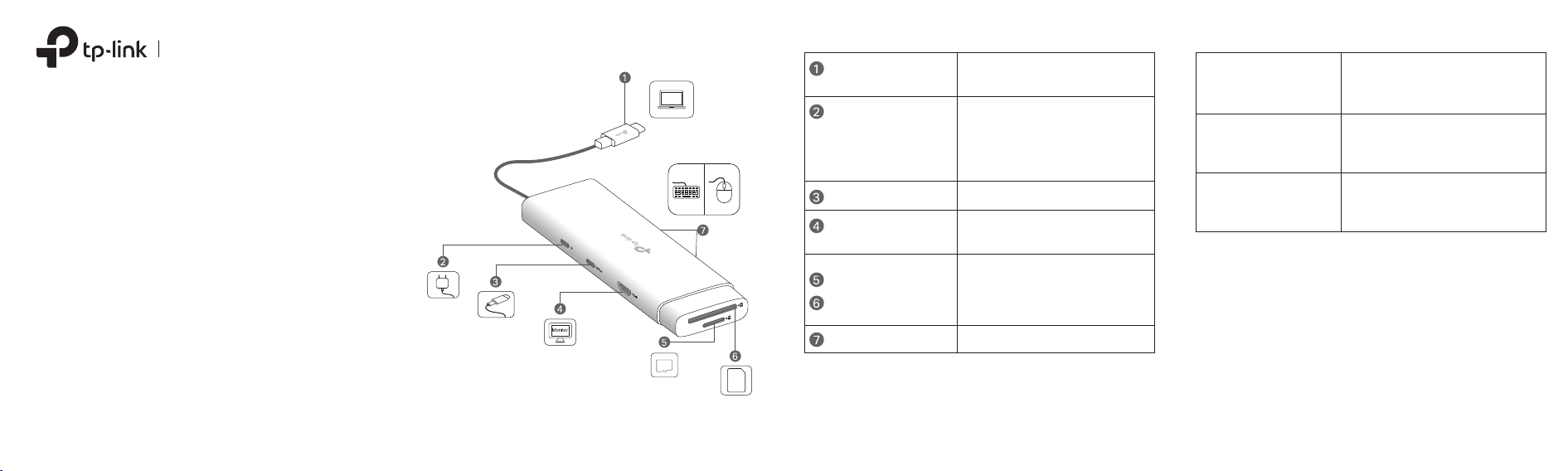
For connecting to your host
device.
USB-C Connector
For unidirectionally charging your
host device when connected to a
PD charger.
PD 3.0; Up to 100W
* Does not support data transfer.
USB-C PD (Power
Delivery) Port*
USB 3.0; Up to 5 Gbps data transfer
USB-C Port
Up to 4K@60Hz
(backward compatible)
HDMI® Port
SD 3.0; UHS-I; Up to 200MB/s;
Supports simultaneously reading
and writing two cards
SD Card Slot
TF (microSD) Card Slot
USB 3.0; Up to 5 Gbps data transferUSB-A Ports ×2
Input
PD: 5V/3A, 9V/3A, 12V/3A,
15V/3A, 20V/5A
Windows, macOS, iPadOS,
iOS, ChromeOS, Linux, Android
Supported Systems
Plug and Play
USB-C PD port, USB-C port,
HDMI® port, TF (microSD) card
slot, SD card slot, USB-A ports.
USB-C Connector: 5V/3A
Note: The ports’ actual performance may vary based on your host
device specications.
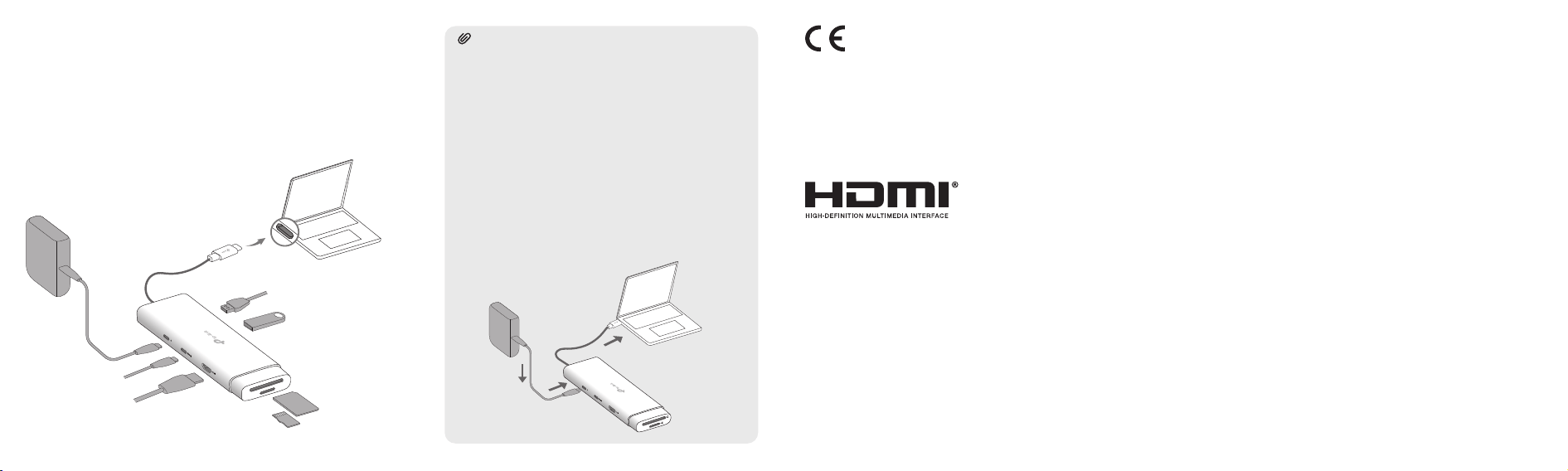
Tips:
2. If you need to connect a PD charger to the
hub’s USB-C PD port, please:
A) Notice that it only has the charging
function and is input only.
B) Use an original or certied PD charger to
charge your host device. The output of
the PD charger should meet the input
specications of the USB-C PD port.
This hub supports the Plug and Play feature. Plug the USB-C
connector into your host device, then plug in your external
peripheral into the corresponding port of the hub.
2 Using the Hub
1. When not in use, please unplug or remove
the external peripherals from the hub rst,
and then unplug the hub from your host
device.
Note: A PD charger (not included) is not required. If you wish to use a PD
charger to charge your host device, please refer to Tips (2B).
USB-C Connector
USB-C Port
This is a class B product. In a domestic environment, this
product may cause radio interference, in which case the user
may be required to take adequate measures.
CE Mark Warning
Operating Temperature: 0°C~40°C (32°F~104°F),
Storage Temperature: -40°C~60°C (-40°F ~140°F)
TP-Link hereby declares that the device is in compliance with
the essential requirements and other relevant provisions of
directives 2014/30/EU, 2011/65/EU, 2009/125/EC and
(EU)2015/863.
The original EU declaration of conformity may be found at
https://www.tp-link.com/en/support/ce/
TP-Link hereby declares that the device is in compliance with
the essential requirements and other relevant provisions of the
Electromagnetic Compatibility Regulations 2016.
The original UK declaration of conformity may be found at
https://www.tp-link.com/support/ukca/
Safety Information
• When the product has a power button, the power button
is one of the ways to shut o the product; when there is
no power button, the only way to completely shut o
power is to disconnect the product or the power adapter
from the power source.
• Do not attempt to disassemble, repair, or modify the
device. If you need service, please contact us.
• Keep the device away from water, re, humidity or hot
environments.
• This equipment can be powered only by equipments that
comply with Power Source Class 2 (PS2) or Limited Power
Source (LPS) dened in the standard of IEC 62368-1.
The terms HDMI, HDMI High-Denition Multimedia Interface,
HDMI trade dress and the HDMI Logos are trademarks or
registered trademarks of HDMI Licensing Administrator, Inc.

Product Name: USB Type-C 7-in-1 Hub
Model Number: UH7020C
Responsible party:
TP-Link Systems Inc.
Address: 10 Mauchly, Irvine, CA 92618
Website: http://www.tp-link.com/us/
Tel: +1 626 333 0234
Fax: +1 909 527 6804
E-mail: [email protected]
This equipment has been tested and found to comply with the limits for a Class B digital device, pursuant to part 15 of the FCC
Rules. These limits are designed to provide reasonable protection against harmful interference in a residential installation. This
equipment generates, uses and can radiate radio frequency energy and, if not installed and used in accordance with the
instructions, may cause harmful interference to radio communications. However, there is no guarantee that interference will not
occur in a particular installation. If this equipment does cause harmful interference to radio or television reception, which can be
determined by turning the equipment o and on, the user is encouraged to try to correct the interference by one or more of the
following measures:
• Reorient or relocate the receiving antenna.
• Increase the separation between the equipment and receiver.
• Connect the equipment into an outlet on a circuit dierent from that to which the receiver is connected.
• Consult the dealer or an experienced radio/ TV technician for help.
FCC Compliance Information Statement
This device complies with part 15 of the FCC Rules. Operation is subject to the following two conditions:
1) This device may not cause harmful interference.
2) This device must accept any interference received, including interference that may cause undesired operation.
Any changes or modications not expressly approved by the party responsible for compliance could void the user’s authority to
operate the equipment.
Note: The manufacturer is not responsible for any radio or TV interference caused by unauthorized modications to this
equipment. Such modications could void the user’s authority to operate the equipment.
We, TP-Link Systems Inc., has determined that the equipment shown as above has been shown to comply with the applicable
technical standards, FCC part 15. There is no unauthorized change is made in the equipment and the equipment is properly
maintained and operated.
Issue Date: 2025-01-20
Industry Canada Statement
CAN ICES-3 (B)/NMB-3(B)
Explanation of the symbols on the product label
Symbols may vary from products.
Note: The product label can be on the product and its I.T.E. power supply.
Indoor use only
DC voltage
AC voltage
Energy eciency marking (level VI)
Polarity of output terminals
Class II equipment
Caution
Operator’s manual
RECYCLING
This product bears the selective sorting symbol for Waste electrical and electronic equipment (WEEE). This
means that this product must be handled pursuant to European directive 2012/19/EU in order to be recycled or
dismantled to minimize its impact on the environment. User has the choice to give his product to a competent
recycling organization or to the retailer when he buys a new electrical or electronic equipment.
安全諮詢及注意事項
• 請使用原裝電源供應器或只能按照本產品
注明的電源類型使用本產品。
• 清潔本產品之前請先拔掉電源線。請勿使用
液體、噴霧清潔劑或濕布進行清潔。
• 注意防潮,請勿將水或其他液體潑灑到本產
品上。
• 插槽與開口供通風使用,以確保本產品的操
作可靠並防止過熱,請勿堵塞或覆蓋開口。
• 請勿將本產品置放於靠近熱源的地方。除非
有正常的通風,否則不可放在密閉位置中。
• 不要私自拆開機殼或自行維修,如產品有故
障請與原廠或代理商聯繫。
設備名稱 Equipment name: USB Type-C 7-in-1 Hub
型號(型式)Type designation (Type):UH7020C
PCB ○ ○ ○ ○ ○ ○
外殼 ○ ○ ○ ○ ○ ○
塑料組件 ○ ○ ○ ○ ○ ○
其他及其配件 − ○ ○ ○ ○ ○
限用物質含有情況標示聲明書
限用物質及其化學符號
Restricted substances and its chemical symbols
鉛
Lead
(Pb)
單元
Unit
汞
Mercury
(Hg)
鎘
Cadmium
(Cd)
六價鉻
Hexavalent
chromium
(Cr+6)
多溴聯苯
Polybrominated
biphenyls
(PBB)
多溴二苯醚
Polybrominated
diphenyl ethers
(PBDE)
備考1.〝超出0.1 wt %〞及〝 超 出 0.01 wt %〞係指限用物質之百分比含量超出百分比含量基準
值。
Note 1:“Exceeding 0.1 wt %” and “exceeding 0.01 wt %” indicate that the percentage
content of the restricted substance exceeds the reference percentage value of
presence condition.
備考2.〝○〞係指該項限用物質之百分比含量未超出百分比含量基準值。
Note 2:“○” indicates that the percentage content of the restricted substance does not
exceed the percentage of reference value of presence.
備考3.〝-〞係指該項限用物質為排除項目。
Note 3:The “−” indicates that the restricted substance corresponds to the exemption.