User Guide
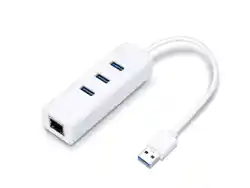
USB to Ethernet Network Adapter
ATTENTION
♦ When product has power button, the power button is one of the way to shut o the
product; when there is no power button, the only way to completely shut o power is
to disconnect the product or the power adapter from the power source.
♦ Do not attempt to disassemble, repair, or modify the device. If you need service, please
contact us.
♦ Keep the device away from water, re, humidity or hot environments.
♦ This equipment can be powered only by equipments that comply with Power Source Class 2
(PS2) or Limited Power Source (LPS) dened in the standard of IEC 62368-1.
For technical support, replacement services, the user guide and more
information, please visit https://www.tp-link.com/support, or simply scan
the QR code.
Recycling
This product bears the selective sorting symbol for Waste electrical and electronic
equipment (WEEE).
This means that this product must be handled pursuant to European directive 2012/19/EU
in order to be recycled or dismantled to minimize its impact on the environment.
User has the choice to give his product to a competent recycling organization or to the retailer
when he buys a new electrical or electronic equipment.
TP-Link hereby declares that the device is in compliance with the essential requirements and
other relevant provisions of directives 2014/30/EU, 2011/65/EU and (EU)2015/863.
The original EU declaration of conformity may be found at https://www.tp-link.com/en/support/ce/
TP-Link hereby declares that the device is in compliance with the essential requirements and
other relevant provisions of the Electromagnetic Compatibility Regulations 2016.
The original UK declaration of conformity may be found at https://www.tp-link.com/support/ukca/
©2024 TP-Link 7106511256 REV2.0.3
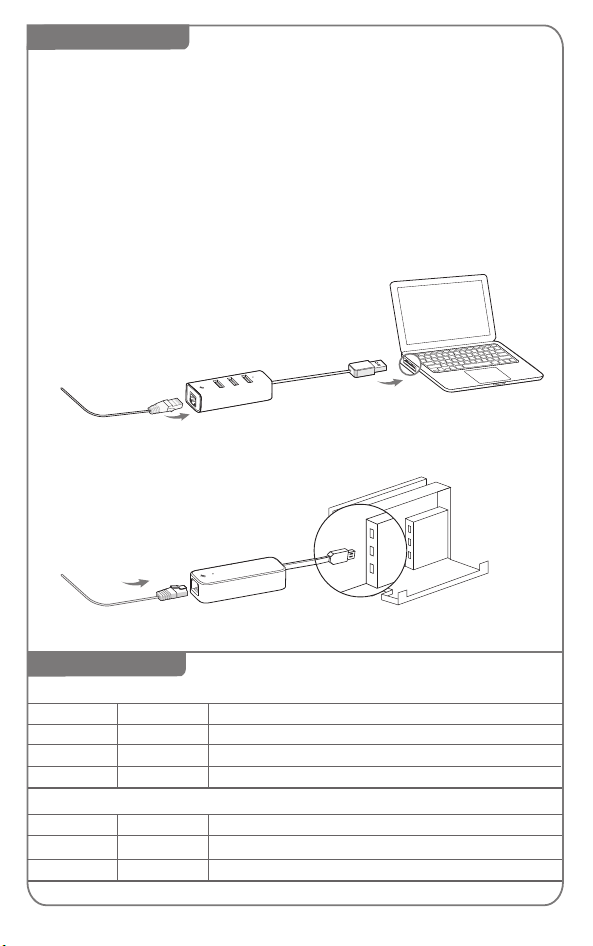
USB
Using the Adapter
LED Explanation
*
UE330C, UE330, UE300 and UE200:
For Windows 7/8/8.1, please click to install a driver if prompted to do so. For Windows 7,
please click CANCEL if prompted "The program might not have installed correctly" after
installation.
For Mac OS X 10.8 to 10.15, please download and install a driver by visiting our ocial
website www.tp-link.com and searching the model number.
UE300C and UE306:
For Windows 7 and Mac OS X 10.9 to 10.15, please download and install a driver by
visiting our ocial website www.tp-link.com and searching the model number.
This adapter supports Plug and Play feature. Plug in and wait for seconds.
Then this adapter is ready to use.
Status Indication
LED
For UE300C, UE300, UE200, UE306:
Green
Yellow The Ethernet cable is properly connected
White
White
White
Flashing
Flashing
On
On
On The adapter is properly connected and hub is ready to use
Network data is being transferred
Both the adapter and Ethernet cable are properly connected
Network data is being transferred
LED
USB Port
wired network
RJ45 Port
computer
*use UE330 as illustration
*
wired network
RJ45 Port
USB 3.0
UE306
*
Works with Nintendo Switch (Supported by UE306 ONLY)
USB
Nintendo Switch
For UE330C, UE330:
Status Indication