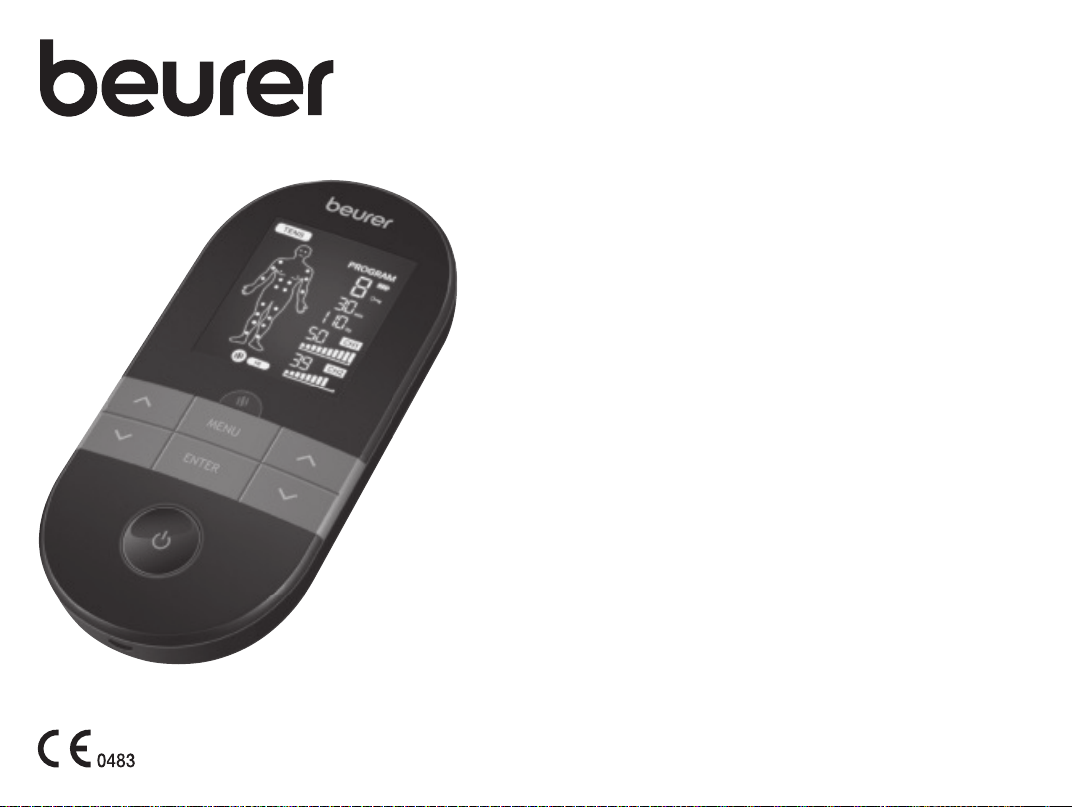
EN Digital TENS/EMS unit with heat function
Instructions for use
EM 59 Heat
2
3
A
B
B
B
C
D
D
D
A
B
C
A
A
B
C
D
1
5
3
2
4
1 2
43
7
11
10
8
9
13
12
14
15
6
3
1 2 3 4 5 6 7
8 9 10 11 12 13 14
15 16 17 18 19 20 21
22 23 24 25 26 27 28
Ch1
Ch2

4
ENGLISH
Table of contents
1. Included in delivery ...................................................................................4
2. Getting to know your device .....................................................................4
3. Signs and symbols .................................................................................... 5
4. Intended use ..............................................................................................7
5. Warnings and safety notes ........................................................................ 8
6. Device description ...................................................................................10
7. Initial use .................................................................................................10
8. Use ..........................................................................................................11
9. Heat ......................................................................................................... 11
10. Program overview ..................................................................................12
10.1 TENS program table .....................................................................12
10.2 EMS program table ....................................................................... 12
10.3 MASSAGE program table .............................................................13
10.4 Information on electrode positioning ............................................13
11. Customisable programs ........................................................................14
12. Favourite program ................................................................................16
13. Therapy memory ...................................................................................16
14. Electric current parameters ...................................................................16
14.1 Impulse shape ...............................................................................17
14.2 Impulse frequency ........................................................................17
14.3 Impulse width ................................................................................17
14.4 Impulse intensity ...........................................................................17
14.5 Cycled impulse parameter variation .............................................17
15. Cleaning and storage ............................................................................17
16. Disposal .................................................................................................18
17. What if there are problems? ..................................................................18
18. Accessories and/or replacement parts .................................................18
19. Technical specifications ........................................................................ 19
20. Notes on electromagnetic compatibility .......................................................... 19
21. Warranty/service ....................................................................................19
Read these instructions carefully and keep them for later
use, be sure to make them accessible to other users and
observe the information they contain.
1. INCLUDED IN DELIVERY
Check that the exterior of the cardboard delivery packaging is intact and make
sure that all contents are present. Before use, ensure that there is no visible
damage to the device or accessories and that all packaging material has been
removed. If you have any doubts, do not use the device and contact your re-
tailer or the specified Customer Service address.
A
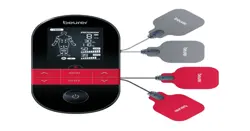
A 4 x electrodes including gel pads
B 1 x EM59 Heat unit
C 1 x connection cable
D 1 x belt clip
2. GETTING TO KNOW YOUR DEVICE
What is EM 59 Heat, and what can it do?
EM 59 Heat falls into the electrostimulation device category. It provides four
basic functions suitable for combined operation:
1. Electrical stimulation of nerve tracts (TENS)
2. Electrical stimulation of muscle tissue (EMS)
3. A massage eect triggered by electrical stimulation
4. The heat function
The unit also features two independent stimulation channels and four elec-
trodes. It oers a wide range of functions for increasing general well-being,
pain relief, maintaining physical fitness, relaxation, muscle revitalisation and
combating tiredness.
The principle of electrostimulation devices is based on the imitation of impulses
in our bodies that are transferred to nerve and muscle fibres using electrodes
via our skin. The electrodes can be applied to many parts of the body; the
electrical impulses are completely harmless and virtually painless. In certain
applications you will only perceive a slight tingling or vibrating sensation. The
electrical impulses that are sent into the tissue influence the transmission of

5
stimulation into nerves, nerve centres and muscle groups in the application
area.
Electrostimulation usually only has an eect after regular applications. With re-
gard to muscles, electrostimulation does not replace regular training. However,
it is a sensible, supplementary training element.
To enable pain to be alleviated even more pleasantly, with the EM 59 Heat you
can also switch on a soothing heat function.
TENS, or transcutaneous electrical nerve stimulation, relates to the electri-
cal stimulation of the nerves through the skin. TENS is an eective non-phar-
macological method of treating dierent types of pain that have a variety of
causes. It has no side-eects if administered correctly. The method has been
clinically tested and approved and can be used for simple self-treatment. The
pain-relieving or pain-suppressing eect is achieved by inhibiting the transfer
of pain to nerve fibres (caused mainly by high-frequency pulses) and by in-
creasing the secretion of endorphins in the body. Their eect on the central
nervous system reduces the sensation of pain. The method is scientifically sub-
stantiated and approved as a form of medical treatment.
Any symptoms that could be relieved using TENS must be checked by your GP.
Your GP will also give you instructions on how to carry out a TENS self-treat-
ment regime.
TENS is clinically tested and approved to treat the following complaints:
• Back pain, particularly in the lumbar/cervical spine area
• Sore joints (e.g. knee, hip and shoulder joints)
• Neuralgia
• Menstrual cramps in women
• Pain resulting from injury to the musculoskeletal system
• Pain caused by circulatory disorders
• Chronic pain with various causes.
Electrical muscle stimulation (EMS) is a widespread and generally recog-
nised method and has been used in sports and rehabilitation medicine for
years. In sports and fitness, EMS is used to complement conventional muscle
training, to increase the performance of muscle groups and to adjust physi-
cal proportions to achieve the desired aesthetic results, amongst other things.
There are two dierent types of EMS application. One is for targeted strength-
ening of the muscles (activating application), and the other is to achieve a re-
laxing, restful eect (relaxing application).
The activating application involves:
• Muscle training to increase endurance and/or
• Muscle training to support the strengthening of specific muscles or muscle
groups, and to achieve the desired changes to physical proportions
The relaxing application involves:
• Muscle relaxation for easing muscle tension
• Improving symptoms of muscular fatigue
• Acceleration of muscle regeneration after intense muscle performance (e.g.
after a marathon)
Thanks to integrated massage technology, the EM 59 Heat is also capable
of relieving muscle tension and combating fatigue with a program based on the
sensation and eects of a real massage.
For the purposes of alleviating any discomfort even more pleasantly, the EM
59 Heat also oers the option of adding soothing heat in two stages, with a
maximum heat generation of 43 °C. Heat is proven to promote blood circulation
and thereby exerts a relaxing eect. The heat function of the EM 59 Heat can
be used parallel or separately to a stimulation.
The positioning suggestions and program tables in these instructions for use
allow you to quickly and simply determine the corresponding application (de-
pending on the aected area of the body) and set the unit to achieve the de-
sired eects.
Thanks to its two separately adjustable channels, the EM 59 Heat oers you
the advantage of being able to set the intensity of the impulses independently
from each other for two treatment areas on the body, for example to cover both
sides of your body or to evenly stimulate larger areas of tissue. The option to
individually set the intensity of each channel also enables you to treat two sep-
arate areas of the body simultaneously instead of having to treat the individual
areas in turn, which saves you time.
3. SIGNS AND SYMBOLS
The following symbols are used on the device, in these instructions for use, on
the packaging and on the type plate for the device:
6
WARNING
Indicates a potentially impending danger. If it is not avoided, there is a risk
of death or serious injury.
CAUTION
Indicates a potentially impending danger. If it is not avoided, slight or minor
injuries may result.
NOTICE
Indicates a potentially harmful situation. If it is not avoided, the system or
something in its vicinity may be damaged.
Product information
Note on important information
Observe the instructions
Read the instructions before starting work and/or operating devices
or machines
IP22
Device protected against foreign objects ≥ 12.5 mm and against
water dripping at an angle
Serial number
Application part, type BF
The electronic device must not be disposed of with household waste
Do not dispose of batteries containing hazardous substances with
household waste
CE labelling
This product satisfies the requirements of the applicable European
and national directives.
Manufacturer
The device can emit eective output values above 10mA, averaged
over every 5-second interval
B
A
Marking to identify the packaging material. A = Material code,
B = Material number: 1-7 = Plastics, 20-22 = Paper and cardboard
Separate the product and packaging elements and dispose of them
in accordance with local regulations.
Temperature limit
Humidity limitation
The device must not be used by persons with medical implants (e.g.
heart pacemakers). Otherwise their function could be impaired.
Item number
Importer symbol
Type number
Swiss authorised representative
Unique Device Identifier (UDI) for unique product identification
Medical device
Date of manufacture
Use by date

7
4. INTENDED USE
TENS/EMS/massage purpose
The device is intended to treat pain using TENS technology (transcutaneous
electrical nerve stimulation). This pain relief can be applied to dierent areas of
the human body as identified in the following eight indication areas.
As a non-medical purpose, the device can also be used with EMS technology
(electrical muscle stimulation) to strengthen the muscles, and for regeneration
and relaxing massages.
TENS/EMS/massage target group
This device is intended for self-treatment in the home, and not in professional
healthcare facilities. Suitable for use by all adults suering from pain as indicat-
ed in the indications below.
Clinical benefits
Treatment of pain due to various causes.
Non-clinical benefits
• Muscle training to increase endurance and/or
• training to support the strengthening of specific muscles or muscle groups,
and to achieve the desired changes to physical proportions.
• Acceleration of muscle regeneration after intense muscular output (e.g. af-
ter a marathon).
• Improving symptoms of muscular fatigue.
• Muscle relaxation for easing muscle tension.
Indications
Use of the device is advised for:
• Back pain– pain at rest and on exertion
• Joint pain– pain at rest and on exertion
• Neuralgia, including phantom pain
• Menstrual cramps
• Pain due to circulatory disorders– pain at rest and on exertion
• Headaches
• Pain after musculoskeletal injuries– pain at rest and on exertion
• Chronic pain due to various causes– pain at rest and on exertion
Contraindications
• The device must never be used near to the heart. The stimulation electrodes
must not be placed on any part of the front ribcage (where the ribs and
breastbone are located), and especially not on the two large pectorals. This
can increase the risk of ventricular fibrillation and induce cardiac arrest (see
“General warnings” section).
• Do NOT use the device
- On the skeletal skull structure, or around the mouth, throat or larynx.
- In the neck/carotid artery area.
- In the genital area.
- If you have implanted electrical devices
(e.g. a pacemaker).
- If you have metal or electrical implants.
- If you use an insulin pump.
- If you have a high temperature (e.g. > 39°C).
- If you have a known or acute cardiac arrhythmia or disorders of the
heart’s conduction system.
- On acutely or chronically diseased (injured or irritated) skin (e.g. inflamed
skin – whether painful or not, reddened skin, rashes (e.g. allergies), burns,
bruises, swellings, both open and healing wounds, or post-operative
scars that are healing).
- If you suer from a seizure disorder (e.g. epilepsy).
- If you are pregnant.
- If you have cancer.
- After an operation, if strong muscle contractions could aect the healing
process.
- If you are connected to a high-frequency surgical device.
- If you have an acute or chronic disease of the gastrointestinal tract.
- In the case of a known allergy to the electrode material
- On acutely or chronically aected (by injury or irritation) skin (e.g. in-
flamed skin°– whether painful or not; reddened skin; rashes, e.g. due
to allergies; burns; bruising; swelling; open and healing wounds and
post-operative scars where the healing process could be impaired)
WARNING
Undesirable side eects
• Skin irritation
• Feeling of pressure at the electrode location
• Slight redness, burning and pain of the skin after treatment
• Paraesthesia
• Discomfort
8
• Sleepiness
• Vibration of muscles
• Tension
• Headaches
• Increased menstrual bleeding
• Allergic reactions to components
5. WARNINGS AND SAFETY NOTES
This device is not a substitute for medical consultation and treatment.
Consult your doctor first if you are experiencing any pain or are suering
from an illness!
WARNING
To avoid damage to health, we strongly advise against using the digital
EMS/TENS unit in the following situations:
• With implanted electrical devices (such as a pacemaker)
• In the case of metal implants
• If you use an insulin pump
• If you have a high temperature (e.g. > 39°C)
• If you have a known or acute cardiac arrhythmia, or disorders of the heart’s
impulse and conduction system
• If you suer from a seizure disorder (e.g. epilepsy)
• If you are pregnant
• If you have cancer
• After an operation, if strong muscle contractions could aect the healing
process
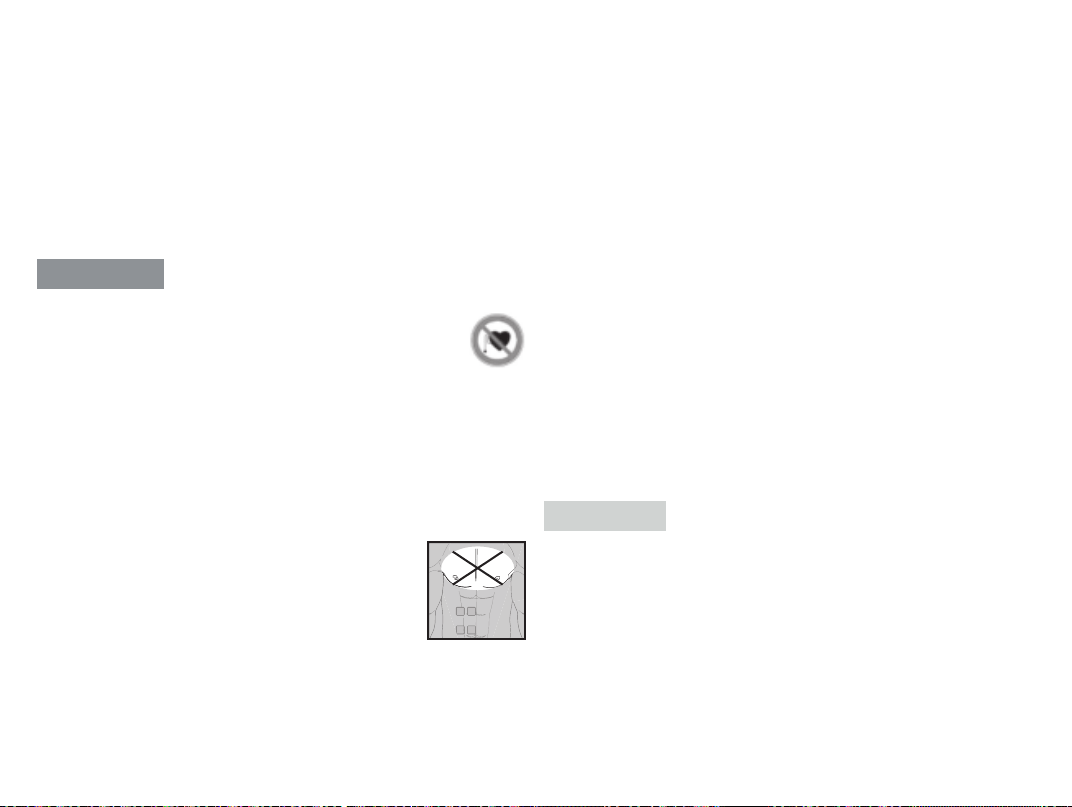
• The device must never be used close to the heart. The
stimulation electrodes must not be placed on any part
of the front ribcage (where the ribs and breastbone are
located), especially not on the two large pectorals. This
can increase the risk of ventricular fibrillation and induce
cardiac arrest.
• On the skeletal skull structure, or around the mouth, throat or larynx
• In the neck/carotid artery area
• In the genital area
• On acutely or chronically diseased (injured or irritated) skin (e.g. inflamed
skin – whether painful or not, reddened skin, rashes, e.g. allergies, burns,
bruises, swellings, both open and healing wounds, and post-operative
scars where the healing process could be aected)
• In humid environments (e.g. in the bathroom) or when bathing or showering
• Do not use after consuming alcohol
• If connected to a high-frequency surgical device
• In the case of acute or chronic diseases of the gastrointestinal tract
• The stimulation should not be applied above or through the head, directly
onto the eyes, covering the mouth, to the front of the neck (especially not to
the carotid artery), or with the electrode surfaces placed on the chest and
upper back or across the heart.
Before using the device, consult your doctor if any of the following apply
to you:
• Serious illnesses, in particular if you suspect or have been diagnosed with
high blood pressure, a blood coagulation disorder, propensity to throm-
bo-embolic conditions or recurrent malignant growths
• Any skin conditions
• If you have unexplained chronic pain in any part of the body
• Diabetes
• If you have any sensory impairment that reduces the feeling of pain (e.g.
metabolic disorders)
• If you are receiving medical treatment
• In the event of complaints linked to stimulation treatment
• If you suer from persistently irritated skin due to long-term stimulation at
the same electrode site
CAUTION
Only use digital EMS/TENS units:
• On adults
• For the purpose for which it was developed and as specified in these in-
structions for use. Any improper use can be dangerous
• For external use
• With the original accessories supplied, which can be re-ordered. Failure to
do so invalidates the warranty.
PRECAUTIONS:
• Always pull firmly on electrodes to remove them from the skin to prevent
injuries in the unusual case of highly sensitive skin.

9
• Keep the device away from sources of heat (heating devices such as driers
or ovens) and do not use it in close proximity (approx. 1 m) to shortwave or
microwave devices (e.g. mobile phones), as doing so can result in unpleas-
ant current peaks.
• Do not expose the device to direct sunlight or high temperatures.
• Protect the device from dust, dirt and humidity.
• Never immerse the device in water or other liquids.
• The device is suitable for self-treatment.
• For hygiene reasons, the electrodes may only be used on one person.
• If the device does not work properly, or if you feel unwell or experience pain,
stop using it immediately.
• Switch o the unit or the respective channel first before removing or relo-
cating electrodes to prevent unintentional stimulation.
• Do not modify electrodes (e.g. by cutting them), as this increases the cur-
rent density, which is potentially hazardous (max. recommended output
value for the electrodes is 9 mA/cm², an eective current density beyond
2 mA/cm² requires increased awareness).
• Do not use the device whilst asleep, driving a vehicle or operating ma-
chinery.
• Do not use whilst undertaking any activity where an unexpected reaction
(e.g. strong muscle contractions even at low intensity) could be dangerous.
• Ensure that no metallic objects (e.g. belt buckles or necklaces) come into
contact with the electrodes during stimulation. If you are wearing jewellery
or have piercings in the area to be treated (e.g. a navel piercing), these
must be removed before using the device. Failure to do so could result in
spot burns.
• Keep the device away from children.
• Make sure not to confuse the electrode cables including contacts with your
headphones or other devices, and do not connect the electrodes to other
devices.
• Do not use the device whilst using other devices that transmit electrical
impulses to your body.
• Do not use in the vicinity of highly flammable substances, gases or explo-
sives.
• The actual temperature may vary depending on the condition of your skin,
your age, the location of the pain, etc.
• If the heat function feels too hot, stop treatment immediately. You can con-
tinue the TENS, EMS or massage treatment without the heat function.
• During the initial few minutes, use the device while sitting or lying down to
minimise the risk of injury resulting from isolated cases of vagal responses
(feeling of faintness). If you feel faint, immediately switch o the device, lie
down and support your legs in an elevated position (approx. 5 –10 min.).
• Treatment of the skin with moisturising lotions or ointments beforehand is
not recommended as this considerably increases the gel pad wear and may
cause unpleasant current peaks.
• This device is not intended for use by children or people with restricted
physical, sensory (e.g. reduced sensitivity to pain) or mental skills or a lack
of experience and/or lack of knowledge, unless they are supervised by a
person who is responsible for their safety or who are instructed by such a
person in how to use the device.
• If the adhesive capability of the gel pads decreases, please replace them
immediately. Do not use the device until you have the new gel pads. Other-
wise the unequal adhesion of the gel pads may lead to skin injuries. Replace
the gel pads with new ones at the latest after having used them 20 times.
Damage
• If the device is damaged, do not use it and contact your retailer or the
specified Customer Services address.
• To ensure that the device functions eectively, do not drop it or dismantle it.
• Check the device for signs of wear and tear or damage. If there are such
signs of wear and tear or damage or if the device was used improperly, it
must be returned to the manufacturer or retailer before further use.
• Switch the device o immediately if it is faulty or not working properly.
• Never attempt to open and/or repair the device yourself. Repairs may only
be carried out by Customer Services or authorised retailers. Failure to com-
ply with this instruction will void the warranty.
• The manufacturer is not liable for damage resulting from improper or care-
less use.
Notes on handling batteries
WARNING
• Risk of explosion! Risk of fire! Failure to comply with the points mentioned
can result in personal injury, overheating, leakage, venting, breakage, ex-
plosion, or fire.
• Always use the correct or supplied charging cable/charger/mains adapter
for charging.
10
• Avoid continuous charging or overcharging Unplug the charger when
charging is complete.
• Charge the device under supervision, paying attention to any heat generat-
ed, deformation, or release of gases. If in doubt, stop charging.
• If batteries/charging cables/chargers are defective, stop using them and
dispose of them properly as soon as possible (see chapter on disposal).
• Do not throw the device or batteries into a fire.
• Never forcibly discharge, heat, disassemble, open, crush, deform, encap-
sulate, modify, or knock the device or batteries.
• Never short-circuit batteries or the connections of the battery-powered
device.
• Protect the device or batteries from direct sunlight, rain, heat, and water.
• Exposure of batteries to an environment with extremely high temperatures
or an extremely low air pressure may result in explosion or leakage of flam-
mable liquids and gases.
• If fluid from a battery comes into contact with your skin or eyes, wash the
aected areas with water and seek medical assistance.
NOTICE
• This device contains a battery that is not replaceable. Once a battery has
reached the end of its service life, the device must be disposed of properly
(see chapter on disposal).
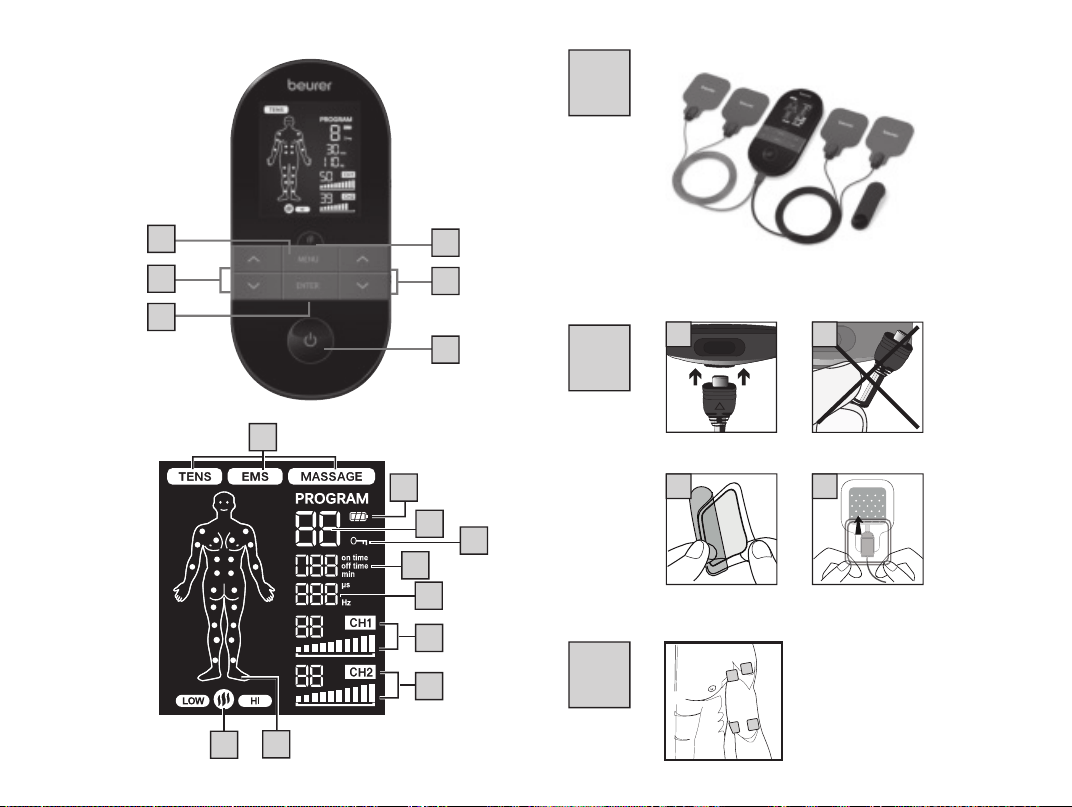
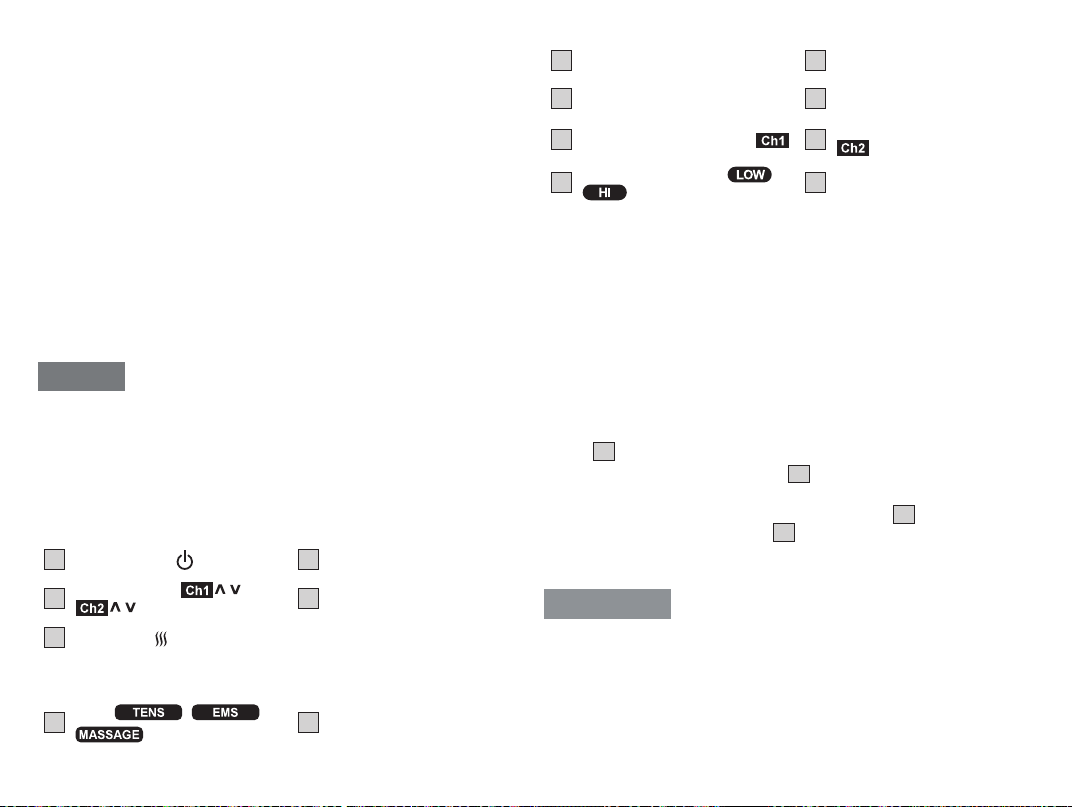
6. DEVICE DESCRIPTION
Buttons:
The associated drawings are shown on page 2.
1
ON/OFF button
2
ENTER button
3
Setting buttons (
/ left,
/ right)
4
MENU button
5
Heat button
Display (full screen):
6
Menu
/ /
7
Battery status
8
Program number
9
Button lock
10
Timer function (remaining time
display)
11
Display for frequency (Hz) and
pulse width (µs)
12
Impulse intensity channel 1
13
Impulse intensity channel 2
14
Heat function low/high
/
15
Electrode positioning indicator
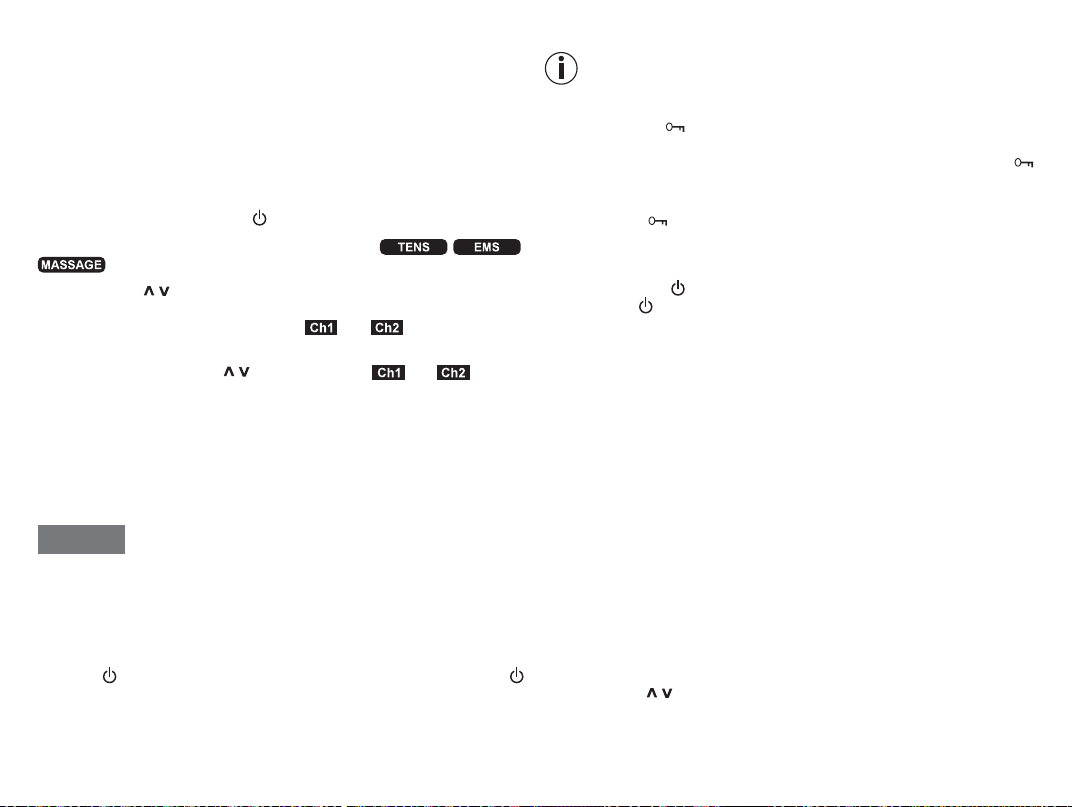
7. INITIAL USE
Before you use the EM 59 Heat for the first time, let it charge for a minimum of
4 hours. Proceed as follows.
1.
Connect the USB charging cable to a mains adapter (max. output 5V/2A)
and the EM59 Heat
2. Then insert the mains adapter into a suitable socket.
3. Alternatively, you can charge the device using your computer/laptop. To do
so, connect the device to a USB port on your PC/laptop via the USB charging
cable. You cannot use the device while it is being charged.
4. Turn the belt clip if required.
5. Guide the connection cable plugs into the socket on the bottom of the de-
vice
B1
.
6. Do not pull, twist or kink the cables
B2
.
7.
After the charging process is complete, apply the provided gelpads to the
electrodes. First carefully remove the protective films
B3
. Then carefully ap-
ply the gel pads to the electrodes
B4
. Ensure that the edges of the gel pads
do not protrude over the electrodes. Applying gel pads slightly askew will
not aect their function
WARNING
Remove the protective film slowly and carefully. Make sure that the self-adhe-
sive gel fpad is not damaged, as damage or unevenness on the gel pad may
cause skin irritation.
11
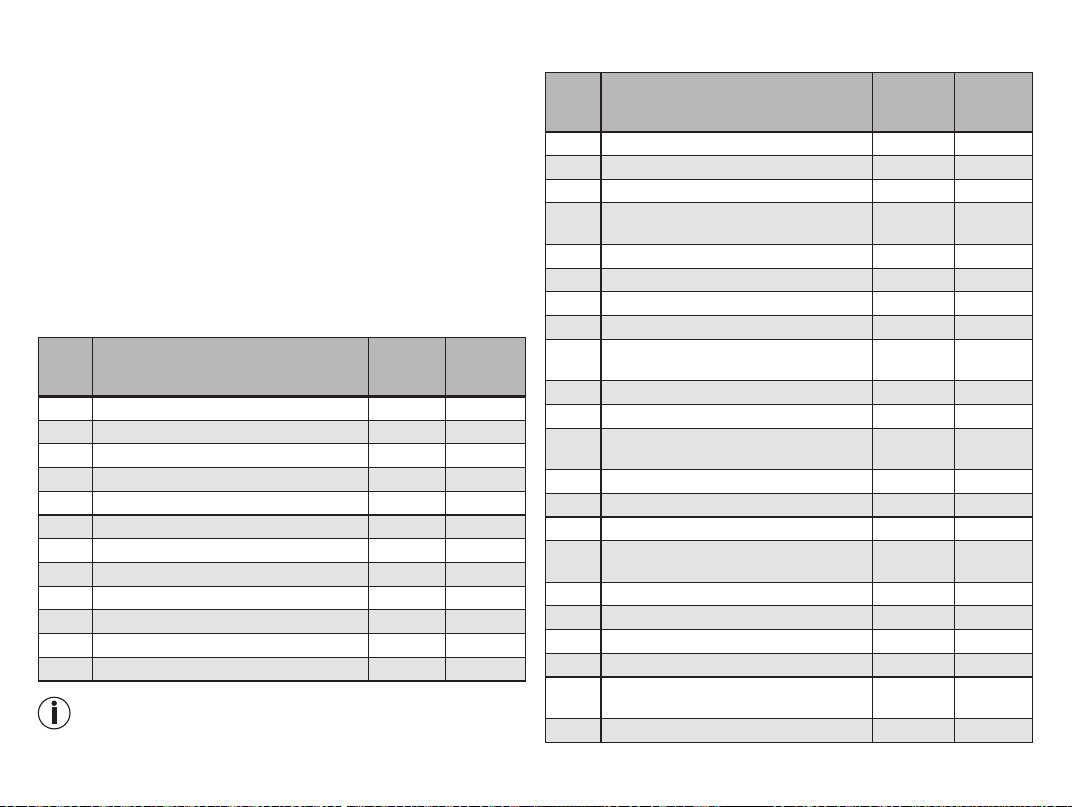
8. USE
Starting use
Step 1: Look for a suitable program from the program tables (see section “Pro-
gram overview”).
Step 2: Place the electrodes on the desired area for treatment (for positioning
suggestions see section “Information regarding the positioning of electrodes”)
and connect them to the device.
Step 3: Press the ON/OFF button
to switch on the device.
Step 4: Press the MENU button to navigate through the / /
menus and press the ENTER button to confirm your selection.
Step 5: Use the / setting buttons to select the program number you want
and press the ENTER button to confirm your selection. At the start of the stim-
ulation treatment, the impulse intensity of and is set to 00 by de-
fault. No impulses are sent to the electrodes yet.
Step 6: Use the left and right / setting buttons for and to select
the impulse intensity you want. The indicator for impulse intensity in the display
changes accordingly. If the program is in a pause phase, the intensity cannot
be increased.
Step 7: You can activate the heat function using the heat function button. The
first press of the button activates the low heat level, the second button press
activates the high heat level, and the third button press deactivates the heat
function.
NOTICE
• The device switches itself o automatically if it is not used for one minute
(automatic switch-o). When the unit is switched on again, the LCD screen
displays the menu selection and the most recently used menu flashes.
• A brief acoustic signal is output when a valid button is pressed. Two brief
acoustic signals are output when an invalid button is pressed.
• You can pause the stimulation at any time by briefly pressing the ON/OFF
button
. To continue the stimulation, briefly press the ON/OFF button
again and set the desired impulse intensity again.
If you wish to return to the previous selection menu, press the MENU
button. By pressing and holding the ENTER button, you can skip in-
dividual setting steps and start directly with the stimulation treatment.
Keylock
Locks the buttons to avoid them being pressed unintentionally.
1.
To activate the keylock, hold down the ENTER button until the
symbol is visible in the display (approx. 3 seconds).
2.
To deactivate the keylock, hold down the ENTER button again un-
til the symbol disappears from the display (approx. 3 seconds).
Pausing use
You can pause the stimulation at any time by briefly pressing the ON/
OFF button
. To continue the stimulation, briefly press the ON/OFF
button again and set the desired impulse intensity again.
9. HEAT
In addition to the TENS/EMS/Massage programs, the EM59 Heat also oers
two heat levels, which can be activated as required for all programs, see sec-
tion “Starting use”. The heat emitted by the gel pads relaxes the muscle and
improves circulation. You can activate the first level of the heat function by
pressing the Heat button. Then wait a moment until the temperature stops in-
creasing. If the temperature is too low for you, you can activate the second
level of the heat function by pressing the Heat button again. If you would like to
deactivate the heat function, you can do so by pressing the Heat button again
If you want to use the heat function separately, without additional stimulation,
proceed as follows:
Step 1: Position the electrodes in your desired target area. (See section “Infor-
mation regarding the positioning of electrodes” for placement suggestions) and
connect them with the device
Step 2: Press the ON/OFF button to switch on the device
Step 3: Press the Heat button in order to access the Heat settings
Step 4: Use the
/ setting buttons to select the treatment time you want and
press the ENTER button to confirm your selection
12
Step 5: Press the Heat button again in order to switch on the first level of the
heat function. Then wait a moment until the temperature stops increasing. If the
temperature is too low for you, you can activate the second level of the heat
function by pressing the Heat button again.
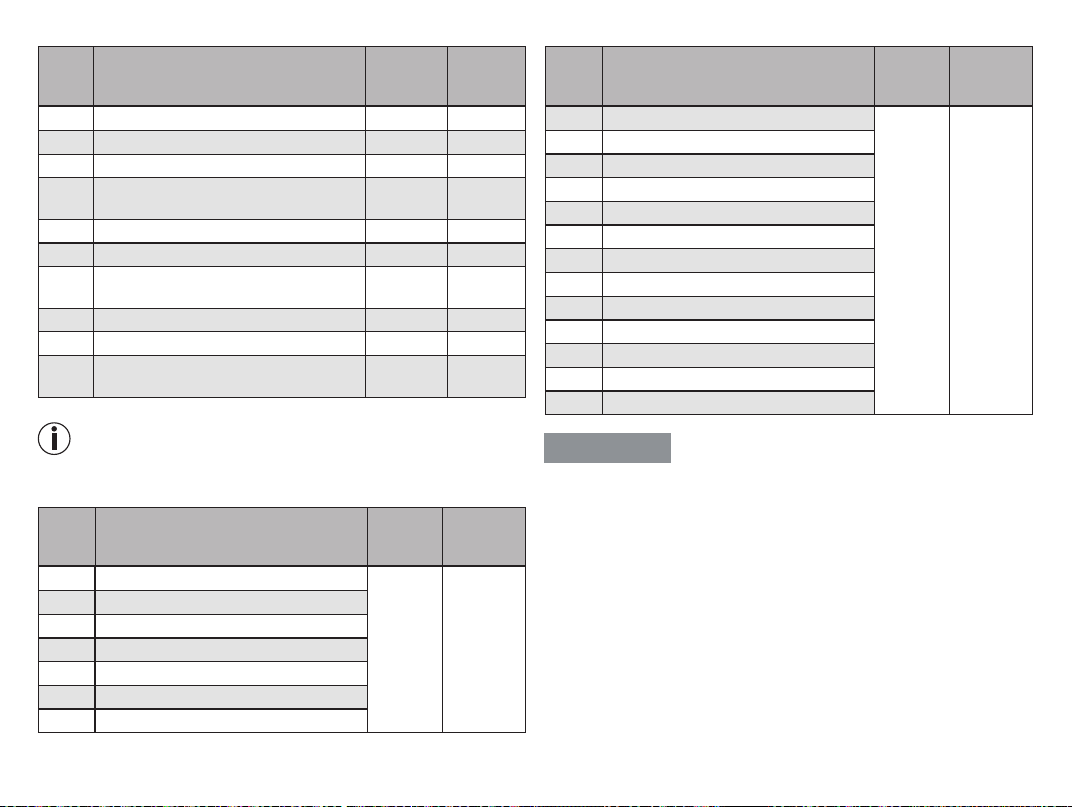
10. PROGRAM OVERVIEW
The digital EMS/TENS unit features a total of over 70 programs:
• 15 TENS programs
• 35 EMS programs
• 20 MASSAGE programs
In all programs you can set the impulse intensity of both channels individually.
You can also set various parameters in TENS programs 13–15 and EMS pro-
grams 33–35 to adjust the stimulating eect to the application area.
10.1 TENS program table
Progr.
no.
Practical areas for application,
indications
Running
time
(min)
Possible
electrode
positions
1 Pain in upper limbs 1 30 12–17
2 Pain in upper limbs 2 30 12–17
3 Pain in lower limbs 30 23–27
4 Ankle pain 30 28
5 Shoulder pain 30 1–4
6 Pain in the back 30 4–11
7 Pain in bottom and back of thighs 30 22, 23
8 Pain relief 1 30 1–28
9 Pain relief 2 30 1–28
10 Endorphin eect (burst) 30 1–28
11 Pain relief 3 30 1–28
12 Pain relief – chronic pain 30 1–28
TENS programs 13–15 can be set individually (see section „Customi-
sable programs“).
10.2 EMS program table
Progr.
no.
Practical areas for application,
indications
Running
time
(min)
Possible
electrode
positions
1 Warming up 30 1–27
2 Capillarisation 30 1–27
3 Strengthening the upper arm muscles 30 12–15
4 Maximising the strength of the upper arm
muscles
30 12–15
5 Explosive force of the upper arm muscles 30 12–15
6 Tightening the upper arm muscles 30 12–15
7 Shaping the upper arm muscles 30 12–15
8 Tightening the lower arm muscles 30 16–17
9 Maximising the strength of the lower arm
muscles
30 16–17
10 Shaping the lower arm muscles 30 16–17
11 Tightening the abdominal muscles 30 18–20
12 Maximising the strength of the abdominal
muscles
30 18–20
13 Shaping the abdominal muscles 30 18–20
14 Toning the abdominal muscles 30 18–20
15 Strengthening the thigh muscles 30 23, 24
16 Maximising the strength of the thigh
muscles
30 23, 24
17 Explosive force of the thigh muscles 30 23, 24
18 Shaping the thigh muscles 30 23, 24
19 Toning the thigh muscles 30 23, 24
20 Strengthening the lower leg muscles 30 26, 27
21 Maximising the strength of the lower leg
muscles
30 26, 27
22 Explosive force of the lower leg muscles 30 26, 27
13
Progr.
no.
Practical areas for application,
indications
Running
time
(min)
Possible
electrode
positions
23 Shaping the lower leg muscles 30 26, 27
24 Toning the lower leg muscles 30 26, 27
25 Strengthening the shoulder muscles 30 1–4
26 Maximising the strength of the shoulder
muscles
30 1–4
27 Tightening the shoulder muscles 30 1–4
28 Strengthening the lower back muscles 30 4–11
29 Maximising the strength of the lower
back muscles
30 4–11
30 Tightening the gluteal muscles 30 22
31 Strengthening the gluteal muscles 30 22
32 Maximising the strength of the gluteal
muscles
30 22
EMS programs 33–35 can be set individually (see section „Customi-
sable programs“).
10.3 MASSAGE program table
Progr.
No.
Practical areas for application, indica-
tions
Running
time (min)
Possible
electrode
positions
1 Tapping massage 1
20 1–28
2 Tapping massage 2
3 Tapping massage 3
4 Kneading massage 1
5 Kneading massage 2
6 Pressure massage
7 Relaxing massage 1
Progr.
No.
Practical areas for application, indica-
tions
Running
time (min)
Possible
electrode
positions
8 Relaxing massage 2
20 1–28
9 Relaxing massage 3
10 Relaxing massage 4
11 Spa massage 1
12 Spa massage 2
13 Spa massage 3
14 Spa massage 4
15 Spa massage 5
16 Spa massage 6
17 Spa massage 7
18 Relaxing massage 1
19 Relaxing massage 2
20 Relaxing massage 3
WARNING
Do not apply the electrodes to the front wall of the chest, i.e. do not massage
the large left and right pectoral muscles.
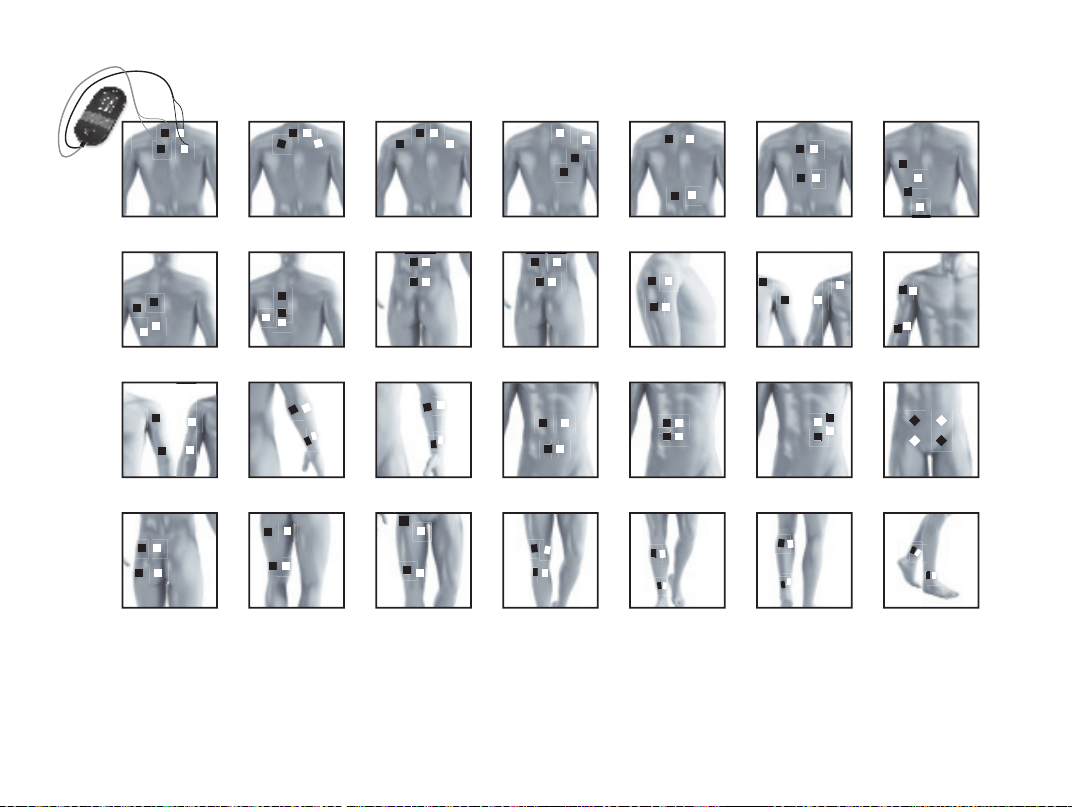
10.4 Information on electrode positioning
The associated drawings are shown on page 5.
It is fundamental to the intended success of electrostimulation applications that
electrodes are sensibly positioned.
We recommend that you consult your doctor to establish the ideal electrode
positions for your intended application area.
The figure on the display is intended as an initial aid to help you position
the electrodes.
The following applies to the selection of electrode positions:
14
Electrode distance
The greater the distance between electrodes, the larger the stimulated tissue
volume. This applies to the area and depth of the tissue volume. At the same
time, however, the stimulation intensity of the tissue decreases the further the
electrodes are apart. As a result, greater distances between electrodes mean a
larger tissue volume is stimulated, but less intensively. Consequently, you must
increase the impulse intensity to boost stimulation.
The following guidelines apply to the selection of the electrode distances:
• Sensible distance: approx. 5 –15 cm
• At distances below 5 cm, the unit primarily stimulates surface structures
intensively
• At distances in excess of 15 cm, large areas and deep structures are stim-
ulated very weakly
Relation between electrodes and muscle fibre structures
C
Adapt the current flow direction to the fibre structure of the muscle according
to the muscle layer you would like to treat. If you are targeting superficial mus-
cles, position the electrodes parallel to the fibre structure (A – B / C – D) and if
you are targeting deeper layers of tissue, position the electrodes across the
fibre structure. You can do this by positioning electrodes as crosses (i.e. diag-
onally), such as A – D / B – C.
As part of pain relief treatment (TENS) using the digital EMS/TENS unit
and its 2 separately adjustable channels and 2 electrodes each, it is
advisable either to position the electrodes of a channel so that the area
aected by the pain is between the electrodes or to position one elect-
rode directly on the area aected by the pain and the other electrode at
a minimum distance of 2 – 3 cm.
You may use the electrodes of the second channel to simultaneously
treat additional areas aected by pain or use them in conjunction with
the electrodes of the first channel to restrict the area aected by pain
(position electrodes opposite). In this case, we once again recommend
positioning electrodes as crosses.
Tip for the massage function: always use all four electrodes for opti-
mum treatment.
Use the electrodes on clean skin, which is preferably free from hair and
grease, in order to prolong the life of the electrodes. If required, clean
the skin with water and remove hair prior to treatment.
If an electrode comes loose during use, the pulse intensity of the cor-
responding channel is reduced to the lowest level. Apply the electrode
again and reset your preferred pulse intensity.
11. CUSTOMISABLE PROGRAMS
(Applies for TENS 13–15, EMS 33–35)
The TENS 13–15 and EMS 33–35 programs can be customised according to
your needs.
TENS 13 program
TENS 13 is a program that you can also customise. In this program, you can
set the impulse frequency to between 1 and 150 Hz and the impulse width to
between 80 and 250 µs.
1. Place the electrodes on the desired area for treatment (for positioning sug-
gestions see section “Information regarding the positioning of electrodes”)
and connect them to the device.
2.
Select the TENS 13 program as described in section “Starting use” (step
3 to step 5).
3. Use the
/ setting buttons to select the impulse frequency you want and
press the ENTER button to confirm your selection.
4.
Use the / setting buttons to select your preferred impulse width and press
the ENTER button to confirm.
5. Use the
/ setting buttons to select the treatment time you want and use
the ENTER button to confirm.
6. Use the left and right / setting buttons for and to select the
impulse intensity you want.
TENS 14 program
The TENS 14 program is a burst program that you can also customise. Various
impulse sequences run in this program. Burst programs are suitable for all ar-
eas of application to be treated with changing signal patterns (to minimise the
level of becoming accustomed to the treatment). In this program you can set an
impulse width of between 80 and 250 µs.
15
1.
Place the electrodes on the desired area for treatment (for positioning sugges-
tions see electrode positions in section “Information regarding the positioning
of electrodes”) and connect them to the device.
2.
Select the TENS 14 program as described in section “Starting use” (step
3 to step 5).
3.
Use the / setting buttons to select your preferred impulse width and press
the ENTER button to confirm.
4. Use the / setting buttons to select the treatment time you want and use
the ENTER button to confirm.
5. Use the left and right
/ setting buttons for and to select the
impulse intensity you want.
TENS 15 program
TENS 15 is a program that you can also customise. In this program, you can set
the impulse frequency to between 1 and 150 Hz. The impulse width changes
automatically during the stimulation treatment.
1.
Place the electrodes on the desired area for treatment (for positioning sugges-
tions see electrode positions in section “Information regarding the positioning
of electrodes”) and connect them to the device.
2.
Select the TENS 15 program as described in section “Starting use” (step
3 to step 5).
3. Use the
/ setting buttons to select the impulse frequency you want and
press the ENTER button to confirm your selection.
4. Use the
/ setting buttons to select the treatment time you want and use
the ENTER button to confirm.
5. Use the left and right / setting buttons for and to select the
impulse intensity you want.
EMS 33 program
EMS 33 is a program that you can also customise. In this program, you can
set the impulse frequency to between 1 and 150 Hz and the impulse width to
between 80 and 320 µs.
1.
Place the electrodes on the desired area for treatment (for positioning sugges-
tions see electrode positions in section “Information regarding the positioning
of electrodes”) and connect them to the device.
2.
Select the EMS 33 program as described in section “Starting use” (step 3
to step 5).
3. Use the
/ setting buttons to select the impulse frequency you want and
press the ENTER button to confirm your selection.
4.
Use the / setting buttons to select your preferred impulse width and press
the ENTER button to confirm.
5. Use the
/ setting buttons to select the treatment time you want and use
the ENTER button to confirm.
6. Use the left and right / setting buttons for and to select the
impulse intensity you want.
EMS 34 program
EMS 34 is a program that you can also customise. In this program, you can
set the impulse frequency to between 1 and 150 Hz and the impulse width to
between 80 and 450 μs. You can also set the working time and pause time for
this program to between 1 and 30 seconds each.
1.
Place the electrodes on the desired area for treatment (for positioning sugges-
tions see electrode positions in section “Information regarding the positioning
of electrodes”) and connect them to the device.
2.
Select the EMS 34 program as described in section “Starting use” (step 3
to step 5).
3. Use the
/ setting buttons to select the ‘on time’ you want and press the
ENTER button to confirm your selection..
4. Use the / setting buttons to select your preferred ‘o time’ and press the
ENTER button to confirm.
5. Use the
/ setting buttons to select the impulse frequency you want and
press the ENTER button to confirm your selection.
6.
Use the / setting buttons to select your preferred impulse width and press
the ENTER button to confirm.
7. Use the / setting buttons to select the treatment time you want and use
the ENTER button to confirm.
8. Use the left and right
/ setting buttons for and to select the
impulse intensity you want.
EMS 35 program
The EMS 35 program is a burst program that you can also customise. Vari-
ous impulse sequences run in this program. Burst programs are suitable for all
areas of application to be treated with changing signal patterns (to minimise
the level of becoming accustomed to the treatment). In this program, you can
16
set the impulse frequency to between 1 and 150 Hz and the impulse width to
between 80 and 450 μs. You can also set the working time and pause time for
this program to between 1 and 30 seconds each.
1.
Place the electrodes on the desired area for treatment (for positioning sugges-
tions see electrode positions in section “Information regarding the positioning
of electrodes”) and connect them to the device.
2.
Select the EMS 35 program as described in section “Starting use” (step 3
to step 5).
3. Use the
/ setting buttons to select the ‘on time’ you want and press the
ENTER button to confirm your selection..
4. Use the / setting buttons to select your preferred ‘o time’ and press the
ENTER button to confirm.
5. Use the
/ setting buttons to select the impulse frequency you want and
press the ENTER button to confirm your selection.
6.
Use the / setting buttons to select your preferred impulse width and press
the ENTER button to confirm.
7. Use the
/ setting buttons to select the treatment time you want and use
the ENTER button to confirm.
8. Use the left and right
/ setting buttons for and to select the
impulse intensity you want.
12. FAVOURITE PROGRAM
With the favourites program, you can define a favourite from the 70 TENS/EMS/
MASSAGE programs.This makes it easier and quicker for you to access your
favourite program. If you have set a favourite program, when you switch on
the device the favourite program will be automatically accessed and started.
You can then start stimulation directly in your favourite program. The choice of
favourite program may be based on your personal preference or, for example,
the advice of your doctor.
Setting the favourite program
1. Select your preferred program from the 70 programs and the corresponding
settings as described in the “Starting use” section.
2. To set the selected program as a favourite, press and hold the
but-
ton for 5 seconds.
3. The saving of the favourite program is confirmed by a long acoustic signal.
When the device is switched on again, your favourite program is accessed
directly.
Now you can no longer change to a dierent program. To access the
other programs again, you must delete your favourite program (see
the following section).
Deleting favourite program
To delete the favourite program and access the other programs again, press
and hold the
button for approx. 5 seconds. The pulse intensity of
and must be set to in this process. Deletion of the favourite program is
confirmed by a long acoustic signal.
13. THERAPY MEMORY
Your device records the treatment time in the therapy memory. This allows you
to record how long you have been using the device in total or for a specific
period of time for your treatments. This may be helpful when consulting your
doctor.
Accessing the therapy memory
To access the therapy memory, switch the device on using the ON/OFF
button and press and hold the button for 2 seconds. The treatment
time elapsed appears in the display. The top two numbers stand for minutes;
the hours are shown below.
Resetting the therapy memory
To reset the treatment time memory (therapy memory) to
press and hold the
button for 2 seconds.
Press the MENU button to return to selecting a program, or switch the device
o.
The treatment time memory cannot be accessed if a favourite program
is activated.
14. ELECTRIC CURRENT PARAMETERS
Electrostimulation devices operate with the following electric current settings,
which may aect the stimulation results dierently, depending on the setting:
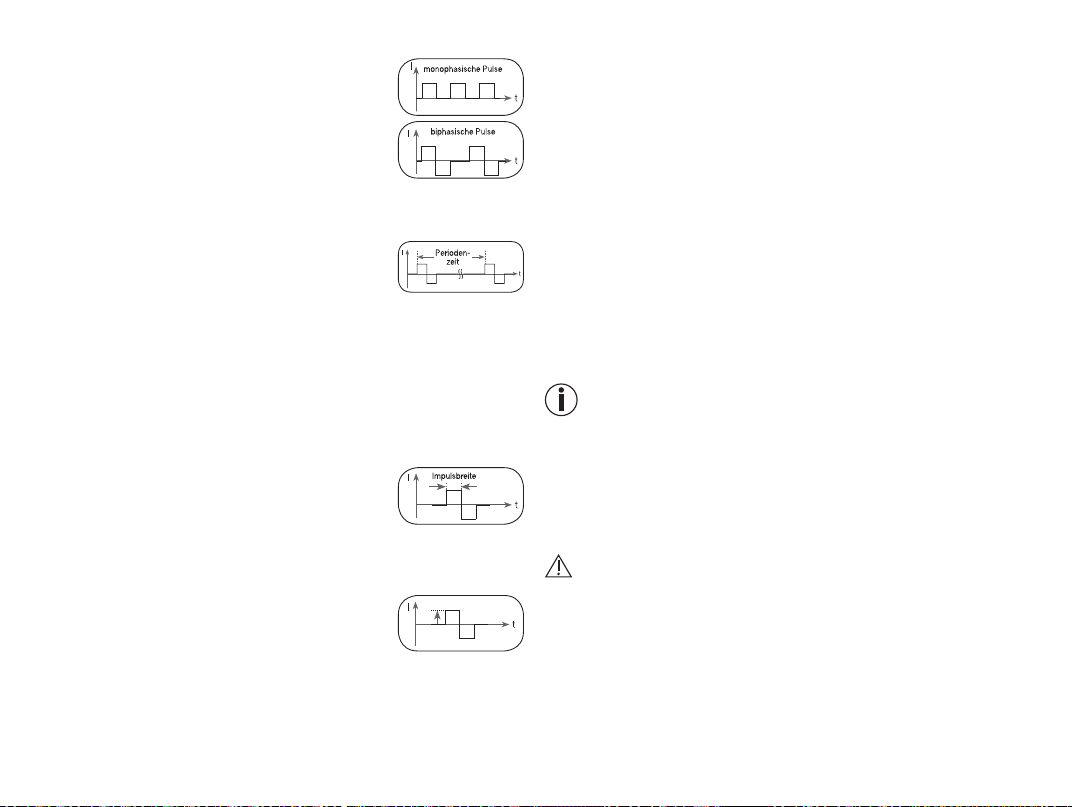
17
14.1 Impulse shape
This describes the time function of the electrical impulse.
It distinguishes between monophasic and biphasic pulse
currents. In monophasic pulse currents, the current flows
in one direction and in biphasic pulse currents the elec-
trical impulse alternates its direction.
The digital EMS/TENS unit only provides biphasic pulse
currents as these relieve muscles, cause little muscle fa-
tigue and provide safer application.
14.2 Impulse frequency
The frequency indicates the number of individual impuls-
es per second and is displayed in Hz (Hertz). It can be
calculated by determining the cyclic value for the time
period. The relevant frequency determines which types of muscle fibres react
best. Slow-reacting fibres react more easily to lower impulse frequencies of
up to 15 Hz, whereas fast-reacting fibres only respond from approximately 35
Hz onwards.
Impulses of approx. 45–70 Hz are linked with constant tension in the muscles
and quicker fatigue. Higher impulse frequencies are therefore better to use for
high-speed strength and maximum power training.
14.3 Impulse width
This indicates the duration of an individual impulse in
microseconds. The impulse width therefore determines,
among other things, the penetration of the electricity,
where usually larger muscle mass requires a larger im-
pulse width.
14.4 Impulse intensity
Setting the intensity level depends on the individual
sensitivity of each user and is determined by a variety
of variables, such as site of application, blood supply to
the skin, skin thickness and the quality of the electrode
contact. The settings should be eective but should never cause an unpleasant
sensation, such as pain at the site of application. While a gentle tingling indi-
cates sucient stimulation energy levels, any setting that causes pain should
be avoided.
When using the device for an extended period, you may need to adjust the
intensity level, as your muscles may start to adapt to the impulse intensity.
14.5 Cycled impulse parameter variation
In many cases it is necessary to cover the overall tissue structure at the site of
application by applying several impulse parameters. In the digital EMS/TENS
unit, this is achieved by the provided programs, which automatically make a cy-
clical impulse parameter change. This also prevents individual muscle groups
at the site of application being aected by fatigue.
The digital EMS/TENS unit provides sensible default current parameter set-
tings. With this, you can change the impulse intensity at any time during use.
In 6 programs you can also set various parameters for stimulation yourself.
15. CLEANING AND STORAGE
Gel pads
• To ensure that the gel pads remain adhesive for as long as possible, clean
them carefully with a damp, lint-free cloth or clean the underside of the
electrodes under lukewarm, running water and pat dry with a lint-free cloth.
Before cleaning with water, remove the connection cable from the
device.
• Following treatment, stick the gel pads back onto the carrier foil of the gel
pads.
Cleaning the device
• After use, clean the device with a soft, slightly damp cloth. If it is very dirty,
you can also moisten the cloth with a mild soapy solution.
• Do not use any chemical or abrasive cleaning agents.
Ensure that no water enters the device.
Reusing the device
Once it has been properly prepared, the device can be used again. Preparation
includes replacement of the gel pads as well as cleaning of the surface of the
device using a cloth moistened with a mild soapy solution
Storage
• Do not make sharp kinks in the connection cables and electrodes.
• After use, stick the gel pads back onto the carrier foil of the gel pads.
• Store the device and accessories in a cool, well-ventilated space.
I m p u l s e
intensity
Time
18
• Never place any heavy objects on the device.
• In order to achieve as long a battery service life as possible, fully charge the
battery at least every 6 months.
16. DISPOSAL
The empty, completely flat batteries should be disposed of through specially
designated collection boxes, recycling points or electronics retailers. You are
legally required to dispose of devices including batteries.
The codes below are printed on batteries containing harmful sub-
stances:
Pb = Battery contains lead,
Cd = Battery contains cadmium,
Hg = Battery contains mercury.
For environmental reasons, do not dispose of the device in the household
waste at the end of its useful life. Dispose of the device at a suitable
local collection or recycling point in your country. Dispose of the
device in accordance with EC Directive – WEEE (Waste Electrical
and Electronic Equipment). If you have any questions, please con-
tact the local authorities responsible for waste disposal.
17. WHAT IF THERE ARE PROBLEMS?
The device does not switch on when the ON/OFF button
is pressed.
How to proceed?
(1) Make sure that the battery is fully charged.
(2) Charge the battery if necessary.
(3) Contact Customer Services.
The electrodes do not stick to the body. How to proceed?
(1) Clean the gel pads using a damp, lint-free cloth. The electrodes must be
replaced if they still do not stick securely.
(2) Clean the skin prior to any application; do not use skincare lotions or oils
prior to treatment. Shaving may increase the life of electrodes.
There is no noticeable stimulation. How to proceed?
(1) Press the ON/OFF button
to interrupt the program. Check that the
connection cables are correctly connected to the electrodes. Ensure that
the electrodes are in firm contact with the treatment area.
(2) Ensure the connection plug is firmly connected to the device.
(3) Press the ON/OFF button
to restart the program.
(4) Check electrode positions and ensure that the adhesive electrodes do not
overlap.
(5) Gradually increase the impulse intensity.
(6) The battery is flat; please charge it.
The battery symbol is shown. How to proceed?
Charge the device, following the instructions from section "Initial use".
You are experiencing an unpleasant sensation at the electrodes. How to
proceed?
(1) The electrodes are not positioned correctly. Check their positions and
re-position, if necessary.
(2) The gel pads are worn. This may cause irritated skin, as even distribution of
the current across the entire area is no longer guaranteed. For this reason,
the electrodes should be replaced.
Skin in the treatment area turns red. How to proceed?
Immediately stop treatment and wait until your skin has returned to its normal
condition. If the redness is under the electrode and disappears quickly, there is
no risk – this is caused by the locally stimulated, increased blood flow.
However, consult your doctor before you continue treatment if the skin irritation
persists and if it is accompanied by an itchy sensation or inflammation. This
may be caused by an allergic reaction to the adhesive surface.
The device is getting too hot. How to proceed?
Switch to the lower heat level or switch the heat function o entirely.
18. ACCESSORIES AND/OR REPLACEMENT PARTS
To purchase accessories and/or replacement parts, visit www.beurer.com or
contact the corresponding service address (as per the service address list) for
your country. Accessories and/or replacement parts are also available from
retailers.
Designation Item number and/or order number
8 x gel pads (45 x 45 mm) Item 646.55
EU mains adapter 110.299
UK mains adapter 110.300
19
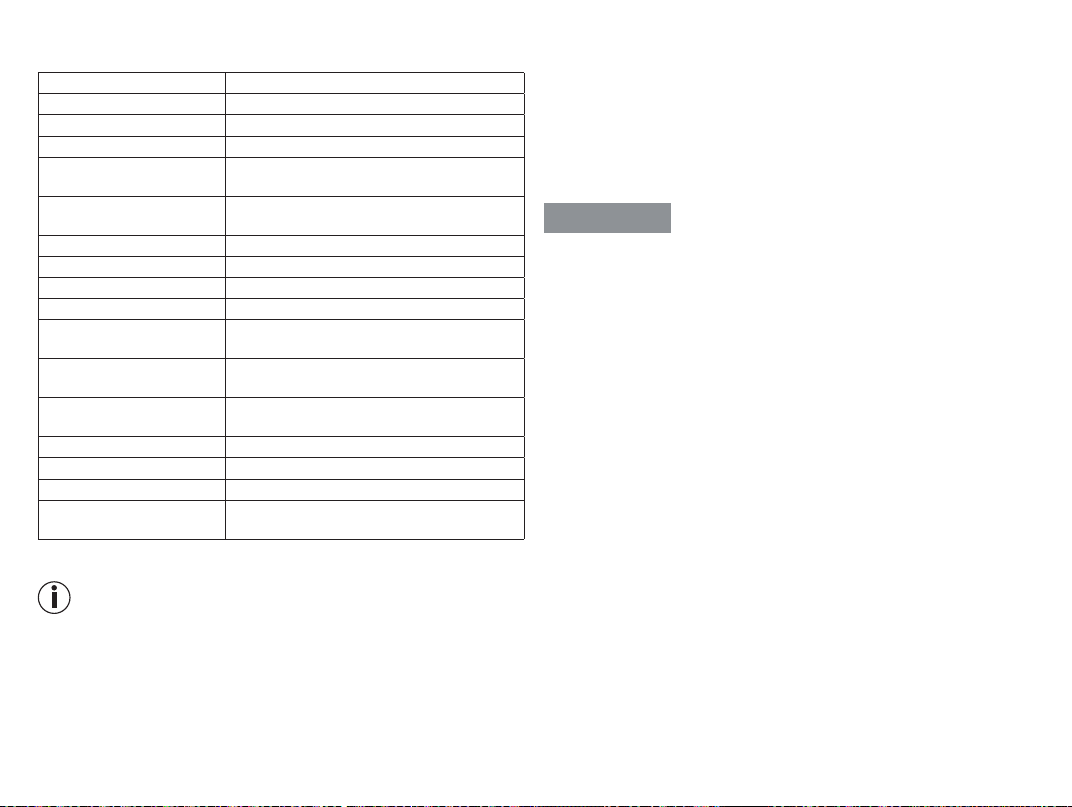
19. TECHNICAL SPECIFICATIONS
Type EM 59
Output waveform Biphasic rectangular pulses
Pulse length 50–450 µs
Pulse frequency 1–150 Hz
Output voltage Max. 100 Vpp (500 ohm)
max. 7.3 Vrms
Output current Max. 200 mApp (500 ohm)
max. 14.6 mArms
Voltage supply
Lithium-ion rechargeable battery, 2000mAh, 3.7V
Treatment time Adjustable from 5 to 100 minutes
Intensity Adjustable from 0 to 50
Heating levels low (41 °C) ; high (43 °C)
Operating conditions 5°C–40°C (41°F–104°F) at a relative air humi-
dity of 15–90%
Storage conditions 0°C–40°C (32°F–104°F) at a relative air humi-
dity of ≤90%
transport conditions: -25°C- 70°C (-13°F-158°F) at a relative air
humidity of ≤90%
Dimensions Approx. 139 x 66 x 26 mm (including belt clip)
Weight Approx. 125 g (including belt clip),
Height limit for use 3,000 m
Maximum permissible
atmospheric pressure:
700–1,060hPa
The serial number is located on the device.
If the device is not used according to the instructions specified, perfect
functionality cannot be guaranteed!
We reserve the right to make technical changes to improve and develop the
product.
This device complies with the European standard EN 60601-1-2 (Group 1,
Class B, in compliance with IEC 61000-4-2, IEC 61000-4-3, IEC 61000-4-8
and IEC 61000-4-39) and is subject to special precautionary measures with
regard to electromagnetic compatibility. Please note that portable and mobile
HF communication systems may interfere with this device.
More details can be requested from the stated Customer Service address or
found at the end of the instructions for use.
For this device, a functional test and instruction in accordance with the German
Medical Devices Operator Ordinance (MPBetreibV) is not required. It is also not
necessary to carry out safety checks in accordance with the German Medical
Devices Operator Ordinance.
20. NOTES ON ELECTROMAGNETIC COMPATIBILITY
WARNING
• The device is suitable for use in all environments listed in these instructions
for use, including domestic environments.
• The use of the device may be limited in the presence of electromagnetic
disturbances. This could result in issues such as error messages or the
failure of the display/device.
• Avoid using this device directly next to other devices or stacked on top of
other devices, as this could lead to faulty operation. If, however, it is neces-
sary to use the device in the manner stated, this device as well as the other
devices must be monitored to ensure they are working properly.
• The use of accessories other than those specified or provided by the manu-
facturer of this device can lead to an increase in electromagnetic emissions
or a decrease in the device’s electromagnetic immunity; this can result in
faulty operation.
• Keep portable RF communication devices (including peripheral equipment,
such as antenna cables or external antennas) at least 30 cm away from all
device parts, including all cables included in delivery. Failure to comply with
the above can impair the performance of the device.
21. WARRANTY/SERVICE
Further information on the guarantee and guarantee conditions can be
found in the guarantee leaflet supplied.
Notification of incidents
For users/patients in the European Union and identical regulatory systems,
the following applies: If a major incident occurs during or through use of
the product, notify the manufacturer and/or their representative of this as
well as the respective national authority of the member state in which the
user/patient is located.
Subject to errors and changes
20
Beurer GmbH • Söflinger Str. 218 • 89077 Ulm, Germany • www.beurer.com
www.beurer-healthguide.com • www.beurer-gesundheitsratgeber.com
646.63_EM59_2026-02-27_10_IM2_BEU_MDR_EN