EN Air humidifier
Instructions for use
LB 200

3
1
2
3
4
5
7
8
9
6
10
11
12
15
17
14
16
13
20
19
18
4
Read these instructions for use carefully. Observe the warnings and safety notes. Keep these instructions for use for
future reference. Make the instructions for use accessible to other users. If the device is passed on, provide the instruc-
tions for use to the next user as well.
1. INCLUDED IN DELIVERY
Check that the exterior of the cardboard delivery packaging is
intact and make sure that all contents are present. Before use,
ensure that there is no visible damage to the device or accessories
and that all packaging material has been removed. If you have
any doubts, do not use the device and contact your retailer or the
customer service address provided.
• 1 air humidifier
• 1 filter
• 1 filter holder incl. water level sensor
• 1 copy of instructions for use
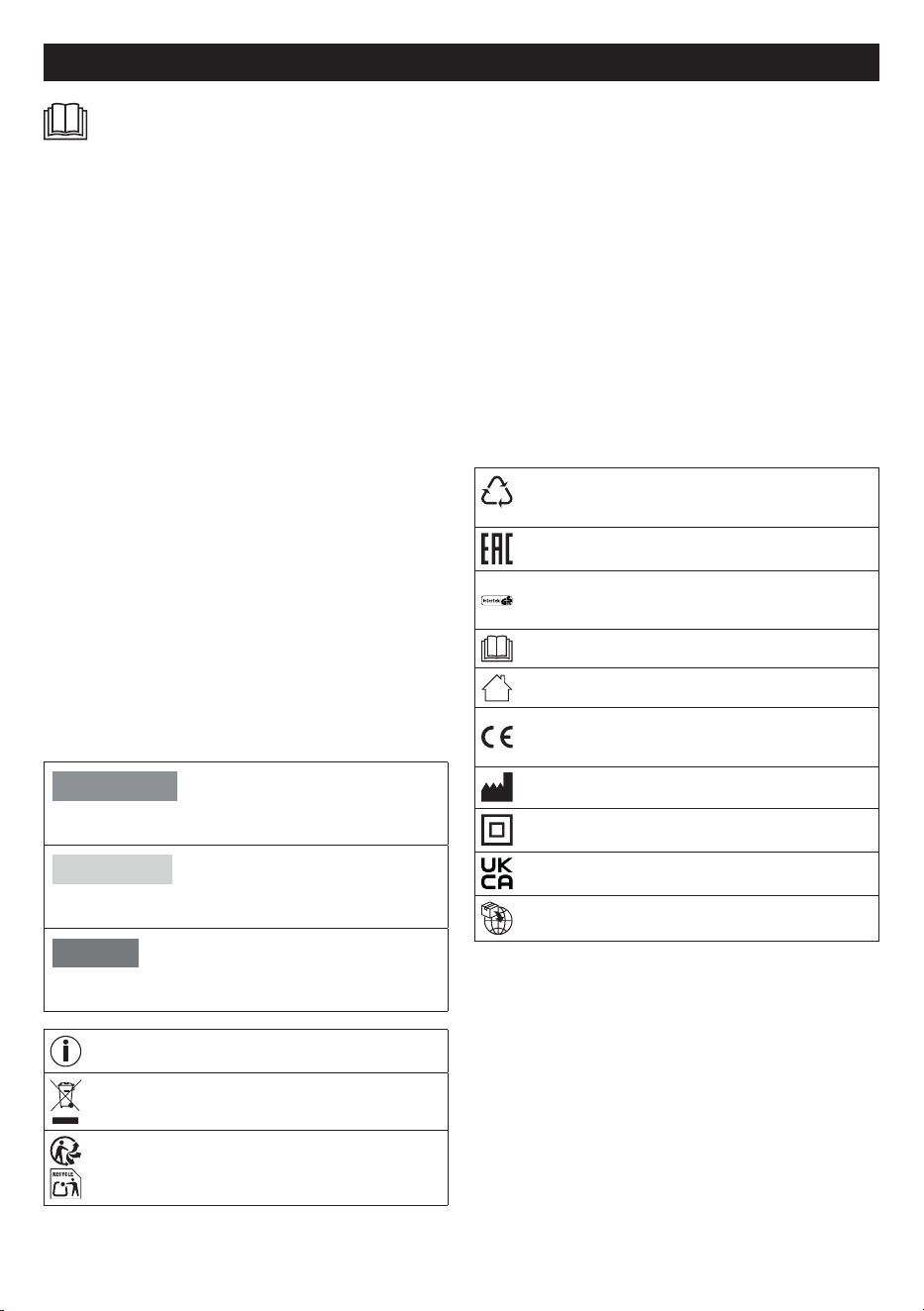
2. SIGNS AND SYMBOLS
The following symbols are used on the device, in these instructi-
ons for use, on the packaging and on the type plate for the device:
WARNING
Indicates a potentially impending danger. If it is not avoided,
there is a risk of death or serious injury.
CAUTION
Indicates a potentially impending danger. If it is not avoided,
slight or minor injuries may result.
NOTICE
Indicates a potentially harmful situation. If it is not avoided,
the system or something in its vicinity may be damaged.
Product information
Note on important information
The electronic device must not be disposed of with
household waste
Separate the product and packaging elements and
dispose of them in accordance with local regulations.
B
A
Marking to identify the packaging material. A = Material
code, B = Material number: 1-7 = Plastics, 20-22 =
Paper and cardboard
The products demonstrably meet the requirements of
the Technical Regulations of the EAEU.
Tested for safety in accordance with the requirements
of the “Produktsicherheitsgesetz” (German Product
Safety Act)
Read the instructions
For indoor use only
CE labelling
This product satisfies the requirements of the applicable
European and national directives.
Manufacturer
Protection class II device
United Kingdom Conformity Assessed Mark
Importer
3. INTENDED USE
This device is intended exclusively for humidifying the air indoors.
This device must only be used for the purpose for which it was
designed and in the manner specified in the instructions for use.
Any form of improper use can be dangerous. Any other use not re-
commended by the manufacturer may result in fire, electric shock
or personal injury. The manufacturer is not liable for damage resul-
ting from improper or careless use.
CONTENS
1. Included in delivery ...................................................................4
2. Signs and symbols ....................................................................4
3. Intended use ..............................................................................4
4. Warnings and safety notes ........................................................5
5. Device description .....................................................................6
6. Initial use ...................................................................................7
7. Usage ........................................................................................7
7.1 Starting use .......................................................................7
7.2 Setting target humidity ......................................................7
7.3 Setting the fan speed/mode .............................................8
7.4 Timer function ...................................................................8
8. Cleaning and maintenance ........................................................8
8.1 Filter drying function .........................................................8
8.2 Cleaning the filter ..............................................................8
8.3 Changing the filter .............................................................8
8.4 Cleaning the motor unit housing .......................................9
8.5 Cleaning the water tank, filter holder and water level
sensor ............................................................................9
8.6 Descaling ..........................................................................9
8.7 Storage ..............................................................................9
9. Accessories and replacement parts ..........................................9
10. What if there are problems? ....................................................9
11. Disposal .................................................................................10
12. Technical specifications ........................................................10
13. Warranty ................................................................................10
ENGLISH

5
4. WARNINGS AND SAFETY NOTES
WARNING
• The device is only intended for
domestic/private use, not for
commercial use.
• This device may be used by chil-
dren over the age of 8 and by
people with reduced physical,
sensory or mental skills or a lack
of experience or knowledge, pro-
vided that they are supervised or
have been instructed on how to
use the device safely, and are fully
aware of the consequent risks of
use.
• Children must not play with the
device.
• Cleaning and user maintenance
must not be performed by chil-
dren unless supervised.
• Disconnect the device from the
mains electricity supply during fil-
ling and cleaning.
• Clean the device using only the
methods specified. Under no cir-
cumstances may liquid enter the
motor unit.
• Do not use any solvent-based
cleaning products.
• If the mains connection cable of
this device is damaged, it must be
replaced by the manufacturer, its
customer service department or a
similarly qualified person to avoid
any risk.
• Note that high moisture levels may
promote the growth of biological
organisms in the environment.
• Do not allow the area around the
device to become wet or damp.
If moisture is present, reduce the
humidification output of the de-
vice. If the humidification output
cannot be reduced, temporarily
suspend use of the device. Make
sure that absorbent materials
such as carpets, curtains, dra-
pes or tablecloths do not beco-
me damp.
• Never leave water in the tank
when the device is not in use.
• Empty and clean the device be-
fore storing it away. Clean the
device before the next use.
WARNING
Electric shock
As with every electrical device, use this device carefully and cauti-
ously, in order to avoid hazards due to electric shock.
• Do not use the device if there is visible damage to the device
or accessories (e.g. if the cable or mains plug is damaged, if
the motor does not rotate, after a malfunction of the device or
if it has been dropped or damaged in any way. In any of these
cases, contact Customer Services).
• Only operate the device with the mains voltage specified on
the device (the type plate is printed on the lower edge of the
motor unit).
• Do not operate the device during a storm.
• In the event of defects or operational faults, switch the device
o immediately and disconnect it from the mains socket.
• Do not pull on the mains cable or on the device to disconnect
the mains plug from the socket.
• Never hold or carry the device by the mains cable. Keep the
cable away from hot surfaces.
• Always switch o the device before disconnecting the mains
plug.
• Never disconnect the mains plug with wet or damp hands.
• To avoid the risk of fire or electric shock, plug the device di-
rectly into a proper power outlet.
• In order to protect persons against electrical hazards, DO NOT
immerse the device in water or other fluids. Do not use near
water.
• Children are not able to assess the dangers associated with
the use of electrical devices. Therefore, children must always
be supervised when they are near the device.
• Always unplug the air humidifier before moving it, removing the
motor unit from the water tank, changing or cleaning the filter,
or when the device is not in use.
• Do not place any objects in device openings or in rotating
parts. Ensure that the moving parts can move freely at all
times. Never drop objects into the openings of the device.
• Do not operate the device outside.
6
• Never block the air inlet or air outlet. Do not place the device
on a soft surface such as a bed or sofa, as this could cause the
device to tip over and the air inlet or outlet to become blocked,
or water could escape from the device.
• DO NOT place any objects on the device.
• DO NOT cover the cable with carpets, runners or anything similar.
• DO NOT run the cable under furniture or equipment.
• DO NOT run the cable in high trac areas.
• Run the cable so that it does not pose a trip hazard.
• DO NOT attempt to repair or adjust any electrical or mecha-
nical functions on this device. Failure to follow this rule shall
void your warranty. Apart from the filter, there are no user-ser-
viceable parts inside the device. Any maintenance work must
be carried out by qualified personnel only.
• Ensure that the motor unit of the device and the mains cable
do not come into contact with water, steam or other liquids.
• Do not fill the water tank via the air outlet.
• Prevent the motor unit from getting wet.
• Never pick up a device that has fallen into water. Disconnect
the mains plug immediately.
WARNING
Risk of fire
There may be a risk of fire if the device is used improperly or these
instructions for use are ignored.
• Never operate the device underneath a cover, such as a blan-
ket, pillow, etc.
• Never use the device near petrol or other highly flammable
substances.
• To reduce the risk of fire, do not place the cable near heating
coils, heating pads, ovens or radiators.
• Do not operate the device in close proximity to flammable or
explosive gas mixtures.
• Keep the device away from sources of heat, as the housing
could melt and trigger a fire.
• Never use flammable cleaning products to clean the device.
• Never use the device near naked flames or gas-powered
equipment.
WARNING
Repairs
• Only specialist personnel may perform repairs on electrical de-
vices. Improper repairs may put users in significant danger. For
repairs, please contact Customer Services or an authorised
retailer.
• The motor unit must not be opened.
WARNING
Risk of Injury
• Make sure that no hair or fingers get into the air outlet.
• Do not add fragrances or chemicals to the water.
NOTICE
Handling
• After each use and before each time it is cleaned, switch o
the device and pull the plug out of the socket.
• Do not operate the device in rooms with high humidity or tem-
perature fluctuations (e.g. bathroom, kitchen).
• Do not place any objects on the device.
• Do not expose the device to high temperatures.
• Protect the device against sunlight and impact, and do not
drop it.
• Never shake the device.
• Place the device on a stable, level and dry surface.
• Avoid water damage by handling the device carefully (e.g. wa-
ter damage from splashing in the vicinity of wooden floors).
If the device should accidentally tip over, water may escape,
even if the device is switched o and unplugged.
• The immediate vicinity of the air humidifier can become damp.
• Empty any remaining water when the device is not in use. The
remaining water is not drinking water! Tip the remaining water
into the waste water system.
• Never drink the remaining water! Do not use the remaining wa-
ter for animals or plants.
• Do not use the device in places where protection against in-
sects was previously provided by incense sticks or incense.
• Do not use the device in rooms where there are chemical va-
pours or oil residues.
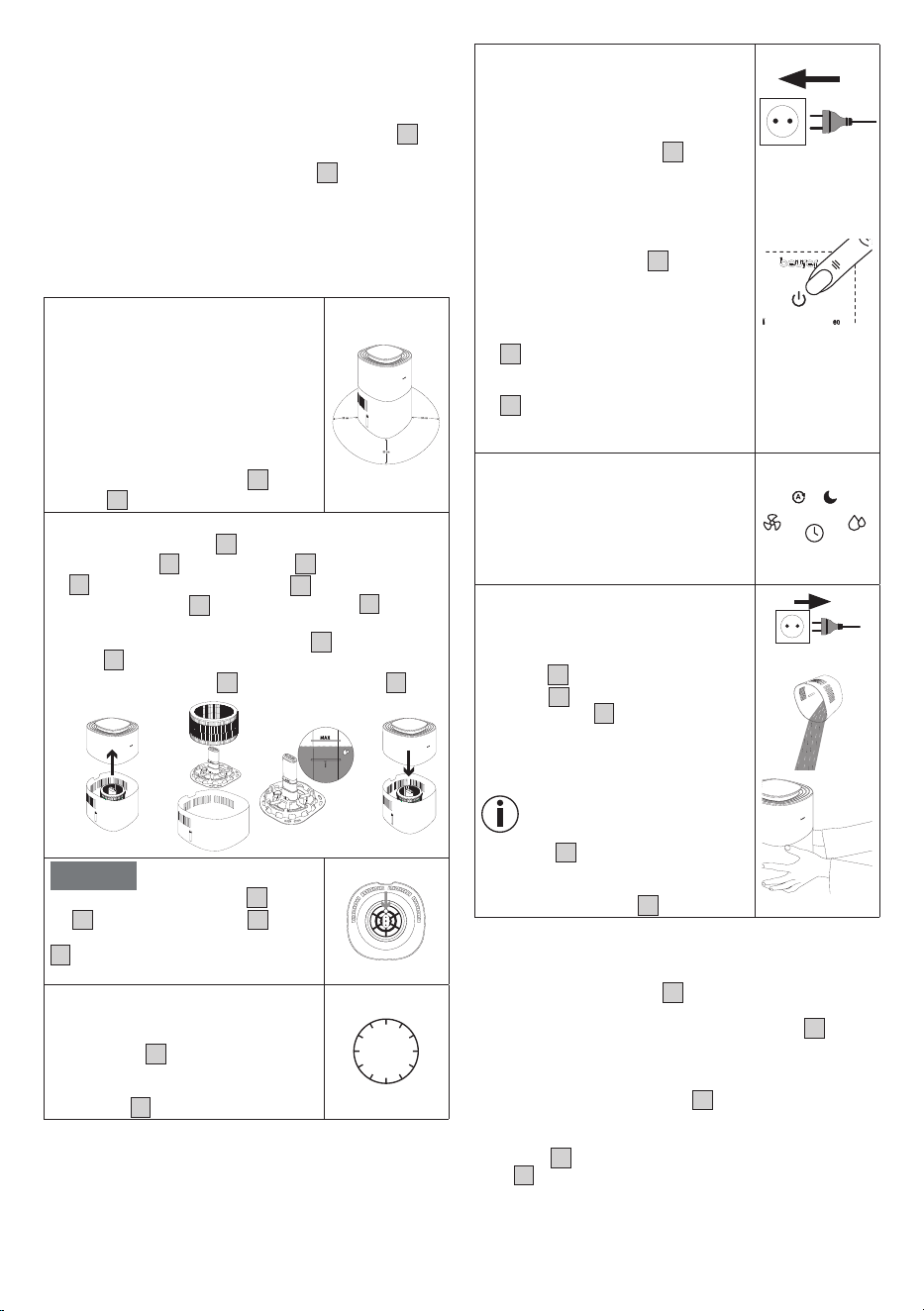
5. DEVICE DESCRIPTION
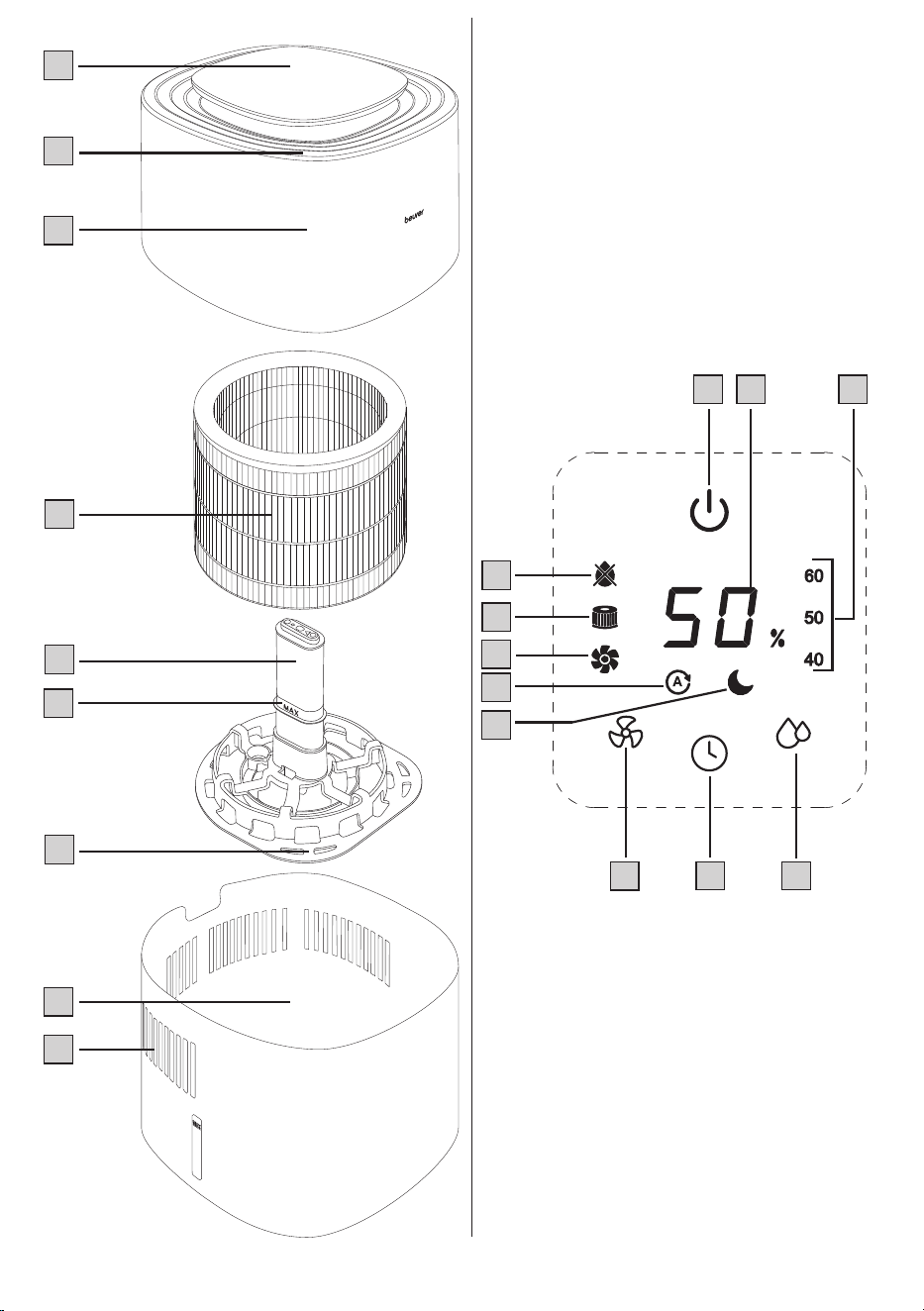
The associated drawings are shown on page 3.
Air humidifier
1
Control panel
2
Air outlet
3
Motor unit
4
Filter
5
Water level sensor
6
“Max.” mark
7
Filter holder
8
Water tank
9
Air inlet
Control panel
10
ON/OFF button
11
Display
(shows current relative humidity, fan speed and timer
duration)
12
Target humidity indicator
13
Target humidity button
14
Timer button
15
Fan speed button
16
NIGHT indicator
(lights up when NIGHT mode is active)
17
AUTO indicator
(lights up when AUTO mode is active)
18
Filter drying indicator
(lights up when filter drying function is active)
19
Filter change indicator
(lights up when filter change is necessary)
20
Water tank indicator
(lights up when the water tank is empty/needs to be
refilled)
7
6. INITIAL USE
1. Open the cardboard packaging.
2.
Remove the device from the top of the box without opening
the film bag.
3.
Remove all films and adhesive strips. Remove the filter
4
from
the device (see section “8.3 Changing the filter”) and take it out
of the plastic film. Then re-insert the filter
4
into the device.
4. Check the device, mains plug and cable for damage.
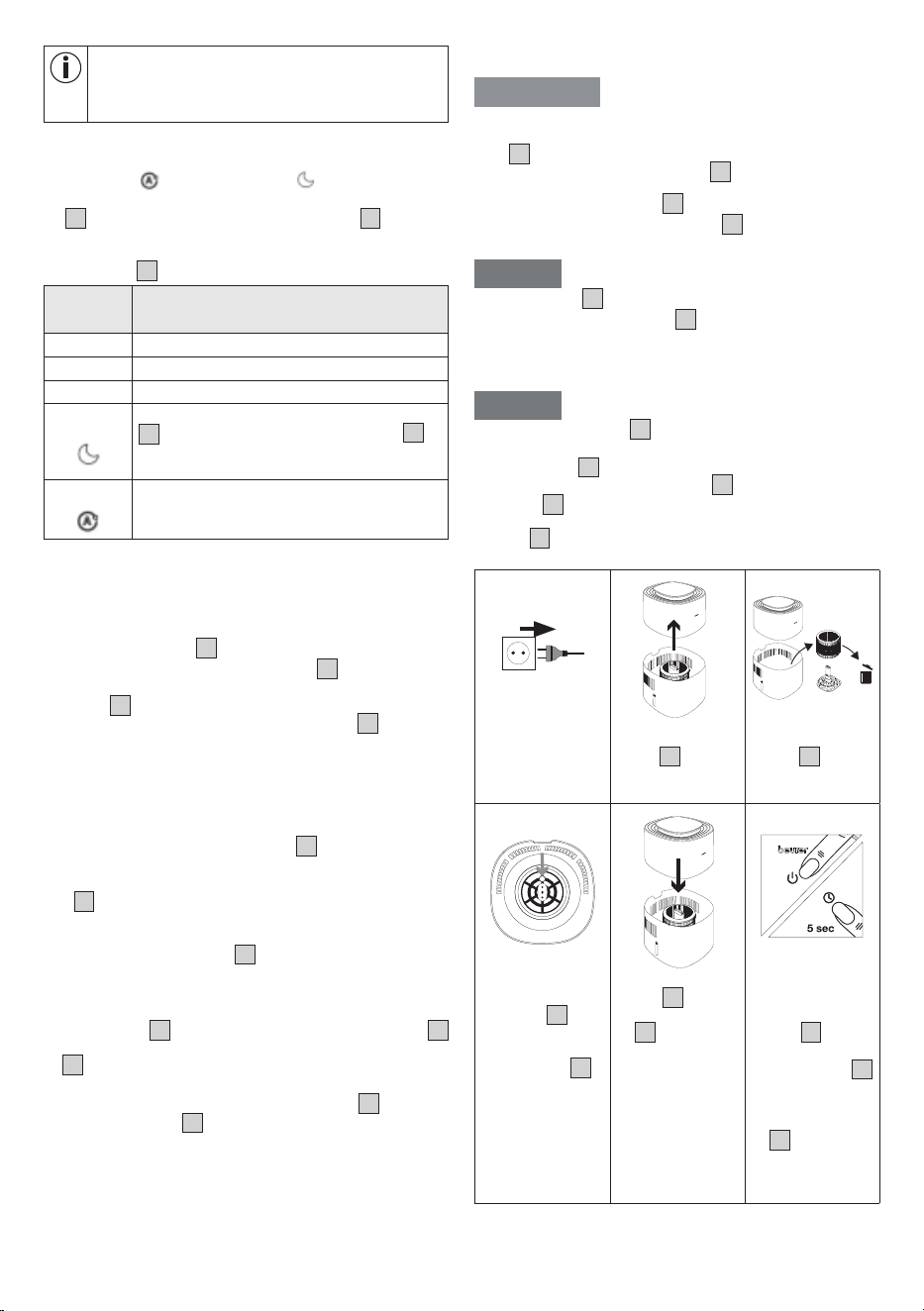
7. USAGE
7.1 Starting use
Step 1: Position the air humi-
difier
1. Place the air humidifier on a stable, ho-
rizontal and level surface to prevent vi-
brations and noise. Never move the air
humidifier during use.
2.
Set up the air humidifier in such a way
that provides 30 cm clearance on all si-
des.
3.
Make sure that the air inlet
9
and air
outlet
2
are never blocked.
Step 2: Fill the water tank
1. Remove the motor unit
3
upwards.
2.
Insert the filter
4
into the water tank
8
using the filter holder
7
including the water level sensor
5
.
3.
Fill the water tank
8
up to the “Max.” mark
6
with cold
tap water or distilled water. The water temperature should not
exceed 40°C. Do not fill the water tank
8
above the “Max.”
mark
6
.
4. Now put the motor unit
3
back on the water tank
8
.
NOTICE
When inserting the filter holder
7
incl. fil-
ter
4
and water level sensor
5
, make
sure that the round hole of the filter holder
7
is on the small raised area on the bot-
tom of the water tank.
Step 3: Allow the filter to beco-
me saturated
To ensure optimum humidification output,
allow the filter
4
to absorb water for 30
minutes before switching on the air humi-
difier (the water level may fall below the
“Max.” mark
6
during this process).
30
min
Step 4: Switch on the air hu-
midifier
1. Insert the mains plug into a suitable so-
cket. Ensure that the cable does not pose
a trip hazard.
2. Press the ON/OFF button
10
to switch
on the air humidifier. During initial use,
the air humidifier will be in Auto mode
A
(see section “7.3 Setting the fan speed/
mode” ) by default.
The current relative humidity of the room
is shown on the display
11
after a few
seconds.
3.
As soon as the water in the water tank
is used up, the air humidifier switches o
automatically and the water tank indicator
20
lights up on the control panel. If the
water tank is empty, no humidity values
are shown. Now either refill the water tank
8
with water or switch on the filter dry-
ing function as required (see section 8.1
on the filter drying function).
Step 5: Set additional functions
You can now optionally set the following
functions:
Target humidity, fan speed/mode and timer
function.
For more information on the individual func-
tions, see sections 7.2 to 7.4.
Step 6: After use
1. Disconnect the mains plug from the so-
cket after each use.
2.
Empty any remaining water from the wa-
ter tank
8
. Do not leave water in the wa-
ter tank
8
when the device is not in use.
3. Allow the filter
4
to air dry when not in
use or use the filter drying function from
time to time after use (see section “8.1
Filter drying function”).
If you want to reposition the air
humidifier, pull the mains plug out
of the socket and empty the water
tank
8
to avoid overflowing. When
carrying the air humidifier, make sure that
you hold the device with both hands at the
bottom of the water tank
8
.
7.2 Setting target humidity
If desired, you can optionally set a target air humidity on the air
humidifier.
The target humidity indicator
12
shows the currently set target
humidity (40 %, 50 % or 60 %).
If no value lights up in the target humidity indicator
12
, the hu-
midifier humidifies the air until a humidity of 70 % is reached and
then switches o. In order to avoid overhumidification of a room,
we recommend that you select a humidity between 40–60 %.
1.
Use the target humidity button
13
to select your desired tar-
get humidity.
2. The selected target humidity will light up in the target humidity
indicator
12
. If no value lights up in the target humidity indica-
tor
12
, the target humidity is set to 70 %. As soon as the target
humidity is reached, the air humidifier switches o automatically.
8
In order to achieve the desired target air humidity as
quickly as possible, we recommend keeping the win-
dows and doors closed during use, as dry outside air
could slow down reaching the target air humidity.
7.3 Setting the fan speed/mode
The air humidifier has three fan speeds (
I
,
2
and
3
) and two modes
( AUTO mode
A
and NIGHT mode
SL
).
• With the air humidifier turned on, use the fan speed button
15
to select a fan speed or mode. The display
11
shows the
currently set fan speed or current mode. After a few seconds,
the current relative humidity of the room is shown again on
the display
11
.
Illuminates
in display
Description
I
Low fan speed
2
Medium fan speed
3
High fan speed
SL
In NIGHT mode all displays on the control panel
1
go out, except for the NIGHT indicator
16
.
In NIGHT mode, the low fan speed is always
active.
A
In AUTO mode, the fan speed is automatically
adjusted depending on how close the current
humidity is to the desired target humidity.
7.4 Timer function
The air humidifier features a timer function that you can use to
determine the number of hours the air humidifier should run for
before it automatically switches itself o. You can set a timer for
between 1 and 9 hours.
1. Use the timer button
14
to select your desired timer. The cur-
rently set timer lights up on the display
1
(e. g. 5 h). After a
few seconds, the current air humidity is shown again on the
display
11
.
2.
To switch o the timer, press the timer button
14
repeatedly
until 0h is shown in the display. The timer is now switched o.
8. CLEANING AND MAINTENANCE
8.1 Filter drying function
Mould and bacteria can form in the filter
4
when the air humidi-
fier is not in use. Therefore, always empty the residual water from
the tank and dry all parts when the device is not in use. Allow the
filter
4
to air dry or use the filter drying function for faster drying:
1.
Before activating the filter drying function, ensure that the residu-
al water has been emptied from the tank (residual moisture may
collect under the filter holder
7
, which must be dried manually).
The filter drying function can only be started once the residual
water has been emptied.
2.
To activate the filter drying function, press and hold the fan
speed button
15
for 5 seconds. The filter drying indicator
18
will start to light up. The filter drying function now dries the filter
4
at the highest setting for the next 3 hours. To switch o the
filter drying function prematurely, press any other button.
3. After the time has elapsed, check that the filter
4
is comple-
tely dry. If the filter
4
is not completely dry, activate the filter
drying function again.
8.2 Cleaning the filter
WARNING
Before cleaning, always ensure that the mains plug of the air
humidifier has been properly disconnected. Only clean the
filter
4
according to the method described in these instruc-
tions for use. Never clean the filter
4
in a washing machine
or dishwasher.
Regular cleaning of the filter
4
is required to ensure hygienic
and fault-free operation. Rinse the filter
4
weekly under running
water to remove dust, dirt and hair.
NOTICE
Replace the filter
4
after 6 months at the latest (see section “8.3
Changing the filter”). If the filter
4
is calcified, descale it as de-
scribed in section “8.6 Descaling”.
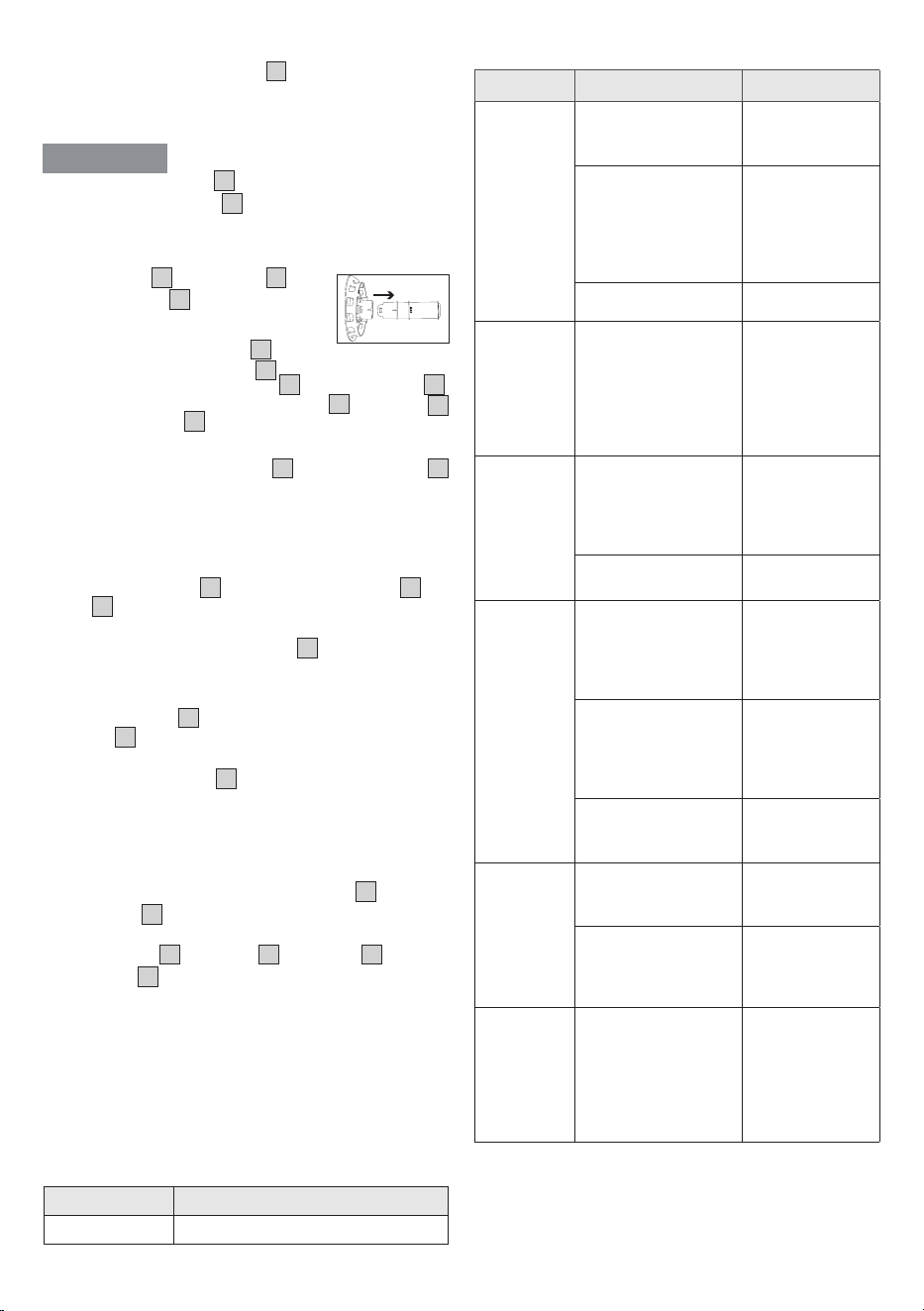
8.3 Changing the filter
NOTICE
When replacing the filter
4
, only use original replacement filters
from Beurer (see section “9. Accessories and replacement parts”).
Change the filter
4
after 6 months at the latest. After 1440 opera-
ting hours*, the filter change indicator
19
lights up automatically.
If the filter
4
is already heavily soiled, deformed or discoloured
before the 1440 operating hours have elapsed, you must replace
the filter
4
earlier and then reset the operating hours counter to
0 (see step 6 in this section).
1.
Disconnect the
air humidifier
from the socket.
2.
Pull o the motor
unit
3
upwards.
3.
Remove the old
filter
4
and dis-
pose of it pro-
perly.
4.
Place the new
filter on the filter
holder
7
. Ma-
ke sure that the
round hole of the
filter holder
7
is
on the small pro-
jection in the bot-
tom of the water
tank.
5.
Put the motor
unit
3
back on
the water tank
8
. Make su-
re that there is
no gap between
them.
6.
Switch on the air
humidifier using
the ON/OFF but-
ton
10
. Press
and hold the ti-
mer button
14
for 5 seconds
until the filter
change indicator
19
goes out. In-
ternal operating
hours counter is
now reset to 0.
* Based on an average of 8 hours of daily use of the air humidifier
over 6 months.
9
8.4 Cleaning the motor unit housing
Clean the housing of the motor unit
3
with a slightly damp cloth
(water or a mild cleaning solution). Do not use solvents, other ag-
gressive cleaning/scrubbing agents or alcohol, as these could da-
mage the surface.
WARNING
Never clean the motor unit
3
in the dishwasher. Make sure that
no liquid enters the air outlet
2
.
8.5 Cleaning the water tank, filter holder and
water level sensor
The water tank
8
, filter holder
7
and
water level sensor
5
can be cleaned in
the dishwasher from time to time. The parts
should not be exposed to temperatures ab-
ove 45°C. The water level sensor
5
can be
disconnected from the filter holder
7
by simply pulling it. To reas-
semble, reinsert the water level sensor
5
into the filter holder
7
.
Alternatively, you can also clean the water tank
8
, filter holder
7
and water level sensor
5
manually with a mild cleaning solution.
8.6 Descaling
We recommend descaling the filter
4
and the water tank
8
weekly.
Use a citric acid solution (6g pure citric acid powder dissolved per
1 litre of water) as a descaling solution.
Descaling the filter
1. Fill a container with descaling solution.
2. Place the filter holder
7
including water level sensor
5
and
filter
4
in the descaling solution so that all parts are covered.
3. Leave for one hour. Then rinse everything thoroughly under run-
ning water. Never squeeze out the filter
4
as this may deform it.
4. Repeat this procedure if necessary.
Descaling the water tank
1. Fill the water tank
8
with descaling solution up to the “Max.”
marking
6
.
2. Leave for one hour.
3. Rinse out the water tank
8
with running water.
4. Repeat this procedure if necessary.
8.7 Storage
When you are not using the device, we recommend that you carry
out the following actions:
1. Empty any remaining water from the water tank
8
.
2. Dry the filter
4
using the filter drying function (see section “8.1
Filter drying function”) or allow it to air dry.
3.
Clean the filter
4
, water tank
8
, filter holder
7
and water
level sensor
5
.
4. Store the air humidifier in its original packaging and in a dry en-
vironment.
5. Store the humidifier without weighing it down.
9. ACCESSORIES AND REPLACEMENT
PARTS
To purchase accessories and replacement parts, please visit
www.beurer.com or contact the corresponding service address
(according to the service address list) in your country. Accessories
and replacement parts are also available from retailers.
Designation Item number and/or order number
Replacement filter 110.005
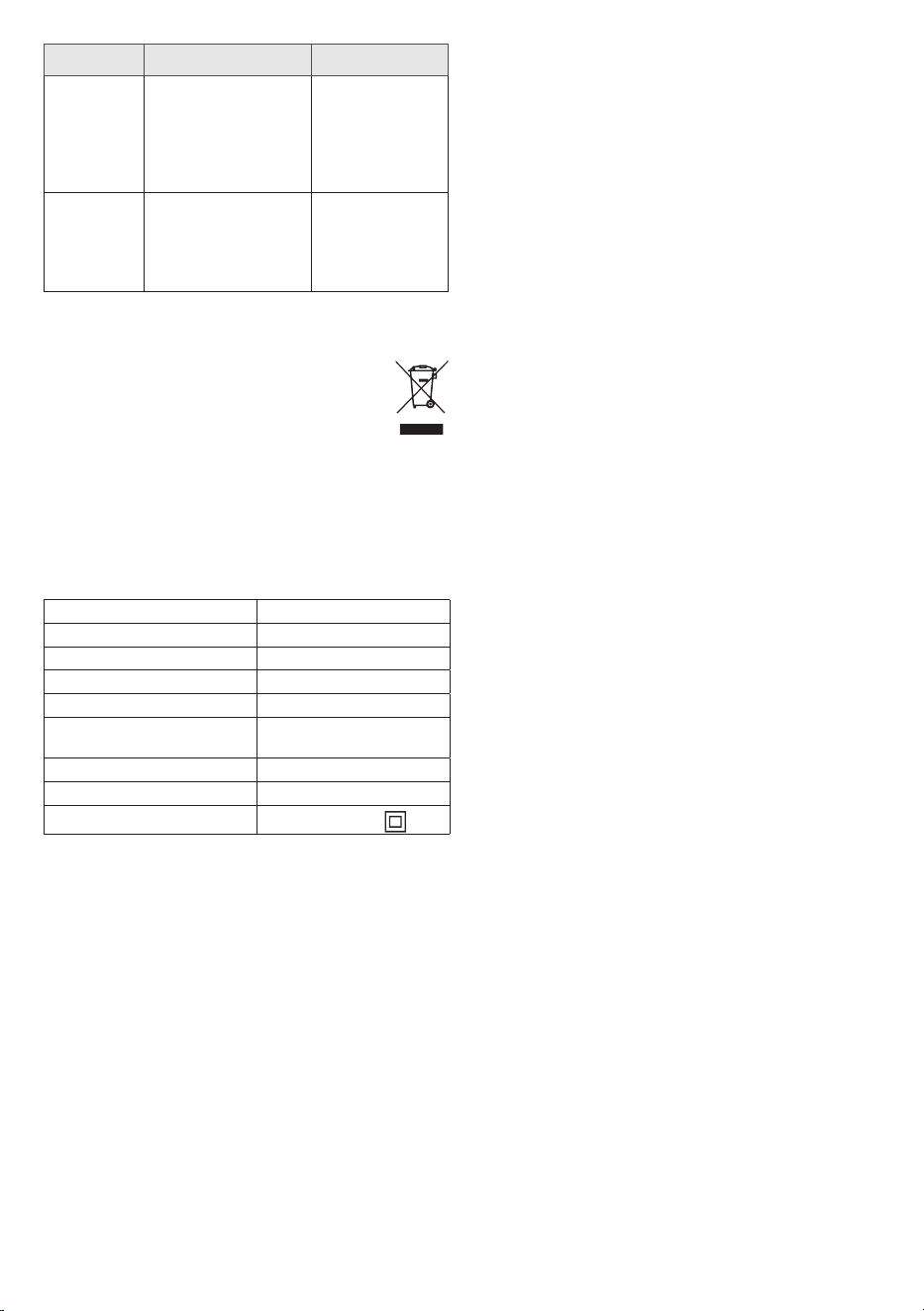
10. WHAT IF THERE ARE PROBLEMS?
Problem Possible cause Solution
Air humidifier
will not turn
on.
Mains plug not plugged
in
Insert the mains
plug into a suitable
socket.
Motor unit not seated
properly on water tank
Check for correct
positioning. There
must be no gap
between the motor
unit and the water
tank.
Water tank is empty Fill the water tank
The air hu-
midifier does
not start
The desired target hu-
midity has already been
reached or exceeded
If you want a high-
er target humidity
level, set this using
the target humidity
button (see section
“7.2 Setting target
humidity”).
Insucient
air flow
Filter dirty
Clean the filter
(see section “8.2
Cleaning the filter”)
and/or descale (if
necessary replace).
Blocked air inlet or
outlet
Check air inlet/air
outlet
The air
humidifier is
very noisy
Foreign object in air
inlet or air outlet
Pull out the mains
plug and remove
foreign bodies
from the air inlet/
air outlet.
Filter clogged
Clean the filter
(see section “8.2
Cleaning the filter”)
and/or descale (if
necessary replace).
Air humidifier is not
standing on a flat and
level surface
Place the air hu-
midifier on a level
and flat surface.
Control
panel not
illuminated/
no display.
The mains plug is not
connected to the socket
and/or not switched on
Insert the mains
plug into a suitable
socket.
The device is in NIGHT
mode
Use the fan speed
button to select
another fan speed
or mode.
Humidifier
starts at the
lowest level
even though
the target
humidity is
reached.
The device performs a
measurement to verify
that the target humidity
is still achieved.
-
10
Problem Possible cause Solution
The water
tank display
lights up
even though
the water
tank is full.
Air bubbles may have
accumulated at the
tip of the water level
sensor.
Lift the filter holder
incl. filter and
water level sensor
upwards out of the
water and reinsert
everything again.
No current
relative
humidity is
shown on
the display.
Water tank is empty. If
the water tank is empty,
no humidity values are
shown.
Fill the water tank
11. DISPOSAL
For environmental reasons, do not dispose of the device in house-
hold waste at the end of its service life. Dispose of the
device at a suitable local collection or recycling point in
your country. Observe the local regulations for material
disposal. Dispose of the device in accordance with EC
Directive Waste Electrical and Electronic Equipment
(WEEE). If you have any questions, please contact the local autho-
rities responsible for waste disposal. You can obtain the location
of collection points for old devices, for example, from the local or
municipal authorities, local waste disposal companies or your re-
tailer.
Also ensure that the filter is disposed of properly.
12. TECHNICAL SPECIFICATIONS
Product name LB 200
Mains voltage/power: 220-240 V~, 50-60 Hz, 17 W
Water tank capacity 3 litres
Suitable for room sizes: Up to 30 m²
Evaporation output Up to 200 ml/h
Measurement range for relatively
humidity:
20 % to 95 %
Dimensions: 230 x 230 x 350 mm
Weight: approx. 2865 g incl. filter
Protection class:
Protection class II /
Subject to technical changes.
13. WARRANTY
Further information on the warranty and warranty conditions can
be found in the warranty leaflet supplied.
Subject to errors and changes

11

12
100.69_LB200_2026-02-12_03_IM2_BEU_EN
Beurer GmbH, Söflinger Str. 218, 89077 Ulm, Germany, www.beurer.com