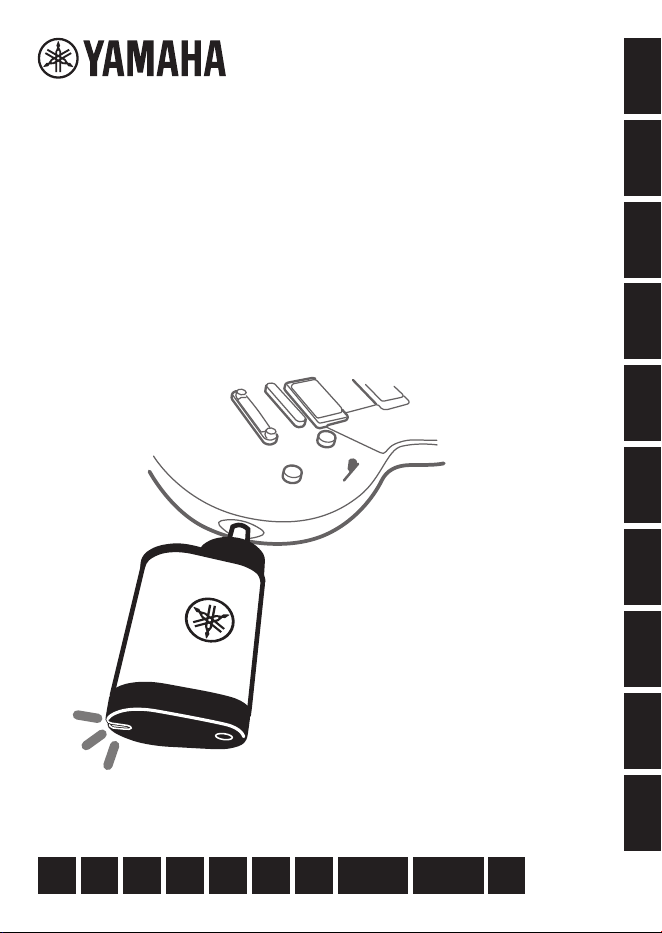
ワイヤレストランスミッター
WIRELESS TRANSMITTER
ÉMETTEUR SANS FIL
无线传输器
無線發射器
YW10T
日本語
EnglishItaliano
繁體中文
DeutschEspañol
한국어
Français
简体中文
ZH-TWES ZH-CNFRENJA IT PT KODE
Português
取扱説明書
Owner’s Manual
Benutzerhandbuch
Mode d’emploi
Manuale di istruzioni
Manual de instrucciones
Manual do Proprietário
使用说明书
使用說明書
사용설명서
2 • YW10T
Owner’s Manual
PRECAUTIONS
WARNING
Do not disassemble
• Do not disassemble or modify this product.
Doing so may cause electric shock, re, injury,
or malfunction. There are no user-serviceable or
replaceable parts inside this product. If the product
needs servicing, be sure to request inspection and
repair from the store from which you purchased it,
or from your Yamaha dealer.
Connection
• Be sure to read the manual for the device
being connected and follow its instructions.
Failure to do so may result in re, overheating,
explosion, or malfunction.
Water caution
• Do not use the product in humid locations
such as a bathroom or outdoors in rainy
weather, or in places where it may be
splashed with water. Also, do not place
vases, chemicals, or other items containing
liquid on the product.
If water or other liquid gets inside, it may cause
re, electric shock, or malfunction.
• Do not connect or disconnect the power plug
with wet hands.
There is a serious risk of electric shock.
Fire caution
• Donotexposethisproducttoopename.
Doing so may result in a re.
Wireless equipment
• Do not use this product in areas where the
use of radio waves is restricted, such as near
medical equipment. Additionally, do not
use this product within 15 cm of a location
whereacardiacpacemakerordebrillatoris
installed.
Radio waves and magnetism generated by this
product may aect operation.
Built-in (lithium-ion) battery
• Be sure to follow the battery handling
instructions.
Improper handling may cause re, electric shock,
liquid leakage, heat generation, rupture, explosion,
or malfunction.
Please read these Safety Precautions carefully before use.
These precautions intend to ensure the safe and proper use of the product, and to prevent harm to you or other
people, or damage to property. Please be sure to follow them. If a child uses this product, we ask that a guardian
ensures that the child thoroughly understands the following information.
After reading these precautions, be sure to keep them in an accessible locations.
Warnings, Cautions and Precautions
Issues that may occur if the product is handled incorrectly are classied according to the degree of harm or
damage and the degree of urgency.
WARNING
Indicates the possibility of death or serious injury.
CAUTION
Indicates the possibility of injury.
NOTICE
Indicates that failure, damage, malfunction, or data loss may occur.
YW10T
Owner’s Manual
• 3
PRECAUTIONS
• Chargewiththespeciedcharger.
Charging with an unspecied charger may cause
leakage, heat generation, rupture, or malfunction.
• Chargewithinthespeciedcharging
temperature.
Charging outside the temperature range may
cause leakage, heat generation, rupture, or
malfunction.
• If the battery leaks, do not touch the leaked
liquid.
Contact with the liquid may result in blindness or
chemical burns. If the liquid comes in contact with
your eyes, mouth, or skin, immediately rinse with
water and consult a doctor.
• Never charge the battery when the product is
wet.
Doing so may cause electric shock, or re or
malfunction due to shorting of the electronic
circuits.
• Do not disassemble the battery by crushing
it with strong pressure or cutting.
Touching the contents of the battery or getting it in
your eyes may cause blindness or chemical burns.
• Do not put or dispose of the battery into a
reorhotfurnace.
Rupture may cause re or injury.
• Do not expose the battery to extremely high
temperaturessuchasdirectsunlightorre.
Rupture may cause re or injury.
• Do not subject this product to mechanical
shock.
Mechanical shock may result in damage caused by
batteries, electric shock, or malfunction.
• Do not place this product in a place where
the air pressure is extremely low.
• For details on charging the battery, be sure
to read the battery manual and follow the
instructions.
Failure to do so may result in re, overheating,
explosion, or malfunction.
If you notice anything unusual
• If any of the following abnormalities occur,
unplug the product from any external
devices immediately.
•
If the product emits an unusual odor or smoke
•
If water or foreign matter gets inside the product
•
If the sound stops while you are using the product
•
If the product is cracked or damaged
Continued use may result in electric shock, re, or
malfunction. Immediately request inspection or
repair from the store from which you purchased
the product, or from your Yamaha dealer.
CAUTION
Handling
• Do not apply excessive force to the main unit
or plug.
Doing so may damage the product or cause injury
to you or others.
• Keep this product out of reach of children.
This product is not suitable for use in locations
where children are likely to be present.
4 • YW10T
Owner’s Manual
NOTICE
Follow the instructions below to prevent product failure, damage, or malfunction.
•
Even when unplugged from an external
device(LEDiso),asmallamountofcurrent
continuestoow.Thepowerconsumption
when unplugged from an external device is
designed to be minimal.
When not using this product for a long period of
time, be sure to unplug it from any external device.
•
Do not use the product in places exposed to
direct sunlight (such as inside a car during the
day), near a heater, or other places where the
temperature is extremely high, or alternately,
where the temperature is extremely low, or
where there is a lot of dust or vibration.
Doing so may cause deformation of the main unit,
failure of internal parts, or unstable operation.
■
Cleaning this product
•
Tocleanthisproduct,useasoft,dryclothor
a soft cloth moistened with water and then
wrung dry.
Do not use benzine, thinner, alcohol, detergents,
chemical wipes, etc., as they may cause
discoloration/alteration.
Please note that Yamaha cannot provide
compensation for damage caused by
improperuseormodication.
■
The charging function of this product
•
Thisproductusesalithiumionbattery.
•
Thebuilt-inlithium-ionbatteryinthis
productisconsumable.Tomakeitlast
longer, please note the following.
•
It may take a long time to charge the battery if it
has not been used for a long period of time.
•
When storing this product for a long period of
time, charge the battery about once every six
months to prevent over-discharge.
•
Rechargeable batteries have a limited service life.
Their capacity decreases gradually depending
on the storage method, environment, number of
uses, and the passage of time.
•
If the battery duration becomes extremely short,
it is near the end of the battery’s service life.
•
Do not attempt to remove the battery by yourself.
•
This battery is a valuable recyclable resource.
If you wish to dispose of this product, please
contact your Yamaha dealer.
■
Handling this product
•
Do not use the product near other electrical
appliancessuchasTVs,radios,stereos,or
cell phones.
Noise may occur in the instrument itself or in the
TV, radio, etc.
Note
■
About the contents of this manual
•
All illustrations in this User’s Manual are for
explanatory purposes only.
■
Trademarks, etc.
•
Mac is a trademark of Apple Inc. registered in the
USA and other countries.
•
Windows is a registered trademark of Microsoft®
Corporation in the United States and other countries.
•
The company names and product names in
this manual are the trademarks or registered
trademarks of their respective companies.
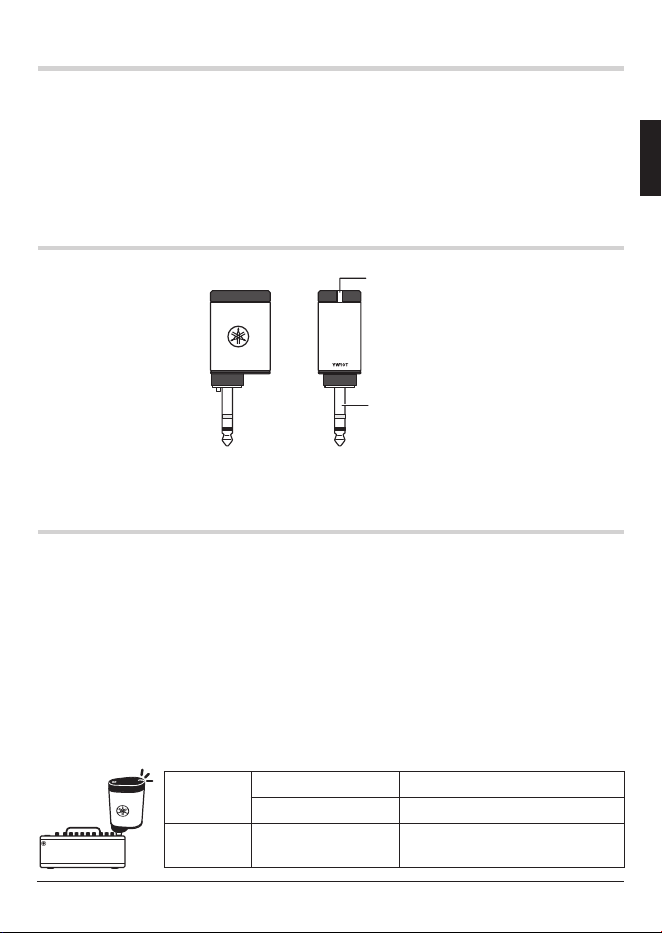
The serial number is printed on the label shown in the
illustration below. Do not remove the serial number
label. We recommend that you write down the model
name and serial number in the elds below and keep
this manual in a safe place so that you can identify
your product even if it is lost.
Model name:
Serial number:
Serial number label
YW10T
Owner’s Manual
• 5
Introduction
Thank you very much for purchasing this Yamaha product.
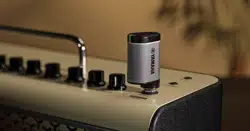
The YW10T is a wireless transmitter for guitars that transmits sound signals via
wireless communication and is best used with Yamaha THR-II Wireless series
(THR-II WL) ampliers.
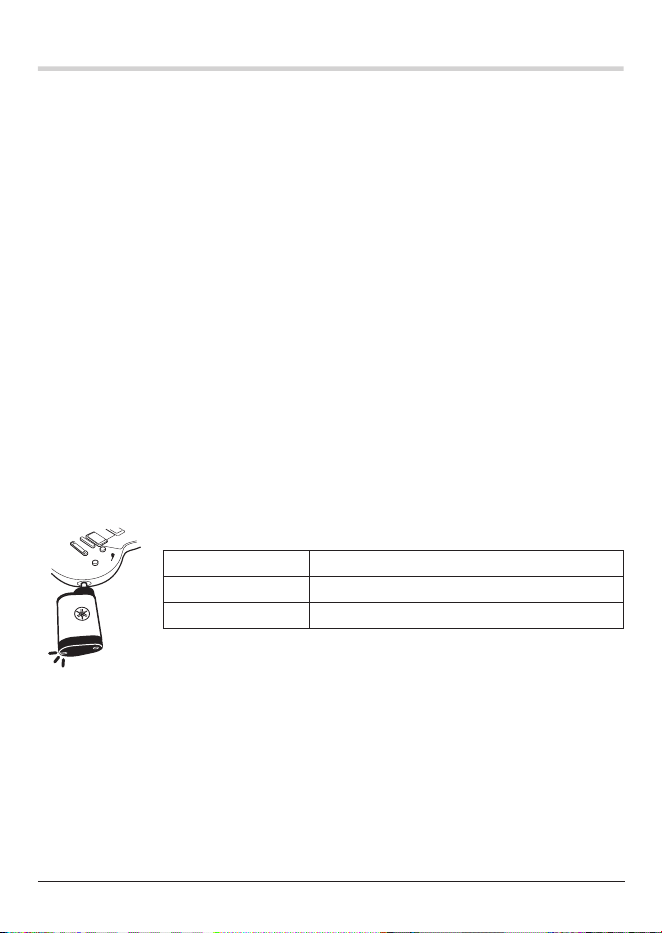
Part names
Plug
LED
Using the YW10T with the THR-II WL
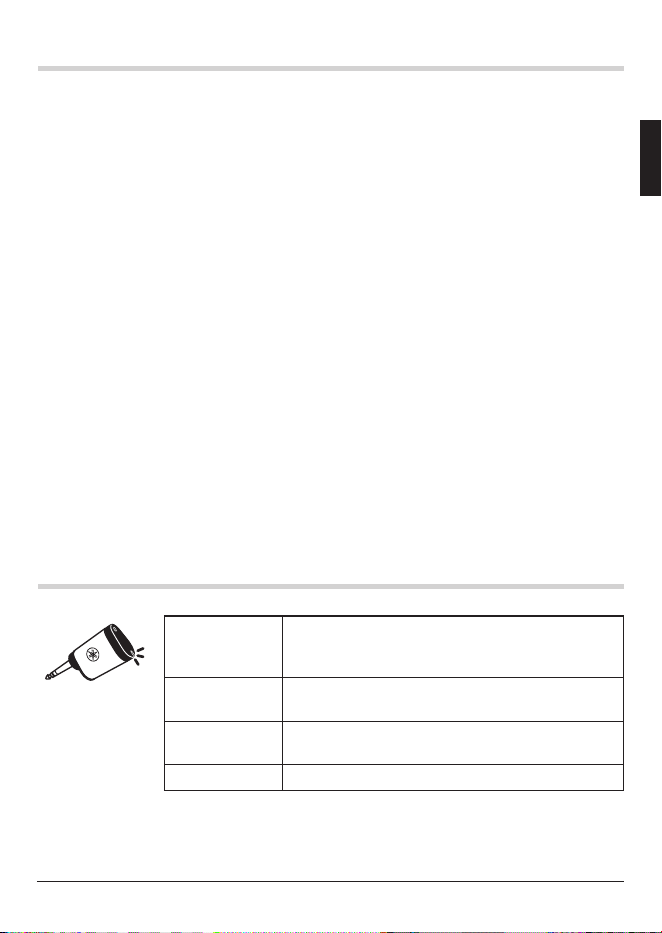
1.
Charging the YW10T
1-1.
Connect the AC adapter to the THR-II WL and plug it into an outlet.
1-2.
Connect the YW10T plug to the INPUT jack on the THR-II WL.
1-3.
The YW10T will begin to charge automatically.
NOTE • The built-in battery is fully charged in about three (3) hours.
• Continuous run time from full charge is approximately seven (7) hours.
■
LED status during charging
While
charging
Flashes (Red) Battery level: less than 10%
Flashes (Green) Battery level: 10% or more
Fully
charged
Lights up (Green) Battery level: 100%
6 • YW10T
Owner’s Manual
Using the YW10T with the THR-II WL
2.
Pairing the YW10T with the THR-II WL
2-1.
Turn on the power to the THR-II WL.
2-2.
Connect the YW10T plug to the INPUT jack on the THR-II WL.
2-3.
The YW10T will automatically pair with the THR-II WL in about ten (10) seconds.
NOTE The YW10T will automatically connect to the device with which it was paired
immediately prior.
3.
Connecting the YW10T to the guitar and playing
3-1.
Turn on the power to the paired THR-II WL.
3-2.
Connect the YW10T to the output jack of the guitar.
3-3.
Wireless communication with the THR-II WL will start automatically.
3-4.
Adjust the output level of both the guitar and THR-II WL to a comfortable volume
while playing.
NOTE After four (4) minutes of no sound while connected to the guitar, the YW10T
will turn o communication and enter sleep mode to conserve power. When
playing resumes, communication will automatically start again.
■
LED status while the YW10T is connected to the guitar
Lights up (Green) Battery level: 10% or more
Flashes (Red) Battery level: less than 10%
O Sleep mode or depleted battery
YW10T
Owner’s Manual
• 7
Firmware update
The YW10T can be updated to the latest rmware by using the THR Remote app for
Windows or Mac.
1.
Connect the THR-II WL to a computer.
NOTE Refer to the THR-II WL Reference Manual section entitled “Connecting to a
Computer” for connection instructions and information on how to download
the THR Remote app.
2.
Connect the YW10T plug to the INPUT jack on the THR-II WL.
3.
Start THR Remote. It will automatically synchronize with the YW10T.
4.
If a newer version of the YW10T rmware is available, a rmware
update notice will appear on the THR Remote screen.
5.
Follow the instructions on the THR Remote screen.
NOTE The YW10T can work as wireless transmitter for LINE6 Relay G10/S, Wireless
compatible models in the Spider V series, and POD GO Wireless. Firmware
updates are also available through these products. For details, refer to the
Line6 product manual.
Other LED status
Lights up
(Dark red)
The YW10T is not properly inserted into the jack
of the THR-II WL. Remove the YW10T and insert it
again.
Flashes
3 times (Red)
Charging was stopped because the product is out
of the appropriate charging temperature range.
Lights up
(Orange)
The YW10T is communicating with the THR-II WL
for initialization or rmware updates.
O Sleep mode or depleted battery.
8 • YW10T
Owner’s Manual
Specications
Wireless transmitter
■
Specications
Size 33 mm × 23 mm × 83 mm
Weight 48 g
Plug 6.3 mm Standard TRS Phone plug
Maximum power consumption Normal use: 0.24 W / Charging: 1.5 W
Sleep mode Four (4) minutes
Standby power consumption
Without connection: less than 20 mW
With instrument connected (in sleep mode): less
than 100 mW
■
Wireless communication function
Digital format Original format (equivalent to 24-bit)
Radio frequency (operational
frequency)
2402 MHz to 2478 MHz
Maximum output power (EIRP) 10 dBm
Maximum communication range
15 m in optimum conditions. (Range may vary
depending on surrounding conditions.)
Type of modulation FSK
■
Rechargeable battery
Built-in rechargeable battery Lithium-ion battery
Charging time (to full capacity) Approximately three (3) hours
Charging temperature +10 °C to +30 °C
Operating temperature 0 °C to +50 °C
Battery run time (continuous
wireless communication time)
Approximately seven (7) hours
*
The contents of this manual apply to the latest specications as of the publishing date.
To obtain the latest version of this manual, access the Yamaha website, then download
the manual le.
YW10T
Owner’s Manual
• 9
This transmitter must not be co-located or operated in conjunction with any other antenna or transmitter.
(554-M01 FCC transmitter 01)
This equipment complies with FCC radiation exposure limits set forth for an uncontrolled environment
and meets the FCC radio frequency (RF) Exposure Guidelines. This equipment has very low levels of
RF energy that is deemed to comply without testing of specic absorption rate (SAR).
(554-M04 FCC portable 01)
This device contains a lithium-ion battery.
After usage, you may recycle the battery, but you never attempt to remove it by yourself. Have the
device inspected by qualied Yamaha service personnel. If there is no Yamaha personnel in your
area, dispose of it properly according to relevant environmental laws and disposal rules in your area.
(582-M02)
This equipment complies with ISED radiation exposure limits set forth for an uncontrolled
environment and meets RSS-102 of the ISED radio frequency (RF) Exposure rules as this equipment
has very low levels of RF energy.
Cet équipement est conforme aux limites d'exposition aux rayonnements énoncées pour un
environnement non contrôlé et respecte les règles d'exposition aux fréquences radioélectriques (RF)
CNR-102 de l'ISDE puisque cet appareil a une niveau tres bas d'energie RF.
(0555-M05_ised_portable_01)
This device contains licence-exempt transmitter(s)/receiver(s) that comply with Innovation, Science
and Economic Development Canadaʼs licence-exempt RSS(s). Operation is subject to the following
two conditions:
1. This device may not cause interference.
2. This device must accept any interference, including interference that may cause undesired
operation of the device.
Lʼémetteur/récepteur exempt de licence contenu dans le présent appareil est conforme aux CNR
dʼInnovation, Sciences et Développement économique Canada applicables aux appareils radio
exempts de licence. Lʼexploitation est autorisée aux deux conditions suivantes :
1. Lʼappareil ne doit pas produire de brouillage;
2. Lʼappareil doit accepter tout brouillage radioélectrique subi, même si le brouillage est susceptible
dʼen compromettre le fonctionnement.
(555-M13 ISED RSS 01)
CAN ICES-3 (B)/NMB-3(B)
(530-M02)
FCC ID: A6RYW10T
(554-M09)
IC: 740B-YW10T
(555-M01)
(15 -M01) (115- M01)
厂名 : 雅马哈电子(苏州)有限公司
厂址 : 江苏省苏州市苏州新区鹿山路 18 号
(44-M04)
Yamaha Global Site
https://www.yamaha.com/
Yamaha Downloads
https://download.yamaha.com/
〒430-8650 静岡県浜松市中央区中沢町 10-1
10-1 Nakazawa-cho, Chuo-ku,
Hamamatsu, 430-8650 Japan
© 2024 Yamaha Corporation
Published 12/2024
2024 年 12 月发行
IPES-A0
VHH9910