Smart Electric Gooseneck Kettle
Model: CS108-NK
Questions or Concerns?
Mon–Fri, 9:00 am–5:00 pm PST/PDT
[email protected] | (888) 402-1684
Smart Electric Gooseneck Kettle
User Manual

2
Our helpful, in-house chefs are ready to assist you
with any questions you might have!
CONTACT OUR CHEFS
Email: [email protected]
Toll-Free: (888) 402-1684
Mon–Fri, 9:00 am–5:00 pm PST/PDT
(We hope you love your new smart kettle as much as we do.)
Thank you for
your purchase!
On behalf of all of us at Cosori,
Happy cking!
Get Creative with COSORI
Download the free VeSync app to discover smart
functions, original recipes from the COSORI chefs,
and more!
explore
our digital recipe gallery
cosori.com/recipes
enjoy
weekly, featured recipes
made exclusively by our in-house chefs

3
Table of Contents Package Contents
Specifications
Package Contents
Specifications
Important Safeguards
Getting to Know Your Smart Kettle
• Kettle Diagram
• Controls
Before First Use
• Water Test
• VeSync App Setup
Using Your Smart Kettle
• Making Pour-Over Coee
• High Altitude Users
• Smart Kettle Sounds
• Adjusting Lid Tightness
• Boil-Dry Protection
• VeSync App Functions
Care & Maintenance
Warranty Information
Customer Support
3
3
4
6
6
7
8
8
8
9
9
10
10
10
10
11
12
14
16
Power Supply AC 120V, 60Hz
Rated Power 1200W
Temperature
Range
104°–212°F /
40°–100°C
Capacity 0.85 qt / 0.8 L
Weight 2.57 lb / 1.17 kg
Dimensions
11.6 x 9 x 7.7 in /
29.4 x 22.7 x 19.7 cm
1 x Smart Electric Gooseneck Kettle
1 x Power Base
1 x User Manual

4
Always follow basic safety precautions when using your kettle.
Read all instructions.
General Safety
• CAUTION: Do not touch hot surfaces.
Use the handle. Do not touch the heated
parts of the base or the metal walls of
the kettle during or immediately after
operation.
• CAUTION: Do not fill the kettle above the
“MAX” line. This may cause water to boil
over and may cause scalding.
• CAUTION: To avoid scalding, always
handle with care when there is hot water
inside the kettle.
• Do not immerse the kettle, base, cord, or
plug in water or other liquids.
• Closely supervise children near the kettle.
Do not allow children to use or play with
this kettle.
• Unplug the kettle when it is not being
used and before cleaning.
• Allow to cool before putting on or taking
o parts, and before cleaning.
• Do not use the kettle if it is
malfunctioning, or if any part, including
the base, cord, or plug, is damaged in any
way. Do not try to repair the kettle. Contact
Customer Support (see page 16).
• Using accessory attachments not
recommended by the manufacturer may
result in fire, electric shock, or injury.
• Do not use outdoors.
• Place the kettle on a dry, flat, stable surface.
• Do not place the kettle (including the
base) on or near heat sources such as
stovetops, ovens, radiators, etc.
• To avoid scalding, always make sure
the lid is securely closed while the kettle
is operating. Do not cover the spout
opening while the kettle is in use. Do not
cover the openings on the lid.
• To disconnect, press CANCEL to turn the
kettle o, then remove the plug from the
wall outlet.
• Only use the kettle as directed in this
manual.
• Household use only.
IMPORTANT SAFEGUARDS
READ AND SAVE THESE INSTRUCTIONS

5
Power & Cord
• Do not let the cord (or any extension
cord) hang over the edge of a table or
counter. Do not allow the cord to touch
hot surfaces.
• This kettle has a 3-prong grounding plug.
Always plug in to a grounded electrical
outlet. Do not modify the plug in any
way.
• This kettle uses a short power-supply
cord to reduce the risk of entangling or
tripping. Use extension cords with care.
• Any extension cord must also be a
grounding-type 3-wire cord.
• The marked electrical rating of an
extension cord should be at least as high
as the rating of the kettle (see page 3).
Note: If the electrical circuit is overloaded with
other appliances, your kettle may not operate
properly. Operate it on a separate electrical circuit.
6
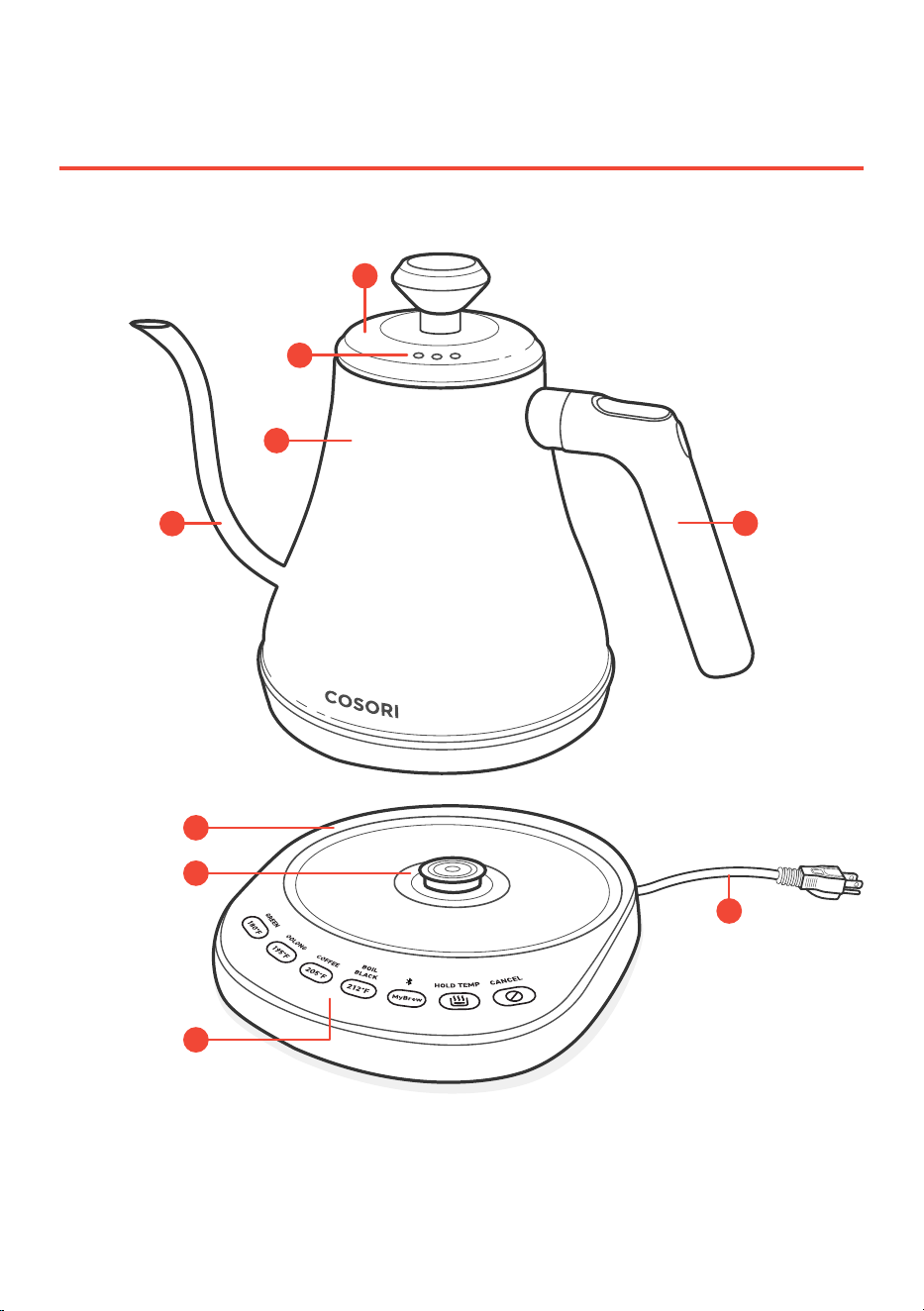
GETTING TO KNOW
YOUR SMART KETTLE
A. Lid
B. Steam Vents
C. Kettle
D. Spout
E. Handle
F. Power Base
G. Heating Plate
H. Control Panel
I. Cord
A
B
C
D
E
G
H
I
F
Kettle Diagram
7
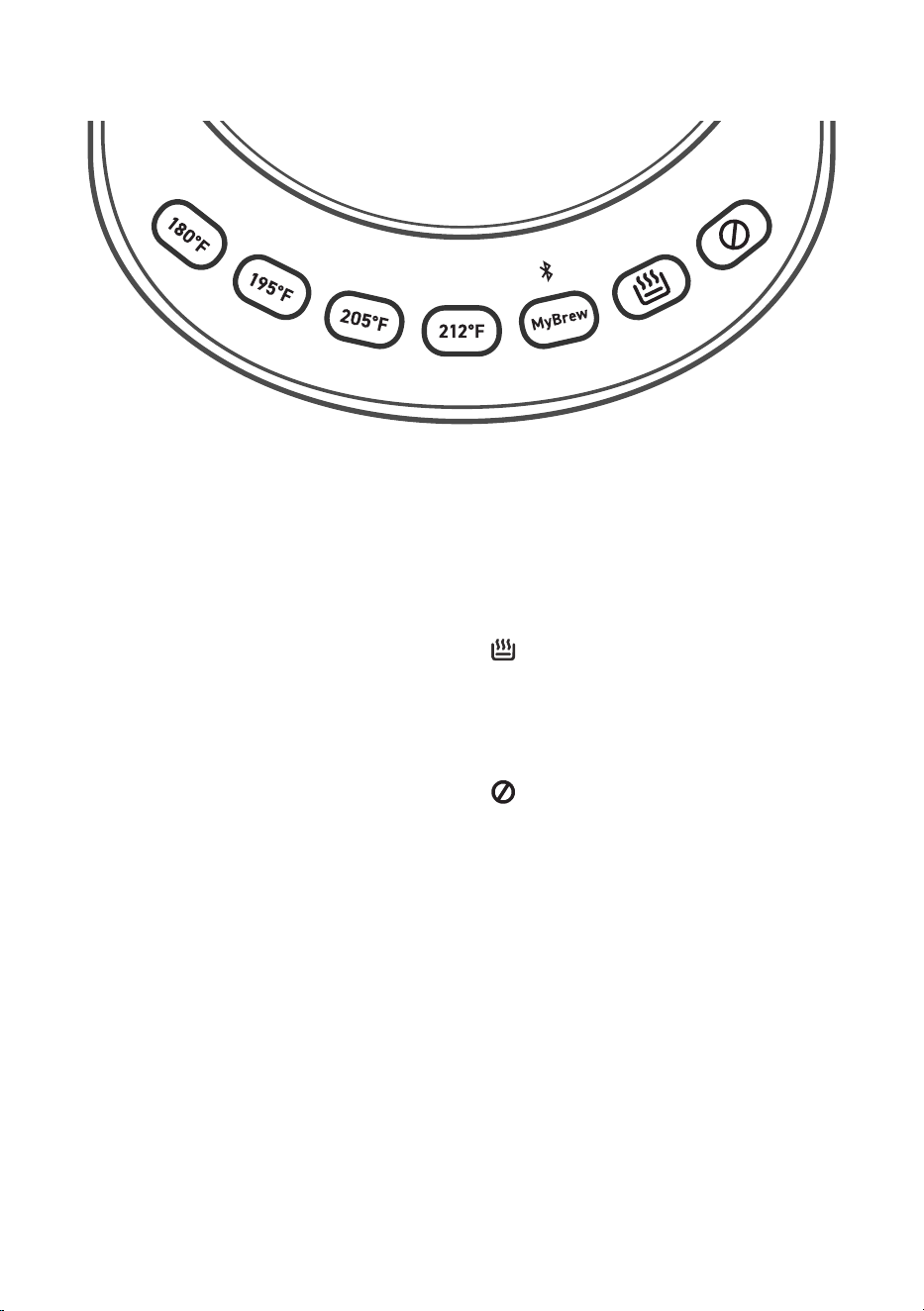
Controls
C
A
N
C
E
L
H
O
L
D
T
E
M
P
B
O
I
L
G
R
E
E
N
O
O
L
O
N
G
C
O
F
F
E
E
B
L
A
C
K
180°F GREEN
• Sets the kettle to 180°F / 82°C, the ideal
temperature for green tea.
195°F OOLONG
• Sets the kettle to 195°F / 91°C, the ideal
temperature for oolong tea.
205°F COFFEE
• Sets the kettle to 205°F / 96°C, the ideal
temperature for coee.
212°F BOIL BLACK
• Sets the kettle to 212°F / 100°C, the ideal
temperature for black tea.
MyBrew
• MyBrew’s default temperature is
140°F / 60°C.
• Use the VeSync app to change MyBrew’s
default temperature.
HOLD TEMP
• Starts or cancels Hold Temperature Mode
to maintain desired temperature
(see page 9).
CANCEL
• Press to turn the kettle o.
• Press and hold for 15 seconds to restore
the kettle to factory settings. This will also
disconnect any Bluetooth
®
connection,
and remove the kettle from the VeSync
app (see page 8).
8
BEFORE FIRST USE
Water Test VeSync App Setup
Perform the Water Test before using your
kettle to make sure it’s working properly.
Do not drink the water that is boiled during
this test.
1. Remove all packaging from your kettle
and its accessories.
2. Completely unravel the power cable
and place the power base on a flat, level,
stable surface.
3. Fill the kettle with water to the “MAX”
line, then put the lid on the kettle. Press
firmly to make sure the lid fits securely.
4. Press 212°F (“BOIL BLACK”).
5. The kettle will automatically turn o
once it has finished boiling the water.
Allow it to cool, then pour out the water.
Rinse thoroughly 2–3 times with cold
water.
1. To download the VeSync app, scan the
QR code or search “VeSync” in the Apple
App Store
®
or Google Play Store.
2. Open the VeSync app. If you already
have an account, tap Log In. To create a
new account, tap Sign Up.
3. Follow the in-app instructions to finish
setting up your smart kettle.
Note:
• To disconnect Bluetooth
®
, press and hold
the CANCEL button for 15 seconds. This will
restore the smart kettle’s default settings and
disconnect it from the VeSync app.
• To reconnect, please follow the instructions in
the VeSync app for adding a device.

9
USING YOUR SMART KETTLE
Making Pour-Over Coffee
1. Add at least ½ US cup / 118 mL of filtered
water to the kettle. Do not fill above the
“MAX” line. Wipe any water from the
outside of the kettle and the base.
2. Put the lid on the kettle and make sure
it fits securely. Place the kettle on the
power base.
3. Plug in the cord. The button lights will
blink, and the base will beep once.
4. Press a preset temperature button. The
button will light up, and the kettle will
start heating up the water.
1. Place the coee maker filter into the
decanter.
2. Add ground coee to the filter according
to your preference.
3. Heat water using the smart kettle.
4. Use the kettle to gently pour water over
the coee grounds using a slow spiral
motion. Pour just enough water to
saturate the grounds.
Note:
• Use filtered water for perfect pour-over
brewing.
• If you start the kettle without water in it, the
kettle will turn o and controls will be disabled.
See Boil-Dry Protection (page 10).
5. Optionally, press (“HOLD
TEMP”) any time before the kettle is
finished heating. This will turn on
Hold Temperature Mode, which will
automatically keep the kettle at the same
temperature for 30 minutes after heating
is finished. The button will stay lit during
that time.
Note:
• You can only select 1 preset at a time.
Note:
• The Hold Temperature time can be changed
from 5–60 minutes in the VeSync app.
(“HOLD TEMP”) will not turn on unless a preset
is selected.
• If you take the kettle o the base while Maintain
Hold Temperature Mode is activated, the
(“HOLD TEMP”) button will blink. After 60
seconds, the kettle will turn o.
• Press and hold for 5 seconds to turn Always
Hold Temp on/o (see page 11). When
Always Hold Temp is on, Hold Temp Mode will
automatically turn on whenever you select a
temperature preset.
Note:
• This spiral motion is to create “turbulence” in
the coee grounds, allowing the particles in the
coee to separate and release flavor.
• The water will cause the grounds to pu up,
which is called “blooming”. Some roasts will
bloom more than others.
6. When the water reaches the selected
temperature, the kettle will beep 3 times
and stop heating.
You’ll need a pour-over coee maker, such
as Cosori’s Original 8-Cup Pour-Over Coee
Maker.
5. Wait 30–45 seconds.
6. Use the kettle to pour water over the
coee grounds again using a slow spiral
motion. If water reaches the top of the
filter, stop and let it settle to the halfway
point, then begin pouring again until
you have the desired amount of coee.
7. When finished, remove the filter and
enjoy!
10
High Altitude Users
Boil-Dry Protection
Smart Kettle Sounds
Adjusting Lid Tightness
Altitude
Preset for
Boiling Water
3,881–9,255 ft /
1,183–2,820 m
205°F COFFEE
9,256 ft / 2,821 m
and above
195°F OOLONG
At higher elevations, water boils at a lower
temperature. You may need to use a
dierent preset.
Your kettle is equipped with boil-dry
protection. If there is less than ½ US cup /
118 mL of water in the kettle, the heat will
automatically shut o. Allow the kettle to cool,
then add more water before using again.
If all buttons blink and the kettle beeps,
remove the kettle from the base and let it cool.
The kettle will alert you by beeping 3
times when the water reaches the preset
temperature. The alerts can be turned o in
the product settings on the VeSync app. The
kettle will also beep once when plugged in or
when boil-dry protection is activated.
If you feel the kettle lid fits too loosely or
is too hard to take o, you can adjust the
tightness of the lid.
1. Take o the lid.
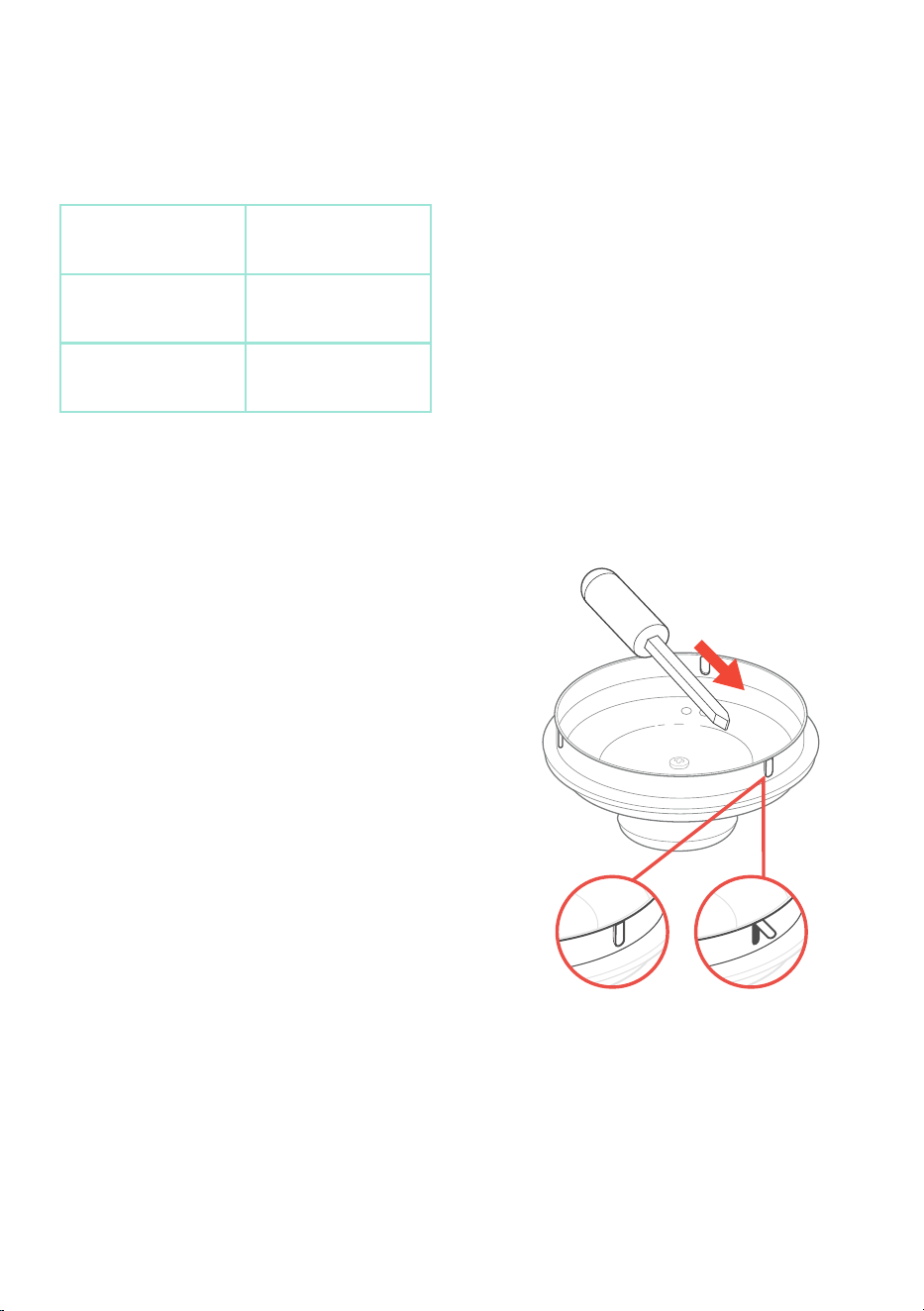
2. Use a tool to adjust the 3 tabs on the
kettle lid. [
Figures 1.1-1.2
]
a. If you push the tabs in, the lid will
fit more loosely, and will be easier
to put on and take o.
b. If you pull the tabs out, the lid will
fit more tightly, and will not come
o as easily.
3. After adjusting the tabs, put the lid back
on and take it o again to see if the fit is
correct. If not, adjust the tabs again until
the lid fits the way you prefer.
Figure 1.1 Figure 1.2

11
VeSync App Functions
The VeSync app allows you to access
additional smart kettle functions, including
those listed below.
Remote Control
• All smart kettle functions can be
controlled remotely.
• Boiling progress can be monitored from
a distance.
MyBrew Customization
• Customize the MyBrew preset by
choosing your own temperature.
• Baby Formula Mode allows your water to
cool to an ideal formula temperature after
boiling.
Hold Temp Customization
• Customize Hold Temperature Mode’s
duration.
• Activate Maintain Hold Temp to resume
Hold Temperature Mode when the smart
kettle is returned to the base.
Delay Start
• Schedule when you want your water to
boil.
• Delay Start can be programmed for up to
12 hours within the VeSync app.

12
CARE & MAINTENANCE
Cleaning
Descaling the Smart Kettle
1. Unplug the kettle and allow it to cool
before cleaning.
2. Wipe the kettle and base with a soft,
damp cloth. Make sure that the electric
socket on the underside of the kettle is
kept dry.
3. Dry all parts after every use.
1. Unplug the kettle and pour out all water.
Make sure the kettle is cool.
2. Squeeze half a lemon into the kettle,
or add ½ US cup / 118 mL of distilled
vinegar into the kettle.
3. If the kettle has thick scale buildup, scrub
the kettle’s inner walls with a non-
scratch scrub sponge.
Note: Never immerse kettle or power base in water.
Note: Do not use steel wool, as this can scratch
the kettle.
Note: For quick descaling, add 3 US tbsp / 44 mL of
baking soda to ½ US cup / 118 mL of vinegar into
the kettle. Swirl the mixture around until it coats the
walls of the kettle, wipe with a non-scratch sponge,
and pour the mixture out. This method will only
work for a thin layer of scale.
You should descale the kettle at least once
a week if you use it frequently. Descaling
removes any mineral deposits that have
built up inside the kettle. Always descale
the kettle before and after storing for long
periods of time.
4. Add 2 US cups / 473 mL of water. Boil the
mixture.
5. Pour out the mixture, then wipe o any
remaining scale with a non-abrasive
cloth, sponge, or cleaning brush.
6. Repeat as needed.

13
This device complies with Part 15 of the FCC
Rules. Operation is subject to the following
two conditions:
1. This device may not cause harmful
interference, and
2. This device must accept any
interference received, including
interference that may cause
undesired operation.
Any changes or modifications not expressly
approved by the party responsible for
compliance could void the user’s authority
to operate this equipment.
NOTE: This equipment has been tested and
found to comply with the limits for a Class B
digital device, pursuant to Part 15 of the FCC
Rules. These limits are designed to provide
reasonable protection against harmful
interference in a residential installation.
This equipment generates, uses and can
radiate radio frequency energy and, if not
installed and used in accordance with the
instructions, may cause harmful interference
to radio communications. However, there
is no guarantee that interference will not
occur in a particular installation. If this
equipment does cause harmful interference
to radio or television reception, which can
be determined by turning the equipment
o and on, the user is encouraged to try to
correct the interference by one or more of
the following measures:
• Reorient or relocate the receiving
antenna.
• Increase the separation between the
equipment and receiver.
• Connect the equipment into an
outlet on a circuit dierent from that
to which the receiver is connected.
• Consult the dealer or an experienced
radio/TV technician for help.
FCC Caution: Any changes or modifications
not expressly approved by the party
responsible for compliance could void the
user’s authority to operate this equipment.
This equipment complies with FCC
radiation exposure limits set forth for an
uncontrolled environment. End users must
follow the specific operating instructions
for satisfying RF exposure compliance. To
maintain compliance with FCC RF exposure
compliance requirements, please follow
operation instructions as documented in
this manual. This transmitter must not be
co-located or operating in conjunction
with any other antenna or transmitter.
This equipment should be installed and
operated with a minimum distance of 20
cm between the radiator and your body. The
availability of some specific channels and/
or operational frequency bands are country
dependent and are firmware programmed
at the factory to match the intended
destination. The firmware setting is not
accessible by the end user.
Arovast Corporation hereby declares that this
equipment is in compliance with the FCC
rules. The declaration of conformity may
be consulted in the support section of our
website, accessible from www.cosori.com
FEDERAL
COMMUNICATION
COMMISSION
INTERFERENCE
STATEMENT
FCC RADIATION
EXPOSURE
STATEMENT
FCC SDOC
SUPPLIER’S
DECLARATION OF
CONFORMITY

14
Product
Smart Electric
Gooseneck Kettle
Models
CS108-NK,
CS108-NK-RBB
For your own reference, we strongly
recommend that you record your order ID and
date of purchase.
Order ID
Date of Purchase
WARRANTY INFORMATION
COSORI Limited Product Warranty
Register your products at https://warranty.cosori.
com/warranty to stay up to date with important
product information such as product updates,
limited warranties, usage and maintenance
recommendations, and notifications concerning
safety warnings or product recalls. Registration is
not required to claim your limited warranty.
Two (2) Year Limited Consumer Product
Warranty
Arovast Corporation (“Arovast”) warrants that the
product shall be free from defects in material and
workmanship for a period of 2 years from the date
of original purchase (“Limited Warranty Period”),
provided the product was used in accordance with
its use and care instructions (e.g. in the intended
environment and under normal circumstances).
Your Limited Warranty Benefits
During the Limited Warranty Period and subject
to this limited Warranty Policy, Arovast will, in its
sole and exclusive discretion, either (i) refund the
purchase price if the purchase was made directly
from the online COSORI store, (ii) repair any
defects in material or workmanship, (iii) replace the
product with another product of equal or greater
value, or (iv) provide store credit in the amount of
the purchase price.
Who Is Covered?
This limited warranty extends only to the original
consumer purchaser of the product and is not
transferable to any subsequent owner of the
product, regardless of whether the product
transferred ownership during the specified term of
the limited warranty.
The original consumer purchaser must provide
verification of the defect or malfunction and
proof of the date of purchase to claim the Limited
Warranty Benefits.
Be Aware of Unauthorized Dealers or Sellers
This limited warranty does not extend to
products purchased from unauthorized dealers
or sellers. Arovast’s limited warranty only extends
to products purchased from authorized dealers or
sellers that are subject to Arovast’s quality controls
and have agreed to follow its quality controls.
Please be aware, products purchased from an
unauthorized website or dealer may be counterfeit,
used, defective, or may not be designed for use in
your country. You can protect yourself and your
products by making sure you only purchase from
Arovast or its authorized dealers.
If you have any questions about a specific seller, or
if you think you may have purchased your product
from an unauthorized seller, please contact our
Customer Support via [email protected].
What’s Not Covered?
• Normal wear and tear, including parts that
might wear out over time (e.g. batteries, filters,
cleaning brush, essential oil pads, etc.).
• If the proof-of-purchase has been altered in
any way or is made illegible.
• If the model number, serial number or
production date code on the product has been
altered, removed or made illegible.
• If the product has been modified from its
original condition.
• If the product has not been used in accordance
with directions and instructions in the user
manual.
• Damages caused by connecting peripherals,
additional equipment or accessories other than
those recommended in the user manual.
• Damages or defects caused by accident,
abuse, misuse, or improper or inadequate
maintenance.
• Damages or defects caused by service or repair
of the product performed by an unauthorized
service provider or by anyone other
than Arovast.
• Damages or defects occurring during
commercial use, rental use, or any use for
which the product is not intended.

15
• If the unit has been damaged, including but
not limited to damage by animals, lightning,
abnormal voltage, fire, natural disaster,
transportation, dishwasher, or water (unless the
user manual expressly states that the product is
dishwasher-safe).
• Incidental and consequential damages.
• Damages or defects exceeding the cost of the
product.
Claiming Your Limited Warranty Service in 5
Simple Steps:
1. Make sure your product is within the specified
limited warranty period.
2. Make sure you have a copy of the invoice and
order ID or proof-of-purchase.
3. Make sure you have your product. DO NOT
dispose of your product before contacting us.
4. Contact our Customer Support team
via [email protected].
5. Once our Customer Support team has approved
your request, please return the product with a
copy of the invoice and order ID.
Sole and Exclusive Remedy
THE FOREGOING LIMITED WARRANTY
CONSTITUTES AROVAST CORPORATION’S
EXCLUSIVE LIABILITY, AND YOUR SOLE AND
EXCLUSIVE REMEDY, FOR ANY BREACH OF ANY
WARRANTY OR OTHER NONCONFORMITY OF
THE PRODUCT COVERED BY THIS LIMITED
PRODUCT WARRANTY STATEMENT. THIS LIMITED
WARRANTY IS EXCLUSIVE, AND IN LIEU OF ALL
OTHER WARRANTIES. NO EMPLOYEE OF AROVAST
CORPORATION OR ANY OTHER PARTY IS
AUTHORIZED TO MAKE ANY WARRANTY IN
ADDITION TO THE LIMITED WARRANTY IN THIS
LIMITED PRODUCT WARRANTY STATEMENT.
Disclaimer of Limited Warranties
TO THE FULLEST EXTENT PROVIDED BY
APPLICABLE LAW, EXCEPT AS WARRANTED IN THIS
LIMITED PRODUCT WARRANTY POLICY, AROVAST
CORPORATION PROVIDES THE PRODUCTS YOU
PURCHASE FROM AROVAST CORPORATION “AS
IS” AND AROVAST CORPORATION HEREBY
DISCLAIMS ALL WARRANTIES OF ANY KIND,
WHETHER EXPRESS OR IMPLIED, STATUTORY, OR
OTHERWISE, INCLUDING BUT NOT LIMITED TO
ANY WARRANTIES OF MERCHANTABILITY, NON-
INFRINGEMENT, AND FITNESS FOR PARTICULAR
PURPOSE.
Limitations of Liability
TO THE FULLEST EXTENT PROVIDED BY
APPLICABLE LAW, IN NO EVENT WILL AROVAST
CORPORATION, ITS AFFILIATES, OR THEIR
LICENSORS, SERVICE PROVIDERS, EMPLOYEES,
AGENTS, OFFICERS, OR DIRECTORS BE LIABLE
FOR:
(a) DAMAGES OF ANY KIND ARISING OUT OF OR
IN CONNECTION WITH PRODUCTS PURCHASED
FROM AROVAST CORPORATION IN EXCESS OF
THE PURCHASE PRICE PAID BY THE PURCHASER
FOR SUCH PRODUCTS, OR
(b) INDIRECT, SPECIAL, INCIDENTAL,
CONSEQUENTIAL, OR PUNITIVE DAMAGES
EVEN IF AROVAST CORPORATION OR ONE OF
ITS SUPPLIERS HAS BEEN ADVISED OF THE
POSSIBILITY OR LIKELIHOOD OF SUCH DAMAGES.
AND REGARDLESS OF WHETHER CAUSED BY
TORT (INCLUDING NEGLIGENCE), BREACH OF
CONTRACT, OR OTHERWISE. OUR LIABILITY
SHALL UNDER NO CIRCUMSTANCES EXCEED
THE ACTUAL AMOUNT PAID BY YOU FOR THE
DEFECTIVE PRODUCT, NOR SHALL WE UNDER
ANY CIRCUMSTANCES BE LIABLE FOR ANY
CONSEQUENTIAL, INCIDENTAL, SPECIAL OR
PUNITIVE DAMAGES OR LOSSES, WHETHER
DIRECT OR INDIRECT.
EXCEPT AS COVERED BY THIS LIMITED
PRODUCT WARRANTY STATEMENT, AROVAST
CORPORATION SHALL NOT BE LIABLE FOR
COSTS ASSOCIATED WITH THE REPLACEMENT
OR REPAIR OF PRODUCTS PURCHASED FROM
IT, INCLUDING, BUT NOT LIMITED TO, LABOR,
INSTALLATION, OR OTHER COSTS INCURRED
BY THE USER AND, IN PARTICULAR, ANY COSTS
RELATING TO THE REMOVAL OR REPLACEMENT
OF ANY PRODUCT.
OTHER RIGHTS YOU MAY HAVE
SOME JURISDICTIONS DO NOT ALLOW FOR:
(1) EXCLUSION OF IMPLIED WARRANTIES; (2)
LIMITATION ON THE DURATION OF IMPLIED
WARRANTIES; AND/OR (3) EXCLUSION OR
LIMIATION OF INCIDENTAL OR CONSEQUANTIAL
DAMAGES; SO THE DISCLAIMERS IN THIS
POLICY MAY NOT APPLY TO YOU. IN THESE
JURISDICTIONS YOU HAVE ONLY THE IMPLIED
WARRANTIES THAT ARE EXPRESSLY REQUIRED TO
BE PROVIDED IN ACCORDANCE WITH APPLICABLE
LAW. THE LIMITATIONS OF WARRANTIES,
LIABILITY, AND REMEDIES APPLY TO THE
MAXIMUM EXTENT PERMITTED BY LAW.

16
ALTHOUGH THIS LIMITED WARRANTY GIVES
YOU SPECIFIC LEGAL RIGHTS, YOU MAY HAVE
OTHER RIGHTS IN YOUR JURISDICTION. THIS
STATEMENT OF LIMITED WARRANTY IS SUBJECT
TO APPLICABLE LAWS THAT APPLY TO YOU AND
THE PRODUCT. PLEASE REVIEW THE LAWS IN
YOUR JURISDICTION TO UNDERSTAND YOUR
RIGHTS FULLY.
CHANGES TO THIS POLICY
We may change the terms and availability of this
limited warranty at our discretion, but any changes
will not be retroactive.
This warranty is made by:
Arovast Corporation
1202 N. Miller St., Suite A
Anaheim, CA 92806
If you have any questions or concerns about your new product, please contact our helpful
Customer Support Team.
*Please have your invoice and order ID ready before contacting Customer Support.
Arovast Corporation
1202 N. Miller St., Suite A
Anaheim, CA 92806
Support Hours
Mon–Fri, 9:00 am–5:00 pm PST/PDT
Email: [email protected]
Toll-Free: (888) 402-1684
CUSTOMER SUPPORT
Trademark Information
Google Play is a trademark of Google LLC.
Apple App Store is a trademark of Apple Inc.
The Bluetooth
®
word mark and logos are registered trademarks owned by Bluetooth SIG, Inc.
and any use of such marks by Arovast Corporation is under license. Other trademarks and trade
names are those of their respective owners.

NOTES

NOTES

NOTES

Questions or Concerns?
Mon–Fri, 9:00 am–5:00 pm PST/PDT
[email protected] | (888) 402-1684
MF032323AC-M1_0521CS108-NK