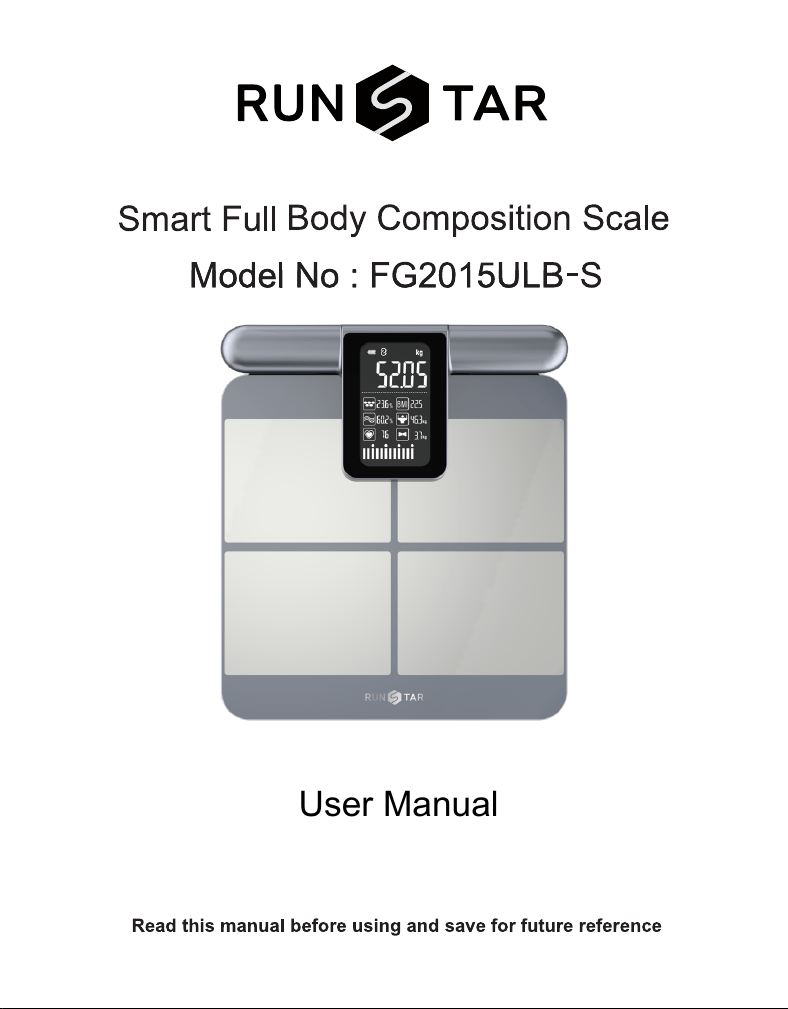
User Manual

• Do not disassemble, squeeze, puncture, or short-circuit the device.
• Do not put the device into water or fire.
• Do not expose the device to an environment at the temperature of higher than 60℃ (140°F).
• This device contains lithium batteries and should be placed away from heat sources (heaters, stoves,
fireplaces, etc.).
• This device is not water-proof. Do not use it in rainy days or wash it directly with water, otherwise it
will cause damage.
• Do not disassemble or repair this device by yourself. Improper o peration during maintenance may
cause battery explosion.
• This device is not intended for people (including children) who are weak, slow to respond or have
mental disorders. Unless they are supervised or instructed by the person responsible for their safety
on how to use the device.
• Keep the device out of the reach of children. Supervise children not to play with the device.
Important Notice:
All measurements provided by this smart body fat scale are for reference only and should not be used
for medical diagnosis. The following factors may affect measurement accuracy:
• Measurements may be inaccurate if you are a minor.
• If you are pregnant, we recommend using Weight-Only Mode to avoid any potential effects from the
low-level electrical currents used in standard body composition measurements.
• Do not use this device if you have implanted a Cardiac Pacemaker or any other medical device.
Maintenance
• Carefully wipe the device with a clean, soft cloth.
• Do not use any detergent.
Caution:
Charging the Device:
• Use a USB charger (5V/1A) to charge the scale. Do not use a higher voltage, as it may damage
the scale.
• Avoid overcharging. Unplug the charger once the battery is fully charged.
• Keep the scale away from children while charging.
Charging Environment:
• Charge the scale at a suitable room temperature. Avoid charging in extremely hot or cold environments.
• Do not leave the scale charging overnight, as prolonged charging and unstable voltage may harm
the battery.
1. WARNINGS
2
2. OVERVIEW
•Press side button (Reset/Power Button) to wake scale (shipped in sleep mode).
•Place on hard, flat surface (no carpet). Activates at 5kg.
•Charge 2 hours (use 5V/1A adapter) before first use.
First-Time Setup:
Thank you for choosing this smart body fat scale.
1
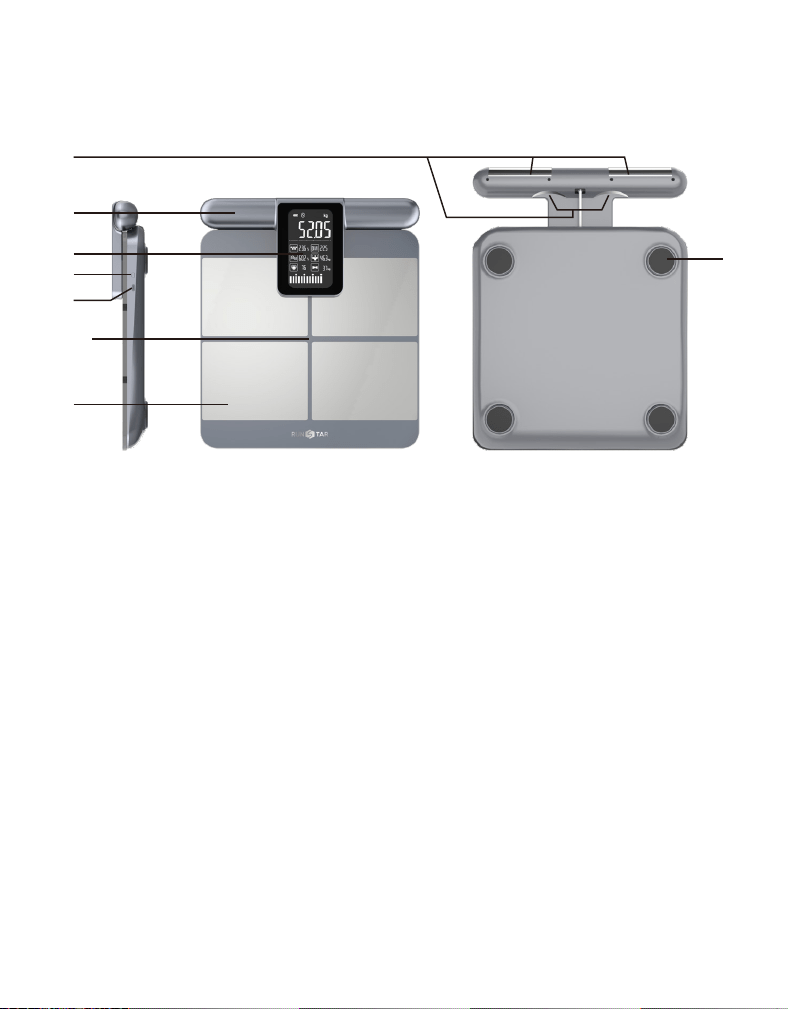
1. Metal electrode on handle 2. Measuring handle
3. Display screen 4. Reset/Power button
5. USB Type-C charging port 6. Tempered Glass
7. Foot Electrode 8. Non-Slip & Anti-Tip Feet
2
3
5
4
6
8
7
3
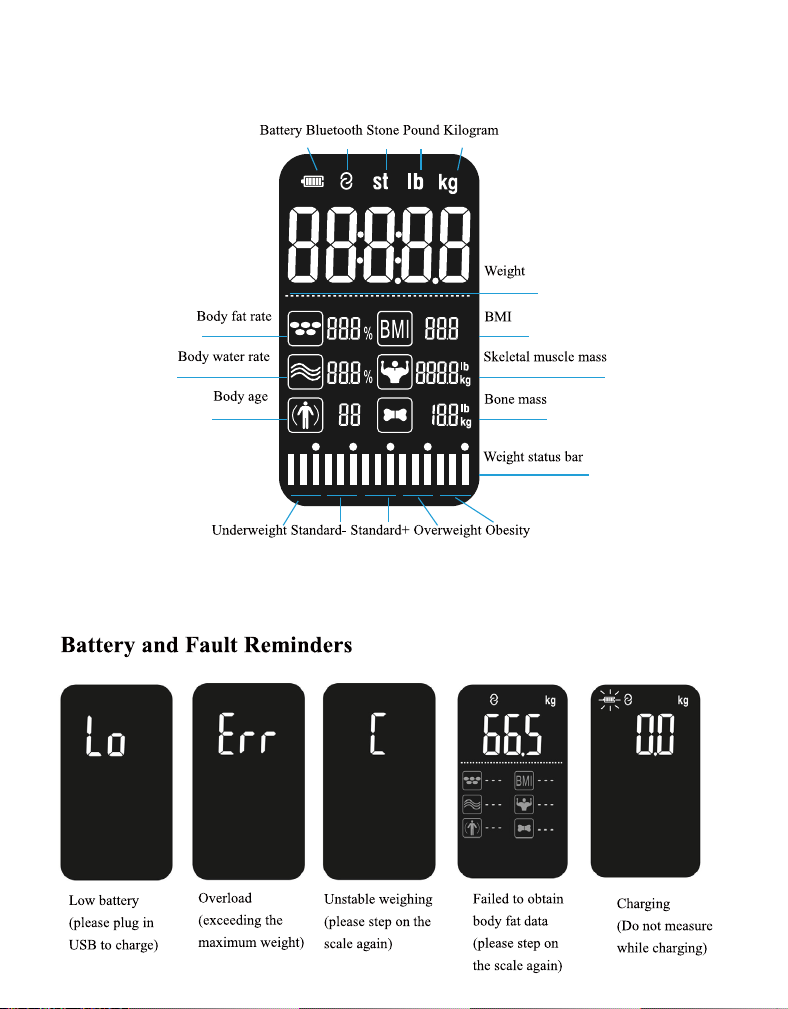
3. DISPLAY SCREEN
Note: display varies by model. Refer to actual product.
4
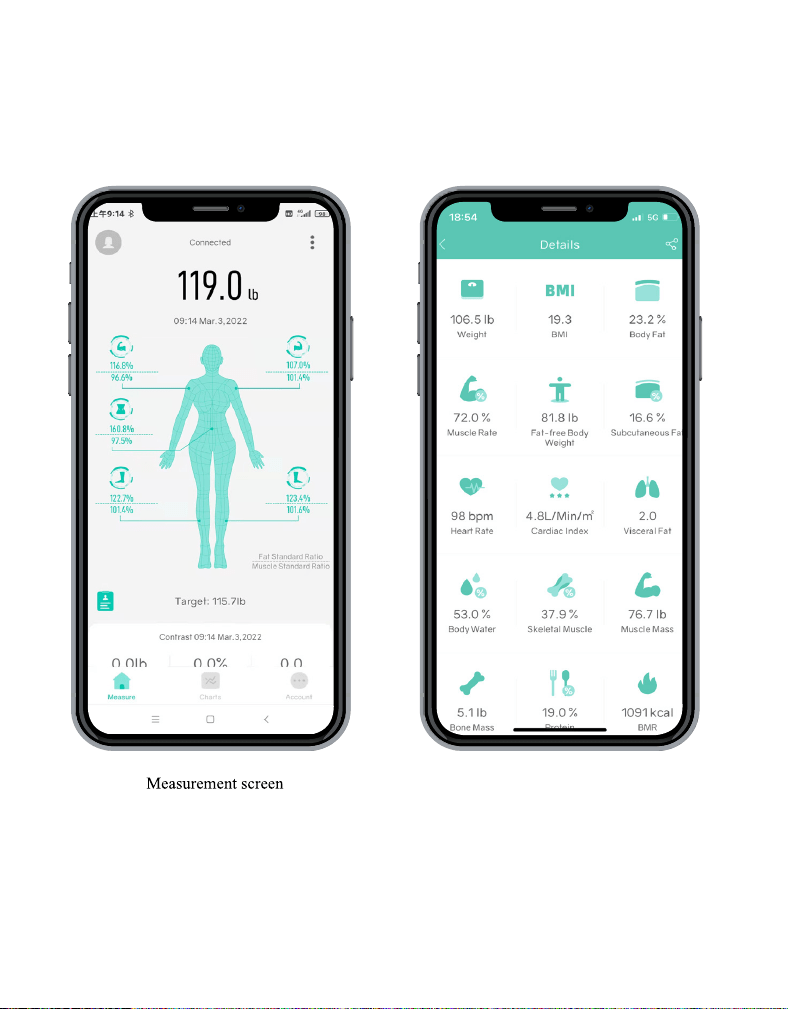
4. STARFIT APP
More than 28 types of body data
Starfit App can not only track your weight changes and record your body mass index, but also provide
other test results, make an analysis from the cloud, and give a health report and improvement
suggestions with the smart body fat scale.
Note: As we continue to improve the App, some features may change in future updates.
Please refer to the latest App version you have installed for the above features.
5
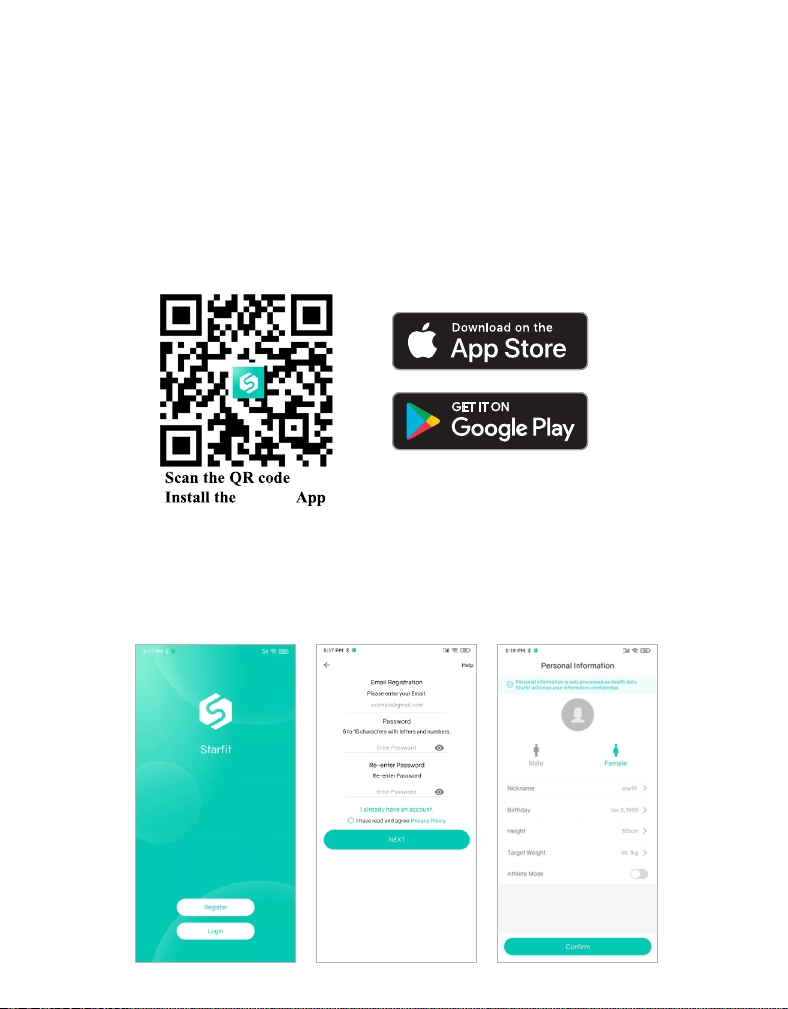
4.2 Regitser the Starfit app
Search for " Starfit " in App Store or Google play, or scan the QR code below to download the App.
If you use WeChat to scan the QR code, click on the upper right corner on the screen and choose to
open it in the browser. App downloaded from other platform or source may be unusable.
Support devices:
• iOS 8.0 and above.
• Android 4.3 and above and equipped with Bluetooth 4.0.
※ iPad and tablets are not supported yet.
Use your email address to register a Starfit account or simply log in with your Apple ID or Google
account. Fill in your personal information to complete.
Note: Entering incorrect gender, age, or height information may result in inaccurate measurement
results
Starfit
6
4.1 Install the Starfit App
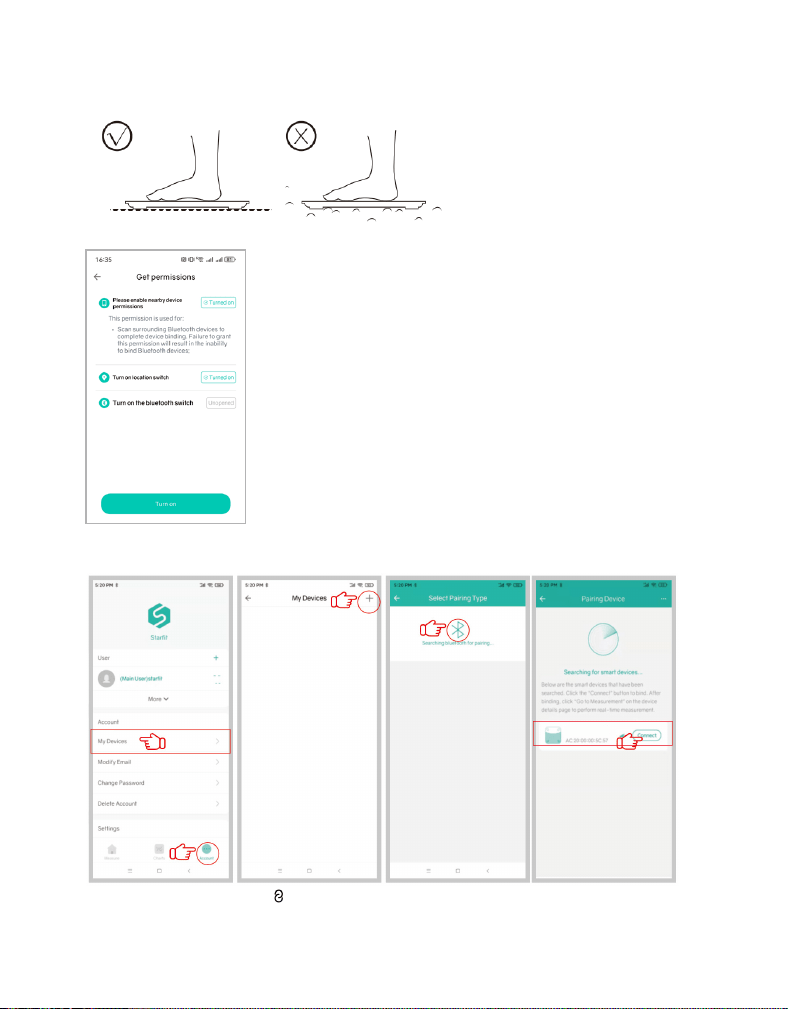
4.3 Connect the Scale with Starfit app
① Place the scale on a hard, flat,non-carpeted floor.
② Turn on Bluetooth/Network/Location on your phone and press the Power button to start the scale.
③ Open Starfit, click 'Account' → 'MyDevice' → '+' → 'Searching Bluetooth for pairing' to find the
scale 'Runstar-R7' to pair. And now your phone is connected to the scale.
Once connected, the indicator " " will appear on the scale screen, and "Connected" will be shown at
the top of the "Measure" page in the app. lf "Disconnected" is displayed, it indicates a failed pairing;
please repeat the steps above.
Runstar-R7
7
5. START MEASURING
5.2 Measuring steps
5.1 Quick start guide
First use:
• Press power button until display "0.0".
• Step onto the scale and hold the handle properly with both hands.
Normal use:
• Just step on. Hold handle for full stats.
Errors:
• Wrong weight? Step on only after "0.0" appears.
• Missing body fat data? Grip the handle correctly once you step on the scale.
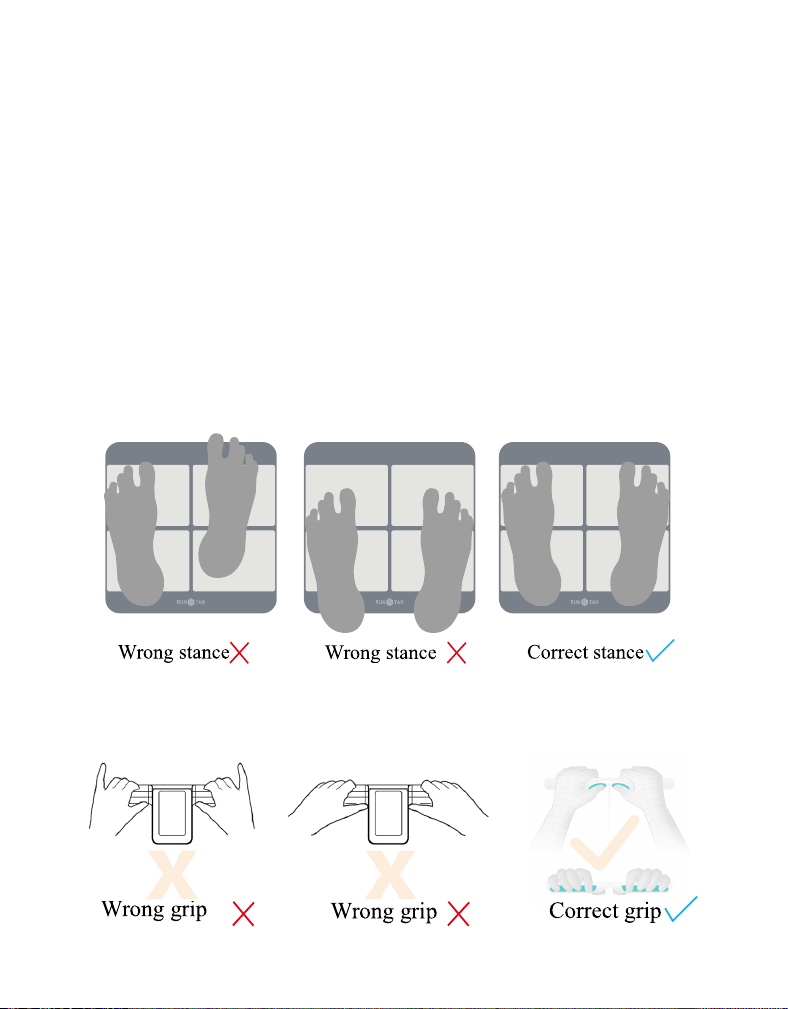
① Stand with your feet apart, with the soles of your feet fully touching the corresponding electrodes on
the scale.
② Hold and lift the handle, ensuring: Thumbs touch the electrodes below the display; Fingers contact the
rear electrodes.
8
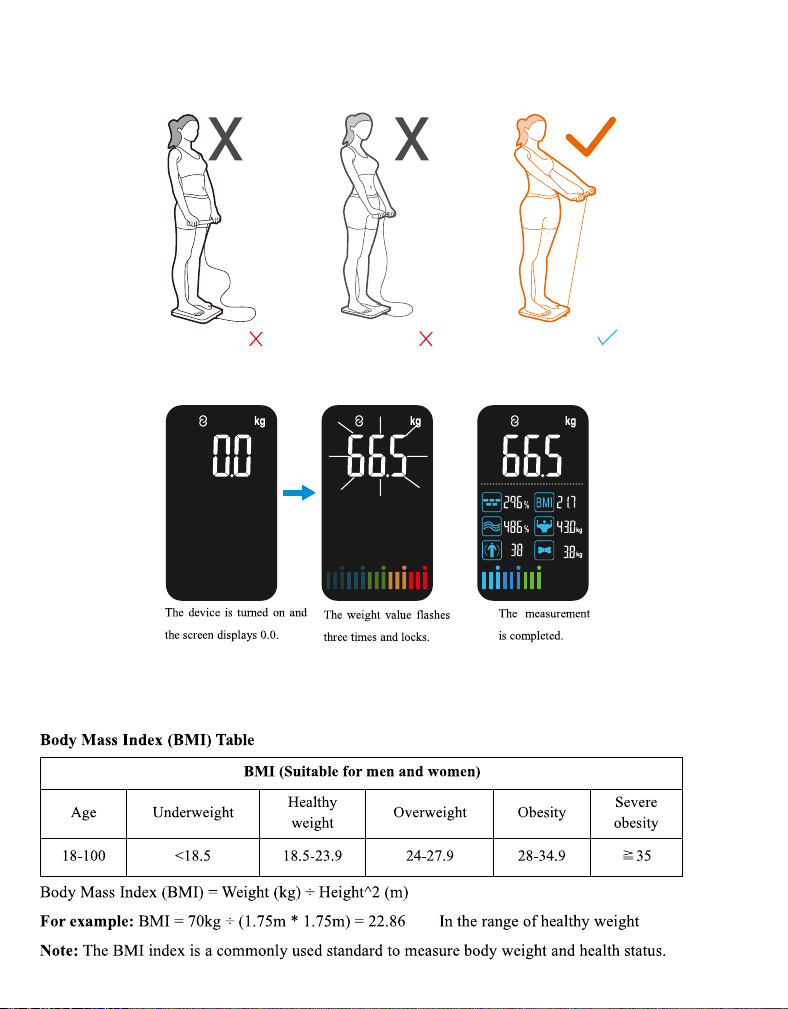
③ Extend arms forward at a 30°- 45° angle from your body; Keep legs slightly apart (don't let thighs touch)
④ Remain motionless for 20+ seconds until all 8 metrics appear on display - full 28 body measurements
available in app.
⑤ The scale will automatically shut down after displaying for 10 seconds.
Note: If you are not barefeet or if your feet are excessively dry, or if your weighing posture is incorrect,
only your weight and BMl can be measured.
Wrong Posture Wrong Posture Correct Posture
9
6. UNLOCK MORE STARFIT APP FEATURES
6.1 View Share/Print a analysis report
6.2 Add and Switch Users
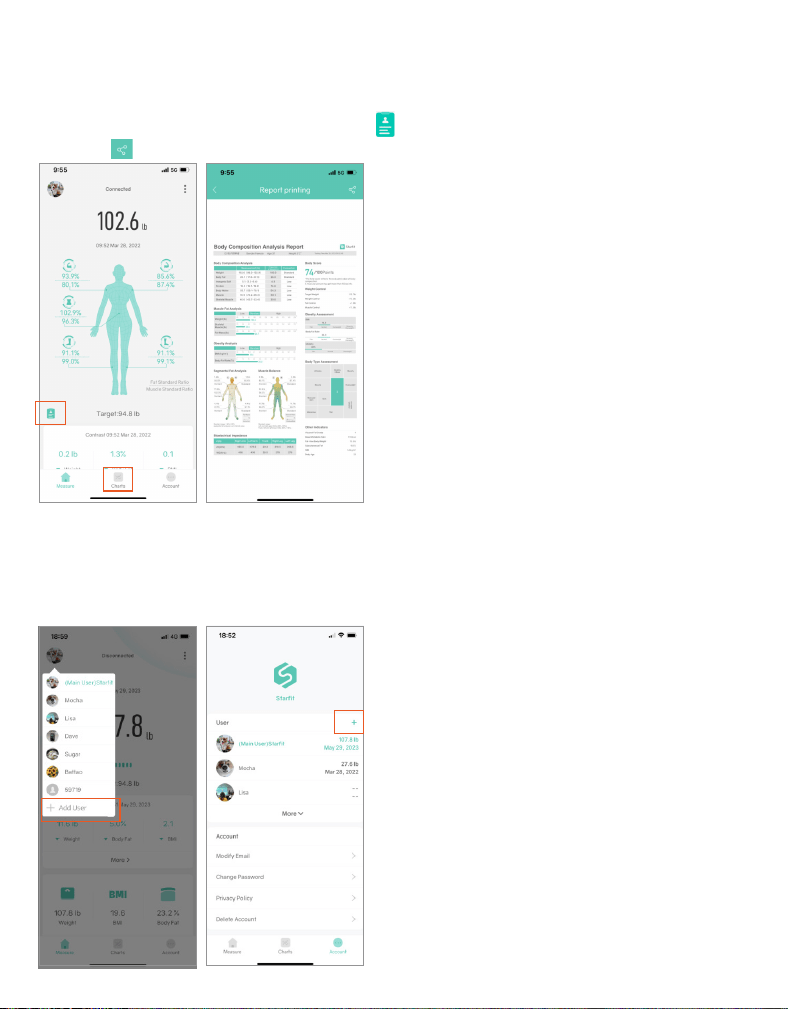
Get a comprehensive analysis report by click the ' ' or find the data you need in 'Charts' → 'User Data',
and click ' ' in the upper right corner to print or share.
10
Click the user avatar in the upper left corner of the 'Measure' page --> '+Add User', or click 'Account' -->
'User' --> '+' to add personal data. The smart scale can identify which user is stepping on the scale and will
remind the user to switch to the correct profile. Please note that it will be invalid if the weight variance is
less than 2 kg.
6.3 Baby Mode
6.4 Track Your Data
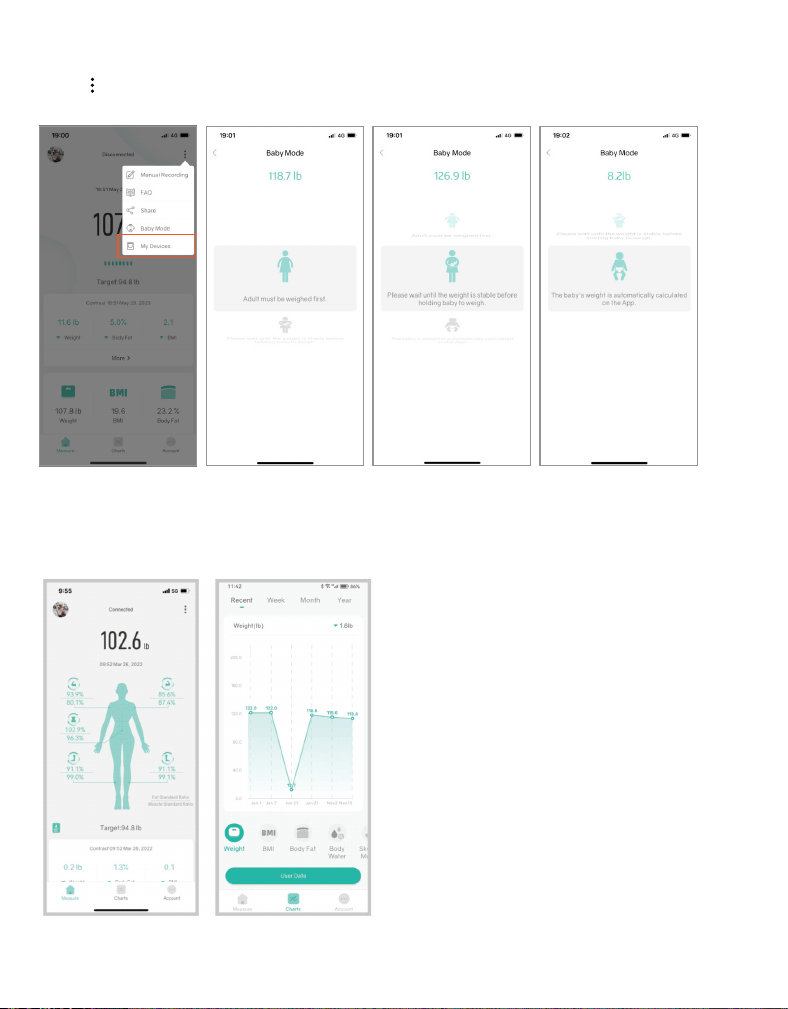
Click ' '--> 'Baby Mode'. An adult should step on the scale to weigh first. After the scale gets the weight,
please step off and hold the baby to weigh again. Starfit will automatically calculate the baby’s weight.
11
Click 'Charts' to view past measurement records in the form of a curve chart. Click on 'User Data' to view
past records of weight, BMI, Muscle Mass, Bone Mass, etc.. You can also delete data or compare data from
different dates.
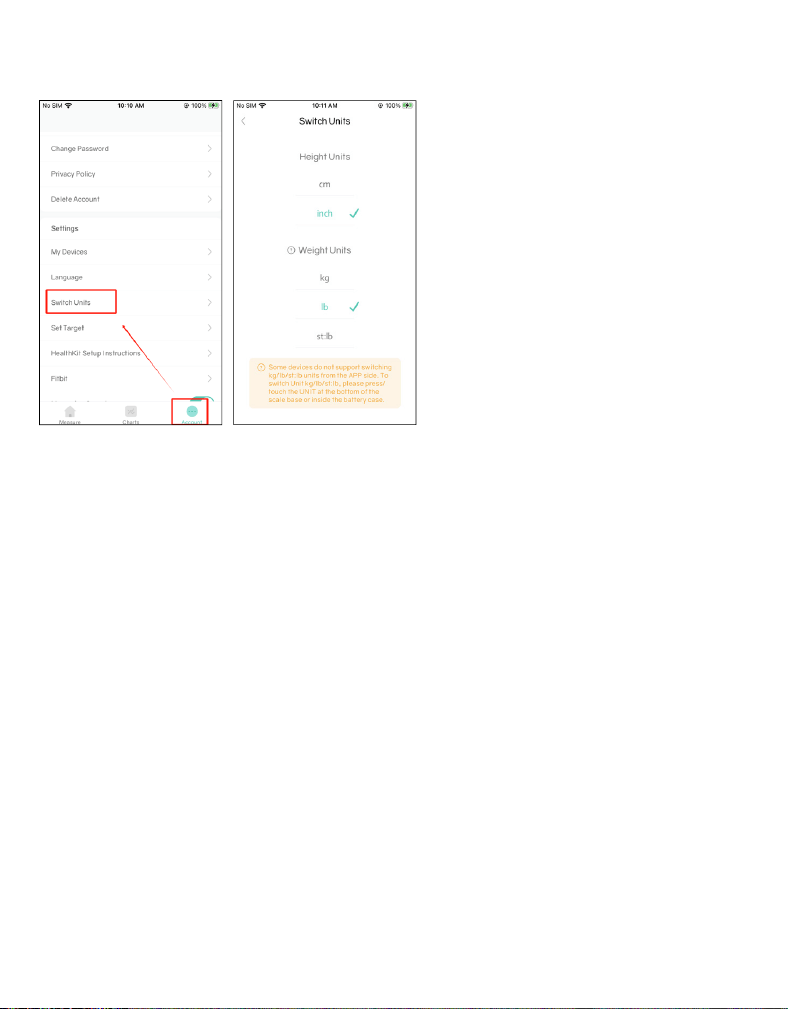
6.5 Switch Units
Important Tips:
FREQUENTLY ASKED QUESTIONS
Click 'Account'--> 'Switch Units'.
12
1.For the first use, connect the scale to the Starfit app to access all functions and measurement data.
If not connected, the scale will only measure weight and BMI.
2.In order to obtain accurate measurement results, users should remove shoes and socks and stand barefoot
on the scale. Failure to do so will result in the scale measuring only weight and BMI.
3.Avoid mixing connected mode and offline mode during measurement. To prevent data loss, it is
recommended to maintain consistency by either staying in offline mode or connected mode throughout
the entire measurement process.
4.When multiple users use the body fat scale, ensure the correct user is selected in the Starfit app before
weighing. Significant differences from the last recorded measurement for the current user may cause the
scale to only provide weight and BMI data.
1.Scale failed to connect.
•Make sure the scale is powered on and the Bluetooth on your smart phone is turned on.
•Check the version of your smartphone, it must be iOS 8.0 or higher/Android 6.0 or higher.
•Make sure your phone allows the App to use Bluetooth. If not, please turn it on in the phone settings.
•Delete the device in APP and reconnect again.

13
2.No body fat data after weighing.
•Make sure the scale is connected with the APP
•The user must step onto the scale with bare feet.
•Make sure your feet and the scale are both dry.
•Make sure your measuring posture is correct and stand steadily on the scale for at least 20s.
•Check if the scale is connected with a different device.
3.Incorrect weight data.
•To ensure accurate measurements, it is essential to place the scale on a hard and flat surface.
This provides a stable foundation for the scale and helps maintain measurement precision.
•Before using the scale, please inspect each foot mat located on the back of the scale. Ensure that there is
no debris or obstructions stuck to the bottom of the mats
• Remove and reinstall the batteries before taking another measurement.
4.Recalibrate the scale.
•Remove and reinstall the batteries
•Step on the scale and then step off until it displays "0.00".
5. The scale does not turned on.
• Press the Reset/Power on button.
• Charge the scale.
• If still doesn't work, contact RunStar customer service team for a new replacement.

14
FCC Statement
Operation is subject to the following two conditions:
(1) This device may not cause harmful interference.
(2) This device must accept any interference received, including interference that may cause undesired
operation.
Note: This equipment has been tested and found to comply with the limits for a Class B digital device,
pursuant to part 15 of the FCC Rules. These limits are designed to provide reasonable protection against
harmful interference in a residential installation.
This equipment generates, uses and can radiate radio frequency energy and, if not installed and used in
accordance with the instructions, may cause harmful interference to radio communications. However,
there is no guarantee that interference will not occur in a particular installation. If this equipment does
cause harmful interference to radio or television reception, which can be determined by turning the
equipment off and on, the user is encouraged to try to correct the interference by one or more of the
following measures:
Reorient or relocate the receiving antenna.
• Increase the separation between the equipment and receiver.
• Connect the equipment into an outlet on a circuit different from that to which the receiver is connected.
• Consult the dealer or an experienced radio/TV technician for help.
15
Battery Advice
Disposal
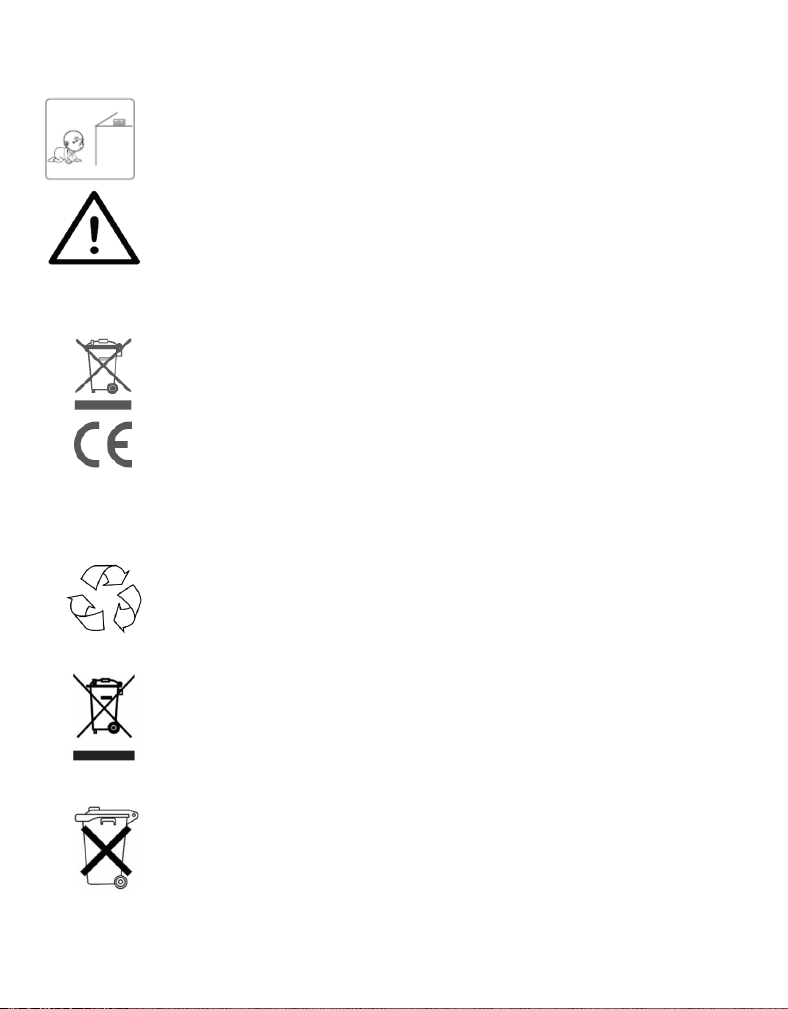
※Keep the scale far away from children to keep them safe and prevent accidents.
※Keep the batteries and other small parts securely out of reach by children to prevent
the potentially fatal risk of accidental ingestion.
※Do not expose the battery to heat or fire, which will easily cause an explosion.
※For your safety, refrain from using the scale if you suspect or detect a battery leakage.
※Ensure responsible disposal of waste electrical products by refraining from disposing
of them with household waste. Instead, please prioritize recycling at designated
facilities, where available. For guidance on proper recycling methods, kindly consult
your local Authority or retailer for expert advice on recycling procedures. Together,
let's contribute to a sustainable future by disposing of electrical products in an
environmentally conscious manner.
※The packaging material is recyclable. Please dispose of it in an environmentally
protective way or take it to a recycling center.
※Please dispose of the device in an environmentally protective way or take it to
The recycling center for used electrical and electronic devices. You can obtain more
information from your local authorities.
※To protect the environment, the battery cannot be disposed of in normal household
waste. Please separate it from the device before disposing or take it to a suitable
collection area. For more information, please focus on the relevant statutory
regulations governing the disposal of batteries.