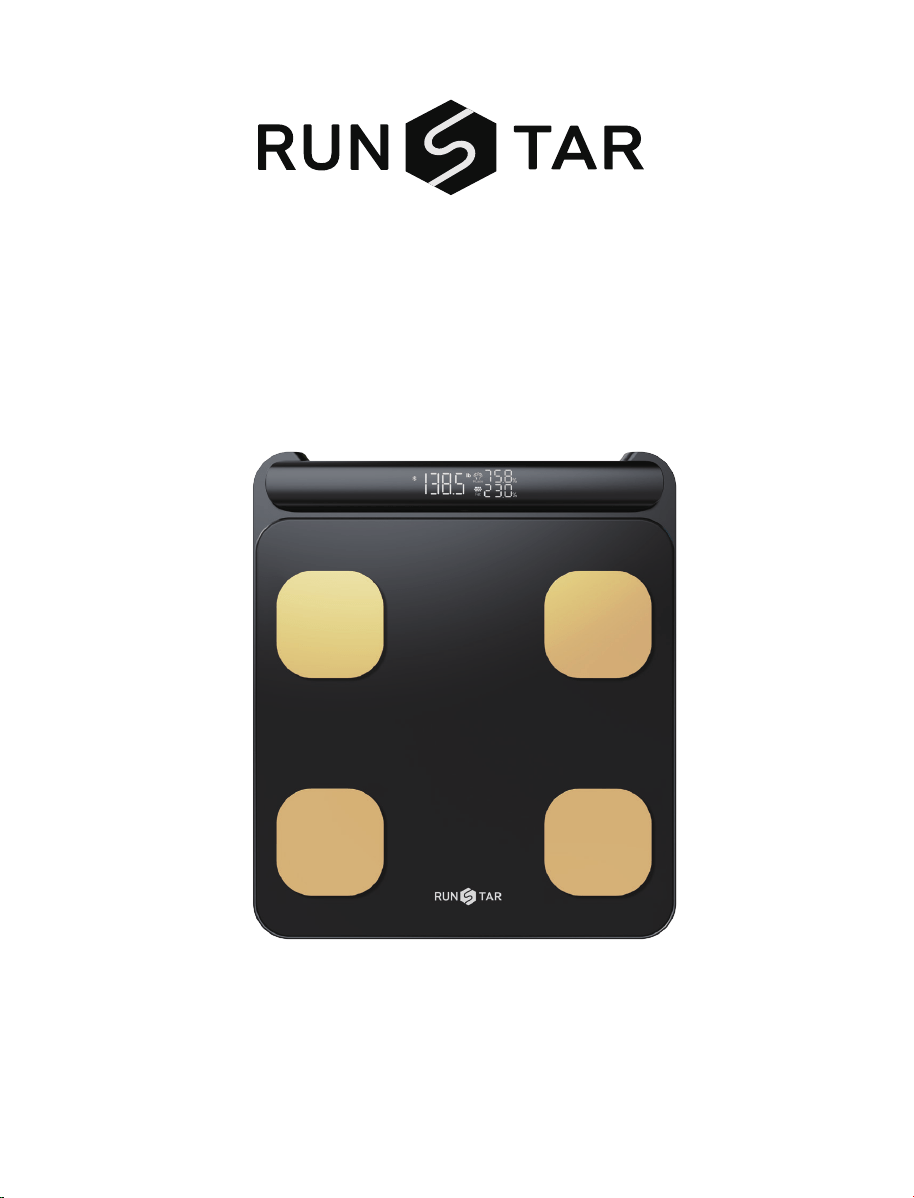
Smart Body
Composition Scale
User Manual
Model NO: FG2202-B
FCC ID:2AP3Q-FG2202WB
Read this manual before using and save for future reference
1
Visiting https://vip.runstar.store or scan the QR code below or to
register and get lifetime warranty:
Quick Start Guide
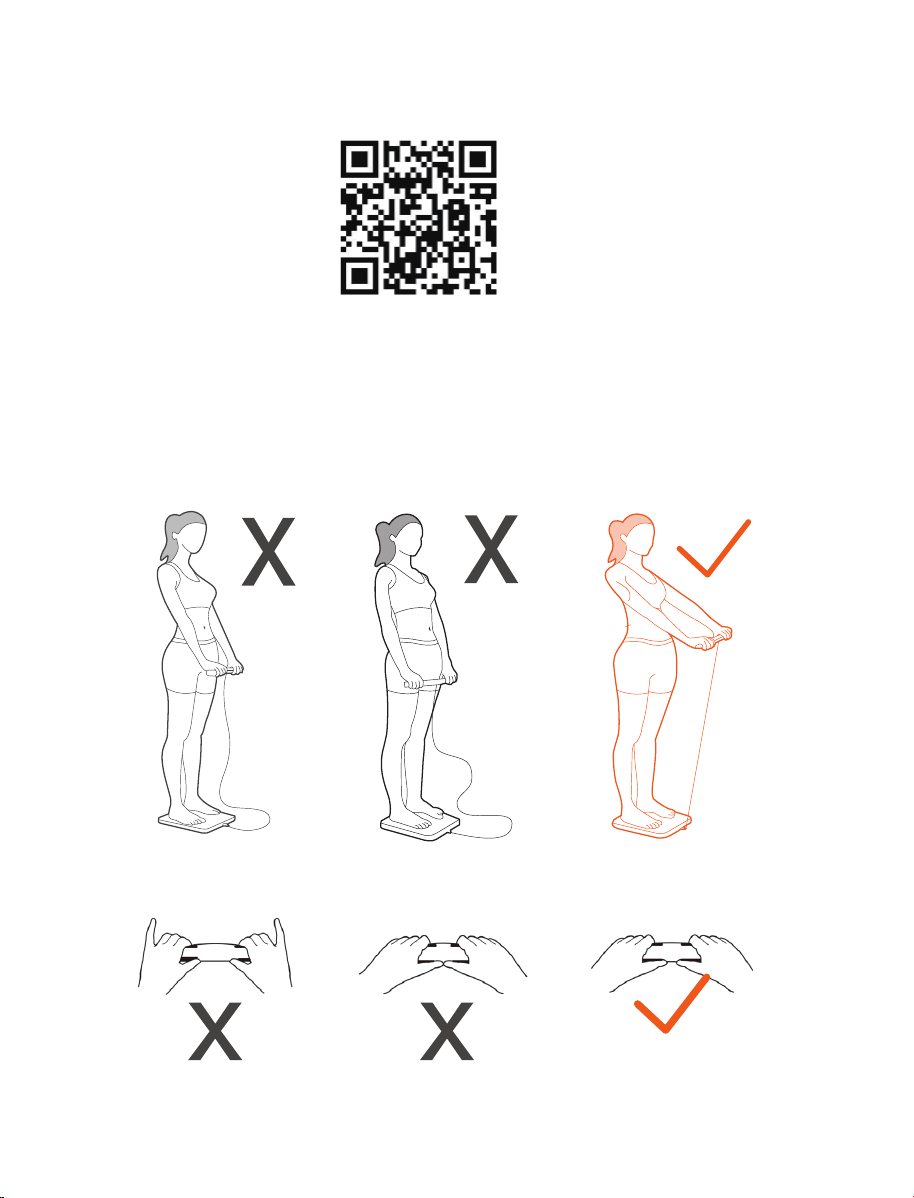
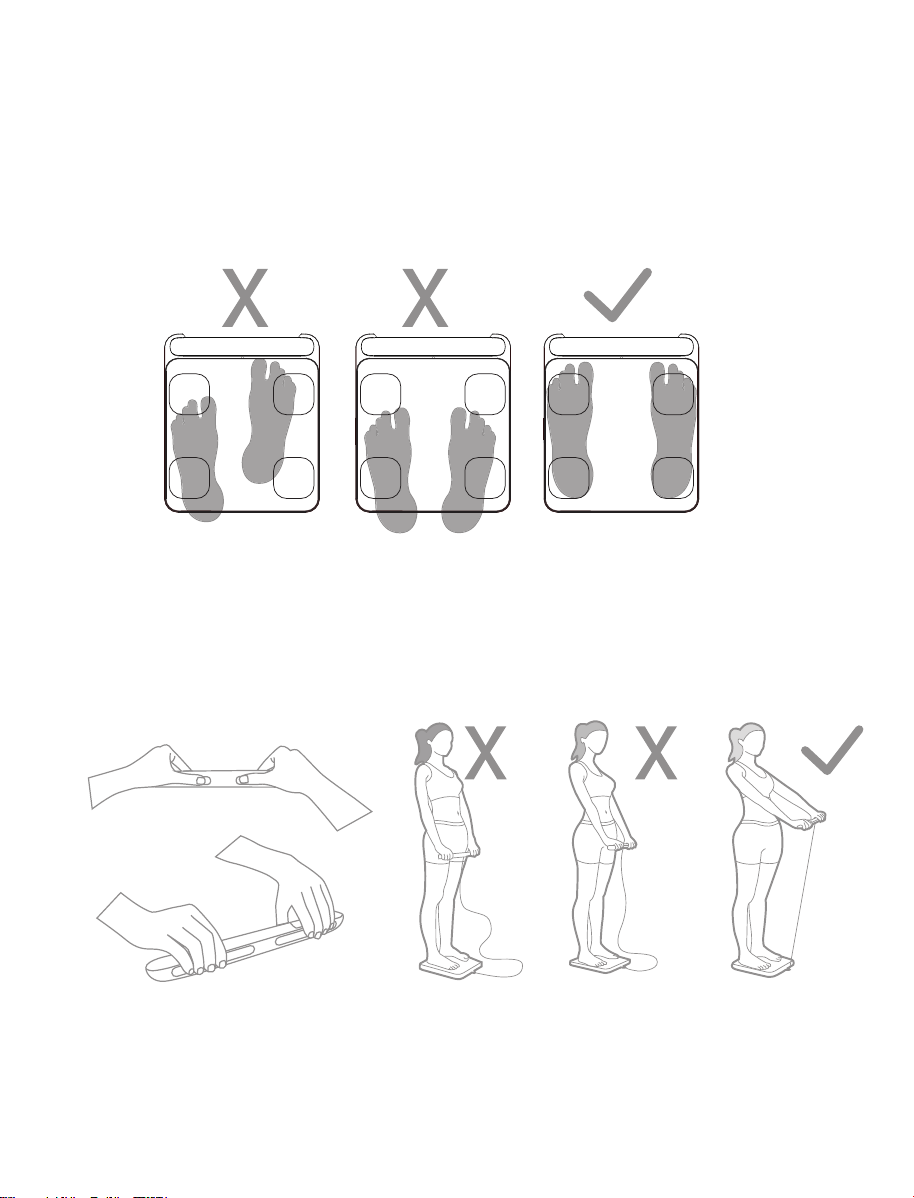
The tail finger does not
touch the electrode pad
Two thumbs close
together
Keep your all fingers
touch the electrode pads
Arms not straight Arms close to waist Keep your arms straight 45
degrees or 90 degrees
1. Download the "Starfit" App from Apple Store or Google Play and complete registration.
2. Remove the transparent plastic spacer from the battery compartment.
3. Place the scale on a hard, flat surface without carpeting.
4. Before measuring, open the Starfit app and confirm the connection status of the scale
(connection steps can be found on page 5 of this manual).
5. Measure barefoot. Ensure full contact of soles and fingers with electrodes.
6. Make sure the posture is correct for measuring, as shown below:
Smart Full Body Composition Scale
WARNING
Product Specification
Product size: 304x350x44.5mm/11.96x13.77x1.75inch
LED screen display: 86x36mm/3.38x1.41inch
Weight unit: Kg/lb/st
Weight limit: 5kg-180kg/11lb-400lb
Weight division: 0.1kg/0.2Ib
Power Supply: 4 x 1.5V AAA batteries
Operating temperature: 10-55℃
Operation humidity: 40%-80% RH
Thanks for choosing Smart Full Body Composition Scale. This scale uses bio-electrical imped-
ance analysis (BIA) technology to help you conveniently measure Body weight, Body balance,
BMI, Body fat rate, Visceral fat, Body water, Skeletal muscle rate, Muscle mass, Bone mass,
Protein, BMR, Body age and etc.
!
●DO NOT use with medical implants such as pacemakers.
●DO NOT stand on the edge of the scale or jump on it;
●DO NOT overload the scale (Max.180kg/440lb)
●DO NOT drop scale or drop the objects on it as this may damage the sensors.
●DO NOT immerse the scale in water or use chemical cleaning agents. Clean the scale with a
slightly damp cloth.
●Not recommended for pregnant women.
●Not recommended for infants, toddlers, and children who are under 10 years of age.
●Any measurement obtained using this device is for reference only and should not be consid
ered as a medical opinion.
●DO NOT be used to diagnose or treat any medical condition. You should consult your primary
care doctor or physician before making changes to your diet, exercise plan or physical
activities.
●Always place the scale on a hard, dry and flat surface before measurement.
●Make sure your feet are dry before stepping on the scale.
●Connect the batteries in accordance with the correct polarities indicated.
●Remove batteries if the scale is not be used for a prolonged period of time
●DO NOT use the device if damaged. The continuous use of a damaged unit may cause injury
or improper results. Please check the device before each use.
●First check the batteries power and replace it if needed, if the scale malfunction.
●Be careful when using on the wet and slippery surface.
2
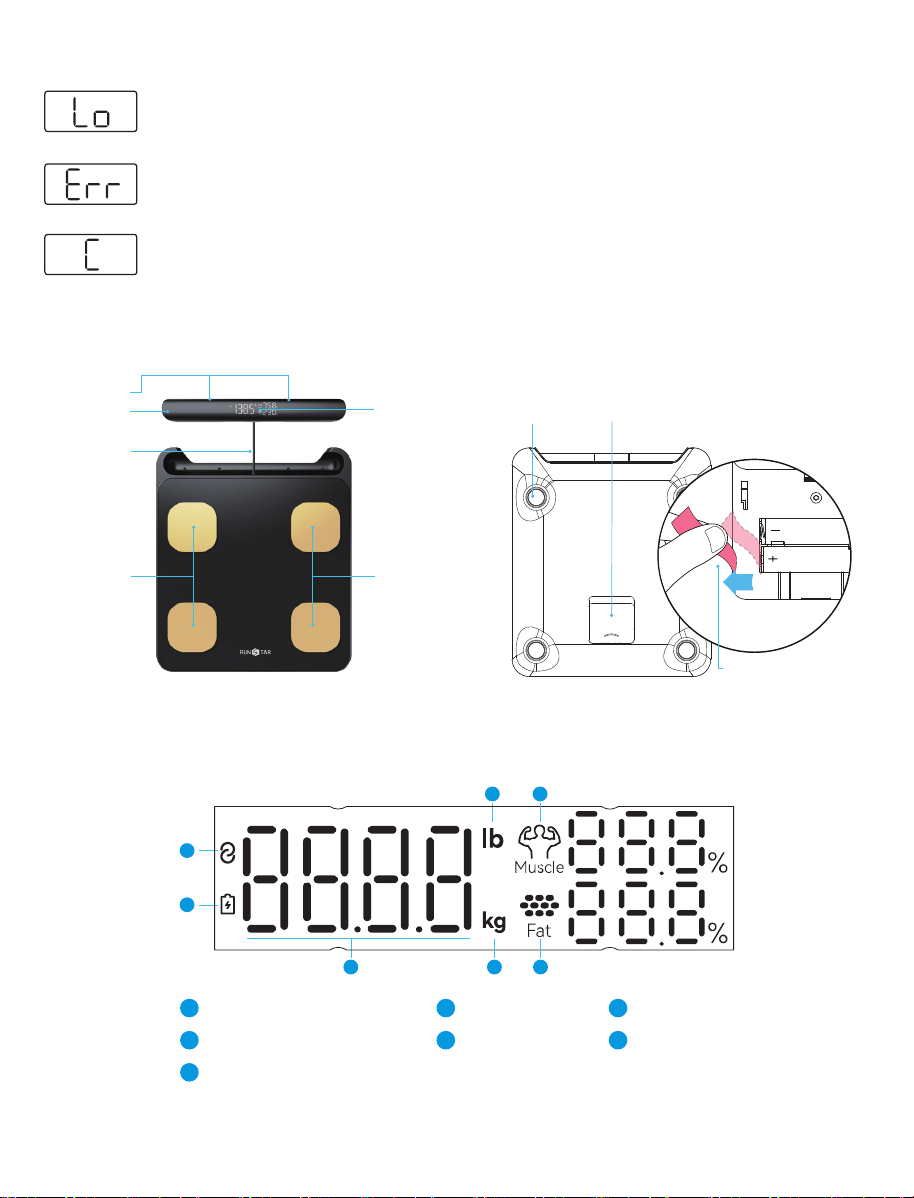
Indication Symbols
Product Overview
Display Overview
The batteries in the scales are too weak. Insert new batteries (see the"Replacing the
Batteries" chapter).
More than 180kg/400lb are on the scales. The scales are overloaded.
An error has occurred during measurement. Step off the scales for 5 seconds and
step onto them again to repeat the measuring process.
3
Electrode
Handle
LED Display
Sensor Feet Battery
Electrode
Electrode
Connective Symbol
1
1
Battery Symbol
2
Body Weight
3
lb
4
kg
5
Muscle Rate
6
Body Fat Rate
7
4 6
2
3 5 7
Retractable
Data Cable
Remove Spacer
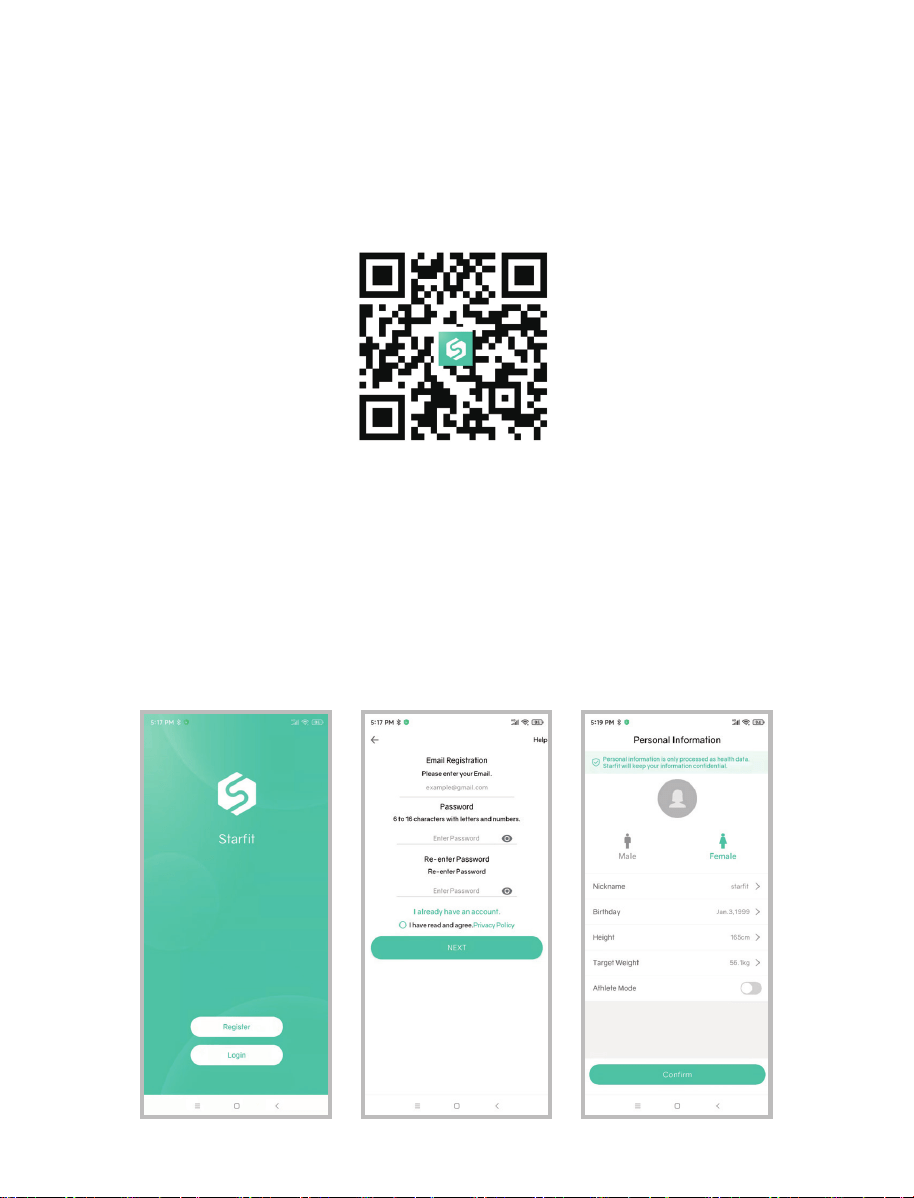
iOS: 8.0 or higher
Android: 5.0 or higher
Support Devices
1.Scan the below QR Code to download APP, or search "Starfit" from Apple Store and Google
Play. iPad and tablets are not supported yet.
2. During the installation process, please note that you must allow the app to use some of the
phone's functions:
iOS: Make sure Bluetooth is on and Bluetooth Authorization is allowed.
Android: Make sure Bluetooth is on and GPS and Location is allowed.
3. The App icon will appear on your phone after the installation is completed.
4. Use your email address to register a Starfit account or simply log in with your Apple ID or
Google account. Fill in your personal information to complete.
Note: Entering incorrect gender, age, or height information may result in inaccurate measurement
results
Download and Register the Starfit APP
4
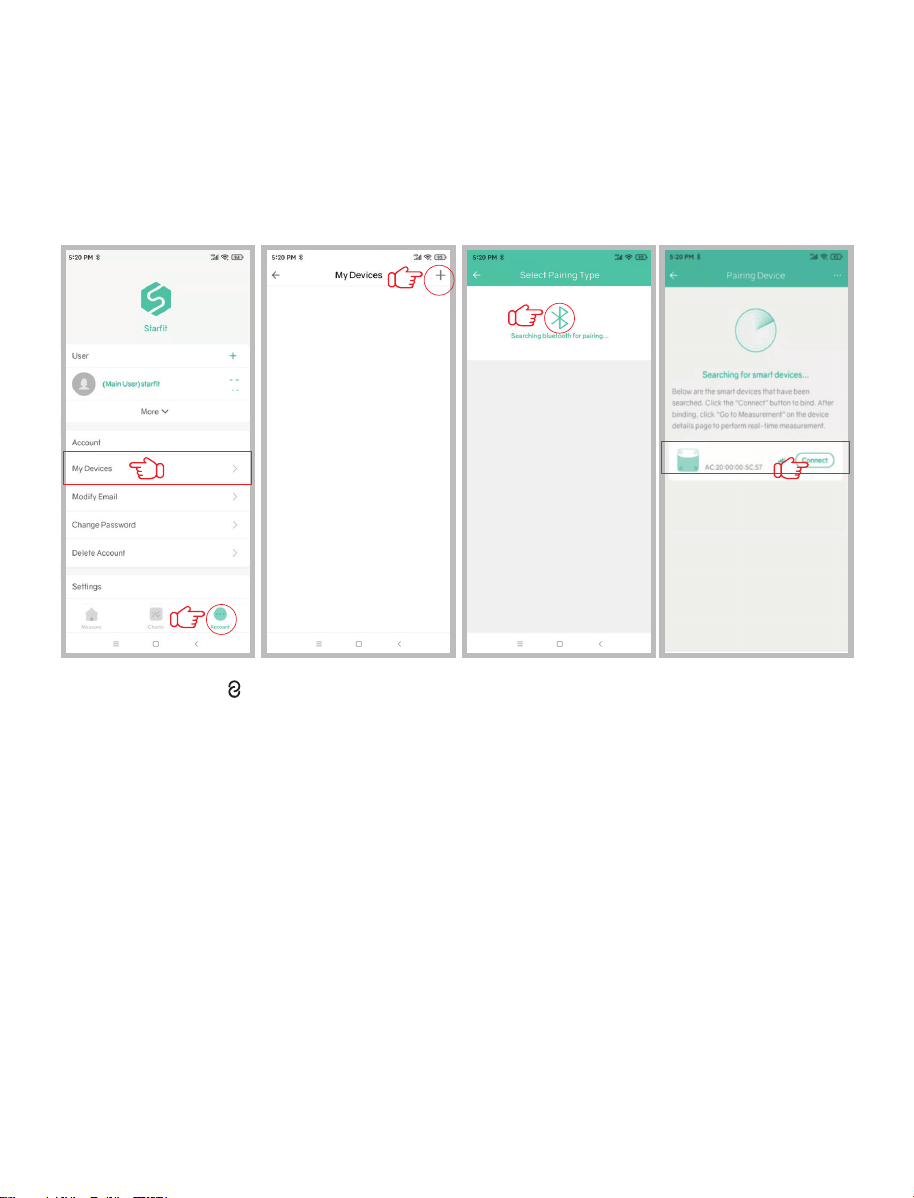
1. Make sure your phone's Bluetooth is turned on, and keep the scale powered on with the
screen lit by slightly stepping on it;
2. Open the APP, Click 'Account' → 'My Device' → '+' → 'Searching Bluetooth for pairing' to find
the scale 'Runstar-R12' to pair. And now your phone is connected with the scale;
※After connected, “ ” will be displayed on the scale screen, and "Connected" will be displayed
at the top of the App's "Measure" page. If it displays "Disconnected", it means that the pairing
failed, please repeat the above steps.
3. Now you can start measuring.
How to Connect the Scale with Starfit APP?
5
Runstar-R12
How to Measure?
1. Step on and off the scale once to activate the scale. Wait until the display shows "0.00"
(lb/kg).
Keep Starfit App on 'Maesure'page, and make sure the APP and scale are connected.
2. ①Step on scale with bare feet. Please make sure that the soles of your feet are in full contact
with the electrodes on the scale (pay attention to Left & Right direction), as shown in the figure
below.
②After standing firmly, grab the handle, making sure your thumbs touch the electrodes below
the display screen, and the rest of your fingers fully touch the electrodes at the back of handle;
stand up straight,spread your legs, stretch your arms naturally and keep them at a 45° angle to
your body, as shown in the figure below.
6
Note:
If you are not barefoot or your feet are too dry, or your weighing posture is incorrect, only your
weight and BMI can be measured.
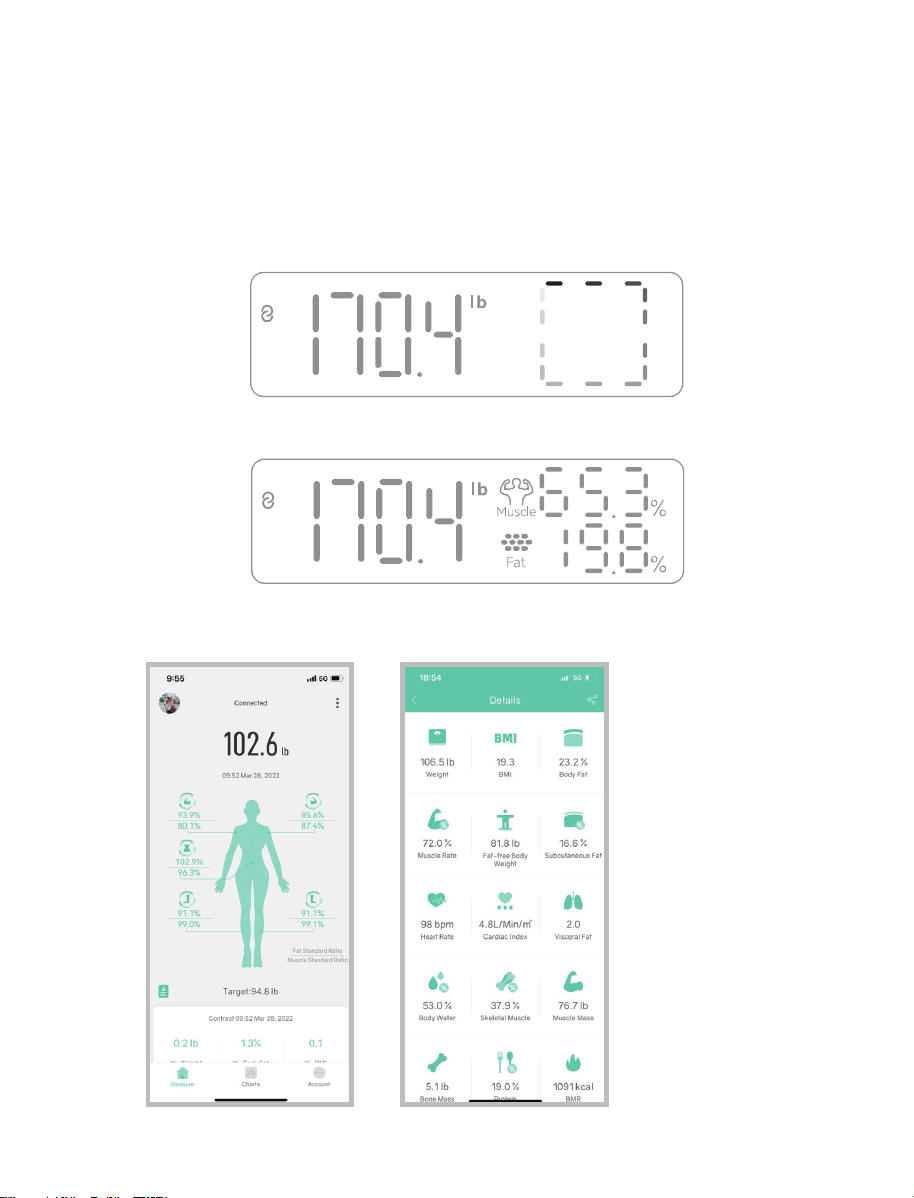
3. After the scale measures the weight, it will enter the body composition analysis: a square box
will rotate on the display screen on the handle.
Please keep the measuring posture still for about 20 seconds;
4. ①Once measurement is completed, you can view Weight, Muscle Rate, Body Fat Rate directly
on LED display.
②You can view all 28 body metrics on the App:
7
Unlock More Starfit APP Features
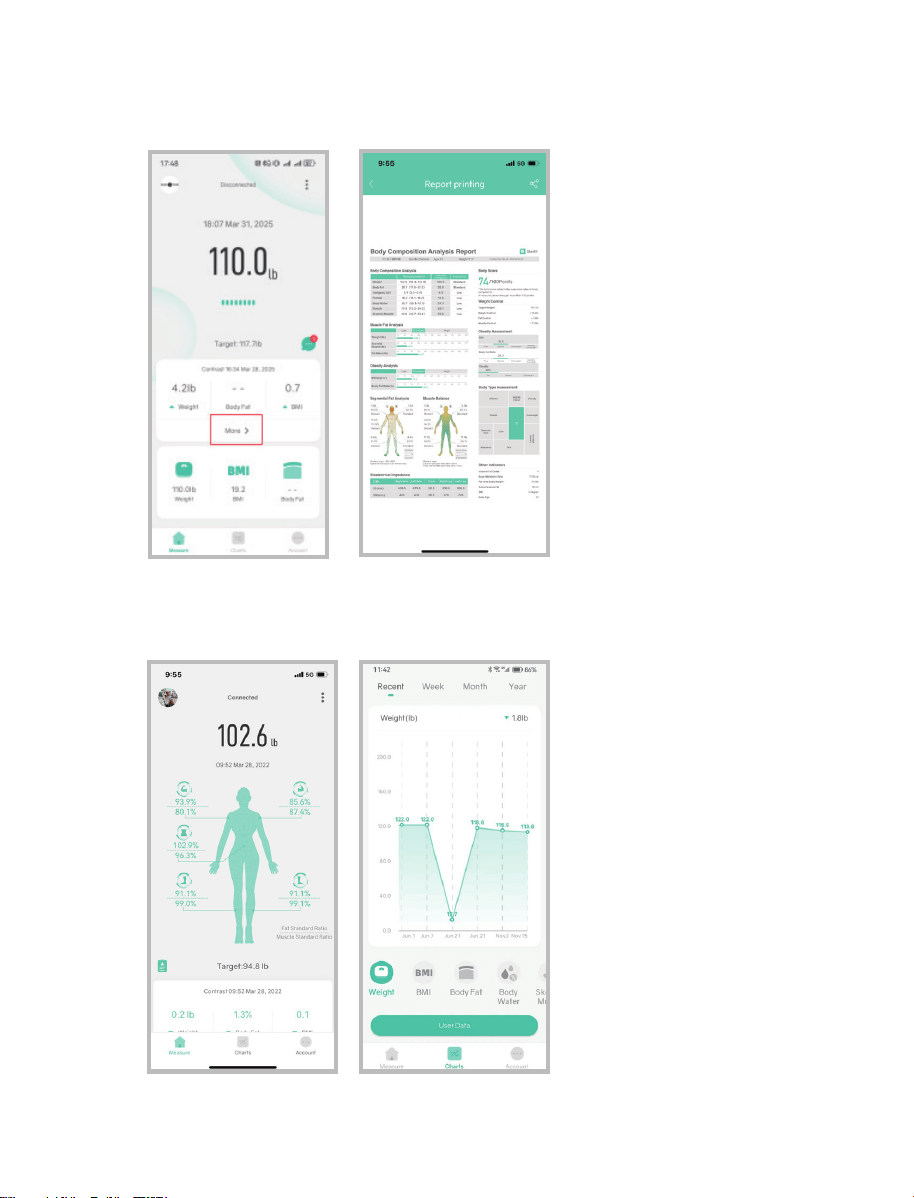
1.You can click on 'More' to enter 'Details' to get the complete measurement results.
At the bottom of the 'Details' page, you can perform 'Report printing'.
2.Click on 'Charts' to view past measurement recordsin the form of a curve chart.
Click on 'User Data' to view past records of weight, BMI, BFR, muscle, bone mass, etc.
You can also delete data or compare data from different dates.
8
Trouble Shooting Guide
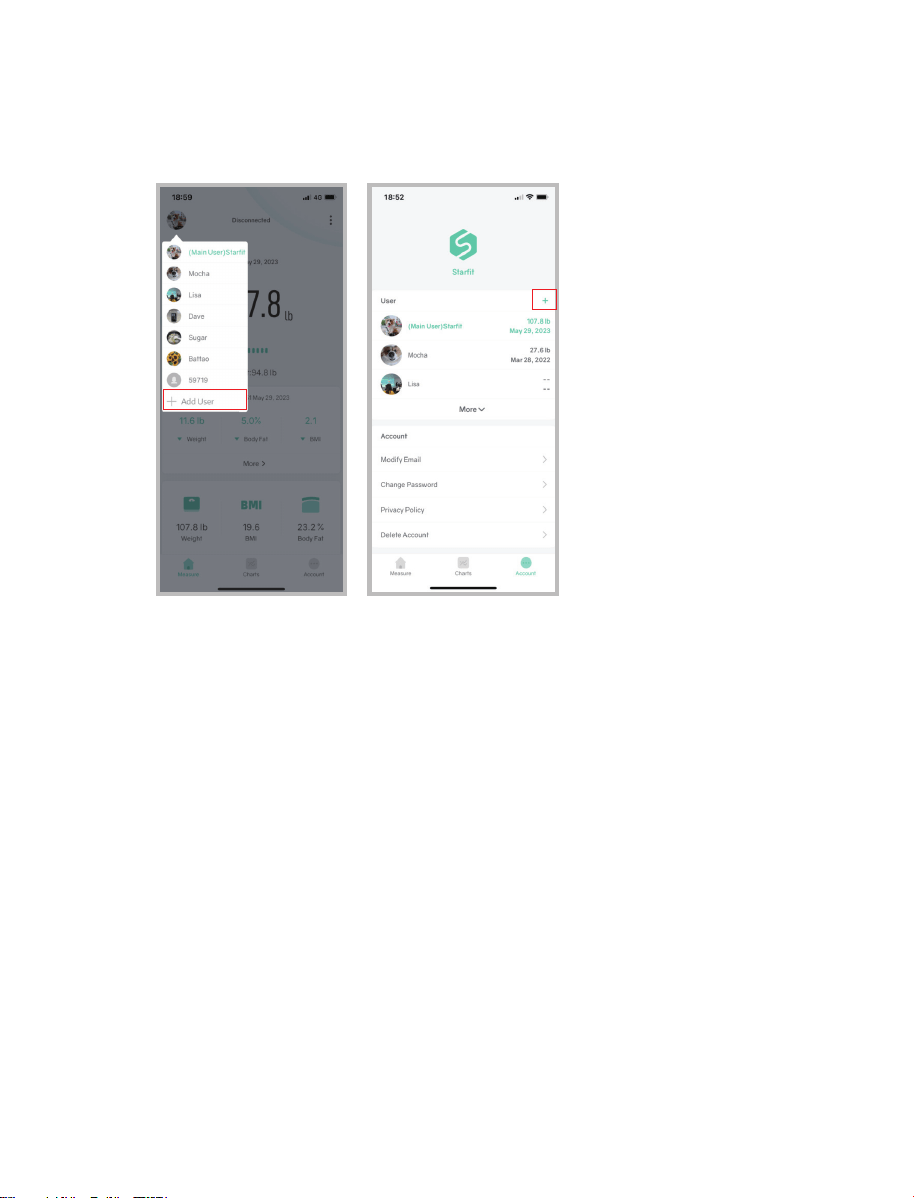
3.Add or Switch user:
Add users by clicking the user avatar in the upper left corner of the 'Measure' page → 'Add User'
or on the 'Account' page → '+'. Each account supports up to 24 users.
Switch user: Click the corresponding user avatar in the upper left corner of the 'Measure' page
to switch users.
1. Bluetooth not connected
•The scale and smart phone must be both have Bluetooth on(scale lights up means Bluetooth on).
•Check the iOS version of your smart phone, it must be iOS 8.0 or higher/Android 6.0 higher.
•Make sure your phone allows the APP to use Bluetooth. If not, please turn it on in the phone
settings.
2. No body fat data measured when weighing
•User must be bare foot to measure the body fat.
•Do pay attention for correct handle bar grip posture during measurement.
•Make sure the soles of feet are slightly damp (apply some body lotion) and the scale surface is dry.
•The measurement process was not fully completed: Make sure to stand still on the scale for
about 20s until Weight, Muscle Rate, Body Fat Rate on the display.
•The scale disconnects from the app.
•Scale is connected to another user's phone - scale shows connected, but the APP shows
disconnected
3. The scale's measurements are inconsistent.
•Check whether the scale is placed on a hard, flat floor without carpet.
•Check each sensor foot on the back to make sure nothing is stuck to the bottom of it.
• Remove the batteries and install, then measure again.
9

4. The App is display the incorrect fat-muscle ratio
• The body parameter setting is incorrect, check to make sure you entered the correct gender,
height, and age.
5. How to recalibrate the scale?
• Remove the batteries and install again, or step on the scale repeatedly so that it displays "0.00".
If it still doesn't work, contact the customer service team for a replacement.
6. The scale does not turn on
•Replace the batteries and try again. If it doesn’t work, contact the customer service team to get
a replacement.
7. Scale only show weight & BMI?
•Check if Bluetooth is connected
•Check if the measurement posture is correct: whether the hands and feet are fully in contact
with the 8 electrodes. This manual provides instructionsfor the correct measurement posture.
•Keep your legs and feet apart. The skin proximity of your legs and feet will affect the
transmission of the measurement current.
•Stand still for about 20-30 seconds to complete the entire measurement.
9.How to change language?
•Starfit APP--->Account--->Settings--->Language
10.How to change unit?
•Starfit APP--->Account--->Settings--->Switch units
Operation is subject to the following two conditions:
(1) This device may not cause harmful interference.
(2) This device must accept any interference received, including interference that may cause
undesired operation.
Note: This equipment has been tested and found to comply with the limits for a Class B digital
device, pursuant to part 15 of the FCC Rules. These limits are designed to provide reasonable
protection against harmful interference in a residential installation.
This equipment generates, uses and can radiate radio frequency energy and, if not installed and
used in accordance with the instructions, may cause harmful interference to radio
communications. However, there is no guarantee that interference will not occur in a particular
installation. If this equipment does cause harmful interference to radio or television reception,
which can be determined by turning the equipment off and on, the user is encouraged to try to
correct the interference by one or more of the following measures:
• Reorient or relocate the receiving antenna.
• Increase the separation between the equipment and receiver.
• Connect the equipment into an outlet on a circuit different from thatto which the receiver is
connected.
• Consult the dealer or an experienced radio/TV technician for help.
10
FCC Statement
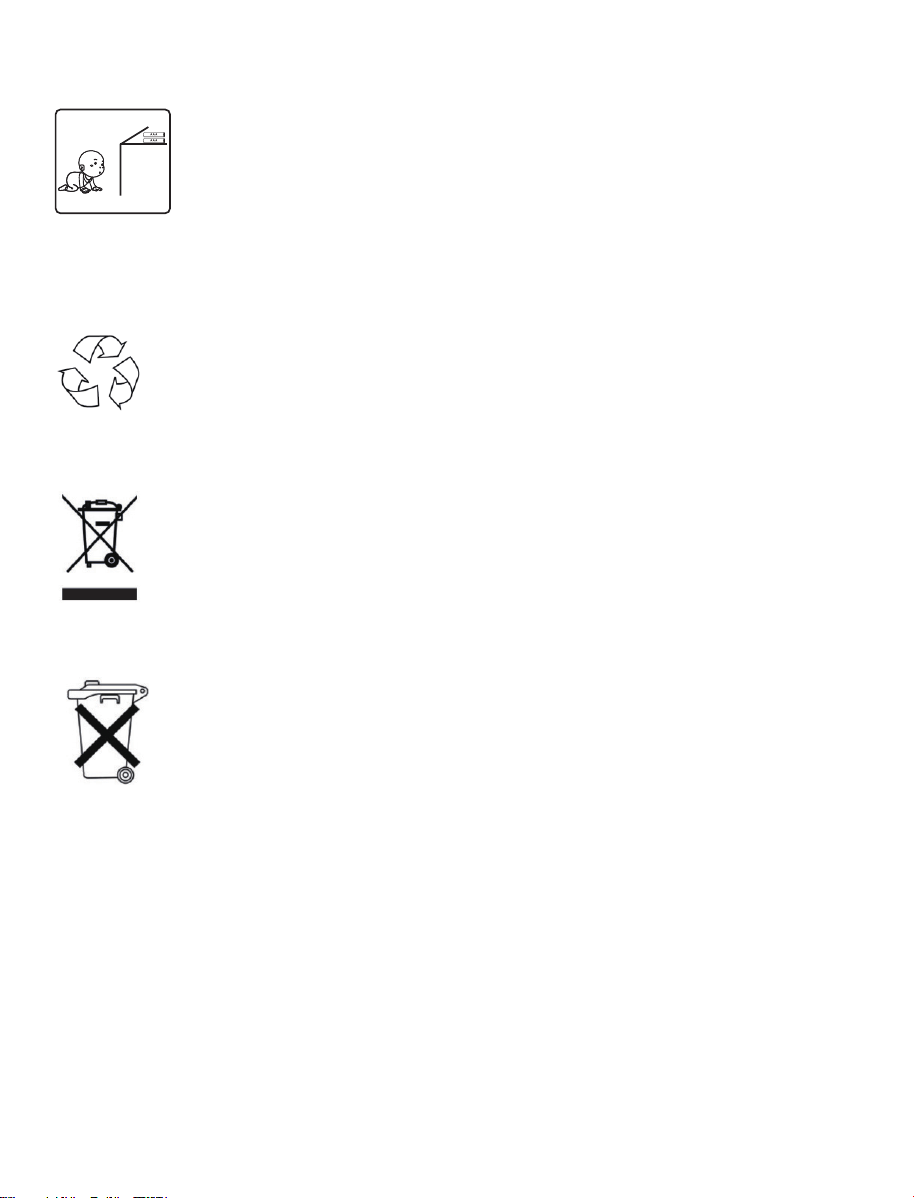
Place the scale far away from the children in case of falling down or crashing.
The packaging material is recyclable. Please dispose of it in an environmentally
friendly manner and take it to a recycling center.
Dispose of the device in an environmentally friendly manner. Dispose of it at a
recycling center for used electrical and electronic devices.
You can obtain more information from your local authorities.
The batteries should be removed prior to disposal of the device and disposed of
separately from the device. To protect the environment, non-rechargeable and
rechargeable batteries may not be disposed of with normal household waste,
but must be taken to suitable collection points. Also note the relevant
statutory regulations governing the disposal of batteries.
Battery Advice
Disposal
11