Instructions
ENG
Safety Precautions ............................................................................2
General Precautions ..........................................................................3
Nomenclature ....................................................................................5
1. Attaching and Detaching the Lens ................................................6
2. Setting the Focus Mode ................................................................8
3. Control Ring ..................................................................................9
4. Manual/ Auto Aperture Operation ................................................10
5. Lens Function Button (AF Stop Button) ......................................12
6. Hood ............................................................................................13
7.
Filters (Sold separately) ....................................................................15
Specifications ..................................................................................20
ENG-1
Thank you for purchasing a Canon product.
Canon RF20mm F1.4 L VCM, RF24mm F1.4 L VCM, RF35mm F1.4
L VCM are wide angle lenses, RF50mm F1.4 L VCM is a standard
lens, and RF85mm F1.4 L VCM is a medium telephoto lens, all
are for use with the EOS R series cameras.
●“VCM” stands for Voice Coil Motor.
Conventions used in these instructions
Warning to prevent lens or camera malfunction or damage.
Supplementary notes on using the lens and taking pictures.
Camera Firmware and Camera Applications
Please use the latest versions of firmware and applications with the camera
in use. For details on whether the firmware and applications in use are
the latest version or not, and for details on updating
them, please check the Canon website.
If the camera’s* firmware is not a compatible version, the following
limitations will apply (excluding RF50mm F1.4 L VCM and RF85mm F1.4
L VCM).
● Magnified view functionality is not available.
● There may be a discrepancy between the positions of AF points and
actually metered positions.
*
Applies to the following camera models:
EOS R and EOS RP
ENG-2
Safety Precautions
Precautions to ensure that the camera is used safely. Read these
precautions thoroughly. Make sure all details are observed in order to
prevent risks and injury to the user and other people.
Warning
Details pertaining to risks that may result in death or
serious injury.
●
Do not look directly at the sun or other strong light sources through
a lens. This may result in loss of sight.
●
Do not leave a lens in the sun without the lens cap attached. The
lens may concentrate entering sunlight and cause a malfunction or fire.
Caution
Details pertaining to risks that may result in injury or
damage to other objects.
●
Do not leave the product in places exposed to extremely high or low
temperatures. The product may cause burns or injury when touched.
●
This product emits low level magnetic flux. If you use an implantable
cardiac pacemaker or other medical device and feel abnormalities,
please keep away from this product and consult your doctor.
ENG-3
General Precautions
Handling Precautions
●
Do not leave the product in excessive heat such as in a car in direct
sunlight. High temperatures can cause the product to malfunction.
●
If the lens is taken from a cold environment into a warm one,
condensation may develop on the lens surface and internal parts. To
prevent condensation in this case, first put the lens into an airtight plastic
bag before taking it from a cold to warm environment. Then take out the
lens after it has warmed gradually. Do the same when taking the lens
from a warm environment into a cold one.
●
When the lens is not attached to the camera or the power switch of the
camera is in the off status when the lens is attached, shaking the lens
may cause the internal lens group to shift and noise may occur, but this is
not a malfunction. Although the internal lens group shifts due to vibration
such as when the lens is carried, this will not affect aspects such as
performance.
●
In order to optimize aperture control, there are occasions in which the
aperture blades will move during focusing, even when the aperture value
is set for aperture-priority AE or manual exposure, etc.
●
Please also read any lens related handling precautions listed in your
camera’s instruction manual.
Shooting Precautions
●
Focus again after recovering from the auto power off status.
●
To maintain the focus position in the shooting-ready status, set [Auto
power off] to [Disable] on the camera.
●
After detaching the lens, or after trying to detach the battery from the
camera, focus the camera again. Due to the structure of the focus lens
drive mechanism, the focus lens may significantly shift from its original
position. (for RF20mm F1.4 L VCM and RF85mm F1.4 L VCM)

ENG-4
This device complies with Part 15 of the FCC Rules. Operation is subject to the
following two conditions: (1) This device may not cause harmful interference, and
(2) this device must accept any interference received, including interference that
may cause undesired operation.
Do not make any changes or modifications to the equipment unless otherwise
specified in the instructions. If such changes or modifications should be made,
you could be required to stop operation of the equipment.
This equipment has been tested and found to comply with the limits for a class
B digital device, pursuant to part 15 of the FCC Rules. These limits are designed
to provide reasonable protection against harmful interference in a residential
installation. This equipment generates, uses and can radiate radio frequency
energy and, if not installed and used in accordance with the instructions, may
cause harmful interference to radio communications.
However, there is no guarantee that interference will not occur in a particular
installation. If this equipment does cause harmful interference to radio or
television reception, which can be determined by turning the equipment off and
on, the user is encouraged to try to correct the interference by one or more of the
following measures:
• Reorient or relocate the receiving antenna.
• Increase the separation between the equipment and receiver.
• Connect the equipment into an outlet on a circuit different from that to which the
receiver is connected.
• Consult the dealer or an experienced radio/TV technician for help.
CAN ICES-3 (B) / NMB-3 (B)
ENG-5
*
This is included with the lens (excluding RF50mm F1.4 L VCM and
RF85mm F1.4 L VCM). However, it is not attached to the lens at the
time of purchase.
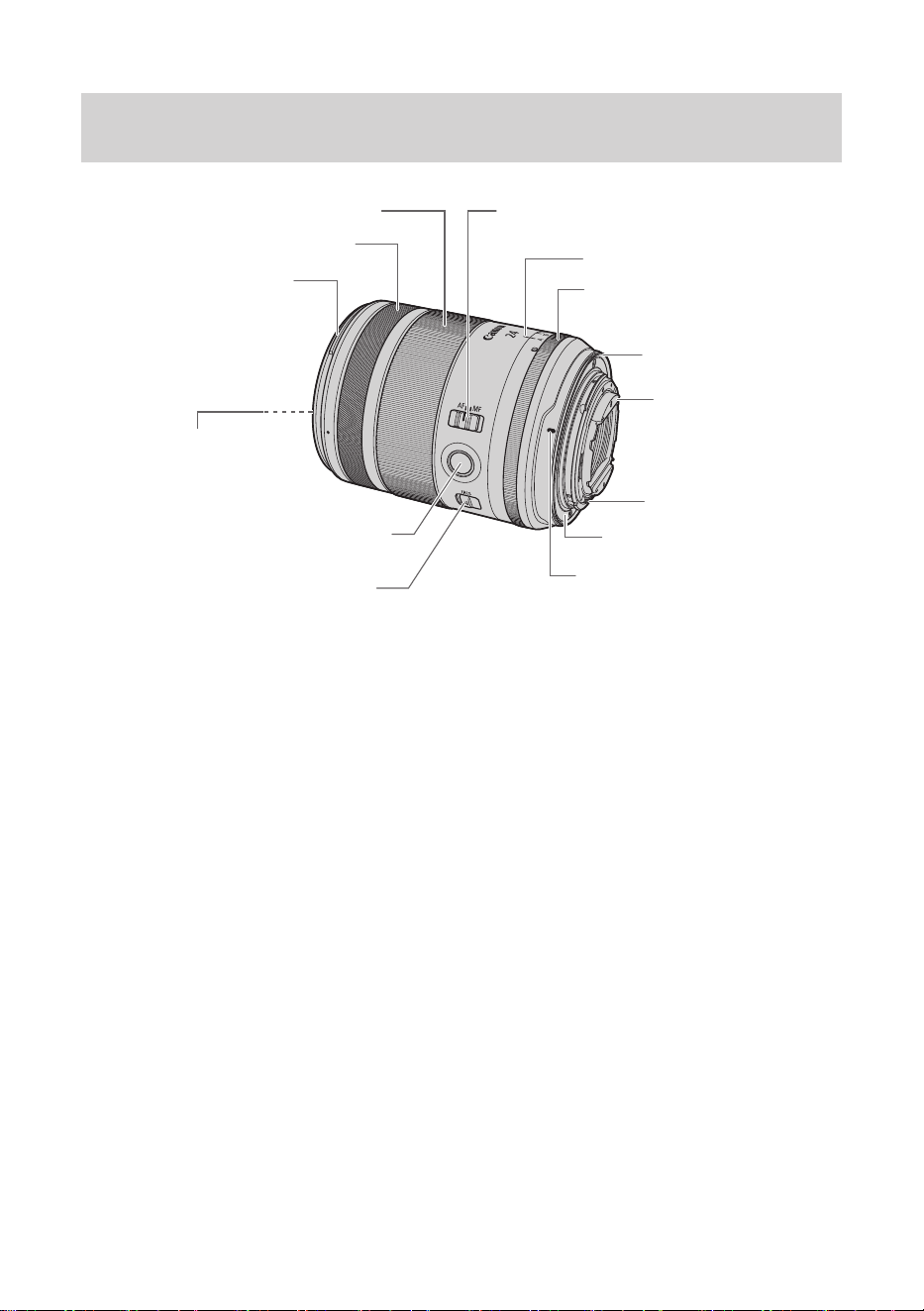
● The illustrations used in the explanations in this manual show the
RF24mm F1.4 L VCM, but the other lenses are also used in the
same way.
● For detailed information, reference page numbers are provided in
parentheses(→**).
Nomenclature
Irisring(→10)
Rear filter
holder*(→16)
Focusingring(→8)
Controlring(→9)
Hoodmount(→13)
Filter mounting
thread(→15)
Lens function button
(AFstopbutton)(→12)
Iris ring lock release
switch(→10)
Focusmodeswitch(→8)
Rubberring(→7)
Contacts(→6)
Lensmount(→6)
Irisindex(→10)
Lensmountindex(→6)
ENG-6
1. Attaching and Detaching the Lens
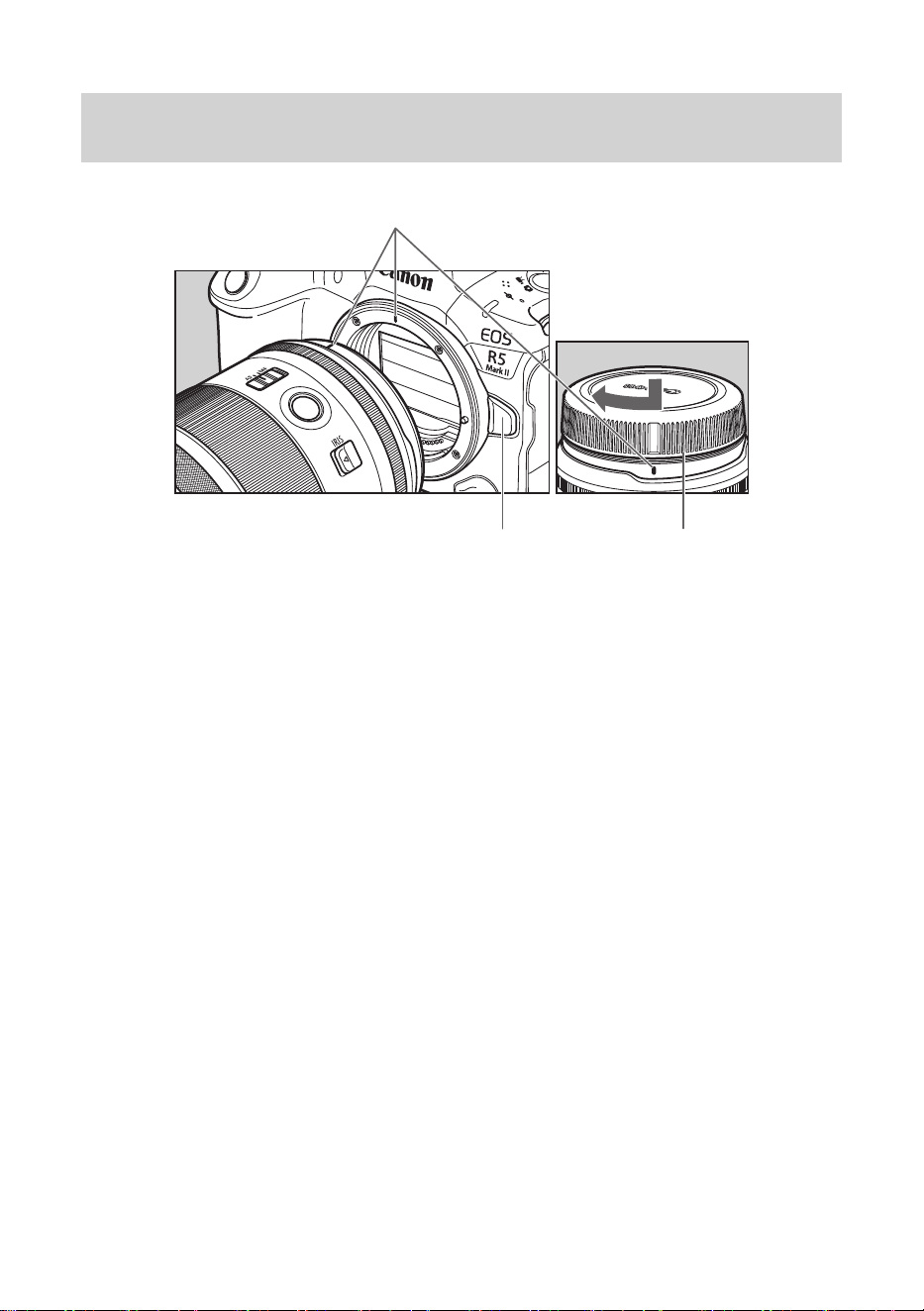
Lens mount index
Lens release button Dust cap
Attaching the Lens
Align the lens mount indexes of the lens and camera, and turn the
lens clockwise until you hear a click.
Detaching the Lens
Turn the lens counterclockwise while pressing the camera’s lens
release button. Detach the lens once it has stopped turning.
Please refer to the camera’s instructions for details.
ENG-7
● Set the camera’s power switch to OFF when attaching or detaching the
lens.
● Attach the lens cap before detaching the lens from the camera.
● After detaching the lens, place the lens with the rear end up and attach
the dust cap to prevent the lens surface and contacts from getting
scratched. Make sure the lens and dust cap mount indexes are aligned
when attaching the dust cap.
● Contacts that are scratched, soiled, or have fingerprints on them
may result in faulty connections or corrosion, which may lead to
malfunctions. If the contacts get soiled, clean them with a soft cloth.
● The lens mount has a rubber ring to improve dust-resistance and water-
resistance performance. This rubber ring may cause friction marks to
appear around the camera’s lens mount, although this will have no
effect on usage.
●Rubber rings can be replaced at Canon Service Center. (chargeable)
ENG-8
2. Setting the Focus Mode
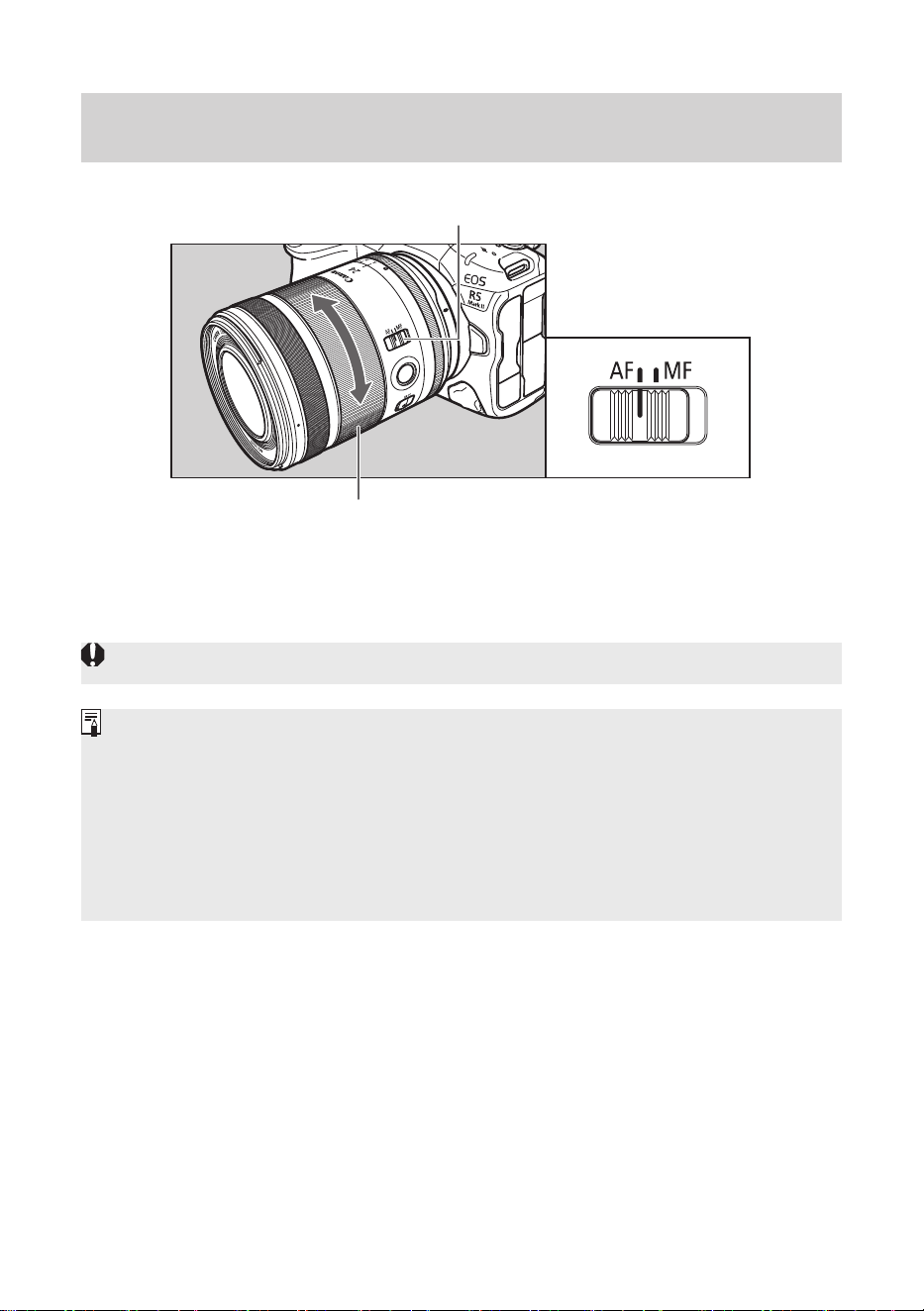
Focus mode switch
Focusing ring
To shoot in autofocus (AF) mode, set the focus mode switch to AF.
To use only manual focusing (MF), set the focus mode switch to MF,
and focus by turning the focusing ring.
● Quickly turning the focusing ring may result in delayed focus.
● The lens’ focusing ring is electronic.
● The lens supports both lens electronic MF and electronic full-time MF.
● When movie recording, the AF speed will be slower than the still photo
shooting mode. It is possible to adjust the AF speed on the camera by
setting Movie Servo AF to [Enable].
Please refer to the camera’s instructions for details.
ENG-9
3. Control Ring
The control ring can be assigned the functions that are commonly
used with cameras, such as shutter speed and aperture settings.
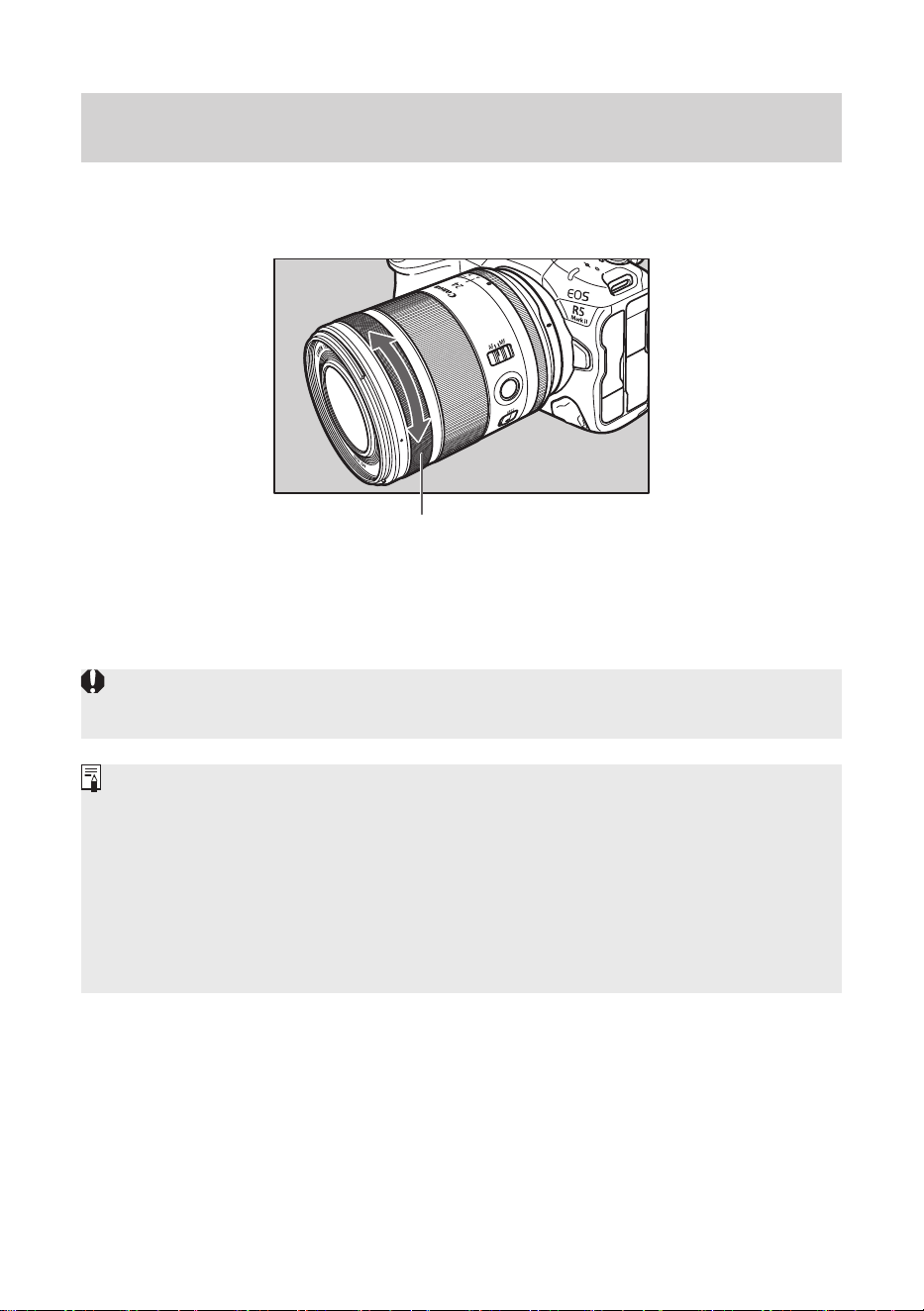
Control ring
The click action of the control ring allows you to have a sense of how
much it is being turned.
Please refer to the camera’s instructions for details on how to use the
control ring.
● There are cases in which the sound of control ring operations may be
recorded when shooting movies.
●The clicking sensation of the control ring can be removed by the Canon
Service Center. (chargeable)
● The focus ring can be used as the control ring by changing the camera
settings*. However, when the focus ring is used as the control ring,
the original control ring operation will be disabled. Please refer to the
camera’s instructions for details.
* Excluding EOS R, RP, Ra, R5, and R6.
ENG-10
4. Manual/ Auto Aperture Operation
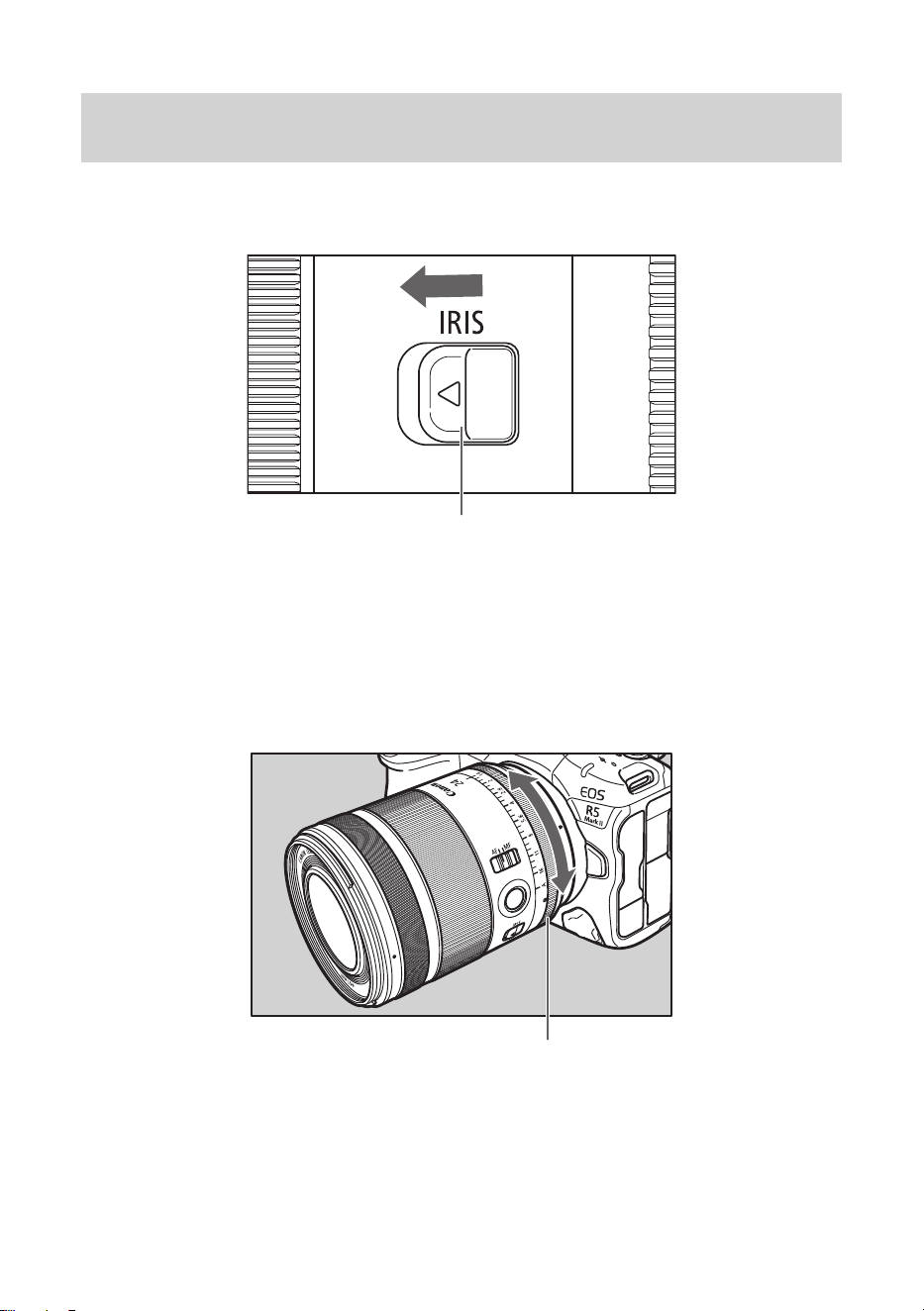
The aperture value can be set using the iris ring. At the time of
shipment, it is set to auto aperture operation.
Iris ring lock release switch
Manual aperture operation
1 While sliding the iris ring lock release switch in the direction of the
arrow, turn the iris ring to match the iris index between 1.4 and 16.
2 Turn the iris ring to set the aperture.
Iris ring
Auto aperture operation
1 While sliding the iris ring lock release switch in the direction of the
arrow, turn the iris ring to match the iris index with A.
2 Aperture is determined by the command signal from the camera.

ENG-11
Manual/ Auto Aperture Operation
●When performing manual aperture operation using the iris ring, the
actual aperture value may differ from the aperture value displayed on
the camera.
● Some cameras *¹ *², have the following limitations.
• The iris ring cannot be used to set the aperture value when shooting
still images.
• During movie shooting, when using the iris ring operation, focusing on
asubjectbyautofocusmaybedicult.
*1 EOS R, RP, Ra, R3, R5, R6, R6 Mark II, R7, R8, R10, R50, R100
* 2 EOS R5C is limited only when shooting still images.
ENG-12
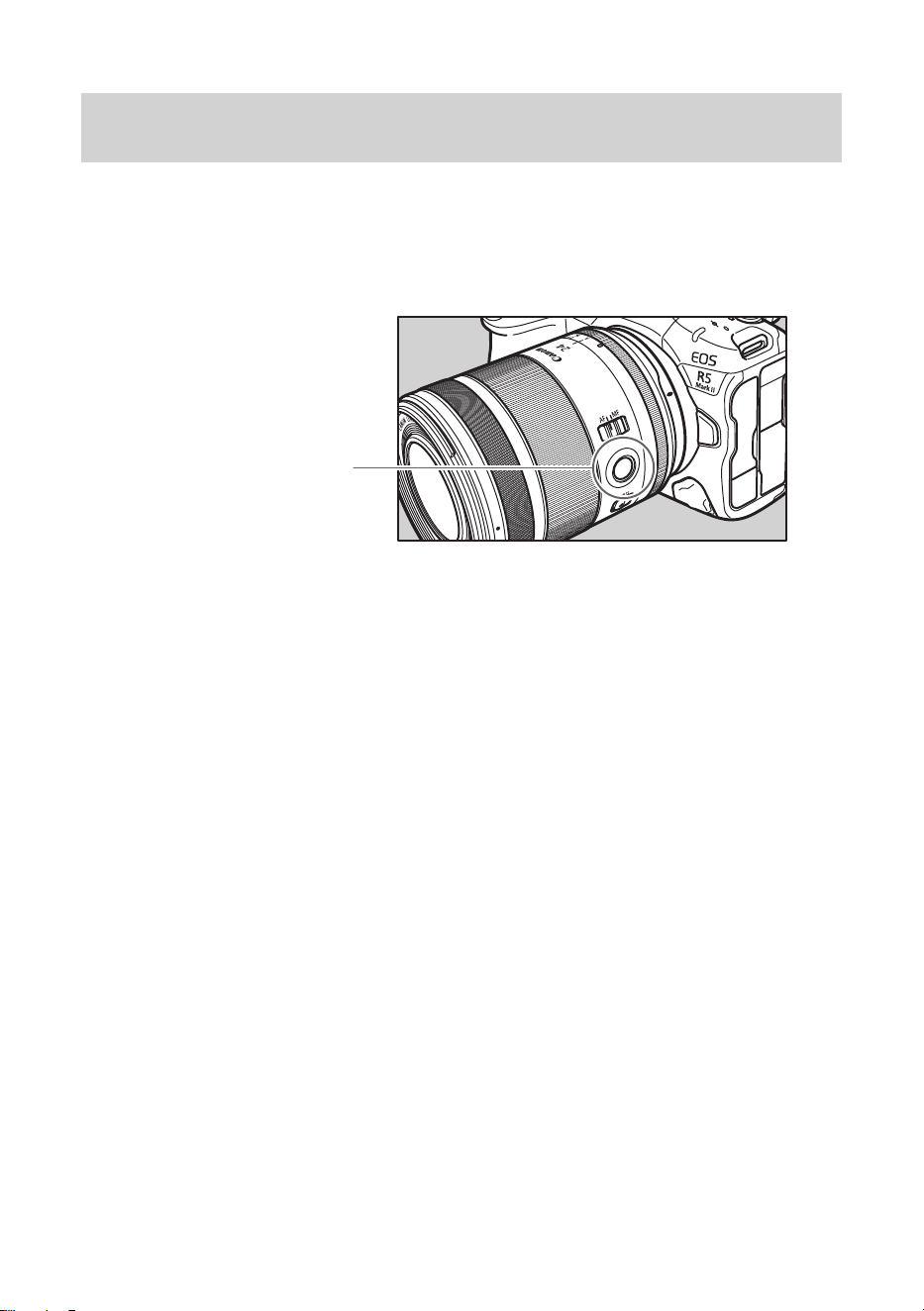
5. Lens Function Button (AF Stop Button)
In the default settings, the lens function button serves as a AF stop
button. You can assign different functions to the button from the
[Customize buttons] section of the camera.
Please refer to the camera’s instructions for details.
Lens function button
(AF stop button)
Use as a AF stop button
During autofocus operation, you can press an AF stop button to
temporarily pause autofocus, and then release the button to resume.
Press an AF stop button to maintain a focusing distance or to avoid
focus search.
Press the shutter button while holding down an AF stop button to
shoot at that focusing distance.
●Useful when autofocus is operating mostly in Servo AF.
ENG-13
6. Hood
The custom lens hood reduces unwanted light that causes flare and
ghosting and protects the front of the lens from rain, snow, and dust.
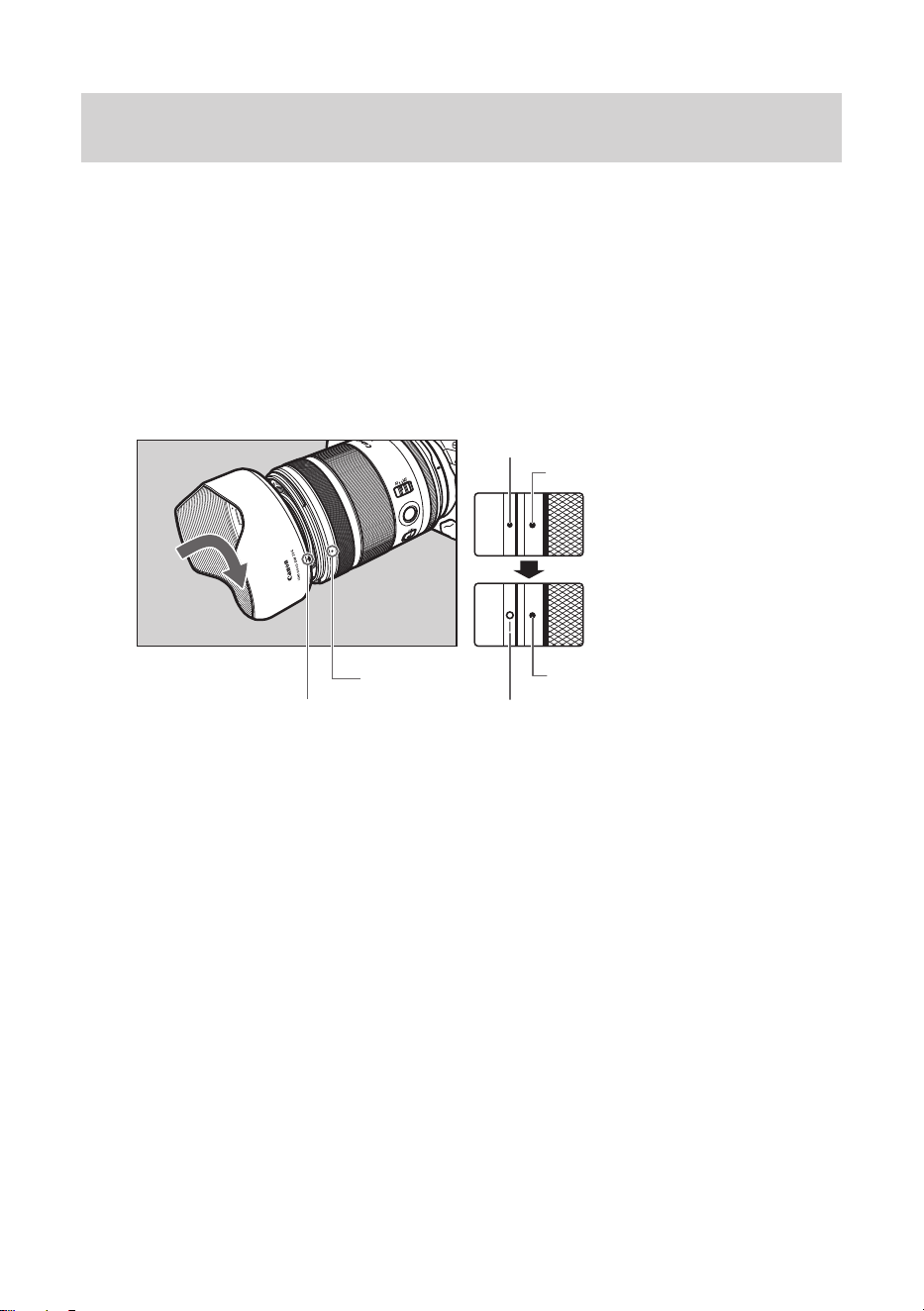
Attaching the Hood
Align the red attachment position mark on the hood with the red dot
on the front of the lens, and then turn the hood in the direction of the
arrow until you hear a click.
Attachment position mark
Stop position mark
Attachment position mark
Red dot
Red dot
Red dot
ENG-14
Hood
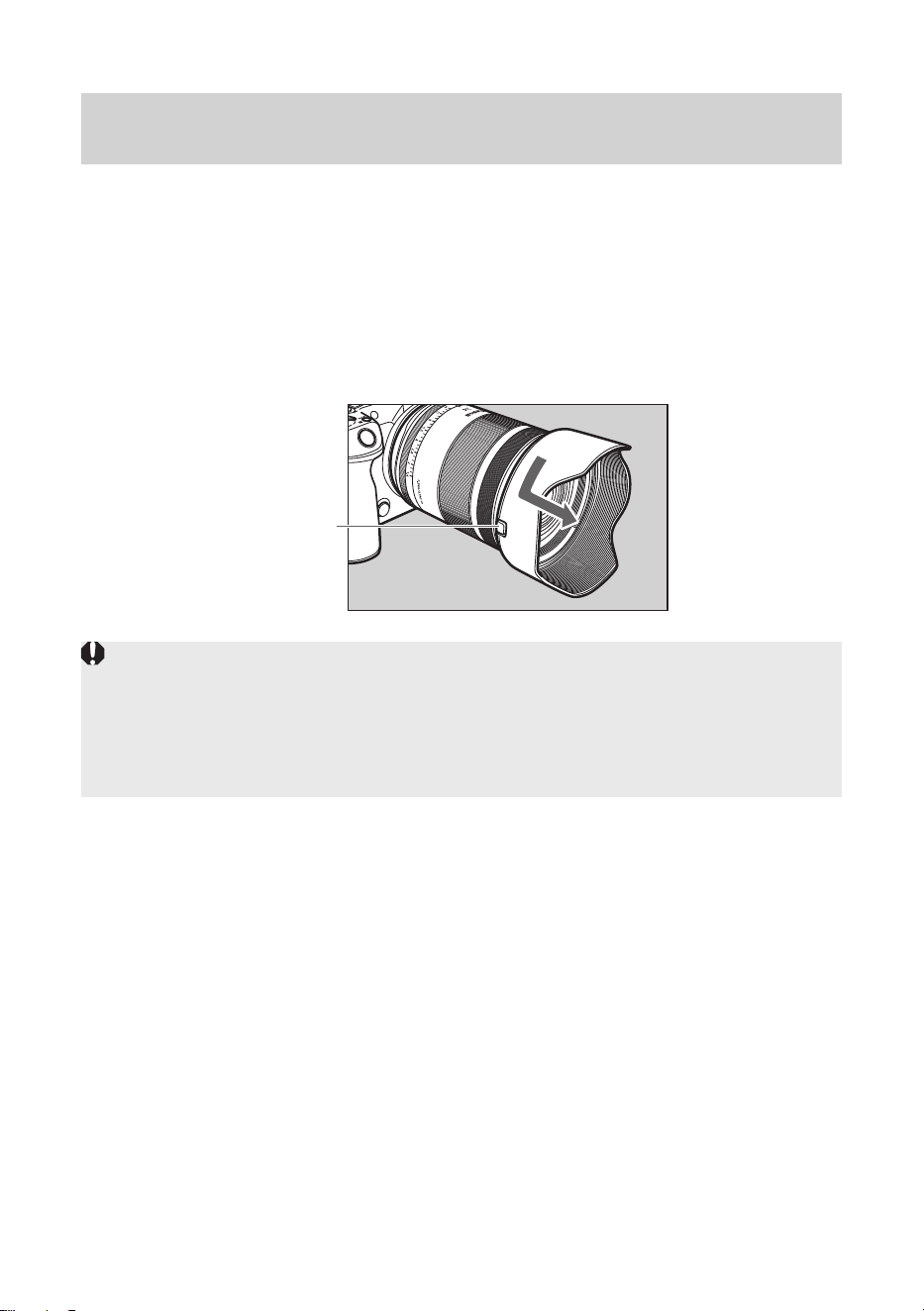
Detaching the Hood
Keep your finger pressed down on the button located on the side of
the hood, and then turn the hood in the direction of the arrow until the
attachment position mark on the hood is aligned with the red dot on
the front of the lens to detach it.
The hood can be reverse-mounted on the lens for storage.
Button
● If the hood is not attached properly, vignetting (darkening of the
perimeter of the picture) may occur.
● Grasp and turn the base of the hood when attaching and detaching it.
There are cases in which it may become deformed if the hood is turned
with it grasped near to the rim.
ENG-15
7.
Filters (Sold separately)
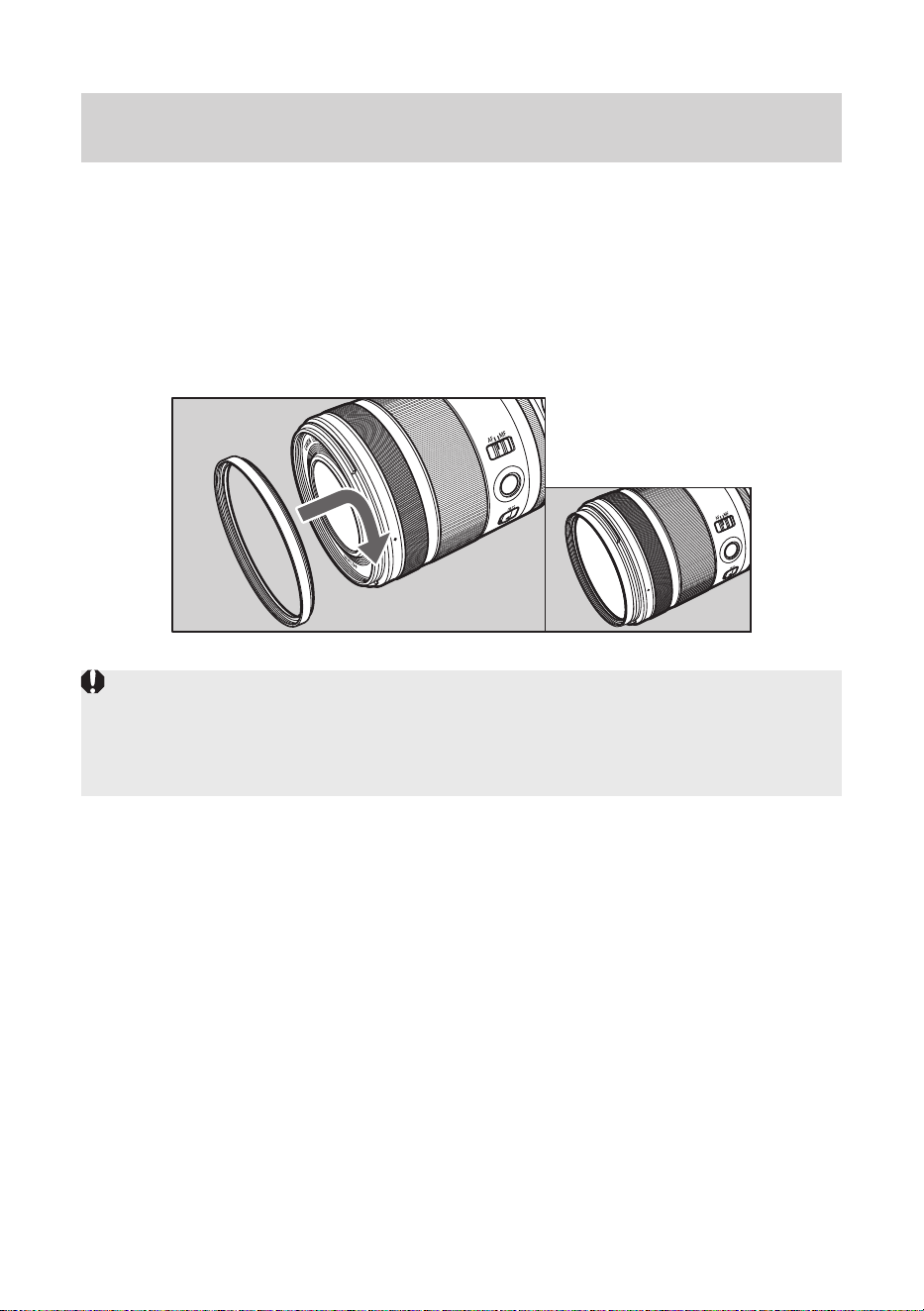
Filters can be attached to the front and, excluding RF50mm F1.4 L
VCM and RF85mm F1.4 L VCM, back of the lens.
When using threaded filters
You can attach filters (ø67) to the filter mounting thread on the front of
the lens.
● Only one filter may be attached.
● If you need a polarizing filter, use the Canon Circular Polarizing Filter
PL-C B.
● Detach the hood when adjusting the polarizing filter.
ENG-16
Filters (Sold separately)
When using sheet type filters (excluding RF50mm F1.4 L
VCM and RF85mm F1.4 L VCM)
A rear filter holder is included with this lens.
Download the filter template files, print them out, then lay the filter
over the template and cut to match. Then insert the filter in the rear
filter holder.
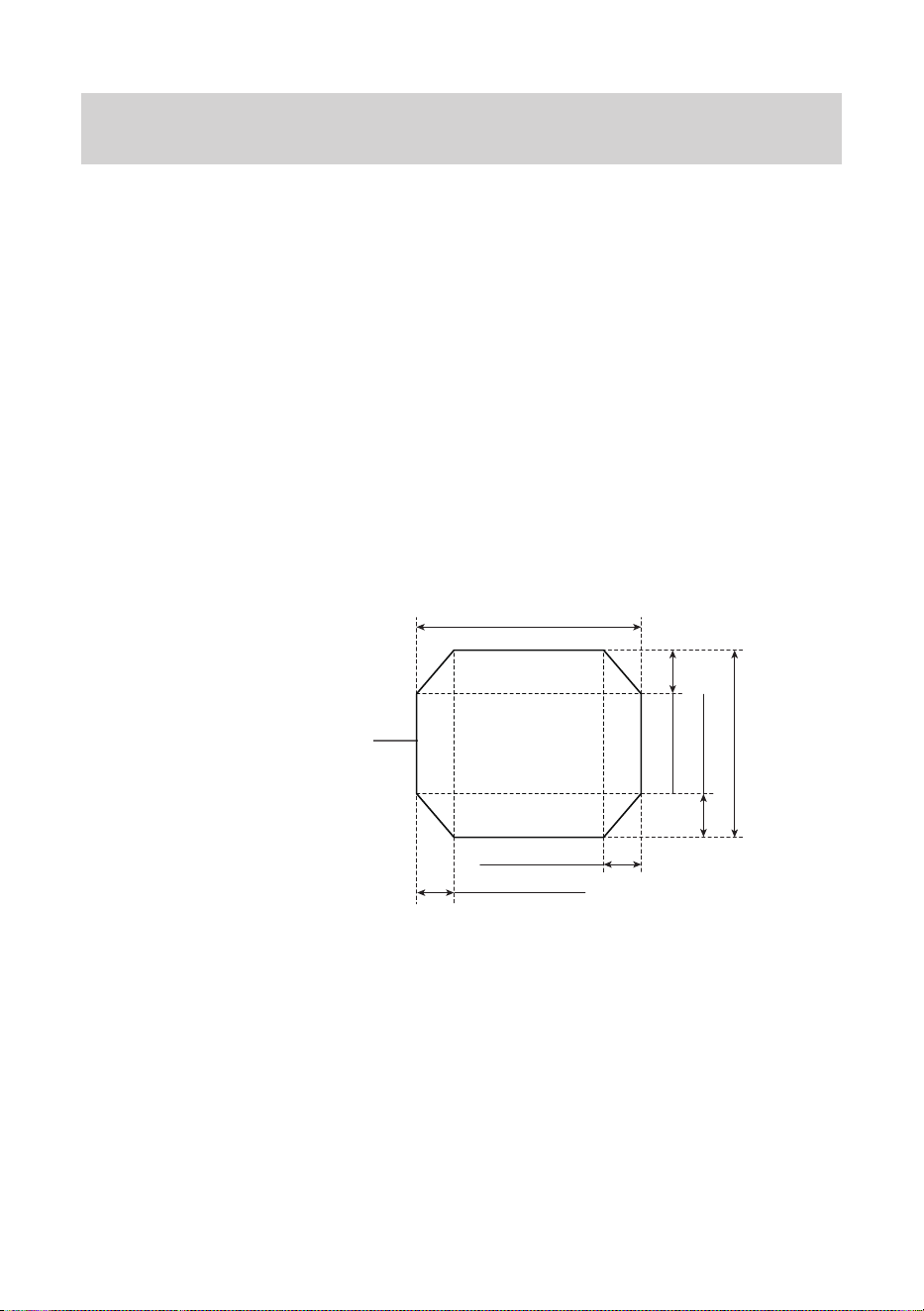
1 Cut the filter to match the shape of the filter template appropriately.
●Download the filter template file (PDF).
●Print the filter template out at full size (100%), and use it as the
template to cut out the filter.
●The templates on this page are printed at full size, so can also be
used. The filter template file is the same as this figure.
Filter template outline
36mm/1.41in.
6mm/0.23in.
6mm/0.23in.
30mm/1.18in.
7mm/0.27in.
7mm/0.27in.

ENG-17
Filters (Sold separately)
● Only one filter with a thickness of 0.2 mm/0.008 in. or less may be
used.
● When printing the template, make sure that the illustration size
remains the same. Check that the printed-out size is the same as the
measurements shown in the illustration.
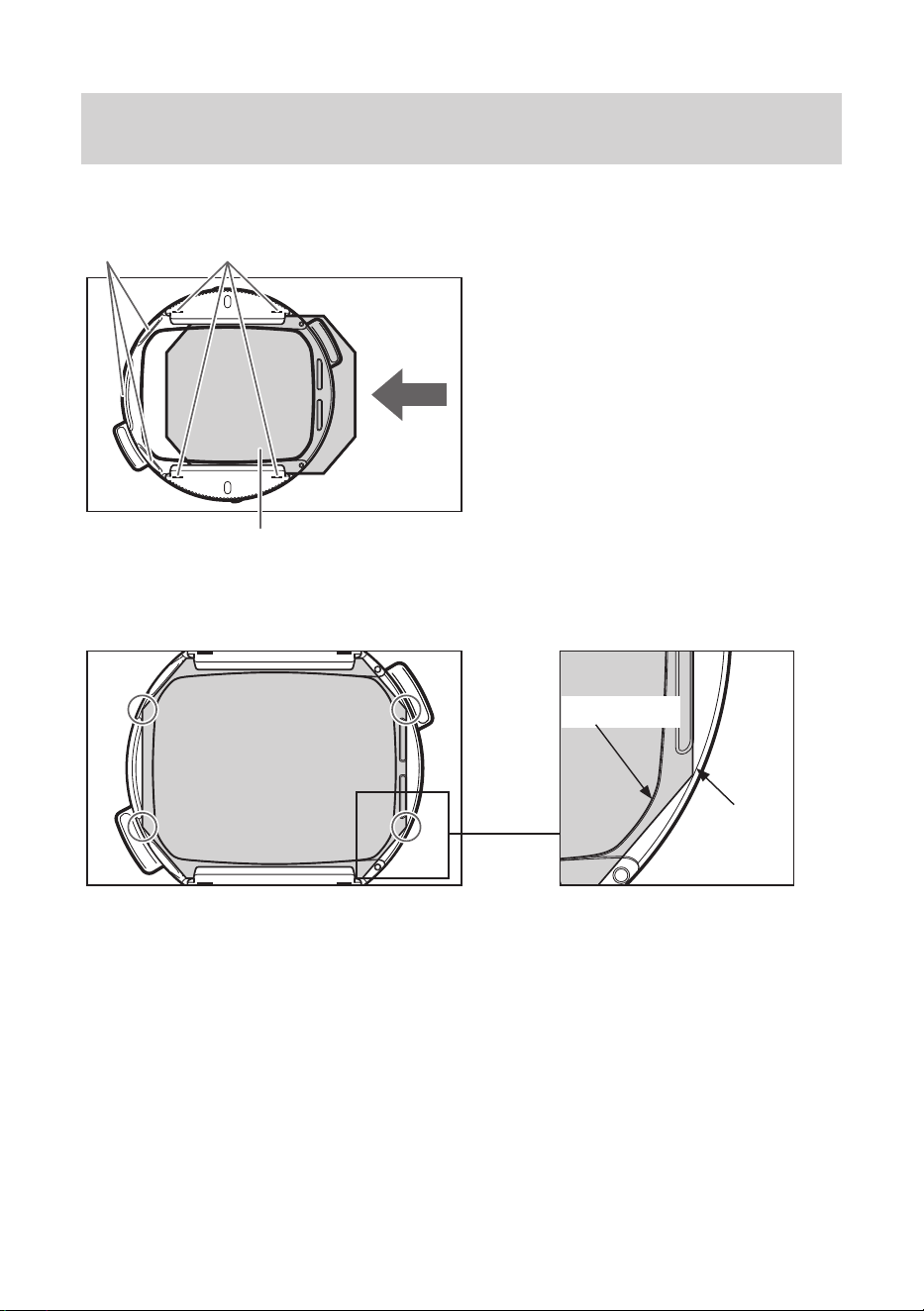
● Cut along the middle of the lines printed on the filter template. Any
deviation from the template line width can cause the following issues.
Note 1: If you cut inside the lines, light will come in around the edges of
thelter,preventingitfromworkingfully.Inparticular,therecan
bedierenceswithexposureandcolorpatchesinthecorners.
Note2:Ifyoucutoutsidethelines,itmaynottintherearlterholder,
ortheltercornerscouldcontactthecamera,damagingthe
cameraorlter.
ENG-18
Filters (Sold separately)
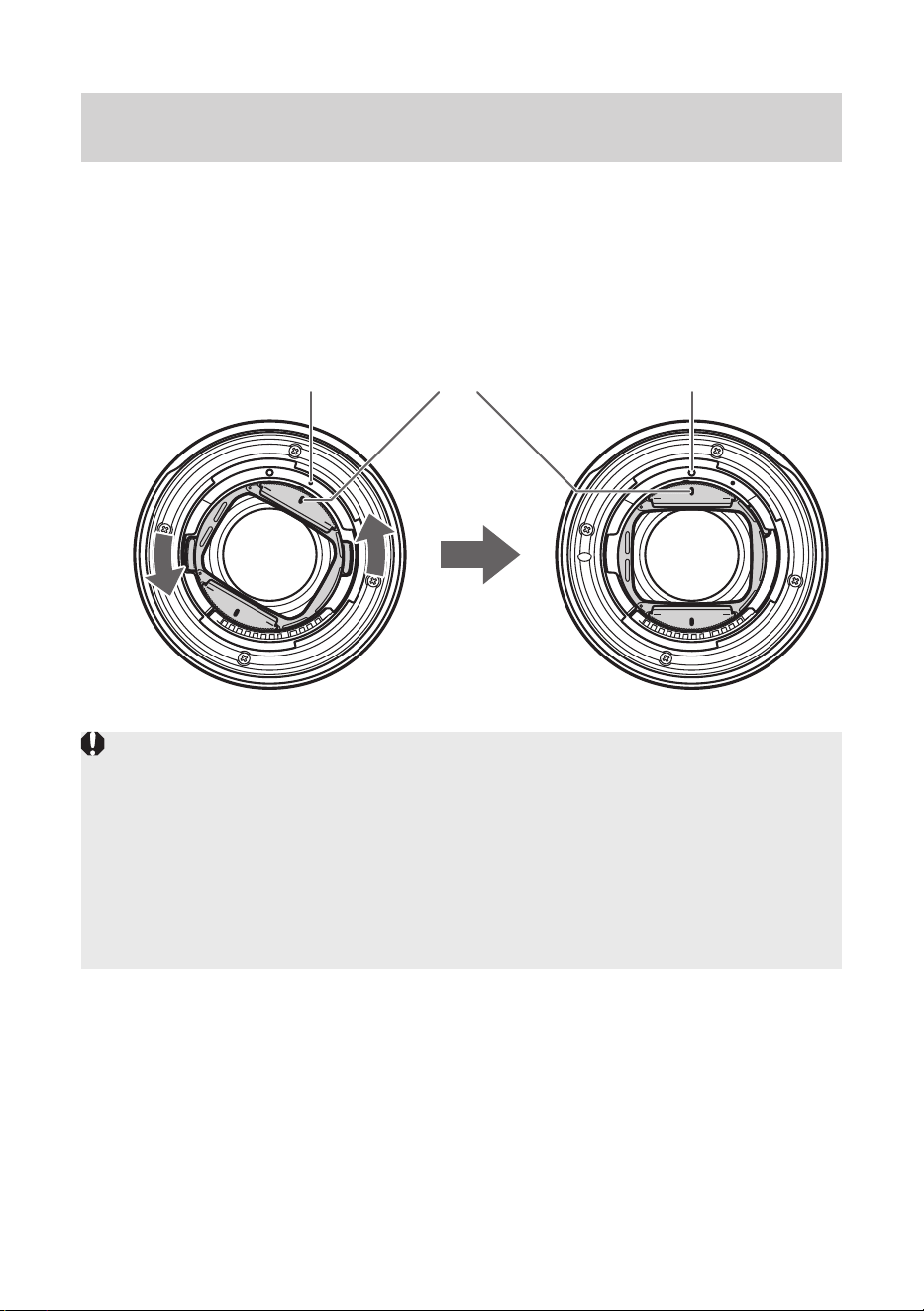
2 Insert the filter into the rear filter holder in the direction of the arrow.
Projections
Filter
Filter indexes
① Check the insertion of the filter
(is it within the rear filter holder
frame?, are the 4 corners
sticking outside the holder?).
● If the filter sticks outside the rear
filter holder, cut the filter.
② Check the insertion of the
filter (does the filter cover
the opening of the rear filter
holder?).
3 Check the filter after insertion.
① Outside
the holder
② Opening
ENG-19
Filters (Sold separately)
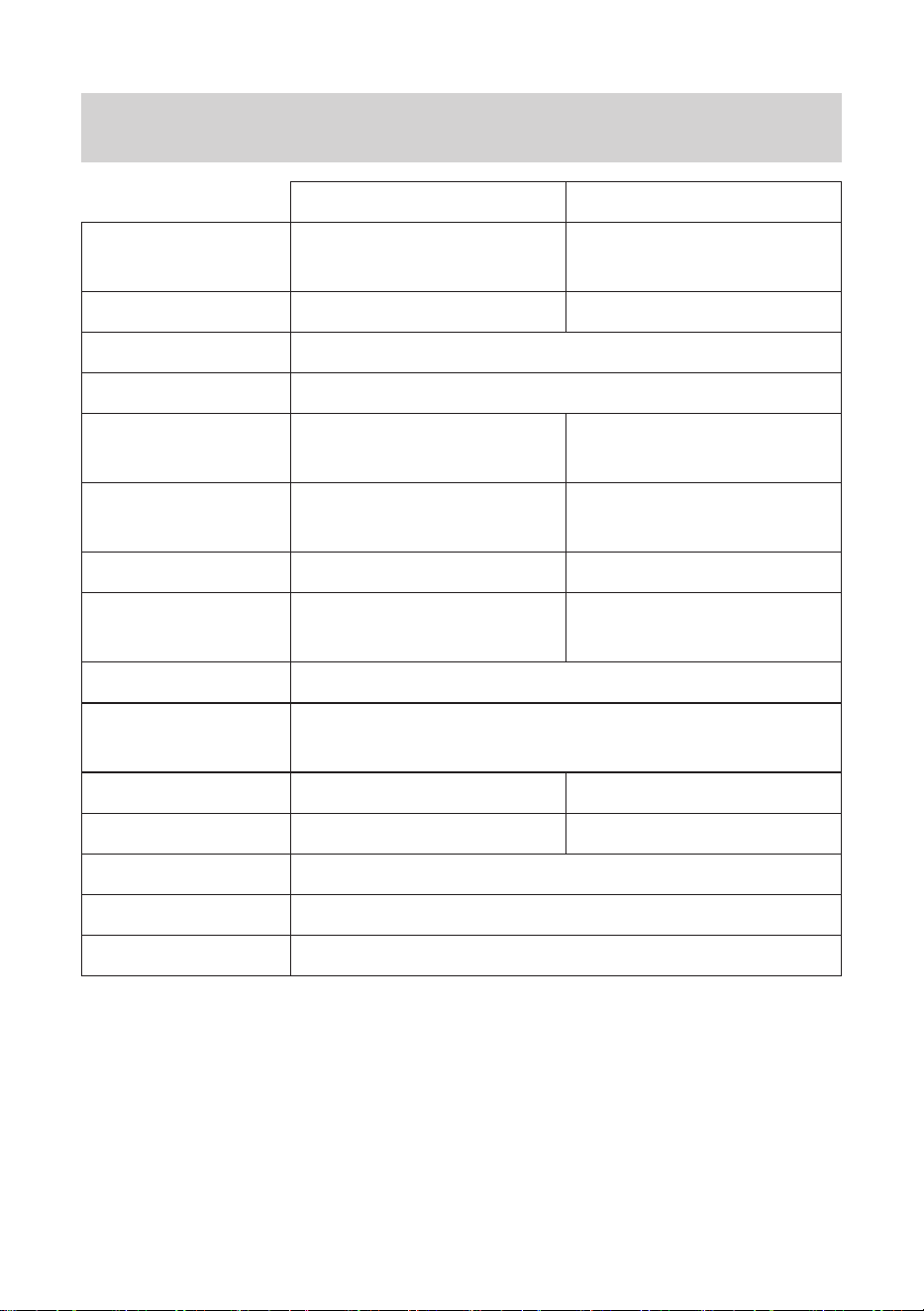
Attach the rear filter holder to the back of the lens.
4 Align the attachment position mark on the lens body with the index
on the rear filter holder.
5 Turn in the direction of the arrow until the rear filter holder index
aligns with the stop position mark on the lens body.
Stop position markIndexAttachment position mark
● Take some test shots before shooting to check that the filter is working
over the entire image.
● Check that the filter is correctly inserted before shooting.
● When the rear filter holder is attached to the lens body, ghosting may
occur depending on shooting conditions. When not using the rear filter,
remove the rear filter holder from the lens body.
● When removing the filter and rear filter holder, remove by reversing the
order of attaching.
ENG-20
Specications
RF20mm F1.4 L VCM RF24mm F1.4 L VCM
Focal Length/
Aperture
20mm f/1.4 24mm f/1.4
Lens Construction 11 groups, 15 elements 11 groups, 15 elements
Maximum Aperture f/1.4
Minimum Aperture f/16
Angle of View
Horizontal: 84°, Vertical:
62°, Diagonal: 94°
Horizontal: 74°, Vertical:
53°, Diagonal: 84°
Min. Focusing
Distance
0.2 m/0.66 ft. 0.24 m/0.79 ft.
Max. Magnification 0.19x 0.17x
Field of View
Approx. 184 x 122 mm/
7.24 x 4.80 in.
Approx. 210 x 140 mm/
8.27 x 5.51 in.
Filter Diameter 67mm (in front)
Max. Diameter and
Length
Approx. 76.5 x 99.3 mm/3.01 x 3.91 in.
Weight Approx. 519 g/18.31 oz. Approx. 515 g/18.17 oz.
Hood EW-73H* EW-73G*
Lens Cap E-67 II*
Lens Dust Cap Lens Dust Cap RF*
Case LP1219*
*
Included with the lens, but can be purchased separately.
ENG-21
Specifications
RF35mm F1.4 L VCM RF50mm F1.4 L VCM
Focal Length/
Aperture
35mm f/1.4 50mm f/1.4
Lens Construction 11 groups, 14 elements 11 groups, 14 elements
Maximum Aperture f/1.4
Minimum Aperture f/16
Angle of View
Horizontal: 54°, Vertical:
38°, Diagonal: 63°
Horizontal: 40°, Vertical:
27°, Diagonal: 46°
Min. Focusing
Distance
0.28 m/0.92 ft. 0.4 m/1.31 ft.
Max. Magnification 0.18x 0.15x
Field of View
Approx. 195 x 130 mm/
7.68 x 5.12 in.
Approx. 230 x 154 mm/
9.06 x 6.06 in.
Filter Diameter 67mm (in front)
Max. Diameter and
Length
Approx. 76.5 x 99.3 mm/3.01 x 3.91 in.
Weight Approx. 555 g/19.58 oz. Approx. 580 g/20.46 oz.
Hood EW-73F* ES-73*
Lens Cap E-67 II*
Lens Dust Cap Lens Dust Cap RF*
Case LP1219*
*
Included with the lens, but can be purchased separately.
ENG-22
Specifications
RF85mm F1.4 L VCM
Focal Length/
Aperture
85mm f/1.4
Lens Construction 10 groups, 14 elements
Maximum Aperture f/1.4
Minimum Aperture f/16
Angle of View Horizontal: 24°, Vertical: 16°, Diagonal: 28°30’
Min. Focusing
Distance
0.75m/2.46 ft.
Max. Magnification 0.12x
Field of View
Approx. 283 x 190 mm/
11.14 x 7.48 in.
Filter Diameter 67mm (in front)
Max. Diameter and
Length
Approx. 76.5 x 99.3 mm/3.01 x 3.91 in.
Weight Approx. 636 g/22.43 oz.
Hood ET-73C*
Lens Cap E-67 II*
Lens Dust Cap Lens Dust Cap RF*
Case LP1219*
*
Included with the lens, but can be purchased separately.

ENG-23
Specifications
● The lens length is measured from the lens mount surface to the front
end of the lens.
Add 24.2 mm/0.95 in. when including the lens cap and dust cap.
● The maximum diameter, length and weight listed are for the lens
itself only.
● Close-up Lens 250D/500D cannot be attached because there is no
size that fits the lens.
● You cannot use extenders.
● Multiple exposure shooting is not possible on certain cameras*
(excluding RF50mm F1.4 L VCM and RF85mm F1.4 L VCM).
*
EOS R, RP, Ra, R5, R5C, R6
● All data listed is measured according to Canon standards.
● Product specifications and appearance are subject to change without
notice.

CT1-D404-B © CANON INC. 2025 0425SZ