
Request and application of additional license to Martin One-
key via M-Series or PC software
1
10/26/2016 Rev F
Martin One-Key
Requesting and applying licenses
Content
What is a One-Key? ......................................................................................................................... 2
Related part numbers ..................................................................................................................... 3
o Martin One-Key compatible licenses available: .................................................................. 3
o Martin One-Key (physical dongle) ....................................................................................... 3
Procedure using M-Series software ................................................................................................ 4
o Requesting new license using the M-Series software, ........................................................ 5
o Sending the information ...................................................................................................... 7
o Applying the new license using M-Series Software ............................................................. 8
Procedure using Codemeter PC application ................................................................................. 10
o Requesting license using PC application ............................................................................ 10
o Sending the information .................................................................................................... 14
o Applying the license using Codemeter application ........................................................... 15
Procedure using Martin ShowDesigner to request a license ....................................................... 18
Backing up the licenses from a Martin One-Key........................................................................... 19
Replacing a lost or stolen One-Key ............................................................................................... 21
Replacing a defective One-Key ..................................................................................................... 22
Request and application of additional license to Martin One-
key via M-Series or PC software
2
10/26/2016 Rev F
What is a One-Key?
A One-Key is a special USB device used for software piracy protection as well as distributing
various access levels to a software based on the user purchase preferences.
Martin One-Key is a simple heavy duty USB device that can unlock one or many applications. It
is easy to carry and is flexible.
At Martin Professional, we use the Martin One-Key for several products:
- Martin M-Series consoles
- P3-PC
- Martin ShowDesigner
- LightJockey
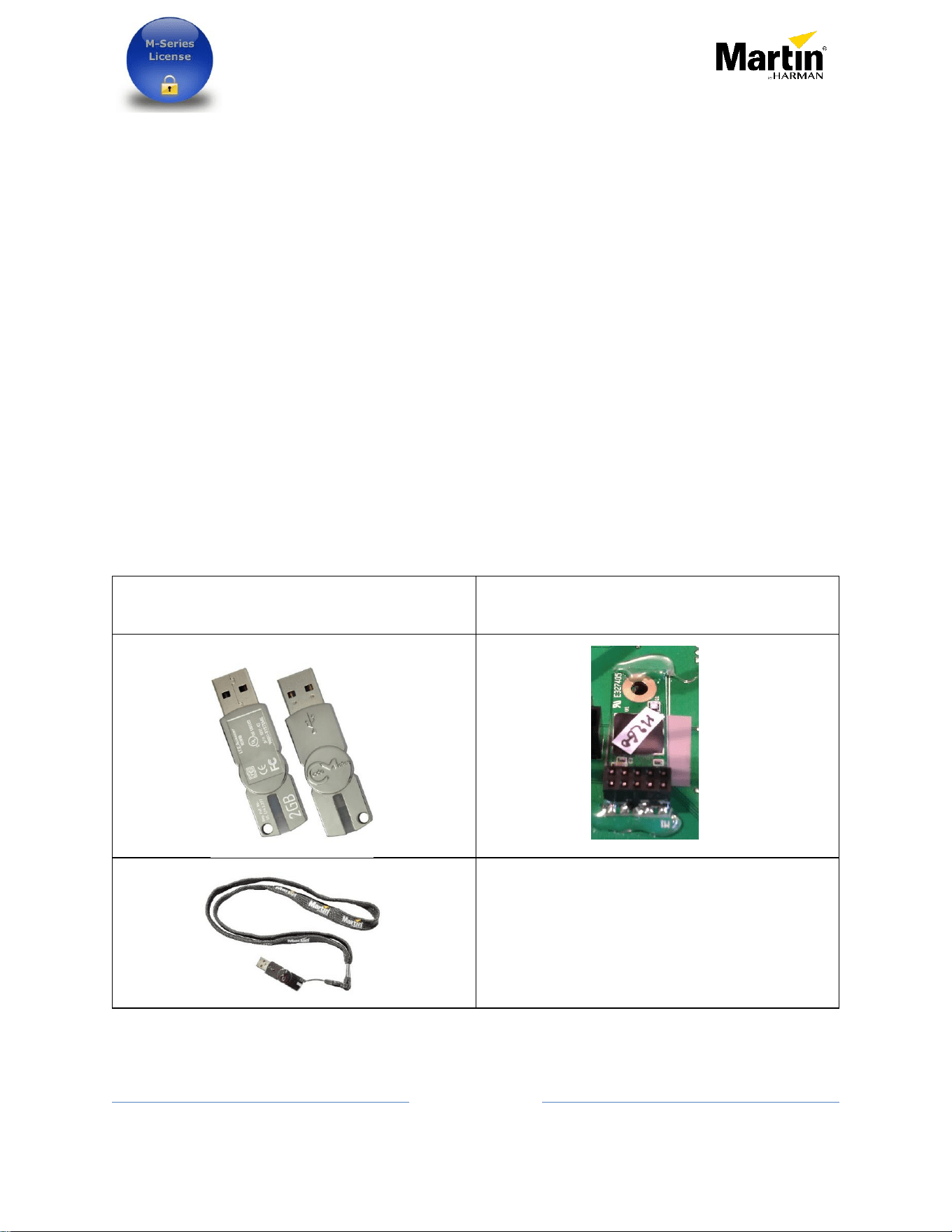
For PC application the One-Key looks like a normal USB drive, but the One-Key used inside most
M-Series consoles is a simple PCB with a header connector.
One-Key used for PC application
One-Key used inside hardware controllers

Request and application of additional license to Martin One-
key via M-Series or PC software
3
10/26/2016 Rev F
Related part numbers
o Martin One-Key compatible licenses available:
Martin Controller and P3-PC
- 39808015 Martin M-PC Pro 64 and LJ 4 Universes License
- 39808028 P3-PC License only
- 39808046 M-PC-M2PC 128 DMX Universes Expansion License
Lighthouse – Martin ShowDesigner (MSD)
- 39808040 MSD 6 Pro (License for five years – W/O One-Key)
- 39808041 MSD 6 Lite (License for five years – W/O One-Key)
o Martin One-Key (physical dongle)
- 90703000 Martin One Key with demo licenses
The Martin One-Key demo contains the following temporary licenses
M-PC 64 universes 45 days
LightJockey 4 universes 45 days
MSD Lite 180 Days
This part number can be used for someone who is purchasing a license but does not
already own a Martin One-Key. It can also be used as replacement for a lost, stolen
or defective One-Key.
The trial time starts from the first time the One-Key is used with a specific software.
- 70758460 Martin One-Key with Martin M-PC Pro 64 and LJ 4 Universes License
This part number can be purchased for users who already own DMX hardware and
only need an M-PC or LightJockey One-Key to unlock the software
- 90721030 P3-PC System Controller
Request and application of additional license to Martin One-
key via M-Series or PC software
4
10/26/2016 Rev F
Procedure using M-Series software
This document explains how to request and apply additional license to a Martin One-Key
using M-Series software on PC or consoles.
At this point, this document assumes the license has already been purchased through a
Martin dealer.
Please read every step carefully to ensure a smooth process.
If the request is made for a console, write down the serial number of this console, it will be
needed in the process.
Very Important
Consoles and PC must have their date, time and time zone set
properly, failing to do so would prevent the license update from
properly working.
Ensure that no extra modules such as the M-Series are connected to
the console or PC.
On a PC a single Martin One-Key should be connected at the time of
request, this to ensure the request is generated from the desired
key.
Request and application of additional license to Martin One-
key via M-Series or PC software
5
10/26/2016 Rev F
o Requesting new license using the M-Series software,
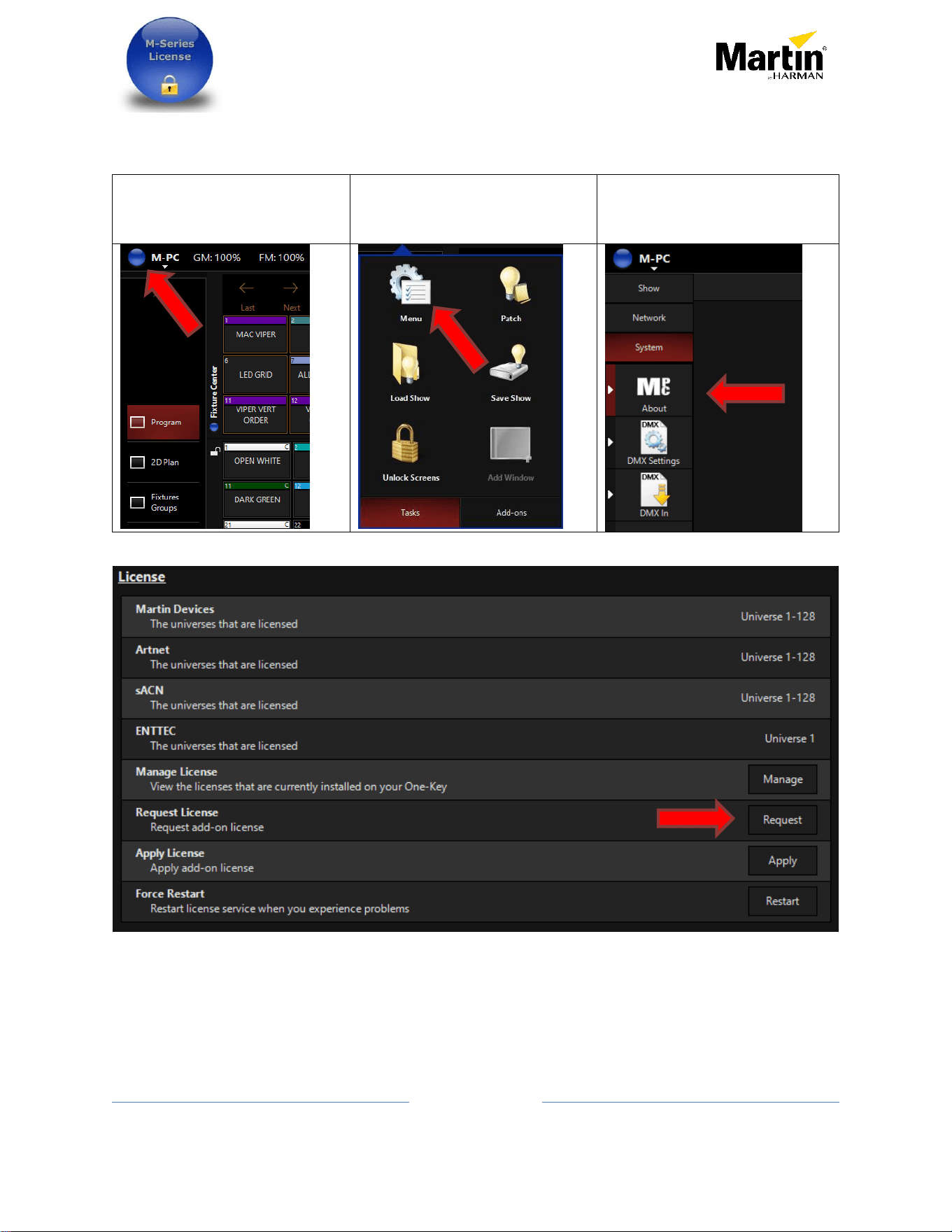
- Start the M-PC application or M-Series console
Click the blue icon in the top
left
Click on Menu
Click on the sidebar System
and About
- In the License section click on Request
Request and application of additional license to Martin One-
key via M-Series or PC software
6
10/26/2016 Rev F
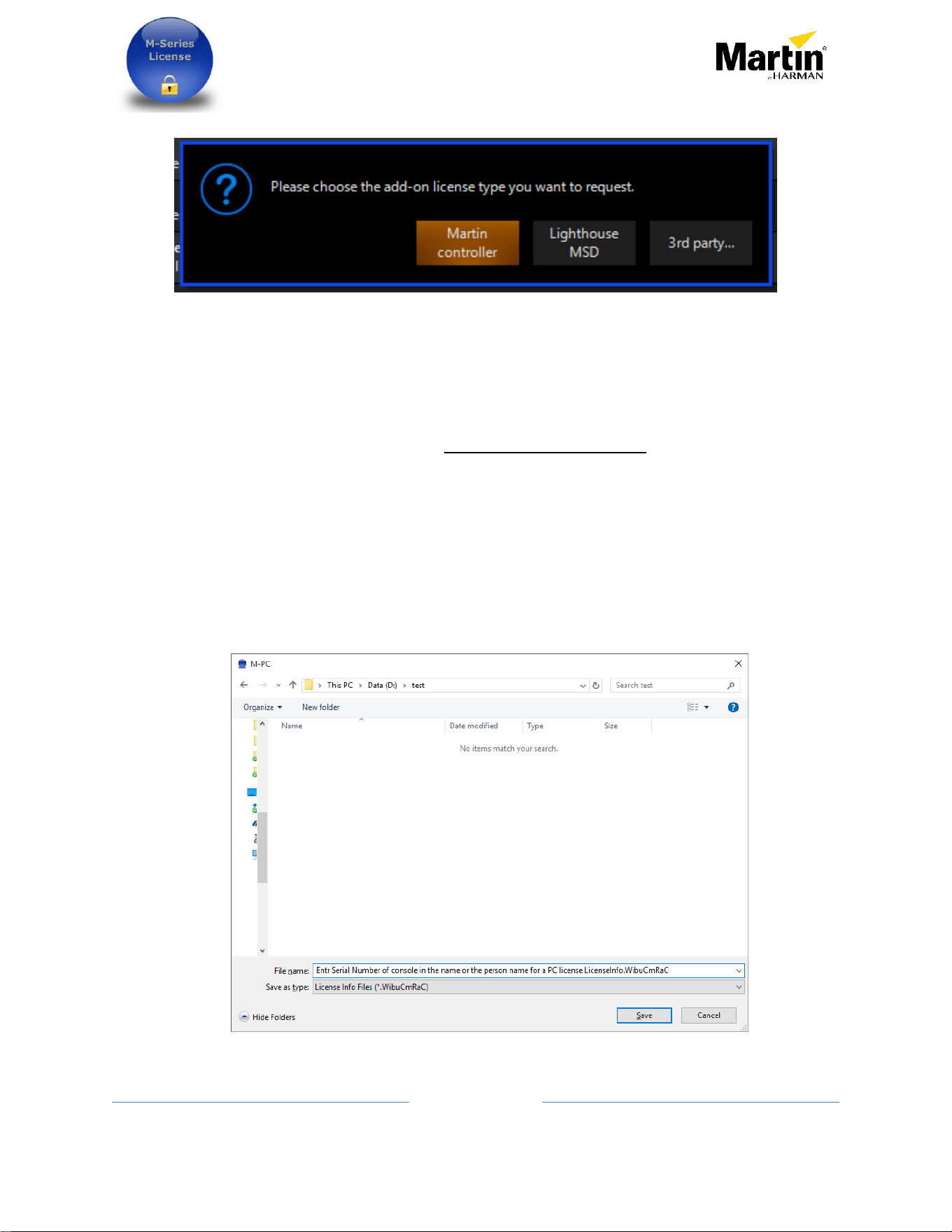
- This pop-up will appear
- If the license request is for MSD (Martin ShowDesigner) license, click on Lighthouse MSD
- Otherwise, click on Martin Controller
- A window will appear and ask for a file name.
o If the request is for a console, include the serial number of that console in the
file name
o If the license request is for an external One-Key, enter the purchaser name in the
filename.
- Select a place to save that file.
o On a console it is suggested to save it to an external USB drive.
o On a PC, the desktop is a good place to save it.

Request and application of additional license to Martin One-
key via M-Series or PC software
7
10/26/2016 Rev F
- The first part of the process is now done.
o Sending the information
- The generated file can now be sent to [email protected]
- Must be included in this email:
o Company or person name who is purchasing the license
o A proof or purchase (PDF)
o Purchase or sale order number
o Part number and quantity purchased
o Serial number of the console if applicable
- A license will be generated within 48 hours on regular working days.
- Any missing information will delay the process.
See next section on how to apply a license to One-Key or console
Request and application of additional license to Martin One-
key via M-Series or PC software
8
10/26/2016 Rev F
o Applying the new license using M-Series Software
Once a new license file is received from Martin Professional or Lighthouse Holland, here‘s
how to apply the license into the Martin One-Key or console.
The license update should first be saved on the computer for example on the desktop or
on a USB drive if the license is to be applied to a console.
Note: A license is only good for the One-Key or console where it originated from. This
means a license cannot be applied to multiple One-Key or console or to a different one
from the original request.
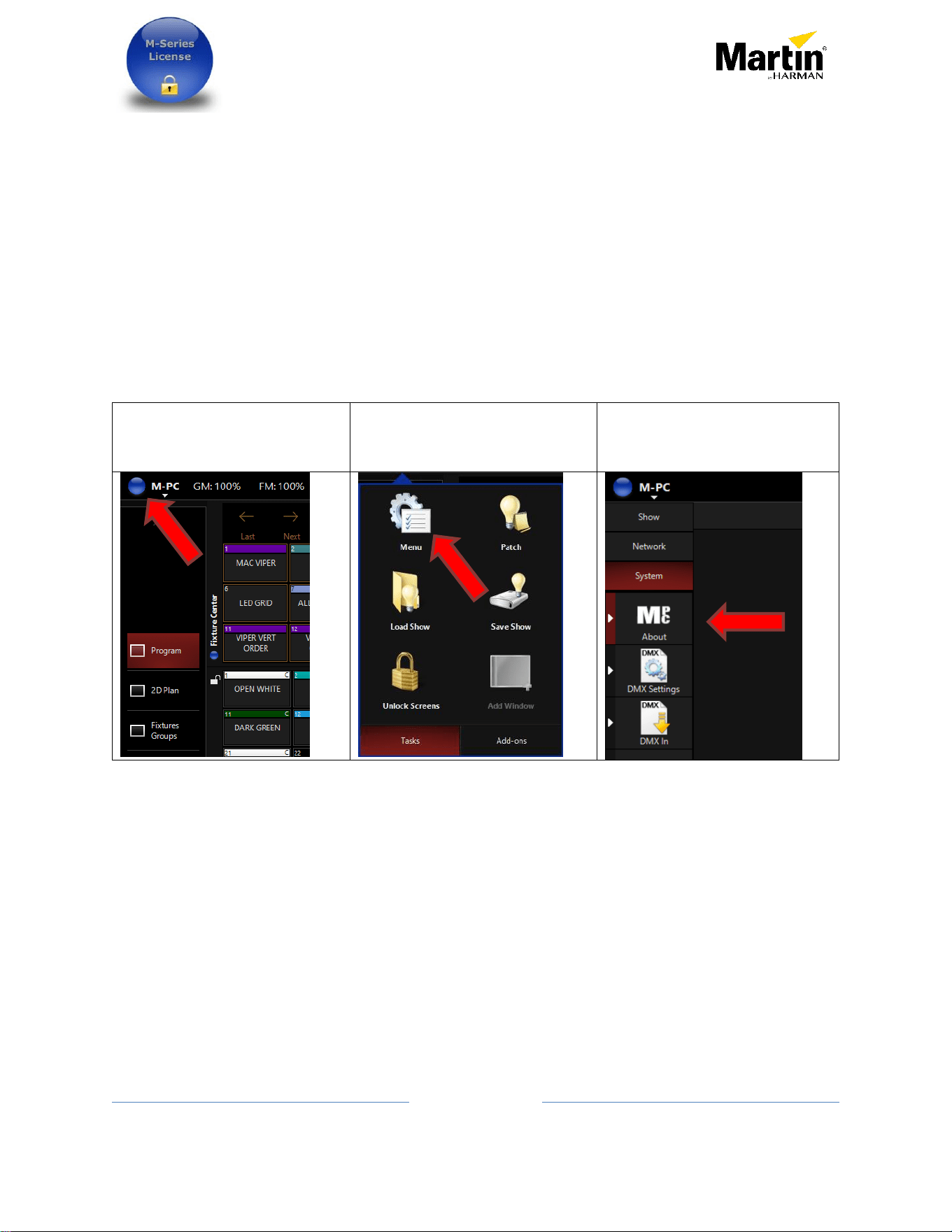
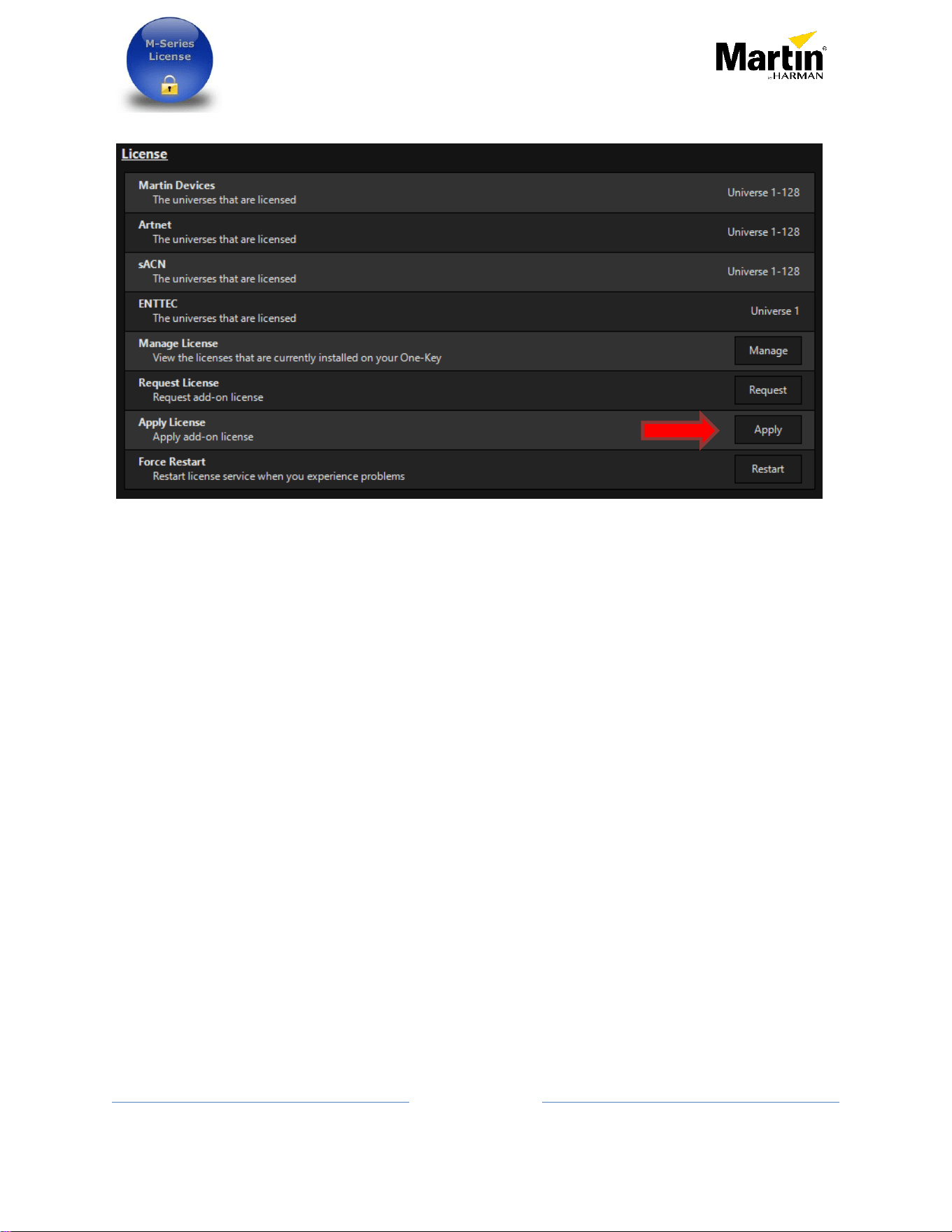
- From the M-Series software,
Click the blue icon in the top
left
Click on Menu
Click on the sidebar System
and About
Request and application of additional license to Martin One-
key via M-Series or PC software
9
10/26/2016 Rev F
- In the License section
- Click on Apply
- Browse to the location where the newly received license was saved. And select that
license file
- Press Open
- The license is now part of the Martin One-Key or console.
Notes:
- It is not possible to erase a license from a key, it stays there forever.
- Reinstalling the console operating system can be done safely, it will not erase any
licenses
- Transferring a license from a key or console to another is not possible
- Keep the proof of purchase and the received license file in case of technical issues that
would require a key to be replaced.
Request and application of additional license to Martin One-
key via M-Series or PC software
10
10/26/2016 Rev F
Procedure using Codemeter PC application
o Requesting license using PC application
This document explains how to request and install additional license to a Martin One-Key
using a Windows based computer.
At this point this document assumes the license has already been purchased.
First the CodeMeter application should already be installed on the computer where the
One-Key is plugged in. This application is normally automatically installed when M-PC,
Martin LightJockey, Martin ShowDesigner and P3-PC. If for some reason the Codemeter
application is not installed, it can be downloaded from
https://www.wibu.com/downloads-user-software.html.
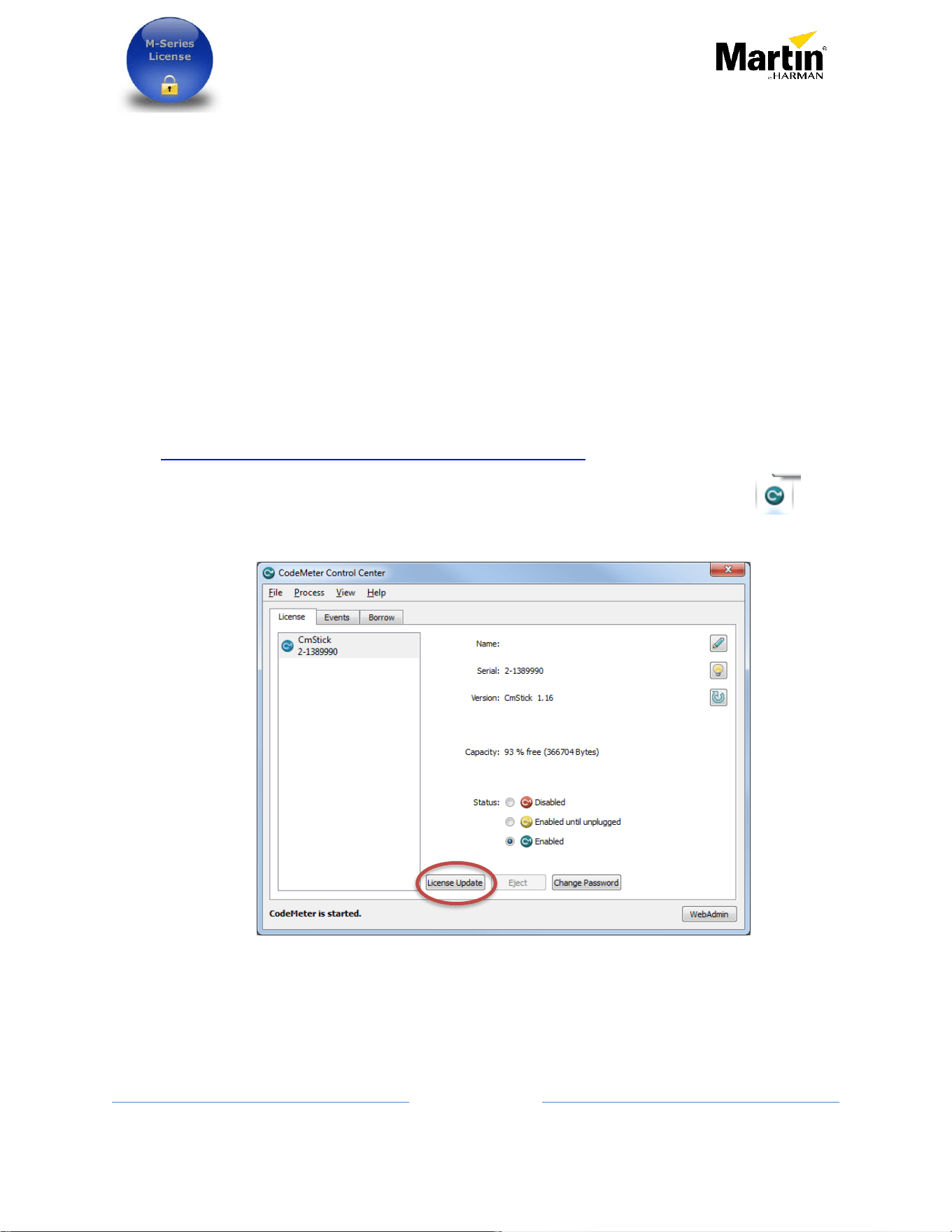
- With the CodeMeter application installed it can be launch from the tray icon or
from the Start menu / CodeMeter / CodeMeter Control Center.
- Click on License Update
Request and application of additional license to Martin One-
key via M-Series or PC software
11
10/26/2016 Rev F
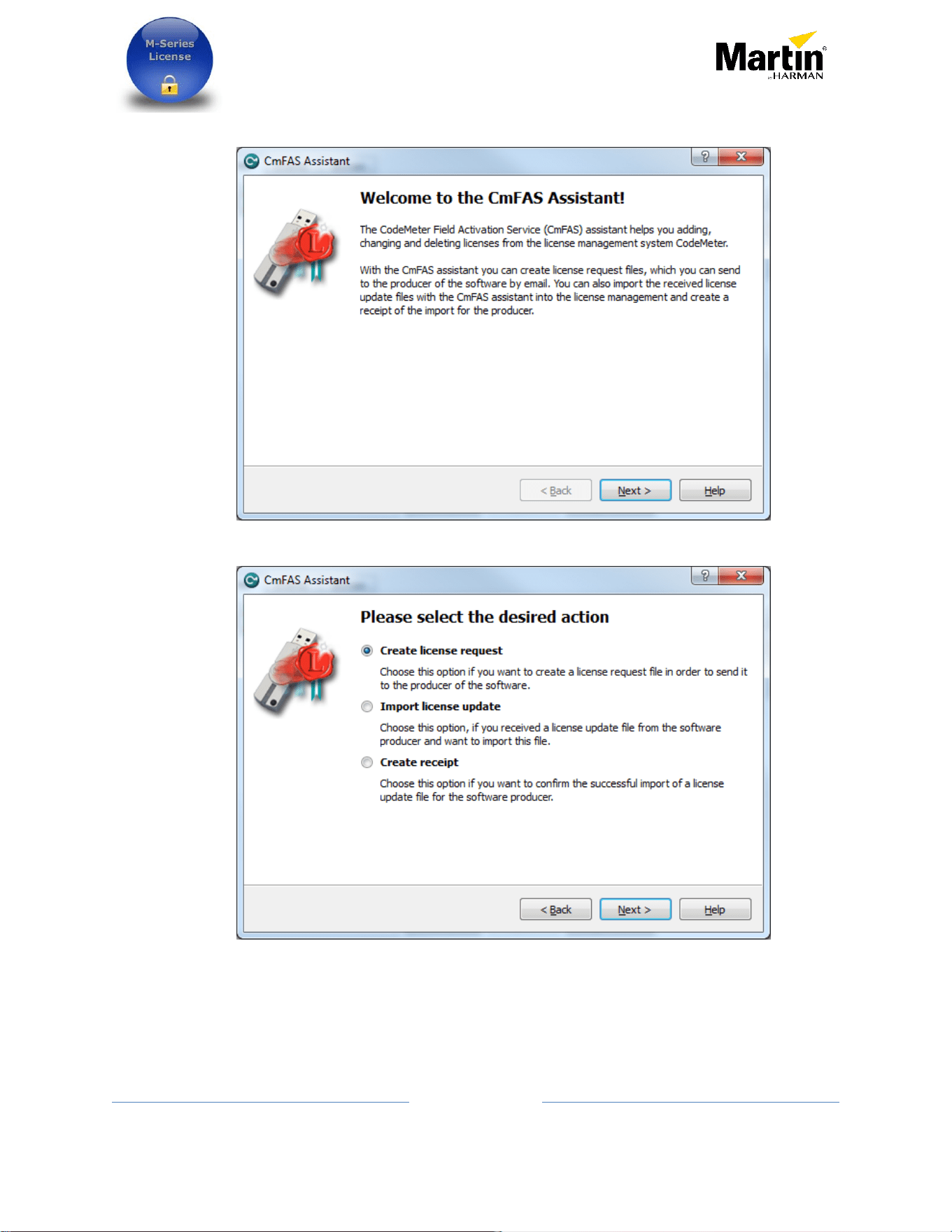
- Click Next when this window is shown
- Select Create license request and click Next
Request and application of additional license to Martin One-
key via M-Series or PC software
12
10/26/2016 Rev F
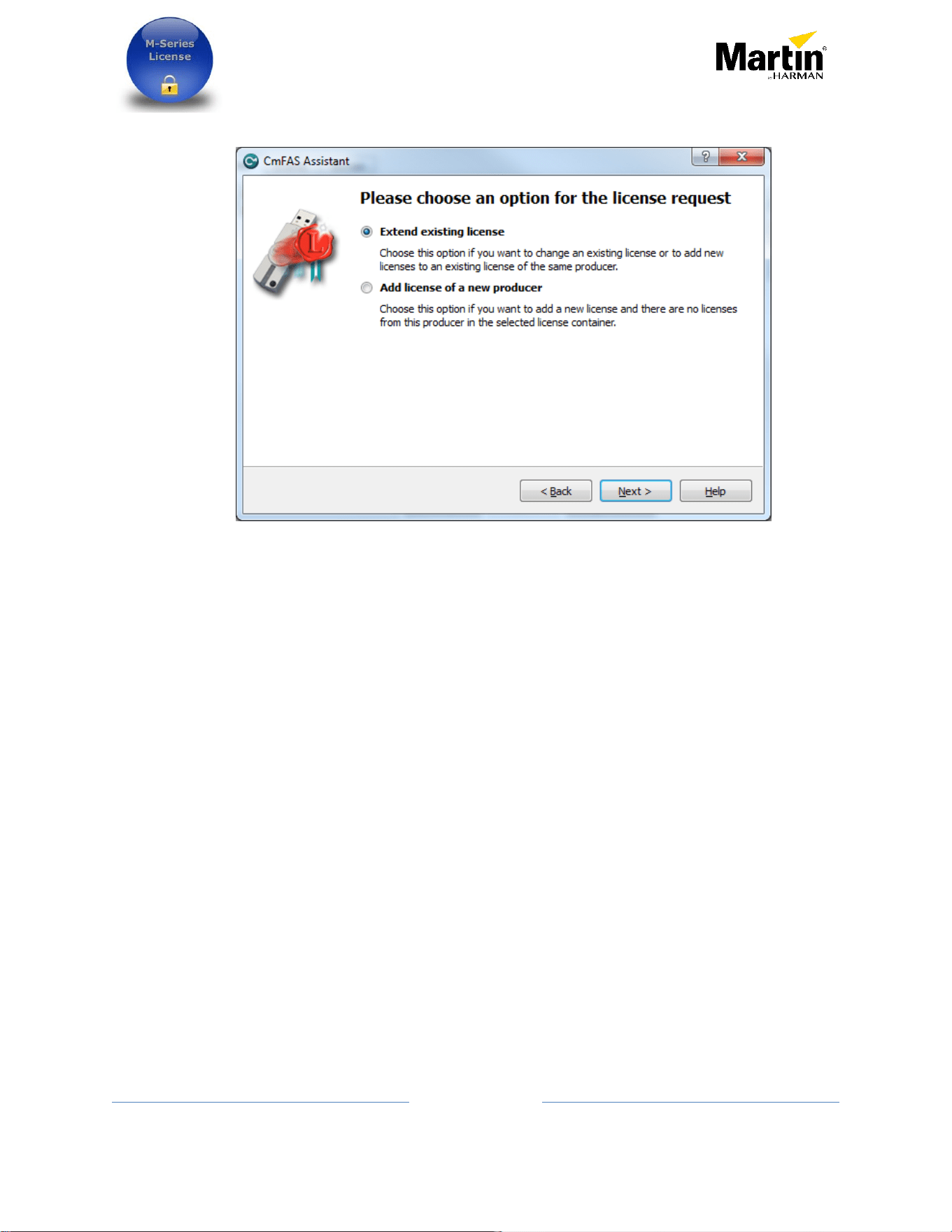
- Select Extend existing license and click next
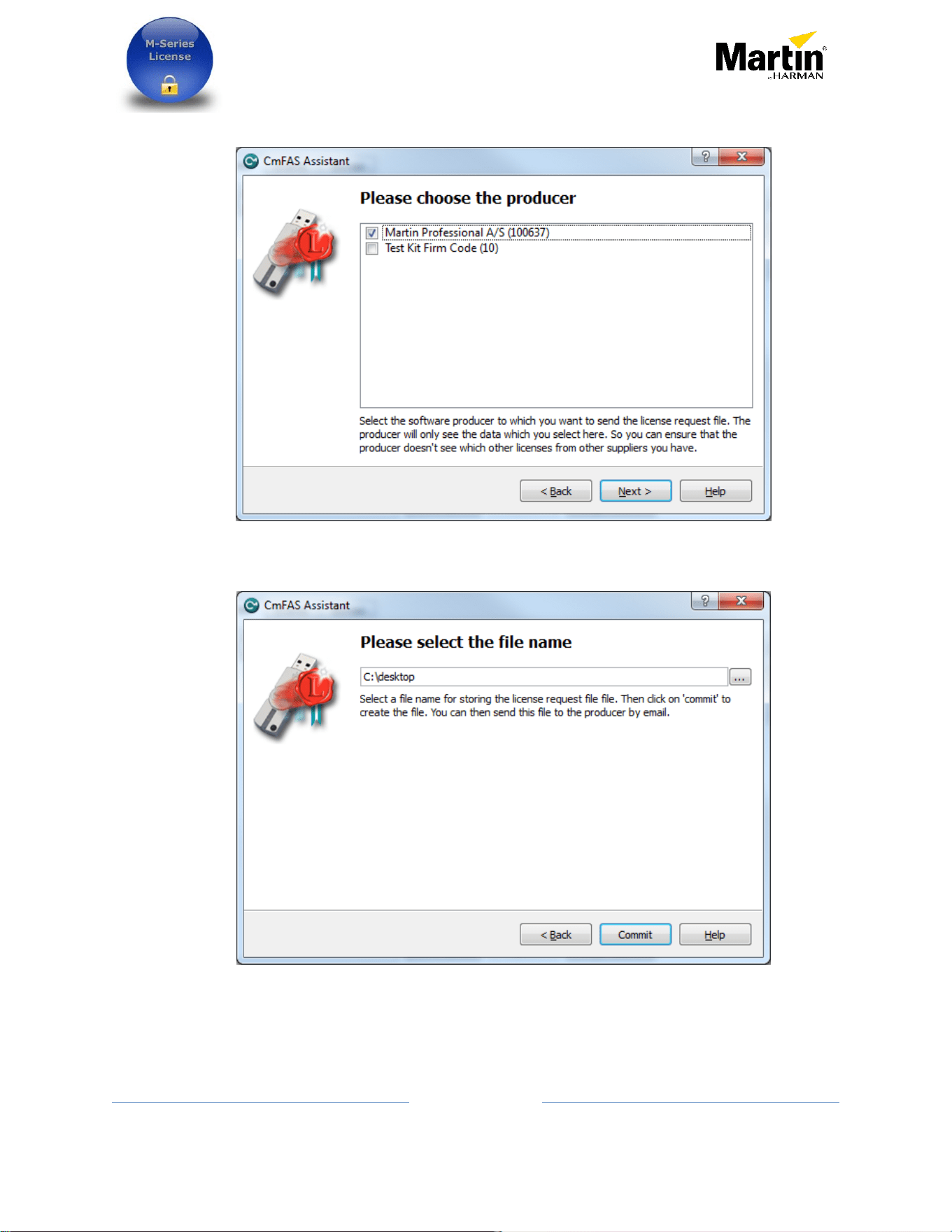
- Select Martin Professional A/S for adding controller license.
- If this is for a Martin Show Designer license, select Lighthouse Holland bv.
- If the producer name is not there, go back to the previous step and choose Add License
of a new producer
Enter the firmcode 100637 for Martin Professional or 100892 for Lighthouse Holland
Request and application of additional license to Martin One-
key via M-Series or PC software
13
10/26/2016 Rev F
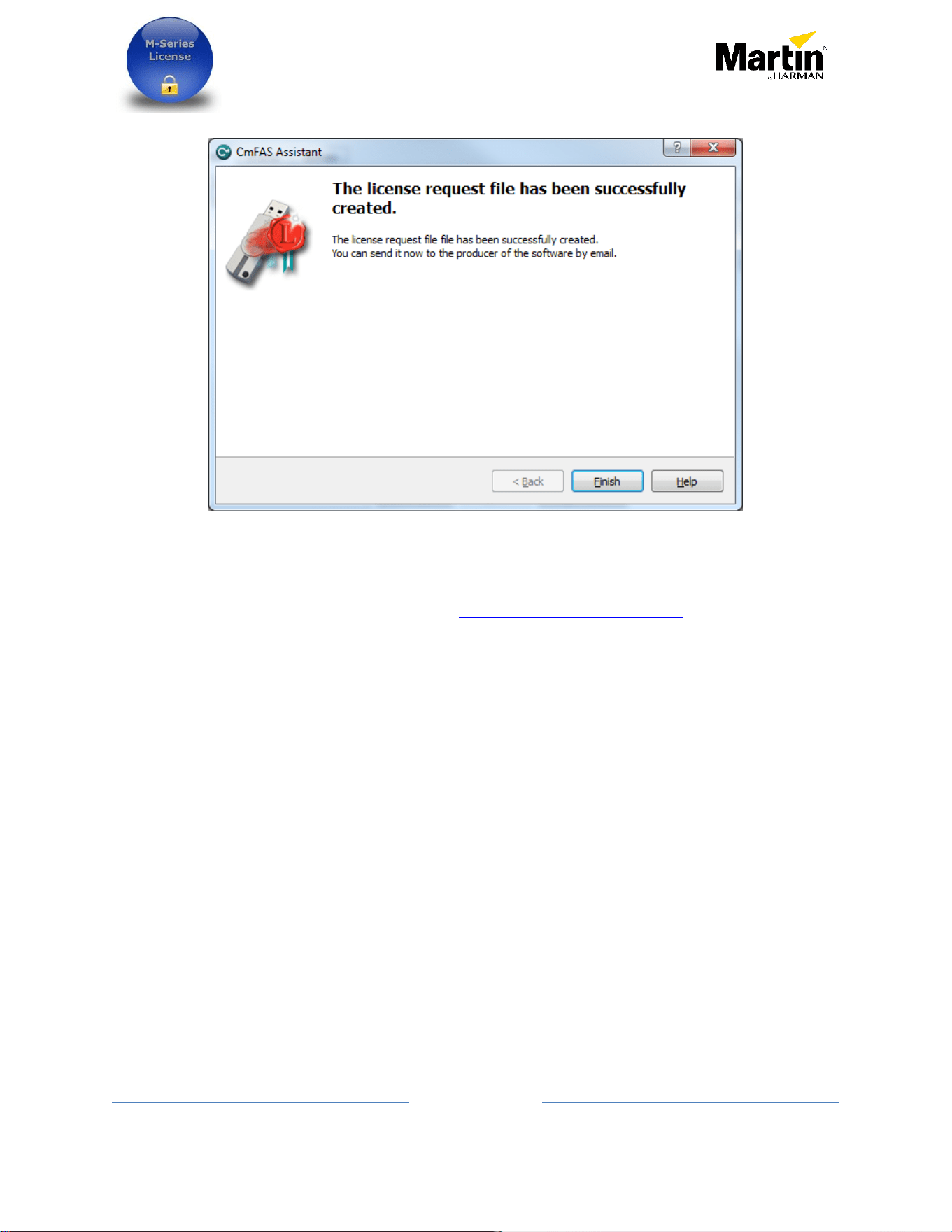
- Click Next to continue
- Select a place on the computer to save the license request file and press Commit.
-
Request and application of additional license to Martin One-
key via M-Series or PC software
14
10/26/2016 Rev F
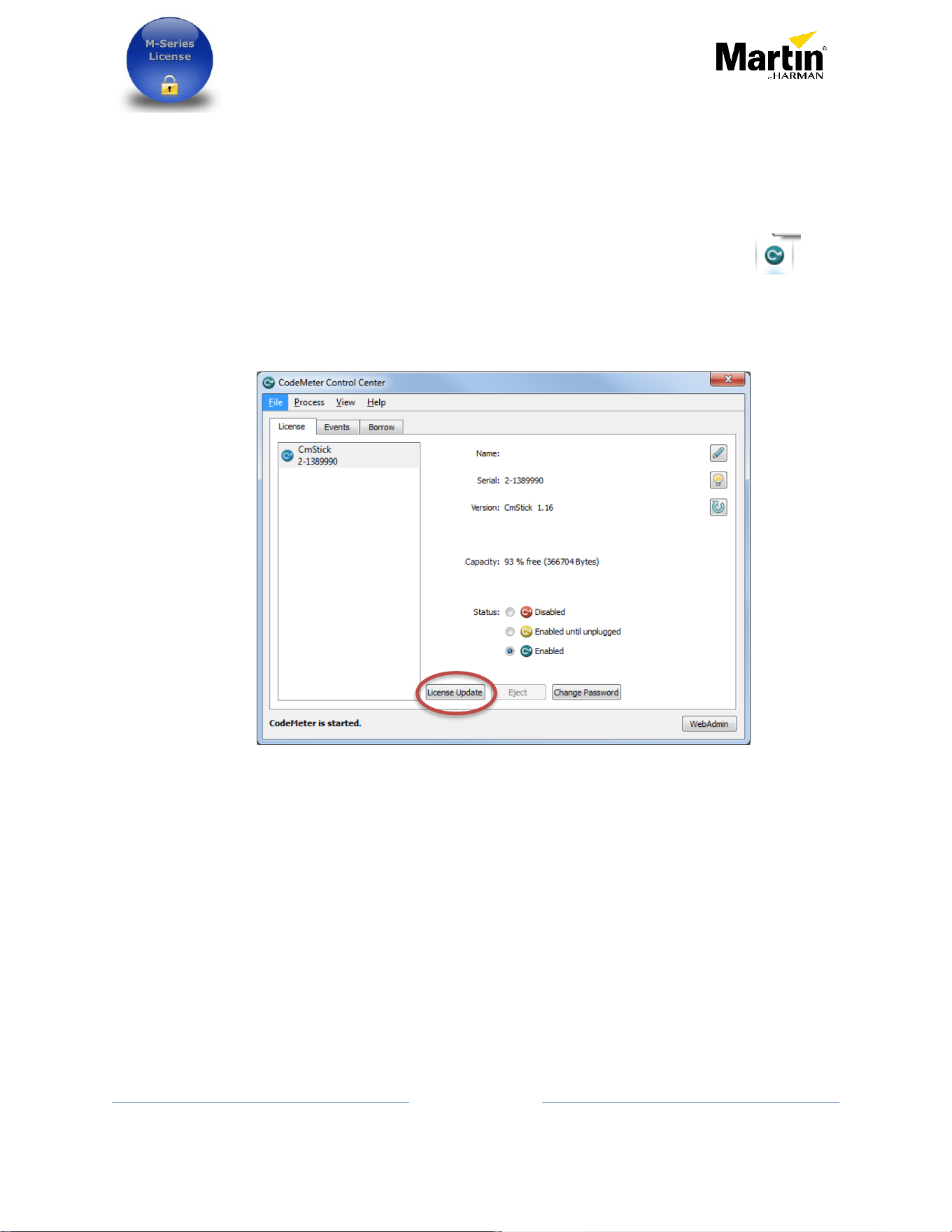
- The license request is now generated.
o Sending the information
- The generated file can now be sent to [email protected]
- Must be included in this email:
o Company or person name who is purchasing the license
o A proof or purchase (PDF)
o Purchase or sale order number
o Part number and quantity purchased
o Serial number of the console if applicable
- A license will be generated within 48 hours on regular working days.
- Any missing information will delay the process.
See next sections on how to apply a license to One-Key.
Request and application of additional license to Martin One-
key via M-Series or PC software
15
10/26/2016 Rev F
o Applying the license using Codemeter application
Once a new license file is received from Martin Professional A/S or Lighthouse Holland bv.
here‘s how to import the license into the Martin One-Key.
The license update should first be saved on the computer, example in C:\ folder
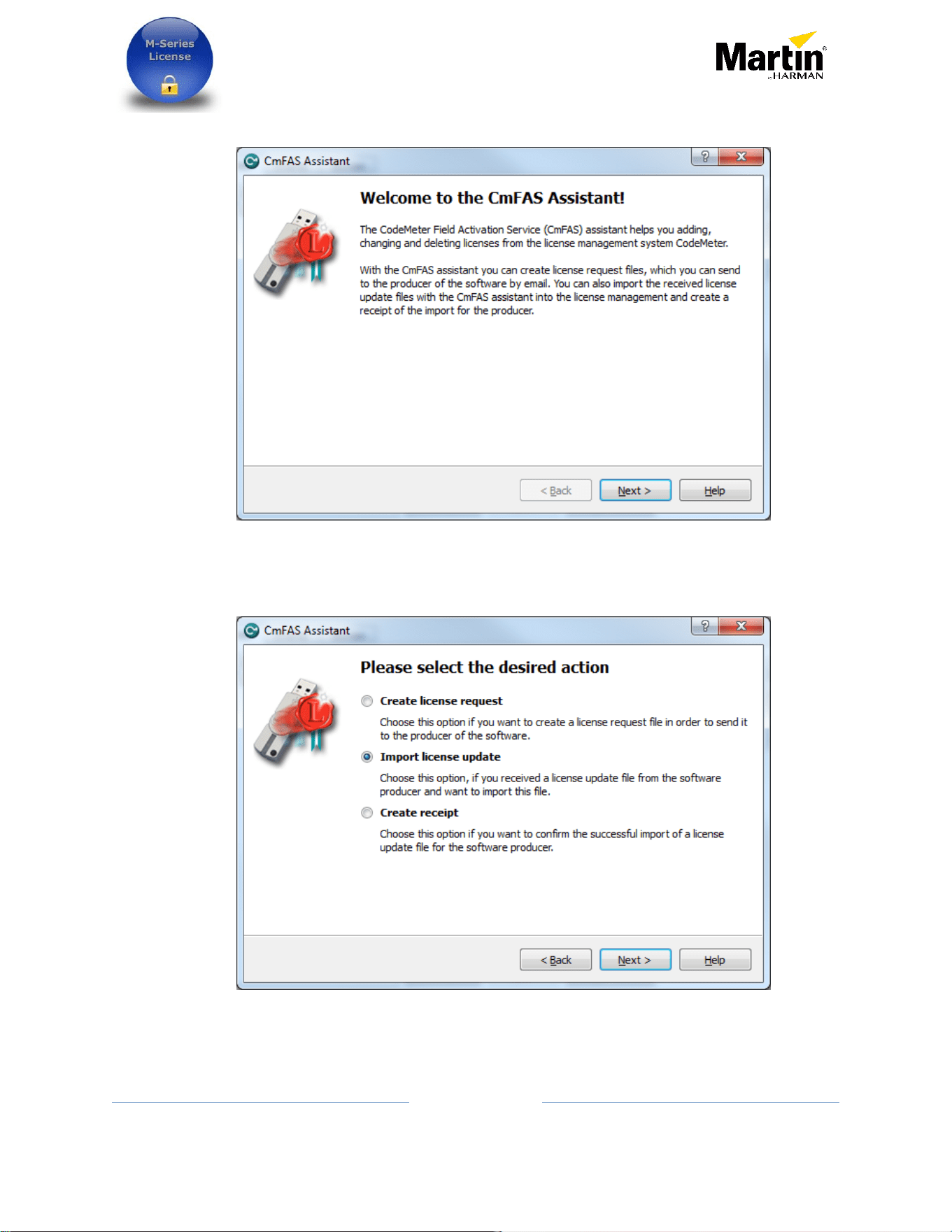
- With the CodeMeter application installed it can be launch from the tray icon or
from the Start menu / CodeMeter / CodeMeter Control Center.
- Click on License Update
Request and application of additional license to Martin One-
key via M-Series or PC software
16
10/26/2016 Rev F
- Click Next when this window is shown
- Select import license update and click next
Request and application of additional license to Martin One-
key via M-Series or PC software
17
10/26/2016 Rev F
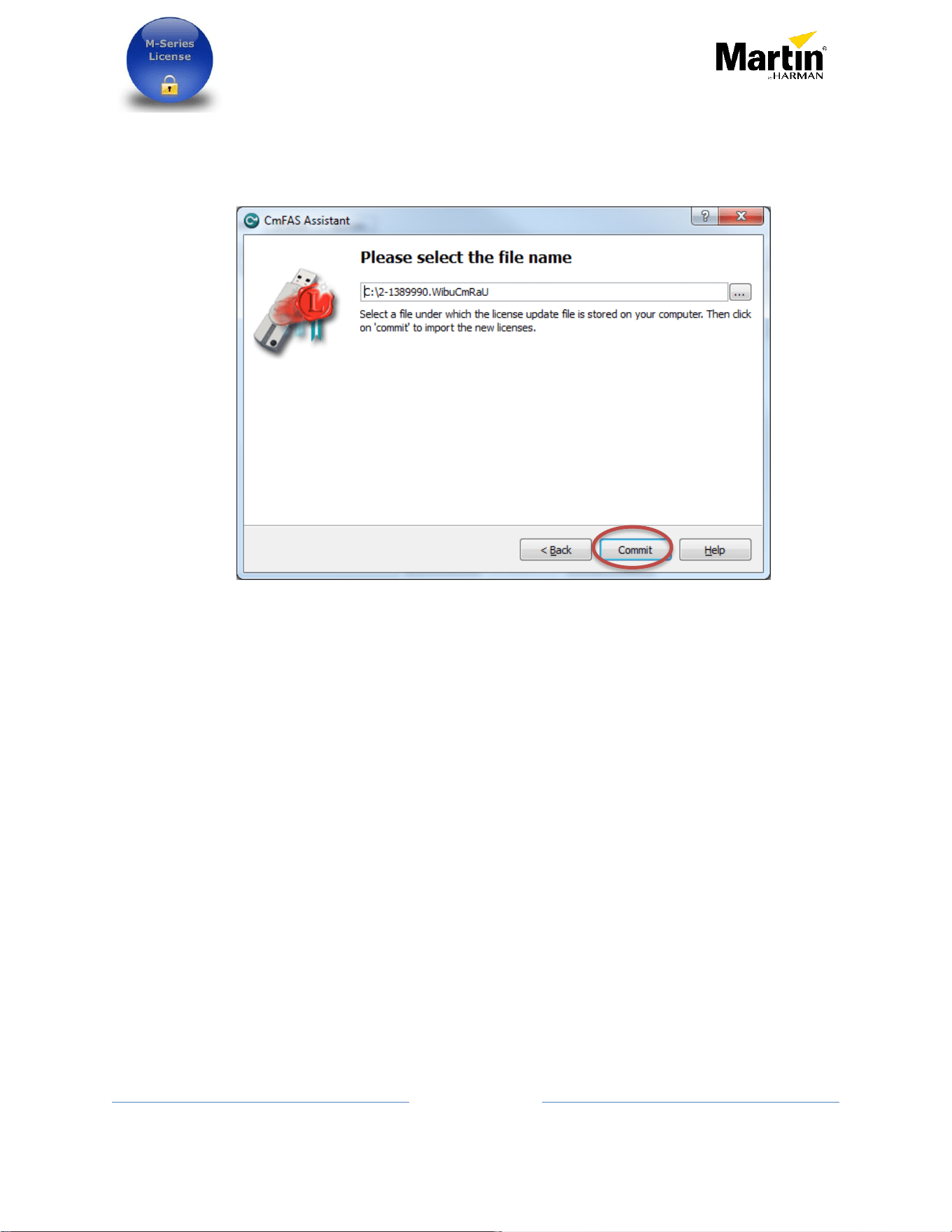
- Browse to the location where the newly received license was saved. And select it
- Press Commit
- The license is now part of the Martin One-Key
Request and application of additional license to Martin One-
key via M-Series or PC software
18
10/26/2016 Rev F
Procedure using Martin ShowDesigner to request a license
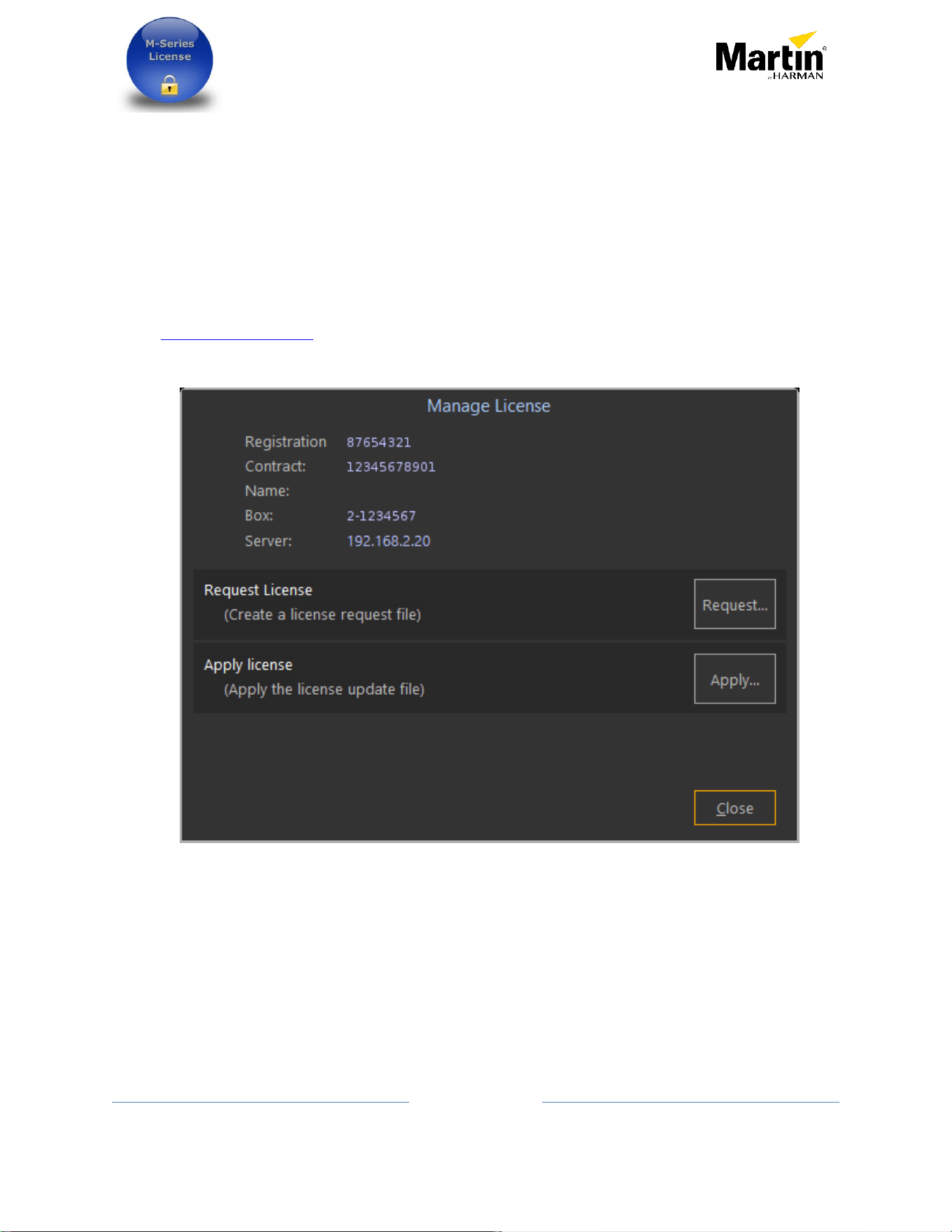
Martin ShowDesigner also contains an interface to request and apply license.
It can be found in the menu Help/Dongle/Manage License or in the Windows Start menu
under Martin ShowDesigner / Manage License
The rest of the procedure is the same as previous procedure.
If the license is contacted directly with Lighthouse Holland, please send an email to
Request and application of additional license to Martin One-
key via M-Series or PC software
19
10/26/2016 Rev F
Backing up the licenses from a Martin One-Key
(Does not apply to console)
Backing up the license can be useful in case of a damaged or stolen key. Although the
backup cannot be used directly on a new key, it can be used to block a stolen key from
being used and/or as proof of purchases when a replacement key arrives.
There are two methods to make a safety backup of the licenses on a One-key:
- -Using this website https://my.codemeter.com/
- -Or locally using the following steps.
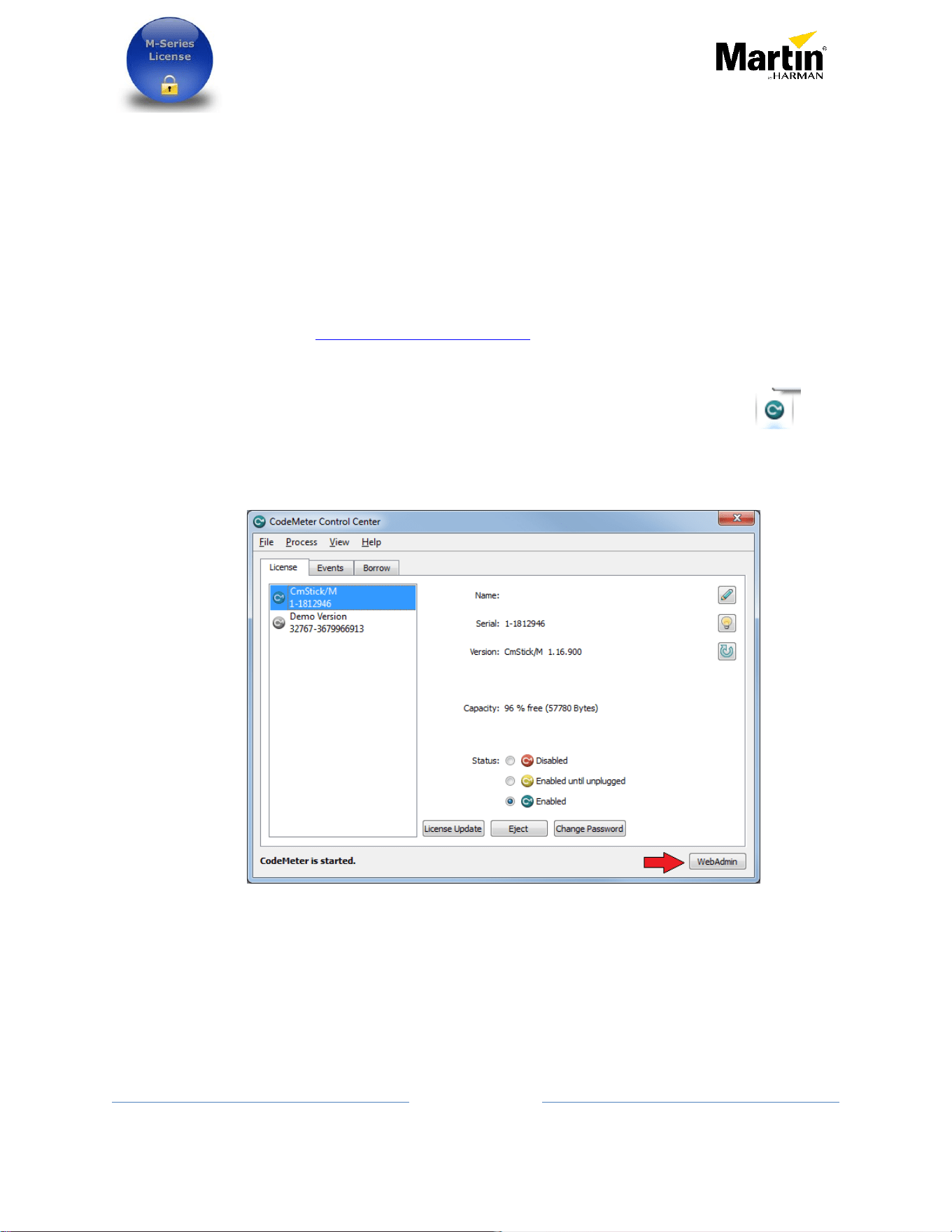
- With the CodeMeter application installed it can be launch from the tray icon or
from the Start menu / CodeMeter / CodeMeter Control Center.
- Click on WebAdmin
Request and application of additional license to Martin One-
key via M-Series or PC software
20
10/26/2016 Rev F
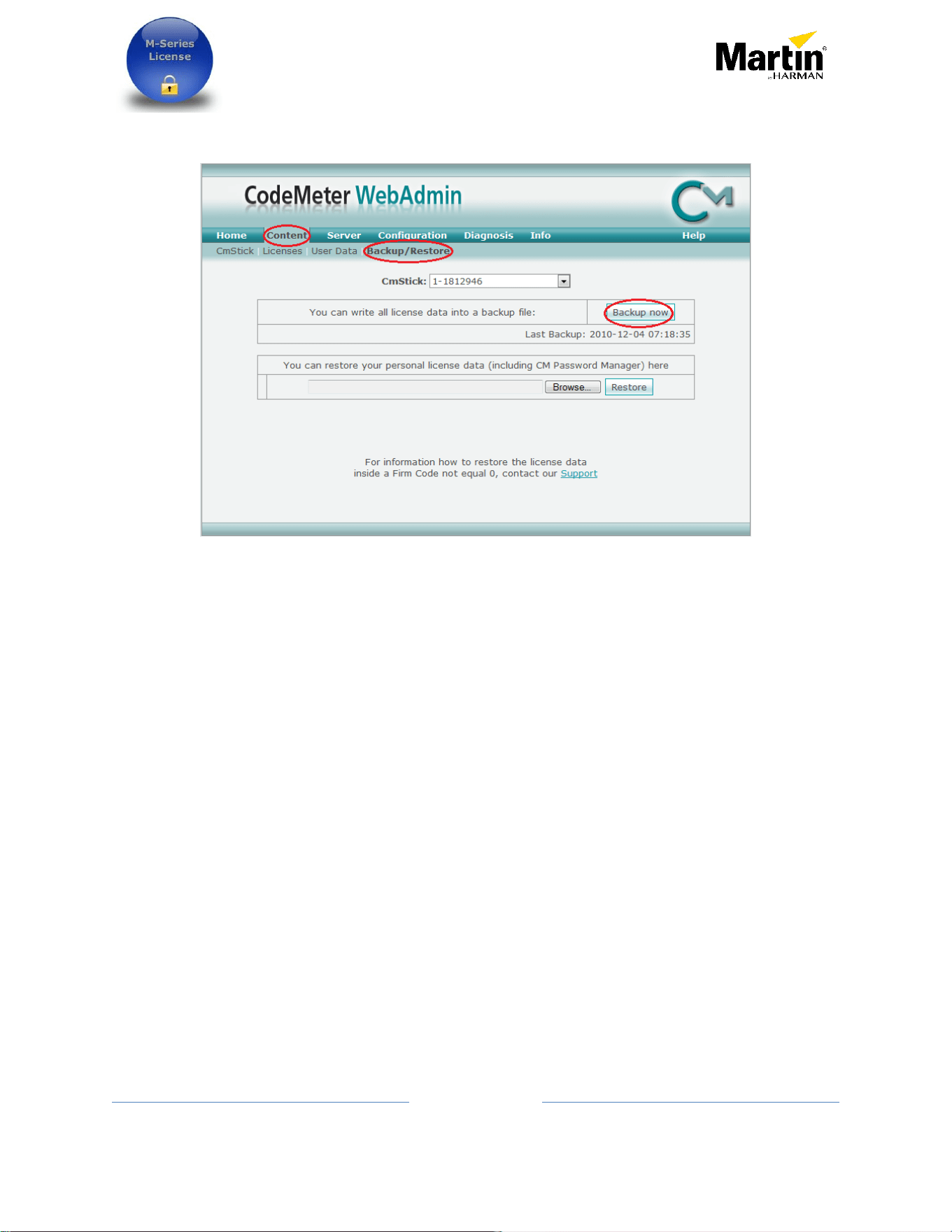
- A web browser will open with this page
Click on Content then Backup/Restore and then Backup Now
- A popup will show where the backup file is saved
Note where the file has been stored, browse to it and make a copy of it in a safe
place. It is strongly suggested to make a copy of the file on a different computer.

Request and application of additional license to Martin One-
key via M-Series or PC software
21
10/26/2016 Rev F
Replacing a lost or stolen One-Key
If a customer’s One-Key gets lost or stolen, it is up to the customer to purchase a new One-
Key with Demo license. P/N 90703000
With a proper proof of purchase, Martin Professional / Lighthouse will replace the lost
license(s).
A customer is entitled to only one lost license incident per 12 months on the same initial
purchased product.
The person claiming a lost or stolen One-Key must provide two things:
o An invoice copy as proof of purchase.
o A backup file of the license(s) that were on the lost/stolen One-Key. This is
important so we can blacklist and block the One-Key from being used again.
If the key was registered on https://my.codemeter.com/ the user must
declare the key as stolen.
Any questions can be sent to [email protected]

Request and application of additional license to Martin One-
key via M-Series or PC software
22
10/26/2016 Rev F
Replacing a defective One-Key
If a customer’s One-Key is defective and still under warranty, it can be exchanged for any
other Martin Professional products under warranty. The old key must be returned for
credit and to obtain the replacement license files
If the One-Key is no longer under warranty, it is up to the customer to purchase a One-Key
with Demo license. P/N 90703000
With a proper proof of purchase, Martin Professional / Lighthouse will replace the
license(s) that was active on the faulty One-Key.
The person claiming a lost or stolen One-Key must provide an invoice copy as proof of
purchase.
Any questions can be sent to [email protected]