

Introduction to Operation Modes (CPE and WBS)
Configuration Guide
1
This guide applies to:
CPE610(UN) 1.0, CPE520(UN) 3.0, CPE510(UN) 3.0, CPE210(UN) 3.0, CPE210(EU) 3.0, CPE220(UN) 3.0,
CPE510(UN) 1.0, CPE510(UN) 2.0, CPE210(UN) 1.0, CPE210(UN) 2.0, CPE220(UN) 1.0, CPE220(UN) 2.0,
CPE520(UN) 1.0, CPE520(UN) 2.0, WBS210(UN) 1.0, WBS210(UN) 2.0, WBS510(UN) 1.0, WBS510(UN) 2.0.
This guide introduces typical usage scenarios of different modes for CPE/WBS products:
1. Access Point
2. Client
3. Repeater (Range Extender)
4. Bridge
5. AP Router
6. AP Client Router (WISP Client)
The following parts detailedly introduces these modes.
Introduction to Operation Modes (CPE and WBS) Access Point
Configuration Guide
2
1
Access Point
In AP mode, the device acts as a central hub and provides wireless access point for
wireless clients, thus the AP mode is applicable to the following three scenarios. Meanwhile,
Multi-SSID function can be enabled in this mode, providing up to four wireless networks
with different SSIDs and passwords.
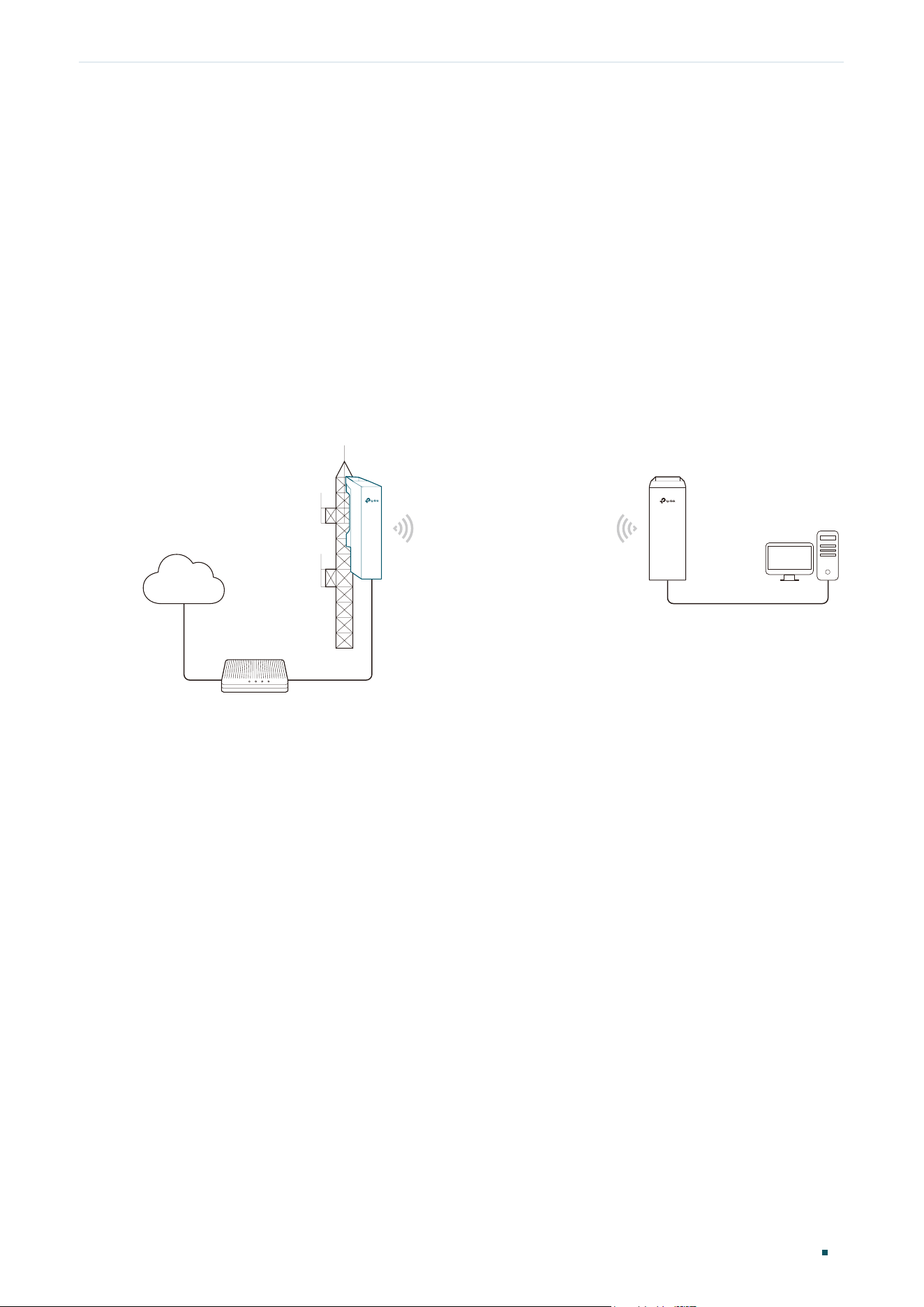
Scenario 1
Figure 1-1 Scenario One for Access Point mode
Access Point
LAN: 192.168.7.2
AP Client Router
LAN: 192.168.0.254
WAN: Dynamic IP
LAN: 192.168.7.1
Router
Internet
Network requirements: Establish the network coverage in the remote areas without long-
distance cabling.
The device in the network: In the adjacent town covered by wired network, ISP (Internet
Service Provider) can put up a device in AP mode to access the internet and transform
wired signal into wireless one. In the remote area, users can put up a device in AP Client
Router mode to access the wireless network.
Advantages: Transmit data wirelessly across a long distance and reduce the cabling cost.
Introduction to Operation Modes (CPE and WBS) Access Point
Configuration Guide
3
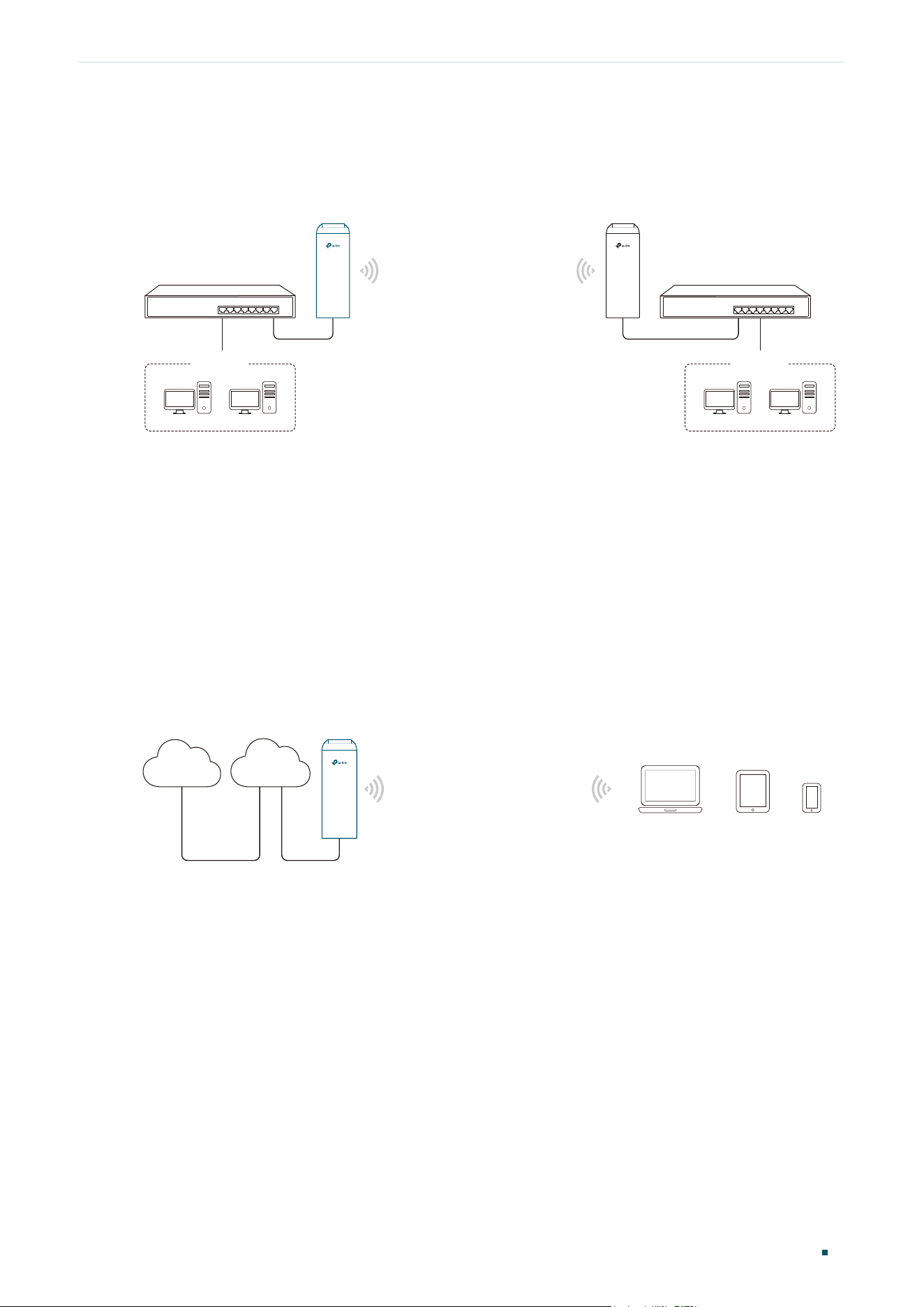
Scenario 2
Figure 1-2 Scenario Two for Access Point Mode
Access Point Client
Switch
LAN: 192.168.0.254 LAN: 192.168.0.2
Switch
Oce Oce
Network requirements: Combine two separate office networks into one.
The device in the network: The device in AP mode connects to one office network and
creates a wireless network. The device in Client mode connects to the other office network
and the wireless network.
Advantages: Establish a point-to-point WLAN across a long distance to achieve the
connectivity between two networks and avoid the cabling trouble.
Scenario 3
Figure 1-3 Scenario Three for Access Point Mode
Access Point
Internet
Laptop/Tablet/Smartphone
Wired Local
Area Network
Network requirements: Establish wireless network coverage in the campus, community,
industrial park or public place to provide wireless access for users.
The device in the network: With the access to campus wired network or other wired local
area networks, the device in AP mode provides the wireless access for wireless clients,
such as smart phones, laptops and tablets to connect to the network.
Advantages: Enrich the access ways of local area network and extend the network
coverage.
Introduction to Operation Modes (CPE and WBS) Client
Configuration Guide
4
2
Client
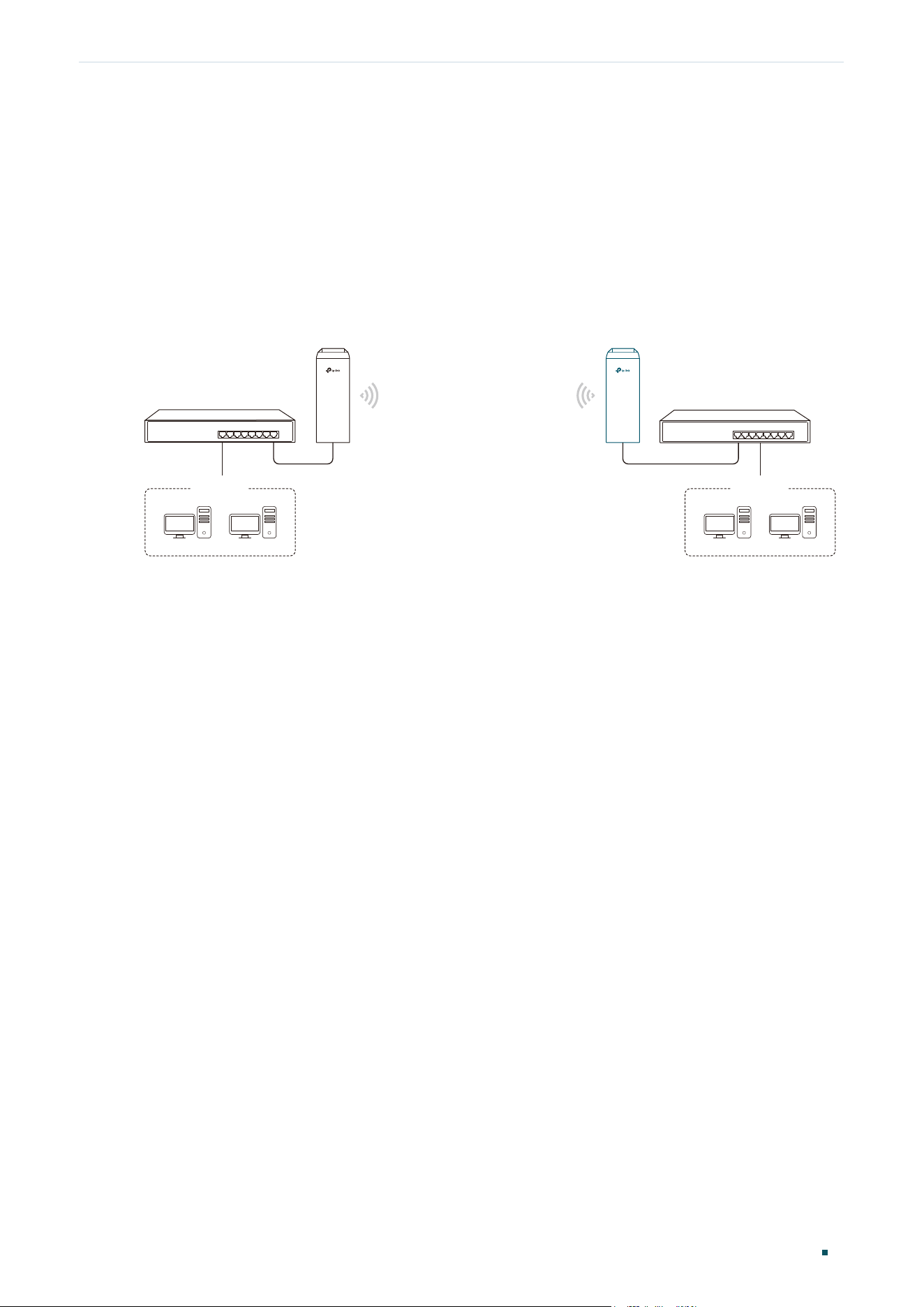
For the device in Client mode, the most common usage scenario is point-to-point
networking. The device is used to transform wireless signal into wired one.
Figure 2-1 Scenario for Client Mode
Access Point
Client
Switch
LAN: 192.168.0.254
LAN: 192.168.0.2
Switch
Oce Oce
Network requirements: Help the wired devices to connect to the wireless network.
The device in the network: In Client mode, the device actually serves as a wireless adapter
to receive the wireless signal from root AP or Station. In this case, wired devices can
access the wireless network by connecting to the device in Client mode.
Introduction to Operation Modes (CPE and WBS) Repeater (Range Extender)
Configuration Guide
5
3
Repeater (Range Extender)
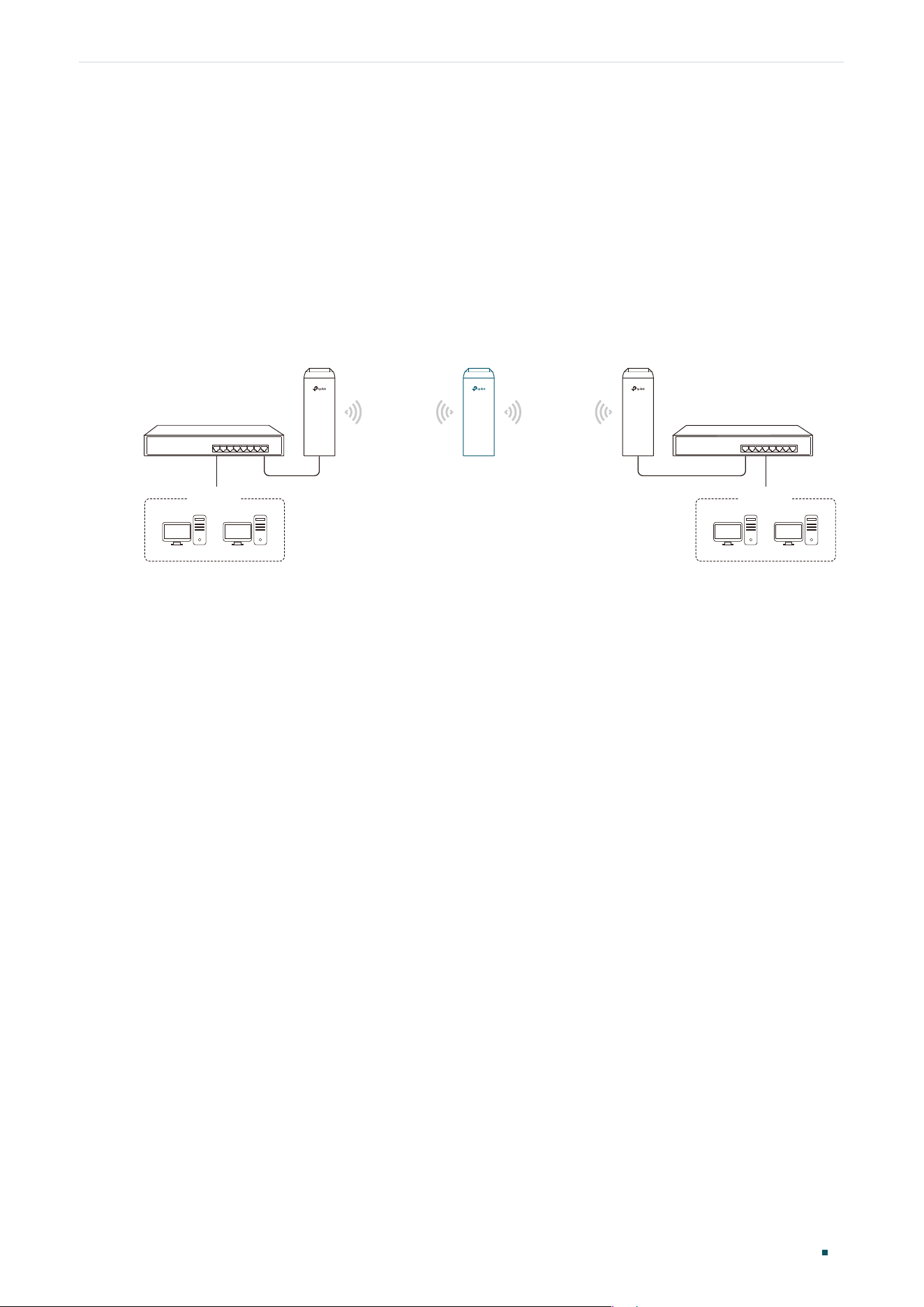
The device in Repeater mode can extend wireless coverage of an existing wireless
network. The SSID and encryption type of the device should be the same as those of the
root AP.
Figure 3-1 Scenario for Repeater Mode
SSID: abc
SSID: abc
Access Point Client
Switch
LAN: 192.168.0.254
Repeater
LAN: 192.168.0.2 LAN: 192.168.0.3
Switch
Oce Oce
Network requirements: Repeat wireless signal and extend the wireless network coverage.
The device in the network: If you want to combine two networks via wireless connection
but the distance is beyond the networks’ wireless coverage range, you can put one or
more devices in Repeater mode along the path to repeat the wireless signal and extend the
wireless transmission range.
Introduction to Operation Modes (CPE and WBS) Bridge
Configuration Guide
6
4
Bridge
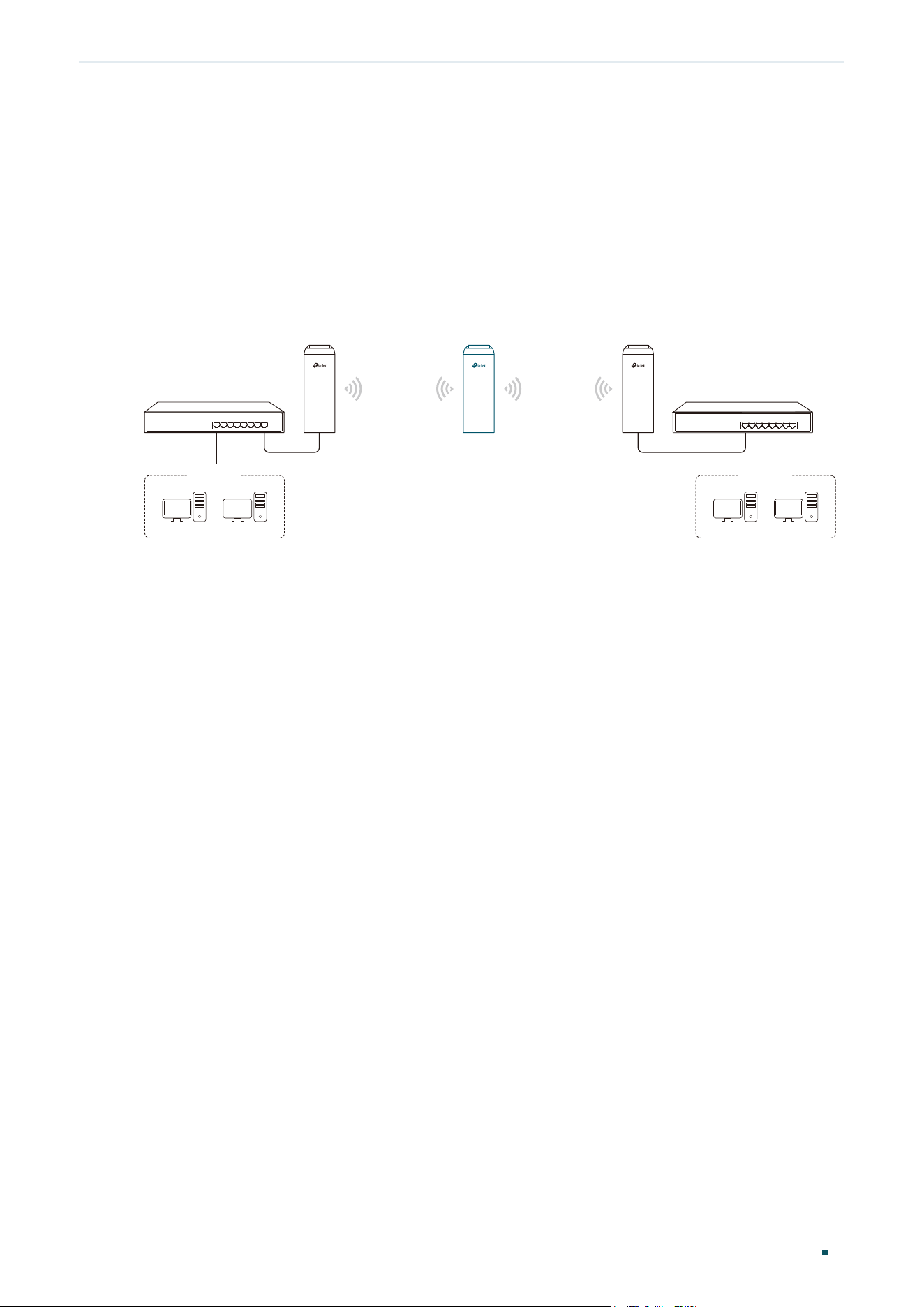
The device in Bridge mode can extend wireless coverage of an existing wireless network.
The SSID and encryption type of the device can be different from those of root AP.
Figure 4-1 Scenario for Bridge Mode
SSID: abc
SSID: 123
Access Point Client
Switch
LAN: 192.168.0.254
Bridge
LAN: 192.168.0.2 LAN: 192.168.0.3
Switch
Oce Oce
Network requirements: Extend the wireless network to eliminate the wireless signal-blind
areas. Users can use different SSID and encryption type from those of the root AP device
to access the network.
The device in the network: Similar to the Repeater mode, the Bridge mode is used to
enhance the exiting wireless signal. However, the difference is that the extended wireless
network has its own SSID and encryption type different from those of root AP.
Introduction to Operation Modes (CPE and WBS) AP Router
Configuration Guide
7
5
AP Router
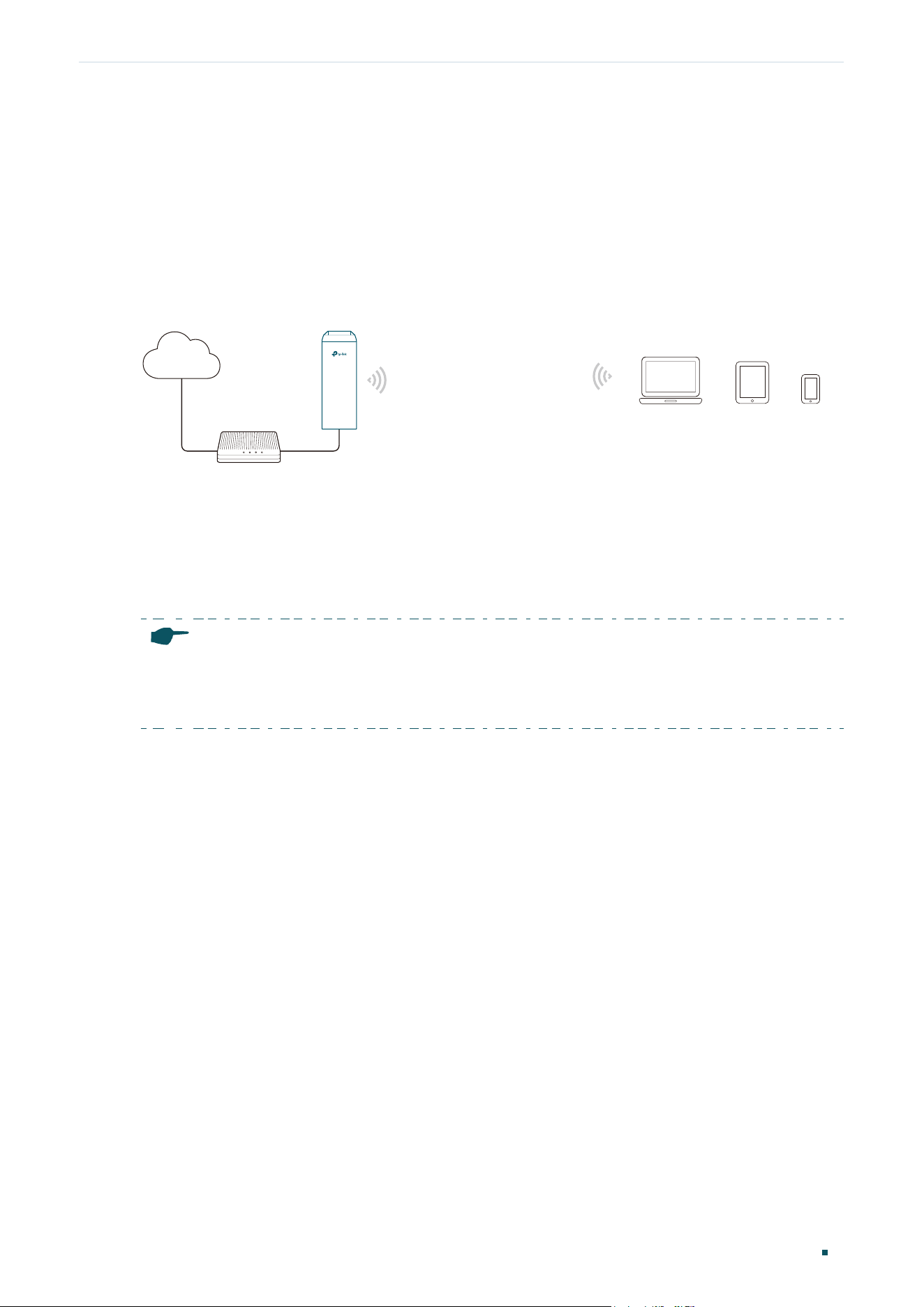
The device in AP Router mode serves as a normal home wireless router but provides a
wider wireless network range.
Figure 5-1 Scenario for AP Router Mode
Modem
AP Router
Laptop/Tablet/Smartphone
Internet
Network requirements: Establish the wireless network coverage in the campus,
community, industrial park or other public places and so on.
The device in the network: The device in AP Router mode connects to root ADSL/Cable
Modem for internet access. Meanwhile, it creates a wireless network for the wireless clients
to connect to the internet.
Note:
In this mode, the device cannot be managed directly through the port connected to ADSL/Cable
Modem. To manage the device, you can connect the management host to the device wirelessly or via
the other LAN port.
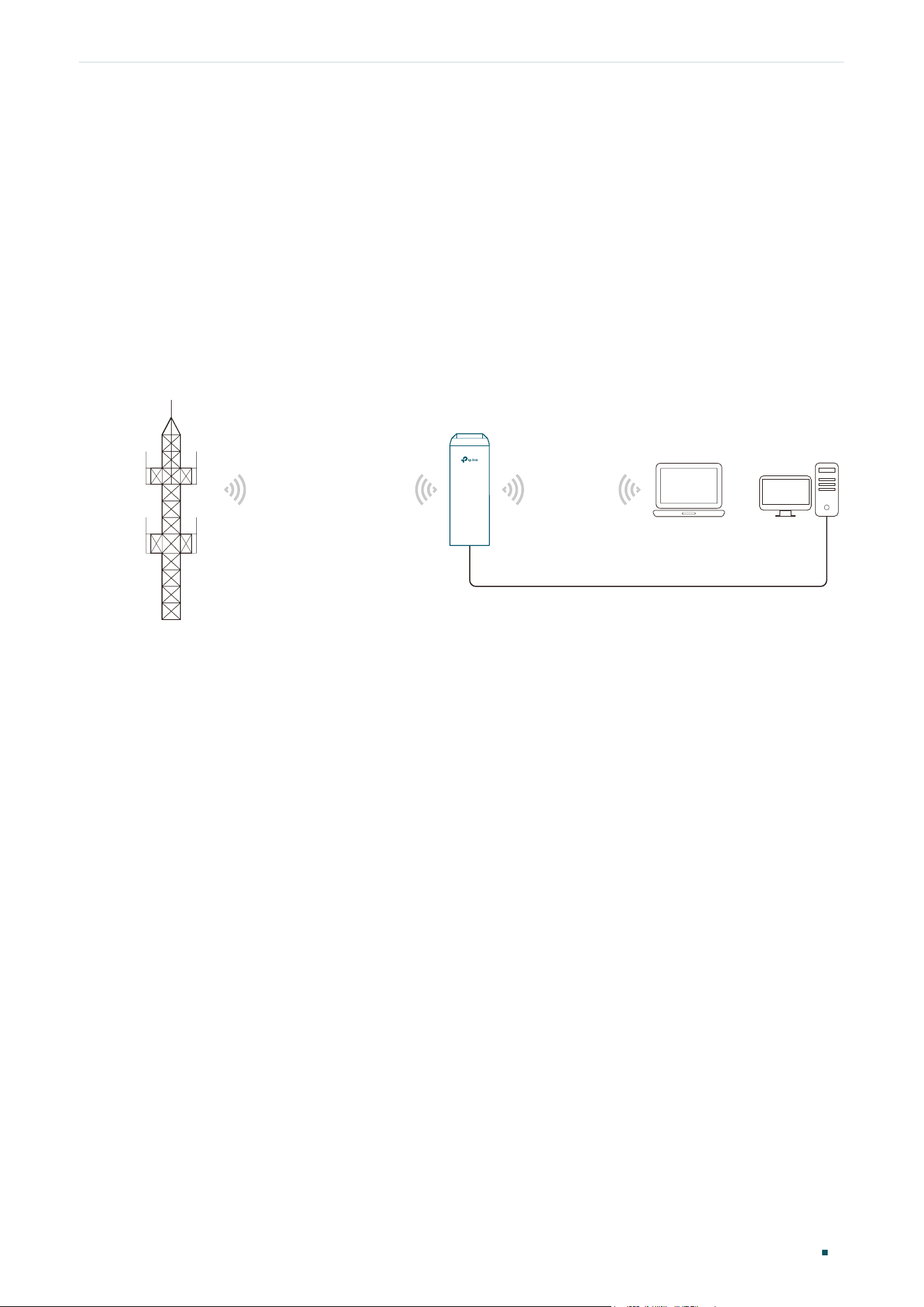
Introduction to Operation Modes (CPE and WBS) AP Client Router (WISP Client)
Configuration Guide
8
6
AP Client Router (WISP Client)
In AP Client Router mode, the device access the internet provided by WISP (Wireless
Internet Service Provider) through wireless connection. For the downstream clients, the
device serves as a normal home wireless router. It can provide wired connection and
wireless connection simultaneously.
Figure 6-1 Scenario for AP Client Router Mode
AP Client Router
LAN: 192.168.0.254
WAN: Dynamic IP
WISP
WISP’s network
User Network
Network requirements: Get internet service from WISP.
The device in the network: The device in Client Router Mode connects to WISP wirelessly
for internet service. It provides both wired access and wireless access for the clients.