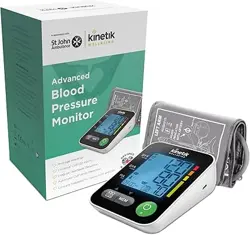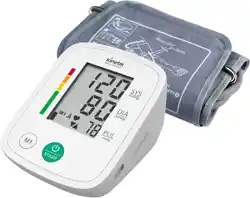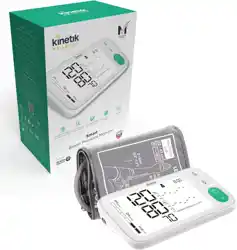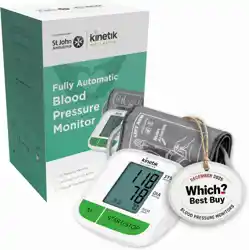
Thank you very much for selecting Kinetik Wellbeing Advanced Blood
Pressure Monitor TMB-2287-K.
Please do read the user manual carefully and thoroughtly so as to ensure
the safe usage of this product, and keep the manual well for further
reference in case you have problems.
TMB-2287-K_UK_IB_20240531_v8
User Manual
Advanced Blood Pressure Monitor
TMB-2287-K
MDSS GmbH
Schigraben 41, 30175 Hannover, Germany
Guangdong Transtek Medical Electronics Co., Ltd.
Zone A, No.105, Dongli Road, Torch Development District,
528437 Zhongshan, Guangdong, China
Made in China.
TMB-2287-K
Share Info GmbH
Heerdter Lohweg 83, 40549 Düsseldorf, Germany

SUPPORT............................................................................................................................2
MEASUREMENT................................................................................................................14
Applying the cuff
Start the Measurement
DATA MANAGEMENT........................................................................................................17
Recall the Records
Delete the Records
INFORMATION FOR USER...............................................................................................20
Tips for measurement
Maintenances
ABOUT BLOOD PRESSURE.............................................................................................22
What are systolic pressure and diastolic pressure?
What is the standard blood pressure classification?
Irregular pulse rate detector
Why does my blood pressure fluctuate throughout the day?
Why do I get a different blood pressure at home compared to the hospital?
Is the result the same if measuring on the right arm?
TROUBLESHOOTING.......................................................................................................24
SPECIFICATIONS..............................................................................................................25
AUTHORIZED COMPONENT ...........................................................................................26
CONTACT INFORMATION.................................................................................................26
EMC GUIDANCE................................................................................................................27
INTRODUCTION..................................................................................................................3
General Description
Indications for Use
Measurement Principle
Receiving and Inspecting your Monitor
Safety Information
LCD Display Signal
Monitor Components
List
BEFORE YOU START..........................................................................................................9
Choice of Power Supply
Installing and Replacing the Batteries
Setting Date and Time
Setting a user ID
1
Table of Contents
CATALOGUE
Features:
Maximum 199 records per user
General Description
Measuring-during-inflation technology
60.5 mm×92.5 mm Digital LCD display
Indications for Use
Measurement Principle
This Blood Pressure Monitor is a digital monitor intended for use in measuring
blood pressure and pulse rate with arm circumference ranging from
It is intended for adult indoor use only.
Receiving and Inspecting your Monitor
Our manual should provide you with all the information you need
to set up and use this product.
If you have a question, have a look at our Troubleshooting page!
For further assistance, why not contact our Customer Care team
directly? We’re here to help!
Our Customer Care team are available from 9am-5pm, Monday to
Friday (excluding bank holidays).
We promise to respond to all queries and will ensure to resolve any
issue you may be having.
You can reach us by…
Phone:
+44 1483 937969
Live Chat:
Simply visit www.kinetikwellbeing.com and send us a message.
Email:
Post:
Kinetik Medical Devices Limited
Unit 11 Perrywood Business Park,
Salfords, RH1 5JQ
Support
SUPPORT
INTRODUCTION
2
3
Thank you for selecting Kinetik Wellbeing’s Advanced Blood Pressure
Monitor (TMB-2287-K). The monitor features blood pressure measurement,
pulse rate measurement and the result storage. The warranty period is two
years. Readings taken by the TMB-2287-K are equivalent to those obtained
by a trained observer using the cuff and stethoscope auscultation method.
This manual contains important safety and care information, and provides
step by step instructions for using the product. Read the manual thoroughly
before using the product.
This product uses the Oscillometric Measuring method to detect blood
pressure. Before every measurement, the unit establishes a “zero pressure”
equivalent to the airpressure. Then it starts inflating the arm cuff, meanwhile, the
unit detects pressure oscillations generated by beat-to-beat pulsatile, which is
used to determine the systolic and diastolic pressure, and also pulse rate.
Check that the device packaging has not been tampered with and make sure
that all contents are present. Before use, ensure that there is no visible damage to
the device or accessories and that all packaging material has been removed. If
you have any doubts, do not use the device and contact your retailer or the
specified Customer Services address.
4 5
INTRODUCTION INTRODUCTION
Precaution
* This device is intended for indoor, home use and is not intended for self-use in public areas.
* This device is portable, but it is not intended for use during patient transport.
* This device is not suitable for continuous monitoring during medical emergencies or operations.
* This device is intended for non-invasive measuring and monitoring of arterial blood pressure.
It is not intended for use on extremities other than the arm, or for any purpose other than
obtaining a blood pressure measurement.
* This device is for adults. Do not use this device on neonates or infants. Do not use it on children and
adolescents unless otherwise instructed by a medical professional.
* Consult with your physician before using this monitor if you suffer from the following conditions:
common arrhythmias such as premature ventricular beats or atrial fibrillation;
peripheral arterial disease, implantation with electrical devices;
undergoing intravascular therapy; arteriovenous shunt or mastectomy.
Please note that any of these conditions may affect measurement readings,
in addition to patient motion, trembling or shivering.
* If you are taking medication, consult your physician to determine the proper time to measure
your blood pressure.
* This device may be used only for the intended use described in this manual, the manufacturer
shall have no liability for any incidental, consequential, or special damages caused by misuse
or abuse.
* Please use the device under the environment which is provided in the user manual. Otherwise,
the performance and lifetime of the device will be impacted and reduced.
* The device may require up to 30 minutes to warm up / cool down from the minimum/ maximum
storage temperature before it is ready for use.
* The blood pressure monitor, its adapter, and the cuff are suitable for use within the patient
environment.
* Do not wash the cuff in a washing machine or dishwasher !
* The device contains sensitive electronic components. To avoid measurement errors, avoid taking
blood pressure measurements near a strong electromagnetic field radiated interference signal
or electrical fast transient/burst signal.
* Wireless communication equipment, such as wireless home network devices, mobile phones,
cordless telephones and their base stations, walkie-talkies may cause interference that may
affect the accuracy of measurements. A minimum distance of 1 foot (30 cm) should be kept from
such devices during a measurement.
* Do not attempt to repair the unit yourself if it malfunctions. Only have repairs carried out byauthorized
service centers.
* It is recommended that the performance should be checked after repair, maintenance, and every
two years of use, by retesting the requirements in limits of the error of the cuff pressure indication
and air leakage (testing at least at 50 mmHg and 200 mmHg). Please contact manufacturer or
distributor for authorized service personnel.
* Store your device, cuff and adapter in a clean and dry place, protect it against extreme moisture,
heat, lint, dust and direct sunlight. Never place any heavy objects on it.
* Make sure the rubber tube of the cuff is not squeezed, stretched, or kinked during storage.
* Dispose of accessories, detachable parts, and the device according to the local guidelines.
Caution
* Blood Pressure Monitor is intended to be operated by adults, including medical staffs and lay
persons. Adult patients could also be intended users or operators.
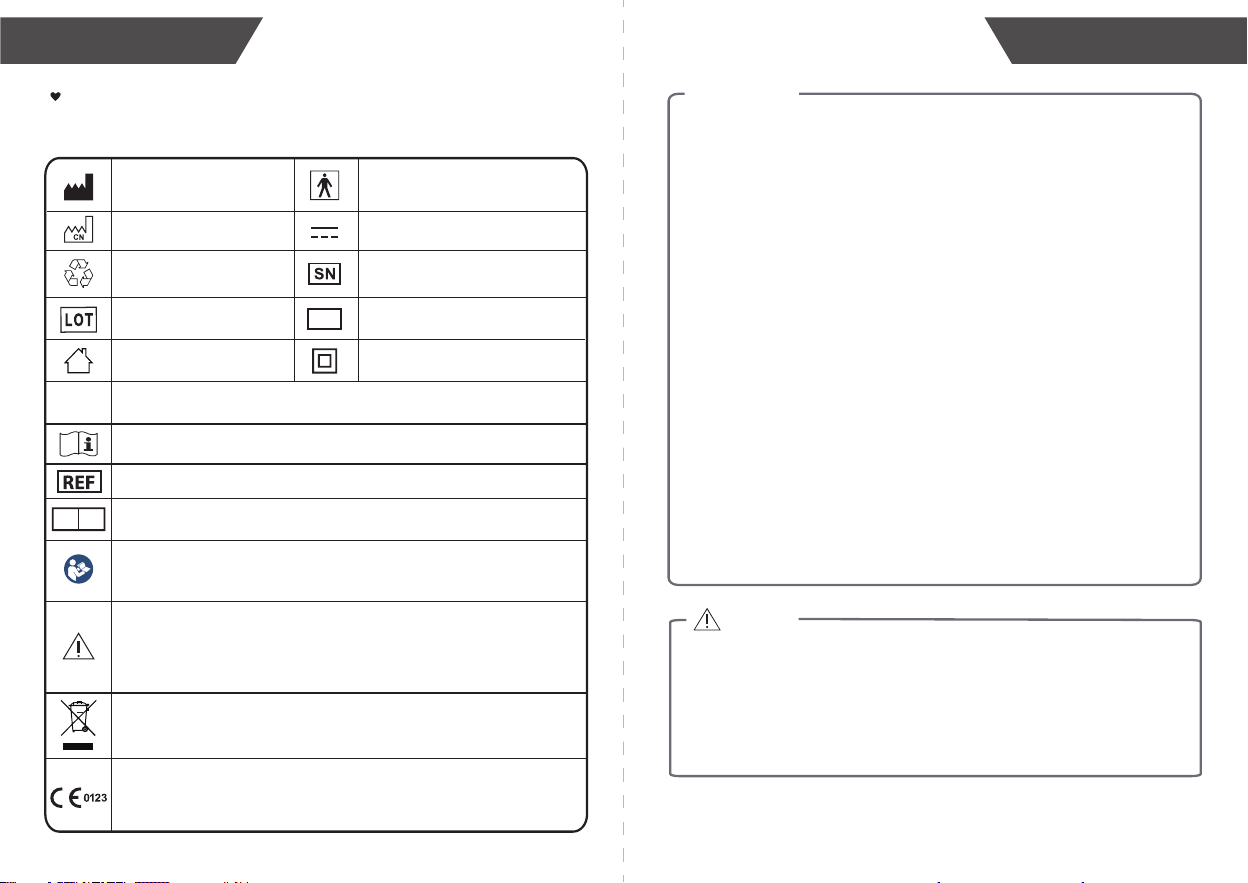
Safety Information
The signs below might be in the user manual, labeling or other component.
They are the requirement of standard and using.
Manufacturer
Serial Number
Type BF applied part
Direct Current
Recyclable
Date of manufacture and
Made in China
MD
Medical Device
EC REP
Consult instructions for use or consult electronic instructions for use.
Batch code
For indoor use only
Class II Equipment
Degree of protection against the Ingress of water.
IP21
Catalogue Number / Model Number
CE marking indicates that a product has been assessed by the
manufacturer and deemed to meet EU safety, health and environmental
protection requirements. It is required for products manufactured anywhere
in the world that are then marketed in the EU.
The symbol indicates that the product should not be discarded as unsorted
waste but must be sent to separate collection facilities for recovery and
recycling.
Refer to instruction manual/booklet
To signify that the instruction manual/ booklet must be read.
Note: The background color of the symbol is blue.
Authorized representative in the European Community /
European Union
Caution
Indicates that caution is necessary when operating the device or control
close to where the symbol is placed, or that the current situation needs
operator awareness or operator action in order to avoid undesirable
consequences.
Warning
* DO NOT apply the cuff on an arm that has an intravenous drip or a blood transfusion attached.
* DO NOT kink, fold, stretch, compress, or otherwise deform the tube during measuring, as the cuff
pressure might continuously increase, which could prevent blood flow and result injury.
* Taking blood pressure measurements too frequently could disrupt blood circulation and cause injuries.
* DO NOT apply cuff to areas on patient where skin is delicate or damaged. Check cuff site frequently
for irritation.
* DO NOT place the cuff on the arm of a person whose arteries or veins are undergoing medical
treatment, i.e. intra-vascular access or intra-vascular therapy or an arteriovenous (A-V) shunt,
which could disrupt blood circulation and cause injuries.
* DO NOT place the cuff on the arm on the same side of a mastectomy (especially when lymph nodes
have been removed). it is recommended to take measurements on the unaffected side.
* DO NOT wrap the cuff on the same arm to which another monitoring device is applied. One or both
devices could temporarily stop functioning if you try to use them at the same time.
* Warning: Please check (for example, by observation of the limb concerned) that the operation
of the device does not result in prolonged impairment of patient blood circulation.
* Warning: On the rare occasion of a fault causing the cuff to remain fully inflated during
measurement, loosen and remove the cuff immediately. Prolonged high pressure applied
to the arm (cuff pressure >300 mmHg or constant pressure >15 mmHg for more than 3 minutes)
might lead to bruising and discolored skin.
* DO NOT use this device with high-frequency (HF) surgical equipment at the same time.
* This device is not used in conjunction with oxygen rich environments, not intended for use with
flammable anaesthetics, not intended for use in conjunction with flammable agents.
* Excessive cuff tube lengths could cause strangulation if you don't manage them properly.
* DO NOT touch output of the batteries/adapter and the user simultaneously.
* The power cord is considered the disconnect device for isolating this equipment from supply mains.
DO NOTposition the equipment so that it is difficult to reach or disconnect.
* DO NOT use this device if you are allergic to polyester, nylon, or plastic.
* Only use accessories approved by manufacturer. Using unapproved accessories might cause
damage to the unit and injure users.
* If you experience discomfort during a measurement, such as pain in the arm or other complaints,
press the Power button immediately to release the air from the cuff.
* DO NOT use the device while under maintenance, or being serviced.
* Sensor degradation or looseness may reduce performance of device or cause other problems.
* You can use this device to take your own measurement, no third-party operator is required.
* Adapter is specified as a part of ME EQUIPMENT.
* At the request of authorized service personnel, circuit diagrams, component part lists, descriptions,
and calibration procedures will be made available by the manufacturer or distributor.
* The expected lifetime of the cuff may vary by the frequency of washing, skin condition, and storage
state.
* Please report to the manufacturer and the competent authority of the Member State / the FDA in
which you are established about any serious incident that has occurred in relation to this device.
Notice
* The air tube poses a risk of strangulation. Furthermore, the small parts of product and batteries present
a choking hazard if swallowed. They should therefore always be kept away from infants/children.
* DO NOT self-diagnose the measurement results and start treatment by yourself. The measu-
rement results given by this device is not a diagnosis. ALWAYS consult your doctor for evalu-
ation of the results and treatment.
* DO NOT adjust medication based on readings from this blood pressure monitor. Take medica-
tion as prescribed by your physician. ONLY a physician is qualified to diagnose and treat high
blood pressure.
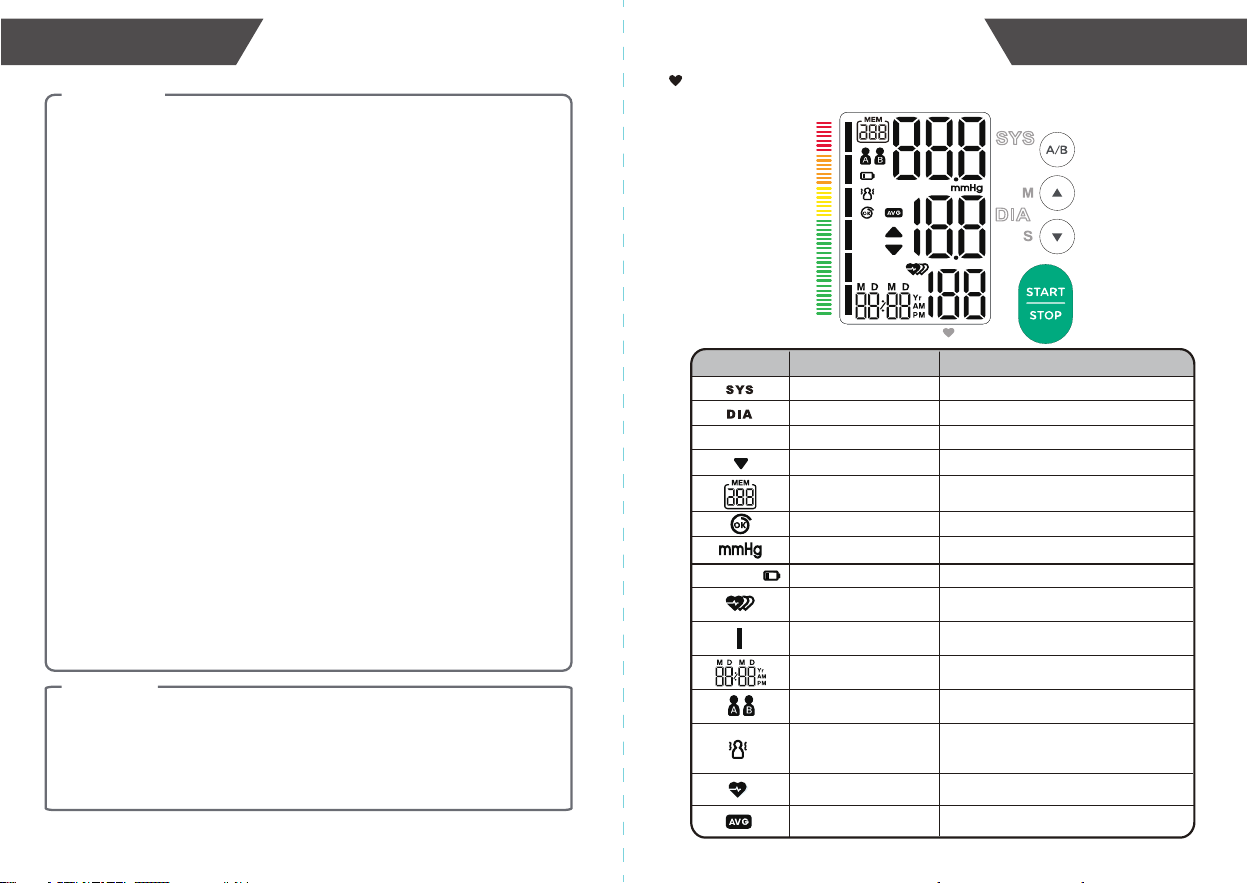
LCD display signal
SYMBOL DESCRIPTION
Systolic blood pressure High blood pressure
Diastolic blood pressure Low blood pressure
EXPLANATION
Memory
mmHg
Measurement Unit of the blood pressure
Low battery
Batteries are low and need to be replaced.
Current Time
Year/Month/Day, Hour/Minute
Pul/min
User A/User B
Start measurement and save the
measuring results for User A/User B
Pulse rate
The average value
The average value of the latest three
records.
Pulse in beats per minutePulse display
Deflation symbol The cuff is deflating.
Indicate it is in the memory mode and
which group of memory it is.
Blood pressure monitor is detecting an
irregular pulse rate during measurement.
Irregular pulse rate
Blood pressure
level indicator
Indicate the blood pressure level.
Blood pressure monitor is detecting a
pulse rate during measurement.
bAt Lo +
Cuff wearing The cuff is secured.
Appears when talking, moving, or shaking
of the arm with the cuff on is detected
during a measurement.
Excessive body
motion detector
TIME/DATE
Pul/min
MEMORY
INTRODUCTION
7
6
INTRODUCTION
9
8
INTRODUCTION
BEFORE YOU START
TIME /
D
ATE
Pul/min
MEM
OR
Y
TIME /DATE
Pul/min
MEMO RY
AC adapter
Type-C cable
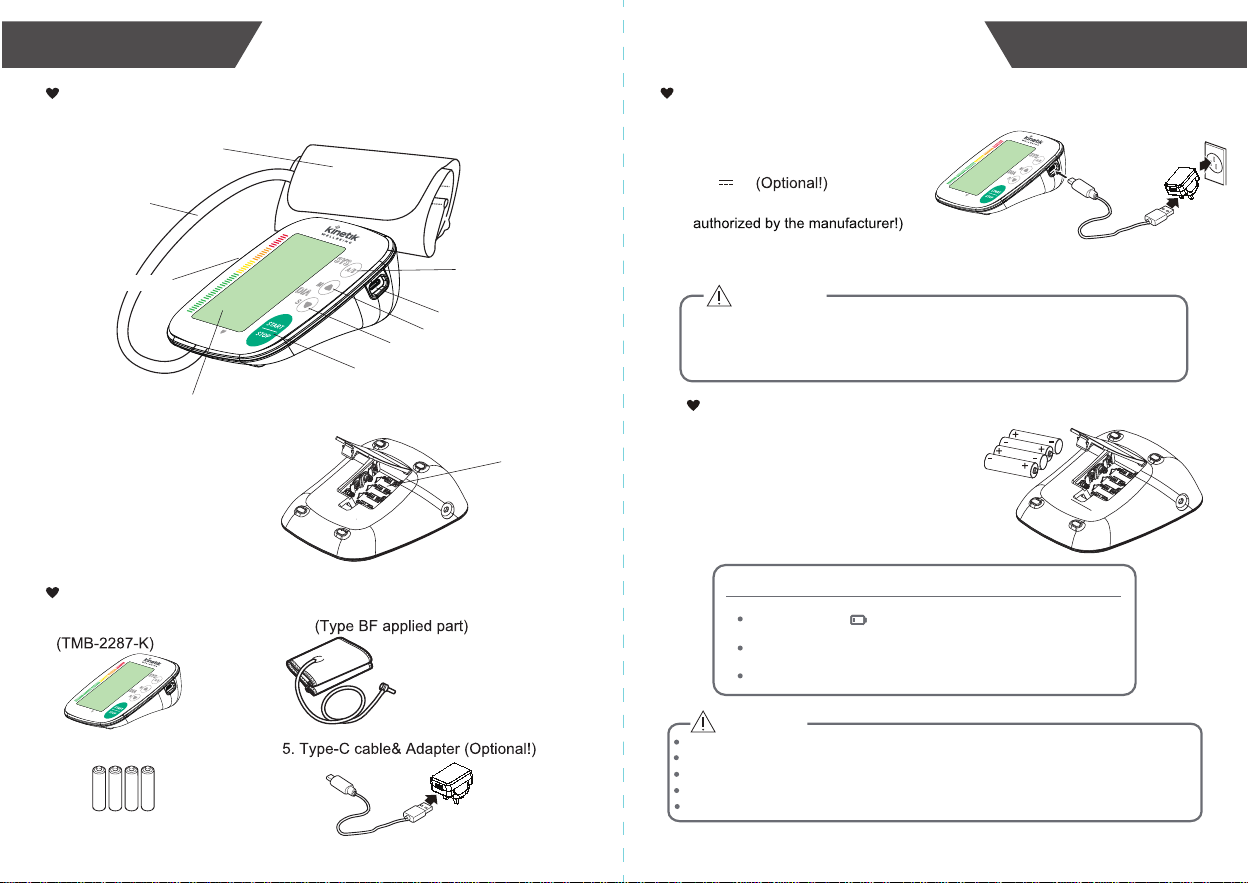
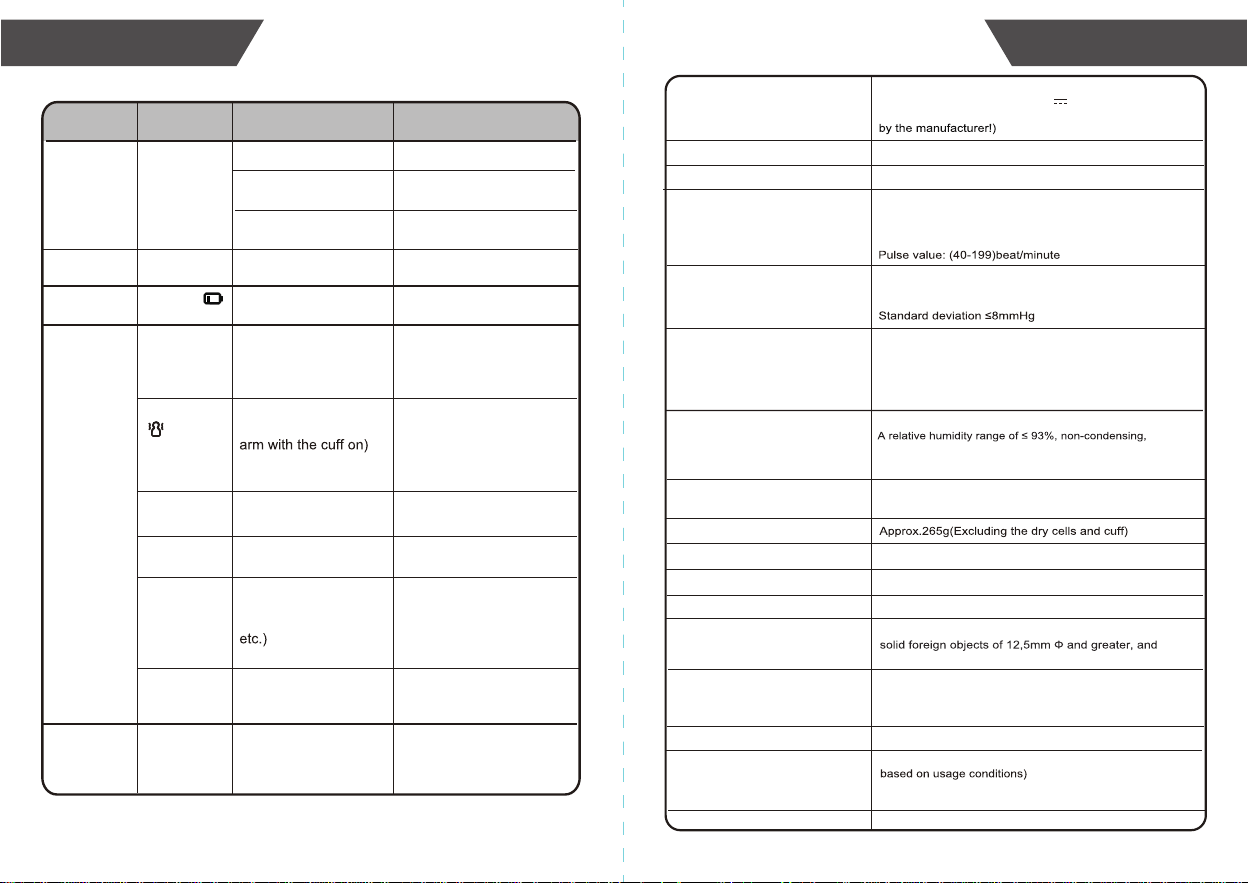
In order to get the best effect and protect your monitor,please use the
the right batteries and special power adapter which complies with local
safety standard.
• Open the battery cover.
• Install the batteries by matching
the correct polarity, as shown.
• Replace the battery cover.
Installing and Replacing the Batteries
CAUTION
Replace the batteries whenever the below happens
The shows.
The display is dim.
The display does not light up.
Choice of Power Supply
1.Battery powered mode:
6V DC 4×AAA batteries (Optional!)
2.AC adaptor powered mode:
Please unplug the adaptor to depart from
the using utility power.
5V 1A
(Please use the AC adapter which is
bAt Lo +
CAUTION
New and used batteries, or different types of batteries shall not be used together.
Remove batteries if the device is not likely to be used for some time.
Do not heat or deform the batteries, or dispose of them in fire.
Batteries should not be disposed of with household waste.
Please check with your local authority for battery recycling advice.
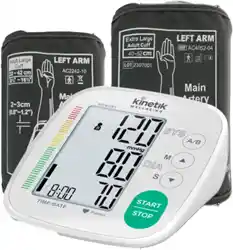
1. Blood Pressure Monitor
4. User manual
2. Cuff
3. 4×AAA batteries (Optional!)
Upper arm cuff:22-42cm or
Upper arm cuff:40-52cm.
Monitor Components
List
BATTERY COMPARTMENT
CUFF
AIR HOSE
AIR CONNECTOR PLUG
TIME/DATE
Pul/min
MEM ORY
TIME/DATE
Pul/mi
n
MEM ORY
MEM BUTTON
START•STOP BUTTON
SET BUTTON
USER BUTTON
TYPE-C PORT
LCD DISPLAY
TIME /
D
ATE
Pul/min
MEM
ORY
TIME /DATE
Pul/min
MEMOR Y
BEFORE YOU START
11
10
BEFORE YOU START
BEFORE YOU START
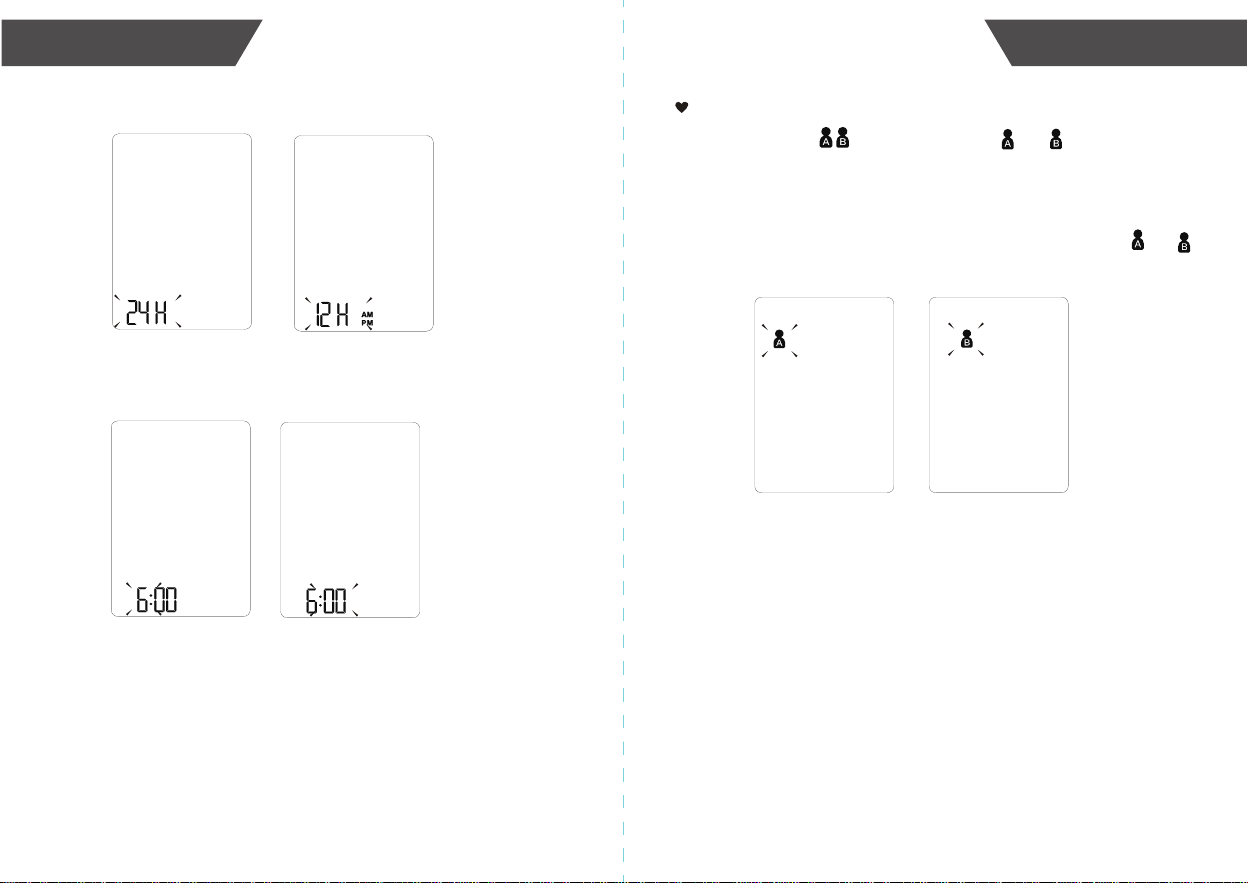
3
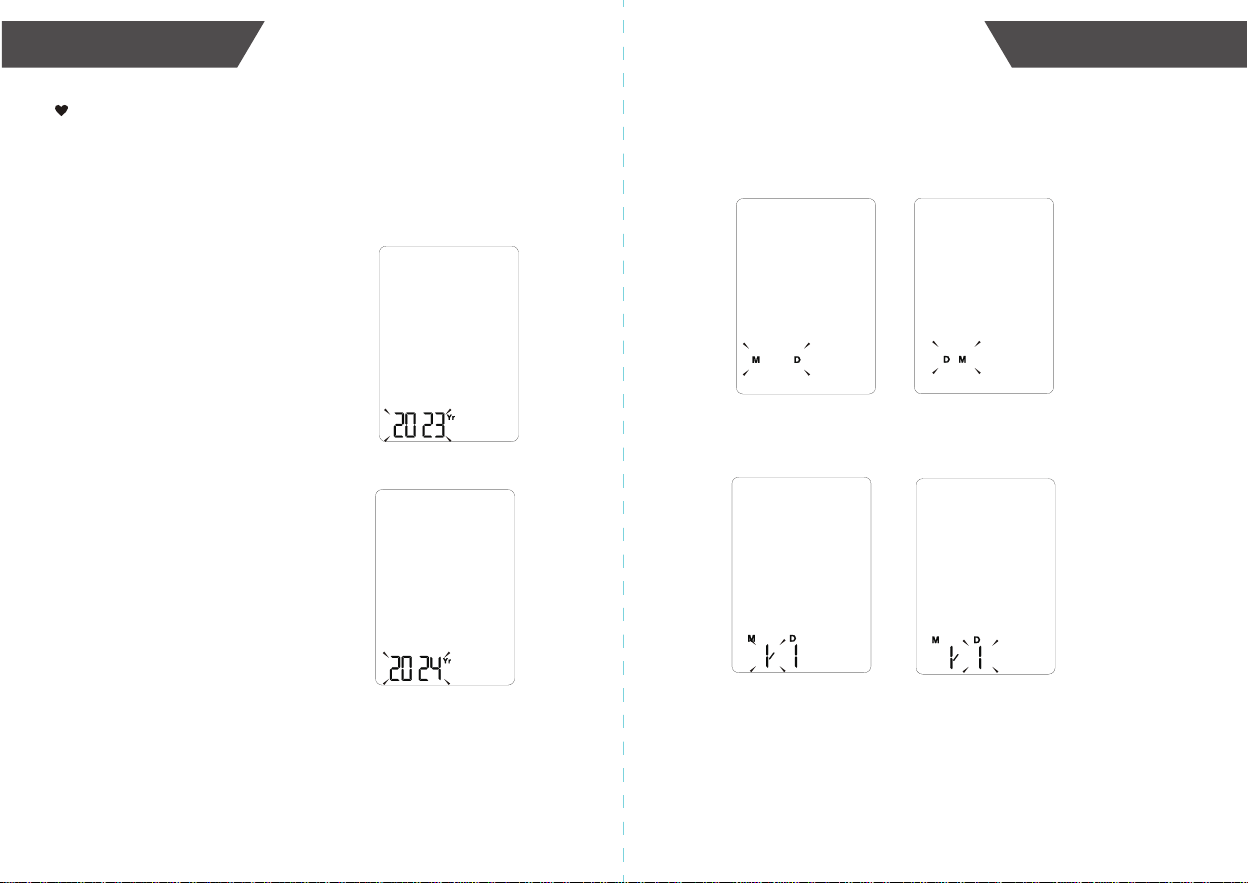
. When you get the right year, press “START•STOP” button
to set down and turn to next step.
4.Repeat the same steps to set the [Month] and [Day].
Repeat the same steps to set the date format between
[month/day] and [day/month].
Setting Date and Time
It is important to set the clock before using your blood pressure
monitor, so that a time stamp can be assigned to each record that
is stored in the memory. (The setting range of the year :2023-2053
time format:12H/24H)
1
.When the monitor is off, press and hold
“SET” button for about 3 minutes,
it will enter the [Year] setting.
2.Press “MEM” or “SET” button to
change the [Year].
Each press will increase or decrease
the numeral by one in a cycling manner.
BEFORE YOU START
13
12
BEFORE YOU START
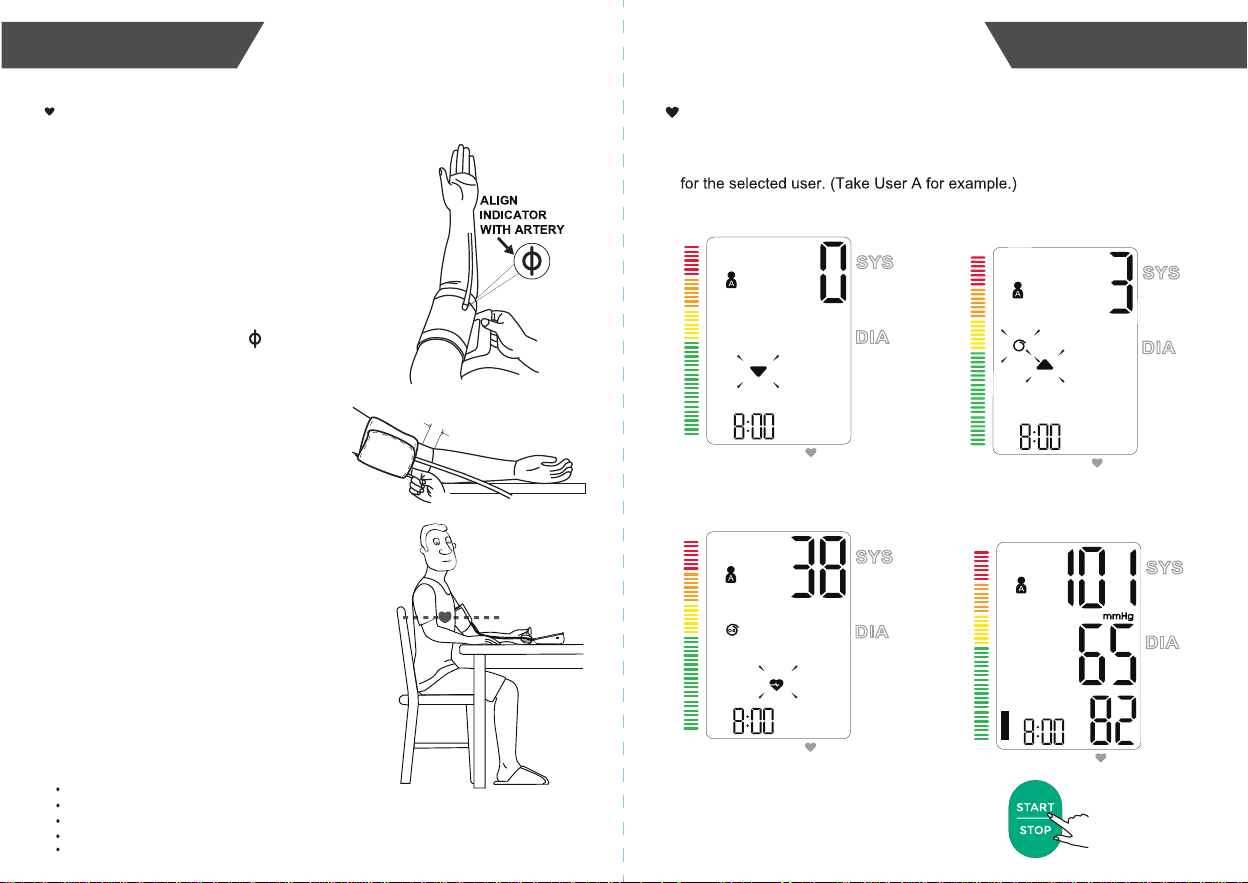
Setting a user ID
There are 2 user ID available. The user and , each with 199
memory spaces, are designed for 2 different people to save the
measured values separately.
2.
Press “START•STOP” button to confirm the selected user ID, the
monitor will enter the measurement automatically.
Press “MEM” button to confirm the selected user ID, the monitor
will enter the memory query automatically.
1.
When the monitor is off, press “USER” button to display the current user ID.
Press the “USER” button to switch the user ID between the user and .
5.Repeat the same steps to set the time format between 24H and 12H.
6.Repeat the same steps to set the [Hour] and [Minute].
7.After the [Minute] is set,the LCD will display “do nE”, and then
it will turn off automatically.
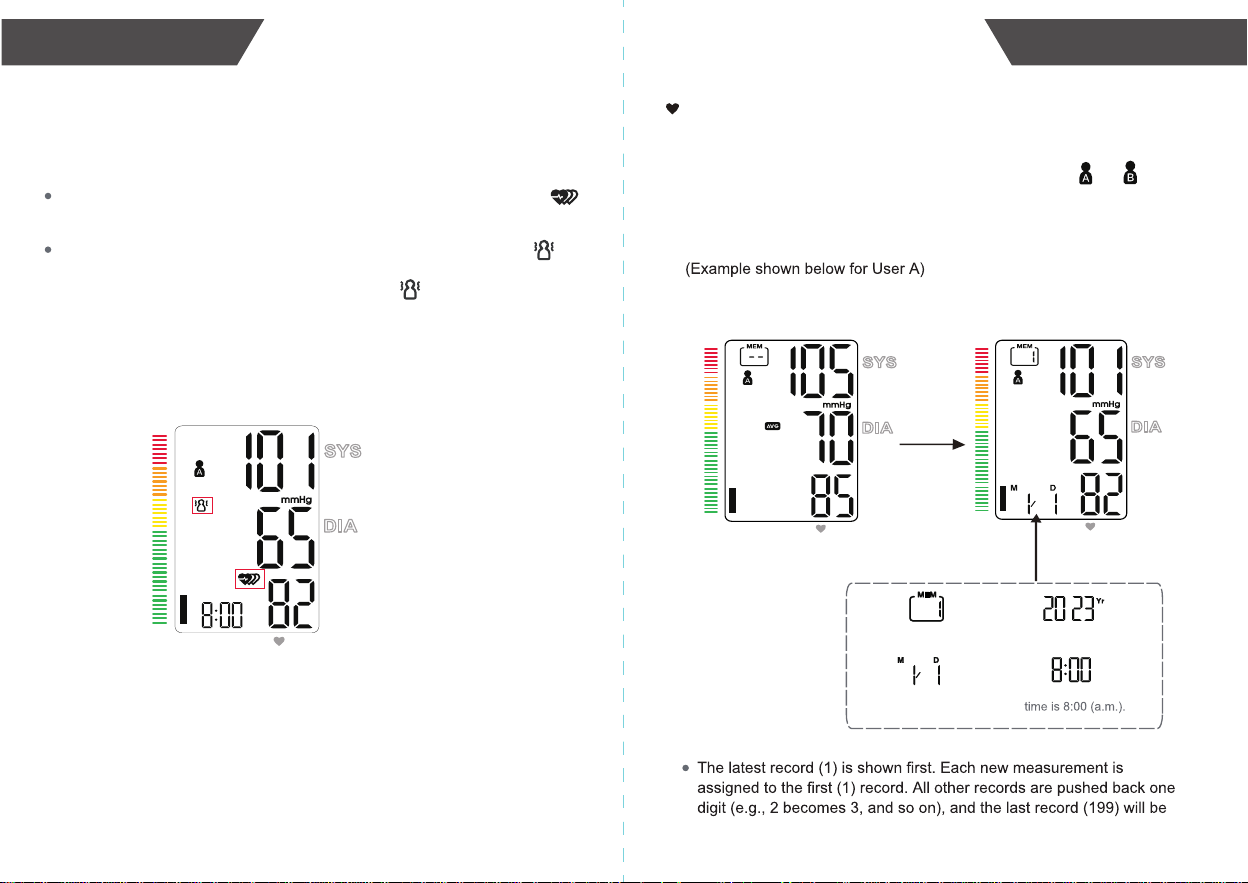
Applying the cuff
2~3cm
1.
Hold your arm with your palm facing
up and tie the cuff on your upper arm,
align the Artery indicator with the
main Artery (on the inside of your arm).
Note: Locate the main Artery by pressing with
2 fingers approximately 2 cm above the bend
of your elbow on the inside of your left arm.
Identify where the pulse can be felt the
strongest, that is your main Artery!
4.
Make sure the bottom edge of the
arm cuff 2 to 3 cm above the inside
elbow. Then wrap the cuff securely.
Note: The cuff should be snug but not too tight.
You should be able to insert one finger between
the cuff and your arm.
Remove all jewelry, such as watches
and bracelets from your left arm.
Note: If your doctor has diagnosed you with poor
circulation in your left arm, use your right arm.
Roll or push up your sleeve to expose
the skin. Make sure your sleeve is not
too tight.
2.
3.
5.
6.
Sit upright in a comfortable chair with
your back against the backrest of the
chair. Keep your feet flat and your legs
uncrossed.
Place your arm resting comfortably on
a flat table. The cuff worn on your arm
should be placed at the same level as
your right atrium of the heart.
Take 5-6 deep breaths and let's start
measuring!
Take the measurement in a silent room.
Wait at least 3 minutes before another measurement. This allows your blood circulation to recover.
Be relaxed and do not move and talk during the measurement procedure.
For a meaningful comparison, try to measure under similar conditions. For example, take daily
measurements at approximately the same time, on the same arm, or as directed by a physician.
Rest for 5 minutes before a measurement.
Helpful tips:
Only use a cuff that has been approved by the manufacturer for this device model.
Before use, please confirm if it fits your arm circumference.
15
14
MEASUREMENT MEASUREMENT
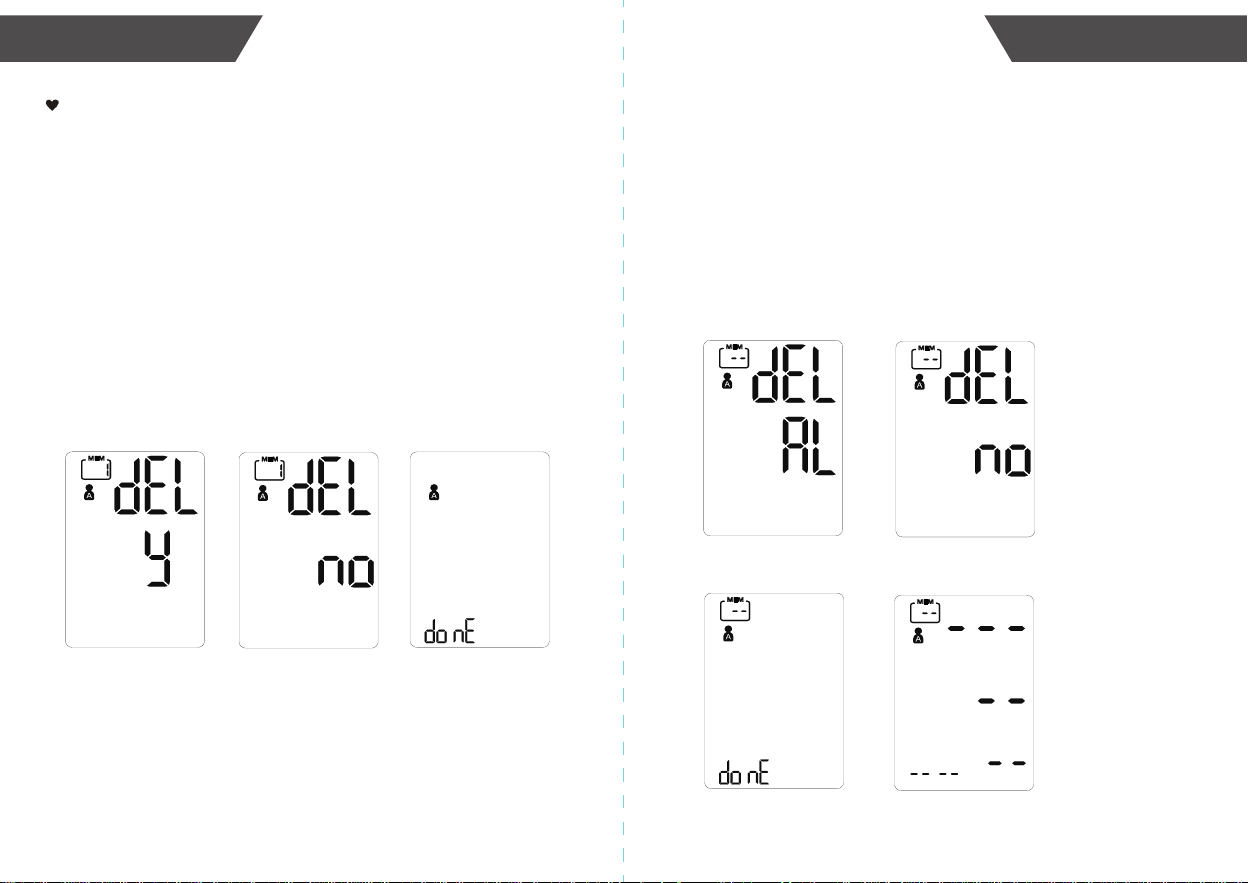
1
.When the monitor is off, press “START•STOP ” button to turn on the monitor,
and it will finish the whole measurement. And save the measurement data
Start the Measurement
2
.Press “START•STOP” button to power off,
otherwise it will turn off within 1 minute.
Cuff wrap detection
Inflating and measuring
Display and save
the measurement result
Adjust the zero
TIME/DATE
Pul/min
MEMORY
TIME/DATE
Pul/min
MEMORY
S
S
TIME/DATE
Pul/min
MEMORY
TIME/DATE
Pul/min
MEMORY
TIME/DATE
Pul/min
MEMORY
The current record
is Group 1.
The corresponding
The corresponding
date is January 1st.
Date and Time will
display alternately.
Recall the Records
2.
3.
Press “USER” button to switch the user ID between user and . press
“START•STOP” button to confirm the selected user ID.
1.
When the monitor is off, press “MEM” button, the user ID will blink.
Then the LCD will display the average value of last 3 readings. When the
records are less than three groups, it will display the latest record.
4.
Press “MEM” or “SET” button to display the next record.
The corresponding
year is 2023.
Note
dropped from the list.
TIME/DATE
Pul/min
MEMORY
DATA MANAGEMENTMEASUREMENT
17
16
TIME/DATE
Pul/min
MEMORY
3.
About the irregular pulse rate and excessive body motion during the
measurement.
During a measurement, If an irregular pulse rate is detected, the symbol
will display in the measurement result. See page 22 for more information.
During a measurement, when the excessive body motion, the symbol
will flash about 5 seconds and detect again. If it is no longer detected, the
symbol will disappear; If still detected, the symbol will final display in
the measurement result.
Note
The measured blood pressure reading may not be accurate if this symbol
is displayed.
1. Enter the memory recall mode as described in section [Recall the
Records].
2. Press and hold “MEM” and “SET” button button for 5 seconds, and the
display will show a blinking “dEL AL” along with the user ID.
3. Use “MEM” or “SET” button to switch between “dEL AL” and “dEL no”,
Press “START/STOP” to confirm the selection.
If “dEL AL” is selected, the LCD will display “do nE” , and delete all the
record of the current user. Several seconds later, it will display “---”.
If “dEL no” is selected, it will stop the deletion.
B: To delete all measurements:
“dEL AL” blinks
“dEL no” blinks
Deletion is done
No record
19
18
DATA MANAGEMENT
DATA MANAGEMENT
Delete the Records
1. Enter the memory recall mode as described in section [Recall the
Records]. Pres “MEM” or “SET” button to get the measurement you would
like to erase.
2. Press and hold “MEM” button for about 5 seconds, and the display will
show a blinking “dEL y”.
3. Use “MEM” or “SET” button to switch between “dEL y” and “dEL no”,
Press “
START•STOP” to confirm the selection.
If “dEL y” is selected, the LCD will display “do nE”, and then the previous
record will be displayed
.
If “dEL no” is selected, it will stop the deletion.
If you did not get the correct measurement, you can delete
results by following steps below.
A: To delete a single measurement:
“dEL y” blinks
“dEL no” blinks
Deletion is done
Maintenance
In order to get the best performance, please follow the
instructions below.
1. Cleaning Process:
Step 1: Make sure to switch off and unplug the device prior to cleaning.
Step 2: Use a soft cloth wetted with soapy water to clean the cuff first, and
then use a soft cloth wetted with clear water to remove residual
soap until there is no visible residual contaminants. Attention shall
be paid to avoid liquid invasion into the cuff.
Step 3: Use a dry soft cloth to wipe the cuff, in order to remove residual
moisture.
Step 4: Dry the cuff at a well-ventilated place after cleaning.
2. Disinfection Process:
Step 1: Make sure to switch off and unplug the device prior to disinfection.
Step 2: Use a soft cloth wetted with 70% isopropanol to disinfect the cuff
for about 10 minutes. Attention shall be paid to avoid liquid invasion
into the cuff.
Step 3: Use a clean dry cloth or towel to wipe off the disinfectant until
there is no visible residue.
Step 4: Dry the cuff at a well-ventilated place after disinfection.
Suggestion:
Frequency of Cleaning and Disinfection:
For single patient multiple use, it’s recommended to clean the device
surface once a month or whenever it’s necessary.
For multiple patient multiple use, it’s recommended to clean the device
every time before and after usage. Maintenance procedures shall be
taken as per instruction.
21
20
INFORMATION FOR USER
INFORMATION FOR USER
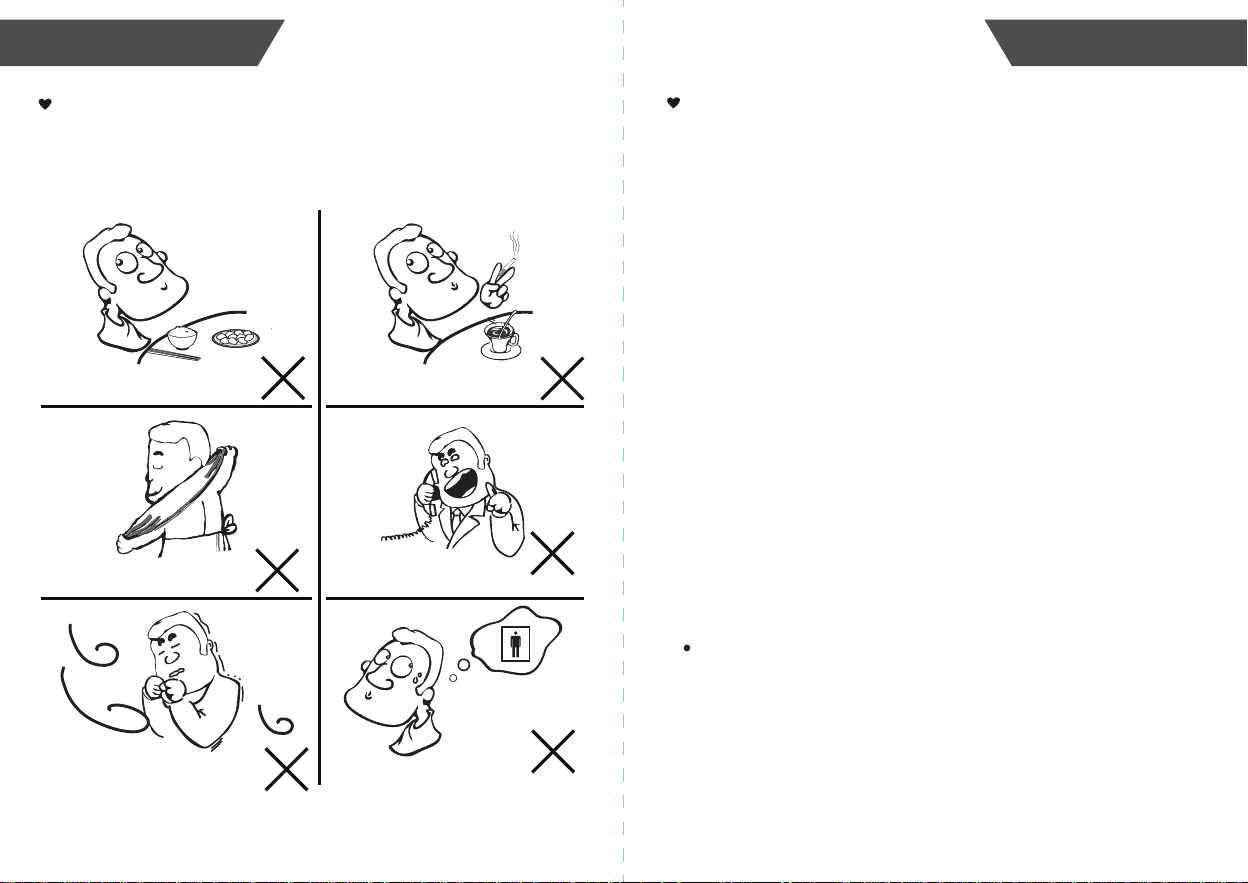
Tips for Measurement
Within 1 hour
after dinner or drinking
Within 20 minutes
after taking a bath
In a very cold environment
Immediate measurement
after tea, coffee, smoking
When talking or moving your fingers
When you want to discharge urine
Measurements may be inaccurate if taken in the following
circumstances.
Why does my blood pressure
fluctuate throughout the
day?
Is the result the same
if measuring on the
right arm?
Why do I get a different
blood pressure at home
compared to the hospital?
1. Individual blood pressure varies
multiple times everyday. It is also
affected by the way you tie your cuff
and your measurement position, so
please take the measurement under the
same conditions.
2.If the person takes medicine, the
pressure will vary more.
3.Wait at least 3 minutes for another
measurement.
The blood pressure is different even
throughout the day due to weather,
emotion, exercise etc, Also, there is the
“white coat” effect, which means blood
pressure usually increases in clinical
settings.
It is ok for both arms, but there
will be some different results for
different people. We suggest you
measure the same arm every time.
What you need to pay
attention to when you measure
your blood pressure at home:
If the cuff is tied properly.
If the cuff is too tight or too loose.
If the cuff is tied on the upper arm.
If you feel anxious.
Taking 2-3 deep breaths before
beginning will be better for measuring.
Advice: Relax yourself for 4-5
minutes until you calm down.
23
22
ABOUT BLOOD PRESSURE
ABOUT BLOOD PRESSURE
Only a physician can tell your normal BP range.
Please contact a physician if your measuring
result falls out of the range. Please note that
only a physician can tell whether your blood
pressure value has reached a dangerous point.
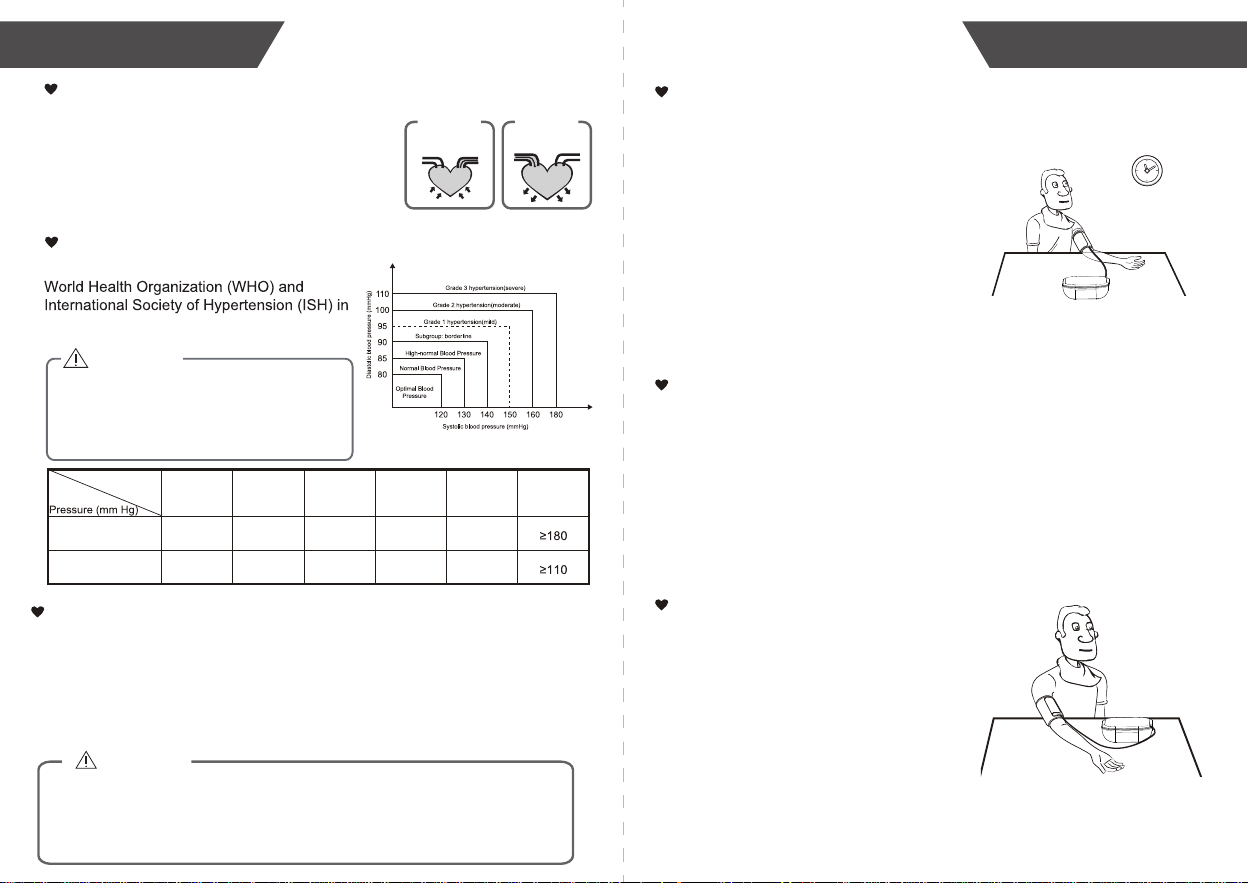
What are systolic pressure and diastolic pressure?
press
artery
vein
blood discharging
Systolic
relax
blood entering
Diastolic
When ventricles contract and pump blood out of the
heart, the blood pressure reaches its maximum value
in the cycle, which is called systolic pressure. When
the ventricles relax, the blood pressure reaches its
minimum value in the cycle, which is called diastolic
pressure.
What is the standard blood pressure classification?
The blood pressure classification published by
1999 is as follows:
CAUTION
SYS
DIA
<120
<80
120-129
80-84
130-139
85-89
140-159
90-99
160-179
100-109
Level
Blood
Optimal Normal
High-normal
Mild Moderate Severe
Irregular Pulse Rate Detector
CAUTION
An irregular pulse rate will be detected if there is an irregular pulse rhythm while measuring
systolic and diastolic blood pressure. When measurements were performed, the monitor will
record all pulse intervals and calculate the average. If two or more pulse intervals were
recorded, and the difference between each interval and the average is larger than ±25% of
the average; or if four or more pulse intervals were recorded, and the difference between
each interval and the average is larger than ±15% of the average value, the irregular pulse
symbol will be displayed along with measurement results.
The appearance of the IPR icon indicates that a pulse irregularity consistent with an irregular
pulse rate was detected during measurement. Usually this is NOT a cause for concern.
However, if the symbol appears often, we recommend you seek medical advice. Please note
that the irregular pulse rate detector only serves as a non-medical feature, and the results
cannot be used directly for clinical judgement. Please seek medical advice from professionals
before making any medical decisions.
5V 1A
(Optional!)
Battery powered mode: 6VDC 4*AAA batteries (Optional!)
Digital LCD V.A.60.5 mm × 92.5 mm
Approx.140mm×130mm×55.6mm
A01
About 22cm-42cm or 40cm-52cm
Type BF applied part
Power supply
Display mode
Measurement mode
Oscillographic testing mode
Measurement range
Measurement perimeter
of the upper arm
Net Weight
External dimensions
Mode of operation
Continuous operation
Degree of protection
Protection against
ingress of water
Accuracy
Normal working condition
Storage & transportation
condition
Software Version
Device Classification
A temperature range of: +5°C to +40°C
A relative humidity range of 15% to 90%,
non-condensing, but notrequiring a water vapour
partial pressure greater than 50 hPa
An atmospheric pressure range of 700 hPa to 1060 hPa
Temperature:-20°C to +60°C
at a water vapour pressure up to 50 hPa
An atmospheric pressure range of 500 hPa to 1060 hPa
Device: 3 years or 30,000 measurements (may vary
Cuff: 10000 times
Alkaline battery: About 200-300 times
IP21 It means the device could be protected against
against vertically falling water drops.
Multiple patient multiple use
Expected Lifetime
Types of use/reuse
Rated cuff pressure: 0mmHg~299mmHg
Measurement pressure:
SYS: 60mmHg~230mmHg
DIA: 40mmHg~130mmHg
Static Pressure: 5℃-40℃ within ±3mmHg
Pulse value: ±5%
Clinical validation: Mean difference within ±5mmHg;
Battery Powered Mode:
Internally Powered ME Equipment
AC Adaptor Powered Mode:
Class II ME Equipment
AC adaptor powered mode:
(Please use the AC adapter which is authorized
WARNING: No modification of this equipment is allowed.
25
24
SPECIFICATIONS
TROUBLESHOOTING
If any abnormality arises during use, please check the following points:
NOTE: If the product still does not work, contact Customer Service. Under no
circumstance should you disassemble or attempt to repair the unit by yourself.
PROBLEM SYMPTOM CHECK THIS REMEDY
No power
High Battery
Low Battery
Error
message
Display can
not light up.
Batteries are depleted.
Replace with new batteries.
Insert the batteries
correctly.
Replace with new batteries.
Batteries are inserted
incorrectly.
bAt Lo &
shows
The battery is too low.
E 1 shows
E 3 shows
E 4 shows
The measurement
failed.
Adapter is inserted
incorrectly.
Insert the AC adapter
correctly.
The cuff is not wrapped
or wrapped incorrectly,
or the cuff air plug is
loose.
Refasten the cuff and insert
air tube plug correctly then
measure again.
Relax for 5 minutes. and
then keep still, measure
again.
Relax for 5 minutes and
measure again.
Pulse is not detected
during measuring.
Loosen the clothing on the
arm and measure again.
Warning
message
Relax for a moment and
then measure again. If the
problem persists, contact
your physician.
out shows
Out of measurement
range
EEx shows
Hardware error
(X can be some digital
symbol, such as1, 2,
Turn off monitor and
measure again. If EEx still
appears on the display,
please contact the retailer
or our customer service.
bAt H shows
The battery is too high. Replace with new batteries.
Excessive body motion
(such as shaking of the
or weak pulse is
detected.
E 2 or
shows
USb Err
shows
The voltage of
the adapter is too high
or too low.
Replace with the authorized
adapter.
EMC Guidance
The ME EQUIPMENT or ME SYSTEM is suitable for home healthcare environments.
Essential performance:
Accuracy of measuring blood pressure
Deviation from normal operation that poses an unacceptable risk to the patient or operator.
Warning: Don’t be near the active HF surgical equipment and the RF shielded room of an ME
system for magnetic resonance imaging, where the intensity of EM disturbances is high.
Warning: Use of this equipment adjacent to or stacked with other equipment should be
avoided because it could result in improper operation. If such use is necessary, this
equipment and the other equipment should be observed to verify that they are operating
normally.
Warning: Use of accessories, transducers and cables other than those specified or provided
by the manufacturer of this equipment could result in increased electromagnetic emissions or
decreased electromagnetic immunity of this equipment and result in improper operation.
Warning: Portable RF communications equipment (including peripherals such as antenna
the equipment including cables specified by the manufacturer. Otherwise, degradation of the
performance of this equipment could result.
Measurement Range
Systolic pressure: 60-230 mmHg
Diastolic pressure: 40-130 mmHg
Rated Cuff Pressure
0-299 mmHg (0-39.9 kPa)
Accuracy
Pressure: ±3 mmHg / 0.4 kPa
Laboratory repriducibility ≤ 3 mmHg
Authorized Component
Input: 100-240V, 50-60Hz, 0.2A max
5V 1000 mA
Adapter
Type: BLJ06L050100U-B
Output:
For more information about our products, please visit
www.kinetikwellbeing.com
Contact Information
26
EMC GUIDANCE
27
AUTHORIZED COMPONENT
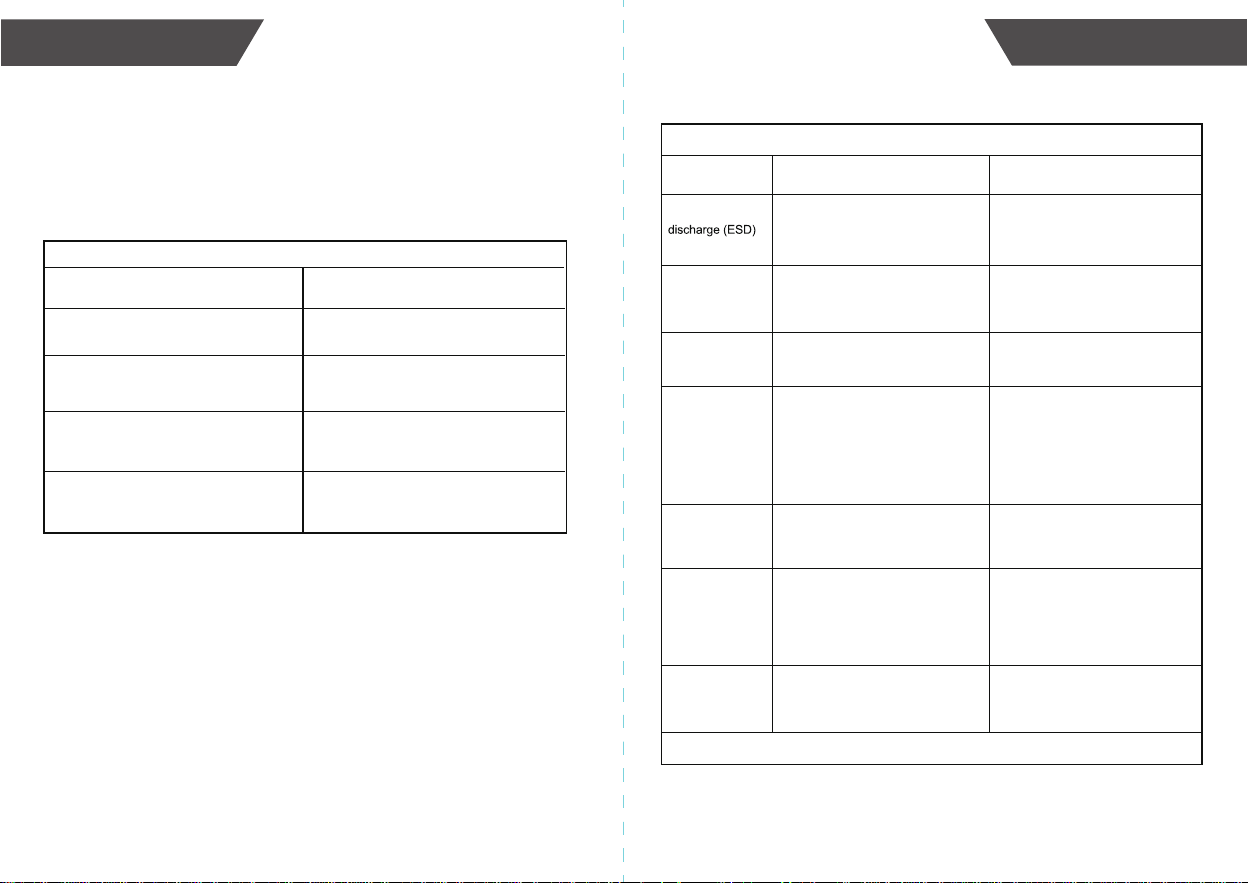
Table 2
Guidance and manufacturer’s declaration – electromagnetic Immunity
Immunity Test
±8 kV contact
±2 kV, ±4 kV, ±8 kV, ±15 kV air
±8 kV contact
±2 kV, ±4 kV, ±8 kV, ±15 kV air
±2 kV for power supply lines
±1 kV signal input/output
100 kHz repetition frequency
±2 kV for power supply lines
Not applicable
100 kHz repetition frequency
±0.5 kV, ±1 kV differential mode
±0.5 kV, ±1 kV, ±2 kV common mode
30 A/m
50 Hz / 60 Hz
30 A/m
50 Hz / 60 Hz
NOTE U
T
is the a.c. mains voltage prior to application of the test level.
Compliance level
Electrostatic
IEC 61000-4-2
Power frequency
magnetic field
IEC 61000-4-8
Voltage dips, short
interruptions and
voltage variations
on power supply
input lines
IEC 61000-4-11
Electrical fast
transient/burst
IEC 61000-4-4
Surge
IEC61000-4-5
IEC 60601-1-2
Test level
0% U
T
; 0,5 cycle. At 0°, 45°, 90°, 135°,
180°, 225°, 270° and 315°.
0% U
T
; 1 cycle and 70% U
T
;
25/30 cycles; Single phase: at 0°.
0% U
T
; 250 / 300 cycle
0% U
T
; 0,5 cycle. At 0°, 45°, 90°, 135°,
180°, 225°, 270° and 315°.
0% U
T
; 1 cycle and 70% U
T
;
25/30 cycles; Single phase: at 0°.
0% U
T
; 250 / 300 cycle
Conduced RF
IEC61000-4-6
3 V
0,15 MHz – 80 MHz
6 V in ISM and amateur radio bands
between 0,15 MHz and 80 MHz
80% AM at 1 kHz
3 V
0,15 MHz – 80 MHz
6 V in ISM and amateur radio bands
between 0,15 MHz and 80 MHz
80% AM at 1 kHz
10 V/m
80 MHz – 2,7 GHz
80% AM at 1 kHz
10 V/m
80 MHz – 2,7 GHz
80% AM at 1 kHz
Radiated RF
IEC61000-4-3
±0.5 kV, ±1 kV differential mode
Not applicable
EMC GUIDANCE
28
EMC GUIDANCE
29
Technical description:
1. all necessary instructions for maintaining BASIC SAFETY and ESSENTIAL
PERFORMANCE with regard to electromagnetic disturbances for the expected lifetime.
2. Guidance and manufacturer’s declaration -electromagnetic emissions and Immunity
Table 1
Guidance and manufacturer’s declaration - electromagnetic emissions
RF emissions
CISPR 11
RF emissions
CISPR 11
Group 1
Class [ B ]
Class A
Comply
Compliance
Harmonic emissions
IEC 61000-3-2
Voltage fluctuations /
flicker emissions
IEC 61000-3-3
Emissions test
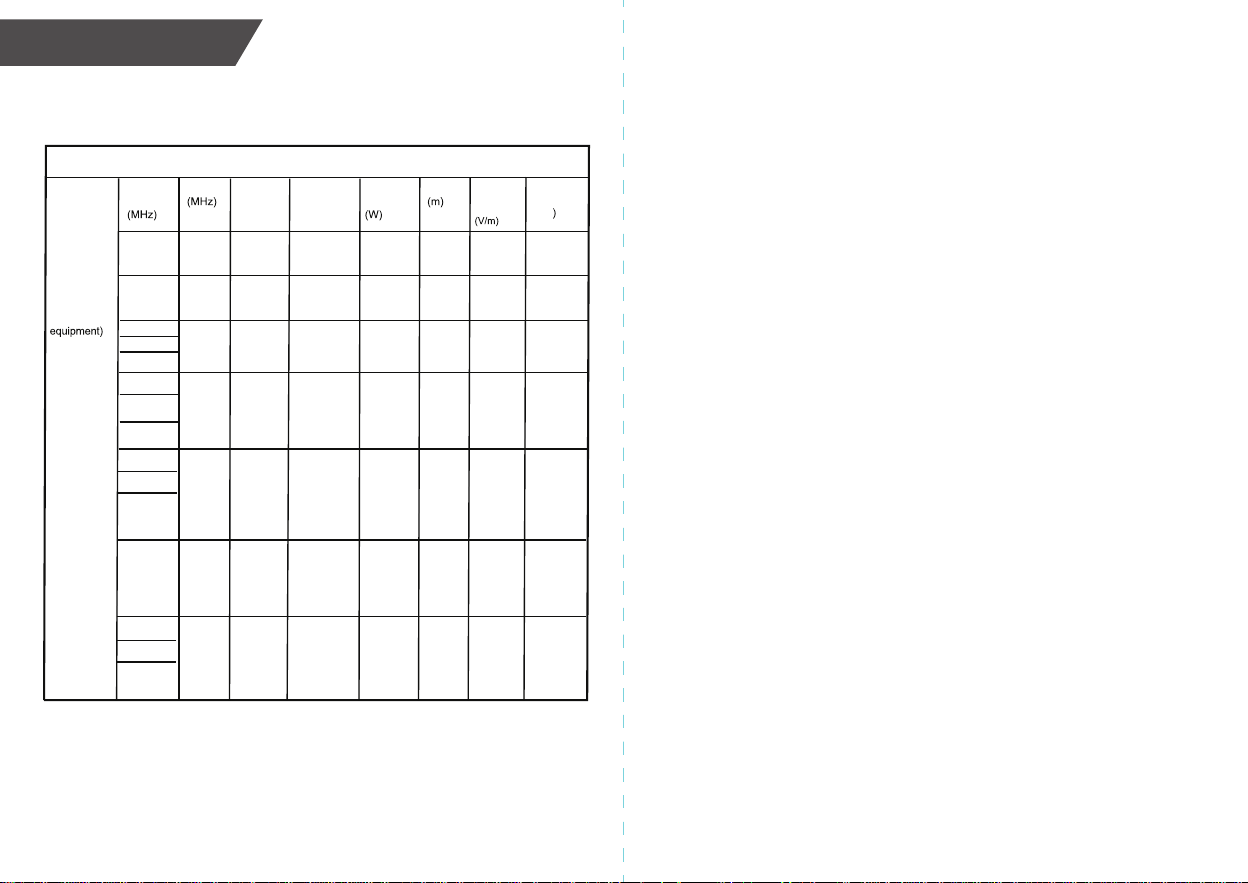
Guidance and manufacturer’s declaration - electromagnetic Immunity
Test
Frequency
385
0.3 27
Radiated RF
IEC61000-4-3
(Test
specifications
for
ENCLOSURE
PORT
IMMUNITY to
RF wireless
communica-
tions
Band Service Modulation Modulation
Power
Distance
IMMUNITY
TEST
LEVEL
380-390 TETRA
400
Pulse
modulation
18Hz
1.8
450 430-470
GMRS
460,FRS
460
FM ± 5kHz
deviation
1kHz sine
2 0.3 28
710 704-787
745
780
LTE Band
13,17
Pulse
modulation
217Hz
0.2 0.3 9
810
870
930
800-960
GSM
800/900,
TETRA 800,
iDEN 820,
CDMA 850,
LTE Band 5
Pulse
modulation
18Hz
2 0.3 28
Compliance
level
(V/m
27
28
9
28
1720
1845
1970
1700-
1990
GSM 1800;
CDMA 1900;
GSM 1900;
DECT;
LTE Band 1,
3,
4,25; UMTS
Pulse
modulation
217Hz
2 0.3
28 28
2
0.3
28
2450 2400-
2570
Bluetooth,
WLAN,
802.11
b/g/n, RFID
2450, LTE
Band 7
Pulse
modulation
217 Hz
28
5240
5500
5785
5100-
5800
WLAN
802.11
a/n
Pulse
modulation
217 Hz
0.2
0.3
9 9
Table 3
30
EMC GUIDANCE