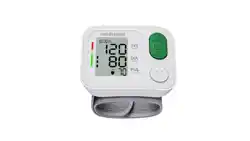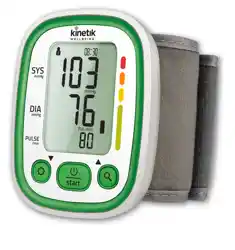
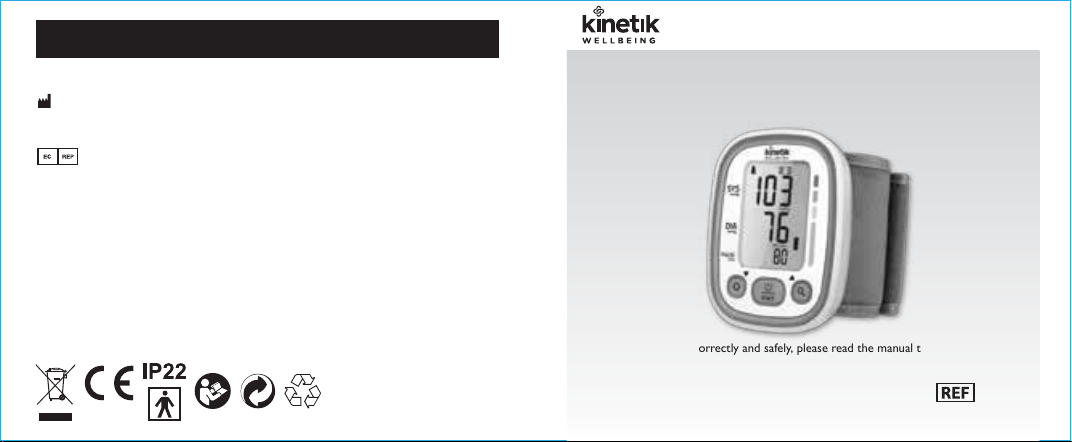
wrist blood pressure monitor
Instruction Manual
Manufactured by:
Harvard Medical Devices Ltd. HK
Authorized European Representative:
Company: Share Info Consultant Service LLC Repräsentanzbüro
Address: Heerdter Lohweg 83, 40549 Düsseldorf
Company: Harvard Medical Devices Ltd. HK
Address: 1002, Railway Plaza, TST, HK
Made in China
Kinetik WBP3 UK IB 20210723
0197
.
To use the monitor correctly and safely, please read the manual thoroughly.
.
Please keep this manual well in order to reference in future.
WBP3
By cmlam at 2:36 pm, Jul 29, 2021

1
TABLE OF CONTENTS
1
INTRODUCTION 2
Safety Information
LCD Display Symbol
Monitor Components
BEFORE YOU START 13
Installing and Replacing the Batteries
Setting Date, Time, Positioning Symbol and Measurement Unit
MEASUREMENT 22
Tie the Cu
Start the Measurement
DATA MANAGEMENT 26
Delete the Records
Recall the Records
INFORMATION FOR USER 30
Tips for Measurement
Maintenance
ABOUT BLOOD PRESSURE 32
What are systolic pressure and diastolic pressure?
What is the standard blood pressure classification?
Irregular heartbeat detector
Why does my blood pressure fluctuate throughout the day?
Why do I get a dierent blood pressure at home compared to the hospital?
Is the result the same if measuring on the right wrist?
TROUBLESHOOTING 35
SPECIFICATIONS 37
MANUFACTURER INFORMATION 39
COMPLIED STANDARDS LIST 40
EMC GUIDANCE 42
General Description
Indications for Use
Measurement Principle
List
Contraindications
Select the User ID
...............................................................................................
...........................................................................................
..................................................................................................
..........................................................................................
....................................................................................
....................................................................................
..........................................................................................
................................................................................................
................................................................................................
...........................................................................
.................................................................................

INTRODUCTION
2
INTRODUCTION
3
Features:
Systolic blood pressure
Diastolic blood pressure
Pulse rate
60 records for each user
General Description
Indications for Use
Thank you for selecting Kinetik wrist type blood pressure monitor (WBP3).
The monitor features blood pressure measurement, pulse rate measurement
and the result storage. The design provides you with two years of reliable
service.
Readings taken by the WBP3 are equivalent to those obtained by a trained
observer using the cu and stethoscope auscultation method.
This manual contains important safety and care information, and provides step
by step instructions for using the product.
Read the manual thoroughly before using the product.
The Kinetik Wrist Blood Pressure Monitor is a digital monitor intended for use in
measuring blood pressure and heartbeat rate with a wrist circumference ranging
from 13.5cm to 21.5 cm ( about 5⅓˝-8½˝ ).
It is intended for adult indoor use only.
This product uses the Oscillometric Measuring Method to detect blood pressure. Before every
measurement, the unit establishes a “zero point” equivalent to the atmospheric pressure. Then it
starts inflating the cu. Meanwhile, the unit detects pressure oscillation generated by beat-to-beat
pulsatile, which is used to determine the systolic pressure and diastolic pressure as well as pulse
rate.
Measurement Principle
Contraindications
1.The device should not be used by any person who may be suspected of,or is pregnant .
2.The device is not suitable for use on patients with implanted,electrical devices,
such as cardiac pacemakers, defibrillators.
INTRODUCTION
4
INTRODUCTION
5
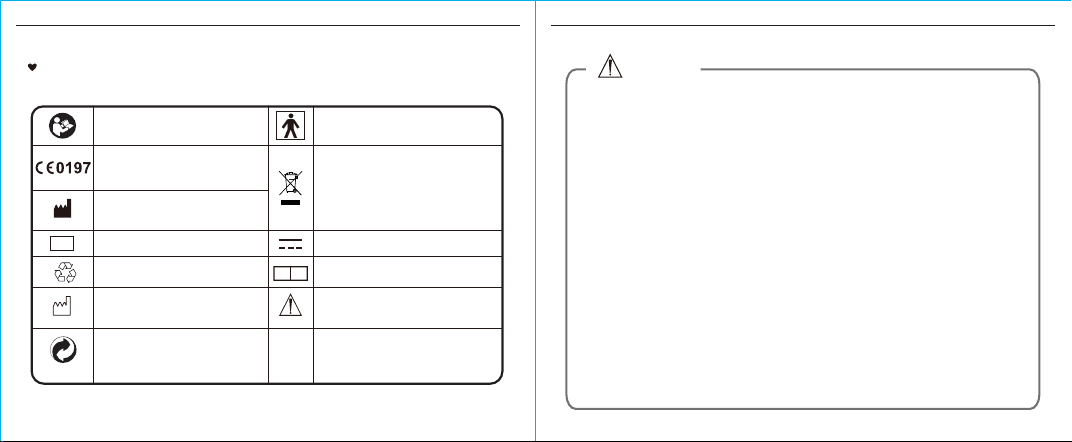
The signs below might be in the user manual, labeling or other component.
They are the requirement of standard and using.
Safety Information
Symbol for “COMPLIES WITH
MDD 93/42/EEC REQUIREMENTS”
Symbol for “MANUFACTURER”
Symbol for “SERIAL NUMBER”
Symbol for “TYPE BF APPLIED
PARTS”
Symbol for “DIRECT CURRENT”
Symbol for “ENVIRONMENT
PROTECTION - Electrical waste
products should not be disposed of with
household waste. Please recycle where
facilities exist. Check with your local
authority or retailer for recycling advice”
Symbol for “Authorised Representative in
the European Community”
EC REP
Caution: Thesenotesmustbe
observedtopreventany damage
tothedevice.
SN
The Green Dot is the license symbol of
a European network of industry-funded
systems for recycling the packaging
materials of consumer goods.
Symbol for “RECYCLE”
Symbol for “MANUFACTURE
DATE”
Read the instructions (actual symbol
colours are white on a blue background).
* This device is intended for adult use in homes only.
* The device is not suitable for use on neonatal patients, pregnant women,patients with implanted,
electronical devices, patients with pre-eclampsia, premature ventricular beats, atrial fibrillation,
peripheral, arterial disease and patients undergoing intravascular therapy or arterio-venous shunt or
people who received a mastectomy. Please consult your doctor prior to using the unit if you suffer from
illnesses.
* The device is not suitable for measuring the blood pressure of children. Ask your doctor before using it
on older children.
* The device is not intended for patient transport outside a healthcare facility.
* The device is not intended for public use.
* This device is intended for no-invasive measuring and monitoring of arterial blood pressure. It is not
intended for use on extremities other than the wrist or for functions other than obtaining a blood pressure
measurement.
* Do not confuse self-monitoring with self-diagnosis. This unit allows you to monitor your blood
pressure.Do not begin or end medical treatment without asking a physician for treatment advice.
* If you are taking medication,consult your physician to determine the most appropriate time to measure
your blood pressure. Never change a prescribed medication without consulting your physician.
* Do not take any therapeutic measures on the basis of a self measurement. Never alter the dose of a
medicine prescribed by a doctor. Consult your doctor if you have any question about your blood
pressure.
* When the device was used to measure patients who have common arrhythmias such as atrial or
ventricular premature beats or atrial fibrillation, the best result may occur with deviation. Please consult
your physician about the result.
* Warning: Do not apply the cuff over a wound;otherwise it can cause further injury.
*Do not inflate the cuff on the same limb which other monitoring ME equipment is applied around
simultaneously, because this could cause temporary loss of function of those simultaneously-used
monitoring ME equipment.
CAUTION
INTRODUCTION
6
INTRODUCTION
7
CAUTION
*On the rare occasion of a fault causing the cuff to remain fully inflated during measurement, open the cuff
immediately. Prolonged high pressure (cuff pressure > 300mmHg or constant pressure > 15mmHg for
more than 3 minutes) applied to the wrist may lead to an ecchymosis.
*Please check that operation of the device does not result in prolonged impairment of patient blood
circulation.
* When measurement, please avoid compression or restriction of the connection tubing.
* The device cannot be used with HF surgical equipment at the same time.
* The ACCOMPANYING DOCUMENT shall disclose that the SPHYGMOMANOMETER was clinically
investigated according to the requirements of ISO 81060-2:2013.
* To verify the calibration of the AUTOMATED SPHYGMOMANOMETER, please contact the manufacturer.
* This device is contraindicated for any female who may be suspected of, or is pregnant. Besides providing
inaccurate readings, the effects of this device on the fetus are unknown.
* Too frequent and consecutive measurements could cause disturbances in blood circulation and injuries.
* This unit is not suitable for continuous monitoring during medical emergencies or operations.Otherwise,
the patient’s wrist and fingers will become anaesthetic, swollen and even purple due to a lack of blood.
* When not in use, store the device in a dry room and protect it against extreme moisture, heat, lint, dust
and direct sunlight. Never place any heavy objects on the storage case.
* This device may be used only for the purpose described in this booklet. The manufacturer cannot be held
liable for damage caused by incorrect application.
*This device comprises sensitive components and must be treated with caution. Observe the storage and
operating conditions described in this booklet.
* The maximum temperature that the applied part can be achieved is 42.5℃ while the environmental
temperature is 40℃.
* The equipment is not AP/APG equipment and not suitable for use in the presence of a flammable
anesthetic mixture with air of with oxygen or nitrous oxide.
* Warning: No servicing/maintenance while the ME equipment is in use.
* The patient is an intended operator.
* The patient can measure data and change batteries under normal circumstances and maintain the device
and its accessories according to the user manual.
* To avoid measurement errors, please avoid the condition of strong electromagnetic field radiated
interference signal or electrical fast transient/burst signal.
* The blood pressure monitor and the cuff are suitable for use within the patient environment. If you are
allergic to polyester, nylon or plastic, please don't use this device.
* During use, the patient will be in contact with the cuff. The materials of the cuff have been tested and
found to comply with requirements of ISO 10993-5:2009 and ISO 10993-10:2010. It will not cause any
potential sensization or irritation reaction.
* If you experience discomfort during a measurement, such as pain in the wrist or other complaints, press
the START/STOP button to release the air immediately from the cuff. Loosen the cuff and remove it from
your wrist.
* If the cuff pressure reaches 40 kPa (300 mmHg), the unit will automatically deflate. Should the cuff not
deflate when pressures reaches 40 kPa (300 mmHg), detach the cuff from the wrist and press the
START/STOP button to stop inflation.
* Before use, make sure the device functions safely and is in proper working condition. Check the device,
do not use the device if it is damaged in any way. The continuous use of a damaged unit may cause injury,
improper results, or serious danger.
* Do not wash the cuff in a washing machine or dishwasher!
* The service life of the cuff may vary by the frequency of washing, skin condition, and storage state. The
typical service life is 10000 times.
* The service life of this product is 2 years.
* Manufacturer will make available on request circuit diagrams, component part lists, descriptions,
calibration instructions,etc., to assist to service personnel in parts repair.
* The operator shall not touch output of batteries and the patient simultaneously.
CAUTION
INTRODUCTION
8
INTRODUCTION
9
* Cleaning :Dust environment may affect the performance of the unit. Please use the soft cloth to clean the
whole unit before and after use. Don’t use any abrasive or volatile cleaners.
* The device doesn’t need to be calibrated within two years of reliable service.
* If you have any problems with this device, such as setting up, maintaining or using, please contact the
SERVICE PERSONNEL of Harvard Medical Devices. Don’t open or repair the device by yourself in the
event of malfunctions. The device must only be serviced, repaired and opened by individuals at authorized
sales/service centers.
* Please report to Harvard Medical Devices if any unexpected operation or events occur.
* Keep the unit out of reach of infants, young children or pets to avoid inhalation or swallowing of small
parts. It is dangerous or even fatal.
* Be careful to strangulation due to cables and hoses, particularly due to excessive length.
* At least 30 min required for ME equipment to warm from the minimum storage temperature between
uses until it is ready for intended use. At least 30 min required for ME equipment to cool from the
maximum storage temperature between uses until it is ready for intended use.
* This equipment needs to be installed and put into service in accordance with the information provided in
the ACCOMPANYING DOCUMENTS;
* Wireless communications equipment such as wireless home network devices, mobile phones, cordless
telephones and their base stations, walkie-talkies can affect this equipment and should be kept at least a
distance d away from the equipment. The distance d is calculated by the MANUFACTURER from the
80MHz to 5.8 GHz column of Table 4 and Table 9 of IEC 60601-1-2:2014, as appropriate.
* Please use ACCESSORIES and detachable partes specified/ authorised by MANUFACTURE.
Otherwise, it may cause damage to the unit or danger to the user/patients.
* There is no luer lock connectors are used in the construction of tubing, there is a possibility that they
might be inadvertently connected to intravascular fluid systems, allowing air to be pumped into a blood
vessel.
* Please use the device under the environment which was provided in the user manual. Otherwise, the
performance and lifetime of the device will be impacted and reduced.
CAUTION CAUTION
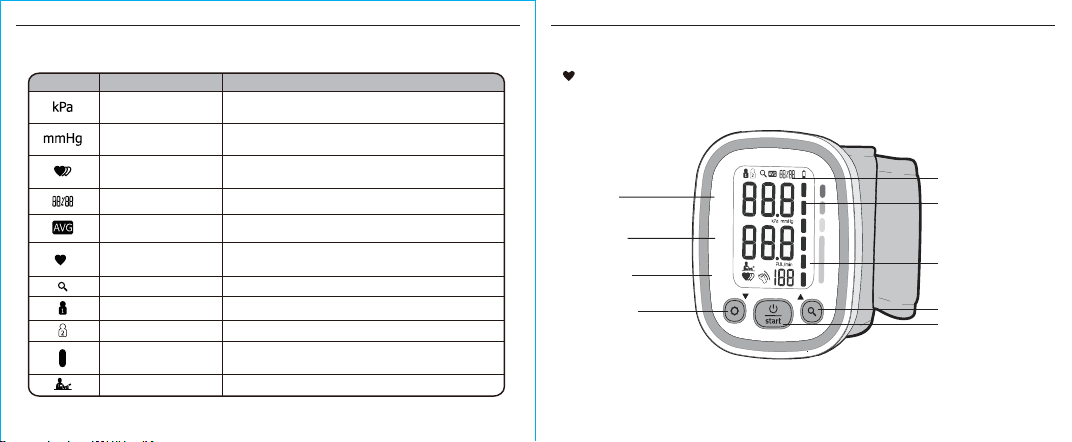
SYMBOL DESCRIPTION EXPLANATION
LCD Display Symbol
Pulse display
Systolic pressure
Diastolic pressure
High blood pressure
Low blood pressure
Pulse in beats per minute
Motion may result in an inaccurate measurementMotion indicator
Low battery
Batteries are low and need to be replaced
* When using this device, please pay attention to the following situation which may interrupt blood flow and
influence blood circulation of the patient, thus cause harmful injury to the patient: connection tubing kinking
too frequent and consecutive multiple measurements; the application of the cuff and its pressurization on
any wrist where intravascular access or therapy, or an arterio-venous (A-V) shunt, is present; inflating the
cuff on the side of a mastectomy.
* Please dispose of ACCESSORIES, detachable parts, and the ME EQUIPMENT according to the local
guidelines.
INTRODUCTION
10
INTRODUCTION
11
SYMBOL DESCRIPTION EXPLANATION
mmHg
kPa
Current time
Month/Day,Hour/Minute
Heartbeat
Memory
Indicate it is in the memory mode
Irregular heartbeat
Average value
User 1
User 2
Blood pressure monitor is detecting a
heartbeat during measurement.
Blood pressure monitor is detecting an
irregular heartbeat during measurement.
Measurement unit of the blood pressure
(1kPa=7.5mmHg)
The average value of latest 3 groups blood pressure
value.
Blood pressure
level indicator
Positioning symbol
The correct position gives you an accurate measurement.
Indicate the blood pressure level
Start measurement and save the results for user 2
Start measurement and save the results for user 1
Measurement unit the blood pressure
(1mmHg=0.133kPa)
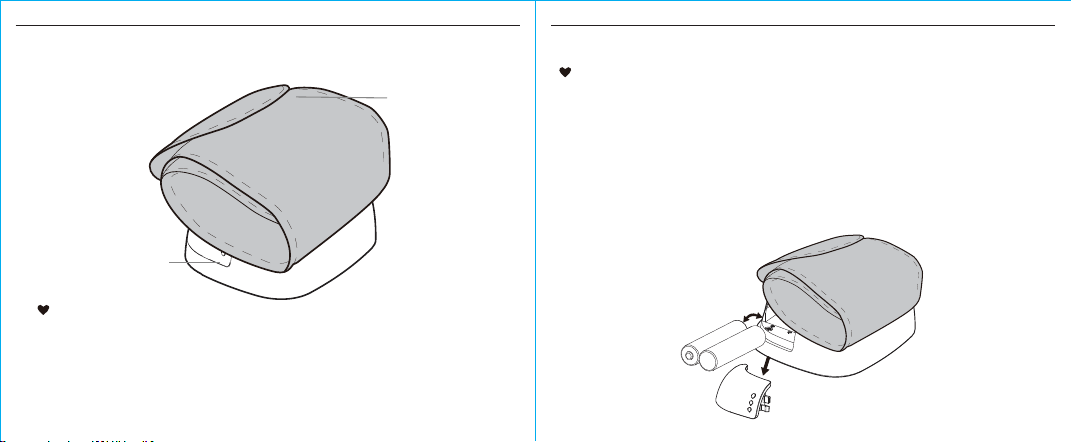
Monitor Components
SYS
mmHg
DIA
mmHg
PULSE
/min
LCD DISPLAY
GRADE
TIME
SYSTOLIC
PRESSURE
DIASTOLIC
PRESSURE
MEMORY BUTTON
SET BUTTON
START/STOP
BUTTON
PULSE RATE
INTRODUCTION
12
BEFORE YOU START
13
CUFF
(Type BF applied
part)
BATTERY
COMPARTMENT
Component list pressure measuring system:
1. PCBA;
2. Air Pipe;
3. Pump;
4. Valve;
5. Cu.
List
1) Blood Pressure Monitor WBP3
2) 2×AAA alkaline batteries (Not Included)
3) User manual
•
•
•
Installing and Replacing the Batteries
Slide o the battery cover.
Install the batteries by matching the correct polarity, as shown
below. Always use the correct battery type (2×AAA alkaline
batteries.)
Replace the cover.
The typical service life of the new and unused batteries
is 60 measurements for the operation time is 60s.
BEFORE YOU START
14
Replace the batteries whenever the below happen
The shows
The display is dim.
The display does not light up
CAUTION
Do not use new and used batteries together.
Do not use different types of batteries together.
Do not dispose the batteries in fire. Batteries may explode or leak.
Remove batteries if the device is not likely to be used for some time.
Worn batteries are harmful to the environment. Do not dispose with daily garbage.
Remove the old batteries from the device following your local recycling guidelines.
BEFORE YOU START
15
Setting Date, Time, Positioning Symbol and
Measurement Unit
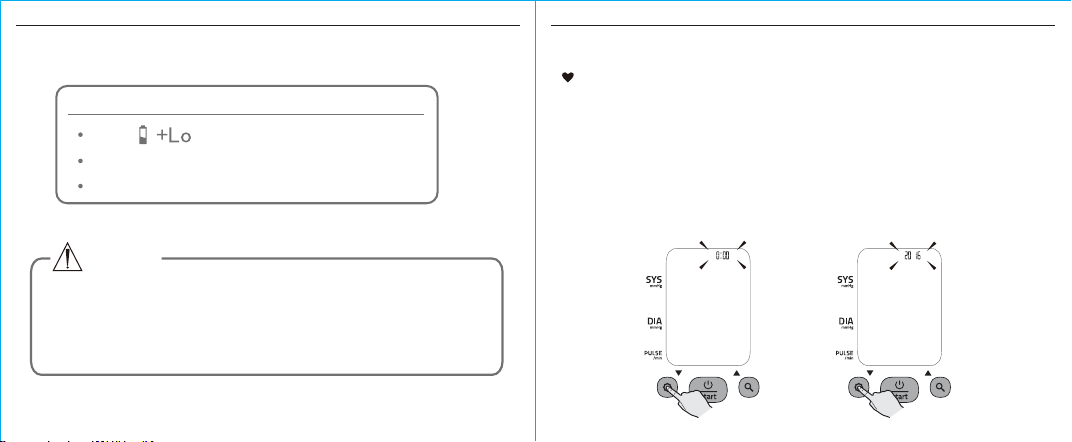
1.
It is important to set the clock before using your blood
pressure monitor, so that a time stamp can be assigned to
each record that is stored in the memory. (The setting range
of year is 2016 ~ 2056. Time format: 24H)
When the monitor is o, press “ SET ” button, it will display the time.
Then press and hold “ SET ” button to enter the mode for year setting.
BEFORE YOU START
16
BEFORE YOU START
17
Notes:
1. During the process of setting, you can press “ ” button to
stop setting at any time.
2. If there is no operation during the process of setting, it will turn o.
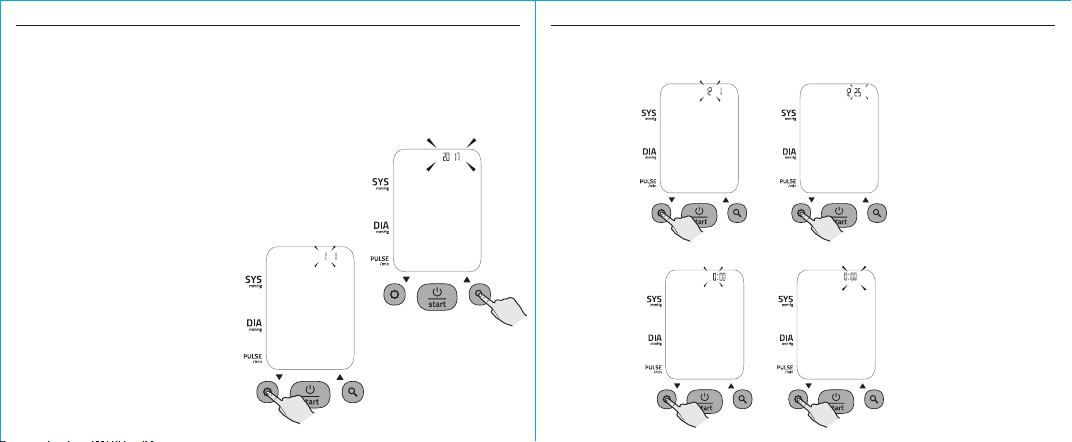
START/STOP
Press “ MEM ” button to change the
[YEAR]. Each press will increase the
numeral by one in a cycling manner.
When you get the right year,
press “ SET ” button to confirm
and it will turn to next step.
2.
3.
4. Repeat step 2 and 3 to confirm [MONTH] and [DAY].
5. Repeat step 2 and 3 to confirm [HOUR] and [MINUTE].
BEFORE YOU START
18
BEFORE YOU START
19
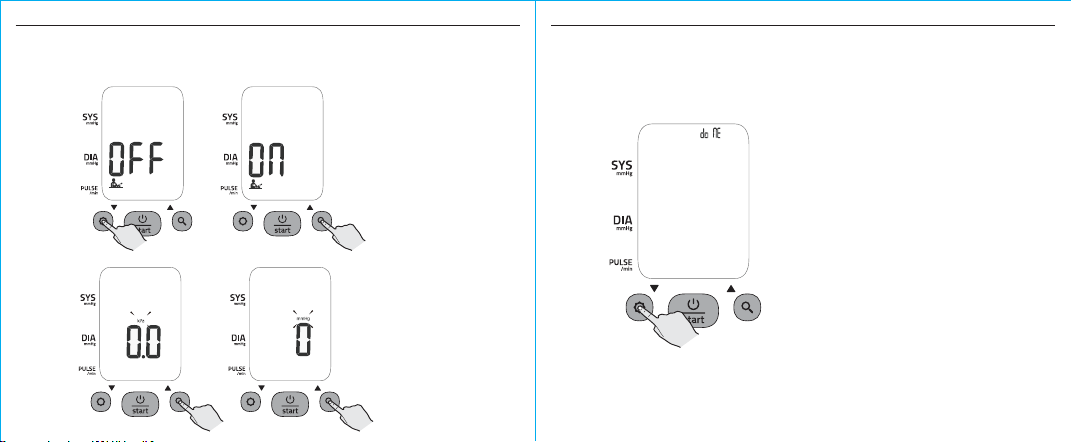
6.
7.
Repeat step 2 and 3 to confirm [Positioning symbol] on or o.
Repeat step 2 and 3 to confirm the measurement unit.
8. After confirming the meausrement unit, the LCD will display “donE”,
then display all the settings you have done one by one and then
the monitor will turn o.
BEFORE YOU START
20
BEFORE YOU START
21
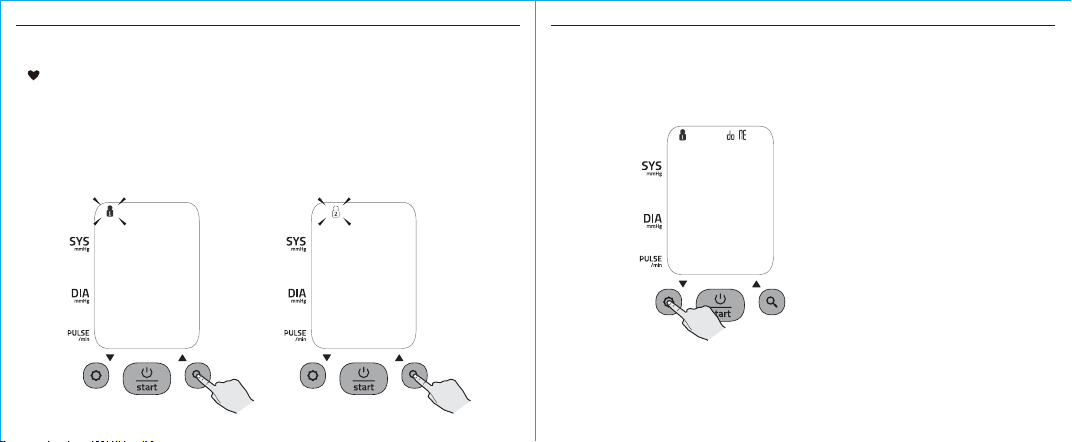
Select the User ID
Before you start the measurement, please select the desired user ID first.
When the blood pressure monitor is o, press and hold “ MEM ” button until
the user ID blinks. Then press “MEM ” button to change the user ID between
user 1 and user 2. Press “ SET ” button to confirm your selection.
1.
After confirming the user ID, the LCD will display “User ID+donE” and then
turn o. Then you can start your measurement now.
2.
MEASUREMENT
22
MEASUREMENT
23
Tie the Cu
1.
Start the Measurement
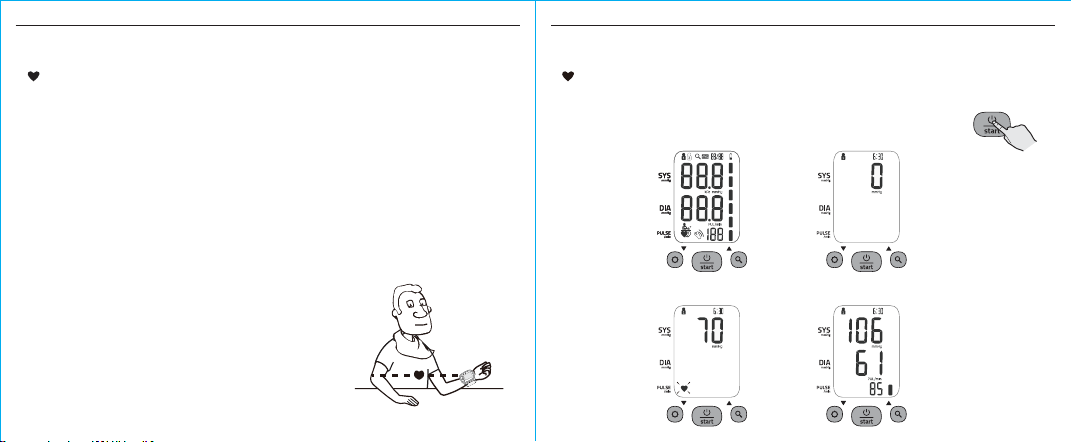
When the monitor is o, press “ ” button to turn on the monitor,
and it will finish the whole measurement. (Take user 1 for example.)
START/STOP
Adjust the zero. LCD display
Inflating and measuring. Display and save the result. The year,
date and time will display alternately.
Remove all accessories (watch, bracelet, etc) from your wrist. If your physician has diagnosed you with
poor circulation in your wrist, use the other one.
Roll or push up your sleeve to expose the skin.
Apply the cu to your wrist with your palm facing up.
Position the edge of the cu about 1cm~1.5cm from wrist joints.
Fasten the wrist cu around your wrist, leaving no extra room between the cu and your skin. If the cu
is too loose, the measurement will not be accurate.
Sit comfortably with your tested wrist resting on a flat surface. Place your elbow on a table so that the
cu is at the same level as your heart. Turn your palm upwards. Sit upright in a chair, and take 5-6 deep
breaths.
Patients with Hypertension:
The middle of the cu should be at the level of the right atrium of the heart; Before starting measurement,
please sit comfortably with legs uncrossed, feet flat on the floor, back and wrist supported.
Rest for 5 minutes before measuring.
Wait at least 3 minutes between measurements. This allows your blood
circulation to recover.
Take the measurement in a silent room.
The patient must relax as much as possible and do not move and talk
during the measurement procedure.
The cu should maintain at the same level as the right atrium of the heart.
Do not cross your legs and keep your feet on the ground.
Keep your back against the backrest of the chair.
For a meaningful comparison, try to measure under similar conditions.
For example, take daily measurements at approximately the same
time, on the same wrist, or as directed by a physician.
1.
2.
3.
4.
5.
6.
7.
•
•
•
•
•
•
•
•
MEASUREMENT
24
MEASUREMENT
25
2.
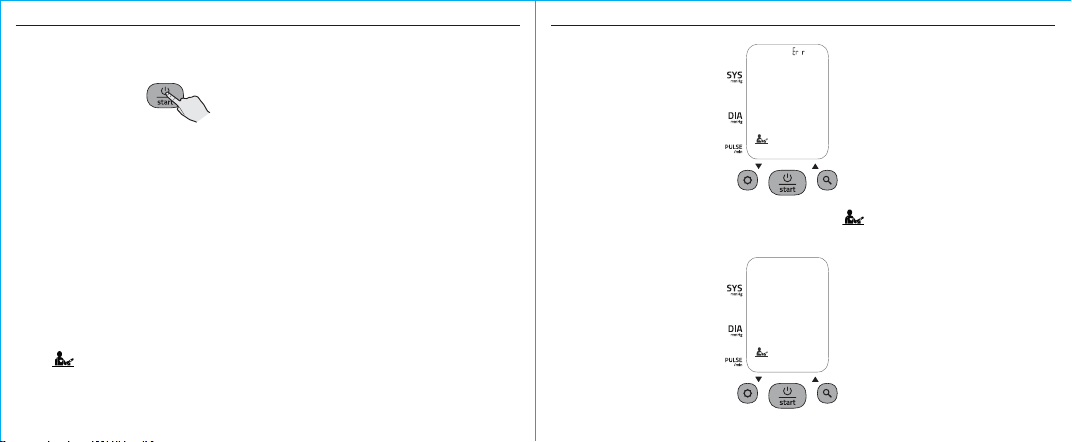
Press “
START/STOP ” button to power o, otherwise it will turn o
within 1 minute.
Tips:
1. There are two users in total. Each user has 60 records.
2. You can press “START/STOP ” button to stop measuring during the
process of the measurement at any time.
3. If the measurement result is out of the measurement range
(SYS: 60mmHg to 230mmHg; or DIA: 40mmHg to 130mmHg; or
Pulse: 40-199 pulse/minute), the LCD will display “out”.
Notes: If you have set the [Positioning Symbol] on, when you start
the measurement, the blood pressure monitor will detect the position
first. The wrist must beat the angle between 30° and 45°. If it’s out of
this angle, the LCD won’t start any measurements and will display
+ Err until you have the correct position.
If you get the correct position, it will display for about 3 seconds,
and then finish the whole measurement.
INFORMATION FOR USER
DATA MANAGEMENT
26
DATA MANAGEMENT
27
2.
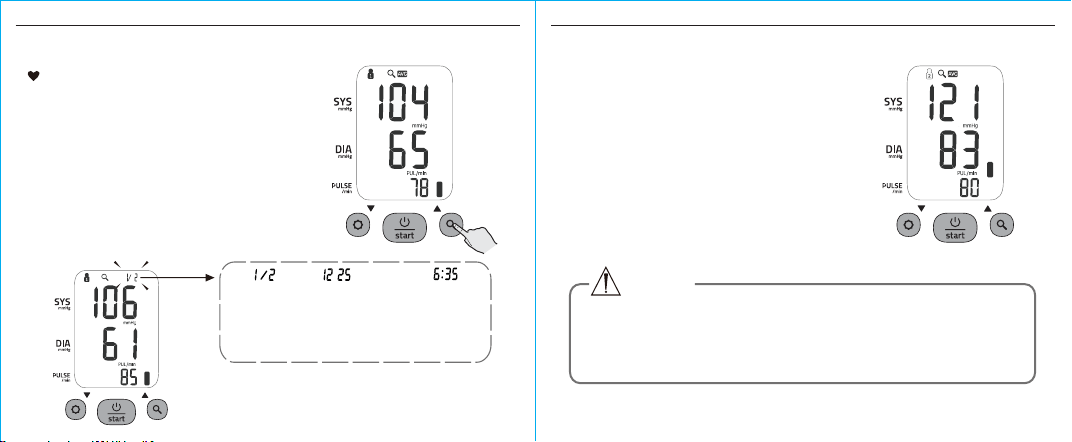
The
corresponding
time is 6:35.
The
corresponding
date is 25th
December.
Press “ MEM ” button or “ SET ”
button to get the record you want.
When the monitor is o, press “ MEM ”
button to show the average value of the
latest three measurement records. If the
records are less than 3 groups, it will
display the latest record instead.
The record number, date and time
of the measurement records will
display alternately.
The record
number is
No.1. Two
records in
total.
Recall the Records
1.
CAUTION
The most recent record (1) is shown first. Each new
measurement is assigned to the first (1) record. All other records
are pushed back one digit (e.g., 2 becomes 3, and so on), and
the last record (60) is dropped from the list.
If you want to check the other user’s
measurement records, please press
“
START/STOP ” button to turn o the blood
pressure monitor. Then press and hold “MEM ”
button to enter the selecting user mode, press
“ MEM ” again to change the user, when the
desired user ID blinks, press “ SET ” button to
confirm. Then press “ MEM ” button to check
the records of the selected user.
3.
DATA MANAGEMENT
28
DATA MANAGEMENT
29
1.
2.
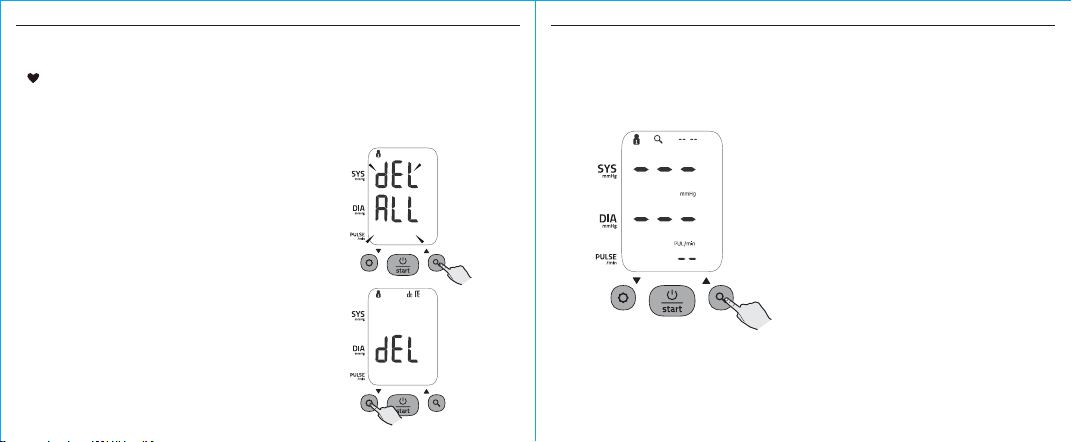
If you did not get the correct measurement, you can delete
all the results for the selected user by following steps.
(Take user 1 for example.)
Delete the Records
Press “ SET ” button to confirm
deleting, the LCD displays “ User
ID+dEL doNE ” and then turns o.
Note: To exit out of delete mode
without deleting any records, press
“
START/STOP ” button before
pressing “ SET ” button to confirm
any delete commands.
In the memory mode, hold pressing
“ MEM ” button about 3 seconds,
the flash display “dEL All” + User ID
will show.
If there is no record, when you press “ MEM ” button to check the record,
the display will show.
3.
INFORMATION FOR USER
30
INFORMATION FOR USER
31
MM
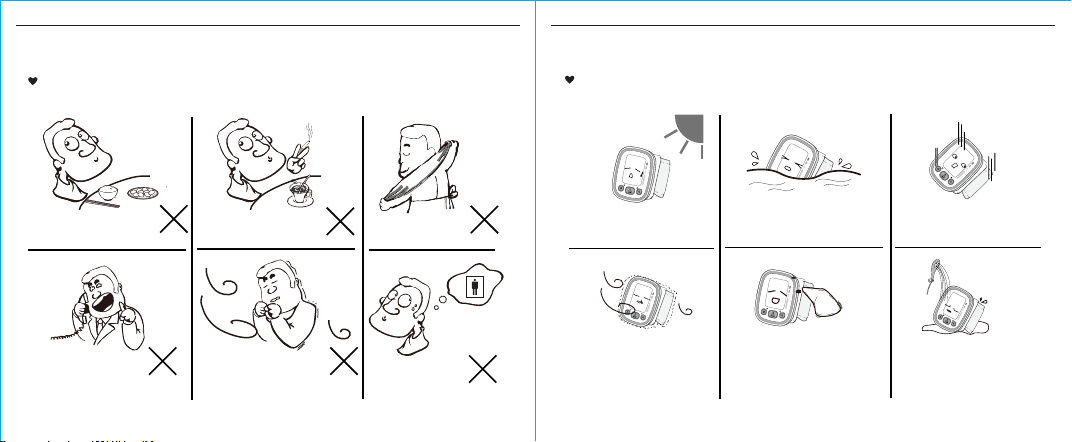
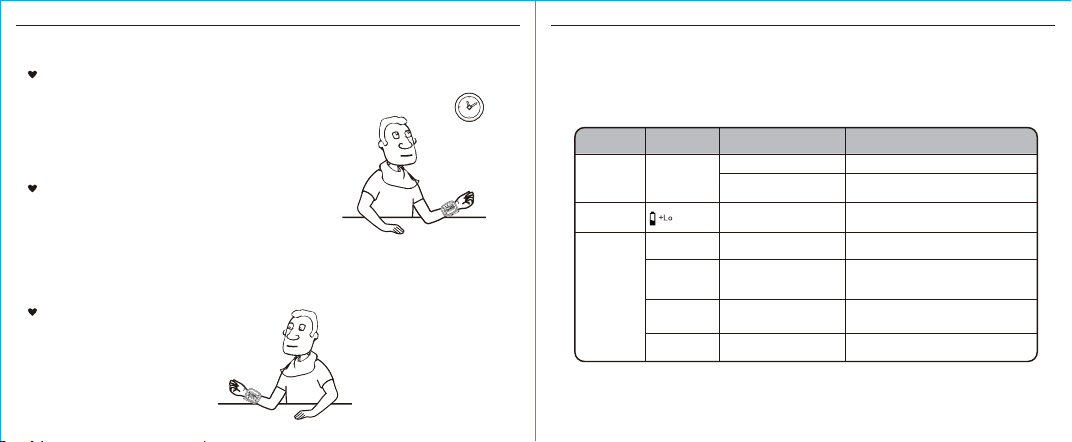
Tips for Measurement
Within 1 hour
after dinner or drinking
Within 20 minutes
after taking a bath
Measurements may be inaccurate if taken in the following circumstances.
Immediate measurement
after tea, coee, smoking
When talking or
moving your fingers
In a very cold environment
When you want to
discharge urine
Maintenance
To obtain the best performance, please follow the instructions below.
Avoid intense shaking and collision.
Avoid touching water,
clean it with a dry cloth in case.
Using wet cloths to remove dirt.
Avoid dusty and unstable-
temperature environment.
Put in a dry place and
avoid the sunshine
Avoid washing the cu
SYS
mmHg
DIA
mmHg
PULSE
/min
SYS
mmHg
DIA
mmHg
PULSE
/min
SYS
mmHg
DIA
mmHg
PULSE
/min
SYS
mmHg
DIA
mmHg
PULSE
/min
SYS
mmHg
DIA
mmHg
PULSE
/min
SYS
mmHg
DIA
mmHg
PULSE
/min
ABOUT BLOOD PRESSURE
32
ABOUT BLOOD PRESSURE
33
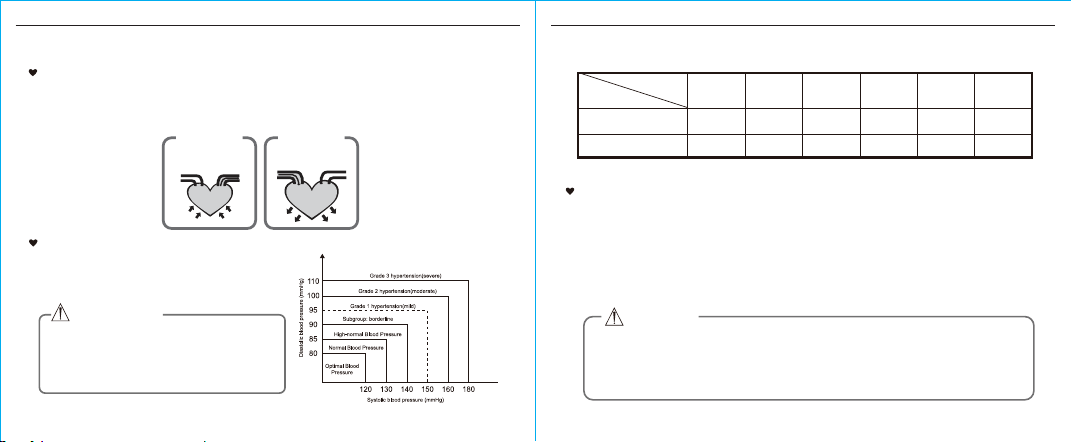
What are systolic pressure and diastolic pressure?
When ventricles contract and pump blood out of the heart, blood pressure reaches its maximum value,
the highest pressure in the cycle is known as systolic pressure. When the heart relaxes between
heartbeats, the lowest blood pressure is diastolic pressure.
120-129
80-84
130-139
85-89
140-159
90-99
160-179
100-109
≥180
≥110
Blood
Normal
High-normal
Mild Moderate Severe
SYS
DIA
<120
<80
Level
Pressure (mm Hg)
Optimal
What is the standard blood pressure classification?
The blood pressure classification published by World
Health Organization(WHO) and International Society
of Hypertension (ISH) in 1999 is as follows:
Only a physician can tell your normal BP range.
Please contact a physician if your measuring
result falls out of the range. Please note that only
a physician can tell whether your blood pressure
value has reached a dangerous point.
CAUTION
An irregular heartbeat is detected when a heartbeat rhythm varies while the device is measuring systolic
pressure and diastolic pressure. During each measurement, blood pressure monitor will keep a record of
all the pulse intervals and calculate the average value of them. If there are two or more pulse intervals,
the dierence between each interval and the average is more than the average value of ±25% , or there
are four or more pulse intervals, the dierence between each interval and the average is more than the
average value of ±15%, then the irregular heartbeat symbol will appear on the display with the
measurement result.
Irregular Heartbeat Detector
CAUTION
The appearance of the IHB icon indicates that a pulse irregularity consistent with an irregular
heartbeat was detected during measurement. Usually this is NOT a cause for concern.
However, if the symbol appears often, we recommend you seek medical advice. Please
note that the device does not replace a cardiac examination, but serves to detect pulse
irregularities at an early stage.
press
artery
vein
blood discharging
Systolic
relax
blood entering
Diastolic
ABOUT BLOOD PRESSURE
34
TROUBLESHOOTING
35
Why does my blood pressure
fluctuate throughout the day?
1. Individual blood pressure varies multiple times everyday. It is also aected
by the way you tie your cu and your measurement position, so please take
the measurement under the same conditions.
2. If the person takes medicine, the pressure will vary more.
3. Wait at least 3 minutes for another measurement.
Why do I get a dierent blood
pressure at home compared
to the hospital?
What you need to pay attention to
when you measure your blood
pressure at home:
If the cu is tied properly.
If the cu is too tight or too loose.
If the cu is tied on the wrist.
If you feel anxious.
Taking 2-3 deep breaths before
beginning will be better for
measuring.
Advice: Relax yourself for 4-5
minutes until you calm down.
Is the result the same if
measuring on the right
wrist?
The blood pressure is dierent even throughout the day
due to weather, emotion, exercise etc, Also, there is the
“white coat” eect, which means blood pressure usually
increases in clinical settings.
It is ok for both wrists, but there will be
some dierent results for dierent
people. We suggest you measure the
same wrist every time.
Refasten the cu and then measure again.
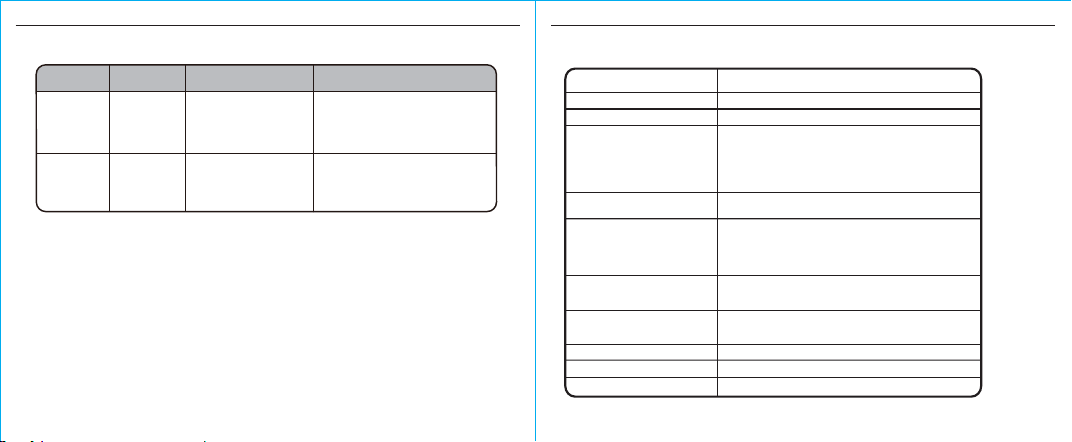
This section includes a list of error messages and frequently asked questions for problems
you may encounter with your blood pressure monitor. If the products not operating as you
think it should, check here before arranging for servicing.
PROBLEM SYMPTOM CHECK THIS REMEDY
No power
Low
batteries
Error
message
Display is dim or
will not light up.
Batteries are exhausted. Replace with new batteries
Insert the batteries correctly
Replace with new batteries
Batteries are inserted
incorrectly.
Show on
the display
Batteries are low.
E 01 shows
E 02 shows
E 03 shows
Movement can aect the measurement.
Relax for a moment and then measure
again.
The measurement process does
not detect the pulse signal.
Loosen the clothing on the wrist and then
measure again.
The monitor detected motion,
while measuring.
E 04 shows Relax for a moment and then measure again.Measure incorrectly.
The cu is too tight or
too loose.
TROUBLESHOOTING
36
SPECIFICATIONS
37
PROBLEM SYMPTOM CHECK THIS REMEDY
Error
message
EExx,shows on
the display.
Retake the measurement.If the problem
persists,contact the retailer or our customer
service department for further assistance.
Refer to the warranty for contact information
and return instructions.
Warning
message
“out ” shows Out of measurement
range
Relax for a moment. Refasten the cu and
then measure again. If the problem persists,
contact your physician.
A calibration error occurred.
(XX can be some digital
symbol,such as 01,02,etc.,
if this similarsituation appear,
all belong to calibration error.)
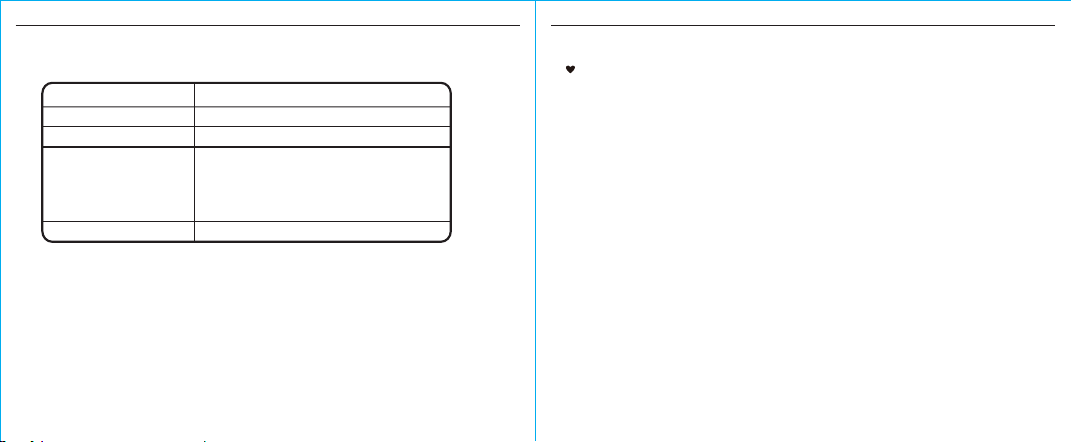
Battery powered mode: 2*AAA batteries (3V DC)
About 13.5cm-21.5cm
Approx.100g (Excluding the batteries)
2×AAA alkaline batteries (Not Included), User manual
Pressure: 5°C-40°C within±3mmHg (0.4kPa)
Pulse value: ±5%
Rated cu pressure:
0mmHg ~ 299mmHg (0kPa ~ 39.9kPa)
Measurement pressure:
SYS: 60mmHg ~ 230mmHg (8.0kPa ~ 30.7kPa)
DIA: 40mmHg ~ 130mmHg (5.3kPa ~ 17.3kPa)
Pulse value: (40-199) beat/minute
Power supply
Display mode
Measurement mode
Oscillographic testing mode
Measurement range
Accuracy
Normal Working condition
Storage & transportation
condition
Measurement perimeter
of the wrist
Weight
External dimensions
Attachment
A temperature range of: +5°C to +40°C
A relative humidity range of 15% to 90%, non-condensing,
but not requiring a water vapour partial pressure greater
than 50 hPa
An atmospheric pressure range of: 700 hPa to 1060 hPa
Temperature: -20°C to +60°C
A relative humidity range of ≤ 93%, non-condensing,
at a water vapour pressure up to 50hPa
Digital LCD V.A. 45mm x 33mm
Approx. 86mm × 66mm × 22mm (Excluding the cu)
SPECIFICATIONS
38
MANUFACTURER INFORMATION
39
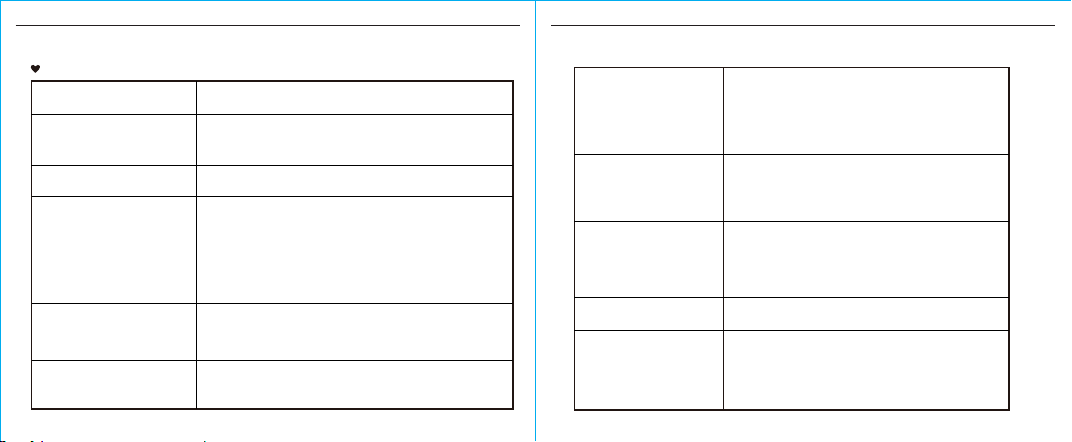
A03
Internally Powered ME Equipment
IP22: The first number 2: Protected against solid foreign
objects of 12,5mm Ø and greater. The second number:
Protected against vertically falling water drops when enclosure
titled up to 15º. Vertically falling drops shall have no harmful
eects when the enclosure is titled at any angle up to 15º on
either side of the vertical.
Mode of operation
Continuous operation
Degree of protection
Type BF applied part
Protection against
ingress of water
WARNING: No modification of this equipment is allowed.
Software Version
Device Classification
Manufacturer Information
Authorized European Representative:
Manufactured by:
Company:
Address:
Company:
Share Info Consultant Service LLC Repräsentanzbüro
Address:
Heerdter Lohweg 83, 40549 Düsseldorf
Harvard Medical Devices Ltd. HK
1002, Railway Plaza, TST, HK
Harvard Medical Devices Ltd. HK
EMC GUIDANCE
COMPLIED STANDARDS LIST
40
COMPLIED STANDARDS LIST
41
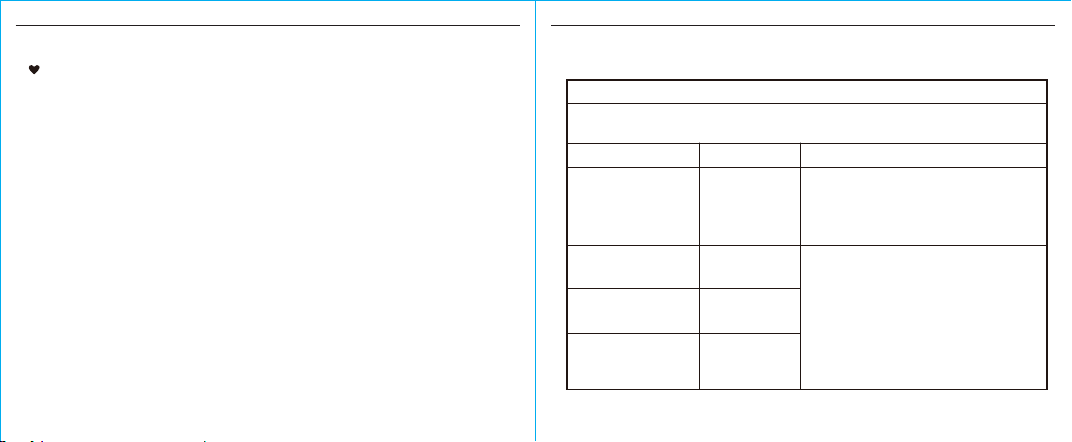
Complied Standards List
EN ISO 14971:2012 Medical devices - Application of risk management to
medical devices
EN 1041:2008+A1:2013 Information supplied by the manufacturer of
medical devices
EN 60601-1:2006+A1:2013/ IEC 60601-1:2005+A1:2012 Medical
electrical equipment - Part 1: General requirements for basic safety and
essential performance
EN 60601-1-11:2015/ IEC 60601-1-11:2015 Medical electrical
equipment - Part 1-11: General requirements for basic safety and essential
performance - Collateral standard: Requirements for medical electrical
equipment and medical electrical systems used in the home healthcare
environment
EN 60601-1-2:2015/ IEC 60601-1-2:2014 Medical electrical equipment -
Part 1-2: General requirements for basic safety and essential performance
- Collateral standard: Electromagnetic disturbances - Requirements and
tests
Risk management
Labeling
User manual
General Requirements
for Safety
Electromagnetic
compatibility
EN ISO 15223-1:2016 Medical devices. Symbols to be used with
medical device labels, labelling and information to be supplied. Part 1 :
General requirements
EN ISO 81060-1:2012 Non-invasive sphygmomanometers - Part 1:
Requirements and test methods for non-automated measurement type
Performance
requirements
EN 1060-3:1997+A2:2009 Non-invasive sphygmomanometers - Part 3:
Supplementary requirements for electro-mechanical blood pressure
measuring systems
EN 1060-4:2004 Non-invasive sphygmomanometers - Part 4: Test
procedures to determine the overall system accuracy of automated
non-invasive sphygmomanometers
EN 60601-1-6:2010+A1:2015/IEC 60601-1-6:2010+A1:2013 Medical
electrical equipment - Part 1-6: General requirements for basic safety and
essential performance - Collateral standard: Usability
EN 62366-1:2015+AC:2015/IEC 62366-1:2015+COR1:2016 Medical
devices - Part 1: Application of usability engineering to medical devices
EN 62304:2006+A1:2015/IEC 62304: 2006+A1:2015 Medical device
software - Software life-cycle processes
Clinical investigation
Usability
Software life-cycle
processes
Bio-compatibility
ISO 10993-1:2009 Biological evaluation of medical devices- Part 1:
Evaluation and testing within a risk management process
ISO 10993-5:2009 Biological evaluation of medical devices - Part 5:
Tests for in vitro cytotoxicity
ISO 10993-10:2010 Biological evaluation of medical devices - Part 10:
Tests for irritation and skin sensitization
IEC 80601-2-30:2009+A1:2013 Medical electrical equipment- Part
2-30: Particular requirements for the basic safety and essential
performance of automated non-invasive sphygmomanometers
ISO 81060-2:2013 Non-invasive sphygmomanometers - Part 2: Clinical
validation of automated measurement type
EMC GUIDANCE
42
EMC GUIDANCE
43
EMC Guidance
1) This product needs special precautions regarding EMC and needs to be
installed and put into service according to the EMC information provided, and
this unit can be aected by portable and mobile RF communications equipment.
2) * Do not use a mobile phone or other devices that emit electromagnetic fields,
near the unit. This may result in incorrect operation of the unit.
3) Caution: This unit has been thoroughly tested and inspected to assure proper
performance and operation!
4) * Caution: This machine should not be used adjacent to or stacked with other
equipment and that if adjacent or stacked use is necessary, this machine should be
observed to verify normal operation in the configuration in which it will be used.
Table 1
Guidance and manufacturer’s declaration – electromagnetic emissions
RF emissions
CISPR 11
Group 1
Class B
Class A
Complies
Compliance
Harmonic emissions
IEC 61000-3-2
Voltage fluctuations/
flicker emissions
IEC 61000-3-3
Emissions test Electromagnetic environment - guidance
The
device is intended for use in the electromagnetic environment specified below. The customer or the
user of the device should assure that it is used in such an environment.
The device uses RF energy only for its internal
function. Therefore, its RF emissions are very low
and are not likely to cause any interference in nearby
electronic equipment.
The device is suitable for use in all establishments,
other than domestic and those directly connected to
the public low-voltage power supply network that
supplies buildings used for domestic purposes.
RF emissions
CISPR 11

EMC GUIDANCE
44
EMC GUIDANCE
45
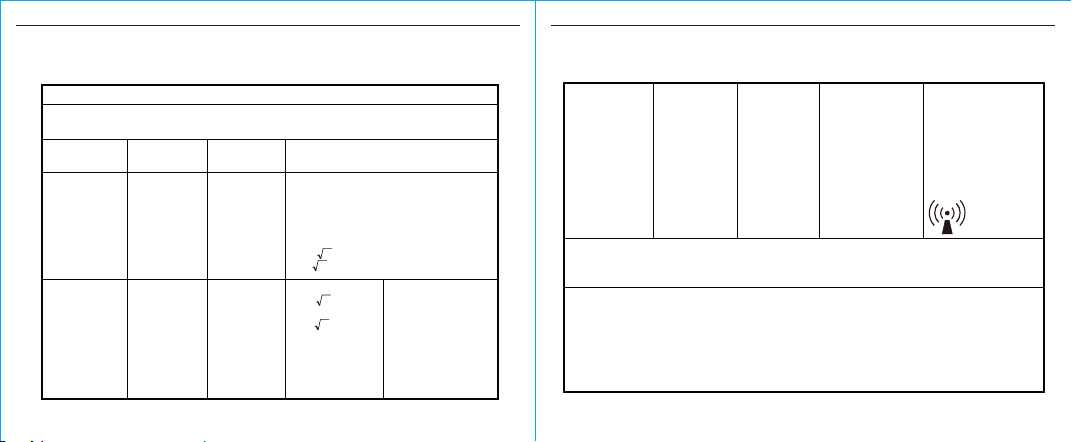
Guidance and manufacturer’s declaration – electromagnetic immunity
Immunity test
±8 kV contact
±15 kV air
±8 kV contact
±15 kV air
power supply lines:
±2 kV
Table 2
Compliance level
Electrostatic
discharge (ESD)
IEC 61000-4-2
Electromagnetic
environment - guidance
Electrical fast
transient/burst
IEC 61000-4-4
Surge
IEC61000-4-5
power supply lines:
±2 kV
input/output lines:
±1 kV
The device is intended for use in the electromagnetic environment specified below. The customer or the
user of the device should assure that it is used in such an environment.
IEC 60601 test level
Floors should be wood,
concrete or ceramic tile. If
floors are covered with
synthetic material, the relative
humidity should be at least 30%.
line(s) to line(s): ±1 kV
line(s) to earth: ±2 kV
100 kHz repetition
frequency
100 kHz repetition
frequency
line(s) to line(s): ±1 kV
Mains power quality should be
that of a typical commercial or
hospital environment.
Mains power quality should be
that of a typical commercial or
hospital environment.
0% U
T
; 0.5 cycle
At 0°, 45°, 90°, 135°,
180°, 225°, 270° and 315°
0% U
T
; 1 cycle
and
70% U
T
; 25/30 cycles
Single phase: at 0°
0% U
T
; 300 cycle
30 A/m
50Hz/60Hz
NOTE U
T
is the a.c. mains voltage prior to application of the test level.
30 A/m
50Hz/60Hz
Power frequency
(50Hz/60Hz)
magnetic field
IEC 61000-4-8
Voltage dips,
short interruptions
and voltage
variations on
power supply
input lines
IEC 61000-4-11
0% U
T
; 0.5 cycle
At 0°, 45°, 90°, 135°,
180°, 225°, 270° and 315°
0% U
T
; 1 cycle
and
70% U
T
; 25/30 cycles
Single phase: at 0°
0% U
T
; 300 cycle
Mains power quality should be
that of a typical commercial or
hospital environment.
Power frequency magnetic fields
should be at levels characteristic
of a typical location in a typical
commercial or hospital
environment.
EMC GUIDANCE
46
EMC GUIDANCE
47
Table 3
Guidance and manufacturer’s declaration – electromagnetic immunity
Immunity test Compliance
level
IEC 60601
Test level
Conducted RF
IEC 61000-4-6
Radiated RF
IEC 61000-4-3
10V/m, 80% Am
at 1kHz
150 kHz to
80 MHz:
3 Vrms
6Vrms (in ISM
and amateur
radio bands)
80% Am at 1kHz
Electromagnetic environment - guidance
The device is intended for use in the electromagnetic environment specified below. The customer
or the user of the device should assure that it is used in such an environment.
150 kHz to
80 MHz:
3 Vrms
6Vrms (in ISM
and amateur
radio bands)
80% Am at 1kHz
Portable and mobile RF communications equipment
should be used no closer to any part of the device,
including cables, than the recommended separation
distance calculated from the equation appropriate
for the frequency of the transmitter.
Recommended separation distances:
d=0.35 ;
d=1.2
10V/m, 80% Am
at 1kHz
80 MHz to 800 MHz:
d=1.2
800 MHz to 2.7 GHz:
d=2.3
where, P is the maximum
output power rating of the
transmitter in watts (W)
according to the
transmitter manufacturer, d
is the recommended
separation distance in
meters (m). Field strengths
from fixed RF transmitters,
as
P
P
P
P
NOTE 1 At 80 MHz and 800 MHz, the higher frequency range applies.
NOTE 2 These guidelines may not apply in all situations. Electromagnetic propagation is aected by
absorption and reflection from structures, objects and people.
a Field strengths from fixed transmitters, such as base stations for radio (cellular / cordless)
telephones and land mobile radios, amateur radio, AM and FM radio broadcast and TV broadcast
cannot be predicted theoretically with accuracy. To assess the electromagnetic environment due to
fixed RF transmitters, an electromagnetic site survey should be considered. If the measured field
strength in the location in which the device is used exceeds the applicable RF compliance level
above, the device should be observed to verify normal operation. If abnormal performance is
observed, additional measures may be necessary, such as re-orienting or relocating the device.
Over the frequency range 150 kHz to 80 MHz, field strengths should be less than 3V/m.b
determined by an
electromagnetic site
survey, should be less
than the compliance level
in each frequency range.
Interference may occur in
the vicinity of equipment
marked with the following
symbol:
a
b
EMC GUIDANCE
48
EMC GUIDANCE
49
80 MHz to 800 MHz 800 MHz to 2.7 GHz
Table 4
Recommended separation distances between portable and mobile RF
communications equipment and the device.
Rated maximum output
power of transmitter
(W)
Separation distance according to frequency of transmitter (m)
0.01
0.1
1
10
100
0.12
0.38
1.2
3.8
12
0.23
0.73
2.3
7.3
23
The device is intended for use in an electromagnetic environment in which radiated RF disturbances
are controlled. The customer or the user of the device can help prevent electromagnetic
interference by maintaining a minimum distance between portable and mobile RF communications
equipment (transmittters) and the device as recommended below, according to the maximum output
power of the communications equipment.
For transmitters rated at a maximum output power not listed above, the recommended separation
distance
d
in metres (m) can be estimated using the equation applicable to the frequency of the
transmitter, where
P
is the maximum output power rating of the transmitter in watts (W) according
to the transmitter manufacturer.
NOTE 1 At 80 MHz and 800 MHz, the separation distance for the higher frequency range applies.
NOTE 2 These guidelines may not apply in all situations. Electromagnetic propagation is aected by
absorption and reflection from structures, objects and people.
150 kHz to 80 MHz
0.12
0.38
1.2
3.8
12
=
d
3.5
P
=
d
1.2
P
2.3=
d
P
Guidance and manufacturer’s declaration - electromagnetic immunity
Test
Frequency
(MHz)
385
0.3 27
The device is intended for use in the electromagnetic environment specified below. The customer or the
user of the device, should assure that it is used in such an environment.
Radiated RF
IEC61000-4-3
(Test
specifications
for
ENCLOSURE
PORT
IMMUNITY
to RF
wireless
communica-
tions
equipment)
Band a)
(MHz)
Service a) Modulation b) Modulation b)
(W)
Distance (m)
IMMUNITY
TEST
LEVEL
(V/m)
380-390 TETRA
400
Pulse
modulation b)
18Hz
1.8
450 430-470
GMRS 460,
FRS 460
FM c) ± 5kHz
deviation 1kHz
sine
2 0.3 28
710 704-787
745
780
LTE Band
13,
17
Pulse
modulation b)
217Hz
0.2 0.3 9
810
870
930
800-960
GSM
800/900,
TETRA 800,
iDEN 820,
CDMA 850,
LTE Band 5
Pulse
modulation b)
18Hz
2 0.3 28
Table 5

EMC GUIDANCE
50
NOTE If necessary to achieve the IMMUNITY TEST LEVEL, the distance between the transmitting
antenna and the ME EQUIPMENT or ME SYSTEM may be reduced to 1 m. The 1 m test distance is
permitted by IEC 61000-4-3.
1720
1845
1970
1700-
1990
GSM 1800;
CDMA 1900;
GSM 1900;
DECT;
LTE Band 1, 3,
4,25; UMTS
Pulse
modulation b)
217Hz
2 0.3 28
2 0.3 28
2450 2400-
2570
Bluetooth,
WLAN,
802.11
b/g/n, RFID
2450, LTE
Band 7
Pulse
modulation b)
217 Hz
5240
5500
5785
5100-
5800
WLAN
802.11
a/n
Pulse
modulation b)
217 Hz
0.2 0.3 9
a) For some services, only the uplink frequencies are included.
b) The carrier shall be modulated using a 50% duty cycle square wave signal.
c) As an alternative to FM modulation, 50% pulse modulation at 18 Hz may be used because while it
does not represent actual modulation, it would be worst case.
The MANUFACTURER should consider reducing the minimum separation distance, based on RISK
MANAGEMENT, and using higher IMMUNITY TEST LEVELS that are appropriate for the reduced
minimum separation distance. Minimum separation distances for higher IMMUNITY TEST LEVELS shall
be calculated using the following equation:
Where P is the maximum power in W, d is the minimum separation distance in m, and E is the
IMMUNITY TEST LEVEL in V/m.
E=