

Use charger in a safe well ventilated environment that is clear of corrosive or explosive
chemicals, flammable liquids or gases. Keep charger and battery away from sources of ignition as a
charging battery produces explosive gases. It is recommended that safety goggles be worn.
Check charger for general condition and ensure that cables, input/output leads, plugs and croco-dile
clips are not damaged in any way.
Never use a charger that is damaged and never attempt to carry
out repairs to a damaged charger.
Charger should only be used by a responsible and competent adult.
WARNINGS
Do NOT attempt to start the vehicle with the charger connected to the battery.
Do NOT attempt to charge a non-rechargeable battery.
Do NOT use this charger to charge dry cell batteries.
Do NOT attempt to charge a frozen battery.
Only lead, gel and AGM batteries (12V/1.2Ah to 12V/120Ah) should be charged.
Charger should not be used as a continuous source of power.
Only use cables that are provided with this charger.
Turn off mains power supply before disconnecting charger from battery.
Avoid contact with battery acid and wash immediately with water if acid does come into contact with
skin or eyes. Wear safety goggles and protective clothing to offer protection from acid and electrolyte.
Do NOT attempt to clean charger with cleaning solvents, use only a clean cloth or tissue.
Do NOT smoke near battery and ensure adequate ventilation.
Do NOT cover charger during operation and disconnect from mains when not in use.
Disconnect charger if battery heats up excessively or if leaks from the battery appear.
When charging battery never allow battery terminals to be connected by any means.
Remove all metal objects (rings, bracelets etc.) when handling battery charger so as to avoid
short circuits and resultant burns.
CONNECTING CHARGER TO BATTERY (IN VEHICLE)
Connect RED positive (+) lead to positive (+) battery terminal and then connect the BLACK negative
(-) lead to the chassis of the vehicle well away from the battery and fuel lines,
then connect the charger to the mains power source. Position charger as far away from the battery as
the cables will allow.
CONNECTING CHARGER TO BATTERY (OUT OF VEHICLE)
Connect RED positive (+) lead to positive (+) battery terminal and then connect the BLACK negative
(-) lead to the negative (-) battery terminal, then connect the charger to the mains power source.
Position charger as far away from the battery as the cables will allow.
This charger can be left connected to your battery (in or out of the vehicle) for extended periods of
time when your vehicle is not being used (e.g. used irregularly or seasonally) without risk of damage
to battery or charger as it has in-built protection.
It also has protection against short circuits and bad connections and will automatically restart
following a power outage.
1
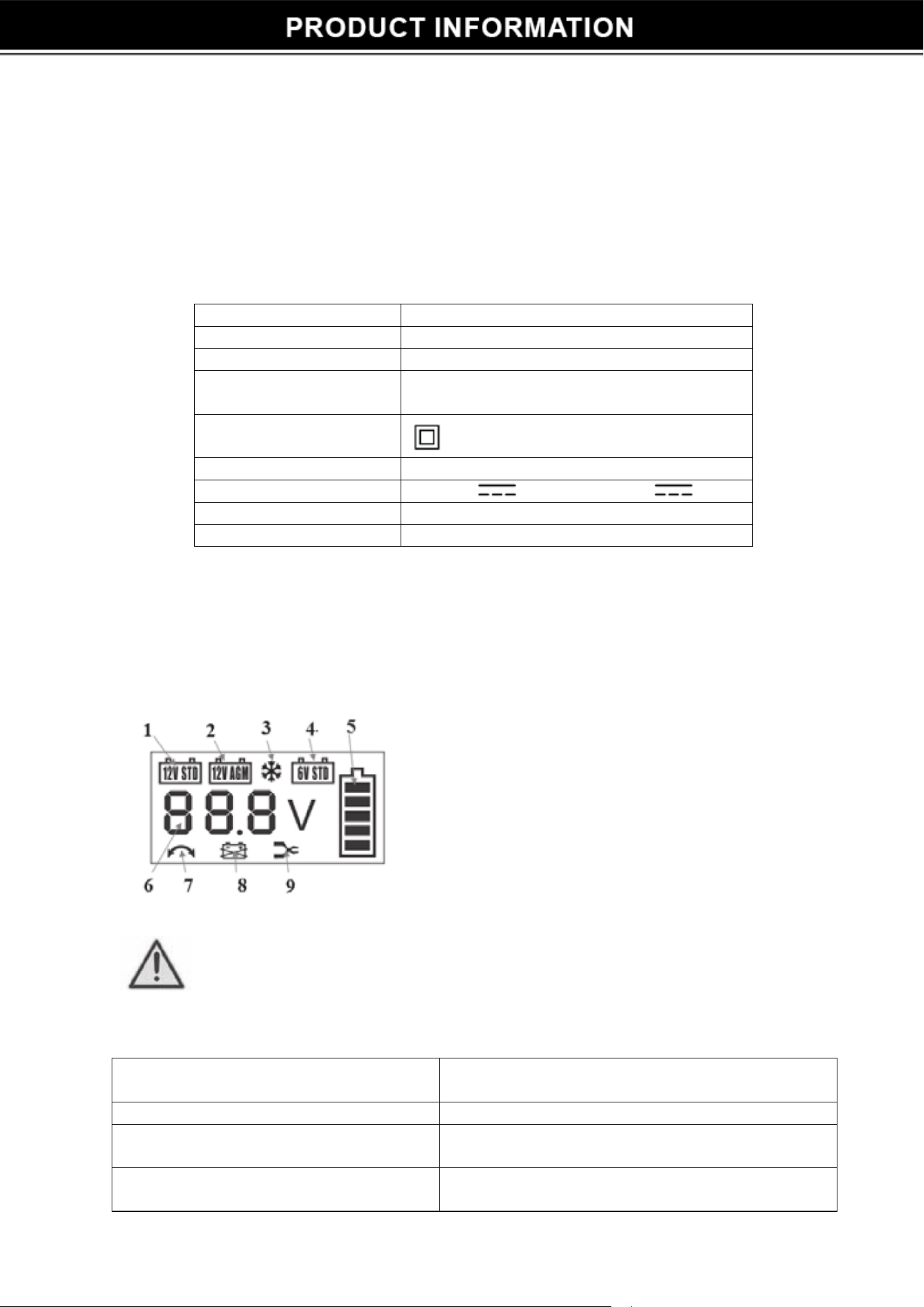
1-12V standard lead-acid battery.
2- 12V AGM battery mode.
3- Winter mode for standard and AGM.
4- 6V standard lead-acid battery mode
5- Charge indicator, each bar represents 20%.
6- Voltage indicator.
7- Reverse polarity indicator.
8- Bad battery indicator.
9- Indicates poor clamp connection.
Standard battery, AGM, gel
110
V,
120
V
50Hz 0.6A
Protection class
Double Insulation
Display Screen
Disconnect the charger from the mains before connecting or disconnecting the
cables from the battery.
Use charger in a ventilated area.
Characteristics of charger: 1A/2A/3A/4A.
Automatic selection according to the capacity or the level of charge of the battery.
Winter Mode (for standard battery 12V or AGM 12V): temperature: 5°C or lower.
Charge indicator : each bar represents 20%.
If the border flashes: charging in progress.
If the border and all the bars are lit: battery charged 100% and then goes to sleep.
Battery voltage, Resolution: 0.1V: indication of polarity reversal of the battery, battery faulty or connection
problem.
Anti-spark and anti-overheating built in.
Battery polarity reversal symbol
displayed.
Clamp indication and voltage
symbols displayed.
No display.
Display backlight on, display showing
0.0V and clamp symbol.
Battery clamps reversed.
Dirty or oxidised battery terminals.
Low or unstable charging current.
Mains power supply not connected.
Battery not connected.
TROUBLESHOOTING
Output lead fuses should be replaced as needed (5A blade fuse) following any faults. Similarly
the mains plug fuse (3A BS1362) should be replaced if needed.
Model
26808
Type of battery
Input voltage
IP45 (impervious to dust and water)
Working environment: 14℉
to 104℉ Storage: 14℉ to 122℉.
If during charging the battery temperature exceeds 104℉, the current can be reduced. If the temperature
exceeds 113℉, charging is stopped, it is resumed only when the temperature of the battery has lowered below
the limits of security.
Battery capacity Min : 1.2 Ah - Max : 120Ah
Input current 6V/1-4A 12V / 1-4A
Weight 1.1
Lbs
Dimensions
8 x 3.2 x 1.75 Inch
2
3