1000 WATT
POWER INVERTER
INSTRUCTION MANUAL
PI1000S
x
1 2 3
4
5 6 5 7
9
10
8
11
5
12
13
SAVE THIS INSTRUCTION MANUAL FOR FUTURE REFERENCE.
© 2022 Baccus Global LLC
Boca Raton, FL 33487
(877) 571-2391
SAFETY GUIDELINES / DEFINITIONS
DANGER: Indicates an imminently hazardous situation which, if not avoided, will result in death
or serious injury.
WARNING: Indicates a potentially hazardous situation which, if not avoided, could result in death
or serious injury.
CAUTION: Indicates a potentially hazardous situation which, if not avoided, may result in minor
or moderate injury.
CAUTION: Used without the safety alert symbol indicates potentially hazardous situation which, if not
avoided, may result in property damage.
RISK OF UNSAFE OPERATION. When using tools or equipment, basic safety precautions should always
be followed to reduce the risk of personal injury. Improper operation, maintenance or modification of
tools or equipment could result in serious injury and property damage. There are certain applications
for which tools and equipment are designed. The manufacturer strongly recommends that this product
NOT be modified and/or used for any application other than for which it was designed. Read and
understand all warnings and operating instructions before using any tool or equipment.
IMPORTANT SAFETY INSTRUCTIONS
READ ALL INSTRUCTIONS
WARNING: Read all instructions before operating the inverter. Failure to follow all instructions
listed below may result in electric shock, fire and/or serious injury.
GENERAL SAFETY WARNINGS AND INSTRUCTIONS
• Avoid dangerous environments. Don’t use inverters in damp or wet locations.
• Keep children away. Keep away from children. This is not a toy!
• Store indoors. When not in use, inverters should be stored indoors in dry, and high or locked-up
places – out of reach of children.
• DIsconnect the inverter from the power supply when not in use.
• Proper cooling is essential when operating the inverter. Do not place it near a vehicle’s heat vent or
in direct sunlight.
• Use of accessories and attachments: The use of any accessory or attachment not recommended by
manufacturer for use with this inverter could be hazardous.
• Stay alert. Use common sense. Do not operate inverter when you are tired.
• Check for damaged parts. Any part that is damaged should be properly repaired or replaced by the
manufacturer unless otherwise indicated elsewhere in this instruction manual before further use.
• Do not operate the inverter near flammable liquids or in gaseous or explosive atmospheres. Motors in
tools or appliances used with the inverter may spark, and the sparks might ignite fumes.
SPECIFIC SAFETY INSTRUCTIONS FOR INVERTERS
WARNING – To reduce the risk of electric shock:
• Do not connect to AC distribution wiring.
• Do not make any electrical connections or disconnections in areas designated as IGNITION
PROTECTED. This inverter is NOT approved for ignition protected areas.
• Never immerse the inverter in water or any other liquid, or use when wet.
• Do not insert foreign objects into the inverter’s outlets.
WARNING – To reduce the risk of fire:
• Do not operate near flammable materials, fumes or gases.
• Do not expose to extreme heat or flames.
CAUTION – To reduce the risk of injury or property damage:
• Disconnect appliance plug from inverter outlet before working on the appliance.
• Always use the inverter where there is adequate ventilation. Do not block ventilation slots.
• Always turn the inverter off and disconnect it from the power source when not in use.
• The inverter must be connected only to batteries with a nominal output voltage of 12 volts. The
unit will not operate from a 6 volt battery and will sustain permanent damage if connected to a 24
volt battery.
• When using this unit in a vehicle, check the vehicle owner’s manual for maximum power rating and
recommended output. Do not install in engine compartment — install in a well ventilated area.
• Do not use with positive ground electrical systems.* Reverse polarity connection will result in a blown
fuse and may cause permanent damage to the inverter and will void warranty.
*The majority of modern automobiles, RVs and trucks are negative ground.
• Keep in mind that this inverter will not operate high wattage appliances or equipment that produces
heat, such as coffee makers, hair dryers, microwave ovens and toasters.
• Do not open the inverter — there are no user-serviceable parts inside. Opening the inverter will void
manufacturer’s warranty.
• Do not use this inverter with medical devices. It is not tested for medical applications.
• Do not use this inverter on a watercraft. It is not qualified for marine applications.
• Install and operate inverter only as described in this Instruction Manual.
SPECIFIC SAFETY INSTRUCTIONS FOR THE USB PORTS
• Do not insert foreign objects into the USB Ports.
• Do not attach USB hubs or more than one personal electronic device to each USB Port.
• Do not use this unit to operate appliances that require more than 3.1 amps in total to operate from
the USB Ports.
• Some household USB-powered electronics will not operate with this unit.
SAVE THESE INSTRUCTIONS
WARNING – To reduce the risk of injury or property damage: Follow these instructions and those
published by battery manufacturer and the manufacturer of any equipment you intend to use with this
unit. Review cautionary markings on these products and on engine.
INTRODUCTION
Congratulations on purchasing your new 1000 Watt Power Inverter. Read this Instruction Manual and
follow the instructions carefully before using this unit.
This power inverter is configured to supply continuous power in the form of three 120V AC outlets and
two 5V USB charging ports to run most household or electronic appliances.
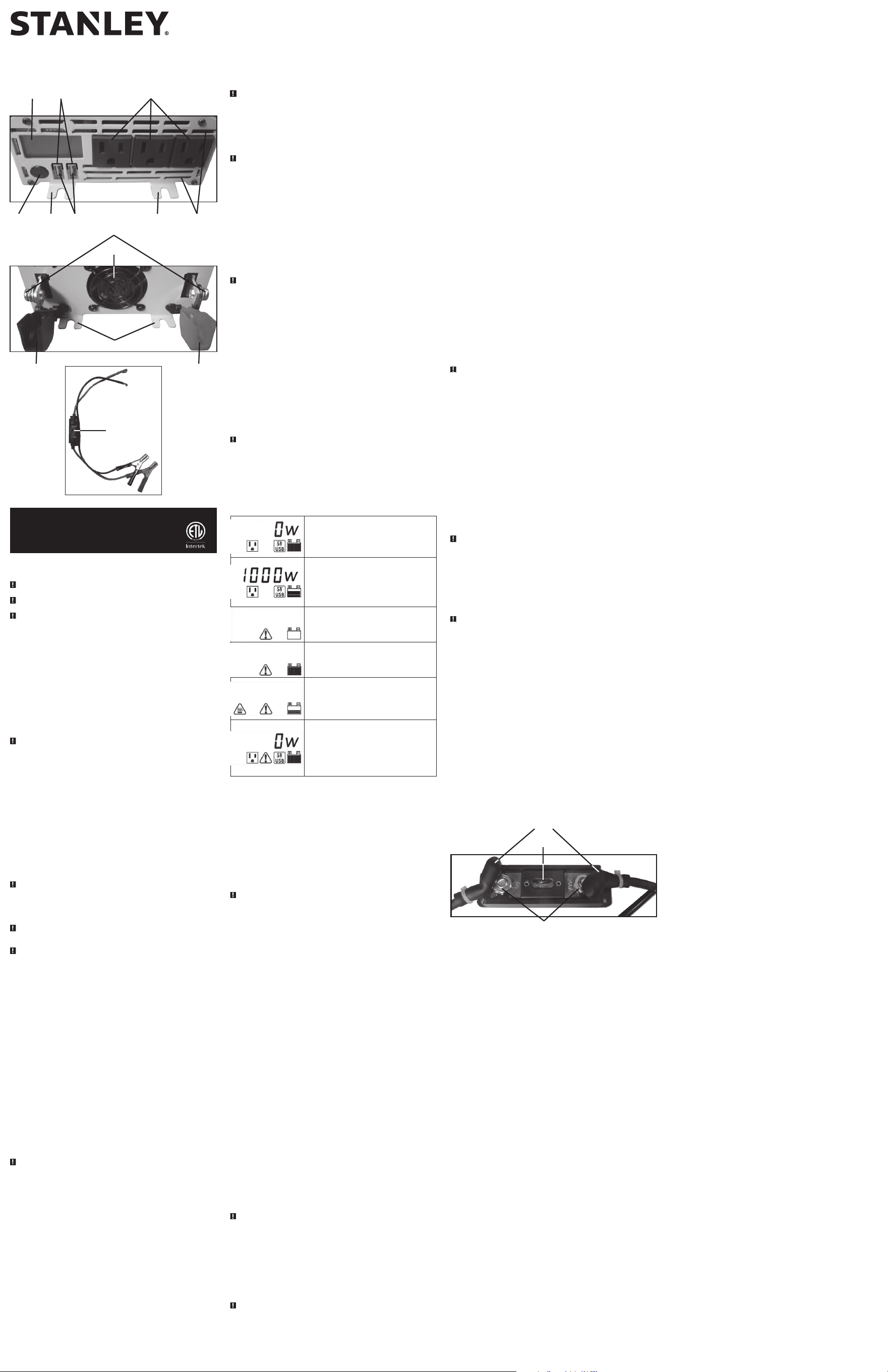
FEATURES
1. LCD Display
2. USB power/fault indicators
3. Three-prong 120 volt AC outlets
4. Power button
5. Mounting brackets (total of 4: 2 in front, 2
in back)
6. USB charging ports
7. Ventilation slots
8. Connection screws (PM6x10)
9. Cooling fan
10. Black (negative) plastic protective cap
11. Red (positive) plastic protective cap
12. Battery clips with cables, fuse holder and
O-ring connectors
13. Fuse holder
HOW THIS INVERTER WORKS
This inverter is an electronic device that converts low voltage DC (direct current) electricity from a
battery to 120 volts AC (alternating current) household power. It converts power in two stages. The first
stage is a DC-to-DC conversion process that raises the low voltage DC at the inverter input to 145 volts
DC. The second stage is a MOSFET bridge stage that converts the high voltage DC into 120V, 60 Hz AC.
Power Inverter Output Waveform
The AC output waveform of this inverter is known as a modified sine wave. It is a stepped waveform
that has characteristics similar to the sine wave shape of utility power. This type of waveform is
suitable for most AC loads, including linear and switching power supplies used in electronic equipment,
transformers, and small motors.
CAUTION: Rechargeable Devices
• Certain rechargeable devices are designed to be charged by plugging them directly into an AC
receptacle. These devices may damage the inverter or the charging circuit.
• When using a rechargeable device, monitor its temperature for the initial ten minutes of use to
determine if it produces excessive heat.
• If excessive heat is produced, this indicates the device should not be used with this inverter.
• This problem does not occur with most of the battery-operated equipment. Most of these devices use
a separate charger or transformer that is plugged into an AC receptacle.
• The inverter is capable of running most chargers and transformers.
CAUTION – Incompatible Products: Certain products contain power supplies or circuits that are
not compatible with an inverter using a modified sine wave output (such as this inverter) and may be
damaged by using this inverter.
If your product requires pure sine wave AC input power to function properly, the instruction manual for
your product could state this. If in doubt, you should contact your product manufacturer PRIOR TO USE.
Some products must be powered from a pure sine wave power source, such as standard household
power, or a “pure sine wave” inverter in order to function properly.
Your product could be damaged by this inverter if it contains:
• Microwave ovens;
• Transformerless battery chargers
• Capacitive coupled power supplies
If an incompatible product is used with this inverter:
• The product might not operate at all, with no indication of failure. The product fuse might open as a
result of trying to use it with the inverter.
• The product might exhibit unusual operation (such as, intermittent operation, buzzing, and the like.)
Note: Some laptop computers may not operate with this inverter.
WARNING: If the product does not operate normally, to reduce the risk of injury or property
damage, turn the product off immediately and unplug it from the inverter.
Power Source Requirements
Your inverter will operate from input voltages between 11 and 15 volts DC. If the input voltage drops
below 10 volts DC, the inverter will shut down. This feature protects the battery from being completely
discharged.
The inverter will also shut down if the input voltage exceeds 15.6 volts. This protects the inverter
against excessive input voltage. Although the inverter has built-in protection against over voltage, it
may still be damaged if the input voltage exceeds 15 volts.
Your inverter is engineered to be connected directly to standard electrical and electronic equipment
in the manner described in the “Installation” section of this Instruction Manual. Do not connect the
inverter to household or RV AC distribution wiring. Do not connect the inverter to any AC load circuit
in which the neutral conductor is connected to ground (earth) or to the negative of the DC (battery)
power source.
Inductive loads, such as TVs and stereos, require more current to operate than resistive loads of the
same wattage rating. Induction motors, as well as some TVs, may require two to six times their rated
wattage to start up. Because these inverters have a peak watt power rating, many such appliances and
tools may be safely operated. The equipment that needs the highest starting wattage are pumps and
compressors that start under load. This equipment can be safely tested. If an overload is detected, the
inverter will simply shut down until the overload situation is corrected. Use the power button to turn
off the inverter, then on again to reset it.
CAUTIONS
• Exceeding recommended voltage limits will void manufacturer’s warranty.
• NEVER try to use your inverter with any 12 volt DC power source thatuses a positive ground. (Most
vehicles and boats use negative ground systems.)
• The Power Inverter must be connected only to batteries with a nominal output voltage of 12 volts.
The unit will not operate from a 6 volt battery and will sustain permanent damage if connected to
a 24 volt battery.
• Reverse polarity connection will result in a blown fuse and may cause permanent damage to the
inverter.
POWER AND FAULT INDICATORS ON THE LCD DISPLAY
Indicates that the unit is connected properly and is ready to
use. The AC outlet icon and USB icon will light solid and the
Digital Readout shows “0W”. The bars on the Battery Icon
represent the voltage level of the connected power source.
Indicates that the unit is connected properly and functioning
normally. The AC outlet icon and USB icon will light solid and
the Digital Readout shows the total output wattage of AC
outlets. The bars on the Battery Icon represent the voltage
level of the connected power source.
This indicates an input voltage too low fault condition. The
fault icon and the empty battery icon will light solid and the
unit will emit three beeps every five seconds. Refer to the
following section for an explanation.
This indicates an input voltage too high fault condition. The
fault icon and the full battery icon will light solid and the
unit will emit three beeps every five seconds. Refer to the
following section for an explanation.
This indicates a thermal fault condition. The fault icon and
the overheat icon will light solid and the bars on the Battery
Icon represent the voltage level of the connected power
source. The unit will emit three beeps every five seconds.
Refer to the following section for an explanation.
This indicates an overload or short circuit fault condition.
The AC outlet icon will flash and the Digital Readout shows
0W. The fault icon and the USB icon will light solid and the
bars on the Battery Icon represent the voltage level of the
connected power source. The unit will emit three beeps
every five seconds. Refer to the following section for an
explanation.
PROTECTIVE FEATURES AND FAULT CONDITIONS
The inverter monitors the following conditions:
Input Voltage Too Low: This condition is not harmful to the inverter, but could damage the
power source, so the inverter will automatically shut down when input voltage drops below 10.5 ±
0.5 volts DC.
Input Voltage Too High: The inverter will automatically shut down when DC input voltage exceeds 15.6
± 0.5 volts, as this can harm the unit.
Thermal Shutdown Protection: The inverter will automatically shut down when the unit becomes
overheated.
Overload/Short Circuit Protection: The corresponding AC outlets or USB charging ports will
automatically shut down when an overload or short circuit occurs.
Refer to “Power and Fault Indicators on the LCD Display” for an explanation of the icons that indicate
a fault condition before shutdown. Press the power button to turn the inverter off, correct the fault
and then press the power button again to turn the inverter back on.
CAUTION – To avoid the risk of property damage: If turning the Power Button off, then on again
does not reset the inverter. DO NOT ATTEMPT TO OPEN THE INVERTER. Opening the inverter for any
reason will void the warranty. The unit must bereturned to manufacturer for testing and repair by
professional factory technicians.
Rated Versus Actual Current Draw of Equipment
Most electrical tools, appliances, electronic devices and audio/visual equipment have labels that indicate
the power consumption in amps or watts. Be sure that the power consumption of the item to be
operated is below 1000 watts. If the power consumption is rated in amps AC, simply multiply by the AC
volts (120) to determine the wattage.
Resistive loads are the easiest for the inverter to run; however, it will not run larger resistive loads (such
as electric stoves and heaters), which require far more wattage than the inverter can deliver. Inductive
loads (such as TVs and stereos) require more current to operate than do resistive loads of the same
wattage rating.
For safety reasons, the inverter will simply shut down if it is overloaded. To restart the unit, simply
unplug all devices plugged into the inverter; disconnect the inverter from any 12 volt DC power source;
then reconnect the inverter BEFORE plugging the appliance(s) back in.
INSTALLATION
Your inverter will provide you with continuous electrical power when powered by a reliable
12V DC source, such as a vehicle battery or a multiple battery configuration. This manual does not
describe all of the possible configurations.
Operating Environment
For best operating results, your inverter should be placed on a flat surface, such as the ground, car floor
or seat, or other solid surface to help diffuse the heat that is generated. Position the inverter as close to
the DC power source as possible.
The inverter should only be operated in locations that meet the following criteria:
DRY – Do not allow water and/or other liquids to come into contact with the inverter.
COOL – Surrounding air temperature should ideally be 50-68°F (10-20°C). Do not place the inverter on
or near a heating vent or any piece of equipment that is generating heat above room temperature.
Keep the inverter out of direct sunlight.
VENTILATED – Allow at least three inches of clearance from other objects to ensure free air circulation
around the inverter. Never place items on or over the inverter during operation.
SAFE – Do not locate inverters in an area, room or compartment where explosives or flammable fumes
might be present, such as engine rooms, engine compartments, and boats or small, unvented battery
compartments.
Mounting the Inverter
Tools Required: four BA4x14 screws in a set and Phillips head screwdriver (NOT supplied).
The inverter comes equipped with mounting brackets for long-term installation. The manufacturer
recommends using BA4x14 screws in a set with a standard Phillips head screwdriver (none of these are
supplied). User may choose to use different screws appropriate to the mounting surface.
Secure the inverter to a flat surface, observing all cautions regarding installation found in this manual.
CAUTION – To avoid the risk of property damage: Only mount the inverter on a level, stable
surface, assuring that all screws are tightened securely and observing all of the cautions and
recommendations regarding installation found in this manual.
CONNECTION TO A POWER SOURCE
The power inverter must be connected only to batteries with a nominal output voltage of 12 volts.
The unit will not operate from a 6 volt battery and will sustain permanent damage if connected to a
24 volt battery.
The standard North American 120V AC outlets and USB charging ports allow simultaneous operation
of multiple devices. Simply plug the equipment into the unit and operate normally. Ensure that the
wattage of all equipment simultaneously plugged into the inverter does not exceed 1000 watts
continuous.
CAUTIONS – To reduce the risk of property damage:
• Always connect the unit to the 12 volt DC power source before plugging any devices into the unit.
• Do not use with positive ground electrical systems.
• Reverse polarity connection will result in a blown fuse and may cause permanent damage to the inverter.
Connecting to a Power Source Using the Supplied Battery Clips with
O-Ring Connectors
Tools Required: a Phillips head screwdriver (NOT supplied).
Use the provided battery clips (with cables and O-ring connectors) to connect the inverter directly to
the 12 volt power source as follows:
1. Make sure that no flammable fumes are present in the installation area.
2. Open the red (positive) plastic protective cap (downward). Using a Phillips head screwdriver,
unscrew the PM6x10 connection screw (counterclockwise) and remove it.
3. Attach the positive O-ring at the end of the red battery clip cable to the positive connection post.
Replace the connection screw and screw it clockwise to secure. Do not over-tighten.
4. Connect the red battery clip to the positive terminal of the battery.
5. Open the black (negative) plastic protective cap (downward). Using a Phillips head screwdriver,
unscrew the PM6x10 connection screw (counterclockwise) and remove it.
6. Attach the negative O-ring at the end of the black battery clip cable to the negative connection
post. Replace the connection screw and screw it clockwise to secure. Do not over-tighten.
7. Connect the black battery clip to the negative terminal of the battery.
8. Make sure that all connections between cables and terminals are secure.
9. Press the power button. A beep will sound. The USB power/fault indicators will light solid and
the backlit LCD will activate to display the AC outlet icon, USB icon, Battery icon and the Digital
Readout shows “0W”, indicating that the inverter is properly connected and is ready to power
appliances that draw up to 1000 watts continuous.
Note:
If the inverter is not properly operating, then refer to “Power and Fault Indicators on the LCD
Display” and “Protective Features and Fault Conditions” for an explanation of the icons that indicate
a fault condition before shutdown. Press the power button to turn the inverter off, correct the fault
and then press the power button again to turn the inverter back on.
Direct Hardwiring to Power Source (optional connection method;
hardware not included)
Use #8 AWG wire if the inverter to power source connection is 4 feet or less. For longer cable lengths,
use #6 AWG wire for lengths to 10 feet. * For cable lengths exceeding 10 feet from inverter to battery,
contact manufacturer for additional information. In either case, protect the positive (+) wire from shorts
by installing a 200 amp fuse or circuit breaker close to the DC power source (battery) terminal. The
cable, fuse holder and fuse (NOT supplied) can be purchased at an electrical supply company.
*For cable lengths exceeding 10 feet from inverter to battery, contact manufacturer for additional
information.
PROCEDURE
1. Make sure that no flammable fumes are present in the installation area.
2. Identify the positive (+) and negative (–) DC power source (battery) terminals.
3. Install a fuse holder or breaker close to the positive (+) terminal of the DC source (battery).
4. Connect a length of wire on one side of the fuse holder or circuit breaker. Connect the other end
of the wire to the positive (+) terminal of the inverter.
5. Connect a length of wire between the inverter’s negative (–) terminal and the DC power source
negative (–) terminal.
6. Connect a short length of wire to the other terminal of the fuse holder or circuit breaker. Mark it
“positive” or “+”.
7. Connect the free end of the fuse or breaker wire to the positive (+) terminal of the DC power
source (battery).
8. Insert a fuse appropriate to the inverter in the fuse holder.
9. Test the inverter by turning it on and plugging in a 100 watt lamp or equipment.
CAUTIONS – To reduce the risk of property damage:
• The cable and fuse sizes given here are a general recommendation. You should always consult the
your National Electrical Code prior to beginning each specific installation.
• Loose connectors may cause overheated wires and melted insulation.
• Check to make sure you have not reversed the polarity. Damage due to reversed polarity is not
covered by manufacturer’s warranty.
Note:
If the inverter is not properly operating, then refer to “Power and Fault Indicators on the LCD
Display” and “Protective Features and Fault Conditions” for an explanation of the icons that indicate
a fault condition before shutdown. Press the power button to turn the inverter off, correct the fault
and then press the power button again to turn the inverter back on.
IMPORTANT CABLE INFORMATION
Substantial power loss and reduced battery operating time results from inverters installed with cables
that are not able to supply full power. Symptoms of low battery power can result from cables that are
either excessively long or an insufficient gauge.
CONNECTION TO LOAD
The Power Inverter is equipped with dual standard North American three-prong type outlets. Plug the
cord from the equipment you wish to operate into the AC receptacle(s). Make sure the combined load
requirement of your equipment does not exceed maximum continuous power.
The Power Inverter is engineered to be connected directly to standard electrical and electronic
equipment in the manner described above. Do not connect the Power Inverter to household or RV
AC distribution wiring. Do not connect the Power Inverter to any AC load circuit in which the neutral
conductor is connected to ground (earth) or to the negative of the DC (battery) source.
WARNING: Do not connect to AC distribution wiring!
OPERATING INSTRUCTIONS
1. Connect the inverter to a functioning 12V DC power source as described in this Instruction Manual.
2. Press the power button.
3. A beep will sound. The USB power/fault indicators will light solid and the backlit LCD will activate
to display the AC outlet icon, USB icon, Battery icon and the Digital Readout shows “0W”,
indicating that the inverter is properly connected and is ready to power appliances.
4. Plug the 120V AC appliance(s) into the Inverter’s three-prong AC outlets and/or plug the USB-
powered device(s) into the inverter’s USB charging ports and operate normally.
5. To turn off the unit, press the power button again.
CAUTION – To reduce the risk of property damage: Always connect the inverter to the 12 volt DC
power source before plugging any devices into the unit.
Notes:
The standard North American 120V AC and USB outlets allow simultaneous operation of multiple
devices. Ensure that the wattage of all equipment simultaneously plugged into the inverter does not
exceed 1000 watts continuous.
The inverter will not operate appliances and equipment that generate heat, such as hair dryers,
electric blankets, microwave ovens and toasters.
Some laptop computers may not operate with this inverter.
This inverter’s USB Charging Ports do not support data communication. They only provide 3.1A
(5V each) DC power to an external USB-powered device.
If a fault condition exists in either of the USB ports, the USB power/fault indicators shut off. In any of
these cases, the USB ports will automatically shut down with no indication on the LCD display.
Some USB-powered household electronics may not operate with these USB Charging Ports. Check the
manual of the corresponding electronic device to confirm that it can be used with this type of USB
Charging Port.
Not all mobile phones are provided with a charging cable, they are normally data cables which are
not supported by this device – please check with your mobile phone manufacturer for the correct
charging cable.
Remember to disconnect the inverter from any power source when not in use.
CARE AND MAINTENANCE
1. Idealstoragetemperaturerangeis0-40°C (32-104°F).
2. Store and use the inverter in a cool, dry place with adequate ventilation for all-around air
circulation.
3. Avoid locations that are exposed to heating units, radiators, direct sunlight, or excessive humidity
or dampness.
Fuse Replacement (in the Positive Battery Clips with O-Ring Connectors)
RUBBER COVER
NUTS
200A FUSE
1. Lift up the Rubber Covers on the Battery Clip Cable and unscrew the two Nuts (counterclockwise)
from each side of the Fuse Holder. Set them aside.
2. Remove the Fuse and check it with a continuity checker to see if it is good or blown.
3. Replace with a 200A amp fuse of the same size and type, if needed.
4. Carefully reassemble the Nuts on the Fuse Holder (clockwise). Do not overtighten the Nuts.
5. Replace the Rubber Covers on the Nuts and test for proper operation of the unit.
TROUBLESHOOTING
Specific AC Outlets Problems
When the 120V AC Outlets are in use, the unit monitors for thermal fault, low and high battery
voltage fault, overload and short circuit conditions (refer to the “Power and Fault Indicators on the
LCD Display” and “Protective Features and Fault Conditions” sections). If a fault condition exists in any
of the AC Outlets, the LCD will display the fault condition and all AC outlets will automatically shut
down. Should this occur:
1. Disconnect all appliances from the unit and make sure the unit is turned off immediately.
2. Allow the unit to cool down for several minutes.
3. Ensure that the wattage of all equipment simultaneously plugged into the inverter does not
exceed 1000 watts continuous.
4. Make sure the appliance cords and plugs are not damaged.
5. Assure there is adequate ventilation around the unit before proceeding.
Specific USB Charging Port Problems
When the USB Charging Ports are in use, the unit monitors for thermal fault, low and high battery
voltage fault, overload and short circuit conditions (refer to the “Protective Features and Fault
Conditions” section). If a fault condition exists in either of the USB ports, the USB power/fault indicators
shut off. In any of these cases, the USB ports will automatically shut down with no indication on the
LCD display. Should this occur:
1. Disconnect all appliances from the unit and make sure the unit is turned off immediately.
2. Allow the unit to cool down for several minutes.
3. Make sure that the draw of the USB device plugged into the USB Charging Port does not exceed
3.1A.
4. Some USB-powered household electronics will not operate with this type of USB Charging Port.
Check the manual of the corresponding electronic device to confirm that it can be used with this
type of USB Charging Port.
5. If an individual USB device is within specifications and the fault occurs, have the USB device
checked for malfunction and do not continue to use it with these USB Charging Ports.
Common Audio/Visual Problems
Buzzing Sound In Audio Systems
Some inexpensive stereo systems and boom boxes make a buzzing sound when operated from the
inverter, because the power supply in the electronic device does not properly filter the modified sine
wave produced by the inverter. The only solution to this problem is to use a sound system that has a
higher quality power supply.
Television Interference
The inverter is shielded to minimize interference with TV signals. However, in some instances, some
interference may still occur, particularly where TV signals are weak. Try the following corrective
measures:
• Place the inverter as far as possible from the television, the antenna and the antenna cables. Use an
extension cable, if necessary.
• Readjust the orientation of the inverter, the antenna cables and the TV power cord to minimize
interference.
• Make sure the antenna feeding the television provides an adequate (“snow free”) signal and that
high quality, shielded antenna cable is used.
• Do not use the inverter to operate high-power appliances or tools at the same time you are using it
to operate the TV.
Common Power Output Problems
Input voltage below 10.5 volts
Recharge auto battery or check DC power supply.
Equipment being operated draws too much power
Reduce load to maximum 1000 watts continuous.
Inverter in thermal shutdown condition
Allow inverter to cool down. Ensure there is adequate ventilation around the unit and that the load is
no more than 1000 watts.
AC output is shorted
Unplug the AC appliance. Turn off the inverter. Disconnect the unit from any 12V DC power source.
Check the appliance cord.
ACCESSORIES
Recommended accessories for use with your tool may be available from the manufacturer. If you need
assistance regarding accessories, please contact the manufacturer at (877) 571-2391.
WARNING: The use of any accessory not recommended for use with this appliance could be hazardous.
SERVICE INFORMATION
Whether you need technical advice, repair, or genuine factory replacement parts, contact the
manufacturer at (877) 571-2391.
ONE-YEAR LIMITED WARRANTY
The manufacturer warrants this product against defects in materials and workmanship for a period of
ONE (1) YEAR from the date of retail purchase by the original end-user purchaser (“Warranty Period”).
If there is a defect and a valid claim is received within the Warranty Period, the defective product can
be replaced or repaired in the following ways: (1) Return the product to the manufacturer for repair or
replacement at manufacturer’s option. Proof of purchase may be required by manufacturer. (2) Return
the product to the retailer where product was purchased for an exchange (provided that the store is a
participating retailer). Returns to retailer should be made within the time period of the retailer’s return
policy for exchanges only (usually 30 to 90 days after the sale). Proof of purchase may be required.
Please check with the retailer for their specific return policy regarding returns that are beyond the time
set for exchanges.
This warranty does not apply to accessories, bulbs, fuses and batteries; defects resulting from normal
wear and tear, accidents; damages sustained during shipping; alterations; unauthorized use or repair;
neglect, misuse, abuse; and failure to follow instructions for care and maintenance for the product.
This warranty gives you, the original retail purchaser, specific legal rights and you may have other rights
which vary from state to state or province to province. This product is not intended for commercial use.
Please visit our website www.baccusglobal.com/register to register your new Baccus Global LLC product
and to be kept up to date on new products and special offers.
SPECIFICATIONS
Maximum power: 1000W continuous via the supplied battery clips
Input: 12.8V DC, 95A via the supplied battery clips
AC Output: 120V AC, 60Hz
Output waveform: Modified Sine Wave
USB Output: 5V DC, 3.1A
Clamp Cable Fuse: 200A
Imported by Baccus Global LLC, 621 NW 53rd St., Suite 450, Boca Raton, FL 33487
www.Baccusglobal.com • 1-877-571-2391
RD020822
INVERSOR DE ENERGÍA DE
1000 VATIOS
MANUAL DE INSTRUCCIÓN
PI1000S
x
1 2 3
4
5 6 5 7
9
10
8
11
5
12
13
SAVE THIS INSTRUCTION MANUAL FOR FUTURE REFERENCE.
Derechos reservados © 2022 Baccus Global LLC
Boca Raton, FL 33487
(877) 571-2391
NORMAS DE SEGURIDAD /
DEFINICIONES
PELIGRO: Indica una situación de peligro inminente que, si no se evita, provocará la muerte o
lesiones graves.
ADVERTENCIA: Indica una situación de peligro potencial que, si no se evita, podría provocar la
muerte o lesiones graves.
PRECAUCIÓN: Indica una situación de peligro potencial que, si no se evita, puede provocar lesiones
leves o moderadas.
PRECAUCIÓN: Utilizado sin el símbolo de alerta de seguridad indica una situación de peligro potencial
que, si no se evita, puede provocar daños a la propiedad.
RIESGO DE OPERACIÓN INSEGURA. Cuando se utilizan herramientas o equipos, siempre se deben
respetar las precauciones de seguridad para reducir el riesgo de lesiones personales. La operación, el
mantenimiento o la modificación incorrectos de herramientas o equipos pueden provocar lesiones
graves y daños a la propiedad. Las herramientas y los equipos están diseñados para usos determinados.
Fabricante recomienda encarecidamente que NO se modifique este producto y que NO se utilice
para ningún otro uso que aquél para el que fue diseñado. Lea y comprenda todas las instrucciones
operativas y las advertencias antes de utilizar cualquier herramienta o equipo.
INSTRUCCIONES IMPORTANTES DE
SEGURIDAD
LEA TODAS LAS INSTRUCCIONES
ADVERTENCIA: Lea todas las instrucciones antes de hacer funcionar el producto. El incumplimiento
de todas las instrucciones enumeradas a continuación puede provocar una descarga eléctrica, un
incendio o lesiones graves.
ADVERTENCIAS E INSTRUCCIONES DE SEGURIDAD
GENERALES
• Evite las condiciones ambientales peligrosas. No utilice artefactos en zonas húmedas o mojadas. No
utilice artefactos bajo la lluvia.
• Mantenga a los niños ausentes. Guarde lejos de niños. ¡Esto no es un juguete!
• Guarde los artefactos que no utilice en el interior. Cuando no los utilice, los artefactos deben
guardarse en el interior en un lugar seco, alto o bajo llave, lejos del alcance de los niños.
• Desconecte los aparatos. Desconecte el aparato de la fuente de energía cuando no lo utiliza.
• El enfriamiento correcto es fundamental al operar el inversor. No coloque la unidad cerca de los
orificios de ventilación del vehículo ni la exponga a la luz solar directa.
• Uso de suplementos y accesorios. El uso de accesorios o dispositivos no recomendados para este
aparato puede resultar peligroso.
• Manténgase alerta. Use el sentido común. No haga funcionar el inversor cuando está cansado.
• Verifique que no haya piezas dañadas. Cualquier parte que esté dañada debe ser reemplazado
por el fabricante antes de su uso posterior. Contacto con el fabricante al (877) 571-2391 para más
información.
• No opere herramientas eléctricas portátiles cerca de líquidos inflamables o en atmósferas gaseosas o
explosivas. Los motores de estas herramientas normalmente chispean, y las chispas pueden encender
los vapores.
INSTRUCCIONES DE SEGURIDAD ESPECÍFICAS PARA LOS
INVERSORES
ADVERTENCIA – Para reducir el riesgo de descarga eléctrica:
• No conecte al cableado de distribución de CA.
• No realice conexiones o desconexiones eléctricas en áreas designadas como PROTEGIDAS CONTRA
IGNICIÓN. Esta unidad NO está aprobada para áreas protegidas contra ignición.
• Nunca sumerja la unidad en el agua ni en ningún otro líquido, ni la utilice cuando esté húmeda.
• No inserte los objetos extranjeros en los enchufes del inversor.
ADVERTENCIA – Para reducir el riesgo de incendio:
• No opere cerca de materiales, vapores o gases inflamables.
• No lo exponga al calor extremo o a las llamas.
PRECAUCIÓN – Para reducir el riesgo de lesiones o daño a la propiedad:
• Desconecte el enchufe de el aparato del enchufe del inversor antes de trabajar en el aparato.
• Siempre utilice el inversor en lugares adecuadamente ventilados. No bloquee las ranuras de
ventilación.
• Siempre apague siempre el inversor y desconéctelo de la fuente de energía cuando no está en uso.
• El inversor debe estar conectado solamente a baterías con un voltaje de salida nominal de 12 voltios.
La unidad no funcionará si se coloca una batería de 6 voltios y ocasionará un daño permanente si se
conecta a una batería de 24 voltios.
• Al utilizar esta unidad en un vehículo, revise el manual del usuario del vehículo para ver el máximo
rango de potencia y la salida recomendada. No lo instale en el compartimiento del motor. Instálelo
en un área bien ventilada.
• No lo utilice con sistemas eléctricos con positivo a tierra*. La conexión de polaridad inversa hará que
un fusible se queme y puede causar un daño permanente al inversor y anulará la garantía.
*La mayoría de los automóviles, vehículos recreativos y camiones modernos posee un negativo a
tierra.
• Tenga en cuenta que este inversor no funcionará con aparatos de alta potencia o equipos en vatios que
produzcan calor, como cafeteras, secadores de cabello, hornos de microondas y tostadores.
• No abra el inversor: no hay piezas que el usuario pueda reparar en su interior. Apertura del inversor
anulará la garantía del fabricante.
• No utilice este inversor con dispositivos médicos. No se ha comprobado su funcionamiento en
aplicaciones médicas.
• No utilice este inversor en embarcaciones. No está diseñado para uso marino.
• Instale y opere la unidad solamente como se describe en este manual de instrucciones.
INSTRUCCIONES DE SEGURIDAD ESPECÍFICAS PARA EL
PUERTOS USB
• No introduzca objetos extraños dentro ya sea el puertos USB.
• No conecte un concentrador USB y no conecte más de un dispositivo electrónico personal a cada
puerto USB.
• No utilice esta unidad para operar los aparatos que requieren más de 3.1 amperios en total para
operar desde los puertos USB.
• Una cierta electrónica USB-accionada hogar no funcionará con esta unidad.
CONSERVE ESTAS INSTRUCCIONES
ADVERTENCIA – Para reducir el riesgo de lesiones: Siga estas instrucciones y las publicadas por el
fabricante de la batería y de cualquier equipo que tenga la intención de utilizar con esta unidad. Revise
las indicaciones sobre precauciones en estos productos y en el motor.
INTRODUCCIÓN
Felicitaciones por adquirir su nuevo 1000 Watt inversor de poder. Lea el manual de instrucción y siga
las instrucciones cuidadosamente antes de utilizar su inversor.
Este inversor de la energía se configura suministrar energía continua bajo la forma de tres enchufes de
120V CA y dos puertos de carga del USB de 5V para operar la mayoría del hogar o de las aplicaciones
electrónicas.
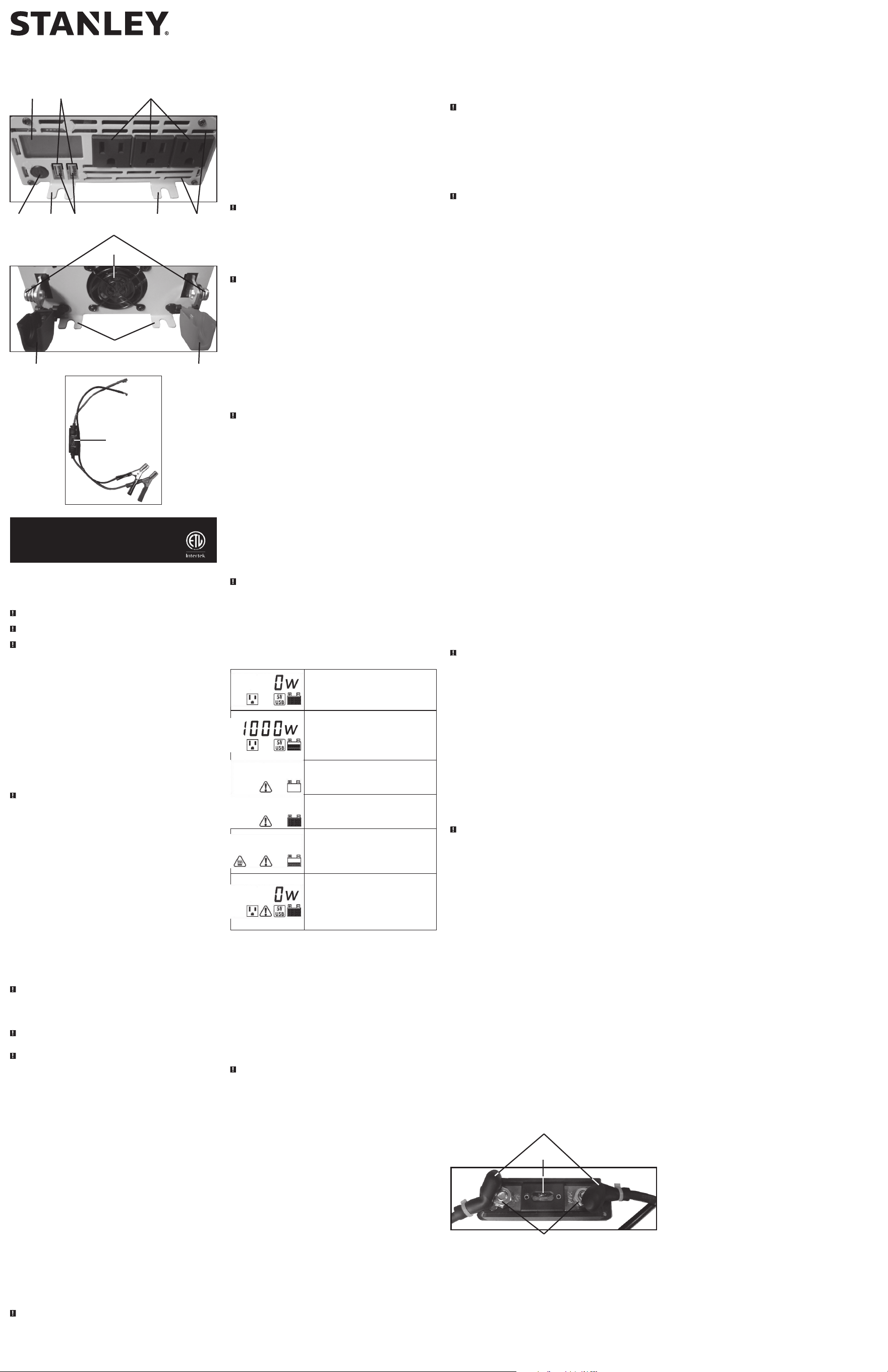
CARACTERÍSTICAS
1. Pantalla del LCD
2. Indicadores de alimentación / falla USB
3. Tomacorrientes de tres patas de 120V CA
4. Botón de poder
5. Soportes de montaje (un total de 4: 2 en el
frente, 2 en la parte trasera)
6. Puertos de carga USB
7. Ranuras de ventilación
8. Tornillos de conexión (PM6x10)
9. Ventilador
10. Tapa protectora de plástico negra (negativa)
11. Tapa protectora plástica roja (positiva)
12. Pinzas de la batería con cables, portafusible
y conectores de junta tórica
13. Portafusible
CÓMO FUNCIONA ESTE INVERSOR
Este inversor es un dispositivo electrónico que convierte la electricidad de CC de baja tensión (corriente
continua) de una batería a 120V CA (corriente alterna). Convierte la energía en dos etapas. La primera
etapa es un proceso de conversión de CC a CC que eleva la CC de bajo voltaje en la entrada del inversor
a 145 voltios de CC. La segunda etapa es una etapa de puente MOSFET que convierte la CC de alta
tensión en 120 voltios, 60 Hz CA.
La forma de onda de salida del inversor eléctrico
La forma de onda de la salida de CA de este inversor se conoce como una onda senoidal modificada.
Es una forma de onda escalonada que posee características similares a la forma de onda senoidal de
la electricidad. Este tipo de forma de onda es adecuado para la mayoría de las cargas de CA, incluidas
las fuentes de energía por conmutación y lineales utilizadas en equipos electrónicos, transformadores
y motores pequeños.
PRECAUCIÓN: Dispositivos recargables
• Algunos dispositivos recargables están diseñados para cargarse al ser enchufados directamente en un
tomacorriente de CA. Estos dispositivos pueden dañar el inversor o el circuito que se está cargando.
• Al utilizar un dispositivo recargable, supervise la temperatura durante los primeros 10 minutos de uso
para determinar si genera calor en exceso.
• Si produce calor en exceso, esto indica que el dispositivo no debe utilizarse con este inversor.
• Este problema no se presenta con la mayoría de los equipos operados con batería. La mayoría
de estos dispositivos utiliza un cargador o transformador por separado que está enchufado en un
tomacorriente de CA.
• El inversor puede funcionar con la mayoría de los cargadores y transformadores.
PRECAUCIÓN – Productos incompatibles: Ciertos productos contienen fuentes de energía o circuitos
que no son compatibles con los inversores que utilizan una salida de onda senoidal modificada (como
este inversor) y que pueden dañarse al utilizar con este inversor.
Si su producto requiere una alimentación de entrada de CA de onda senoidal pura para funcionar
correctamente, es posible que lo indique el manual de instrucciones de su producto. En caso de duda,
debe comunicarse con el fabricante de su producto ANTES DE UTILIZARLO.
Algunos productos deben alimentarse con una fuente de energía de onda senoidal pura, como la
energía estándar de uso doméstico o un inversor de “onda senoidal pura” para poder funcionar
correctamente.
Este inversor puede dañar su producto si éste contiene:
• Hornos de microondas, y
• Cargadores de baterías sin transformador
• Fuentes de energía con acoplamiento capacitivo
Si se utiliza un producto incompatible con este inversor:
• Es posible que el producto no funcione en absoluto, sin indicios de falla. Es posible que el fusible del
producto se haya abierto al intentar utilizarlo con el inversor.
• El producto presenta un funcionamiento anormal (como operación intermitente, zumbido y similares).
Nota: Algunos computadoras portátiles pueden no funcionar con este inversor.
ADVERTENCIA: Si el producto no funciona normalmente, para reducir el riesgo de lesiones y daños
a la propiedad, apague el producto de inmediato y desenchúfelo del inversor.
Requisitos de la fuente de energía
Su inversor funcionará con un voltaje de entrada de entre 11 y 15 voltios de CC. El inversor se apagará
si el voltaje de entrada desciende por debajo de 10 voltios de CC. Esta característica incorporada evita
que la batería esté totalmente descargada.
El inversor también se apagará si el voltaje de entrada excede los 15,6 voltios. Esta característica evita
el voltaje de entrada excesivo en el inversor. Aunque el inversor posee protección incorporada contra
voltaje en exceso, igualmente corre el riesgo de dañarse si el voltaje de entrada excede los 15 voltios.
Su inversor está diseñado para conectarse directamente a equipos eléctricos y electrónicos estándar de
la forma en que se describió anteriormente. No conecte el Inversor eléctrico a cableados de distribución
de CA de vehículos recreativos o para uso doméstico. No conecte el inversor a cualquier circuito de
carga de CA en el que el conductor neutro esté conectado a tierra o al negativo de la fuente (batería)
de energía de CC.
Las cargas inductivas, como televisores y estéreos, exigen más corriente para funcionar que las cargas
resistivas de la misma clasificación de potencia en vatios. Los motores de inducción, y algunos televisores,
pueden demandar una cantidad de vatios de dos a seis veces mayor que su capacidad nominal para
funcionar. Como estos inversores tienen un rango de potencia máximo, muchos de estos aparatos y
herramientas pueden operarse de manera segura. Las bombas y los compresores son equipos que exigen
la potencia en vatios más alta para funcionar. Estos equipos pueden probarse de manera segura. Si se
detecta una sobrecarga, los inversores simplemente se apagarán hasta que se corrija dicha situación.
Utilice el botón de poder para apagar el inversor, luego presione encender, para reiniciarlo.
PRECAUCIONES
• Exceder los límites de voltaje recomendados anulará la garantía del fabricante.
• NUNCA intente usar su inversor con cualquier fuente de energía de CC de 12 voltios que utilice
positivo a tierra. (La mayoría de los vehículos y embarcaciones utilizan sistemas con negativo a tierra).
• El Inversor eléctrico debe estar conectado solamente a baterías con un voltaje de salida nominal
de 12 voltios. La unidad no funcionará si se coloca una batería de 6 voltios y ocasionará un daño
permanente si se conecta a una batería de 24 voltios.
• La conexión de polaridad inversa hará que un fusible se queme y puede causar un daño permanente
al inversor.
INDICADORES DE ENCENDIDO Y FALLA EN
LA PANTALLA LCD
Indica que la unidad está correctamente conectado y listo
para usar. La icono de toma de CA y el icono USB se iluminará
sólido y el lector digital mostrará “0W”. Las barras en el icono
de batería representan el nivel de voltaje de la fuente de
alimentación conectada.
Indica que la unidad está conectada correctamente y
funcionando normalmente. La icono de toma de CA y el icono
USB se iluminará sólido y el lector digital mostrará la salida de
vatios total de tomas de CA. Las barras en el icono de batería
representan el nivel de voltaje de la fuente de alimentación
conectada.
Esto indica una condición de avería demasiado baja del voltaje
de entrada. El icono de fallo y el icono de batería vacía se
iluminarán sólida y la unidad emitirá tres pitidos cada cinco
segundos. Refiera a la sección siguiente para una explicación.
Esto indica una condición de avería demasiado alta del voltaje
de entrada. El icono de fallo y el icono de batería llena se
iluminarán sólida y la unidad emitirá tres pitidos cada cinco
segundos. Refiera a la sección siguiente para una explicación.
Este indica una condición de avería termal. El icono de fallo
y el icono de sobrecalentamiento se iluminarán sólida y las
barras en el icono de la batería representar el nivel de voltaje
de la fuente de alimentación conectada. La unidad emitirá tres
pitidos cada cinco segundos. Refiera a la sección siguiente para
una explicación.
Esto indica una condición de la sobrecarga o de avería del
cortocircuito. El icono de la toma de CA parpadea y la lectura
digital muestra 0W. El icono de fallo y el icono USB se iluminará
sólida y las barras en el icono de la batería representar el nivel
de voltaje de la fuente de alimentación conectada. La unidad
emitirá tres pitidos cada cinco segundos.Refiera a la sección
siguiente para una explicación.
CARACTERÍSTICAS DE PROTECCIÓN Y CONDICIONES DE
FALLO
El inversor supervisa las siguientes condiciones:
Voltaje de entrada demasiado bajo: Este estado no es perjudicial para el inversor, pero puede dañar la
fuente de energía, de modo que el inversor se apagará automáticamente cuando el voltaje de entrada
disminuya a 10.5 ± 0.5 voltios CC.
Voltaje de entrada demasiado alto: El inversor se apagará automáticamente cuando el voltaje de
entrada de CC exceda los 15.6 ± 0.5 voltios, ya que esto puede dañar la unidad.
Protección de apagado térmico: El inversor se apagará automáticamente cuando la unidad se
sobrecaliente.
Protección contra cortocircuitos o sobrecargas: Las tomas de corriente de CA correspondientes o los
puertos de carga USB se apagarán automáticamente cuando ocurra una sobrecarga o un cortocircuito.
Refiera a los “Indicadores de la energía y de la avería en la pantalla del LCD” para una explicación de
los iconos que indican una condición de avería antes de parada. Presione el botón de encendido para
encender el inversor fuera, corregir el fallo y luego presione el botón de encendido para encender el
inversor de nuevo.
PRECAUCIÓN – Para evitar el riesgo de daños a la propiedad: Si apaga el interruptor con./desc. (on/
off) entonces encendido no reajusta otra vez el inversor, NO INTENTE ABRIR EL INVERSOR. La apertura
del inversor por cualquier razón anulará la garantía. La unidad se debe volver al fabricante para la
prueba y la reparación por los técnicos profesionales de la fábrica.
Consumo de corriente real versus calificado del equipo
La mayoría de las herramientas eléctricas, los aparatos, los dispositivos electrónicos y los equipos
visuales/de audio poseen etiquetas que indican el consumo de energía en amperios o vatios. Asegúrese
de que el consumo de energía del artículo que desee operar sea menor a 1000 vatios. Si el consumo
de energía se clasifica en CA de amperios, simplemente multiplique por los voltios de CA (120) para
determinar la vatiaje.
El inversor puede transportar las cargas resistivas con más facilidad, no obstante, no aceptará cargas
resistivas más grandes (como estufas y calentadores eléctricos) que requieran mucha más potencia
en vatios de la que el inversor puede suministrar. Las cargas inductivas (como televisores y estéreos)
requieren más corriente para funcionar que las cargas resistivas de la misma clasificación de potencia
en vatios.
Por razones de la seguridad, el inversor cerrará simplemente si se sobrecarga. Para recomenzar la
unidad, desenchufe simplemente todos los dispositivos tapados en el inversor; desconecte el inversor
de cualquier fuente de 12 voltios de CC; entonces vuelva a conectar el inversor ANTES de tapar las
aplicaciones detrás adentro.
INSTALACIÓN
Su inversor proveerá de usted corriente eléctrica continua cuando es accionado por una fuente
confiable de 12 voltios de CC, tal como una batería del vehículo o una configuración múltiple de la
batería. Este manual no describe todas las configuraciones posibles.
Sugerencias de operación
Para obtener los mejores resultados de explotación, el inversor debe ser colocado sobre una superficie
plana, como el terreno, piso o coche asiento, o de otra superficie sólida de que ayuden a disipar el
calor que se genera. Coloque el inversor lo más cerca posible de la fuente de alimentación CC como
sea posible.
El inversor se debe funcionar solamente en las localizaciones que cumplen los criterios siguientes:
SECOS — No permita que el agua u otros líquidos entren en contacto con el inversor.
FRESCOS — La temperatura ambiental debe estar entre 10 y 20 °C (50 y 68 °F). Mantenga el inversor
lejos de la luz solar directa siempre que sea posible.
BIEN VENTILADOS — Mantenga el área que rodea el inversor limpia para garantizar la libre circulación
de aire alrededor de la unidad. No coloque artículos en o sobre el inversor durante su funcionamiento.
La unidad se apagará si la temperatura interna se eleva demasiado. El inversor se reiniciará
automáticamente después de enfriarse.
SEGUROS — No utilice el inversor cerca de materiales inflamables o en lugares donde se puedan
acumular vapores o gases inflamables. Éste es un aparato eléctrico que puede generar chispas durante
breves períodos si se establecen conexiones eléctricas o éstas se rompen.
Montaje del inversor
Herramientas requeridas: cuatro tornillos BA4x14 en un sistema y un destornillador principal de Phillips
(no suministrados).
El inversor viene equipado de las consolas de montaje para la instalación de largo plazo. El fabricante
recomienda usando los tornillos BA4x14 en un sistema con un destornillador principal estándar
de Phillips (no se suministra ningunos de éstos). El usuario puede elegir utilizar diversos tornillos
apropiados a la superficie de montaje.
Asegure el inversor a una superficie plana, observando todas las precauciones con respecto a la
instalación encontrada en este manual.
PRECAUCIÓN – Para evitar el riesgo de daños materiales, monte solamente el inversor en una
superficie llana, estable, asegurando que todos los tornillos están apretados con seguridad y observando
todas las precauciones y recomendaciones con respecto a la instalación encontrada en este manual.
CONEXIÓN A UNA FUENTE DE ENERGÍA
El Inversor eléctrico debe estar conectado solamente a baterías con un voltaje de salida nominal de
12 voltios. La unidad no funcionará si se coloca una batería de 6 voltios y ocasionará un daño
permanente si se conecta a una batería de 24 voltios.
Los tomacorrientes estándar norteamericano de 120 voltios AC y los puertos de carga USB permiten el
funcionamiento simultáneo de varios dispositivos. Simplemente enchufe el equipo en la unidad y opere
normalmente. Asegúrese de que la potencia de todos los equipos enchufados simultáneamente en el
inversor no supere 1000 vatios continuos.
PRECAUCIONES – Para reducir el riesgo de daño a la propiedad:
• Siempre conecte la unidad a la fuente de energía de cc de 12 voltios antes de conectar cualquier
dispositivo al inversor.
• No lo use con sistemas eléctricos de tierra positivos.
• La conexión de polaridad inversa producirá un fusible fundido y puede ocasionar daños permanentes
al inversor.
Conexión a una fuente de energía utilizando los pinzas de la batería con
los conectadores del junta tórica
Herramientas requeridas: un destornillador principal de Phillips (NO suministrado).
Utilice los clips de batería proporcionados (con los conectadores de los cables y del junta tórica) para
conectar el inversor directamente con la fuente de energía de 12 voltios como sigue:
1. Compruebe de que no haya vapores inflamables en el área de instalación.
2. Abra la tapa protectora plástica (positiva) roja (hacia abajo). Usando un destornillador principal de
Phillips, desatornille el tornillo de la conexión PM6x10 (a la izquierda) y quítelo.
3. Ate el junta tórica positivo en el extremo del cable rojo del clip de batería al poste positivo de la
conexión. Substituya el tornillo de la conexión y atorníllelo a la derecha para asegurar. No apriete
demasiado.
4. Conecte la pinza de batería roja al terminal positivo de la batería.
5. Abra la tapa protectora plástica (negativa) negro (hacia abajo). Usando un destornillador principal
de Phillips, desatornille el tornillo de la conexión PM6x10 (a la izquierda) y quítelo.
6. Ate el junta tórica negativo en el extremo del cable negro del clip de batería al poste negativo
de la conexión. Substituya el tornillo de la conexión y atorníllelo a la derecha para asegurar. No
apriete demasiado.
7. Conecte la pinza negro de la batería al terminal negativo de la batería.
8. Asegúrese de que todas las conexiones entre los cables y los terminales estén seguras.
9. Pulse el botón de alimentación. Un pitido sonará. Los indicadores de alimentación / falla USB se
iluminará sólido y la pantalla LCD retroiluminada se activará para mostrar el icono de salida de CA,
el icono USB, el icono de la batería y la lectura digital muestra “0W”, indicando que el inversor
está conectado correctamente y está listo para alimentar aparatos que consumen hasta 1000 vatios
continuos.
Nota:
Si el inversor no funciona correctamente, consulte “Indicadores de encendido y falla en la pantalla
LCD” y “Características de protección y condiciones de fallo” para una explicación de los iconos que
indican una condición de fallo antes del apagado. Pulse el botón de alimentación para encender el
inversor apagado, corrija el problema y, a continuación, pulse de nuevo el botón de encendido para
encender el inversor.
CABLEADO DIRECTO A LA FUENTE DE ENERGÍA (MÉTODO
OPCIONAL DE LA CONEXIÓN; HARDWARE NO INCLUIDO)
Utilice el alambre del AWG #8 si el inversor a la conexión de la fuente de energía es 4 pies o menos.
Para longitudes de cable más largas, utilice el alambre del AWG #6 para las longitudes a 10 pies.*
Para las longitudes de cable que exceden 10 pies del inversor a la batería, consulte con el fabricante
para la información adicional. En cualquier caso, proteja (+) el alambre positivo contra cortocircuitos
instalando un fusible o el disyuntor de 200 amperios cerca del terminal de la fuente de CC (batería).
El cable, el sostenedor del fusible y el fusible (NO suministrados) se pueden comprar en una compañía
de la fuente eléctrica.
* Para longitudes de cable de más de 10 pies desde el inversor a la batería, contactar el fabricante
para obtener información adicional.
PROCEDIMIENTO
1. Compruebe de que no haya vapores inflamables en el área de instalación.
2. Identifique los terminales positivo (+) y negativo (–) (batería) de la fuente de energía de CC.
3. Instale un soporte para fusibles o interruptor cerca del terminal POSITIVO (+) de la fuente de
energía (batería) de CC.
4. Conecte una prolongación de cable en un lado del soporte del fusible o del interruptor
automático. Conecte el otro extremo del cable al terminal positivo (+) del inversor.
5. Conecte una prolongación del cable entre el terminal negativo (–) del inversor y el terminal
negativo (–) de la fuente de energía de CC.
6. Conecte una prolongación corta del cable al otro terminal del soporte del fusible o al interruptor
automático. Márquelo como “positivo” o “+”.
7. Conecte el extremo libre del fusible o del cable del interruptor al terminal positivo (+) de la fuente
de energía (batería) de CC.
8. Inserte un fusible adecuado al inversor en el soporte del fusible.
9. Pruebe el inversor encendiéndolo y enchufándolo en una lámpara o equipo de 100 vatios.
PRECAUCIONES – Para reducir el riesgo de daño a la propiedad:
• Los tamaños de los cables y fusibles que se dan aquí son una recomendación general. Siempre debe
consultar a la NFPA 70: Código Eléctrico Nacional
®
antes de comenzar cada instalación específica.
• Los conectores sueltos pueden hacer que los cables se sobrecalienten y que el aislamiento se derrita.
• Compruebe para asegurarse de que no ha invertido la polaridad. Los daños ocasionados por polaridad
inversa no están cubiertos por nuestra garantía.
Nota:
Si el inversor no funciona correctamente, consulte “Indicadores de encendido y falla en la pantalla
LCD” y “Características de protección y condiciones de fallo” para una explicación de los iconos que
indican una condición de fallo antes del apagado. Pulse el botón de alimentación para encender el
inversor apagado, corrija el problema y, a continuación, pulse de nuevo el botón de encendido para
encender el inversor.
INFORMACIÓN IMPORTANTE SOBRE LOS CABLES
La pérdida considerable de potencia y el menor tiempo de operación de la batería se debe a inversores
instalados con cables que no pueden suministrar una potencia plena. Los síntomas de potencia baja de
la batería pueden deberse a que los cables son excesivamente largos o a un calibre insuficiente.
CONEXIÓN A LA CARGA DE POTENCIA
El inversor eléctrico está equipado con tomacorrientes estándar dobles de tipo estadounidenses de tres
clavijas. Enchufe el cable del equipo que desee operar en el o los tomacorrientes de CA. Asegúrese de
que el requisito de cargas combinadas del equipo no exceda la potencia continua máxima.
El inversor eléctrico está diseñado para conectarse directamente a equipos eléctricos y electrónicos
estándar de la forma ya descrita. No conecte el inversor eléctrico a cableados de distribución de CA
domésticos o de vehículos recreativos. No conecte el inversor eléctrico a ningún circuito de carga de CA
en que el conductor neutro esté conectado a tierra (tierra) o al negativo de la fuente de CC (batería).
ADVERTENCIA: ¡No conecte al cableado de distribución de CA!
INSTRUCCIONES DE OPERACIÓN
1. Conecte el inversor a una fuente de alimentación de 12 voltios de CC que funcione como se
describe en este manual de instrucciones.
2. Pulse el botón de alimentación.
3. Un pitido sonará. La pantalla LCD retroiluminada se activará para mostrar el icono de salida de CA,
el icono USB, el icono de la batería y la lectura digital muestra “0W”, indicando que el inversor
está conectado correctamente y está listo para alimentar aparatos.
4. Enchufe los aparatos de CA de 120 voltios en las tomas de CA de tres patas del inversor y / o
conecte los dispositivos alimentados por USB en el puerto de carga USB del inversor y opere
normalmente.
5. Para apagar la unidad, presione el botón de encendido nuevamente.
PRECAUCIÓN – Para reducir el riesgo de daño a la propiedad: Siempre conecte el inversor a la fuente
de energía de cc de 12 voltios antes de conectar cualquier dispositivo al inversor.
Notas:
Los tomacorrientes estadounidenses estándar de CA de 120 voltios y los puertos USB permiten al
usuario operar varios dispositivos simultáneamente. Asegúrese de que la potencia de todos los
equipos enchufados simultáneamente en el inversor no exceda 1000 vatios continuos.
El inversor no servirá para aparatos y equipos que generen calor, como secadores de cabello, mantas
térmicas, hornos de microondas y tostadores.
Es posible que algunas computadoras portátiles no funcionen con este inversor.
Los puertos de carga USB de este inversor no son compatibles con la comunicación de datos. Solo
proporcionan potencia de CC de 3.1 A (5 V cada uno) a un dispositivo eléctrico USB externo.
Si existe una condición de falla en cualquiera de los puertos USB, los indicadores de alimentación /
falla USB se apagan. En cualquiera de estos casos, los puertos USB se apagarán automáticamente sin
indicación en la pantalla LCD.
Algunos productos electrónicos domésticos alimentados por USB no funcionen con estos puertos de
carga USB. Compruebe el manual del dispositivo electrónico correspondiente para confirmar que se
puede utilizar con este tipo de puerto USB de carga.
No todos los teléfonos móviles vienen con un cable de carga; en general, son cables de datos
incompatibles con este dispositivo (confirme con el fabricante de su teléfono móvil para obtener el
cable de carga correcto).
Recuerde desconectar el inversor de cualquier fuente de alimentación cuando no esté en uso.
CUIDADO Y MANTENIMIENTO
1. La temperatura ideal de almacenamiento varía entre 0°C y 40°C (32°F y 104°F).
2. Almacene y use el inversor en un lugar fresco y seco y con ventilación adecuada en los alrededores.
3. Evite los lugares expuestos a unidades de calefacción, radiadores, luz solar directa o humedad en
exceso.
Reemplazo del fusible (en las pinzas de batería positiva con conectores
de junta tórica)
CUBIERTA DE GOMA
TUERCAS
200A
FUSIBLE
1. Levante las cubiertas de goma en el cable de la abrazadera de la batería y desenrosque las dos
tuercas (hacia la izquierda) desde cada lado del portafusibles. Ponlos a un lado.
2. Retire el fusible y compruébelo con un comprobador de continuidad para ver si está bien o si está
fundido.
3. Reemplace con un fusible de amperios de 200A del mismo tamaño y tipo, si es necesario.
4. Vuelva a ensamblar cuidadosamente las tuercas en el portafusibles (en el sentido de las agujas del
reloj). No apriete demasiado las tuercas.
5. Vuelva a colocar las cubiertas de goma en las tuercas y verifique que la unidad funcione correctamente.
DETECCIÓN DE PROBLEMAS
Problemas específicos de las tomas de CA
Cuando las tomas de 120V de CA están en uso, la unidad monitores para monitores para fallas térmicas,
falla de baja y alta tensión de batería, sobrecarga y condiciones de cortocircuito (consulte las secciones
“Características de protección” y “Características de protección y condiciones de fallo”). Si existe una
condición de fallo en cualquiera de las tomas de corriente CA, la pantalla LCD mostrará la condición de
fallo y todas las tomas de CA se apagan automáticamente. Si esto ocurre:
1. Desconecte todos los dispositivos de la unidad y asegúrese de la unidad ha sido apagado.
2. Deje que la unidad se enfríe durante varios minutos.
3. Asegúrese de que la potencia de todos los equipos enchufados simultáneamente en el inversor no
exceda 1000 vatios continuos.
4. Asegúrese de que los cables y enchufes del dispositivo no estén dañados.
5. Asegurar que haya suficiente ventilación alrededor de la unidad antes de proceder.
Problemas específicos del puerto de carga USB
Cuando el puerto de carga USB está en uso, la unidad monitores para monitores para fallas
térmicas, falla de baja y alta tensión de batería, y condiciones de cortocircuito (consulte las secciones
“Características de protección” y “Características de protección y condiciones de fallo”). Si existe una
condición de falla en cualquiera de los puertos USB, los indicadores de alimentación / falla USB se
apagan. En cualquiera de estos casos, los puertos USB se apagarán automáticamente sin indicación en
la pantalla LCD. Si esto ocurre:
1. Desconecte todos los dispositivos de la unidad y asegúrese de la unidad ha sido apagado.
2. Deje que la unidad se enfríe durante varios minutos.
3. Asegúrese de que el consumo total del dispositivo USB conectado al puerto de carga USB no
exceda de 3.1A.
4. Algunos productos electrónicos para el hogar con conexión USB no funcionará con este tipo de
puerto de carga USB. Consulte el manual del dispositivo electrónico correspondiente para confirmar
que se puede utilizar con este tipo de puerto de carga USB.
5. Si un dispositivo USB individual está dentro de las especificaciones y se produce un falla, haga
revisar el dispositivo USB por un mal funcionamiento y no continúe usándolo con estos puertos de
carga USB.
Problemas visuales/de audio frecuentes
Zumbidos en los sistemas de audio
Algunos sistemas estéreos y estéreos económicos generan zumbidos cuando se los pone en
funcionamiento desde el inversor ya que la fuente de energía en el dispositivo electrónico no filtra
correctamente la onda senoidal modificada producida por el inversor. La única solución a este problema
es utilizar un sistema de sonido que posea una fuente de energía de calidad superior.
Interferencia con el televisor
El onvertidor está protegido a fin de reducir al mínimo la interferencia con las señales de televisión. Sin
embargo, en determinadas situaciones, es posible que aún haya alguna interferencia, particularmente
con señales de televisión débiles. Intente las siguientes medidas correctivas:
• Coloque el inversor lo más lejos posible de la televisión, de la antena y de los cables de la antena.
Utilice un cable de extensión, en caso de necesidad.
• Reajuste la orientación del inversor, de los cables de la antena y del cable eléctrico de la TV para
reducir al mínimo interferencia.
• Cerciórese de que la antena que alimenta la televisión proporcione (“nieve libre “) una señal
adecuada y esa alta calidad, cable blindado de la antena está utilizada.
• No utilice el inversor para funcionar aplicaciones de alta potencia o las herramientas al mismo tiempo
usted lo está utilizando para funcionar la TV.
Problemas frecuentes de potencia de salida
El voltaje de entrada está por debajo de 10.5 voltios
Recargue la batería auto o compruebe la fuente de CC.
El equipo que se opera genera mucha energía
Reduzca la carga a un máximo de 1000 vatios continuos.
El inversor está en la condición de apagado térmico
Espere que el inversor se enfríe. Asegúrese de que haya una ventilación adecuada alrededor de
la unidad y que la carga no supere los 1000 vatios.
La salida de CA está en cortocircuito
Desenchufe la aplicación de la CA. Apague el inversor. Desconecte la unidad de cualquier fuente de la
potencia 12V CC. Compruebe la cuerda de la aplicación.
ACCESORIOS
Accesorios recomendados para uso con esta unidad puede ser disponibles a través del fabricante. Si
necesita ayuda con respecto a los accesorios, por favor póngase en contacto con el fabricante al (877)
571-2391.
ADVERTENCIA: El uso de cualquier accesorio no recomendado para el uso con esta unidad podía ser
peligroso.
INFORMACIÓN DE SERVICIO
Si usted necesita asesoramiento técnico, reparación, o partes genuinas del fabricante, póngase en
contacto con el fabricante al (877) 571-2391.
UN AÑO DE GARANTÍA LIMITADA
El fabricante garantiza este producto contra defectos de materiales y mano de obra durante un período
de UN (1) AÑO a partir de la fecha de compra del producto por el comprador usuario final (“Período
de Garantía”). Si hay un defecto y una reclamación válida se recibe dentro del período de garantía,
el producto defectuoso puede ser reemplazado o reparado en el las siguientes maneras: (1) Devuelva
el producto al fabricante para reparación o reemplazo, a opción del fabricante. La prueba de compra
puede ser requerida por el fabricante. (2) Devuelva el producto a la tienda donde el producto fue
comprado para un intercambio (siempre y cuando se trate de un minorista participante). Devoluciones
al minorista deben hacerse dentro del plazo de póliza de devoluciones del minorista para intercambios
solamente (por lo general 30 a 90 días después de la fecha de compra). La prueba de compra puede
ser requerida por el minorista. Por favor consulte la póliza de devoluciones del minorista sobre
devoluciones que están fuera del plazo establecido para intercambios.
Esta garantía no se aplica a los accesorios, bombillos, fusibles y baterías; defectos a consecuencias
de desgaste normal; accidentes; daños y perjuicios sufridos durante el envío y manejo, alteraciones,
reparaciones o uso no autorizado, negligencia, abuso, y si no se siguen instrucciones para el cuidado y
mantenimiento del producto.
Esta garantía le otorga al comprador usuario final, derechos legales específicos y usted puede tener
otros derechos que varían de estado a estado o de provincia a provincia. Este producto no está
diseñado para uso comercial.
Por favor, visite nuestro sitio web www.baccusglobal.com/register para registrar el nuevo Baccus Global
LLC producto y mantenerse al tanto de los nuevos productos y ofertas especiales.
ESPECIFICACIONES
Potencia máxima: 1000W continuos a través de las pinzas de la batería
suministrados
Entrada: 12.8V CC, 95A a través de las pinzas de la batería
suministrados
Salida de CA: 120V CA, 60Hz
Forma de onda de salida: onda sinusoidal modificada
Salida USB: 5V CC, 3.1A
Fusible de cable de pinza: 200A
Importados por Baccus Global LLC, 621 NW 53rd St., Suite 450, Boca Raton, FL 33487
www.Baccusglobal.com • 1-877-571-2391
RD020822