Frigidaire.com USA 1-800-374-4432 Frigidaire.ca Canada 1-800-265-8352
2025)
use
&
care
Microwave Oven
Introduction. . . . . . . . . . . . . . . . . . 2
Cleaning And Care
. . . . . . . . . . . .
Precautions Microwave Energy . . . . . . . 3
Service Call Check . . . . . . . . . . . . .
Important Safety Instructions. . . . . . .
Warranty . . . . . . . . . . . . . . . .
Maintenance
. . . . . . . . . . . . . .
Names Of Oven Parts And Accessories . .
Operation
. . . . . . . . . . . . . . . . .
.
A06823541 (July
4-7
10-25
26
8-9
.
27
28
29
2
INTRODUCTION
INTRODUCTION
Thank you for bringing Frigidaire into your home!
We see your purchase as the beginning of a long
relationship together.
This manual is your resource for the use and care
of your product. Please read it before using your
appliance. Keep it handy for quick reference. If
something doesn’t seem right, the troubleshooting
section will help you with common issues.
FAQs, helpful tips and videos, cleaning products, and
kitchen and home accessories are available at www.
frigidaire.com.
We are here for you! Visit our website, chat with an
agent, or call us if you need help. We may be able
to help you avoid a service visit. If you do need
service, we can get that started for you
Let's make it ocial! Be sure to register your prod-
.
uct.
Keep your product info here so it’s easy to find.
Model Number:
Serial Number:
Purchase Date:
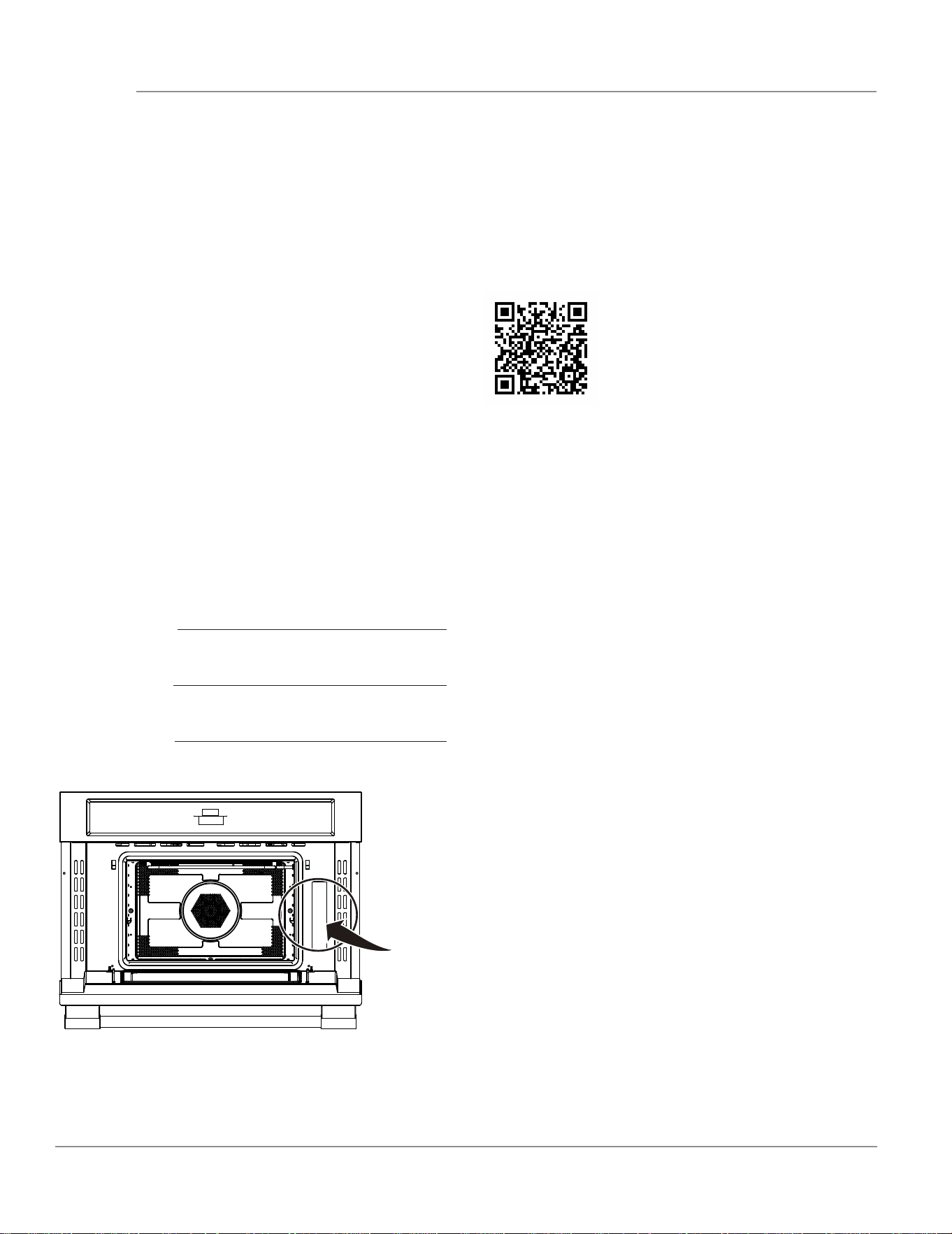
Serial Number Location
Let’s make it official! Be sure to register your product.
Visit us at Frigidaire.com/register
Or use your mobile device to scan the QR code.
Welcome to our
family
Do not attempt to operate this oven
with the door open since open door operation can
result in harmful exposure to microwave energy. It
is important not to defeat or tamper with the safety
interlocks.
Do not place any object between the oven front
face and the door or allow soil or cleaner residue to
accumulate on sealing surfaces.
Do not operate the oven if it is damaged. It is
particularly important that the oven door close
properly and that there is no damage to the:
(1) DOOR (bent)
(2)HINGES AND LATCHES (broken or loosened)
(3)DOOR SEALS AND SEALING SURFACES.
The oven should not be adjusted or repaired by
anyone except properly qualified service
personnel.
PRECAUTIONS TO AVOID POSSIBLE EXPOSURE
TO EXCESSIVE MICROWAVE ENERGY
WARNING
To reduce the risk of burns, electric shock, fire,
in
jury to persons or exposure to excessive
microwave energy:
This device complies with part 18 of the FCC Rules.
RADIO INTERFERENCE
• Operation of the microwave oven may cause
interference to your radio, TV or similar
equipment.
• When there is interference, it may be reduced
or eliminated by taking the following measures:
- Clean door and sealing surface of the oven.
- Reorient the receiving antenna of radio or
television.
- Relocate the microwave oven with respect to
the receiver.
- Move the microwave oven away from the
receiver.
- Plug the microwave oven into a different outlet
so that microwave oven and receiver are on
different branch circuits.
UTENSILS
CAUTION
• Personal Injury Hazard
• Tightly-closed utensils could explode. Closed
containers should be opened and plastic pouches
should be pierced before cooking.
• See the instructions on "Materials you can use in
microwave oven or to be avoided in microwave
oven."
There may be certain non-metallic utensils that are
not safe to use for microwaving. If in doubt, you
can test the utensil in question following the
procedure below.
Utensil Test:
- Fill a microwave-safe container with 1 cup of
cold water (250ml) along with the utensil in
question.
- Cook on maximum power for 1 minute.
- Carefully feel the utensil. If the empty utensil is
warm, do not use it for microwave cooking.
- Do not exceed 1 minute cooking time.
SAVE THESE INSTRUCTIONS
(Only for USA)
3
PRECAUTIONS MICROWAVE ENERGY
WARNING
Indicates a potentially hazardous situation which,
if not avoided, may result in death or serious
inju
ry.
CAUTION
Indicates a potentially hazardous situation
which, if not avoided, may result in minor or
moderate injury.
IMPORTANT
Indicates installation, operation or main-tenance
information which is important but not hazard-
related.
Read all instructions before using this appliance.
This manual contains important safety symbols and instructions. Please pay at-tention to these symbols
and follow all instructions given.
Do not attempt to install or operate your appliance until you have read the safety precautions in this
manual. Safety items throughout this manual are labeled with a WARNING or CAUTION statement based
on the risk type.
Warnings and important instructions ap-pearing in this guide are not meant to cover all possible
conditions and situations that may occur. Common sense, caution, and care must be exercised with
installing, maintaining, or operating your appliance.
DEFINITIONS
This is the safety alert symbol. It is used to alert of potential personal injury hazards. Obey all safety
messages that follow this symbol to avoid possible injury or death.
NOTE
Indicates a short, informal reference – something
written down to assist the memory or for future
reference.
NOTE
ELECTRICAL
REQUIREMENTS
Product rating is 120V, 60Hz, AC only, 20 amp.
This product must be connected to a seperate
and dedicated supply circuit of the proper
voltage and frequency.
requirements of the
National Electrical Code or the prevailing local
code for this kilowatt rating. The power supply
cord and plug should be brought to a seperate
and dedicated 20-ampere branch circuit
single grounded outlet. The outlet box should be
located in the cabinet above the microwave oven.
The outlet box and supply circuit should be
installed by a qualifed electrician and conform to
the National Electrical Code or the prevailing local
code.
IMPORTANT
1. If you have any questions about the grounding
or electrical instructions, consult a qualified
electrician or service
person.
2. Neither Electrolux nor the dealer can accept
any liability for damage to the microwave oven
or personal injury resulting from failure to
observe the
correct electrical connection
procedures.
SAVE THESE INSTRUCTIONS
4
IMPORTANT SAFETY INSTRUCTIONS
Wire size must conform to the
When using electrical appliances basic safety
precautions should be followed, including the
following:
WARNING
To reduce the risk of burns, electric shock, fire,
injury to persons or exposure to excessive
microwave energy:
• Read all instructions before using the appliance.
• Read and follow the specific:
"PRECAUTIONS TO AVOID POSSIBLE
EXPOSURE TO EXCESSIVE MICROWAVE
ENERGY" found on page 3.
• This appliance must be grounded. Connect only
to properly grounded outlet. See
"GROUNDING INSTRUCTIONS" found on page 6.
• Install or locate this appliance only
in accordance with the provided installation
instructions.
• Some products such as whole eggs and sealed
containers - for example, closed glass jars - are
able to explode and should not be heated in this
oven.
• Use this appliance only for its intended use as
described in the manual. Do
not use corrosive chemicals or vapors in this
appliance. This type of oven is specifically
designed to heat, cook or dry food. It is not
designed for industrial or laboratory use.
• HOT CONTENTS CAN CAUSE SEVERE BURNS.
DO NOT ALLOW CHILDREN TO USE THE
MICROWAVE. Use caution when removing hot
items.
• Do not operate this appliance if it has a damaged
cord or plug, if it is not working properly, or if it
has been damaged or dropped.
• This appliance should be serviced only by
qualified service personnel. Contact nearest
authorized service facility for examination, repair,
or adjustment.
• Do not cover or block any openings on the
appliance.
• Do not store this appliance outdoors. Do not use
this product near water - for example, near a
kitchen sink, in a wet basement, near a swimming
pool, or similar location.
• Do not immerse cord or plug in water.
• Keep cord away from heated surface.
• Do not let cord hang over edge of table or
counter. When cleaning surfaces of door and
oven that comes together on closing the door,
use only mild, nonabrasive soaps, or detergent
applied with a sponge or soft cloth.
• To reduce the risk of fire in the oven cavity:
- Do not overcook food. Carefully attend appliance
when paper, plastic, or other combustible
materials are placed inside the oven to facilitate
cooking.
- Remove wire twist-ties from paper or plastic bag
before when placing bag in oven.
- If material inside of the oven ignite, keep oven
door closed, turn oven off, and disconnect the
power cord, or shut off power at the fuse or circuit
breaker panel.
- Do not use the cavity for storage purposes. Do not
leave paper products, cooking utensils, or food in
the cavity when not in use.
• Liquids, such as water, coffee, or tea are able to be
overheated beyond the boiling point without
appearing to
be boiling. Visible bubbling or boiling when the
container is removed from the microwave oven is
not always present. THIS COULD RESULT IN VERY
HOT LIQUID SUDDENLY BOILING OVER WHEN THE
CONTAINER IS DISTURBED OR A UTENSIL IS
INSERTED INTO THE LIQUID. To reduce the risk of
injury to persons:
• Do not overheat the liquid.
• Stir the liquid both before and halfway through
heating it.
• Do not use straight-sided containers with narrow
necks.
• After heating, allow the container to stand in the
microwave oven for a short time before removing
the container.
• Use extreme care when inserting a spoon or other
utensil into the container.
• Oversized food or oversized metal utensils should
not be inserted in a microwave oven as they
may create a fire or risk of electric shock. Do not
clean with metal scouring pads. Pieces can burn off
the pad and touch electrical parts involving a risk of
electric shock.
• Do not store any materials, other than
manufacturer's recommended accessories, in this
oven when not in use.
• Do not cover racks or any other part of the oven
with metal foil. This will cause over- heating of the
oven.
• Clean Ventilation Hoods Frequently -Grease should
not be allowed to accumulate on hood or filter.
• When flaming foods under the hood, turn the fan on.
• Use care when cleaning the vent-hood filter.
Corrosive cleaning agents, such as lye-based oven
cleaners, may damage the filter.
• Suitable for use above both gas and electric cooking
equipment.
IMPORTANT SAFETY INSTRUCTIONS
5
SAVE THESE INSTRUCTIONS
SAVE THESE INSTRUCTIONS
GROUNDING INSTRUCTIONS
This appliance must be grounded. In the event of an electrical short circuit, grounding reduces the risk of
electric shock by providing an escape wire for the electric current. This appliance is equipped with a cord
having a grounding wire with a grounding plug. The plug must be plugged into an outlet that is properly
installed and grounded.
WARNING
Improper use of the grounding can result in a risk
of electric shock.
Consult a qualified electrician or serviceman if the
grounding instructions are not completely
understood, or if doubt exists as to whether the
appliance is properly grounded. If it is necessary to
use an extension cord, use only a
3-wire extension cord that has a 3-blade grounded
plug, and 3-slot receptacle th
at will accept the
plug on the appliance.The marked rating of the
extension cord shall be equal to or greater than the
electrical rating of the appliance.
DANGER
Electric Shock Hazard
Touching some of the internal components can
cause serious personal injury or death. Do not
disassemble this appliance.
6
IMPORTANT SAFETY INSTRUCTIONS
IMPORTANT
1. If you have any questions about the
grounding or electrical instructions, consult a
qualified electrician or service person.
2. Neither Electrolux nor the dealer can accept
any liability for damage to the microwave
oven or personal injury resulting from failure
to observe the
correct electrical connection
procedures.
WARNING
Electric Shock Hazard
Improper use of the grounding can result in
electric shock. Do not plug into an outlet until
appliance is properly installed and grounded.
ABOUT YOUR MICROWAVE OVEN
This Use and Care Manual is valuable: read it
carefully and always save it for reference.
A good microwave cookbook is a valuable
asset. Check it for microwave cooking principles,
techniques, hints and recipes.
NEVER use the microwave oven without the
tumtable and support nor tum the turntable
over so that a large dish could be placed in
the micrwave oven. The tumtable will turn
both clockwise and counterclockwise.
ALWAYS have food in the micrwave oven
when it is on to absorb the microwave energy.
When using the microwave oven at power
levels below 100%, you may hear the magnetron
cycling on and off. It is normal for the exterior
of the microwave oven to be warm to the
touch when cooking or reheating.
Room humidity and the moisture in food will
infuence the amount of moisture that condenses
in the microwave oven. Generally, covered foods
will not cause as much condensation as uncovered
ones. Ventilation openings must not be blocked.
The microwave oven is for food preparation only.
It should not be used to dry clothes or newspapers.
Condensation is a normal part of microwave cooking.
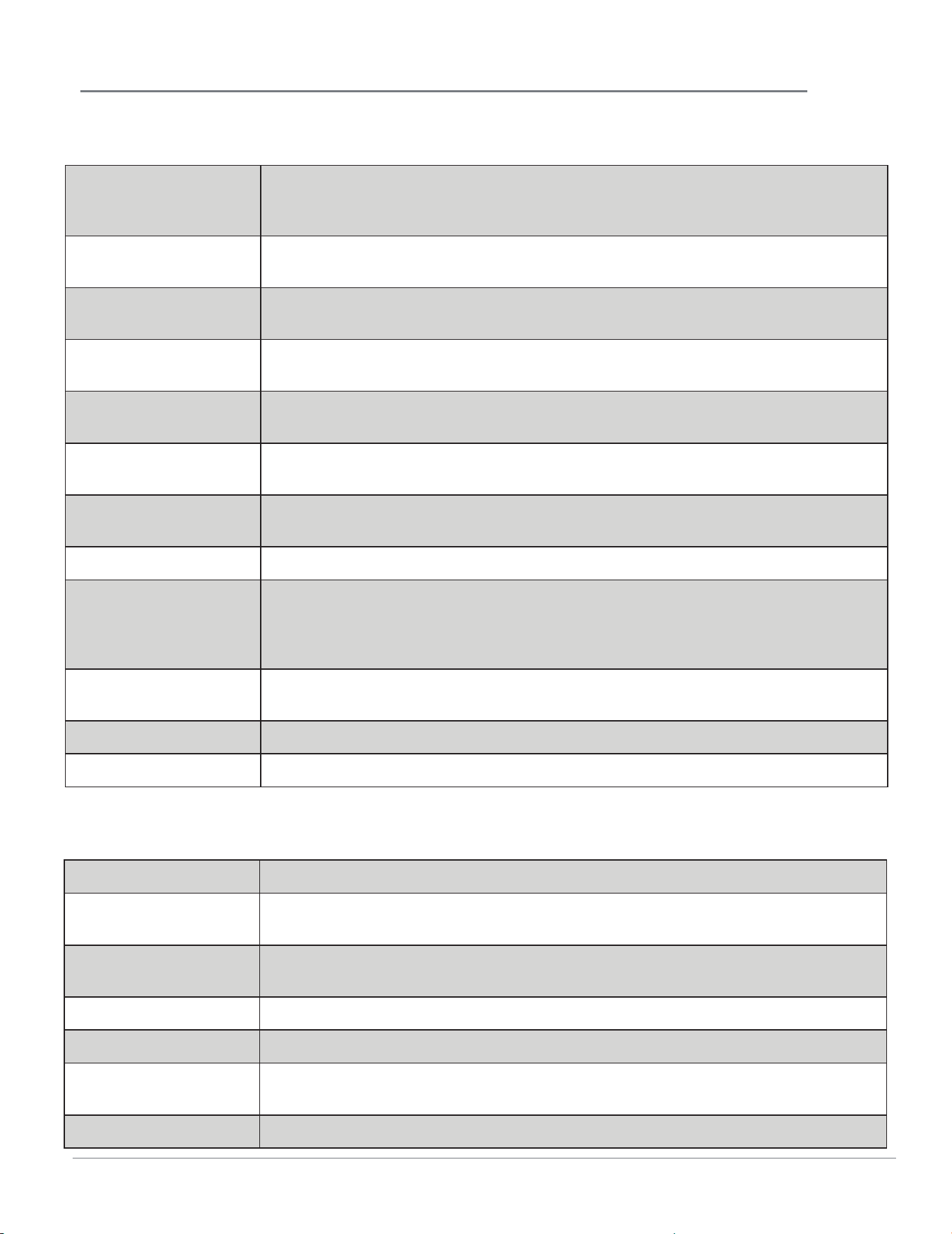
Materials you can use in microwave oven
Browning dish
Follow manufacturer instructions. The bottom of browning dish must be at
least 3/16 inch (5mm) above the turntable. Incorrect usage may cause the
turntable to break.
Dinnerware
Microwave-safe only. Follow manufacturer's instructions. Do not use cracked
or chipped dishes.
Glass jars
Always remove lid. Use only to heat food until just warm. Most glass jars are
not heat resistant and may break.
Glassware
Heat-resistant oven glassware only. Make sure there is no metallic trim. Do not
use cracked or chipped dishes.
Oven cooking bags
Follow manufacturer instructions. Do not close with metal tie. Make slits to
allow steam to escape.
Paper plates and cups
Use for short term cooking/warming only. Do not leave oven unattended
while cooking.
Paper towels
Use to cover food for reheating and absorbing fat. Use with supervision for a
short-term cooking only.
Parchment paper Use as a cover to prevent splattering or a wrap for steaming.
Plastic
Microwave-safe only. Follow the manufacturer instructions. Should be labeled
"Microwave Safe". Some plastic containers soften, as the food inside gets hot.
"Boiling bags" and tightly closed plastic bags should be slit, pierced or vented
as directed by package.
Plastic wrap
Microwave-safe only. Use to cover food during cooking to retain moisture. Do
not allow plastic wrap to touch food.
Thermometers Microwave-safe only (meat and candy thermometers).
Wax paper Use as a cover to prevent splattering and retain moisture.
IMPORTANT SAFETY INSTRUCTIONS
Materials to be avoided in microwave oven
Aluminum tray May cause arcing. Transfer food into microwave-safe dish.
Food carton with
metal handle
May cause arcing. Transfer food into microwave-safe dish.
Metal or metal-
trimmed utensils
Metal shields the food from microwave energy. Metal trim may cause arcing.
Metal twist ties May cause arcing and could cause a fire in the oven.
Paper bags May cause a fire in the oven.
Plastic foam
Plastic foam may melt or contaminate the liquid inside when exposed to high
temperature.
Wood Wood will dry out when used in the microwave oven and may split or crack.
7
8
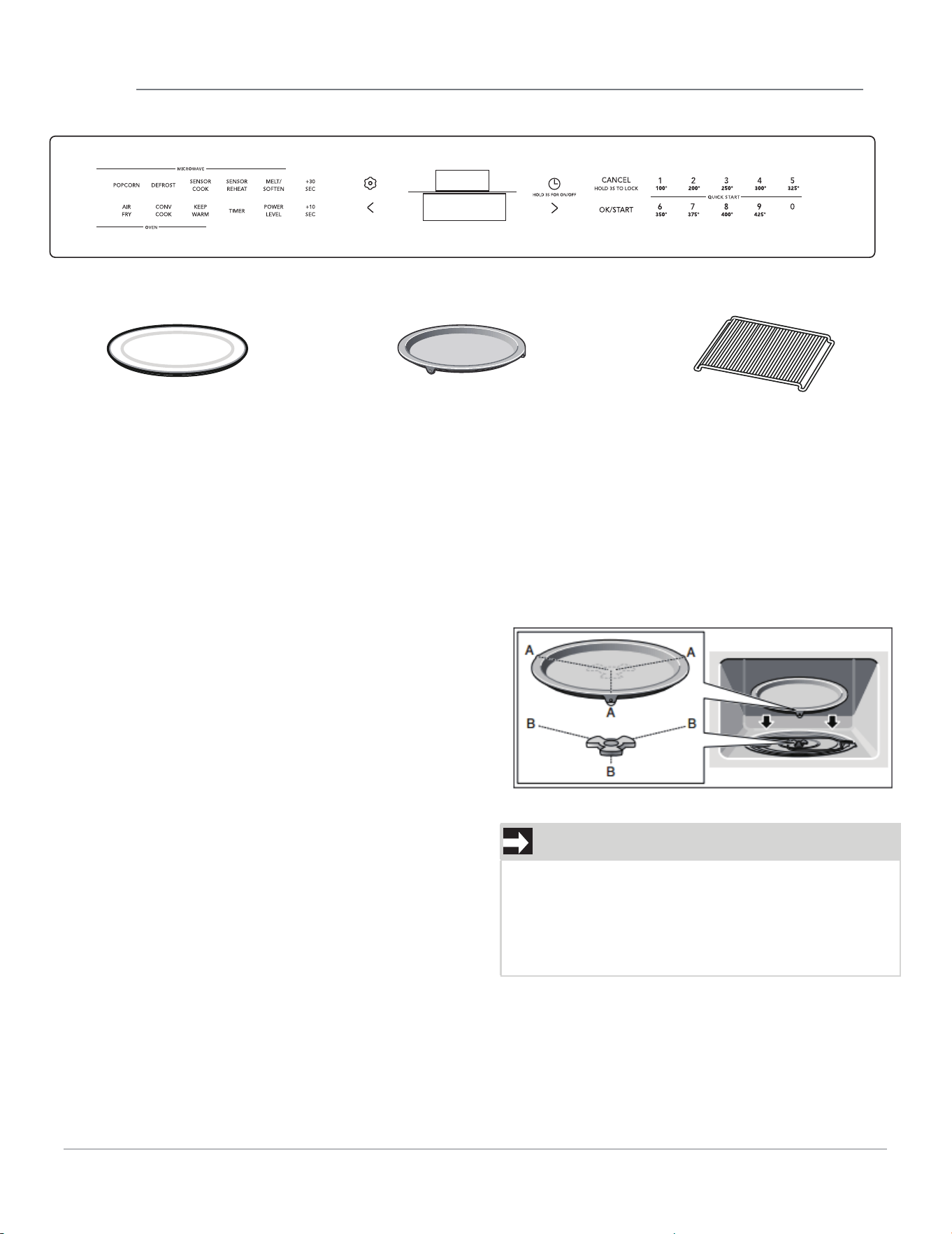
NAMES OF OVEN PARTS AND ACCESSORIES
Ceramic microwave
tray
Metal tray turntable Wire rack
NOTE
Do not use the appliance if the turntable is not in
place. Confirm that all parts are properly seated
and that the turntable rotates freely when the
microwave is operated. The metal tray turntable
can support max. 12 lbs.
Metal tray turntable with bake element below
Provide heat for food which particularly requires
with the rollers "A" as shown in the picture, on the
carrier "B" in the middle
floor. The turntable
must sit straight on the carrier.
Wire rack
Use the wire rack with recess facing down for
Convection, Keep Warm and to fit larger dishes
into the oven cavity. Use it facing up (as shown)
for Broil/Grill.
Ceramic microwave tray
Use for microwave cooking and conventional
cooking. Food like a popcorn bag or potatoes can
be directly placed on the ceramic tray.
Warning :
• The ceramic tray will get hot during convention
cooking
• Place the ceramic tray on top of the metal tray
turnable
• The ceramic tray can remain in the oven for all
cooking modes, unless “Bake on Metal Tray” is
required.
• Use ceramic tray on top of metal tray to pop
porcorn.
• Do not pop popcorn directly on metal turntable
tray.
a lot of heat from underneath. Place the turntable
of the cooking compartment
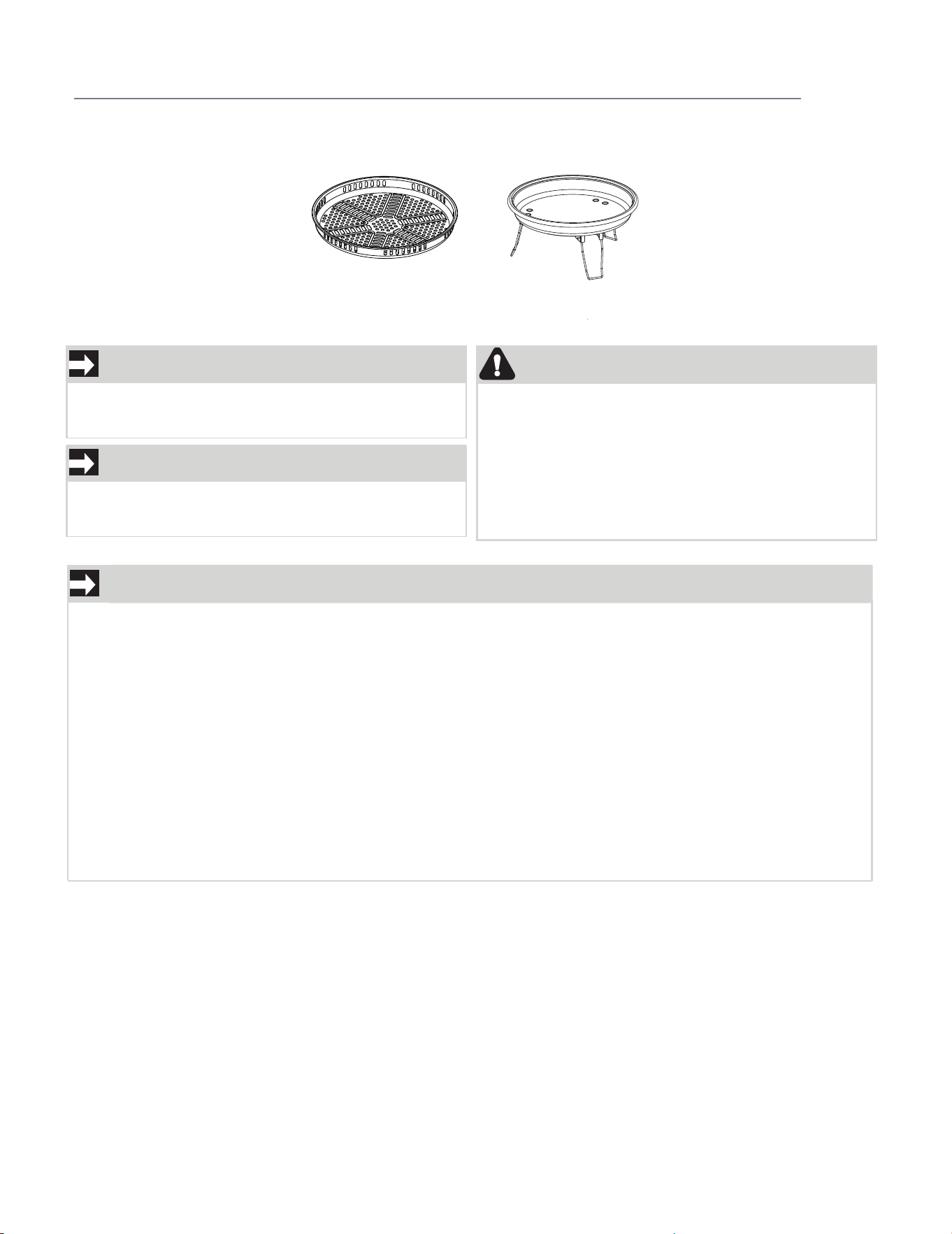
Air Fry Tray
Air Fry Pan
NAMES OF OVEN PARTS AND ACCESSORIES
NOTE
NOTE
CAUTION
The Air Fry Pan and Air Fry Tray are designed
for Air Fry cooking only and should not be used
for any other microwave cooking.
Always use oven mits when handling hot items.
The preheated Air Fry Pan and Air Fry Tray will
be hot.
Both Air Fry and Convection Cook use all the elements, and the convection fan. Convection is more
gradual than Air Fry and is intended for baking and roasting.
Convection can be used for all kinds of foods, sometimes even more than one food at a time!
Air Fry works differently than normal convection cooking. The convection element in Air Fry
oven is more powerful as a standard convection element.
The oven control's program for Air Fry is specifically designed for fried foods. When you put
your food in the oven, the hot air works the way hot oil does while frying: by completely
surrounding the food with intense, flowing heat.
These differences allow Air Fry to make and circulate superheated air that's hotter sooner. Air Fry is
intended for single rack cooking, so that hot air can circulate all around the food for the crunchiest
results, especially when using our Air Fry Tray!
NOTE
NOTE
The Round Wire Rack can be used for Convection
cooking and Microwave Cooking functions.
NOTE
NOTE
The wire rack can be used for microwave cooking
only.
9
OPERATION
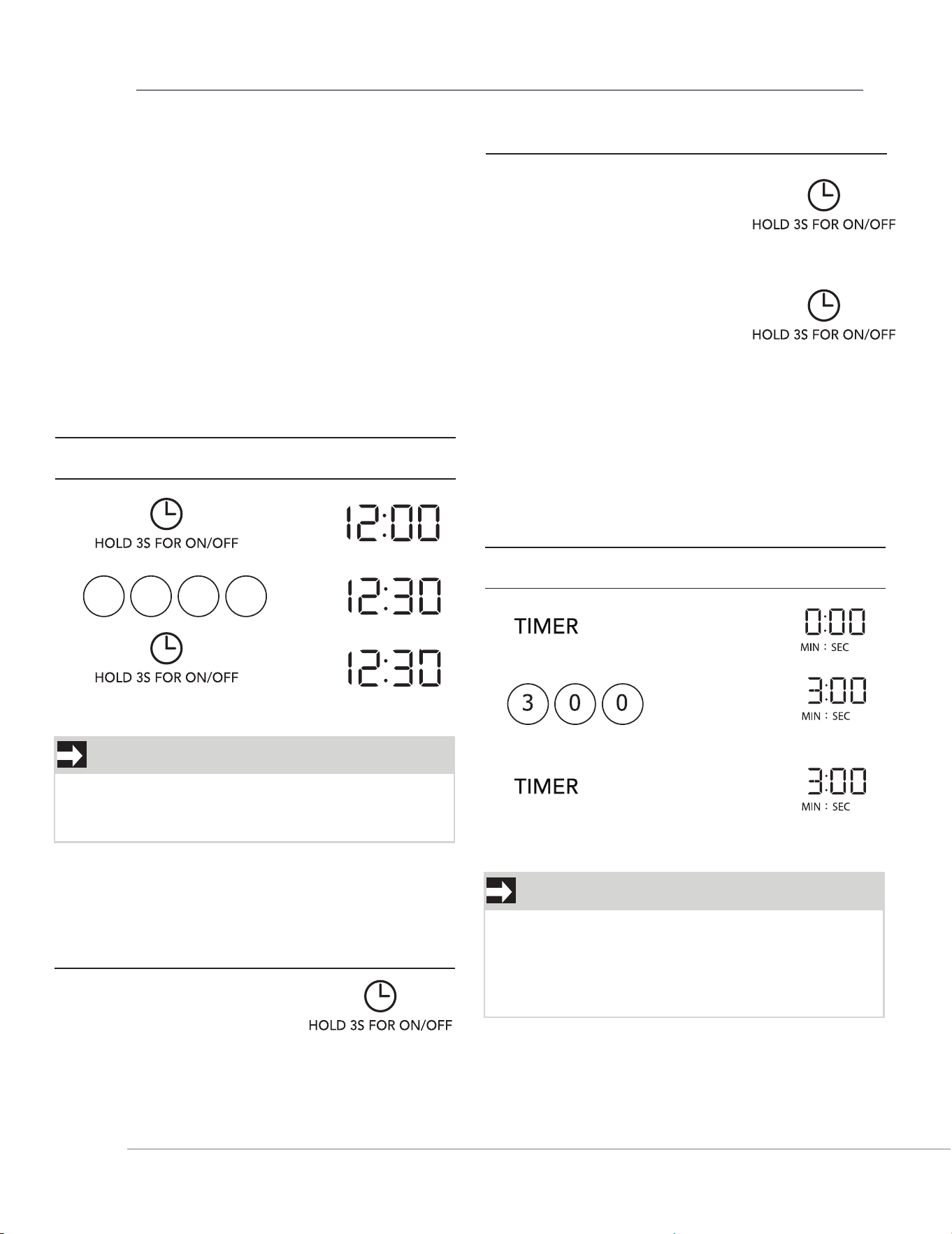
TO SET THE CLOCK
Suppose you want to enter the correct time of
day 12:30 (A.M or P.M.).
2.
3.
NOTE
When clock is in set mode and after 3 seconds of
no activity the clock will automatically set to the
time in the display.
NOTE
1. Opening the door during timer countdown will
not pause the running timer.
2. To cancel the active timer, press the CANCEL
key once.
3. Arrow button can be operated to set the time.
1.
1. Before operating your new oven make sure
you read and understand this Use and Care
Guide completely.
2. Before the Built-in Convention Microwave
Oven can be used, follow these procedures:
• Plug in the oven. Close the door. The oven
display will flash 12:00.
• If no operation after 1 minute, the oven will
show 12:01.
3. Set clock. See below.
Clock Display OFF.
2. Hold Clock button 3s,
display is OFF.
3. When display is off, Tap
(short press) will display
time for 3 sec.
1. Clock key (short press <1sec)
to enter the clock query state,
display "current clock" for
3 seconds and then return to
standby mode, the clock is
not displayed;
Touch Display Shows:
1 2 3 0
TO SET THE TIMER
Set the timer for 3 minutes.
2.
3.
1.
Touch Display Shows:
SETTING THE CLOCK ON/OFF
Clock display ON default.
1. Touch and hold pad.
2. Time will display, after 3s,
OFF will display.
O
FF
ON
Time counting down
10
11
OPERATION
CONTROL LOCK
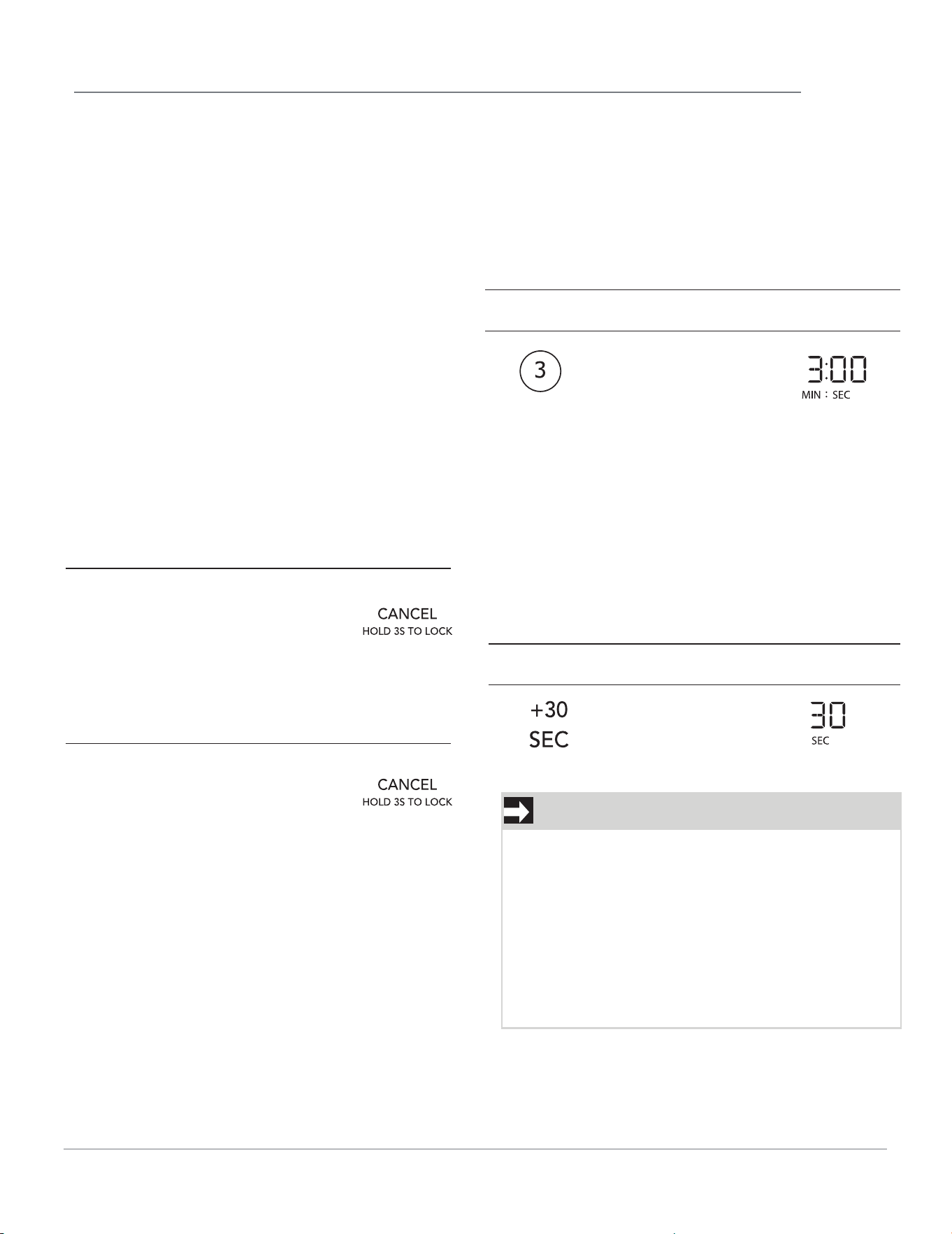
You may lock the control panel to prevent the
microwave from being accidentally started or
used by children.
The control lock feature is very useful when
cleaning the control panel. The lock will prevent
accidental programming when wiping the control
panel clean.
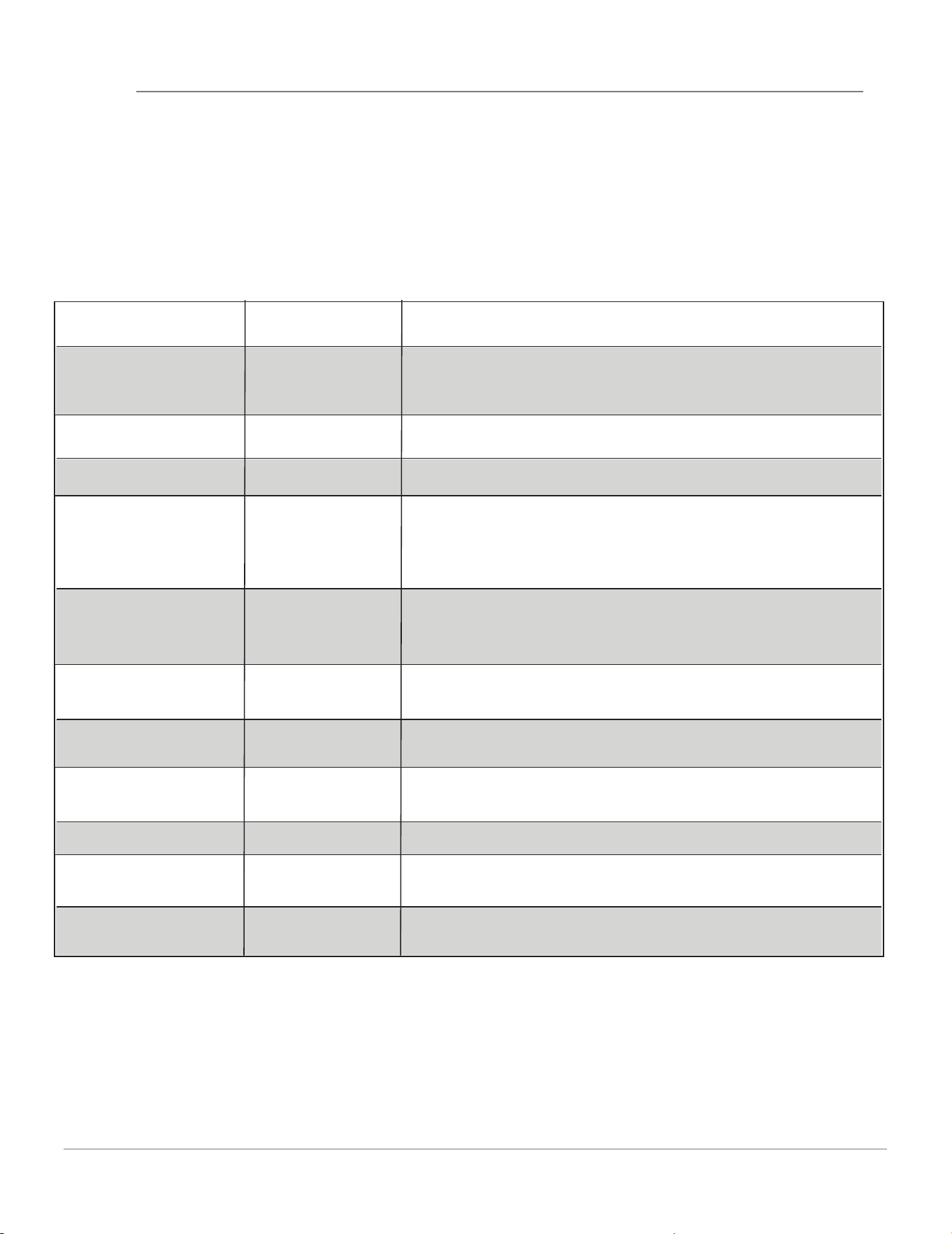
Example: to set the control lock ON:
NOTE
1. The cooking time can be extended for 30
seconds by pressing add 30 sec key (only in
manual cooking). The cooking time is extended
to a maximum of 99 minutes 99 seconds.
2. Touch <> once to drop or add 5 seconds.
3.“FOOD” will be displayed if a quick start cooking
cycle or +30 sec key is not selected within 5
minutes of placing food in the microwave. You
must open then close the door again to clear
''FOOD" from the display.
Suppose you want to cook 3 minutes at 100%power.
1.
1.
Touch Display Shows:
Touch Display Shows:
CANCEL
Press the CANCEL to:
1. Erase if you make a mistake during
programming.
2. Cancel timer and the signal after
cooking.
3. Cancel a program during cooking,
press once.
Touch and hold the CANCEL pad for
more than 3 seconds. The display will\\
Example: to change the control lock from
ON to OFF:
Touch and hold the CANCEL pad for
more than 3 seconds. The display will
Time counting
down automatically
after 2 seconds
Time counting down
USING ADD 30 SEC.
This is a time-saving pad. It is a simplified feature
that lets you quickly set and start microwave
cooking at 100% power.
Suppose you want to set and start microwave
cooking at 100% for 30 SEC.
USING ONE TOUCH START
This is a time saving pad that will automatically
start cooking 2 seconds after selected. Numeric
key 1 to 9 can be touched for a 1 minute to
9 minutes automatic start cooking feature.
show UNLOCK for 2 seconds.
show LOCKED for 2 seconds.
OPERATION
12
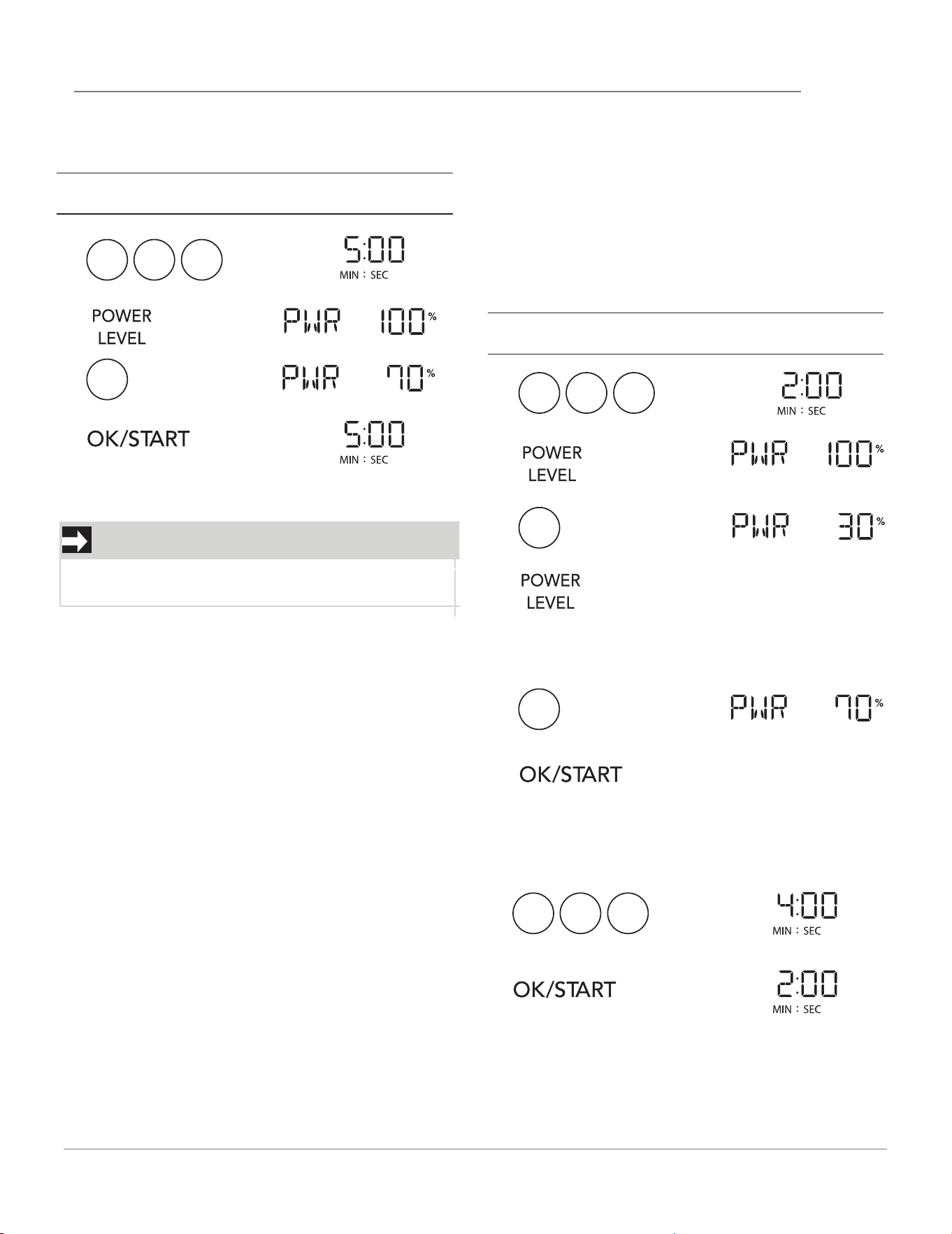
SETTING TIMED COOKING WITH
POWER LEVEL
This feature lets you program a specific cook
time and power. For best results, there are 11
power level settings in addition to HIGH (100%)
power. Refer to the "Microwave Power Levels"
table.
COOK POWER
100% of full power
LEVEL WHEN TO USE IT
High
• Quickly heating convenience foods and foods with
high water content, such as soup and beverages.
• Cooking tender cuts of meat, ground meat or chicken.
7 = 70% of full power Medium-High
• Cooking and heating foods that need a
Cook Power lower than High (for example, whole fish
and meat loaf) or when food is cooking too fast.
• Reheating a single serving of food.
5 = 50% of full power Medium
• Cooking ham, whole poultry, and pot roasts.
• immering stews.
1 = 10% of full power Low
• Keeping food warm.
• Taking chill out of fruit.
3 = 30% of full power
Medium-Low,
Defrost
• Manually defrosting pre-cooked and other foods,
such as bread, fish, meats and poultry.
8 = 80% of full power
• Heating rice, pasta, or casseroles.
9 = 90% of full power
• Heating cream soups.
6 = 60% of full power
• Cooking that requires special care, such as
cheese and egg dishes, pudding, and custards.
• Finishing cooking casseroles.
4 = 40% of full power
• Melting chocolate.
• Heating pastries.
2 = 20% of full power • oftening butter, cheese, and ice cream.
0 = 0% of full power None • Standing time in oven.
OPERATION
13
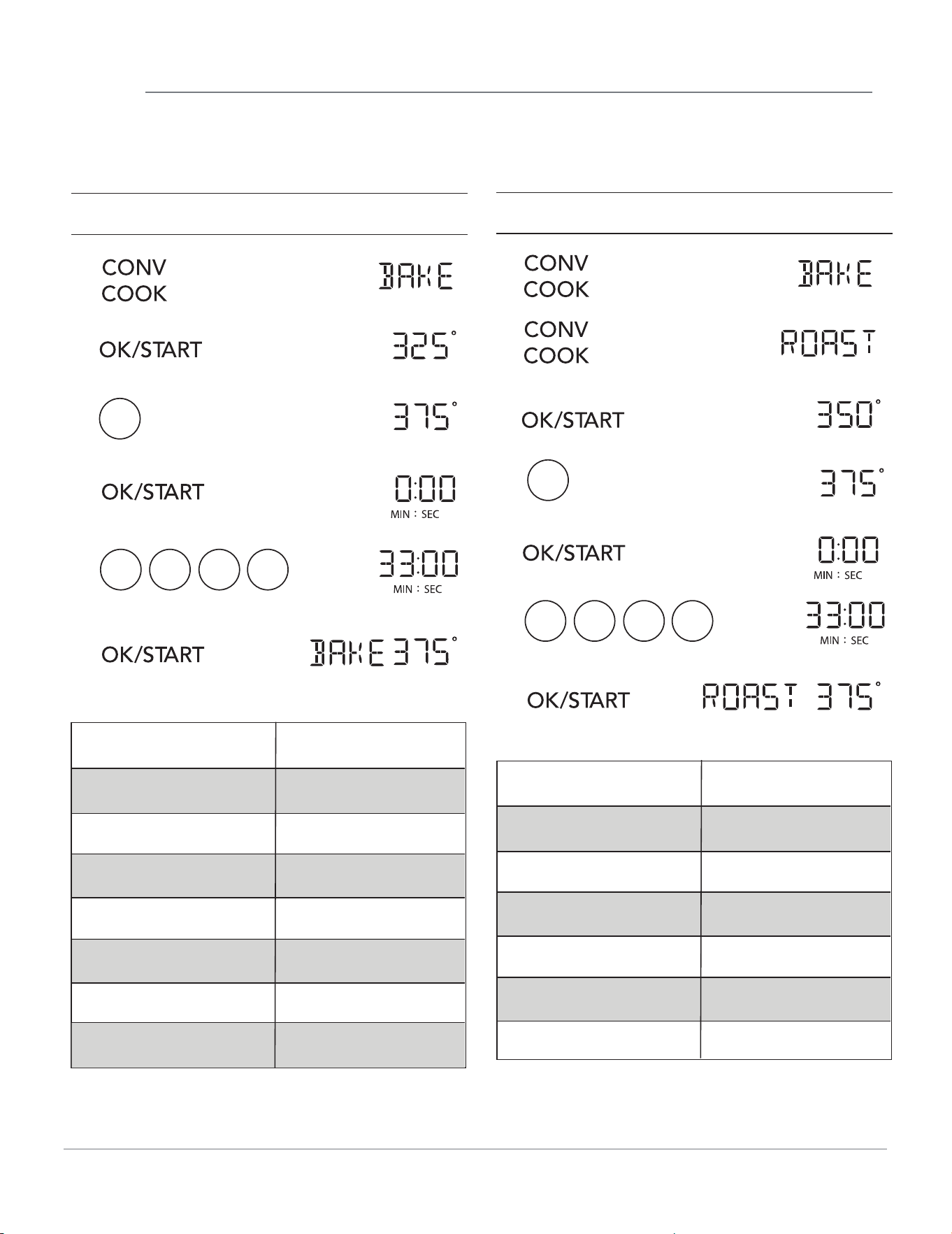
NOTE
If you do not select a power level, the oven will
automatically cook at HIGH (100%) power.
1.
2.
3.
4.
Touch Display Shows:
Suppose you want to cook for five minutes at
70% power.
5 0 0
7
Time counting down
To set a 2-stage cook cycle. The first stage is a
2 minutes cook time at 30% cook power then a
4 minutes cook time at 70% cook power.
Touch Display Shows:
SETTING TWO-STAGE COOKING
For best results, some recipes call for different
power levels during a cook cycle. You can
program your oven for two power level stages
during the cooking cycle.
4.
1.
2.
2 0 0
3.
3
“ ENTER STAGE 2 POWER
PRESS OK " will show on the
display.
“ ENTER STAGE 2 COOK TIME
PRESS START " will show on
the display.
When the first stage finishes, the oven
will beep. "FIRST STAGE DONE" will
show on the display. The second stage
starts automatically.
5.
7
4 0 0
7.
6.
8.
Time counting down
Bake (Deg F) Key
5
6
3
4
OPERATION
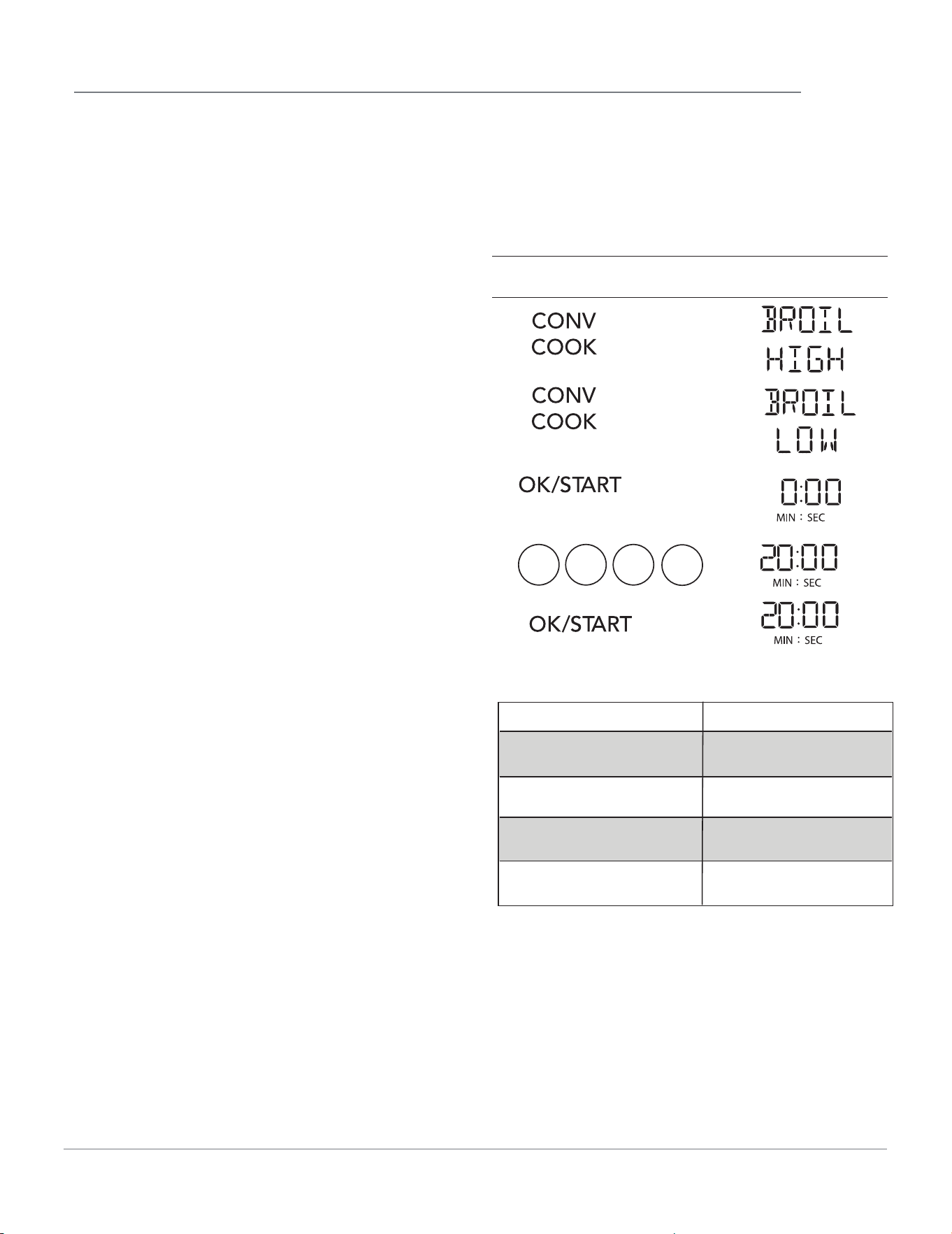
CONVECTION BAKE
Suppose you want to bake 33 min at 375 degree.
Touch Display Shows:
4.
1.
2.
3.
5.
6.
3
7
3 0 0
then time counting down
7
8
250
300
325(Default)
350
375
400
9
425
CONVECTION ROAST
Suppose you want to roast 33 min at 375 degree.
Touch Display Shows:
4.
1.
2.
3.
5.
7
7.
6.
3 3 0 0
then time counting down
Roast (Deg F) Key
6
7
4
5
8
9
300
325
350(Default)
375
400
425
14
OPERATION
Touch Display Shows:
CONVECTION Broil/Grill COOKING
The broil / grill touch pad lets you broil at a high
or low setting and also cook fresh and frozen
pizza. See table below.
Suppose you want to broil or grill for 20 minutes
with the low level.
5.
Time counting down
1.
2.
3.
4.
2 0 0
0
X3
TIPS FOR CONVECTION COOKING
This section gives you cooking instructions and
procedures for operating each convection
function. Please read these instructions carefully.
Convection cooking circulates hot air through the
oven cavity with a fan. The constantly moving air
surrounds the food to heat the outer portion
quickly, creating even browning and sealed-in
flavor by the constat motion of hot air over the
food surfaces. Your oven uses convection cooking
whenever you use the Convection Button. DO
NOT USE THE OVEN WITHOUT THE TURNTABLE
IN PLACE.
1. Do not
cover turntable or metal rack with
aluminum foil. It interferes with the flow of air that
cooks the food.
2. Round pizza pans are excellent cooking utensils
for many convection-only items. Choose pans that
do not have extended handles.
3. Use convection cooking for items like souffles,
breads, cookies, angel food cakes, pizza, and for
some meat and fish.
4. You do not need to use any special techniques to
adapt your favorite oven recipes to convection
cooking; however, you need to lower oven
temperature by 25°F from
recommended temperature mentioned in package
instructions when cooking packaged food in
convection mode.
5. When baking cakes, cookies, breads, rolls, or other
baked foods, most recipes call for preheating.
Preheat the empty oven just as you do a regular
oven. You can start heavier dense foods such as
meats, casseroles, and poultry without preheating.
6. All heat-proof cookware or metal utensils can be
used in convection cooking.
7.
U
s
e metal utensils only for convection cooking.
Never use for microwave or combination cooking
since arcing and damage to the oven may occur.
8.
A
fter preheating, if you do not open the door, the
oven will automatically hold at the preheated
temperature for 30 minutes.
PRECAUTIONS
• The oven cavity, door, metal turntable tray,
ceramic tray, metal rack, and cooking utensils will
become very hot. USE THICK OVEN GLOVES
when removing the food, cooking utensils, metal
turntable tray, ceramic tray, metal rack from the
over after convection cooking.
• Do not use lightweight plastic containers, plastic
wraps, or paper products during any convection.
• For fresh pizza use a pizza paddle for sliding the
pizza on and from the metal turntable.
• If using a pizza paddle, sprinkle the paddle
liberally with cornmeal for ease in transferring the
dough to the metal turntable.
• Maximum size is 12 inches for fresh and frozen pizzas.
• Avoid using a pizza stone as it can damage the
oven.
• The metal turntable can be used for cutting pizza
into slices. Remove the turntable from the oven
after the pizza is baked.
15
KEY PRESS Food
CONV COOK x1
CONV COOK x2
CONV COOK x3
CONV COOKx4
Bake
Roast
Broil high
Broil low
Pizza tips
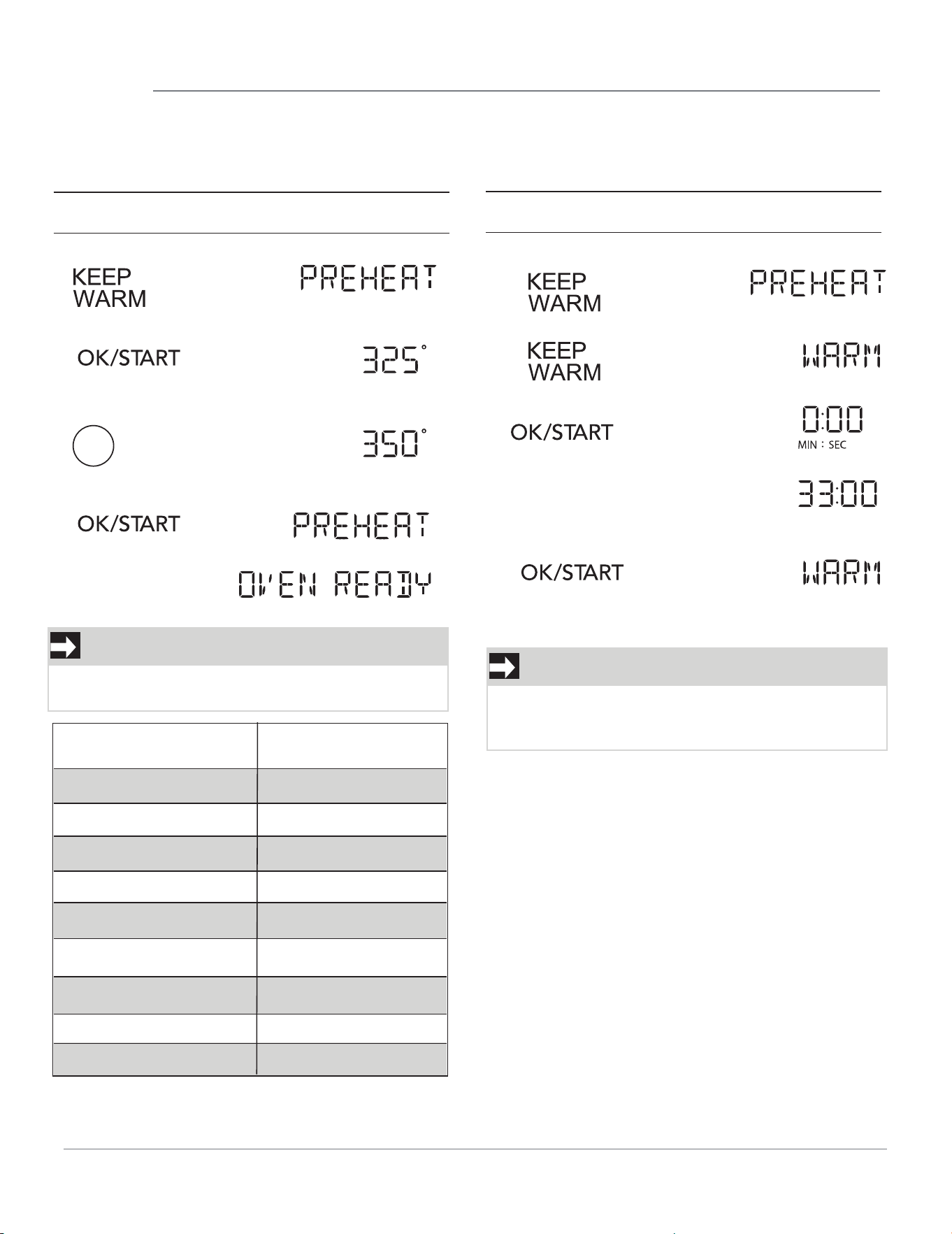
OPERATION
PREHEAT
Suppose you want to preheat 350 degree.
Touch Display Shows:
Preheat (Deg F) Key
3
4
1
2
5
6
100
200
250
300
325 (Default)
9425
350
7375
8400
NOTE
The temperature range has 9 steps from 100F
0
to 425
0
F.
16
NOTE
If you do not set a keep warm time, just press
Convection Keep Warm then touch OK/START,
KEEP WARM
Suppose you want to keep warm for 33min.
Touch Display Shows:
• The keep warm function will work at 170°F and it can not be changed.
4.
1.
2.
3.
6
When set preheat
temp is reached.
1.
2.
>
.
3.
4.
5
you can keep warm up to 90 minutes.
9
OPERATION
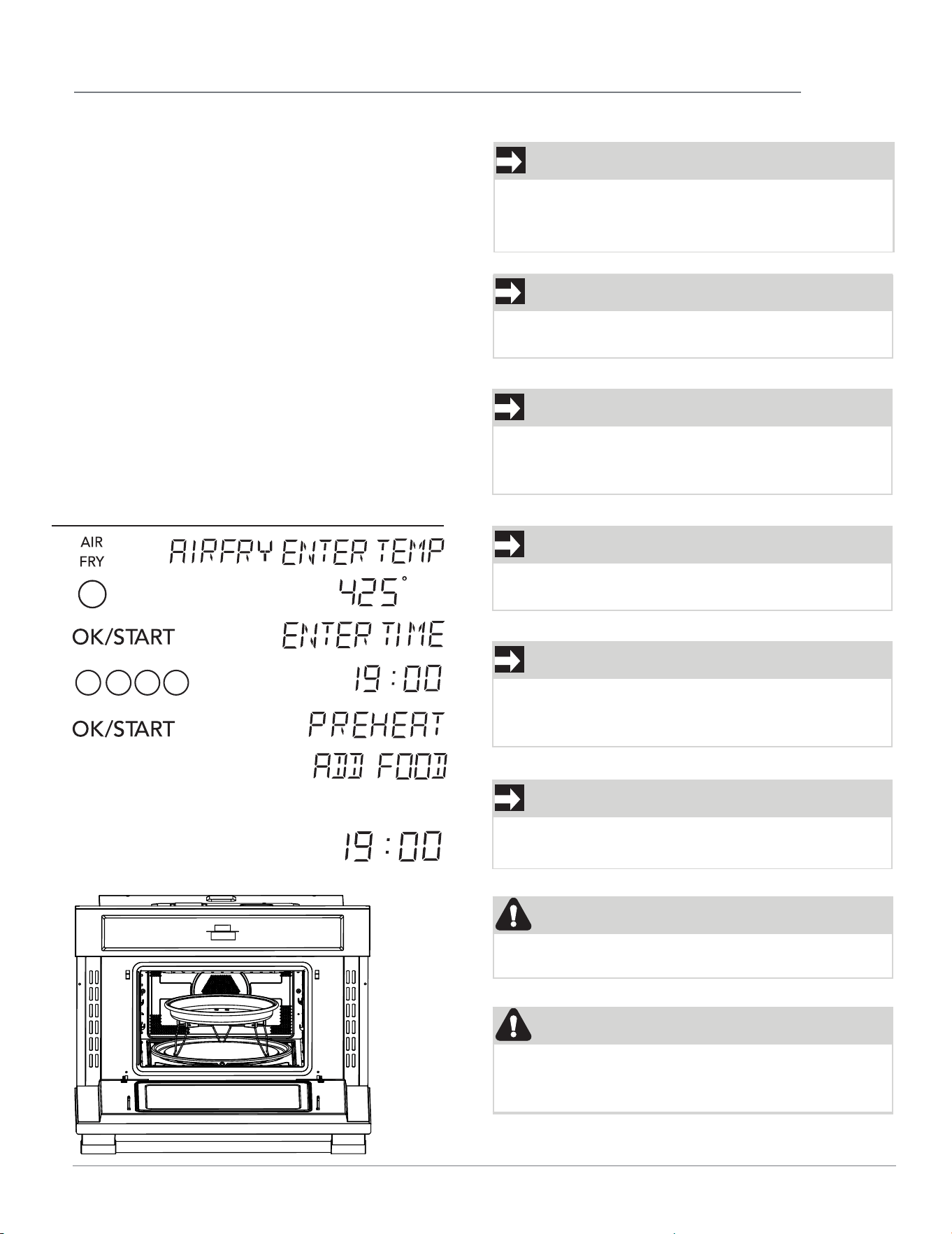
Air Fry
The Air Fry feature works best when using the Air
Fry Pan and Air Fry Tray with packaged and
convenience foods and can be programmed for
temperatures between 100°F and 425°F using
preset temperatures.
Follow the recipe or package directions for food
preparation quantity, time, and temperature.
Important:
• Air Fry is designed for baking on a single oven
rack. Food should be arranged in single layers on
the Air Fry Tray.
• Place Air Fry Pan on ceramic tray to preheat.
• Food may need to be removed early and should
be checked at minimum recommended bake time.
However, frozen dense foods and items with cook
times less than 15 minutes may require additional
time.
Suppose you want to Air Fry at
425°F
for 19
minutes.
Touch:
Display Shows:
1 9 0 0
•
NOTENOTE
NOTENOTE
When oven is preheated it will beep and the
display will show ADD FOOD. Place the Air Fry
T
r
ay with food into the Air Fry Pan.
NOTENOTE
CAUTION
17
NOTENOTE
The Air Fry pan, and tray have been designed
together and most food do not require flipping
during cooking.
NOTENOTE
When you Air Fry whole chicken, fold the Air Fry
pan legs down and place on the ceramic tray.
Should an oven fire occur, close the oven door and
turn the oven off. If the fire continues, use a fire
extinguisher. Do not put water or flour on the fire.
The preheated Air Fry collapsible pan will be hot
when placing the tray with food into the oven.
WARNINGWARNING
NOTENOTE
NOTENOTE
Oven temperature is reached.
Open the door and then put the food
Touch OK/START to start cooking.
Time counting down
Do not place the Air Fry Pan legs on the metal turntable
and
place on the ceramic tray which is on the metal turntable.
Preheat the Air Fry Pan
with the legs extended
Touch the +10 SEC or +30 SEC to add time during time
countdown. Adding time will not work during preheating.
When cooking is finished, the oven will beep to notice
removing food and the display will show COOLING.
1.
2.
3.
4.
5.
6.
7.
8.
into the oven. Close the door.
NOTE
1. Remove wire rack from oven before cooking
popcorn. Do not use regular paper bags. Do
not re-pop un-popped kernels. Do not pop
popcorn in glass cookware.
2. Use ceramic tray on top of metal tray to pop
popcorn.
3. Do not pop popcorn directly on metal turntable
tray.
4. Do not leave microwave oven unattended while
popping corn.
18
OPERATION
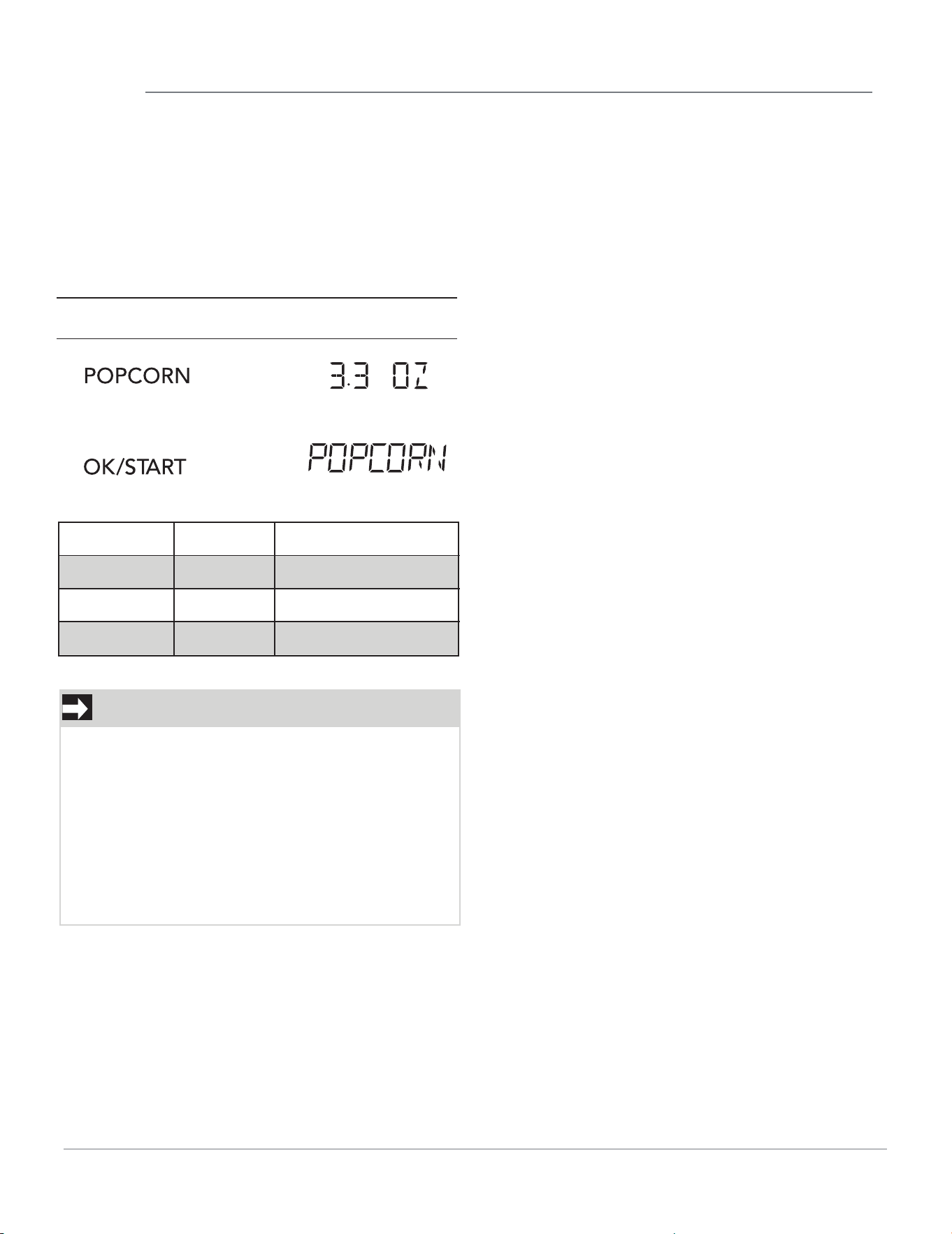
SETTING POPCORN
The Popcorn quick touch pad lets you pop 3.3, 3.0,
1.75 ounce bags of commercially packaged micro-
wave popcorn. Pop only one package at a time.
If you are using a microwave popcorn popper,
follow manufacturer's instructions.
Suppose you want to pop a 3.3 oz. popcorn
2.
Then time will count down
1.
Touch Display Shows:
Key press
Popcorn
Popcorn
Popcorn
Selection
3.3
3.0
1.75
Amount
3.3 oz (94g)
3.0 oz (85g)
1.75 oz (50g)
SENSOR OPERATING INSTRUCTIONS
Sensor Cook allows you to cook most of your
favorite foods without selecting cooking times and
power levels. The display will show the selected
food type during the initial sensing period.
The oven automatically determines required
cooking time for each food item. When the
internal sensor detects a certain amount of
humidity coming from the food, it will tell the oven
how much longer to heat. The display will show the
remaining heating time. For best results for
cooking by Sensor, follow these recommendations.
1. Food cooked with the sensor system should be at
normal storage temperature.
2. Always use microwavable containers.
3. Match the amount to the size of the container.
Fill containers at least half full for best results.
4. Be sure the outside of the cooking container and
the inside of the microwave oven are dry before
placing food in the oven. Beads of moisture
turning into steam can mislead the sensor.
5. Foods should always be covered with mic
rowavable plastic wrap, waxed paper, or a lid.
Never use tightsealing plastic covers. They can
prevent steam from escaping and cause food to
overcook.
6. Do not open the door or touch the CANCEL key
during the sensing time. When sensing time is over,
the oven beeps and the remaining cooking time
will appear in the display window. At this time you
can open the door to stir, turn, or rearrange the
food.
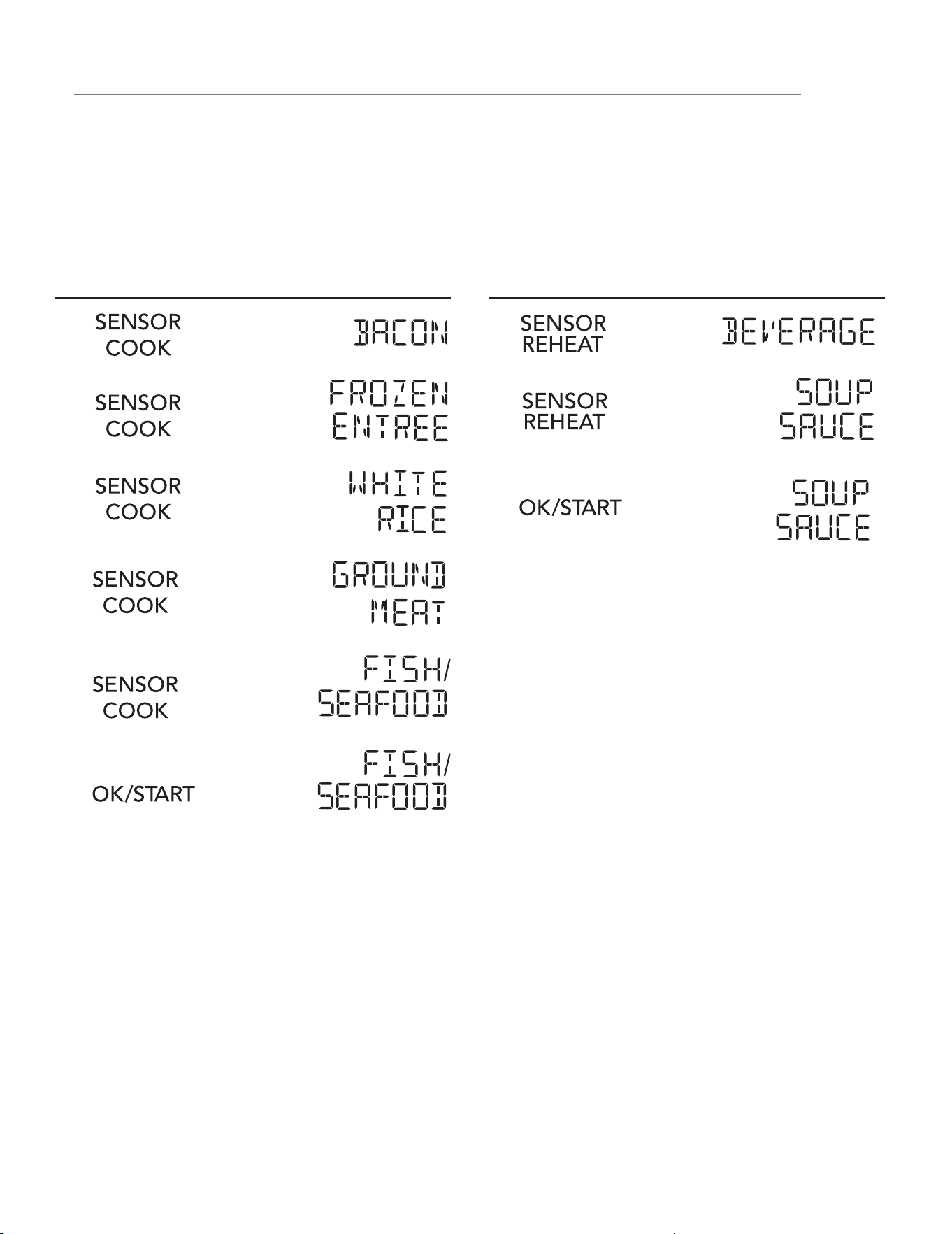
Touch Display Shows:
USING SENSOR COOK
Using SENSOR COOK lets you cook common
microwave-prepared foods without needing to
program times and cook powers.
Suppose you want to cook fish seafood with sensor.
Sensor Cook selections are made by touching
the Sensor Cook key multiple times.
4.
1.
2.
3.
Touch Display Shows:
USING SENSOR REHEAT
Using SENSOR REHEAT lets you reheat common
microwave-prepared foods without selecting
cooking times and power levels.
Suppose you want to reheat soup sauce.
Sensor Reheat selections are made by touching
the Sensor Reheat key multiple times.
1.
2.
3.
5.
6.
OPERATION
19
OPERATION
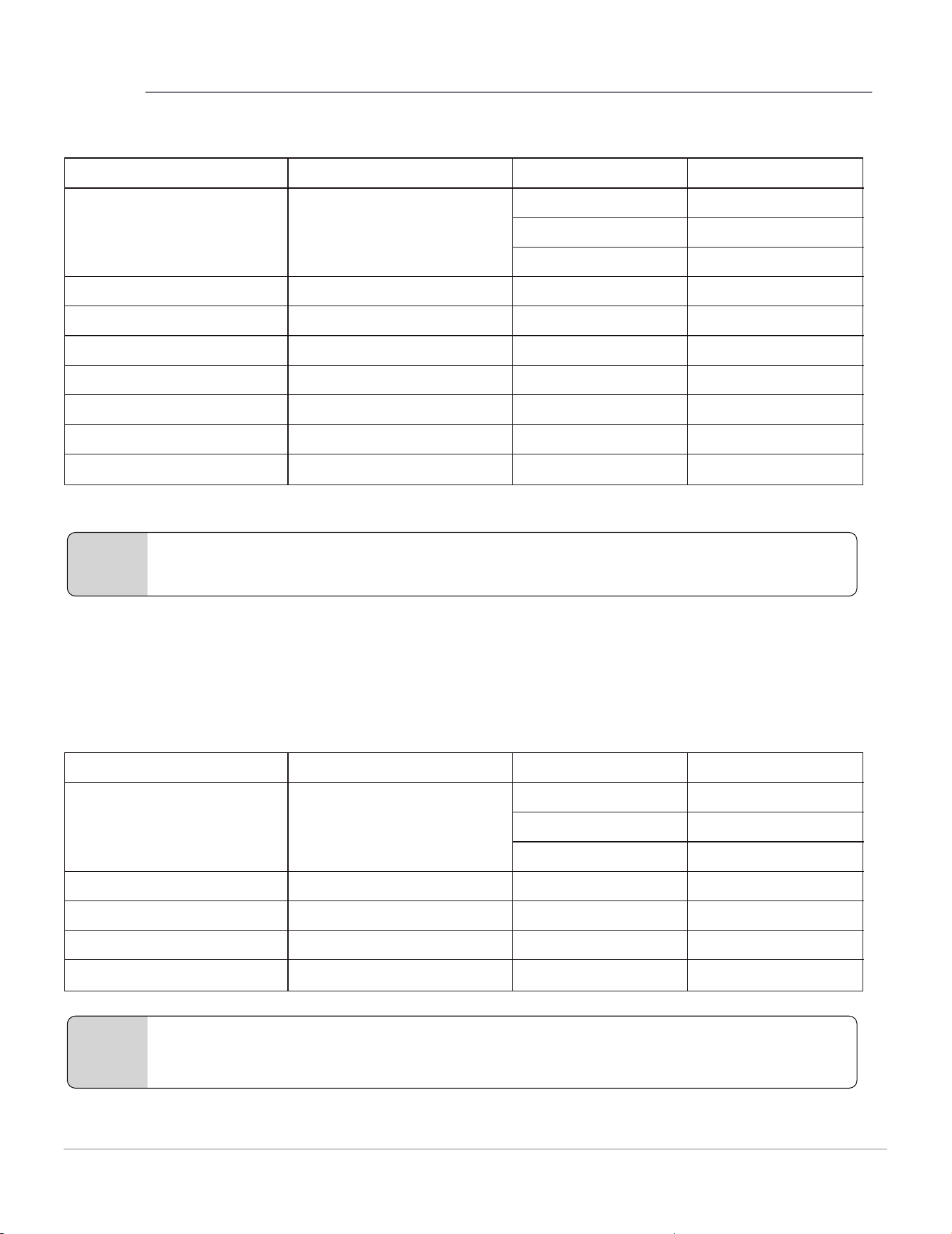
SENSOR COOK TABLE
SENSOR REHEAT TABLE
Display
1
2
1 slice
2 slices
BACON
3 3 slices
- 10 oz/20 oz
- 2-5 cups
- 8-24 oz
FROZEN ENTREE
WHITE RICE
GROUND MEAT
FISH/SEA FOOD
- 8-20 oz
POTATO - 1-4
FRESH VEGGIES - 1- 4 cups
FROZEN VEGGIES
Bacon
Frozen entree
White rice
Ground meat
Fish/Sea food
Potato
Fresh vegetables
Frozen vegetables - 1- 4 cups
The Number KeyFood Weight
Note
Display
1
2
1 cup (8oz)
2 cups (16 oz)
BEVERAGE
3 3 cups (24 oz)
- 1 - 2 cups
- 1 - 4 slices
- 1 plate
SOUP SAUCE
PIZZA
DINNER PLATE
CASSEROLE/PASTA
Beverage
Soup sauce
Pizza
Dinner plate
Casserole/pasta
- 1 serving
The Number KeyFood Weight
Note
.
20
• For the menu "BACON",after touching SENSOR COOK to select bacon function, touch the corresponding
number key or touch < or > to set the weight of the food, and then touch OK/START to start cooking.
• For the menu "BEVERAGE",after touching SENSOR REHEAT to select beverage function, touch the
corresponding number key or touch < or > to set the weight of the food, and then touch OK/START to start
cooking.
OPERATION
1.
2.
3.
4.
5.
Touch Display Shows:
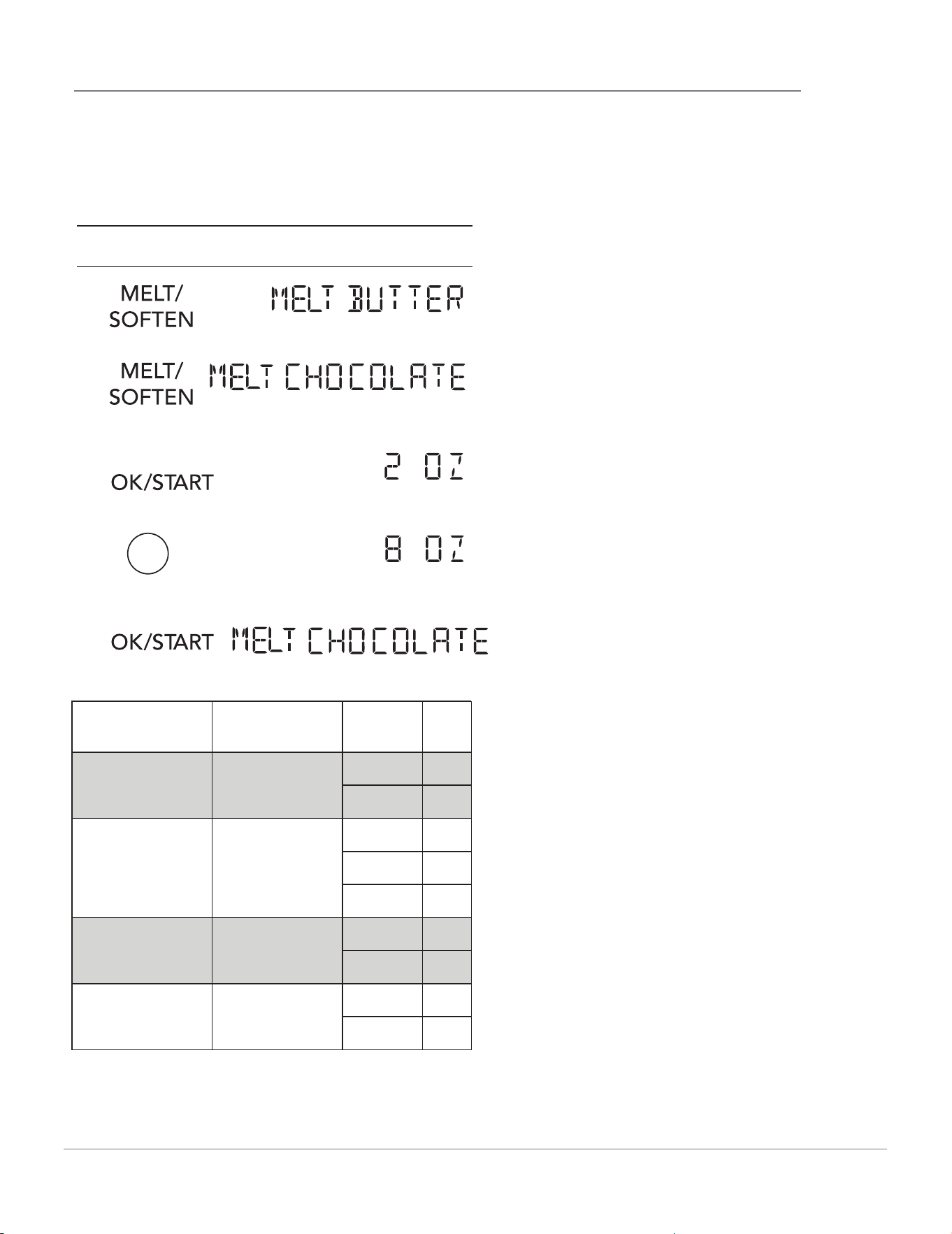
SETTING MELT/SOFTEN
The oven uses low power to melt and soften
items. See the following table.
Suppose you want to melt 8 oz. of Chocolate.
8
then time will count down
K
E
Y KE
Y
Melt / Soften x1
Melt / Soften x2
Melt / Soften x3
Melt / Soften x4
Food Amount
Melt Butter
1 stick 1
2 sticks 2
2 oz. 2
4 oz. 4
8 oz. 8
1 Pint 1
1/2 gallons 2
3 oz. 3
8 oz. 8
Melt Chocolate
Soften Ice
Cream
Soften Cream
Cheese
21
KEY
PRESS
Defrost
Defrost
Defrost
Category
Meat
Poultry
Fish
WEIGHTS YOU CAN
SET (tenths of a
pound)
0.1 to 6.0
0.1 to 6.0
0.1 to 6.0
OPERATION
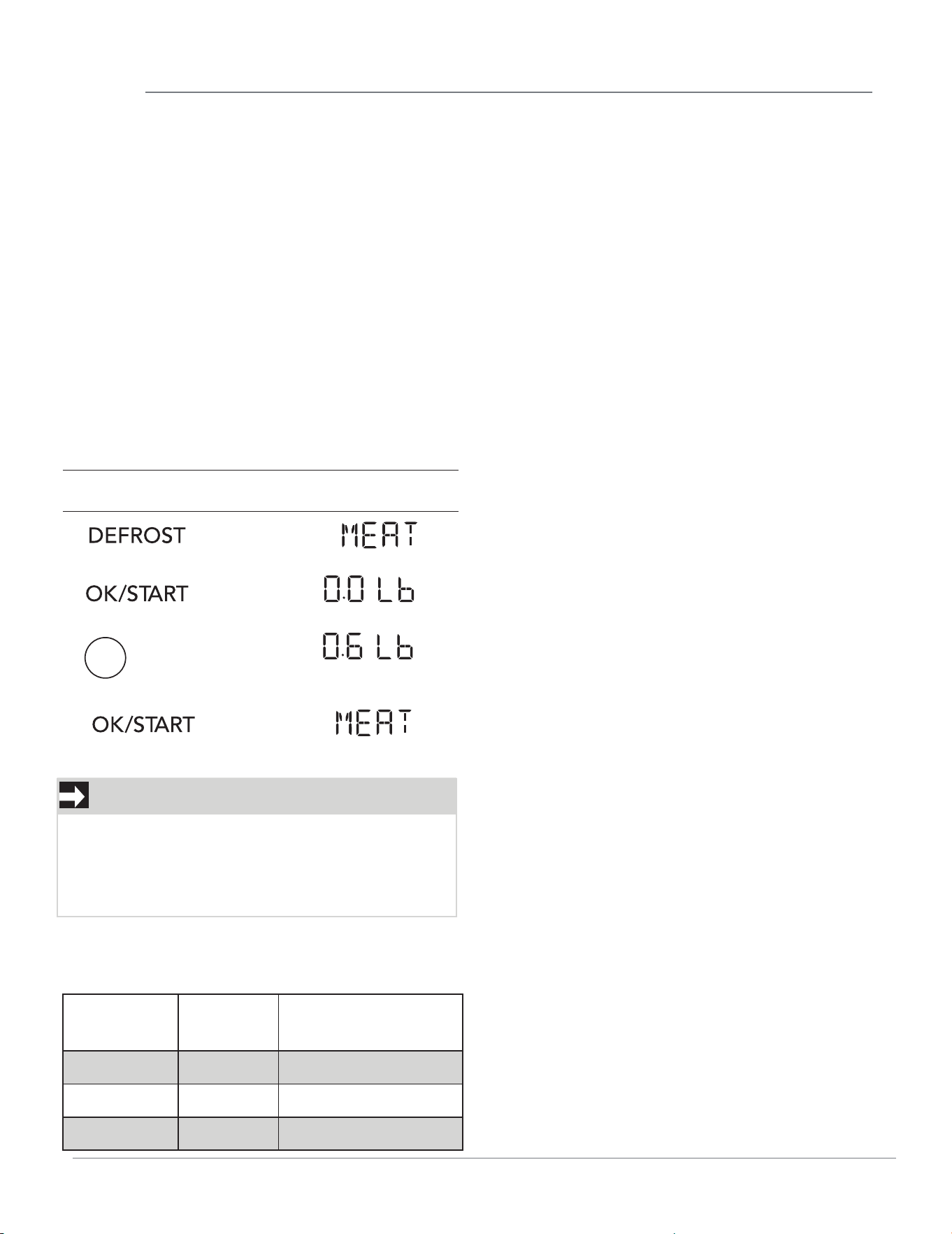
USING AUTO DEFROST
Three defrost sequences are preset in the oven.
The auto defrost feature provides you with the
best defrosting method for frozen foods.
The cooking guide will show you which defrost
sequence is recommended for the food you are
defrosting.
For added convenience, the Auto Defrost
includes a built in beep mechanism that reminds
you to check, turn over, separate, or rearrange
the food in order to get the best defrost results.
Three different defrosting levels are provided:
This table shows food type selections and the
weights you can set for each type. For best
results, loosen or remove covering on food.
1. MEAT
2.POULTRY
3.FISH
Available weight is 0.1-6.0 lbs.
Suppose you want to defrost 0.6 lbs of meat.
Touch Display Shows:
1.
2.
3.
4.
6
Then time will count down
OPERATING TIPS
• For best results, remove fish, shellfish,meat, and
poultry from its original closed paper or plastic
package (wrapper). Otherwise, the wrap will hold
steam and juice close to the foods, which can
cause the outer surface of the foods to cook.
• For best results, roll your ground meat into a ball
before freezing. During the DEFROST cycle, the
microwave will signal when it is time to turn the
meat over. Scrape off any excess frost from the
meat and continue defrosting.
• Place foods in a shallow containers or on a
microwave roasting rack to catch drippings.
NOTE
The oven will beep during the DEFROST cycle.
At this time, open the door and turn, separate, or
rearrange the food. Remove any portions that
have thawed. Return frozen portions to the oven
and touch OK/START to resume the defrost cycle.
DEFROSTING TIPS
• When using Auto Defrost, the weight to be
entered is the net weight (the weight of the food
minus the container).
• Before starting, make sure to remove any and all
metal twist-ties that often come with frozen food
bags, and replace them with strings or elastic
bands.
• Open containers, such as cartons, before placing
in the oven.
• Always slit or pierce plastic pouches or
packaging.
• If food is foil wrapped, remove foil and place
food in a suitable container.
• Slit the skin of skinned food, such as sausage.
• Bend plastic pouches of food to ensure even
defrosting. Always under estimate defrosting
time. If defrosted food is still icy in the center,
return it to the microwave oven for more
defrosting.
• The length of defrosting time varies according to
how solidly the food is frozen.
• The shape of the package affects how quickly
food will defrost. Shallow packages will defrost
more quickly than a deep block.
• As food begins to defrost, separate the pieces.
Separated pieces defrost more easily.
• Use small pieces of aluminum foil to shield parts
of food such as chicken wings, leg tips, fish tails,
or areas that start to get warm. Make sure the foil
does not touch the sides, top, or bottom of the
oven. The foil can damage the oven lining.
• For better results, let food stand after defrosting.
(For more information on standing time, see the
"Microwave Cooking Tips" section).
• Turn over food during defrosting or standing
time. Break apart and remove food as required.
22
OPERATION
USER REFERENCE
This section gives instructions for operating
each function. Please read this section carefully.
USER PREF
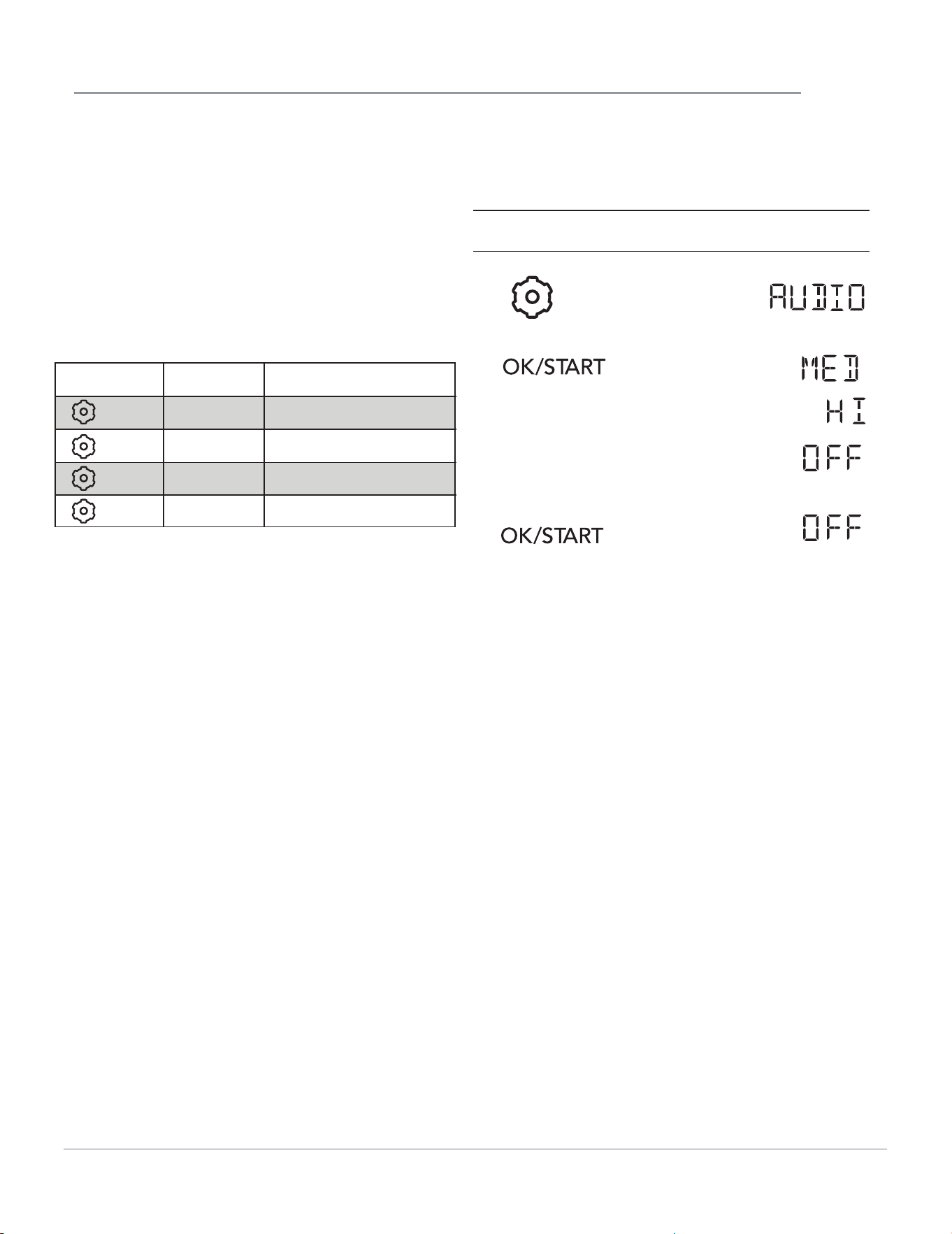
The microwave oven has settings that allow you
to customize the operation for your convience.
Below is the table showing the various settings.
Touch the User Pref key multiple times to scroll
to the desired setting function.
>
>
Display for 2 seconds then clear.
SETTING AUDIO LOW/MED/HIGH/OFF
Suppose you want to turn on the Audio Off.
Touch Display Shows:
4.
1.
2.
3.
5.
Key
x 1
x 2
x 3
Food Level
Audio
Weight
Language
Low / Med / High / OFF
Lbs / KG
English / French
x 4
Demo Mode ON / OFF
23
OPERATION
Display for 2 seconds then clear.
1.
2.
4.
3.
5.
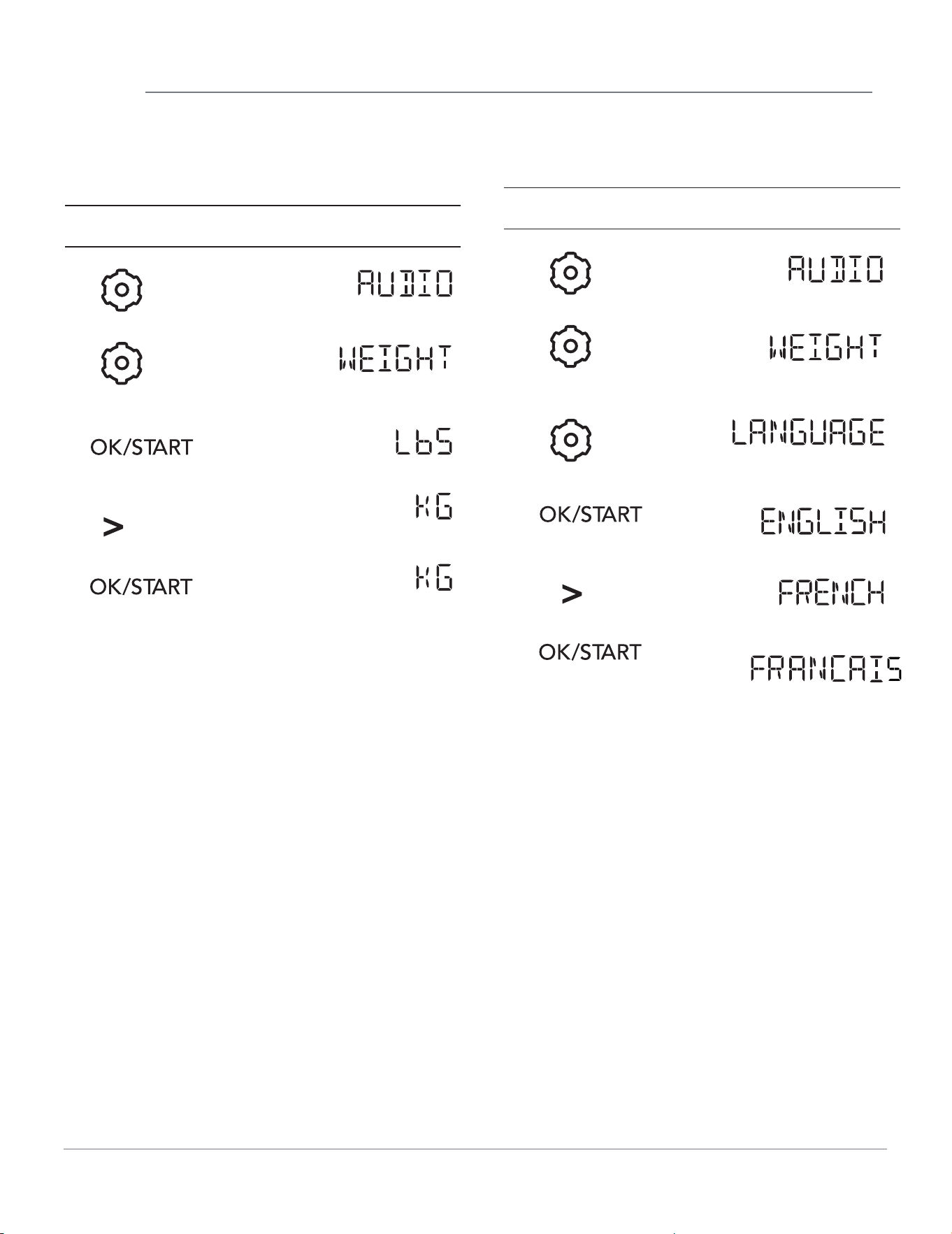
SETTING WEIGHT LBS/KG
Suppose you want to toggle weight between
pounds & kilograms.
Touch Display Shows:
SETTING LANGUAGE MODE
Suppose you want to enter Language Mode.
Touch Display Shows:
Display for 2 seconds then clear.
1.
2.
3.
5.
4.
6.
24
OPERATION
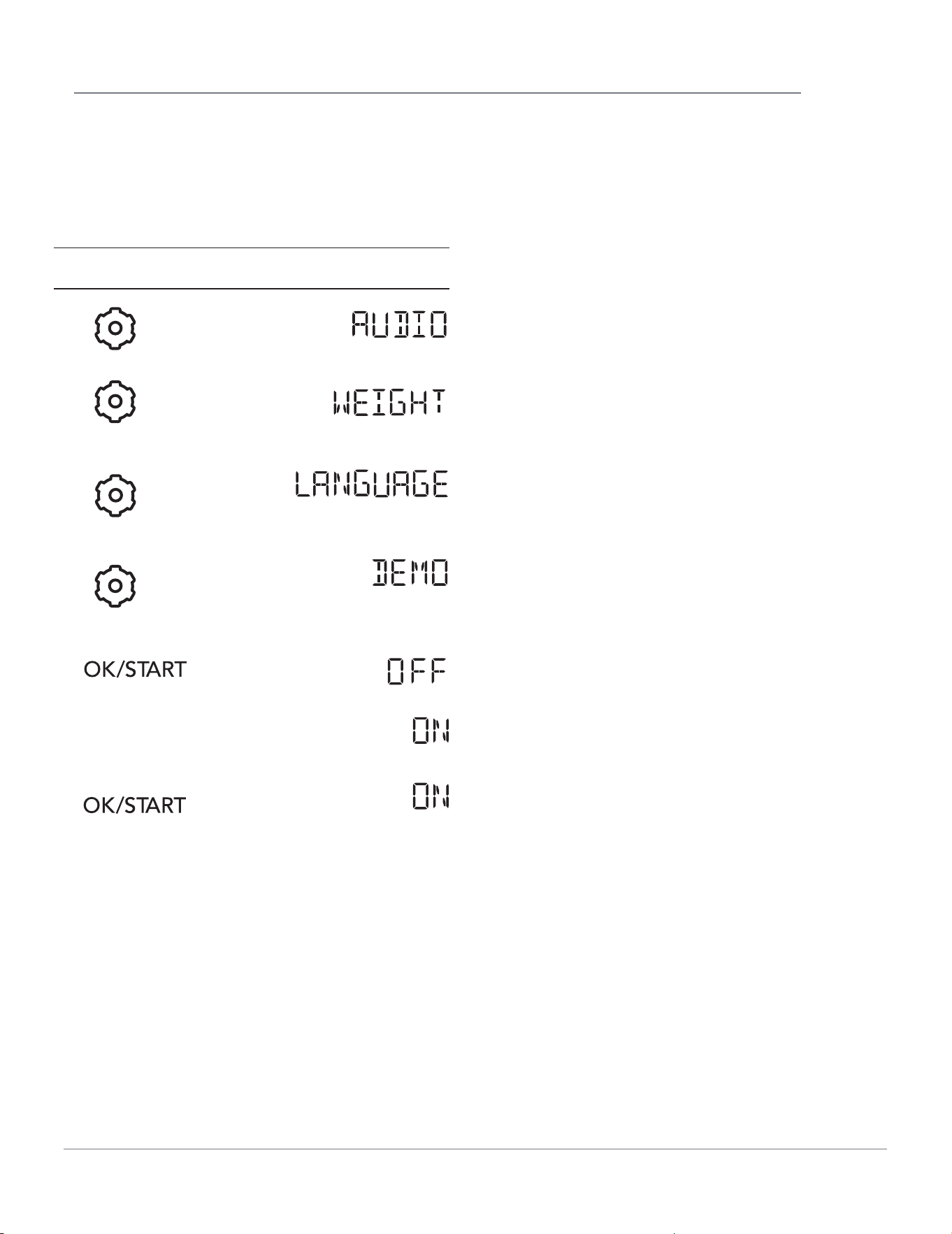
SETTING DEMO MODE
Suppose you want to enter Demo Mode. When
Demo mode is ON programming functions will
work in a rapid countdown mode with no cooking
power.
Touch Display Shows:
>
Display for 2 seconds then clear.
1.
2.
3.
4.
6.
5.
7.
25
T
roubleshooting
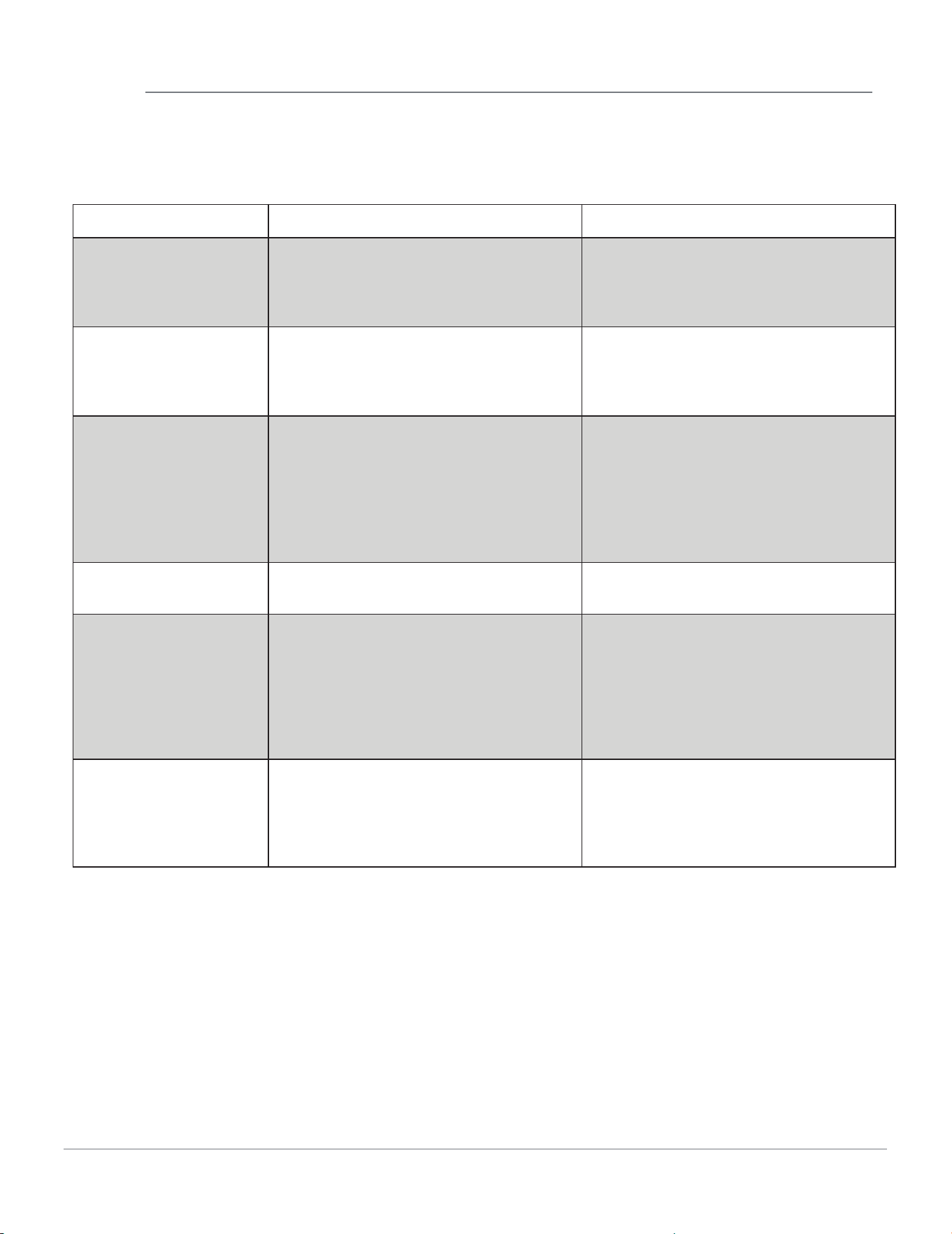
Check your problem by using the chart below and try the solutions for each problem. If the
microwave oven still does not work properly, contact the nearest authorized service center.
TROUBLE POSSIBLE CAUSE POSSIBLE REMEDY
Oven will not start
• Electrical cord for oven is not
plugged in.
• Door is open.
• Wrong operation is set.
• Plug into the outlet.
• Close the door and try again.
• Check instructions.
Arcing or sparking
• Materials to be avoided in
microwave oven were used.
• The oven is operated when empty.
• Spilled food remains in the cavity.
• Use microwave-safe cookware only.
• Do not operate with oven empty.
• Clean cavity with wet towel.
Unevenly cooked
foods
• Materials to be avoided in
microwave oven were used.
• Food is not defrosted completely.
• Cooking time, power level is not
suitable.
• Food is not turned or stirred.
• Use microwave-safe cookware only.
• Completely defrost food.
• Use correct cooking time, power
level.
• Turn or stir food.
Overcooked foods
• Cooking time, power level is not
suitable.
• Use correct cooking time, power
level.
Undercooked foods
• Materials to be avoided in
microwave oven were used.
• Food is not defrosted completely.
• Oven ventilation ports are
restricted.
• Cooking time, power level is not
suitable.
• Use microwave-safe cookware only.
• Completely defrost food.
• Check to see that oven venti-
lation ports are not restricted.
• Use correct cooking time, power
level.
Improper defrosting
• Materials to be avoided in
microwave oven were used.
• Cooking time, power level is not
suitable.
• Food is not turned or stirred.
• Use microwave-safe cookware only.
• Use correct cooking time, power
level.
• Turn or stir food.
MAINTENANCE
26

CLEANING AND CARE
EXTERIOR
The outside surface is precoated steel and
plastic. Clean the outside with mild soap and
water; rinse and dry with a soft cloth. Do not use
any type of household or abrasive cleaner.
DOOR
Disconnect the power cord or deactivate the
oven with setting Child Lock before cleaning to
prevent unexpected manipulation.
Wipe the window on both sides with a soft cloth
to remove any spills or spatters. Metal parts will
be easier to maintain if wiped frequently with a
soft cloth. Avoid the use of spray and other
harsh cleaners as they may stain, streak or dull
the door surface.
EASY CARE™ STAINLESS STE E L /
SMUDGE _PROOF™ STAINLESS STEE L /BLACK
STAINLESS STEEL(SOME MODELS)
Your microwave oven(some models) may have a
Stainless Steel finish or coating. Clean the stain-
less with warm soapy water using a clean
sponge or cloth. Rinse with clean water and dry
with a soft clean cloth. DO NOT use ANY store
bought cleaners like Stainless Steel cleaners or
any other types of cleaners containing any
abrasive, chlorides, chlorines or ammonia. It is
recommended to use mild dish soap and water
or a 50/50 solution of water and vinegar.
INTERIOR
Cleaning is easy because little heat is generated
to the interior surfaces; therefore, there is no
baking and setting of spills or spattering. To
clean the interior surfaces, wipe with a soft cloth
and warm water. DO NOT USE ABRASIVE OR
HARSH CLEANERS OR SCOURING PADS. For
heavier soil, use baking soda or a mild soap;
rinse thoroughly with hot water. The rack can be
cleaned with hot soapy water, rinsed and dried.
WAVEGUIDE COVER
The waveguide cover is located on the ceiling in
the microwave oven cavity. It is made from mica
so requires special care. Keep the waveguide
cover clean to assure good microwave oven
performance. Carefully wipe with a damp cloth
any food spatters from the surface of the cover
immediately after they occur. Built-up splashes
may overheat and cause smoke or possibly
catch fire. DO NOT REMOVE THE WAVEGUIDE
COVER.
ODOR REMOVAL
Occasionally, a cooking odor may remain in the
microwave oven. To remove, combine 1 cup
water, grated peel and juice of 1 lemon and
several whole cloves in a 2-cup glass measuring
cup. Boil for several minutes using 100% power.
Allow to set in microwave oven until cool. Wipe
interior with a soft cloth.
METAL TURNTABLE TRAY AND CERAMIC
TRAY;
The metal turntable tray and ceramic tray can
be removed for easy cleaning. Wash them in
mild, sudsy water. They are also
dishwasher-proof. Use upper rack of dishwasher.
The turntable motor shaft is not sealed, so
excess water or spills should be wiped up
immediately.
TOUCH CONTROL PANEL
Care should be taken in cleaning the touch
control panel. If the control panel becomes
soiled, open the microwave oven door before
cleaning. Wipe the panel with a cloth dampened
slightly with water only. Dry with a soft cloth. Do
not scrub or use any sort of chemical cleaners.
Disconnect the power cord before cleaning or leave the door open to deactivate
the oven during cleaning.
27
SERVICE CALL CHECK
SPECIFICATIONS
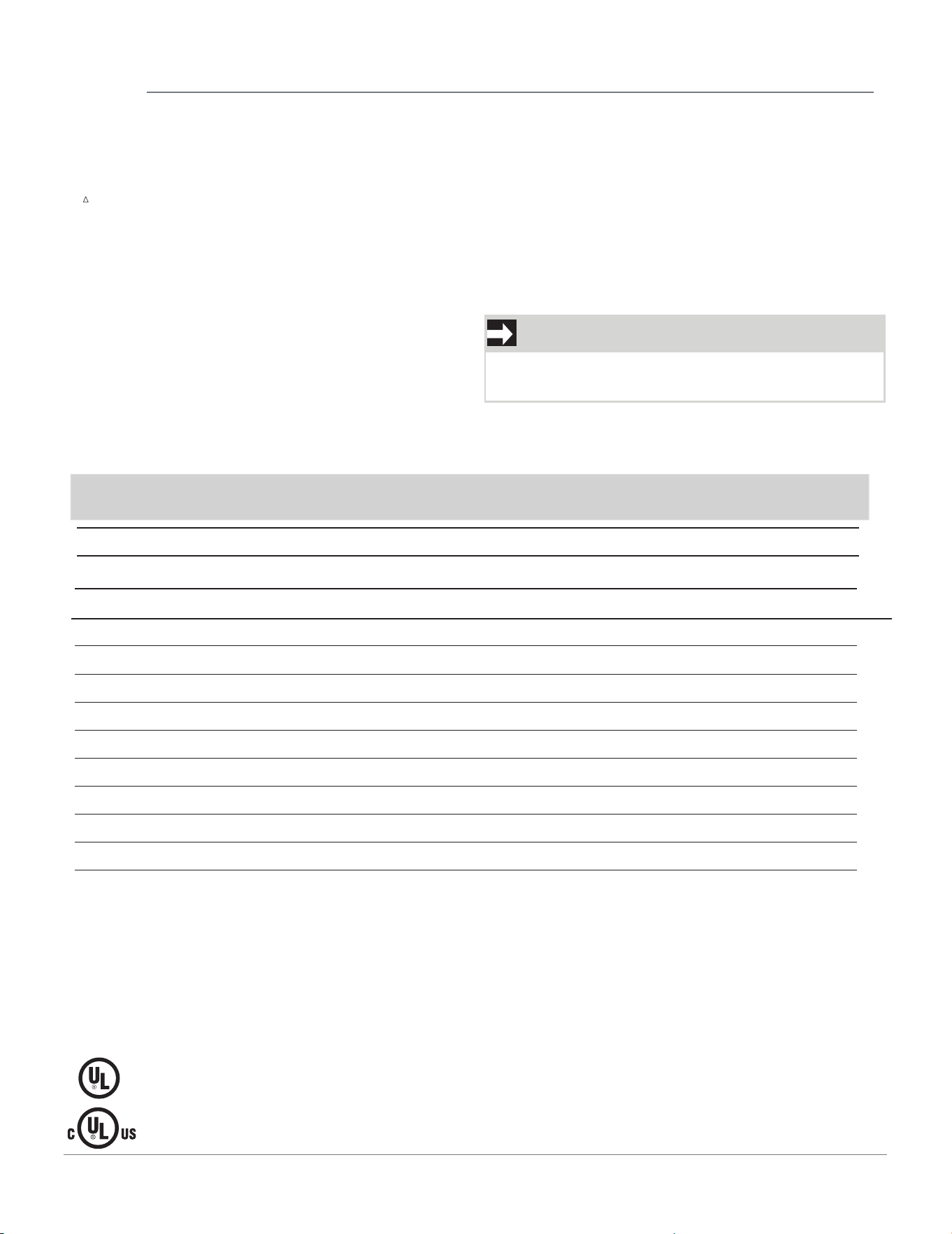
Please check the following before calling for service:
Place one cup of water in a glass measuring cup in the microwave oven and close the
door securely. Operate the microwave oven for one minute at HIGH 100%.
YES ____ NO ____
YES ____ NO ____
YES ____ NO ____
YES ____ NO ____
* The International Electiotechnical Commission's standardized method for measuring output wattage.
omplies with Department of Health and Human Services (DHHS) rule, CFR, Title 21, Chapter I,
DHHS -
C
Subchapter J.
Inc. for use in USA or Canada.
- This symbol on the nameplate means the product is listed by Underwriters Laboratories, Inc.
- This symbol on the nameplate means the product is listed by Underwriters Laboratories,
method is widely recognized. test method
**
This is the classification of ISM (Industrial, Scientific and Medical) equipment described in the International
Standard CISPR11.
***
Internal capacity is calculated by measuring maximum width, depth and height. Actual capacity for
holding food is less.
In compliance with standards set by:
F C - Federal Communications Commission Authorized.
A Does the microwave oven light come on?
B
Does the cooling fan work? (Put your hand at top above Display.)
C Does the turntable rotate? (It is normal for the turntable to turn in either
direction.)
Is the water in the microwave oven warm?
If “NO” is the answer to any of the above questions,
please check electrical outlet, fuse and/or circuit
breaker. If they are functioning properly, CONTACT
YOUR NEAREST ELECTROLUX AUTHORIZED
SERVICER.
A microwave oven should never be serviced by a
“do-it-yourself” repair person.
D
C
AC Line Voltage:
Single phase 120VAC, 60Hz, AC only
AC Power Required::
Output Power*: 1000 W
1700 W
Frequency: 2450 MHz(Class B/Group2)**
Outside Dimensions (including handle):
Cavity Dimensions:
Microwave oven Capacity***:
Cooking Uniformity: Turntable
Weight:
Oven Light:
19.08" X 29.88"X 25.44"
1750W 20A
1.6 Cu.Ft.
1.5W LED
9.84" X 16.54"X 16.54"
Approx. (net) 90.7 lbs , (gross) 105.8lbs
1. After starting the microwave function, if it does
NOTE
Input Power*(convection):
not heat, check whether it is DEMO mode.
1750 W
Input Power*(Airfry):
28
WARRANTY
1. Products with original serial numbers that have been removed, altered or cannot be readily determined.
2. Product that has been transferred from its original owner to another party or removed outside the USA or
Canada.
3. Rust on the interior or exterior of the unit.
4. Products purchased “as-is” are not covered by this warranty.
5. Food loss due to any refrigerator or freezer failures.
6. Products used in a commercial setting.
7. Service calls which do not involve malfunction or defects in materials or workmanship, or for appliances not
in ordinary household use or used other than in accordance with the provided instructions.
8. Service calls to correct the installation of your appliance or to instruct you how to use your appliance.
9. Expenses for making the appliance accessible for servicing, such as removal of trim, cupboards,
shelves, etc., which are not a part of the appliance when it is shipped from the factory.
10. Service calls to repair or replace appliance light bulbs, air fi lters, water fi lters, other consumables, or knobs,
handles, or other cosmetic parts.
11. Surcharges including, but not limited to, any after hour, weekend, or holiday service calls, tolls, ferry trip
charges, or mileage expense for service calls to remote areas, including the state of Alaska.
12. Damages to the fi nish of appliance or home incurred during installation, including but not limited to
fl oors, cabinets, walls, etc.
13. Damages caused by: services performed by unauthorized service companies; use of parts other than genuine
Electrolux parts or parts obtained from persons other than authorized service companies; or external causes
14. Labor costs after ninety (90) days from your original date of purchase incurred for product repair or
replacement as provided herein for carry-in appliances.
such as abuse, misuse, inadequate power supply, accidents, fi res, or acts of God.
L5V 3E4
Printed in China
Canada
1.800.265.8352
Electrolux Canada Corp.
5855 Terry Fox Way
Mississauga, Ontario, Canada
USA
1-800-374-4432
Electrolux Home Products,
Inc., 10200 David Taylor
Drive Charlotte, NC 28262
Your appliance is covered by a one year limited warranty. For one year from your original
date of purchase, Electrolux will pay all costs for repairing or replacing any parts of this
appliance that prove to be defective in materials or workmanship when such appliance is
installed, used and maintained in accordance with the provided instructions.
This warranty does not cover the following:
CUSTOMER’S SOLE AND EXCLUSIVE REMEDY UNDER THIS LIMITED WARRANTY SHALL BE PRODUCT REPAIR
OR REPLACEMENT AS PROVIDED HEREIN. CLAIMS BASED ON IMPLIED WARRANTIES, INCLUDING
WARRANTIES OF MERCHANTABILITY OR FITNESS FOR A PARTICULAR PURPOSE, ARE LIMITED TO ONE
YEAR OR THE SHORTEST PERIOD ALLOWED BY LAW, BUT NOT LESS THAN ONE YEAR. ELECTROLUX SHALL
NOT BE LIABLE FOR CONSEQUENTIAL OR INCIDENTAL DAMAGES SUCH AS PROPERTY DAMAGE AND
INCIDENTAL EXPENSES RESULTING FROM ANY BREACH OF THIS WRITTEN LIMITED WARRANTY OR ANY
IMPLIED WARRANTY. SOME STATES AND PROVINCES DO NOT ALLOW THE EXCLUSION OR LIMITATION OF
INCIDENTAL OR CONSEQUENTIAL DAMAGES, OR LIMITATIONS ON THE DURATION OF IMPLIED
WARRANTIES, SO THESE LIMITATIONS OR EXCLUSIONS MAY NOT APPLY TO YOU. THIS WRITTEN
WARRANTY GIVES YOU SPECIFIC LEGAL RIGHTS. YOU MAY ALSO HAVE OTHER RIGHTS THAT VARY FROM
STATE TO STATE.
If You Need Service
Keep your receipt, delivery slip, or some other appropriate payment record to establish the warranty period
should service be required. If service is performed, it is in your best interest to obtain and keep all receipts.
Service under this warranty must be obtained by contacting Electrolux at the addresses or phone
numbers below.
This warranty only applies in the USA and Canada. In the USA, your appliance is warranted by Electrolux Major
Appliances North America, a division of Electrolux Home Products, Inc. In Canada, your appliance is warranted by
Electrolux Canada Corp. Electrolux authorizes no person to change or add to any obligations under this warranty.
Obligations for service and parts under this warranty must be performed by Electrolux or an authorized service
company. Product features or specifi cations as described or illustrated are subject to change without notice.
29
welcome
home
Frigidaire.com
1-800-374-4432
Frigidaire.ca
1-800-265-8352
owner support
accessories
service
Our home is your home. Visit us if you
need help with any of these things:
registration
(See your registration card
for more information.)