USER MANUAL
READ AND SAVE THESE INSTRUCTIONS.
FOR RESIDENTIAL USE ONLY.
PLEASE LEAVE THESE INSTRUCTIONS WITH THIS UNIT FOR
THE OWNER.
PLEASE RETAIN THESE INSTRUCTIONS FOR FUTURE
REFERENCE.
IMPORTANT:
INSTALLER:
OWNER:
Rev.24.
12
2
THANK YOU FOR YOUR PURCHASE
Thank you for your purchase. We know that you have many brands and
products to choose from and we are honored to know that you have decided
to take one of our products into your home and hope that you enjoy it.
COSMO Appliances are designed according to the strictest safety and
performance standard for the North American market. We follow the most
advanced manufacturing philosophy. Each appliance leaves the factory after
thorough quality inspection and testing. Our distributors and our service
partners are ready to answer any questions you may have regarding how to
install, use and care for your products. We hope that this manual will help you
learn to use the product in the safest and most effective manner.
Before using this product, please read through this manual carefully. Keep
this user manual in a safe place for future reference. Please ensure that other
persons using this product are familiar with these instructions as well.
If you have any questions or concerns, please contact the dealer from whom you
purchased the product, or contact our Customer Support at:
1-888-784-3108
Reach us online at:
www.cosmoappliances.com
3
TABLE OF CONTENTS
DISHWASHER SAFETY ........................................................................................ 4
Important Safety Instructions ................................................................................. 5
FEATURES ............................................................................................................ 6
OVERVIEW ........................................................................................................... 7
Package Contents ..................................................................................................... 7
Interior ......................................................................................................................... 7
Control Panel ............................................................................................................. 7
SETTING UP YOUR DISHWASHER ...................................................................... 8
Finding a Suitable Location ..................................................................................... 8
Before Using Your Dishwasher ............................................................................... 8
USING YOUR DISHWASHER ............................................................................... 9
Using the Control Panel ........................................................................................... 9
Using the Child Lock ............................................................................................... 10
BASIC OPERATIONS ............................................................................................ 11
Preparing and Loading Dishes ............................................................................... 11
Filling the Detergent Dispenser ............................................................................. .16
Filling the Rinse Aid Dispenser ................................................................................ 17
Factors Affecting Performance .............................................................................. 18
MAINTENANCE AND CARE ................................................................................ 19
Cleaning ..................................................................................................................... 19
Protecting Your Dishwasher for Long Periods of Non-use ............................... 22
SPECIFICATIONS ................................................................................................ 22
TROUBLESHOOTING ......................................................................................... .23
LIMITED WARRANTY .........................................................................................26
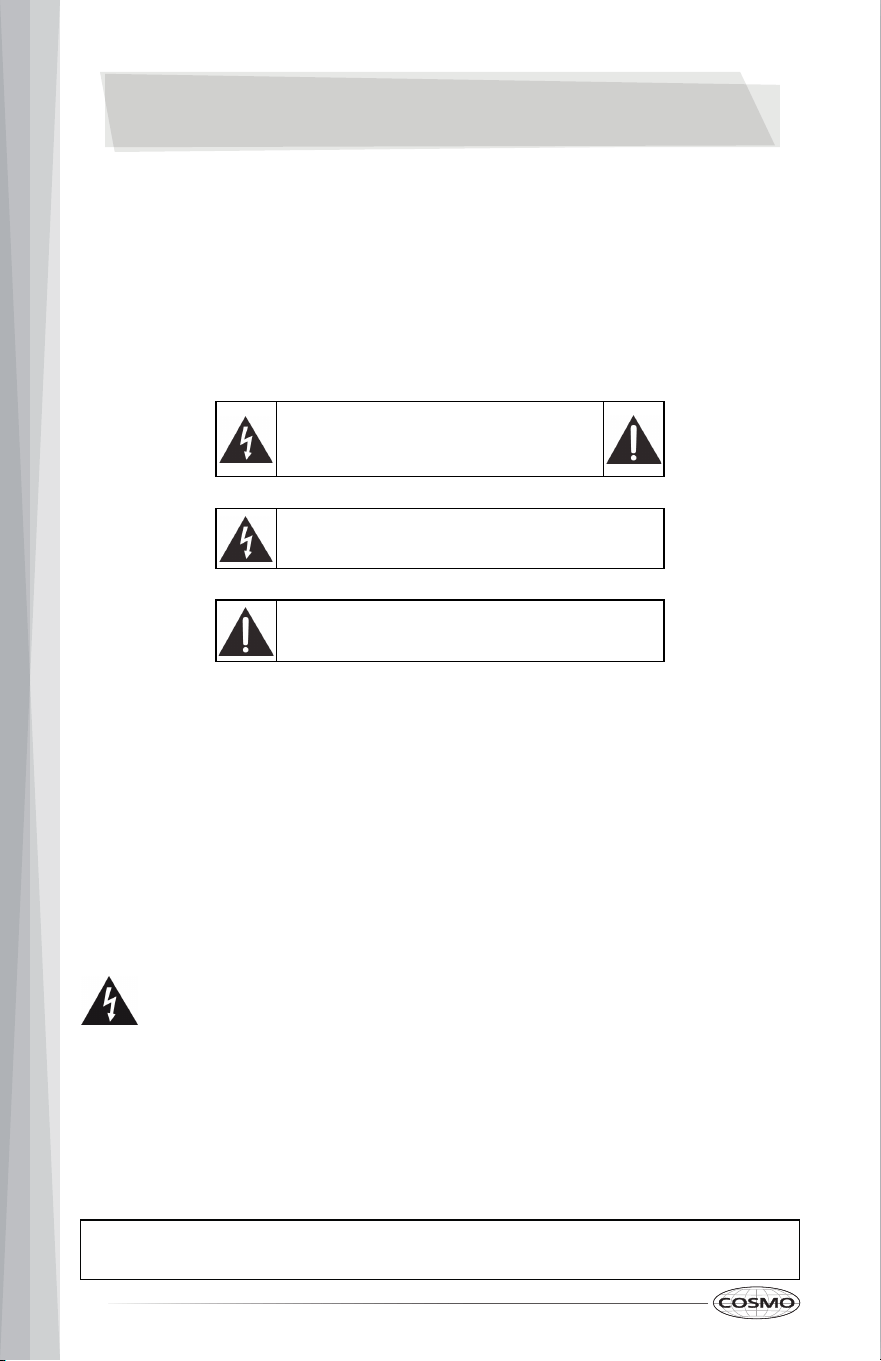
CAUTION
RISK OF
ELECTRIC
SHOCK
DO NOT OPEN
This symbol indicates that dangerous voltage constituting
a risk of electric shock is present within your appliance.
This symbol indicates that there are important operating
and maintenance instructions in the literature
accompanying your appliance.
4
DISHWASHER SAFETY
IMPORTANT:
ELECTRIC SHOCK HAZARD
READ ALL INSTRUCTIONS BEFORE USING THE APPLIANCE
Your safety and the safety of others are very important.
We have provided many important safety messages in this manual and on your appliance.
Always read and obey all safety messages.
When using your dishwasher, follow basic safety precautions, including the following:
1 Read these instructions.
2 Keep these instructions.
3 Heed all warnings.
4 Follow all instructions.
5 Clean only with a damp cloth.
6 Do not block any ventilation openings. Install in accordance with the manufacturer's instructions.
7 Make sure that the available AC power matches the voltage requirements of this appliance.
8 Refer all servicing to qualified service personnel. Servicing is required when the appliance has
been damaged in any way or it does not operate normally.
WARNING: Failure to follow these instructions can result in electric shock, fire, or death.
1 WARNING: Never allow children to play with, operate, or crawl inside the dishwasher.
2 Turn off the dishwasher before carrying out user maintenance on it.
3 If a component part is damaged, it must be replaced by the manufacturer, its service agent,
or similar qualified persons in order to avoid a hazard.
4 This appliance is intended to be used in household and similar environments.
READ AND SAVE THESE INSTRUCTIONS
5
IMPORTANT SAFETY
INSTRUCTIONS
READ AND SAVE THESE INSTRUCTIONS
Basic Precautions Before Use:
• Read all instructions before using the dishwasher.
• The manual does not cover every possible condition and situation that may occur.
• Use the dishwasher only for its intended function as described in this manual.
• When loading items to be washed:
• Load sharp items and knives so that they are not likely to damage the door seal
and tub.
• Load sharp items and knives with the handles up to reduce the risk of cut-type
injury.
• Do not wash plastic items unless they are marked dishwasher safe or the
equivalent. If not marked, check with the manufacturer for their recommendation.
Items that are not dishwasher safe may melt and create a potential fire hazard.
• If the dishwasher drains into a garbage disposal, make sure that the disposal is
completely empty before running the dishwasher.
• Do not tamper with the controls.
• Do not operate your dishwasher unless all enclosure panels are properly in place.
• Do not touch the heating element during or immediately after use, especially if the
sanitize option has been selected.
• Do not let children abuse, sit, or stand on the door or the racks of the dishwasher.
• Under certain conditions, hydrogen gas may be produced in a hot water system
that has not been used for two weeks or more. HYDROGEN GAS IS EXPLOSIVE. If
the hot water system has not been used for such a period, before using, turn on all
hot water faucets and let water flow from each for several minutes. This will
release any accumulated hydrogen gas. Hydrogen gas is flammable. Do not smoke
or use an open flame during this time.
• Do not store or use combustible materials, gasoline, or other flammable vapors
and liquids in the vicinity of this or any other appliance.
• Use only detergents or rinse agents recommended for use in a dishwasher and
keep them out of the reach of children.
• Keep young children and infants away from the dishwasher when it is operating.
• Do not use the dishwasher if it has a damaged power cord or plug, and do not plug
the dishwasher into a damaged outlet. Failure to observe these instructions may
result in electrical shock.
• Remove the door to the washing compartment when removing an old dishwasher
from service or discarding it.
• To reduce the risk of injury, do not allow children to play in or on a dishwasher.
6
FEATURES
The dishwasher fills with water, covering the filter area at the bottom. Water is then pumped
through the various filter and spray arms, spraying a mixture of hot water and detergent
against the soiled surfaces of your dishes and silverware. Soil particles are separated and go
down the drain as the dirty water is drained and replaced with clean water. The number of
water fills is determined by the cycle selected.
Wash Cycle Selections
Cycle times are approximate and will vary with options selected. Hot water is necessary to
activate dishwasher detergent and melt fatty food soils. An automatic sensor checks the
incoming water temperature and, if it is not hot enough, the timer will be delayed to allow for
the water to heat for the main wash of all cycles.
Filter System
Your dishwasher has a multiple filter system which includes four separate filter meshes. It
separates dirty water and clean water into different chambers. The multiple filter system helps
your dishwasher to get better performance with less water and less energy.
Smart Wash System
Your dishwasher has a smart wash system under the normal wash program which selects the
wash cycle based on how large and how soiled the load is, permitting your dishwasher to clean
more efficiently every time. When a partial load of lightly soiled dishes is placed in the unit, a
short wash cycle is automatically selected. When a full load of heavily soiled dishes is placed in
the unit, a heavy wash cycle is automatically selected.
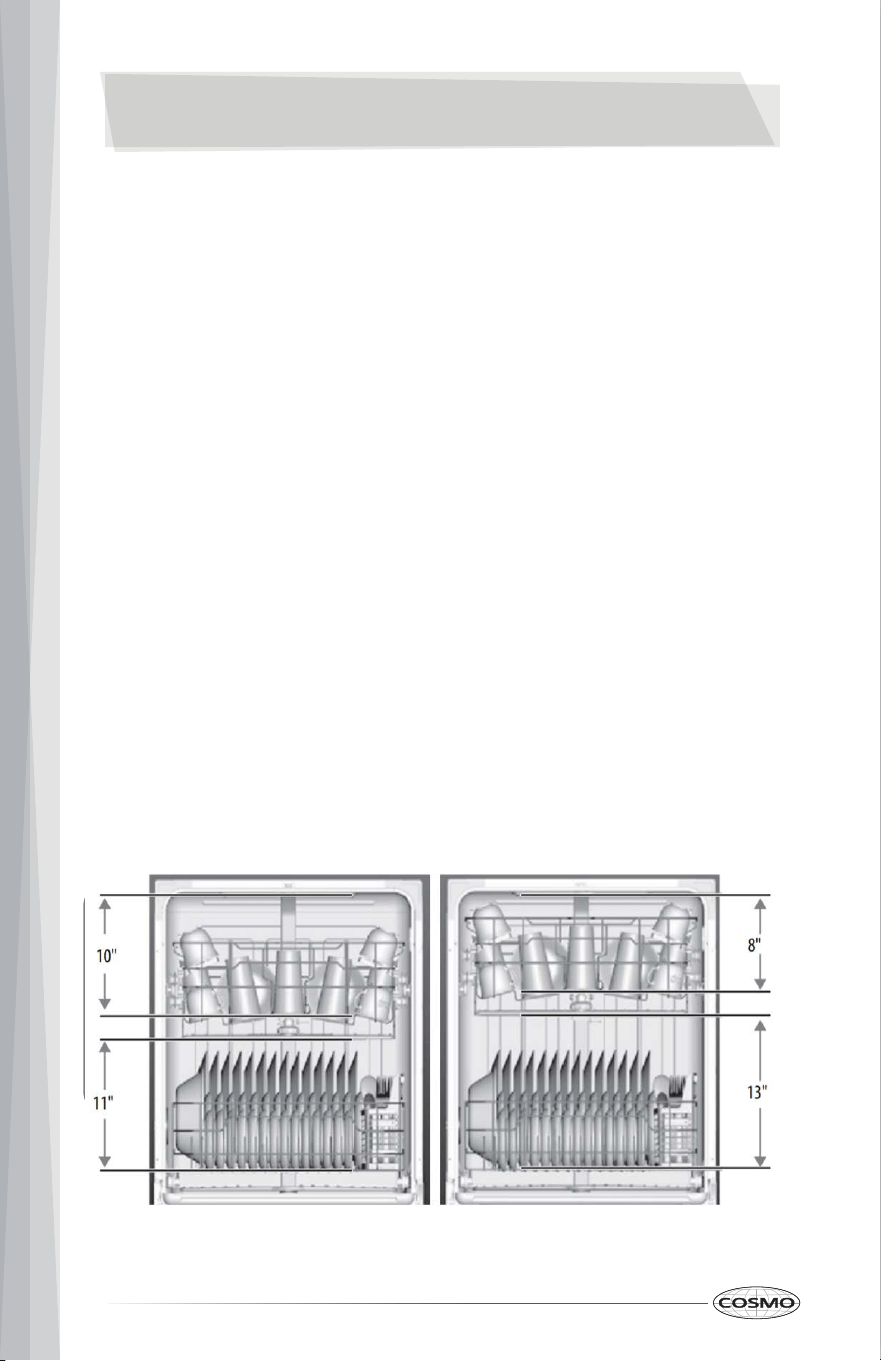
Adjustable Middle Rack
The middle rack of your dishwasher can be raised or lowered to accommodate loading dishes
of varying heights in either rack. After removing the 3rd rack, the middle rack clearance height
can be adjusted from 8" to 10". The lower rack clearance height can be adjusted from 11" to 13".
See "Loading the Middle Rack" on page 13.
How Your Dishwasher Cleans
7
OVERVIEW
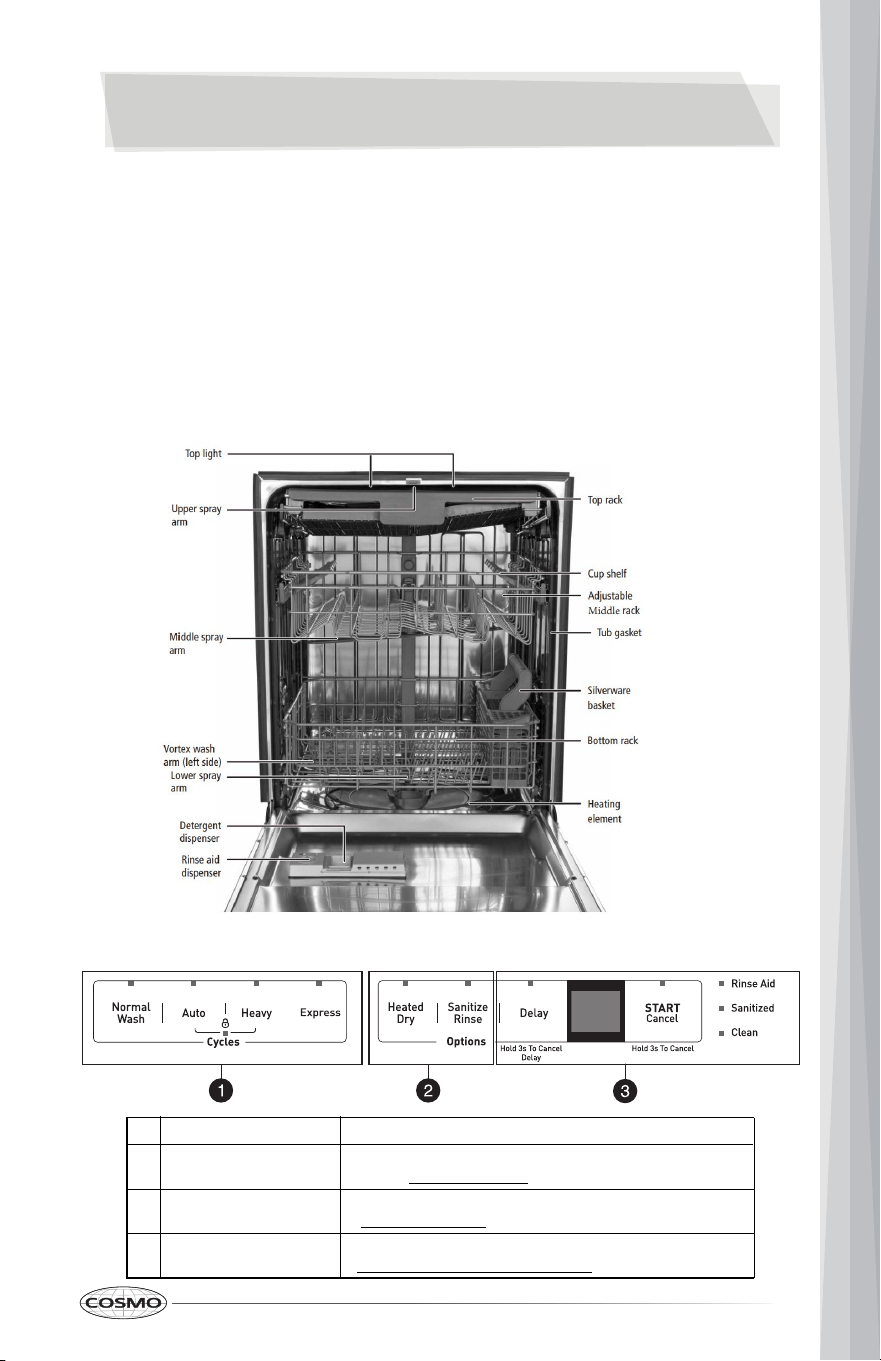
Package Contents
Note: You need to purchase the installation kit in order to install your dishwasher.
# ITEM DESCRIPTION
1 Cycles
Select a cycle based on the type of dishes and how dirty they
are. See "Cycles" on page 9 for more information.
2 Options
Options add enhancements to your selected cycle. See
"Options" on page 9 for more information.
3 Controls and indicators
Start or stop your wash cycle and check its status. See
"Controls and Indicators" on page 10 for more information.
Control Panel
Interior
• Dishwasher
• Hose
• Hose clamp
• Top mounting clips (2)
• Wood screws (4)
• User Manual/Guide
• Installation Instructions/Guide
Filling the detergent dispenser
8
SETTING UP YOUR DISHWASHER
For complete instructions on installing and setting up your dishwasher, see the included Installation
Instructions guide.
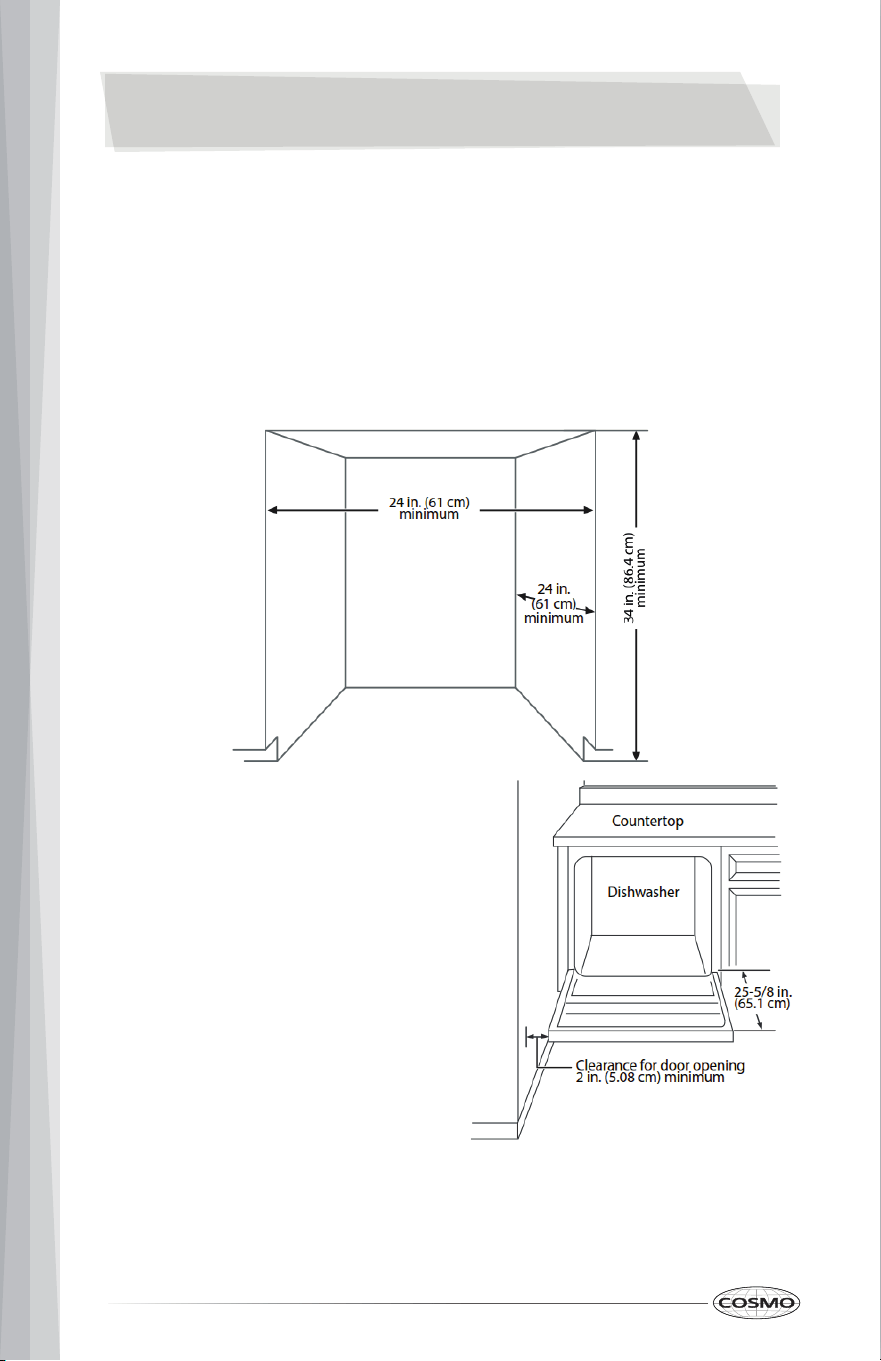
Finding a Suitable Location
• The dishwasher must be installed so that the drain hose is no more than 10 feet (3.01 m) in
length, for proper drainage.
• This dishwasher is designed to be enclosed on the top and on both sides by a standard
residential kitchen cabinet unit.
• The installation enclosure must be clean and free of any obstructions.
• The enclosure must be at least 24 in. (61 cm) wide, 24 in. (61 cm) deep, and 34 in. (86.4 cm) high.
• For the front door of the dishwasher to be flush with the front edge of the counter top, the
counter top must be 25 in. (63.5 cm) deep.
Before Using Your Dishwasher
1 Remove the interior packing.
2 Clean the interior surface with lukewarm water using a soft cloth.
3 Make sure that the water supply temperature is between 120°F and 149°F (49°C and
65°C).
4 Make sure that your dishwasher is connected to a grounded 120V, 60Hz power
supply.
5 If the dishwasher is damaged, please contact Customer Service.
If installing into a corner, allow 2 in. (5.08 cm)
min. clearance between dishwasher and
adjacent cabinet, wall, or other appliances.
Allow 25-5/8 in. (65.1 cm) min. clearance from
the front of the dishwasher for opening the door.
9
Using the Control Panel
Your dishwasher’s control panel is located on the top edge of the door. The door must be
opened to make settings and operate the dishwasher.
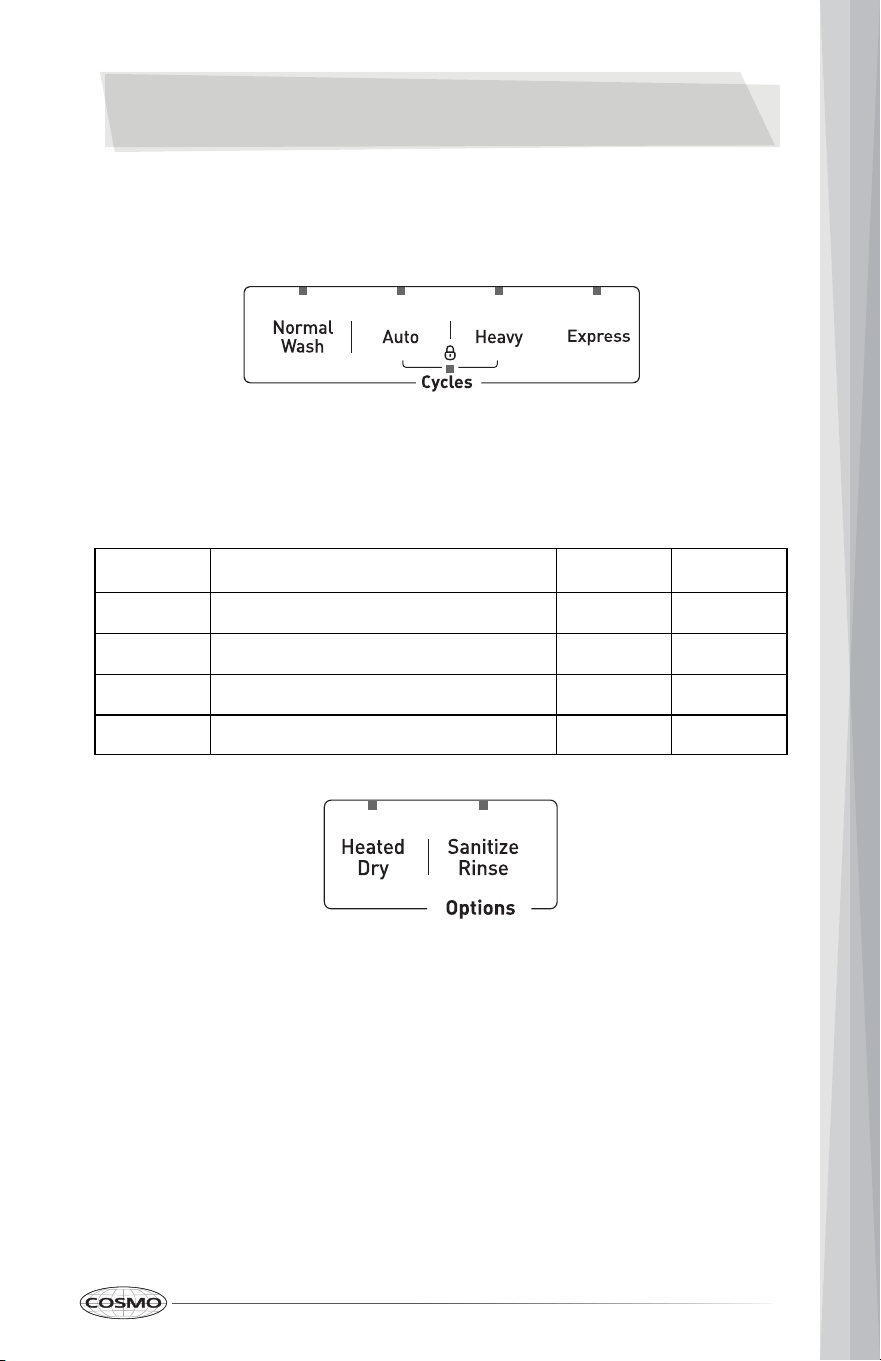
Cycles
Select a cycle based on the type of dishes to be washed and the level of soil on the dishes.
Cycle times are approximate and will vary with options selected. The timer will be delayed to
allow for the water to heat for the main wash of all cycles if the sensor detects the water is not
hot enough. Below is water use and cycle times under standard conditions.
Options
Options can add enhancements to the cycle selected.
• Heated Dry —Use to heat-dry your dishes.
• Sanitize Rinse — Use to sanitize your dishes and glassware. Maintains the water temperature
at 158° F (70° C) max., and is available with the Normal Wash, Auto, and Heavy cycles.
CYCLE DESCRIPTION WATER USE
CYCLE TIME
(MINUTES)
Normal Wash
Use for regularly soiled dinner dishes or silverware. 102 - 120
Auto
A fast wash for lightly soiled dishes and silverware
3 - 5.9 gal.
(11.4 - 22.5 L)
100 - 133
Heavy
Use for hard-to-clean, heavily soiled dishes, pots,
and pans.
6.9 gal.
(26.2 L)
Express
Use for lightly soiled and pre-rinsed dishes and
silverware.
4 gal.
(15.1 L)
60
3
- 5.9 gal.
(11.4 - 22.5 L)
138
USING YOUR DISHWASHER
10
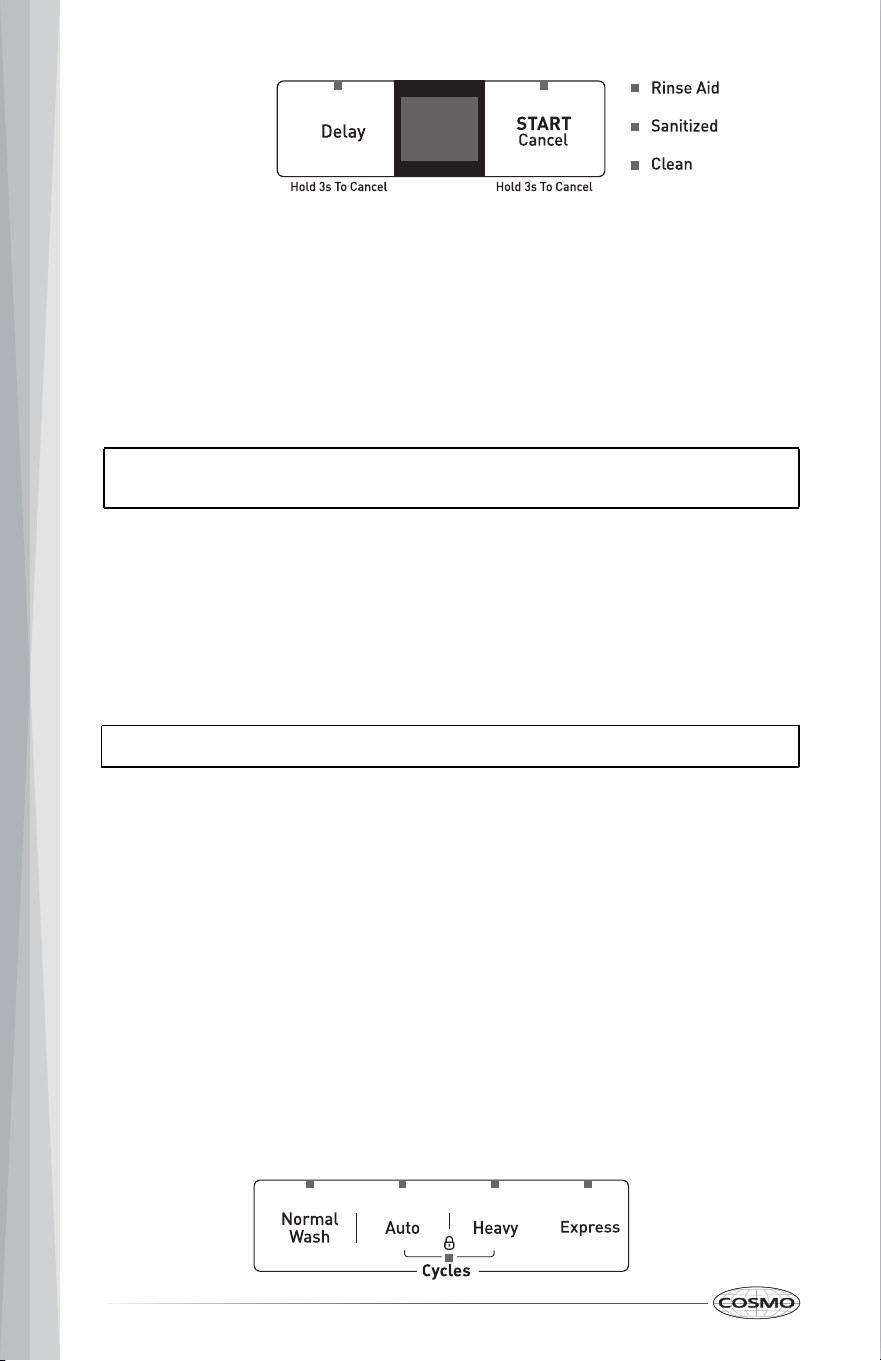
Controls and Indicators
• Delay — Press repeatedly to delay the start of the selected wash cycle until the delay time
you want is shown on the display. You can select from one to 24 hours delay. After you select
the delay time you want, press START/Cancel once, then close the door within four seconds.
The delay begins to count down.
If you open the door while delay is running, press Delay for three seconds, then close the
door within four seconds to begin the cycle from that point.
To cancel the delay and begin the cycle before the delay period is complete, open the door,
then press and hold START/Cancel for three seconds.
• Display — Shows the remaining hours and minutes of the current cycle, delay hours
remaining, and error codes (see "Error Codes" on page 23).
• START/Cancel — Press to start the dishwasher after you have selected a cycle and function (if
desired). Close the door. The cycle indicator begins to blink and the function indicator turns
on. If you don’t close the door within four seconds of pressing START/Cancel, the dishwasher
pauses. Press START/Cancel again to continue with the cycle.
To cancel a running cycle, open the door, then press and hold START/Cancel for three
seconds. The dishwasher will return to standby status.
To load more dishes or pause the dishwasher while it’s already running, open the door. A
safety mechanism stops the cycle.
You can add more dishes before the main wash cycle has started. To determine this, check the
detergent dispenser in the door. If the detergent dispenser is still closed, you can add more
dishes. If it is open, you can add dishes to the dishwasher if the dish quantity is small. If the
quantity is large, restart the cycle.
• Rinse Aid — Turns on when you need to add rinse aid.
• Sanitized — Turns on when a sanitized cycle is finished. Turns off after 60 seconds, when
the door is opened.
• Clean — Turns on after a cycle is finished. Turns off after 60 seconds when the door is
opened.
Using the Child Lock
Use the lock to prevent children from accidentally changing the dishwasher cycle or starting the
dishwasher.
• Press the Auto and Heavy buttons at the same time to turn the child lock on or off. The indicator
light turns on.
Note: If the remaining time on the display suddenly increases or decreases by several minutes,
it means that the Smart Sensor has checked the soil level or the water needs to be heated to
reach the required temperature.
CAUTION: To avoid injury open the door slowly and carefully. There is a possibility of hot steam
from inside the dishwasher.
11
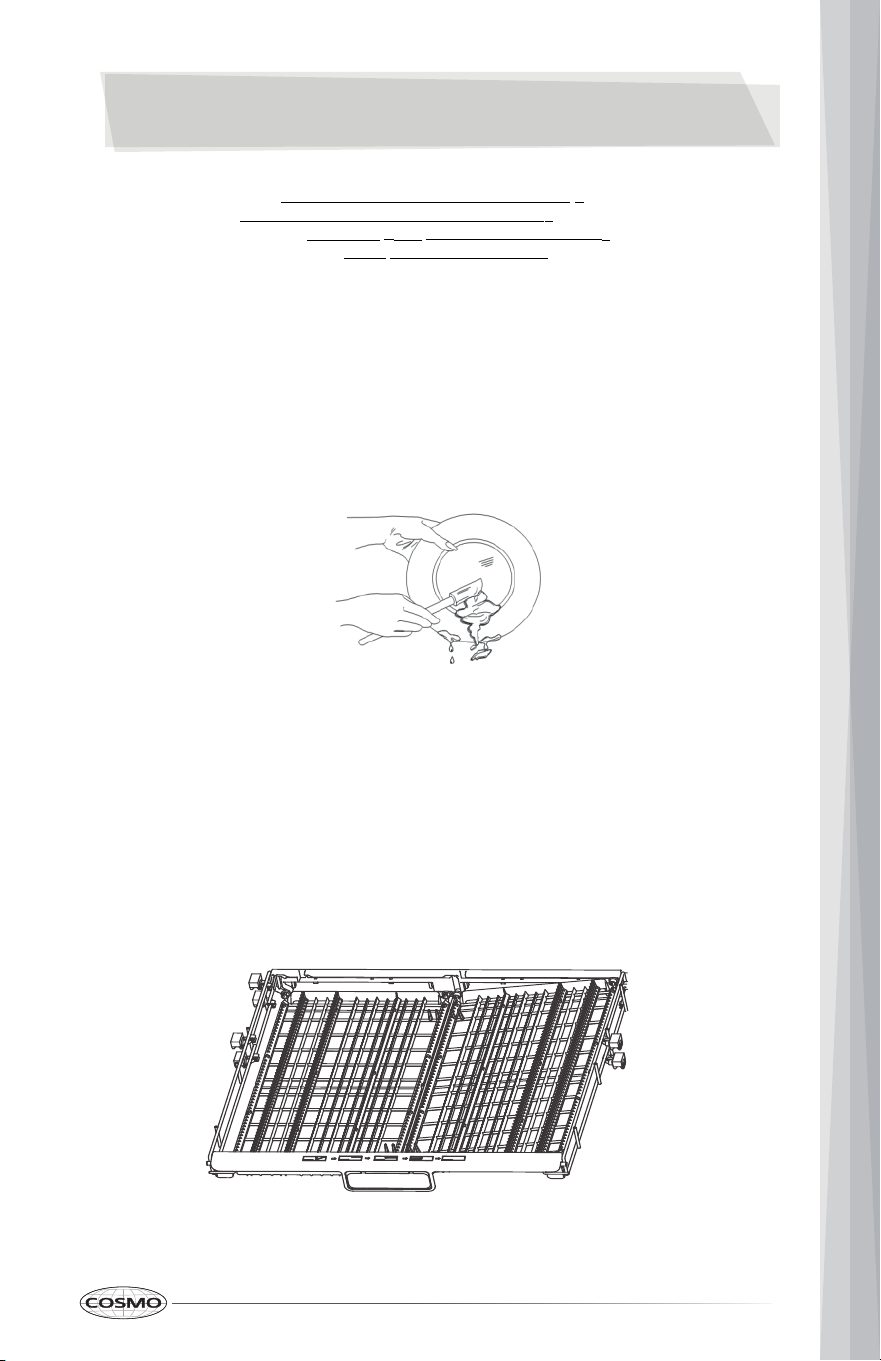
• Scrape away large pieces of food, bones, pits, toothpicks, and similar items.The continuous
filtered wash system will remove the remaining food particles.
• Burned-on foods should be loosened before loading.
• Empty liquids from glasses and cups.
• Foods such as mustard, mayonnaise, vinegar, lemon juice, and tomato-based products may
cause discoloration of stainless steel and plastics if allowed to sit for a long period of time.
Unless the dishwasher is to be operated at once, it is best to rinse off these types of foods.
• If the dishwasher drains into a garbage disposal, be sure the disposal is completely empty
before starting the dishwasher.
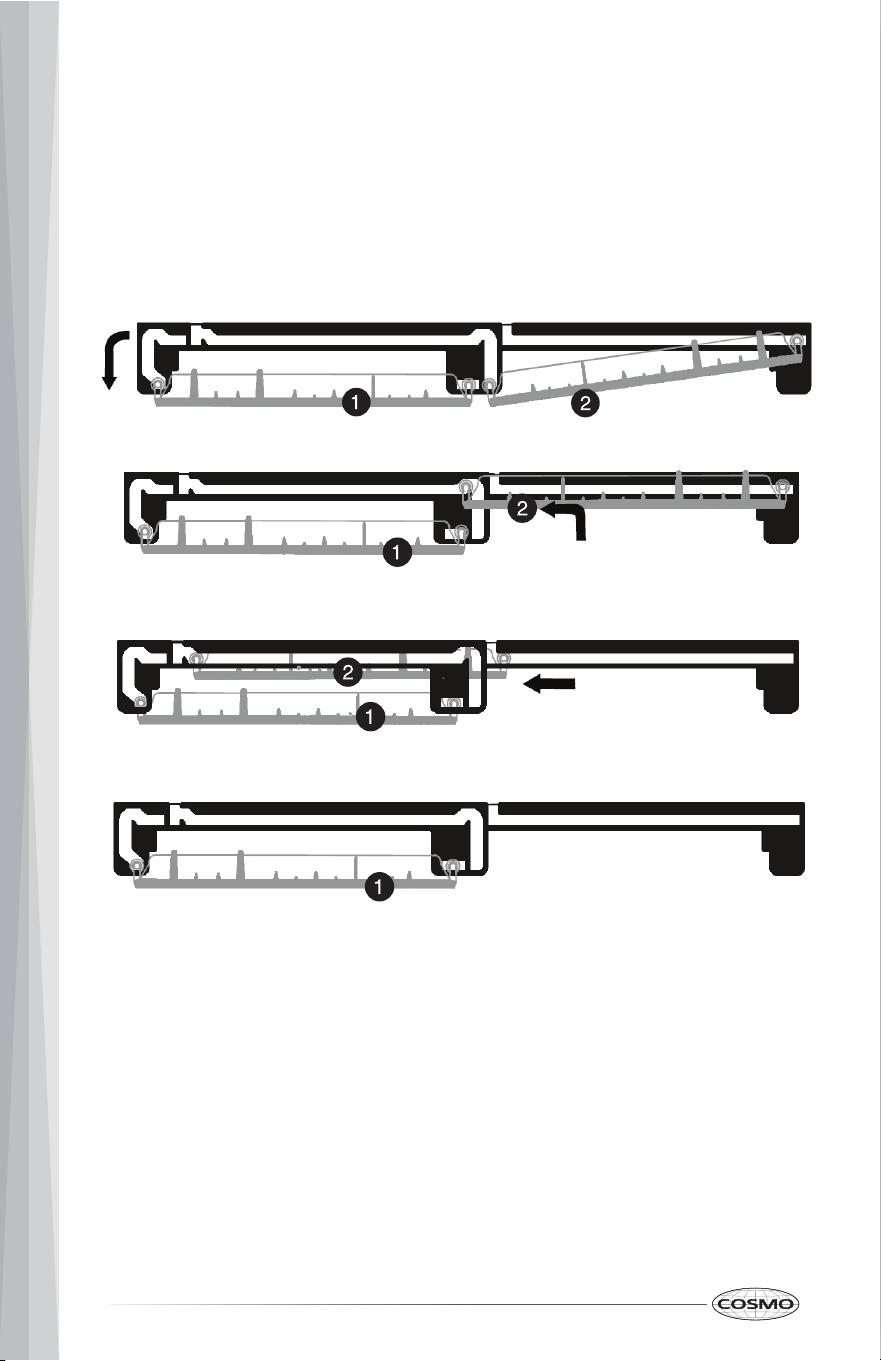
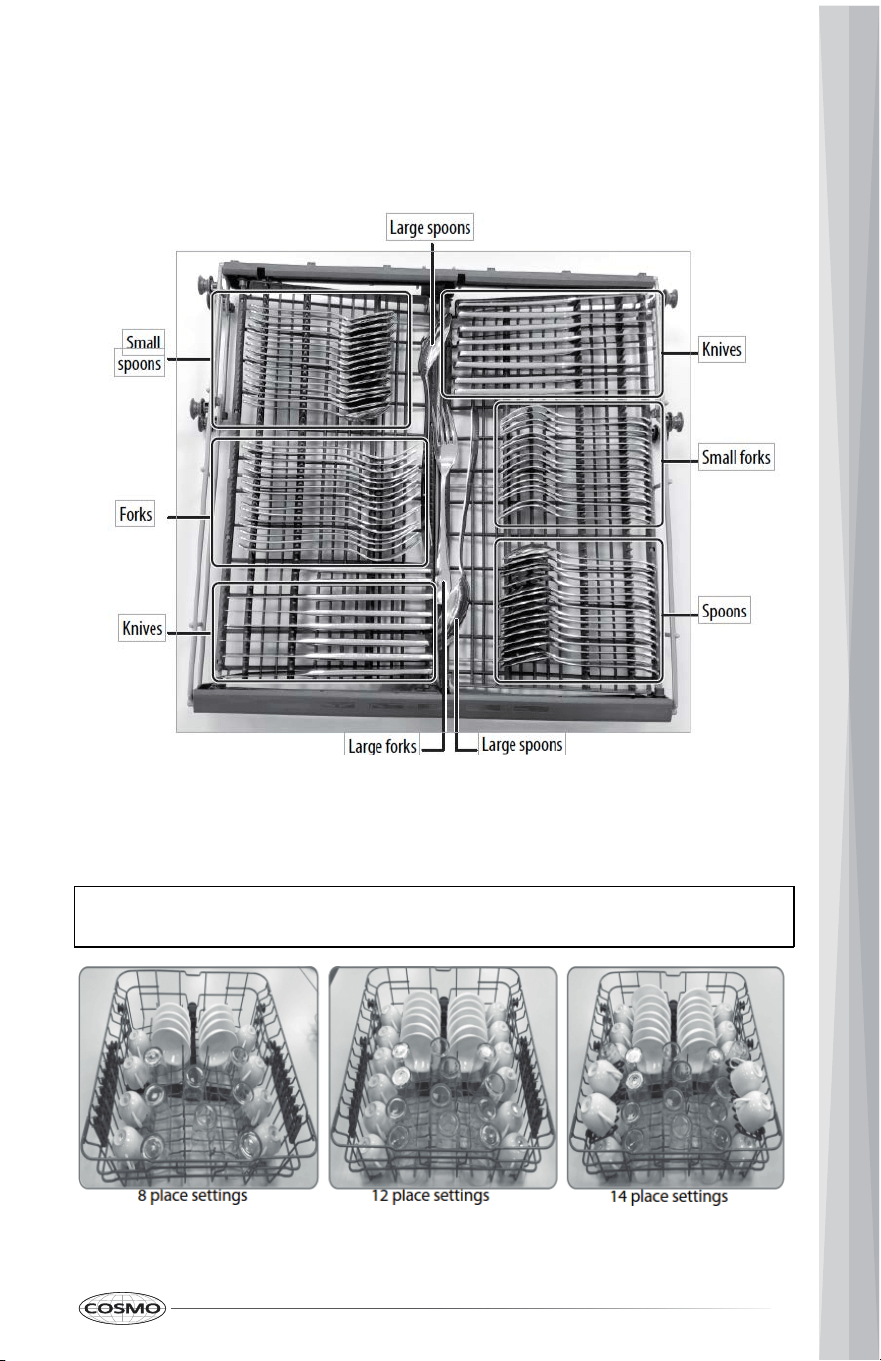
Adjusting the Top Rack
This dishwasher has a convenient top rack for silverware, cutlery, and small items. This rack can be
adjusted to accommodate varying loads, as shown below.
BASIC OPERATION
1 Load the dishwasher (See "Preparing and Loading Dishes" on page 11).
2 Add detergent (See "Filling the Detergent Dispenser" on page 16).
3 Add rinse aid, if needed (See "Filling the Rinse Aid Dispenser" on page 17).
4 Select the cycle you want (See the "Basic Operation" on page 11). The indicator will light when the
selection is made.
5 Select the option you want. The indicator will light when the selection is made.
6 To start, press START/Cancel on the control pad.
7 Close the door within four seconds and the wash cycle will begin.
Preparing and Loading Dishes
Preparing Dishes for Washing
1
2
Left rack adjusted to lower position and right rack angled
Left rack adjusted to lower position and right rack to upper position
Left rack adjusted to lower position and right rack moved to the left
Left rack adjusted to lower position and right rack removed
Loading the Middle Rack
The middle rack is designed for cups, glasses, small plates, bowls, and plastic items marked
dishwasher-safe. For best results, place the items with the soiled surface facing down or toward the
center. Tilt them slightly for better drainage.
Note: Make sure that the loaded dishes do not interfere with the rotation of the middle spray
arm, which is located just below the middle rack. You can check this by rotating the middle spray
arm by hand.
1
3
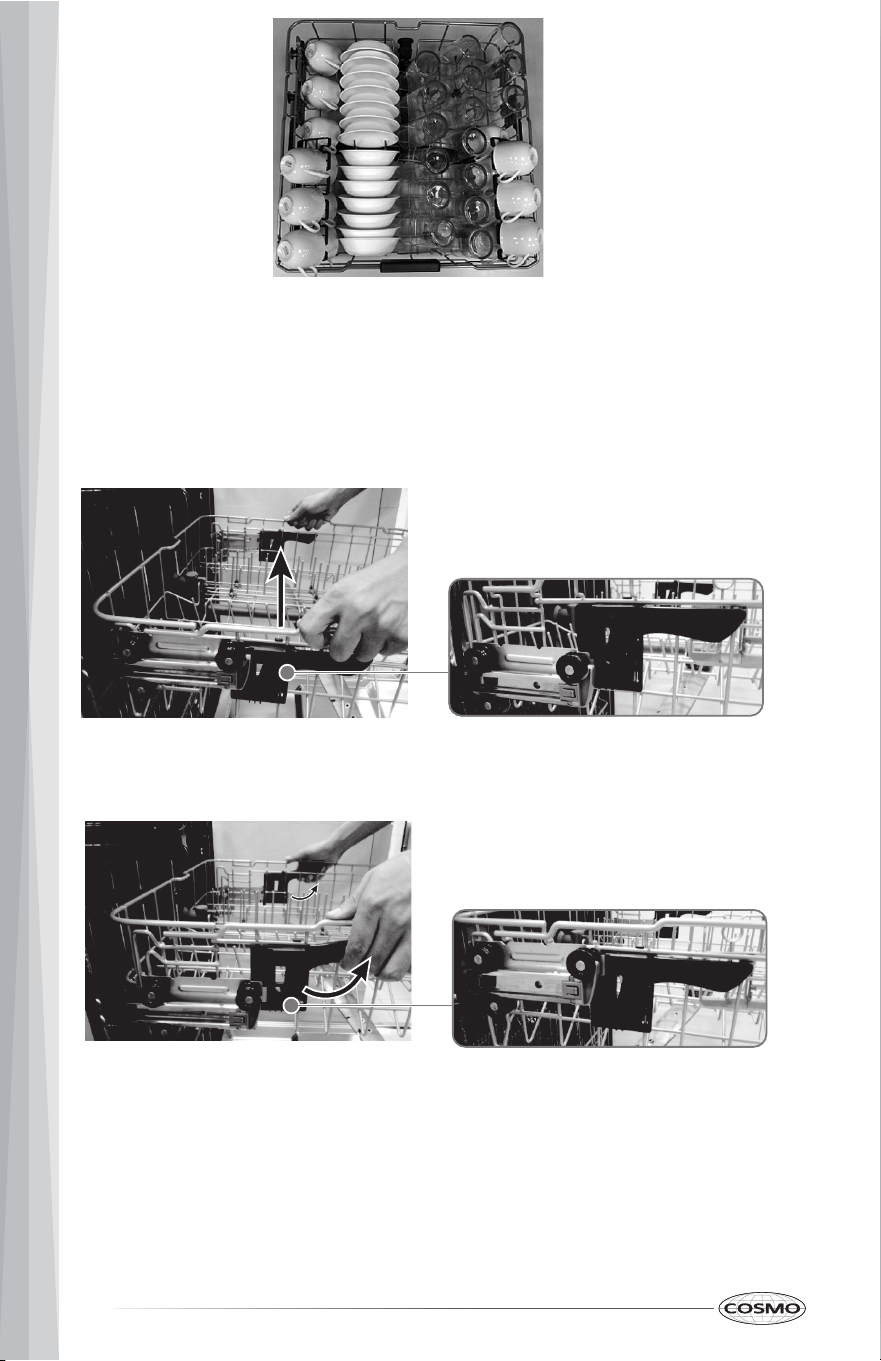
Loading the Top Rack
You can place the items in the top rack randomly or in an orderly fashion. The image below shows
how to load the top rack for 16 place settings:
Adjusting the Middle Rack
The height of the middle rack can be adjusted to accommodate loading taller dishes in
either rack
1.
Lift the rack to move it to the upper position.
Middle rack in the upper position
2. Press the handle to move it to the lower position.
Middle rack in the lower position
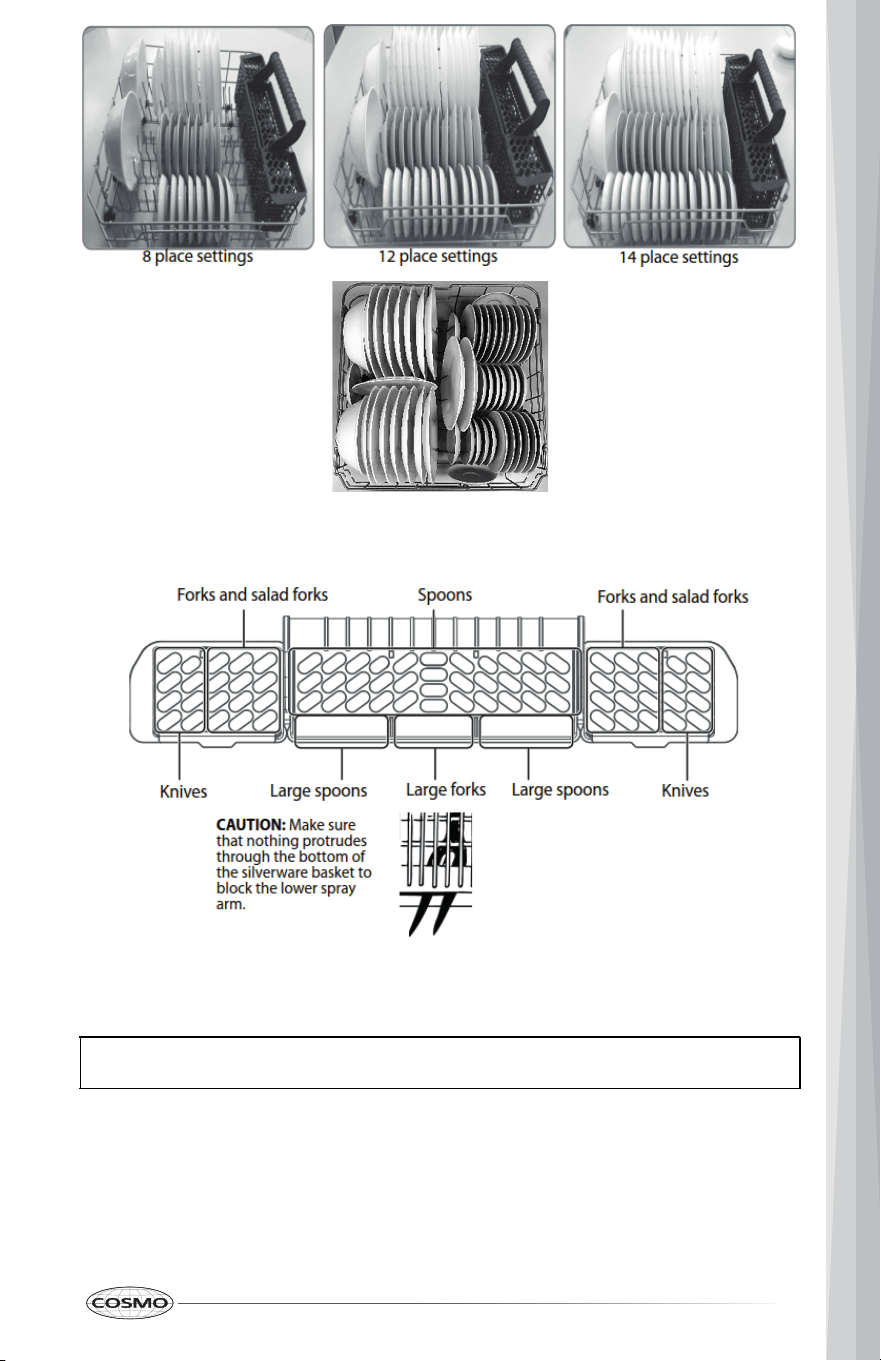
Loading the Bottom Rack
The bottom rack is designed to accommodate plates, bowls, saucers, and cookware. The
adjustable rack lets you load items up to 13" (33 cm) high. Large items should be placed along the
edge, with the inside facing down, so they do not interfere with the middle or lower spray arms or
prevent the detergent dispenser from opening.
14
16 place settings
Loading the Silverware Basket
The silverware basket is divided into three separate sections, which can be placed in either the
upper or lower racks.
Adding a Dish
Before adding dishes, refer to "Preparing and Loading Dishes" on page 11 for instructions on
loading more dishes. Also see information on Start/cancel in the "Controls and Indicators" on
page 10.
To add or remove items after the wash cycle starts:
1 Open the door slightly and wait a few seconds until the wash action stops before completely
opening.
2 Add the item, then close the door firmly.
3 Press START/Cancel on the control pad. The cycle automatically resumes.
CAUTION: TO AVOID BURN INJURY: Open the door slowly and wait until the spray arms and wash
action stop. Hot water may splash out of dishwasher. Failure to do so may result in injury.
16 place
settings
1
5
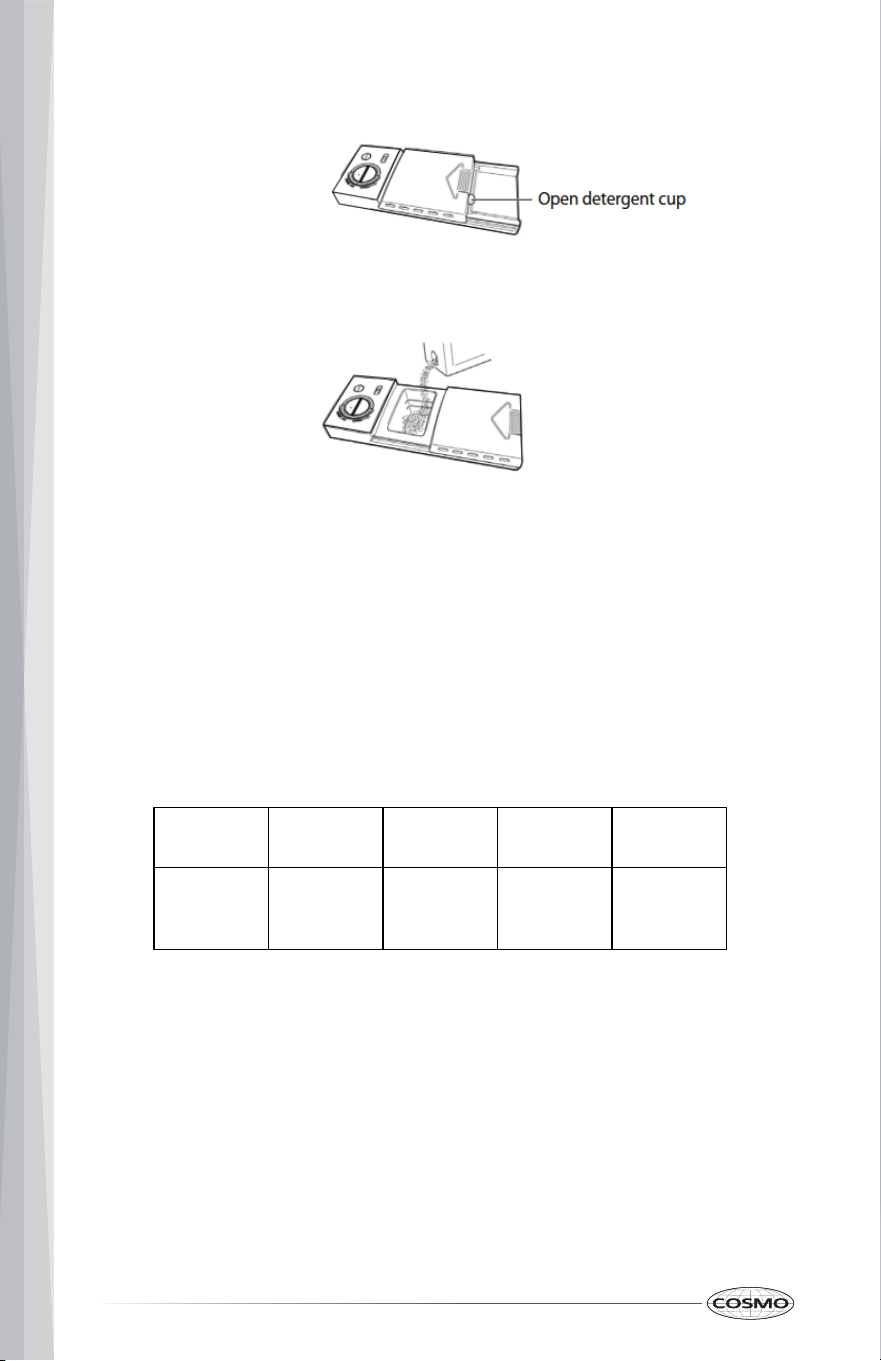
1 Push the detergent dispenser cover latch downwards to open the detergent cup.
2 Add detergent (dry powder, liquid, or packets) to the cup.
3 Close the detergent dispenser cover.
The amount of detergent required depends on the cycle selected and the soil level on the dishes.
Refer to the following table for the recommended amount.
CYCLE
SOFT WATER
(0-3 GRAINS)
MEDIUM HARD
WATER (4-8
GRAINS)
HARD WATER
(9-12 GRAINS)
VERY HARD
WATER (OVER
12 GRAINS)
Normal
Auto
Heavy
Express
2 tsp. (9.9 ml)
(main wash cup
1/4 full)
5 tsp. (24.6 ml)
(main wash cup
fill to line above
regular)
8 tsp. (39.4 ml)
(main wash cup
completely full)
Main wash cup
completely full
(water softener
recommended)
Filling the Detergent Dispenser
1
6
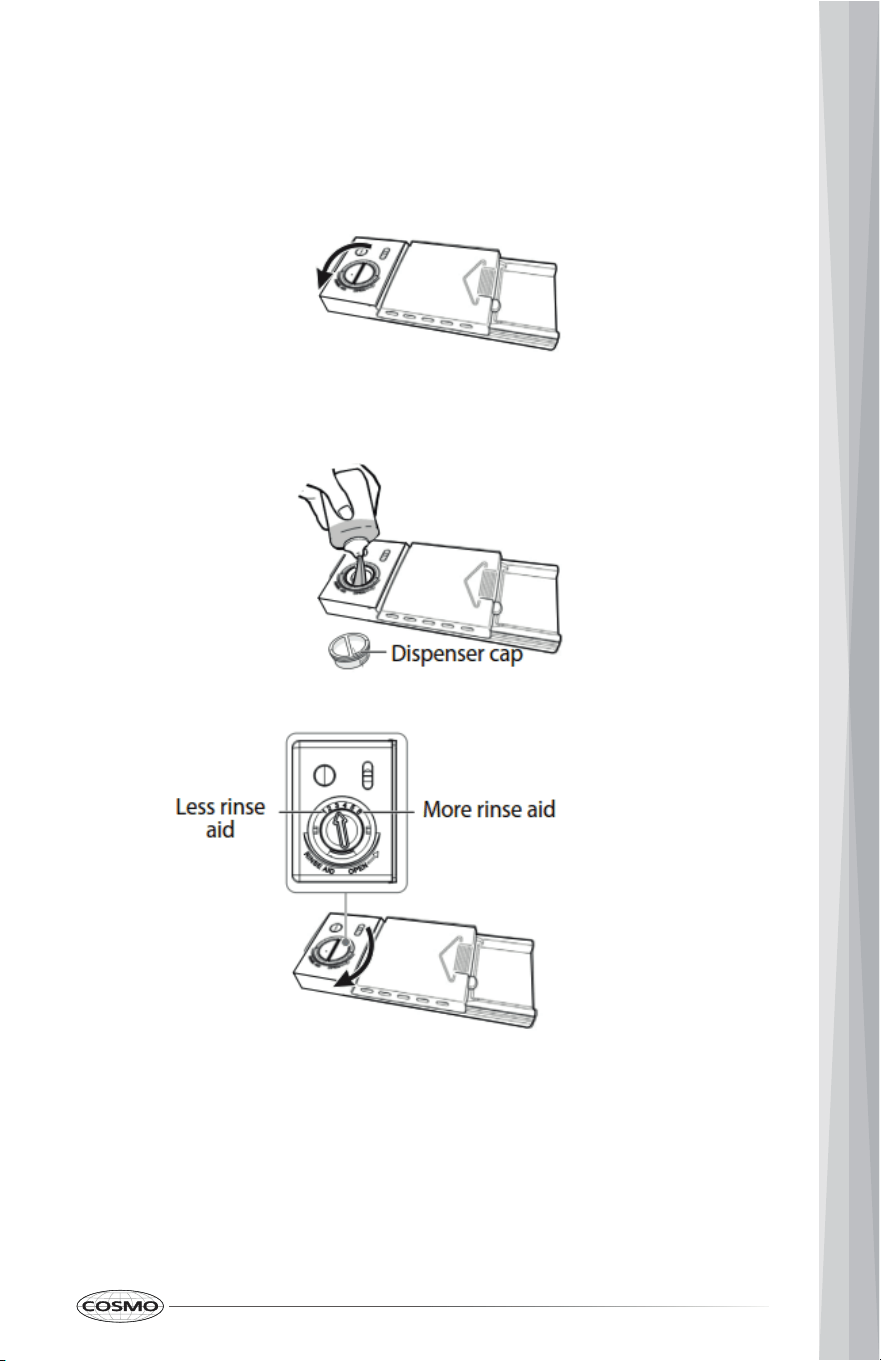
Filling the Rinse Aid Dispenser
Your dishwasher is designed to use a liquid rinse aid. The use of a rinse aid greatly improves
drying performance after the final rinse. Do not use a solid or bar-type rinse aid. Under normal
conditions, the rinse aid will last approximately one month. Try to keep the dispenser full, but do
not over fill it.
2 Add rinse aid until the liquid touches the indicated fill level. Do not overfill since this can
cause over-sudsing. Wipe up any spills with a damp cloth. The dispenser holds enough for 35
to 140 washes, depending on the dial setting.
3 Replace the cap and turn it 1/4 turn clockwise.
1 Turn the rinse aid dispenser cap 1/4 turn counterclockwise and lift it out.
17
Heat Dry Function
The heat dry function, when used with a rinse aid, enhances drying performance. If you do not choose
the heat dry function, items in your load that will not be completely dry at the end of the cycle.
Water Pressure
For optimum performance, the hot water supply line for your dishwasher must provide water
pressure of at least 20 psi (138 kPa) and not more than 120 psi (828 kPa). You may experience low
water pressure during high-demand periods, such as when laundry or showers are in use while
you are washing the dishes. To eliminate this problem, wait until hot water demand is reduced
before starting the dishwasher.
Important: To make sure that the water entering the dishwasher is hot, run hot water from the
nearest hot water faucet to clear cool water from the pipe before starting the cycle.
Factors Affecting Performance
Using Rinse Aid
Rinse aid greatly improves drying and reduces water spots and filming. Without rinse aid, your
dishes and dishwasher interior will have excessive moisture. In addition, the heated dry option will
not perform as well without rinse aid. The rinse aid dispenser, located next to the detergent cup,
automatically releases a measured amount of rinse aid during the last rinse.
If spotting and poor drying is a problem, increase the amount of rinse aid dispensed by rotating the
dial to a higher number. The dial is located under the dispenser cap.
If the rinse aid is low, the rinse aid light turns on at the beginning and end of the cycle indicating
that it is time to refill. Refer to "Filling the Rinse Aid Dispenser" on page 17.
Water Temperature
Hot water is required for optimum dish washing and drying results. Water entering the dishwasher
should be at least 120° F (49° C) to achieve satisfactory results.
To check the water temperature entering the dishwasher:
1 Turn on the hot water faucet near the dishwasher and let it run for several minutes.
2 Hold a thermometer (a candy or meat thermometer will work) in the water stream to check the
temperature. If the temperature is below 120° F (49° C), have a qualified person raise the hot water heater
thermostat setting.
18
MAINTENANCE AND CARE
Cleaning the Stainless Steel Panel
Clean the stainless steel door and handle regularly with a soft cloth and standard household
cleaner to remove the debris.
Cleaning the Control Panel
Clean the control panel gently with a soft, lightly dampened cloth.
Cleaning the Stainless Steel Inner Door and Tub
The tub is made of stainless steel. It will not rust or corrode, even if the dishwasher should be
scratched or dented. Clean the spots on the steel inner door and tub with a damp non-abrasive
cloth.
Cleaning the Filters
The filters are designed to collect debris and need to be cleaned monthly to maximize wash
performance.
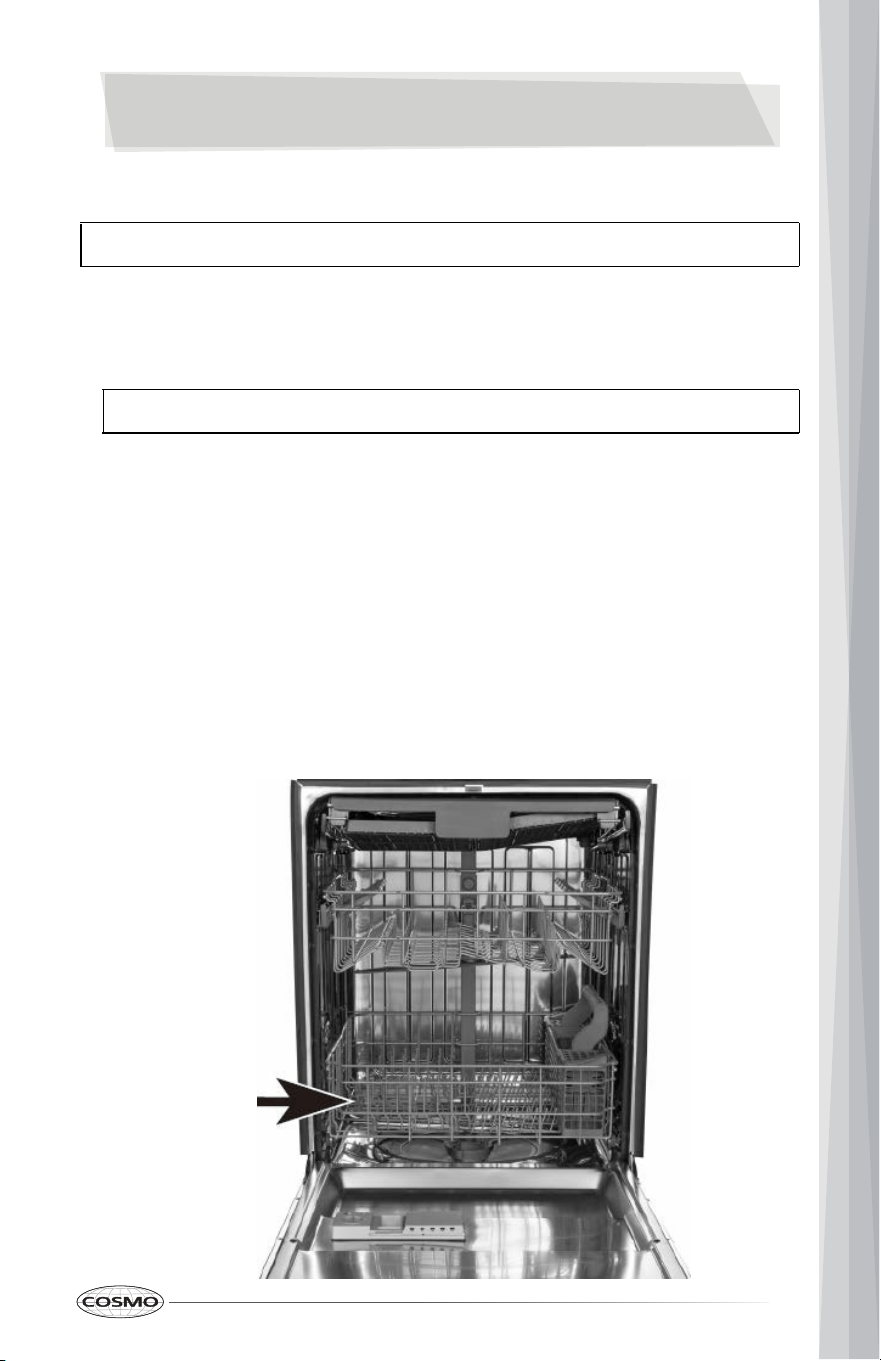
1 Remove the bottom rack.
Cleaning
CAUTION: TO AVOID BURN INJURY: Allow the heating element to cool before attempting to clean
the interior of your dishwasher.
CAUTION: Do not use appliance wax, polish, bleach, or products containing chlorine to clean
the stainless steel door.
1
9
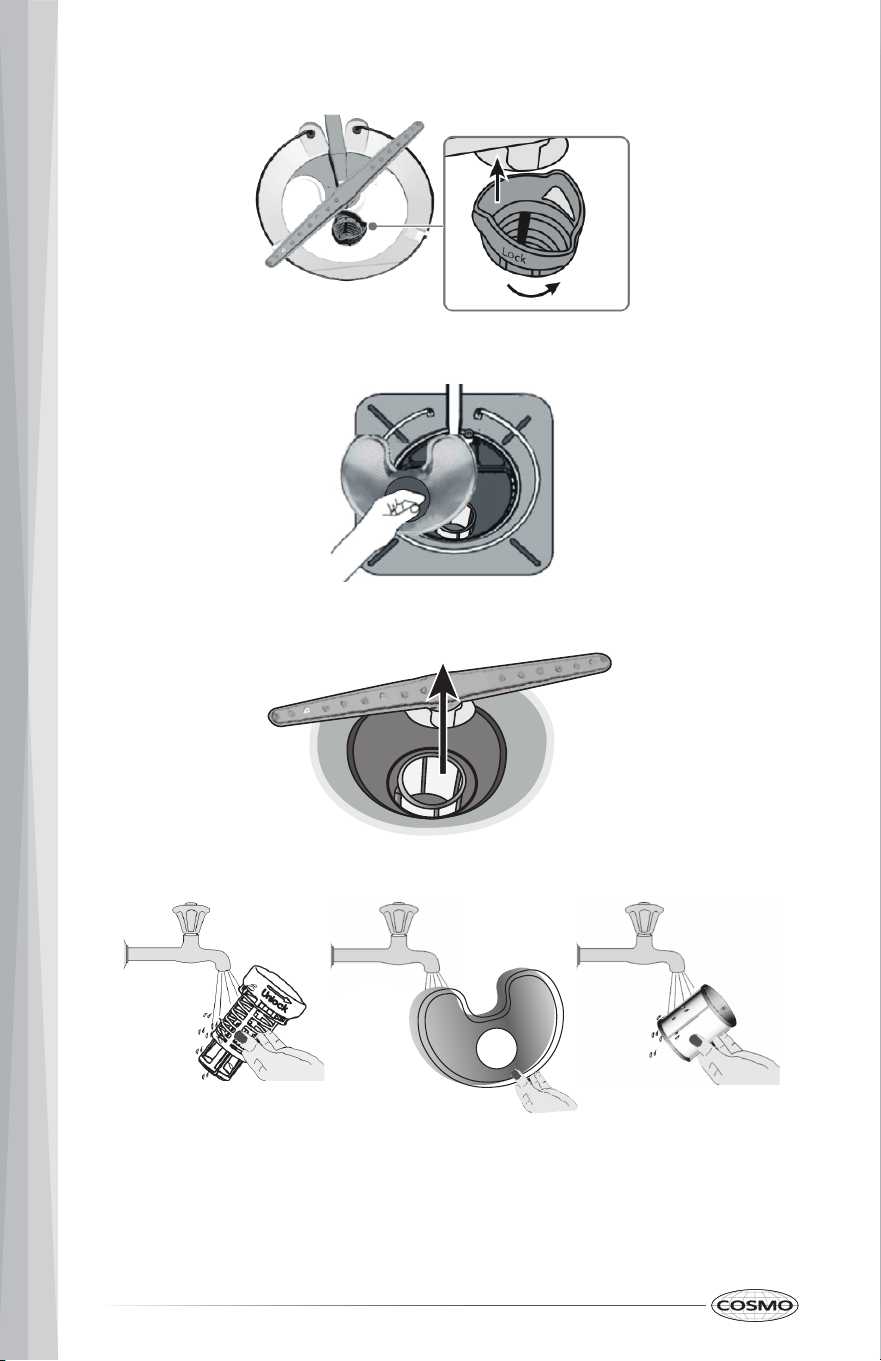
3 Lift the fine filter from the bottom of the tub.
2 Rotate the cylinder filter, then lift it out.
4 Take out the fabric filter.
5 Flush the filters by holding them under running water.
6 Replace the fabric filter, fine filter, and cylinder filter.
7 Replace the bottom rack.
20
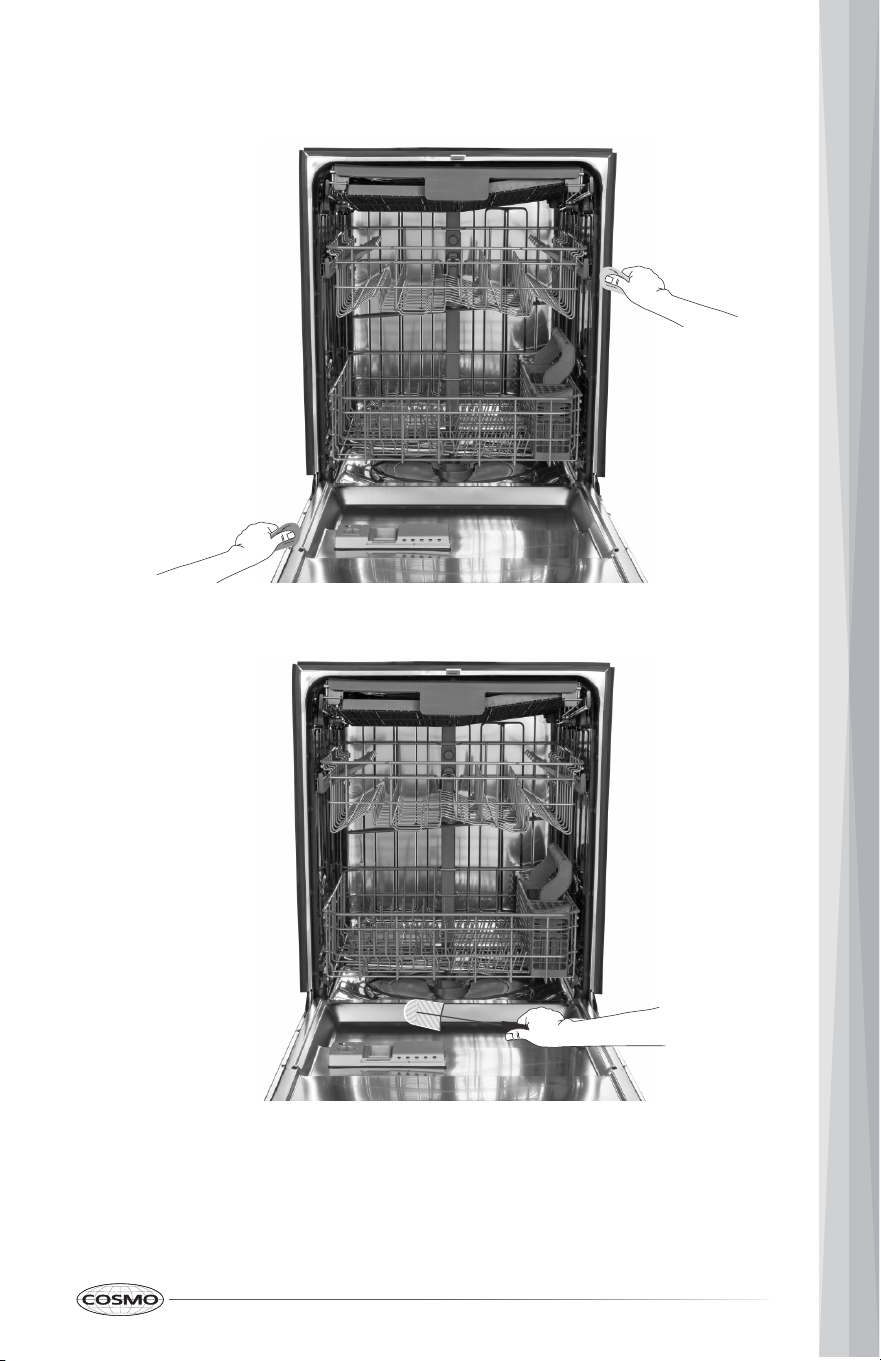
Cleaning the Door and Tub Gaskets
Clean the door gasket with a damp cloth to remove food particles regularly.
The inside of the dishwasher is self-cleaning under normal use. If needed, the tub gasket can be
cleaned with a damp cloth. Use a brush to clean the opening in the end of the gasket.
Cleaning the Air Gap
If there is an air gap installed with your dishwasher, make sure that it is clean so the dishwasher
will drain properly. The air gap is not part of your dishwasher.
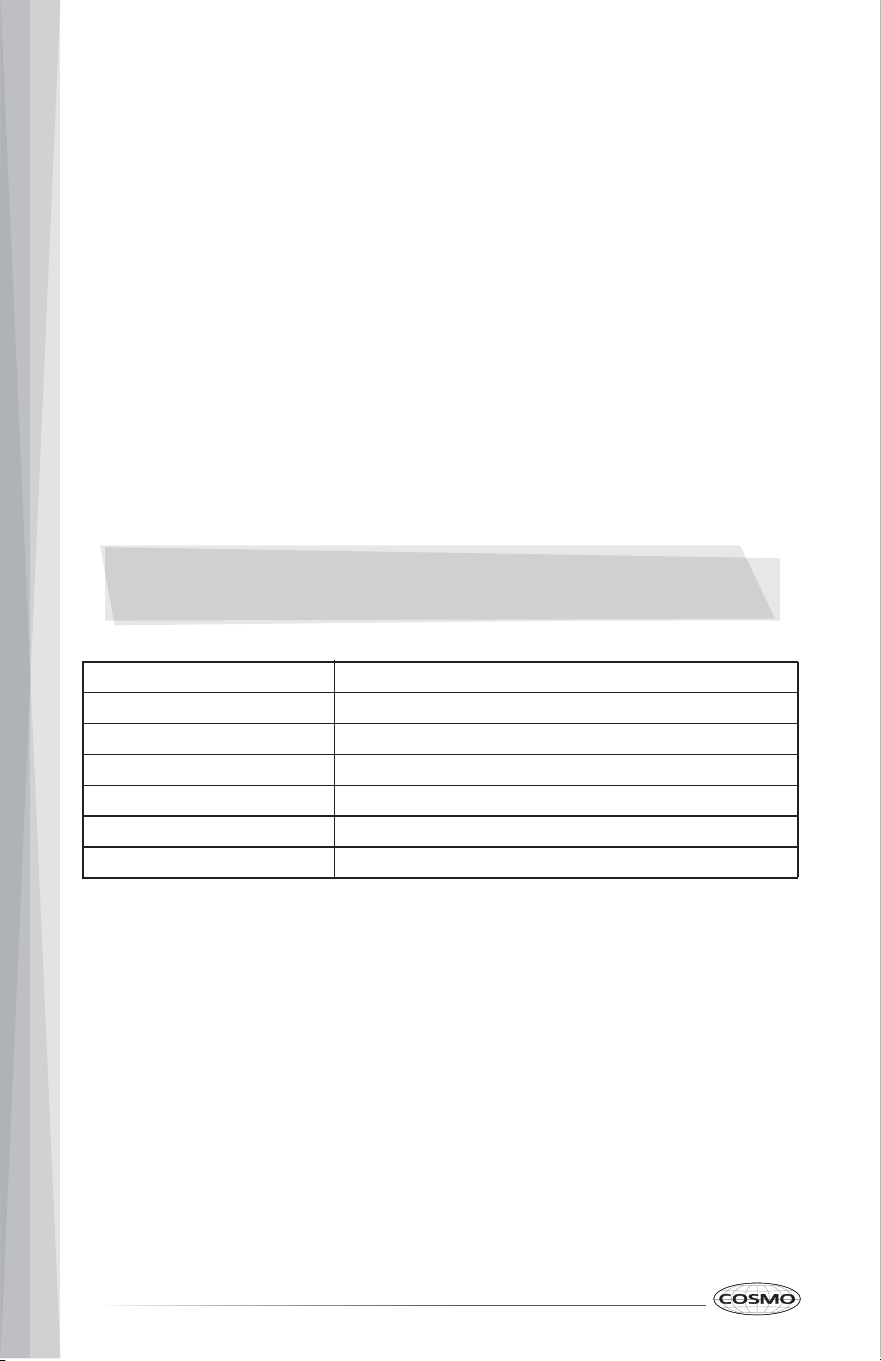
Before you clean the air gap, turn off the dishwasher, then remove the plastic air gap cover and
clean with a toothpick.
2
1
Protecting Your Dishwasher for Long Periods of Non-Use
Your dishwasher should be protected from freezing if you plan to leave it for extended periods in an
unheated place. Have a qualified person do the following:
To Disconnect Service:
1 Turn off the electrical power to the dishwasher at the supply source by removing fuses or
tripping the circuit breaker.
2 Turn off the water supply.
3 Place a pan under the inlet valve, then disconnect the water line from the inlet valve and
drain it into a pan.
4 Disconnect the drain line from the pump and drain the water into a pan.
To Restore Service:
1 Reconnect the water, drain, and electrical power.
2 Turn on the water and electrical power supply.
3 Fill the detergent cup and the rinse aid cup and run the dishwasher through a heated-
wash cycle.
4 Check all connections to make sure that they do not leak.
SPECIFICATIONS
Capacity
Max 1
6 place settings
Dimensions (W × D × H)
Weight
Power requirements
88.2 lbs. (40.0 kg)
23 7⁄8 × 27 × 33 3⁄4 in. (606 × 686 × 857 mm)
Current
120 V ~ 60 Hz
8.4 A
Water pressure Between 20 and 120 psi (138 and 827 kPa)
Noise (dB) 51 dB
22
TROUBLESHOOTING
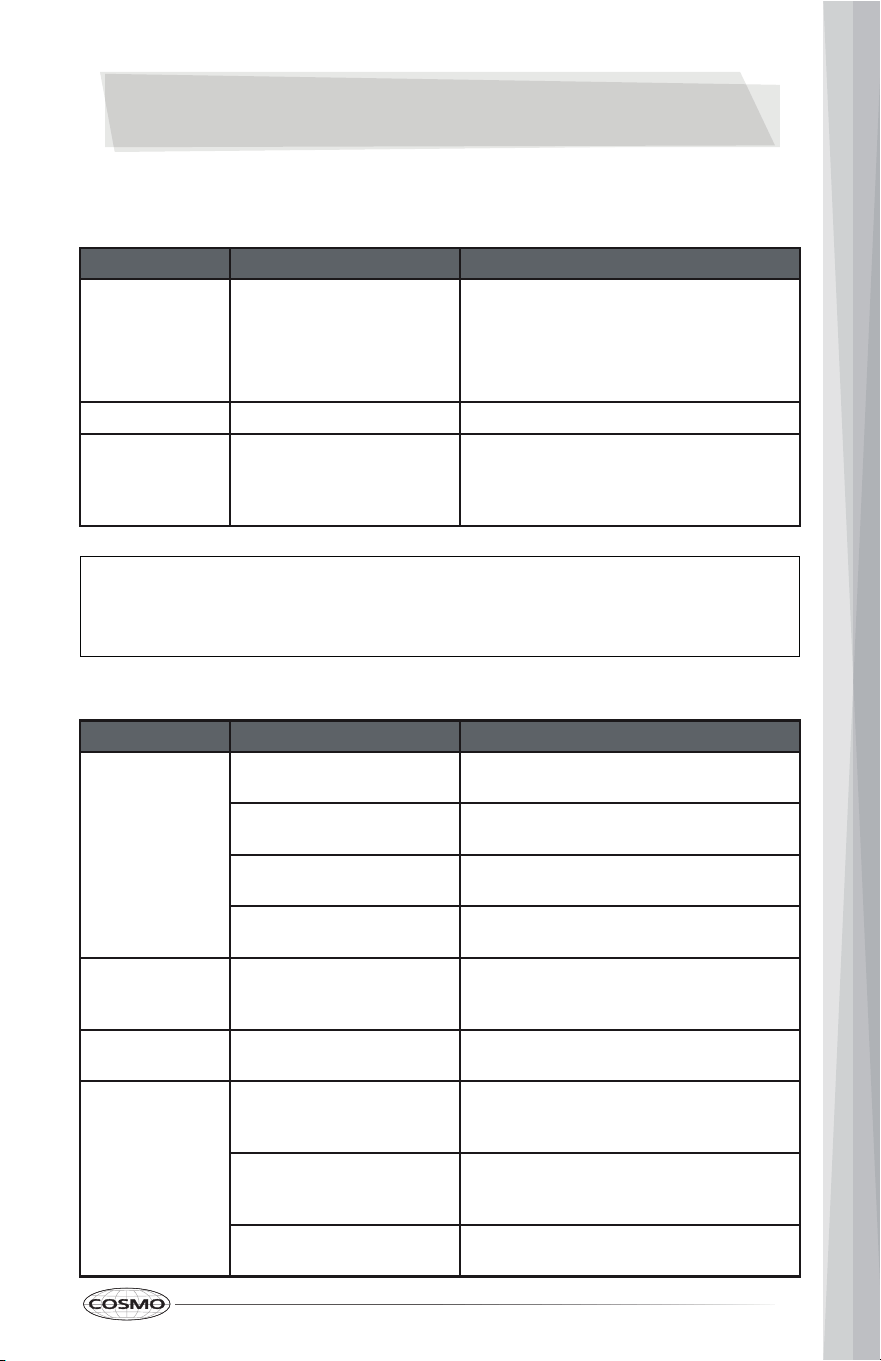
First try the solutions suggested here to possibly avoid the cost of a service call.
ERROR CODES
CODE MEANING POSSIBLE CAUSE
E1 Longer inlet time.
• The water faucet is not opened.
• Water intake is restricted.
• Water pressure is too low.
• Drain hose was plugged.
E4 Overflow. A leak in the dishwasher.
E9 A button has been touched
for more than 30 seconds
(by anything, including
water).
Anything (including water) is touching a
button.
PROBLEMS
PROBLEM POSSIBLE CAUSE POSSIBLE SOLUTION
The dishwasher
won’t start
The door may not be closed
properly.
Make sure that the door is closed and
latched.
The power is off or not
connected.
Make sure that the power is connected and
turned on.
The delay start option is
selected.
Refer to the "Delay" section under "Controls
and Indicators" on page 10.
The child lock is activated. Deactivate the child lock. Refer to the "Using
the Child Lock" section on page 10.
The dishwasher
beeps at the end
of the cycle
This is normal and indicates
that the wash cycle is
complete.
The rinse aid light
is on
The rinse aid level is low. Add rinse aid.
The dishwasher
runs too long
The dishwasher is connected
to a cold water supply.
Make sure that the dishwasher is connected
to a hot water supply. If not, change the
water supply to a hot water source.
The cycle time varies,
depending on the soil level of
the dishes.
When heavy soil is detected, the wash times
will be longer.
Depends on the option
selected.
Some options will add time to the cycle.
CAUTION:
• If an overflow occurs, turn off the main water supply before calling for service.
• If there is water in the base pan because of an overfill or small leak, the water should be
removed before restarting the dishwasher.
23
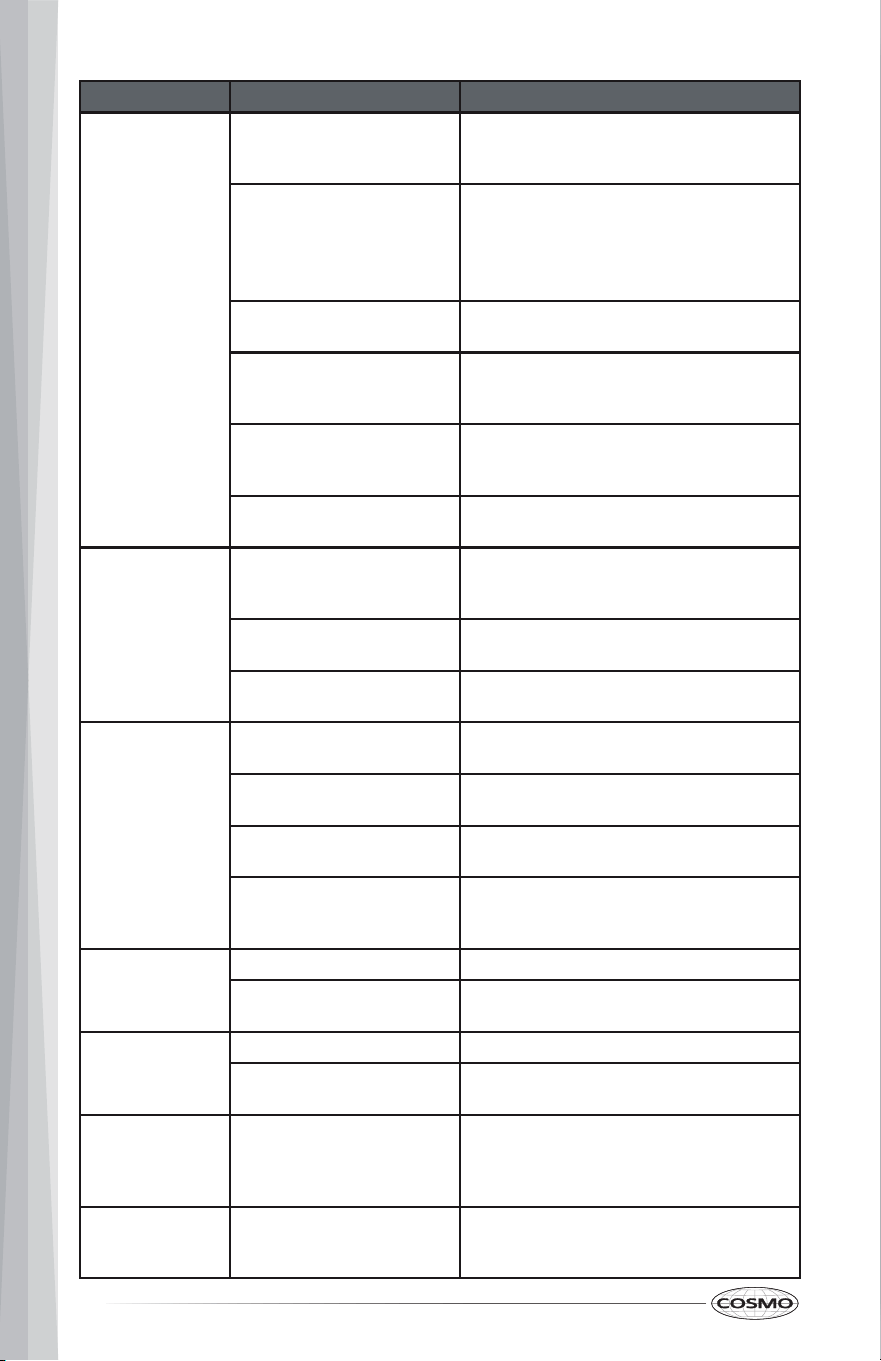
PROBLEM POSSIBLE CAUSE POSSIBLE SOLUTION
The dishes are
not clean enough
The water pressure is too
low.
Make sure that the water pressure is above
20 psi (138 kPa). Use your dishwasher when
water demand is low.
The inlet water temperature
is too low.
Make sure that the dishwasher is connected
to a hot water supply. If not, change the
water supply to a hot water source.
Use your dishwasher when hot water
demand is low.
Dishes are too close together. Reload the dishwasher as shown in
"Preparing and Loading Dishes" on page 11.
Improper use of detergent. Add detergent depending on the water
hardness and washing cycle you choose. Use
fresh detergent.
The selected cycle is not
suitable for the soil level on
the dishes.
Choose a different cycle with a longer
washing time.
The spray arms are blocked. Make sure that the spray arms are not
blocked and are free to rotate.
The dishes are
not drying
enough
The rinse aid dispenser is
empty or the setting is too
low.
Fill the rinse aid dispenser.
Increase the rinse aid setting.
Dishes are loaded
improperly.
Reload the dishwasher as shown in
"Preparing and loading dishes" on page 11.
The cycle you chose did not
include drying.
Choose a cycle with drying.
Spots and filming
on dishes
Water hardness is too high. For extremely hard water, install a water
softener.
Dishes are loaded
improperly.
Reload the dishwasher as shown in
"Preparing and loading dishes" on page 11.
Old or damp rinse aid power
is used.
Use fresh, liquid rinse aid.
The rinse aid dispenser is
empty or the setting is too
low.
Fill the rinse aid dispenser.
Increase the rinse aid setting.
Etching Using too much detergent. Use less detergent if you have soft water.
The inlet water temperature
exceeds 150° F (65.6° C).
Lower the inlet water temperature.
Detergent left in
dispenser cup
Detergent may be too old. Use fresh detergent.
The spray arm is blocked. When you load the dishes, make sure that
the spray arms are not blocked.
The detergent
dispenser will not
close
Improper operation of the
detergent cover.
Add detergent and rinse aid only as
indicated in this manual. See "Filling the
Detergent Dispenser" on page 16 and "Filling
the Rinse Aid Dispenser" on page 17.
Water remains in
the dishwasher.
The previous cycle has not
finished or has been
interrupted.
Make sure that the current cycle is finished.
24
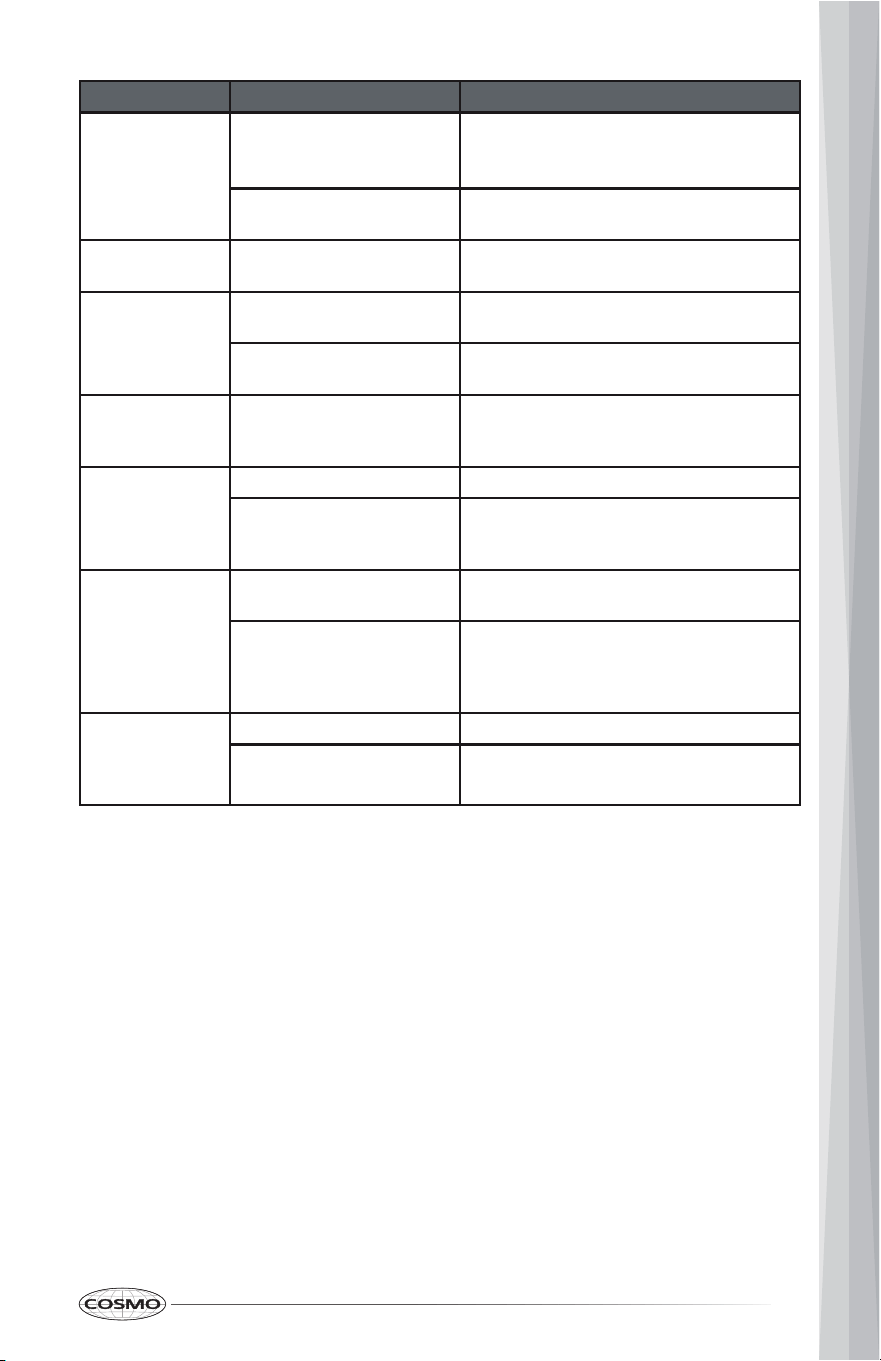
PROBLEM POSSIBLE CAUSE POSSIBLE SOLUTION
The dishwasher
does not drain
properly.
The drain is clogged. Check the air gap (if so equipped).
Make sure that the garbage disposal is
empty (if so connected).
The drain hose is kinked. Make sure that the drain hose is not kinked
and is properly connected.
Suds in the tub Using improper detergent. Make sure to use only automatic dishwasher
detergent.
The dishwasher
leaks
Excessive suds caused by
using improper detergent.
Make sure to use only automatic dishwasher
detergent.
The dishwasher is not level. Level the dishwasher. (Refer to the
Installation Instructions/Manual.)
There are black
or gray marks on
the dishes
Aluminum utensils have
rubbed against the dishes.
Make sure that the water inlet temperature
is not less than 120° F (49° C).
The interior of the
tub is stained
Coffee or tea stains. Use a spot cleaner to remove the stains.
Reddish stain. Some tomato products may cause this. Rinse
your dishes before loading to help prevent
this.
Noises Detergent cup opening/drain
pump.
This is normal.
A hard object has entered
the wash module. When the
object is ground up the noise
will stop.
If the noise continues after the cycle is
complete, call for service.
The dishwasher
won’t fill (the
dishwasher will
beep)
The water valve is turned off. Turn on the water valve.
The door may not be closed
completely.
Make sure that the door is closed and
latched.
25
LIMITED WARRANTY
WARRANTY AND SERVICE
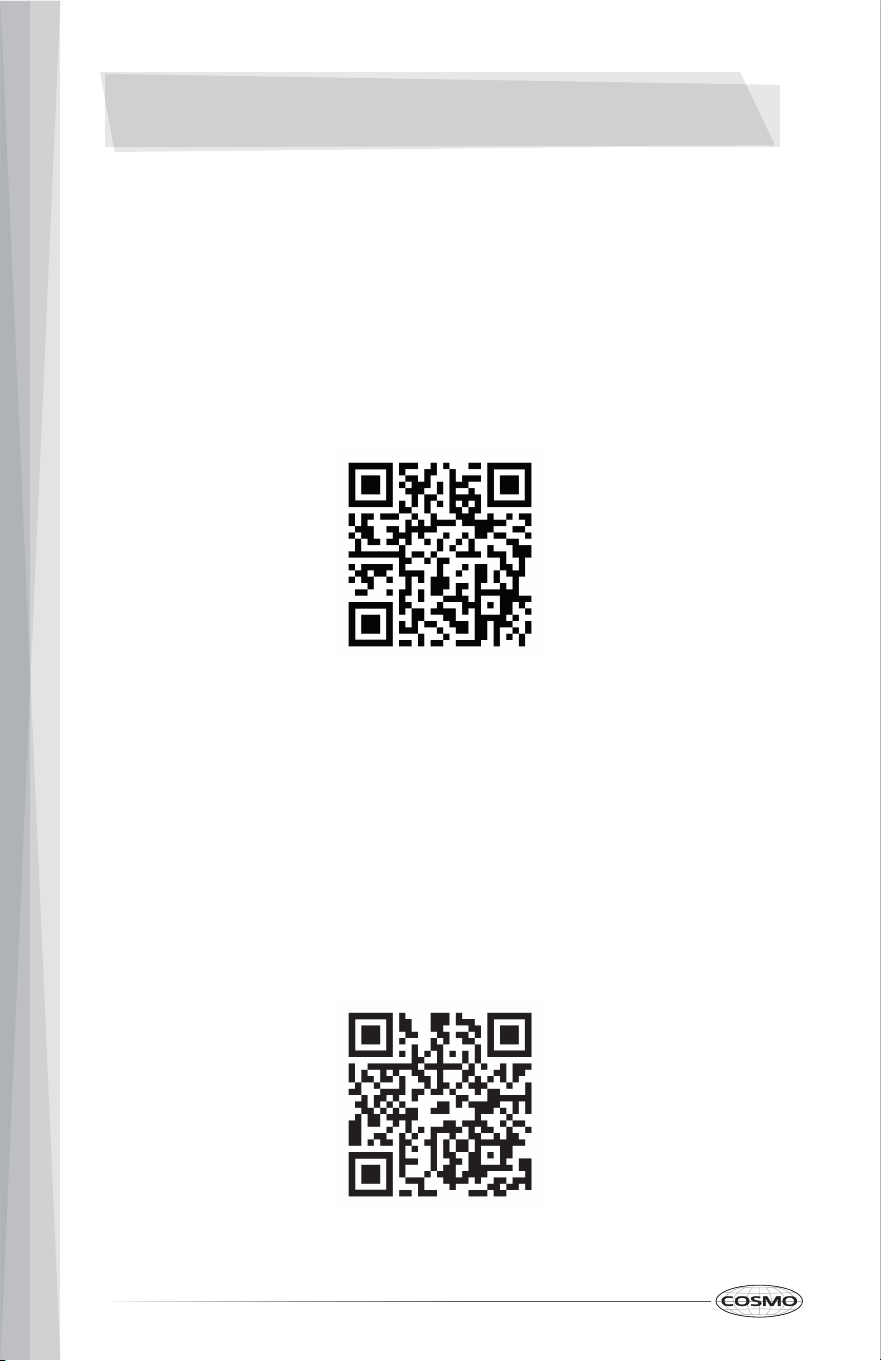
TO RECEIVE WARRANTY SERVICE, YOUR PRODUCT MUST BE REGISTERED.
TO REGISTER AND REVIEW FULL WARRANTY DETAILS, VISIT:
WWW.COSMOAPPLIANCES.COM/WARRANTY
SCAN TO REGISTER
CUSTOMER SUPPORT
TO CHAT WITH US LIVE FOR ASSISTANCE, VISIT:
WWW.COSMOAPPLIANCES.COM/CHAT
SCAN TO CHAT
2
6
IMPORTANT
Do Not Return This Product To The Store
If you have a problem with this product, please contact COSMO Customer
Support at
+1 (888) 784-3108
DATED PROOF OF PURCHASE, MODEL #, AND SERIAL # REQUIRED FOR
WARRANTY SERVICE.
IMPORTANT
Ne pas Réexpédier ce Produit au Magasin
Pour tout problème concernant ce produit, veuillez contacter le service des
consommateurs Cosmo Customer Support au
+1 (888) 784-3108
UNE PREUVE D’ACHAT DATEE EST REQUISE POUR BENEFICIER DE LA GARANTIE.
IMPORTANTE
No regrese este producto a la tienda
Si tiene algún problema con este producto, por favor contacte el ayuda al
cliente COSMO al
+1 (888) 784-3108
(Válido solo en E.U.A.)
NECESITA UNA PRUEBA DE DE COMPRA FECHADA, NÚMERO DE MODELO Y DE
SERIE PARA EL SERVICIO DE LA GARANTÍA.
Correct disposal of this product:
This marking indicates that this appliance should not be
disposed with other household wastes. To prevent
possible harm to the environment or human health from
uncontrolled waste disposal, recycle it responsibly to
promote the sustainable reuse of material resources.
2
7

Cosmo is constantly making efforts to improve the quality and
performance of our products, so we may make changes to our
appliances without updating this manual.
Electronic version of this manual is available at:
www.cosmoappliances.com
APPLIANCES