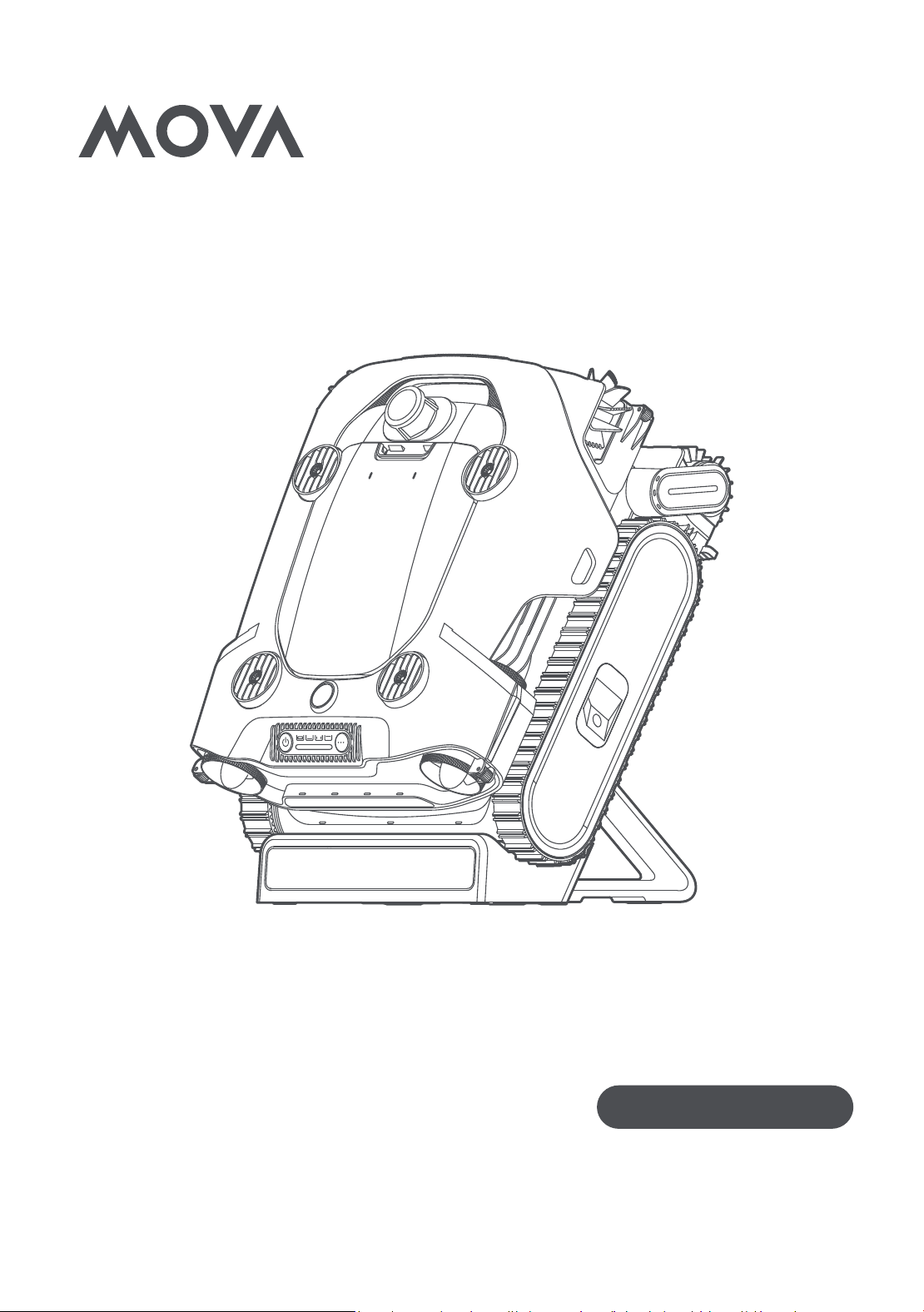
MOVA Rover X10
User Manual
Robotic Pool Cleaner
The illustrations in this manual are for reference only. Please refer to the actual product for accuracy.

1. Safety Instructions
•Always disconnect the appliance from the supply before assembling,
disassembling or cleaning.
•To protect against the effect of freezing, the appliance shall not be left
outside during freezing weather conditions.
•The appliance is a Class III appliance that it must only be supplied at
SELV.
1.1 Safety Regulations
•
READ AND FOLLOW ALL INSTRUCTIONS.
•
SAVE THESE INSTRUCTIONS.
•This appliance can be used by children aged from 8 years and above
and persons with reduced physical, sensory or mental capabilities or
lack of experience and knowledge if they have been given supervision
or instruction concerning use of the appliance in a safe way and
understand the hazards involved.
•Children shall not play with the appliance.
•Cleaning and user maintenance shall not be made by children without
supervision.
•Remove the robotic pool cleaner from the pool before allowing people to
enter the pool.
•When examining the robotic pool cleaner, make sure the robotic pool
cleaner is switched OFF.
•Charge the battery only within the specified temperature range.
•The unit must be connected only to a supply circuit that is protected by
a ground-fault circuit interrupter (GFCI). This GFCI should be tested on
a routine basis. To test the GFCI, push the test button. The GFCI should
interrupt power. Push the reset button. Power should be restored. If
the GFCI fails to operate in this manner, the GFCI is defective. If the
GFCI interrupts power to the power unit without the test button being
pushed, a ground current may be flowing, indicating the possibility of
an electric shock. Do not use the power unit. Disconnect the power unit
and contact the manufacturer for assistance.
•Use only the original battery charger.
•The battery charger must be supplied through a residual current device
(RCD) having a rated residual operating current not exceeding 30 mA.
•The power cord is not user-replaceable. If the power cord is damaged,
stop using the battery charger and contact the service center for repair.

3
EN
Do not use extension cord to connect the battery charger to electric
supply; provide a properly located outlet.
•DO NOT USE the robotic pool cleaner and/or its battery/power pack
in case of mechanical damage to the robotic pool cleaner and/or its
battery.
•To avoid the risk of fire and burns, DO NOT open, crush, heat, or burn
the battery case.
•Keep hands and fingers away from impeller motor area and driving belt
mechanism to avoid injury.
•For continuous protection against possible electric shock, place the
battery charger at least 11 cm (4.33 in) above ground.
•When lifting the robotic pool cleaner, take care to prevent back injury.
•Do not use the robotic pool cleaner if you have added liquid flocculant
or any other clarifier to the pool water. These substances obstruct and
damage the robot's filters.
•The Lithium-ion battery in this product is non-replaceable. It should be
recycled by certified battery electronics recyclers that accept batteries.
Batteries should NOT be discarded in the trash or put in municipal
recycling bins. Do not disassemble the battery.
•The robotic pool cleaner must not be used when people are in the water.
•Switch off the pump from the supply mains before carrying out user
maintenance such as cleaning the filter.
•Only use the supply unit provided with this appliance.
•The power outlet must be properly grounded and installed in a dry, well-
ventilated area outside the pool (at least 1.5 m/4.92 ft away from the
pool edge), avoid exposure to splashing water or humid environments.
The outlet must comply with national electrical safety standards. Do not
use loose, damaged, or defective outlets.
•Handle the power cord with care to prevent damage. Do not pull or lift
the charging dock by the power cord, do not use the power cord as a
handle or pull the cord around sharp edges or corners. Do not allow the
product to run over the power cord. Keep the power cord away from
heat sources. Never plug or unplug the power cord on wet ground or
near water sources (such as standing water around the pool edges).
•Regularly inspect the power adapter and charging cable for damage,
cracks, exposed wires, overheating, or aging. If any abnormality is found,
stop using the product immediately and contact authorized after-sales
service for replacement. Do not attempt to repair, splice, tape, or modify
the cable yourself.

4
EN
•Do not use a damaged charging dock.
•Install the charging dock on a flat, dry, hard surface with no standing
water. Keep it away from pool splashing water, shower areas, or
other humid environments. Avoid exposure to direct sunlight, high-
temperature heat sources (such as heaters), and flammable materials
(such as disinfectants or gasoline).
•Do not install the charging dock in areas accessible to children or pets,
or on low platforms where it may be bumped or knocked over.
•The charging dock is intended only for charging the specified models of
this manufacturer’s pool robots. Do not use it to charge other devices,
as this may cause damage or short circuits.
•During charging, ensure the robot is properly placed on the charging
dock. If the indicator light behaves abnormally during charging (blinking
irregularly, not lighting up), or if excessive heat is detected, immediately
disconnect the power. Check whether the contact areas between the
charging dock and the robot are clean and free of foreign objects. Do
not resume charging until the issue has been resolved.
•During charging, do not touch the charging areas on the dock or the
robot. Avoid contact with wet hands to prevent electric shock or burns.
•Do not place metal objects (such as keys or coins) or liquid containers
on the charging dock to prevent short circuits or electrical leakage.
•During charging and when not in use, keep the charging dock out of the
reach of children and pets to prevent accidental contact, cable chewing,
or touching the charging area.
•Store the charging dock separately from pool disinfectants (such as
chlorine-based products and pH adjusters), cleaning agents, and other
chemical solutions. Do not allow chemical substances to come into
direct contact with the charging dock housing, connectors, or cables to
prevent corrosion and damage.
•When cleaning the charging dock, do not use strong acids or alkaline
cleaners. Clean the dock only with a dry cloth or a slightly damp cloth
with a neutral detergent. Always disconnect the power completely
before cleaning, and reconnect the power only after the dock is
completely dry.
•If the charging dock is accidentally splashed with water or submerged,
immediately disconnect the power supply. Allow it to dry thoroughly
and have it inspected and confirmed safe by qualified personnel before
reuse. Never reconnect the power after water exposure unless it has
been properly inspected.
•This charging dock is intended for indoor use or use in covered, dry

5
EN
outdoor areas only. Do not use it in uncovered outdoor environments
where it may be exposed to rain.
•Do not modify the charging dock’s circuitry, connectors, or power
specifications, as doing so may result in serious safety hazards such as
fire or electric shock.
1.2 FCC/IC Statement
This device complies with Part 15 of the FCC Rules / Innovation, Science
and Economic Development Canada’s licence-exempt RSS(s). Operation
is subject to the following two conditions: (1) this device may not cause
harmful interference. (2) this device must accept any interference received,
including interference that may cause undesired operation.Changes
or modifications not expressly approved by the party responsible for
compliance could void the user's authority to operate the equipment.
This equipment has been tested and found to comply with the limits
for a Class B digital device, pursuant to part 15 of the FCC Rules. These
limits are designed to provide reasonable protection against harmful
interference in a residential installation. This equipment generates uses
and can radiate radio frequency energy and, if not installed and used in
accordance with the instructions, may cause harmful interference to radio
communications. However, there is no guarantee that interference will
not occur in a particular installation. If this equipment does cause harmful
interference to radio or television reception, which can be determined by
turning the equipment off and on, the user is encouraged to try to correct
the interference by one or more of the following measures:
•Reorient or relocate the receiving antenna.
•Increase the separation between the equipment and receiver.
•Connect the equipment into an outlet on a circuit different from that to
which the receiver is connected.
•Consult the dealer or an experienced radio/TV technician for help.
1.3 MPE Reminding
To satisfy FCC/IC RF exposure requirements, a separation distance of 20
cm/7.87 in or more should be maintained between the antenna of this
device and persons during device operation.
To ensure compliance, operations at closer than this distance is not
recommended.
1.4 IMPORTANT SAFETY INSTRUCTIONS
When installing and using this electrical equipment, basic safety

6
EN
precautions should always be followed including the following:
•
READ AND FOLLOW ALL INSTRUCTIONS
•
This appliance shall not be used by children. Cleaning and user
maintenance shall not be carried out by children.
•Prevent unintentional starting. Ensure the switch is in the off position
before connecting to battery pack, picking up or carrying the appliance.
Carrying the appliance with your finger on the switch or energizing
appliance that have the switch on invites accidents.
•Recharge only with the charger specified by the manufacturer. A charger
that is suitable for one type of battery pack may create a risk of fire
when used with another battery pack.
•Use appliances only with specifically designated battery packs. Use of
any other battery packs may create a risk of injury and fire.
•When battery pack is not in use, keep it away from other metal objects,
like paper clips, coins, keys, nails, screws or other small metal objects,
that can make a connection from one terminal to another. Shorting the
battery terminals together may cause burns or a fire.
•Under abusive conditions, liquid may be ejected from the battery.
If contact accidentally occurs, flush with water. If liquid contacts
eyes, additionally seek medical help. Liquid ejected from the battery
may cause irritation or burns. (This advice is considered correct for
conventional NiMh, NiCd, lead acid and lithium-ion cell types. If this
advice is incorrect for a cell design that differs from these, then the
correct advice may be substituted.)
•Do not use a battery pack or appliance that is damaged or modified.
Damaged or modified batteries may exhibit unpredictable behavior
resulting in fire, explosion or risk of injury.
•Do not expose a battery pack or appliance to fire or excessive
temperature. Exposure to fire or temperature above 130 °C may
cause explosion. The temperature of 130 °C can be replaced by the
temperature of 265 °F.
•Follow all charging instructions and do not charge the battery pack or
appliance outside of the temperature range specified in the instructions.
Charging improperly or at temperatures outside of the specified range
may damage the battery and increase the risk of fire.
•It is recommended to charge the robot in a cool, dry indoor environment.
Charging under direct sunlight outdoors may cause the robot to
overheat, triggering temperature protection and resulting in an inability
to charge properly.
•Have servicing performed by a qualified repair person using only
7
EN
identical replacement parts. This will ensure that the safety of the
product is maintained.
•Do not modify or attempt to repair the appliance or the battery pack (as
applicable) except as indicated in the instructions for use and care.
•Do not expose the appliance or battery to excessive temperatures.
•Be aware of the risk of terminals of the battery or terminals of the
adapter being short circuited by metal objects.
•The button cell battery on the MCU must not be replaced by the
consumer.
1.5 Correct Disposal of this Product
This marking indicates that this product should not be disposed of with
other household waste throughout the EU. To prevent possible harm to the
environment or human health from uncontrolled waste disposal, recycle
it responsibly to promote the sustainable reuse of material resources. To
recycle your used device, please use the return and collection systems or
contact the retailer where the product was purchased. They can safely
recycle this product.
The remote surveillance is for the absolute private use of non-public,
privately owned places for pure self-protection and single control intended
only. Please be aware of the local data protection based legal obligations
in case of use. No surveillance of public places, especially with clandestine
intent and on the part of the employer without justified reasons. Such not
justified use is in the risk and responsibility of the user only.
8
EN
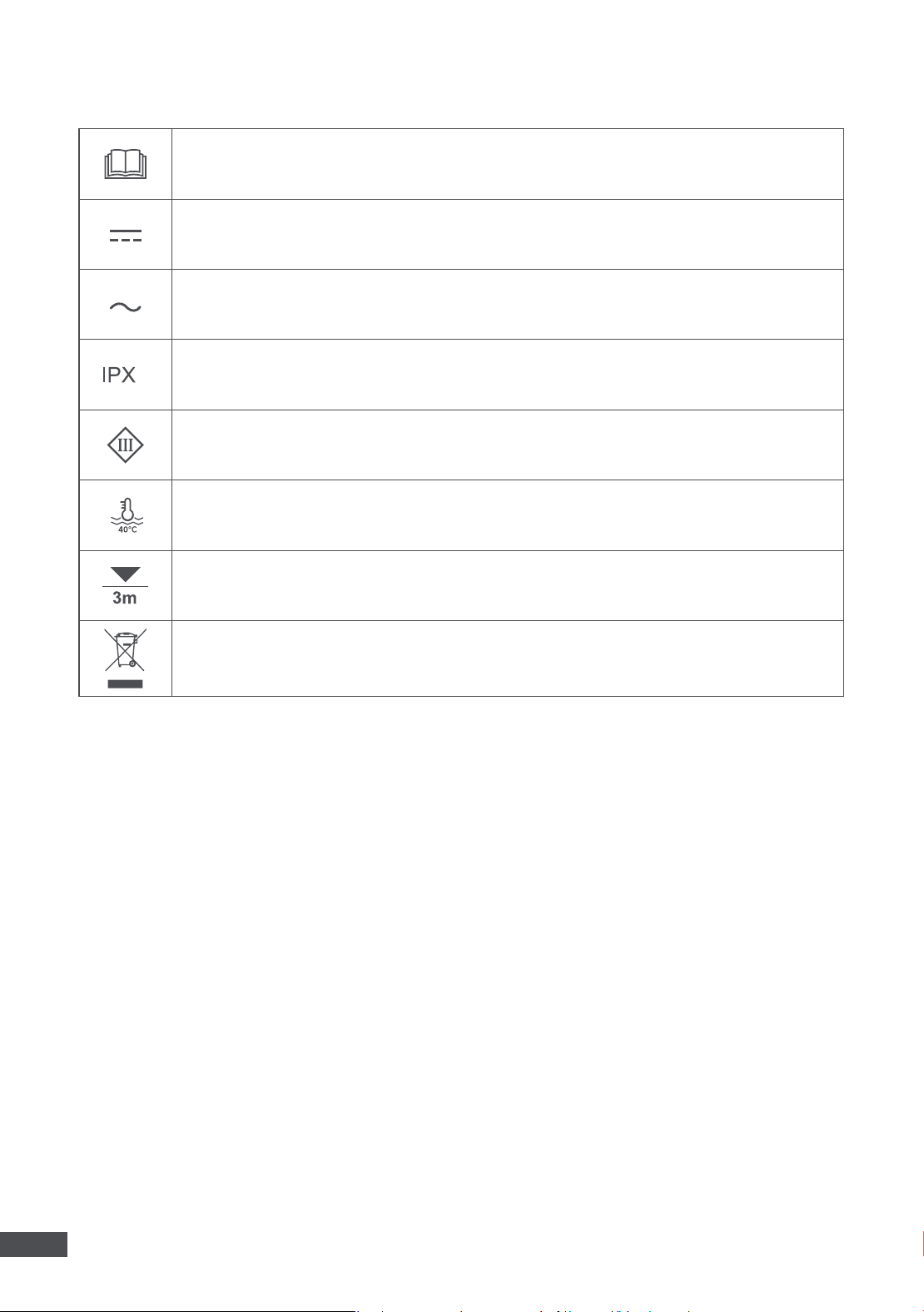
1.6
Symbols and Decals
Before charging, read the instructions.
Direct current
Alternating current
8
Ingress Protection
Class Ⅲ
Water Temp Max: 40 ° C( 104 ° F )
Maximum Water Depth: 3 m ( 10 ft )
WARNING –
It is not permitted to dispose of this product as normal household waste. Ensure that the
product is recycled in accordance with local legal requirements.
9
EN
2. Product Introduction
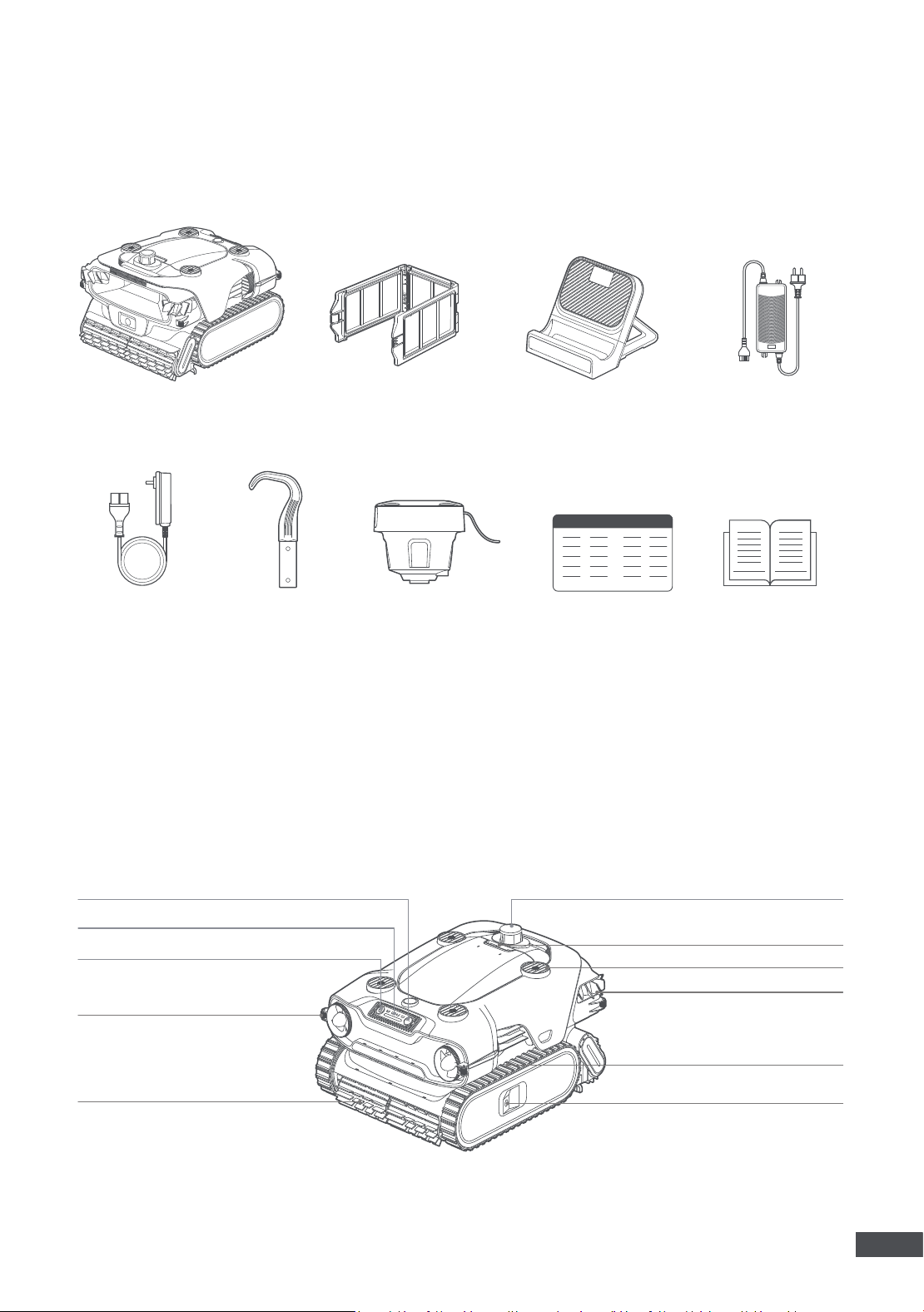
2.1 What’s in the Box
Hook
Robot
Wireless Charging Dock
Adapter
(for the dock)
Ultra-fine Filter
AquaSonar™
User ManualQuick Start Guide
Note:
If there is inconsistency between the manual and the actual product, the actual product shall govern.
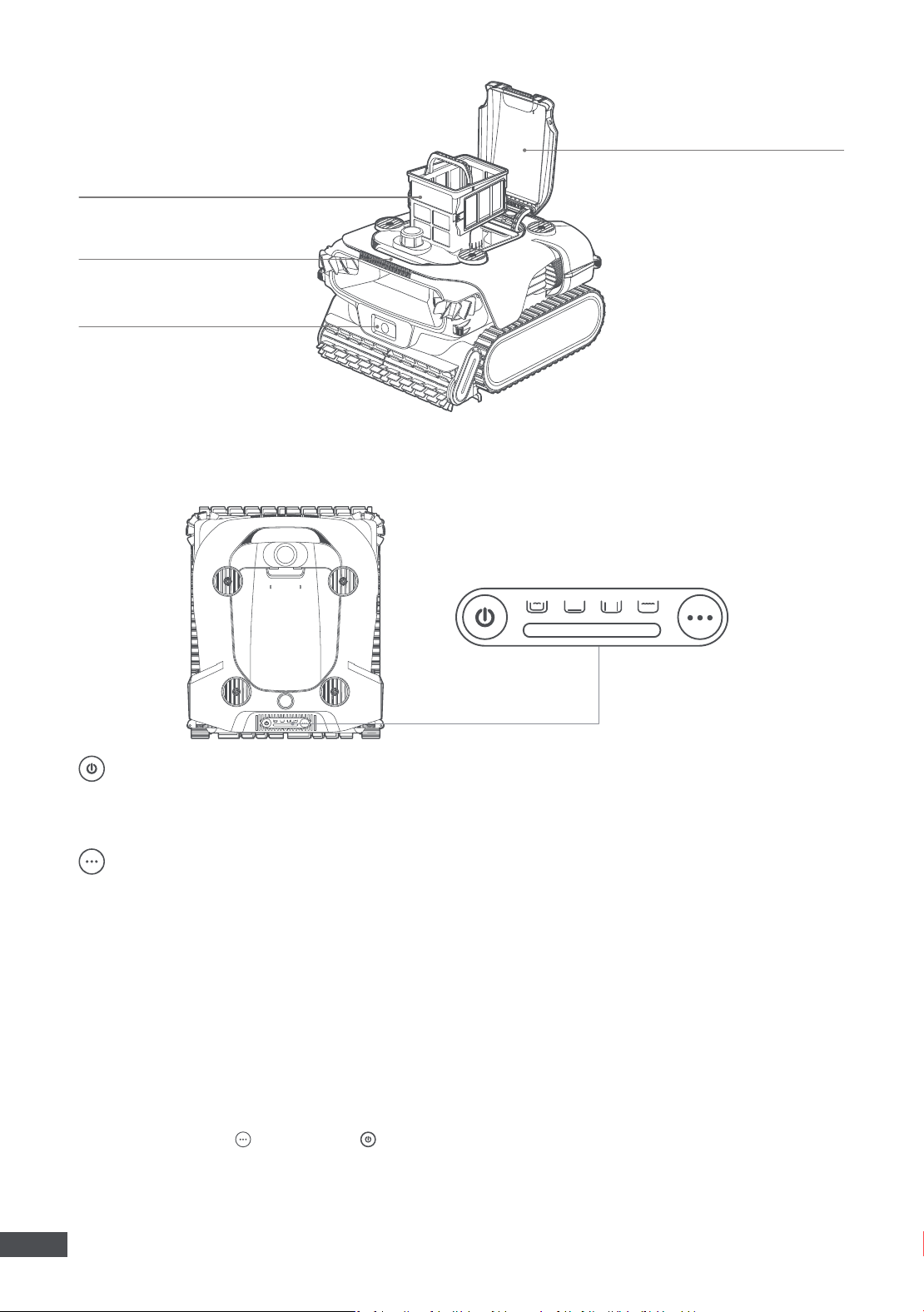
2.2 Product Structure
Mode Button
LED Indicator
Power Button
Guide Wheel
Roller Brush
Laser Distance Sensor
Press-to-open Switch
Water Outlet
Side Brush
Caterpillar Tread
TOF Sensor
Adapter
(for the AquaSonar™)
10
EN
Filter Basket
Handle
Sensor Fusion Module
Top Cover
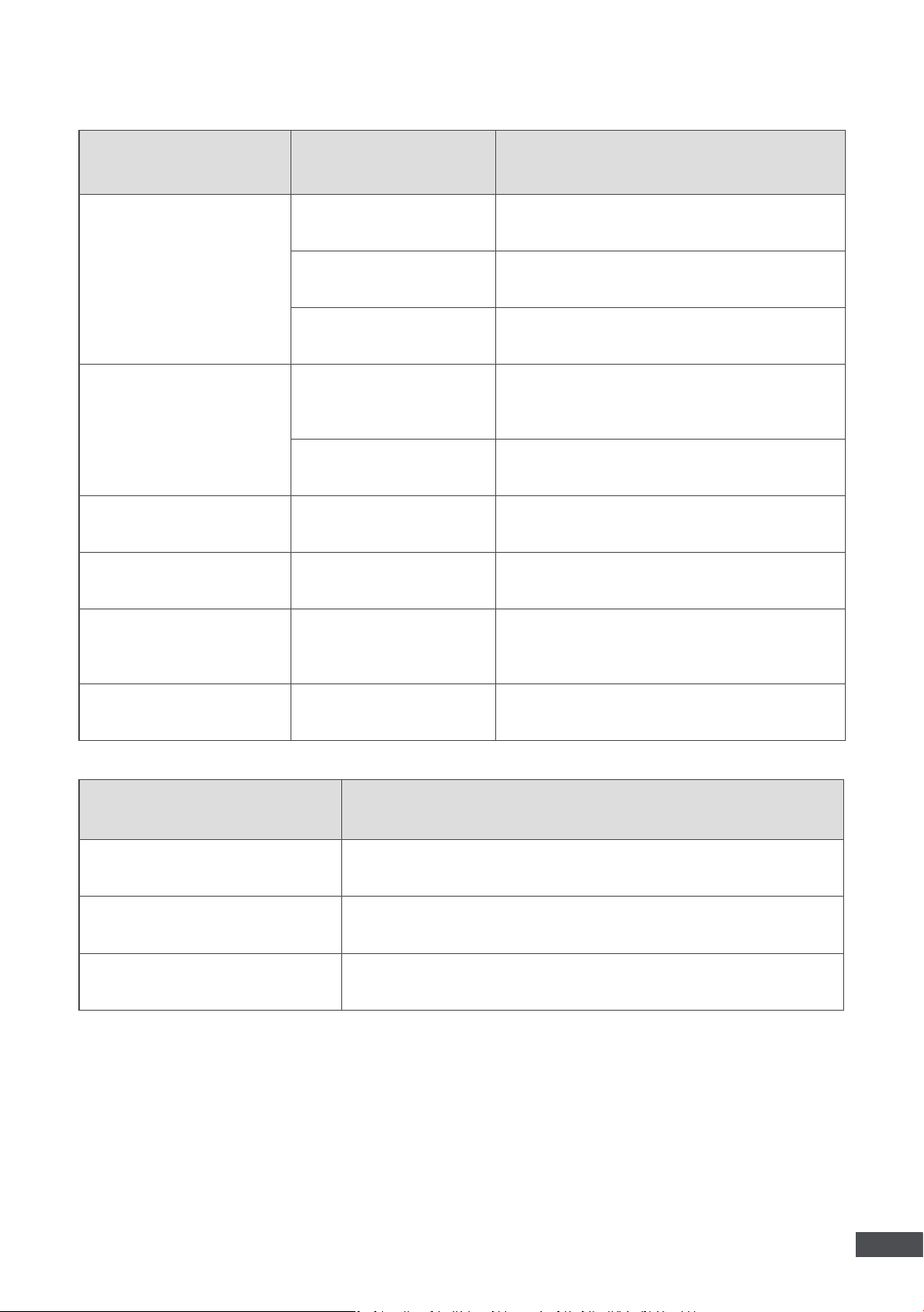
2.3 Buttons on the Robot
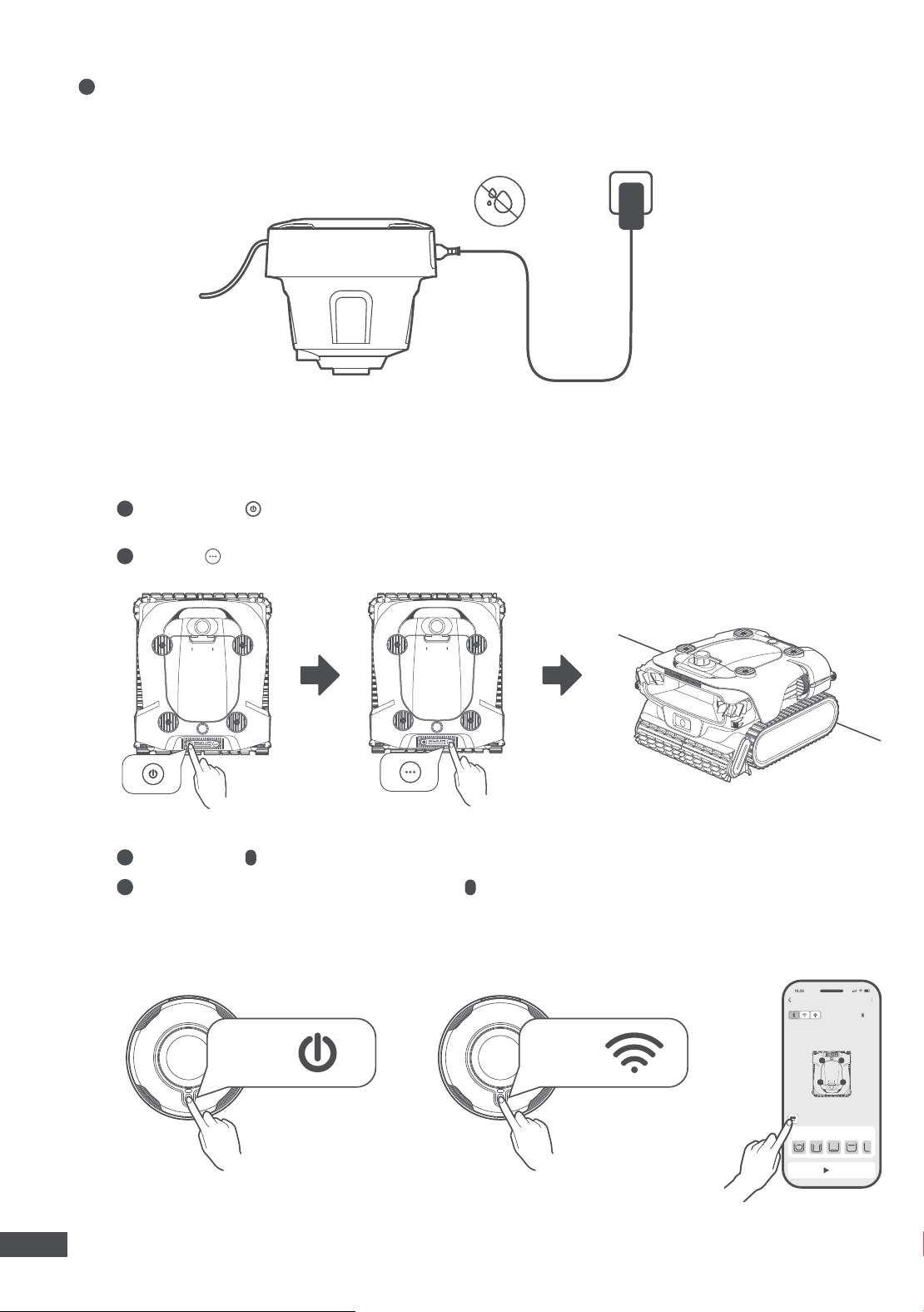
Power
•Press and hold for 3s to turn the robot on/off.
•
Press and hold for 10s to force shutdown.
Mode Button
•Press to cycle through and select a mode from: Complete Mode, Floor Mode, Wall Mode and Surface
Mode. For more customized cleaning modes, please refer to the App.
Complete Mode:
The robot cleans the pool floor, the wall (including the waterline), and the surface.
Floor Mode:
The robot cleans the pool floor only.
Wall Mode:
The robot cleans the walls only. While cleaning the walls, the robot will scrub the waterline at
the same time.
Surface Mode:
The robot cleans the pool surface only.
•Long-press to start network setup, and press twice to exit the network setup.
•Long-press to cancel the cleaning task started via the App.
Power Button + Mode Button
•Long-press the , and press the twice simultaneously to restore the factory settings.
11
EN
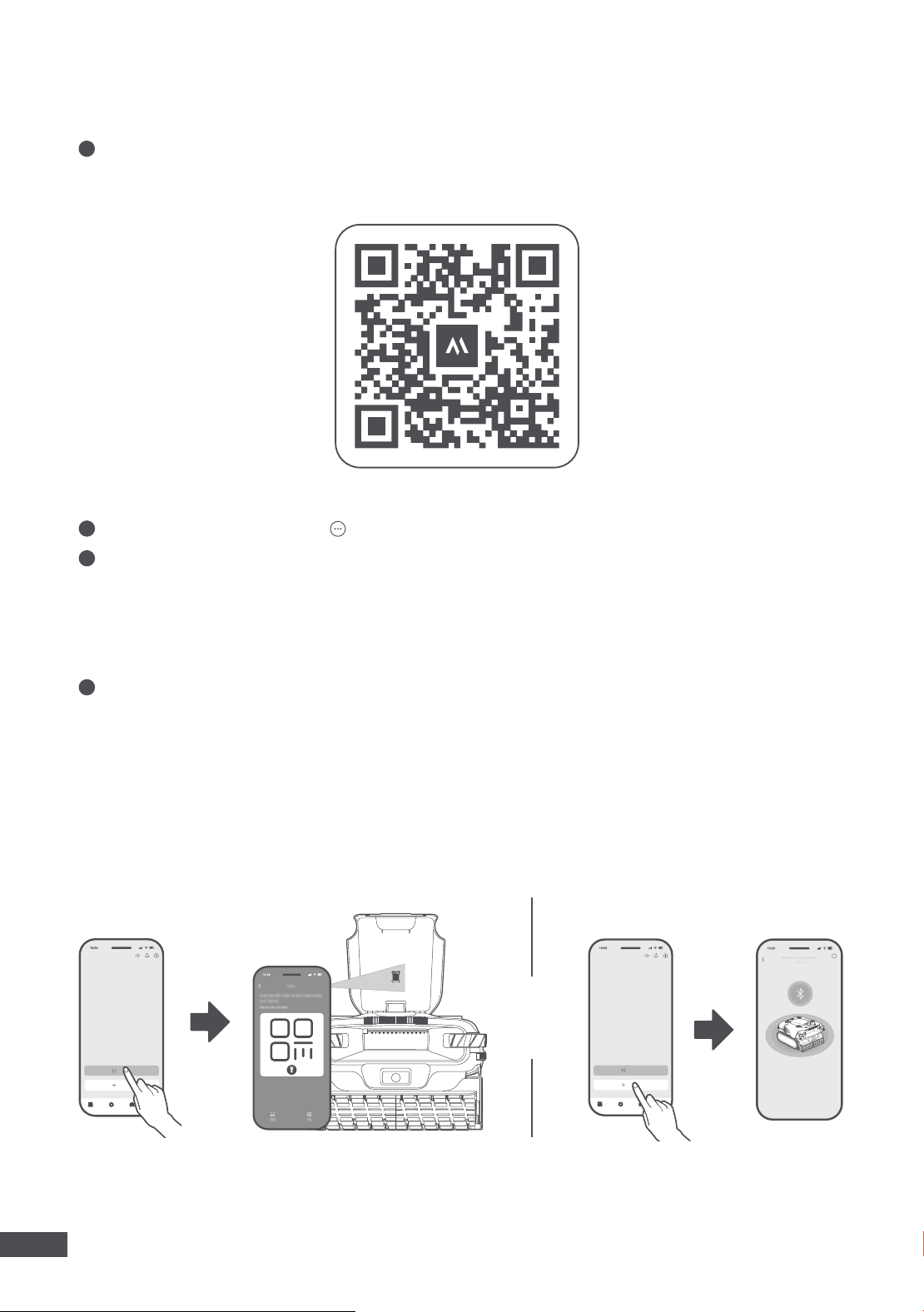
2.4 LED Status Indicator
Light Effect Robot Status
Operation
Blinking Purple Working in remote control mode.
Solid Green The light panel reflects the current battery level.
Flowing Green Robot submerging.
Charging
Blinking Green
Charging in progress. The light panel reflects
the current battery level.
Solid Green Battery fully charged.
Error Blinking Red Robot malfunction.
Network Configuration Blinking Blue Network setup.
Firmware Update Colourful Flowing Light OTA update in progress.
Factory Reset Blinking White Restoring factory settings.
Light Effect AquaSonar™ Status
Solid Green In standby.
Blinking Blue Network setup.
Blinking Red Battery nearing depletion or an error has occurred.
12
EN
3. Connect to the MOVAhome App
1
Scan the QR code to download the App, or search for "MOVAhome" in the App Store or Google Play. After
installation is complete, please create an account and log in.
Note:
The App development team will continuously conduct OTA (over-the-air) updates and maintenance on
the firmware and App. Please check for update notifications to keep the firmware and App up-to-date to enjoy
more features.
OR
?
2
Turn on the robot, long-press the on the robot to start the network setup.
3
Before setting up the network, please check the following:
•Ensure that both your mobile device and the robot are within the same Wi-Fi network coverage range with a
strong signal.
•Ensure the current Wi-Fi network is a single-band network of 2.4 GHz frequency or 5 GHz frequency.
•Ensure the Bluetooth function on your mobile device is enabled.
•Bring the phone close to the robot (within 1 m).
4
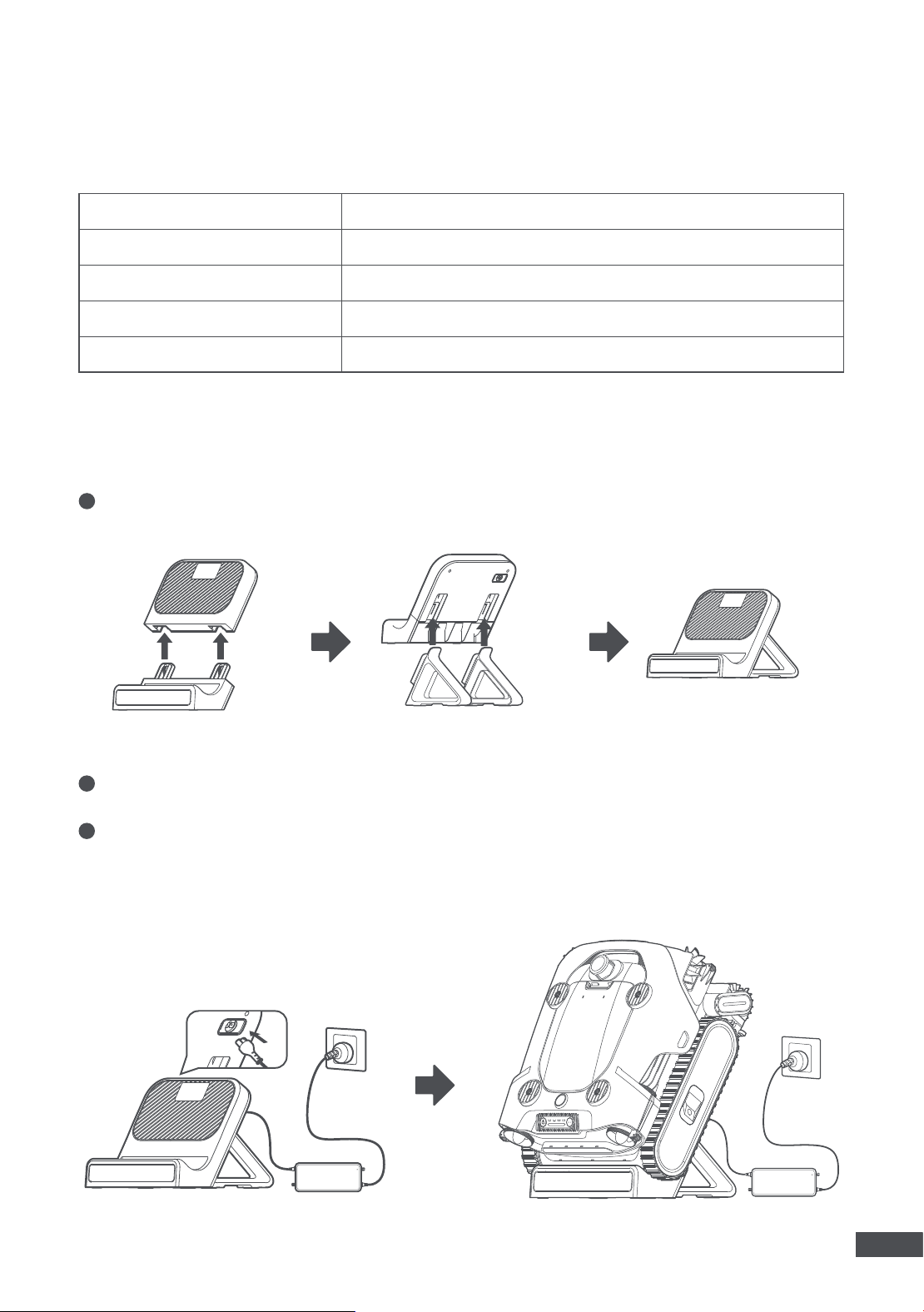
Open the App. You can add your robot in one of the following ways:
•Scan QR code to connect: Navigate to the Device page and tap Scan to connect. Scan the QR code on the
device. Follow the onscreen instructions to complete the connection.
•Add manually: Go to the Device page and tap Add. Select your device model. Follow the onscreen
instructions to complete the connection.
13
EN
4.1 Water Conditions for Robot Use
4.2 Charging
Chlorine Maximum 12 PPM
Salt Maximum 6000 PPM
PH 4-9
Working Temperature 5-40 ℃ (41–104 ℉)
Maximum Water Depth 3 m (10 ft)
4. Operations
1
Attach the base to the charging panel, then insert the brackets into the grooves on the back of the charging
panel. When installing the brackets, ensure the side with the slots faces inward.
2
Connect the adapter's cable to the charging port on the back of the dock, and plug the adapter into an
electrical outlet.
3
Place the robot on the dock to start charging.
Caution:
•Do not charge the robot in direct sunlight.
•Please fully charge the robot before use.
14
EN
4
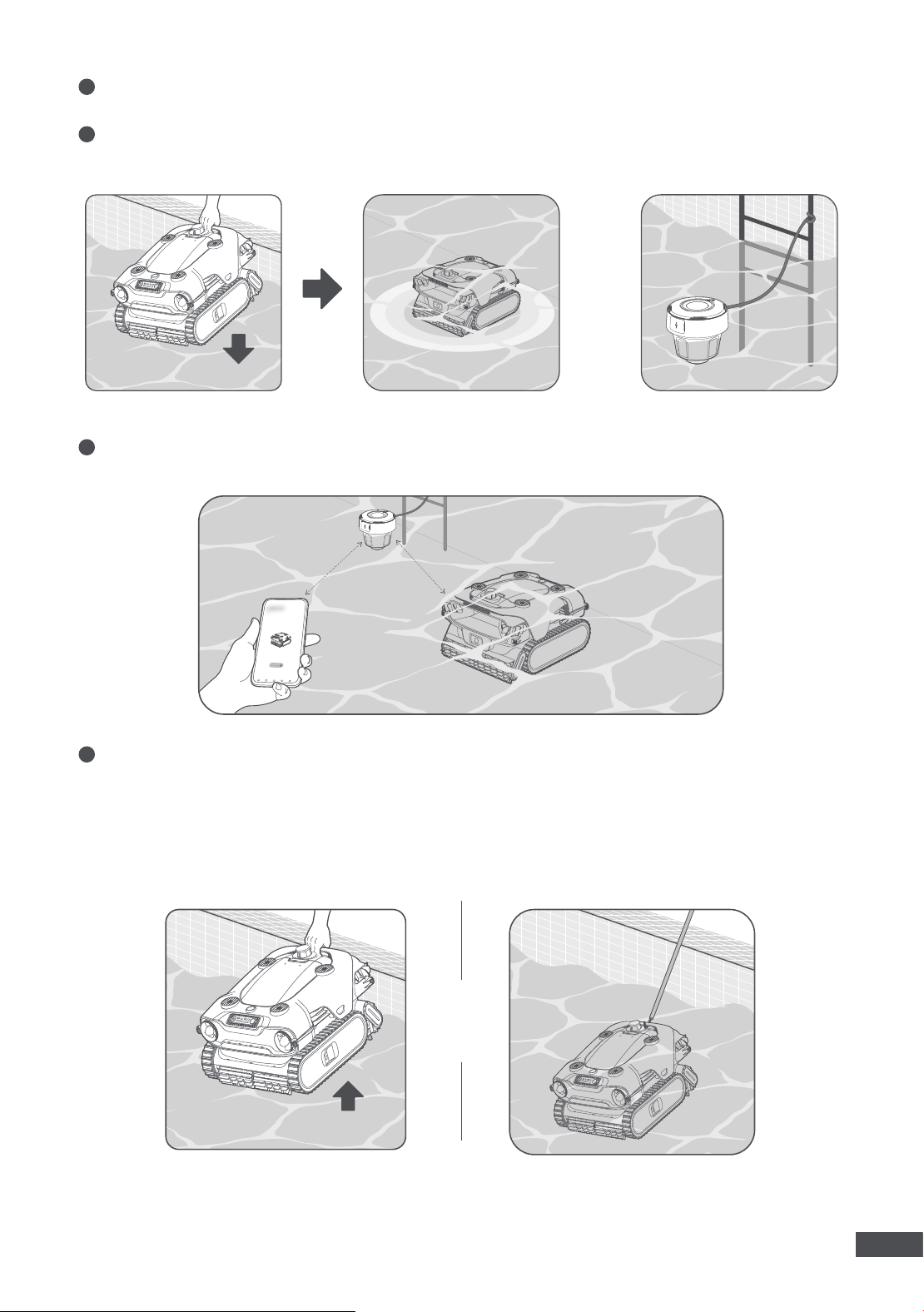
After charging the robot, fully charge AquaSonar™. Connect the adapter's cable to the charging port on
AquaSonar™, and plug the adapter into an electrical outlet to start charging. Ensure the charging port is dry
before charging. After the charging is complete, firmly close the charging port cover.
3
Long-press the on AquaSonar™ for 3s to turn it on.
4
When AquaSonar™ is turned on, long-press the for 5s to start network setup. When you see the indicator
flashing blue, AquaSonar™ is ready for network connection. Follow the on-screen instructions to complete
the connection. Use a 2.4 GHz Wi-Fi network.
Note:
The camera will be activated for navigation and positioning when the robot is working underwater.
1
Long-press the to turn the robot on. The robot will perform a self-check first and this may take a few
seconds. Once the indicator stops moving, the robot is ready for the next step.
2
Press the to select a mode. Then, place the robot on a level surface and wait for a while for it to calibrate.
4.3 Start Cleaning
3S 5S
80%
15
EN
5
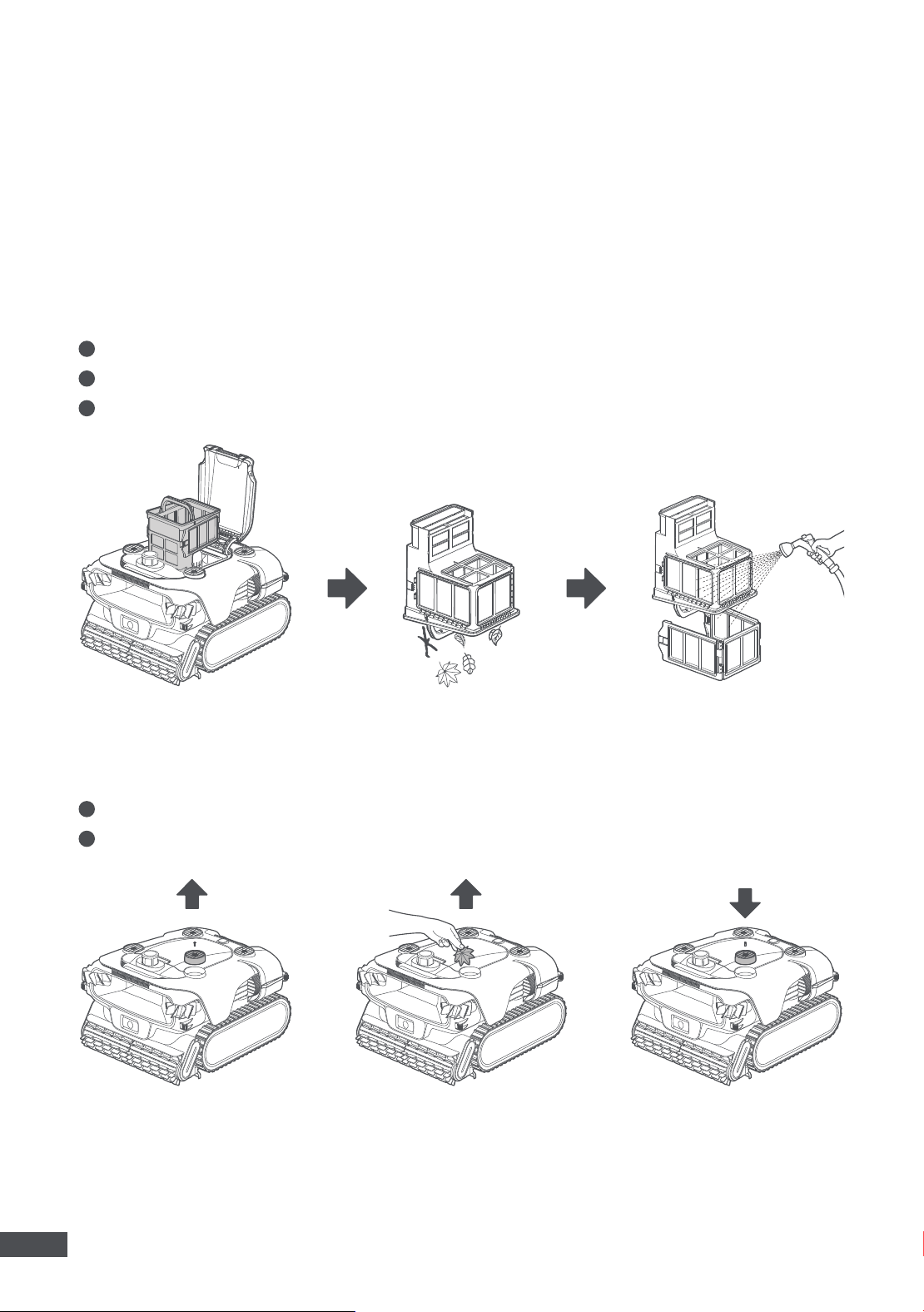
Submerge the robot and AquaSonar™ in the pool. It may take up to 3 minutes for the robot to fill with water.
For easy pickup, it's recommended to secure the AquaSonar™ to the poolside with the lanyard.
6
After that, the robot will autonomously explore the pool's edges to start the initial mapping. After the
mapping is done, the robot will start cleaning automatically.
8
The robot will automatically park at the poolside for retrieval when cleaning is complete. If the robot fails to
return to the poolside, you can manually guide the robot to the poolside via the App, or attach the hook to
any standard pool pole (not included) to lift the robot out of water.
Note:
•If the battery is too low to return to the poolside, the robot will park on the pool floor. Use the hook to retrieve
it.
•After being lifted out of the water, the robot will automatically drain. This process may take about 3 minutes.
7
While the robot is working underwater, you can control the robot on the App via AquaSonar™.
OR
16
EN
Warning:
Please turn the robot off and disconnect it from the charging dock before cleaning and maintenance
to prevent injury.
1
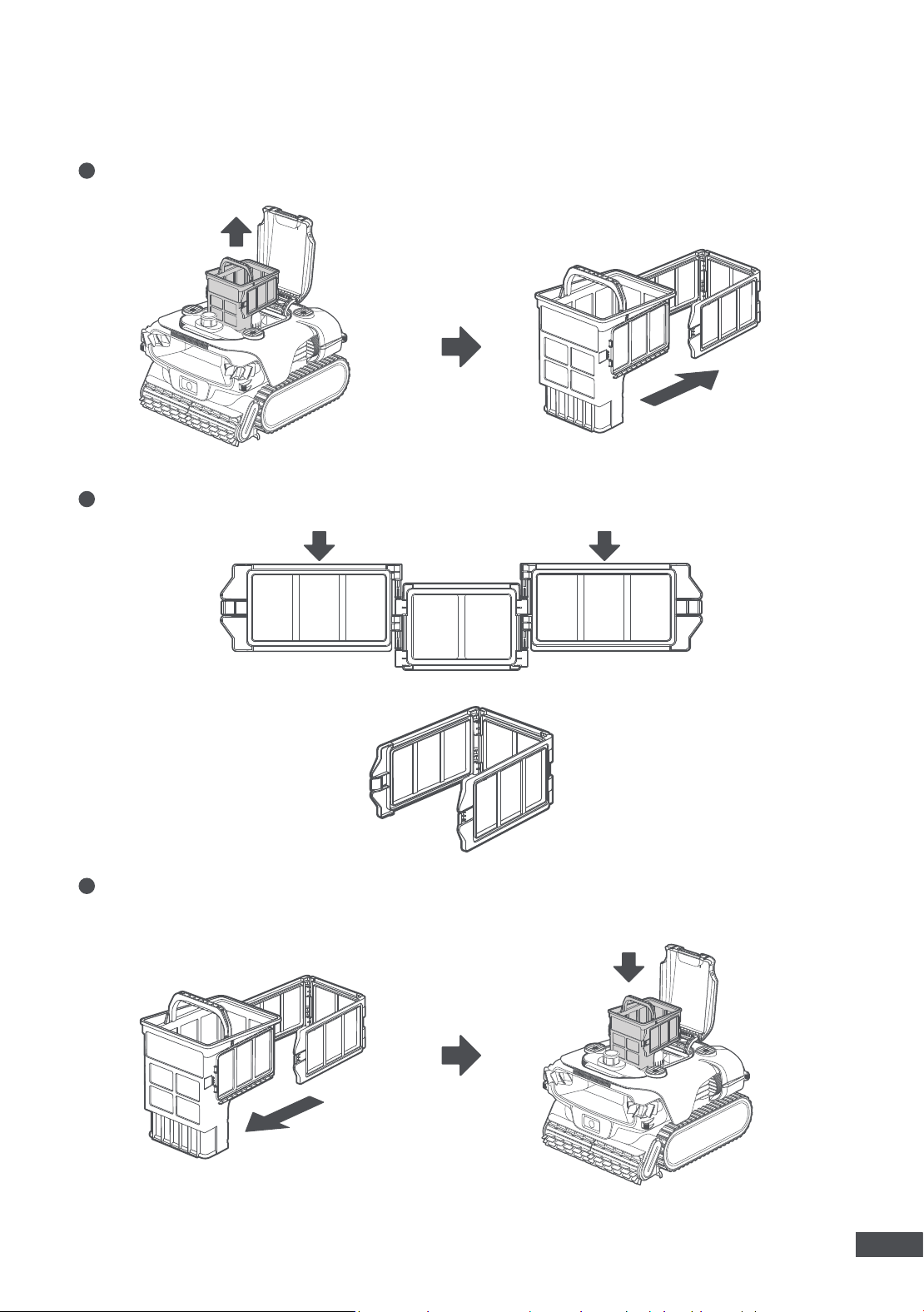
Open the top cover of the robot, take out the filter basket.
2
Empty all debris such as hair, twigs, and sand.
3
Separate the filter basket and the ultra-fine filter. Then, rinse them thoroughly with a hose.
5.1 Cleaning
Filter Basket
Water Outlet
5. Maintenance and Replacement
It is recommended to rinse the filter basket after each use to prevent clogging.
1
Unscrew the screw from the water outlet cover to remove the cover.
2
Clean all debris around the outlet. Then, reinstall the cover and secure the screw.
17
EN
1
Remove the old ultra-fine filter.
2
Assemble the replacement ultra-fine filter.
3
Attach the new ultra-fine filter onto the filter basket and press down until you hear a "click", indicating it is
securely locked in place.
5.2 Replacement
Ultra-fine Filter
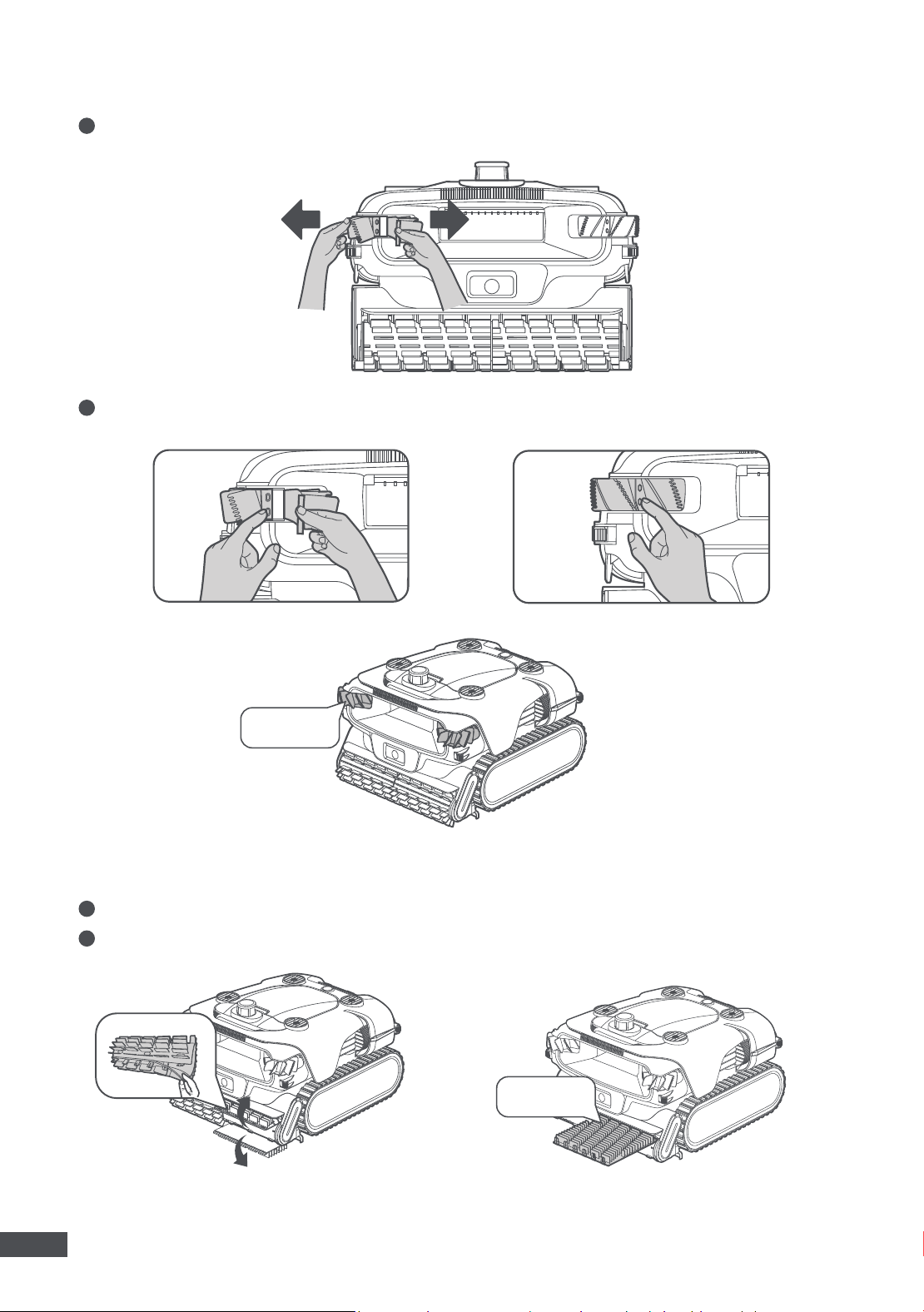
18
EN
1
Unfasten and remove the old side brush.
2
Attach one end of the new side brush to the protrusion, then rotate it to attach the middle and the other end.
Side Brush
1
Unfasten the silicone buckles on the roller brush.
2
Replace the roller brush with a new one and fasten the silicone buckles.
Roller Brush
NEW
NEW
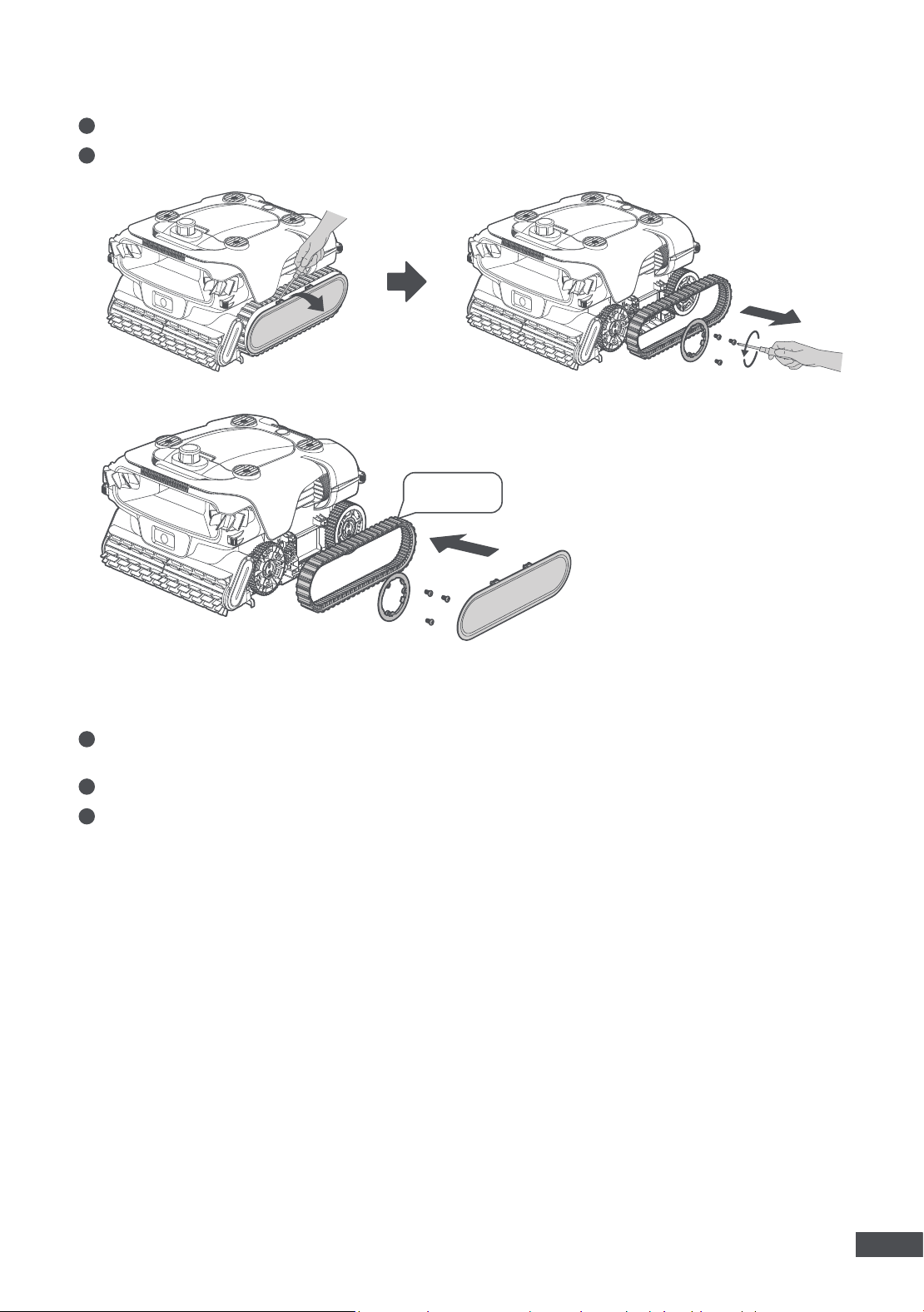
19
EN
1
Remove the robot from the pool and drain all the water. Please wait approximately 3 minutes for the draining
process to complete.
2
Turn the robot off before storage. It is recommended to store the robot with a battery level of 80–100 %.
3
Store the robot in a place with an ambient temperature between -10 ℃ (14 ℉) and 20 ℃ (68 °F). Ensure the
following conditions are met:
•Store the robot indoors in a cool, dry location, protected away from direct sunlight, rain, or frost.
•Keep the robot away from extreme temperatures, flames, and areas accessible to children.
•Protect it from dust if stored for an extended period.
•Recharge the robot at least every six months to maintain battery health.
1
Remove the side panel from the robot with a screw driver.
2
Replace the caterpillar tread with a new one. Then, reinstall the side panel.
5.3 Storage
Caterpillar Tread
NEW
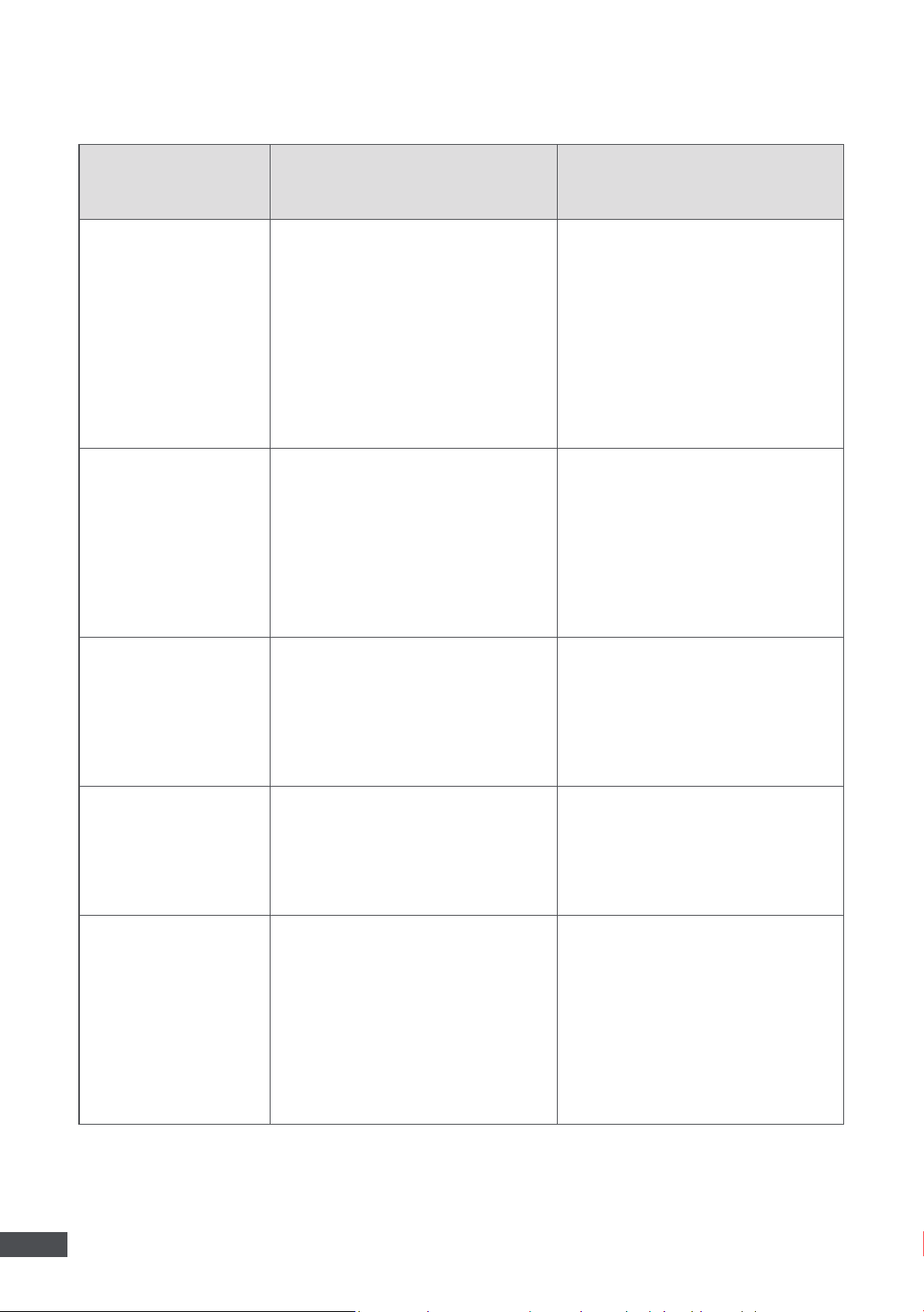
20
EN
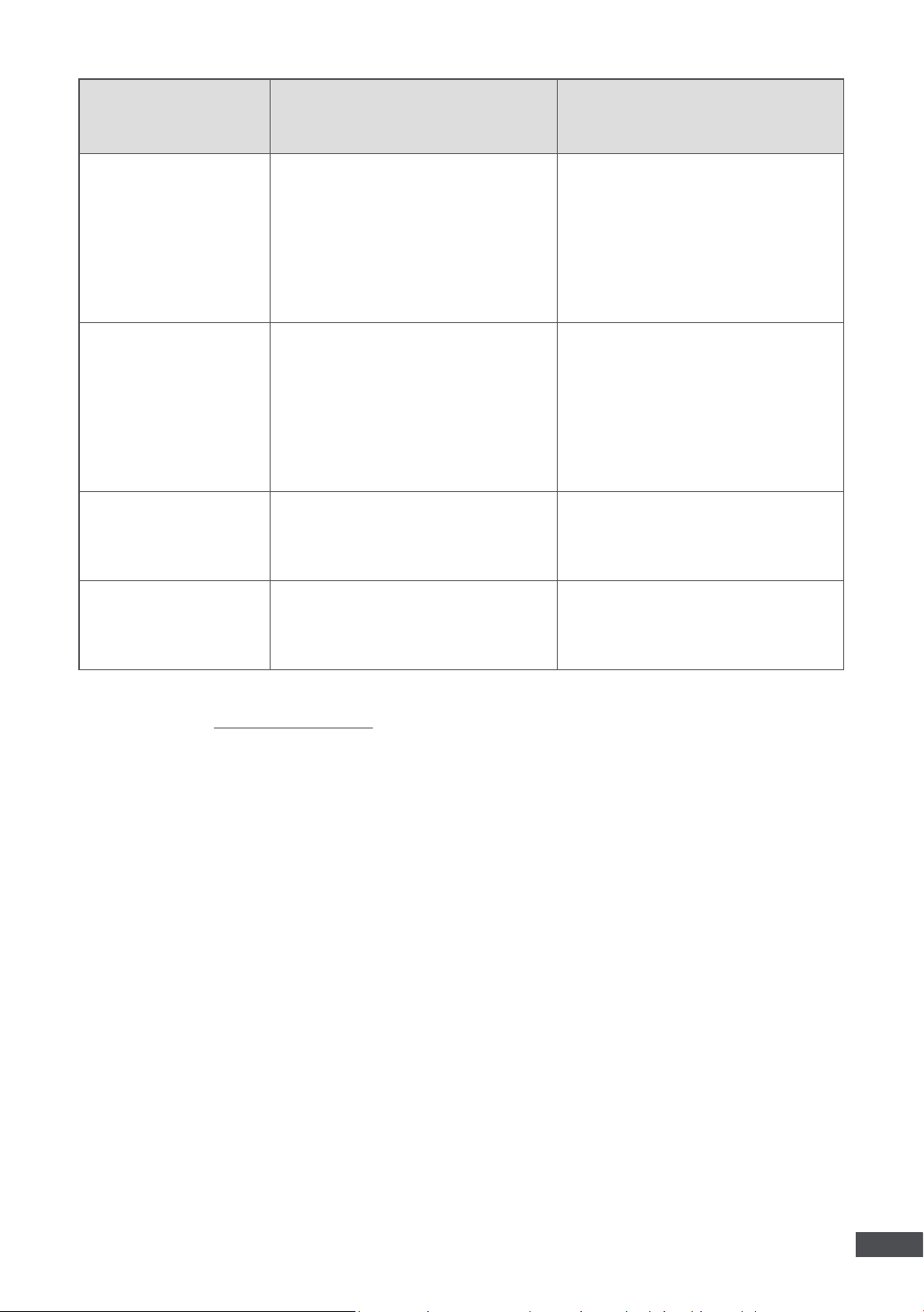
6. Troubleshooting
Issues Causes Soluciones
The robot fails to
connect to the app.
1. There is an issue with the robot's
Wi-Fi or Bluetooth connection.
2. The current Wi-Fi signal is too
weak.
3. The robot has not yet been
connected to the network.
1. Ensure that the Wi-Fi router is
functioning correctly.
2. Move your phone closer to the
robot or place the robot nearer to
the Wi-Fi router.
3. Refer to the Wi-Fi connection
instructions and try again.
4. If the issue persists, please
contact after-sales service.
The robot fails to
move along the
boundary of the pool
floor.
1. Sensors may be blocked by
debris or fail to function properly.
2. The pool layout is too complex.
3. The robot didn't perform
calibration before entering water.
1. Clean all sensors thoroughly and
try again.
2. Restart the robot on a level
ground and wait for a while for it
to calibrate.
3. If the issue persists, contact
after-sales service.
The robot fails to stick
closely to the pool
wall while cleaning
the walls.
1. The filter basket may be clogged
with debris.
2. The curvature of the wall is too
steep.
1. Clean the filter basket
thoroughly before trying again.
2. The robot is not designed to
navigate pool walls with excessive
curvature.
The robot is unable to
move or moves slowly
on the pool floor.
1. Sensors may be blocked by dirt
or malfunctioning.
2. The filter basket may be
clogged with dirt or debris.
1. Clean all sensors thoroughly.
2. Ensure the roller brushes are
free from tangles and debris.
The robot does not
charge.
1. The robot is not in the right
place.
2. The charger may be damaged
or not powered.
3. Battery temperature is too high/
low.
1. Replace the robot on the dock
and try again.
2. Check if the adapter is firmly
plugged into the outlet.
3. Only charge the robot within
the specified temperature range.
4. If the issue persists, please
contact after-sales service.
21
EN
* If you encounter any issues while using the device, please go to Settings>Support in the App, or visit the
official website at https://www.mova.tech to check the FAQ or contact our customer service for help.
Issues Causes Soluciones
The cleaning results
are not as good as
expected.
1. The filter basket is full or
clogged with debris.
2. The suction power of the
current cleaning mode may be
insufficient.
1. Use a hose to clean the filter
basket and the ultra-fine filter
thoroughly.
2. Increase the suction power to
a stronger setting and restart the
cleaning process.
The robot can't climb
up the pool wall.
1. The filter basket is full or
clogged with debris.
2. The curvature of the wall is
too steep, causing the robot to
become stranded.
1. Use a hose to clean the filter
basket and the ultra-fine filter
thoroughly.
2. The robot is not designed to
navigate pool walls with excessive
curvature.
The robot is stuck.
The robot is stuck on the pool
floor and unable to escape.
Manually retrieve the robot and
restart the cleaning cycle.
The robot fails to
update.
The Wi-Fi signal is too weak.
Move the robot to an area with a
stronger Wi-Fi signal and retry.
22
EN
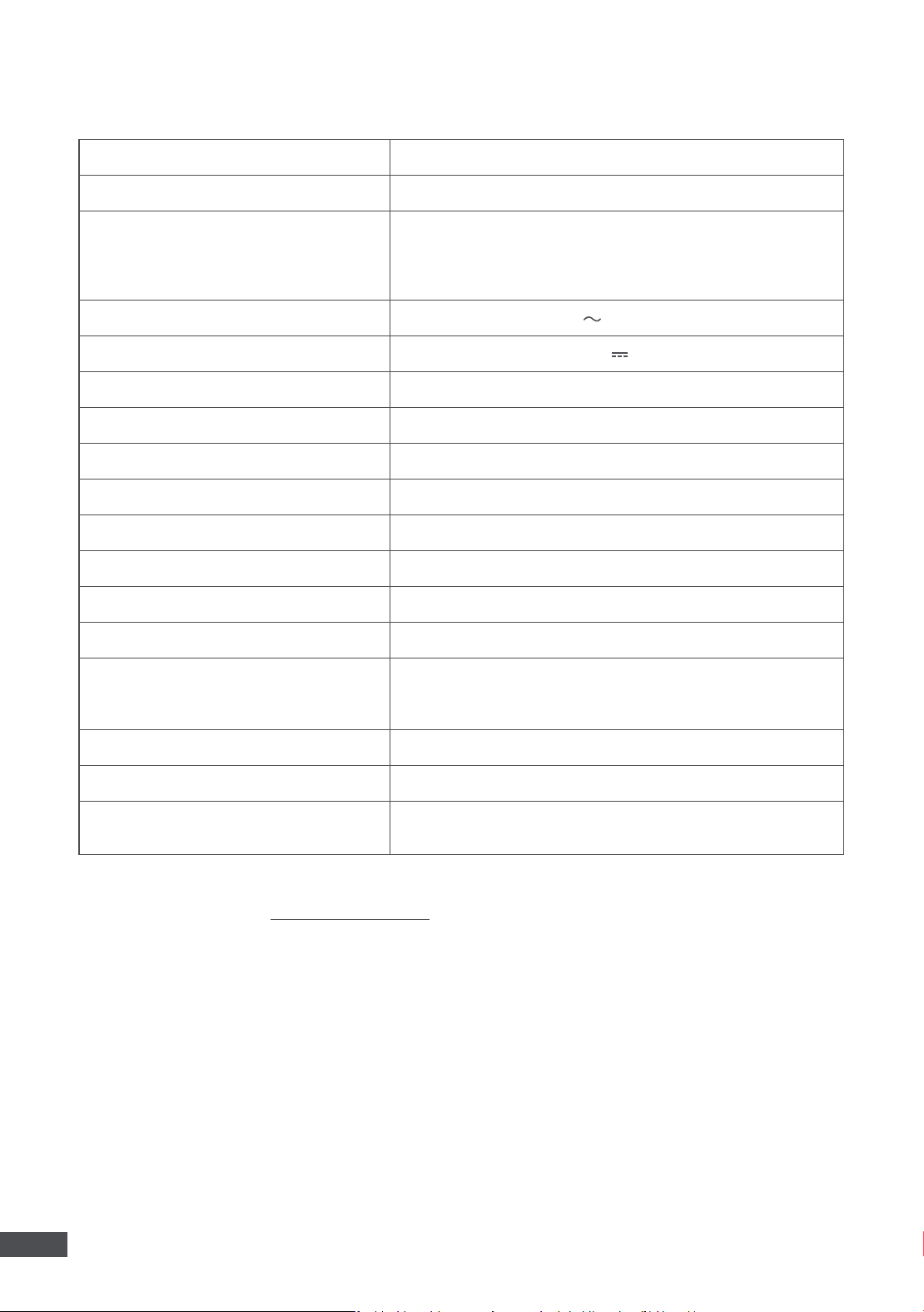
7. Specifications
Name Robotic Pool Cleaner
Model PIXZ6111
Adapter Model
EU: GM130-2940350-2FG
AU: GM130-3200390-4FG
CH: GM130-2940350-SFG
US: GM130-2940350-1FG
Adapter Input 100~240 V 50/60 Hz 2.5 A
Adapter Output 29.4 V 3.5 A
Wireless Charging Dock Model AD1
Wireless Charging Dock Input DC 29.4 V 3.5 A
Wireless Charging Dock Output DC 24.9 V 3 A
Battery Capacity 15000 mAh
Charging Time ~6.5 hrs
Charging Temperature 5–53 ° C (±2 ° C) / 41–127.4 ° F (±3.6 ° F)
Working Temperature 5-40 ℃ (41–104 ℉ )
Storage Temperature -10-25 ℃ (14–77 ℉ )
Ingress Protection
IPX8 for Robotic Pool Cleaner
IPX7 for Wireless Charging Dock
IPX8 for AquaSonar ™
Operating Frequency 50 Hz or 60 Hz
Bluetooth 2400~2483.5 MHz
Wi-Fi
2400-2483.5 MHz
5150-5850 MHz
* The specifications are subject to change as we continually improve the product. For the latest information,
please visit our website at https://www.mova.tech

Manufacturer:
Wavefuture Robotics Technology (Suzhou) Co., Ltd.
Address:
1/F, Building B, No. 7 Qian Zhu Road, Taihu Street, Wuzhong District,
Suzhou, Jiangsu Province, P.R.China
MADE IN CHINA

