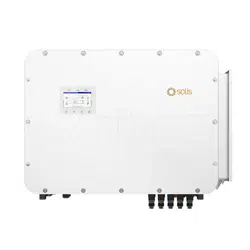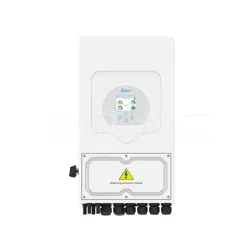
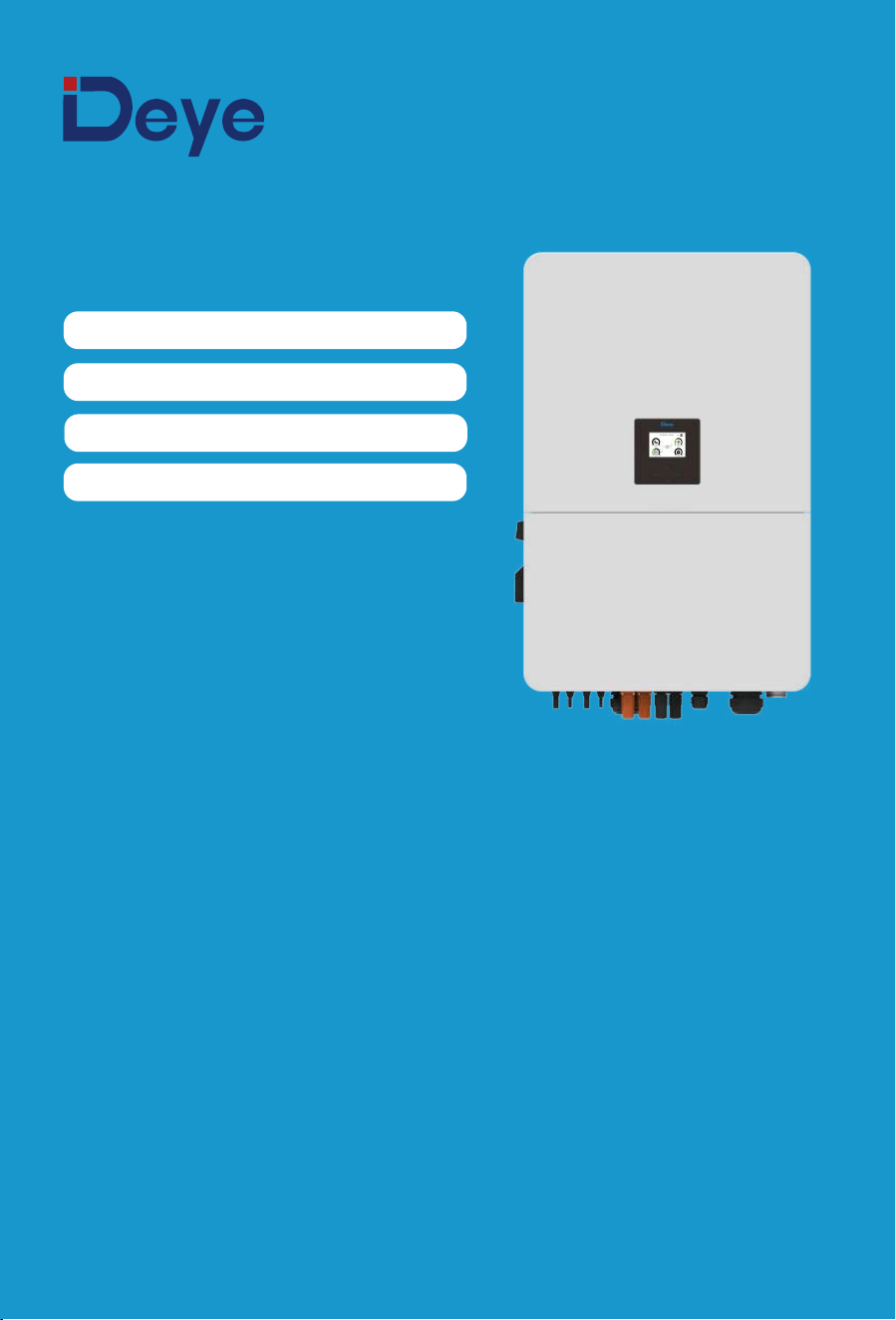
Hybrid Inverter
User Manual
SUN-80K-SG02HP3-EU-EM6
SUN-60K-SG02HP3-EU-EM6
SUN-75K-SG02HP3-EU-EM6
SUN-70K-SG02HP3-EU-EM6

1. Safety Introductions
2. Product instructions
2.1 Product Overview
�������������������
�������������������
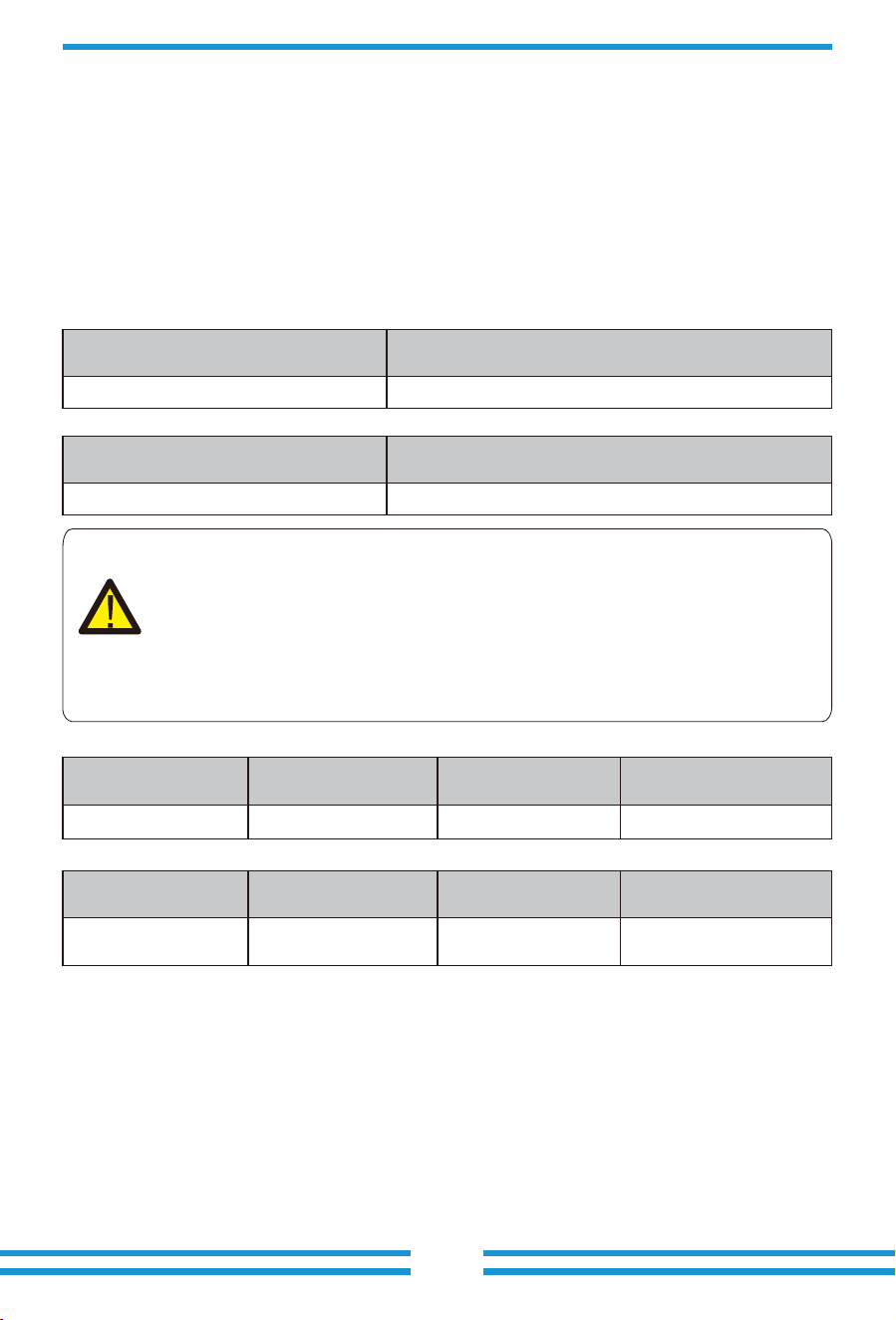
2.2 Product Size
01-02
02-06
Contents
2.3 Product Features
2.4 Basic System Architecture
2.5 Product handling requirements
�����������������������
3. Installation
3.1 Parts list
3.2 Mounting instructions
3.6 PV Connection
3.5Grid connection and backup load connection
06-30
3.7 Meter or CT installation
3.8 Earth Connection(mandatory)
3.9 Data logger connection
3.10 Wiring diagram with neutral line grounded
3.13 Typical application diagram of diesel generator
3.11 Wiring diagram with neutral line ungrounded
3.12 Typical application diagram of on-grid system
3.14 Three phase parallel connection diagram
��������������������������
46-476. Mode
5.6 Battery Setting Menu
5.7 System Work Mode Setup Menu
5.8 Grid Setting Menu
5.9 Generator Port Use Setup Menu
5.10 Advanced Function Setup Menu
5.11 Device Info Menu
�����������������������
��������������������
4. OPERATION
4.1 Power ON/OFF
4.2 Operation and Display Panel
5. LCD Display Icons
5.1 Main Screen
5.2 Detail page
31
32-46
5.4 System Setup Menu
5.5 Basic Setting Menu
5.3 Curve Page-Solar & Load & Grid
������������������
������������������������
7. Warranty
9. Datasheet
47-48
54-55
�����������������������
10. Appendix I 55-57
�����������������������
12. Appendix III 59
�����������������������
11. Appendix II 58
���������������
13. EU Declaration of Conformity 59-60
������������������������
8. Troubleshooting 48-53
3.3 Function port definition
3.4 Battery connection
- 01 -
About This Manual
This manual provides information and guidelines for the installation, operation, and
maintenance of the SUN-(60-80)K-SG02HP3-EU-EM6 inverter. Please note that it does not
contain comprehensive information about the photovoltaic (PV) system.
How to Use This Manual
Before undertaking any operation involving the inverter, it is crucial to thoroughly read this manual
and any associated documents. Ensure that these documents are stored safely and are readily
accessible at all times.
Please be aware that the contents of this manual may undergo periodic updates or revisions as a
result of ongoing product development. Consequently, the information contained herein is subject
to change without prior notice. The latest manual can be acquired via [email protected]
1. Safety Introductions
Labels description
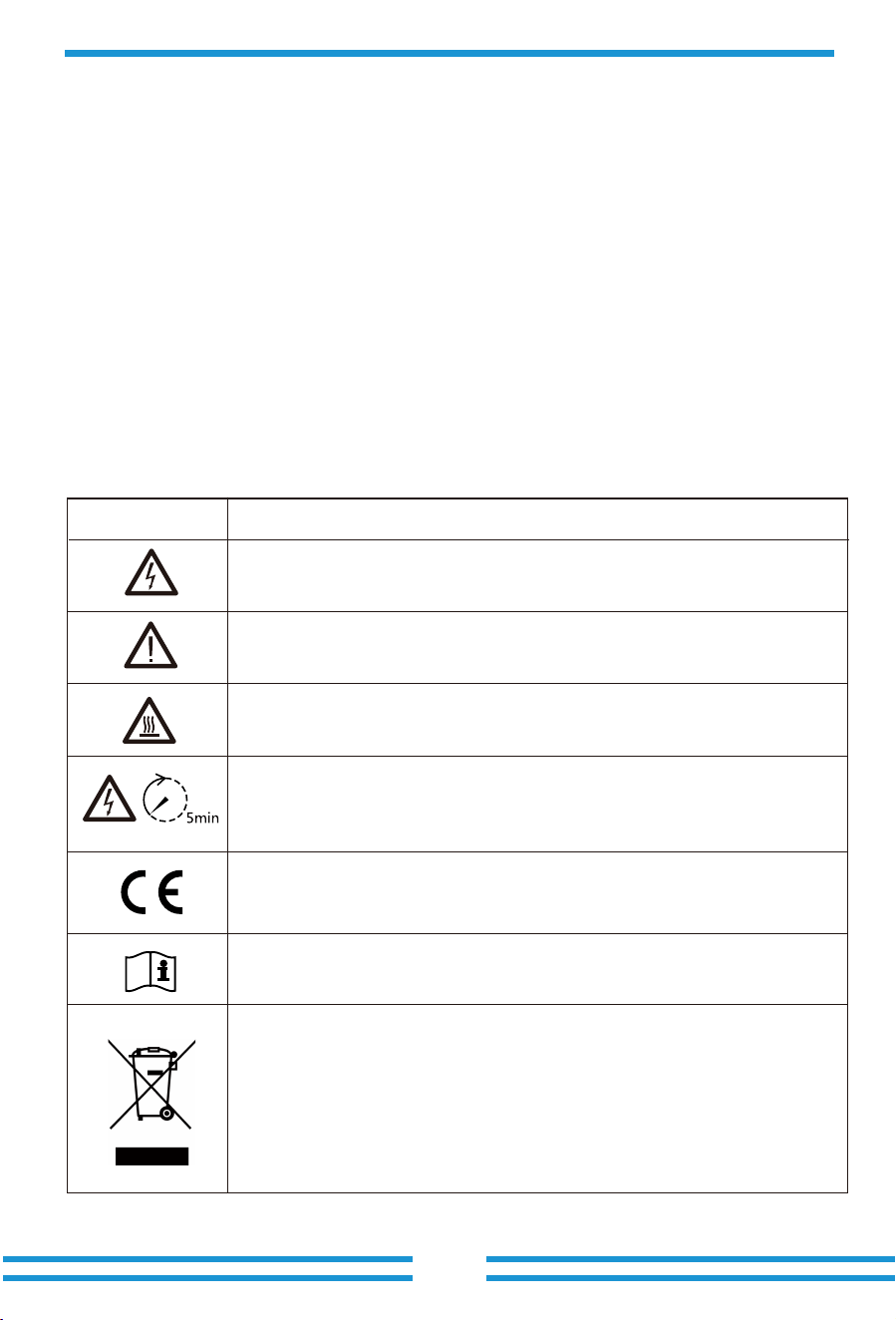
Label
Description
Please read the instructions carefully before use.
CE mark of conformity
Symbol for the marking of electrical and electronics devices according to
Directive ����/��/EC. Indicates that the device, accessories and the
packaging must not be disposed as unsorted municipal waste and must be
collected separately at the end of the usage. Please follow Local Ordinances
or Regulations for disposal or contact an authorized representative of the
manufacturer for information concerning the decommissioning of
equipment.
Caution, risk of electric shock symbol indicates important safety
instructions, which if not correctly followed, could result in electric shock.
The DC input terminals of the inverter must not be grounded.
Surface high temperature, Please do not touch the inverter case.
The AC and DC circuits must be disconnected separately, and the
maintenance personnel must wait for � minutes before they are
completely powered off before they can start working.

2. Product Introductions
This is a multifunctional inverter, combining functions of inverter, solar charger and battery
charger to offer uninterruptible power support with portable size. Its comprehensive LCD display
offers user configurable and easy accessible button operation such as battery charging, AC/solar
charging, and acceptable input voltage based on different applications.
· This chapter contains important safety and operating instructions. Read and keep this manual
for future reference.
· Before using the inverter, please read the instructions and warning signs of the battery and
corresponding sections in the instruction manual.
· Do not disassemble the inverter. If you need maintenance or repair, take it to a professional
service center.
· Improper reassembly may result in electric shock or fire.
· To reduce risk of electric shock, disconnect all wires before attempting any maintenance or
cleaning. Turning off the unit will not reduce this risk.
· Caution: Only qualified personnel can install this device with battery.
· Never charge a frozen battery.
· For optimum operation of this inverter, please follow required specification to select appropriate
cable size. It is very important to correctly operate this inverter.
· Be very cautious when working with metal tools on or around batteries. Dropping a tool may
cause a spark or short circuit in batteries or other electrical parts, even cause an explosion.
· Please strictly follow installation procedure when you want to disconnect AC or DC terminals.
Please refer to "Installation" section of this manual for the details.
· Grounding instructions - this inverter should be connected to a permanent grounded wiring
system. Be sure to comply with local requirements and regulation to install this inverter.
· Never cause AC output and DC input short circuited. Do not connect to the mains when DC
input short circuits.
- 02 -
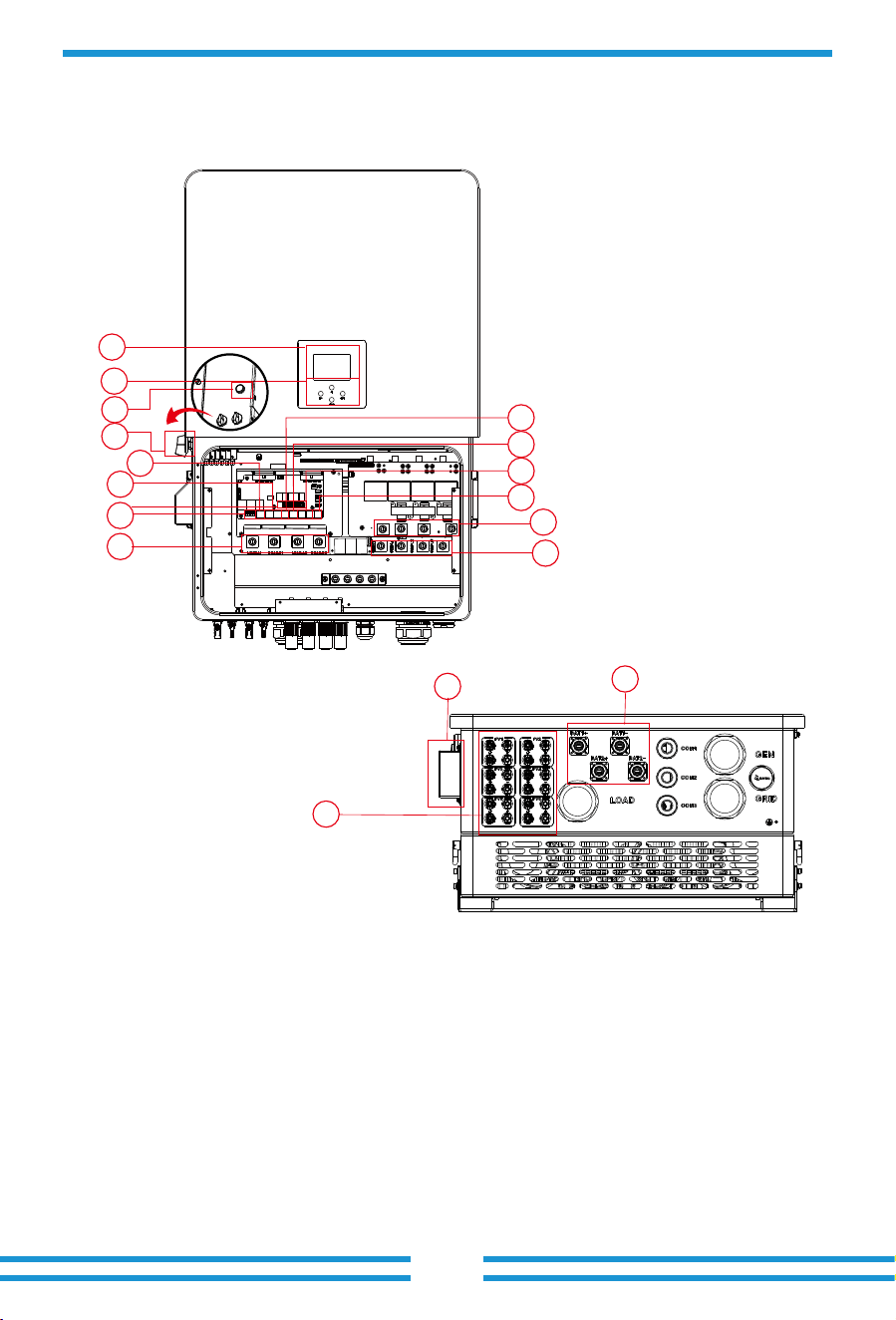
2.1 Product Overview
1: LCD display
2: Function buttons
4: DC switch
3: Power on/off button
5: Meter port
6: Parallel port
7: CAN port
8: DRM port
9: BMS port
10: RS485 port
11: Generator input
12: Grid
17: WiFi Interface
16: Battery input
14: Load
13: Function port
15: PV input
- 03 -
15
16
17
1
2
3
4
6
5
7
8
10
9
11
12
13
14
- 04 -
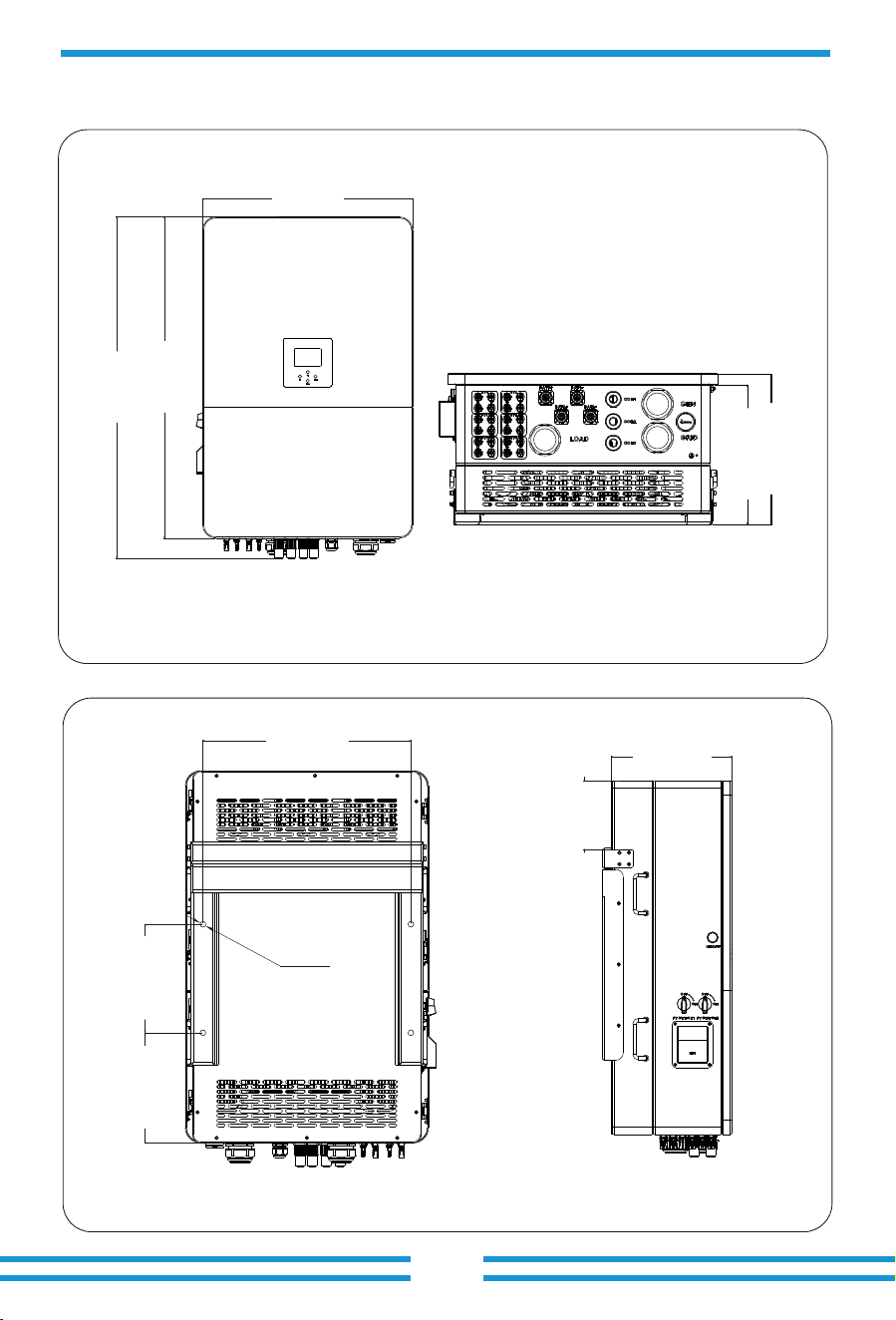
2.2 Product Size
Inverter Size
338.00 mm
314.50 mm
606.00 mm
927.00 mm
985.26 mm
4- Φ 14
518.00 mm
270.00 mm274.50 mm
314.00 mm
180.00 mm
- 05 -
2.3 Product Features
- 230V/400V Three phase Pure sine wave inverter.
- Self-consumption and feed-in to the grid.
- Auto restart while AC is recovering.
- Programmable supply priority for battery or grid.
- Programmable multiple operation modes: On grid, off grid and UPS.
- Configurable battery charging current/voltage based on applications by LCD setting.
- Configurable AC/Solar/Generator Charger priority by LCD setting.
- Compatible with mains voltage or generator power.
- Overload/over temperature/short circuit protection.
- Smart battery charger design for optimized battery performance
- With limit function, prevent excess power overflow to the grid.
- Supporting WIFI monitoring and have 3 or 4 built-in MPP Trackers, 1 MPP Tracker can
connect 2 PV strings.
- Smart settable three stages MPPT charging for optimized battery performance.
- Time of use function.
- Smart Load Function.
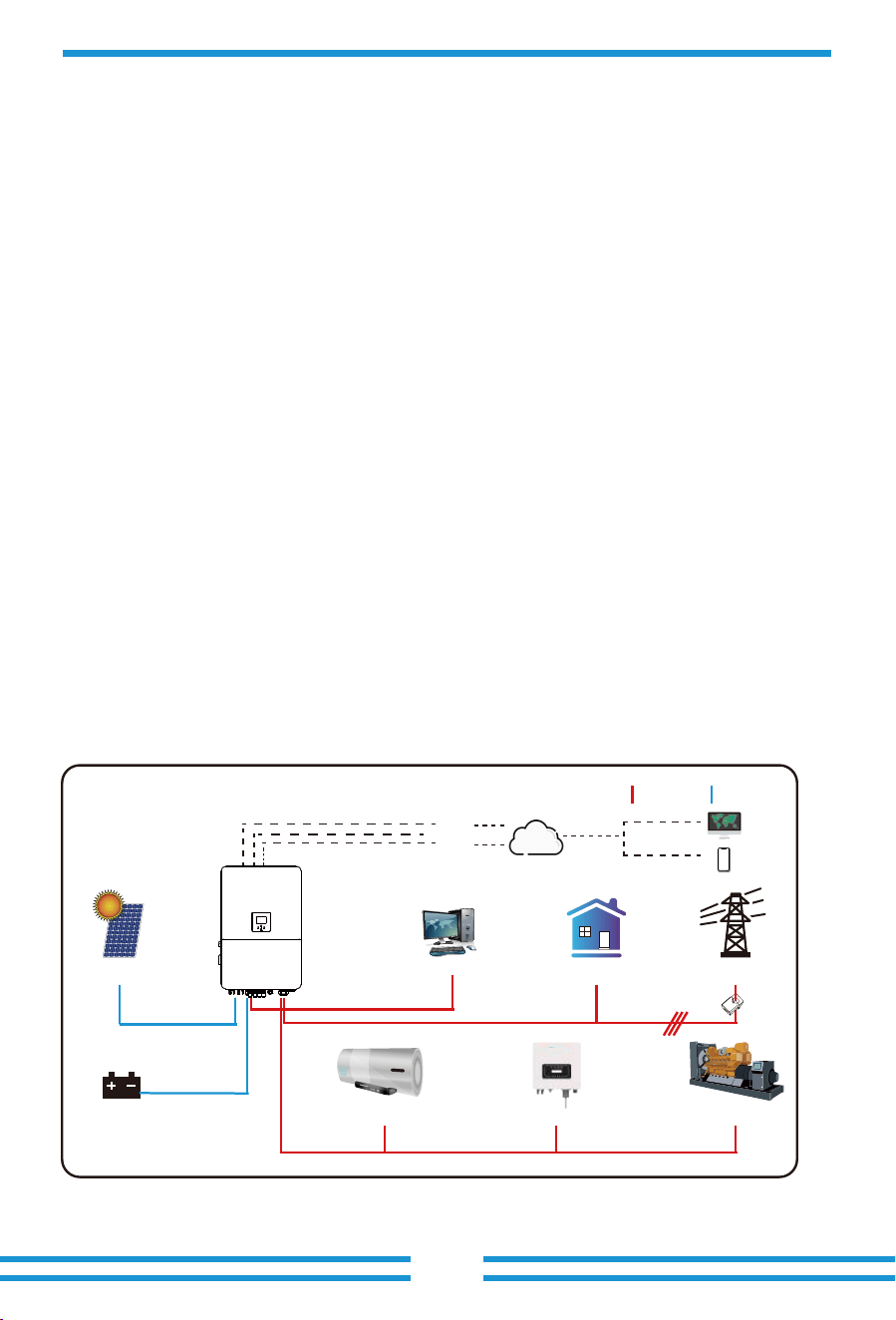
2.4 Basic System Architecture
The following illustration shows basic application of this inverter.
It also includes following devices to have a complete running system.
- Generator(Fro off-grid mode)or Utility Grid
- PV modules
Consult with your system integrator for other possible system architectures depending on your
requirements.
This inverter is designed to power a range of appliances commonly found in homes and offices,
including motor type appliances like refrigerators and air conditioning units. Before use, it's
advisable to verify appliance compatibility with this inverter.
The generator interface should not be connected to both the generator and the smart load
simultaneously. The generator only can be connected in stand-alone scenario. When the grid be
connected, the generator should not be connected simultaneously.
GridBackup Load*
Cloud services
On-Grid Home Load
GeneratorGrid-connected InverterSmart Load
Battery
Solar
CT
AC cable DC cable
WiFI
LAN
GPRS/4G
OR OR
*Connected to the LOAD port
computer
phone
- 06 -
3. Installation
3.1 Parts List
Check the equipment before installation. Please make sure nothing is damaged in the package.
You should have received the items in the following package:
Wall mounting bracket x1
Hybrid inverter
x1
Communication cable x2
L-type Hexagon wrench
x1
Stainless steel anti-collision
bolt M12×60
x4
User
manual
User manual x1 Data logger(optional) x1
Meter(optional)
x 1
Three-Phase Smart Meter
SET ESC
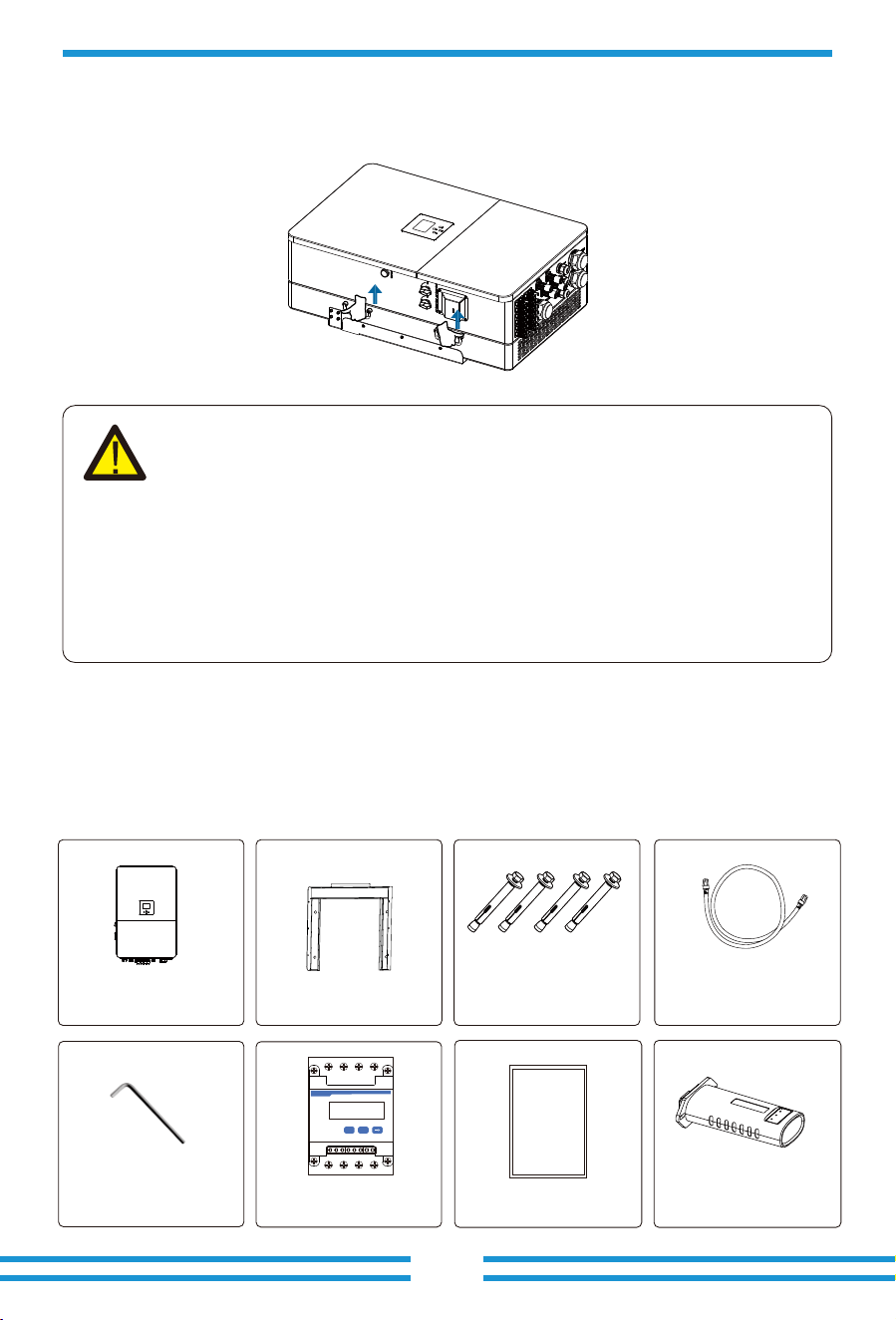
transport
2.5 Product handling requirements
CAUTION:
Improper handling may cause personal injury!
· Arrange an appropriate number of personnel to carry the inverter according to
its weight, and installation personnel should wear protective equipment such
as anti-impact shoes and gloves.
· Placing the inverter directly on a hard ground may cause damage to its metal
enclosure. Protective materials such as sponge pad or foam cushion should be
placed underneath the inverter.
· Move the inverter by one or two people or by using a proper transport tool.
· Move the inverter by holding the handles on it. Do not move the inverter by
holding the terminals.
Lift the inverter out of the packaging box and transport it to the designated installation location.
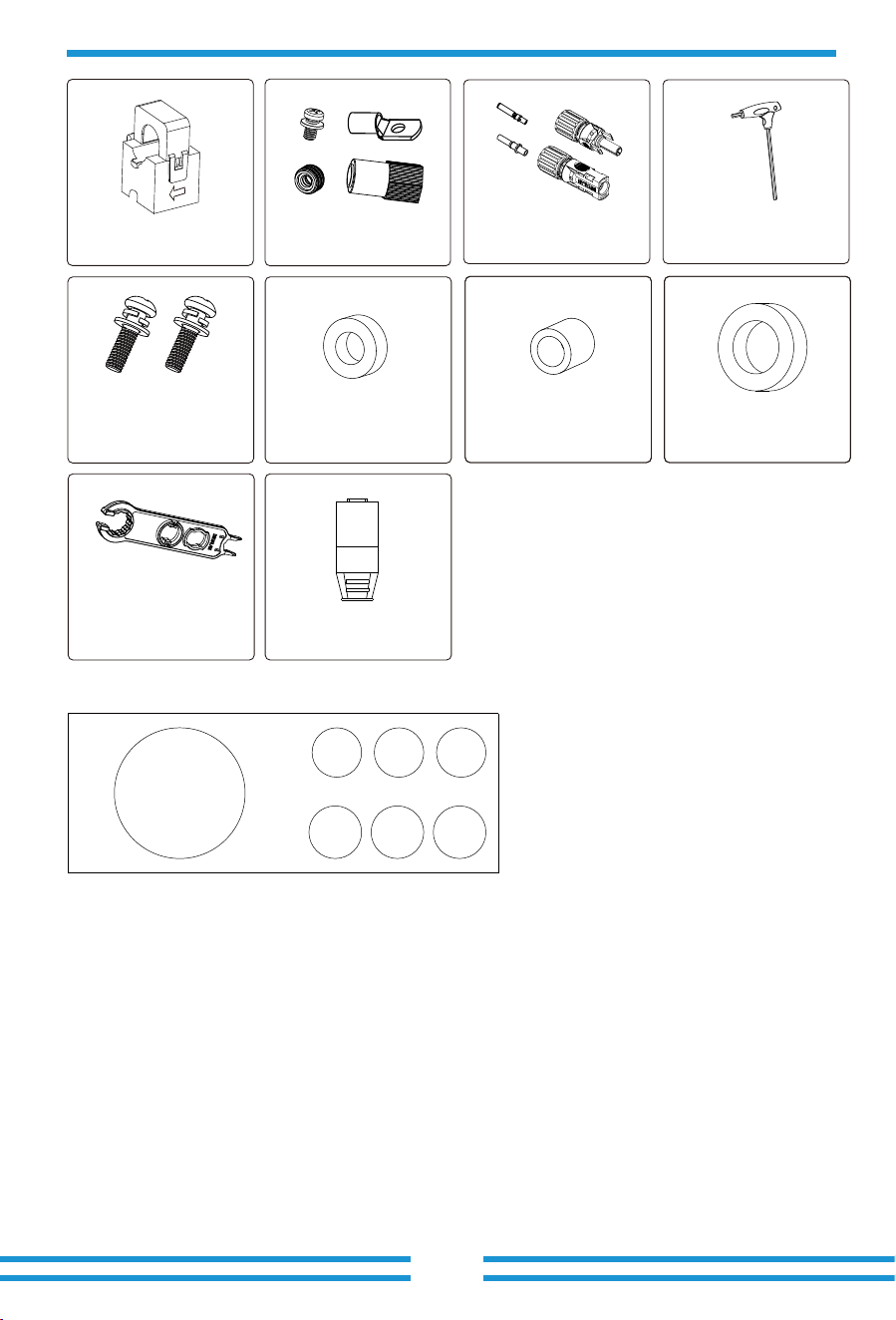
Sensor Clamp
x 3
- 07 -
3.2 Mounting instructions
Installation Precaution
This Hybrid inverter is designed for outdoor use(IP��), Please make sure the installation site
meets below conditions:
Excessive heat buildup, heavy rainfall or water pooling, can impact the performance and
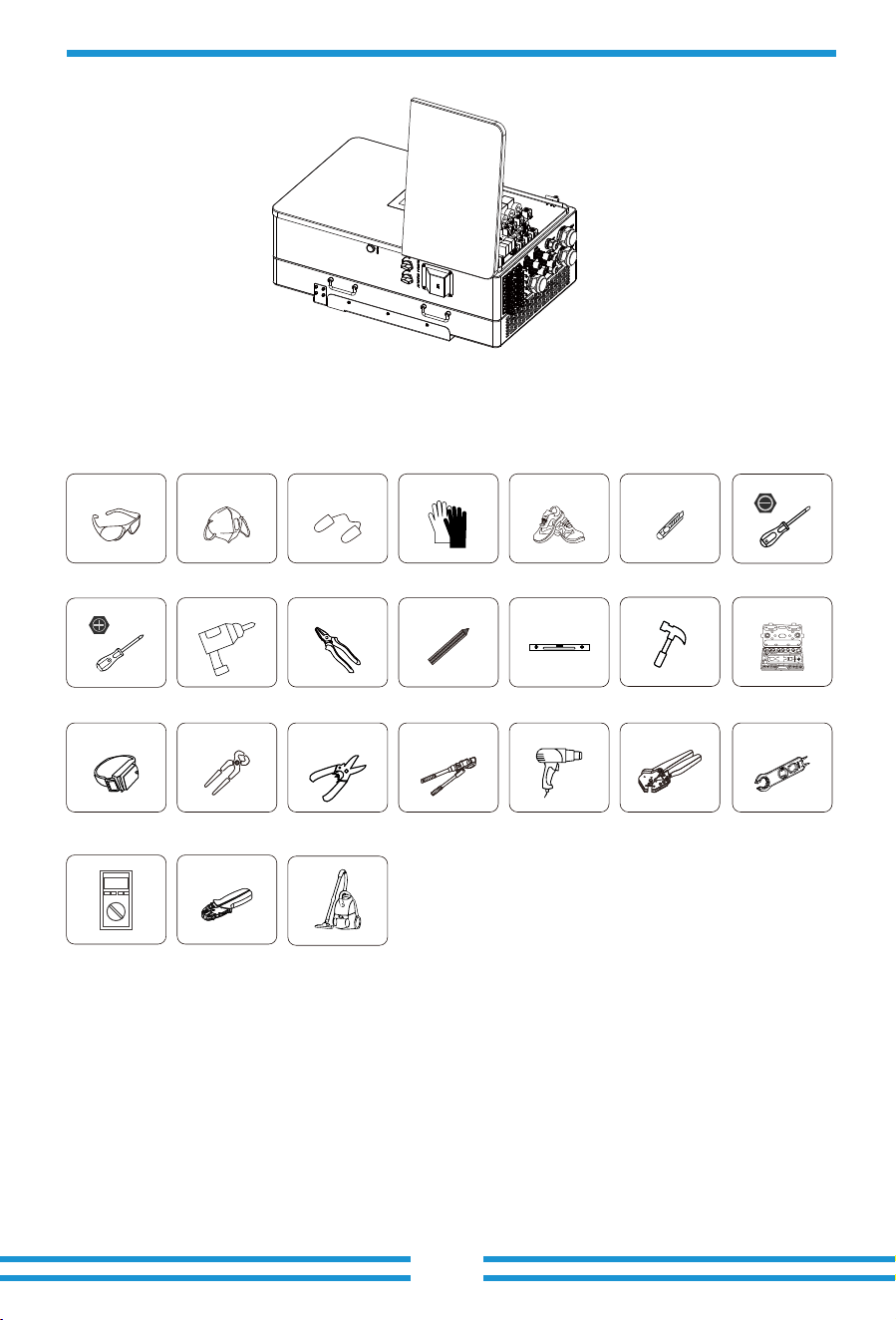
longevity of the inverter. Before connecting all wires, please take off the metal cover by
removing screws as shown below:
· Not in direct sunlight, rain exposure, snow laying up during installation and operation.
· Not in areas where highly flammable materials are stored.
· Not in potential explosive areas.
· Not directly expose to the cold air to avoid condensation inside the inverter casing .
· Not near the television Antenna or antenna cable.
· Not higher than altitude of about ���� meters above sea level.
· Not in environment of precipitation or humidity(>��%)
DC+/DC- Plug connectors
including metal terminal
xN
Battery Plug connectors
accessories x4
T-type wrench
x1
Stainless steel mounting
screws M4*12 x9
Solar Photovoltaic
Connector Special
Spanner x1
7,*8,*9
Magnetic ring for AC
wires x3
(80×50×25 mm)
4,5,6
Magnetic ring for CT x3
(31×29×19 mm)
Magnetic ring for
commuication cable of
BMS and Meterx3
(23×33×15 mm)
1,2,3
Matching Resistor x1
*8 &*9 are placed on the top of the
EPE material upper cover
1,2,3 : 23×33×15 mm
4,5,6 : 31×29×19mm
7,8,9 :80×50×25 mm
Packing box of magnetic ring
1 2
3
4
5
6
7
- 08 -
Considering the following points before selecting where to install:
· Please select a vertical wall with load-bearing capacity for installation, suitable for installation
on concrete or other non-flammable surfaces, installation as follows.
· Install this inverter at eye level in order to allow the LCD display to be read at all times.
· The ambient temperature is recommeded to be between -��~��℃ to ensure optimal operation.
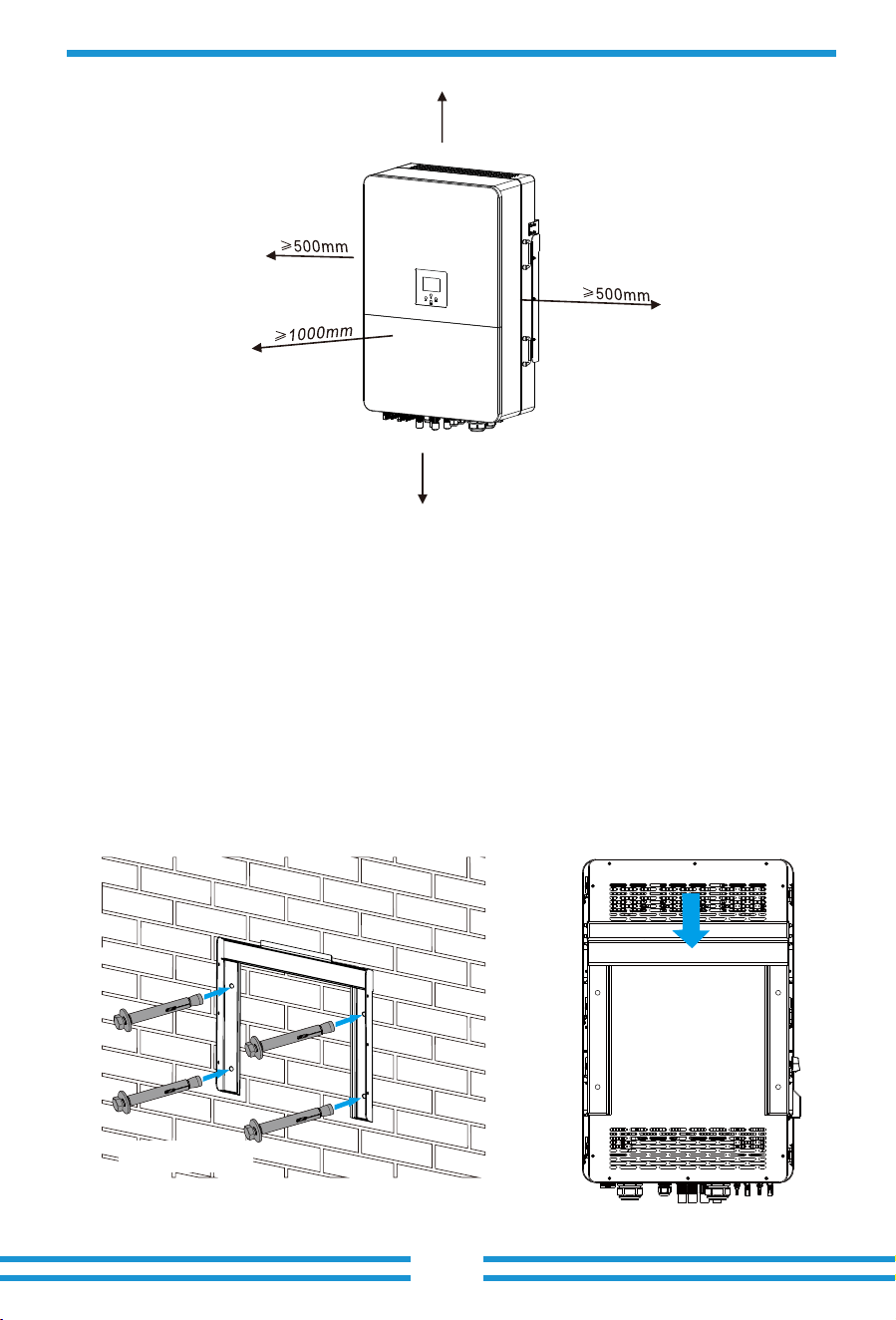
· Be sure to keep enough distance between other objects and the inverter surfaces as shown in the
diagram to guarantee sufficient heat dissipation and have enough space for removing wires.
Installations Tools
Installation tools can refer to the following recommended ones. Also, use other auxiliary tools
on site.
Protective goggles EarplugsAnti-dust mask Work gloves Utlity Knife Slotted screwdriver
Cross screwdriver
Work shoes
Percussion drill
Anti-static wrist strap
Wire cutter
Wire stripper
Hydraulic pliers
Heat gun
Crimping tool�-�mm²
Solar connector
wrench
Pliers
Marker
Level
Rubber hammer socket wrenches set
Multimeter ≥���� Vdc
RJ�� crimping plier
Cleaner
- 09 -
For a proper ventilation of the inverter and avoid overheating, allow a clearance of approximately
�� cm around the inverter and at least ��� cm to the front as it can be seen at the picture below.
Mounting the inverter
Remember that this inverter is heavy! Please be careful when lifting out from the package.
Choose the recommend drill head(as shown in below pic) to drill � holes on the wall,
��-��mm deep.
�. Use a proper hammer to fit the expansion bolt into the holes.
�. Screw out the nuts of the expansion bolts, align the holes of the mounting bracket with the �
expansion bolts, and then push in the mounting bracket, tighten the nuts of expansion bolts.
�. Mount the inverter on the mounting bracket and use screws to fix the inverter with mounting
bracket.
≥500mm
≥500mm
Inverter Moun�ng bracket installa�on
Size: M12×60
- 10 -
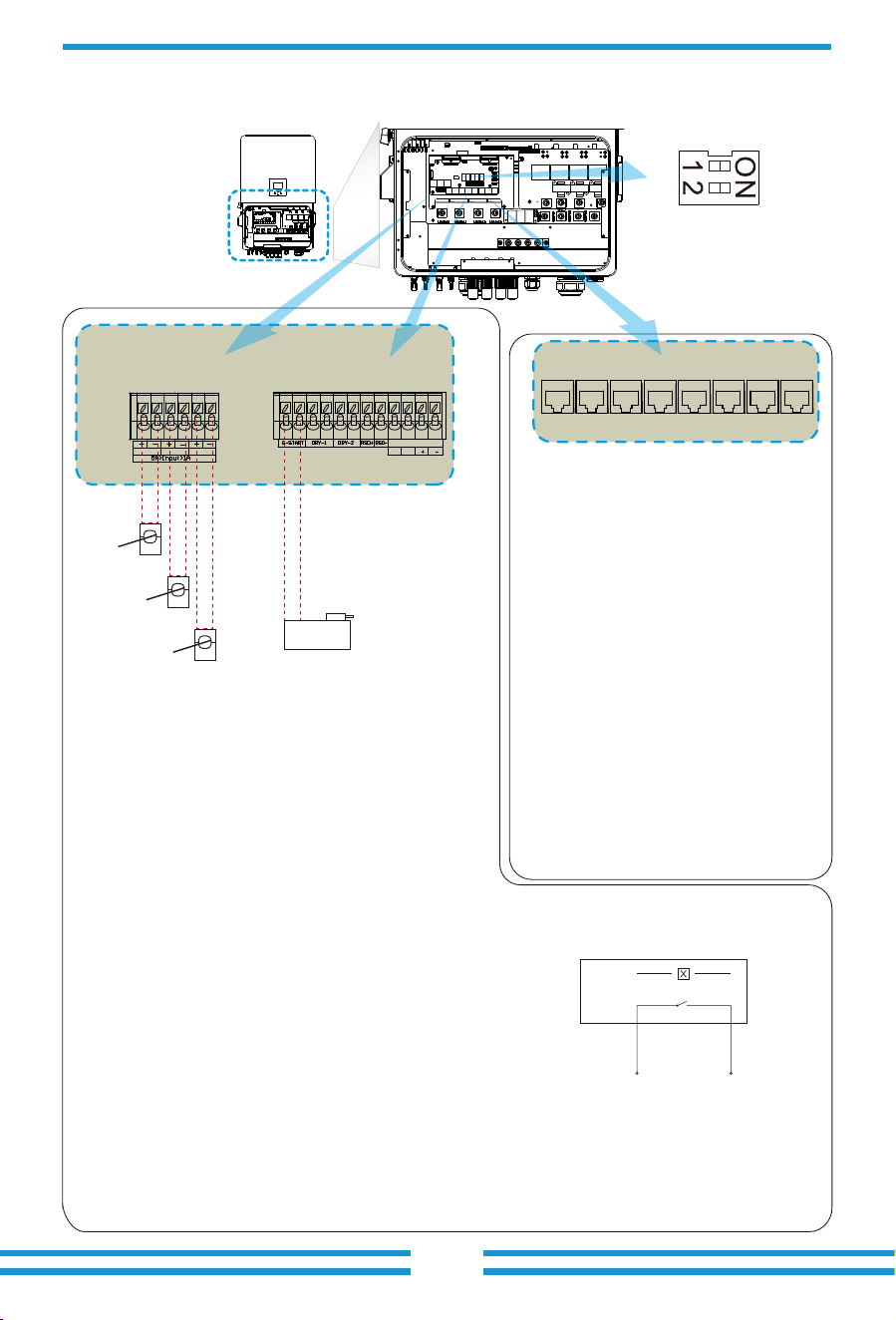
1 2 3 4 5 6 1 2 3 4 5 6 7 8 9 10 1112
Meter: for energy meter communication.
Parallel_1: Parallel communication
port 1.
Parallel_2: Parallel communication
port 2 . (Parallel A and B are
same and have no particular orders)
CAN: reserved.
DRM: Logic interface for AS/
NZS 4777.2:2020.
BMS1: BMS port for battery
communication port 1.
BMS2: BMS port for battery
communication port 2.
RS485: RS485 port.
CT -L2
CT -L3
CT -L1
Gen start-up
N/O Relay
Parallel_1 Parallel_2Meter CAN DRM BMS1 BMS2 RS485
GS (diesel generator startup signal)
relay
coil
open
contact
G S
3.3 Funcon port definion
CN1 CN2
Inverter
CT-L1 CT-L2 CT-L3
SHUT DOWN
B B
CN1:
CT-L1 (1,2): current transformer (CT-L1) for"zero
export to CT"mode clamps on L1 when
in three phase system.
CT-L2 (3,4): current transformer (CT-L2) for"zero
export to CT"mode clamps on L2 when
in three phase system.
CT-L3 (5,6): current transformer (CT-L3) for"zero
export to CT"mode clamps on L3 when
in three phase system.
If the secondary current of CT are within the range of
1A-5A, use terminals 1-6.
CN2:
G-start (1,2): dry contact signal for startup the diesel generator.
When the "GEN signal" is active, the open contact (GS) will
switch on (no voltage output).
DRY-1 (3,4): Dry contact output. When the inverter is in
off-grid mode and the "signal island mode" is checked,
the dry contact will switch on.
DRY-2 (5,6): reserved.
RSD+,RSD- (7,8): When battery is connected and the
inverter is in "ON" status, it will provide 12Vdc.
SHUT DOWN (9,10,11,12): if the terminal "B" & "B" (9&10)
is short-circuited with wire connection, or there’s 12Vdc
input at the terminal "+ "& "- " (11&12), the inverter will
give alarm (F22) and shutdown immediately.
DIP switch:For
communication setting
of parallel system.
DRM: It is used to accept the
external input signal(Digital input).
More details please refer to the P57.
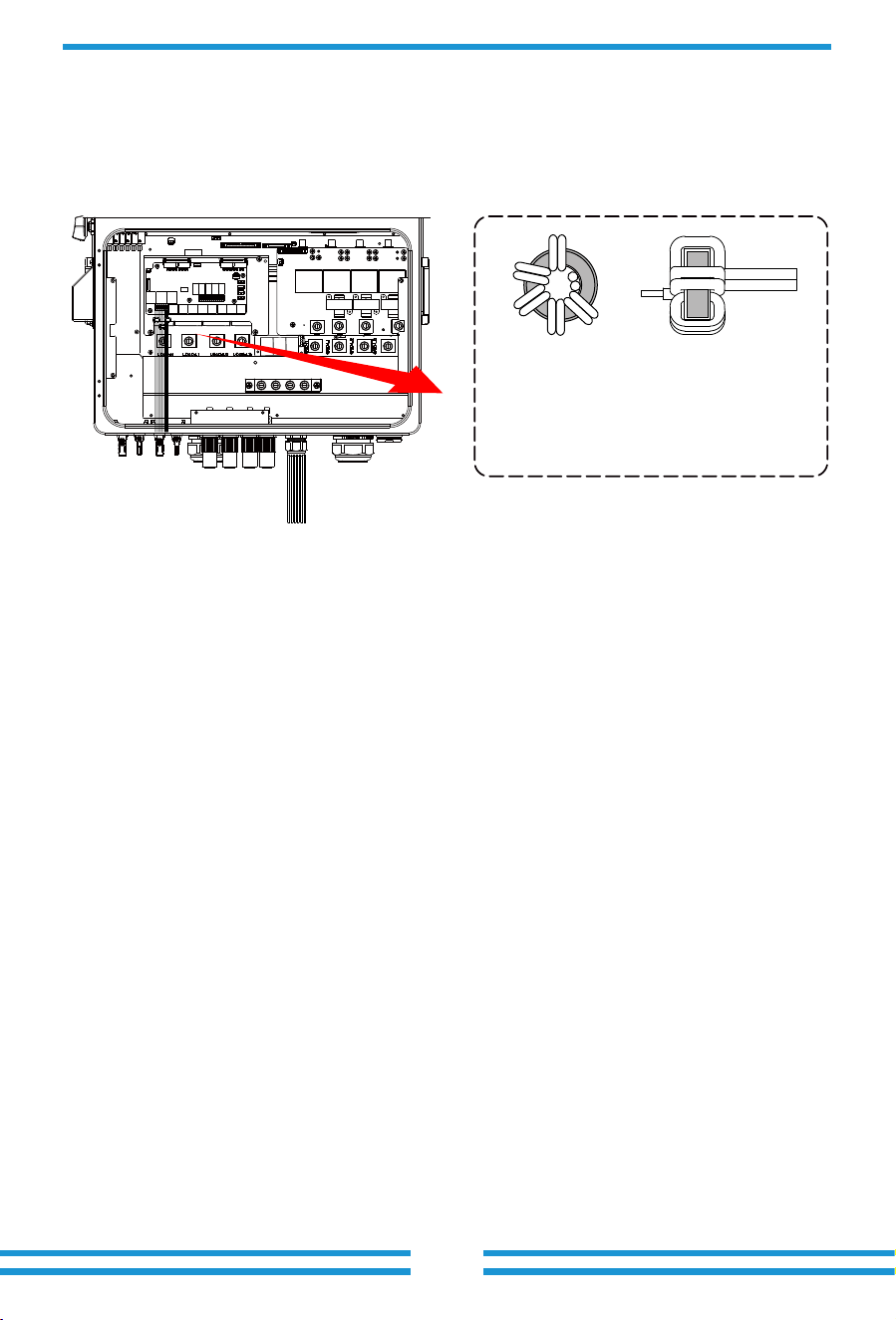
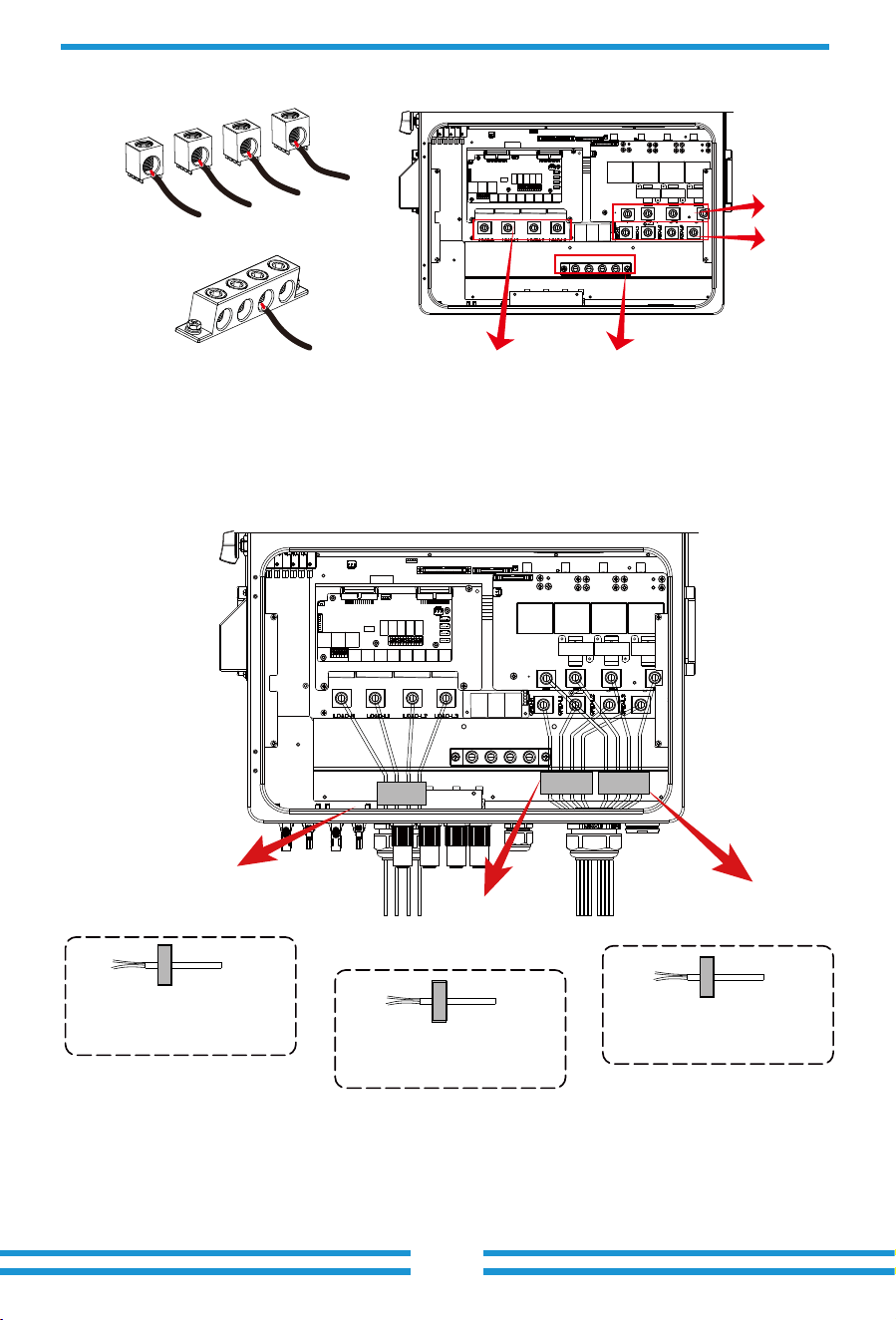
Thread the end of the CT's wires through
the magnetic ring � and wrap the wires
around it five lap. Fix the magnetic ring
near the wiring terminals, as shown in the
above diagram. Repeat this operation for
the other two CTs.
- 11 -
4 6
5
- 12 -
3.4 Battery connection
For safe operation and compliance, a separate DC over-current protector or disconnect device is
required between the battery and the inverter. In certain applications, a disconnect switch may
not be necessary, but it is always essential to have DC overcurrent protection in place. Refer to
the typical amperage in the page 28 for the required fuse or circuit breaker size.
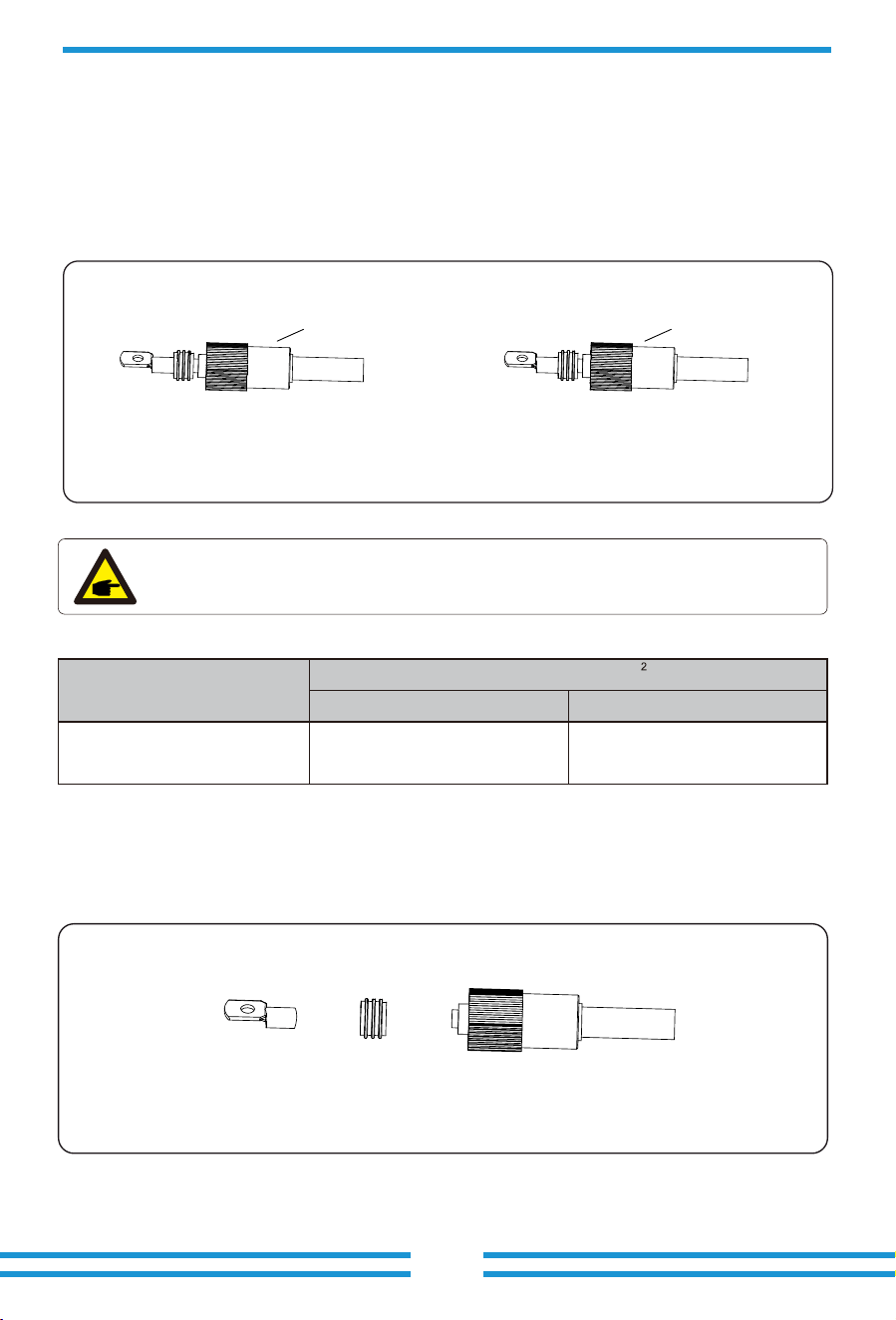
Pic 3.1 BAT+ plug connector
Pic 3.2 BAT- plug connector
Orange
Safety Hint:
Please use approved DC cable for battery system.
Model
Range Recommended value
Cross section(mm )
60/70/75/80kW 4AWG
16mm
2
Chart 3-2
The steps to assemble the battery plug connectors are listed as follows:
a) Pass the cable through the terminal, as shown in Pic 3.3.
Pic 3.3
Black
- 13 -
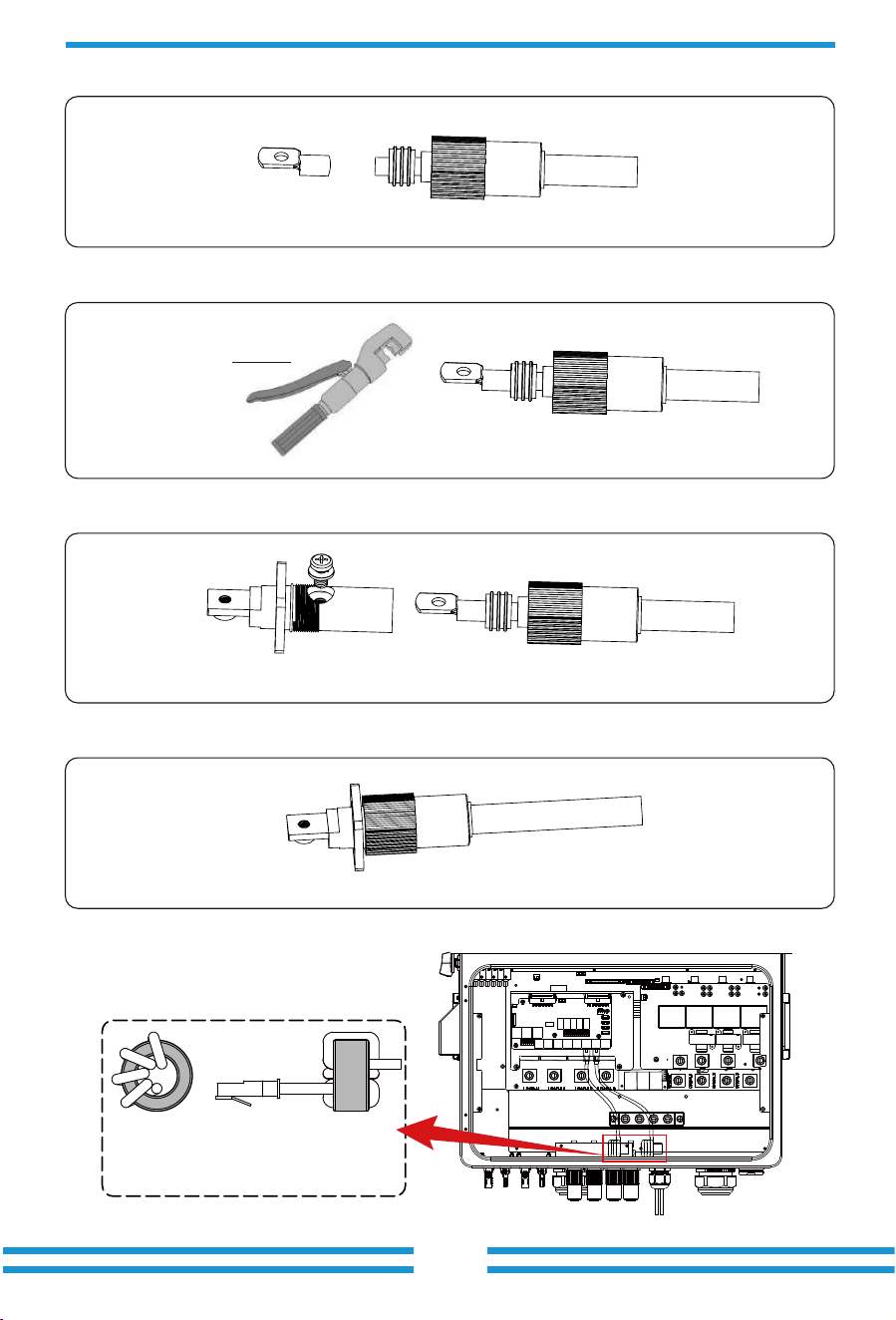
b) Put on the rubber ring, as shown in Pic 3.4.
Pic 3.4
d) Fasten terminal with a bolt, as shown in Pic 3.6.
Pic 3.6
e) Fasten the terminal with outer cover, as shown in Pic 3.7.
Pic 3.7
c) Crimp the metal terminal, as shown in Pic 3.5.
Pic 3.5
Hydraulic pliers
BMS connection
Thread the BMS communication cable
through the magnetic ring 1,2 and wrap
it around the magnetic ring four times.
1,2
- 14 -
3.5 Grid connection and backup load connection
· Before connecting to the grid, a separate AC breaker must be installed between the inverter
and the grid, and also between the backup load and the inverter.This will ensure the inverter
can be securely disconnected during maintenance and fully protected from over current.Check
the recommended values in the following tables according to local regulations in each country.
The recommended specifications for AC breakers here are based on the Max.Continuous AC
passthrough current of inverter, you can also choose the AC breaker of backup side according
to the actual total operating current of all the backup loads.
· There are three terminal blocks with "Grid" "Load"and "GEN" markings. Please do not misconnect
input and output connectors.
Grid connection and backup load connection (Copper wires) (bypass)
Model
60/70/75/80kW
Wire Size
4/0AWG
Cross section(mm )
2
95
Torque value(max)
20.3Nm
Grid connection and backup load connection (Copper wires)
Note:
In final installation,breaker certified according to IEC 60947-1 and IEC 60947-2
shall be installed with the equipment.
Model
60/70/75/80kW
Recommended
AC breaker
250A
AC Breaker for backup load
AC Breaker for grid
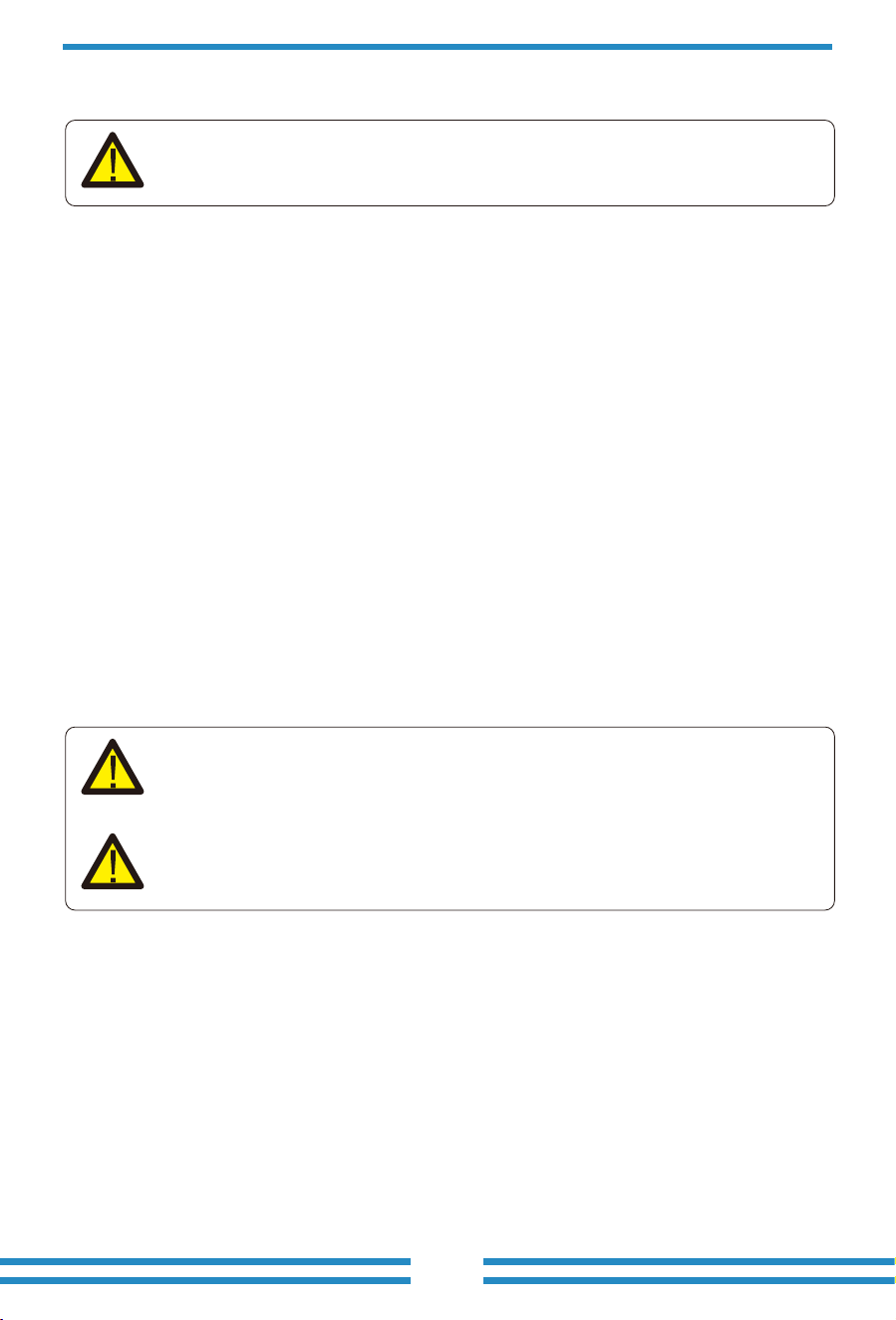
All wiring must be performed by a qualified personnel.It is very important for
system safety and efficient operation to use appropriate cable for AC input
connection. To reduce risk of injury, please use the proper recommended cable
as below. There are two tables below, the first table recommends cable specififi-
cations based on bypass current(Max.Continuous AC passthrough), and the
second table is based on Max.AC output current.
Model
60/70/75/80kW
Recommended
AC breaker
250A
1. Before making Grid, load and Gen port connection, be sure to turn off AC breaker or
disconnector first.
2. Strip the insulation of AC wires by about 10mm, insert AC wires according to polarities indicated
on the terminal block and tighten the terminals. Be sure to connect corresponding N wires and PE
wires to related terminals as well.
Please follow below steps to implement Grid, load and Gen port connection:
Chart 3-3 Recommended Size for AC wires
Model
60/70/75/80kW
Wire Size
4/0AWG
Cross section(mm )
2
95
Torque value(max)
20.3Nm
- 15 -
GRID
LOAD E-BAR
E-BAR
GEN
N
L1
L2
L3
PE
Thread the end of wires through the
magne�c ring 7 and connect these wires to
the terminals of LOAD port corresponding to
the indica�on of polarity.
LOAD
GEN
GRID
Thread the end of wires through the
magne�c ring 8 and connect these wires to
the terminals of GEN port corresponding to
the indica�on of polarity.
7
8
Thread the end of wires through the
magne�c ring 9 and connect these wires to
the terminals of GRID port corresponding to
the indica�on of polarity.
9
7
8
9
3.6 PV Connection
3. Make sure all the wires are securely and completely connected.
Before connecting to PV modules, please install a separately DC circuit breaker between
inverter and PV modules. It is very important for system safety and efficient operation to
use appropriate cable for PV module connection.
Be sure that AC power source is disconnected before attempting to wire it to the
unit.
To avoid any malfunction, do not connect any PV modules with possible leakage
current to the inverter. For example, grounded PV modules will cause leakage
current to the inverter. When using PV modules, please ensure the PV+ & PV-
of solar panel is not connected to the system ground bar.
It is requested to use PV junction box with surge protection. Otherwise, it will
cause damage on inverter when lightning occurs on PV modules.
4. Some appliances, such as air conditioners and refrigerators, may need a time delay before
recconneting them after a power outage. This delay allows the refrigerant gas to stabilize and
prevents potential damage. Check if your appliance has a built-in time-delay function before
connecting it to our inverter. Examples of appliances that may require a delay include:
Air conditioners: Balancing refrigerant gas.
Refrigerators: Stabilizing the compressor.
Freezers: Allowing the cooling system to balance.
Heat pumps: Protecting against power fluctuations.
This inverter will protect your appliances by triggering an overload fault if no time delay is
present. However, internal damage may still occur. Refer to the manufacturer's documenta-
tion for specific time-delay requirements.
- 16 -
3.6.1 PV Module Selection:
3.6.2 PV Module Wire Connection:
When selecting proper PV modules, please be sure to consider below parameters:
1) Open circuit Voltage (Voc) of PV modules can not exceed max.PV Input Voltage of
inverter.
2) Open circuit Voltage (Voc) of PV modules should be higher than min.PV Input Voltage of inverter.
3) The PV modules used to connected to this inverter shall be Class A rating certified according
to lEC 61730.
- 17 -
1. Switch the Grid Supply Main Switch(AC)OFF.
2. Switch the DC lsolator OFF.
3. Assemble PV input connectors to the inverter.
Safety Hint:
Before connecting to inverter, please make sure that the open circuit voltage of
PV strings haven't exceeded the max.PV input voltage of the inverter.
Safety Hint:
Before connection, please make sure the polarity of PV array matches the
"DC+" and "DC-" symbols.
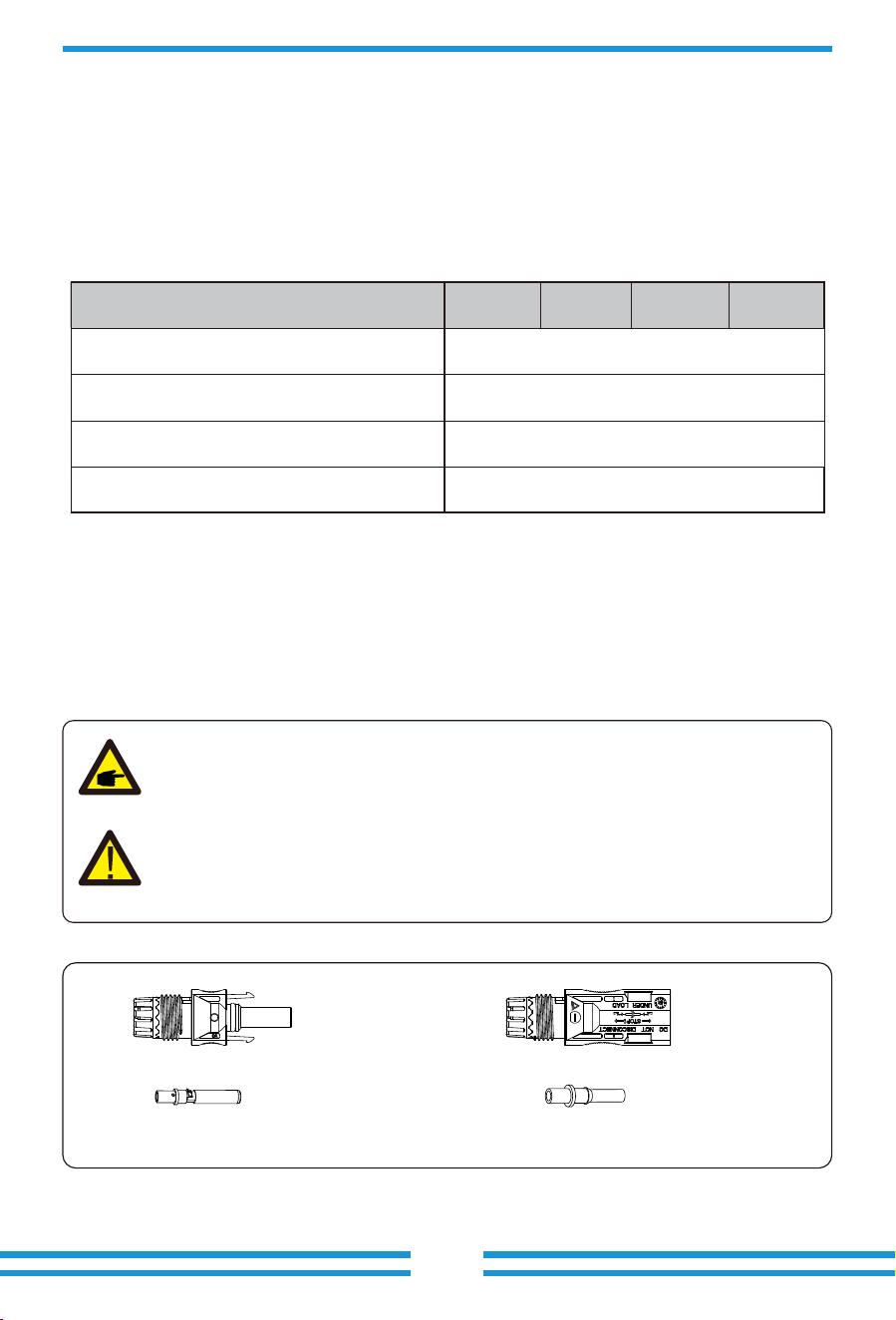
Pic 5.1 DC+ male connector
Pic 5.2 DC- female connector
Chart 3-5
PV Input Voltage
Inverter Model
PV Array MPPT Voltage Range
No. of MPP Trackers
No. of Strings MPP Tracker
650V (180V-1000V)
150V-850V
2+2+2+2+2+2
6
60kW 70kW 80kW
75kW
- 18 -
Safety Hint:
Please use approved DC cable for PV system.
Cable type
Range Recommended value
Cross section(mm )
Industry generic PV cable
(model: PV1-F)
2.5-4
(12-10AWG)
2.5(12AWG)
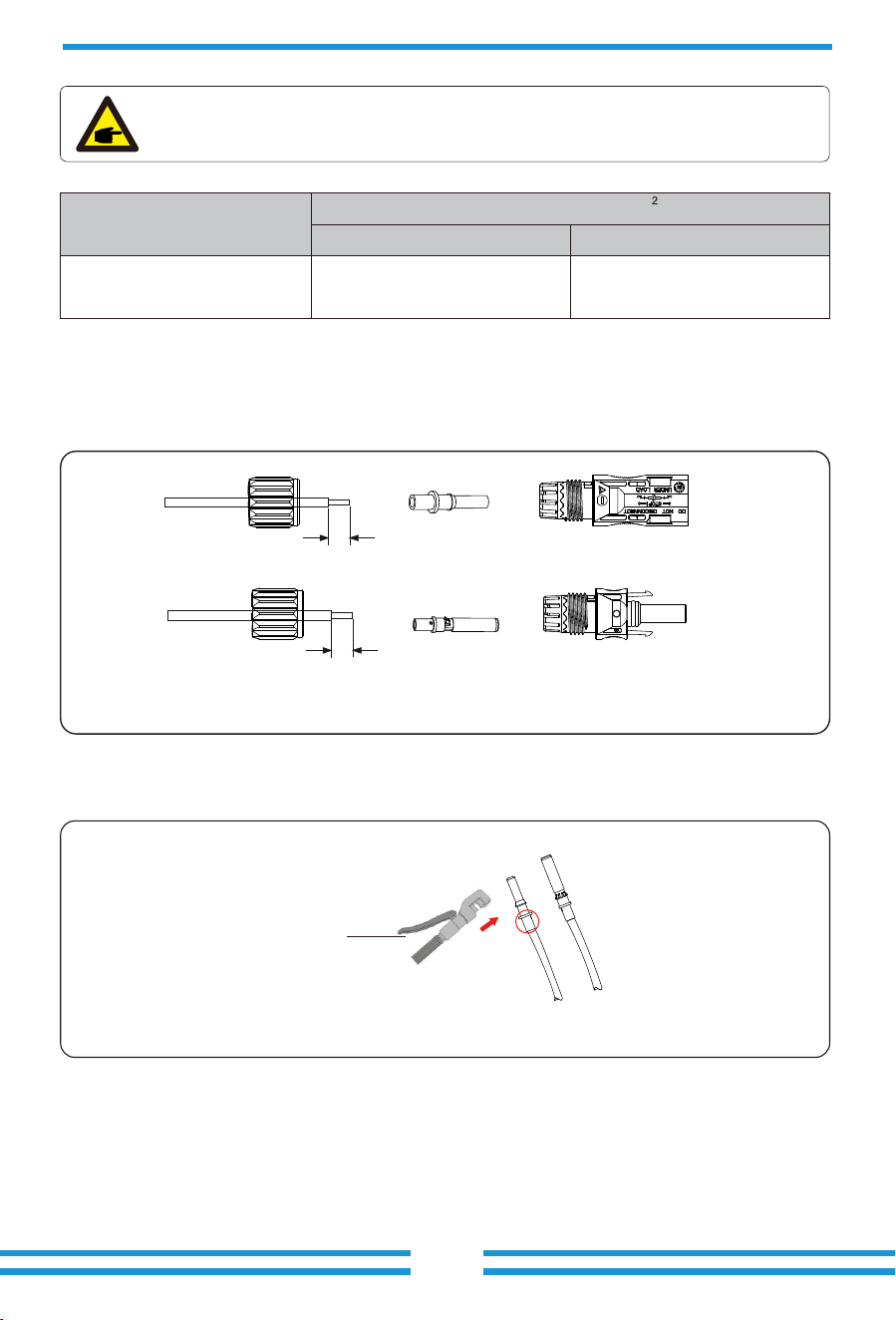
The steps to assemble the PV connectors are listed as follows:
a) Strip the insulation of the PV wire by 7 mm, disassemble the cap nut of the connetctor,
thread one PV wire through the cap nut of the connector (see Pic 5.3). Repeat this operation
with all the PV wires, paying special attention to the polarity of the connector.
b) Crimping metal terminals with crimping pliers , as shown in Pic 5.4.
c) Insert the contact pin to the top part of the connector and completely tighten the cap nut to
the top part of the connector, as shown in Pic 5.5.
Pic 5.3 Disassemble the connector cap nut
Pic 5.4 Crimp the contact pin to the wire
Chart 3-6
7mm
7mm
Hydraulic pliers
-19 -
Pic 5.5 connector with cap nut screwed on
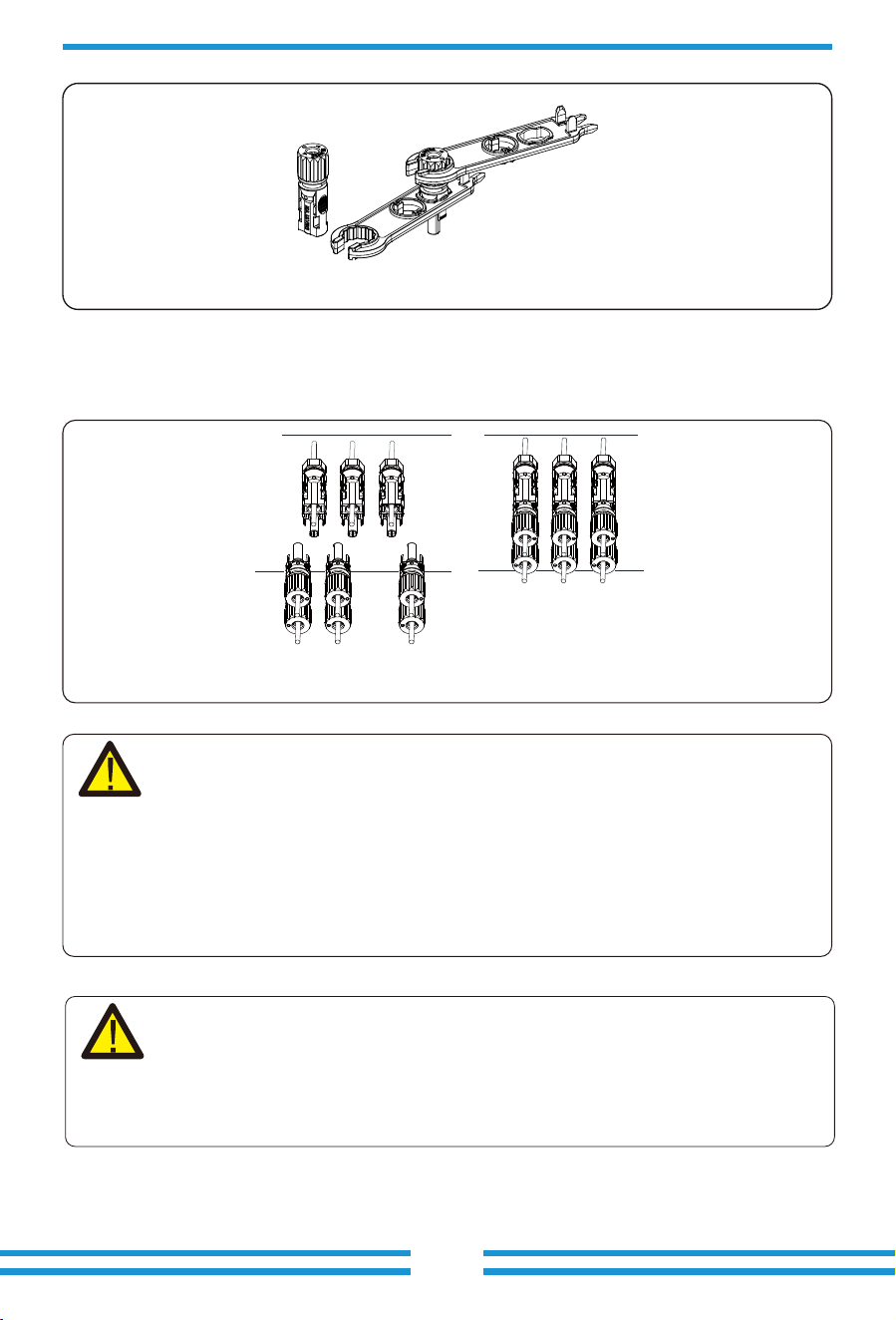
d) Finally insert the PV connectors into the positive and negative PV inputs of the inverter, as
shown in Pic 5.6.
Pic 5.6 DC input connection
Warning:
Warning:
Please use its own DC power connector from the inverter accessories. Do not
interconnect the connectors of different manufacturers. The Isc current of PV
modules should not exceed the Max.PV Isc current of this inverter. If exceeds,
it may damage the inverter and is not covered by Deye's warranty.
When operating the PV strings, be aware that sunlight exposure can generate high
voltages in the PV strings. Avoid contact with exposed electrical connecters or
terminals to prevent electrical shock or injury. For safety, it is best to operate the
PV strings at night or when PV modules are not exposed to sunlight. If daytime
operation is necessary, cover the PV modules to minimize sunlight exposure and
prevent high voltage generation. Remember to turn off the DC breaker or switch
before performing any maintenance or adjustments. Do not turn off the DC
breaker or switch when high voltage or high current is present to avoid damage or
hazards. Prioritize personal safety.
- 20 -
1 2 3 4 5 6
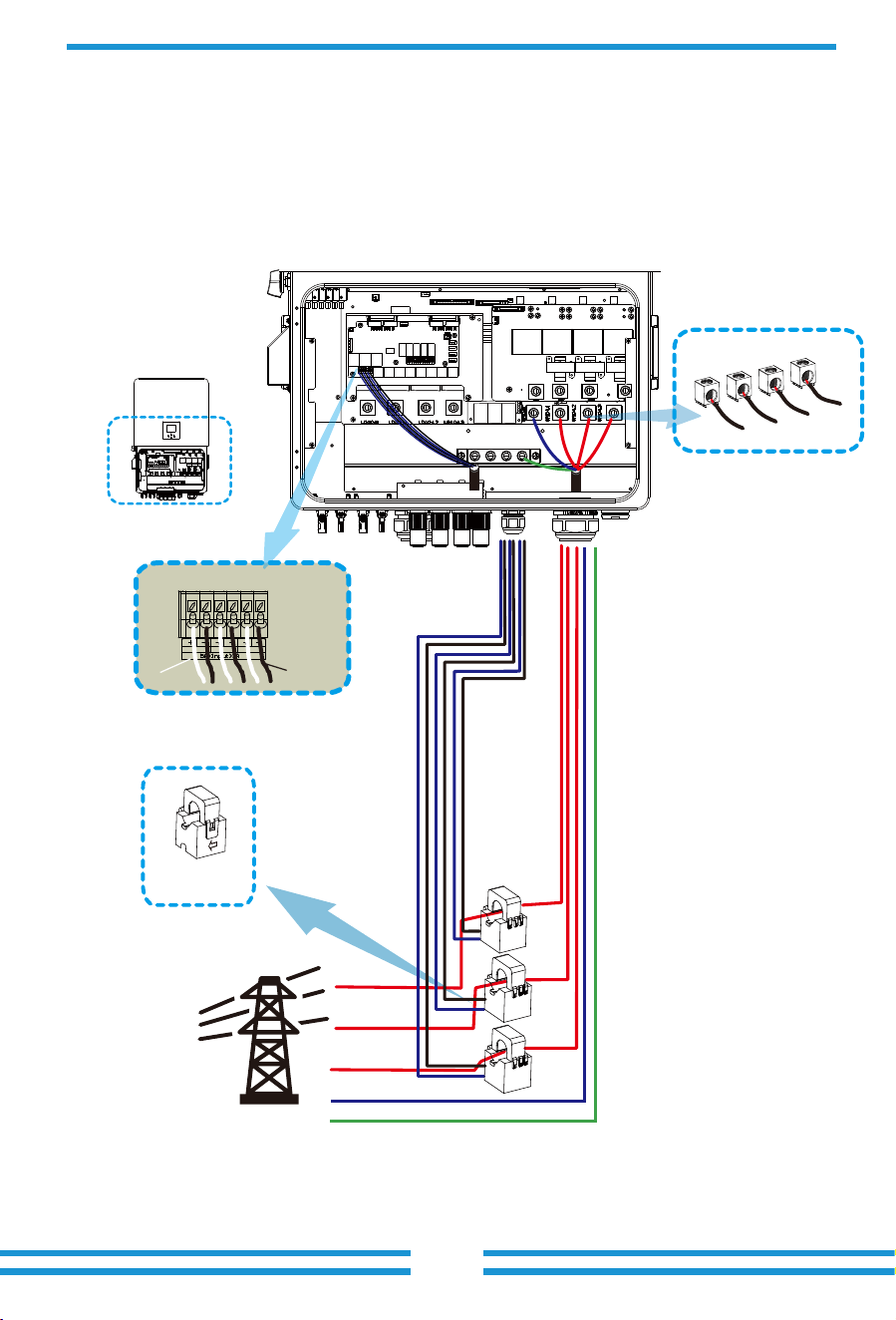
CT-L1 CT-L2 CT-L3
White wire
Black wire
CT
Arrow pointing
to inverter
*Note:When taking power from the utility grid, if the grid power displayed
on the LCD screen is indeed negative, please adjust the installation direction
of the CTs.Please refer to Chapter 3.10 for the position to be clamped.
Grid
N
PE
L1
L2
L3
CT1
CT2
CT3
Inverter
GRID
N
L1
L2
L3
3.7 Meter or CT installation
3.7.1 CT connection
There are three selectable installation methods to measure the power consumption or to ensure zero power
export to grid. The default installation method is to use the CTs(300A/5A) that come with the packaging
box. When the distance between the AC distribution box and the hybrid inverter exceeds 10 meters, which
means that the wire length of the CT needs to exceed 10 meters, it is recommended to use a smart meter
instead of three CTs. In addition, in a parallel system, if the current to be measured is greater than 300 A, the
default three CTs also need to be replaced with smart meters or larger CTs. Please contact the Deye support
team to confirm which specification of CT or smart meter to use.
- 21 -
L1
L2
L3
N
PE
RS485A
RS485B
Three-Phase Smart Meter
SET ESC
1 74 10
2524
3
96 10
CHINT meter
Three-Phase Smart Meter
SET ESC
1 74 10
2524
3 96 10
RS 485
CHNT DTSU666
(3,6,9,10)
(1,4,7,10)
L1
L2
L3
Grid
Inverter
GRID
Parallel_1 Parallel_2Meter
N
L1
L2
L3
L1
L1
L2
L2
L3
L3
N
N
RS485A
RS485B
Grid
Eastron meterEastron SDM630-Modbus V2
RS 485
RS 485 B RS 485 A
B A G
(5,6,7,8)
(1,2,3,4)
1234
L1
L2
L3
5678
GND
Eastron
5 6 7 8
L1
L2
L3
Eastron
5 6 7 8
Inverter
PE
GND
GRID
Parallel_1 Parallel_2Meter
N
L1
L2
L3
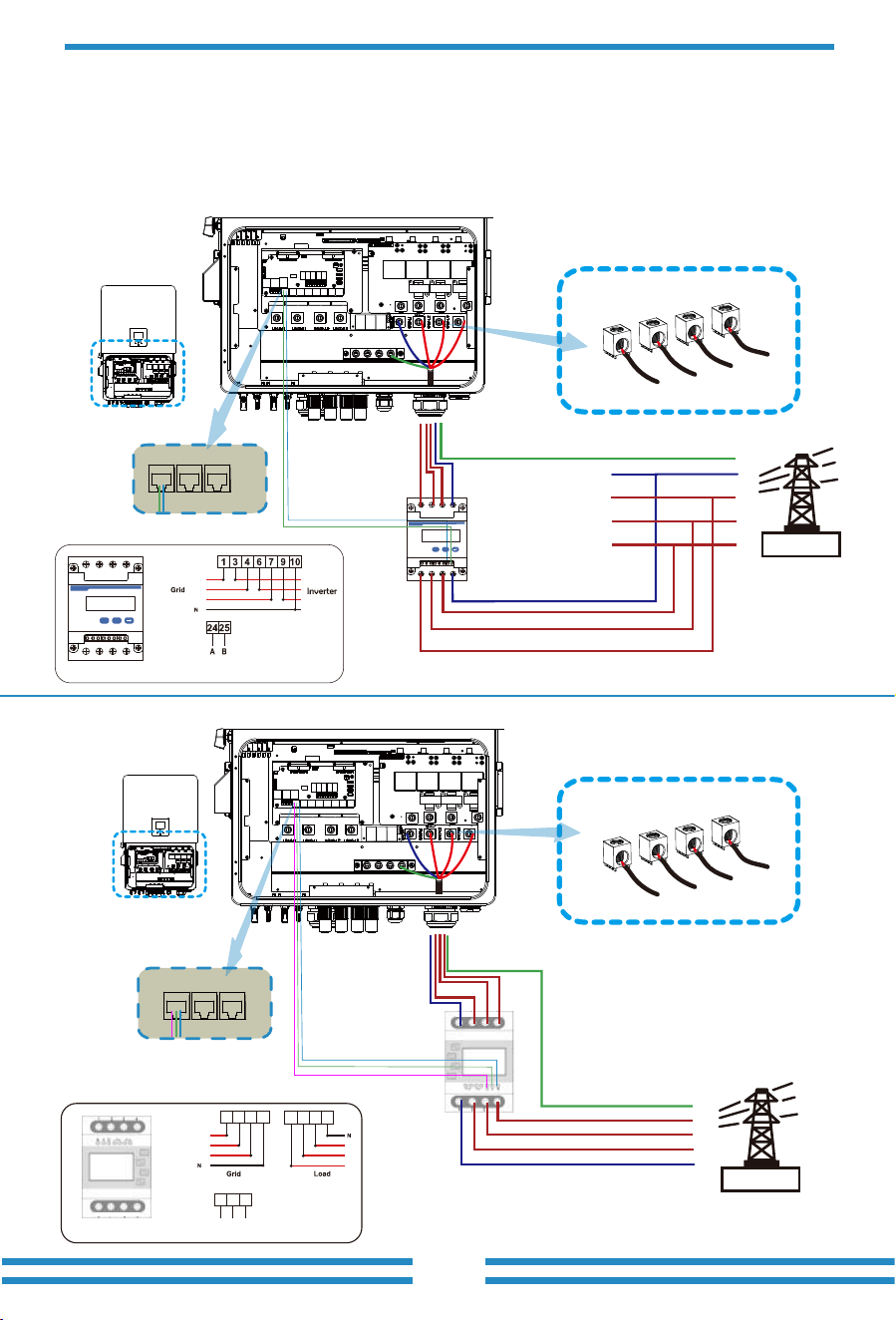
3.7.2 Meter connection without CTs
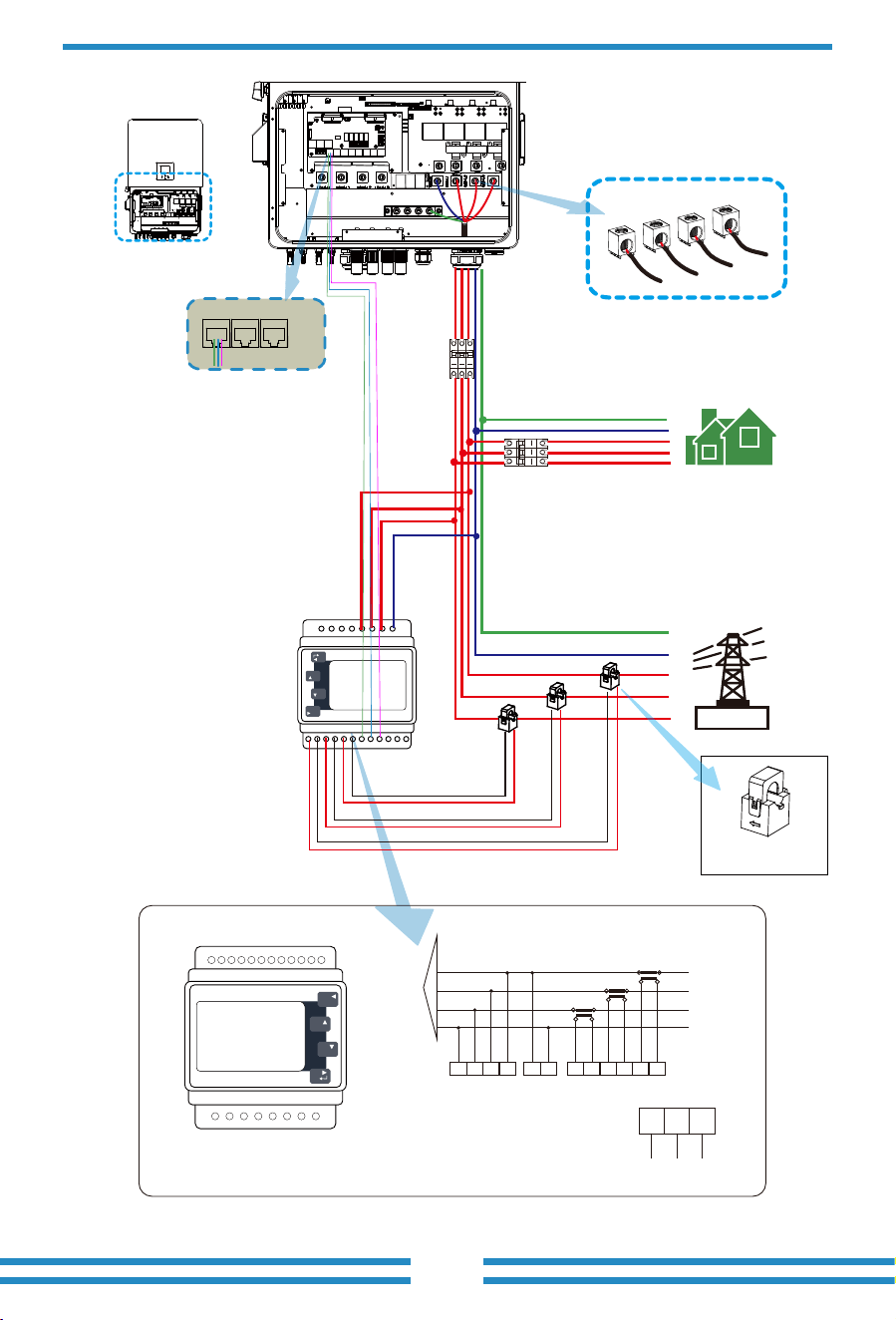
There are two kinds of smart meter, one is passthrough smart meter, and the other is Mutual inductance
smart meter with CTs. The smart meter brands that Deye inverters have been matched with include CHINT
and Eastron,The recommended models here are not all compatible models,It is recommended to
purchase smart meter from authorized distributors of Deye, otherwise it may not be able to be used due to
communication mismatch. The definition of the "Meter" port can be found in the Appendix part which is in
the end of this user manual.
- 22 -
Three-Phase Smart Meter
SET ESC
7
2524211917161413
3 96 10
GRID
Parallel_1 Parallel_2Meter
Inverter
L1
L2
L3
N
PE
Grid
AC Breaker
AC Breaker
Home Load
L1
L3
N
PE
L2
CT1
CT2
CT3
RS485A
RS485B
N
L1
L2
L3
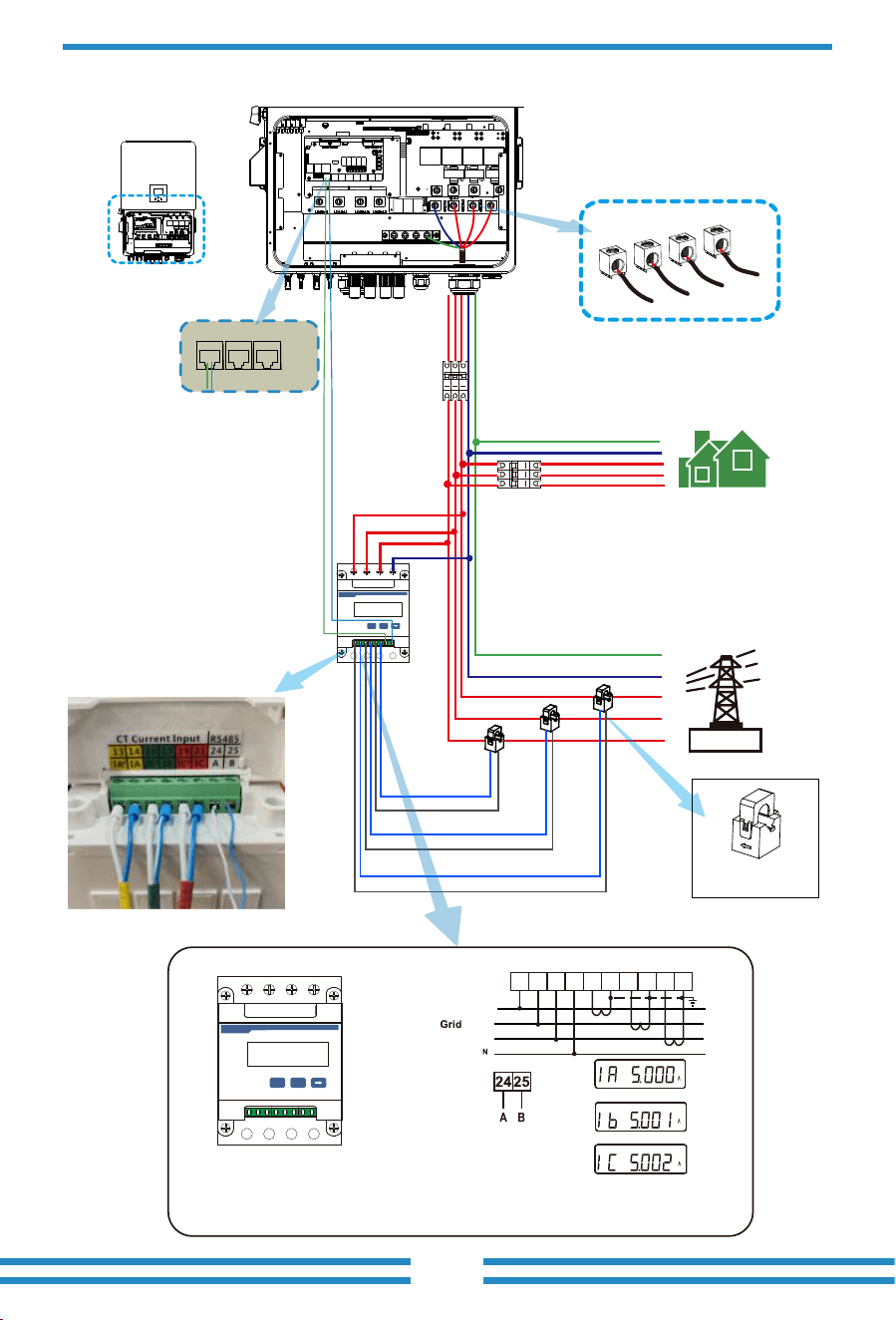
Note: the arrow direcon
towards the inverter
Three-Phase Smart Meter
SET ESC
2524211917161413
3 96 10
CHINT meter
RS 485
CHNT DTSU666
(3,6,9,10)
3 13 146 9 10 16 17 19 21
Phase B current =5.001A
Phase C current =5.002A
Phase A current =5.000A
L1
L2
L3
PIN 13,16,19:White cable of the CT
PIN 14,17,21: Blue cable of the CT
White line
White line
White line
Blue line
Blue line
Blue line
230/400V,3~
250A/50mA
50/60Hz
3.7.3 Meter connection with CTs
Note: the arrow direcon
towards the inverter
- 23 -
Black line
Black line
Black line
Red line
Red line
Red line
GRID
Parallel_1 Parallel_2Meter
Inverter
L1
L2
L3
N
PE
Grid
AC Breaker
AC Breaker
Home Load
L1
L3
N
PE
L2
CT1
CT2
CT3
Eastron meter
Eastron SDM630MCT
1 2 3 4 5 6
L1
L2
L3
N
P1P2
S1S2
P2 P1
S1S 2
P1P2
S1
S2
3 PHASE 4 WIRE
15 16
17 18
19 20
Grid voltage
sampling
Auxiliary
power supply
Current inputs
RS 485
RS 485 A RS 485 B
14 13 12
GND
1 2 3 4 5 6 7 8
9 10 11 12 13 14 15 16 17 18 19 20
P
M
E
U/I
ESC
Eastron
meter
NA LA L1 L2 L3 N
S1 S2 S1 S2 S1 S2
1 2 3 4 5 6 7 8
9 10 11 12 13 14 15 16 17 18 19 20
P
M
E
U/I
ESC
Eastron
RS485A
RS485B
GND
N
L1
L2
L3
- 24 -
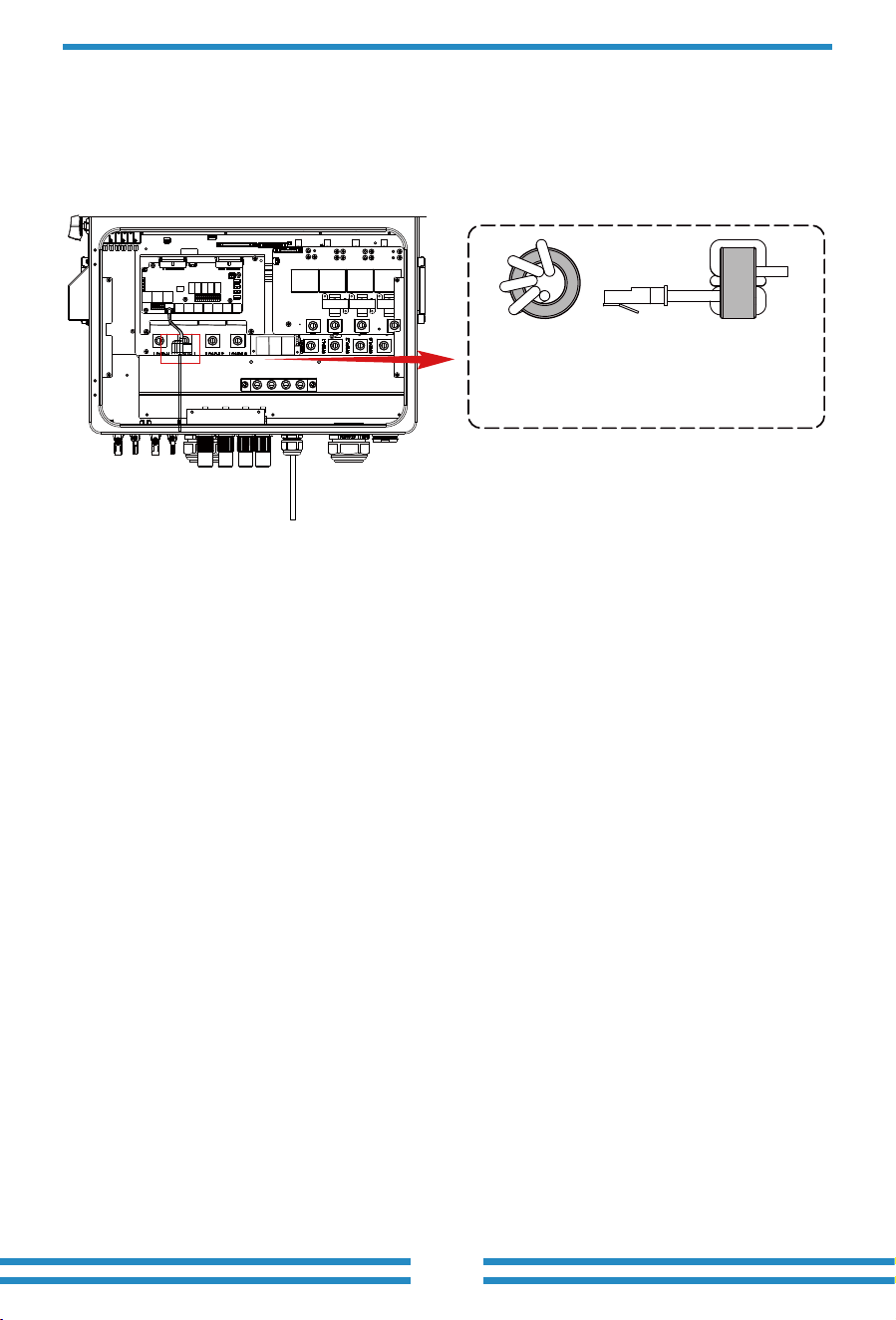
Meter connection
3
Thread the meter communication cable
through the magnetic ring 3 and wrap
it around the magnetic ring four times.
- 25 -
3.9 Data logger connection
For the configuration of data logger, please refer to the user manual of data logger. Wi-Fi logger is
not the only option, If the installation location does not have Wi-Fi signal or the signal is weak,
you can also choose a data logger that communicates via other interfaces.
The conductor should be made of the same metal as the phase conductors.
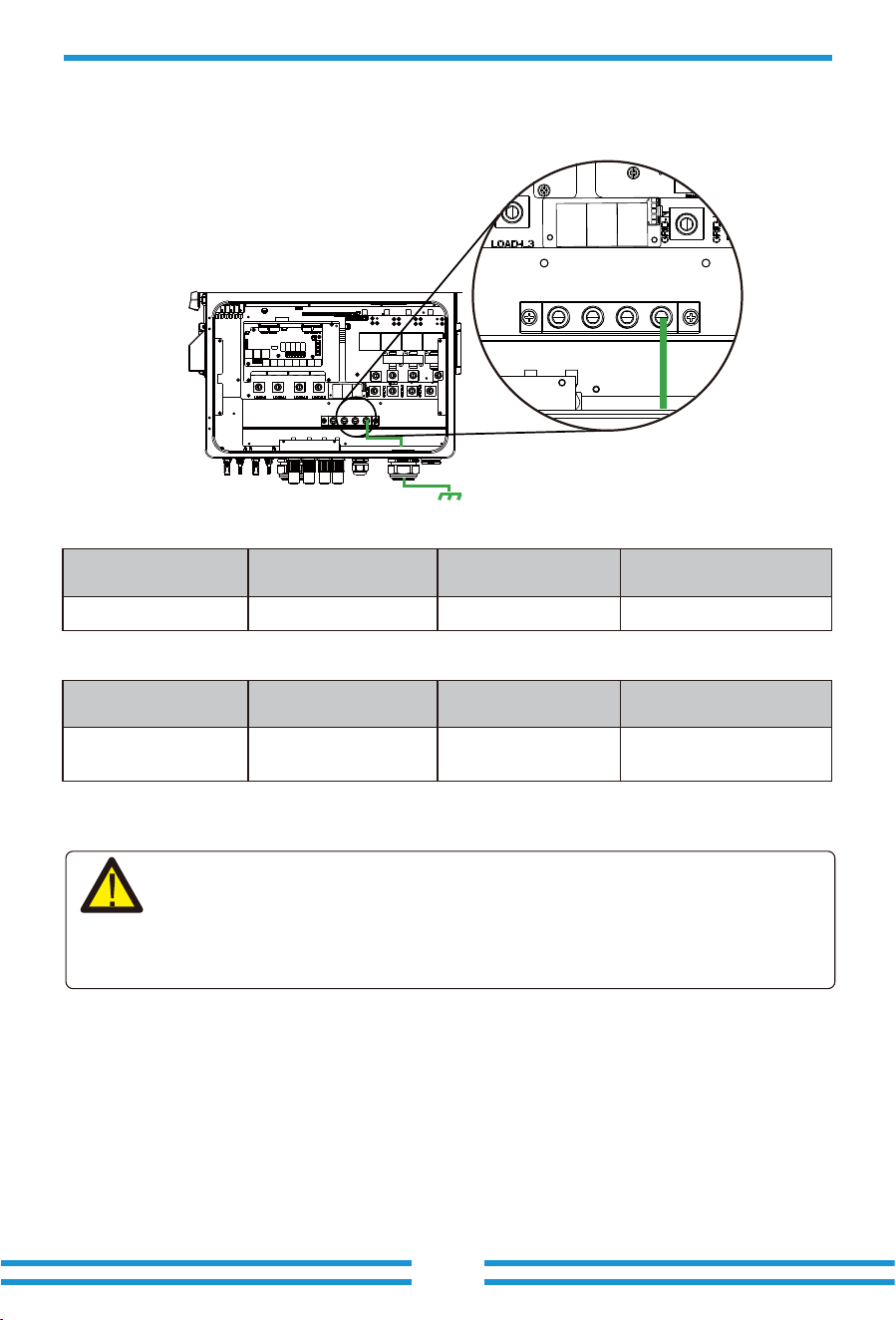
3.8 Earth Connection(mandatory)
Ground cable shall be connected to ground plate on grid side, this prevents electric shock if the
original protective conductor fails.
Earth Connection (Copper wires) (bypass)
Model
60/70/75/80kW
Wire Size
0AWG
Cross section(mm )
2
50
Torque value(max)
20.3Nm
Earth Connection (Copper wires)
Warning:
Inverter has built-in leakage current detection circuit,The type A RCD can be connected to
the inverter for protection according to the local laws and regulations.If an external leakage
current protection device is connected to the grid port of inverter, please refer to section
3.11, its operating current must be equal to 10mA/KVA or higher, for this series of inverter it
should be 800mA or higher, otherwise inverter may not work properly.
Model
60/70/75/80kW
Wire Size
0AWG
Cross section(mm )
50
Torque value(max)
20.3Nm
2
- 26 -
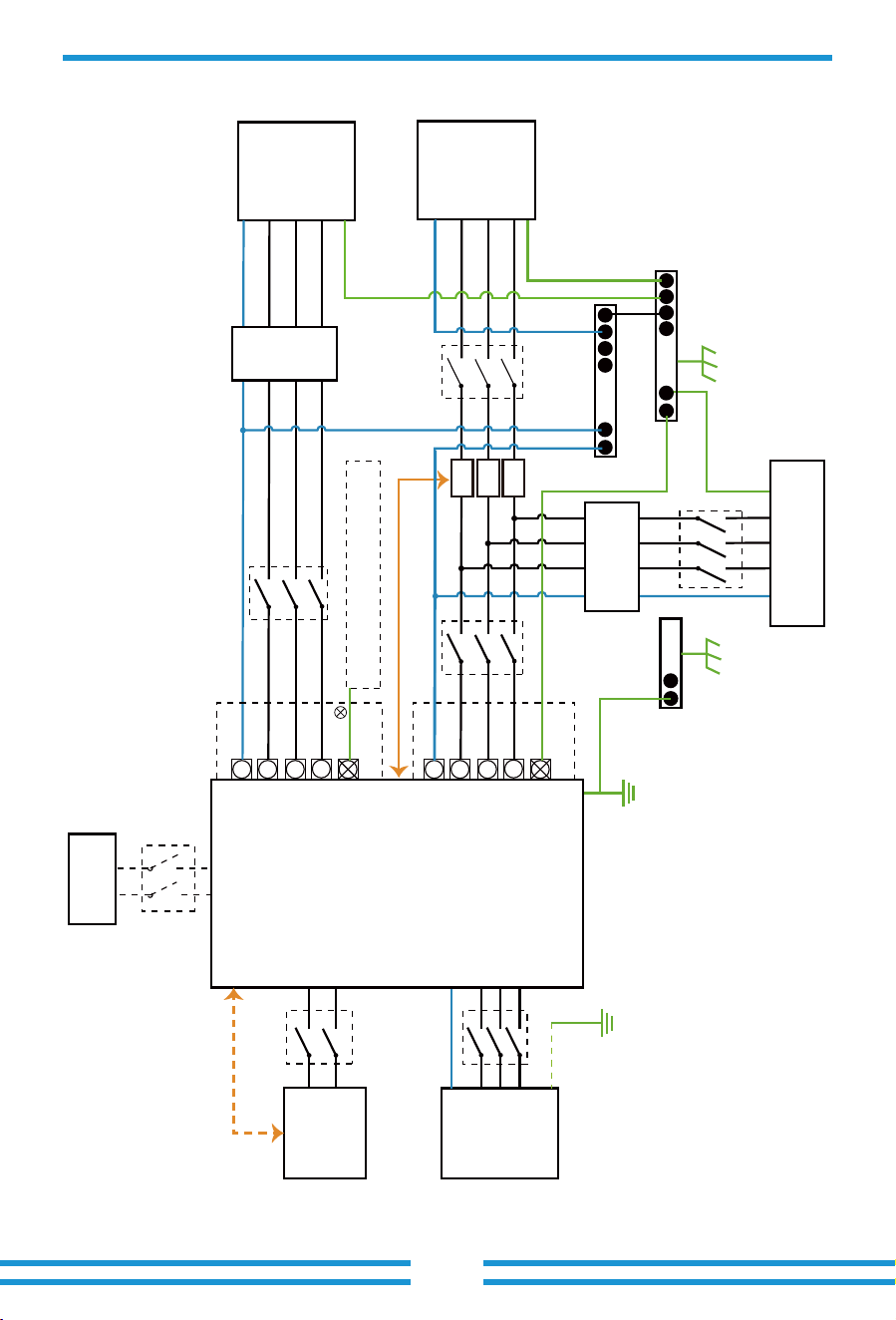
3.10 Wiring diagram with neutral line grounded
This diagram is an example for an application that neutral connects with the
PE in a distribution box.
For countries such as Australia, New Zealand, etc., please follow
local wiring regulations!
E-BAR
GEN
PORT
Load
CT
PE
AC Breaker
L1 L1
N N
L2
Load
PE or
L2
L3
L3
AC Breaker AC Breaker
L1
L1
L1
N
N
N
L2
L2
Grid
PE
L2
L3
PE
PE
L3
L1
N
L2
PE
L3
L3
AC Breaker
Hybrid Inverter
CT1
CT2
CT3
RCD
Home Loads
E-BAR
Grid
Battery
BMS
DC Breaker
PV
DC Breaker
Do not connect this terminal when the neutral
wire and PE wire are connected together.
Inverter case grounding
N-BAR
E-N
Link
RCD
- 27-
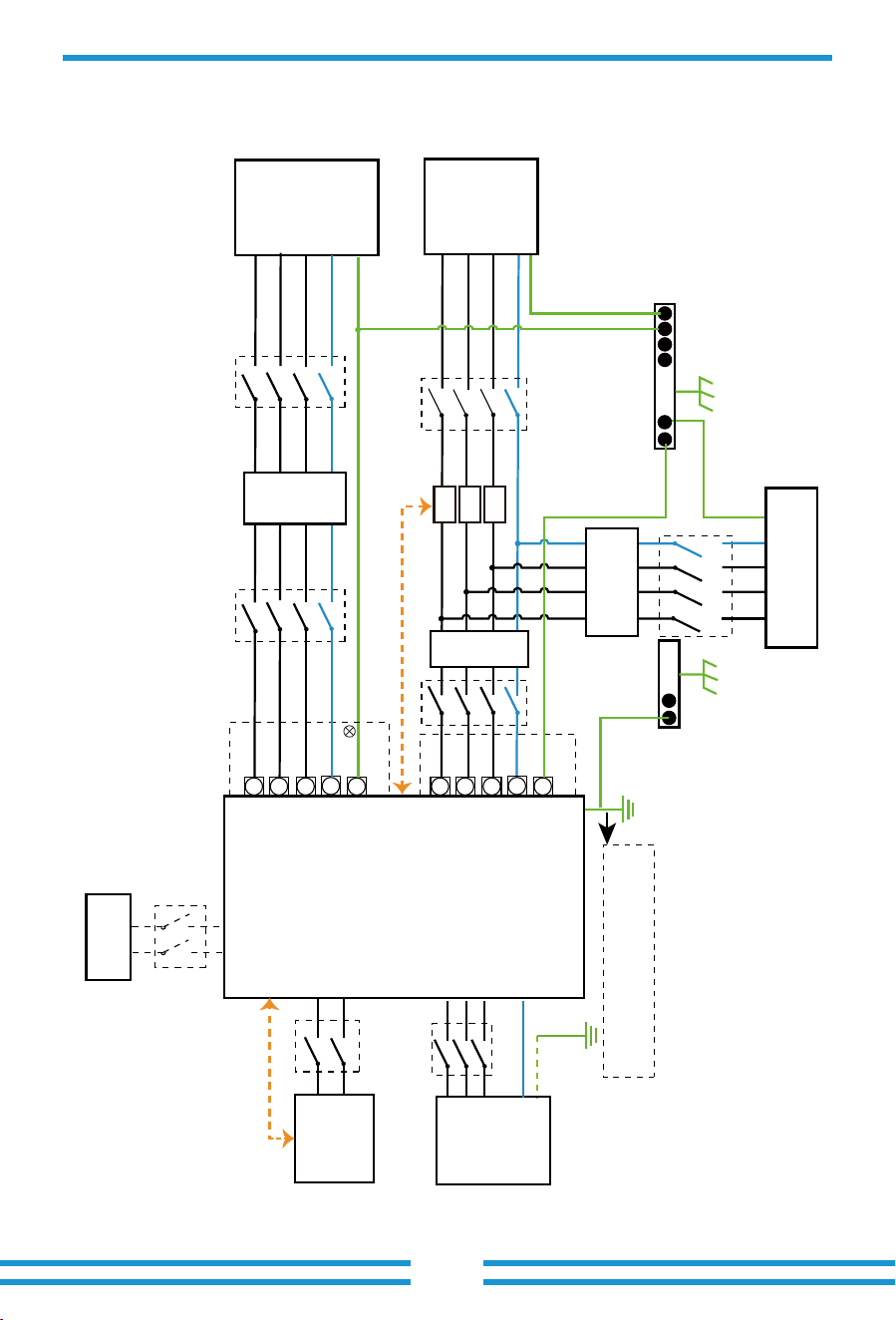
3.11 Wiring diagram with neutral line ungrounded
This diagram is an example for an application in which neutral is separated from the
PE in the distribution box.
For countries such as China, Germany,the Czech Republic, Italy, etc., please follow local
wiring reguations!
E-BAR
Backup
Loads
CT
PE
L2 L2
L1 L1
L3
Backup
PE or
L3
N
PE
N
L2
L2
L2
L1
L1
L1
L3
L3
On-Grid
PE
L3
N
PE
N
N
Hybrid Inverter
CT1
CT2
CT3
RCD
Home Loads
RCD
E-BAR
Grid
Battery
BMS
Distribution box
800mA RCD (Recommended)
RCD
DC Breaker
Grouding screw hole in the
lower right corner
GEN
PORT
L1
N
L2
PE
L3
AC Breaker
PV
DC Breaker
- 28 -
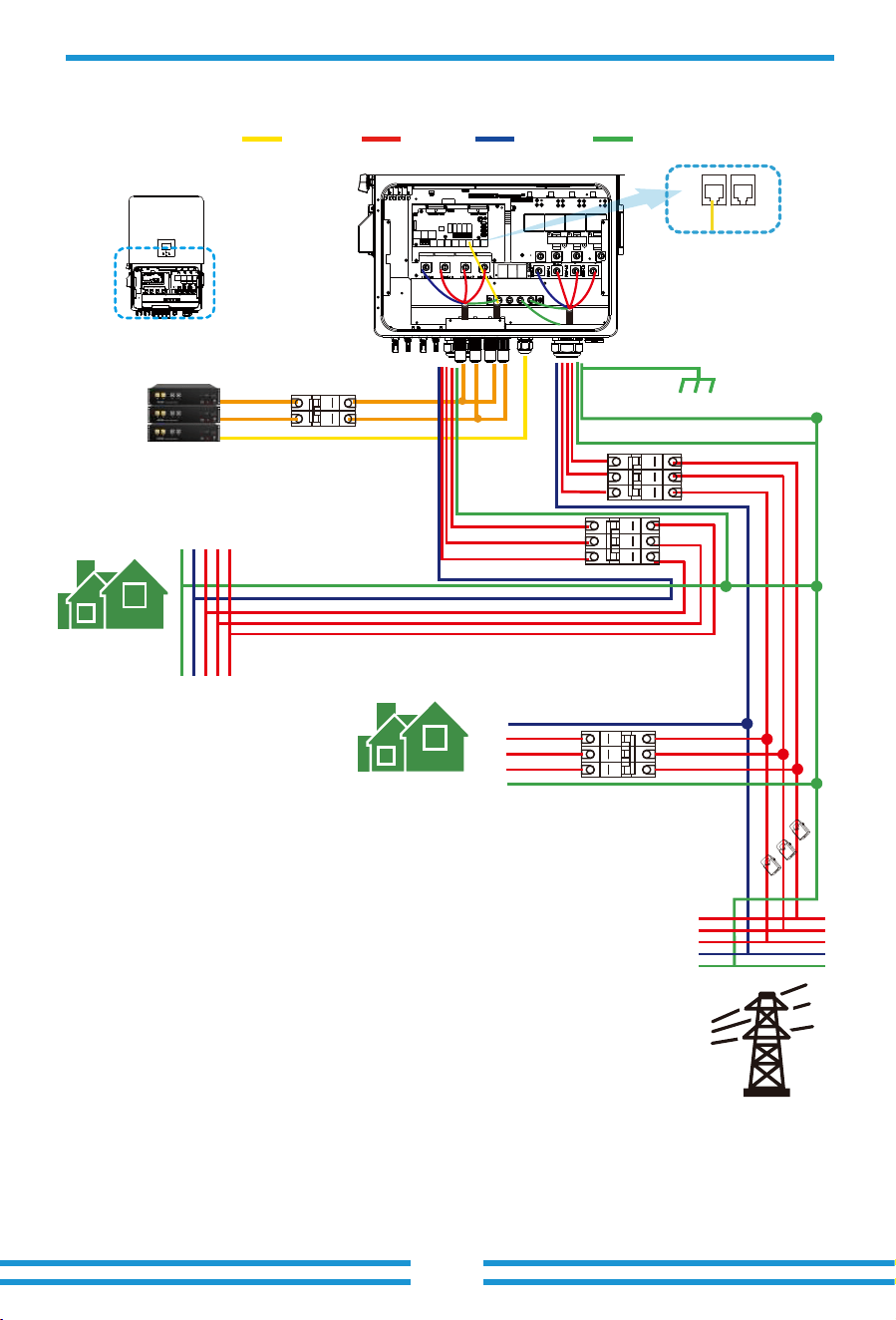
L wireCAN N wire PE wire
BMS1 BMS2
Grid
Backup Load
Inverter
①DC
Breaker
②AC Breaker
③AC Breaker
④AC Breaker
Battery pack
Home Load
L1
L1
L2
L2
L3
L3
N
N
PE
PE
L1
L2
L3
N
PE
Ground
CT1
CT2
CT3
① DC Breaker for battery
SUN-60K-SG02HP3-EU-EM6: 100A DC breaker
SUN-70K-SG02HP3-EU-EM6: 100A DC breaker
SUN-75K-SG02HP3-EU-EM6: 100A DC breaker
SUN-80K-SG02HP3-EU-EM6: 100A DC breaker
② AC Breaker for backup load
SUN-60K-SG02HP3-EU-EM6: 250A AC breaker
SUN-70K-SG02HP3-EU-EM6: 250A AC breaker
SUN-75K-SG02HP3-EU-EM6: 250A AC breaker
SUN-80K-SG02HP3-EU-EM6: 250A AC breaker
③ AC Breaker for grid
SUN-60K-SG02HP3-EU-EM6: 250A AC breaker
SUN-70K-SG02HP3-EU-EM6: 250A AC breaker
SUN-75K-SG02HP3-EU-EM6: 250A AC breaker
SUN-80K-SG02HP3-EU-EM6: 250A AC breaker
④AC Breaker for home load
Depends on household loads
3.12 Typical application diagram of on-grid system
BMS1 BMS2
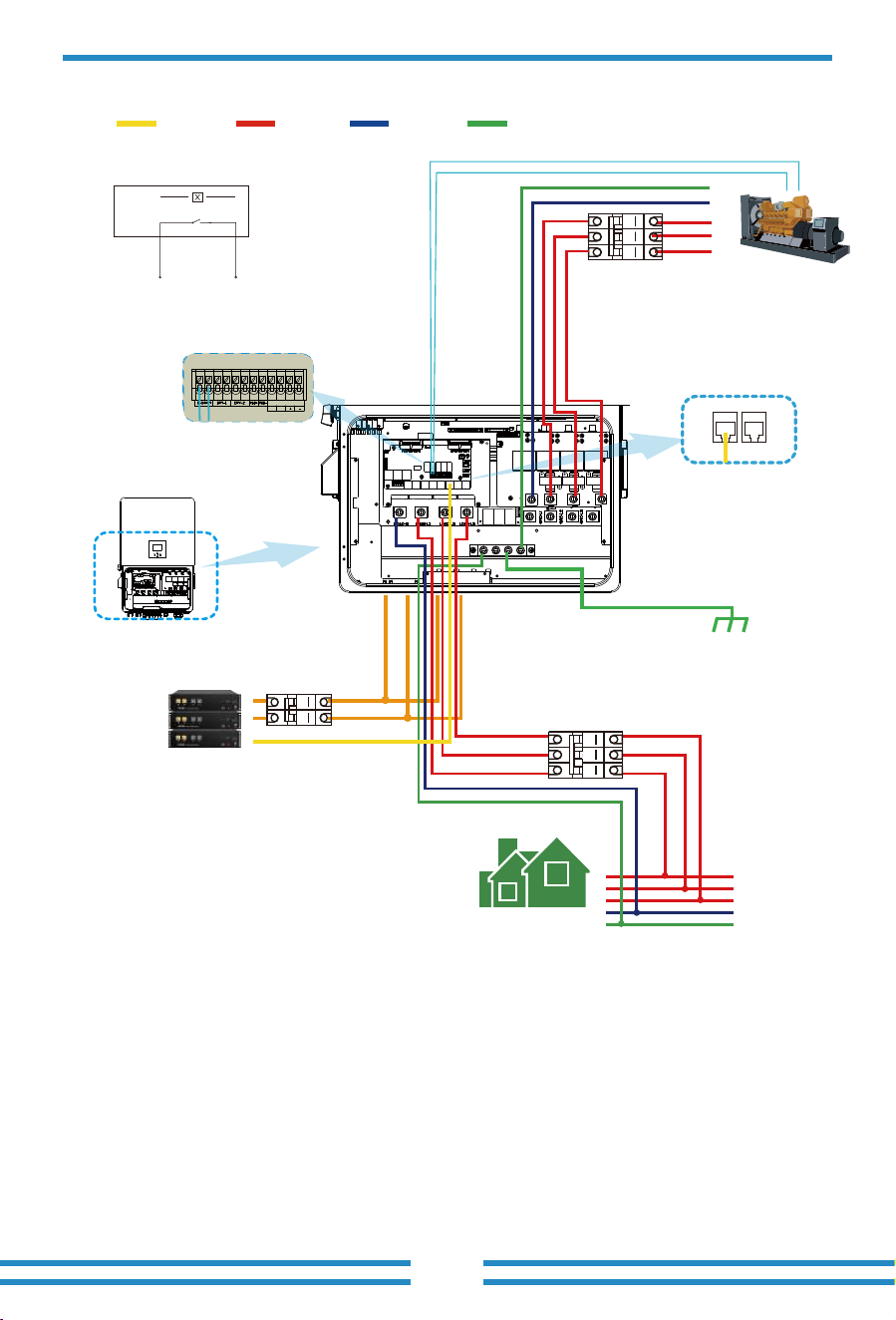
3.13 Typical application diagram of diesel generator
- 29 -
L wireCAN N wire PE wire
①DC
Breaker
Battery pack
Backup Load
L3
L2
L1
N
PE
Generator
GS (diesel generator startup signal)
relay
coil
open
contact
G S
G-start (1,2): dry contact signal for startup
the diesel generator.
Remotely control signal line
Inverter
③AC Breaker
②AC
Breaker
L3
L2
L1
N
PE
1 2 3 4 5 6 7 8 9 10 1112
SHUT DOWN
B B
Ground
① DC Breaker for battery
SUN-60K-SG02HP3-EU-EM6: 100A DC breaker
SUN-70K-SG02HP3-EU-EM6: 100A DC breaker
SUN-75K-SG02HP3-EU-EM6: 100A DC breaker
SUN-80K-SG02HP3-EU-EM6: 100A DC breaker
② AC Breaker for backup load
SUN-60K-SG02HP3-EU-EM6: 250A AC breaker
SUN-70K-SG02HP3-EU-EM6: 250A AC breaker
SUN-75K-SG02HP3-EU-EM6: 250A AC breaker
SUN-80K-SG02HP3-EU-EM6: 250A AC breaker
③ AC Breaker for Generator port
SUN-60K-SG02HP3-EU-EM6: 250A AC breaker
SUN-70K-SG02HP3-EU-EM6: 250A AC breaker
SUN-75K-SG02HP3-EU-EM6: 250A AC breaker
SUN-80K-SG02HP3-EU-EM6: 250A AC breaker
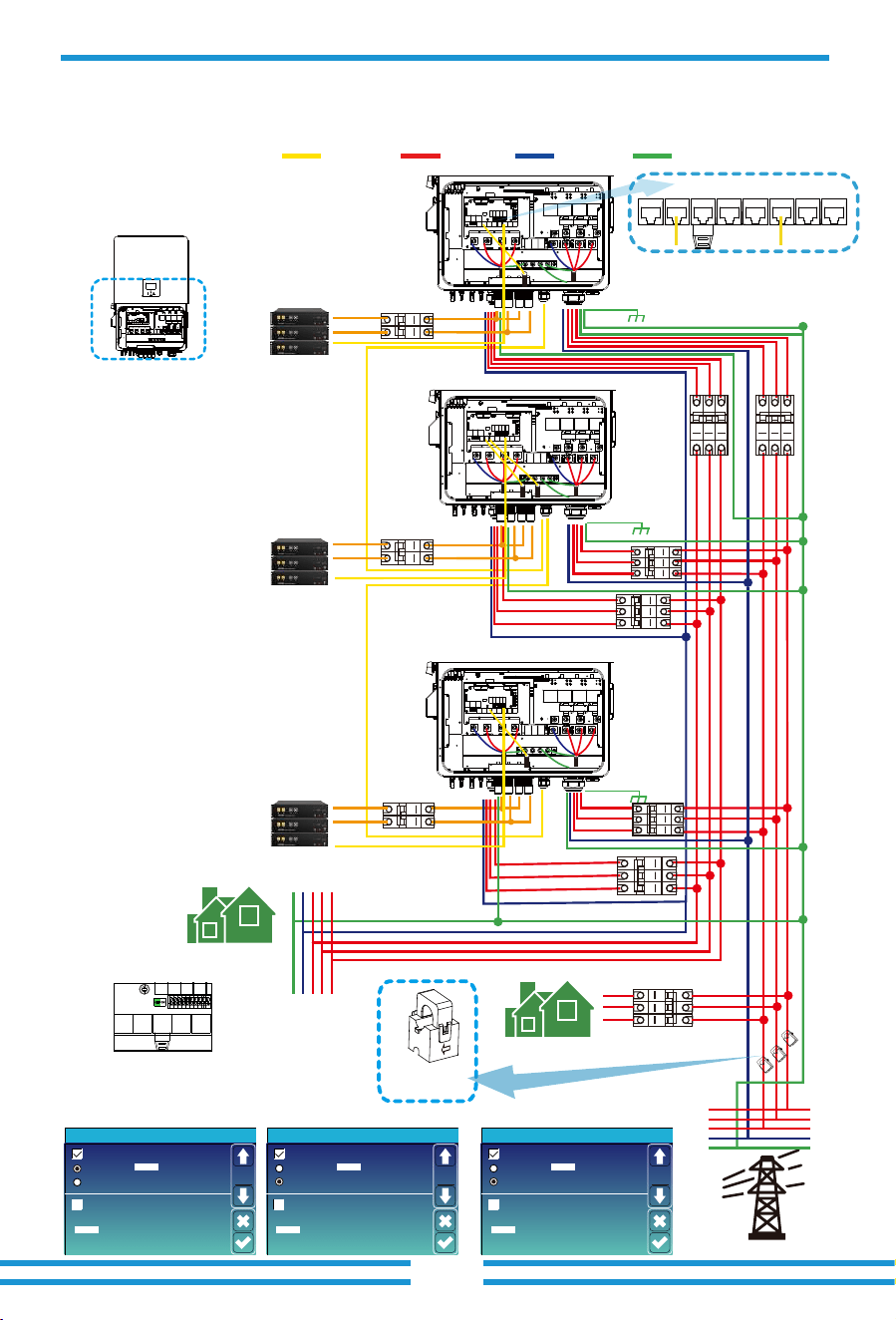
- 30 -
L wireCAN N wire PE wire
3.14 Three phase parallel connection diagram
Inverter
Master inverter Slave Inverter Slave Inverter
Parallel
Master
Slave
Modbus SN
02
Advanced Function
Paral.
Set3
EX_Meter For CT
Meter Select
0/3No Meter
Parallel
Master
Slave
Modbus SN
03
Advanced Function
Paral.
Set3
EX_Meter For CT
Meter Select
0/3No Meter
Parallel
Master
Slave
Modbus SN
Advanced Function
Paral.
Set3
EX_Meter For CT
Meter Select
0/3No Meter
01
Grid
Backup Load
Inverter
No.3
(slave)
Inverter
No.2
(slave)
Inverter
No.1
(master)
⑩
⑤
②
③
Battery pack
Home Load
L1 L2 L3NPE
L1
L2
L3
N
PE
CT
Arrow point to inverter,
and connect CT's cables to
the master inverter.
⑧
Ground
Ground
Ground
Battery pack
①
Battery pack
CT1
CT2
CT3
Parallel_1 Parallel_2Meter CAN DRM BMS1 BMS2 RS485
①②③ DC Breaker for battery
SUN-60K-SG02HP3-EU-EM6: 100A DC breaker
SUN-70K-SG02HP3-EU-EM6: 100A DC breaker
SUN-75K-SG02HP3-EU-EM6: 100A DC breaker
SUN-80K-SG02HP3-EU-EM6: 100A DC breaker
⑤⑦⑨ AC Breaker for backup load
SUN-60K-SG02HP3-EU-EM6: 250A AC breaker
SUN-70K-SG02HP3-EU-EM6: 250A AC breaker
SUN-75K-SG02HP3-EU-EM6: 250A AC breaker
SUN-80K-SG02HP3-EU-EM6: 250A AC breaker
④⑥⑧ AC Breaker for grid port
SUN-60K-SG02HP3-EU-EM6: 250A AC breaker
SUN-70K-SG02HP3-EU-EM6: 250A AC breaker
SUN-75K-SG02HP3-EU-EM6: 250A AC breaker
SUN-80K-SG02HP3-EU-EM6: 250A AC breaker
⑩ AC Breaker for home load
Depends on household loads
⑥
⑦
⑨
④
Note: For the parallel system, the lead-acid battery and 'No Batt' mode are not supported.
All inverters connected in parallel must be the same model. Please use lithium battery which
is on the "Deye Approved Battery list".
Each inverter should have its own separate battery set.
Ensure that the DIP switches of each
hybrid inverter in the parallel system
are switched to the OFF state.
Note: The idle parallel ports of the first and last inverters
need to be plugged in with matching resistors.
OFF
ON
Note: For the parallel system,
please choose the "Zero export to CT " mode.
Only the master inverter needs to be
installed CT.
4. OPERATION
4.1 Power ON/OFF
4.2 Operation and Display Panel
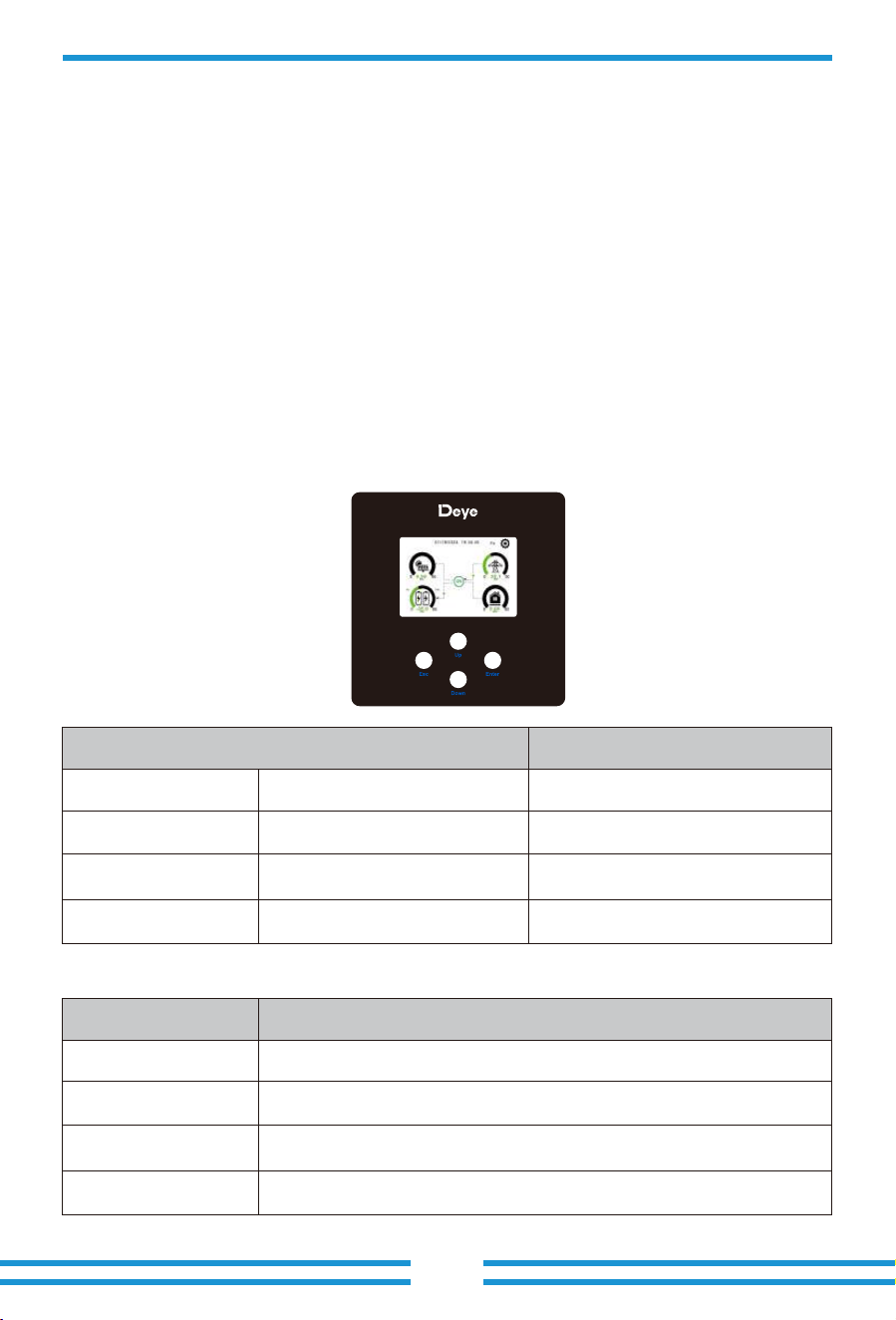
The operation and display panel, shown in below chart, is on the front panel of the inverter.
It includes four indicators, four function keys and a LCD display, indicating the operating status
and input/output power information.
Chart 4-1 LED indicators
LED Indicator
DC
AC
Normal
Alarm
Green led solid light
Green led solid light
Green led solid light
Red led solid light
PV Connection normal
Grid Connection normal
Inverter operating normal
Malfunction or warning
Messages
Chart 4-2 Function Buttons
Function Key
Esc
Up
Down
Enter
Description
To exit setting mode
To go to previous selection
To go to next selection
To confirm the selection
- 31 -
Once the system has been properly installed and the battery is connected to the inverter, follow
the steps below to turn on the inverter:
1. Turn all the breakers of the installation on.
2. Turn on the DC switches of the inverter and the power button of battery (If there is one battery
installed at the system), no matter the order.
3. Press the ON/OFF button (located on the left side of the inverter case) to turn on the inverter.
When a system connected to either PV or Grid (without battery) is switched on, the LCD will still
be lighted up displaying "OFF". In this situation, after switching ON/OFF button on, select "NO
batt" at the inverter settings to make the system work.
When turning off the inverter, please follow the following steps:
1. Turn off the AC breakers on Grid port, Load port and GEN port.
2. Press the ON/OFF button of hybrid inverter and turn off the DC breaker on battery side, then
turn off the power button of the battery.
3. Switch off the DC switches of the inverter.
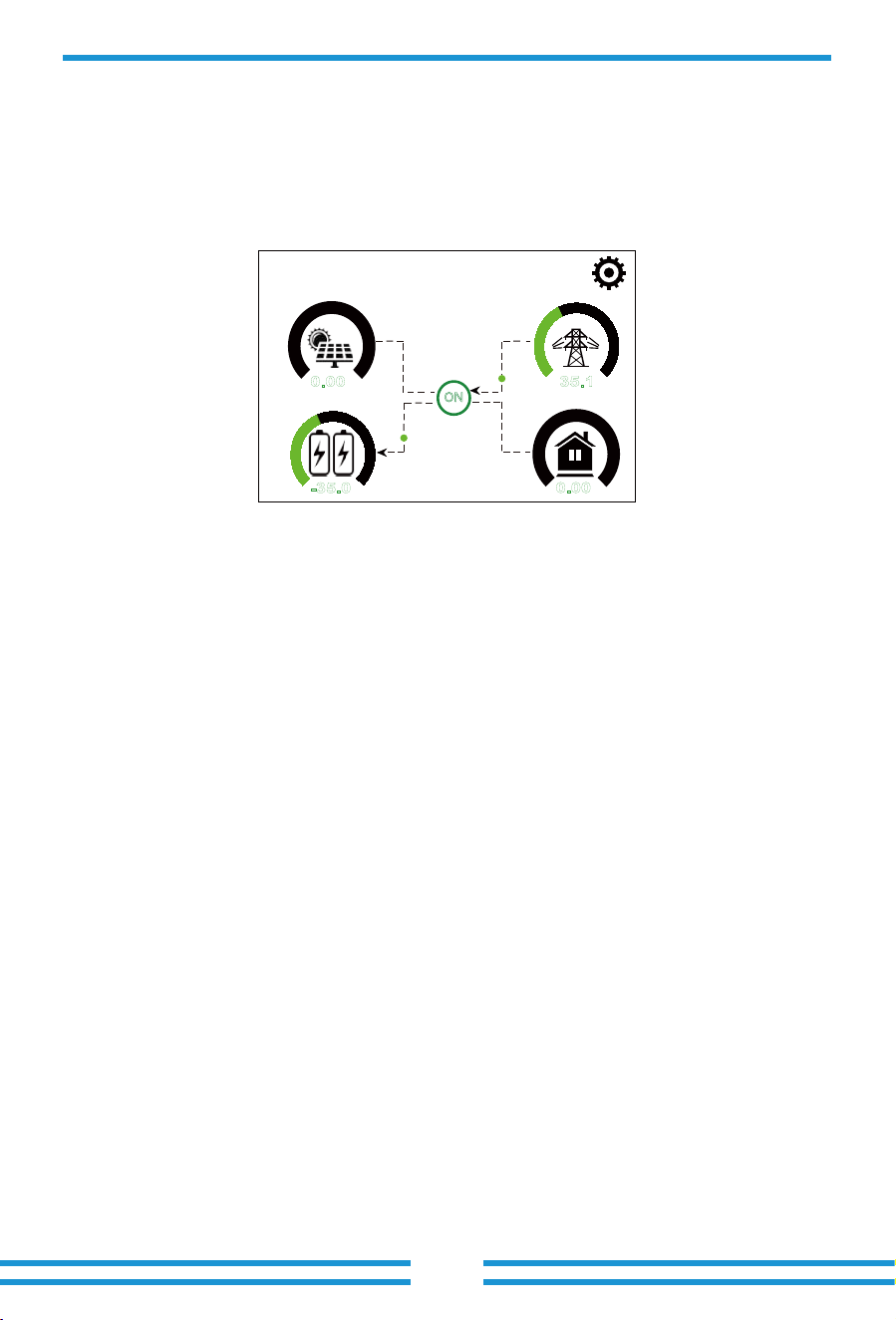
5.1 Main Screen
5. LCD Display Icons
The LCD is touchscreen, below screen shows the overall information of the inverter.
01/19/2024 19:34:40
0.00
KW
-35.0
KW
35.1
KW
0.00
KW
0 80
0 80
0 80
0 80
Fri
ON
- 32-
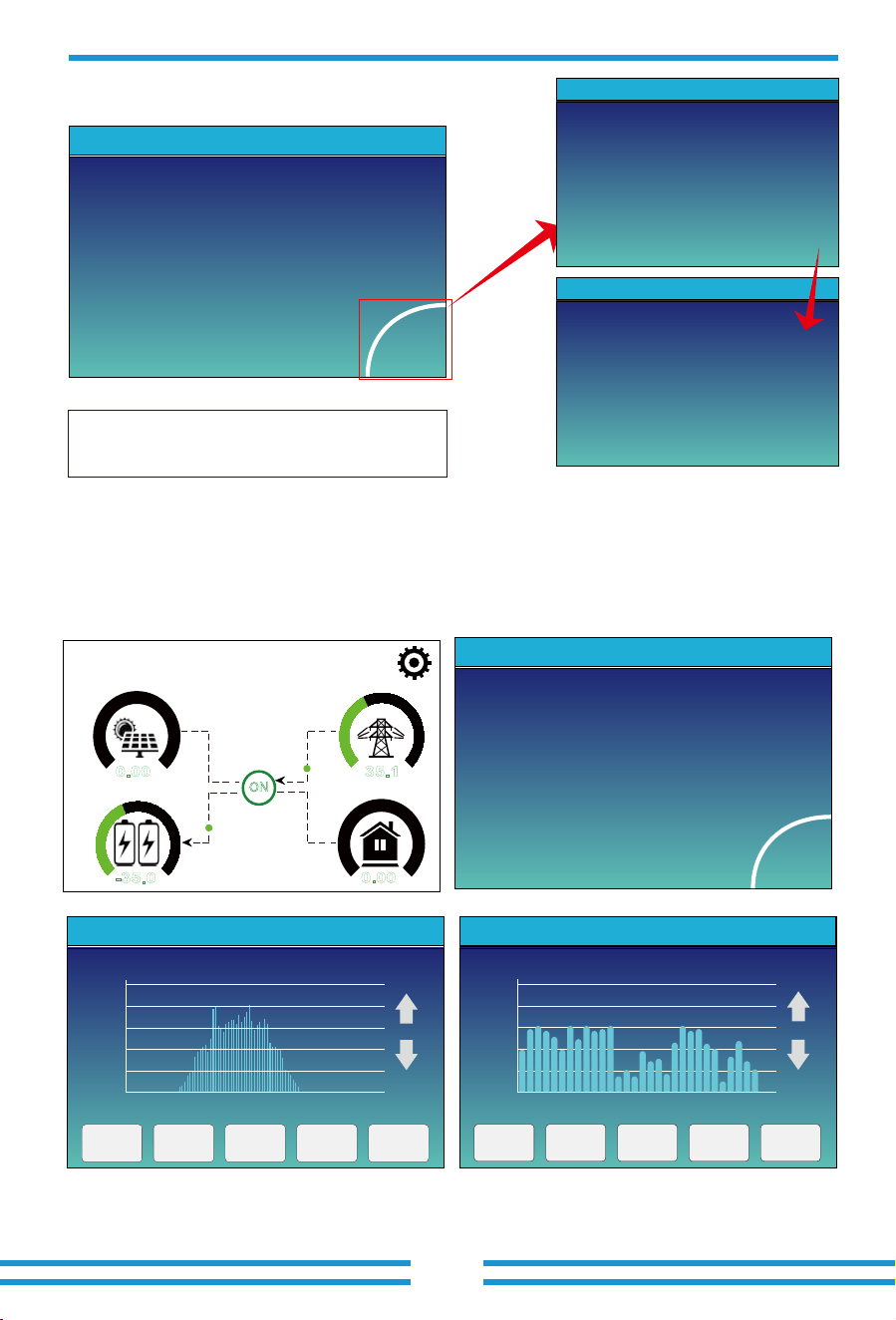
1.The icon at the center of the screen indicates whether the system is under normal operation
or not, displaying "ON" for normal status or displaying a code like "Comm./F01-F64" for
communication errors or other errors. Please refer to the Error code list of alarms and errors in
chapter 8 to find out solutions about the error.
2.At the top-center of the screen is the date and local time that must be set during
commissioning.
3.System Setup Icon, Press this set button,you can enter into the system setup screen which
including Basic Setting, Battery Setting , Grid Setting, System Work Mode, Generator
Port Use, Advanced Function and Device info.
4.The main screen includes the icons for PV(left up), grid (right up), load (right bottom)
and battery (left bottom). It also displays the energy flow direction by moving dots. When the
power is approaching to a high level, the color on the panels will change from green to red,
showing vividly the system status on the main screen.
0% 74%
Some clarifications about the system status are as follows:
-PV power will always be positive.
-In single inverter system, load power will always be positive. In a parallel system, the load
power may be negative, which means that the other inverters supply power to this inverter
through the load port.
-A negative Grid power means energy being exported to the grid (sold), whereas positive means
energy being imported form the grid (purchased).
-Negative battery power means charging, positive means discharging.
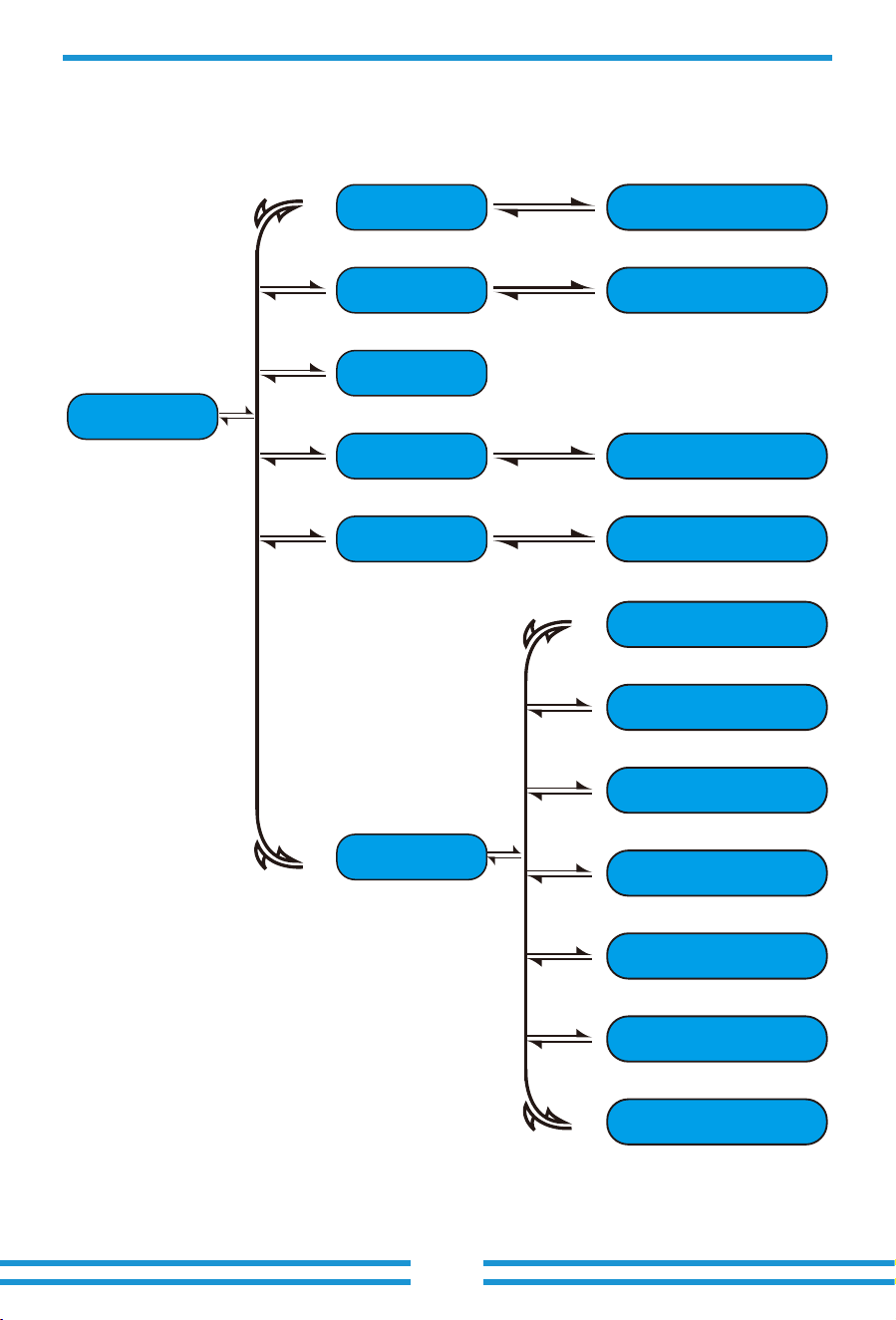
5.1.1 LCD operation flow chart
Main Screen
Solar Page Solar Graph
Grid Graph
BMS Page
Load Graph
Battery Setting
System Work Mode
Grid Setting
Gen Port Use
Basic Setting
Advanced Function
Device info
Grid Page
Inverter Page
Battery Page
Load Page
System Setup
- 33 -
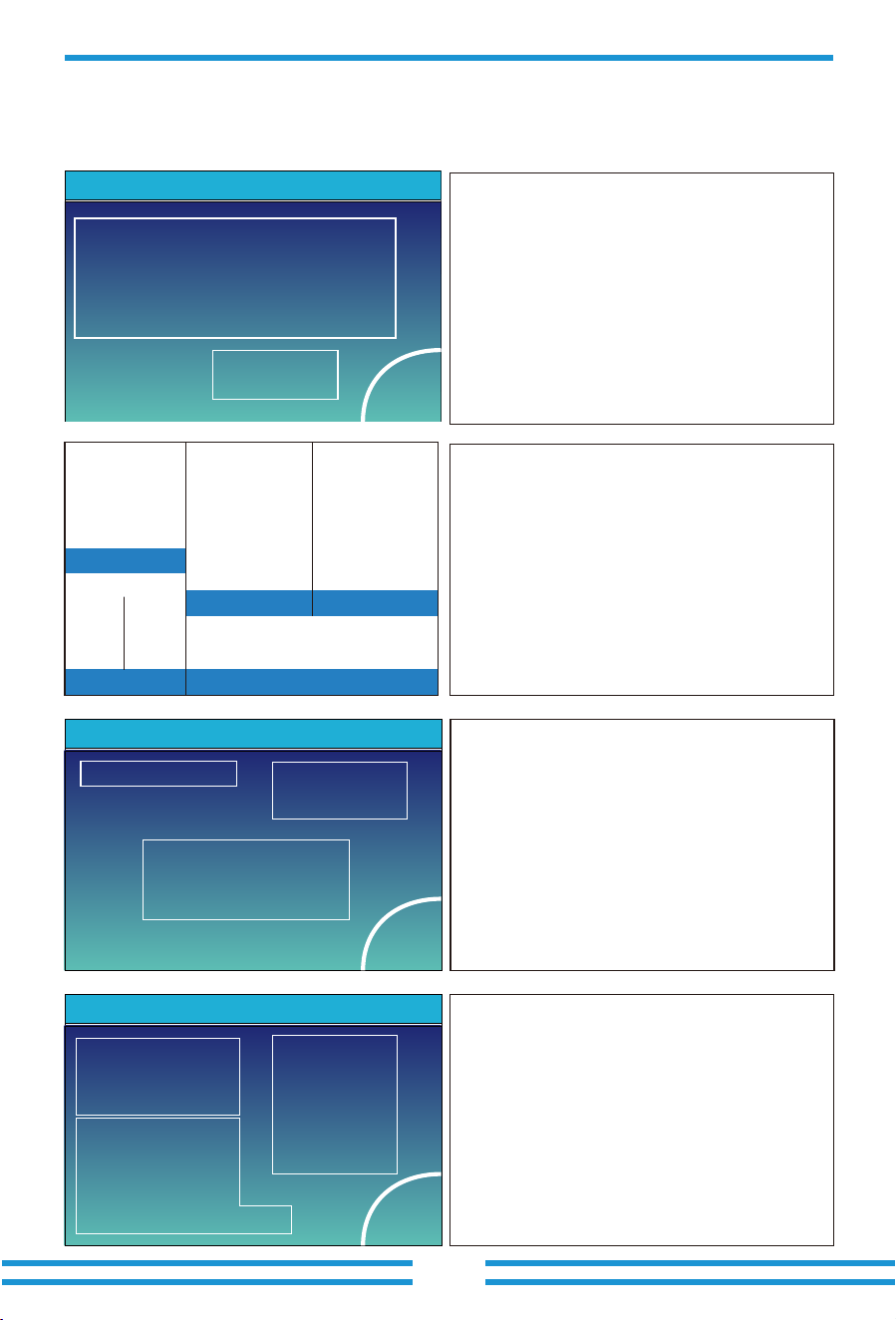
1166w
L1N: 221v 0w
L2N: 229v 1166w
L3N: 225v 0w
21w
150V
M1:0.00KW/ 0V/ 0.0A
M3:0.00KW/ 0V/ 0.0A
M5:0.00KW/ 0V/ 0.0A
M2:0.00KW/ 0V/ 0.0A
M4:0.00KW/ 0V/ 0.0A
M6:0.00KW/ 0V/ 0.0A
0.00KW
-0.41A
27.0C
150V
-0.41A
27.0C
1244w
50Hz
Load
Battery PV
Grid Inverter
①
L1N: 222v 0.8A
L2N: 229v 5.0A
L3N: 229v 0.9A
HM: LD:
-10W 28W
5W 1192W
0W 24W
-81w
50Hz
L1N: 222v 0.1A
L2N: 230v 0.1A
L3N: 223v 0.1A
INV_P:
-30W
-26W AC_T:
-25W 38.8C
0w 0w
5.2 Detail page
- 34 -
0W
Stand by
0.0Hz
Energy
CT2: 0W LD2:0W
CT1: 0W LD1:0W
BUY
Today=0.0KWH
Total =8.60 KWH
Today=2.2KWH
Total =11.60 KWH
SELL
CT3: 0W LD3:0W
L1: 0V L2: 0V L3: 0V
Grid
①
②
This is Solar Panel detail page.
Press the "Energy "button will enter into the power
curve page.
①
②
③
Solar Panel Generation.
Voltage, Current, Power for each MPPT.
Daily and total PV production.
③
Power: 55W Today=0.5 KWH
Total =1.60 KWH
L1: 220V P1: 19W
L2: 220V P2: 18W
L3: 220V P3: 18W
Load
Energy
①
②
③
This is Grid detail page.
Press the "Energy " button will enter into the power
curve page.
①
②
③
Status, Power, Frequency.
BUY: Energy from Grid to Inverter,
L: Voltage for each Phase
CT: Power detected by the external current
sensors or smart meter.
LD: Power detected using internal sensors on
AC grid in/out port.
SELL: Energy from Inverter to grid.
This is Inverter detail page.
①
Power: 1560W
Energy
Today=8.0 KWH
Total =12.00 KWH
PV1-V: 286V PV1-I: 5.5A PV1-P: 1559W
PV2-V: 286V PV2-I: 5.5A PV2-P: 1559W
PV3-V: 286V PV3-I: 5.5A PV3-P: 1559W
PV4-V: 286V PV4-I: 5.5A PV4-P: 1559W
PV5-V: 286V PV5-I: 5.5A PV5-P: 1559W
PV6-V: 286V PV6-I: 5.5A PV6-P: 1559W
Solar
③
①
②
This is Load detail page.
When you check "Selling First" or "Zero export to
Load" on system work mode page, the information
on this page is about backup load which connect on
Load port of hybrid inverter.
When you check "Zero export to CT"on system work
mode page, the information on this page is including
backup load and home load.
Press the "Energy " button will enter into the power
curve page.
①
②
③
Load Power.
Voltage, Power for each Phase.
Daily and total Load consumption .
Click the icons on main screen of LCD display, you can enter the detail pages of "Solar",
"Inverter","Load","Grid" and "Batt".
DC/AC Inverter module:
Voltage, Current, Power of each Phase.
AC-T: Temperature near DC/AC inverter module.
- 35 -
Temp:25.0C
5.3 Curve Page-Solar & Load & Grid
2022-5-28
20%
1 3 5 7 9 11 13 15 17 19 21 23
40%
60%
80%
100%
3000W
Solar Power Production:Day
5-2022
400
0
05 10 15 20 25 30
800
1200
1600
2000
2000Wh
System Solar Power:Month
CANCEL Day Month Year Total
CANCEL Day Month Year Total
This is Battery detail page.
BATTERY DETAIL PAGE
Click the "Li-BMS" button on the lower right corner of
Battery detail page, you can enter the BMS page.
PV1-V: 0V PV1-I: 0.0A PV1-P: 0W
Power: 0W
Solar
Energy
Today=0.0 KWH
Total =0.00 KWH
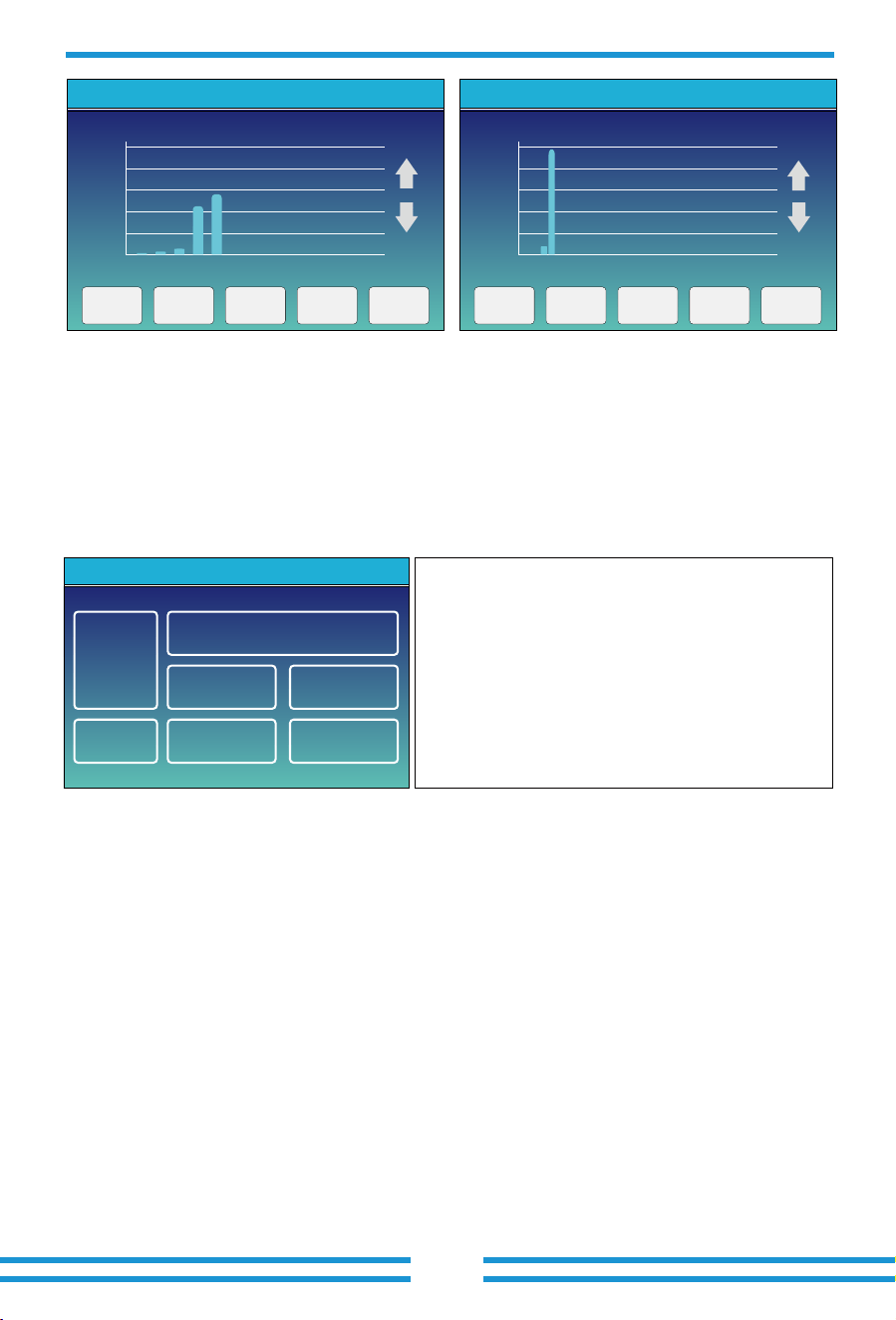
In the main screen of LCD display, click the icons of "Solar", "Grid" and "Load", you can enter
the detail pages of Solar power, Grid power and Load consumption. Click the "Energy" button
on the lower right corner of these detail pages, you can enter the curve page. Using PV as an
example for illustration below.
01/19/2024 19:34:40
0.00
KW
-35.0
KW
35.1
KW
0.00
KW
0 80
0 80
0 80
0 80
Fri
ON
0% 74%
Battery 1
Stand by
SOC: 46%
U:631.7V
I:-0.09A
Power: -50W
Temp:27.0C
Battery 2
Stand by
SOC: 0%
U:0.0V
I:0.00A
Power: 0W
Temp:-100.0C
Batt
Li-BMS
Press the “Down” button, you can enter the
LiBms2 detail page
Battery
Voltage: 629.5V
Battery
capacity :100AH
LiBms1: Deye-HV
Battery
Current: 0.0A
Battery
Charge Voltage :691.2V
Battery
Temp: 27.0C
Charge
current limit :100A
SOC :46% SOH :100% Discharge current limit :100A
Battery SW: 0×1004
Battery HW: 0×3001
Alarms: 0×8000 0×0000
Request Force Charge
Li-BMS
Battery
Voltage: 0.0V
Battery
capacity :0AH
LiBms2: Not matched
Battery
Current: 0.0A
Battery
Charge Voltage :0.0V
Battery
Temp:-100.0C
Charge
current limit :0A
SOC :0% Discharge current limit :0A
Alarms: 0×0000 0×0000
Li-BMS
2022
40
1 2 3 4 5 6 7 8 9 10 11 12
80
120
160
200
KWh
System Solar Power:Year
CANCEL Day Month Year Total
TOTAL
400
0
20 20 20 20 20 20 20 20 20 20 20 20 20 20 20 20 20
16 18 20 22 24 26 28 30 32 34 36 38 40 42 44 46 48
800
1200
1600
2000
2000KWh
CANCEL Day Month Year Total
System Solar Power:Total
- 36-
5.4 System Setup Menu
System Work Mode
Battery
Setting
Grid Setting
Gen Port
Use
Basic
Setting
System Setup
Device Info.
Advanced
Function
This is System Setup page.
Solar power curve for daily, monthly, yearly and total can be roughly checked on the LCD, for more
accuracy power generation, please check on the monitoring system. Click the up and down buttons
below the LCD screen to view the power curves of different time periods. The operation of checking
the grid power and load power is similar to the above operation.
5.5 Basic Setting Menu
Basic
Set1
Time Syncs Beep Auto Dim
24-Hour
Basic Setting
Year Month Day
Hour Minute
Lock out all changesFactory Reset
2019 03
09 15
17
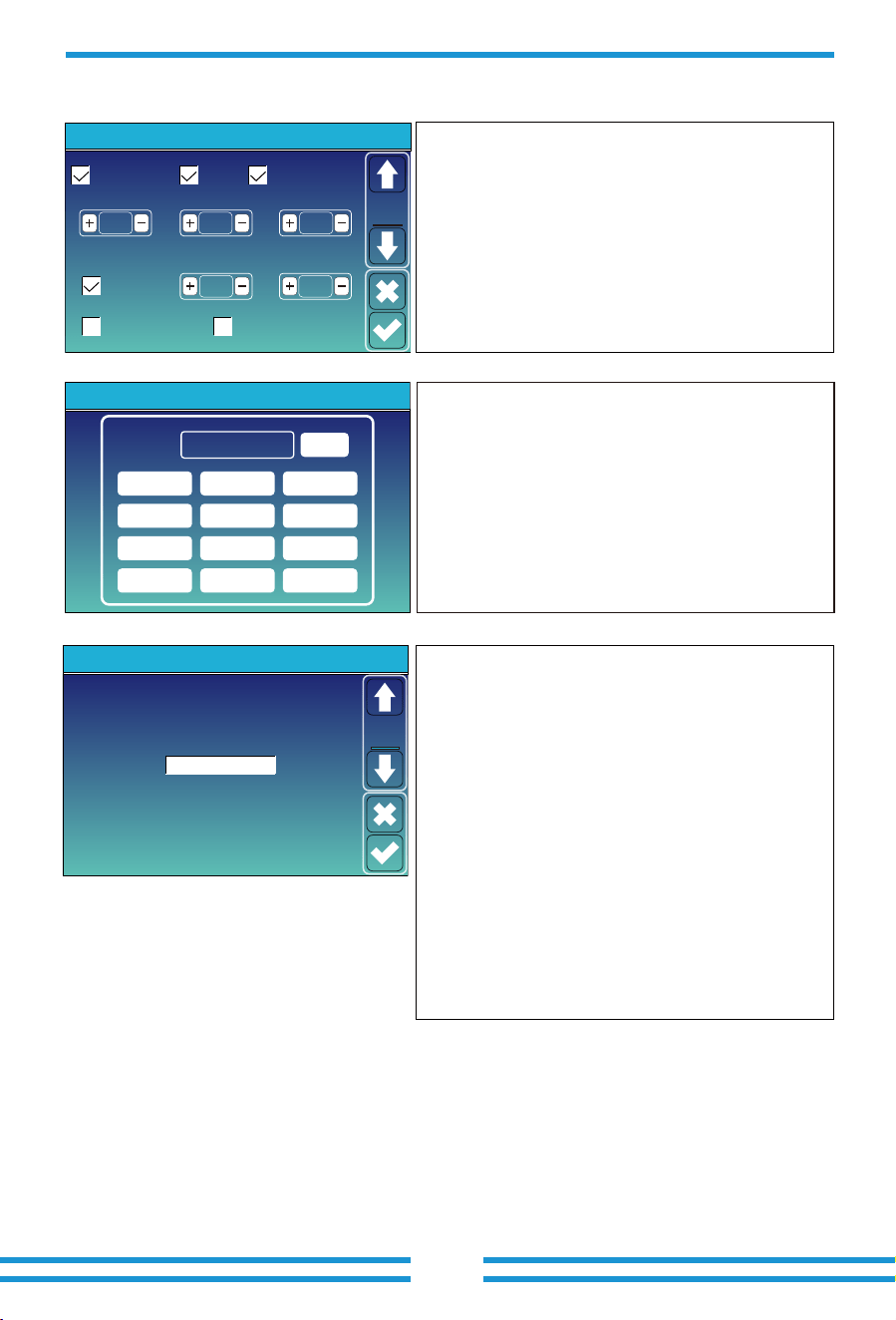
Time Syncs: Enable the inverter to automatically
synchronize cloud platform time.
Beep: Used to turn on or off the beep sound in inverter's
alarm status.
Auto Dim: Used to automatically adjust the brightness of
the LCD display screen.
Factory Reset: Reset all parameters of the inverter.
Lock out all changes: Lock programmable parameters
to prevent them from being changed.
Factory Reset Password: 9999
PassWord
DELX--X--X--X
1 2 3
4 5 6
7 8 9
CANCEL 0 OK
Lock out all changes Password: 7777
When we select the "factory reset" or"Lock out all changes",
the system will require us to enter a password first to
confirm the operation.
1. Click the down arrow on the left side of the "Basic Set1"
page to enter the "Basic Set2" page;
2. On the "Basic Set2" page, you can set the display
language of the LCD screen as needed. Click the "UP" and
"DOWN" buttons below the LCD screen to switch
language options. The current available options are:
English, German, Polish, Hungarian, Spanish, Czech,
Ukrainian.
3. After switching to the desired language, click on the
check mark icon in the bottom right corner of the page to
save the settings.
Note:If the current LCD screen does not have a Basic
Set2 page, or if the language option on the Basic Set2
page does not include the language you need to set,
please contact the after-sales support team to update the
HMI firmware and language firmware package of the
inverter. After the update is completed, follow the above
steps to complete the setup.
Basic
Set2
Basic Setting
Language Select
Pack Version: 1004
Polish
- 37-
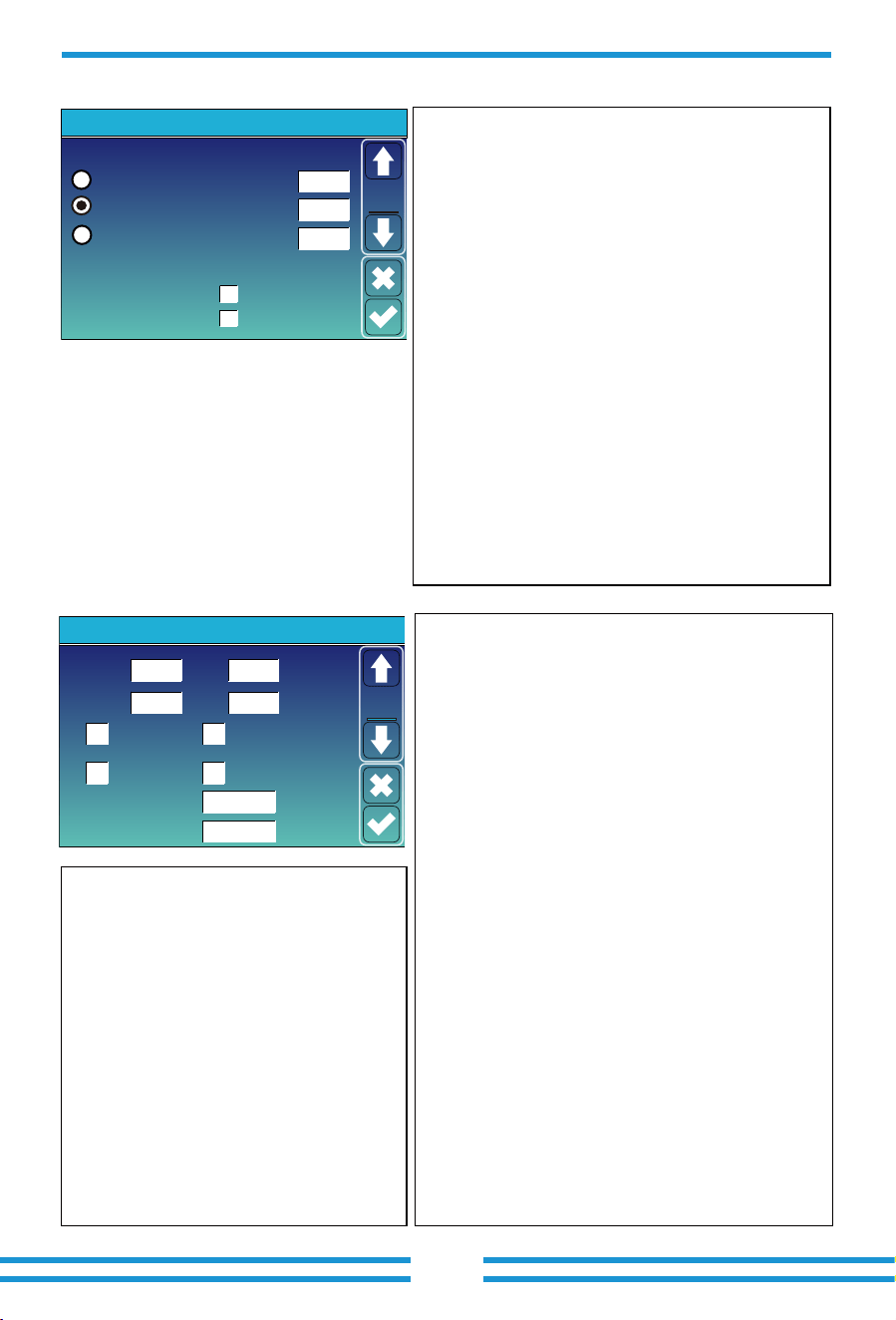
Batt Mode
Lithium
Use Batt V
Battery Setting
Parallel bat1&bat2
Gen Force
Max A Charge
Batt Capacity
Max A Discharge 0A
0A
0Ah
Batt
Mode
No Batt
- 38-
5.6 Battery Setting Menu
Batt Capacity: Reserved.
Use Batt V: Use battery voltage for all battery related
settings.
Max. A charge/discharge: Max battery charge/discharge
current(0-80A for 60/70/75/80kW model).
For AGM and Flooded, we recommend Ah battery
size x 20%= Charge/Discharge amps.
. For Lithium, we recommend Ah battery size x 50% =
Charge/Discharge amps.
. For Gel, follow manufacturer' s instructions.
No Batt: tick this item if no battery is connected
to the system.
Parallel bat1&bat2: If a set of batteries are connected to
both BAT1 and BAT2 simultaneously, this function needs
to be enabled.
When only use BMS1 port of the inverter to communication
with the BMS of the battery, and both sets of battery power
ports are used, it's necessary to enable "Parallel bat1&bat2"
function.If the BMS controller of the battery does not have
two sets of power cable wiring terminals, additional DC BUS
or combiner box needs to be used. Please refer to Appendix III,
there are several possible scenarios for your reference.
Gen Force: When the generator is connected, it is forced
to start the generator without meeting other conditions.
①
②
③
This is Battery Setup page.
Start =30%: Percent SOC below 30% system will AutoStart
a connected generator to charge the battery bank.
A = 80A: The maximum charging current that the
generator can support.
①
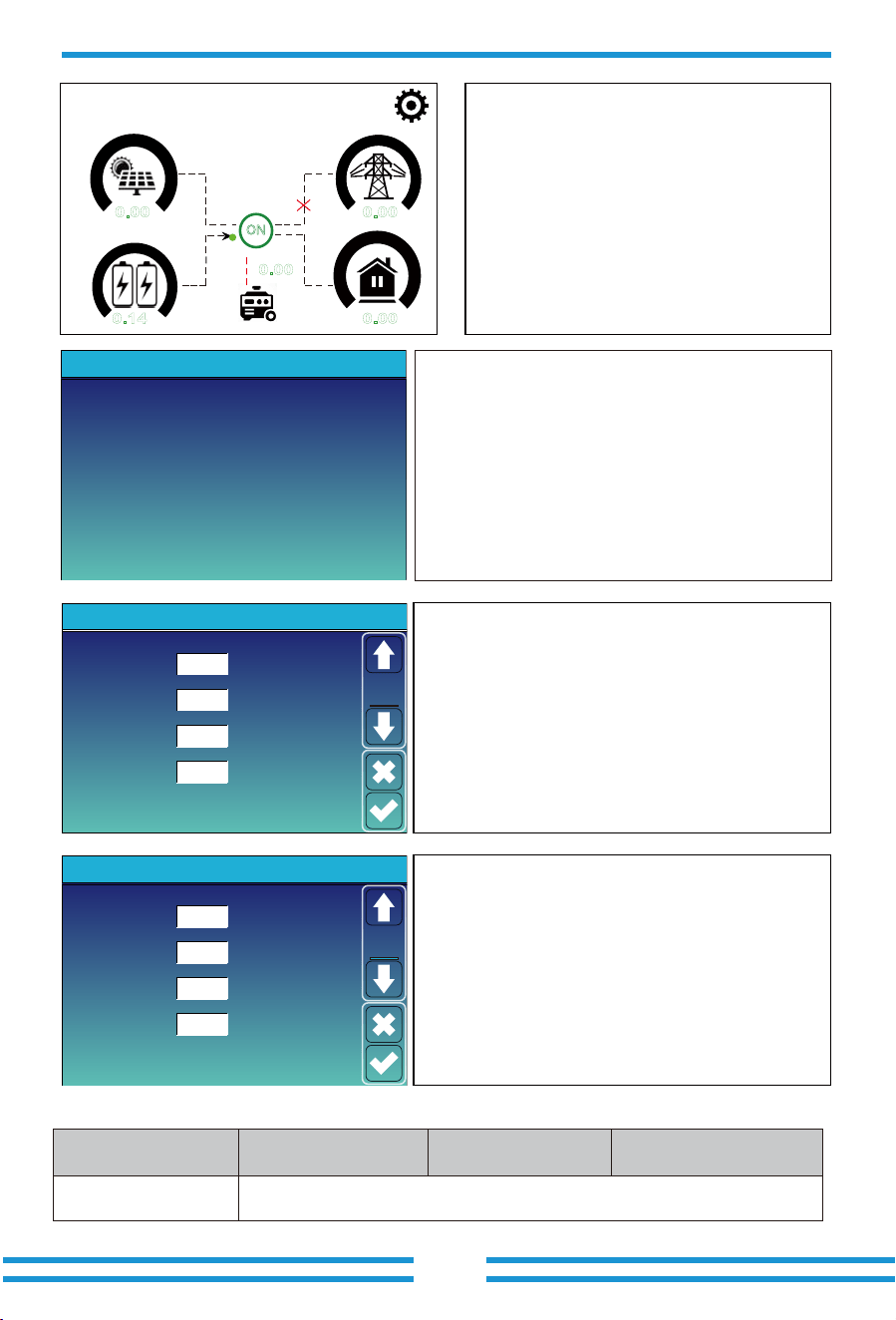
This is Grid Charge, you need select.
②
Grid Charge
Gen Charge
Grid SignalGen Signal
Gen Max Run Time 24.0 hours
Gen Down Time 0.0 hours
Battery Setting
Start
A
30% 30%
80A
80A
Batt
Set2
②
①
③
③
Gen Max Run Time: It indicates the longest time
Generator can run in one day, when time is up, the
Generator will be turned off. 24H means that it does
not shut down all the time.
Gen Charge: Use the power of diesel generator to
charge the battery.
Gen Signal: The normally open relay will close when the
battery SOC or voltage drop to the set value of "Start".
Gen Down Time: It indicates the rest time of the
Generator before the inverter start it again.
Start =30%: When battery SOC or voltage
drop to this set value, inverter will start the
generator connected to the grid port
automatically to charge the battery.
A = 80A: maximum charging current when
only use the power fed from the grid port of
inverter as the power source, which means
using the power of grid or the power of
generator connected to the grid port.
Grid Charge: It's allowed to use power fed
from the grid port, which includes grid or
generator connected to the grid port, to
charge the battery.
Grid Signal: When a generator is connected
to the grid port of hybrid inverter, this 'Grid
signal' can be used to control the dry contact
to start or stop the generator.
- 39 -
Recommended battery settings
Battery Type Absorption Stage Float Stage
Equalization Voltage
(every 30 days 3hr )
Lithium Follow its BMS voltage parameters
01/19/2024 01:23:02 PM Fri
0.00
KW
0% 74%
0.14
KW
0.00
KW
KW
0.00
KW
0 80
0 80
0 80
0 80
ON
Signal
on
0.00
Click the generator icon on the main screen, you can enter the
'Generator' detail page. The information contained on this
page is as follows:
(1) How much power is using from generator;
(2) How much energy has used from generator in today or in
total;
(3) The output voltage and power on each phase of generator.
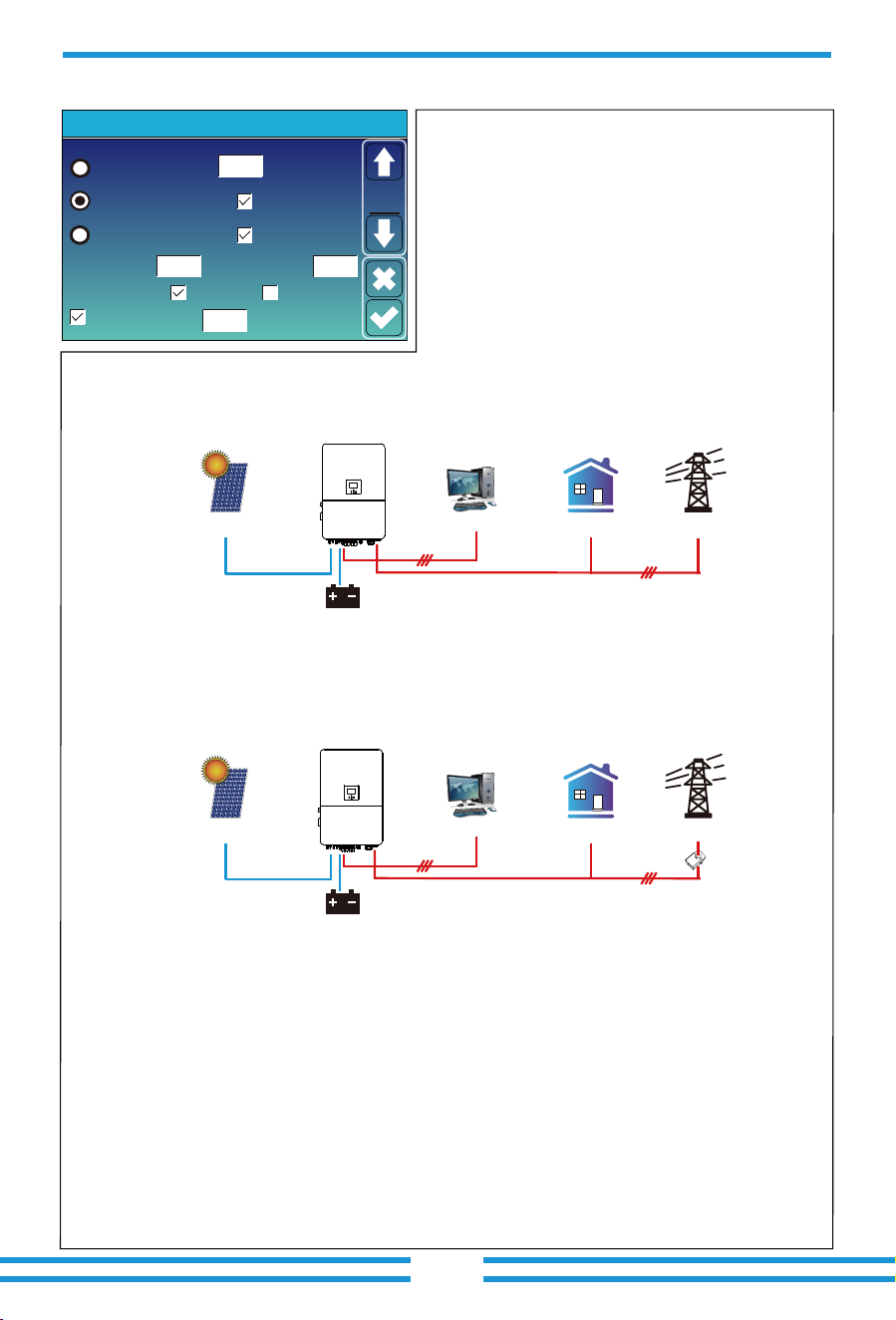
When the "Lithium" mode is selected, the content on the "Batt Set 3"
page is shown in the figure on the left.
Lithium Mode: This is the BMS communication protocol code which
can be confirmed on the "Deye Approved Battery list" based on the
battery model you are using.
Shutdown:Be valid in Off-grid mode, battery can discharge to this
SOC, then the DC/AC inverter module of this inverter will be shut
down and the solar power can only be used to charge the battery.
Low Batt :Be valid in On-grid mode, when the 'Grid charge' has
been checked and the set target battery SOC on 'Time of Use' page
isn't less than the "Low Batt" value, the battery SOC will remain
above the value of "Low Batt" .
Restart :Be valid in Off-grid mode, after the DC/AC inverter module
of this inverter is shut down, the PV power can only be used to
charge the battery. After the battery SOC has resumed to this
"Restart" value, the DC/AC inverter module will restart to output AC
power.
When the "Use Batt V" mode is selected, the content on the "Batt
Set 3" page is shown in the figure on the
left
.
Float voltage: Battery full charge voltage.
Shutdown : Be valid in Off-grid mode, battery can discharge to
this voltage, then the DC/AC inverter module of this inverter will be
shut down and the solar power can only be used to charge the
battery.
Low Batt :Be valid in On-grid mode, when the 'Grid charge' has
been checked and the set target battery voltage on 'Time of Use'
page isn't less than the "Low Batt" value, the battery voltage will
remain above the value of "Low Batt" .
Restart :Be valid in Off-grid mode, after the DC/AC inverter
module of this inverter is shut down, the PV power can only be
used to charge the battery. After the battery voltage has resumed
to this "Restart" value, the DC/AC inverter module will restart to
output AC power.
When the "GEN signal" is active, the generator icon
will appear on the main screen of inverter LCD
display.
Lithium Mode
Shutdown
Low Batt
Restart
40%
20%
10%
00
Battery Setting
Set3
Batt
Float V
Shutdown
Low Batt
Restart
500V
470V
450V
536V
Battery Setting
Set3
Batt
Power: 6000W Today=10 KWH
Total =10 KWH
Generator
V_L1: 230V
V_L2: 230V
V_L3: 230V
P_L1: 2KW
P_L2: 2KW
P_L3: 2KW
Off grid
- 40 -
5.7 System Work Mode Setup Menu
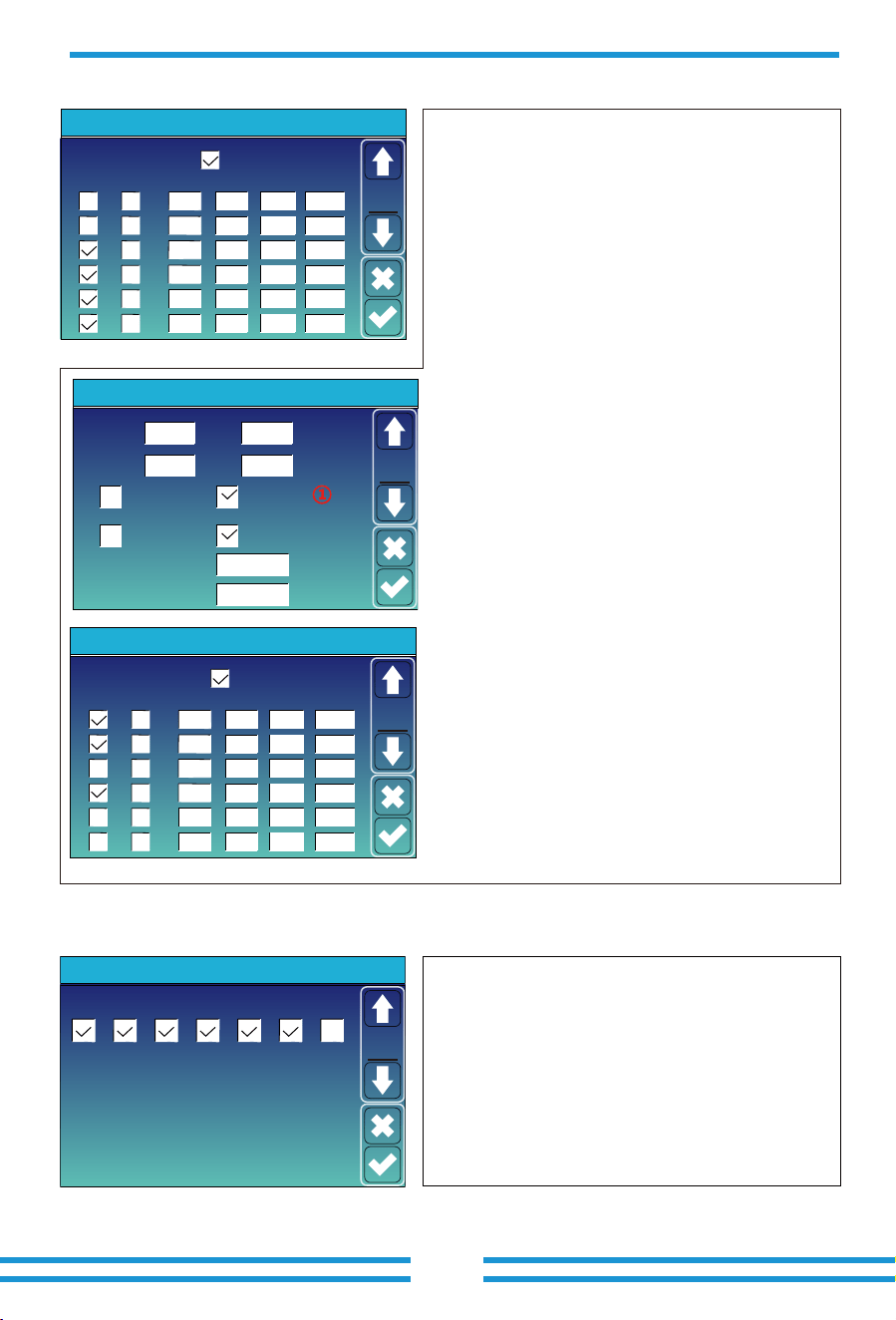
Zero Export To Load
Max Solar Power
Zero Export To CT
Max Sell Power
Energy pattern
BattFirst LoadFirst
System Work Mode
Solar Sell
Solar Sell
32000
32000
Power
28000
Zero-export Power
20
Selling First
Work
Mode1
Grid Peak Shaving
Work Mode
Selling First: This Mode allows hybrid inverter to sell
back any excess power produced by the solar panels to
the grid. If time of use is active, the battery energy also
can be sold into grid.
The PV energy will be used to power the load and charge
the battery, then the excess will flow to grid.
Power source priority for the load is as follows:
1. Solar Panels.
2. Batteries(when the actual battery SOC is higher than
the target SOC).
3. Grid.
Max Solar Power: the maximum DC input power allowed.
Grid
Backup Load
On-Grid Home Load
Battery
Solar
Grid
Backup Load
On-Grid Home Load
Battery
Solar
CT
Zero Export To Load: Hybrid inverter will only provide power to the backup load connected. The hybrid inverter
will neither provide power to the home load nor sell power to grid,if the "solar sell" behind is not enabled. The
built-in CT will detect power flowing back to the grid and will reduce the power of the inverter only to supply the
backup load and charge the battery. Load consumption=Backup load.
Zero Export To CT: Hybrid inverter will not only provide power to the backup load connected but also give power
to the home load connected. If PV power and battery power is insufficient, it will take grid energy as supplement.
The hybrid inverter will not sell power to grid,if the "solar sell" behind is not enabled. In this mode, external CTs or
smart meter must be installed. For the installation method of CTS or smart meter, please refer to the section 3.7 .
The external CTs or smart meter will detect power flowing back to the grid and will reduce the power of the inverter
only to supply the backup load, home load and charge the battery. Load consumption=Backup load+home load.
Solar Sell: "Solar sell" is selectable for Zero export to load or Zero export to CT. When activating it, the surplus of
the energy generated by the PV can be sold back to grid. When it is active, the energy generated by the PV array
will first power the loads or charge the battery, and then export to grid.
Max. sell power: Maximum power allowed to flow to grid.
Zero-export Power: This parameter will ensure the zero-export by taking from the grid some small amount of
energy that has been set with this value. It is recommended to set it as 20-100W to ensure the hybrid inverter won'
t feed power to grid.
Energy Pattern: Priority of PV power usage. When "Grid charge" is enabled, the default energy pattern is "Load
First", this setting will be invalid.
Batt First: PV power is firstly used to charge the battery, and the excess power will be used to power the load. If
PV power is insufficient, grid will make supplement for battery and load simultaneously.
Load First: PV power is firstly used to power the load, and the excess power will be used to charge the battery. If
PV power is insufficient, Grid will provide power to load.
Grid Peak-shaving: when it is active, grid power will be limited within the set value. If the grid peak-shaving
power plus PV power plus battery power cannot meet the power consumption of the load after peak-shaving, the
grid peak-shaving will be invalid, and the power taken from the grid can exceed this set value.
- 41 -
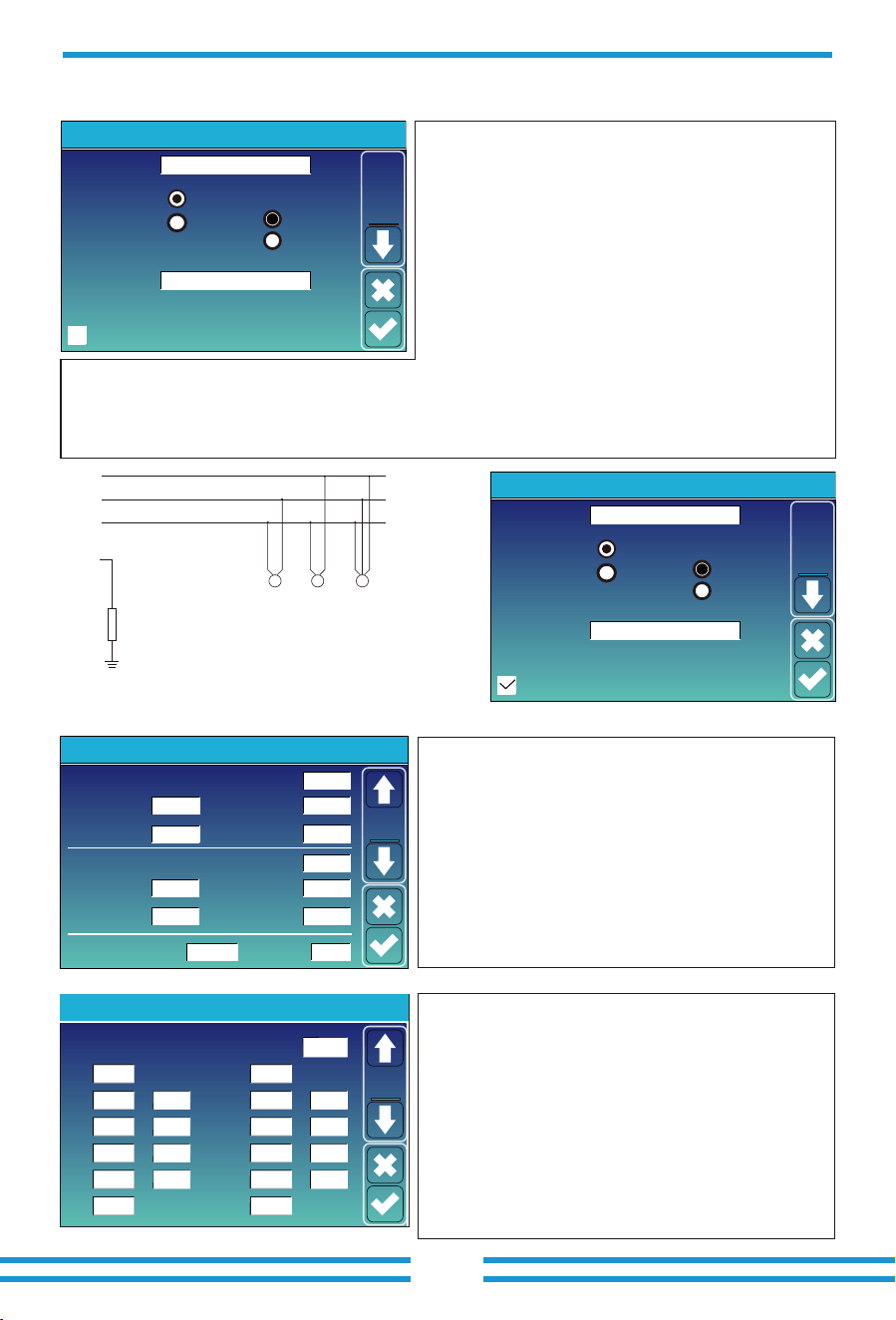
Time of use: it is used to program when to use grid or
generator to charge the battery, and when to discharge
the battery to power the load. Only tick "Time Of Use"
then the follow items (Grid, charge, time, power etc.)
will take effect.
Time Of Use
Time
System Work Mode
Batt
Grid
Charge
Gen
00:00
05:00
09:00
10:00
15:00
18:00
05:00
08:00
10:00
15:00
18:00
00:00
Power
32000
32000
32000
32000
32000
32000
160V
160V
160V
160V
160V
160V
Work
Mode2
For example
During 00:00-05:00,
if battery SOC is lower than 80%, it will use grid to charge the
battery until battery SOC reaches 80%.
During 05:00-08:00,
if battery SOC is higher than 40%, hybrid inverter will discharge
the battery until the SOC reaches 40%. At the same time,
if battery SOC is lower than 40%, then grid will charge the
battery SOC to 40%.
During 08:00-10:00,
if battery SOC is higher than 40%, hybrid inverter will discharge
the battery until the SOC reaches 40%.
During 10:00-15:00,
If battery SOC is lower than 80%, hybrid inverter will charge the
battery until the SOC reaches 80%. If the PV power is sufficient, the
battery can be charged to 100%.
During 15:00-18:00,
when battery SOC is higher than 40%, hybrid inverter will discharge
the battery until the SOC reaches 40%.
During 18:00-00:00,
when battery SOC is higher than 35%, hybrid inverter will discharge
the battery until the SOC reaches 35%.
Time Of Use
Time
System Work Mode
Batt
Charge
Gen
00:00
05:00
08:00
10:00
15:00
18:00
05:00
08:00
10:00
15:00
18:00
00:00
Power
80%
40%
40%
80%
40%
35%
Work
Mode2
32000
32000
32000
32000
32000
32000
Grid
②
Grid Charge
Gen Charge
Grid SignalGen Signal
Gen Max Run Time 0.0 hours
Gen Down Time 0.5 hours
Battery Setting
Start
A
30% 30%
80A
80A
Batt
Set2
It allows users to choose which day to execute the
setting of "Time of Use".
For example, the inverter will execute the time of use
page on Mon/Tue/Wed/Thu/Fri/Sat only.
Mon
System Work Mode
Tue Wed Thu Fri Sat Sun
Work
Mode4
Note: when in selling first mode and click time of use, the battery
power can be sold into grid.
Grid Charge:uses the grid to charge the battery in the selected
period of time.
Gen charge:
utilize diesel generator to charge the battery
in the
selected period of time.
Time: real time, from 0:00 to 0:00 the next day.
Note: For more flexible and controllable use of batteries, it is
recommended to enable the "Time Of Use" function.When the
inverter is operating in on-grid mode and "Time Of Use" is not
enabled, the inverter can charge normally, but only discharge to
provide the inverter's self-consumption power, without discharging to
power the loads.
Power: Max. discharge power of battery allowed.
Batt(V or SOC %): The target value of battery voltage or SOC during
the current time period. If the actual SOC or voltage of the battery is
lower than the target value, the battery needs to be charged. If there
is a energy source like solar power or grid, the battery will be
charged; If the actual SOC or voltage of the battery is higher than the
target value, the battery can discharge, and when the solar power is
not enough to power the load or the "Selling First "is enabled, the
battery will discharge.
Assuming that at the end of the previous time period, the actual
battery level reaches or approaches the target value of the previous
time period.
- 42 -
5.8 Grid Setting Menu
Reconnection Time PF
60s
1.000
Grid Setting/Connect
Low frequency
Normal connect
48.00Hz
Low voltage
185.0V
High frequency 51.50Hz
Normal Ramp rate 10s
Reconnect Ramp rate 36s
High voltage
265.0V
Low frequency
Reconnect after trip
Low voltage
High frequency
51.30Hz
High voltage
263.0V
48.20Hz
187.0V
Grid
Set2
Over voltage U>(10 min. running mean)
Grid Setting/IP Protection
260.0V
Set3
Grid
--
HV1
265.0V
0.10s
--
HV2
265.0V
0.10s
HV3
--
LV1
185.0V
0.10s
--
LV2
185.0V
0.10s
185.0V
LV3
--
HF1
51.50Hz
0.10s
--
HF2
0.10s
HF3
--
LF1
48.00Hz
0.10s
--
LF2
0.10s
LF3
①
②
① ②
0.10s—Trip time.
LV1: Level 1 undervoltage protection point;
LV2: Level 2 undervoltage protection point;
LV3: Level 3 undervoltage protection point.
HV1: Level 1 overvoltage protection point;
HV2: Level 2 overvoltage protection point;
HV3: Level 3 overvoltage protection point.
HF1: Level 1 over frequency protection point;
HF2: Level 2 over frequency protection point;
HF3: Level 3 over frequency protection point.
LF1: Level 1 under frequency protection point;
LF2: Level 2 under frequency protection point;
LF3: Level 3 under frequency protection point.
265.0V
51.50Hz
51.50Hz
48.00Hz
48.00Hz
U
V
W
400VAC
Rz
Rz: Large resistance ground resistor. Or the system
doesn’t have Neutral line
400VAC 400VAC
N
0/23
Grid Setting/Grid code selection
Grid Mode
Grid Level
0/120/240
0/240/120
Grid
Set1
Grid Frequency
50HZ
60HZ
General Standard
Phase Type
IT system-neutral is not grounded
LN:230V/LL:400V(AC)
Grid Mode:
General Standard、UL1741 & IEEE1547、CPUC RULE21、
SRD-UL-1741、CEI_0_21_Internal、EN50549_CZ-PPDS(>16A)、
Australia_A、Australia_B、Australia_C、AS4777_NewZealand、
VDE4105、OVE-Directive R25、EN50549_CZ_PPDS_L16A、
NRS097、G98、G99、EN50549_1_Norway_133V、
EN50549_1_Norway_230V、Japan_200VAC_3P3W、
CEI_0_21_External、CEI_0_21_Areti、Japan_400VAC_3P3W、
Japan_415VAC_3P4W、EN50549_1_Switzerland.
Please follow the local grid code and then choose the
corresponding grid standard.
Grid level: there’re several voltage levels for the inverter
output voltage when it is in off-grid mode.
LN:220V/LL:380V(AC), LN:230V/LL:400V(AC).
0/23
Grid Setting/Grid code selection
Grid Mode
Grid Level
0/120/240
0/240/120
Grid
Set1
Grid Frequency
50HZ
60HZ
General Standard
Phase Type
IT system-neutral is not grounded
LN:220V/LL:380V(AC)
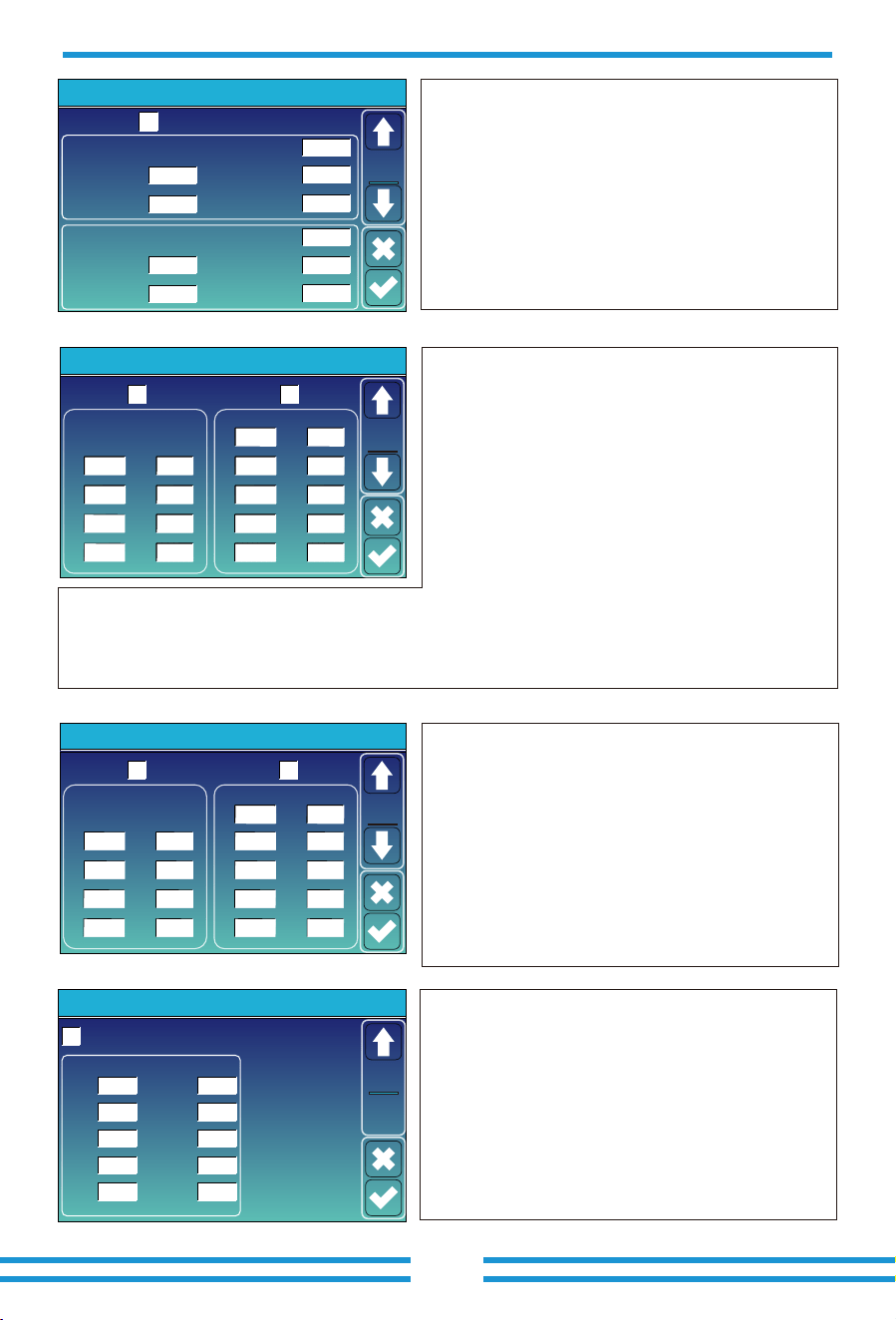
IT system: If the grid system is IT system, then please enable this option. All the live lines of IT system are insulated
from ground, and the neutral point of the IT system is grounded through high impedance or not grounded (as shown
in the following figure).
Normal connect: The allowed grid voltage/frequency
range when the inverter operates normally.
Normal Ramp rate: It is the startup power ramp.
Reconnect after trip: The allowed grid voltage
/frequency range for the inverter connects the grid
after the inverter trip from the grid.
Reconnect Ramp rate:It is the reconnection power ramp.
Reconnection time: The waiting time for the inverter
connects the grid again after tripping.
PF: Power factor, which is the ratio of active power to
apparent power in AC circuits and can be used to adjust
the output active power and reactive power of inverter.
- 43 -
Grid Setting/F(W)
F(W)
Start freq F
Over frequency
50.20Hz
Start delay F
0.00s
Stop freq F 51.5Hz
Droop F 40%PE/Hz
Stop delay F
0.00s
Start freq F
Under frequency
49.80Hz
Start delay F
Stop freq F 49.80Hz
Droop F 40%PE/Hz
Stop delay F
0.00s
0.00s
Grid
Set4
Grid Setting/LVRT
L/HVRT
HV3
0%
HV3_T
30.24s
HV2
0%
HV2_T
0.04s
HV1
0%
HV1_T
22.11s
LV1
0%
LV1_T
22.02s
LV2
0%
LV2_T
0.04s
Grid
Set7
Grid Setting/V(W) V(Q)
V(W) V(Q)
V1
108.0%
P2
V2
110.0%
P3
P4
V3
112.0%
V4
114.0%
P1
100%
80%
60%
40%
Lock-in/Pn Lock-out/Pn
V1
94.0%
Q2
V2
97.0%
Q3
Q4
V3
105.0%
V4
108.0%
Q1
44%
0%
0%
-44%
Grid
Set5
5%
20%
Grid Setting/P(Q) P(F)
P(Q) P(PF)
P1
0%
Q2
P2
2%
Q3
Q4
P3
0%
P4
22%
Q1
2%
0%
21%
25%
P1
0%
PF2P2
0%
PF3
PF4
P3
0%
P4
62%
PF1
-0.000
-0.000
0.000
0.264
Grid
Set6
Lock-in/Pn Lock-out/Pn
50%
50%
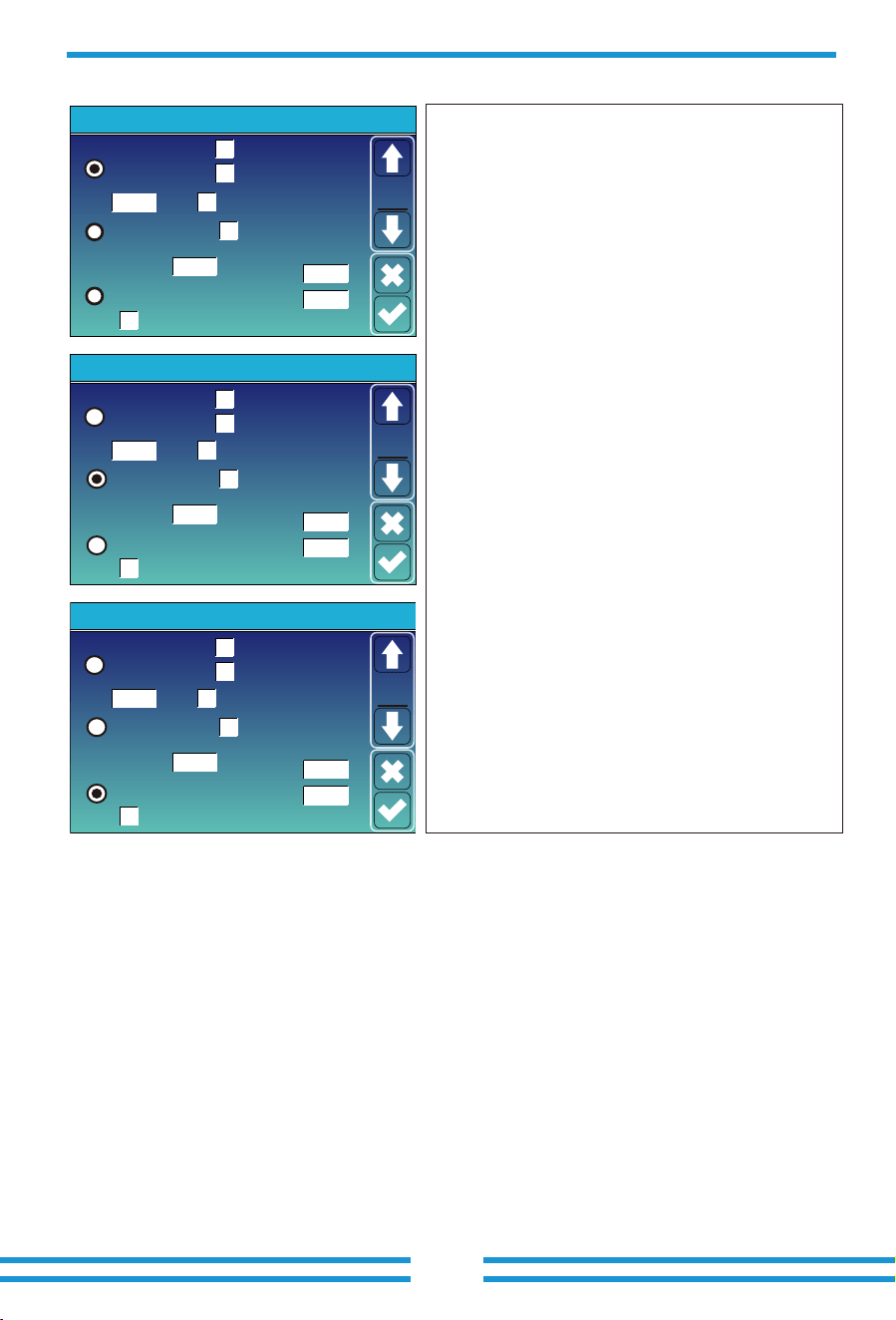
F(W): It's used to adjust the output active power of inverter
according to the grid frequency.
Droop F: percentage of nominal power per Hz
For example, "Start freq F=50.2Hz, Stop freq F=51.5,
Droop F=40%PE/Hz" when the grid frequency reaches
51.2Hz, the inverter will decrease its active power at
Droop F of 40%. And then when grid system frequency
is less than 50.1Hz, the inverter will stop decreasing
output power.
For the detailed setup values, please follow the local
grid code.
V(W): It is used to adjust the inverter's active power
according to the set grid voltage.
V(Q): It is used to adjust the inverter's reactive power
according to the set grid voltage.
These two functions are used to adjust inverter's output
power (active power and reactive power) when grid
voltage changes.
Lock-in/Pn 5%: When the inverter active power is less
than 5% rated power, the V(Q) mode will not take effect.
Lock-out/Pn 20%: If the inverter active power is
increasing from 5% to 20% rated power, the V(Q) mode
will take effect again.
For example: V2=110%, P2=80%. When the grid voltage reaches 110% of the rated grid voltage,
inverter will reduce its active power output to 80% of the rated power.
For example: V1=94%, Q1=44%. When the grid voltage reaches 94% of the rated grid voltage,
inverter will output reactive power that accounts for 44% of the rated power.
For the detailed setup values, please follow the local grid code.
P(Q): It is used to adjust the output reactive power of
inverter according to the set active power.
P(PF): It is used to adjust the PF of inverter according
to the set active power.
For the detailed setup values, please follow the local
grid code.
Lock-in/Pn 50%: When the output active power of
inverter is less than 50% of inverter's rated power, it
won't enter the P(PF) mode.
Lock-out/Pn 50%:When the output active power of
inverter is higher than 50% of inverter's rated power,it
will enter the P(PF) mode.
Note : only when the grid voltage is equal to or higher
than 1.05 times of the rated grid voltage, then the P(PF)
mode will take effect.
LVRT/HVRT: When the voltage of the power grid reaches
the set HV or LV, the relay at the inverter grid port will
remain closed for the set time to maintain stable grid
connection without tripping.
- 44 -
5.9 Generator Port Use Setup Menu
GEN port is a multifunctional port, but you can only choose
one of the following three functions at a time.
Generator input rated power: allowed Max. power from diesel
generator.
GEN connect to grid input: connect the diesel generator to the
grid input port.
Smart Load Output: Use the GEN port as an AC output port, and
the load connected to this port can be controlled on/off by the
hybrid inverter.
e.g. ON: 100%, OFF: 95%: When the battery bank SOC reaches
100%, Smart Load Port will switch on automatically and power
the load connected. When the battery bank SOC < 95% , the
Smart Load Port will switch off automatically.
Mode
OFF
ON
Generator Input
SmartLoad Output
Micro Inv Input
On Grid always on
GEN connect to Grid input
AC couple on grid side
AC couple on load side
Ml export to Grid cutoff
GEN PORT USE
55.00Hz
154.0V
151.0V
Rated Power
AC Couple Frz High
8000W
PORT
Set1
Mode
OFF
ON
Generator Input
SmartLoad Output
Micro Inv Input
On Grid always on
GEN connect to Grid input
Ml export to Grid cutoff
GEN PORT USE
55.00Hz
100%
95%
Rated Power
AC Couple Frz High
8000W
PORT
Set1
Mode
OFF
ON
Generator Input
SmartLoad Output
Micro Inv Input
On Grid always on
GEN connect to Grid input
Ml export to Grid cutoff
GEN PORT USE
55.00Hz
90%
100%
Rated Power
AC Couple Frz High
8000W
PORT
Set1
Smart Load OFF Batt
• Battery SOC or voltage at which the Smart load will switch off.
Smart Load ON Batt
• Battery SOC or voltage at which the Smart load will switch on.
On Grid always on: When "on Grid always on" is checked, the
smart load port will always keep switching on if hybrid inverter is
operating in on-grid mode.
Micro Inv Input: Use the GEN port as an AC couple input port,
which can be connected with micro-inverter or other Grid-Tied
inverter.
*Micro Inv Input ON: When the hybrid inverter operates in
off-grid mode and the SOC or voltage of battery drops to this set
value, the relays on GEN port of hybrid inverter will turn to
normally closed(ON), then the Grid-Tied inverter will generate
solar power and feed into hybrid inverter. When the hybrid inverter
operates in on-grid mode, this parameter will be invalid, the relays
on GEN port of hybrid inverter will always be normally colsed(ON),
Grid-Tied inverter can operate normally.
AC Couple Frz High: If choosing"Micro Inv input", as the battery
SOC reaches gradually setting value (OFF), during the process, the
microinverter output power will decrease linear. When the battery
SOC equals to the setting value (OFF), the system frequency will
become the setting value (AC couple Frz high) and the Microinvert-
er will stop working.
Ml export to Grid cutoff: Stop exporting power produced by the
microinverter or Grid-Tied inverter to the grid.
AC couple on Load side: Connect one or several on-grid inverters
on the Load port side of this hybrid inverter.
AC couple on Grid side: Connect one or several on-grid inverters
on the Grid port side of this hybrid inverter.
*Note: Micro Inv Input OFF and On is valid for some certain FW
version only.
AC couple on grid side
AC couple on load side
AC couple on grid side
AC couple on load side
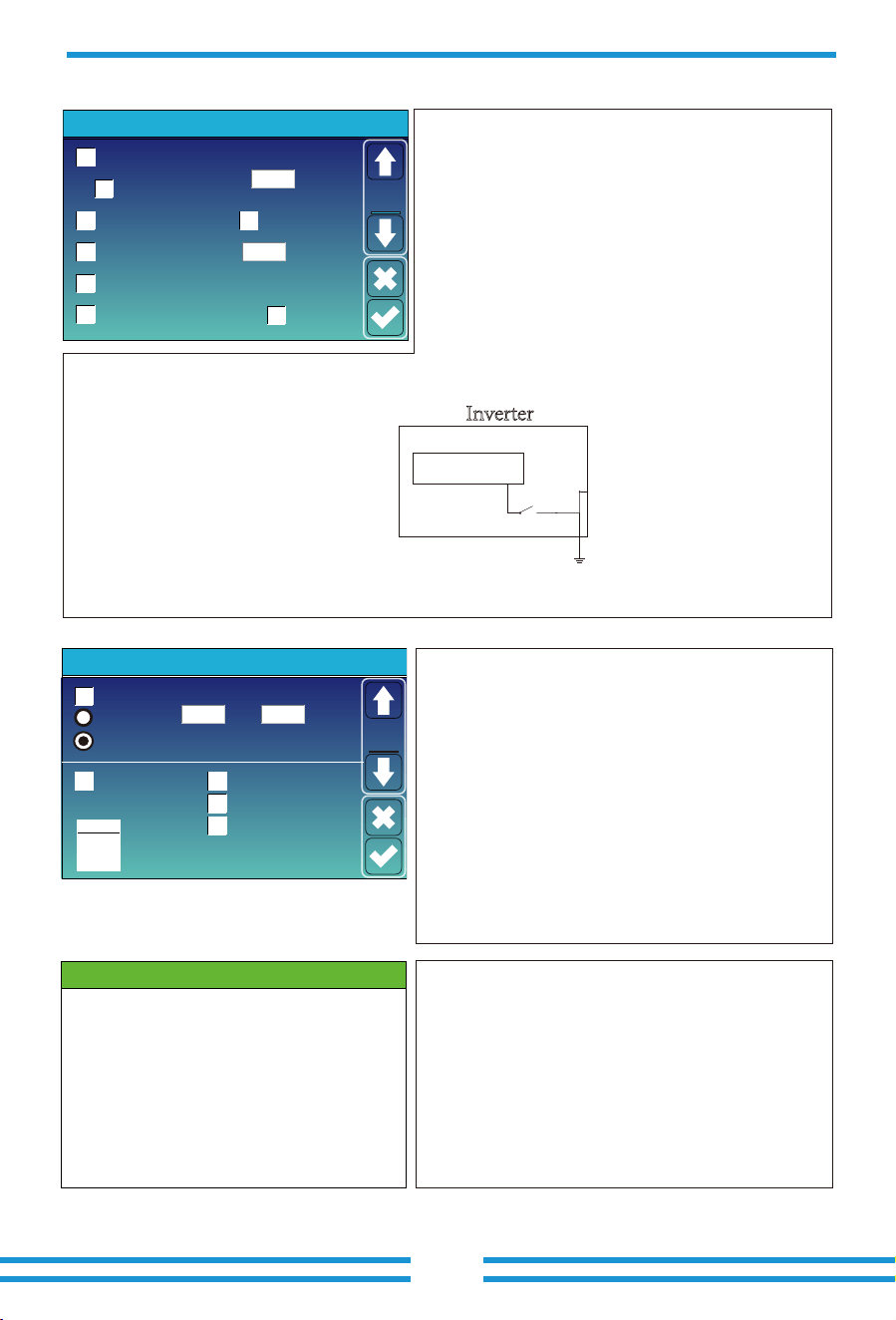
5.10 Advanced Function Setup Menu
*Signal island mode:
If "Signal island mode" is checked and When inverter is in off-grid mode, the relay on the Neutral line of
load port will switch on, then the N line of load port will bind to ground.
Asymmetric phase feeding:
When the loads connected to the Load port have an unbalanced distribution on the three phases
and the inverter is working in on-grid mode, enabling this function will ensure an equal power absorption from the three phases
of grid.
- 45 -
System selfcheck
CEI Report
0ms
2000:1
Backup Delay
Advanced Function
Func
Set1
DRM
Gen peak-shaving
CT Ratio
Signal Island Mode
Asymmetric phase feeding
Solar Arc Fault ON(Optional)
Clear Arc_Fault(Optional)
Solar Arc Fault ON(Optional):
This feature is optional. After
enabling this function, the inverter will detect whether there is
a arcing fault on the PV side. If arcing occurs, the inverter will
report a fault and stop outputting power.
Clear Arc_Fault(Optional):
After the arc fault on the PV side is
eliminated, enabling this function can eliminate the arc fault
alarm of the inverter and restore normal operation of the inverter.
System selfcheck:
Disable. this is only for factory.
Gen Peak-shaving:
Limit the maximum output power of the
generator to the set rated power on "GEN PORT USE" page, the rest of
power consumption will be provided by inverter to ensure that the
generator will not overload.
DRM:
Demand response mode, receive external commands for active
power scheduling and reactive power scheduling.
Backup Delay:
When the grid cuts off, the inverter will output power
after the set time.
For example, backup delay: 600s. the inverter will give output power
after 600s when the grid cuts off.
Note: for some old FW version, this function is not available.
L1 L2 L3 N
Load port
Inverter
Shell
Relay
Ground cable
*If this item was selected, please ensure that
the shell of the inverter is grounded,
otherwise there will be electric shock if you
touch the shell.
Parallel: Enable this function when several same model hybrid inverters are
connecting in parallel.
Master: Select any hybrid inverter in the parallel system as the master
inverter, and the master inverter needs to manage the working mode of the
parallel system.
Slave: Set the other inverters managed by the master inverter as slave
inverter.
Modbus SN: The Modbus address of each inverter, should be different.
Baud Rate: The rate at which inverter transmits data.
Ex_Meter For CT: when using zero-export to CT mode, the hybrid inverter
can select EX_Meter For CT functionand use the different meters.e.g.CHNT
and Eastron.
Grid Tie Meter2: When there are one or more grid-tied inverters AC coupled
on the grid or load port side of the hybrid inverter, and external meter is
installed for this/these grid-tied inverters, it is necessary to enable this
function to upload the data of the external meter to the hybrid inverter to
ensure that the power consumption data of the load is correct.
CT Check: Inverter will perform self check on external CT and return the
test results.
MPPT Scan:
After enabling this function, MPPT will perform I-V curve
scanning every 5 minutes to find the maximum power point again and
eliminate MPPT failure caused by shadows.
CT_Data: The CT self-check result data presented in decimal
format needs to be parsed into binary to display whether the
three CTs are correctly connected.
CT_CTA:
Analysis of A-phase CT self-check result.
CT_CTB:
Analysis of B-phase CT self-check result.
CT_CTC: Analysis of C-phase CT self-check result.
CT SelfCheck
CT_Data: 0
CT_CTA: FAIL
CT_CTB: FAIL
CT_CTB: FAIL
Parallel
Master
Slave
00
Modbus SN
0000
Baud Rate
Paral.
Set3
EX_Meter For CT Grid Tie Meter2
CT check
MPPT Scan
Meter Select
0/3No Meter
CHNT
Eastron
Advanced Function
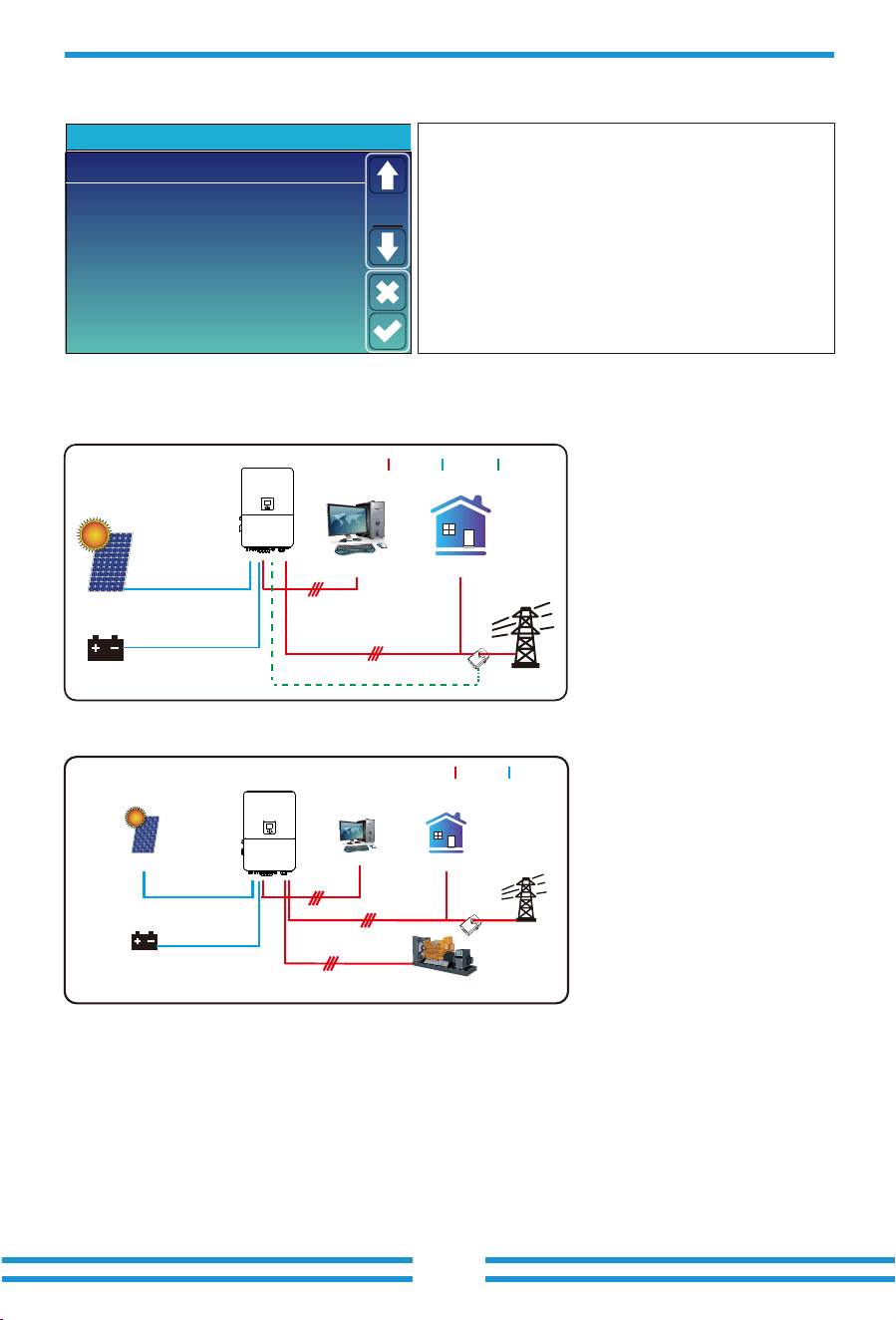
- 46 -
6. Mode
5.11 Device Info Menu
HMI: LCD version
Volt
1
2
3
50.38V 19.70A 30.6C 52.0% 26.0Ah 0.0V 0.0A 0|0|0
50.33V 19.10A 31.0C 51.0% 25.5Ah 53.2V 25.0A 0|0|0
50.30V 16.90A 30.2C 12.0% 6.0Ah 53.2V 25.0A 0|0|0
4
5
0.00V 0.00A 0.0C 0.0% 0.0Ah 0.0V 0.0A 0|0|0
0.00V 0.00A 0.0C 0.0% 0.0Ah 0.0V 0.0A 0|0|0
0.00V 0.00A 0.0C 0.0% 0.0Ah 0.0V 0.0A 0|0|0
0.00V 0.00A 0.0C 0.0% 0.0Ah 0.0V 0.0A 0|0|0
0.00V 0.00A 0.0C 0.0% 0.0Ah 0.0V 0.0A 0|0|0
0.00V 0.00A 0.0C 0.0% 0.0Ah 0.0V 0.0A 0|0|0
0.00V 0.00A 0.0C 0.0% 0.0Ah 0.0V 0.0A 0|0|0
0.00V 0.00A 0.0C 0.0% 0.0Ah 0.0V 0.0A 0|0|0
0.00V 0.00A 0.0C 0.0% 0.0Ah 0.0V 0.0A 0|0|0
0.00V 0.00A 0.0C 0.0% 0.0Ah 0.0V 0.0A 0|0|0
0.00V 0.00A 0.0C 0.0% 0.0Ah 0.0V 0.0A 0|0|0
0.00V 0.00A 0.0C 0.0% 0.0Ah 0.0V 0.0A 0|0|0
6
7
8
9
10
11
12
13
14
15
Curr
Volt Curr
Temp SOC Energy
Charge
Fault
Sum
Data
Details
Data
Li-BMS
Volt
1
2
3
50.38V 19.70A 30.6C 52.0% 26.0Ah 0.0V 0.0A 0|0|0
50.33V 19.10A 31.0C 51.0% 25.5Ah 53.2V 25.0A 0|0|0
50.30V 16.90A 30.2C 12.0% 6.0Ah 53.2V 25.0A 0|0|0
4
5
0.00V 0.00A 0.0C 0.0% 0.0Ah 0.0V 0.0A 0|0|0
0.00V 0.00A 0.0C 0.0% 0.0Ah 0.0V 0.0A 0|0|0
0.00V 0.00A 0.0C 0.0% 0.0Ah 0.0V 0.0A 0|0|0
0.00V 0.00A 0.0C 0.0% 0.0Ah 0.0V 0.0A 0|0|0
0.00V 0.00A 0.0C 0.0% 0.0Ah 0.0V 0.0A 0|0|0
0.00V 0.00A 0.0C 0.0% 0.0Ah 0.0V 0.0A 0|0|0
0.00V 0.00A 0.0C 0.0% 0.0Ah 0.0V 0.0A 0|0|0
0.00V 0.00A 0.0C 0.0% 0.0Ah 0.0V 0.0A 0|0|0
0.00V 0.00A 0.0C 0.0% 0.0Ah 0.0V 0.0A 0|0|0
0.00V 0.00A 0.0C 0.0% 0.0Ah 0.0V 0.0A 0|0|0
0.00V 0.00A 0.0C 0.0% 0.0Ah 0.0V 0.0A 0|0|0
0.00V 0.00A 0.0C 0.0% 0.0Ah 0.0V 0.0A 0|0|0
6
7
8
9
10
11
12
13
14
15
Curr
Volt Curr
Temp SOC Energy
Charge
Fault
Sum
Data
Details
Data
Li-BMSDevice Info.
Inverter ID: 2102199870 Flash
MAIN:Ver2002-1046-1707
HMI: Ver 1001-8010
Alarms Code
F13 Grid_Mode_changed
F13 Grid_Mode_changed
F56 DC_VoltLow_Fault
F23 Tz_GFCI_OC_Fault
2021-06-11 13:17
2021-06-11 08:23
2021-06-11 08:21
2021-06-10 13:05
Occurred
Device
Info
Mode I:Basic
MAIN: Control board FW version
Grid
Backup Load On-Grid Home Load
CT
Battery
Solar
AC cable DC cable
COM cable
Grid
Backup Load
On-Grid Home Load
Battery
Solar
CT
AC cable DC cable
Generator
Mode II: With Generator
This page show Inverter ID, Firmware version and alarm
codes.
Note: When using the GEN port as the "generator input" port, the
relays on the grid port and GEN port of the inverter will not be
closed simultaneously. The relays on the GEN port will only be
closed when the inverter is running in off-grid mode.
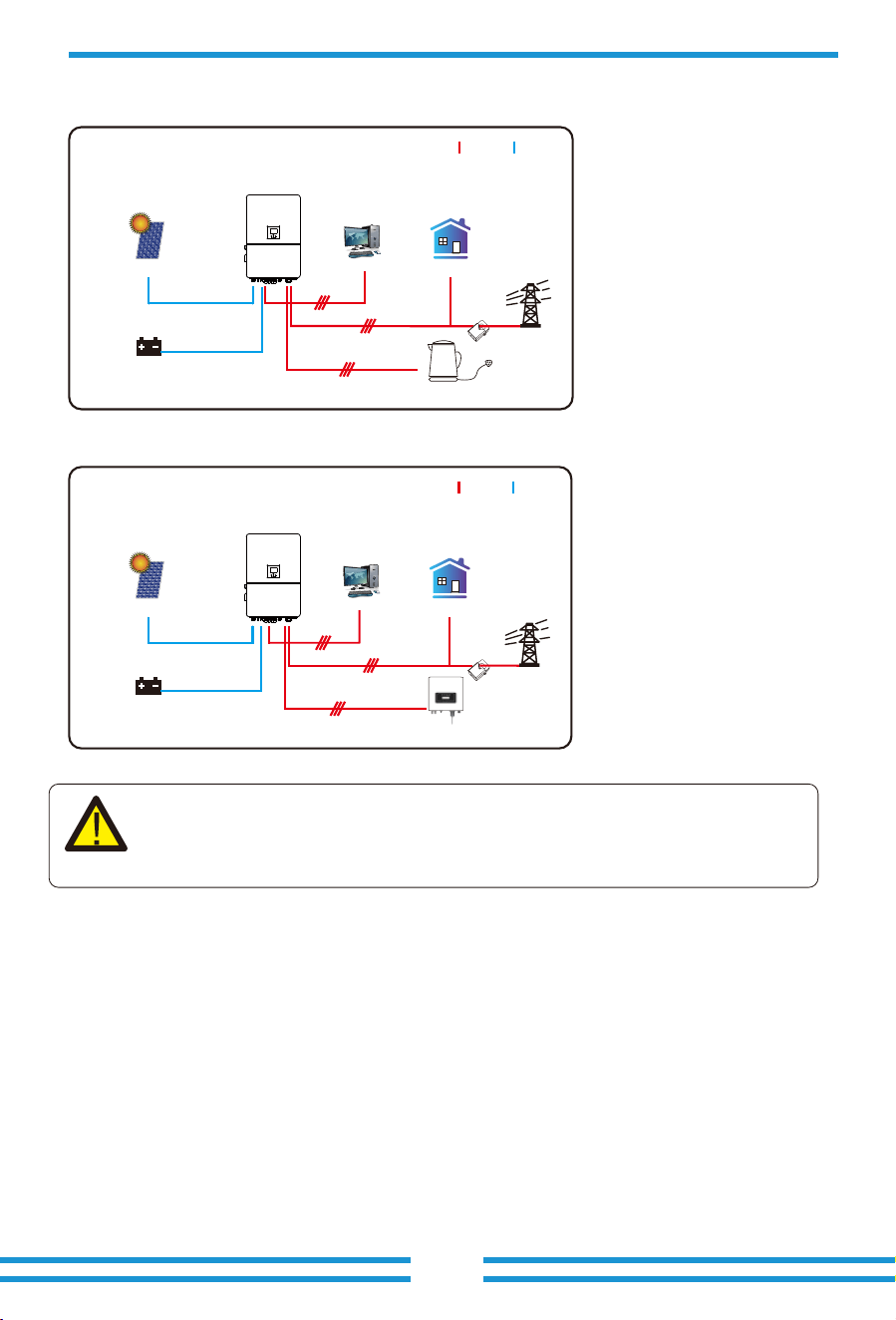
7. Warranty
- 47 -
The 1st priority power of the system is always the PV power, then 2nd and
3rd priority power will be the ba�ery bank or grid according to the se�ngs.
The last power backup will be the Generator if it is available.
Grid
Backup Load
On-Grid Home Load
Battery
Solar
CT
AC cable DC cable
Smart Load
Mode III: With Smart-Load
Grid
Backup Load On-Grid Home Load
Battery
Solar
On-Grid+AC couple
AC cable DC cable
On-Grid Inverter
Mode IV: AC Couple
CT
As to Warranty terms, please refer to 《General Warranty Agreement - DEYE》.
Under the guidance of our company, customers return our products so that our company can
provide service of maintenance or replacement of products of the same value. Customers need to
pay the necessary freight and other related costs. Any replacement or repair of the product will
cover the remaining warranty period of the product. If any part of the product or product is
replaced by the company itself during the warranty period, all rights and interests of the
replacement product or component belong to the company.
Factory warranty does not include damage due to the following reasons:

- 48 -
8. Troubleshooting
· Damage during transportation of equipment;
· Damage caused by incorrect installation or commissioning;
· Damage caused by failure to comply with operation instructions, installation instructions or
maintenance instructions;
· Damage caused by attempts to modify, alter or repair products;
· Damage caused by incorrect use or operation;
· Damage caused by insufficient ventilation of equipment;
· Damage caused by failure to comply with applicable safety standards or regulations;
· Damage caused by natural disasters or force majeure (e.g. floods, lightning, overvoltage,
storms, fires, etc.)
In addition, normal wear or any other failure will not affect the basic operation of the product.
Any external scratches, stains or natural mechanical wear does not represent a defect in the
product.
Perform troubleshooting according to the solutions in the table below. Contact the
after-sales service if these methods do not work.
Collect the information below before contacting the after-sales service, so that the problems
can be solved quickly.
• Inverter information like serial number, firmware version, installation date, fault time, fault
frequency, etc.
• Installation environment, including weather conditions, whether the PV modules are
sheltered or shadowed, etc. It is recommended to provide some photos and videos to assist
in analyzing the problem.
• Utility grid situation.
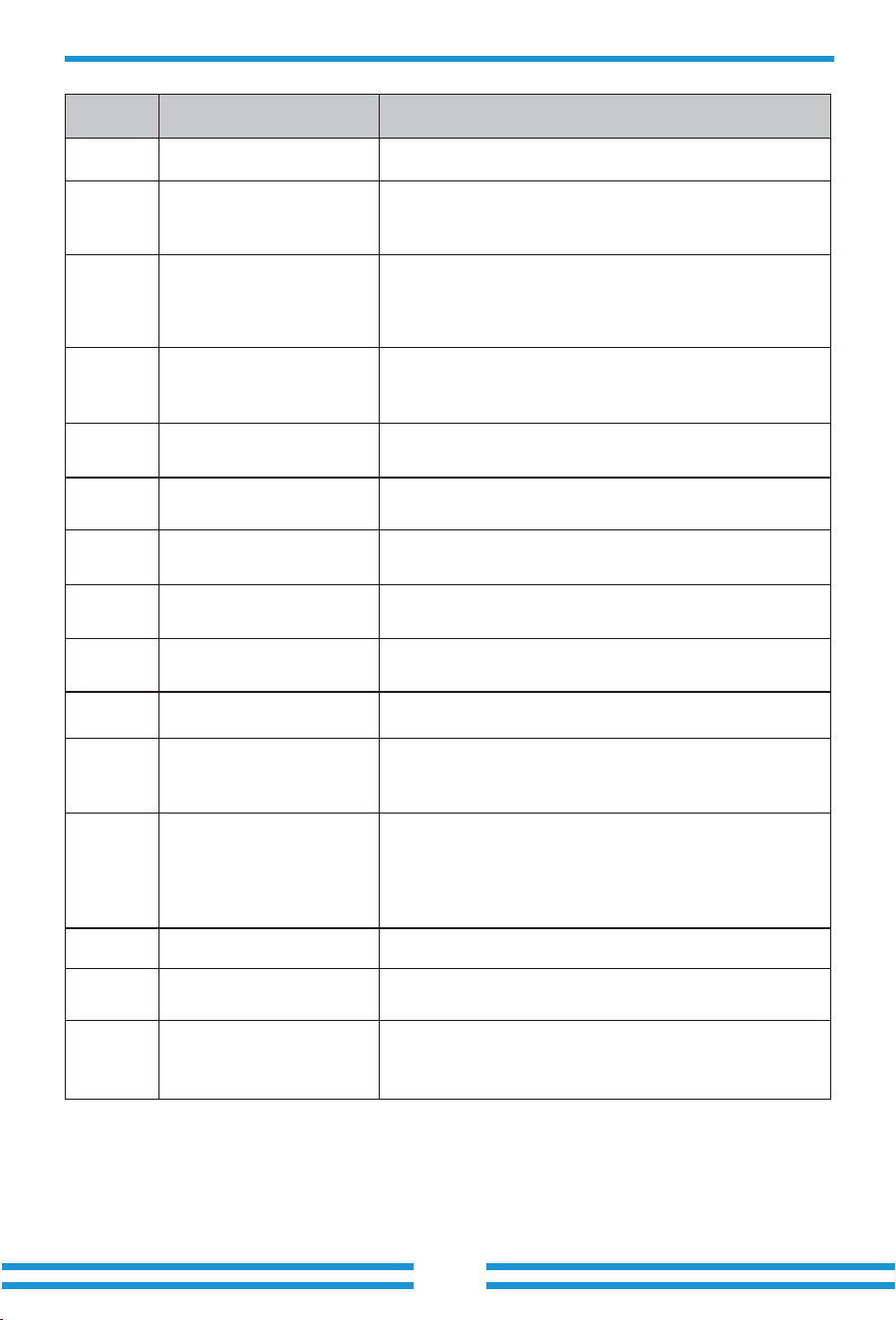
- 49 -
Error code
Meter_offline_warn
CT_WRONG_direction_warn
Meter communication failure
Check whether the meter has successful communication
and whether the wiring is normal.
W�� Reserved
W�� FAN_IN_Warn
�. Check the operating status of the fan.
�. If the fan is running abnormally, open the cover of the
inverter to check the connection of the fan.
W��
W��
W��
Grid_phase_warn
�. Check the phase sequence connection of the power grid.
�. Try to change the grid type, �, ���/���.
�. If there is still no solution to check the wiring at the grid
end.
Check whether the arrow on CT's case point to the inverter or
not , and check if the installation location of CTs are correct.
CT_Notconnect_warnW��
Check whether the wires of CTs are connected correctly or
not.
FAN_OUT�_WarnW��
Check whether the FAN are connected correctly and
operating normally.
FAN_OUT�_WarnW��
Check whether the FAN are connected correctly and
operating normally.
FAN_OUT�_WarnW��
Check whether the FAN are connected correctly and
operating normally.
�. Measure whether the grid port voltage is too high.
�. Check whether the AC cable is too thin to carry current.
Battery_comm_warnW��
Abnormal battery communication
�. Check whether the BMS connection is stable.
�. Check whether the BMS data is abnormal.
Parallel_comm_warnW��
Unstable parallel communication
�. Check the connection of the parallel communication line.
Please do not wind the parallel communication line with
other cables.
�. Check whether the parallel dip switch is on.
VW_activateW��
Description Solutions
F�� DC_Inversed_Failure
Check the PV input polarity.
F�� DC_Insulation_Failure
Check whether the PV is grounded, secondly, check whether
the impedance of the PV to the ground is normal.
F�� GFDI_Failure
�.Check whether the PV modules are grounded.
�. Check whether the impedance of the PV to the ground is
normal, whether there is leakage current.
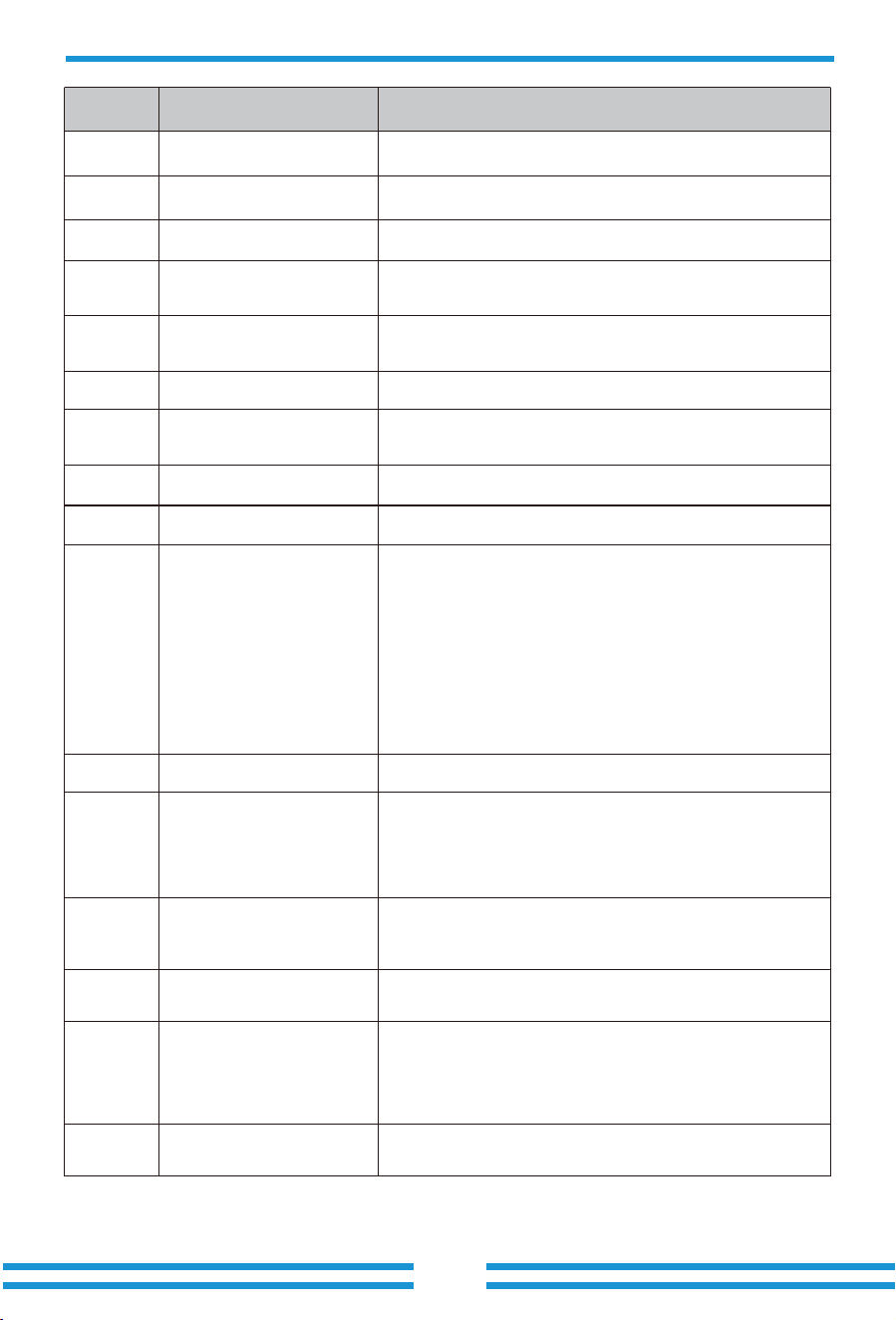
- 50-
Error code
F�� DCDC�_START_Failure
F�� Working_Mode_Change
F�� AC_OverCurr_SW_Failure
F�� GFCI_Failure
F�� Tz_AC_OverCurr_Fault
The BUS voltage can’t be reached by PV or battery.
�. Switch off the DC switches and restart the inverter.
The BUS voltage can’t be reached by PV or battery.
�. Switch off the DC switches and restart the inverter.
F�� GFDI_Ground_Failure Check whether the PV is grounded.
F�� IGBT_Failure Restart the inverter � times and restore the factory settings.
F�� AuxPowerBoard_Failure
�. First check whether the inverter switch is open.
�. Restart the inverter � times and restore the factory settings.
F�� AC_MainContactor_Failure Restart the inverter � times and restore the factory settings.
F�� EEPROM_Read_Failure Restart the inverter � times and restore the factory settings.
Restart the inverter � times and restore the factory settings
F�� EEPROM_Write_Failure
�. When the grid type and frequency have changed it will
report F��.
�. When the battery mode has been changed to "No battery"
mode, it will report F��.
�. For some old FW version, it will report F�� when the
system's work mode has been changed.
�. Generally, this error will disappear automatically.
�. If it remains the same, turn off DC and AC switches for one
EEPROM_Write_Failure
minute, then turn on the DC and AC switches.
AC side over current fault
�. Please check whether the backup load power and common
load power are within the range.
�. Restart and check whether it is normal.
Leakage current fault
�. Check the PV side cable ground connection.
�. Restart the system �-� times.
AC side over current fault
�. Please check whether the backup load power and
commonload power are within the range.
�. Restart and check whether it is normal.
F�� Tz_Integ_Fault Restart the inverter � times and restore the factory settings.
F�� DCDC�_START_Failure
F�� AC_SlaveContactor_Failure Restart the inverter � times and restore the factory settings.
F�� DC_OverCurr_Failure Restart the inverter � times and restore the factory settings.
F�� Tz_PV_OverCurr_Fault
�. Check the PV connection and whether the PV is unstable.
�. Restart the inverter � times.
Description Solutions
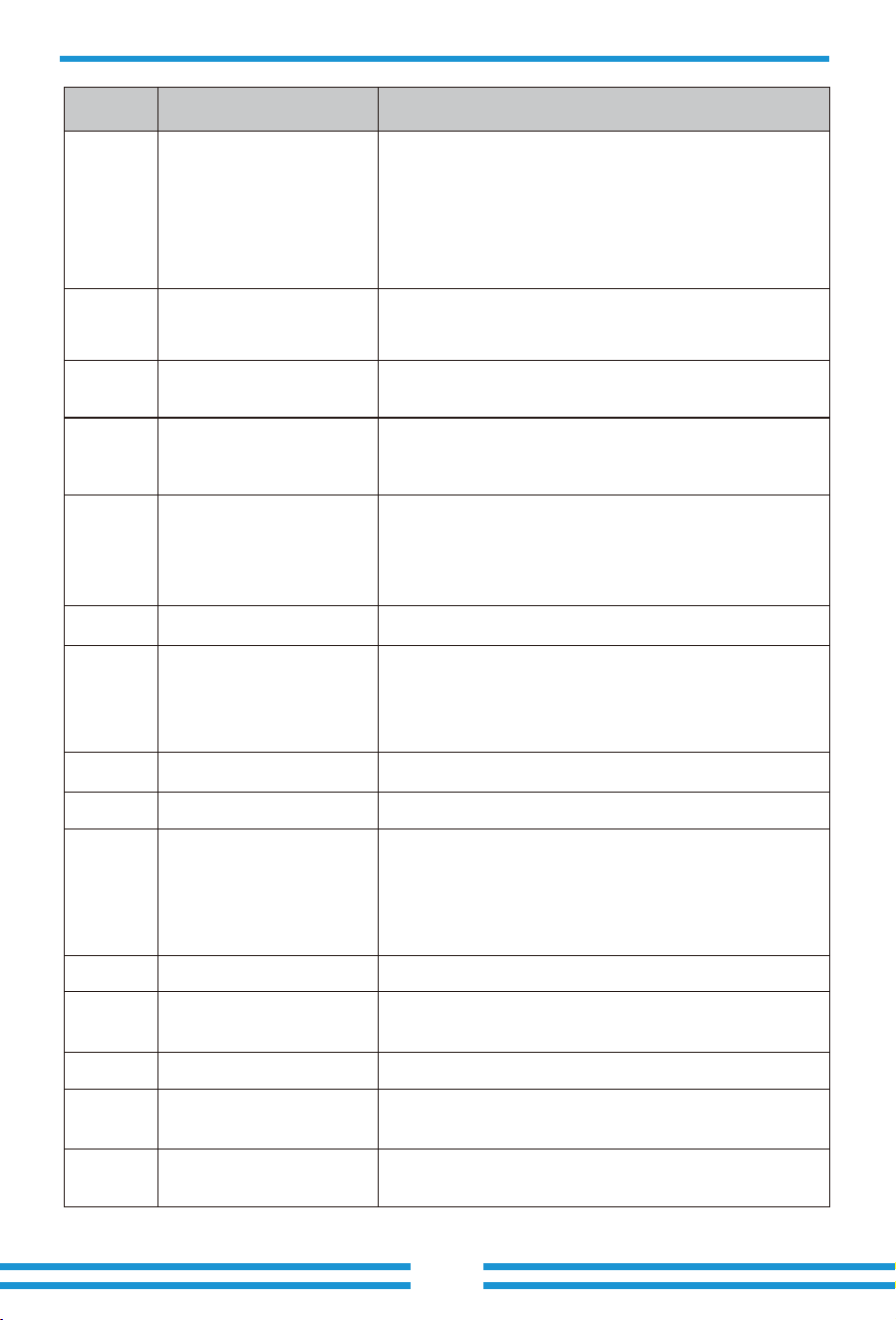
- 51 -
Error code
F��
Tz_EmergStop_Fault
Remotely shutdown
It means the inverter is remotely controlled.
F�� Tz_GFCI_OC_Fault
Leakage current fault
�. Check PV side cable ground connection.
�. Restart the system �~� times.
F�� DC_Insulation_Fault
F�� BusUnbalance_Fault
PV isolation resistance is too low
�. Check the connection of PV panels and inverter is firm and
correct.
�. Check whether the PE cable of inverter is connected to
ground.
F�� DC_Feedback_Fault Restart the inverter � times and restore the factory settings.
F�� DC_Insulation_Fault Restart the inverter � times and restore the factory settings.
�. Please wait for a while and check whether it is normal.
�. When the load power of � phases has a big different, it will
report the F��.
� .When there's DC leakage current, it will report F��.
�. Restart the system �~� times.
F�� DCIOver_M�_Fault Restart the inverter � times and restore the factory settings.
F��
Parallel_Comm_Fault
�. When inverters are connected in parallel, check the parallel
communication cable connection and hybrid inverter
communication address setting.
�. During the parallel system startup period, inverters will
report F��. But when all inverters are in ON status, it will
disappear automatically.
F�� AC_MainContactor_Fault
F�� AC_SlaveContactor_Fault
F�� DCIOver_M�_Fault
�. Check whether the grid orientation is correct,
�. Restart the inverter � times and restore the factory settings
Restart the inverter � times and restore the factory settings.
Restart the inverter � times and restore the factory settings.
F�� AC_OverCurr_Fault
�. Check whether the grid current is too large.
�. Restart the inverter � times and restore the factory settings.
F�� Tz_HV_Overcurr_Fault
BUS over current
�. Check the PV input current and battery current setting.
�. Restart the system �~� times.
F�� Tz_Dc_OverCurr_Fault
DC side over current fault
�. Check PV module connection and battery connection;
�. When in the off-grid mode, starting the inverter under a high
power load may report F��. Please reduce the load power
connected.
�. If it remains the same, turn off DC and AC switches for one
minute, then turn on the DC and AC switches.
Description Solutions
F�� AC_Overload_Fault
Check the backup load connection, make sure it is within the
allowed power range.
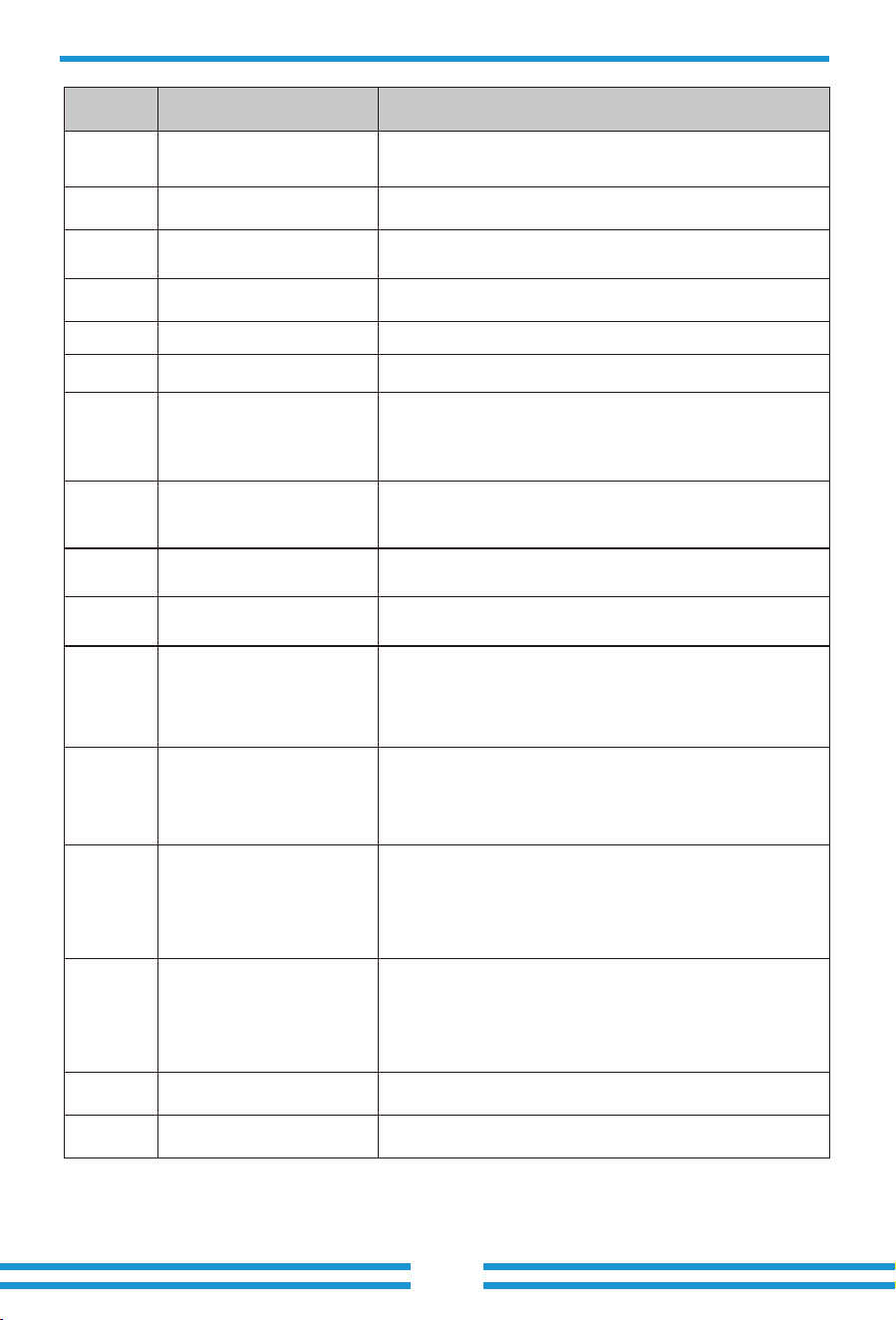
- 52 -
F��
AC_OverFreq_Fault
Grid frequency out of range
�. Check whether the frequency is in the range of the
specification or not.
�. Check whether AC cables are firmly and correctly
connected.
F�� AC_UnderFreq_Fault
Grid frequency out of range
�. Check whether the frequency is in the range of the
specification or not.
�. Check whether AC cables are firmly and correctly
connected.
Error code
F�� INT_DC_OverCurr_Fault Inverter DC overcurrent, restart the inverter.
F�� Reserved
F�� Reserved
F�� AC_UV_OverVolt_Fault
Grid voltage out of range
�. Check the voltage is in the range of specification or not.
�. Check whether AC cables are firmly and correctly
connected.
F�� AC_UV_UnderVolt_Fault
Grid voltage out of range
�. Check the voltage is in the range of specification or not.
�. Check whether AC cables are firmly and correctly
connected.
F�� AC_V_GridCurr_DcHigh_Fault Restart the inverter � times and restore the factory settings.
F�� AC_U_GridCurr_DcHigh_Fault Restart the inverter � times and restore the factory settings.
F�� Reserved
F�� INT_AC_OverCurr_Fault Inverter AC overcurrent, restart the inverter.
F�� AC_NoUtility_Fault
Check the grid voltage and frequency, whether the connection
of the power grid is normal.
F�� Reserved
F�� Reserved
Description Solutions
F�� Parallel_system_Stop
F�� Parallel_Version_Fault
Check the hybrid inverter work status. If there is at least one
hybrid inverter shutdown, all hybrid inverters will report F��
fault.
�. Check whether the inverter version is consistent.
�. Please contact us to upgrade the software version.
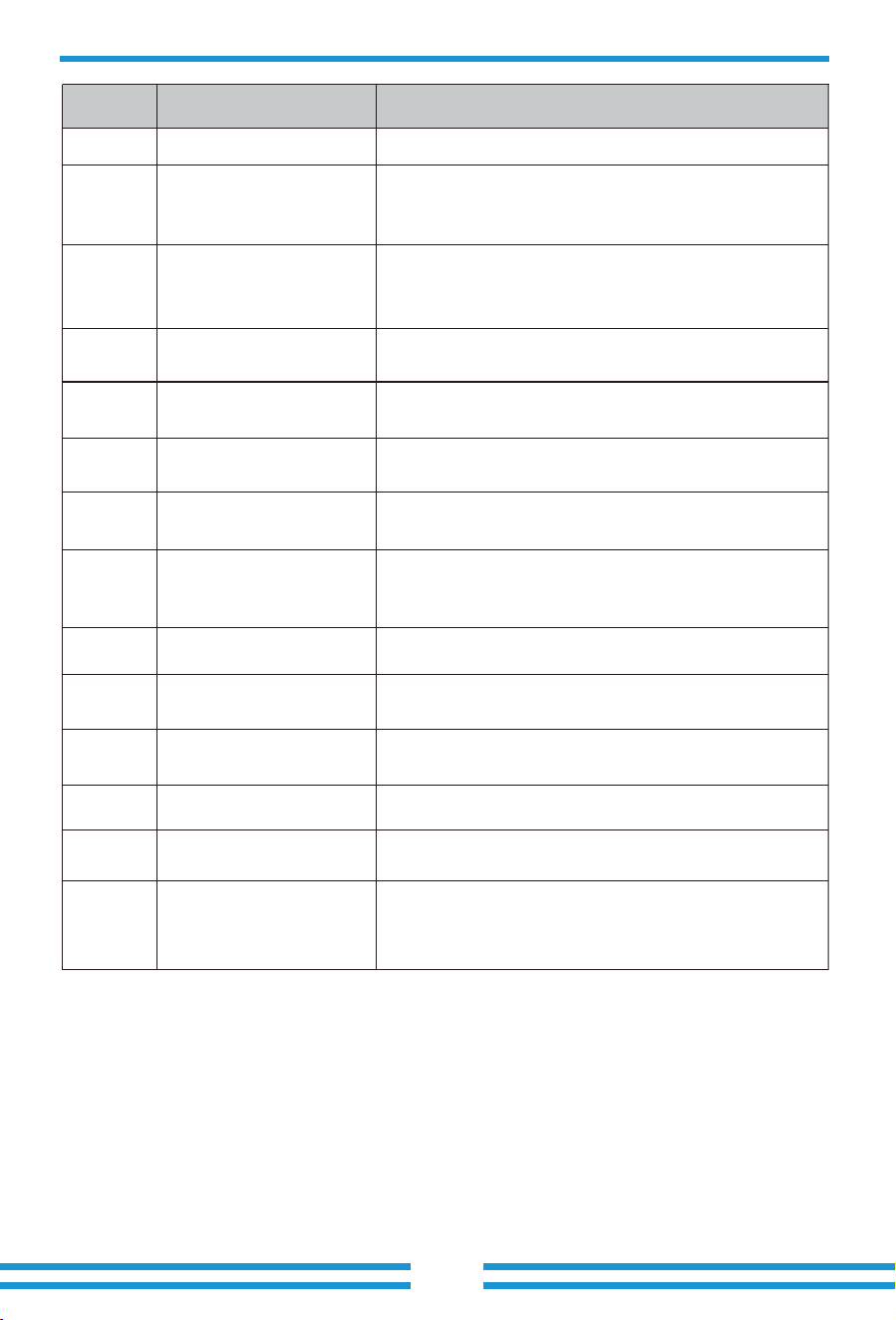
- 53 -
Error code Description Solutions
F�� DC_VoltHigh_Fault
F�� DC_VoltLow_Fault
BUS voltage is too high
�. Check whether battery voltage is too high.
�. check the PV input voltage, make sure it is within the
allowed range.
Check wether the temperature data of BMS is too high.
Check whether the voltage and frequency of the generator
are normal, and then restart.
F�� Reserved
F�� GEN_FAULT
Check whether the switch of the inverter is turned on, restart
the inverter, and restore the factory settings.
F�� INVERTER_Manual_OFF
F�� Battery_Temp_High_Fault
BUS voltage is too low
�. Check whether battery voltage is too low.
�. If the battery voltage is too low, use PV or grid to charge
the battery.
F�� Battery_Comm_Lose
�. It means that the communication between the hybrid
inverter and the battery BMS is disconnected when
"BMS_Err-Stop" is active.
�. To avoid this error, disable "BMS_Err-Stop" item on the LCD.
F��
DRMs_Stop
F�� ARC_Fault
F��
Heatsink_HighTemp_Fault
�. ARC fault detection is only for US market.
�. Check PV module cable connection and clear the fault.
F�� BAT�_VoltHigh_Fault
�. Check the battery � terminal voltage is high.
�. Restart the inverter � times and restore the factory settings.
F�� BAT�_VoltHigh_Fault
�. Check the battery � terminal voltage is high.
�. Restart the inverter � times and restore the factory settings.
F�� BAT�_VoltLow_Fault
�. Check the battery � terminal voltage is low.
�. Restart the inverter � times and restore the factory settings.
F�� BAT�_VoltLow_Fault
�. Check the battery � terminal voltage is low;
�. Restart the inverter � times and restore the factory settings.
Check the DRM function is active or not.
Heat sink temperature is too high
�. Check whether the working environment temperature is
too high.
�. Turn off the inverter for �� minutes and restart.
Chart 8-1 Fault information
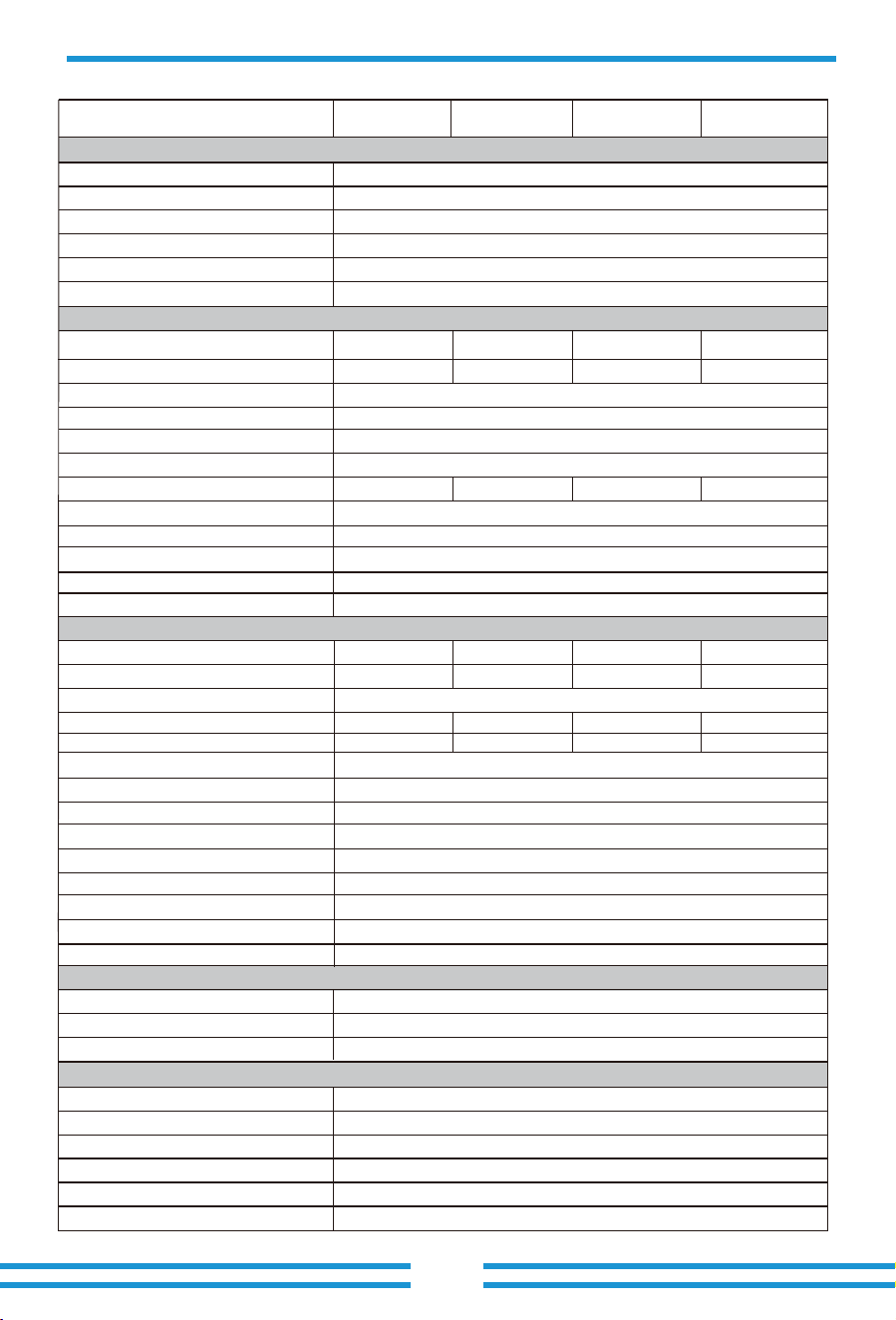
- 54 -
9. Datasheet
Max. AC Input/Output Apparent Power(VA)
Peak Power (off-grid)
(W)
Max. AC Input/Output Current(A)
Model
Battery Input Data
Rated AC Input/Output Current(A)
Battery Type
Battery Voltage Range(V)
Max. Charging Current(A)
Max. Discharging Current(A)
Charging Strategy for Li-ion Battery
Max. Operating PV Input Current(A)
No. of MPP Trackers/No. of Strings MPP Tracker
Max. Inverter Backfeed Current To the Array
AC Input/Output Data
1.5 time of rated power, 10 S
Lithium-ion
160-1000
Self-adaption to BMS
6/2+2+2+2+2+2
0
3L+N+PE
80+80
80+80
Rated AC Input/Output Active Power(W)
Number of Battery Input 2
Full Load MPPT Voltage Range(V)
Rated PV Input Voltage (V)
Equipment Protection
Yes
AC Output Overcurrent Protection
DC Polarity Reverse Connection Protection
Yes
YesAC Output Overvoltage Protection
YesAC Output Short Circuit Protection
Thermal Protection Yes
Yes
DC Terminal Insulation Impedance Monitoring
98.70%
Efficiency
Max. Efficiency
98.10%Euro Efficiency
>99%
MPPT Efficiency
50Hz/45Hz-55Hz 60Hz/55Hz-65Hz
0.8 leading to 0.8 lagging
Rated Input/Output Grid Frequency/Range
Power Factor Adjustment Range
<0.5% In
DC Injection Current
<3% (of nominal power)
Total Current Harmonic Distortion THDi
Grid Connection Form
220/380V, 230/400V 0.85Un-1.1Un
Rated Input/Output Voltage/Range(V)
Max. Input Short-Circuit Current(A)
PV String Input Data
Max. PV Input Power(W)
Max. PV Input Voltage (V)
Start-up Voltage(V)
MPPT Voltage Range(V)
1000
180
150-850
650
36+36+36+36+36+36
54+54+54+54+54+54
Max. PV access power(W)
Max. Output Fault Current (A)
Max. Output Overcurrent Protection (A)
334
SUN-60K -SG02HP3
-EU-EM6
60000
66000
91/87
365-850
96000
100/95.7
120000
SUN-75K-SG02HP3
-EU-EM6
75000
82500
113.7/108.7
455-850
120000
125/119.6
150000
SUN-70K-SG02HP3
-EU-EM6
70000
77000
106.1/101.5
425-850
112000
116.7/111.6
140000
256
SUN-80K-SG02HP3
-EU-EM6
80000
88000
121.3/116
485-850
128000
133.4/127.6
160000
180-1000PV Input Voltage Range(V)
200
Max. Continuous AC Passthrough (grid to load)(A)
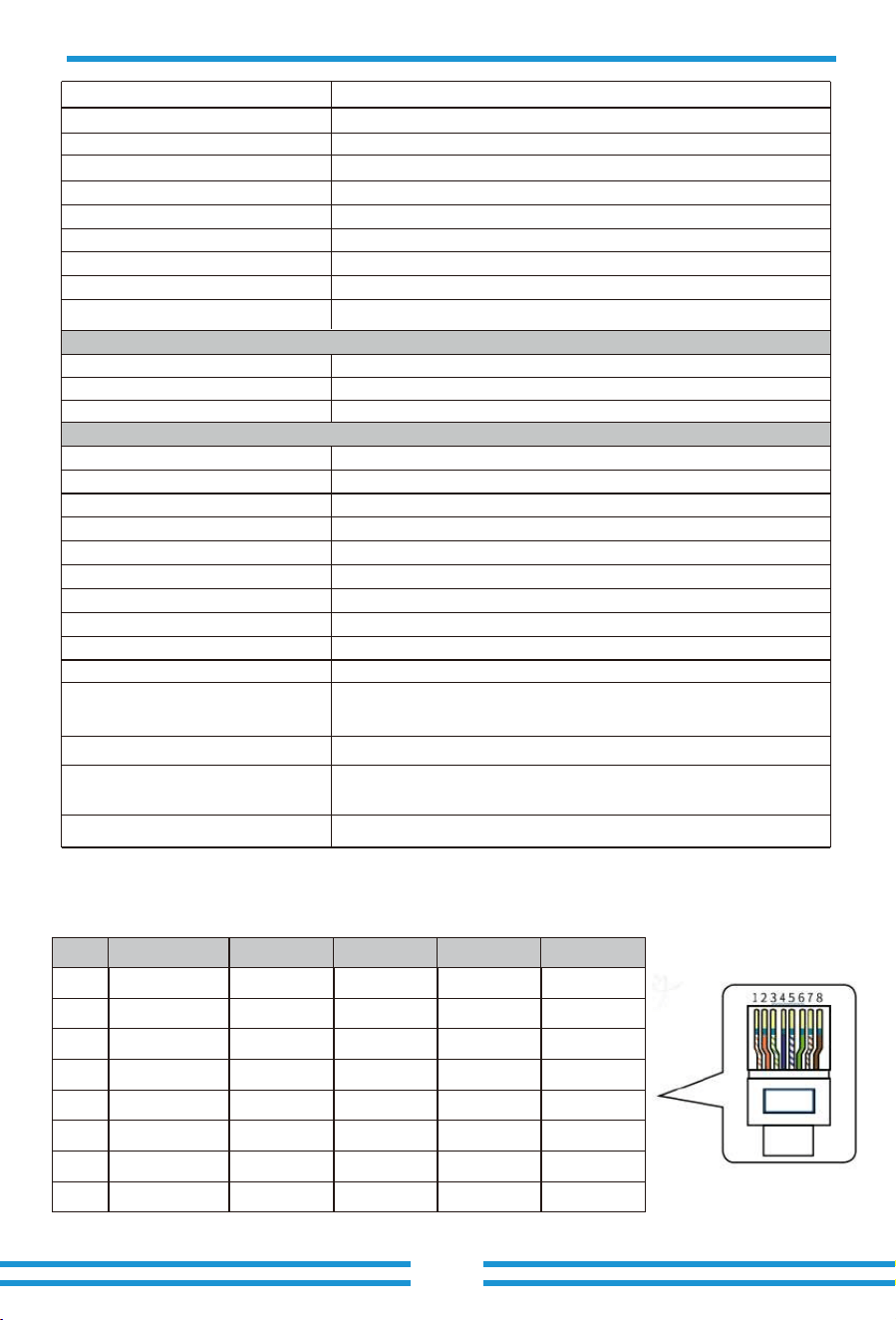
- 55 -
10. Appendix I
Definition of RJ45 Ports
1
2
3
4
5
6
7
8
No.
Orange&White
Orange
Blue
Blue&White
Green
Green&White
Brown&White
Brown
Color
485_B
485_A
CAN-H1
CAN-L1
GND_485
GND_485
485_A
485_B
BMS1
485_B
485_A
CAN-H2
CAN-L2
GND_485
GND_485
485_A
485_B
BMS2
485_B
485_A
485_B
485_A
GND_COM
GND_COM
⸺
⸺
Meter
485_B
485_A
⸺
⸺
GND_485
GND_485
485_A
485_B
RS485
YesGround Fault Current Monitoring
YesDC Component Monitoring
Surge Protection Level
Power Network Monitoring
Island Protection Monitoring
Earth Fault Detection
DC Input Switch
Overvoltage Load Drop Protection
Residual Current (RCD) Detection
General Data
Grid Regulation
Safety EMC/Standard
Interface
Operating Temperature Range
Permissible Ambient Humidity
Permissible Altitude
Weight(kg)
Cabinet size(W*H*D) [mm]
Warranty
Noise
Ingress Protection(IP) Rating
Inverter Topology
Over Voltage Category
Type of Cooling
5 Years/10 Years
the Warranty Period Depends the Final Installation Site of Inverter,
More Info Please Refer to Warranty Policy
TYPE III(DC),TYPE III(AC)
Yes
Yes
Yes
Yes
Yes
Yes
-40 to +60℃, >45℃ Derating
3000m
0-100%
Smart cooling
105
Installation Style Wall-mounted
606W×927H×314D (Excluding connectors and brackets)
≤ 65 dB
IP 65
Non-Isolated
OVC II(DC), OVC III(AC)
IEC 61727,IEC 62116,CEI 0-21,EN 50549,NRS 097,RD 140,
UNE 217002,OVE-Richtlinie R25,G99,VDE-AR-N 4105
IEC/EN 61000-6-1/2/3/4, IEC/EN 62109-1, IEC/EN 62109-2
RS232, RS485, CAN
Monitor Mode
Communication Interface
GPRS/WIFI/Bluetooth/4G/LAN (optional)
LCD+LEDDisplay
OptionalArc fault circuit interrupter (AFCI)
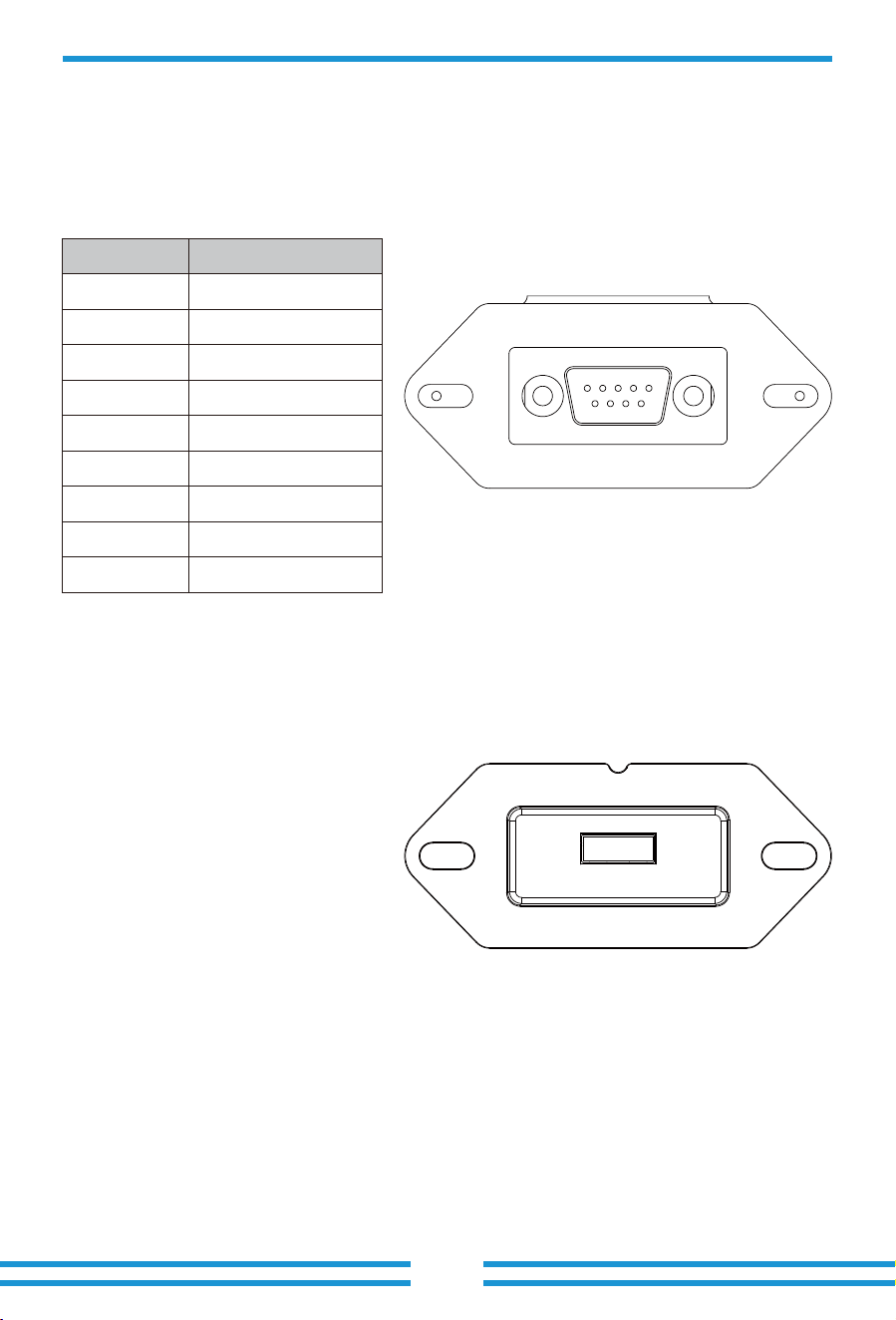
- 56 -
RS���
USB
DB� (RS���)
12345
6789
This model of inverter has two types of logger interfaces, DB� and USB. Please refer to the
actual inverter received for the actual interface type.
�
No.
D-GND
RS���
�
�
�
�
�
TX
�
��Vdc
�
RX
�
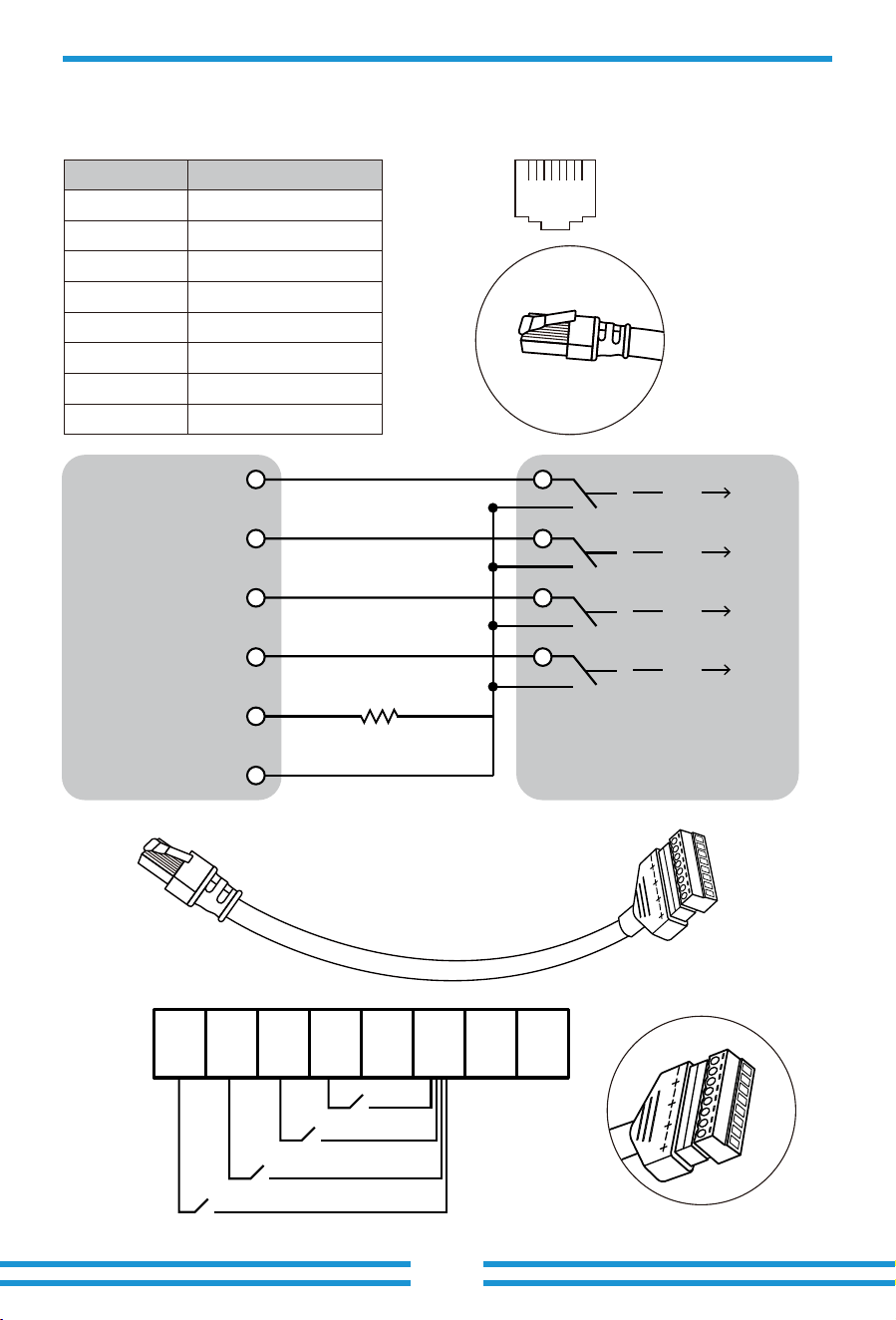
- �� -
12345678
87654321
DRM:It is used to accept the external control command.
1
No.
DI 1
DRM
2 DI 2
3 DI 3
DI 4
4
5
6 GND
REF
7 Reserved
8 Reserved
Definion of RJ45 Port Pin for DRM
Inverter RCR
12345678
1
K 1
K 2
K 3
K 4
2 3 4 5 6 7 8
K 1 0%
PIN 6 GND
PIN 5 REF
PIN 4 DI 4
PIN 3 DI 3
PIN 1 DI 1
PIN 2 DI 2
K 2 30%
K 3 60%
K 4 100%
15K
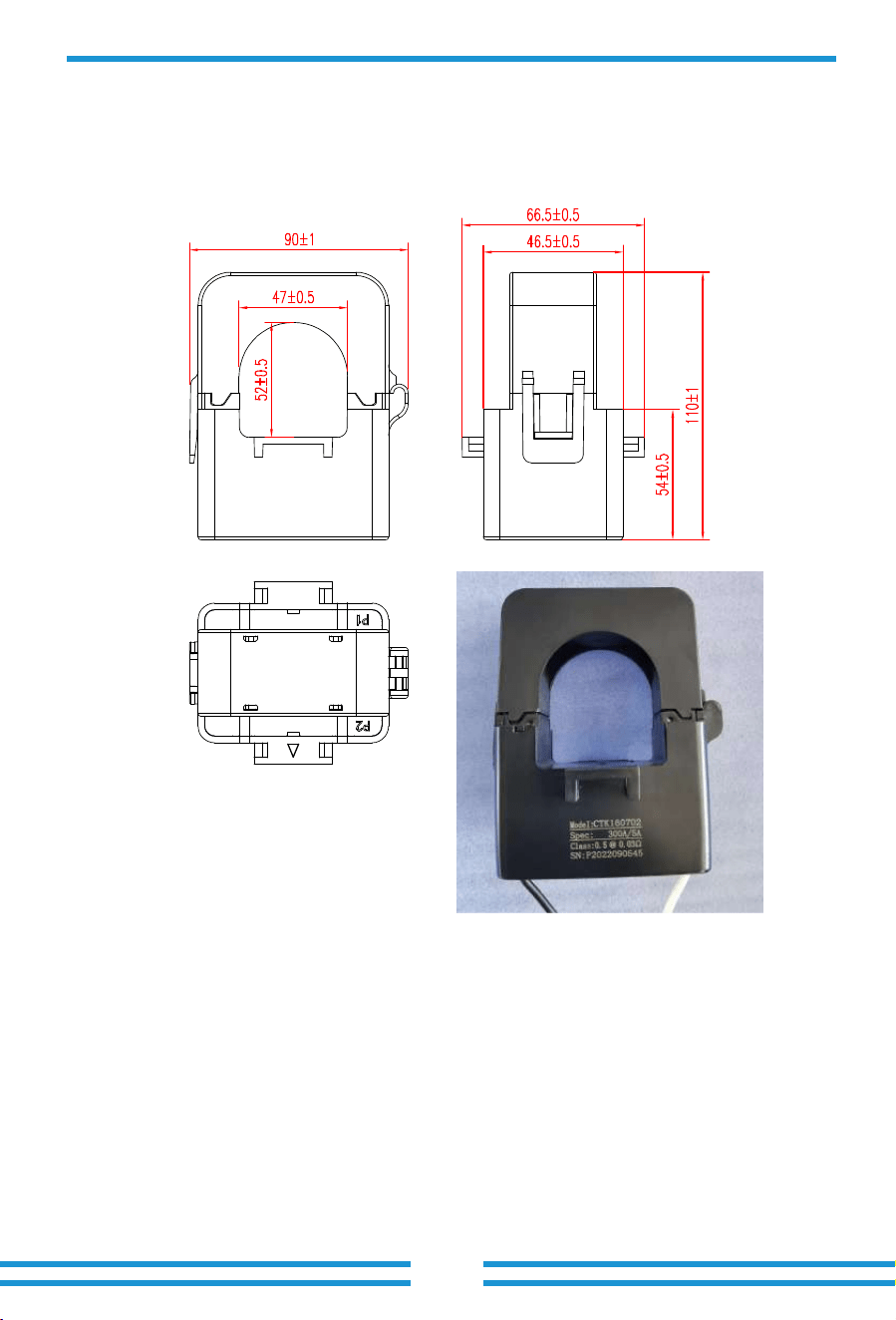
- 58 -
1. Split Core Current Transformer (CT) dimension: (mm)
2. Secondary output cable length is 4m.
11. Appendix II
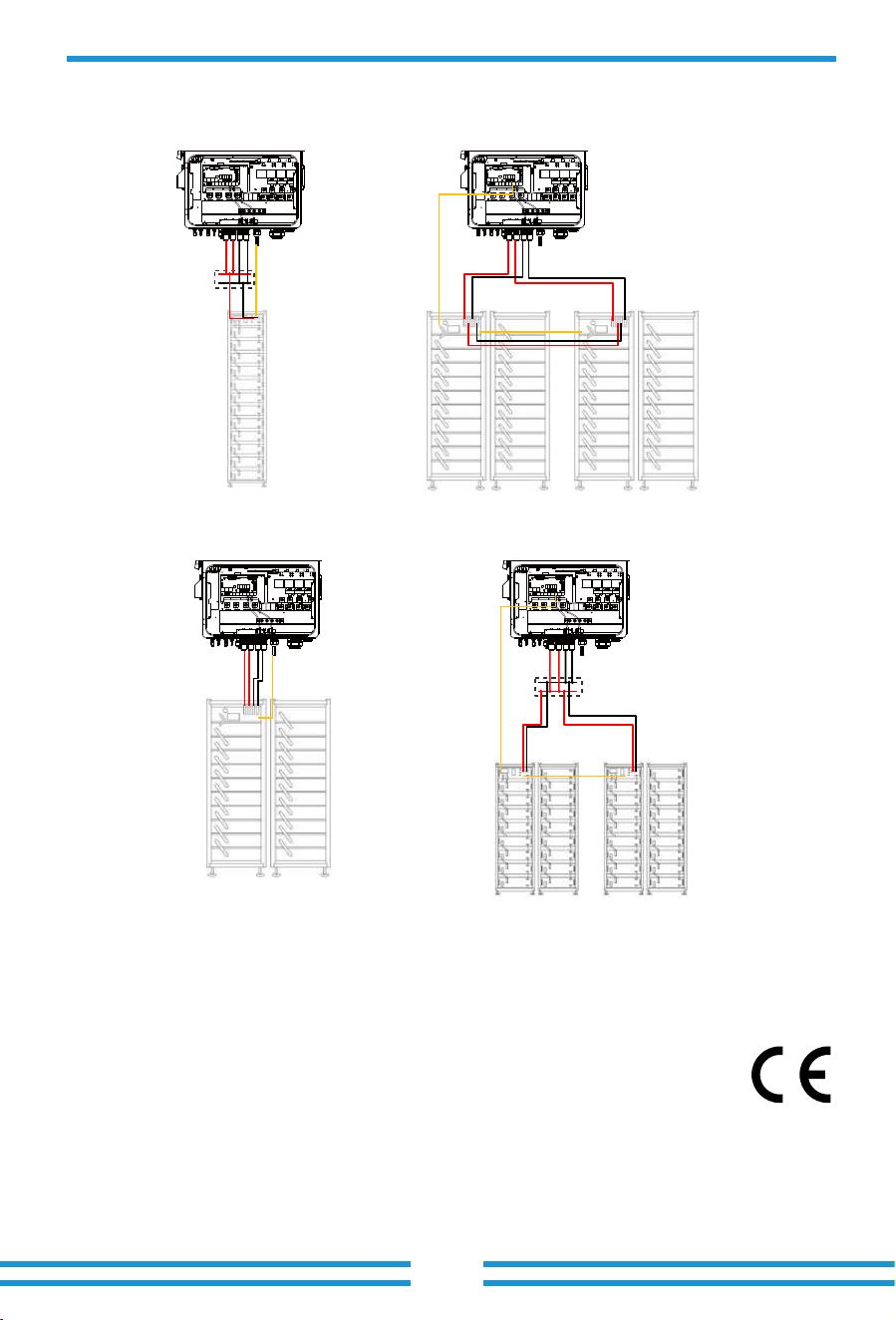
12. Appendix III
13. EU Declaration of Conformity
within the scope of the EU directives
· Electromagnetic compatibility ����/��/EU (EMC)
· Low Voltage Directive ����/��/EU (LVD)
· Restriction of the use of certain hazardous substances ����/��/EU (RoHS)
NINGBO DEYE INVERTER TECHNOLOGY CO., LTD. confirms herewith that the products
described in this document are in compliance with the fundamental requirements and other
relevant provisions of the above mentioned directives. The entire EU Declaration of Conformity
and certificate can be found at https://www.deyeinverter.com/download/#hybrid-inverter-�.
CAN to BMS1 of
the inverter
CAN to BMS1 of
the inverter
Master
Slave
CAN communication to
BMS1 port of the hybrid
inverter
CAN(parallel)
CAN(parallel)
CAN communication to
BMS1 port of the hybrid
inverter
Master
Slave
DC combiner box
DC combiner box
- 59 -
- 60 -
V1.3.1, 2025-04-03

Add.: No.26 South YongJiang Road, Daqi, Beilun, NingBo, China.
Fax.: +86 (0) 574 8622 8852
Tel.: +86 (0) 574 8622 8957
E-mail: [email protected]
Web.: www.deyeinverter.com