M
U
LTI-F
U
NCTI
O
N
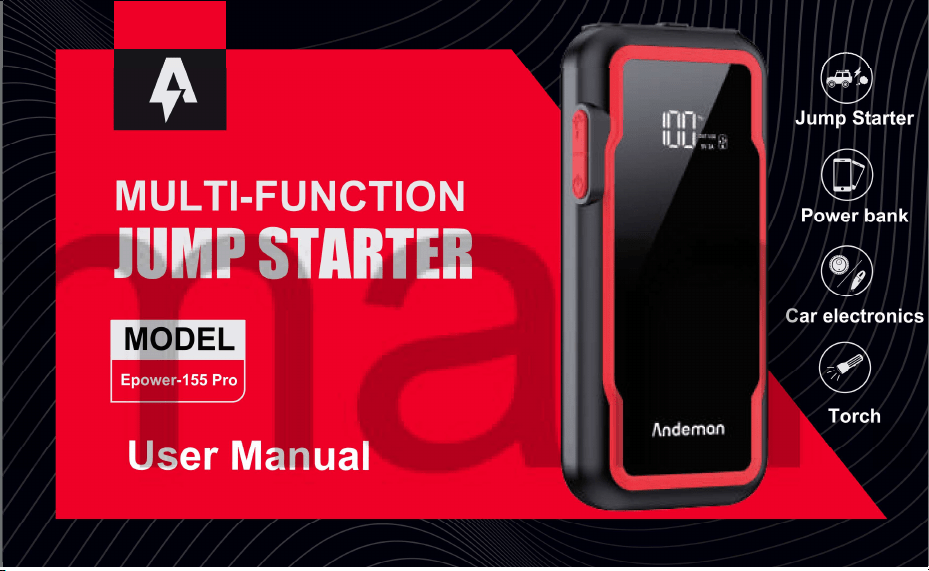
MODEL
Epow
er-155 Pr
o
U
s
er Ma
n
ual
Jump
Starter
Powe
r bank
Car
electr
onics
Torch
JUMP STARTER
Name VISHTEC ltd
Add 3 rd floor office 5, Plovdiv 2 Liuben
Name VISHTEC UK Co.,Ltd
Add 275 ISLINGTON SUITE 1405
NEW NORTH ROAD LONDON
ENGLAND N1 7AA
Email Vincent.feng@vish-tec.com
Karavelov bul, 4002 Bulgaria
Email compliance@vish-tec.com

ENGLISH
001
CATALOG
PRODUCT OVERVIEW
ENGLISH
DEUTSCH
FRANÇAIS
001-015
016-030
031-045
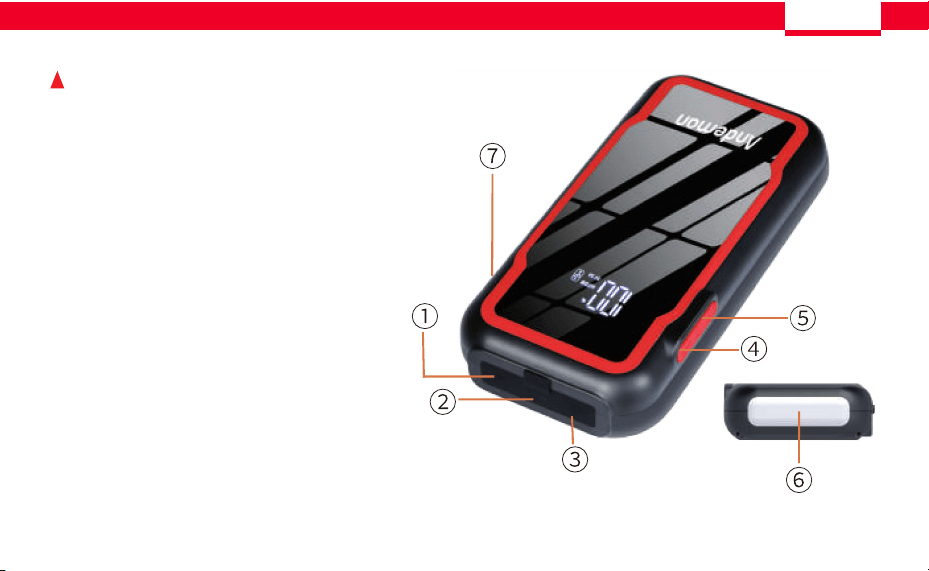
1. USB 5V/3A
2. USB 5V/2A
3. Charge port
4. LED light switch
5. Main switch
6. LED Lighting
7. DO anti-reverse insertion
car start entrance
ENGLISH
001
CATALOG
PRODUCT OVERVIEW
ENGLISH
DEUTSCH
FRANÇAIS
001-015
016-030
031-045
1. USB 5V/3A
2. USB 5V/2A
3. Charge port
4. LED light switch
5. Main switch
6. LED Lighting
7. DO anti-reverse insertion
car start entrance
ENGLISH ENGLISH
002 003
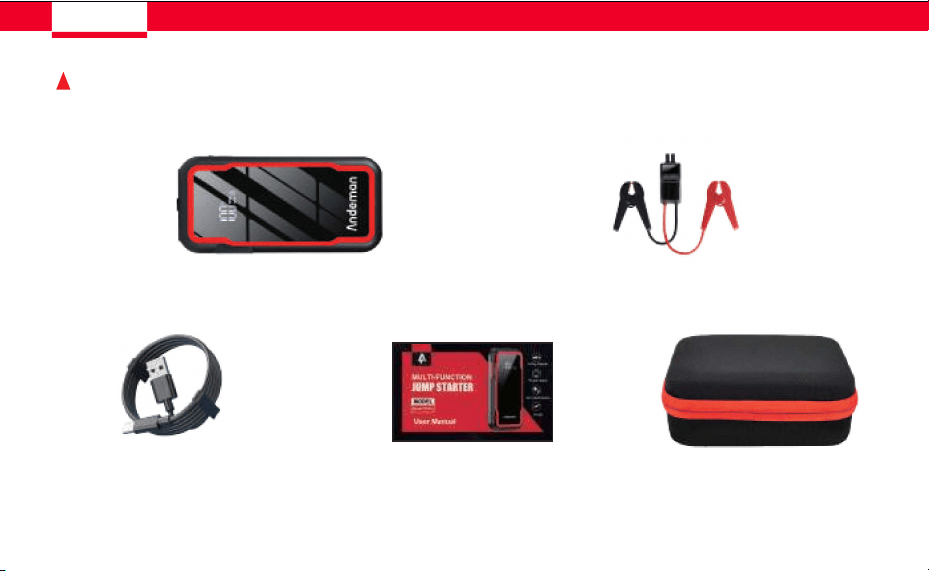
PACKAGE CONTENTS HOW TO USE
Essential Version
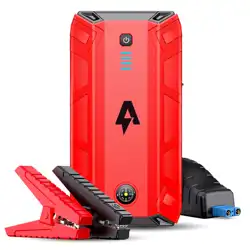
Starting power supply
Epower-155 Pro ×1
type-C charging cable×1 User Manual ×1 Storage box ×1
Smart clamps×1
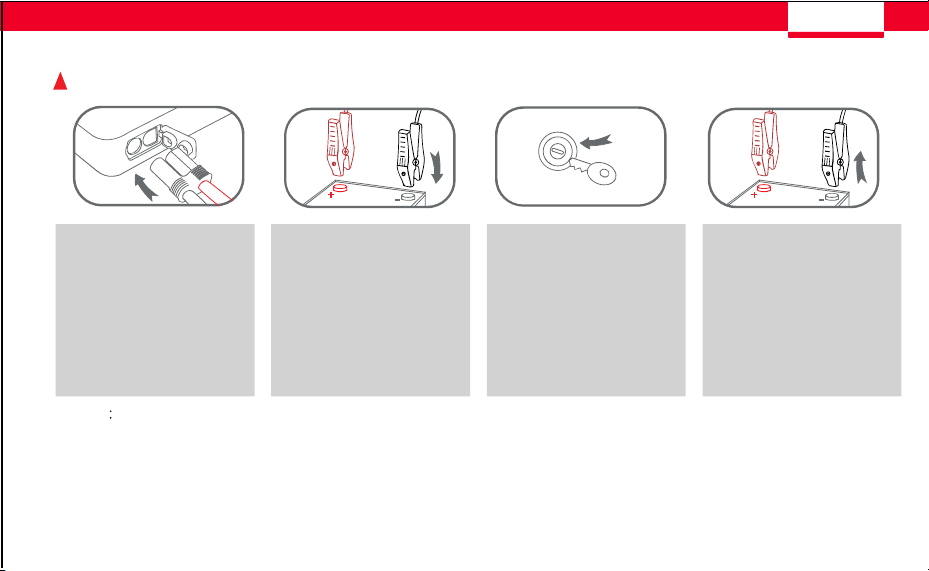
Step 1 Step 2 Step 3 Step 4
Plug the jumper
cables into the 12V
vehicle start port
Notice
1.Before starting the car, please make sure that the remaining power of the product is more than 60%
2.lf a second start is required, it needs to be started every 30 seconds
3.Remove jumper clamps from vehicle battery within 30 seconds onceengine starts
start the vehicle remove jumper
clamps
connect the RED clamp
to vehicle battery's
positive(+)terminal
and BLACK clamp to
negative(-)terminal
ENGLISH ENGLISH
002 003
PACKAGE CONTENTS HOW TO USE
Essential Version
Starting power supply
Epower-155 Pro ×1
type-C charging cable×1 User Manual ×1 Storage box ×1
Smart clamps×1
Step 1 Step 2 Step 3 Step 4
Plug the jumper
cables into the 12V
vehicle start port
Notice
1.Before starting the car, please make sure that the remaining power of the product is more than 60%
2.lf a second start is required, it needs to be started every 30 seconds
3.Remove jumper clamps from vehicle battery within 30 seconds onceengine starts
start the vehicle remove jumper
clamps
connect the RED clamp
to vehicle battery's
positive(+)terminal
and BLACK clamp to
negative(-)terminal
ENGLISH ENGLISH
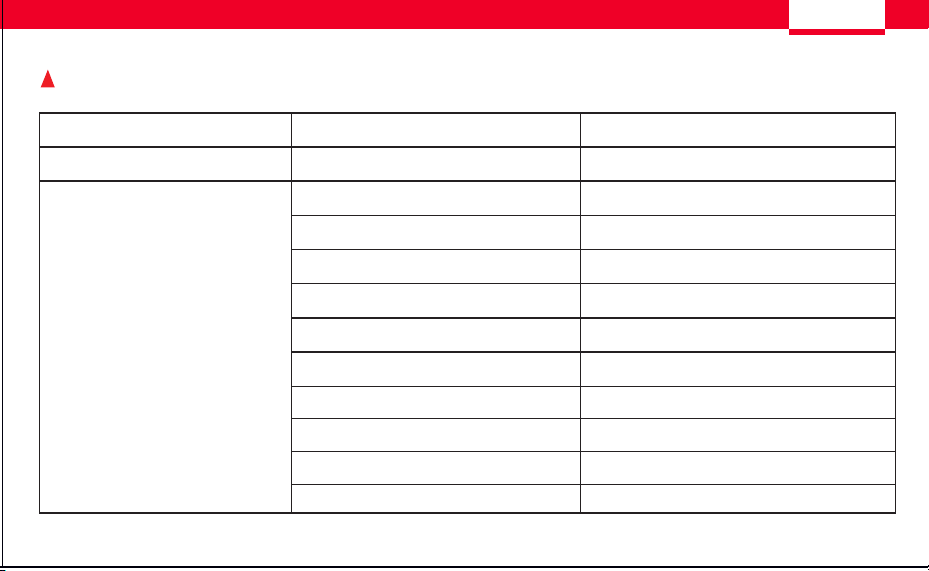
Performance index Performance index Specifications
L × W × H (mm)
Internal Battery
Peak current
Battery Capacity
type-C Input
Output USB-1
Output USB-2
Charging time
Working Temperature
Charging Temperature
Storage Temperature
5~10 hours
14°F to 140°F
32°F to 113°F
-4°F to 122°F
190*83*38
Lithium Ion
3000A
74Wh
5V/3A
5V/3A
5V/2A
Dimensions
Main Parameters
004 005
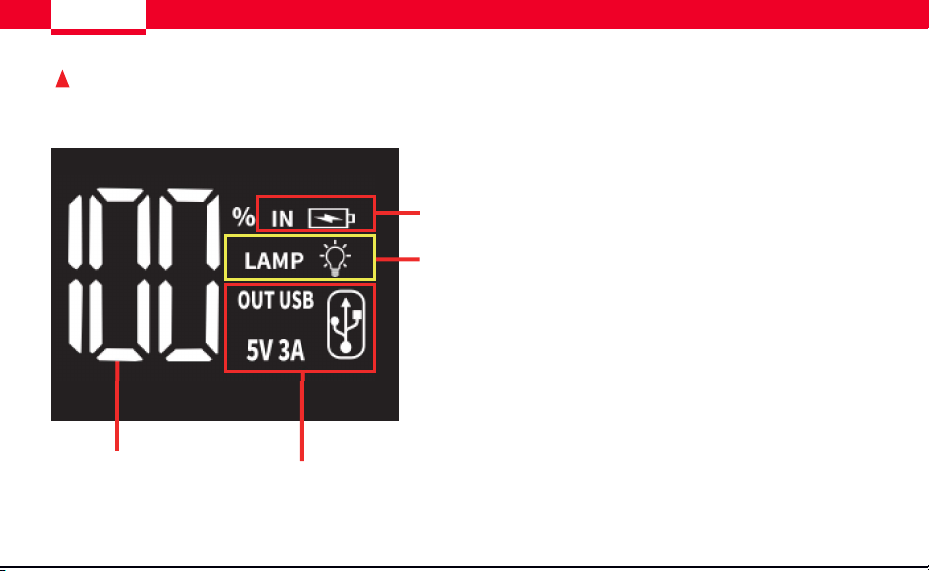
DISPLAY SCREEN DESCRIPTION SPECIFICATIONS
1.Battery power percentage
2. USB input/output
3.floodlight
4.Charging display
1
2
3
4
ENGLISH ENGLISH
Performance index Performance index Specifications
L × W × H (mm)
Internal Battery
Peak current
Battery Capacity
type-C Input
Output USB-1
Output USB-2
Charging time
Working Temperature
Charging Temperature
Storage Temperature
5~10 hours
14°F to 140°F
32°F to 113°F
-4°F to 122°F
190*83*38
Lithium Ion
3000A
74Wh
5V/3A
5V/3A
5V/2A
Dimensions
Main Parameters
004 005
DISPLAY SCREEN DESCRIPTION SPECIFICATIONS
1.Battery power percentage
2. USB input/output
3.floodlight
4.Charging display
1
2
3
4
ENGLISH ENGLISH
006 007
Recharge Time
Charger Rating
13h
6.5h
4.5h
5W
10W
15W
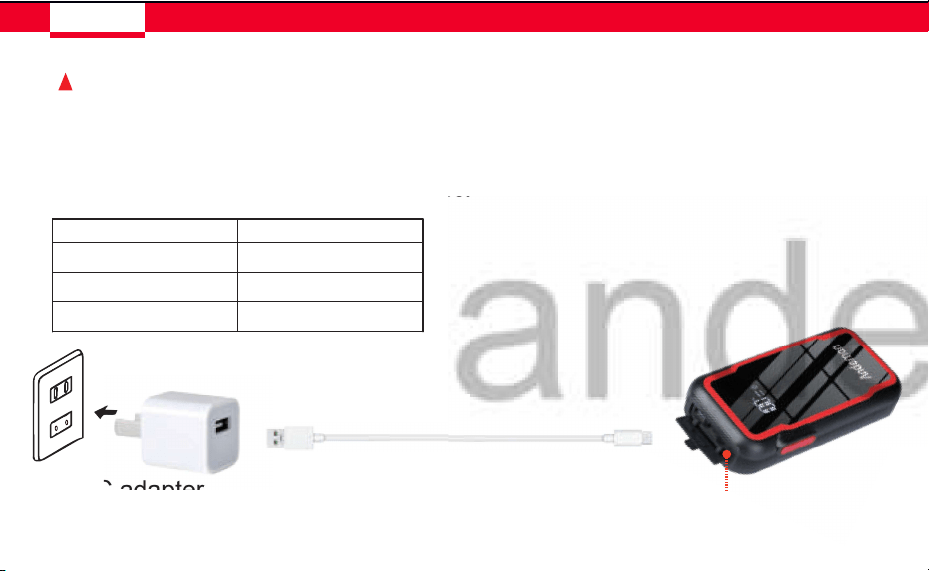
HOW TO CHARGE Epower-155 Pro How to use the light?
1.Insert the Type-C charging cable into the Input port of the startup power supply.
2.Insert the USB port of the charging cable Into the adapter
(Note:AC adapter is not included).
3.Plug the AC adapter into a power source.
AC adapter type-C Charging cable
Input
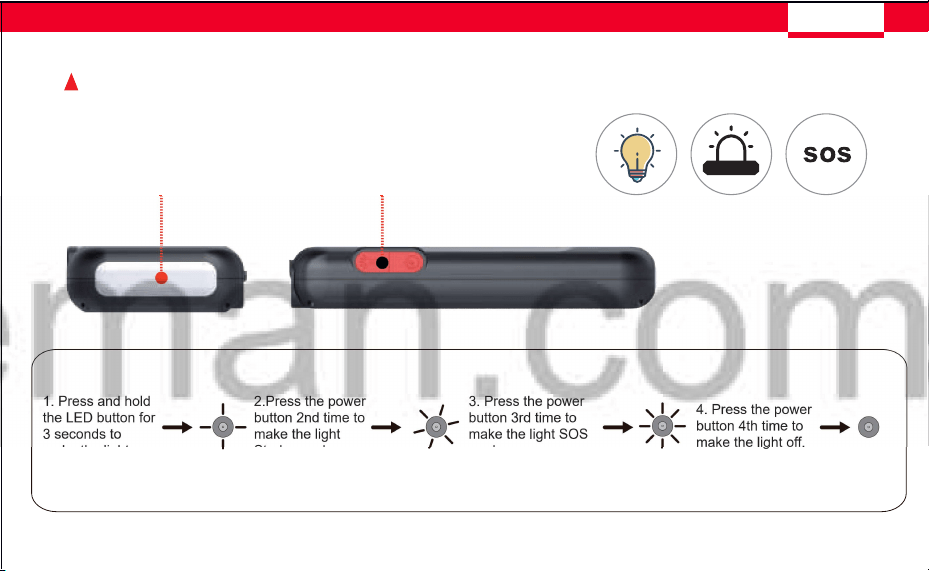
LED Flashlight Light Button
1. Press and hold
the LED button for
3 seconds to
make the light on.
2.Press the power
button 2nd time to
make the light
Strobe mode.
3. Press the power
button 3rd time to
make the light SOS
mode.
4. Press the power
button 4th time to
make the light off.
Llghtlng Strobe llght SOS off
ENGLISH ENGLISH
006 007
Recharge Time
Charger Rating
13h
6.5h
4.5h
5W
10W
15W
HOW TO CHARGE Epower-155 Pro How to use the light?
1.Insert the Type-C charging cable into the Input port of the startup power supply.
2.Insert the USB port of the charging cable Into the adapter
(Note:AC adapter is not included).
3.Plug the AC adapter into a power source.
AC adapter type-C Charging cable
Input
LED Flashlight Light Button
1. Press and hold
the LED button for
3 seconds to
make the light on.
2.Press the power
button 2nd time to
make the light
Strobe mode.
3. Press the power
button 3rd time to
make the light SOS
mode.
4. Press the power
button 4th time to
make the light off.
Llghtlng Strobe llght SOS off

ENGLISH ENGLISH
1.Q: How do I turn off Epower-155 Pro?
008 009
FAQ
A: Press and hold the power button for 3 seconds to turn off the power.
Note: The Epower-155 Pro startup power supply is able to detect its own battery status
and can take measures to save power, such as entering sleep mode when the battery is
very low.
2. Q: When the battery is fully charged, how long can the power be
retained in the battery without using the starting power supply Epower-155 Pro?
A:If placed in storage, the battery can hold about 2 years of charge. However, it is
recommended that you charge it every 1 month, because this can extend the overall
life of the battery
3. Q: How long does it take to start the Epower-155 Pro battery from
zero to full charge?
It takes about 13 hours to fully charge the battery using a 5W USB charger.
It takes about 6.5 hours to fully charge the battery using a 10W USB charger.
It takes about 4.5 hours to fully charge the battery using a 15W USB charger.
Q: What is the expected service life of the starting power Epower-155 Pro?
A:lt could last for around five years if kept in good condition . The battery should support
around 500 recharges from 0 to 100%.
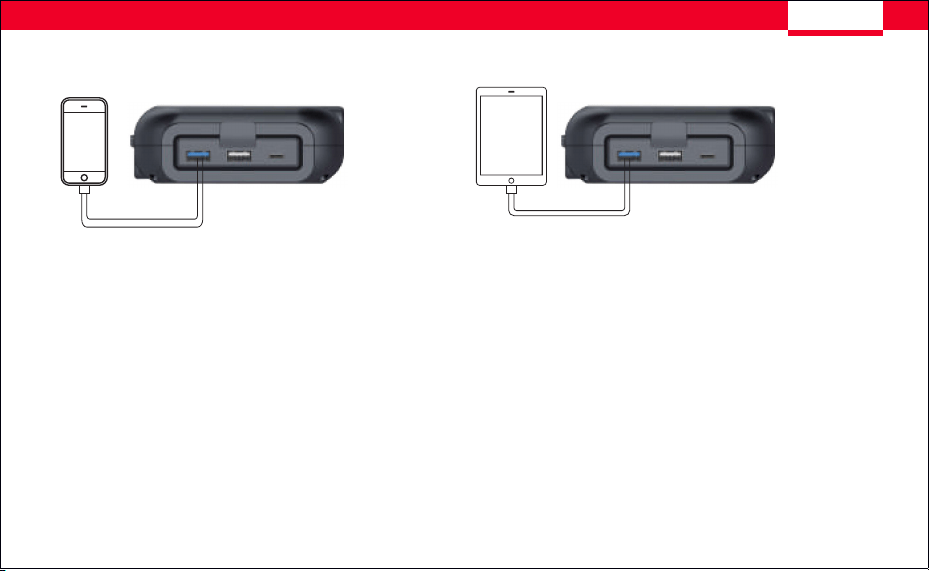
Q: Can I charge my phone or tablet with the boot power Epower-155 Pro?
A:Yes, the boot power Epower-155 Pro includes two standard USB output ports. Just
connect any mobile device to one of these two ports and you can charge it. High
power charging is required via a USB port cable that supports fast charging.
Details on output current and voltage are on page 5.
ENGLISH ENGLISH
1.Q: How do I turn off Epower-155 Pro?
008 009
FAQ
A: Press and hold the power button for 3 seconds to turn off the power.
Note: The Epower-155 Pro startup power supply is able to detect its own battery status
and can take measures to save power, such as entering sleep mode when the battery is
very low.
2. Q: When the battery is fully charged, how long can the power be
retained in the battery without using the starting power supply Epower-155 Pro?
A:If placed in storage, the battery can hold about 2 years of charge. However, it is
recommended that you charge it every 1 month, because this can extend the overall
life of the battery
3. Q: How long does it take to start the Epower-155 Pro battery from
zero to full charge?
It takes about 13 hours to fully charge the battery using a 5W USB charger.
It takes about 6.5 hours to fully charge the battery using a 10W USB charger.
It takes about 4.5 hours to fully charge the battery using a 15W USB charger.
Q: What is the expected service life of the starting power Epower-155 Pro?
A:lt could last for around five years if kept in good condition . The battery should support
around 500 recharges from 0 to 100%.
Q: Can I charge my phone or tablet with the boot power Epower-155 Pro?
A:Yes, the boot power Epower-155 Pro includes two standard USB output ports. Just
connect any mobile device to one of these two ports and you can charge it. High
power charging is required via a USB port cable that supports fast charging.
Details on output current and voltage are on page 5.
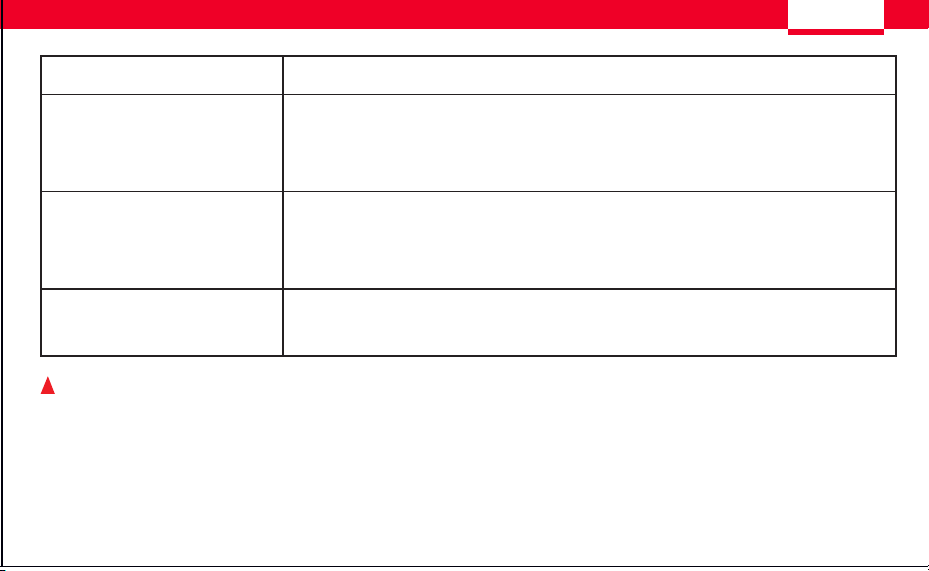
TROUBLE SHOOTING
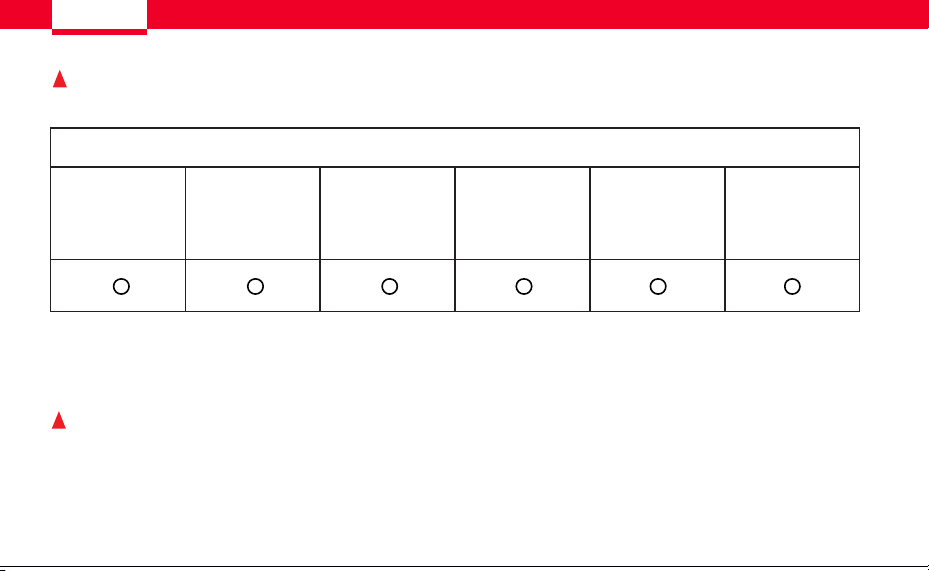
TOXIC AND HARMFUL SUBSTANCES
Problem Solution
SAFETY INSTRUCTIONS
ENGLISH
Lead (Pb) Mercury (Hg) Cadmium (Cd)
Hexavalent
Chromium
(Cr (Vi))
Polybrominated
Biphenyls (PBB)
Polybrominated
Diphenyl Ethers
(PBDE)
No response when pressing
the power button
The voltage of the Epower-155 Pro is really low and triggers the low power
protection to shut down the device. Plug the wall charger into the
Epower-155 Pro to recharge it.
• Make sure the power switch is in the on position.
• Check that jump-starter is full charged. Recharge unit if necessary.
• Make sure a proper polarity cable connection has been established.
• Make sure the USB Charging Port Power Button is in the on position.
• Check that Jump-Starter has a full charge. Recharge unit if necessary
1. Read the user manual carefully before using this device.
2. Do not use this device as a car battery.
3. Do not use this device as a toy.
4. Be careful to use it when there are children around to avoid injury.
Unit fails to jump-start
USB power port fails to power
ENGLISH
010 011
TOXIC AND HAZARDOUS SUBSTANCES
Indicate all homogeneous materials' hazardous substances content are below
the MCV limit specified in theStandard 2002/95/EC(RoHs).
If the following operations can not solve your problems, please stop using the
device and contact the manufacture with E-mail
TROUBLE SHOOTING
TOXIC AND HARMFUL SUBSTANCES
Problem Solution
SAFETY INSTRUCTIONS
ENGLISH
Lead (Pb) Mercury (Hg) Cadmium (Cd)
Hexavalent
Chromium
(Cr (Vi))
Polybrominated
Biphenyls (PBB)
Polybrominated
Diphenyl Ethers
(PBDE)
No response when pressing
the power button
The voltage of the Epower-155 Pro is really low and triggers the low power
protection to shut down the device. Plug the wall charger into the
Epower-155 Pro to recharge it.
• Make sure the power switch is in the on position.
• Check that jump-starter is full charged. Recharge unit if necessary.
• Make sure a proper polarity cable connection has been established.
• Make sure the USB Charging Port Power Button is in the on position.
• Check that Jump-Starter has a full charge. Recharge unit if necessary
1. Read the user manual carefully before using this device.
2. Do not use this device as a car battery.
3. Do not use this device as a toy.
4. Be careful to use it when there are children around to avoid injury.
Unit fails to jump-start
USB power port fails to power
ENGLISH
010 011
TOXIC AND HAZARDOUS SUBSTANCES
Indicate all homogeneous materials' hazardous substances content are below
the MCV limit specified in theStandard 2002/95/EC(RoHs).
If the following operations can not solve your problems, please stop using the
device and contact the manufacture with E-mail

WARNING
5.The product only works with 12V battery.
6.Use the clamps that come with the device. When the clamp or wire is damaged, stop using it immediately
to avoid personal injuries caused by fire or electric shock.
7.Do not connect the positive and negative clamps to each other.
8.Before starting, make sure there is no rust or foreign matter on the interface. Connect the device with the
clamp tightly to make sure the device starts properly.
9.Remove the clamps from the car battery within 30 seconds after successfully starting the car. Otherwise,
it may cause damage.
10.Do not start the device more than three times in a row, and the interval between each start should be at
least two minutes otherwise the product will be overheated and damaged.
11.Do not use the clamps to power other devices.
12. Do not place the device in an environment where the temperature exceeds 140°F
13. The device shall be charged at a temperature of 32'F to 113°F
14. Do not put the device in water or expose it to rain.
15. Do not expose the device to high temperature or fire.
16. Do not use the device in explosive environment with flammable liquid, gas or dust
17. Make sure that someone around is available to help you when using the device
18. Do not wear metal jewelry such as rings, bracelets, and necklaces while using the device
19. Disconnect the jump starter and the clamp at the battery clamp plug to reduce the risk of damage to the
power plug and power cord.
20. Do not use damaged or modified battery packs to avoid the danger of fire, explosion, and injury
21.Use the original charger or a charger with the same input terminal as the jumper starter to charge
22.Do not charge this device immediately after starting the car.
23.Do not start the car while charging the device.
24.The battery may leak in extreme cases. Do not touch the leaked liguid directly with your hands or skin.
Rinse immediatelywith soap and water in case of contact. lf the leaked liguid comes into contact with your
eyes, rinse your eves with cold water for at least 10 minutes and seek medical advice immediately.
25.At the end of the product life, lithium battery should be disposed in accordance with local regulations.
This product is for 12-Voltage vehicle (equipment) batteries. lt may be dangerous if used
with other types of batteries. Read and understand the safety instructions before using
the jump starter. Fail to follow the safety instructions may cause Damage to the jump
starter, and may also result in electric shock, explosions, fire, property damage, and
personal injury.
ENGLISH
!
ENGLISH
012 013
WARNING
5.The product only works with 12V battery.
6.Use the clamps that come with the device. When the clamp or wire is damaged, stop using it immediately
to avoid personal injuries caused by fire or electric shock.
7.Do not connect the positive and negative clamps to each other.
8.Before starting, make sure there is no rust or foreign matter on the interface. Connect the device with the
clamp tightly to make sure the device starts properly.
9.Remove the clamps from the car battery within 30 seconds after successfully starting the car. Otherwise,
it may cause damage.
10.Do not start the device more than three times in a row, and the interval between each start should be at
least two minutes otherwise the product will be overheated and damaged.
11.Do not use the clamps to power other devices.
12. Do not place the device in an environment where the temperature exceeds 140°F
13. The device shall be charged at a temperature of 32'F to 113°F
14. Do not put the device in water or expose it to rain.
15. Do not expose the device to high temperature or fire.
16. Do not use the device in explosive environment with flammable liquid, gas or dust
17. Make sure that someone around is available to help you when using the device
18. Do not wear metal jewelry such as rings, bracelets, and necklaces while using the device
19. Disconnect the jump starter and the clamp at the battery clamp plug to reduce the risk of damage to the
power plug and power cord.
20. Do not use damaged or modified battery packs to avoid the danger of fire, explosion, and injury
21.Use the original charger or a charger with the same input terminal as the jumper starter to charge
22.Do not charge this device immediately after starting the car.
23.Do not start the car while charging the device.
24.The battery may leak in extreme cases. Do not touch the leaked liguid directly with your hands or skin.
Rinse immediatelywith soap and water in case of contact. lf the leaked liguid comes into contact with your
eyes, rinse your eves with cold water for at least 10 minutes and seek medical advice immediately.
25.At the end of the product life, lithium battery should be disposed in accordance with local regulations.
This product is for 12-Voltage vehicle (equipment) batteries. lt may be dangerous if used
with other types of batteries. Read and understand the safety instructions before using
the jump starter. Fail to follow the safety instructions may cause Damage to the jump
starter, and may also result in electric shock, explosions, fire, property damage, and
personal injury.
ENGLISH
!
ENGLISH
012 013
FCC statement
This equipment has been tested and found to comply with the limits for a Class B digital device, pursuant to
part 15 of the FCC Rules. These limits are designed to provide reasonable protection against harmful
interference in a residential installation. This equipment generates, uses and can radiate radio frequency
energy and, if not installed and used in accordance with the instructions, may cause harmful interference to
radio communications. However, there is no guarantee that interference will not occur in a particular installation.
If this equipment does cause harmful interference to radio or television reception, which can be determined by
turning the equipment off and on, the user is encouraged to try to correct the interference by one or more of the
following measures:
- Reorient or relocate the receiving antenna.
- Increase the separation between the equipment and receiver.
- Connect the equipment into an outlet on a circuit different from that to which the receiver is connected.
- Consult the dealer or an experienced radio/TV technician for help.
Thank you for your support of our original
Audew
products,
Andeman
has upgraded the original products, launched a
more efficient jump starter, and enriched the product line by
adding car repair and maintenance products. We hope that
this brand can bring you a one-stop shopping experience for
auto supplies and meet the needs of all users for auto supplies.
Contact Us andeman@andeman.com
ENGLISH ENGLISH
014 015
This device complies with part 15 of the FCC Rules. Operation is subject to the following two conditions:
(1) This device may not cause harmful interference, and
(2) this device must accept any interference received, including interference that may cause undesired operation.

FCC statement
This equipment has been tested and found to comply with the limits for a Class B digital device, pursuant to
part 15 of the FCC Rules. These limits are designed to provide reasonable protection against harmful
interference in a residential installation. This equipment generates, uses and can radiate radio frequency
energy and, if not installed and used in accordance with the instructions, may cause harmful interference to
radio communications. However, there is no guarantee that interference will not occur in a particular installation.
If this equipment does cause harmful interference to radio or television reception, which can be determined by
turning the equipment off and on, the user is encouraged to try to correct the interference by one or more of the
following measures:
- Reorient or relocate the receiving antenna.
- Increase the separation between the equipment and receiver.
- Connect the equipment into an outlet on a circuit different from that to which the receiver is connected.
- Consult the dealer or an experienced radio/TV technician for help.
Thank you for your support of our original
Audew
products,
Andeman
has upgraded the original products, launched a
more efficient jump starter, and enriched the product line by
adding car repair and maintenance products. We hope that
this brand can bring you a one-stop shopping experience for
auto supplies and meet the needs of all users for auto supplies.
Contact Us andeman@andeman.com
ENGLISH ENGLISH
014 015
This device complies with part 15 of the FCC Rules. Operation is subject to the following two conditions:
(1) This device may not cause harmful interference, and
(2) this device must accept any interference received, including interference that may cause undesired operation.

M
U
LTI-F
U
NCTI
O
N
MODEL
Epow
er-155 Pr
o
U
s
er Ma
n
ual
Jump
Starter
Powe
r bank
Car
electr
onics
Torch
JUMP STARTER
Name VISHTEC ltd
Add 3 rd floor office 5, Plovdiv 2 Liuben
Name VISHTEC UK Co.,Ltd
Add 275 ISLINGTON SUITE 1405
NEW NORTH ROAD LONDON
ENGLAND N1 7AA
Email Vincent.feng@vish-tec.com
Karavelov bul, 4002 Bulgaria
Email compliance@vish-tec.com