
Owner’s Manual
Wireless Speaker
EN
2 En
Thank you for purchasing this Yamaha product.
This wireless speaker is a Bluetooth® speaker that you can take anywhere you like and enjoy music
from a smart device whenever you want to.
Be sure to read the included Safety Brochure to ensure proper and safe use. Keep it readily available for
future reference.
Included accessories 3
Control buttons 4
Charging the unit 5
Turning on the unit 6
Connecting a Bluetooth® device 7
Troubleshooting 8
Restarting or initializing the unit 12
List of lamp displays 13
Specifications 15
CONTENTS
3 En
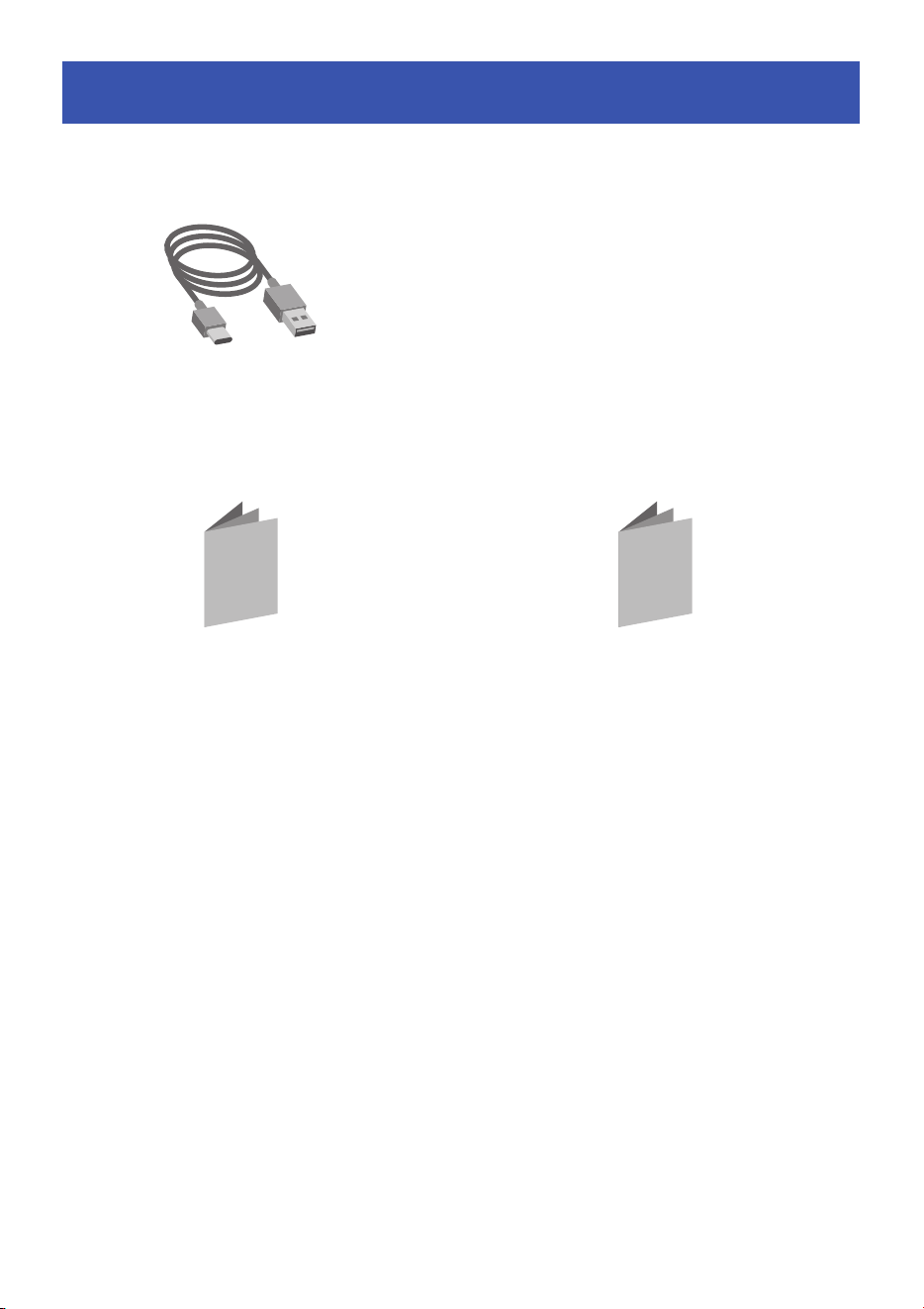
Included accessories
USB cable
(for charging the unit; 1 m,
Type A to Type C)
Quick Start Guide
Safety Brochure
4 En
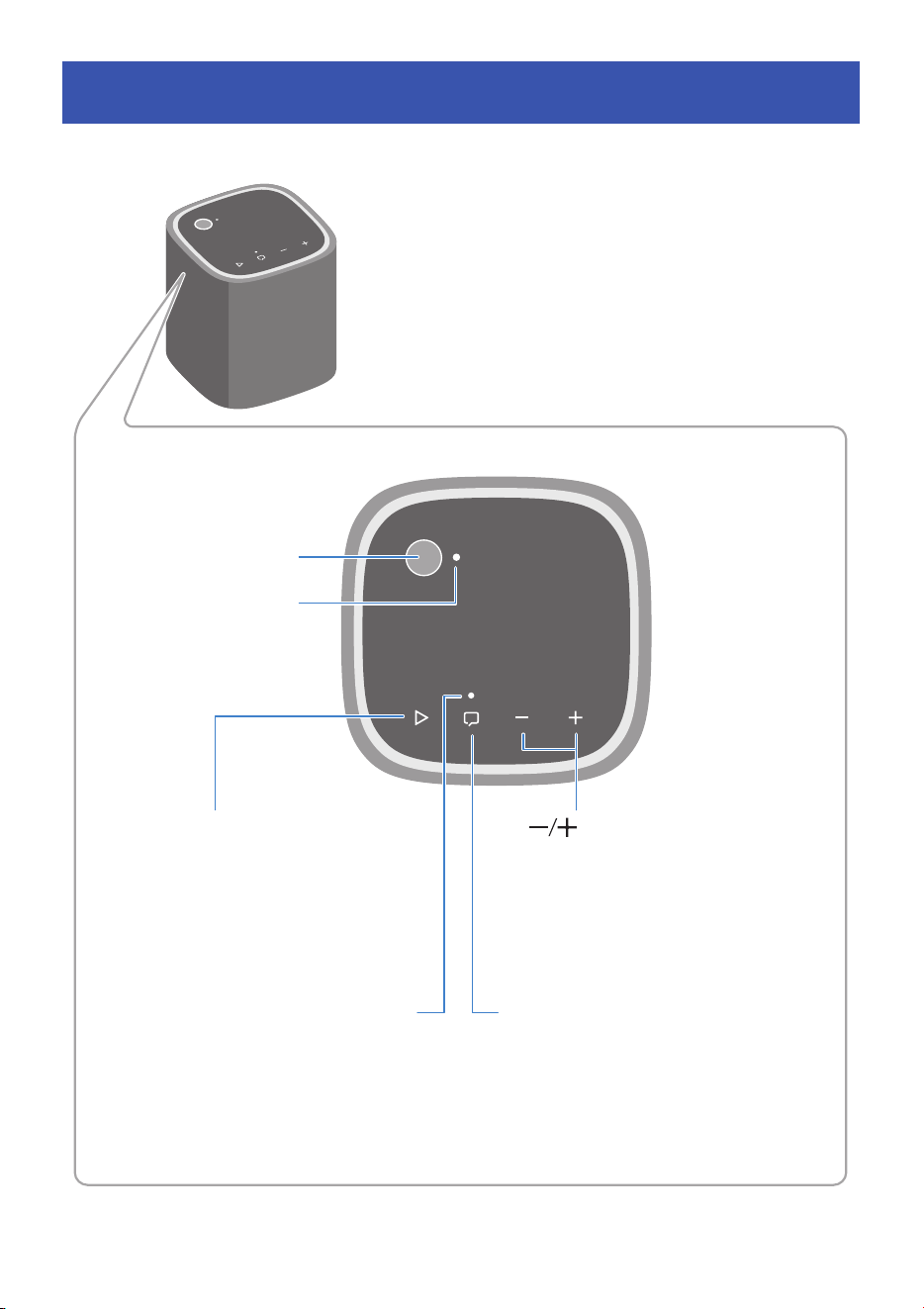
Control buttons
Power button
Power lamp
R Play/Pause button
During playback, press the button twice
quickly to skip to the next song, or three
times to skip backward to the beginning
of the current song or previous song.
Clear Voice lamp Q Clear Voice button
When the Clear Voice function is
enabled, the Clear Voice lamp glows,
and human voices such as dialog in the
audio can be heard more clearly.
Volume buttons
Adjust the volume.
5 En
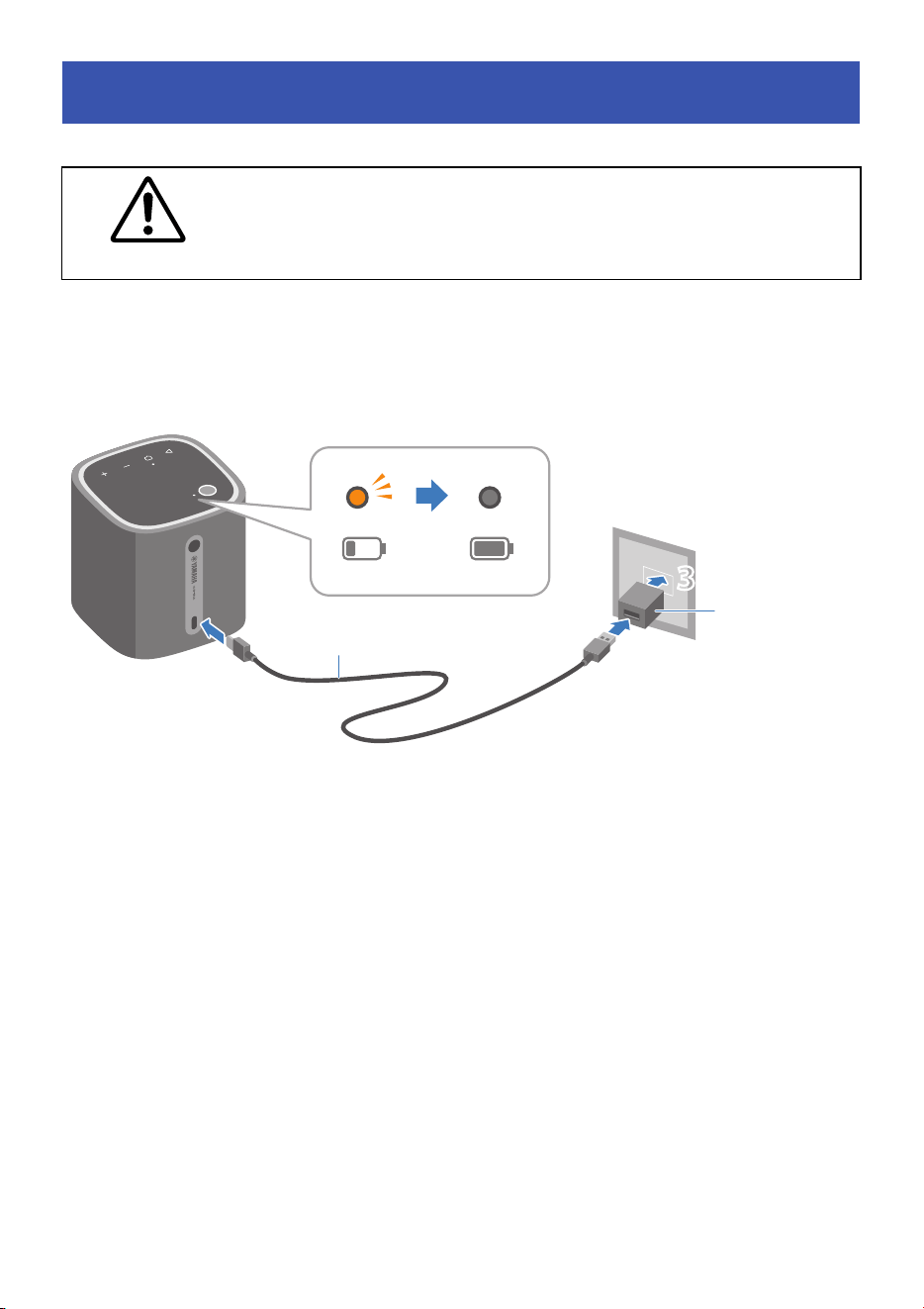
Use a commercially available USB power adapter that can output DC 5 V (2 A or more) when charging
the unit.
A charging cradle (Yamaha CC-T1A; sold separately) can also be used to charge the unit.
1 Connect the Type-C connector of the USB cable to the USB port on this unit.
2 Connect the Type-A connector of the USB cable to the USB power adapter.
3 Plug in the USB power adapter to an AC wall outlet.
The power lamp glows orange and charging will start. When charging is completed, the power
lamp turns off.
NOTE
• When charging with a DC 5 V (2 A or more) USB power adapter, the charging time is approximately
three hours. Charging time varies depending on the usage environment and conditions.
• If the unit is charged while it is playing at a high volume, the remaining battery may decrease. Turn
down the volume or turn off the unit and wait until charging is complete, and then use it.
Charging the unit
Do not charge the unit when it is wet. Charging with liquid or foreign matter
on the terminals may cause fire, explosion, liquid leakage, electric shock, or
malfunction.
CAUTION
1
2
3
3
USB power
adapter
(commercially
available)
USB cable (included)
6 En
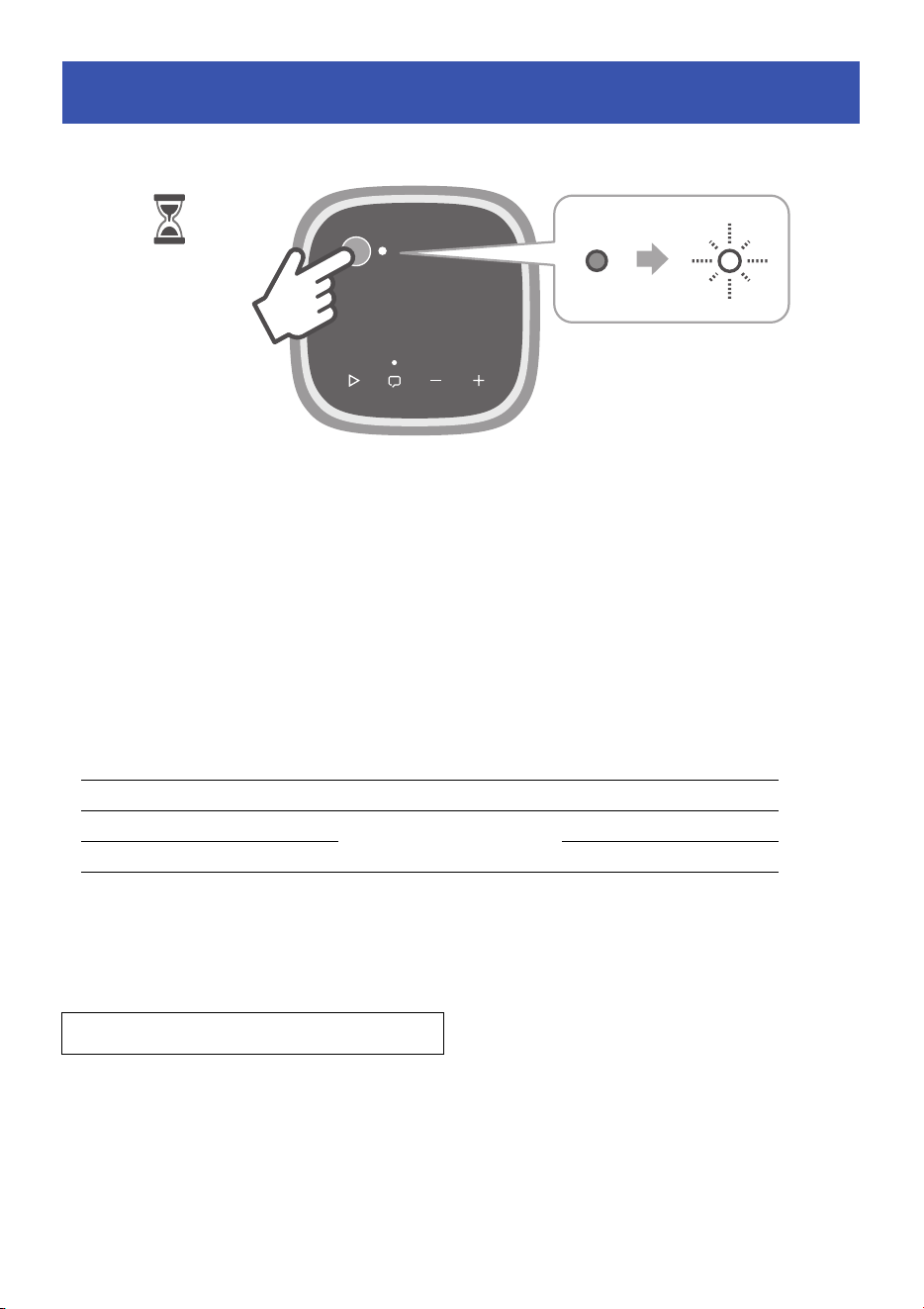
Hold down the power button to turn on the unit.
The power lamp flashes to inform you of the remaining battery level.
− Flashing white: Remaining battery level is more than half.
− Flashing orange: Remaining battery level is less than half.
After showing the remaining battery level, the unit turns on. To turn off the unit, press and hold the
power button again
NOTE
• If the Play/Pause button (R) is pressed for at least five seconds while the unit is on, the power lamp
and a melody inform you of the remaining battery level.
• This unit will automatically switch to standby in any of the following situations (Auto Standby):
− No playback for 20 minutes or more
− No operation for eight hours or more, regardless of playback
A melody will inform you of the status of this unit, such as when the power is turned on or when a
Bluetooth device is connected.
To disable the Sound Guide, hold down the Clear Voice button ( p. 4) for at least three seconds. The
Sound Guide switches between enabled and disabled each time the button is held down.
Turning on the unit
Remaining battery level Power lamp Melody
More than half Flashes white Long sound
Less than half
Flashes orange
Medium length sound
Less than 20% Short sound
Sound guide (default setting: enabled)
1・・・2・・・
7 En
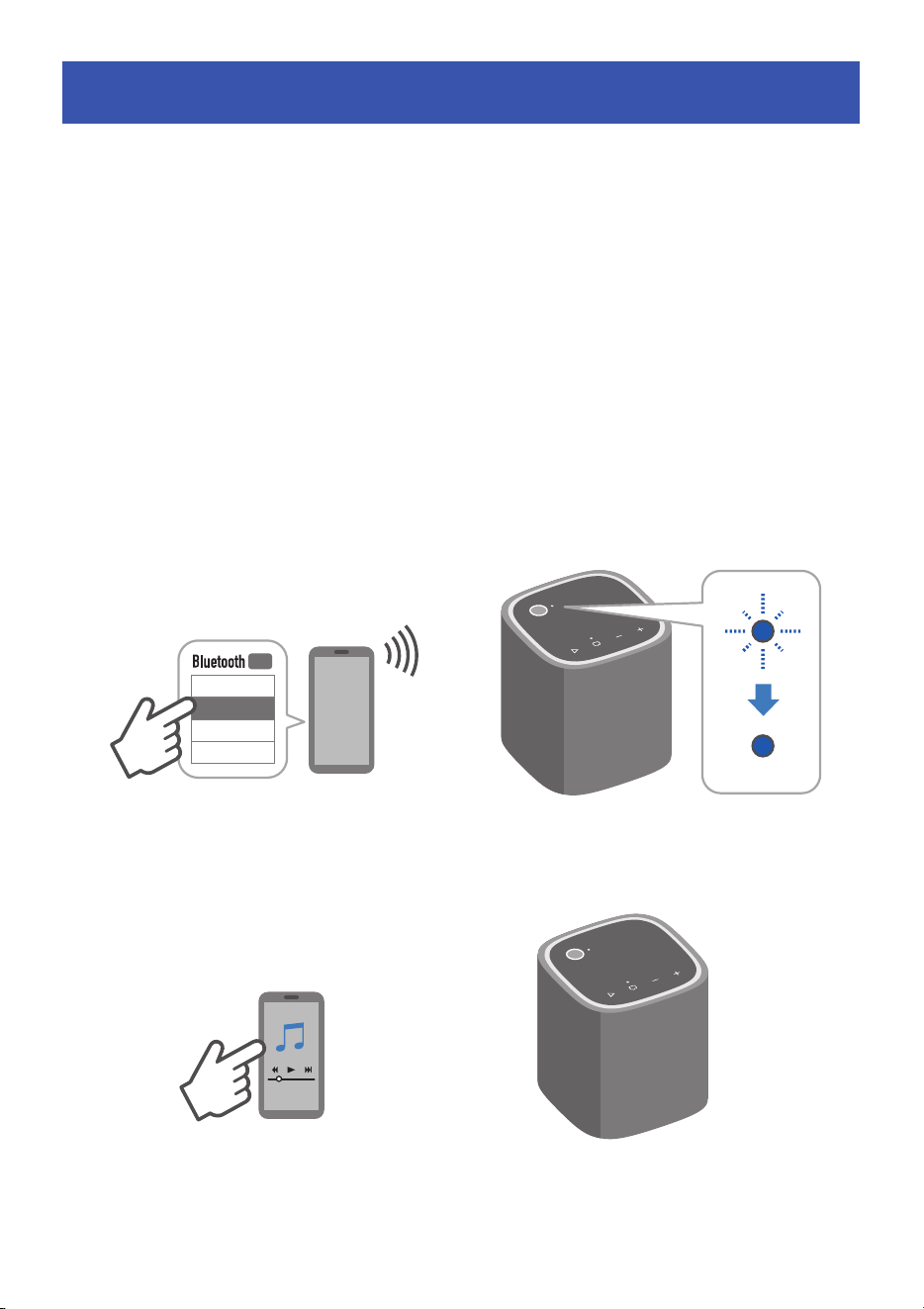
A Bluetooth device can be connected when the power lamp is flashing blue.
NOTE
• If other Bluetooth devices have been connected before, the unit will connect to the last connected
device when the unit is turned on. To connect a new Bluetooth device, disconnect the currently
connected Bluetooth device and then connect the new device.
• To terminate the Bluetooth connection from this unit, press the volume (−) button and Play/Pause
(R) ( p. 4) button simultaneously for at least five seconds.
1 On the Bluetooth device, enable the Bluetooth function.
2 On the Bluetooth device, select this unit (Yamaha WS-B1A) from the list of
available devices to connect to.
If a passkey is required, enter the number “0000”.
When the connection is established, the power lamp glows blue.
3 Play audio content on the Bluetooth device.
Connecting a Bluetooth® device
WS-B1A
*****
*****
*****
ON
♩
㽈
♪
♬

8 En
Try following the instructions described in “Troubleshooting” first when the unit does not function
properly. If an error occurs, the lamp flashes to notify you. See “List of lamp displays” ( p. 13) for
details.
If the unit does not function properly after following the instructions to solve the problem, restart or
initialize it. ( p. 12)
If the unit still does not function properly even after following these instructions, turn off the unit and
contact the nearest authorized Yamaha dealer or service center.
The unit cannot be charged / It takes a long time to charge
A USB power adapter that is not compatible with the unit is being used.
Use a USB power adapter that can output DC 5 V (2 A or more). ( p. 5)
The USB power adapter and this unit are not properly connected.
Check that all connections are made properly. ( p. 5)
Ambient temperature is too high or too low.
Charge the unit within the temperature range of 5°C to 35°C. ( p. 5)
Charging takes a long time.
It is possible that charging is stopped. Disconnect and reconnect the USB cable and charge the
unit again. ( p. 5)
The protection circuitry of this unit has been activated.
Check the lamp display. ( p. 13)
The unit is connected to a USB charging compatible port on a computer.
This function is not guaranteed. Use a USB power adapter that can output DC 5 V (2 A or more).
Troubleshooting

9 En
The unit cannot be turned on
The power button is not being pressed and held.
To turn on the unit, press and hold the power button for at least three seconds. ( p. 6)
The remaining battery level is low.
Charge the unit. ( p. 5)
Ambient temperature is too high or too low.
Use the unit within the operating temperature range. ( p. 15)
The unit turns off suddenly
The remaining battery level is low.
Charge the unit. ( p. 5)
NOTE
If the unit is playing at a high volume, the remaining battery may decrease and the unit may turn
off even if it is charging. In this case, turn off the unit, and then fully charge it before use.
The Auto Standby function turned off the unit.
Turn on the unit again. ( p. 6)
Ambient temperature is too high or too low.
Use the unit within the operating temperature range. ( p. 15)
The rechargeable battery in the unit has deteriorated.
Contact the nearest authorized or Yamaha dealer or service center.

10 En
The unit cannot be connected to a Bluetooth device
The name of this unit is not displayed in the list of available devices to connect to on the
Bluetooth device.
Try disabling and re-enabling the Bluetooth function of the Bluetooth device. The name of this
unit may then be displayed.
This unit cannot be connected to the Bluetooth device even though the name of the unit
is displayed in the list of available devices to connect to on the Bluetooth device.
Try deleting the name of this unit from the list and connecting the unit to the Bluetooth device
again. The unit may then be connected to the Bluetooth device.
The Bluetooth device is not turned on.
Turn on the Bluetooth device and ensure that its Bluetooth function is enabled.
The unit is connected to another Bluetooth device.
Terminate the current Bluetooth connection, and then connect to the new device. ( p. 7)
The unit and the Bluetooth device are too far away from each other.
Move the Bluetooth device and/or the unit so that they are closer to each other.
The audio output destination on the Bluetooth device is not set to this unit.
Select the unit as the audio output destination on the Bluetooth device.
Electromagnetic waves being emitted from devices using 2.4 GHz (such as microwave
ovens or wireless devices) are obstructing the wireless communication.
Do not use the unit near such devices.
This unit has been initialized.
The connection information will be deleted when the unit is initialized. Delete the name of this
unit from the list of available devices to connect to on the Bluetooth device and then connect to
the Bluetooth device again. ( p. 7)
The passkey for the Bluetooth device is not “0000”.
Bluetooth devices with a passkey other than “0000” cannot be used.
The Bluetooth device you are using does not support the A2DP profile.
Use a Bluetooth device that supports the A2DP profile.

11 En
No sound
The unit and Bluetooth device are not connected.
Connect to the Bluetooth device. ( p. 7)
The volume is too low.
Turn up the volume. ( p. 4)
Broken, distorted, or unusual sound is heard from the unit
The volume is too high.
Turn down the volume. ( p. 4)
Electromagnetic waves being emitted from devices using 2.4 GHz (such as microwave
ovens or wireless devices) are obstructing the wireless communication.
Do not use the unit near such devices.
The unit and the Bluetooth device are too far away from each other.
Move the Bluetooth device and/or the unit so that they are closer to each other.
Noise is emitted from electronic devices installed near the unit
The Bluetooth connection is unstable.
Install this unit away from electronic devices.

12 En
If the unit does not function properly after following the instructions described in “Troubleshooting”,
restart or initialize (factory reset) the unit.
Restarting the unit
Press and hold the power button for at least 10 seconds to restart the unit. The connection
information will not be deleted even if the unit is restarted.
If the unit does not turn on automatically after restarting, press and hold the power button for at least
three seconds to turn on the unit.
Initializing the unit
If the unit does not function properly even after restarting, initialize it. When the unit is initialized, the
factory settings will be restored and all connection information will be deleted.
1 Press the power button while holding down the Clear Voice button in standby
state.
The Clear Voice lamp flashes.
2 Press the Play/Pause button while the Clear Voice lamp is flashing.
The unit will be initialized.
Restarting or initializing the unit
13 En
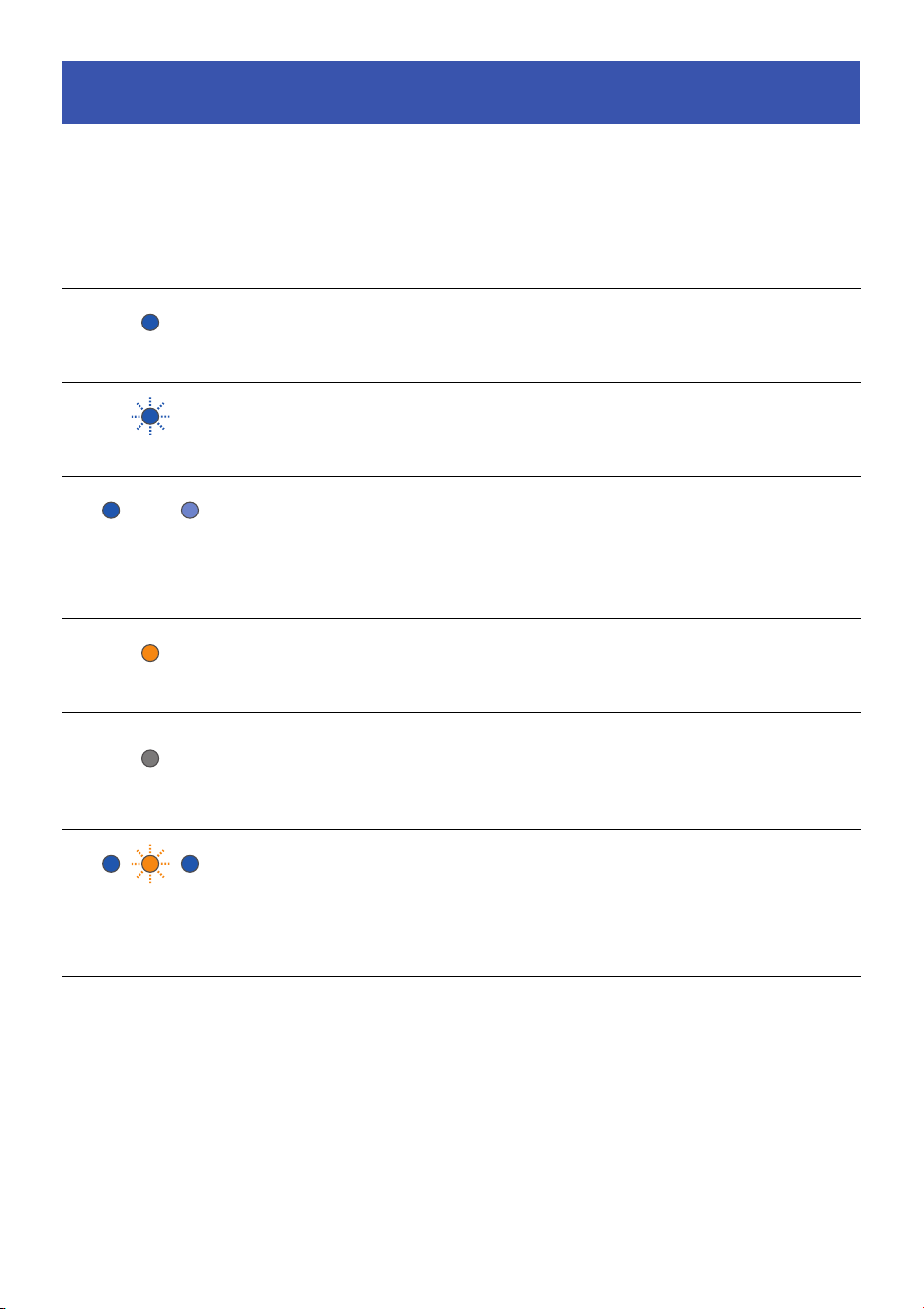
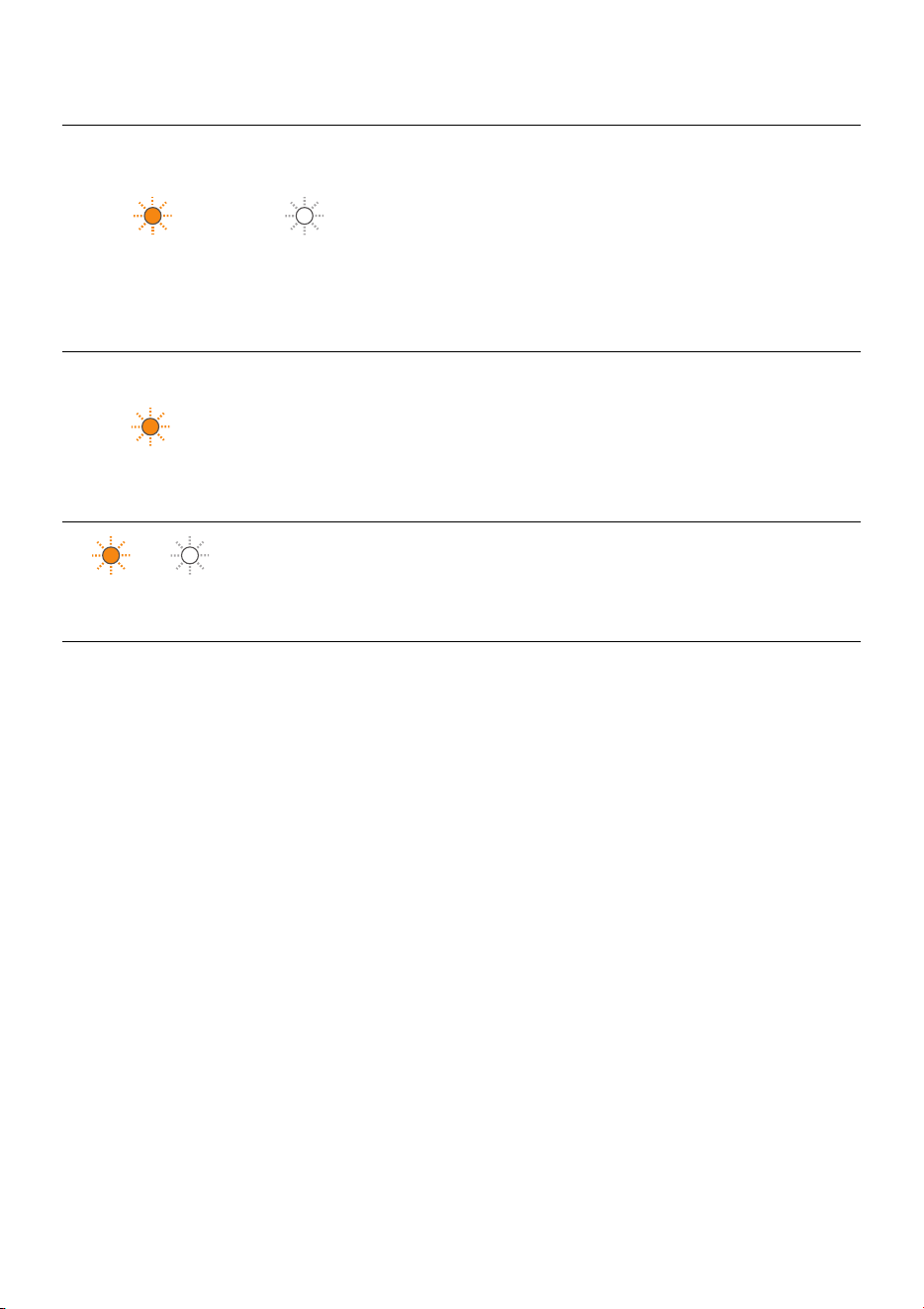
The status of this unit is shown by the color of the lamp (white, blue, or orange) and by glowing/
flashing.
List of lamp displays
Power lamp
Clear Voice
lamp
Power status Status of the unit Solution
Glowing blue
−On
Connected to a
Bluetooth device
−
Flashing blue
−On
Waiting for the
Bluetooth
connection
−
Glowing blue
brightly and dimly
alternately
−On
Charging (when
the unit is
connected to a
Bluetooth device)
−
Glowing orange
− Standby Charging −
Off
−Standby
Charging is
completed or the
unit is in standby
state.
−
Flashes orange four
times while glowing
blue or flashing blue
−On
Remaining battery
level is less than
20%.
Charge the unit.
14 En
* If an error occurs and the unit does not function properly even after following the instructions to
solve the problem, turn off the unit and contact the nearest authorized Yamaha dealer or service
center.
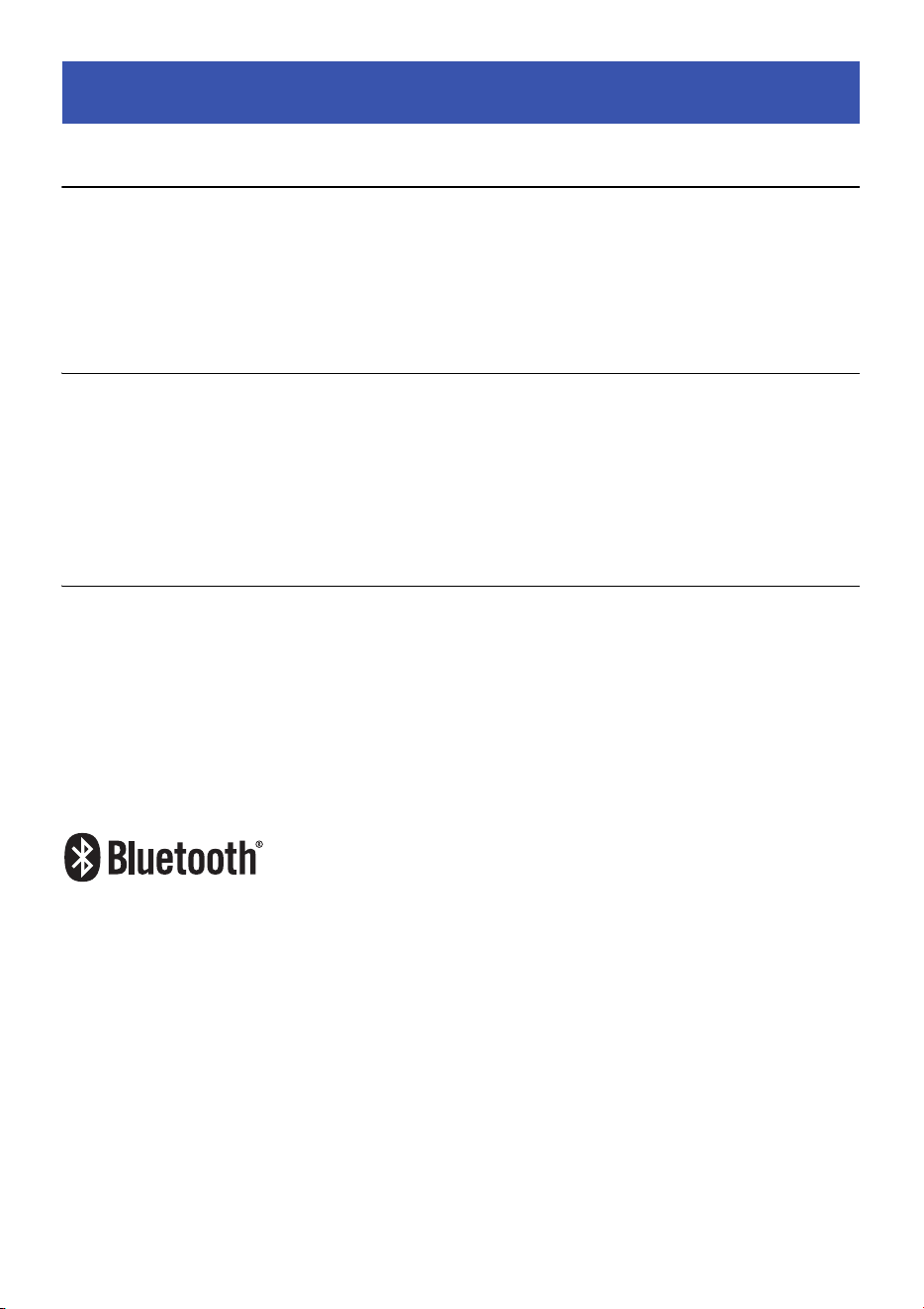
The power lamp and Clear Voice
lamp are flashing.
On/Standby An error occurred*
Unplug the USB
power adapter from
the AC wall outlet,
and then plug it in
again.
If the lamps are still
flashing, restart the
unit. ( p. 12)
Flashing orange
−
On/Standby (in
charging state)
An error occurred*
Unplug the USB
power adapter from
the AC wall outlet,
and then plug it in
again after 5 to
10 minutes.
Flashing orange and
white alternately
−OnAn error occurred*
Turn off the unit, and
then turn it on again
after 5 to 10 minutes.
Power lamp
Clear Voice
lamp
Power status Status of the unit Solution
15 En
Bluetooth
Bluetooth version Bluetooth Version 5.0
Supported profiles A2DP (Advanced Audio Distribution Profile)
AVRCP (Audio/Video Remote Control Profile)
Maximum communication range Approx. 10 m (33 ft) (without interference)
Power
Built-in rechargeable battery Lithium-ion battery
Continuous playback time Approx. 12 hours on a full charge (IEC62396-1)
Charging time Approx. 3 hours
(Playback/charging time varies depending on the usage environment and conditions.)
Input DC5V, 2A
General
Dimensions (W × H × D) 88 × 105 × 88 mm (3-1/2" × 4-1/8" × 3-1/2")
Weight 0.49 kg (1.08 lb)
Waterproof and dustproof performance IP67
Operating temperature range 5°C to 35°C
The Bluetooth® word mark and logos are registered trademarks owned by Bluetooth SIG, Inc. and any
use of such marks by Yamaha Corporation is under license. Other trademarks and trade names are
those of their respective owners.
Specifications

Yamaha Global Site
https://www.yamaha.com/
Yamaha Downloads
https://download.yamaha.com/
AV21-0206
© 2022 Yamaha Corporation
Published 06/2022
KSOD-A0
10-1 Nakazawa-cho, Naka-ku, Hamamatsu, 430-8650 Japan10-1 Nakazawa-cho, Naka-ku, Hamamatsu, 430-8650 Japan