USER MANUAL
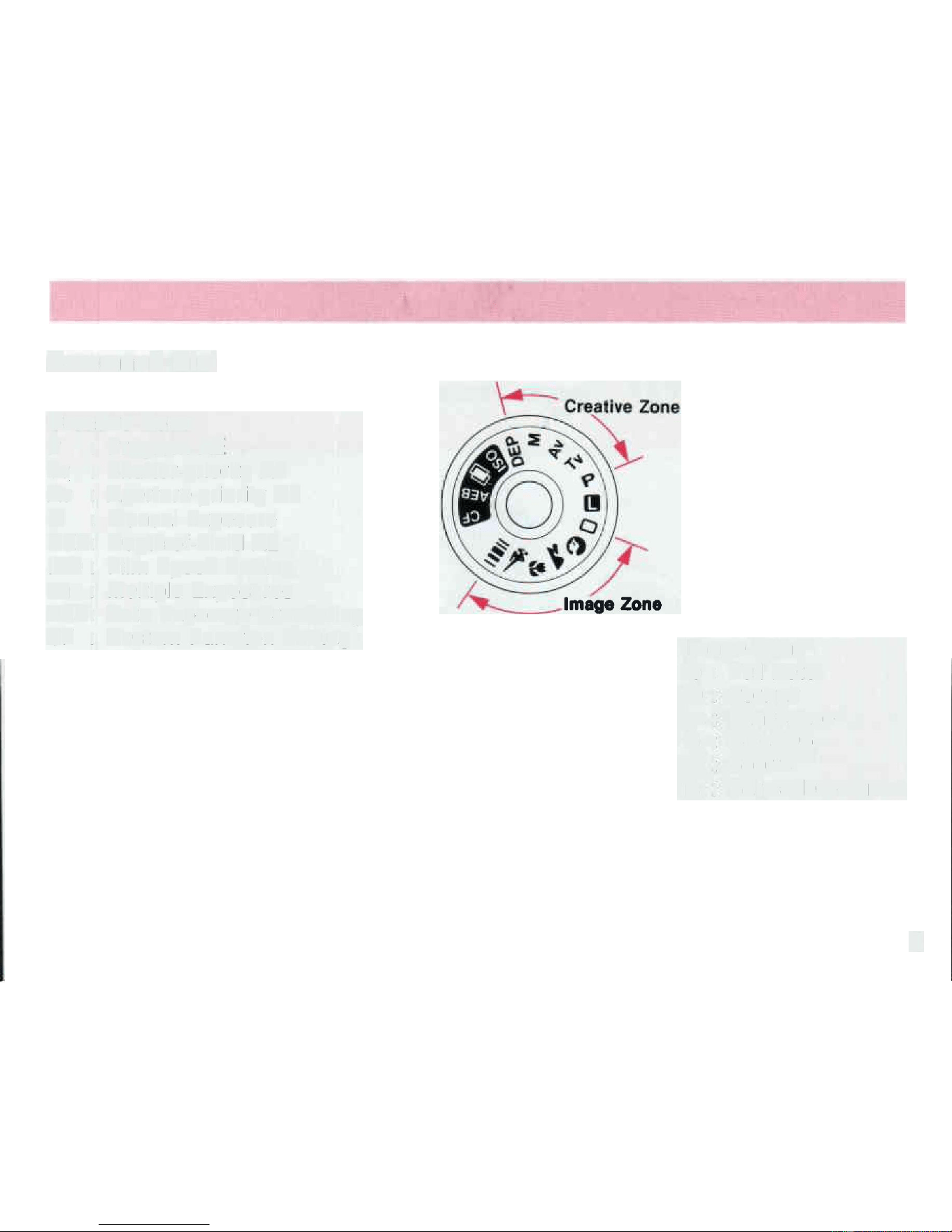
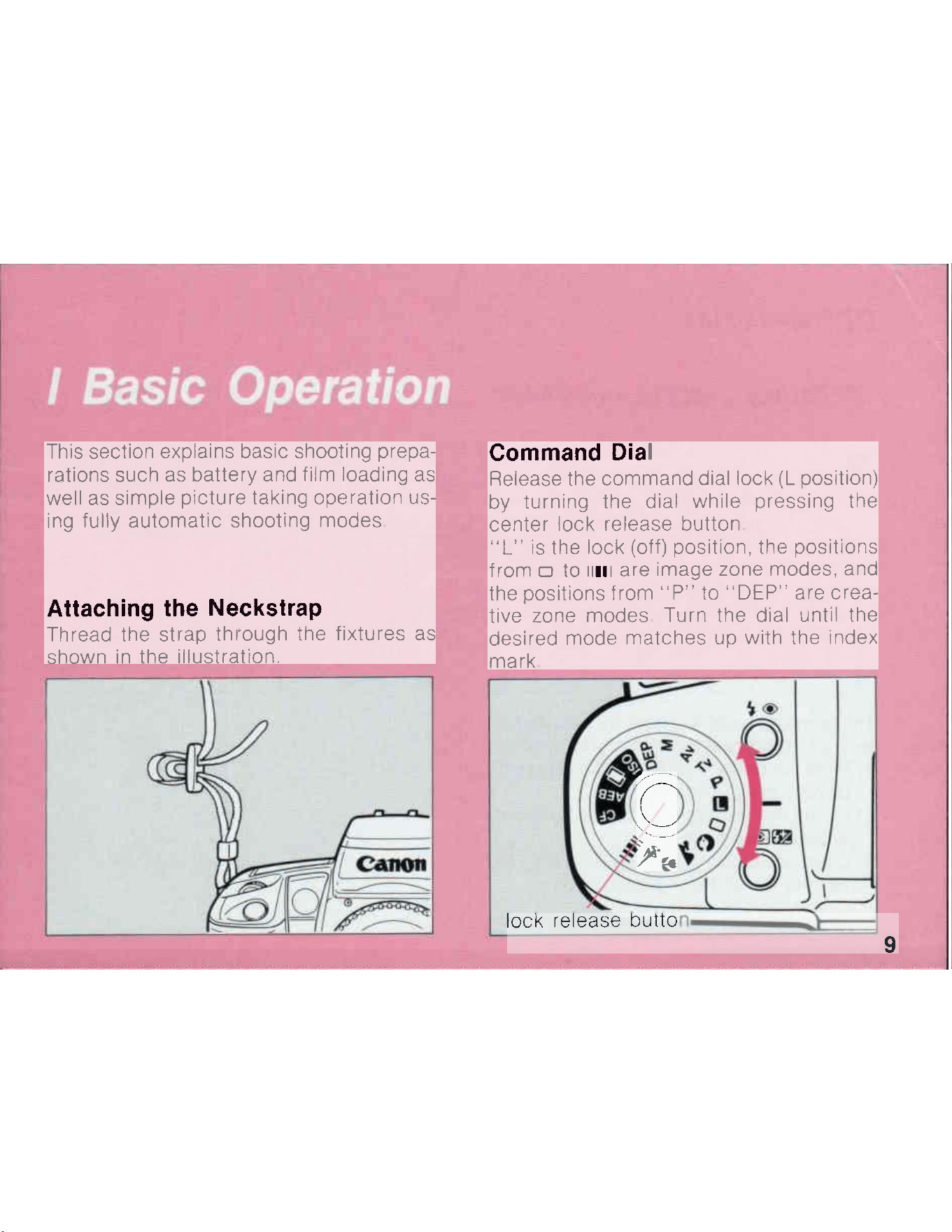
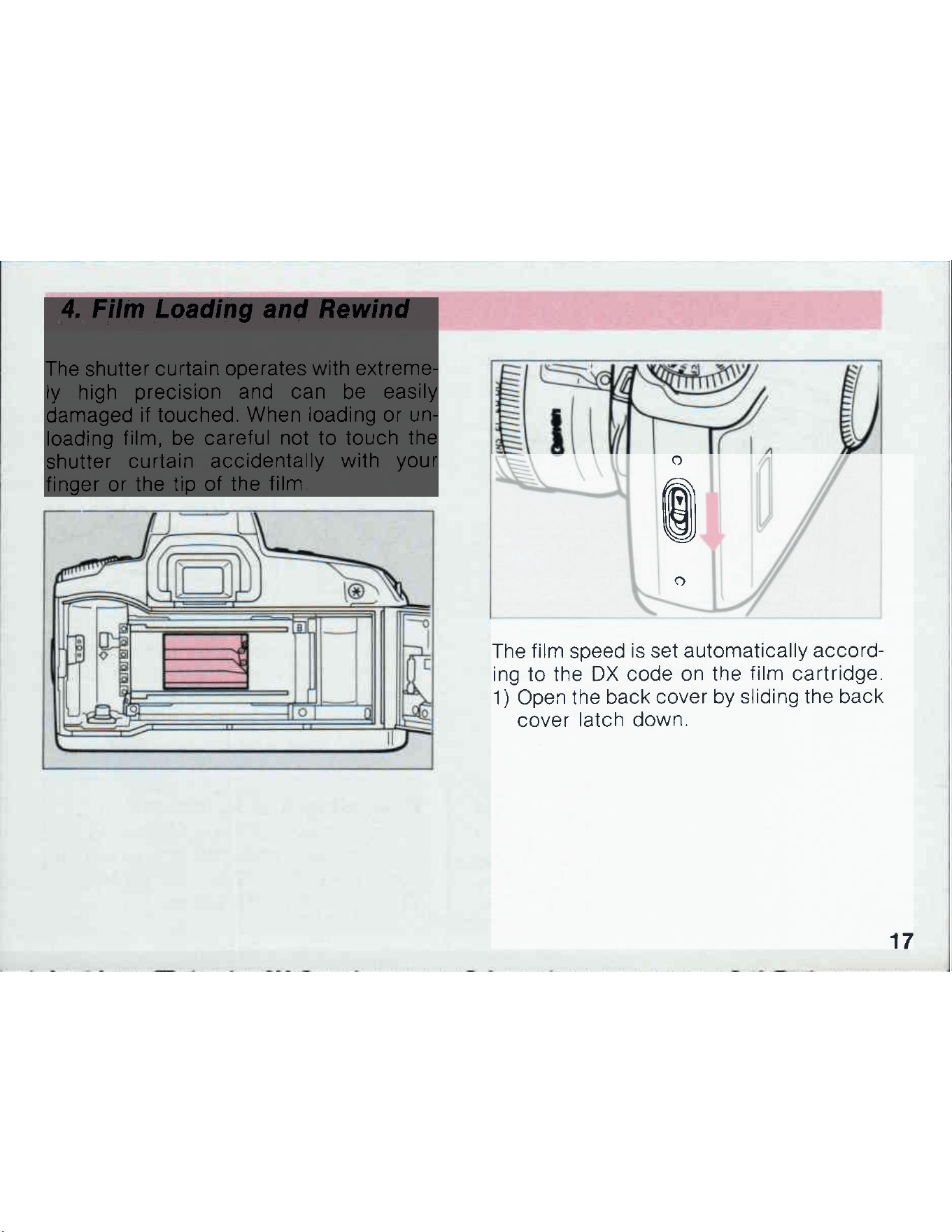
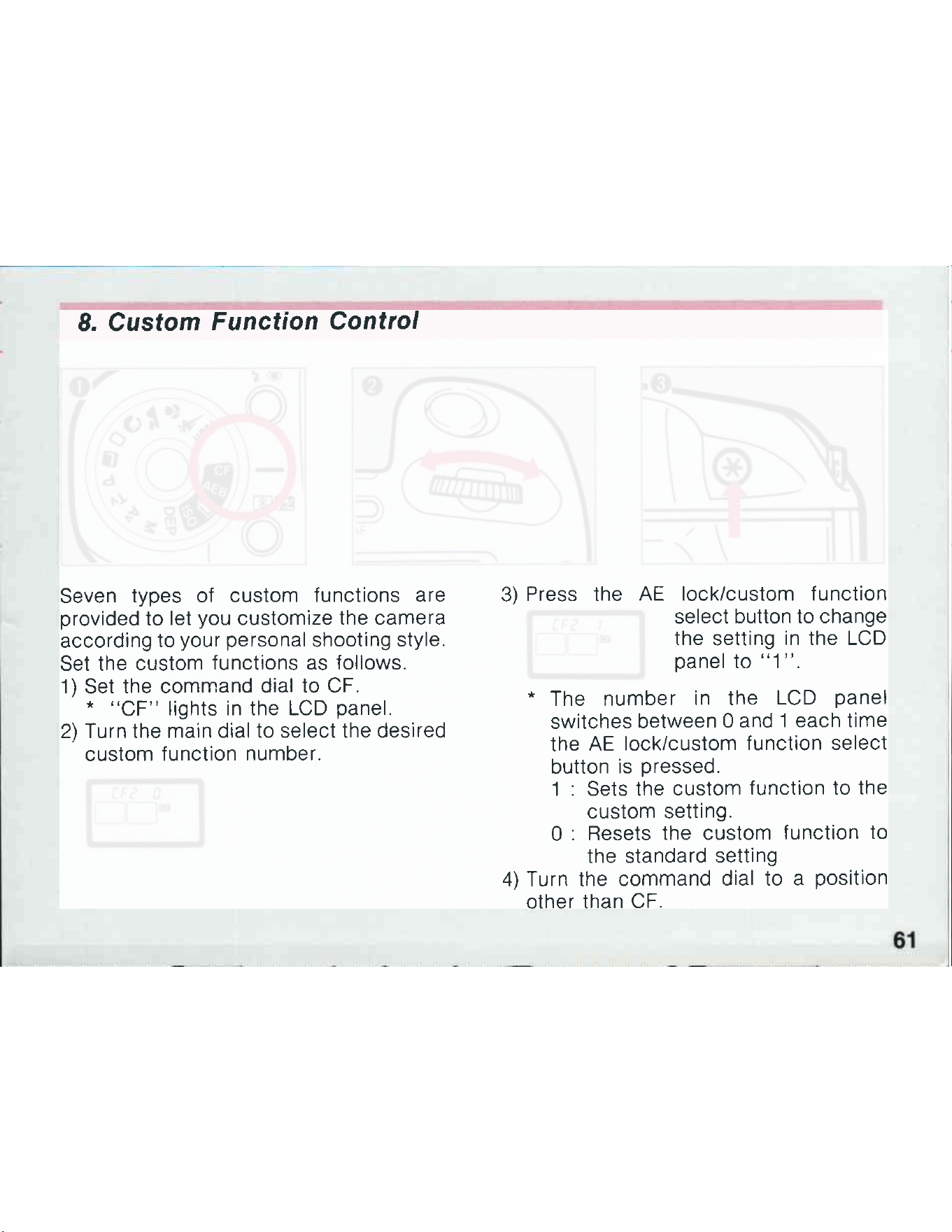
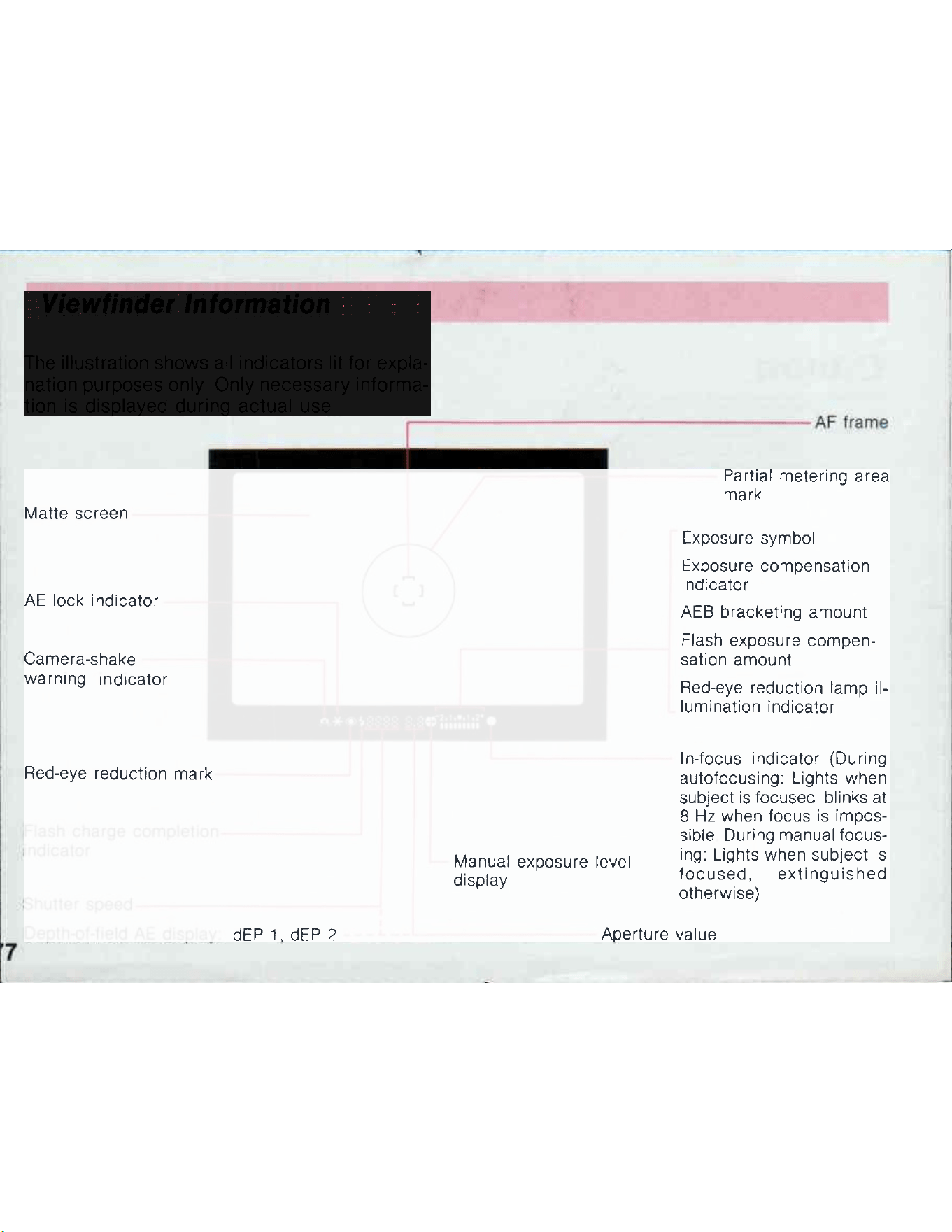
Command
Dial
Creative
Zone
P :
Program
AE
Tv
:
Shutter-priority AE
Av
:
Ap
e
r
t
u
r
e
-
p
r
i
o
r
i
t
y
AE
M
:
Manual
E
x
p
o
s
u
r
e
DE
P
:
Depth-of-Field AE
I
S
O
:
Film Speed
S
e
tt
i
n
g
�
:
Multiple Exposures
AEB: Auto Exposure
B
r
a
c
ke
t
i
n
g
CF
:
Custom Function Setting
I
m
a
g
e
Z
o
n
e
o
:
Full
A
u
t
o
(I
:
P
o
r
t
r
a
i
t
M-
;
La
nds
c
ape
&
:
C
l
o
s
e
-
u
p
'-.:
S
po
r
t
s
11
11
1
:
Bar-code
p
r
o
g
r
a
m
4
I
n
t
r
o
d
u
c
t
i
o
n
Thank you for selecting a Canon
EOS
c
ame
r
a
The
EOS
1
0
0
i
s
an
autofocus
SLR camera
i
n
co
r
po
r
a
t
•
i
n
g
advanced functions designed for ease of
use,
and
f
e
a
t
u
r
e
s
a
silent
drive
mechanism
to make
i
t
t
h
e
quietest camera
i
n
EOS
series Moreover, the
E
O
S
1
0
0
allows
i
n
p
u
t
of up to five bar-code programs
f
ro
m
t
he
Bar Code Book
containing
sample
p
ho
t
o
g
r
a
p
h
s
and
corresponding
bar codes for setting
opt
i
m
um
shooting data
I
nc
o
r
p
o
r
a
ti
n
g
the
l
a
t
es
t
E
O
S
t
e
c
hn
o
l
•
o
g
y
,
the EOS
1
0
0
i
s
packed
w
i
t
h
features
i
n
c
l
u
d
i
n
g
a
b
u
i
l
t
-
i
n
a
u
t
o
z
o
o
m
flash
w
i
t
h
automatic
flash
c
o
v
e
r
•
age for 28mm wide-angle
t
e
n
s
e
s
and
t
w
i
n
e
l
ec
t
r
o
n
i
c
i
n
p
u
t
dials for superior
o
p
e
r
a
b
i
l
i
t
y
.
Particularly
benefi•
cial
i
s
t
h
e
EOS
1
O
O
'
s
silent
operation
which
a
ll
o
w
s
you to
t
ake
p
i
c
t
ure
s
i
n
situations
normally avoided wi
t
h
other cameras due to their distracting operation
n
o
i
s
e
* The
explanations
i
n
this
i
ns
t
r
u
c
t
i
o
n
book
a
ss
u
m
e
use of
t
h
e
camera
with
t
he
E
F
28-80mm
f/
3
.
5
-
5.
6
USM zoom
l
e
ns
attached
However, operation
i
s
basically
the same for any
E
F
l
en
s
F
e
a
t
u
r
es
1
.
Silent drive
mechanism
provides
quiet
film
w
i
n
d
•
i
n
g
and
r
e
w
i
nd
i
n
g
2. Bar-code system allows
i
n
p
u
t
of up to five
b
a
r
-
c
o
d
e
programs for
s
e
tt
i
n
g
optimum shooting
data
3.
Auto zoom flash
automatically
adjusts the
f
l
as
h
coverage angle according to the
t
e
ns
focal
l
e
ng
t
h
(
2
8
m
m
,
50mm,
8
0
m
m
)
4. Twin
electronic
i
np
u
t
dials for
qu
i
c
k
,
e
ffi
c
i
e
n
t
camera
op
e
r
at
i
o
n
.
5 Cross-type
BASIS
AF sensor and AF auxiliary
l
i
g
h
t
for sure focusing even
with
l
o
w
-
c
o
n
t
r
a
s
t
s
u
b
j
e
c
t
s
6. Command dial
"image
zo
n
e
"
p
ro
v
i
d
e
s
simple,
f
u
lly
automatic
ope
r
a
ti
o
n
A
tt
e
n
t
i
o
n
I
M
P
O
R
T
A
N
T
I
N
F
O
R
M
A
T
I
O
N
The Canon
E
O
S
1
0
0
will give optimum
p
e
r
f
o
r
•
mance
together
w
i
t
h
specially designed Canon
E
F
l
e
n
s
e
s
,
flash
u
n
i
t
s
and other Canon brand
a
c
c
e
s
•
sories.
I
t
i
s
possible that the use
of
i
n
c
o
m
p
a
ti
b
l
e
l
e
ns
e
s
or other
accessories
may
r
esu
l
t
i
n
u
ns
a
t
i
s
•
factory
performance
or damage to your
c
a
m
e
r
a
.
We therefore suggest the use of Canon
EF
l
e
n
s
es
and
accessories
Damage to your Canon
c
a
m
e
r
a
as a
r
es
u
l
t
of
malfunction
or
i
m
p
r
o
p
e
r
c
o
n
ne
c
t
i
o
ns
caused by the use
of
i
nc
omp
a
t
i
b
l
e products
m
a
y
void
i
t
s
w
a
r
r
a
n
t
y
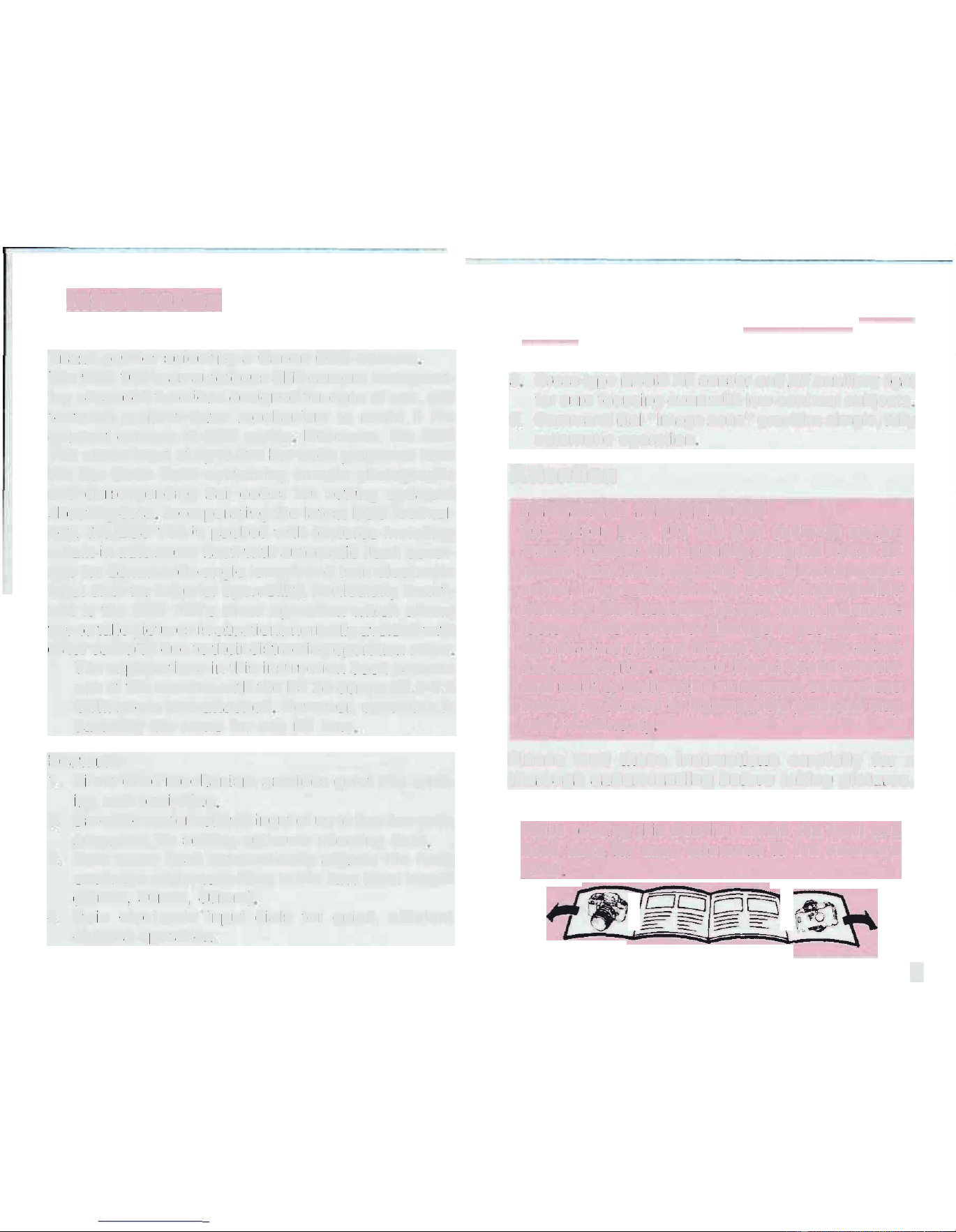
Please read these instructions carefully for a
thorough understanding
b
e
f
or
e
taking
p
i
ct
u
r
e
s
.
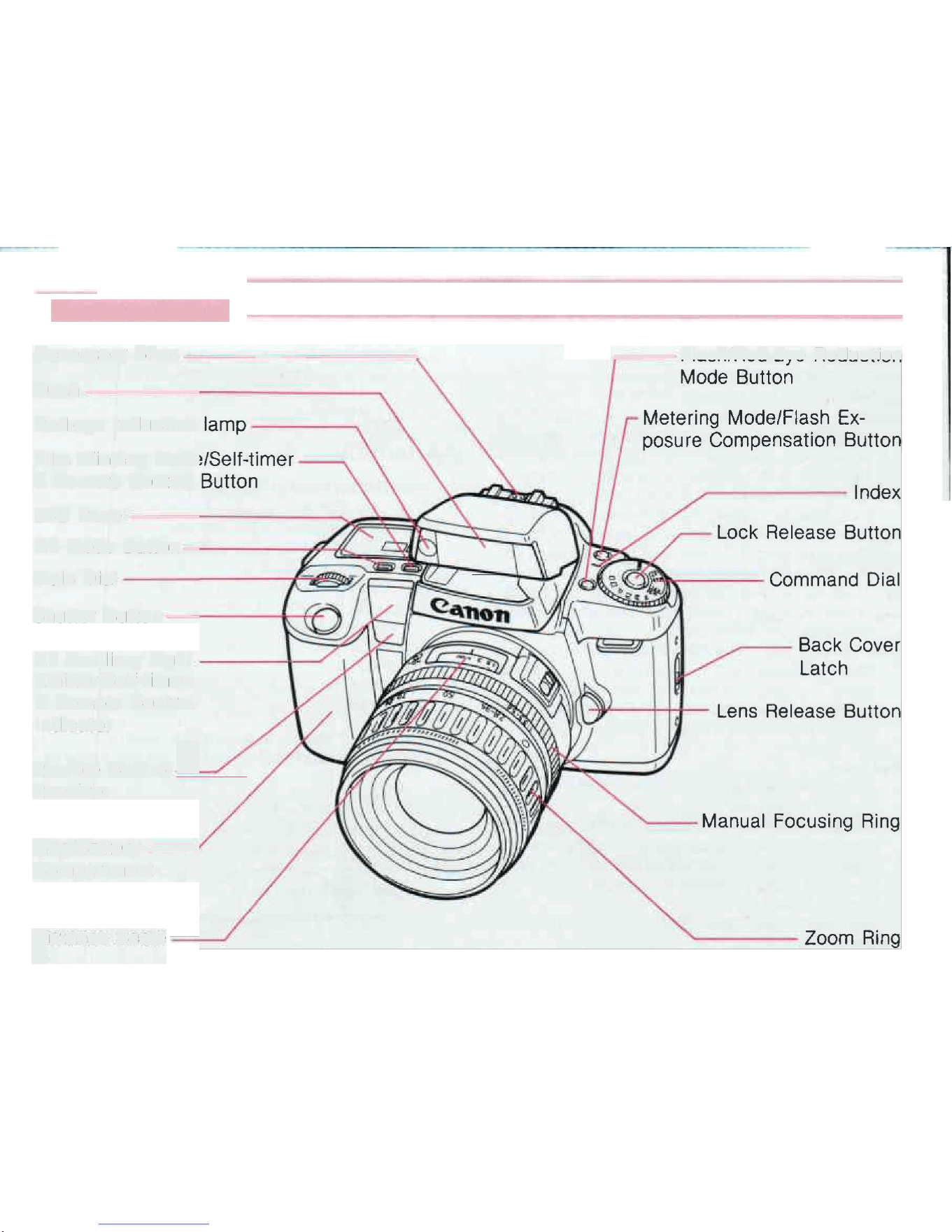
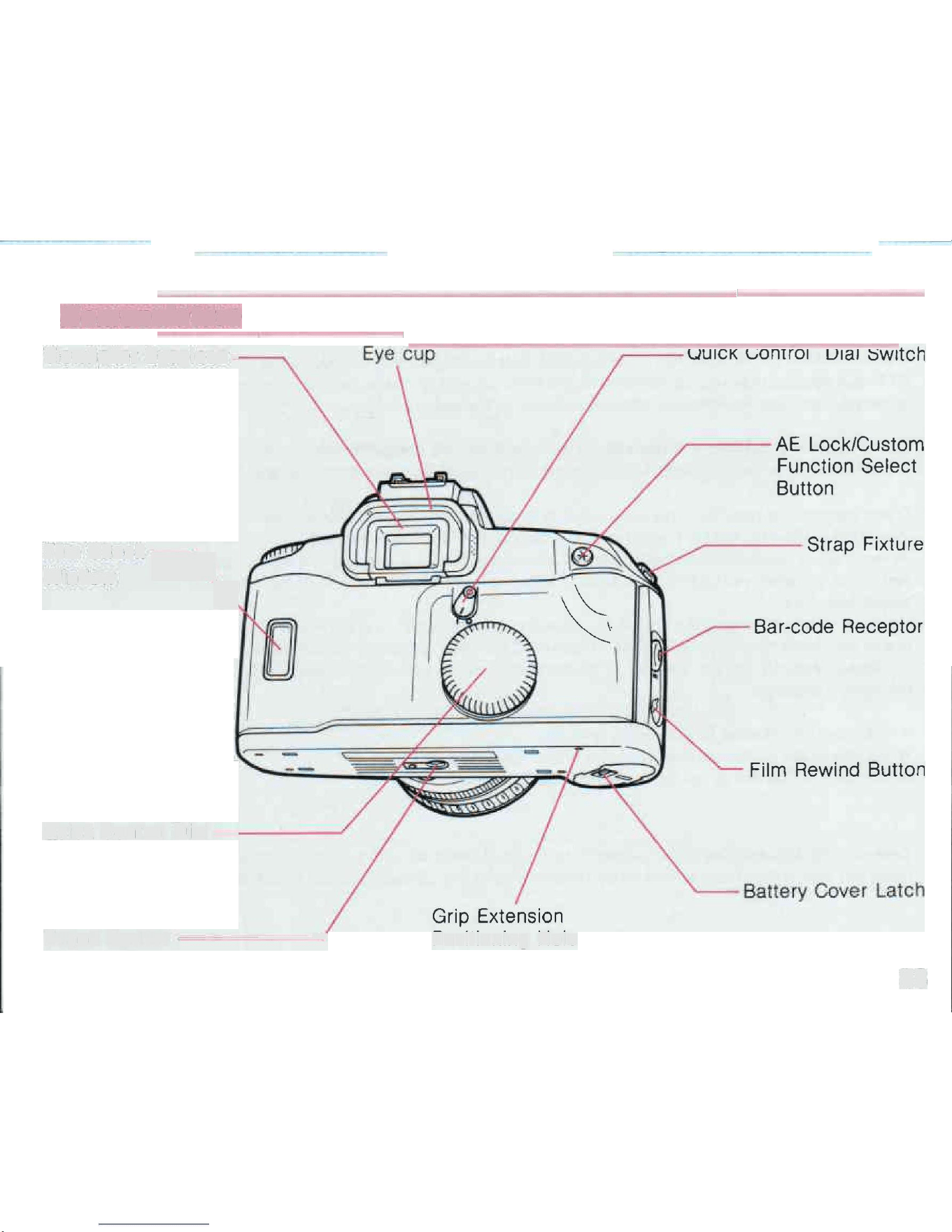
While
reading this
booklet,
u
n
f
o
l
d
the front
and
back flaps for easy
reference
to the
c
a
m
e
r
a
'
s
parts
•
2
N
o
m
e
n
c
l
a
t
u
r
e
Accessory
S
h
o
e
-
-
------
-
•
F
l
a
s
h
-
-
-
---
-
---
-
•
R
e
d-e
y
e
r
e
d
u
c
t
i
o
n
l
a
m
p
-
--
•
Film Winding
M
o
de
/
S
e
l
f
-ti
m
e
r
-
•
&
Remote
Control
B
u
t
t
o
n
LCD
P
a
n
e
l
-
------
���
,tS
AF Mode
B
u
tt
o
n
-
---
-£
���
Main
Dial
w,--,._
-.,_
�
,
Shutter Button
-
-
--
--
----1-I-
AF Auxiliary
Li
g
h
t
-
-
-
----.L-
•
E
m
i
tt
e
r
/
S
e
l
f
-t
i
m
e
r
&
Remote
Control
I
n
d
i
cat
o
r
�
/
--
F
l
a
sh
/
R
ed
-
E
y
e
R
ed
u
c
t
i
o
n
Mode Button
Metering Mode/Flash
E
x
•
posure Compensation Button
--
-
Back
C
o
v
e
r
L
a
tc
h
Lens
R
el
e
a
se Button
R
e
m
o
t
e
Control
R
e
c
e
i
v
e
r
Grip/Battery
-
•
C
o
m
p
a
r
t
m
e
n
t
�
i
s
t
a
n
c
e
S
c
a
r
e
/"
/
---
-
Manual
F
o
c
u
s
i
n
g
R
i
ng
No
m
e
n
c
l
a
t
u
r
e
V
i
e
w
f
i
n
d
e
r
E
y
ep
i
e
c
e
-
-
Fiim
C
h
e
c
k
�
Window
""'
Quick Control
D
ia
l
-
--
-
--
�
-
-
Q
u
i
c
k
Control Dial
S
w
it
c
h
-
--
-
A
E
L
o
c
k
/
C
u
s
t
o
m
Function
S
e
l
e
c
t
B
u
tt
o
n
-
-
-
-
St
r
a
p
Fixture
Film
R
e
w
i
n
d
B
u
tt
o
n
Tripod Socket
-
-
-
-
-
-
Grip
E
x
t
e
n
s
i
o
n
P
os
i
t
i
on
i
n
g
H
o
l
e
B
a
t
t
e
ry
Cover
L
a
t
c
h
78
1
-
1
·
·
-
-
-=
1
�
1
1
1
/
I I
, '
•
-
-=
�
- --
:_
�
!
-
These devices comply with Part
1
5
of the FCC
R
u
le
s
.
Operation
i
s
subject to the following two
c
o
n
d
i
t
i
o
n
s
:
(
1
)
These devices may not cause
h
a
r
m
f
u
l
i
n
t
e
r
f
e
r
en
c
e
, and (2) these devices must accept any
i
n
t
e
r
f
e
r
en
c
e
received.
i
n
cl
u
d
i
n
g
i
n
t
e
r
fe
re
n
ce
that may cause
u
nd
e
s
i
r
ed
o
p
e
r
a
t
i
on
.
Do not make any changes or
m
od
i
f
i
c
a
ti
o
n
s
to the equipments unless otherwise specified
i
n
the
i
ns
tr
u
c
t
i
o
n
s
.
I
f
such changes or modifications should be made, you could be required to stop operation of the
e
q
u
ip
me
n
t
s
.
These equipments have been tested and found to comply with the
l
i
m
i
t
s
for a class B digital device, p
u
r
s
u
a
n
t
to part
1
5
of the FCC Rules. These
li
m
i
t
s
are designed to provide reasonable protection against
h
a
r
m
f
u
l
i
n
•
terference
i
n
a
r
e
s
i
d
en
t
i
a
l
i
n
s
t
a
ll
a
t
i
o
n
.
These equipments
g
e
ne
r
a
t
e
,
use and can radiate radio frequency energy
and,
i
f
not
i
n
st
a
ll
e
d and used
i
n accordance
w
i
t
h the
i
ns
t
r
u
c
t
i
o
n
s
, may cause
h
a
r
m
f
u
l
i
n
t
e
r
f
e
r
e
n
c
e
to
r
a
d
i
o
c
o
mm
un
i
c
a
t
i
o
n
s
.
However, there
i
s
no guarantee that
i
nt
e
r
f
e
r
e
n
c
e
will not
occur
i
n
a particular
i
n
s
t
a
ll
a
t
io
n
.
I
f
these
e
q
u
ip
•
ments do cause harmful
i
nt
e
r
f
e
r
e
n
c
e
to radio or television reception, which can be
determined
by t
u
rn
i
n
g
the equipments off and on, the user
i
s
encouraged
to try to correct the
i
n
t
erf
e
r
e
nc
e
by one or more of th
e
following
m
e
a
s
u
r
e
s
:
•
R
eo
r
i
e
n
t
or relocate the receiving an
t
e
n
na
.
•
I
ncr
e
a
s
e the separation between the equipments and
r
e
c
e
i
v
e
r
.
•
C
on
s
u
l
t
the dealer or an experienced
r
a
d
i
o
rrv
technician for
h
e
l
p
r--
These
digital
apparatuses do not exceed the Class B
l
i
m
i
t
s
for radio noise emissions from digital
a
p
pa
r
:J
tuses set out
i
n
the Radio
I
n
t
e
r
f
e
r
e
n
c
e
Regulations of the Canadian Department of
C
o
mm
u
n
i
c
a
ti
o
n
s
.
79