Product Specifications
Material: ABS + Fabric
Bluetooth Version: V5.3
Wireless Charging: 5W / 7.5W / 15W
Output Power: 10W (5W x 2)
Input Voltage: DC 5V/3A, 9V/3A
Driver: 57mm x 2 Speaker
Speaker Impedance: 4Ω
FM Frequency: 87.5–108MHz
Battery Capacity: 3.7V 1200mAh
Play Time: 3–6 hours (at 50% volume)
Charging Time: 2.5–3 hours
Working Distance: 10 meters
Functions: Bluetooth, TF Card, USB, FM, AUX, TWS
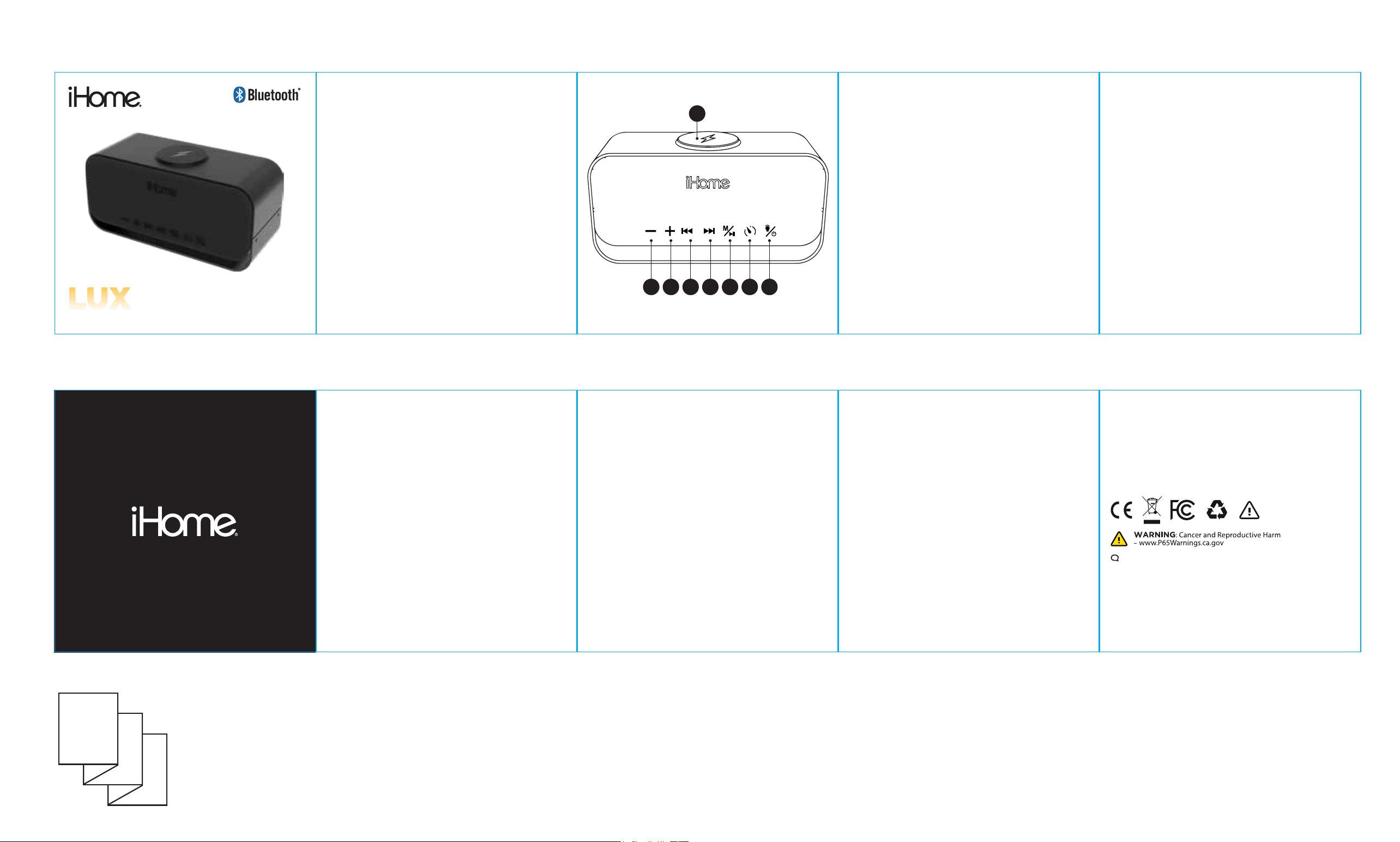
Button Functions & Interfaces
1. Wireless Charging Pad
2. Short / long press to reduce the volume.
3. Short / long press to add the volume.
4. Short press the last song.
5. Short press the next song.
6. Long press function switch BT / White noise / FM mode.
Short press play or pause musics. Short press FM station
scan in FM mode. Short press answer or hang up the
imcoming call. Double press to dial the last call.
MODEL: 2IHSK1015
1
2 3 4 5 6 7 8
7. Short press the timing 15/30/60, Long press for TWS
pairing.
8. Long press to turn on / off. Short press light effects switch.
Double press to quickly turn on / off the lights.
Charging Instructions
To use the wireless charging feature: You must use a USB-C PD
Wall Charger (not included) that is rated for at least 20W. For
best results, use a charger labeled "PD" (Power Delivery) with a
wattage of 30W, 40W, 45W, or 65W. Plug 1 end of the provided
USB C cable to the speaker and plug the other end to a USB-C
PD Wall Charger (not included) to enable wireless charging
Power On / O
To turn on: Press and hold the power button for two seconds. The
speaker will power on and activate the default lighting.
Bluetooth (Wireless) Connection
The speaker defaults to Bluetooth mode when turned on and
supports A2DP-enabled devices. A voice prompt will indicate
when the speaker is in pairing mode and waiting for a connection.
Open the Bluetooth settings on your mobile phone and search
for available devices. Select iHome Lux Speaker from the list to
begin pairing. Once successfully paired, a voice prompt will
sound, and your device will show as connected.
True Wireless Stereo (TWS)
Pairing (Note: This function is only available in Bluetooth mode.) If
you have two iHome Lux Speakers, you can link them together for
a true stereo surround sound experience. Long-press the pairing
button on either speaker to connect them to each other. Once
connected, the two speakers will automatically separate into left
and right audio channels.
Lighting Controls
The iHome Lux Speaker features multiple lighting effects. It
defaults to a warm light setting when powered on. Press the Light
button to cycle through and adjust the different lighting effects.
Hands-Free Calling
Answer / End a Call: Short press the designated button to answer
an incoming call. Short press it again to hang up. Redial: Double
press the button to automatically dial the last called number.
FM Radio Mode
Long press the Mode button to switch to the FM Radio function.
Important: Plug the Type-C charging cable into the speaker's port
to act as a radio antenna (the USB end does not need to be
plugged into a power source). Press the Pause/Play button to
automatically scan and save available radio stations. Short press
the Forward / Backward (+/-) buttons to skip through your saved
channels.
TF Card / USB Drive Mode
Simply insert a TF (MicroSD) card or USB drive into the
corresponding slot. A voice prompt will confirm the connection,
and the speaker will automatically begin playing the audio files.
Use the Forward / Backward (+/-) buttons to skip tracks.
White Noise Mode
Long press the Mode button to switch to White Noise mode. Press
the Forward / Backward (+/-) buttons to select your favorite sleep
sounds.
Safety Precautions
• The equipment complies with the standard GB 4943.1-2022.
• This product is not a toy; keep it out of the reach of children
to prevent accidents.
• Do not place the machine in high-temperature environments,
including direct sunlight, fire sources, or heaters. Do not use
in humid or rainy environments.
• In addition to the provided charging cable, please do not use
other methods to charge the machine.
• Do not disassemble the machine; prohibit any attempt to
repair or modify the machine.
• Avoid dropping, impacting, scratching, or behaviors that
affect the function of the machine.
• If the battery is improperly replaced, there is a risk of burning
or explosion; replace only with the same type or equivalent
type of battery.
• Using the audio at high volume for a long time may cause
damage to your hearing.
• If there is any damage, water ingress, high-temperature
deformation, abnormal sound/heat, or peculiar smells, stop
using the machine immediately and contact the merchant
FCC Warning
T
his device complies with part 15 of the FCC Rules. Operation is subject to the
following two conditions: (1) This device may not cause harmful interference, and
(2) this device must accept any interference received, including interference that
may cause undesired operation.
Any Changes or modifications not expressly approved by the party responsible
for compliance could void the user's authority to operate the equipment.
Note: This equipment has been tested and found to comply with the limits for a
Class B digital device, pursuant to part 15 of the FCC Rules. These limits are
designed to provide reasonable protection against harmful interference in a
residential installation. This equipment generates uses and can radiate radio
frequency energy and, if not installed and used in accordance with the
instructions, may cause harmful interference to radio communications. However,
there is no guarantee that interference will not occur in a particular installation. If
this equipment does cause harmful interference to radio or television reception,
which can be determined by turning the equipment off and on, the user is
encouraged to try to correct the interference by one or more of the following
measures:
20
26 © Lifeworks Technology Group LLC. New York, NY 10018.
iHome is a registered trademark of SDI Technologies Inc., used
under license. The Bluetooth® word mark and logos are registered
trademarks owned by Bluetooth SIG, Inc., and any use of such
marks by Lifeworks Technology Group LLC. is under license. All
other brands are registered trademarks of their respective
companies. USB Type-C™ and USB-C™ are trademarks of USB
Implementers Forum. Made in China
support: 8
77-543-3540
P
ackage Contents:
(1) Speaker, (1) Charging Cable, (1) User Manual
*USB Charger not included.
-R
eorient or relocate the receiving antenna.
-Increase the separation between the equipment and receiver.
-Connect the equipment into an outlet on a circuit different from that to which
the receiver is connected.
-Consult the dealer or an experienced radio/TV technician for help.
* RF warning for Portable device:
The device has been evaluated to meet general RF exposure requirement. The
device can be used in portable exposure condition without restriction.
According to §15.247(e)(i) and §1.1307(b)(1), systems operating under the
provisions of this section shall be operated in a manner that ensures that the
public is not exposed to radio frequency energy level in excess of the
Commission’s guidelines.
According to KDB 447498 (2)(a)(i)
This device contains licence-exempt transmitter(s)/receiver(s) that comply with
Innovation,
Science and Economic Development Canada’s licence-exempt RSS(s). Operation
is subject to the following two conditions:
(1) This device may not cause interference.
(2) This device must accept any interference, including interference that may
cause undesired operation of the device..
WIRELES
S CHARGING SPEAKER
FRONT
BA
CK
D
ouble sided pritning
Accordian Style Booklet
For WPT mode
This equipment complies with FCC radiation exposure limits set forth for an uncontrolled
environment. This equipment should be installed and operated with minimum distance
20cm between the radiator and your body.
This transmitter must not be co-located or operating in conjunction with any other antenna
or transmitter.