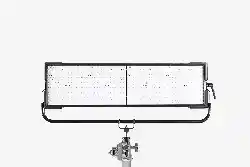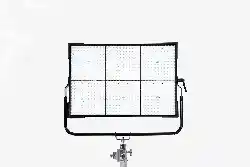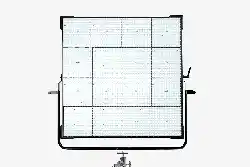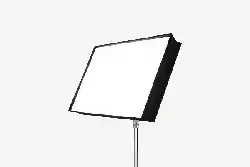
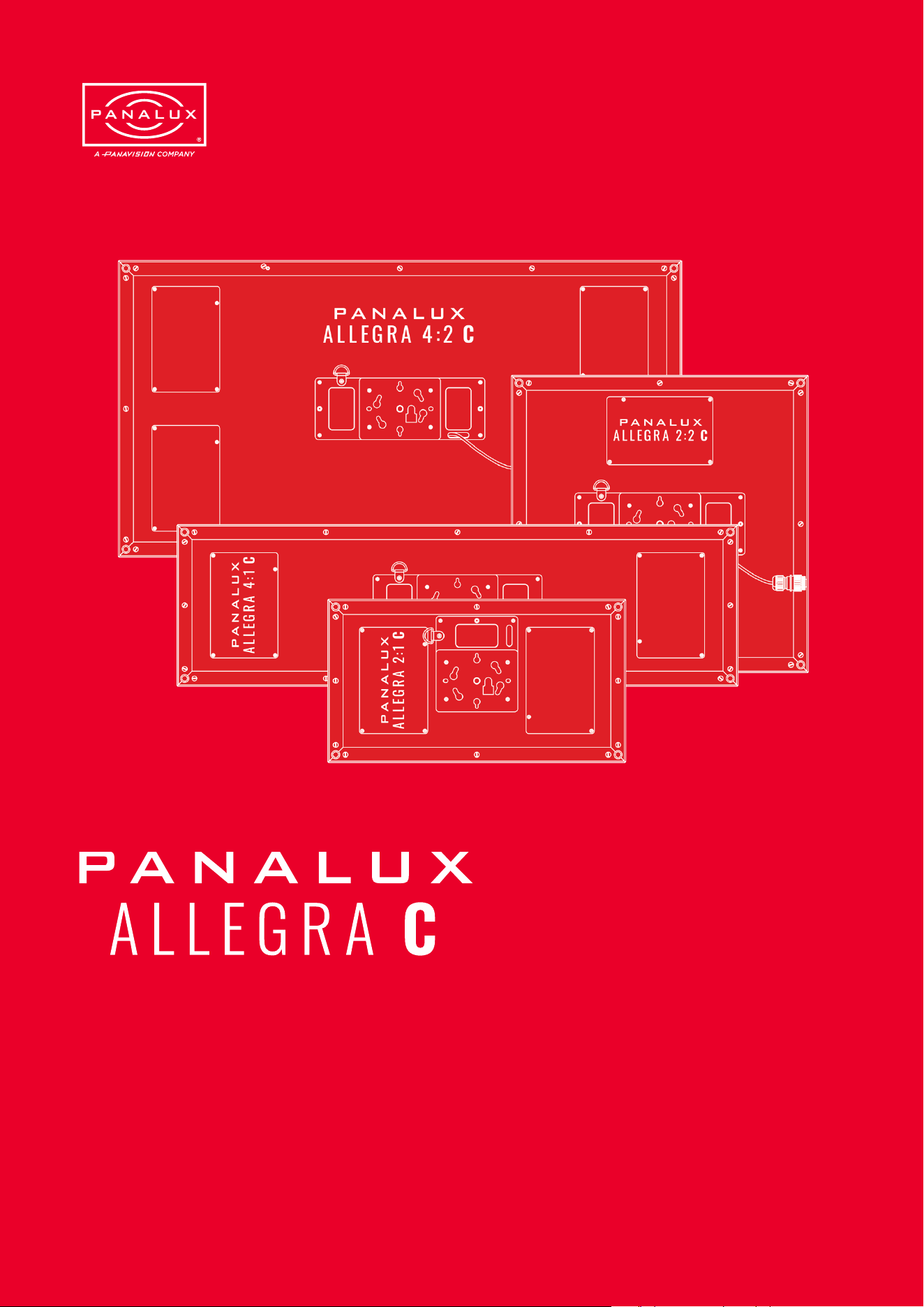
Accurate, powerful, full-colour LED
ISSUE 1.0 | OCTOBER 2023
User manual of ALLEGRA-C™

T A B L E O F
CONTENTS
Menu Buttons
Memory Buttons
Backlight
MENU
Important Note on Dimming Curves
Tungsten Emulate Mode
Output
Gamut
Control Priority
05 General
Ballast Characteristics
Head Characteristics
Fault Finding Tips
Spare Parts & Accessories
06 Appendix
ALLEGRA-C Menu Tree
DMX Personalities - Channel
Assignments
Gels
Source Matching
Gel Library
Source Emulation List
RDM
ALLEGRA-C RDM Sensors
ALLEGRA-CTM 2:1 Overall
Dimensions & Rigging Centres
ALLEGRA-CTM 2:2 Overall
Dimensions & Rigging Centres
ALLEGRA-CTM 4:1 Overall
Dimensions & Rigging Centres
ALLEGRA-CTM 4:2 Overall
Dimensions & Rigging Centres
01 Introduction
About This User Manual
Related Documentation
Technical Support
Disclaimer
02 Important Information & Warning
Changes
Measuring Correlated Colour
Temperature (CCT), Colour x y
Flicker-Free Filming
Gel/Filter Emulations and
Source Matching
Safety Information
Ventilation
Additional Safety Considerations
03 System Overview
ALLEGRA-C™ System
ALLEGRA-C™ Heads
ALLEGRA-C™ Ballasts
Connections
Ballast Connections
04 Operation
Ballast User Interface
Factory Reset
Lock Mode
Rotary Encoder
03
04
04
04
04
05
06
06
07
07
08
09
09
11
12
12
14
15
16
17
18
18
18
19

INTRODUCTION
01
ISSUE 1.0 | OCTOBER 2023
User manual of ALLEGRA-C™
© 2023 Panalux Ltd. All Rights Reserved.

About This User Manual
This manual provides installation, operation, and maintenance instructions for all ALLEGRA-C™ professional lighting xtures.
This manual applies to the following software versions:
v2.22
Related Documentation
For more information regarding DMX512 systems, refer to the DMX512/1990 & AMX 192 Standards publication available from
United States Institute for Theatre Technology, Inc. (USITT). Contact by post at USITT, 6443 Ridings Road, Syracuse, NY,
13206-1111, USA; by phone on 1-800-93USITT; or online at www.usitt.org.
Art-Net is used for transmitting DMX lighting control protocol and RDM over the User Datagram Protocol (UDP) of the Internet
Protocol suite. It is based on the TCP/IP protocol suite and used to communicate between nodes/lighting xtures and a
lighting desk, typically on a private local network such as Ethernet. Art-Net can address over 30,000 universes.
Art-Net™ designed by and copyright Artistic Licence Holdings Ltd.
Technical Support
For technical support, contact Panalux on +44 20 8233 7000 or at info@panalux.biz
Disclaimer
Panalux and ALLEGRA-C™ are trademarks of PANAVISION registered in the U.S. and other countries. All other brand or
product names which may be mentioned in this manual are trademarks or registered trademarks of their respective companies.
This manual is for informational use only and is subject to change without notice. Please check www.panalux.biz for the latest
version. Panalux assumes no responsibility or liability for any claims resulting from errors or inaccuracies that may appear in
this manual.
INTRODUCTION
PANALUX ALLEGRA-C USER MANUAL
4
ISSUE 1.0 | OCTOBER 2023

02
ISSUE 1.0 | OCTOBER 2023
User manual of ALLEGRA-C™
© 2023 Panalux Ltd. All Rights Reserved.
IMPORTANT
INFORMATION &
WARNINGS

Changes
Panalux provides this manual ‘as is’ without warranty of any
kind, either expressed or implied, including but not limited
to the implied warranties or merchantability and tness for a
particular purpose. Panalux may make improvements and/or
changes to the product(s) and/or the programmes described
in this publication at any time without notice. This publication
could contain technical inaccuracies or typographical errors.
Changes are periodically made to the information in this
publication; these changes are incorporated in new editions
of this publication.
Measuring Correlated Colour Temperature
(CCT), Colour x y
The ALLEGRA-C™ utilises an LED source that is optimized
for the lm, TV, and image capture industries. Older colour
meters cannot be used to accurately read the Correlated
Colour Temperature (CCT) of ALLEGRA-C™ and other
discontinuous spectrum light sources. Older colour
meters are designed for a full spectrum source such as
incandescent lights. These meters possess only three
sensors to measure the light output: red, green, and blue. As
such, a narrow band or discontinuous spectrum light source
may not read correctly. Colour meters such as the Sekonic
C800 Spectromaster or UPR Tech MK 350 will provide
excellent measurements and include TLCI and SSI metrics
as standard.
Panalux have taken great care in ensuring that the CCT and
colour spectrum of gel emulations of the light emanating
from ALLEGRA-C™ closely matches traditional tungsten
and discharge light sources. This allows you to easily
place ALLEGRA-C™ alongside your traditional lighting
xtures. If in any doubt, it is the user’s responsibility, as is
customary, to shoot image capture tests when combining
sources employing different core technology—such as
HMI, orescent, tungsten, or simple RGB and bi-colour
LED xtures—to ensure compatibility. Shoot tests using
the camera setup to be used for the project (capture
gamut, LUTs, etc.). The spectral power density curve, chip
proles, and coordinates will be different from other xtures.
Matching x y coordinates will only guarantee proximity to the
x y coordinates. It will not guarantee a colour match to eye or
to camera with another light source.
IMPORTANT
INFORMATION
PANALUX ALLEGRA-C USER MANUAL
6
ISSUE 1.0 | OCTOBER 2023

Flicker-Free Filming
The only way to guarantee icker-free
lming at any frame rate and shutter
angle is by using pure DC power,
carbon arc sources, or daylight. There
is a chance of icker in every other
scenario with articial light, even with
tungsten mains-powered xtures.
Visible icker is also affected by
postproduction. Where the contrast is
increased, the icker becomes more
visible.
ALLEGRA-C™ has been validated
icker-free at any dim position up to
10,000 fps. ALLEGRA-C™ has been
tested across a range of dim settings,
CCTs, and colours with the high-speed
Vision Research Phantom camera
as well as Arri Alexa Mini, with the
cameras at multiple shutter angles. Not
all manufacturers are as thorough. Test
whenever in doubt, particularly when
shooting high speed.
Flicker factor, the relationship
between the maximum and minimum
illuminance exhibited in the icker, can
be measured with a icker meter. 100%
means the light goes totally dark at
minimum. HMI electronic ballasts tend
to have a icker factor around 1–3%,
tungsten lights 0–10%.
With multi-colour LED xtures, in
particular older Stage and Architectural
LED xtures where compatibility with
lm and digital cameras wasn’t a
consideration in their design, individual
colour channels can be out of sync,
causing different colour mixes on
different frames, which can cause
issues with high-speed lming, stop-
frame animation, and still photography.
If in doubt, test and review. Check the
footage after running a test, and be
aware that some digital cameras do not
replay raw footage, so it is advisable to
download les rst and then check.
Gel/Filter Emulations and
Source Matching
ALLEGRA-C™ comes pre-loaded with
a range of LEE Filter gel emulations.
Since the base spectrum of the
ALLEGRA-C™ at 3200K and 5600K is
not identical to a tungsten or daylight
source, the gel presets are merely
emulations. Due to the inherent
technology, no LED bi-colour or multi-
chip source can perfectly match the
spectrum of a subtractive lter laid
over a tungsten or daylight source.
Even if the x y coordinates appear to
be a good match, the spectrum will
be different, and the camera will read
subtle differences. If in doubt, test
before shooting.
7
PANALUX ALLEGRA-C USER MANUAL
ISSUE 1.0 | OCTOBER 2023
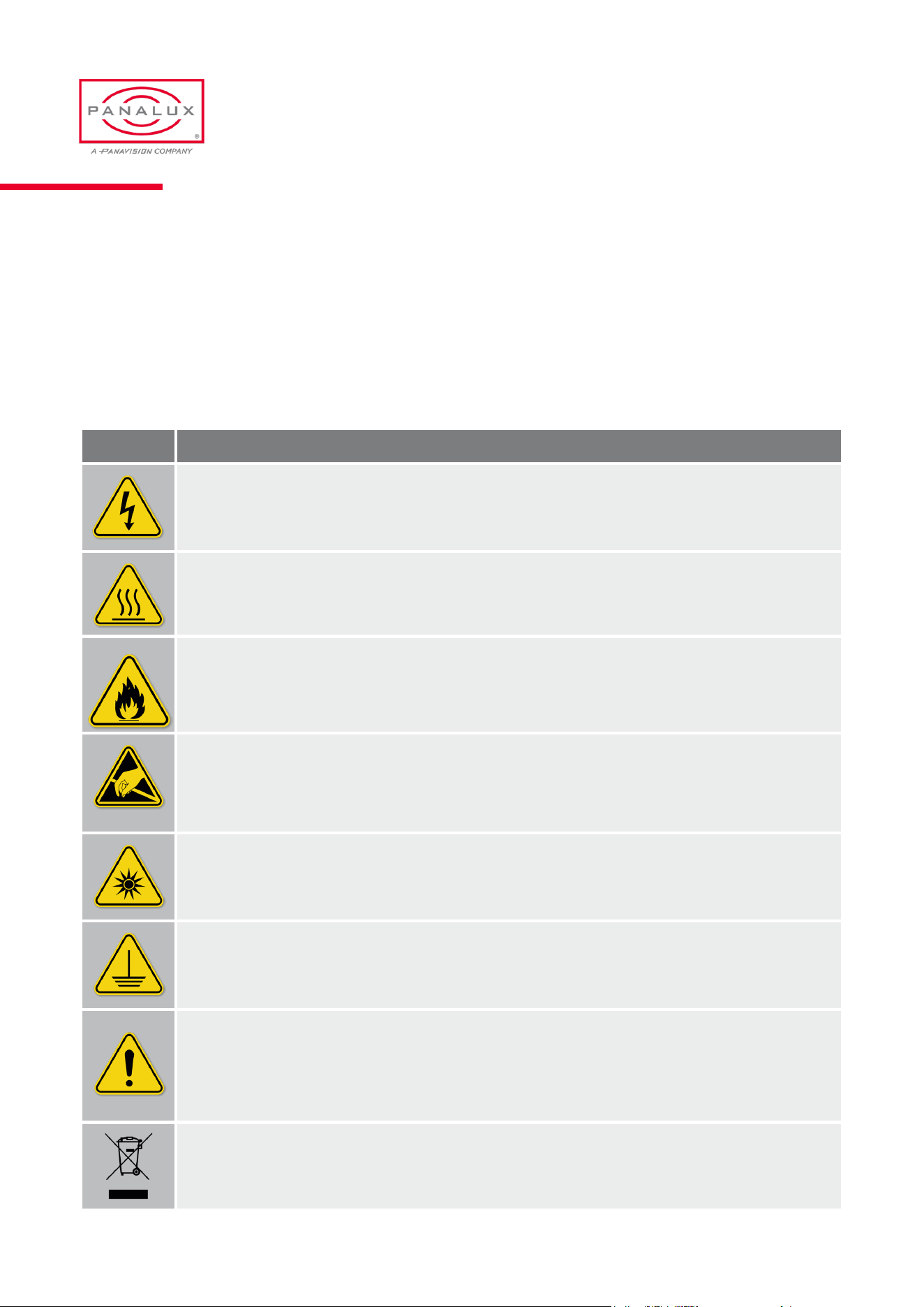
Safety Information
Please read through this manual carefully before operating the ALLEGRA-C™ system. Keep this manual for future reference.
There are numerous safety instructions and warnings that must be adhered to for your own safety. ALLEGRA-C™ sytem
is not intended for residential use. It is only intended for use in a professional studio. The ALLEGRA-C™ system must
only be serviced by a qualied individual. The symbols below are used throughout this manual to identify important safety
information.
SYMBOL MEANING
Risk of electric shock / risk of re
Do not open. To reduce the risk of electric shock, do not remove cover (or back). No user serviceable parts
inside. Refer servicing to qualied service personnel.
Burning Injuries
Be aware of high case temperatures of 60-85°C during and after use of ALLEGRA-C™. Don’t touch the metal
cases, frames or LED’s to avoid burning issues.
Flammable Materials
Keep ammable materials away from the installation. The installation should be such that the amount of air ow
required for safe operation of the equipment is not compromised. Proper ventilation must be provided.
ESD and LEDs
LED components used in ALLEGRA-C™ are sensitive to electro-static discharge (ESD). To prevent the possibili-
ty of destroying LED components do not touch during operation or when ALLEGRA-C™ is switched off.
Light output
Due to high light-output intensity do not look directly into the bare LED array. Use diffusers when exposing the
light to human eyes.
This equipment MUST be earthed
In order to protect against risk of electric shock, the installation should be properly grounded. Defeating the pur-
pose of the grounding type plug will expose you to the risk of electric shock.
Mains cords
Use only a Neutrik PowerCon TrueOne NAC3FX-W-TOP Connector. The user is responsible for ensuring power
cables are of adequate condition for each application. If the power cords are damaged, replace them only with
new ones. Never try to repair a power cord.
Environmental: Disposal of old electrical & electronic equipment
This symbol on the product or on its packaging indicates that this product shall not be treated as
household waste.
PANALUX ALLEGRA-C USER MANUAL
8
ISSUE 1.0 | OCTOBER 2023
Additional Safety Considerations
1. ALLEGRA-C™ system is rated as IP40, for indoor use
and in a dry environment.
2. ALLEGRA-C™ system is not certied for use in
hazardous locations.
3. ALLEGRA-C™ system operating temperature is within
the range of 0 to 40°C (32 to 104°F).
4. Do not connect to a variable power supply such as a
dimmer rack or variac.
5. Use only approved spare parts and accessories. (Refer
to Spare Parts/Accessories list on page 37.)
6. Do not open the ALLEGRA-C™ system when powered.
Allow the ALLEGRA-C™ system to cool before
servicing, as internal parts may be hot.
7. Do not alter the design of the ALLEGRA-C™ system or
tamper with any of the safety features.
8. Do not look directly into ALLEGRA-C™ bare light
source as it may be harmful to the eyes.
9. The ALLEGRA-C™ system’s surfaces can become
hot. Please ensure contact on the surface by persons
or materials is avoided when the xture is operating.
Do not operate ALLEGRA-C™ if there are any signs
of physical damage. If damage is visible or suspected,
contact Panalux Engineering Dept.
10. Before using ALLEGRA-C™, check for any of the
defects listed in the table below.
Part Possible Defect
Power Cable Physical damage, cut, burnt
Header cable Physical damage
Connectors Damaged, loose
Safety xings Damaged, loose
Casings Physical damage
Ventilation
1. Do not use the ALLEGRA-C™ system outdoors or in a wet environment without approved accessories.
2. Keep the ALLEGRA-C™ system a minimum distance of 0.1m (4 inches) away from ammable materials/objects.
PANALUX ALLEGRA-C USER MANUAL
9
ISSUE 1.0 | OCTOBER 2023

Note
ALLEGRA-C™ system has been built to conform to
international regulatory standards relating to professional
lighting equipment. Any modication made to the
ALLEGRA-C™ system will void the manufacturers’ warranty.
Approvals
EU
EN 55015:2013
EN 61547:2009
EN 61000-3-2:2014
EN 61000-3-3:2013
EN 61000-4-2:2009
EN61000-4-3:2006+A1:2008+A2:2010
EN 61000-4-4:2012
EN 61000-4-5:2006
EN 61000-4-6:2009
EN 61000-4-8:2010
EN 61000-4-11:2004
FCC
47 CFR of part 15
CSA
and UL
CSA C21.0 No. 250.4-14
CAN/CSA C21.0 No. 250.13-14
UL Standard No. 153
UL Standard No. 8750
Certications
ROHS
EPA3050B:1996
EN1122B:2011
EPA3052:1996
EPA7196A:1992
APE3540C:1996
EPA8270D:2007
Europe
EN / IEC 62471
PANALUX ALLEGRA-C USER MANUAL
10
ISSUE 1.0 | OCTOBER 2023

SYSTEM
OVERVIEW
04
ALLEGRA-C™ System
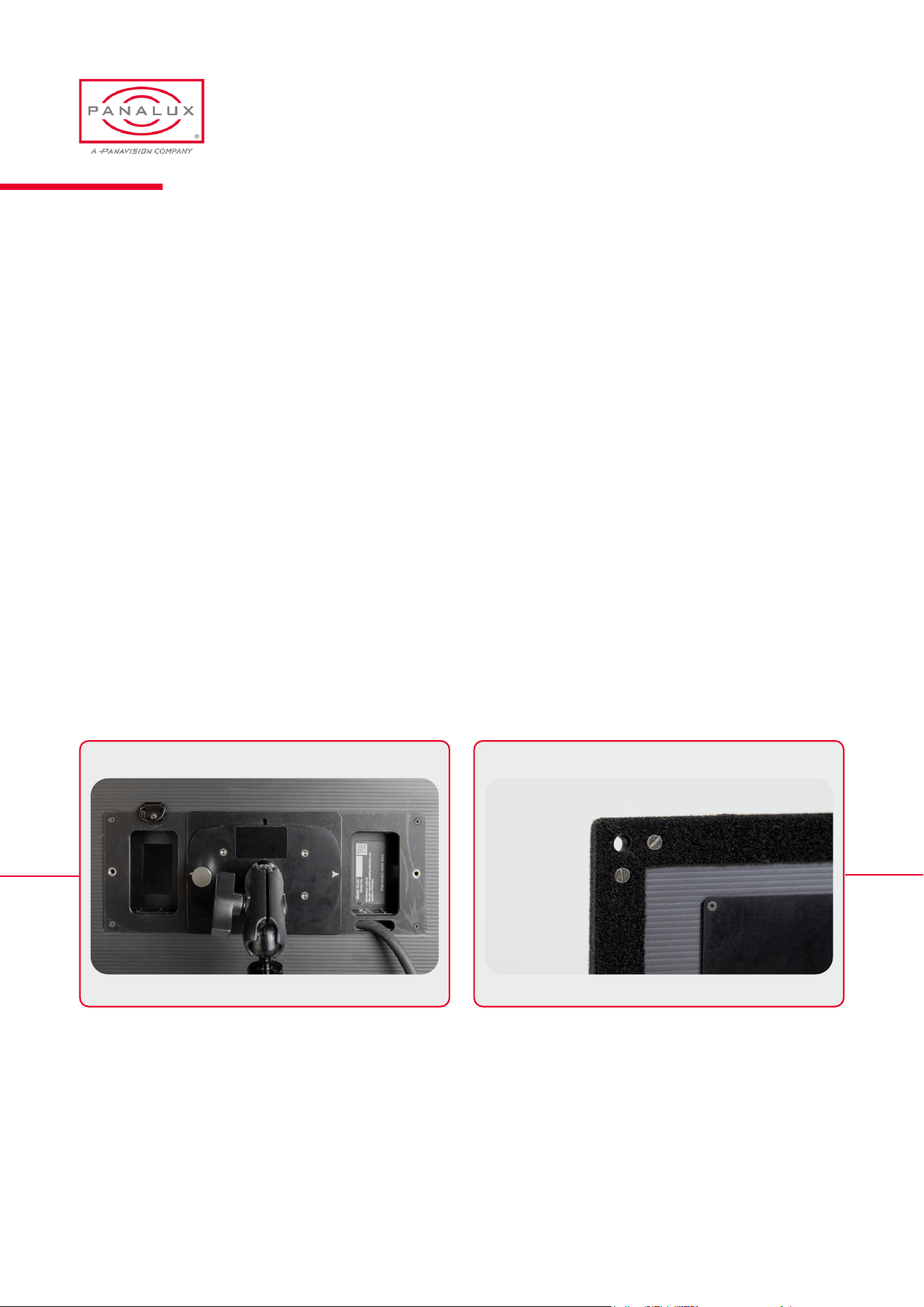
Each ALLEGRA-C™ system comprises a head and a ballast. The sections below provide information on each in turn.
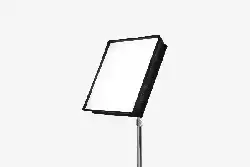
ALLEGRA-C™ Heads
ALLEGRA-C™ heads are powerful light xtures that incorporate Panalux’s high-quality proprietary LED arrays. This LED
source provides the user with a large volume of high-quality white light at a stable and repeatable CCT, emulating traditional
sources and a vast array of colours, LEE lter emulations and tints.
Head Fixings:
All ALLEGRA-C™ heads are provided with a Kino mount receptacle on the rear face as the primary xing method. A Kino
mount universal joint, incorporating a 16mm receiver is included in the ALLEGRA-C™ kit. For an alternative method of
hanging ALLEGRA-C™ heads, eyelets are present on the xture for attaching rigging ropes in each corner. Ensure the ropes
are securely attached to ALLEGRA-C™ head before rigging.
SYSTEM OVERVIEW
PANALUX ALLEGRA-C USER MANUAL
12
ISSUE 1.0 | OCTOBER 2023
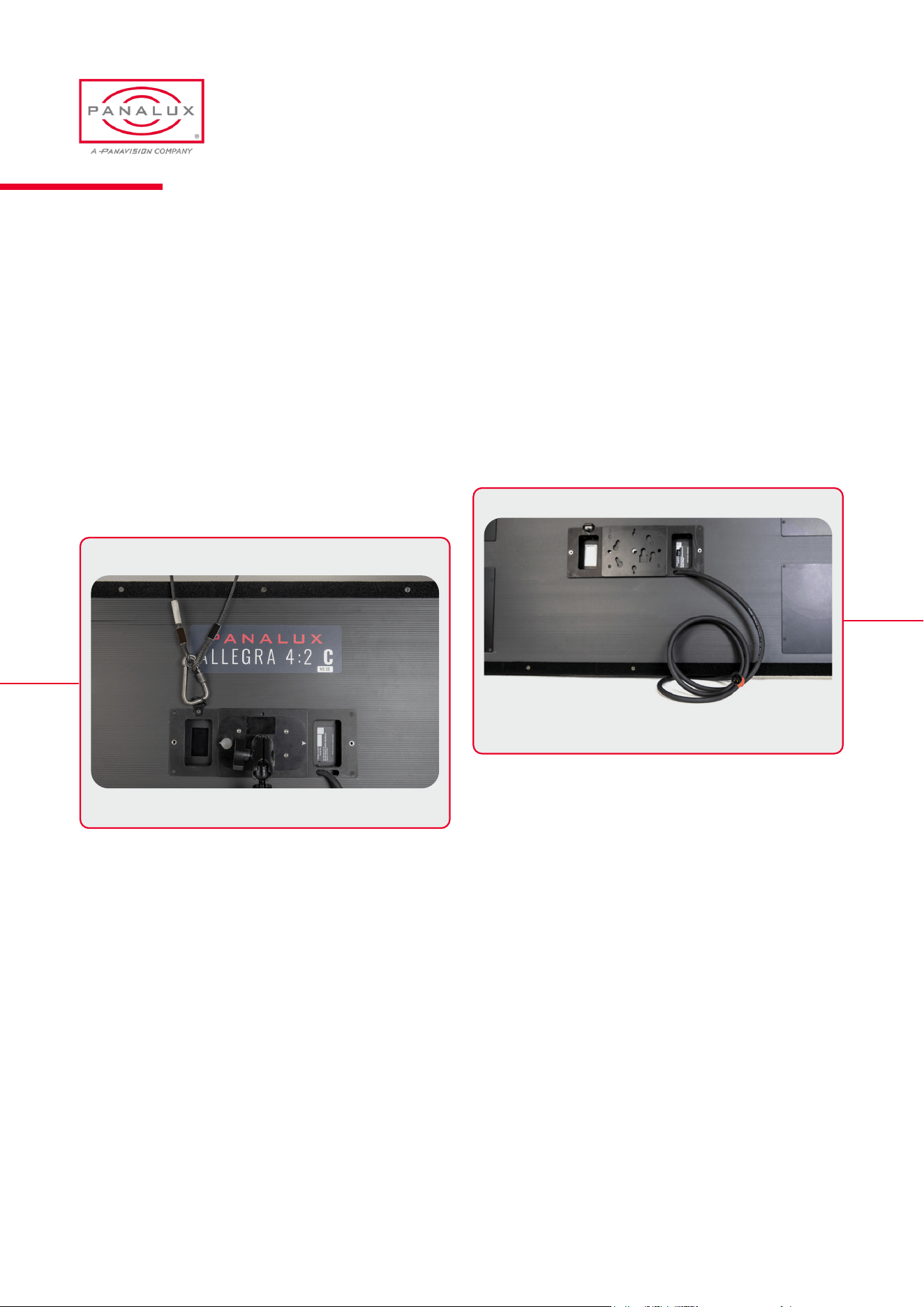
Head Connections:
1. The ALLEGRA-C™ head is connected to its ballast via a
2m tail, terminated with a Neutrik 8+2 XLR.
2. A 4m extension cable is included in the kit. Do not
use extensions of more than 8m, as the head may not
function correctly.
3. Ensure the connection cable and any other cables are
routed carefully to avoid snagging & pulling.
.
Head Safety:
When hanging an ALLEGRA-C™ head, a safety cable
should be attached to the D-ring on the rear of the xture.
The combined weight of ALLEGRA-C™ head should be
considered when choosing suitable safety bond(s). The
safety bond assembly should be rated at the combined
weight of the head and accessories present. head weights
can be found in the Physical Characteristics section of the
manual.
PANALUX ALLEGRA-C USER MANUAL
13
ISSUE 1.0 | OCTOBER 2023
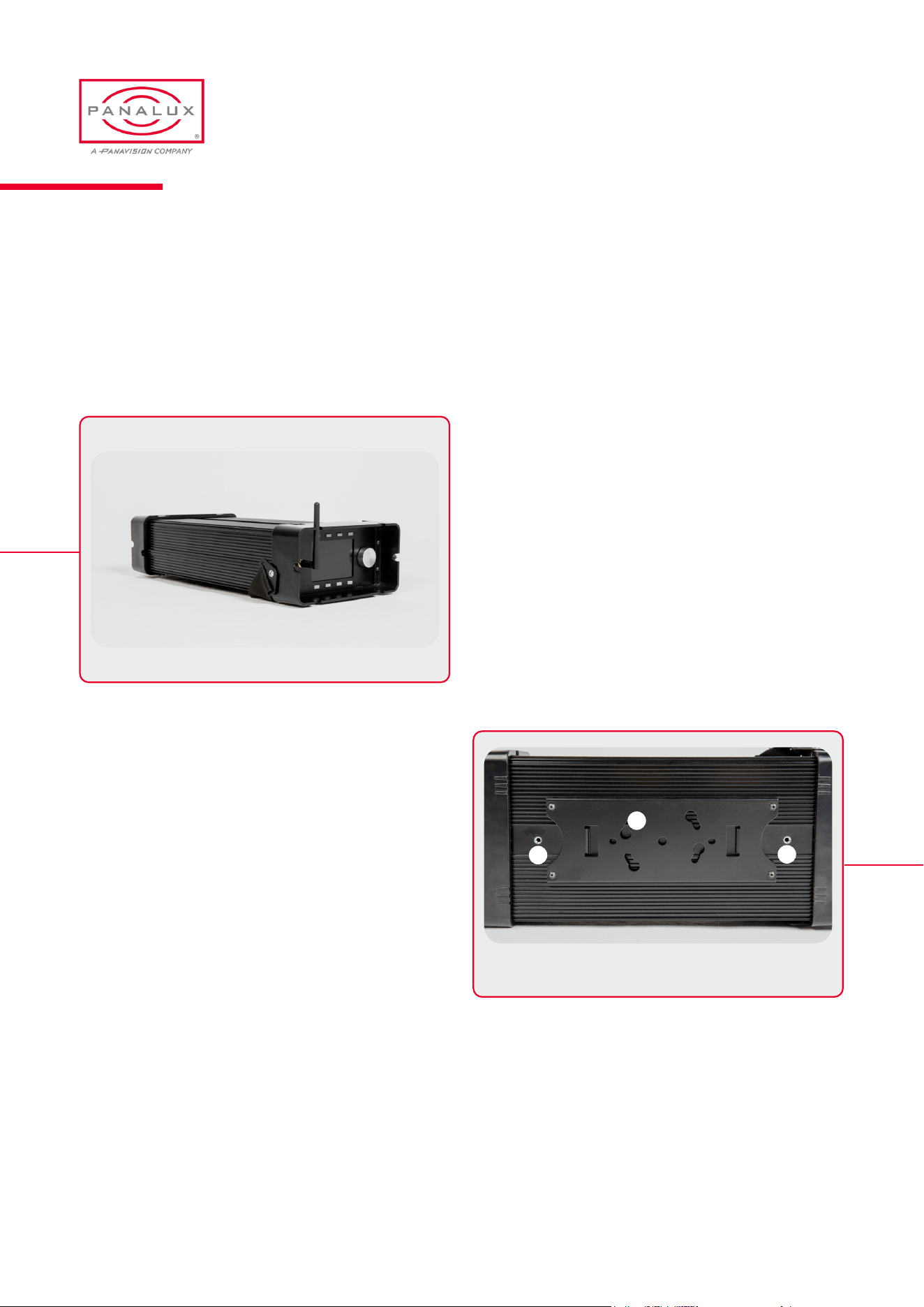
ALLEGRA-C™ Ballasts
ALLEGRA-C™ ballasts are available in two sizes. 450C, which is capable of powering two ALLEGRA-C™ heads and
the 250C, that can power a single ALLEGRA-C™ head. Both ballasts incorporate a mains power supply and the Panalux
proprietary user interface and controller.
Ballast Fixings:
ALLEGRA-C™ ballasts are provided with a Kino mount
receptacle on the underside as the primary xing method. A
Kino mount universal joint, incorporating a 16mm receiver is
included in the ALLEGRA-C™ kit.
For an alternative method of hanging ALLEGRA-C™
ballasts, two M6 threaded holes are present on the
underside of the ballast, for attaching eye bolts or other
appropriate xings. Ensure any xings are securely screwed
into the ALLEGRA-C™ ballast before rigging
Kino mount (1) and M6 threads (2)
1
2
2
PANALUX ALLEGRA-C USER MANUAL
14
ISSUE 1.0 | OCTOBER 2023
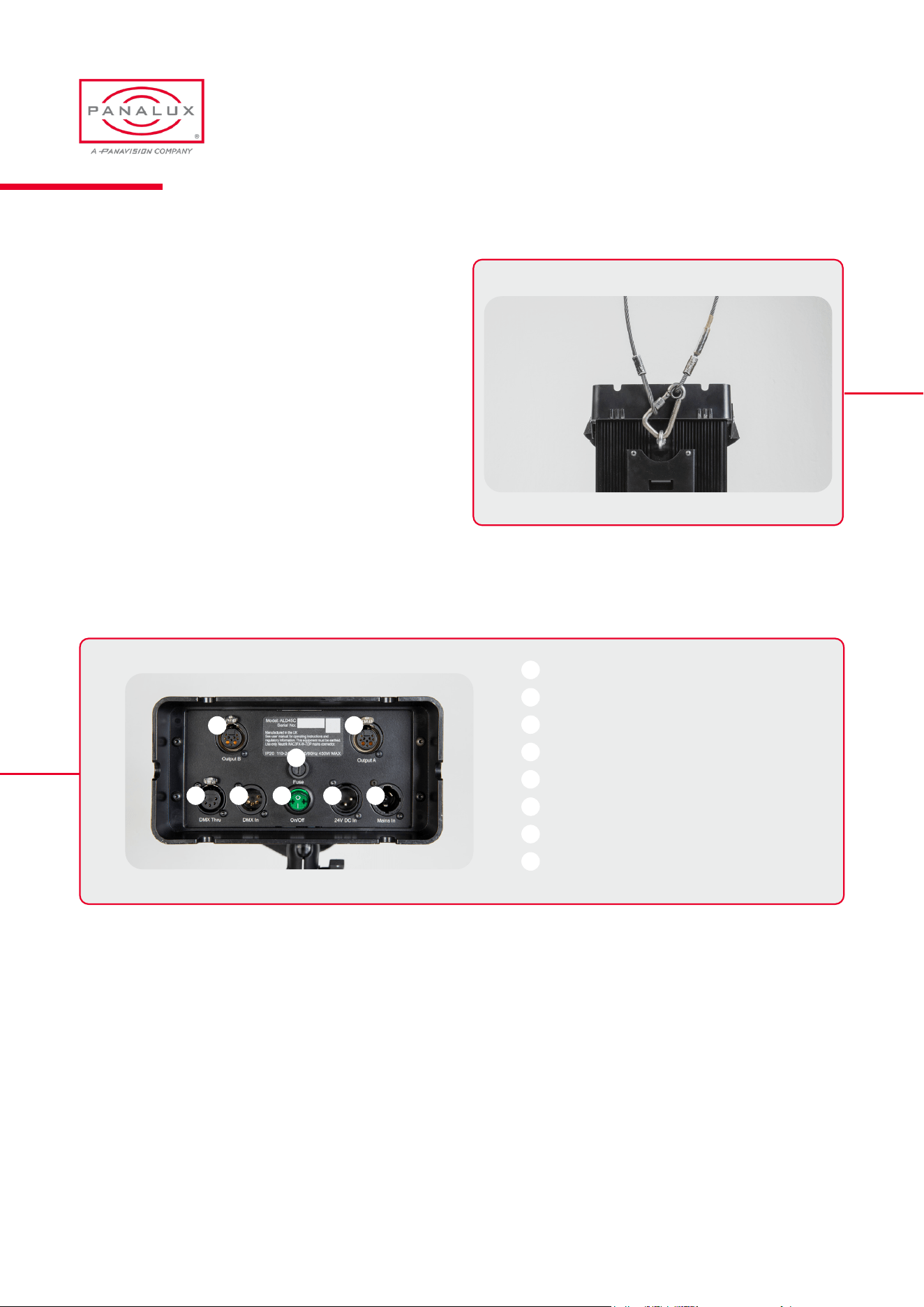
Ballast Safety:
When hanging an ALLEGRA-C™ ballast, an M6 eye-bolt
should be tted and a safety cable should be attached to it.
The combined weight of ALLEGRA-C™ ballast should be
considered when choosing suitable safety bond(s). The
safety bond assembly should be rated at the combined
weight of the head and accessories present. Ballast weights
can be found in the Physical Characteristics section of the
manual.
Connections
2 1
8 7
6
5 4 3
1
2
3
4
5
6
7
8
Head A output
Head B output
Mains in
DC in
Mains on/off switch
Mains fuse
DMX in
DMX out
PANALUX ALLEGRA-C USER MANUAL
15
ISSUE 1.0 | OCTOBER 2023

Power
ALLEGRA-C™ ballasts are tted with two power inlets:
A Neutrik powerCON TRUE1 NAC3MPX-TOP type
connector for mains power.
This inlet is switched and fused. The power cable should
be plugged into ALLEGRA-C™ before switching the
mains power supply ON. The mains power supply should
be switched OFF before removing the power cable. Use
only Neutrik connectors for power cords. It is the user’s
responsibility to ensure the power cord is maintained in good
condition and any physical damage is addressed.
A Neutrik 3 pin XLR connector for a 24 - 36V DC source.
Ensure that the input voltage does not exceed 36V,
otherwise damage to the ballast may result. DC wiring is as
follows:
Pin 1: 0V
Pin 2: 24 - 36VDC
Pin 3: NC
The ALLEGRA-C™ ballast switches automatically between
AC and DC power. If AC and DC power is applied at the
same time, the ALLEGRA-C™ ballast will use the AC
source.
Head Outputs
A Neutrik 8+2 pole XLR provides data and power to the
ALLEGRA-C™ head. Allegra 250C ballasts have 1 output
and Allegra 450C ballasts have 2 outputs. When driving one
head from an Allegra 450C ballast, use output A.
BALLAST CONNECTIONS
Data Inputs
ALLEGRA-C™ uses industry standard 5-pin XLR male and
female connectors to receive and output DMX signals. The
DMX wiring is as follows:
Pin 1: Ground
Pin 2: Data +
Pin 3: Data –
Pin 4: Spare
Pin 5: Spare
Please note: ALLEGRA-C™ is self-terminating and does
not require external DMX termination when used in a chain
Accessories
The ALLEGRA-C™ system has a range of accessories:
Power cord
Aerial
Spill skirt
Snapgrid® Eggcrate
Quarter Grid Cloth
Half Grid Cloth
Full Grid Cloth
Magic Cloth
Kino mount universal 16mm receiver
M6 Eye-bolt
PANALUX ALLEGRA-C USER MANUAL
16
ISSUE 1.0 | OCTOBER 2023

OPERATION
04
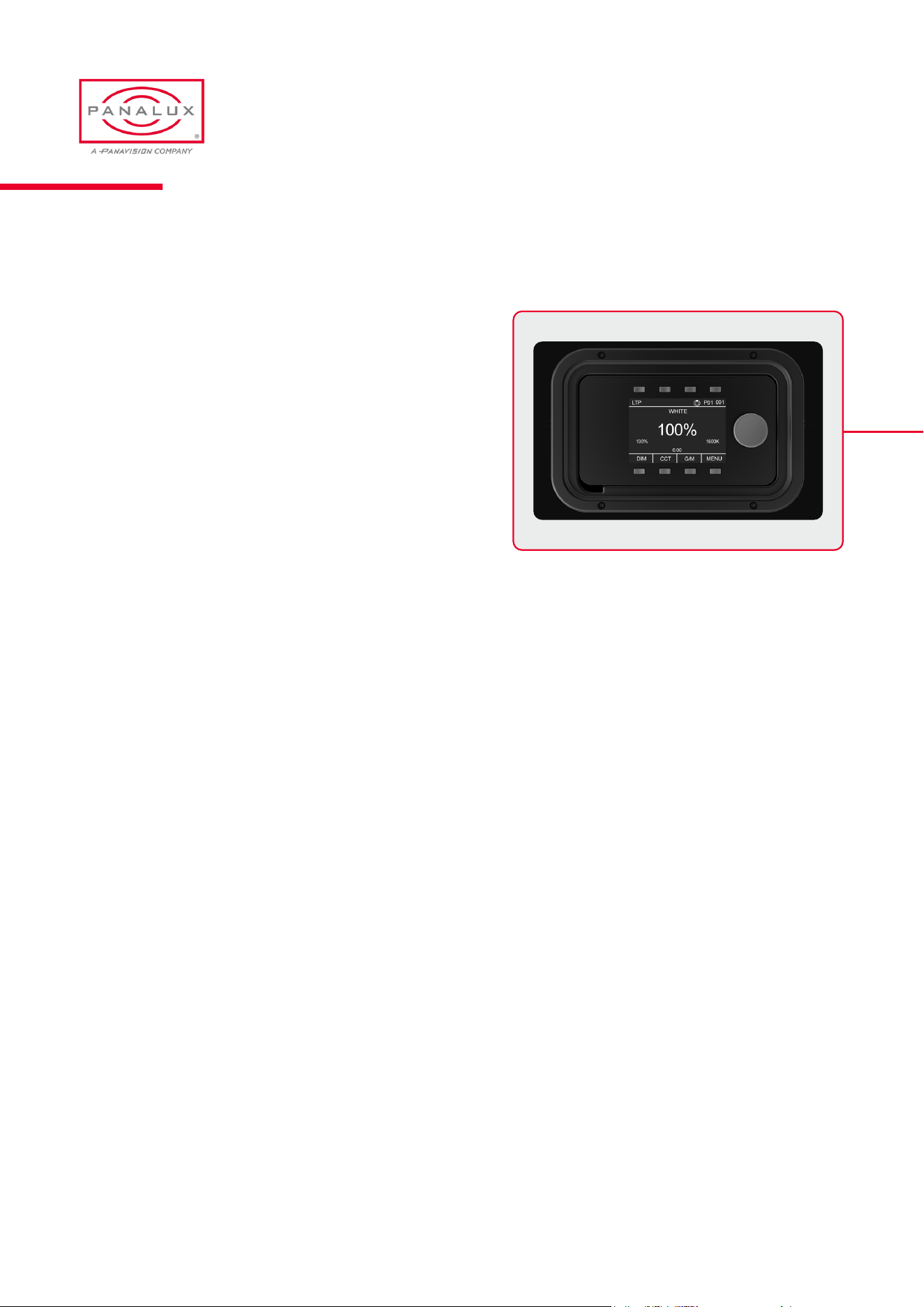
Ballast User Interface
ALLEGRA-C™ ballast provides control over the intensity,
colour temperature, green/magenta bias, hue and saturation,
x y coordinates, RGB, and a range of other parameters for
precision control.
Control is via the local user interface on the front of the ballast,
DMX, or Wireless connection.
In all modes, the status bar will show the current state of:
DMX Base Address
DMX Personality
DMX Control Source (wired, wireless, local)
Control priority (int, ext, LTP)
‘LOCKED’ (when local control is locked)
‘DEMO’ (when xture is cycling through a demo)
In white mode (shown above), the display will always show:
Dim Position (percentage)
CCT
Green/Magenta Bias
Factory Reset
Factory reset and clearing all memory presets is achieved by holding down the bottom left and bottom right buttons together
while cycling the power.
WARNING. ALL STORED PRESETS WILL BE ERASED.
OPERATION
Lock Mode
The local controls can be locked and unlocked by holding down the bottom left button for 2 seconds. ‘LOCKED’ will be shown
top centre of the display when local control is disabled.
To release LOCKED status and DEMO status, hold down bottom left button.
PANALUX ALLEGRA-C USER MANUAL
18
ISSUE 1.0 | OCTOBER 2023
Rotary Encoder
The encoder enables scrolling forwards or backwards through the ‘live’ highlighted menu item. Also, by pushing the encoder,
you are able to jump through presets. It is also used to navigate menus.
‘Push’ to conrm selection
See rotary encoder presets below:
After 5 seconds, the encoder always defaults to dimmer in any mode.
The encoder features a ballistic algorithm. The slower it is rotated the higher the resolution. The faster it is rotated the faster it
scrolls through the CCT range or gel.
When controlling the dimming this allows ultra-ne control down to 0.1% steps.
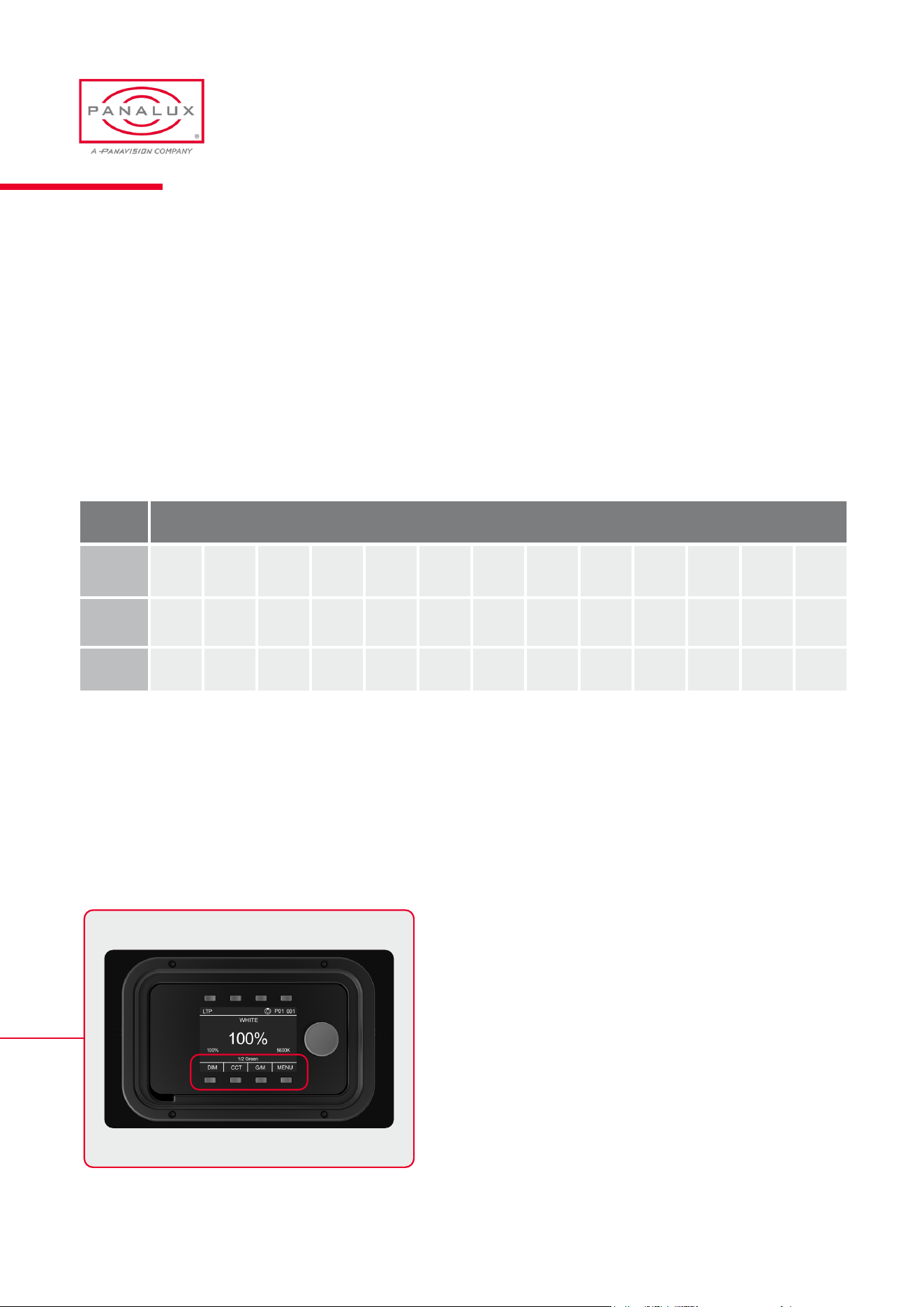
Menu Buttons
There are 4 quick menu buttons below the screen. In WHITE
MODE the rst 3 allow the user to assign the encoder to
alter key attributes: DIM, CCT, and green/magenta bias
(G/M). The fourth selector button (bottom right) is dedicated
to MENU selection or BACK functions.
Value Presets
Dim 25% 50% 75% 100%
CCT 1700K 2700K 2900K 3200K 3600K 4300K 5000K 5600K 6500K 7700K
10000K 15000K 20000K
G/M 1/8 +G 1/4 +G 1/2 +G 3/4 +G 1 +G N/C 1 -G 3/4 -G 1/2 -G 1/4 -G 1/8 -G
PANALUX ALLEGRA-C USER MANUAL
19
ISSUE 1.0 | OCTOBER 2023
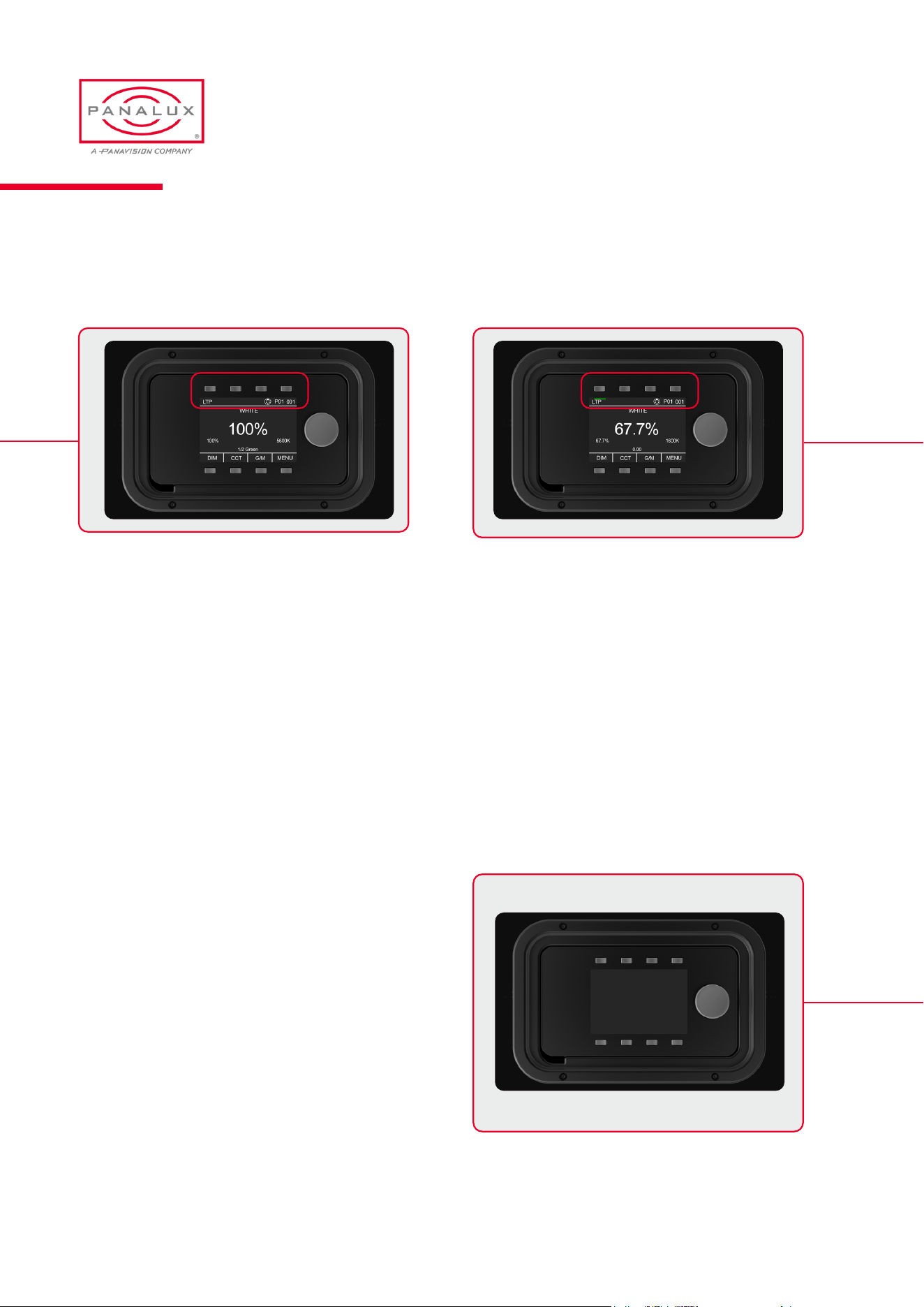
Memory Buttons
The 4 memory buttons above the screen are reserved for storing user dened scenes.
Backlight
The controller screen’s backlight activates on user
interaction, local or from DMX. After 30 seconds of inactivity
it deactivates with a slow fade to 10% brightness.
To store a scene, push and hold any of the 4 buttons until the screen ashes SAVED. All scene settings will be saved. For
example, in WHITE MODE, dim percentage, CCT, and green/magenta bias will be saved.
A green bar below a memory button indicates a stored scene. A single button press displays the stored settings without
changing the output, and the bar will turn red. A second press will change the output.
Black or 0% dim can also be stored to enable a rapid cut to black facility from local control, achieved with a quick double tap
of the preset button.
WARNING: The scene memory can be overwritten. Restoring to factory default will permanently erase all user-memory
settings.
PANALUX ALLEGRA-C USER MANUAL
20
ISSUE 1.0 | OCTOBER 2023
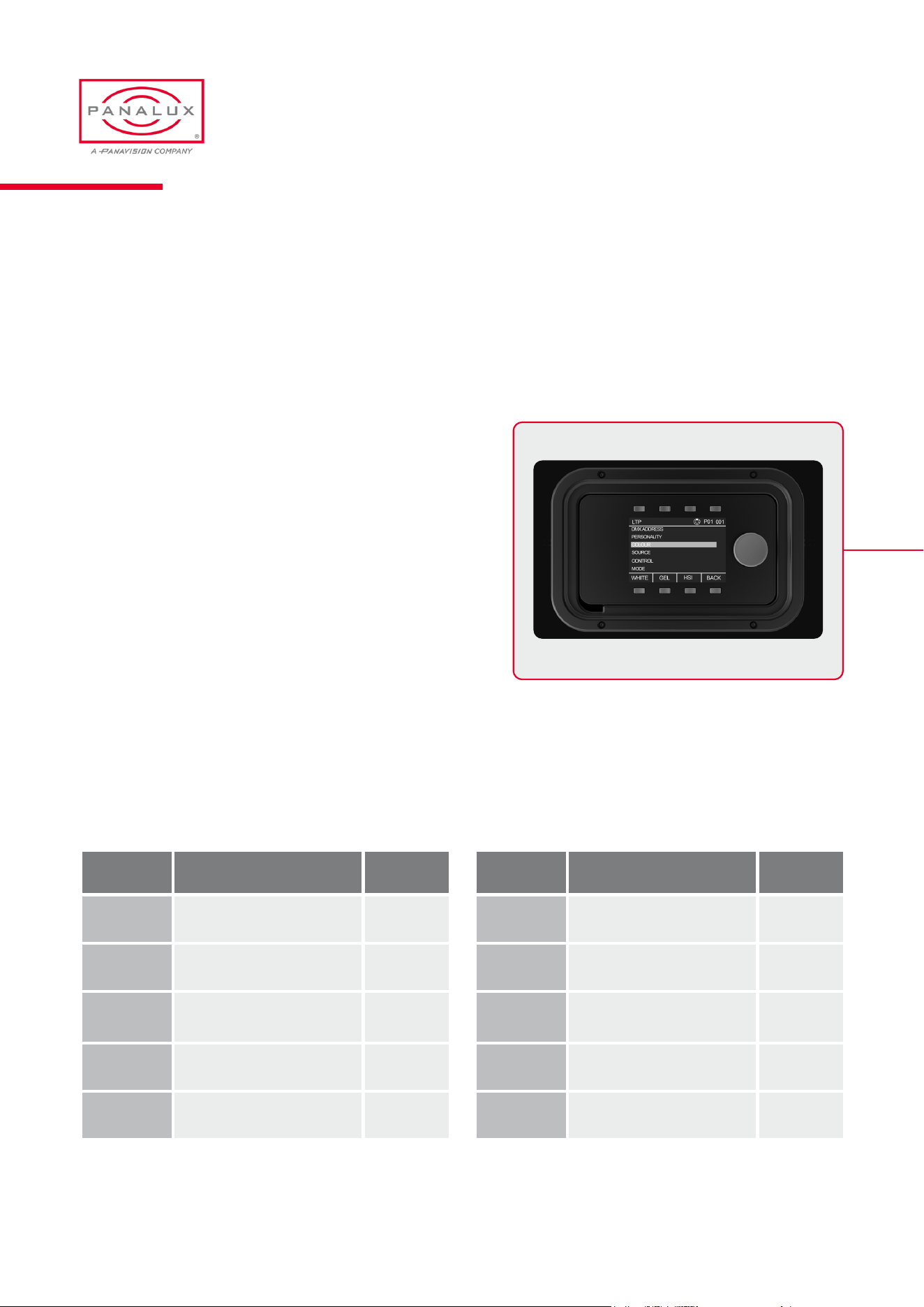
Rotate the encoder to select the required DMX address and
press the encoder to store it. The DMX address is displayed
on the right of the info bar at the top of the screen:
DMX ADDRESS
MENU
One push of the menu button (bottom right) enables the menu. If the menu button is not visible, repeatedly press the back
button until it appears.
PERSONALITY
DMX personalities determine how the ALLEGRA-C™ ballast behaves in relation to DMX control and the number of channels
one xture will occupy. The selected personality is always shown on the top status bar. ALLEGRA-C™ has 19 available DMX
personalities.
Personality Type Channels
P1
White 8 bit 3
P2
White 16 bit 5
P3
HSI 8 bit 4
P4
HSI 16 bit 8
P5
Gel 24 bit BCD 6
Personality Type Channels
P6
Gel 16 bit 5
P7
Gel Hue 24 bit BCD 8
P8
Gel Hue 16 bit 11
P9
RGB 8 bit 4
P10
RGB 16 bit 8
PANALUX ALLEGRA-C USER MANUAL
21
ISSUE 1.0 | OCTOBER 2023
Personality Type Channels
P11
x y 16 bit 8
P12
x y 24 bit BCD 10
P13
Ultra 7
P14
Extreme 10
P15
Crossfade white to
colour
9
Personality Type Channels
P16
Crossfade white to RGB 8
P17
Crossfade white to gel 13
P18
Crossfade gel to gel 20
P19
Crossfade xy to xy 15
See appendix for personality channel assignments
COLOUR
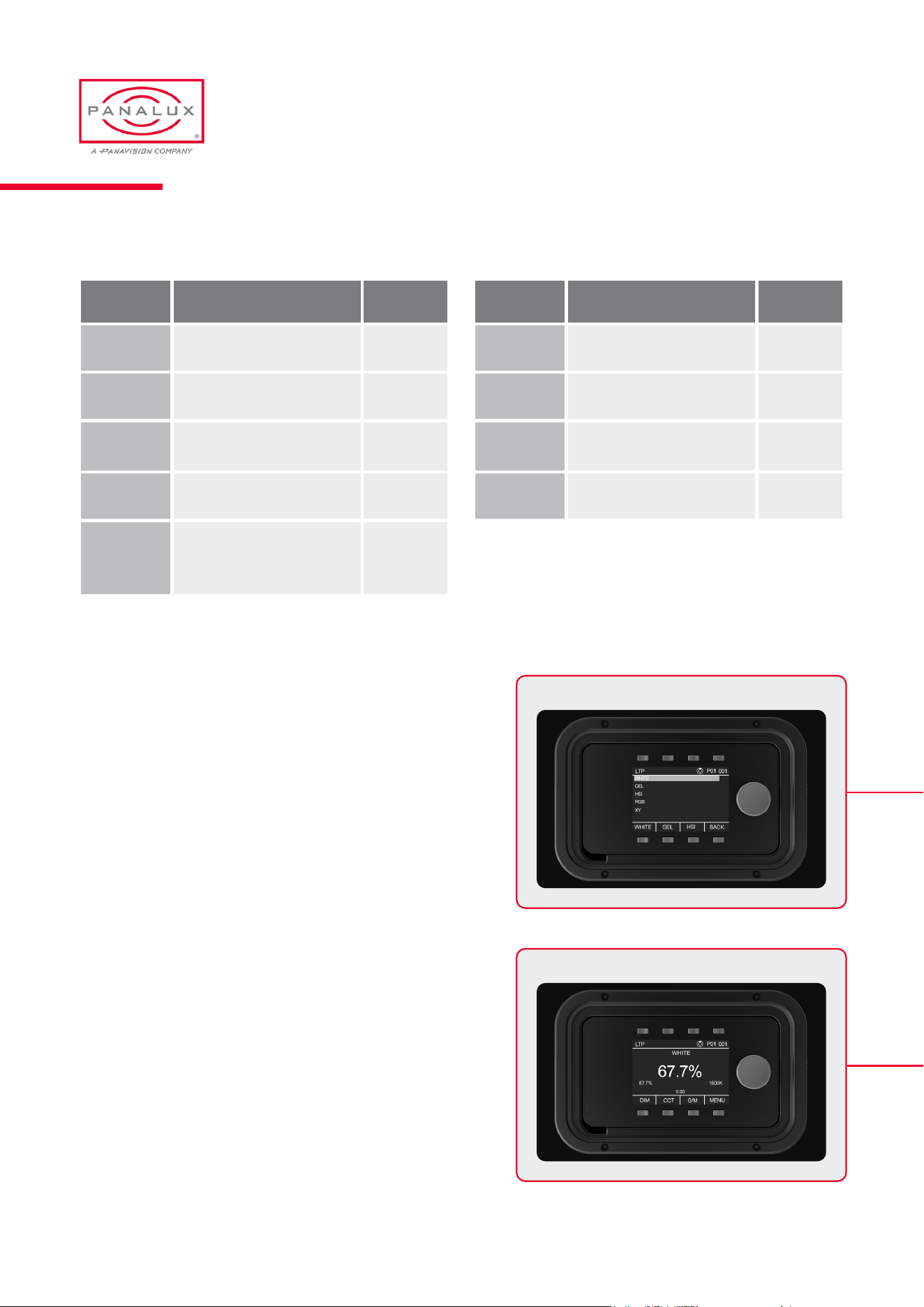
The colour menu allows selection of the ve ALLEGRA-C™
colour modes. White, Gel, HIS, RGB and xy. White, Gel and
HIS modes are also available using the quick menu buttons
at the bottom of the screen.
WHITE allows white point control along the Black Body
Locus (BBL) from 1600K – 20,000K and green/magenta bias
above and below that Locus.
PANALUX ALLEGRA-C USER MANUAL
22
ISSUE 1.0 | OCTOBER 2023
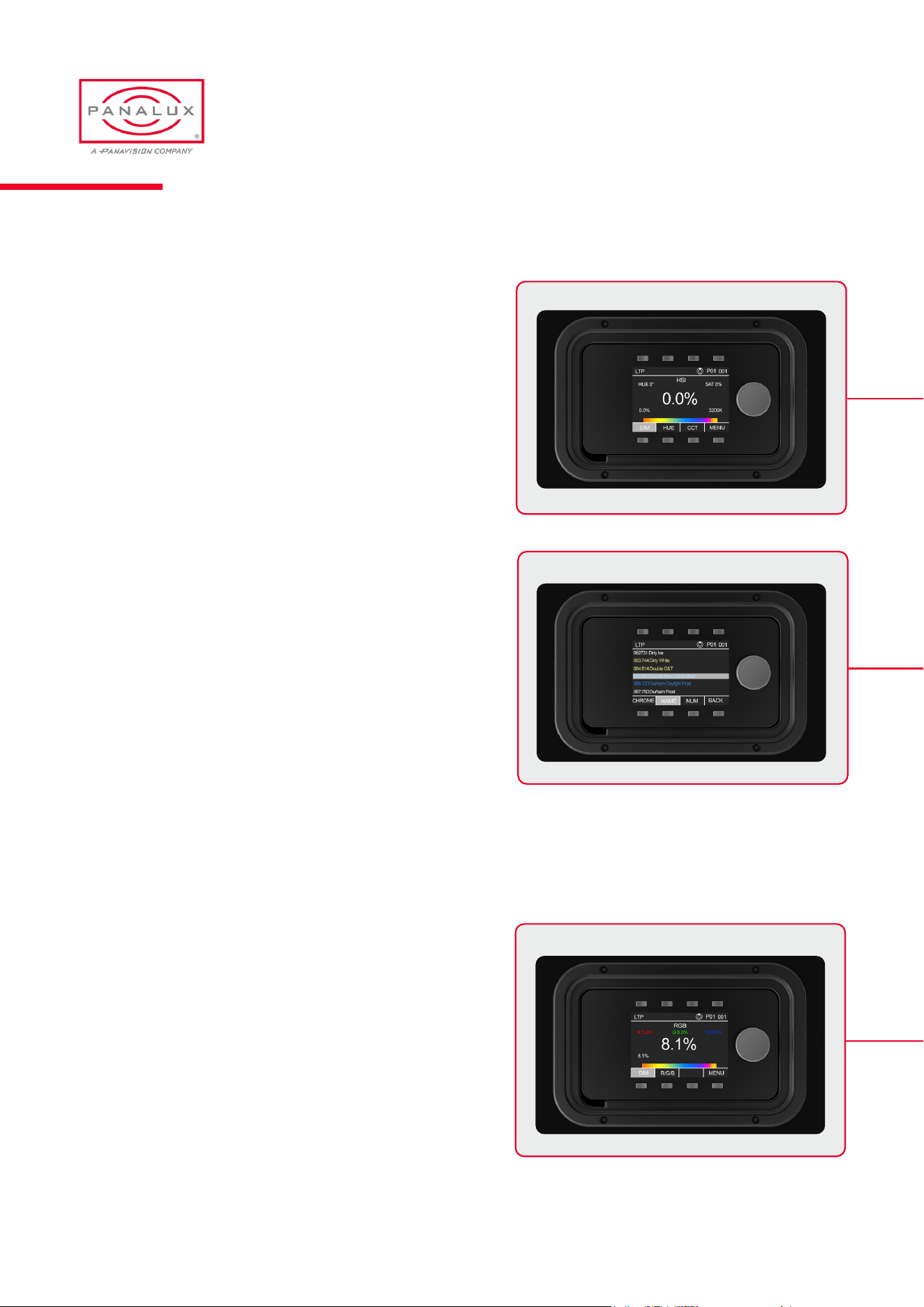
HSI mode allows the user to control the hue angle and
saturation against a set white point.
GEL mode accesses a selection of LEE lter emulations
sortable by chroma, name, or number.
In this screen, the live highlighted bottom button (NAME
in the top-left example image) allows toggling of LIVE ON
and LIVE OFF. In LIVE OFF mode, you can scroll through a
range of colours without changing the output until selected.
In LIVE ON mode, the output will change actively whilst
scrolling through the gel list.
Gel numbers highlighted with a RED background are outside
of selected gamut and are desaturated. See gamut section
below.
RGB Repeatedly pressing the RGB button toggles control
between Red, Green and Blue.
PANALUX ALLEGRA-C USER MANUAL
23
ISSUE 1.0 | OCTOBER 2023
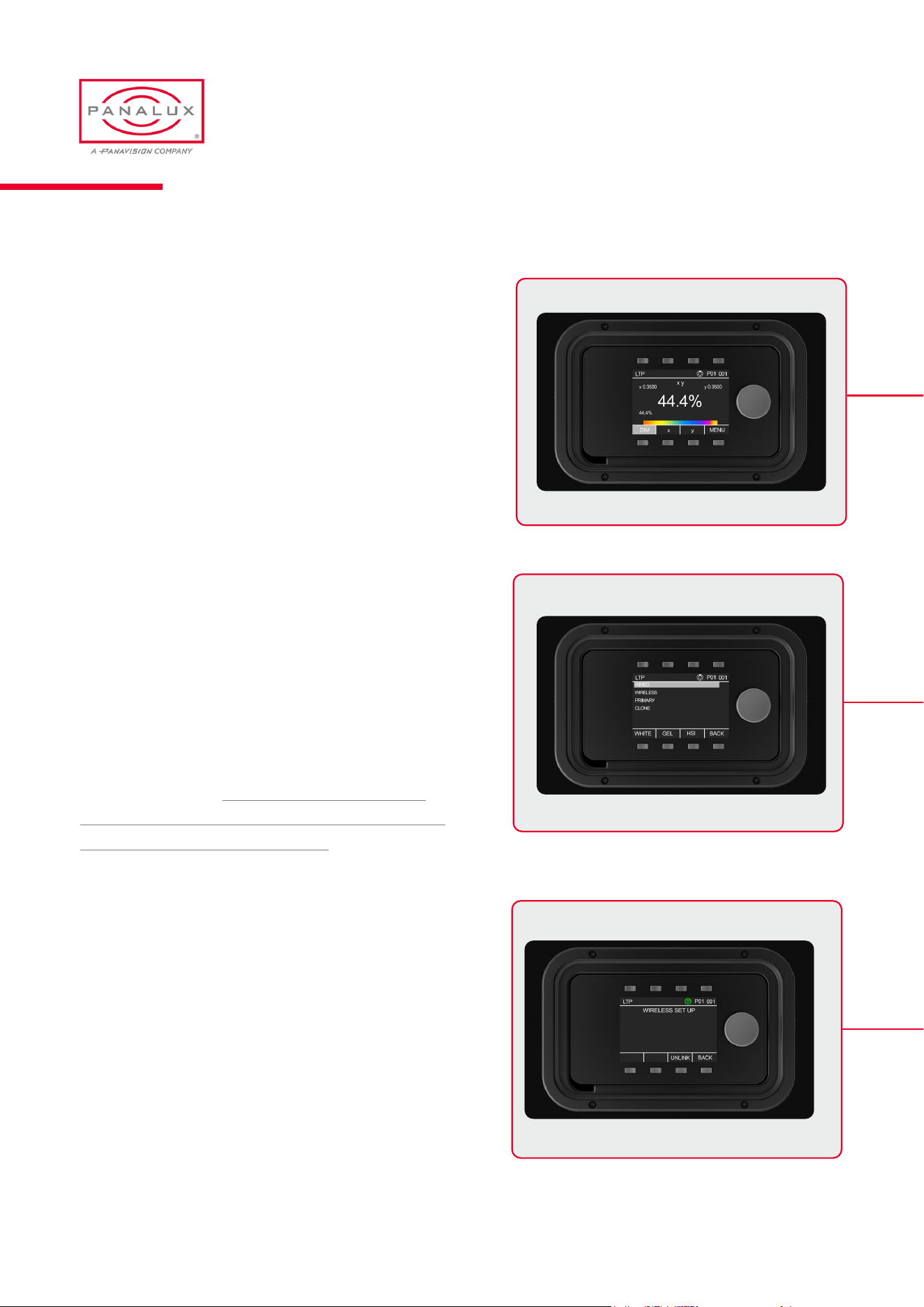
x y mode allows the user to select an x y coordinate on the
CIE 1931 chromaticity chart.
If the chosen colour point is out of gamut, ALLEGRA-C™
will shut off its output and the font will turn red.
The light will switch off during adjustment as soon as the
requested coordinate is unachievable. If the coordinates
selected go out of achievable gamut, the coordinate font will
turn red.
The source menu allows the user to select between wired,
wireless or primary/clone control.
SOURCE
WIRED ALLEGRA-C™ will show the XLR symbol on the
info bar and will respond to DMX control signals on the
DMX socket. The XLR symbol will turn blue when a valid
DMX signal is present. DO NOT CONNECT WIRELESS
AND WIRED DMX SIGNALS AT THE SAME TIME AS THE
FIXTURE MAY BEHAVE ERRATICALLY.
WIRELESS In wireless mode, ALLEGRA-C™ will attempt
to pair with a CRMX wireless transmitter and the wireless
symbol on the info bar will ash. Once paired, the wireless
symbol will become solid green. To un-pair, press the unlink
button and ALLEGRA-C™ will immediately start to search
for a new transmitter. Do not use wireless mode with wired
DMX connected, or the xture may behave erratically.
PANALUX ALLEGRA-C USER MANUAL
24
ISSUE 1.0 | OCTOBER 2023
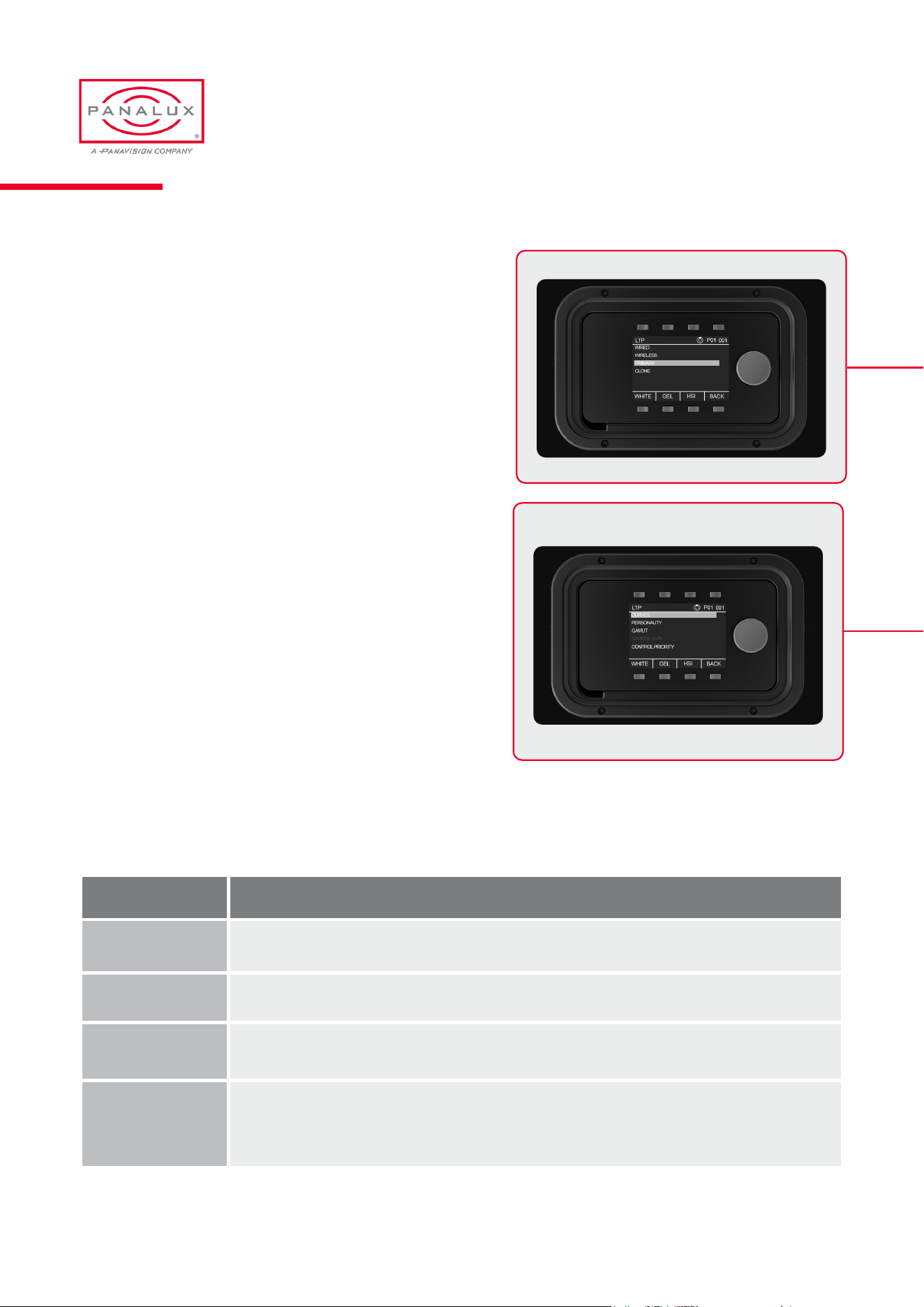
PRIMARY/CLONE When selected, ALLEGRA-C™ will
become the primary xture and a network symbol will be
displayed on the info bar. In this mode, any ALLEGRA-C™
connected to the primary, via the DMX sockets, will copy its
behaviour.
All ALLEGRA-C™ systems in the chain must be set to
the same DMX personality.
The control menu allows selection of dimming curves, output
power, colour gamuts and the priority of control signals.
CONTROL
CURVES
Curve Characteristics
Linear (Default) In linear mode, 50% equates to half the output, or 1 stop down. 25% is quarter output, or 2 stops down.
Square Law
A square law curve increases the dimming resolution at lower control levels.
S Curve
S Curve provides a ner control at lower and higher levels while offering coarse control (lower resolution) at
medium levels. This dimming curve best emulates a typical incandescent lamp’s dimming abilities.
Tungsten Emulate
Tungsten emulate mode combines square law with greater resolution at lower levels and a warming of the
CCT as the xture dims. This operates on any CCT start point between 2700K and 3600K (correlating to an
underrun and overrun tungsten bulb). At CCTs outside this range, standard square law is in play.
PANALUX ALLEGRA-C USER MANUAL
25
ISSUE 1.0 | OCTOBER 2023
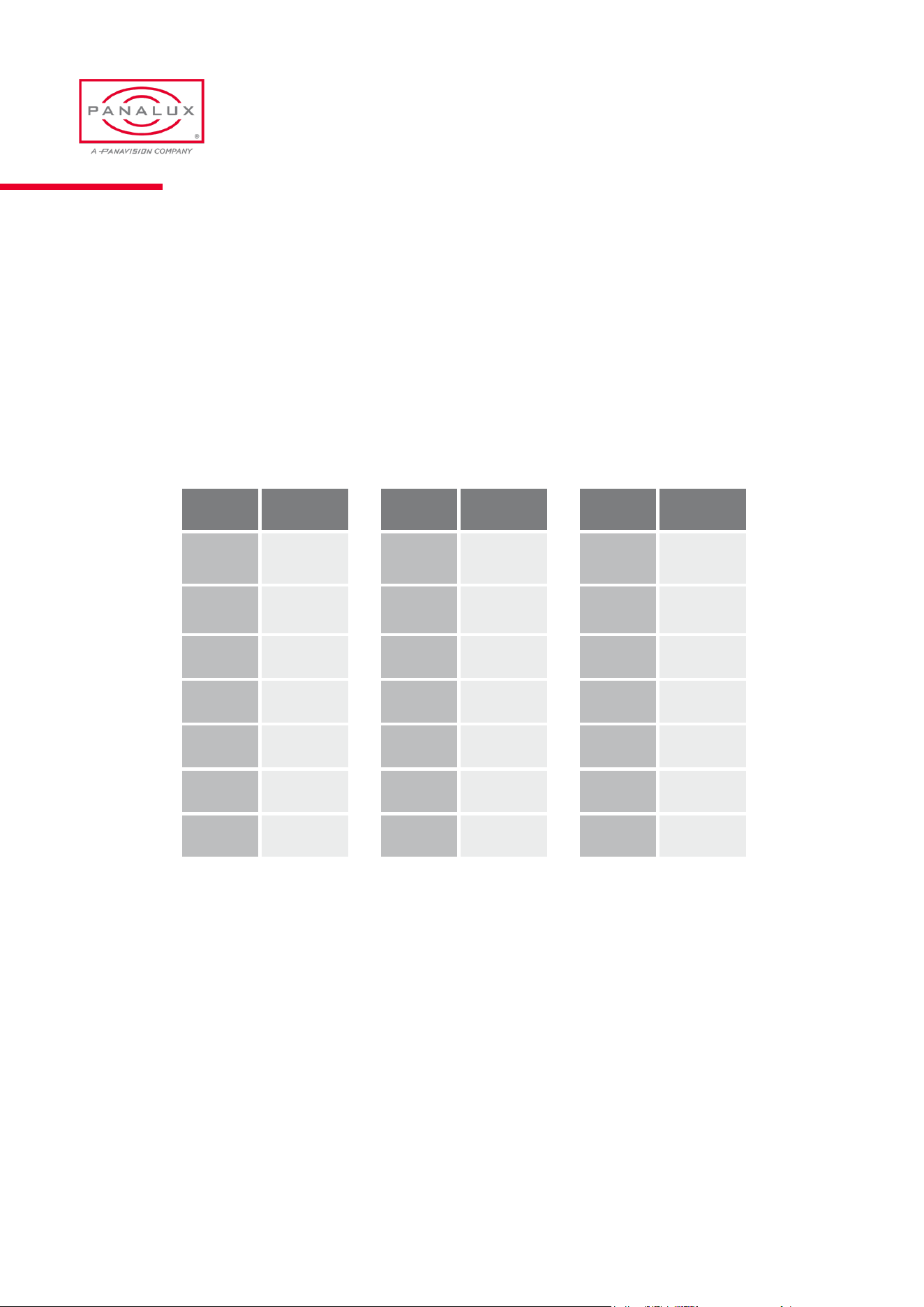
Output
The ALLEGRA-C™ system has two power output modes, BOOST (default) and FLAT. Due to the inherent efcacy difference
between warm white and cold white chips, the photometric output changes at different CCTs.
In a studio environment where multiple changes are made to CCT, it is often advantageous that the photometric output
remains constant. This is achieved in FLAT mode and is active only in WHITE MODE and only between 2700K and 7000K.
In BOOST mode, maximum output is available, which may be advantageous when working in environments with ambient
daylight.
Tungsten Emulate Mode
Tungsten Emulate reference values are as below:
Dim CCT
100% 3200K
85% 3000K
71% 2800K
58%
2600K
48%
2400K
38% 2200K
31% 2000K
Dim CCT
100% 3600K
86% 3400K
74% 3200K
63%
3000K
52%
2800K
35% 2600K
28% 2400K
Dim CCT
100% 2700K
80% 2480K
60% 2220K
40%
1920K
30%
1760K
25% 1695K
10% 1600K
Important Note on Dimming Curves
It is important for consistency that all ALLEGRA-C™ systems in a DMX rig are set to the same dimming curve. If set to
different dimming curves, xtures on the same address, output won’t track with a global dim command.
26
PANALUX ALLEGRA-C USER MANUAL
ISSUE 1.0 | OCTOBER 2023
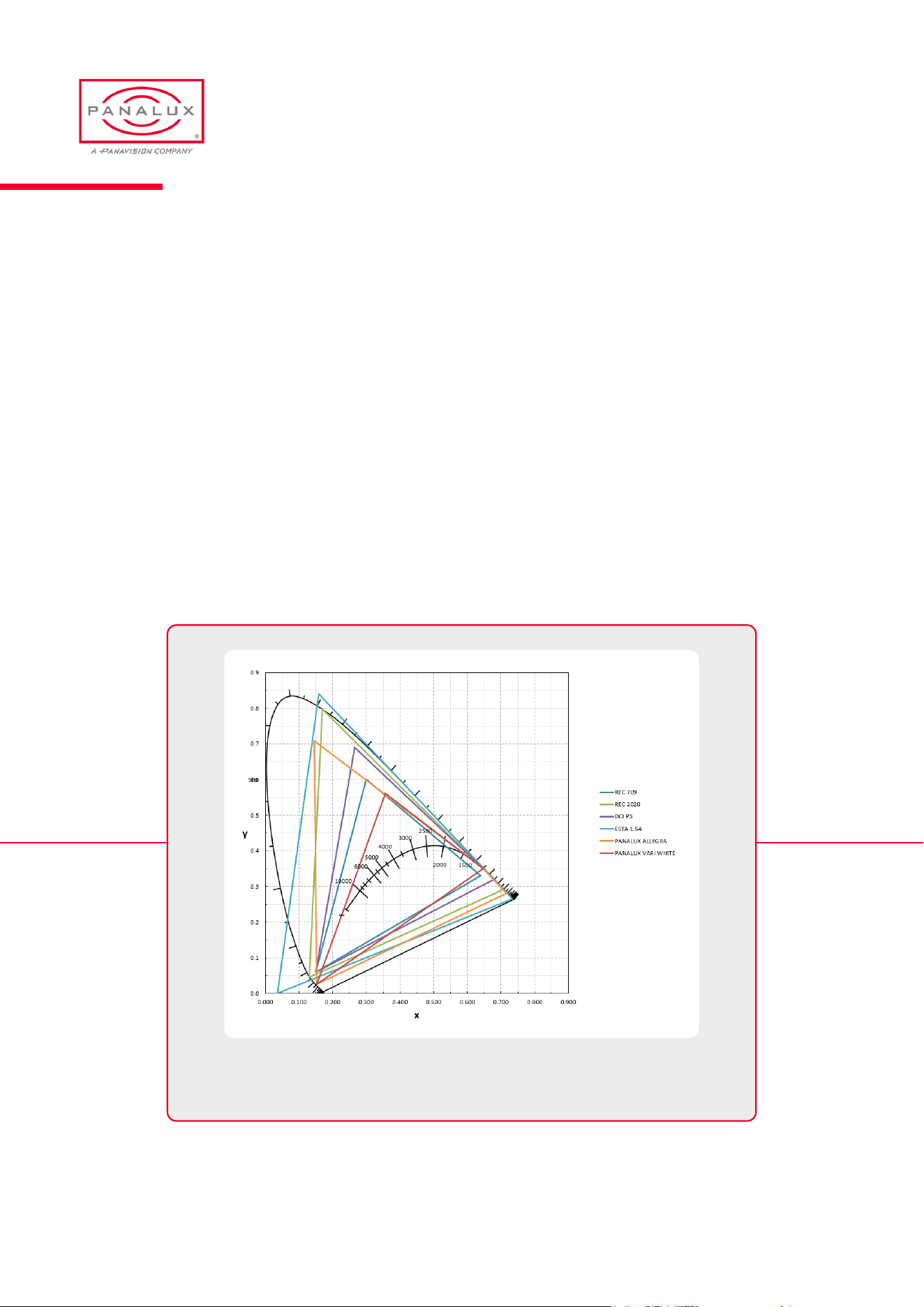
Gamut
The ALLEGRA-C™ heads output gamut can be restricted to the bounds of REC 2020, REC 709, DCI P3, ESTA 1.54 or
Panalux Vari-white, to match the Sonara range of heads.Due to the different overlaps of the gamuts, selecting REC 709 or
REC 2020 will restrict some of ALLEGRA-C™ output in certain zones.
For example, as can be seen in the illustration below, the ALLEGRA-C™ head is capable of producing a range of colours
in the yellow and deep amber zone that wouldn’t be captured in REC 709. In x y mode with REC 709 as the selected
gamut, ALLEGRA-C™ would not output a colour at those x y coordinates, which would be shown in a red font on the
display.
In CCT, HSI, RGB, or GEL mode, if the colour is unachievable due to the chosen gamut, the colour produced will be
desaturated towards the selected white point
CIE 1931 Chromaticity Diagram showing gamut comparison between
ALLEGRA-C™ Vari-White and other common colour spaces.
PANALUX ALLEGRA-C USER MANUAL
27
ISSUE 1.0 | OCTOBER 2023
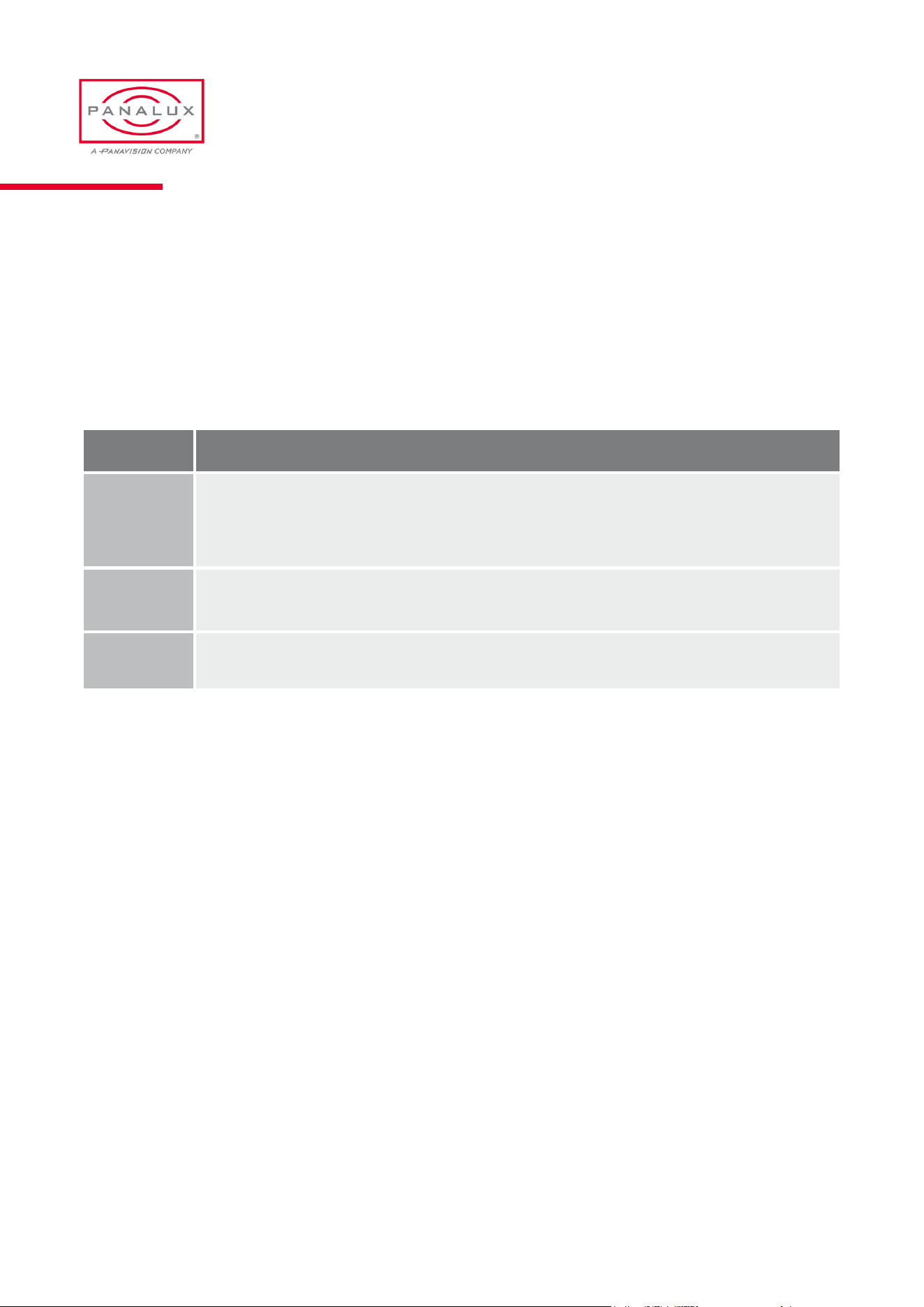
Control Priority
The ALLEGRA-C™ ballast can be controlled by local user interface or by external control (wired or wireless).
3 control priority modes are available, detailed below:
Mode Characteristics
LTP (Default)
Last Takes Precedence. In LTP mode, the ALLEGRA-C™ ballast will listen to DMX (wired or wireless), Art-Net,
and the local User Interface, and will take instructions from any. This allows a DOP or gaffer to ‘ride’ the dimmer
when the talent is moving to a cue, or during setup to make changes whilst talking to the board operator, who
may be backstage.
External
Ignores local control and locks the User Interface. To exit this mode, hold down the bottom left button for 5 sec-
onds and the display will go to Control Priority Menu.
Local
Ignores any external input even if wired to DMX.
PANALUX ALLEGRA-C USER MANUAL
28
ISSUE 1.0 | OCTOBER 2023

GENERAL
05
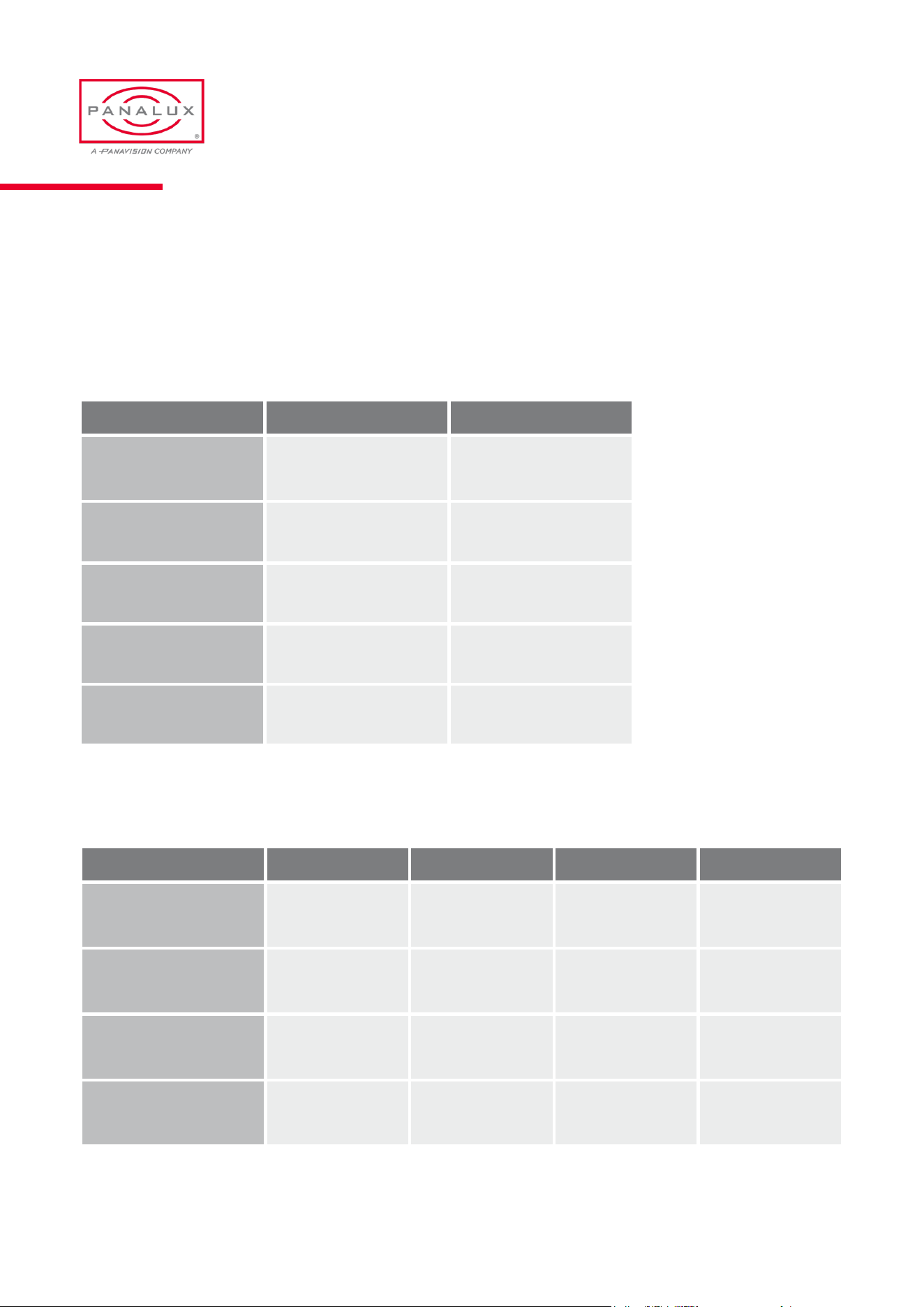
General Information
Ballast Characteristics
Head Characteristics
Part 450C 250C
Dimensions(W x H x D) 210x108x448 mm 210x108x316mm
Weight(excl. accessories) 5.7kg 2.19kg
AC input 110-240V 50/60Hz 110-240V 50/60Hz
DC input 24-36V 24-36V
Max input power 450W 400W
Part 2:1C 2:2C 4:1C 4:2C
Dimensions(W x H x D) 533x292x30 mm 533x533x30 mm 1013x292x30 mm 1013x533x30 mm
Weight(excl. accessories) 2.66 kg 3.56 kg 3.78 kg 5.85 kg
Input Voltage 24V 24V 24V 24V
Max power draw 100W 100W 100W 100W
PANALUX ALLEGRA-C USER MANUAL
30
ISSUE 1.0 | OCTOBER 2023
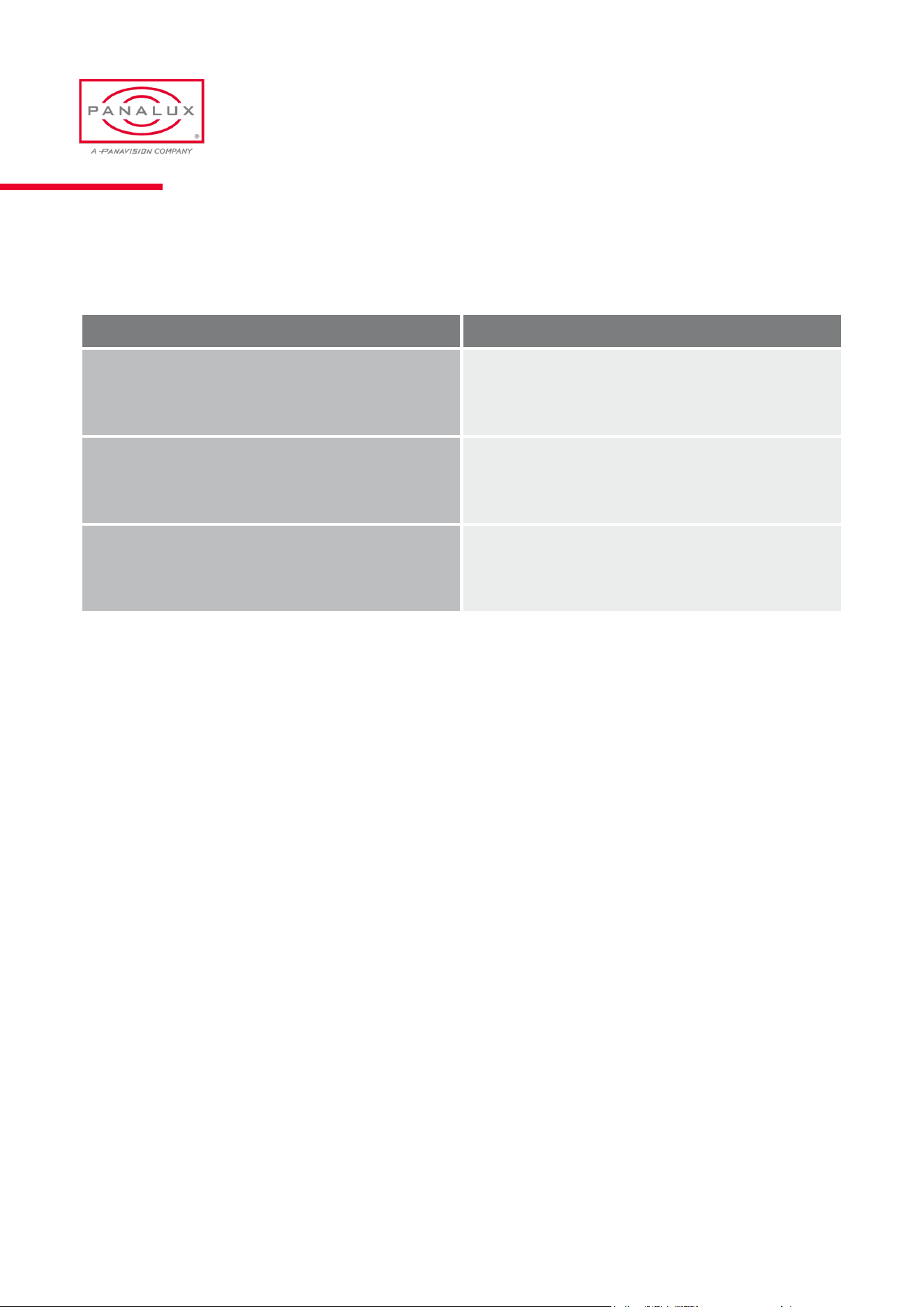
Fault Finding Tips
Issue Possible Solution
No power seen and rocker switch not lit Check mains power and fuse.
Two or more xtures on the same address are behaving dif-
ferently on dimming or CCT
Check that all xtures are set to the same personality,
output and dimming curve
One or more xtures on a DMX Universe are ashing or
behaving oddly
Conrm that none of the xtures are in PRIMARY/CLONE
or wireless mode
PANALUX ALLEGRA-C USER MANUAL
31
ISSUE 1.0 | OCTOBER 2023
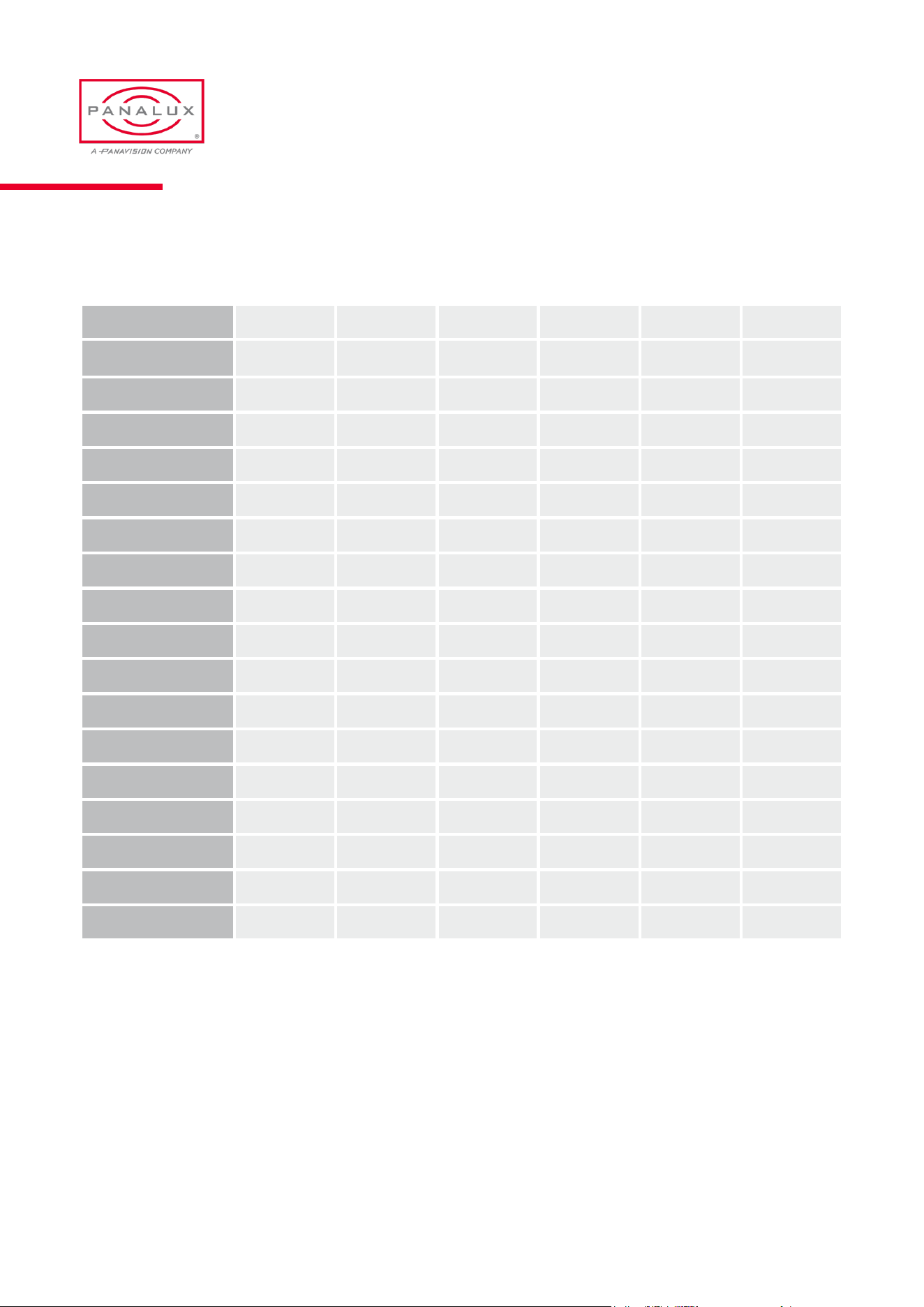
Spare Parts & Accessories
Description 450C 250C 2:1C 2:2C 4:1C 4:2C
Ballast HIOF0AR HIORXAR - - - -
Ballast case YDOEZA4 YKOWBAQ - - - -
Power cord VIKLIA7 VIKLIA7 - - - -
Aerial HINXFAR HINXFAR - - - -
M6 Eye bolt JIOIDAR JIOIDAR - - - -
Kupo mount HPOEUAK HPOEUAK HPOEUAK HPOEUAK HPOEUAK HPOEUAK
4m Extension cable HIOF1AR HIOF1AR HIOF1AR HIOF1AR HIOF1AR HIOF1AR
8m Extension cable HIOL7AR HIOL7AR HIOL7AR HIOL7AR HIOL7AR HIOL7AR
Lamp head - - HIO8VAR HIO8WAR HIO8XAR HIO8YAR
Kit bag - - YOOASAD YOOARAD YOOAQAD YOOAPAD
Spill skirt - - HIOETAR HIOESAR HIOERAR HIOEQAR
Full grid cloth - - JIOAUAR JIO2MAR JIO2PAR JIO2JAR
Half grid cloth - - JIOAVAR JIO2NAR JIO2QAR JIO2KAR
Quarter grid cloth - - JIOAWAR JIO2OAR JIO2RAR JIO2LAR
Magic cloth - - JIOAXAR JIOATAR JIOAZAR JIOAYAR
Snapgrid Eggcrate - - JJODJAJ JJODIAJ JJODHAJ JJODFAJ
Snapgrid bag - - YJODMAJ YJODL AJ YJODK AJ YJODGAJ
PANALUX ALLEGRA-C USER MANUAL
32
ISSUE 1.0 | OCTOBER 2023

APPENDIX
06
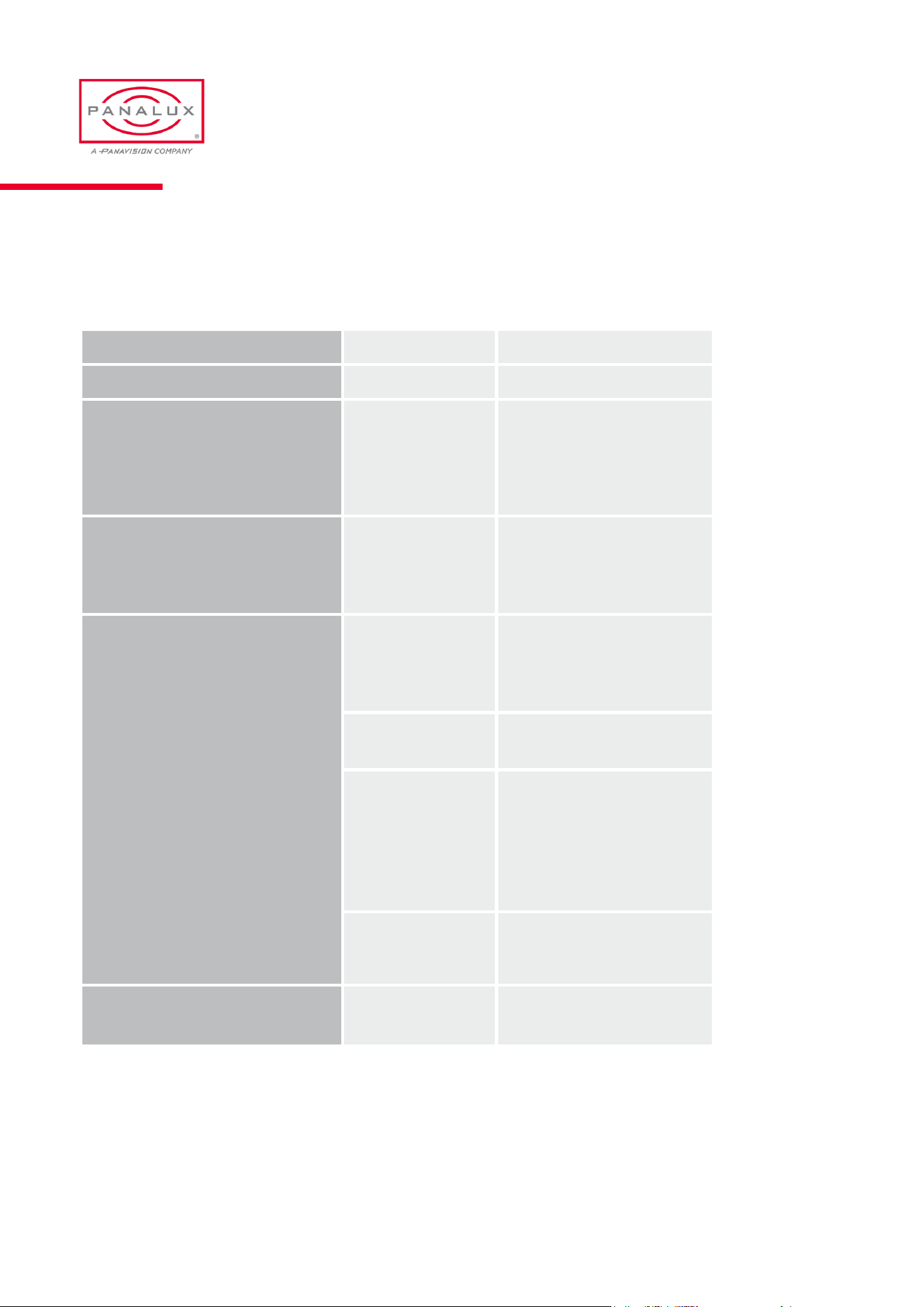
ALLEGRA-C Menu Tree
DMX Address 1 – 512
Personality 1-19
Colour
WHITE
GEL
HSI
RGB
xy
Source
WIRED
WIRELESS
PRIMARY
CLONE
Control
CURVES
LINEAR
SQUARE LAW
S CURVE
TUNGSTEN EMULATE
OUTPUT
BOOST
FLAT
GAMUT
PX VARI WHITE
REC 2020
REC 709
DCI P3
ESTA 1.54
PX FULL COLOUR
CONTROL PRIORITY
LTP
EXTERNAL
LOCAL
Mode
STANDARD
ATRACT
PANALUX ALLEGRA-C USER MANUAL
34
ISSUE 1.0 | OCTOBER 2023
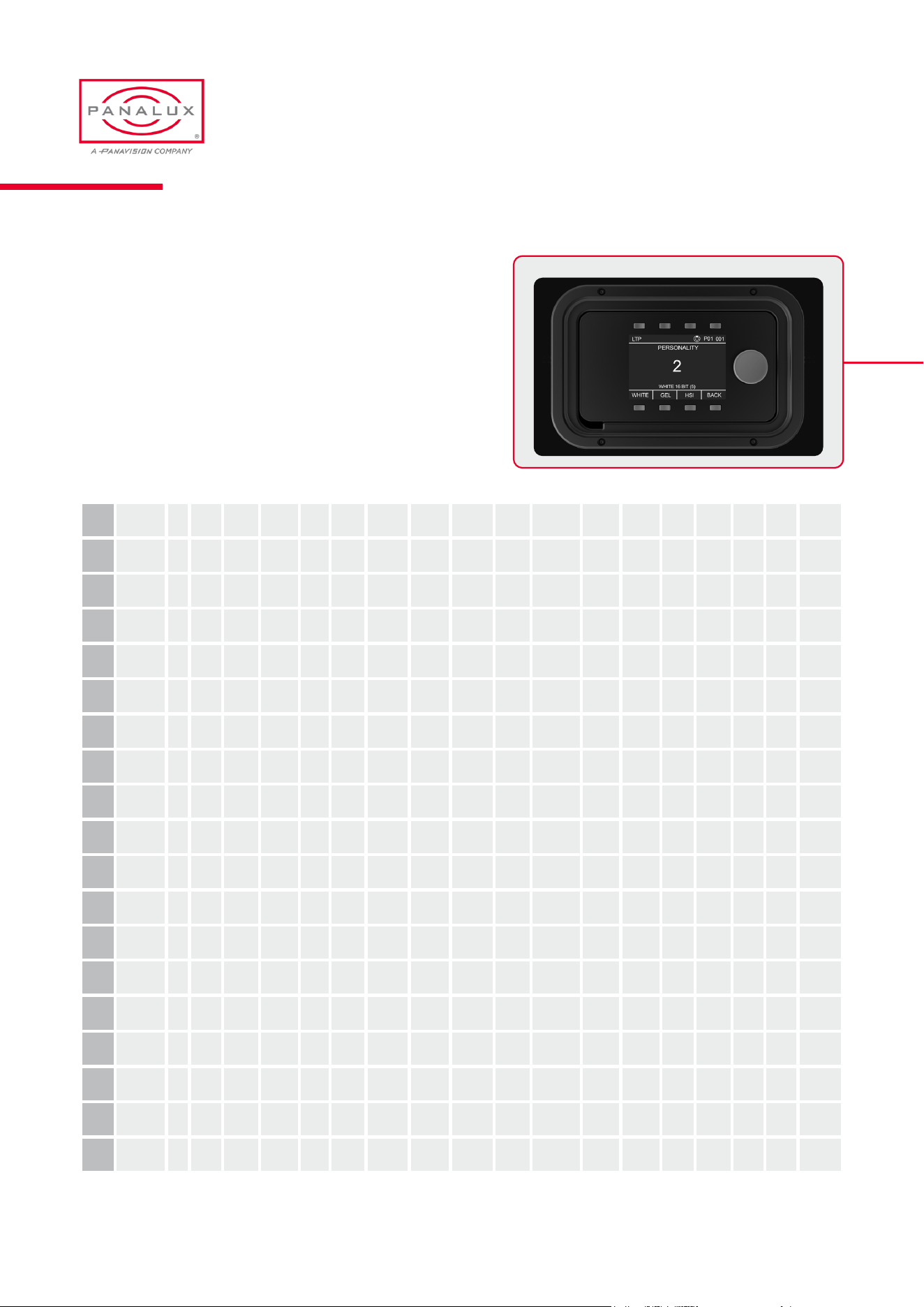
The parameters controlled in each of the DMX personalities
are listed below:
DMX Personalities - Channel Assignments
P1
White 8 bit DIM CCT
+/- Gn
P2
White 16 bit DIM DIM CCT CCT
+/- Gn
P3
HSI 8 bit DIM CCT HUE SAT
P4
HSI 16 bit DIM DIM CCT CCT HUE SAT SAT
P5
Gel 24 bit BCD DIM CCT +/- Gn GEL 000 GEL 00 GEL 0
P6
Gel 16 bit DIM DIM +/- Gn GEL GEL
P7
Gel Hue 24 bit
BCD
DIM CCT +/- Gn GEL 000 GEL 00 GEL 0 +/- HUE SAT
P8
Gel Hue 16
bit (11)
DIM DIM CCT CCT +/- Gn GEL GEL HUE HUE SAT SAT
P9
ALB 8 bit DIM AMBER LIME BLUE
P10
ALB 16 bit DIM DIM AMBER AMBER LIME LIME BLUE BLUE
P11
x y 16 bit DIM DIM x x y y
Spectral
Breadth
WW to CW
P12
x y 24 bit BCD DIM DIM x .0 x .00 x .000 y .0 y .00 y .000
Spectral
Breadth
WW to
CW
P13
Ultra DIM DIM AMBER AMBER BLUE WW CW
P14
Extreme DIM DIM AMBER 1 AMBER 2
LIME BLUE WW 1
WW 2 CW 1 CW 2
P15
CROSSFADE
TO COLOUR
DIM DIM CCT CCT HUE HUE SAT SAT
CROSS-
FADE TO
COLOUR
P16
CROSSFADE
TO RGB DIM DIM CCT CCT RED GREEN BLUE
CROSS-
FADE TO
RGB
P17
CROSSFADE
TO GEL DIM DIM CCT CCT +/- Gn GEL 000 GEL 00 GEL 0 HUE HUE SAT S AT
CROSS-
FADE TO
GEL
P18
CROSSFADE
GEL TO GEL DIM DIM CCT CCT +/- Gn GEL A GEL A HUE HUE SAT S AT GEL A GEL A HUE HUE SAT SAT
CROSS-
FADE GEL
TO GEL
P19
CROSSFADE
X Y TO X Y DIM DIM xA xA yA yA xB xB yB yB
CROSSFADE
XY (A) TO
XY (B)
PANALUX ALLEGRA-C USER MANUAL
35
ISSUE 1.0 | OCTOBER 2023

A range of especially created Panalux GELS unique to
Allegra and ALLEGRA-C are listed from #850 onwards.
Unlike other GELs these colours are not affected by base
CCT
Gels
Panalux source matching recipes have been measured and
formulated from real sources. These formulations are not
affected by base CCT. All are pre-xed with ‘SM’ for ease of
ALPHA sorting and carry numbers 900 onwards
Source Matching
PANALUX ALLEGRA-C USER MANUAL
36
ISSUE 1.0 | OCTOBER 2023
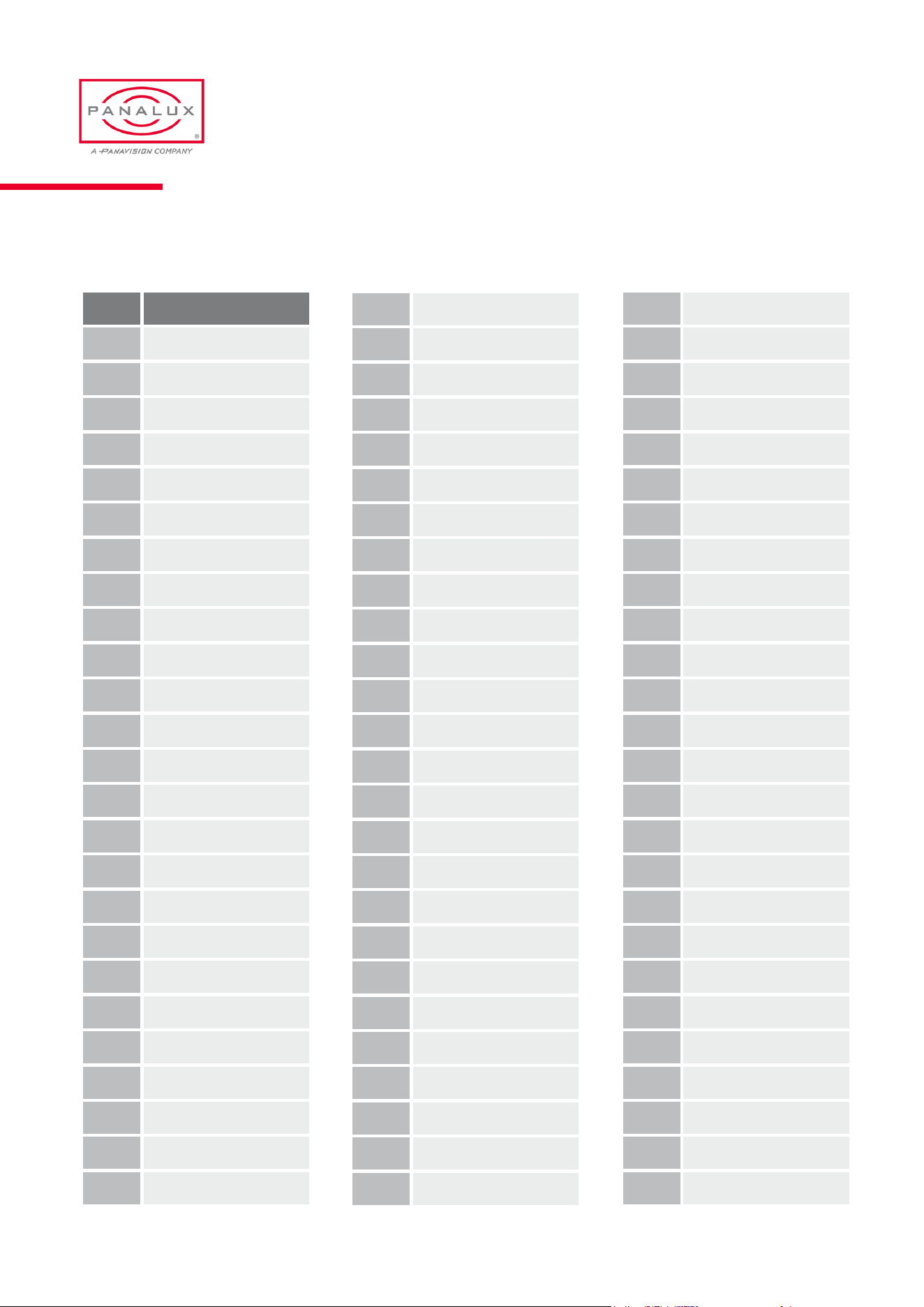
Gel Library
Gel Name
2 Rose Pink
3 Lavender Tint
4 Medium Bastard Amber
7 Pale Yellow
8 Dark Salmon
9 Pale Amber Gold
10 Medium Yellow
13 Straw Tint
15 Deep Straw
17 Surprise Peach
19 Fire
20 Medium Amber
21 Gold Amber
22 Dark Amber
24 Scarlet
25 Sunset Red
26 Bright Red
27 Medium Red
29 Plasa Red
35 Light Pink
36 Medium Pink
46 Dark Magenta
48 Rose Purple
49 Medium Purple
52 Light Lavender
53 Paler Lavender
58 Lavender
61 Mist Blue
63 Pale Blue
68 Sky Blue
71 Tokyo Blue
75 Evening Blue
79 Just Blue
85 Deeper Blue
88 Lime Green
89 Moss Green
90 Dark Yellow Green
101 Yellow
102 Light Amber
103 Straw
104 Deep Amber
105 Orange
106 Primary Red
107 Light Rose
108 English Rose
109 Light Salmon
110 Middle Rose
111 Dark Pink
113 Magenta
115 Peacock Blue
116 Medium Blue-Green
117 Steel Blue
118 Light Blue
119 Dark Blue
120 Deep Blue
121 Lee Green
122 Fern Green
124 Dark Green
126 Mauve
127 Smokey Pink
128 Bright Pink
131 Marine Blue
132 Medium Blue
134 Golden Amber
135 Deep Golden Amber
136 Pale Lavender
137 Special Lavender
138 Pale Green
139 Primary Green
140 Summer Blue
141 Bright Blue
142 Pale Violet
143 Pale Navy Blue
144 No Colour Blue
147 Apricot
148 Bright Rose
151 Gold Tint
PANALUX ALLEGRA-C USER MANUAL
37
ISSUE 1.0 | OCTOBER 2023
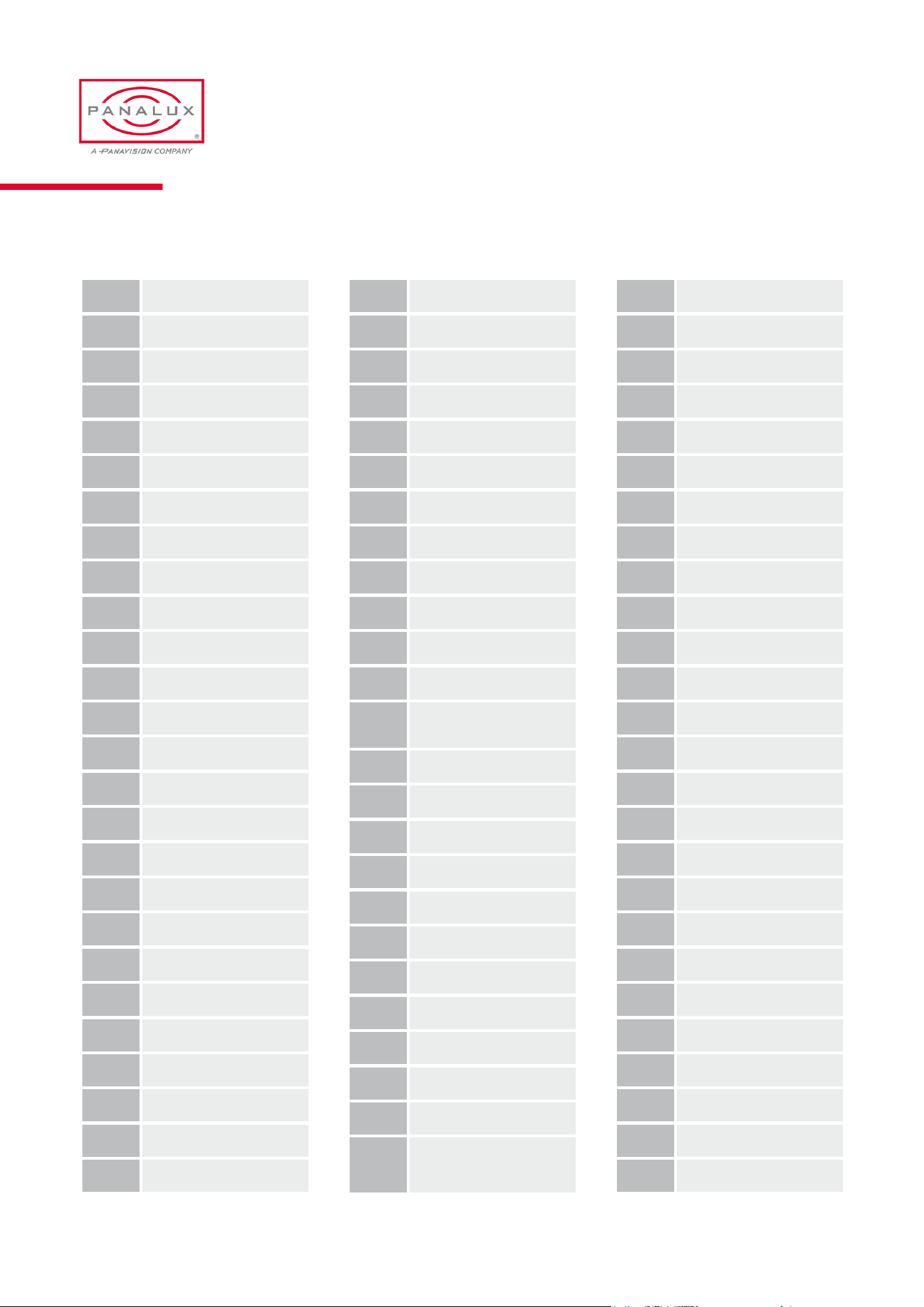
191 Cosmetic Aqua Blue
192 Flesh Pink
194 Surprise Pink
195 Zenith Blue
196 True Blue
197 Alice Blue
198 Palace Blue
199 Regal Blue
212 L.C.T.Yellow
213 White Flame Green
219 Fluorescent Green
230 Super Corr.L.C.T.Yellow
232
S.Cor WF.Grn to
Tungsten
236 H.M.I. (to Tungsten)
237 C.I.D. (to Tungsten)
238 C.S.I. (to Tungsten)
241 Lee Fluorescent 5700K
242 Lee Fluorescent 4300K
243 Lee Fluorescent 3600K
322 Soft Green
323 Jade
327 Forest Green
328 Follies Pink
332 Special Rose Pink
343
Special Medium
Lavender
Gel Library (cont.)
152 Pale Gold
153 Pale Salmon
124 Pale Rose
156 Chocolate
157 Pink
158 Deep Orange
159 No Colour Straw
161 Slate Blue
162 Bastard Amber
164 Flame Red
165 Daylight Blue
169 Lilac Tint
170 Deep Lavender
172 Lagoon Blue
174 Dark Steel Blue
176 Loving Amber
179 Chrome Orange
180 Dark Lavender
181 Congo Blue
182 Light Red
183 Moonlight Blue
184 Cosmetic Peach
186 Cosmetic Silver Rose
187 Cosmetic Rouge
188 Cosmetic Highlight
189 Cosmetic Silver Moss
345 Fuchsia Pink
352 Glacier Blue
353 Lighter Blue
354 Special Steel Blue
361 Surprise Blue (BBC)
363 Special Medium Blue
366 Cornower
441 Full C.T. Straw
442 Half C.T. Straw
443 Quarter C.T. Straw
444 Eighth C.T. Straw
500 Double New Colour Blue
501 New Col Robertson Blue
502 Half New Colour Blue
503 Quarter New Colour Blue
504 Waterfront Green
505 Sally Green
506 Marlene
507 Madge
508 Midnight Maya
511 Bacon Brown
512 Amber Delight
513 Ice And A Slice
514 Double G and T
525 Argent Blue
550 ALD Gold
PANALUX ALLEGRA-C USER MANUAL
38
ISSUE 1.0 | OCTOBER 2023
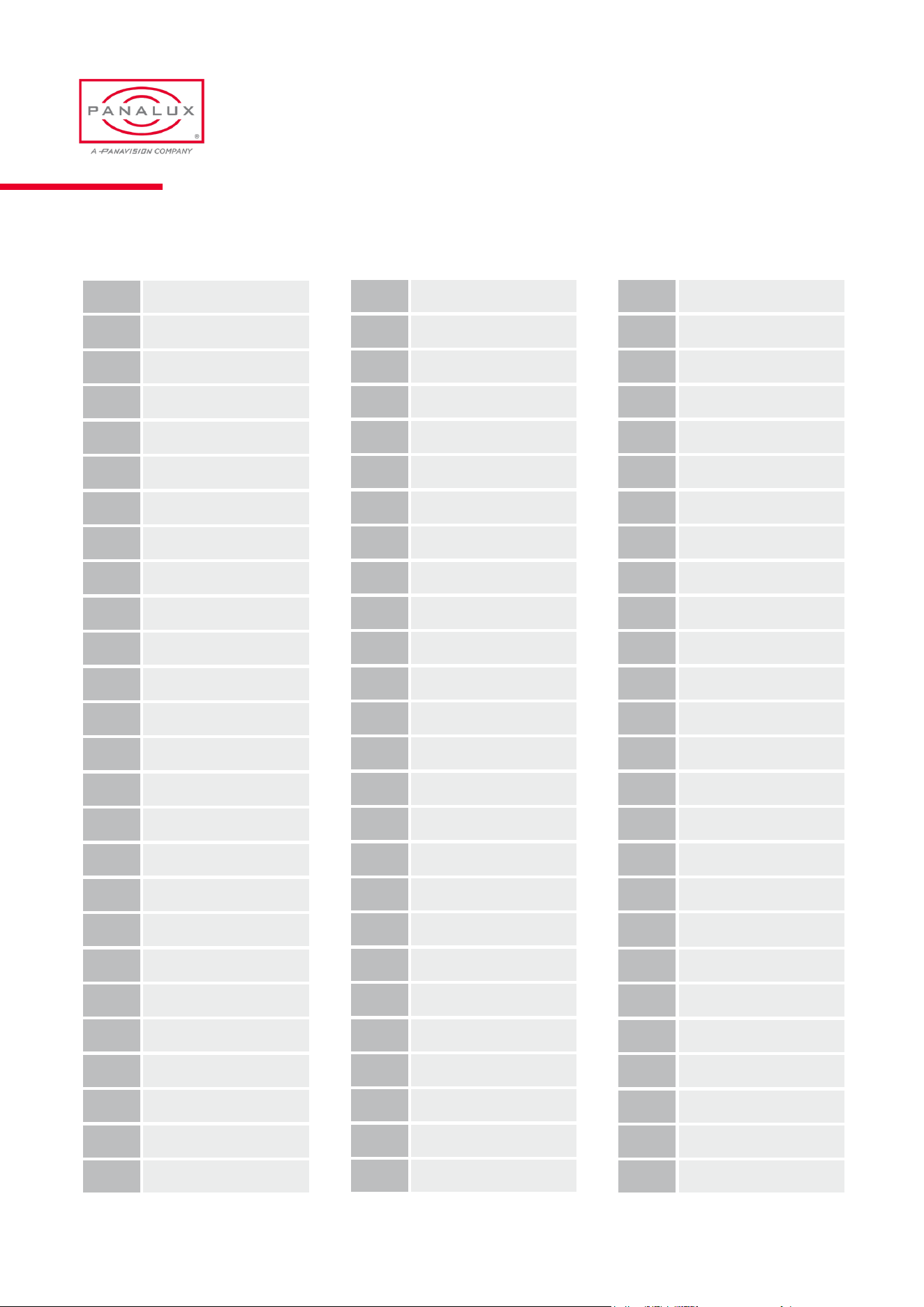
604 Full C.T. Eight Five
642 1/2 Mustard Yellow
643 1/4 Mustard Yellow
650 Industry Sodium
651 Hi Sodium
652 Urban Sodium
700 Perfect Lavender
701 Provence
702 Special Pale Lavender
703 Cold Lavender
704 Lily
705 Lily Frost
706 King Fals Lavender
707 Ultimate Violet
708 Cool Lavender
709 Electric Lilac
710 Spir Special Blue
711 Cold Blue
712 Bedford Blue
713 J. Winter Blue
714 Elysian Blue
715 Cabana Blue
716 Mikkel Blue
719 Colour Wash Blue
721 Berry Blue
722 Bray Blue
Gel Library (cont.)
723 Virgin Blue
724 Ocean Blue
725 Old Steel Blue
727 QFD Blue
728 Steel Green
729 Scuba Blue
730 Liberty Green
731 Dirty Ice
733 Damp Squib
735 Velvet Green
736 Twickenham Green
738 JAS Green
740 Aurora Borealis Green
741 Mustard Yellow
742 Bram Brown
744 Dirty White
746 Brown
747 Easy White
748 Seedy Pink
763 Wheat
764 Sun Colour Straw
765 Lee Yellow
767 Oklahoma Yellow
768 Egg Yolk Yellow
770 Burnt Yellow
773 Cardbox Amber
774 Soft Amber Key 1
775 Soft Amber Key 2
776 Nectarine
777 Rust
778 Millennium Gold
779 Bastard Pink
780 AS Golden Amber
781 Terry Red
787 Marius Red
789 Blood Red
790 Moroccan Pink
791 Moroccan Frost
793 Vanity Fair
795 Magical Magenta
797 Deep Purple
798 Chrysalis Pink
799 Special K H Lav
801 Zircon Minus Green 1
802 Z i r c o n M i n u s G r e e n 2
803 Zircon Minus Green 3
804 Zircon Minus Green 4
805 Zircon Minus Green 5
806 Zircon Warm Amber 2
807 Zircon Warm Amber 4
808 Zircon Warm Amber 6
809 Zircon Warm Amber 8
PANALUX ALLEGRA-C USER MANUAL
39
ISSUE 1.0 | OCTOBER 2023
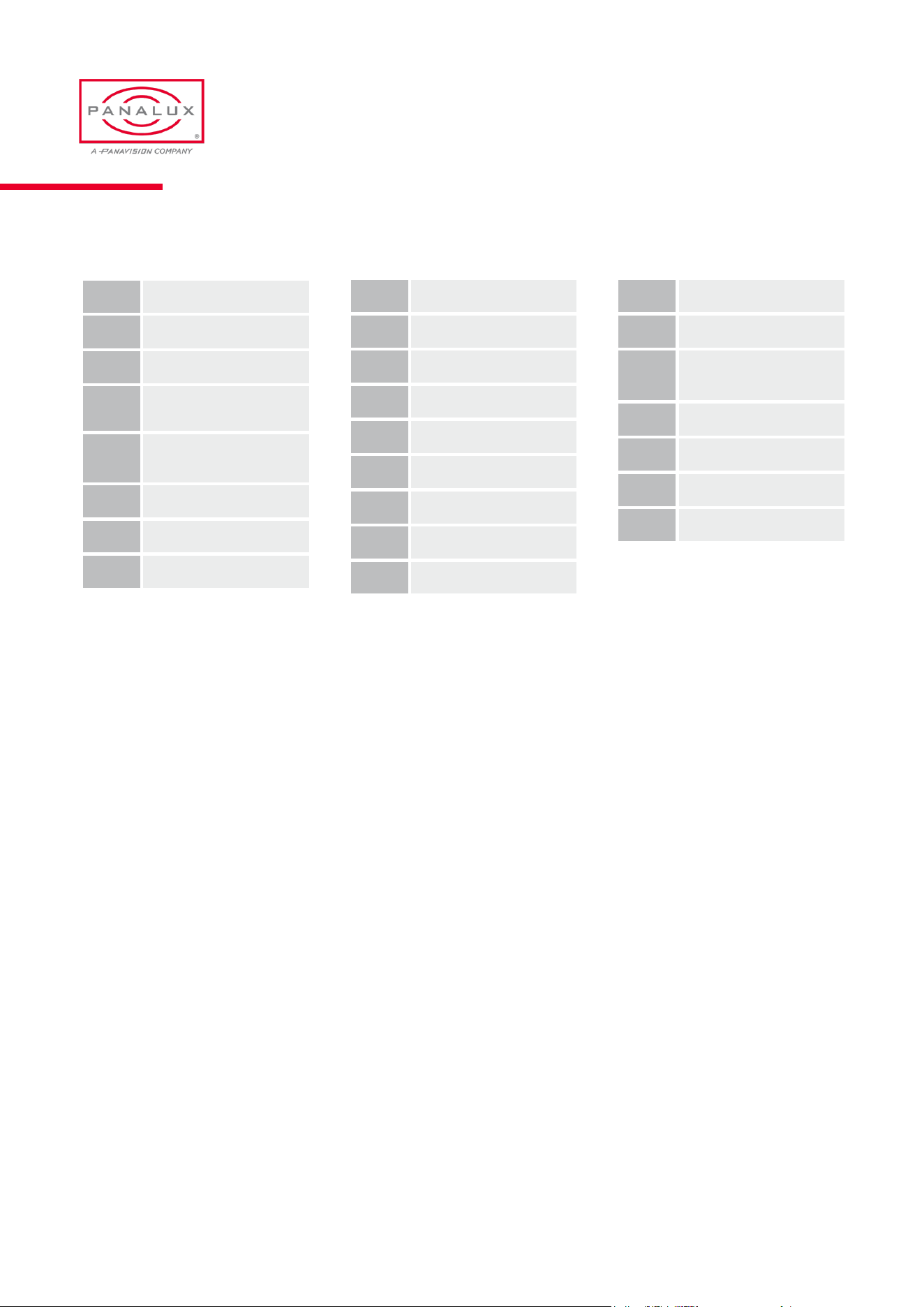
810 Zircon Diffusion 1
811 Zircon Diffusion 2
812 Zircon Diffusion 3
813
Zircon Warm Amber 5
(O32)
814
Zircon Warm Amber 9
(R31)
815 Zircon Dark Density
816 Zircon Mid Density
817 Zircon Pale Density
Gel Library (cont.)
818 Zircon Cool Blue 6
819 Zircon Cool Blue 8
820 Zircon Cool Blue 10
840 Special Cyan 15
841 Special Cyan 30
842 Special Cyan 60
850 Panalux Inky Blue
851 Panalux Full Amber
852 Panalux Phosphor Green
855 Panalux Midnight Layla
856 Panalux Backlight Blue
857
Panalux Deep Congo
Blue
858 Panalux Neon Pink
859 Panalux Salty Dog Sea
860 Panalux Lush Lavender
861 Panalux Deepest violet
PANALUX ALLEGRA-C USER MANUAL
40
ISSUE 1.0 | OCTOBER 2023
900 Candle ame 1700K
901 Candle ame 1850K
902 High Quality Filament LED
903
904 Carbon arc
905 Low pressure sodium
906 Sodium vapour
907 High Press stadium light
908 Mercury vapour
909 Xenon
910 Arena lighting
911 Frosty night
912 Val d'isere
913 Watery winter sunlight
914 Shadow side winter sun
915 Overcast winter dusk
916
917
Sunlight - 5790K - clear blue sky
- midsummer
918 Electronic ash
919
920 Flourescent warm white
921 Flourescent neutral white
922 Flourescent cold white
923 Flourescent old green
924 Halophosphate orescent
925 Auto Xenon headlamp
926 Auto sealed beam headlamp
927 Auto Indicator (modern)
928 Auto Indicator (classic)
929 Auto side light (classic)
930
931
932
933
934
935 Green screen (narrow band)
936 Blue screen (narrow band)
937 Green screen (power)
938 Blue screen (power)
Source Emulation List
PANALUX ALLEGRA-C USER MANUAL
41
ISSUE 1.0 | OCTOBER 2023
RDM
The ALLEGRA-C™ is RDM Enabled
RDM functionality gives the ability to remotely identify the xture, set its DMX address and DMX personality, and other
options. This feature also enables information about ALLEGRA-C to be read remotely, such as the temperature of the LED
arrays. See the full list of RDM functions and monitoring options below:
Function Type
1 UID (Unique Identier) to allow recognition of individual xtures Monitoring
2 RDM Protocol Version Monitoring
3 Device Model Description Fixed
4 Manufacturer Label Fixed
5 Software Version Fixed
6 Serial Number Fixed
7 DMX Footprint Monitoring
8 DMX Personality Description Monitoring
9 DMX Start Address User Editable
10 DMX Personality User Editable
11 Dimming Curve User Editable
12 Output Mode User Editable
13 Colour Gamut User Editable
14 Camera LUT User Editable
15 Device Hours Monitoring
16 Lamp Hours Monitoring
17 Power Output Monitoring
18 Reset device to factory defaults and wipe saved scenes User Editable
PANALUX ALLEGRA-C USER MANUAL
42
ISSUE 1.0 | OCTOBER 2023
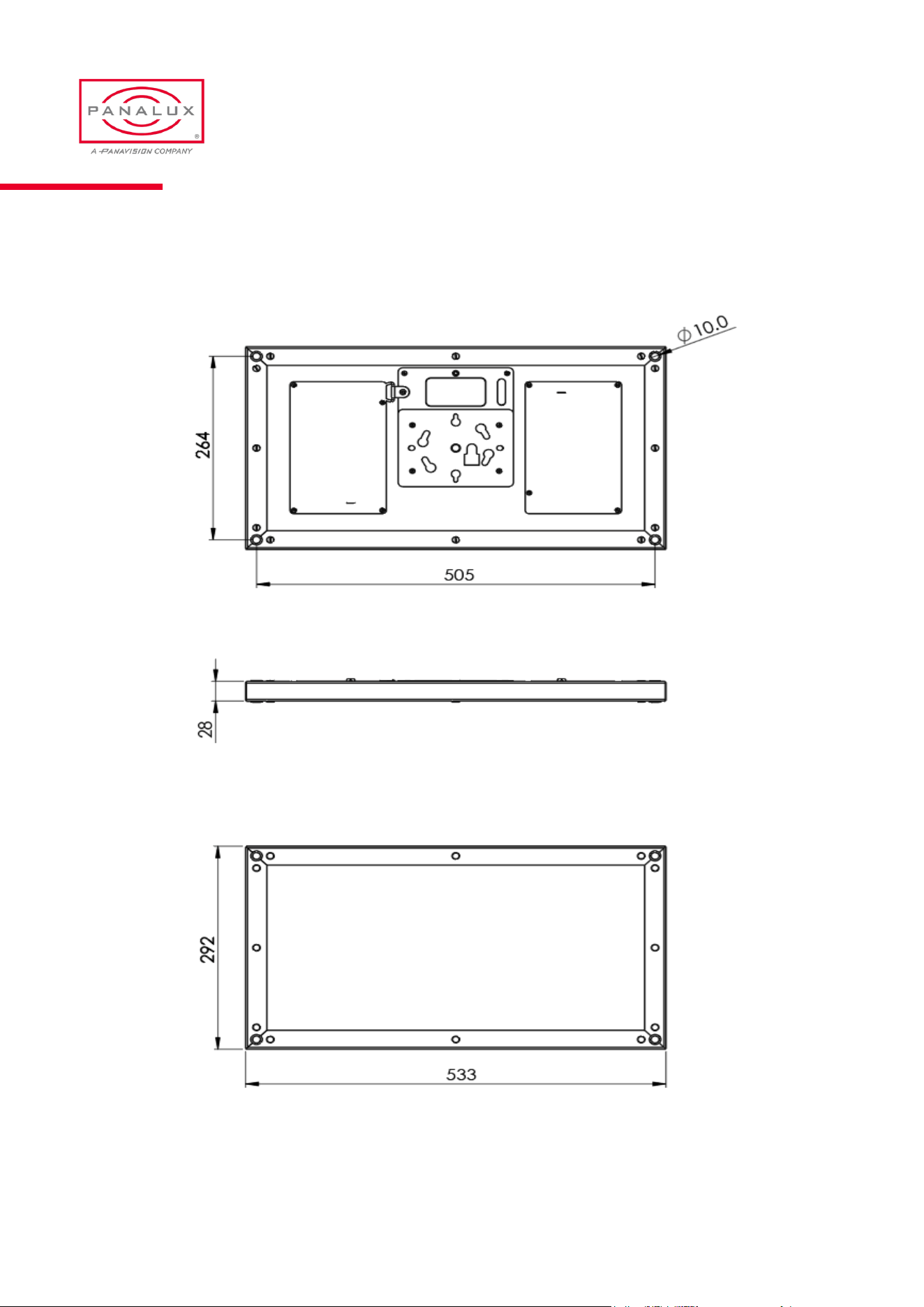
ALLEGRA-CTM 2:1 Overall Dimensions & Rigging Centres
PANALUX ALLEGRA-C USER MANUAL
43
ISSUE 1.0 | OCTOBER 2023
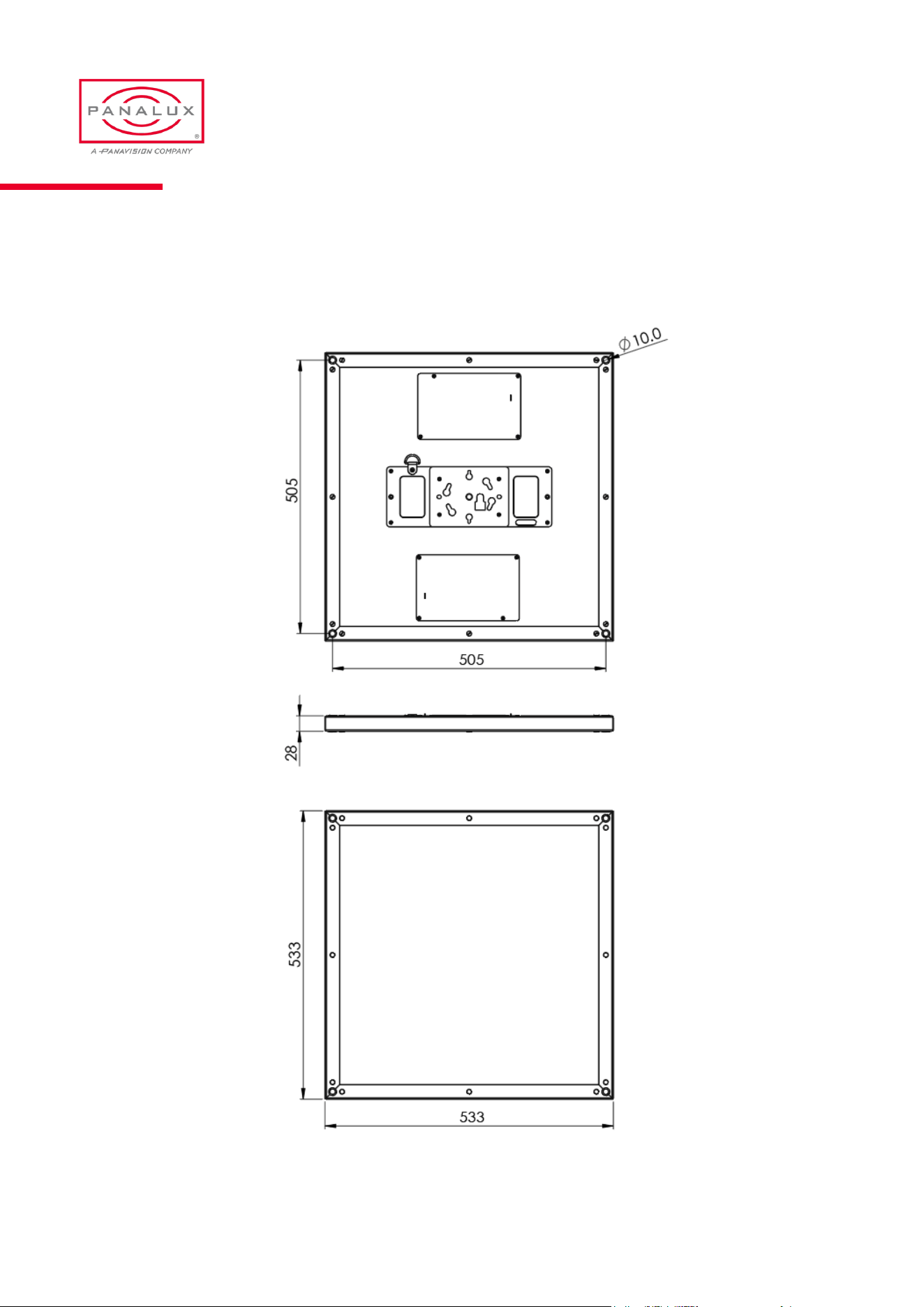
ALLEGRA-CTM 2:2 Overall Dimensions & Rigging Centres
PANALUX ALLEGRA-C USER MANUAL
44
ISSUE 1.0 | OCTOBER 2023
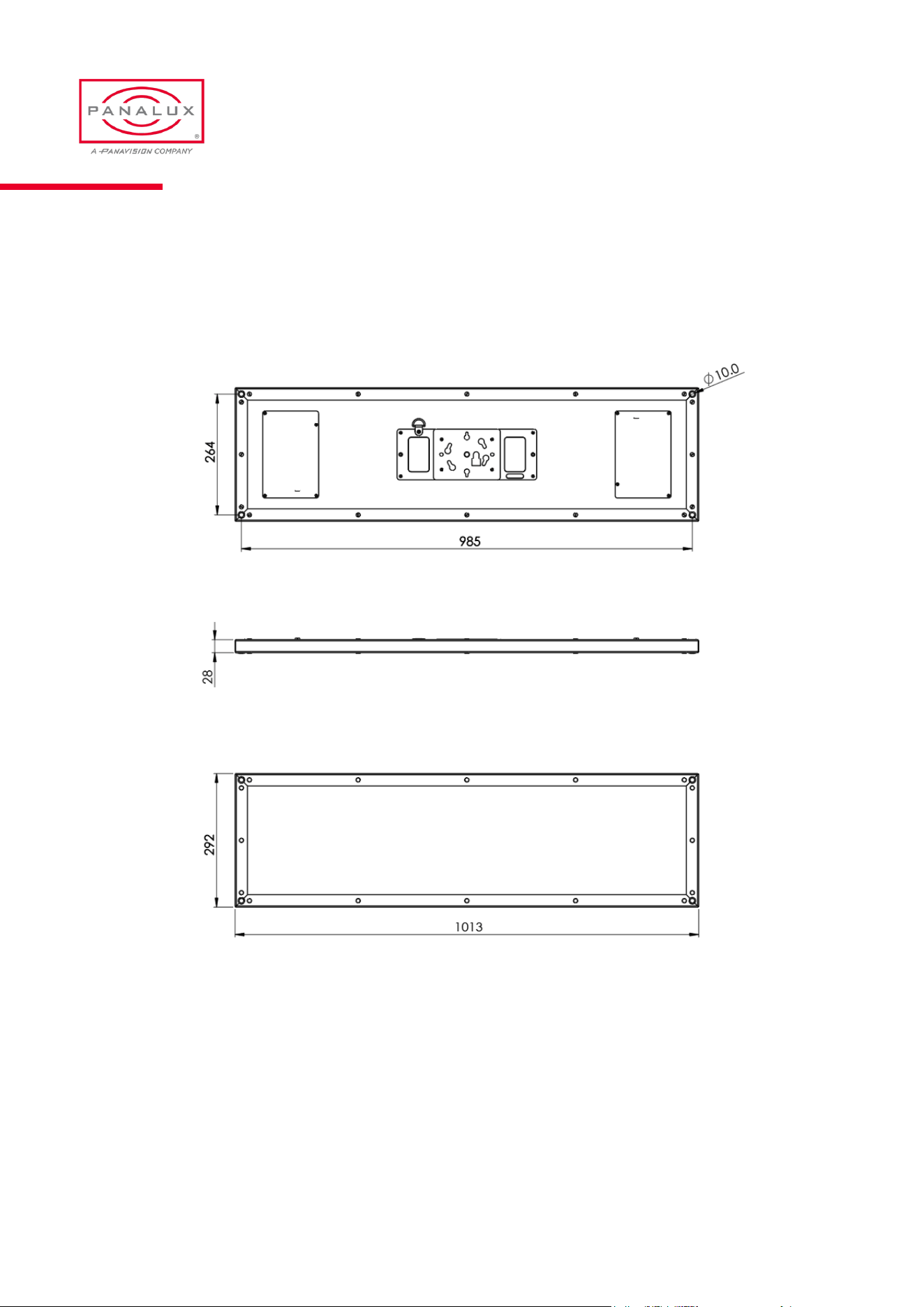
ALLEGRA-CTM 4:1 Overall Dimensions & Rigging Centres
PANALUX ALLEGRA-C USER MANUAL
45
ISSUE 1.0 | OCTOBER 2023
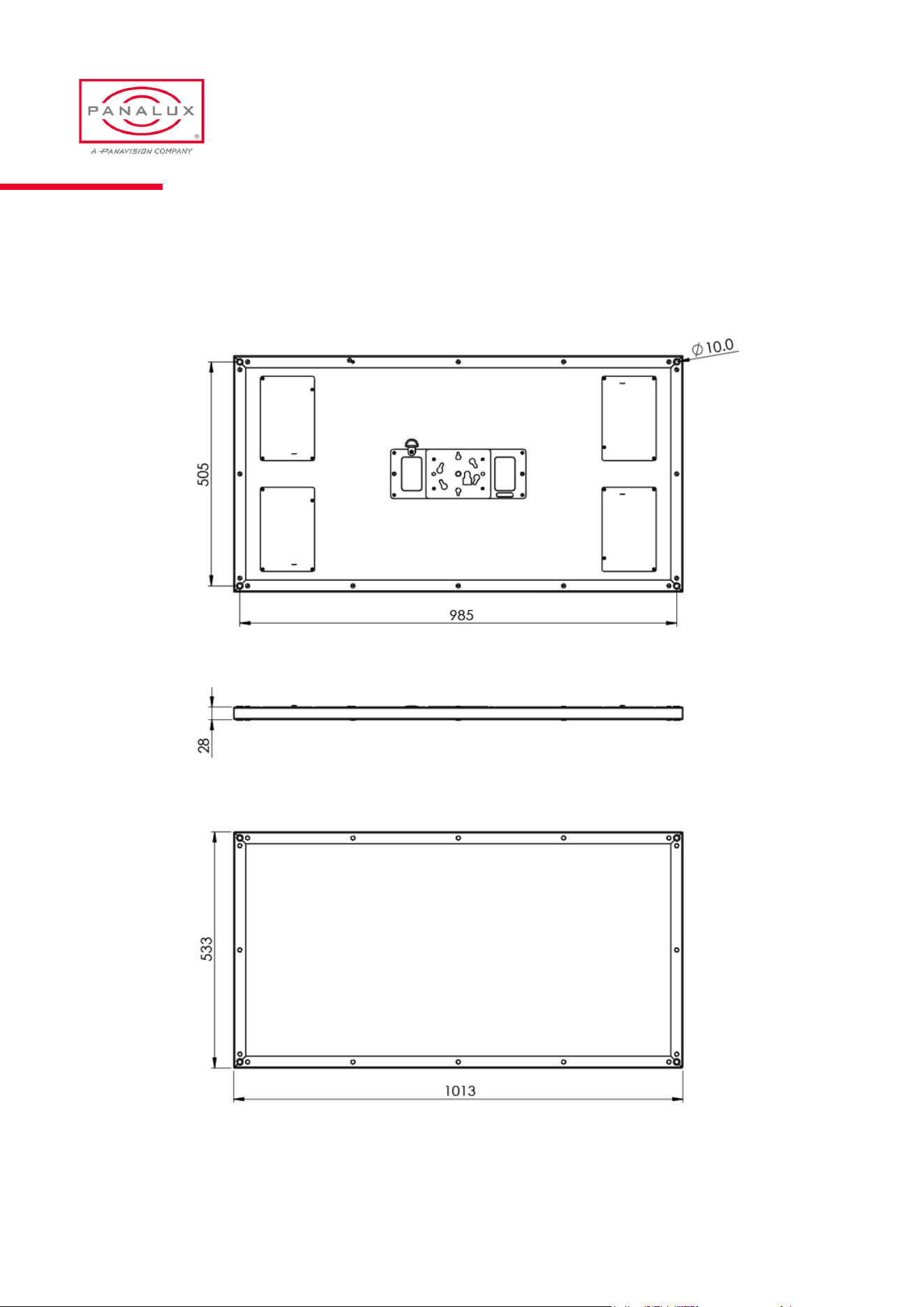
ALLEGRA-CTM 4:2 Overall Dimensions & Rigging Centres
PANALUX ALLEGRA-C USER MANUAL
46
ISSUE 1.0 | OCTOBER 2023
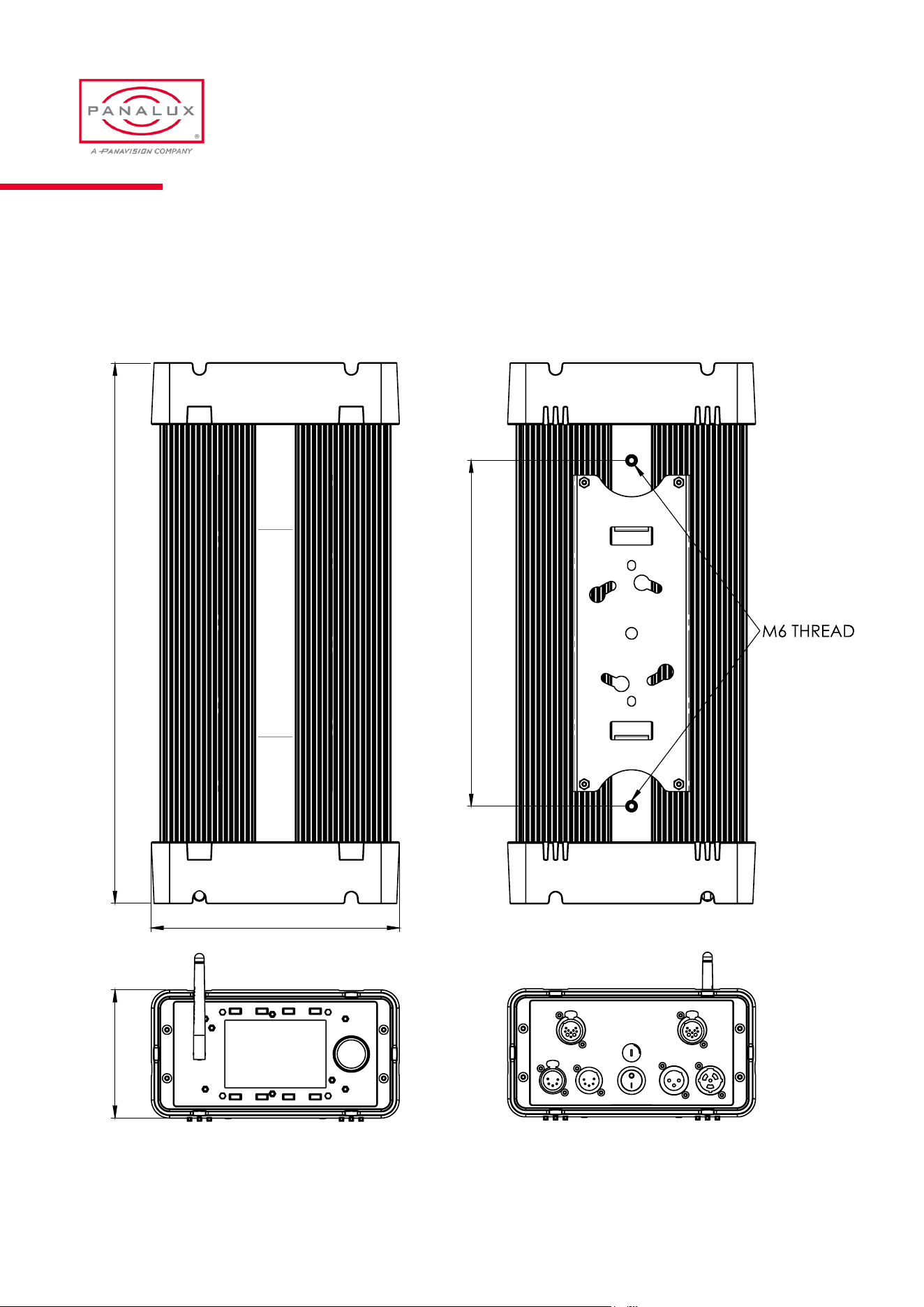
ALLEGRA-C 450C LED Driver - Overall Dimensions & Rigging Centres
105.7
204.5
445.0
285.0
PANALUX ALLEGRA-C USER MANUAL
47
ISSUE 1.0 | OCTOBER 2023
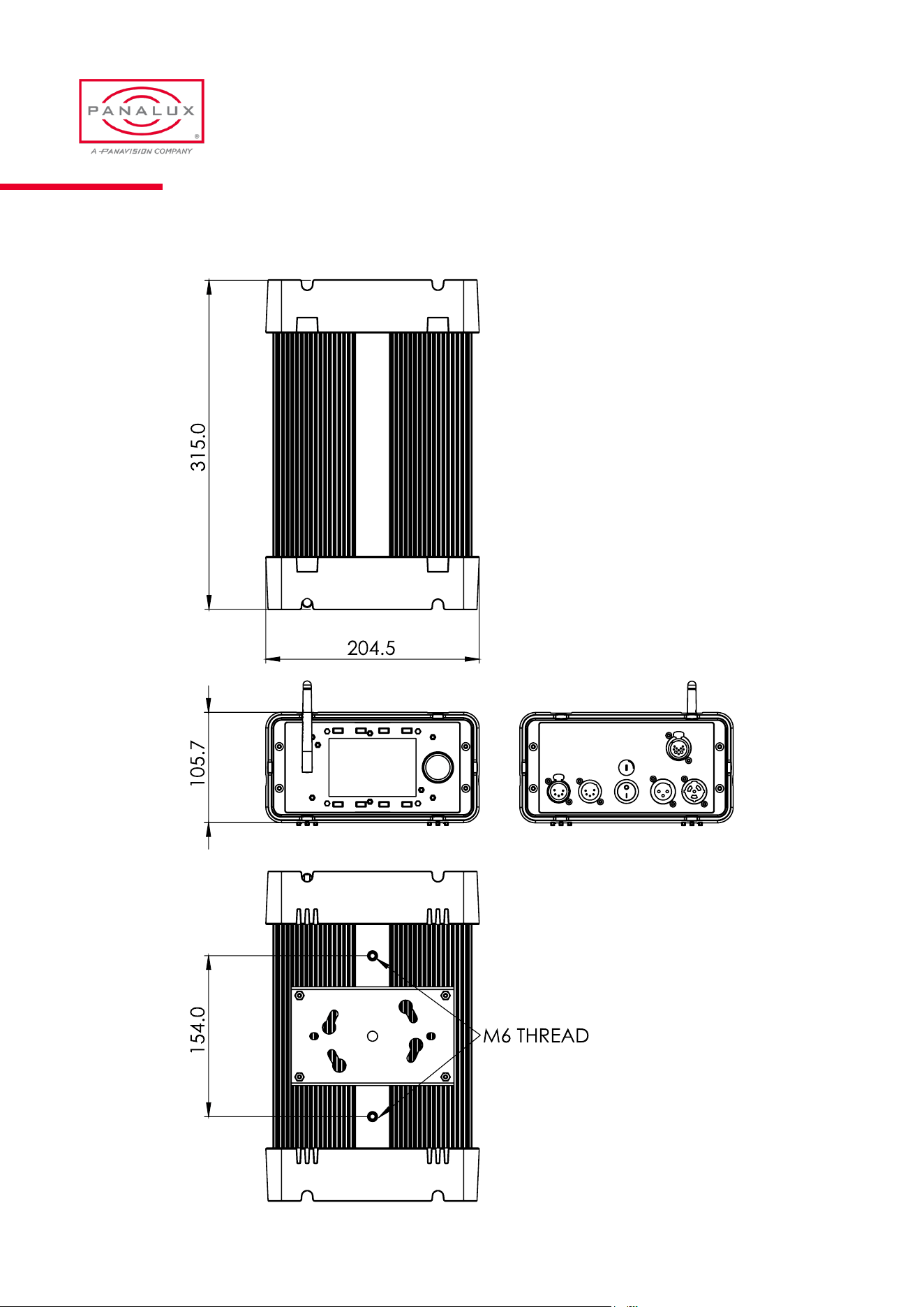
ALLEGRA-C 250C LED Driver - Overall Dimensions & Rigging Centres
PANALUX ALLEGRA-C USER MANUAL
48
ISSUE 1.0 | OCTOBER 2023