For More Information
4 Ports MPPT Solar PoE Switch
POE-SW804G-SOLAR
Quick Guide (V2.1/2026-9-2)
4 Ports MPPT Solar PoE Switch
POE-SW804G-Solar
Quick Guide
User Manual
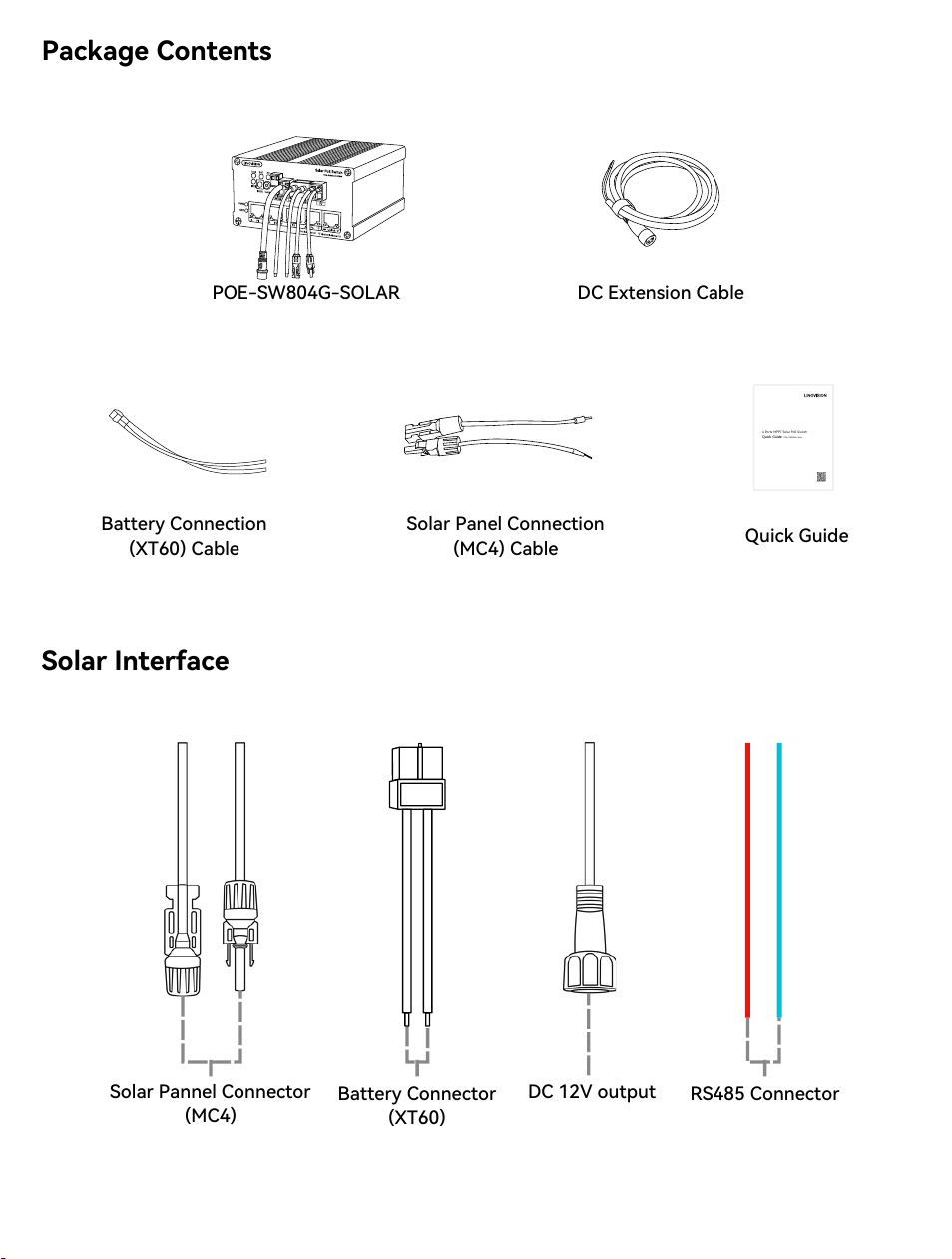
POE-SW804G-SOLAR
DC Extension Cable
Battery Connection
(XT60) Cable
Solar Panel Connection
(MC4) Cable
Quick Guide
Package Contents
Solar Interface
Solar Pannel Connector
(MC4)
Battery Connector
(XT60)
DC 12V output
RS485 Connector
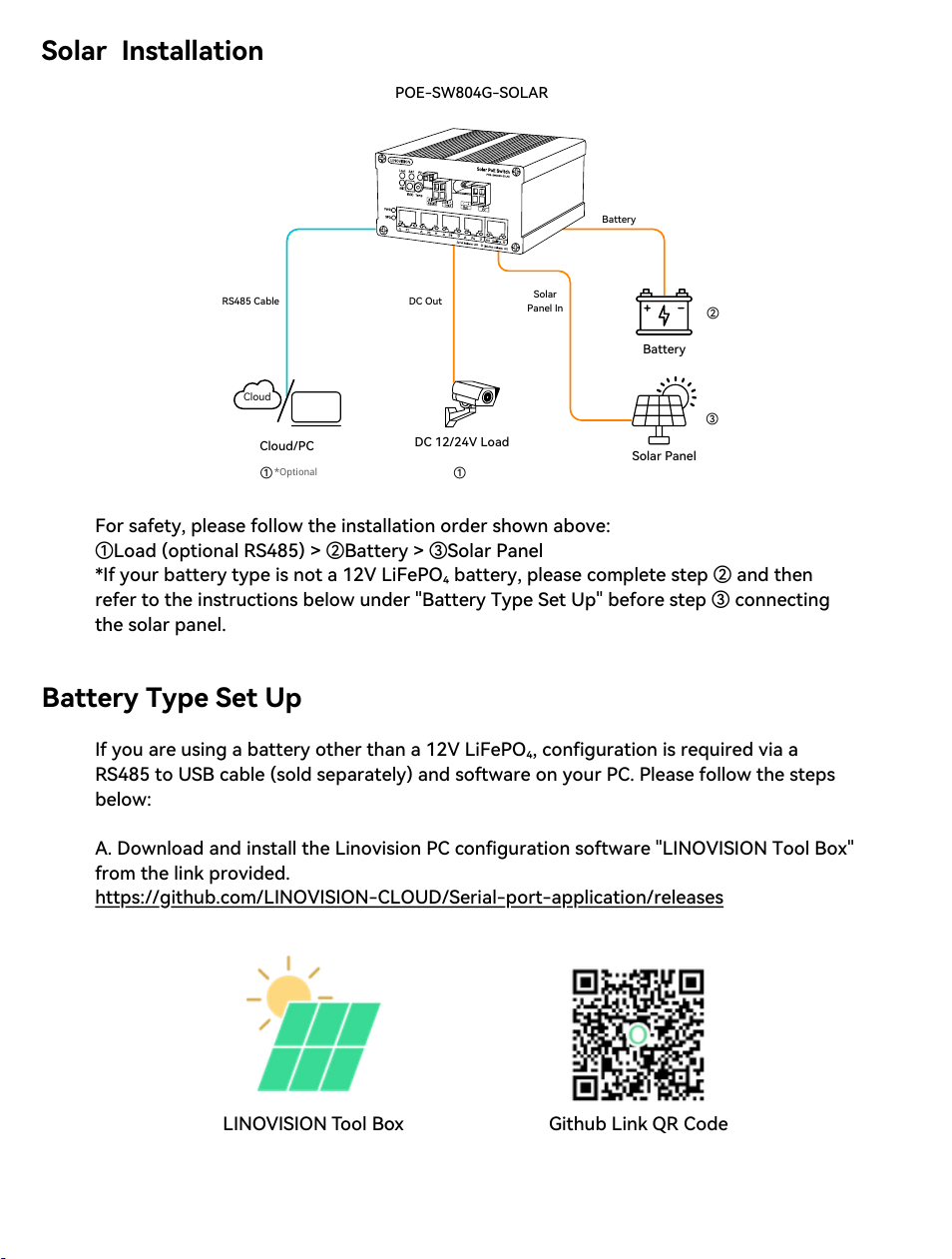
Solar Installation
For safety, please follow the installation order shown above:
①Load (optional RS485) > ②Battery > ③Solar Panel
*If your battery type is not a 12V LiFePO₄ battery, please complete step ② and then
refer to the instructions below under "Battery Type Set Up" before step ③ connecting
the solar panel.
Battery Type Set Up
If you are using a battery other than a 12V LiFePO₄, configuration is required via a
RS485 to USB cable (sold separately) and software on your PC. Please follow the steps
below:
A. Download and install the Linovision PC configuration software "LINOVISION Tool Box"
from the link provided.
https://github.com/LINOVISION-CLOUD/Serial-port-application/releases
LINOVISION Tool Box
Github Link QR Code
POE-SW804G-SOLAR
Solar Panel
Battery
DC 12/24V Load
①
②
③
Cloud
Cloud/PC
①
*Optional
RS485 Cable
DC Out
Solar
Panel In
Battery
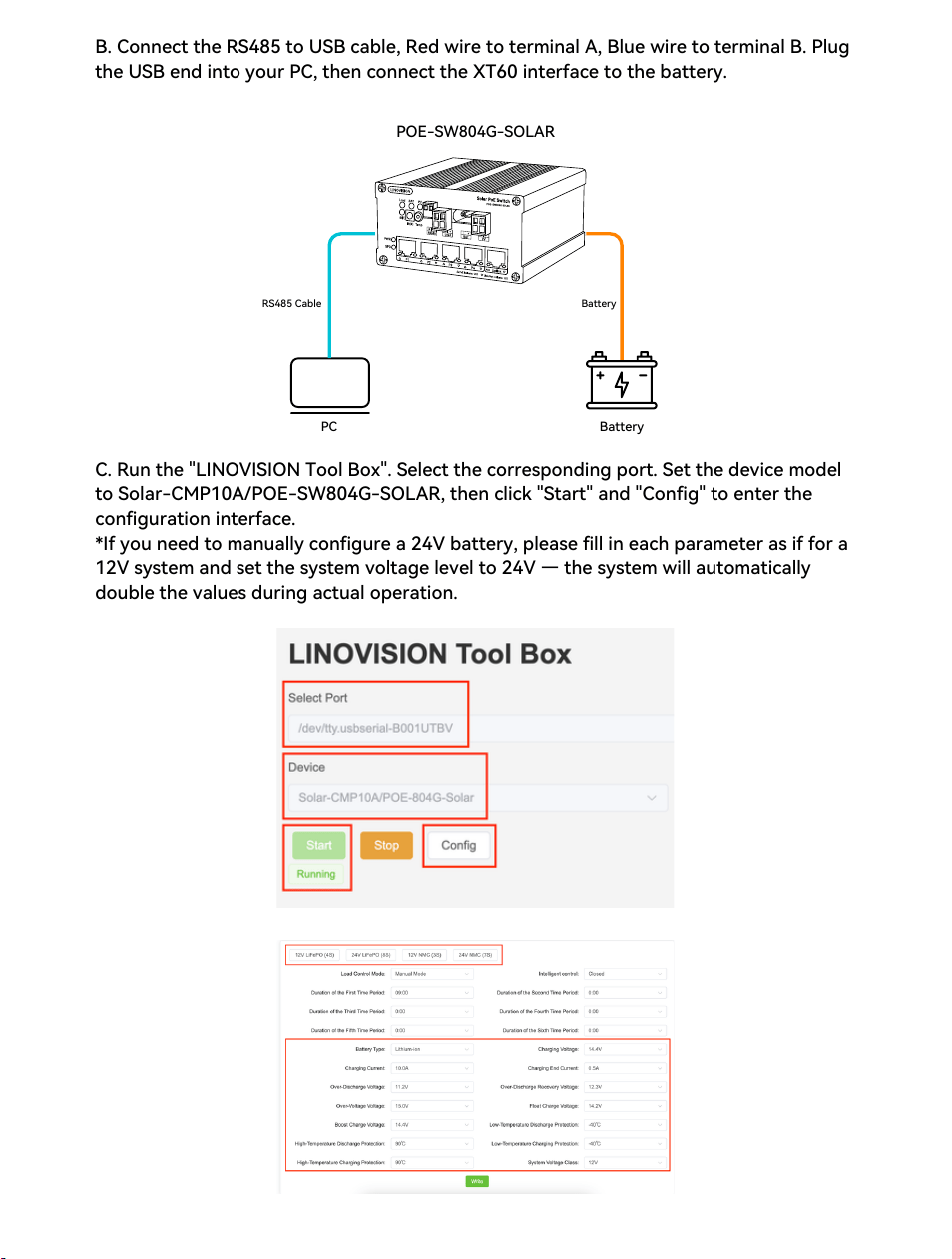
B. Connect the RS485 to USB cable, Red wire to terminal A, Blue wire to terminal B. Plug
the USB end into your PC, then connect the XT60 interface to the battery.
C. Run the "LINOVISION Tool Box". Select the corresponding port. Set the device model
to Solar-CMP10A/POE-SW804G-SOLAR, then click "Start" and "Config" to enter the
configuration interface.
*If you need to manually configure a 24V battery, please fill in each parameter as if for a
12V system and set the system voltage level to 24V — the system will automatically
double the values during actual operation.
Battery
POE-SW804G-SOLAR
PC
RS485 Cable
Battery
12V LiFePO₄ (4S)
24V LiFePO₄ (8S)
12V NMC (3S)
24V NMC (7S)
Charging Voltage
14.4V
28.8V
12.6V
29.4V
Charging Current
10.0A
10.0A
10.0A
10.0A
Charging End Current
0.5A
0.5A
0.5A
0.5A
Over-Discharge Voltage
11.2V
22.4V
9.0V
21.0V
Over-Discharge Recovery
Voltage
12.3V
23.6V
9.9V
22.2V
Over-Voltage Voltage
15.0V
30.0V
13.0V
30.8V
Float Charge Voltage
14.2V
28.4V
12.3 V
28.7V
Boost Charge Voltage
14.4V
28.8V
12.6V
29.4V
High-Temperature Charge
Protection
55°C
55°C
50°C
50°C
High-Temperature
Discharge Protection
60°C
60°C
60°C
60°C
Low-Temperature Charge
Protection
0°C
0°C
0°C
0°C
Low-Temperature Discharge
Protection
-20°C
-20°C
-20°C
-20°C
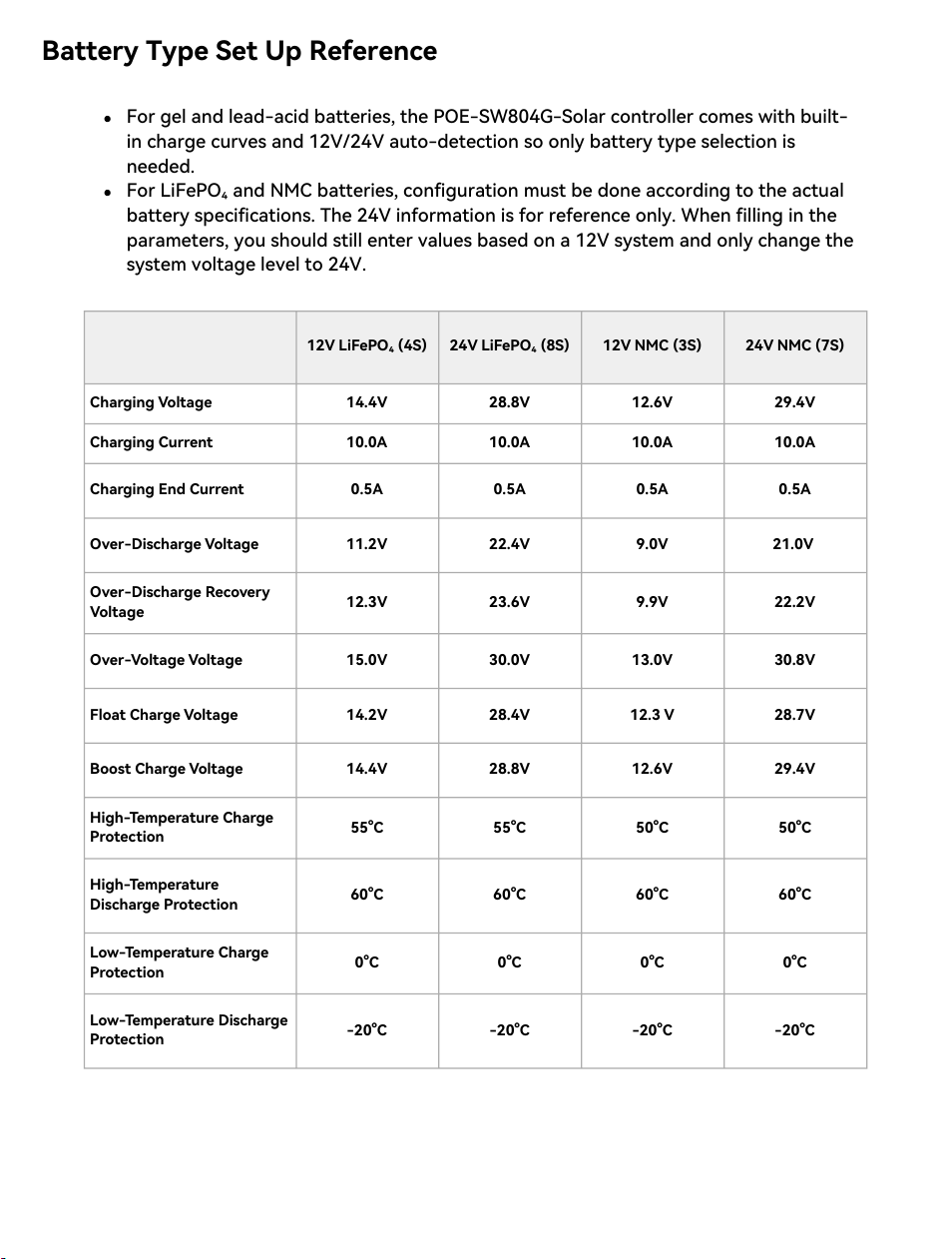
Battery Type Set Up Reference
For gel and lead-acid batteries, the POE-SW804G-Solar controller comes with built-
in charge curves and 12V/24V auto-detection so only battery type selection is
needed.
For LiFePO₄ and NMC batteries, configuration must be done according to the actual
battery specifications. The 24V information is for reference only. When filling in the
parameters, you should still enter values based on a 12V system and only change the
system voltage level to 24V.
Symptom
Possible Cause
Corrective Action
PV status indicator LED is off
in daylight;
load lamp switches on in
daylight;
load lamp operates for only
one night
Photovoltaic module wiring
incorrect
Verify and correct the
photovoltaic module
wiring
Load status indicator LED
flashes rapidly;
load lamp does not illuminate
Load lamp wiring short-
circuited or open-circuited;
load lamp defective
Inspect and repair the
load lamp wiring;
replace the lamp if
necessary
Load status indicator LED
flashes rapidly;
load lamp flickers
The load lamp turns off
immediately after lighting,
and the load status indicator
LED flashes rapidly.
Adjust the consumption
of load lamp to the
range specified in the
controller datasheet
Load status indicator LED
flashes slowly
Load power exceeds the
controller's rated capacity
Reduce the output
current to within the
controller's rating
BAT status indicator LED is
red;
lighting duration is
insufficient
Battery deeply discharged;
excessive cable resistance;
battery damaged
Confirm proper charging
conditions and remove
any shading of the
photovoltaic module;
shorten or tighten
battery cables;
replace the battery if
required
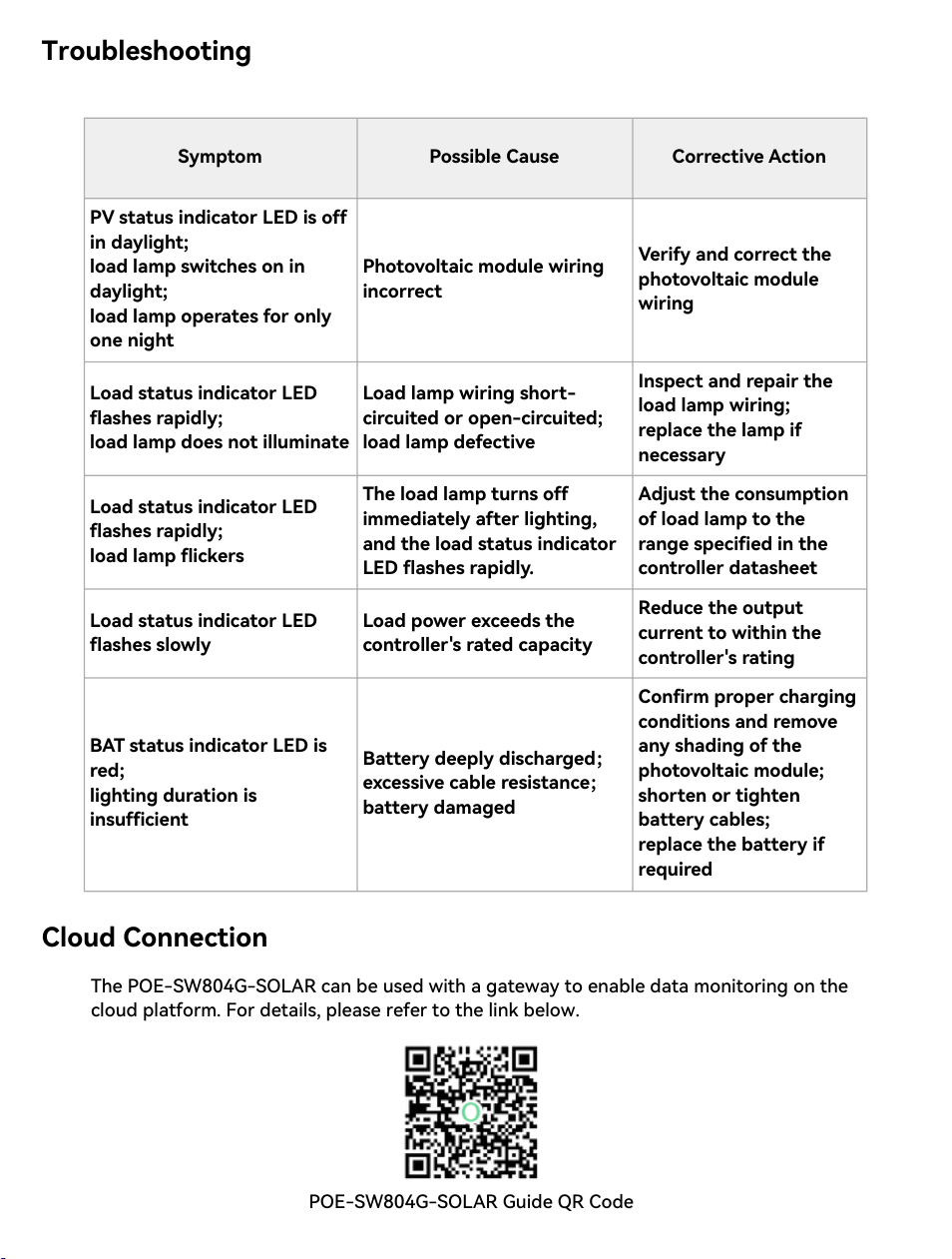
Troubleshooting
Cloud Connection
The POE-SW804G-SOLAR can be used with a gateway to enable data monitoring on the
cloud platform. For details, please refer to the link below.
POE-SW804G-SOLAR Guide QR Code