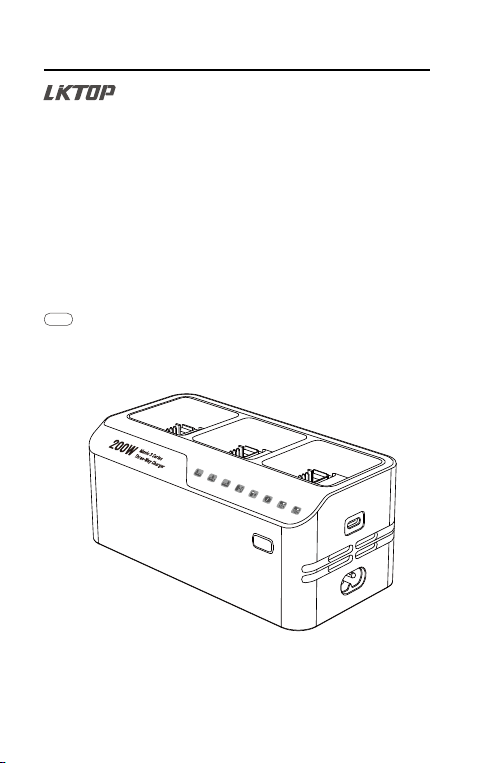
200W Mavic 3
Series Three-Way Charger
200W Mavic 3 Series Three-Way Charger User
User
使用说明
Manual
Manual
V 2.1 2023.11
200W Mavic 3 Series Three-Way Charger User Manual
或
或
A1 A2
© 2023 LKTOP. All rights reserved.
2
B C
MICRO USB-C
FNS
HDMI
MICRO USB-C
FNS
HDMI

9
200W Mavic 3 Series Three-Way Charger User Manual
© 2023 LKTOP. All rights reserved.
Thank you for purchasing the LKTOP 200W Mavic 3 Series Three-Way Charger (hereafter referred to as
the "Charger"). Before using the charger, please read this statement carefully, once you use this product, it
is deemed to recognize and accept the entire content of this statement. Please use the product completely
following these instructions and be sure to pay attention to precautions. Due to improper use by the user
(including but not limited to: charging a battery of a non-specified model, short-circuiting the product,
heating up, entering objects, touching the terminal with the hand or proximal end, etc.). We shall not be liable
for any direct or indirect damage or injury caused by the charger.
LKTOP is a registered trademark of LIKI. The product names, brands, and all other appearing in this
article are trademarks or registered trademarks of the companies to which they belong. This product
and manual are copyrighted by LIKI. Reproduction in any form may not be made without permission.
Use of this product and manual does not entail patent liability. The final interpretation right of this
document and all related documents of this product belongs to LIKI.
Regarding the disclaimer, there may be differences between the different language versions. The
Chinese version shall prevail in China, while the English version shall prevail in other regions.
Disclaimer
Product use precautions
·Please read and follow all safety and compliance guidelines related to this document and the product
before using it.
·Do not use the charger in direct sunlight, rain, or humid environments.
·Keep the charger away from heat sources, high voltage, water, flammable gases, corrosive substances,
and other hazardous materials.
·In the event of a fire, use a dry powder fire extinguisher for proper firefighting; using a liquid fire
extinguisher may pose an electric shock hazard.
·Using the charger during thunderstorms or lightning is strictly prohibited.
·Keep the interior of the charger dry and prevent any liquids such as water or oil from entering.
·Do not block the charger's ventilation ports during charging; ensure proper ventilation and heat
dissipation.
·During charging, keep away from combustible materials, and do not charge the charger or batteries on
carpets.
·The charger's battery interface is only intended for charging Mavic 3 series batteries; do not charge
batteries of other models.
·Place the charger on a stable surface during use and pay attention to insulation and fire prevention.
·Do not touch the metal terminals of the battery interface with hands or other objects. If foreign objects are
attached to the metal terminals, wipe them clean with a dry cloth while the power is off.
·Ensure proper alignment of the battery interface with the charger interface before gently pressing and
inserting it; failure to do so may damage the battery.
·Do not unplug the AC power cord or battery charging cable during the charging process. After charging
is complete, promptly remove the battery, remote controller, phone, etc.
·Always use the charger within the appropriate environmental temperature range (recommended 0°C to
40°C).
·This product supports AC or Type-C input. During the use of the charger, it is prohibited to use both AC
and Type-C as input inputs. In the case of AC input, Type-C only supports output.
·When moving or transporting the charger, do not pull on the power cord.
·The AC power cord for the charger is rated at 2.5A; ensure that the current rating of the external AC
power supply is greater than 2.5A.
·Before inserting the battery into the charger, ensure that the battery interface, charger interface, battery
surface, and charger battery compartment surface are dry and free of moisture.
·It is strictly prohibited to disassemble or damage the charger.
EN
10
200W Mavic 3 Series Three-Way Charger User Manual
© 2023 LKTOP. All rights reserved.
Product Introduction
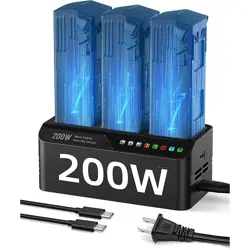
The LKTOP 200W Mavic 3 Series Three-Way Charger is an intelligent charger that integrates the
charger and charging manager. It can simultaneously connect three DJI Mavic 3 series intelligent flight
batteries (BWX-260-5000-15.4) for charging. The maximum output power of the charger is up to 200W,
and it supports two charging modes: storage mode ( stop charging at 60%) and full charge mode
(charging to 100%). When charging the intelligent flight battery, the Type-C interface can also be
used to charge the remote control or phone. When connecting the intelligent flight battery separately, it
can also be used as a power bank.
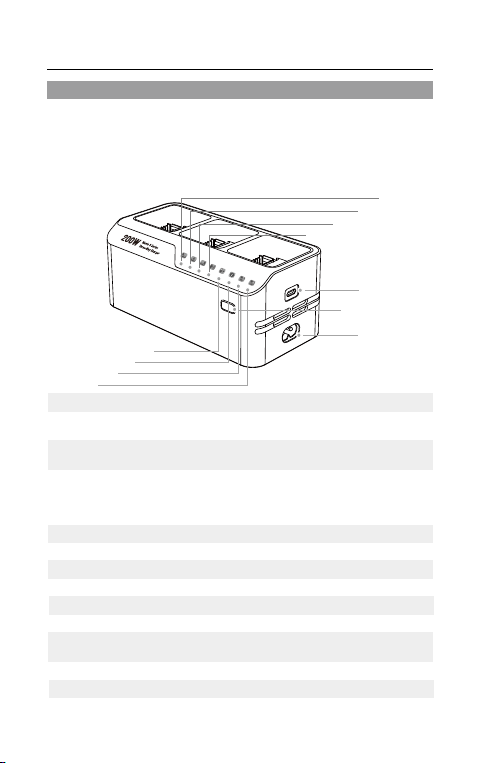
Indicator Light L1
Indicator Name
Description
Indicator Light L2
Indicator Light L3
Type-C Port
Power input terminal or charging output terminal, supporting
PD fast charging protocol
Press and hold the button for more than 2 seconds to switch
between storage mode and full charge mode
Steady light when B1 battery is inserted
Steady light when B2 battery is inserted
Steady light when B3 battery is inserted
Steady light when the battery is discharging
Steady light when the battery is charging
A flashing yellow light indicates a low power (less than 18W)
input reminder. A flashing red light indicates a fault warning
Storage mode indicator light (approximately 60% charge)
Name Description
Function Button
Indicator Light L4
Indicator Light L5
Indicator Light L6
Indicator Light L7
Full power mode indicator light
Indicator Light L8
B1
B2 B3
L1
L2
L3
L4
L5
L6
L7
L8
Type-C Port
AC Power Port
Function Button
AC Power Port
AC power interface
Note: In charging scenarios, Type-C and AC power ports cannot be used as power input ports at the same
time.
11
© 2023 LKTOP. All rights reserved.
200W Mavic 3 Series Three-Way Charger User Manual
Product Usage Instructions
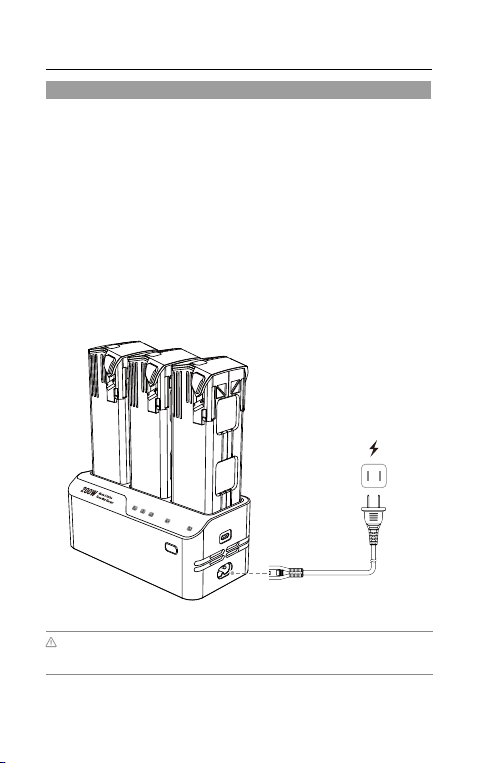
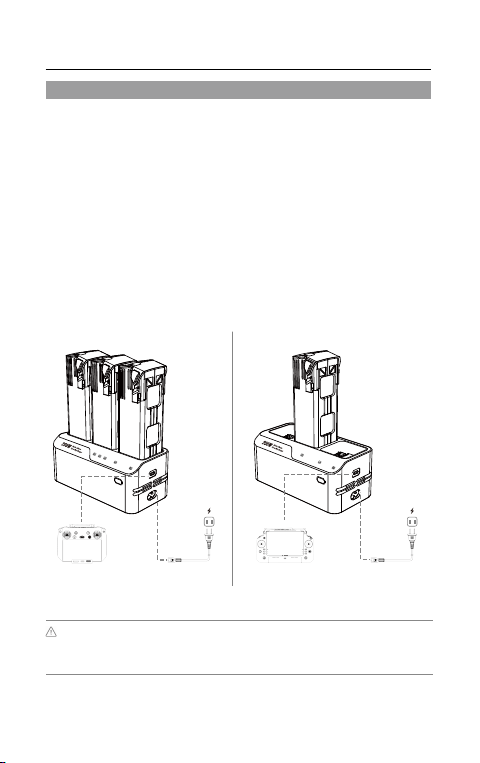
This manual provides charging examples using the LKTOP 200W Mavic 3 Series Three-Way Charger
and DJI Mavic 3 Series batteries (BWX-260-5000-15.4). When using the battery charger, you can
charge up to three DJI Mavic 3 Series intelligent flight batteries simultaneously.
1. Connect the charger to an AC power source (100-240V, 50/60Hz). Please use a power cord that is
compatible with the specifications. If needed, use a power adapter.
2. With the intelligent flight battery turned off, connect the battery to the charger.
3. During the charging process, the battery level indicator lights on the intelligent flight battery will flash in
a cycle and indicate the current battery level.
4. When all the battery level indicator lights are turned off, it means that the intelligent flight battery is fully
charged. Please promptly remove the battery and turn off the charger's power.
· Charge intelligent flight batteries
· Charging procedure
·The LKTOP 200W Mavic 3 Series Three-Way Charger will intelligently detect the battery level and prioritize
charging the remaining high battery.
·The charging time of the first battery is about 60-70 minutes, the second battery is about 70-80 minutes, and the
third battery is about 80-90 minutes.
12
200W Mavic 3 Series Three-Way Charger User Manual
© 2023 LKTOP. All rights reserved.
Product Usage Instructions
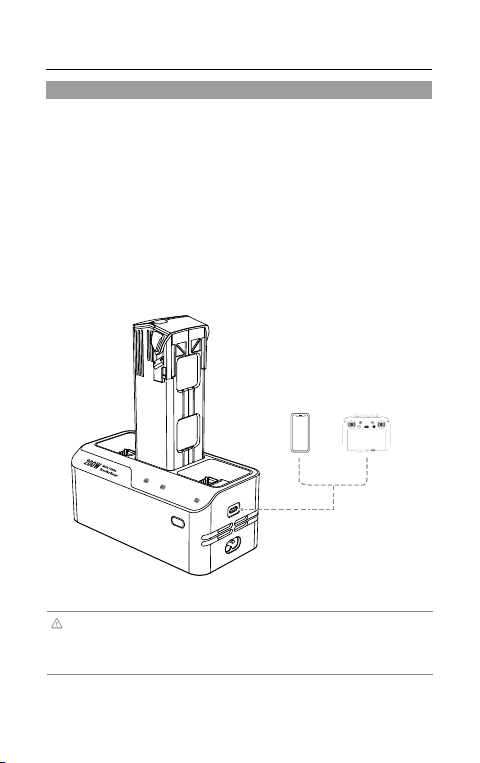
This manual uses the LKTOP 200W Mavic 3 Series Three-Way Charger and DJI Mavic 3 series
intelligent flight battery (BWX-260-5000-15.4) as charging examples. The DJI Mavic 3 series
intelligent flight battery can be used with a charger to connect up to three DJI Mavic 3 series intelligent
flight batteries for simultaneous charging. It can also be connected to external devices (such as the
DJI Mavic 3 series remote controller) through the Type-C interface for charging.
1. Connect the charger to an AC power source (100-240V, 50/60Hz). Please use a power cord that
is compatible with the charging specifications. If necessary, use a power adapter.
2. When the intelligent flight battery is turned off, connect the battery and remote controller to the
charger separately.
3. During the charging process, the battery's power indicator will flash in a cycle and indicate
the current battery level.
4. After waiting for the device to fully charge (when the intelligent flight battery is fully charged,
the battery indicator lights will all turn off), please unplug the corresponding device in a timely
manner and turn off the charger power.
· Connect the intelligent flight battery to an external device for charging
· Charging procedure
·When using the LKTOP 200W Mavic 3 Series Three-Way Charger to charge a single battery, the Type-C port
can provide a maximum power output of 100W.
Max 100W
Max 10W
Max 100W
·When using the LKTOP 200W Mavic 3 Series Three-Way Charger to charge three batteries, the Type-C port
can provide a maximum power output of 10W. (As the battery charge level approaches full, the power output of the
Type-C port will gradually increase, up to a maximum of 100W.)
MICRO USB-C
FNS
HDMI
13
© 2023 LKTOP. All rights reserved.
Product Usage Instructions
This manual provides discharging examples using the LKTOP 200W Mavic 3 SeriesThree-Way
Charger and DJI Mavic 3 Series Batteries (BWX-260-5000-15.4). To discharge the battery without
connecting the charger, insert the Mavic 3 Series intelligent flight battery. First, turn on the intelligent
flight battery switch, and then connect the external device to the Type-C port to charge the external
device.
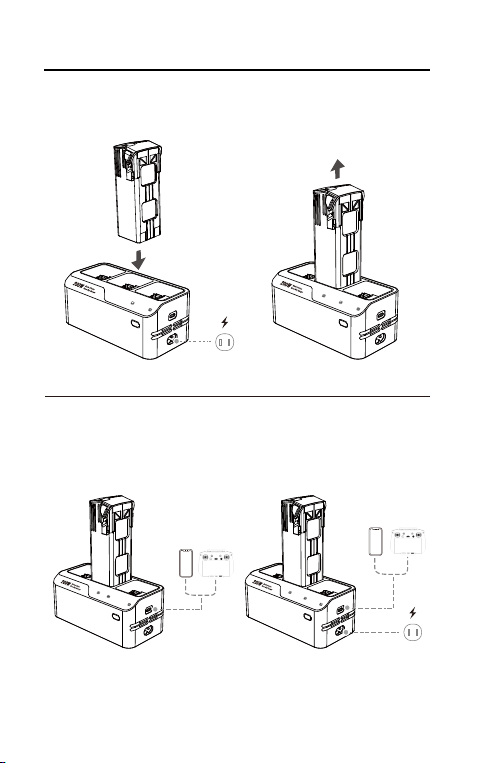
1. Insert the intelligent flight battery into the charger.
2. Turn on the intelligent flight battery switch, and the discharge indicator light L4 remains on.
3. Connect the external device to the Type-C port to charge the external device.
4. Once the battery, remote controller, and other external devices are fully charged, please promptly
remove them from the charger.
· Use the intelligent flight battery as a mobile power source to charge external devices
· Discharge procedure
·When using the LKTOP 200W Mavic 3 SeriesThree-Way Charger to use the intelligent flight battery as a
power bank to charge external devices, the Type-C interface can provide a maximum power output of 100W.
·When not charging externally as a rechargeable battery, be sure to turn off the smart battery switch and
unplug the battery. (Short press the battery switch once, then long press the battery switch for more than 2
seconds to turn on/off the intelligent flight battery.)
200W Mavic 3 Series Three-Way Charger User Manual
or
MICRO USB-C
FNS
HDMI

14
200W Mavic 3 Series Three-Way Charger User Manual
© 2023 LKTOP. All rights reserved.
Product Specifications
MC336
*The charging time was tested in a lab environment at room temperature (25℃) and should be taken as
reference only.
Type-C Output Port Compatible Products
Product Names
Power/Description
DJI RC Pro Remote Controller
Max 30W
DJI RC Pro Plus Remote Controller
Max 100W
DJI RC Remote Controller
Max 15W
DJI N1 Remote Controller
Max 10W
Mobile Phone
Supports PD protocol and some mobile phones
Tablet PC
Support PD protocol and support some tablets
Model
Compatible Battery Model
Operating Temperature
AC Input Voltage
USB Type-C Input
DJI Mavic 3 Series batteries (BWX-260-5000-15.4)
41°to 104°F (5°to 40℃)
100V-240V~2.5A 50Hz/60Hz 230W
9V⎓3A; 12V⎓3A; 15V⎓3A; 20V⎓5A
USB Type-C Output
5V⎓2A; 9V⎓3A; 12V⎓3A; 15V⎓3A; 20V⎓5A
PPS:3.3V-21V⎓5A
Charging Power
100W Max (for a single battery)/200W Max
(for multiple batteries)
Product Dimensions About 151×75×60 mm (product host)
About
88×83×160mm
Product Weight
Package Dimensions
475g ±10%(excluding cable weight)
Charging Time
Approximately 60-70 minutes for the first battery
Approximately 70-80 minutes for two batteries
Approximately 80-90 minutes for three batteries