Light Indicator
Product Introducon
FCC Statement :
Aenon
Protecve Funcon
Light Mode
Do not disassemble, puncture, drop, bend or modify
Do not shake while charging
Unplug the device when fully charged
Do not expose to liquids
Keep away from children
Avoid extreme temperatures
3-Year Limited Warranty
For the fastest and safest charge, use an ADAM cable, your device’s
original cable or a cerfied cable (such as MFi).
The informaon in this user manual may be changed without prior
noce, please scan the QR code for the latest version.
This device complies with Part 15 of the FCC Rules. Operaon is subject to the following
two condions:
(1) This device may not cause harmful interference, and (2) this device must accept any
interference received, including interference that may cause undesired operaon.
Warning: Changes or modificaons not expressly approved by the party responsible for
compliance could void the user's authority to operate the equipment.
Note: This equipment has been tested and found to comply with the limits for a Class B
digital device, pursuant to Part 15 of the FCC Rules. These limits are designed to provide
reasonable protecon against harmful interference in a residenal installaon.
This equipment generates, uses, and can radiate radio frequency energy and, if not
installed and used in accordance with the instrucons, may cause harmful interference
to radio communicaons. However, there is no guarantee that interference will not
occur in a parcular installaon. If this equipment does cause harmful interference to
radio or television recepon, which can be determined by turning the equipment off
and on, the user is encouraged to try to correct the interference by one or more of the
following measures:
(1) Reorient or relocate the receiving antenna.
(2) Increase the separaon between the equipment and receiver.
(3) Connect the equipment into an outlet on a circuit different from that to which the
receiver is connected.
(4) Consult the dealer or an experienced radio / TV technician for help.
Mulple Circuit Protecon
Over-Heat Protecon
Short-Circuit Protecon
Over-Voltage Protecon
Over-Current Protecon
Flame Retardant Protecon
FCC Radiaon Exposure Statement:
This equipment complies with FCC radiaon exposure limits set forth for an
uncontrolled environment. This equipment should be installed and operated with
minimum distance 20cm between the radiator & your body.
ADAM elements International Co., Ltd.
www.adamelements.com
+886-2-2738-9900
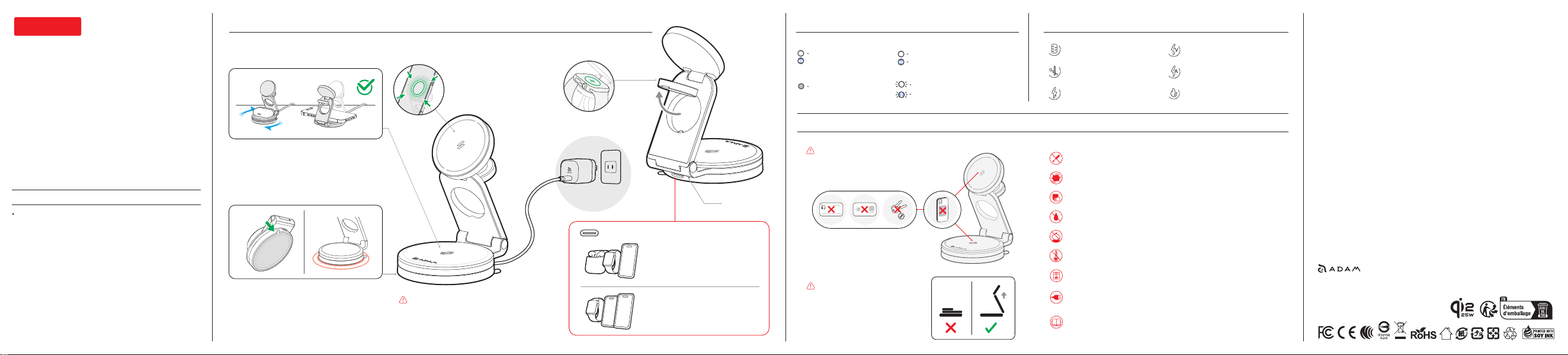
Cauon 2:
In order to achieve the best
charging efficiency and heat
dissipaon effect, please use it
in a Z-shaped stand when
charging.
Cauon 1:
Please avoid placing any credit cards, smart
cards or metal objects on the charging area
to prevent damage or demagnezaon.
Standby
No signal
FOD (Foreign Object Detecon)
25W Qi2 Charger
The light flashes when metal foreign
objects are detected on either the
Qi2 magnec charging area or the
charging base.
Specificaon
User Manual
ENGLISH
Qi2 25W 3-in-1 Charging Staon
MAG 360 Ultra
Qi2 25W 3-in-1 Charging Staon
Model Name: MAG 360 Ultra
Input | USB-C Female: 5V ⎓ 3A / 9V ⎓ 3A / 12V ⎓ 3A /
15V ⎓ 3A / 20V ⎓ 3A
Output | Qi2 25W Charger: 5W, 7.5W, 10W, 15W, 25W
Wireless Charging Base: 5W, 7.5W, 10W, 15W
Apple Watch Charger: 5W
Operang Temperature: 0°C - 40°C
Size: 101 x 86.2 x 34.6 mm (folded)
Weight: 330 g
3-Year Limited Warranty
Made in China
*The 360° rotang base allows easy viewing angle
adjustment without the cable or outlet limitaons.
15W Charging Base with 360° Design
Strong Sucon-Cup Design
Apple Watch Charger
Release
Tab
*Sucon-cup base provides enhanced stability
and a secure hold on smooth surface, with an
easy-release pull tab for quick removal.
Wireless charging for Qi2
25W compable devices &
other phones while using
the metal ring adapter.
Cauon:
To avoid any damage to wireless charger,
please check the output voltage of the
power source is suitable for the charger.
USB-C Port
*A PD 45W charger or above is
required to charge an smartphone,
AirPods, and an Apple Watch
simultaneously.
*A PD 60W charger or above is
required to charge two smartphones
and an Apple Watch simultaneously.
Plug in the Power Supply
White and blue lights for 2
seconds and then turns off
Device Charging
White light turns on (Qi2 charger only)
Blue light turns on (charging base only)
White light flashes (Qi2 charger only)
The blue light flashes for 15 seconds,
then turns off. (charging base only)
FCC ID: 2ABY9MAG-360ULTRA