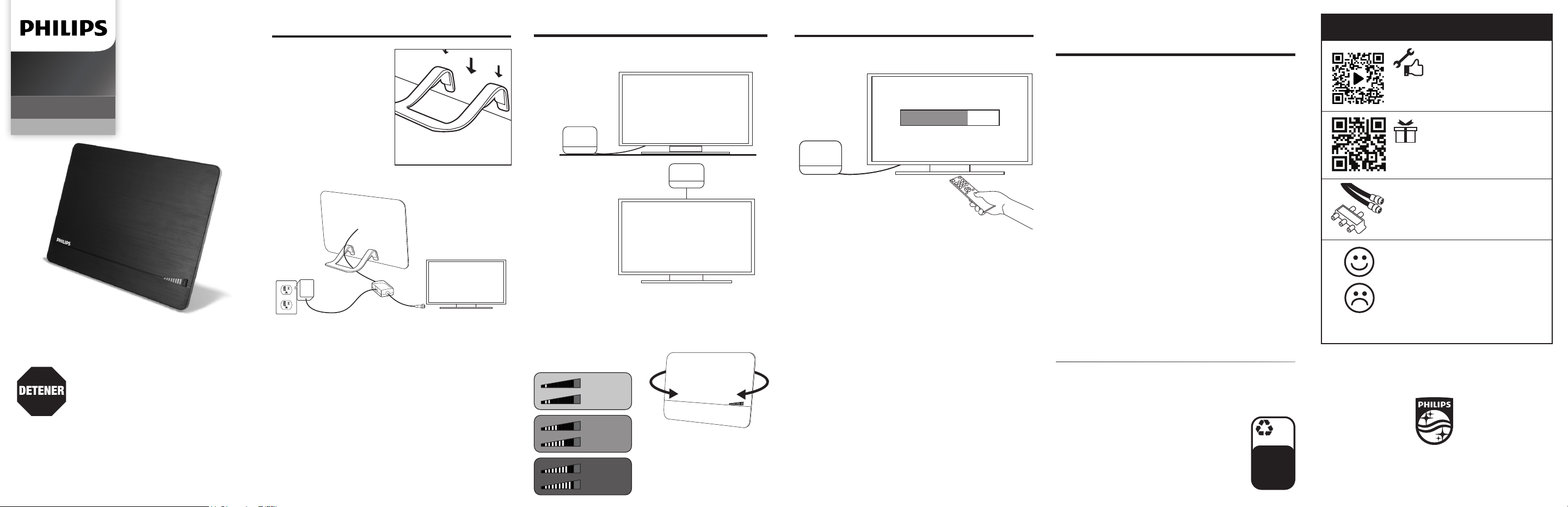
1. Connect 2. Place 3. Scan
Place the antenna in your desired location. Perform a TV channel scan.
1. Open your TV’s setup or settings menu.
2. Select your TV’s scanning command — scan,
auto tune, channel search or channel scan, making
sure it’s set to scan for over-the-air channels rather
than cable.
3. Wait for the channel scan to nish.
Scanning Tips
• Consult the TV manual or visit the TV manufacturer’s website
for specic instructions.
• Rescan for over-the-air channels anytime you move the antenna.
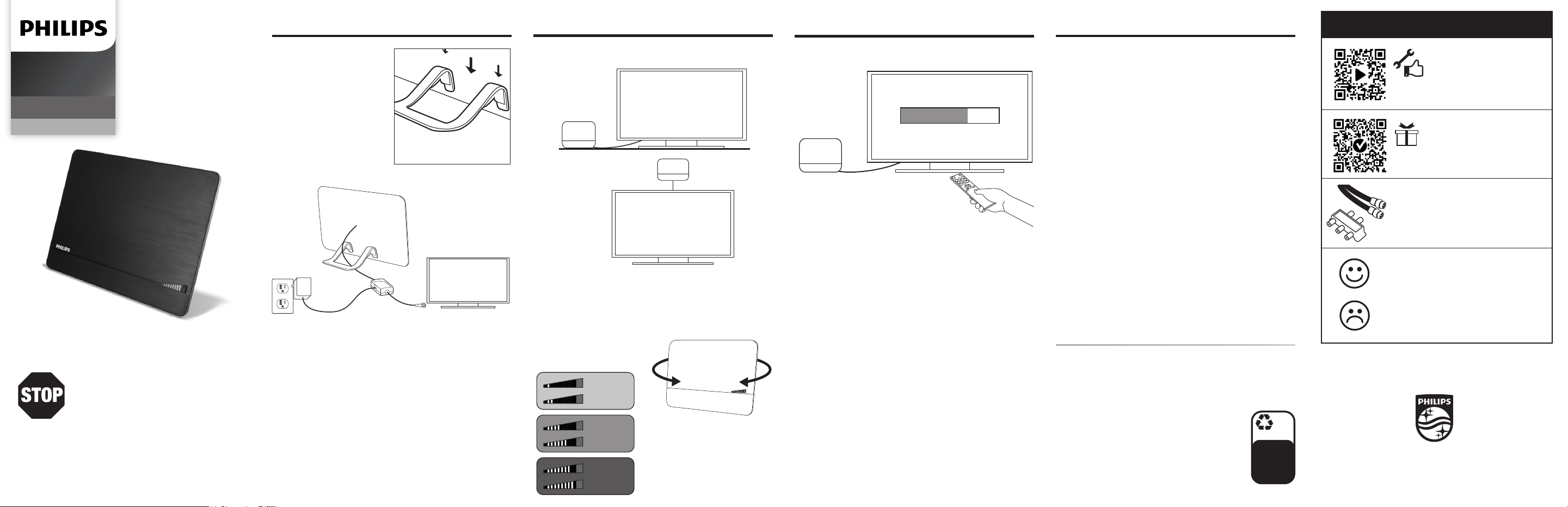
Attach the antenna
stand to the antenna for
tabletop placement.
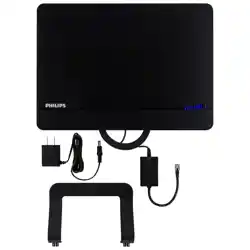
Connect the coax cable from the antenna to the TV’s
coax cable port, then connect the AC adapter to the
power inserter and a wall outlet.
Note: If your TV does not have a coax cable port, a converter
box is required for installation.
Mounting supplies included.
SCAN FOR CHANNELS
SEARCHING...
TV
TV
Wall
mount
Tabletop
stand
Press the ON/OFF button to
operate the signal nder
LED indicator lights.
WEAK
GOOD
STRONG
Check the signal nder LED indicator lights with
the antenna in dierent locations to discover the
best reception.
TV
Please note: Use only the
supplied AC adapter.
Antenna
v3 3/22
User Guide
PLEASE DO NOT RETURN THIS PRODUCT TO THE
STORE, CALL US FIRST!
Installation questions?
Contact us at 1-844-816-0320 between
7AM-8PM, M-F, Central Time.
Antenna helpful tips
QUESTIONS? ISSUES?
CALL OUR U.S.-BASED EXPERTS AT
1-844-816-0320
MADE IN TAIWAN
Philips and the Philips Shield Emblem are registered
trademarks of Koninklijke Philips N.V. and are used under
license. This product has been manufactured by and is sold
under the responsibility of Jasco Products Company, and
Jasco Products Company LLC, 10 E. Memorial Rd., Oklahoma
City, OK 73114 is the warrantor in relation to this product.
This product comes with a limited-lifetime warranty.
Visit www.philips.com/support for warranty details.
Questions? Contact our U.S.-based Consumer Care at
1-844-816-0320 between 7AM-8PM, M-F, Central Time.
• Maximize the number of channels you receive by
placing the antenna in several dierent locations. Be
sure to run a new channel scan on your TV in each
position. Refer to the instruction manual that came
with your TV if you are unsure how to do this.
• Position or mount the antenna as high as possible or
near a window for best performance.
• Visit www.antennaweb.org to determine the
available television stations and location of the
broadcast towers in your area.
100%
recyclable
Paper made
from 50%
post
consumer
waste
byjasco.com/recycle
Get exclusive, web-only deals and more!
Scan here or visit byjasco.com/deals
Like our product?
Leave us a review on Amazon.com or
your favorite retailer website!
Having issues and need support?
Call our U.S.-based experts Monday-Friday,
from 7AM-8PM (Central Time).
1-844-816-0320
Find antennas, ampliers, splitters, cables
and more, just visit our website!
byjasco.com/antennas
Need accessories?
Register your Philips
product
THANK YOU FOR YOUR PURCHASE!
Scan to watch a step-by-step video
or visit https://byjasco.com/45289i
Product instructions
made easy
SDV3238N/27
HD Antenna
Audio/Video
2. Colocar 3. Buscar
1. Conectar
Fije el soporte de antena
para ubicarla sobre una
mesa.
TV
TV
Soporte
de pared
Soporte
de mesa
Coloque la antena en su ubicación deseada.
Accesorios de montaje incluidos.
Explore los canales en su TV.
Consejos para escanear
• Consulte el manual del televisor o comuníquese con el fabricante del
televisor para obtener instrucciones detalladas.
• Vuelva a realizar una búsqueda de canales de señal abierta cada vez
que muefa la antena.
SCAN FOR CHANNELS
SEARCHING...
BUSCAR CANALES
UBICANDO...
1. Abra el menú de conguración o ajustes del televisor.
2. Seleccione buscar, sintonización automática, búsqueda
de canales o exploración de canales, asegurándose
de que esté congurado para buscar canales de señal
abierta en lugar de los de cable.
3. Espere que el televisor complete la búsqueda
de canales.
WEAK
GOOD
STRONG
Compruebe las luces indicadoras LED del buscador
de señal ubicando la antena en distintos lugares para
descubrir la mejor recepción.
Presione el botón de
ENCENDIDO/APAGADO para
operar las luces indicadoras
LED del buscador de señal.
Antena
Conecte el cable coaxial desde la antena hacia el
televisor, luego conecte el adaptador de CA en el
insertador de potencia y un tomacorriente de pared.
Nota: Si su televisor no tiene un puerto de cable coaxial,
se requiere un convertidor para la instalación.
TV
Nota: Use únicamente el adaptador
de CA suministrado.
NO DEVOLVER A LA TIENDA
¡LLÁMENOS PRIMERO!
¿Tiene preguntas? Comuníquese al
1-844-816-0320 entre las 7 a. m. y 8 p. m. de lunes
a viernes, CT (hora del centro).
V3 3/22
Manual del usuario
Consejos útiles sobre
la antena
¿PREGUNTAS? ¿PROBLEMAS?
CONTACTE CON NUESTROS EXPERTOS AL
1-844-816-0320
HECHO EN TAIWAN
Philips y el emblema de escudo Philips son marcas registradas de
Koninklijke Philips N.V. y se usan bajo licencia. Este producto ha sido
fabricado y se comercializa bajo responsabilidad de Jasco Products
Company y Jasco Products Company LLC, 10 E. Memorial Rd.,
Oklahoma City, OK 73114, es el garante en relación a este producto.
Este producto tiene una garantía limitada de por vida.
Visite www.philips.com/supportpara conocer los detalles
de la garantía.
¿Tiene preguntas? Comuníquese al 1-844-816-0320 entre
las 7 a. m. y 8 p. m. de lunes a viernes, hora del centro.
• Optimice la cantidad de canales al colocar la
antena en diversas ubicaciones. Asegúrese de
realizar una nueva búsqueda de canales de
TV en cada posición. Consulte el manual de
instrucciones de su TV de ser necesario.
• Posicione la antena a la mayor altura posible
o cerca de una ventana para garantizar su
funcionamiento óptimo.
• Visite www.antennaweb.org para determinar
las estaciones televisivas disponibles y la ubicación
de las torres de transmisión de su zona.
100%
recyclable
Paper made
from 50%
post
consumer
waste
byjasco.com/recycle
Para ofertas exclusivas, que solo encontrará en
Internet y ¡más! Escanee o visite
byjasco.com/deals
¿Le gusta nuestro producto?
Déjenos una reseña en Amazon.com
o el sitio web de su comercio favorito.
¿Tiene problemas y
necesita ayuda?
Llame a nuestros expertos en los EE. UU.,
de lunes a viernes, de 7 a. m. a 8 p. m.
(hora del centro).
1-844-816-0320
Obtenga antenas, amplicadores, divisores, cables y
más, ¡visite nuestro sitio web!
byjasco.com/antennas
¿Necesita más accesorios?
Registre su producto
Philips
GRACIAS POR SU COMPRA
Escanee para ver un video instructivo
paso a paso o visite https://byjasco.com/45289i
Instrucciones
fáciles
SDV3238N/27
HD Antenna
Audio/Video