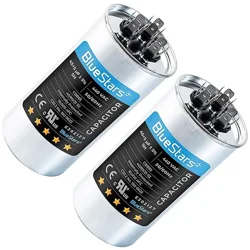

INSTALLATION GUIDE FOR REPLACING AN AC CAPACITOR
Materials Needed:
● New capacitor from BlueStars (ensure it matches the specifications of the old one)
● Screwdriver
● Safety gloves and goggles
● Wiring diagram or notes (if available/ optional)
Procedure:
Safety First:
Before starting, ensure that the power to the equipment or device is turned off. Turn off the
power from the circuit panel or the circuit breaker inside your house.
Double-check with a meter or a voltage pen to make sure there is no power during the
installation.
Wear safety gloves and goggles to protect yourself from electrical hazards.
Identify the Capacitor:
Locate the faulty capacitor on the circuit board by referring to the video instruction or any
available documentation. Using a screwdriver, carefully disassemble the device or appliance
housing to access the circuit board.
Discharge the Capacitor:
Capacitors can store a charge and should be discharged by touching both terminals
simultaneously with an insulated screwdriver. This ensures there is no residual charge that
could be harmful.
Remove the Old Capacitor:
Carefully loosen the metal strap holding the old capacitor and take it out. Remember to take
note of its orientation. You can take a photo of the wires and label the terminals' orientation. Or

else, take each terminal side by side, taking off one wire at a time and then put it to the new
one.
Install the New BlueStars Capacitor:
Ensure that the new capacitor matches the specifications of the old one (voltage, capacitance/
microfarad rating, and polarity).
Align the capacitor with the correct polarity according to your previous taken picture. Or else,
taking off one wire at a time and then put it to the new capacitor.
Insert the capacitor into the designated slots on the circuit board.
Double-Check Connections:
Verify that the new capacitor is securely and correctly installed. Tighten the screws on the metal
strap to secure the capacitor in place.
Ensure a snug fit, but do not overtighten to avoid damaging the capacitor or the circuit board.
Reassemble the Device:
Put the device back together, following the reverse order of disassembly.
Test the Device:
Power on the device and check if it functions correctly. Monitor for any signs of overheating or
unusual behavior.
Final Checks:
Inspect the entire circuit for any loose connections or soldering issues.
If the device operates as expected, you have successfully replaced the capacitor.
Refer to the specific instructions in video for any unique steps or details if you are unsure. If in
doubt, seek professional assistance.