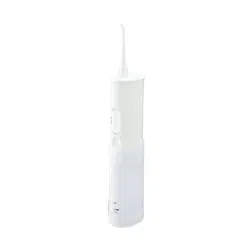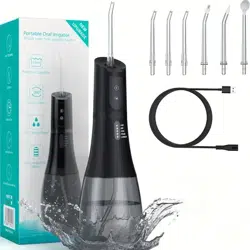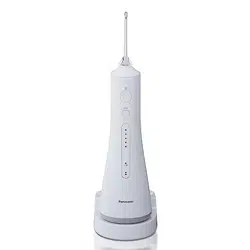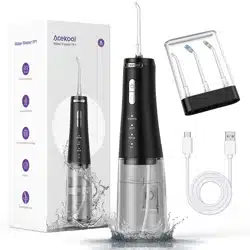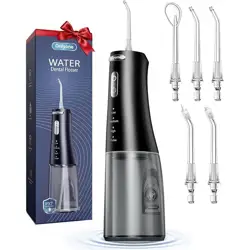
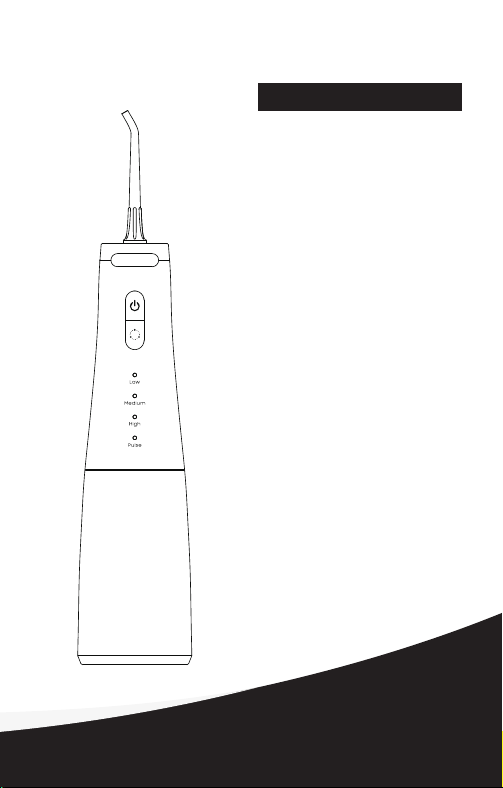
Thank You For Purchasing a Oral Irrigator
Model: FC5090
User Manual
Portable Oral Irrigator
Thank you for choosing a oral irrigator!
You’re on your way to a more hygienic life!
Thank you for purchasing a portable oral irrigator from, a pioneering and
innovative brand with the world's most advanced high-pressure water
pulse technology.
Conventional toothbrushes cannot easily remove food debris hidden in
the oral cavity, while most dental floss can only reach a limited area
under the gums. In contrast, oral irrigators can quickly and efficiently
remove food debris from deep in the gums and between the teeth to
ensure perfect hygiene.

0201
FCC STATEMENT
This device complies with Part 15 of the FCC Rules. Operation is
subject to the following two conditions: (1) this device may not cause
harmful interference, and (2) this device must accept any interference
received, including interference that may cause undesired operation.
Warning: Changes or modifications to this unit not expressly approved
by the party responsible for compliance could void the user’s authority
to operate the equipment.
NOTE: This equipment has been tested and found to comply with the
limits for a Class B digital device , pursuant to Part 15 of the FCC Rules.
These limits are designed to provide reasonable protection against
harmful interference in a residential installation . This equipment
generates , uses and can radiate radio frequency energy and, if not
installed and used in accordance with the instructions, may cause
harmful interference to radio communications.However, there is no
guarantee that interference will not occur in a particular installation.If
this equipment does cause harmful interference to radio or television
reception , which can be determined by turning the equipment off and
on, the user is encouraged to try to correct the interference by one or
more of the following measures:
--Reorient or relocate the receiving antenna.
--Increase the separation between the equipment and receiver.
--Connect the equipment into an outlet on a circuit different from that
to which the receiver is connected.
--Consult the dealer or an experienced radio/TV technician for help.
SAVE THESE INSTRUCTIONS
IMPORTANT SAFEGUARDS
When using electrical products, especially when children are present,
basic safety precautions should always be followed, including the
following:
READ ALL INSTRUCTIONS BEFORE USING.
DANGERS-To reduce the risk of electrocution:
1.Do not use while bathing.
2.Do not place or store product where it can fall or be pulled into a tub,
shower stall or sink.
3.Do not place in or drop into water or other liquid.
4.Do not reach for a product that has fallen into water. Unplug
immediately.
5.Do not handle charger with wet hands when charging.
WARNING-To reduce the risk of burns,
electrocution, fire, or injury to persons.
1.A product should never be left unattended when plugged in.
2.Close supervision is necessary when this product is used by, on, or
near children or invalids.
3.Use this product only for its intended use as described in this manual.
Do not use attachments not recommended by the manufacturer.
4.Never operate this product if it has a damaged cord or plug, if it is not
working properly, if it has been dropped or damaged, or dropped into
water. Return the product to a service center for examination and repair.
5.Keep the cord away from heated surfaces.
6.Never block the air openings of the product or place it on a soft
surface, such as a bed or couch, where the air openings may be
blocked. Keep the air openings free of lint, hair, and the like.
7.Never use while sleeping or drowsy.
8.Never drop or insert any object into any opening or hose.
9.Unplug this product before filling. Fill (reservoir) with water only unless
otherwise specified
by manufacturer. Do not overfill (or specify filling instructions)
10.This appliance is not intended for use by persons (including children)
with reduced physical, sensory or mental capabilities, or lack of
experience and knowledge, unless they have been given supervision or
instruction concerning use of the appliance by a person responsible for
their safety.
11.Children should be supervised to ensure that they do not play with the
appliance.
12.Donotuseoutdoorsoroperatewhereaerosol(spray)productsare
beingusedorwhereoxygenisbeingadministered.
13.This product needs to be charged with the charger specified by the
manufacturer, do not use the charger not specified or other charger.
14.Do not plug this device into a voltage system that is different from the
voltage system specified on the device or charger.
15.The appliance must only be supplied at safety extra low voltage
corresponding to the marking on the appliance.
16.This appliance contains batteries that are non-replaceable.
17.For household use only. DO NOT use the product outdoor.

0201
FCC STATEMENT
This device complies with Part 15 of the FCC Rules. Operation is
subject to the following two conditions: (1) this device may not cause
harmful interference, and (2) this device must accept any interference
received, including interference that may cause undesired operation.
Warning: Changes or modifications to this unit not expressly approved
by the party responsible for compliance could void the user’s authority
to operate the equipment.
NOTE: This equipment has been tested and found to comply with the
limits for a Class B digital device , pursuant to Part 15 of the FCC Rules.
These limits are designed to provide reasonable protection against
harmful interference in a residential installation . This equipment
generates , uses and can radiate radio frequency energy and, if not
installed and used in accordance with the instructions, may cause
harmful interference to radio communications.However, there is no
guarantee that interference will not occur in a particular installation.If
this equipment does cause harmful interference to radio or television
reception , which can be determined by turning the equipment off and
on, the user is encouraged to try to correct the interference by one or
more of the following measures:
--Reorient or relocate the receiving antenna.
--Increase the separation between the equipment and receiver.
--Connect the equipment into an outlet on a circuit different from that
to which the receiver is connected.
--Consult the dealer or an experienced radio/TV technician for help.
SAVE THESE INSTRUCTIONS
IMPORTANT SAFEGUARDS
When using electrical products, especially when children are present,
basic safety precautions should always be followed, including the
following:
READ ALL INSTRUCTIONS BEFORE USING.
DANGERS-To reduce the risk of electrocution:
1.Do not use while bathing.
2.Do not place or store product where it can fall or be pulled into a tub,
shower stall or sink.
3.Do not place in or drop into water or other liquid.
4.Do not reach for a product that has fallen into water. Unplug
immediately.
5.Do not handle charger with wet hands when charging.
WARNING-To reduce the risk of burns,
electrocution, fire, or injury to persons.
1.A product should never be left unattended when plugged in.
2.Close supervision is necessary when this product is used by, on, or
near children or invalids.
3.Use this product only for its intended use as described in this manual.
Do not use attachments not recommended by the manufacturer.
4.Never operate this product if it has a damaged cord or plug, if it is not
working properly, if it has been dropped or damaged, or dropped into
water. Return the product to a service center for examination and repair.
5.Keep the cord away from heated surfaces.
6.Never block the air openings of the product or place it on a soft
surface, such as a bed or couch, where the air openings may be
blocked. Keep the air openings free of lint, hair, and the like.
7.Never use while sleeping or drowsy.
8.Never drop or insert any object into any opening or hose.
9.Unplug this product before filling. Fill (reservoir) with water only unless
otherwise specified
by manufacturer. Do not overfill (or specify filling instructions)
10.This appliance is not intended for use by persons (including children)
with reduced physical, sensory or mental capabilities, or lack of
experience and knowledge, unless they have been given supervision or
instruction concerning use of the appliance by a person responsible for
their safety.
11.Children should be supervised to ensure that they do not play with the
appliance.
12.Donotuseoutdoorsoroperatewhereaerosol(spray)productsare
beingusedorwhereoxygenisbeingadministered.
13.This product needs to be charged with the charger specified by the
manufacturer, do not use the charger not specified or other charger.
14.Do not plug this device into a voltage system that is different from the
voltage system specified on the device or charger.
15.The appliance must only be supplied at safety extra low voltage
corresponding to the marking on the appliance.
16.This appliance contains batteries that are non-replaceable.
17.For household use only. DO NOT use the product outdoor.

0403
Safety Measures
Warning: To reduce the risk of burns, electric
shock, fires, and other injury hazards, please
observe the safety guidelines below.
Basic safety precautions should be observed during the use of electrical
products, especially when children are present.
Please read all safety guidelines before using this device.
Warning: To reduce the risk of electric shock and
other hazards, please observe the safety
guidelines below:
1. Check if the charger or power cord are damaged before initial and
during continued use of this device. If either are damaged, do not
attempt to use the device. Instead, contact after-sales services for a
replacement.
2. Do not throw the device into a fire or other heated environments.
3. Do not immerse the device into water, as this may cause damage.
4. Do not attempt to plug or unplug the charger while your hands are
wet. When plugging or unplugging the device, do so using the charger,
not the power cord.
5. Do not modify, damage, or destroy the charging equipment. Do not
forcefully stretch, bend, or twist the power cord. Do not place heavy
objects on the power cord or stick the power cord between other
objects.
6. Do not drop or insert foreign objects into any of the device openings.
7. Do not place the device, charger, or power cord on heated surfaces.
8. Do not place the device in a hot or humid location, nor any locations
exposed to direct sunlight.
9. Before cleaning and maintenance, ensure that the device is turned off
and not charging.
1. Do not use this device in any manner other than those outlined in the
manual.
2. Do not use this device while a nozzle is not installed.
3. Persons (including children) without the full mental capacity or
relevant experience and knowledge must
clean and maintain this device under the supervision of a guardian.
4. Place this device outside of the reach of children and infants. Do not
allow this device to be used as a toy.
5. Users suffering from periodontitis or those who have undergone oral
surgery within the past 2 months should consult a doctor before using
this device.
6. Only the nozzles and accessories included with, sold with, or
recommended by this device should be used.
7. Do not disassemble or swap out parts from this device.
8. To prevent burns, do not fill the tank or attempt to clean your mouth
with water over 40℃.
9. Do not use this device for any purpose other than oral hygiene.
10. To prevent injury, do not press the nozzle forcefully into your gums
or teeth.
11. Do not use this device in outdoor locations where aerosols (sprays)
or oxygen supplies are in use.
12. Remove all cosmetic teeth accessories before using this device.
13. Do not use iodine, salt water, or concentrated essential oils that are
insoluble in water with this device. Doing so will reduce its performance
and shorten its service life.
14. Do not fill the device with pure mouthwash liquid. If you wish to use
a mouthwash, dilute it in accordance with the proper proportions.
Store this manual for future reference!

0403
Safety Measures
Warning: To reduce the risk of burns, electric
shock, fires, and other injury hazards, please
observe the safety guidelines below.
Basic safety precautions should be observed during the use of electrical
products, especially when children are present.
Please read all safety guidelines before using this device.
Warning: To reduce the risk of electric shock and
other hazards, please observe the safety
guidelines below:
1. Check if the charger or power cord are damaged before initial and
during continued use of this device. If either are damaged, do not
attempt to use the device. Instead, contact after-sales services for a
replacement.
2. Do not throw the device into a fire or other heated environments.
3. Do not immerse the device into water, as this may cause damage.
4. Do not attempt to plug or unplug the charger while your hands are
wet. When plugging or unplugging the device, do so using the charger,
not the power cord.
5. Do not modify, damage, or destroy the charging equipment. Do not
forcefully stretch, bend, or twist the power cord. Do not place heavy
objects on the power cord or stick the power cord between other
objects.
6. Do not drop or insert foreign objects into any of the device openings.
7. Do not place the device, charger, or power cord on heated surfaces.
8. Do not place the device in a hot or humid location, nor any locations
exposed to direct sunlight.
9. Before cleaning and maintenance, ensure that the device is turned off
and not charging.
1. Do not use this device in any manner other than those outlined in the
manual.
2. Do not use this device while a nozzle is not installed.
3. Persons (including children) without the full mental capacity or
relevant experience and knowledge must
clean and maintain this device under the supervision of a guardian.
4. Place this device outside of the reach of children and infants. Do not
allow this device to be used as a toy.
5. Users suffering from periodontitis or those who have undergone oral
surgery within the past 2 months should consult a doctor before using
this device.
6. Only the nozzles and accessories included with, sold with, or
recommended by this device should be used.
7. Do not disassemble or swap out parts from this device.
8. To prevent burns, do not fill the tank or attempt to clean your mouth
with water over 40℃.
9. Do not use this device for any purpose other than oral hygiene.
10. To prevent injury, do not press the nozzle forcefully into your gums
or teeth.
11. Do not use this device in outdoor locations where aerosols (sprays)
or oxygen supplies are in use.
12. Remove all cosmetic teeth accessories before using this device.
13. Do not use iodine, salt water, or concentrated essential oils that are
insoluble in water with this device. Doing so will reduce its performance
and shorten its service life.
14. Do not fill the device with pure mouthwash liquid. If you wish to use
a mouthwash, dilute it in accordance with the proper proportions.
Store this manual for future reference!

Table of Contents I. Package Contents
We reserve the right to final interpretation in case of any typographical
errors or misunderstandings found in the contents of this manual. Device
upgrades and updates will be incorporated into a new version of the
manual without notice. The appearance and color of the product is
subject to the packaged model, which shall take precedence over any
illustrations of descriptions found in this manual.
0605
Safety warning ......................................................................................
Table of Contents ..........................................................................................
Safety Measures ....................................................................................
FCC Statement ..............................................................................................
......................................................................................I. Package Contents
......................................................II. Accessories and Specifications
........................................................................V. Environmental Protection
.......................................................................................VI. Troubleshooting
.............................................................................VIII. After-Sales Services
..........................................................................VII. Hazardous Substances
................................................................................................III. Steps
.............................................................
01-02
05
03-04
02
06
07-08
13
14
16
15
08-12
12-13IV. Cleaning and Maintenance
Switch Button
Low-level mode
High-level mod
Medium-level mod
Mode selection button
Pulse mode
..........................
..........................
Water Tank
..........................
..........................
..........................
Uninstall Button
Nozzle
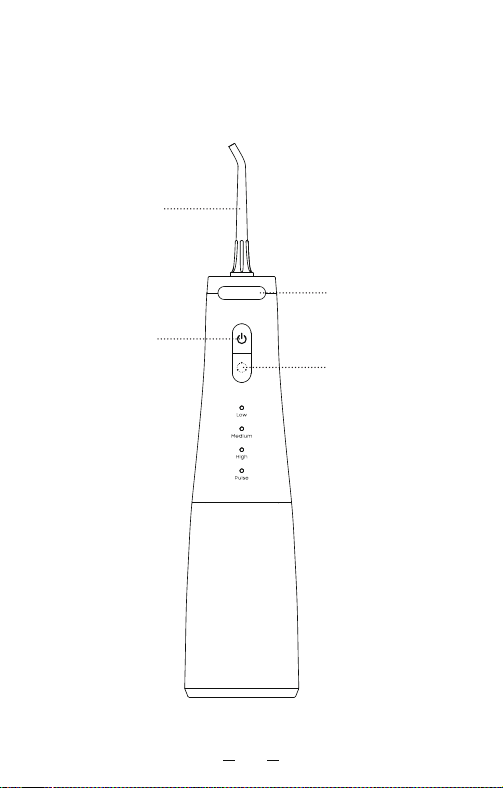
Table of Contents I. Package Contents
We reserve the right to final interpretation in case of any typographical
errors or misunderstandings found in the contents of this manual. Device
upgrades and updates will be incorporated into a new version of the
manual without notice. The appearance and color of the product is
subject to the packaged model, which shall take precedence over any
illustrations of descriptions found in this manual.
0605
Safety warning ......................................................................................
Table of Contents ..........................................................................................
Safety Measures ....................................................................................
FCC Statement ..............................................................................................
......................................................................................I. Package Contents
......................................................II. Accessories and Specifications
........................................................................V. Environmental Protection
.......................................................................................VI. Troubleshooting
.............................................................................VIII. After-Sales Services
..........................................................................VII. Hazardous Substances
................................................................................................III. Steps
.............................................................
01-02
05
03-04
02
06
07-08
13
14
16
15
08-12
12-13IV. Cleaning and Maintenance
Switch Button
Low-level mode
High-level mod
Medium-level mod
Mode selection button
Pulse mode
..........................
..........................
Water Tank
..........................
..........................
..........................
Uninstall Button
Nozzle
0807
Accessories can be purchased from the vendor
Product Name
FC5090
8W
IPX7
Product No.
Rated Voltage
Power Rating
Waterproof Rating
Charge Time
Input
Adaptor
Rating Value
Place of origin
China
Oral Irrigator
Oral Irrigator
5V 1A
3.7V
Power Cord x1
Instructions:
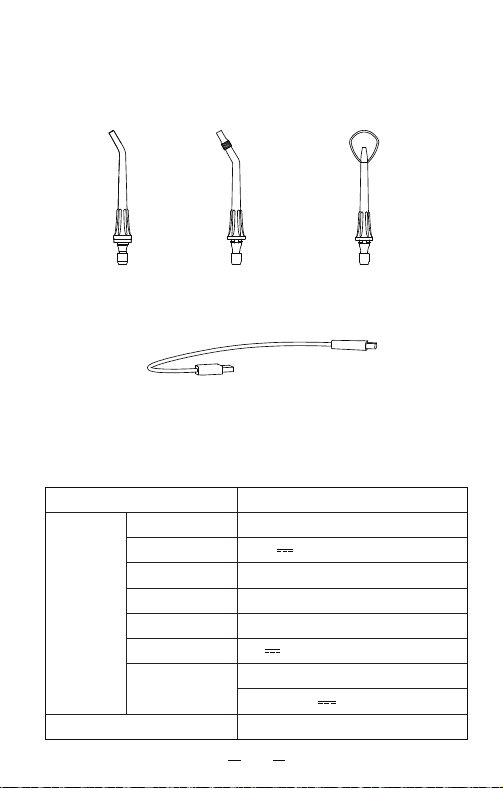
The oral irrigator comes with: 4 standard nozzles. If you wish to
purchase additional nozzles, visit the official website or an authorized
vendor.
II. Accessories and Specifications
Product Specifications:
Product Accessories:
Input:100-240V~50/60Hz 0.3A
Output:5V 1A 5.0W
≤4h
Application
Normal Cleaning
.....................................
...................................
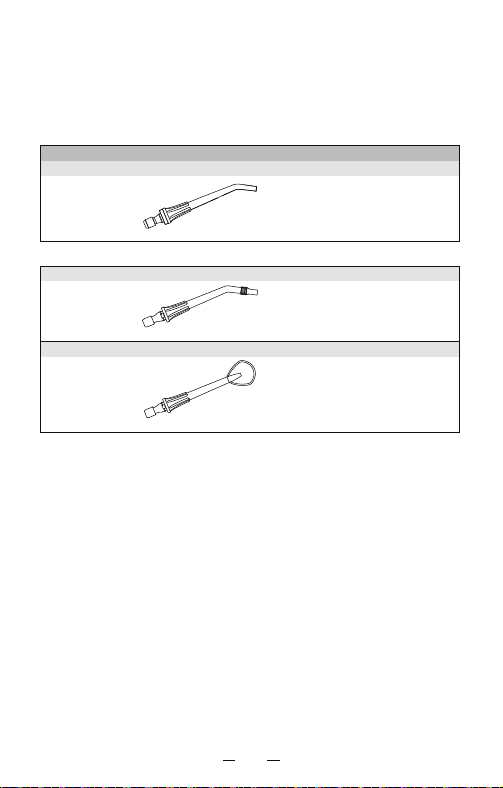
Standard Nozzle
Replace every 6 months
Orthodontic Nozzle
Application
Braces
Normal Cleaning
Tongue Scraper
Application
Tongue Coating
Normal Cleaning
...................................
Nozzle x4 Orthodontic Tip x1 Tongue Coating
Cleaning Tip x1
0807
Accessories can be purchased from the vendor
Product Name
FC5090
8W
IPX7
Product No.
Rated Voltage
Power Rating
Waterproof Rating
Charge Time
Input
Adaptor
Rating Value
Place of origin
China
Oral Irrigator
Oral Irrigator
5V 1A
3.7V
Power Cord x1
Instructions:
The oral irrigator comes with: 4 standard nozzles. If you wish to
purchase additional nozzles, visit the official website or an authorized
vendor.
II. Accessories and Specifications
Product Specifications:
Product Accessories:
Input:100-240V~50/60Hz 0.3A
Output:5V 1A 5.0W
≤4h
Application
Normal Cleaning
.....................................
...................................
Standard Nozzle
Replace every 6 months
Orthodontic Nozzle
Application
Braces
Normal Cleaning
Tongue Scraper
Application
Tongue Coating
Normal Cleaning
...................................
Nozzle x4 Orthodontic Tip x1 Tongue Coating
Cleaning Tip x1
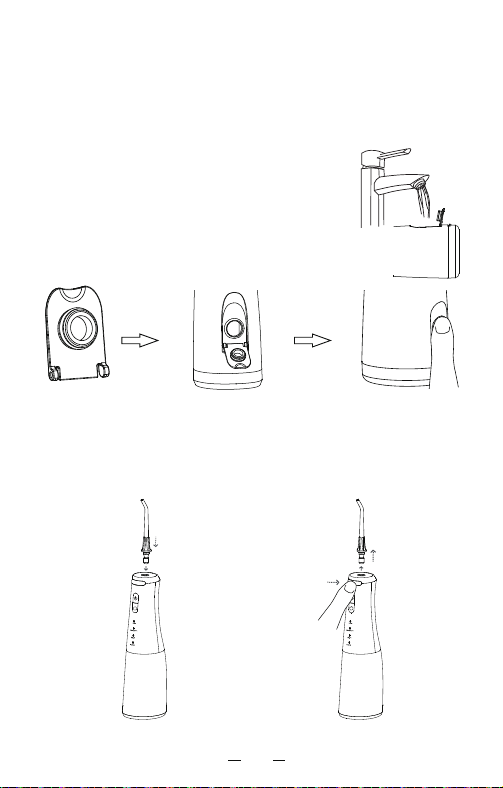
Step 2: Install the Nozzle
III. Steps
Installation Auswechseln
Before Starting: Very Important! Ensure the device is fully charged
before using it for the first time by connecting the USB cable to the
charging port and turning on the power. This device cannot be used
while charging.
Insert the nozzle into the hole on the top of the controller. You should
hear a “click” sound on successful installation. Rotate the nozzle to
adjust the direction of water outflow. If you need to replace the
irrigator, press and hold the uninstall button, then remove the irrigator.
1009
Step 1: Fill the Water Tank
Open the lid and then fill water into the reservoir.
If the lid falls off, you can insert the gasket of
the lid to the opening, then close the lid.
Note: Ensure that the device is turned off before
filling the water tank.
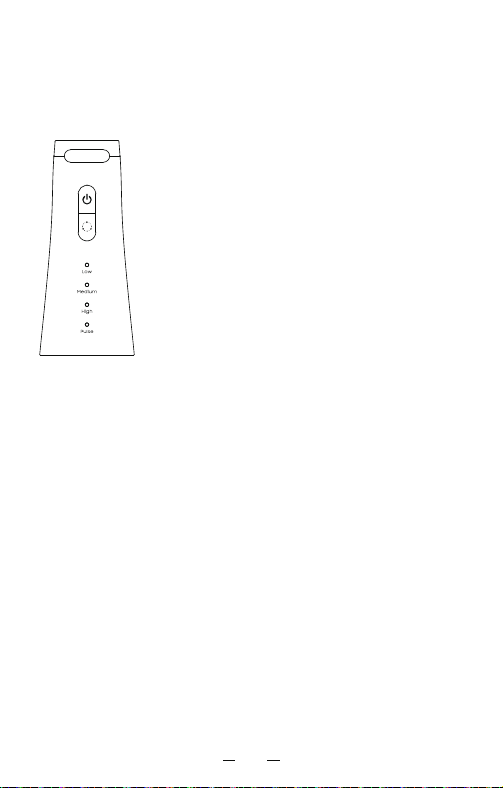
Step 3: Select Mode
This device has 4 modes. Select the desired mode by tapping the
mode button while the device is off. The functions of each mode are
outlined below.
1. After you press the on/off button, the device will
enter the work mode. You can press the mode button
to switch the mode in the following cycle: Low
level-Medium level-High level-Pulse. In any work
mode, you can press and hold the on/off button for
more than one second to turn off the device.
2.During charging, the function indicator displays the
charging status, the battery displays the current
power, and the charging indicators flash in sequence.
When the device is fully charged, the battery power is
full, and all the charging indicators are on. You can
press and hold the mode button to check the current
battery power, which is indicated by the number of
indicators that are on. If the charging indicator flashes
during use, you need to charge the device. When the
device is nearly out of power, the charging indicator
will flash for three times, then the device will be off
automatically.
3.The device will work for two minutes. Memory mode:
When the device is on, it will memorize the last mode
you use for more than one minute before you turn off
the device.
4.Hold the device upright during use to make sure that
it is in the optimal working condition. If the device
operates with any mode for more than 120 seconds, it
will be off automatically.
Step 2: Install the Nozzle
III. Steps
Installation Auswechseln
Before Starting: Very Important! Ensure the device is fully charged
before using it for the first time by connecting the USB cable to the
charging port and turning on the power. This device cannot be used
while charging.
Insert the nozzle into the hole on the top of the controller. You should
hear a “click” sound on successful installation. Rotate the nozzle to
adjust the direction of water outflow. If you need to replace the
irrigator, press and hold the uninstall button, then remove the irrigator.
1009
Step 1: Fill the Water Tank
Open the lid and then fill water into the reservoir.
If the lid falls off, you can insert the gasket of
the lid to the opening, then close the lid.
Note: Ensure that the device is turned off before
filling the water tank.
Step 3: Select Mode
This device has 4 modes. Select the desired mode by tapping the
mode button while the device is off. The functions of each mode are
outlined below.
1. After you press the on/off button, the device will
enter the work mode. You can press the mode button
to switch the mode in the following cycle: Low
level-Medium level-High level-Pulse. In any work
mode, you can press and hold the on/off button for
more than one second to turn off the device.
2.During charging, the function indicator displays the
charging status, the battery displays the current
power, and the charging indicators flash in sequence.
When the device is fully charged, the battery power is
full, and all the charging indicators are on. You can
press and hold the mode button to check the current
battery power, which is indicated by the number of
indicators that are on. If the charging indicator flashes
during use, you need to charge the device. When the
device is nearly out of power, the charging indicator
will flash for three times, then the device will be off
automatically.
3.The device will work for two minutes. Memory mode:
When the device is on, it will memorize the last mode
you use for more than one minute before you turn off
the device.
4.Hold the device upright during use to make sure that
it is in the optimal working condition. If the device
operates with any mode for more than 120 seconds, it
will be off automatically.
1211
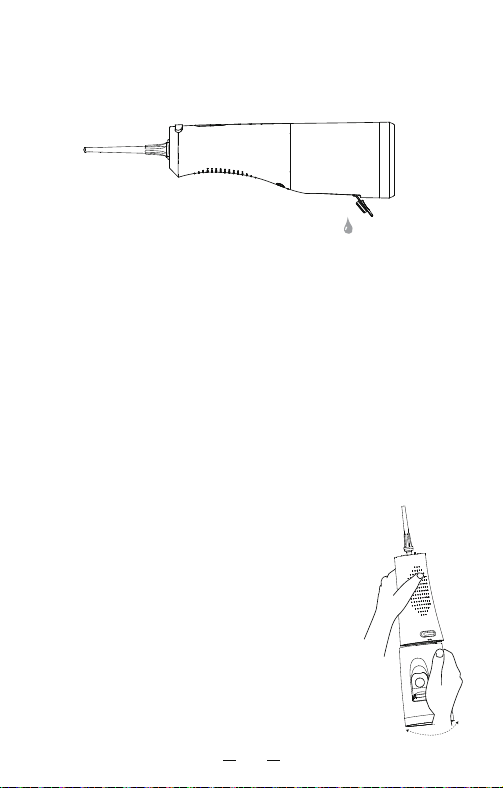
After use, open the water tank and pour out any remaining liquid. Turn
on the device and drain any liquid left until the irrigator no longer sprays
out any liquid, then turn off the device.
Step 6: After Use
Step 7: Charging
Step 4: Before Use
Press and hold the switch button for 0.6 second to start the device. To
pause the device during use, tap the switch button. Press and hold the
button again to resume operation. This device is equipped with a
120-second shutdown timer. Automatic shutdown will only trigger if the
water tank is empty. If you wish to keep using the device, tap the switch
button to turn it off, then restart the device after refilling the water tank.
Turn off the device after you are finished using it.
Step 5: Use
For best results, start with the molars (posterior teeth) and start cleaning
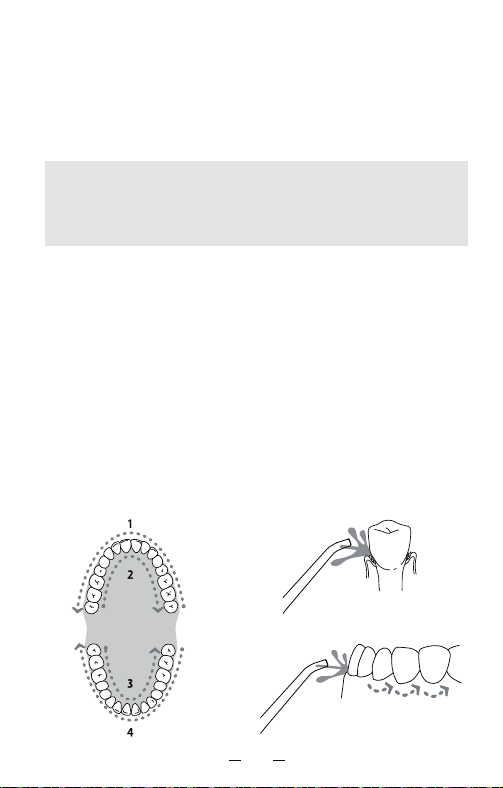
towards the front teeth. While cleaning, move the nozzle 90° along the
gum line. Stay between each tooth for a short period. Close your lips
slightly to avoid the water from spraying out, but leave enough space so
that water can flow freely from your mouth to the sink.
Techniques
Before using the device, lean slightly over the sink, extend the nozzle
into your mouth and aim it at the teeth, gums, or between the teeth.
Rotate the nozzle to adjust the direction of the water outflow so that it
is perpendicular to the part of your mouth you wish to clean. Ensure that
your mouth is open enough so that any water flows right out.
IV. Cleaning and Maintenance
1. Clean this device only with clean water or a neutral detergent. Do not
use corrosive or abrasive detergents. Do not use water above 50℃ to
clean any part of this device, as this may lead to damage or reduced
performance.
2. Do not soak the oral irrigator in water. If necessary, clean the surface
of the device by wiping with a soft cloth dipped in mild, non-corrosive
detergent.
Cleaning the Body:
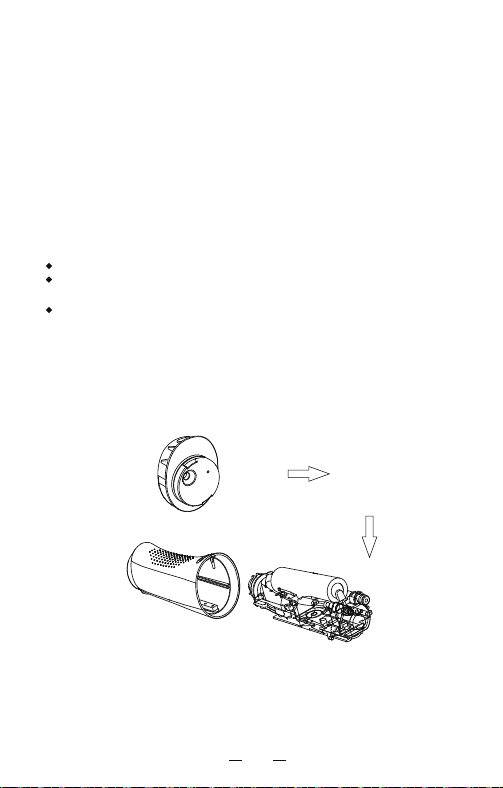
1. You can hold the device with your left hand, seize
the buckle of the cover with your right hand, rotate
the buckle left and right, then gently pull it down.
2. Rinse the inside of the tank with clean room
temperature water. Do not clean the tank with any
type of detergent.
3. After cleaning, locate the bottom cover to the
buckle, then gently insert it to the device.
Cleaning the Tank:
Removing Hard Water:
Note:
When using the oral irrigator for the first time, start from the lowest
gear. Water pressure can be gradually increased as the oral cavity
adapts. You may experience itching or minor gum bleeding during use.
This is normal and should typically stop after 1-2 weeks.
The indicator light is white, and will remain on while the device is in use.
If the device shuts down after the indicator flashes for five times, the
device is in low-voltage state. In the low-voltage state, after you press
the on/off button again, the device will not power on. The indicator
flashes for four times, indicating that you need to charge the device in
time. When the device is charging, the indicator flashes. While the
device is fully charged, the indicator light will remain on.
1211
After use, open the water tank and pour out any remaining liquid. Turn
on the device and drain any liquid left until the irrigator no longer sprays
out any liquid, then turn off the device.
Step 6: After Use
Step 7: Charging
Step 4: Before Use
Press and hold the switch button for 0.6 second to start the device. To
pause the device during use, tap the switch button. Press and hold the
button again to resume operation. This device is equipped with a
120-second shutdown timer. Automatic shutdown will only trigger if the
water tank is empty. If you wish to keep using the device, tap the switch
button to turn it off, then restart the device after refilling the water tank.
Turn off the device after you are finished using it.
Step 5: Use
For best results, start with the molars (posterior teeth) and start cleaning
towards the front teeth. While cleaning, move the nozzle 90° along the
gum line. Stay between each tooth for a short period. Close your lips
slightly to avoid the water from spraying out, but leave enough space so
that water can flow freely from your mouth to the sink.
Techniques
Before using the device, lean slightly over the sink, extend the nozzle
into your mouth and aim it at the teeth, gums, or between the teeth.
Rotate the nozzle to adjust the direction of the water outflow so that it
is perpendicular to the part of your mouth you wish to clean. Ensure that
your mouth is open enough so that any water flows right out.
IV. Cleaning and Maintenance
1. Clean this device only with clean water or a neutral detergent. Do not
use corrosive or abrasive detergents. Do not use water above 50℃ to
clean any part of this device, as this may lead to damage or reduced
performance.
2. Do not soak the oral irrigator in water. If necessary, clean the surface
of the device by wiping with a soft cloth dipped in mild, non-corrosive
detergent.
Cleaning the Body:
1. You can hold the device with your left hand, seize
the buckle of the cover with your right hand, rotate
the buckle left and right, then gently pull it down.
2. Rinse the inside of the tank with clean room
temperature water. Do not clean the tank with any
type of detergent.
3. After cleaning, locate the bottom cover to the
buckle, then gently insert it to the device.
Cleaning the Tank:
Removing Hard Water:
Note:
When using the oral irrigator for the first time, start from the lowest
gear. Water pressure can be gradually increased as the oral cavity
adapts. You may experience itching or minor gum bleeding during use.
This is normal and should typically stop after 1-2 weeks.
The indicator light is white, and will remain on while the device is in use.
If the device shuts down after the indicator flashes for five times, the
device is in low-voltage state. In the low-voltage state, after you press
the on/off button again, the device will not power on. The indicator
flashes for four times, indicating that you need to charge the device in
time. When the device is charging, the indicator flashes. While the
device is fully charged, the indicator light will remain on.
1413
V. Environmental Protection
2. Battery Recycling
1. Battery Maintenance
Ensure that the battery is fully charged before initial use.
Ensure that the battery is fulled charged before storing the device for
an extended period.
In order to prolong battery life, charge the device immediately when the
battery is low.
This device uses recyclable rechargeable batteries. At the end of the
device's lifecycle, recycle or dispose of the batteries separately in
accordance with your local waste management regulations before
disposing of the device.
Recycling Procedure: While the device is turned off, remove the nozzle
and water tank, then use a screwdriver or a similar tool to pry open the
base to remove the recyclable batteries.
(Note: Do not short circuit the positive and negative terminals of the
removed battery. The terminals can be insulated with tape.)
1. Depending on the mineral content of the water used, hard water
deposits may build up on the device. Failure to remove hard water
buildups will reduce product performance.
2. Point the nozzle at the sink, turn on the device, then let it run until all
water has been used. Fill the water tank with clean warm water, then
repeat the above steps to clean the tank. This cleaning process should
be repeated every 1-3 months to maintain product performance.
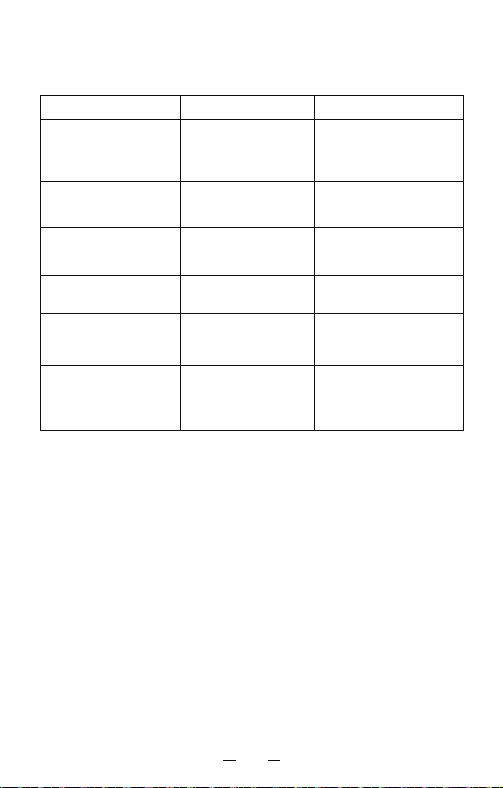
VI. Troubleshooting
Problem Cause Solution
There is a leak in the
water inlet
There is a leak in the
water tank
There is not enough
water pressure
The seal is damaged
Not enough charge
Try again after charging
the device
Not enough charge
The device is not
releasing any water
The device is being used
for the first time, or has
not been used in an
extended period
Contact the vendor
for repairs
The device cannot
start
The seal of the nozzle
holder is damaged, or
the nozzle was not
installed in the
proper position
Contact the vendor for
repairs, or reinstall the
nozzle in the proper
position
Replace the seal, or
contact the
vendor for repairs
Add a suitable amount of
water to the nozzle
installation hole and try
again after reinstalling
the nozzle.
Try again after charging
the device,12 or contact
the vendor for repairs
There is a leak between
the nozzle and the body
The seal is damaged,
or there are
impurities on the inlet
If you were not able to solve the problem with the troubleshooting
instructions above, please contact the vendor you purchased the device
from or visit a designated after-sales repair location.
1413
V. Environmental Protection
2. Battery Recycling
1. Battery Maintenance
Ensure that the battery is fully charged before initial use.
Ensure that the battery is fulled charged before storing the device for
an extended period.
In order to prolong battery life, charge the device immediately when the
battery is low.
This device uses recyclable rechargeable batteries. At the end of the
device's lifecycle, recycle or dispose of the batteries separately in
accordance with your local waste management regulations before
disposing of the device.
Recycling Procedure: While the device is turned off, remove the nozzle
and water tank, then use a screwdriver or a similar tool to pry open the
base to remove the recyclable batteries.
(Note: Do not short circuit the positive and negative terminals of the
removed battery. The terminals can be insulated with tape.)
1. Depending on the mineral content of the water used, hard water
deposits may build up on the device. Failure to remove hard water
buildups will reduce product performance.
2. Point the nozzle at the sink, turn on the device, then let it run until all
water has been used. Fill the water tank with clean warm water, then
repeat the above steps to clean the tank. This cleaning process should
be repeated every 1-3 months to maintain product performance.
VI. Troubleshooting
Problem Cause Solution
There is a leak in the
water inlet
There is a leak in the
water tank
There is not enough
water pressure
The seal is damaged
Not enough charge
Try again after charging
the device
Not enough charge
The device is not
releasing any water
The device is being used
for the first time, or has
not been used in an
extended period
Contact the vendor
for repairs
The device cannot
start
The seal of the nozzle
holder is damaged, or
the nozzle was not
installed in the
proper position
Contact the vendor for
repairs, or reinstall the
nozzle in the proper
position
Replace the seal, or
contact the
vendor for repairs
Add a suitable amount of
water to the nozzle
installation hole and try
again after reinstalling
the nozzle.
Try again after charging
the device,12 or contact
the vendor for repairs
There is a leak between
the nozzle and the body
The seal is damaged,
or there are
impurities on the inlet
If you were not able to solve the problem with the troubleshooting
instructions above, please contact the vendor you purchased the device
from or visit a designated after-sales repair location.
15 16
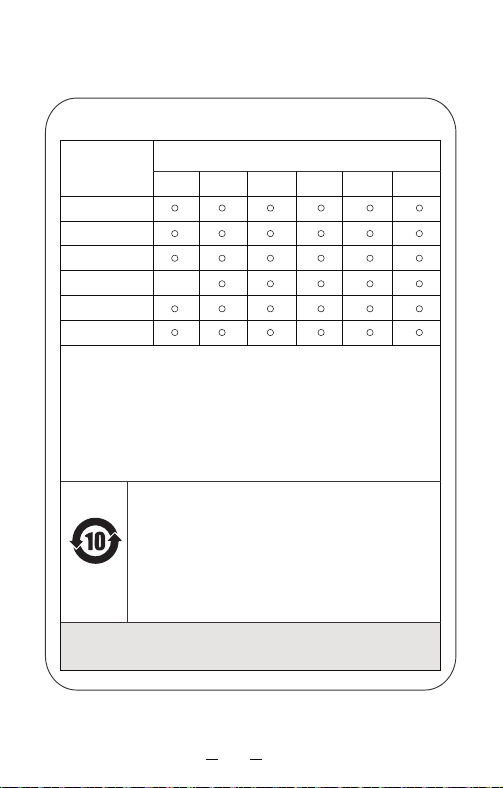
VII. Hazardous Substances
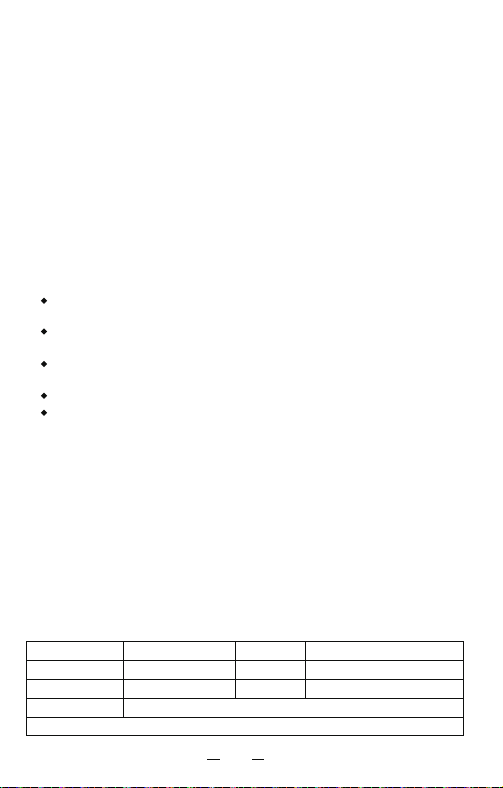
VIII. After-Sales Services
Warranty Repair Record
Thank you for purchasing a oral irrigator.
Please keep the below in mind.
1. When you purchase this device, ask the vendor to provide a valid sales
certificate to serve as your warranty.
2. In accordance with national regulations, this device includes a 1-year
free warranty period for failures not attributable to user error. This
warranty does not include nozzles. If the warranty period is exceeded,
thedevice can be sent to designated after-sales locations for paid
maintenance.
3. Charges and service fees may still be applied during the warranty
period in the below circumstances.
4.Please fill in the form below carefully, then send it to the designated
after-sales maintenance location along with the device that requires
repairs.
The device was damaged due to improper use, maintenance, or
storage by the consumer.
The device was damaged by a service agent that has not undertaken
the “three guarantees”.
The sales voucher is not valid or already one year over the expiration
date.
The device was damaged during commercial use.
The device was damaged by a force majeure event (such as lightning,
earthquake, or fire).
Customer Name
Phone
Color
Vendor
Product No.
Date of Purchase
Repair Date
Mailing Address
Name and Content of Hazardous Substances:
Component
Name
Hazardous Substance or Element
Lead(Pb)
Plastic Componentsc
Hardware
Electric Machinery
Components
Circuit Control
Components
Charging
Components
Accessories
This form was prepared in accordance with the Administrative Measure on the Control of
Pollution Caused by Electronic Information Products (SJ/T 11364).
O: Indicates that hazardous substances in all homogeneous materials in this component are
under the reporting requirements of GB/T 26572.
X: Indicates that hazardous substances in at least one homogeneous material in this component
is over the reporting requirements of GB/T 26572.
Components marked with “X” indicate that due to the current limitations on global
technology, the complete replacement of these elements or substances with environmentally
friendly alternatives cannot be realized. This may change with subsequent technological
developments.
10-Year Environmental Protection Use Period: Indicates that there is a
10-year period before hazardous substances contained in this device
are likely to leak out during normal use, causing possible harm to health
and the environment.
Chasing Arrow Symbol: Indicates that this device can be recycled. This
device should not be discarded after its expiration date or failure to
repair and return to normal use. Please deliver this device to a proper
recycling facility or enterprise qualified for the disposal of waste
electrical and electronic equipment. For the correct disposal method,
please refer to your national or local regulations regarding the disposal
of old electrical and electronic products.
The above symbols were implemented in accordance with the Administrative Measure
on the Control of Pollution Caused by Electronic Information Products (SJ/T 11364).
Long-term use of this device will not cause any harm to the human body.
Mercury
(Hg)
Cadmium
(Cd)
Hexavalent
Chromium
(Cr(VI))
Polybrominated
Biphenyls
(PBB)
Polybrominated
Diphenyl Ether
(PBDE)
x
RoHS Symbol
15 16
VII. Hazardous Substances
VIII. After-Sales Services
Warranty Repair Record
Thank you for purchasing a oral irrigator.
Please keep the below in mind.
1. When you purchase this device, ask the vendor to provide a valid sales
certificate to serve as your warranty.
2. In accordance with national regulations, this device includes a 1-year
free warranty period for failures not attributable to user error. This
warranty does not include nozzles. If the warranty period is exceeded,
thedevice can be sent to designated after-sales locations for paid
maintenance.
3. Charges and service fees may still be applied during the warranty
period in the below circumstances.
4.Please fill in the form below carefully, then send it to the designated
after-sales maintenance location along with the device that requires
repairs.
The device was damaged due to improper use, maintenance, or
storage by the consumer.
The device was damaged by a service agent that has not undertaken
the “three guarantees”.
The sales voucher is not valid or already one year over the expiration
date.
The device was damaged during commercial use.
The device was damaged by a force majeure event (such as lightning,
earthquake, or fire).
Customer Name
Phone
Color
Vendor
Product No.
Date of Purchase
Repair Date
Mailing Address
Name and Content of Hazardous Substances:
Component
Name
Hazardous Substance or Element
Lead(Pb)
Plastic Componentsc
Hardware
Electric Machinery
Components
Circuit Control
Components
Charging
Components
Accessories
This form was prepared in accordance with the Administrative Measure on the Control of
Pollution Caused by Electronic Information Products (SJ/T 11364).
O: Indicates that hazardous substances in all homogeneous materials in this component are
under the reporting requirements of GB/T 26572.
X: Indicates that hazardous substances in at least one homogeneous material in this component
is over the reporting requirements of GB/T 26572.
Components marked with “X” indicate that due to the current limitations on global
technology, the complete replacement of these elements or substances with environmentally
friendly alternatives cannot be realized. This may change with subsequent technological
developments.
10-Year Environmental Protection Use Period: Indicates that there is a
10-year period before hazardous substances contained in this device
are likely to leak out during normal use, causing possible harm to health
and the environment.
Chasing Arrow Symbol: Indicates that this device can be recycled. This
device should not be discarded after its expiration date or failure to
repair and return to normal use. Please deliver this device to a proper
recycling facility or enterprise qualified for the disposal of waste
electrical and electronic equipment. For the correct disposal method,
please refer to your national or local regulations regarding the disposal
of old electrical and electronic products.
The above symbols were implemented in accordance with the Administrative Measure
on the Control of Pollution Caused by Electronic Information Products (SJ/T 11364).
Long-term use of this device will not cause any harm to the human body.
Mercury
(Hg)
Cadmium
(Cd)
Hexavalent
Chromium
(Cr(VI))
Polybrominated
Biphenyls
(PBB)
Polybrominated
Diphenyl Ether
(PBDE)
x
RoHS Symbol

Thank You For Purchasing a Oral Irrigator
Model: FC5090
User Manual
Portable Oral Irrigator
Thank you for choosing a oral irrigator!
You’re on your way to a more hygienic life!
Thank you for purchasing a portable oral irrigator from, a pioneering and
innovative brand with the world's most advanced high-pressure water
pulse technology.
Conventional toothbrushes cannot easily remove food debris hidden in
the oral cavity, while most dental floss can only reach a limited area
under the gums. In contrast, oral irrigators can quickly and efficiently
remove food debris from deep in the gums and between the teeth to
ensure perfect hygiene.