Headphones
User Guide
EN
Contents
Read This First 3
Advantages of this product.........................................................................3
About the manuals....................................................................................4
Accessories and part names........................................................................5
Storing this product.................................................................................. 7
Connections 8
Connecting the headphones with the headphone cable.. ................................ 8
Connecting to an audio device.. .................................................................. 9
Wearing the headphones 11
Putting the headphones on.......................................................................11
Maintenance 13
Taking care of the headphones..................................................................13
Taking care of the accessories...................................................................15
Troubleshooting 16
Check this first........................................................................................16
Aftersales service....................................................................................17
Appendix 18
Specifications.........................................................................................18
Optional accessories (sold separately).. ..................................................... 20
Replacing the earpads..............................................................................21
2
Contents

Read This First
Advantages of this product
This product is a pair of headphones that connects via cable to an audio device such as a headphone
amplifier.
Immerse yourself more deeply in your own world of sound and music
Listeners want to become engrossed in their personal world, where they’re always connected to the music
they love.
With this kind of listening experience in mind, Yamaha offers the YH-C3000: a pair of over-ear headphones
that could only have been realized by Yamaha, a company that understands deeply both about audio devices
and musical instruments.
The YH-C3000 brings you out of the moment to enjoy countless hours of music to your heart’s content.
The sound that makes total immersion in your music a reality
(
This product features Yamaha’s proprietary ARMODYNAMIC™ drivers, offering superb responsiveness and
a likable sound you’ll easily appreciate.
(
The oval-shaped housings are made of beech wood, which is also used on pianos for an expressive sound
that vibrantly articulates each tone at just the right distance from your ear, offering a natural feeling of
sonic immersion.
Comfortable fit for long periods of listening to music
(
The head pad is made using three-dimensional stitching to gently match your head shape, reducing
pressure on the top of your head.
(
The stepless sliders for each ear let you precisely adjust the fit of the headphones.
(
The earpads are made of highly durable protein leather and low-rebound urethane foam with high-rigidity
aluminum arms, which make the headphones both comfortable and stable to wear.
Design
The wooden housings have a smooth curved design that accentuates the beauty of the glossy finish. The
product’s overall design resembles a musical instrument, enhancing your music experience.
For more information
https://yamaha.io/yh-c3000
* ARMODYNAMIC™
“ARMODYNAMIC” is a registered trademark of Yamaha Corporation.
3
Read This First > Advantages of this product
About the manuals
Three manuals (Safety Guide, Quick Guide and User Guide) are available for users of this product. Be sure to
read all manuals and keep them in a safe, accessible place for future reference.
Available manuals
Safety Guide (included)
This explains the necessary precautions that you must observe to use this product. Be sure to read them
before using this product.
Quick Guide (included)
This illustrates how to immediately use the product after purchase.
User Guide (this guide)
This provides details on all functions. This guide is only available from our website.
(
The precautions and other matters in this guide are classified as follows.
(
CAUTION
This content indicates “risk of injury.”
(
NOTICE
Indicates points that you must observe to prevent product failure, damage or malfunction, as well as to
protect the environment.
(
NOTE
Indicates notes on instructions, restrictions on functions, and additional information that may be
helpful.
NOTE
(
The explanations in this guide are based on the latest specifications at the time of publication.
(
The latest version (PDF) of each guide can be downloaded from the following website.
https://download.yamaha.com/
4
Read This First > About the manuals
Accessories and part names
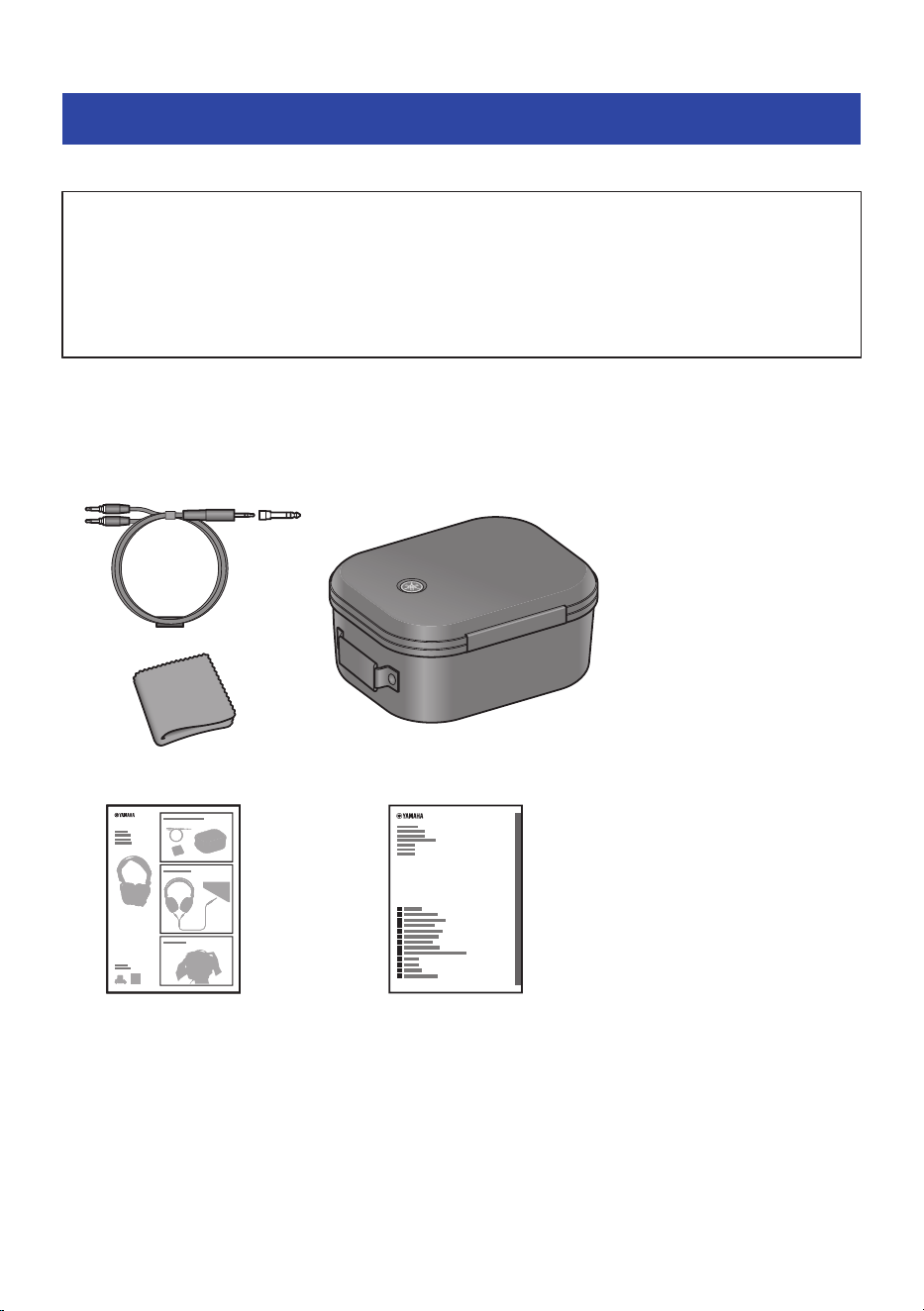
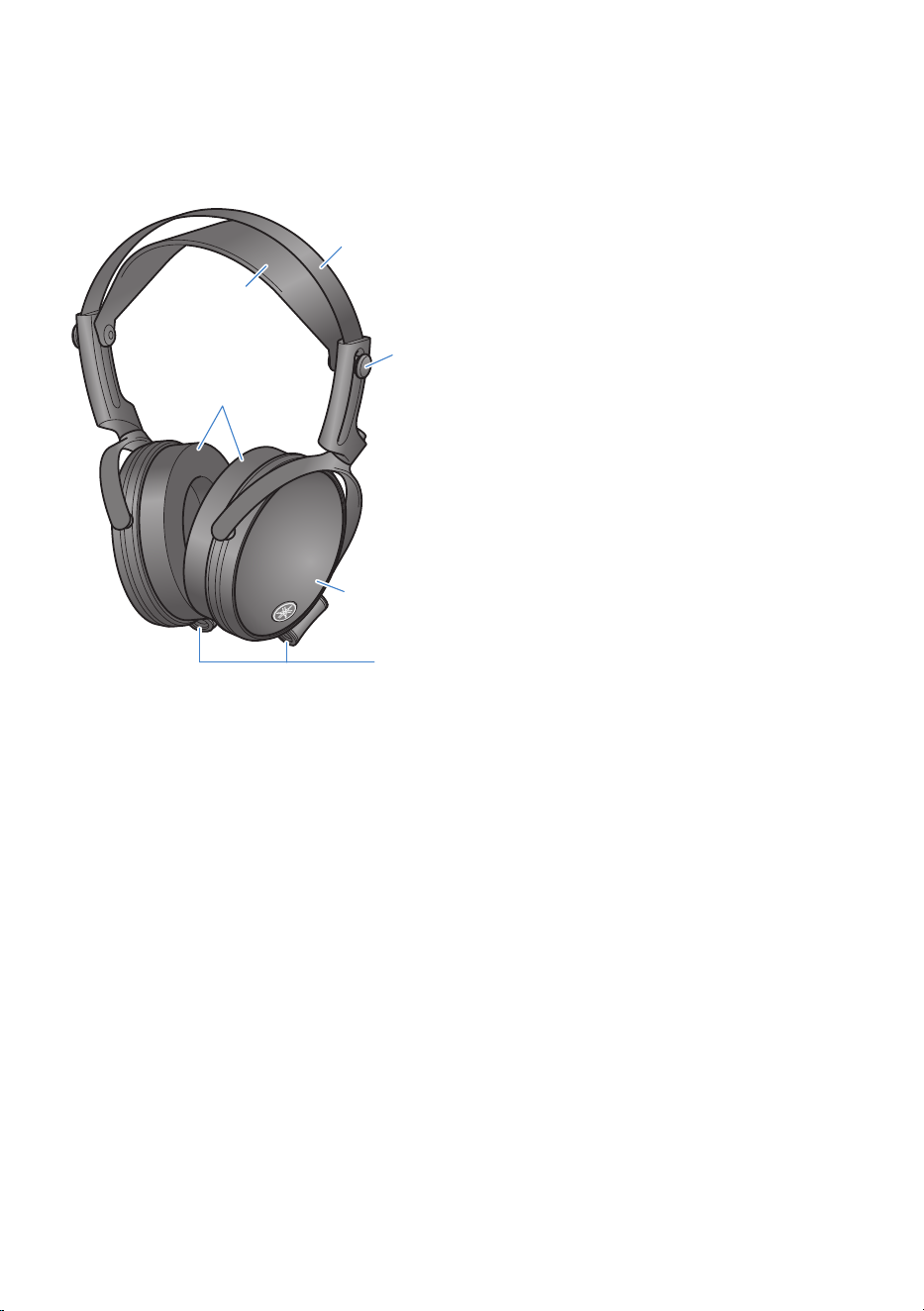
The accessories included with this product as well as the part names are as shown below.
NOTICE
(
This product uses strong magnets. Do not place or hold this product near any objects that might be affected by the magnetic
field of this product.
(
For objects like clocks or ATM cards, the data on the affected device may be corrupted or destroyed.
(
Metal parts like paper clips or screws may damage this product or cause a malfunction.
(
As the diaphragms used in this product are susceptible to impact, do not drop this product or expose it to strong impact. This
may cause a malfunction.
n
Accessories
Make sure that all of the accessories are included with this product.
a b
e
c
d
YH-C3000
YH-C3000
a
Headphone cable (3.5 mm, three-conductor plug) 2 m (78-3/4″)
(Includes a 6.3 mm adaptor plug)
b
Carrying case
c
Cleaning cloth
d
Quick Guide
5
Read This First > Accessories and part names
Storing this product
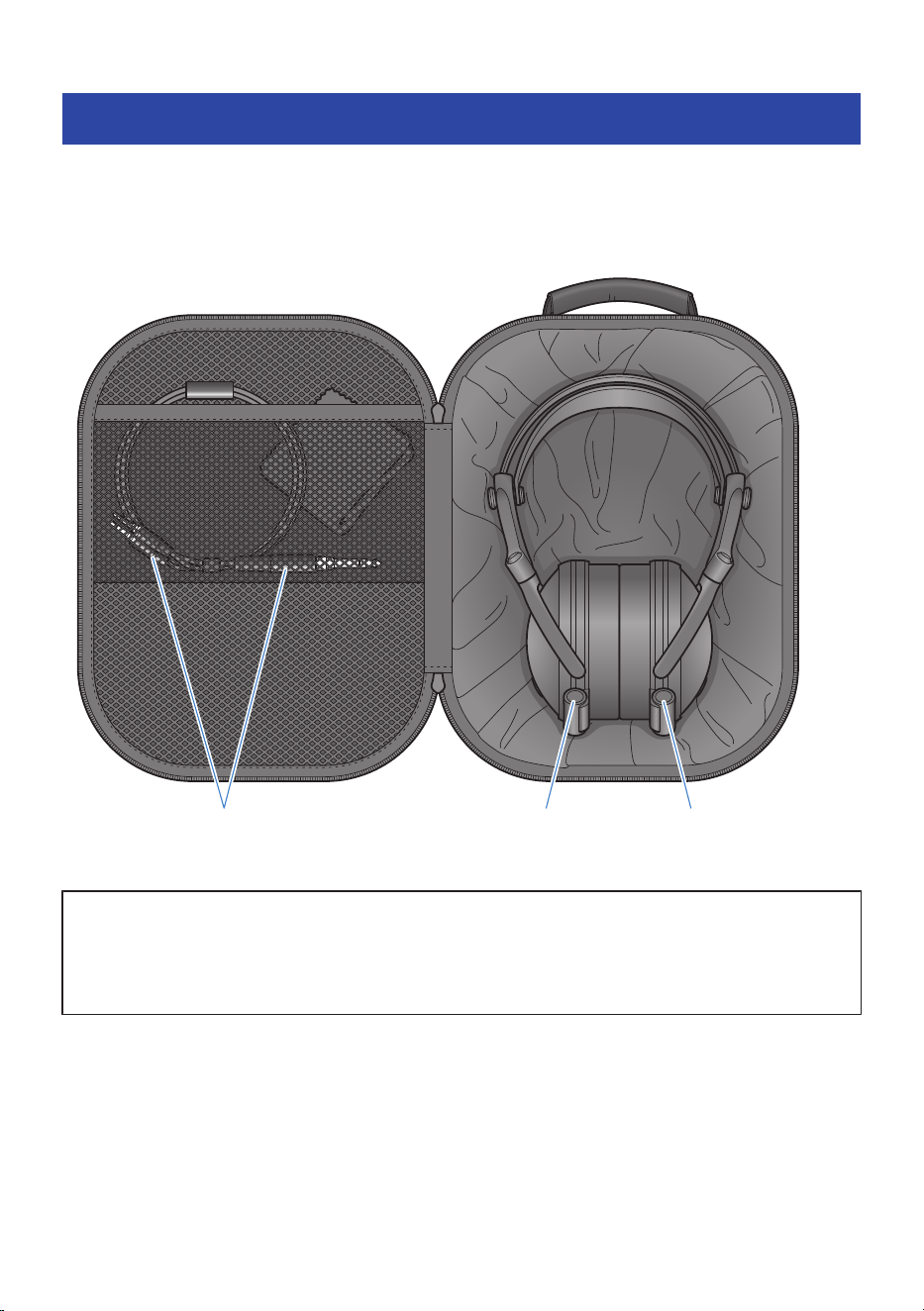
When you are not using or when you are carrying it somewhere with you, you can store it in the included
carrying case.
We recommend that you maintain and clean the product before storing it, to keep it in good condition to use
for a long time.
Store the plug inside the pocket for safekeeping. L R
NOTICE
(
If the cloth liner inside the case begins losing its shape, place the headphones in the correct position inside while gently holding
the cloth down. Trying to forcibly close the fastener without storing the headphones in the correct position may damage the
product or the contents of the case.
(
Make sure not to get the fabric inside the case caught in the fastener when you open or close it. This may damage the product.
7
Read This First > Storing this product
Connections
Connecting the headphones with the headphone cable
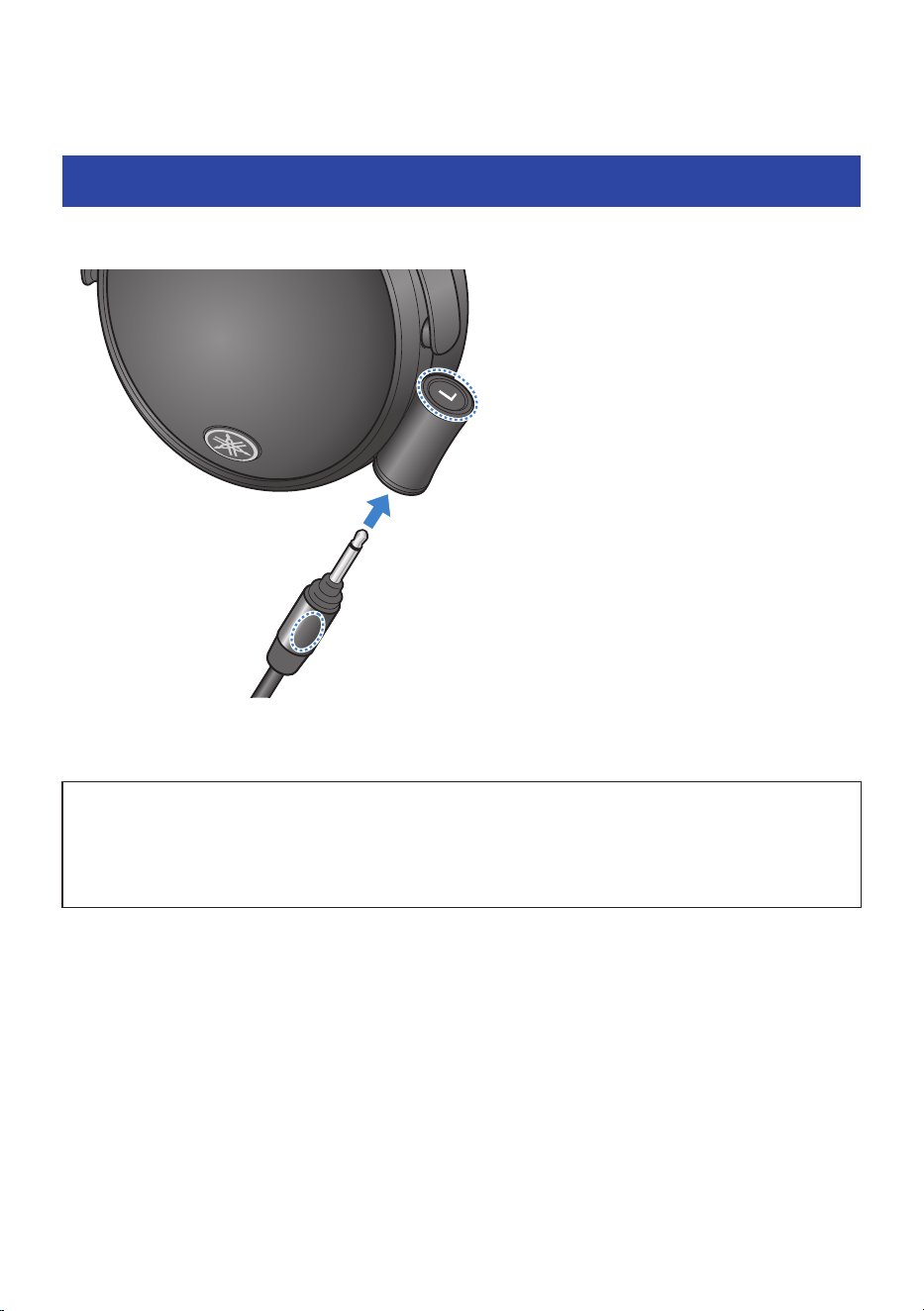
Connect the included headphone cable to the headphones.
LEFT
Make sure that the correct cable plugs, L (left) and R (right) are plugged into the correct sides on the
headphones, and firmly insert the plugs all the way into the cable jacks.
NOTICE
(
Be sure to grip this cable’s plug when inserting or unplugging. If you pull too hard on the cable itself, the cable wires may break.
(
Insert the plug all the way into the jack. If the plug is not fully inserted, you may hear no sound, or you may hear breaks in the
sound.
(
The audio may sound strange if you get the L (left) and R (right) cable jacks mixed up.
8
Connections > Connecting the headphones with the headphone cable
Connecting to an audio device
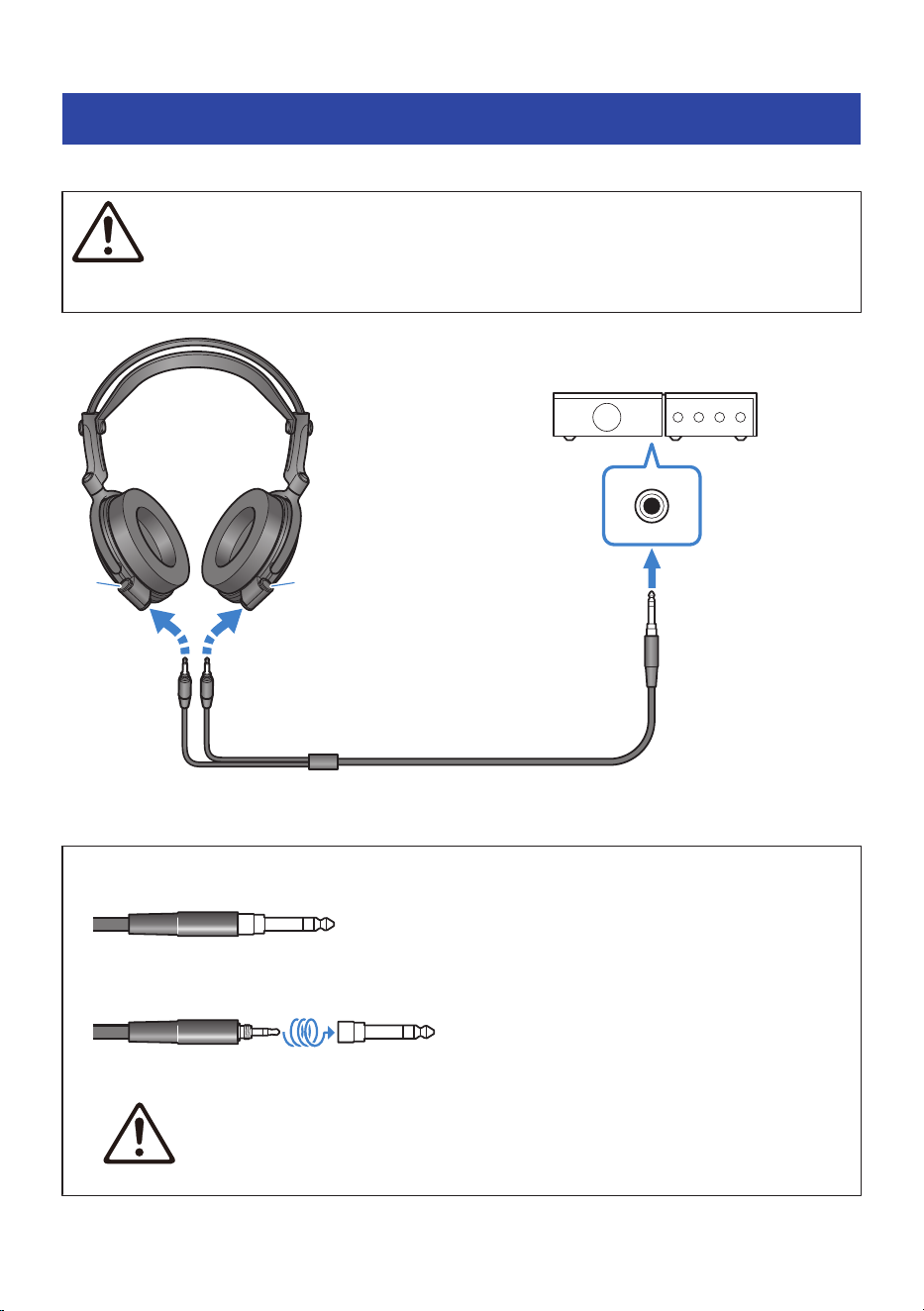
Connect the included headphone cable to an audio device such as a headphone amplifier.
CAUTION
(
Make sure to turn the volume all the way down on the devices you connect to this product beforehand.
Failure to do so may cause hearing loss, electric shock, or damage to this product.
L R
RIGHTLEFT
Headphone amplifier or
other equipment
Headphone output jack
Headphone cable
(3.5 mm three-conductor plug,
includes 6.3 mm adaptor plug)
Input plug
Firmly plug the included headphone cable all the way into the headphone output jack on the device to which
you want to connect.
How to use the 6.3 mm adaptor plug
(
Connecting to a Φ6.3 mm headphone output jack
(
Use the cable with the adaptor plug attached on the end.
(
Connecting to a Φ3.5 mm headphone output jack
(
Remove the adaptor plug on the end of the cable before use.
CAUTION
Keep the adaptor plug out of reach of children after you’ve removed it, so that it is not accidentally swallowed.
9
Connections > Connecting to an audio device

NOTE
(
The included cable and adaptor plug are only for use with headphones.
(
Make sure to plug the cable only into the headphone output jack of the device to which you are connecting.
(
Be sure to grip this cable’s plug when inserting or unplugging. If you pull on the cable instead, the cable wires may break.
(
Insert the plug all the way into the jack. If the plug is not fully inserted, you may hear no sound, or you may hear breaks in the
sound.
(
When connecting this product to another device, refer to the Owner’s Manual for that device as well.
10
Connections > Connecting to an audio device
Wearing the headphones
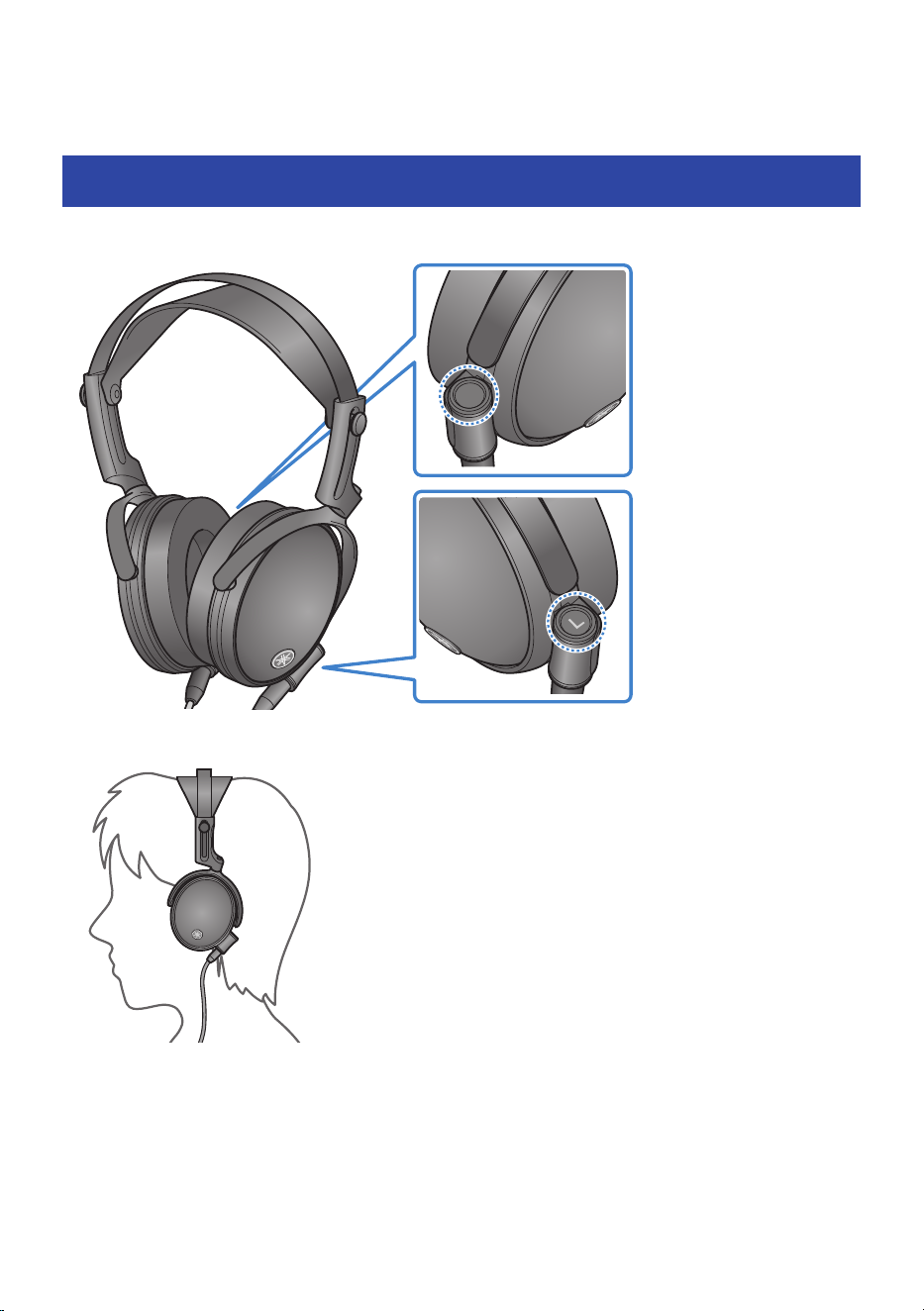
Putting the headphones on
Put the headphone marked L on your left ear, and put the headphone marked R on your right ear.
5
Make sure that each headphone covers your entire ear.
Use the slider to adjust the position according to the size of your head.
11
Wearing the headphones > Putting the headphones on
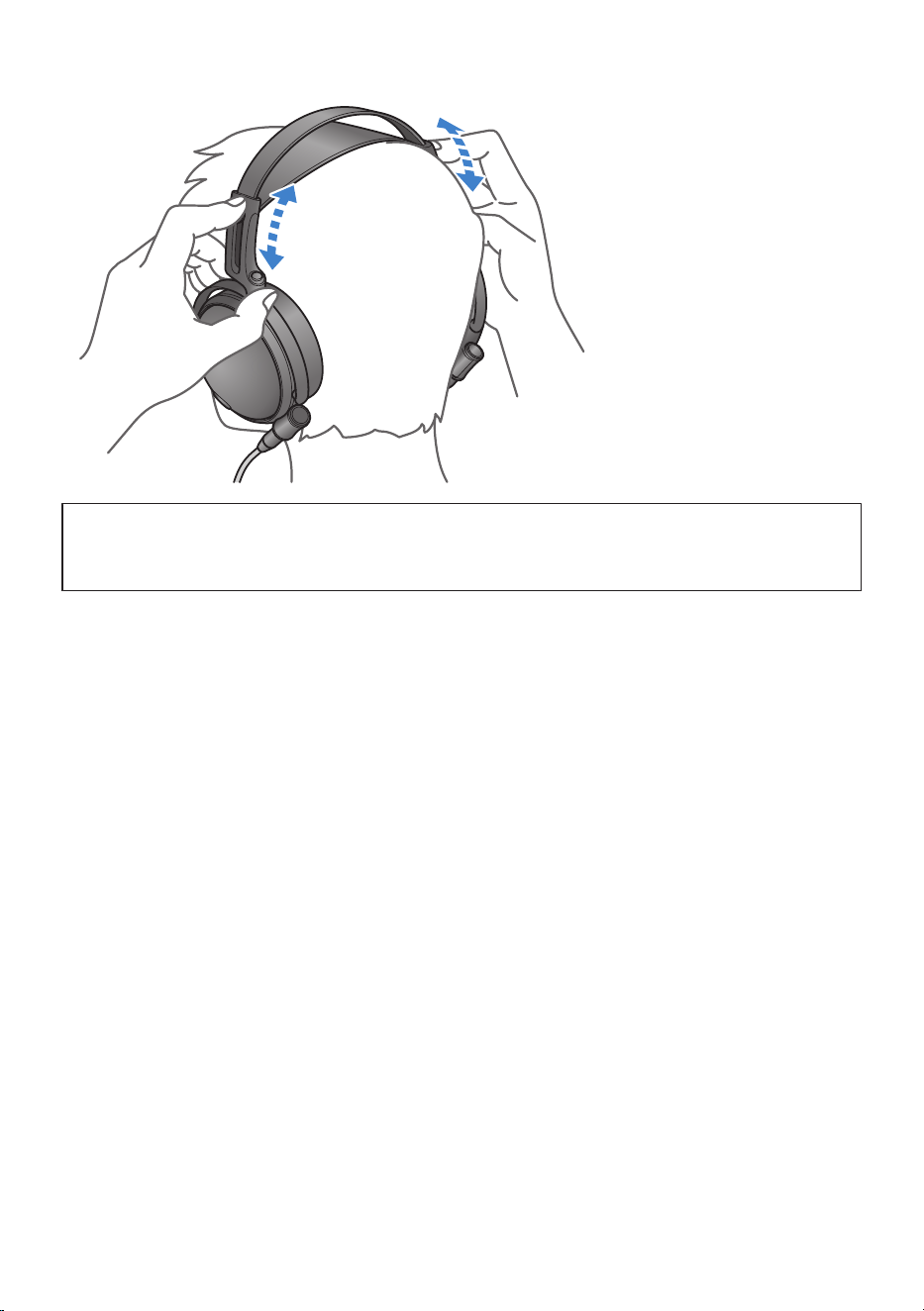
NOTICE
(
Be careful not to get your fingers or hair caught in the movable part of the slider.
(
Do not forcibly pull on the movable part of the slider. This action may cause a malfunction.
12
Wearing the headphones > Putting the headphones on

Maintenance
Taking care of the headphones
We recommend that you take regular care of this product, so that you can use it for a long time to come.
Daily maintenance
(
When maintaining the headphones, be sure to remove the headphone cable from this product and from
any connected devices. Failure to do so may cause a malfunction.
(
When maintaining the headphones, use the included cleaning cloth or another soft, dry cloth to wipe the
product. Do not wipe the surfaces with benzine, thinner, detergent, chemically-treated cloths, disinfectant
solutions containing alcohol or similar liquids. This may cause discoloration or deterioration.
(
To prevent rust or deformation, always keep the product dry and avoid placing it in extremely cold or hot
locations.
(
Be careful not to heat the product with a hairdryer or heating device.
(
Do not expose this product to direct sunlight for long periods of time.
(
Do not blow on the driver units. This may cause the diaphragm inside these units to malfunction, or cause
damage.
(
When you are not using this product, store it in the included carrying case.
Headband
(
Use the included cleaning cloth or another soft, dry cloth when to wipe the headband off if it becomes
dirty.
(
Wipe off the headband regularly to remove any dust.
Head pad
(
Use the included cleaning cloth or another soft, dry cloth when to wipe the head pad off if it becomes
dirty. Do not use disinfectant solutions containing alcohol or similar liquids.
(
Hair care products may cause damage to the pad surface. If any such products get on the head pad,
carefully wipe them off.
(
Wipe off the head pad regularly to remove any dust.
Housing
(
Gently wipe the housings with the included cleaning cloth or another soft, dry cloth to prevent scratches
on the surface.
(
As the housings of the headphones are made of real wood, their coloration, woodgrain and so forth may
look slightly different between the left and right sides, and even between different headphones of the
same model. Also, you may notice changes in smoothness on the surface of the housing, depending on
where you use this product and the passage of time.
13
Maintenance > Taking care of the headphones

Earpads
(
When maintaining the earpads, use the included cleaning cloth or another soft, dry cloth to wipe the
earpads. Do not use leather polish, solvents (such as thinner or benzine) or disinfectant solutions
containing alcohol or similar liquids.
(
Hair care products may damage the surface of the earpads. If any such products get on the earpads,
carefully wipe them off.
(
The earpads may naturally degrade over time, even when stored and used normally. We recommend that
you replace the earpads soon if they have degraded.
14
Maintenance > Taking care of the headphones

Taking care of the accessories
This explains how to take care of the accessories.
Cable plugs
(
Use the included cleaning cloth or another soft cloth to lightly wipe the plugs.
Carrying case
(
Use a dry and soft cloth when cleaning this product. Do not use chemicals such as benzine or thinner,
detergents, disinfectant solutions containing alcohol, chemically treated cloths or the like on this product.
This may cause discoloration or deterioration.
(
This product may naturally degrade over time, even when stored and used normally.
(
Do not store this product in a sealed vinyl bag or the like. This may cause deformation, discoloration or
deterioration.
15
Maintenance > Taking care of the accessories

Troubleshooting
Check this first
If this product does not operate normally while you are using it, check the following points.
No sound can be heard
(
The headphone cable may not be correctly connected.
Make sure that the headphone cable is correctly plugged all the way into the headphones and the
connection jack on your audio device.
(
“Connections”(p.8)
(
The power of the audio playback device might not be on.
Turn on the power of your connected device.
(
The volume is too low.
Raise the volume on your connected device.
(
The audio stopped playing back.
Start playback.
Sound is not good or sounds strange
(
You might be wearing the headphones on the wrong sides (L/R).
Check that the left (L) and right (R) headphones are worn on the correct sides.
(
“Putting the headphones on”(p.11)
(
The left (L) and right (R) plugs of the headphone cable might be plugged into the opposite jacks on
the headphones.
Check the left (L) and right (R) jacks on the headphones and connect the plugs correctly.
(
“Connections”(p.8)
(
The earpads may not be correctly attached.
Check whether the earpads are attached correctly to the headphones.
(
“Replacing the earpads”(p.21)
If the trouble still cannot be solved, please contact us for product support as shown below.
(
For customers within Japan
Please contact the store where you purchased this product, or the Product Support Center as listed in the
“Safety Guide” included with this product.
(
For customers outside of Japan
Please contact your nearest authorized Yamaha dealer or service center.
https://manual.yamaha.com/audio/address_list/
16
Troubleshooting > Check this first

Aftersales service
For service or general inquiries
(
For customers within Japan
Please contact the store where you purchased this product, or the Product Support Center as listed in the
“Safety Guide” included with this product.
(
For customers outside of Japan
Please contact your nearest authorized Yamaha dealer or service center.
https://manual.yamaha.com/audio/address_list/
NOTE
(
The earpads are replaceable parts. As the earpads are an important part of this product that affect the sound quality, we
recommend that you replace them soon if they are degraded or damaged.
(
If one of the driver units on the headphones is damaged or malfunctioning, you may notice a difference in sound between the left
and right sides. For this reason, we recommend replacing both sides at the same time.
17
Troubleshooting > Aftersales service

Appendix
Specifications
The specifications of this product are as shown below.
YH-C3000 Headphones
(
Driver type
Closed-back/over-ear
(
Driver units
Dynamic
(
Playback frequency range
5 Hz – 55 kHz
(
Sensitivity
94 dB/mW (at 1 kHz)
(
Impedance
34 Ω (at 1 kHz)
(
Weight
Approx. 330 g (11.64 oz) (not including cable, but including earpads)
(
Earpads
Polyurethane leather
Accessories
Headphone cable (unbalanced)
(
Length
Approx. 2 m (78-3/4″)
(
Plug shape
(
Device side
3.5 mm, three-conductor plug (includes 6.3 mm screw-on adapter)
(
Headphones side
3.5 mm, two-conductor plug
(
Conductive material
Silver-coated OFC
(
Weight
Approx. 72 g (2.54 oz)
Carrying case
(
Dimensions (W × H × D)
228 × 130 × 283 mm (9" x 5-1/8" x 11-1/8")
(
Weight
Approx. 600 g (1.3 lb)
* The size of the actual product may differ slightly from the sizes shown.
Cleaning cloth
(
Size
Approx. 150 × 150 mm (5-7/8" x 5-7/8")
(
Material
Polyester, nylon
18
Appendix > Specifications

* The contents of this User Guide apply to the latest specifications as of the publishing date. For the latest version of the
User Guide, refer to the Yamaha website.
19
Appendix > Specifications

Optional accessories (sold separately)
The following optional products are also available for purchase to use with this product.
(
HUC-SC020 Headphone Unbalanced Cable
(
HBC-SC020 Headphone Balanced Cable
(
HXC-SC020 Headphone XLR Cable
(
HXC-SC030 Headphone XLR Cable
(
HST-5000 Headphone Stand
(
CCS-5000 Carrying Case (same as the included accessory)
20
Appendix > Optional accessories (sold separately)
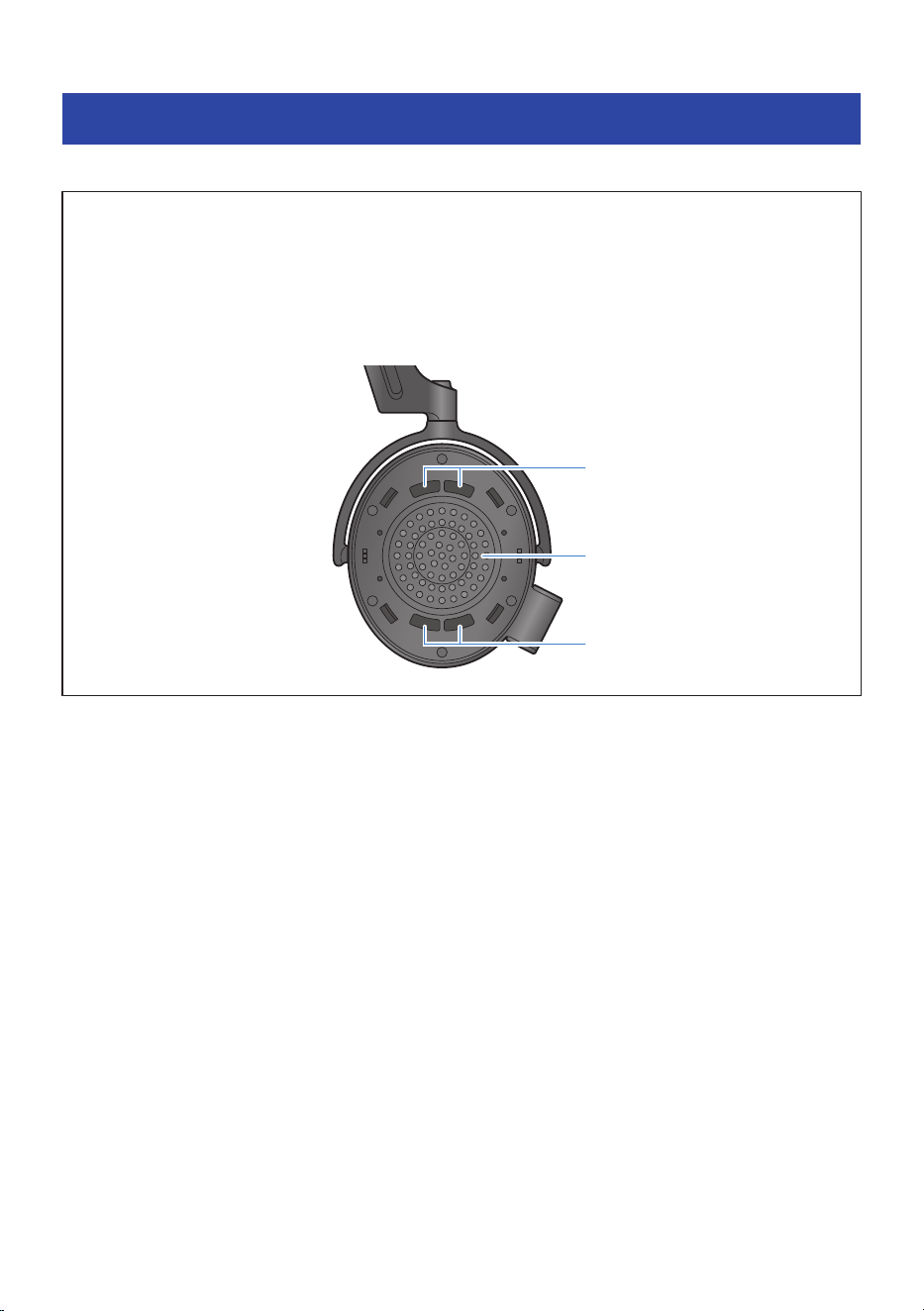
Replacing the earpads
This explains how to replace the earpads.
NOTICE
(
Do not forcibly tug on the earpads or use too much force at a single spot when removing them. This may damage the earpads
and headphones.
(
When removing the earpads, do not forcibly insert any sharp or hard objects or the like between the earpads and the
headphones. Doing so may scratch or damage the earpads and headphones.
(
When replacing the earpads, do not apply too much force to the driver unit or the acoustic mesh, or expose these parts to
impact. This may damage the parts.
Acoustic mesh
Acoustic mesh
Driver unit
Headphone after removing
earpad
21
Appendix > Replacing the earpads
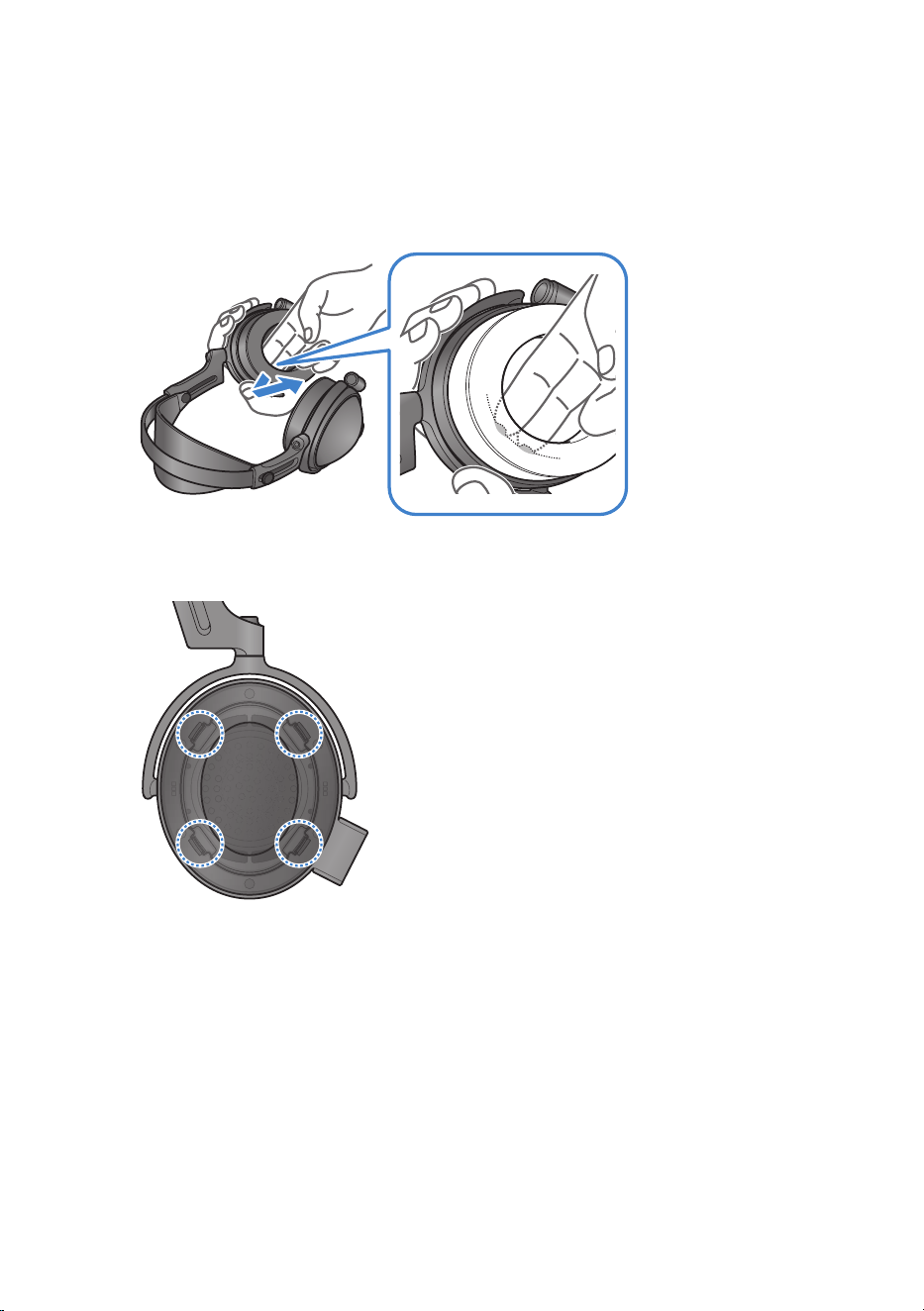
Follow these steps to replace the earpads.
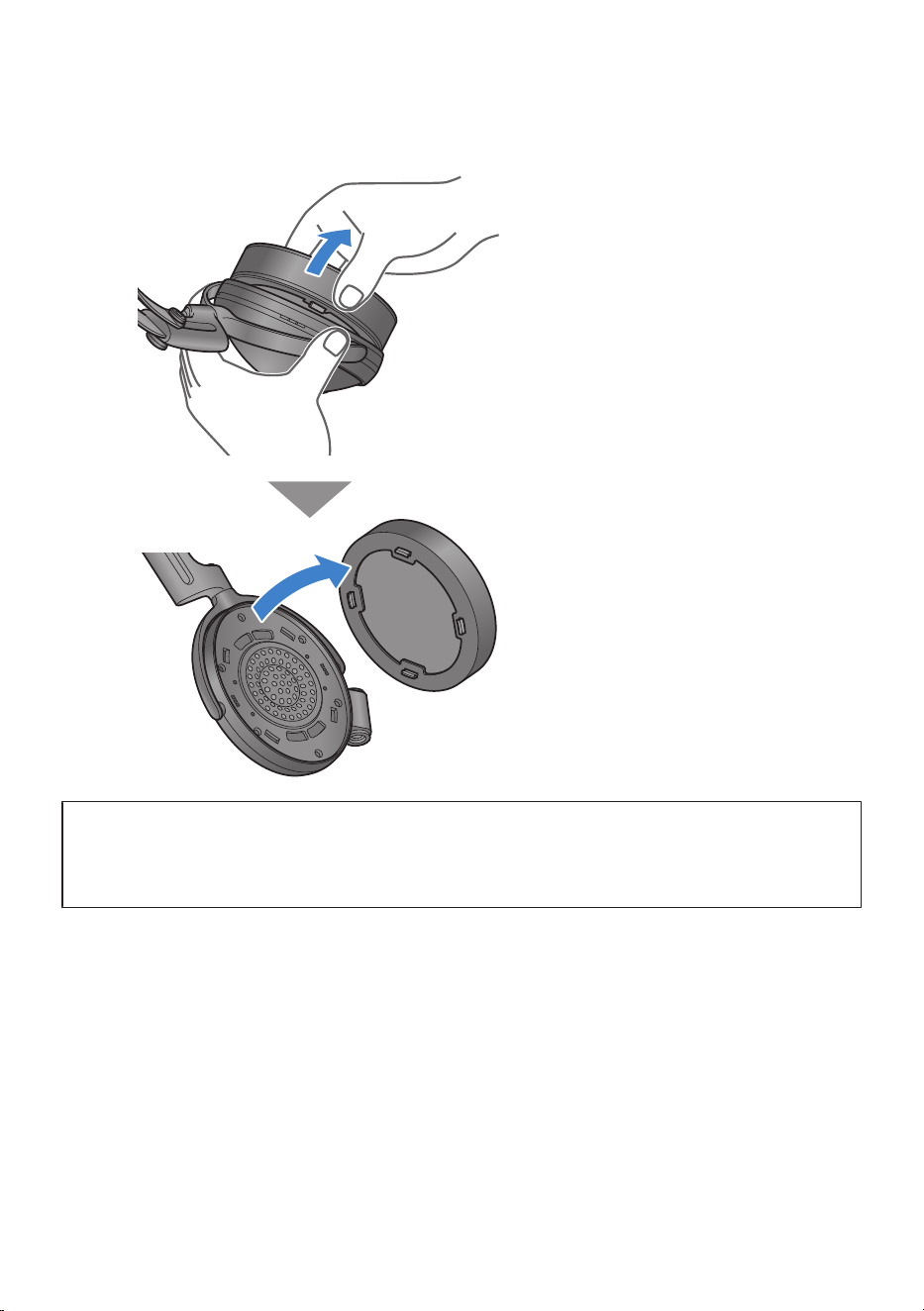
1 Hook your finger onto the protrusion inside the earpad, and remove the earpad
while pushing up on the outer part of the housing.
There are four protrusions that fasten the earpad onto the housing, as shown in the following
illustration.
22
Appendix > Replacing the earpads
2 If the earpad comes off of one of the fastening points, pull on each of the fastening
points in order to take the earpad off.
NOTICE
(
The center of each driver unit contains a strong magnet. Be careful not to insert any paper clips, screws or other metallic
objects into this area. This action may cause a malfunction.
(
Be careful not to get any dust or other foreign matter inside the headphones. This action may cause a malfunction.
23
Appendix > Replacing the earpads
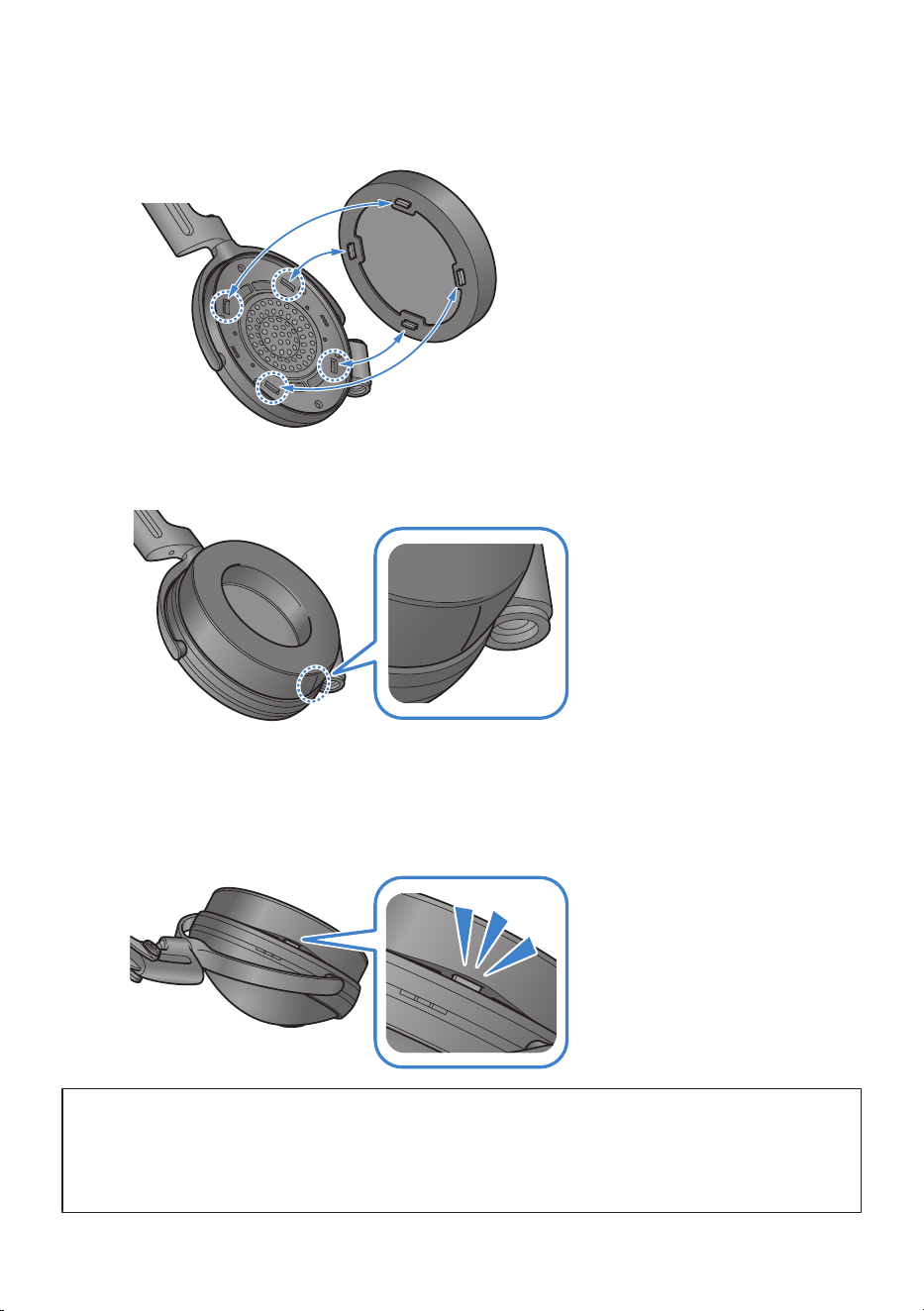
3 Align the replacement earpad with the four fastening points inside the headphone
housing.
The L and R orientation of the earpads does not matter. The earpad that has stitching on the
side goes down.
4 Press the earpads in so that they firmly fit into the four fastening points.
If there is a gap between the earpads and the part that comes into contact with this product,
this means that the earpads may not be firmly fitting into the fastening points. Insert the
earpads all the way into the fastening points until you hear a click.
NOTICE
(
When attaching the earpads onto the headphones, do not apply too much force to the driver unit or the acoustic mesh, or
expose these areas to impact. This may damage the product.
(
After attaching the earpads, lightly pull on them to make sure that they won’t easily come off. The earpads might fall off or the
sound quality may not be as good if they are not firmly attached.
24
Appendix > Replacing the earpads

Yamaha Global Site
https://www.yamaha.com/
Yamaha Downloads
https://download.yamaha.com/
© 2025 Yamaha Corporation
Published 10/2025 AM-B0
AV23-0080
Layout Folder: YMH_PDF_Manual_A5_AV
Stylesheet Name: 01_YMH_PDF_Manual_A5_AV_En-Multi
Stylesheet Version: 2025.3.19