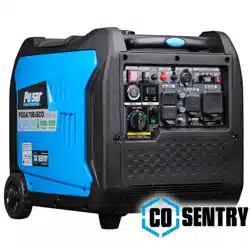
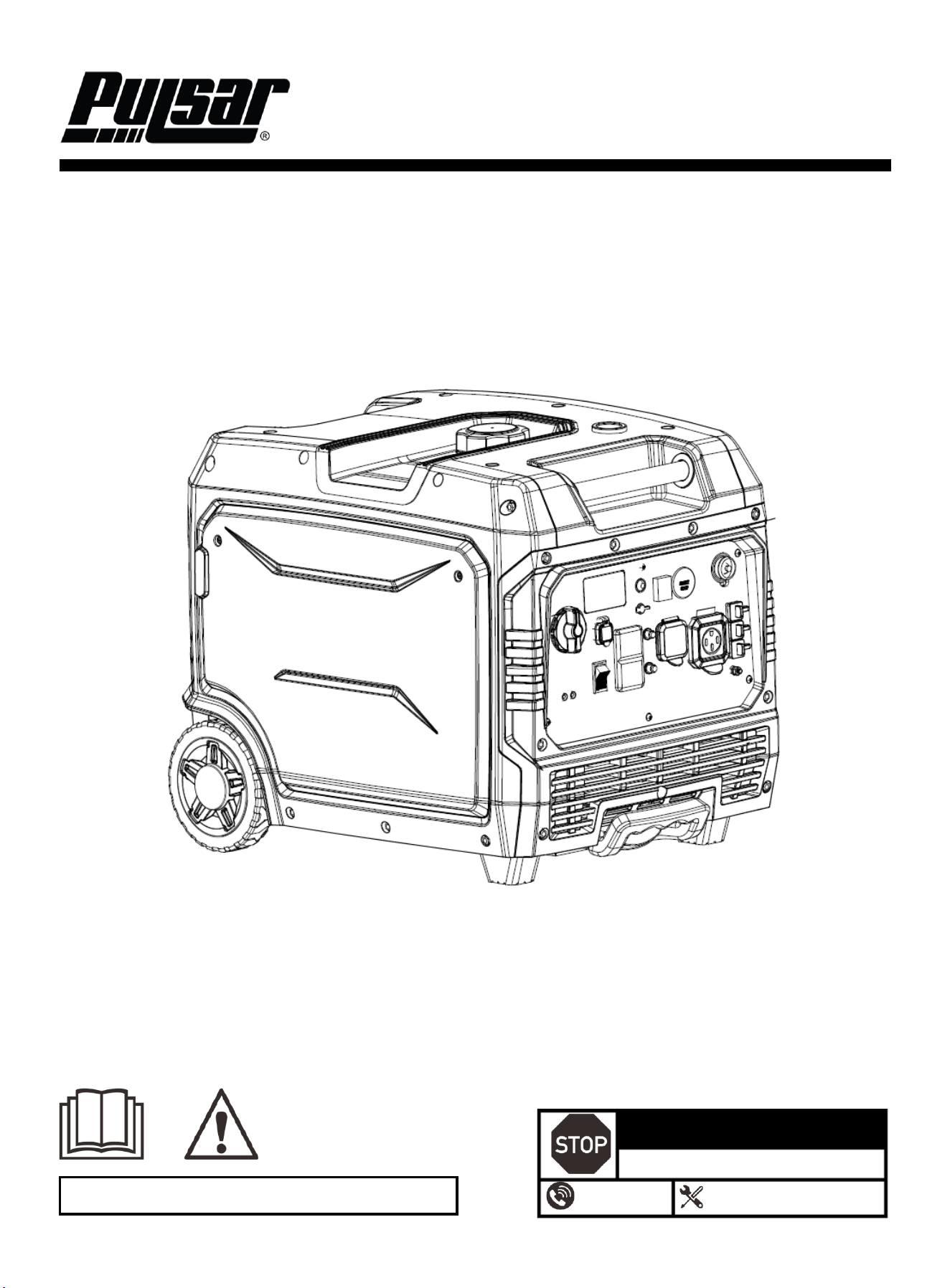
7600-Watt Inverter Generator
OPERATOR'S MANUAL
Warning: The Engine Exhaust from this product contains chemicals known to the
State of California to cause cancer, birth defects or other reproductive harm.
DO NOT RETURN TO STORE!
HAVE QUESTIONS OR NEED SERVICE?
1-866-591-8921
support@pulsar-products.com
Model: PG7600BiSRCO
Caution:
Before using your generator, please read this manual carefully to understand proper use.
Keep this manual with the generator.
1
Table of Contents
Table of Contents ………………………………….…...…..1
Instruction …………………………………………….……..1
Safety Warnings and Notices ………………………...….1
Safety Instructions …………………………………………2
Components…………………………………………………4
Control Panel ……………………………………………..…5
Preparation………………………………………………………5
Operation………………………………………………………...7
Maintenance ………………………………………….…………9
Specifications ……………………….………………......……12
Troubleshooting Guide ……………….……………….….…13
Electrical Schematic……………………………………….…15
Introduction
Thank you for choosing Pulsar Products!
This manual provides instructions on how to safely and
correctly operate your generator. Please read and fully
understand this manual before using your generator. If you
have any questions, contact us at 1-866.591.8921
(Monday–Friday) or at support@pulsar-products.com
before using your generator.
All details and images in this manual are believed to be
accurate at the time of publication. Pulsar Products
reserves the right to make updates to this manual at any
time. For the latest updates, please contact Pulsar Support
at 866.591.8921 or support@pulsar-products.com.
This manual is a permanent part of the generator. If the
generator is resold, please include this manual with it.
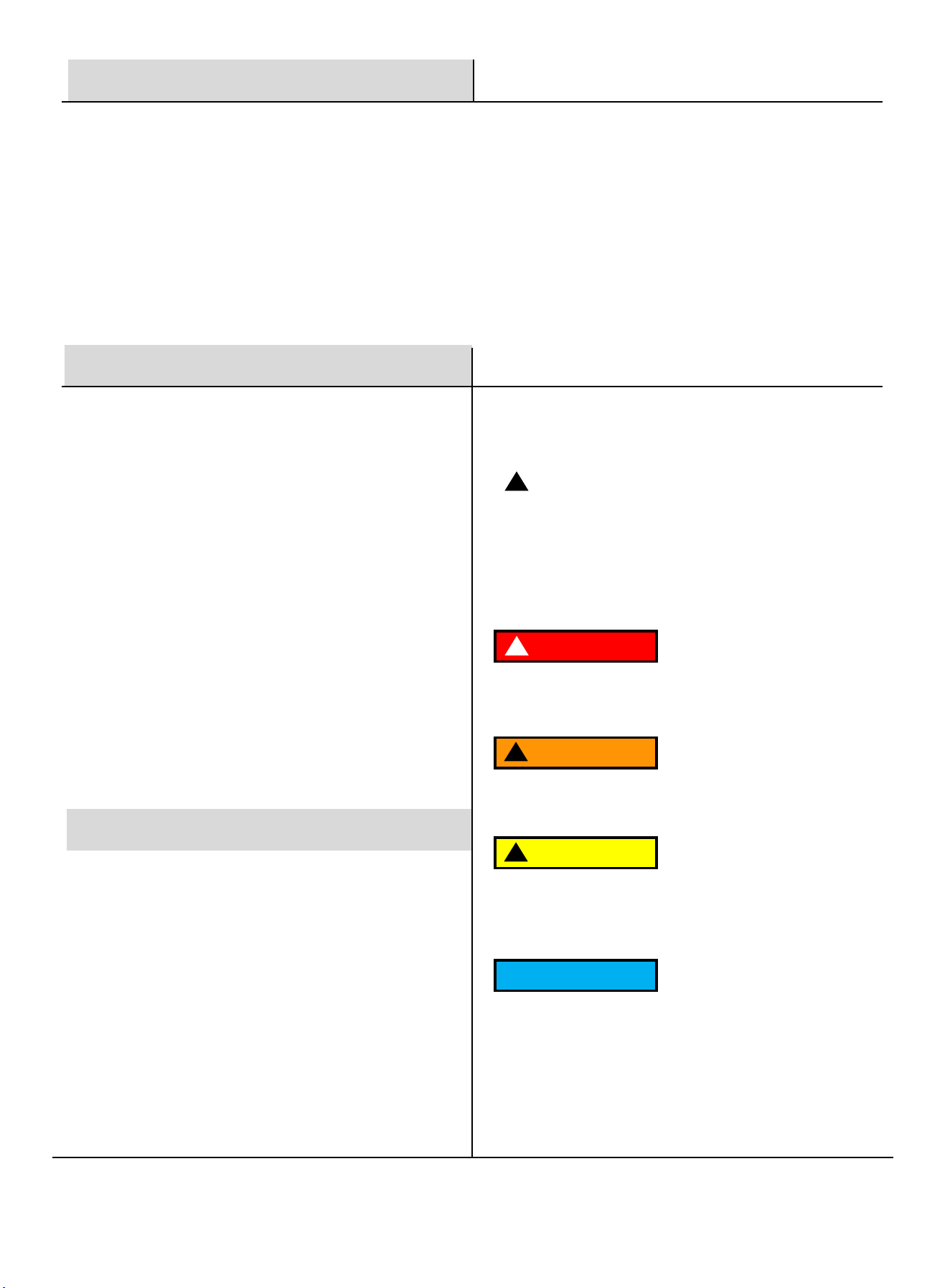
DANGER
!
DANGER indicates an imminently hazardous
situation which, if not avoided, will result in death
or serious injury.
WARNING
!
WARNING indicates a potentially hazardous
situation which, if not avoided, could result in
death or serious injury.
CAUTION
!
CAUTION indicates a potentially hazardous situation
which, if not avoided, may result in minor or moderate
injury. It may also be used to alert against unsafe
practices.
NOTICE
Failure to follow the instruction may result in the
damage to your generator and other property.
Safety Warnings and Notices
WARNING: Save This Manual
for Future Reference
This manual contains important information regarding
the safety, operation, maintenance, and storage of this
product. Before use, you must read and fully
understand all cautions, warnings, instructions, and
product labels. Failure to do so could result in serious
personal injury and/or property damage.
Safety Definitions
!
This safety alert symbol appears with most safety
statements. It means to pay attention and be alert, your
safety is involved! Please read and abide by the
message that follows the safety alerts symbol.
2
Safety Instructions
Follow all safety information provided in this manual and
on the generator.
Before operating the generator, you must read and
understand this manual fully and familiarize yourself with
safe operating practices.
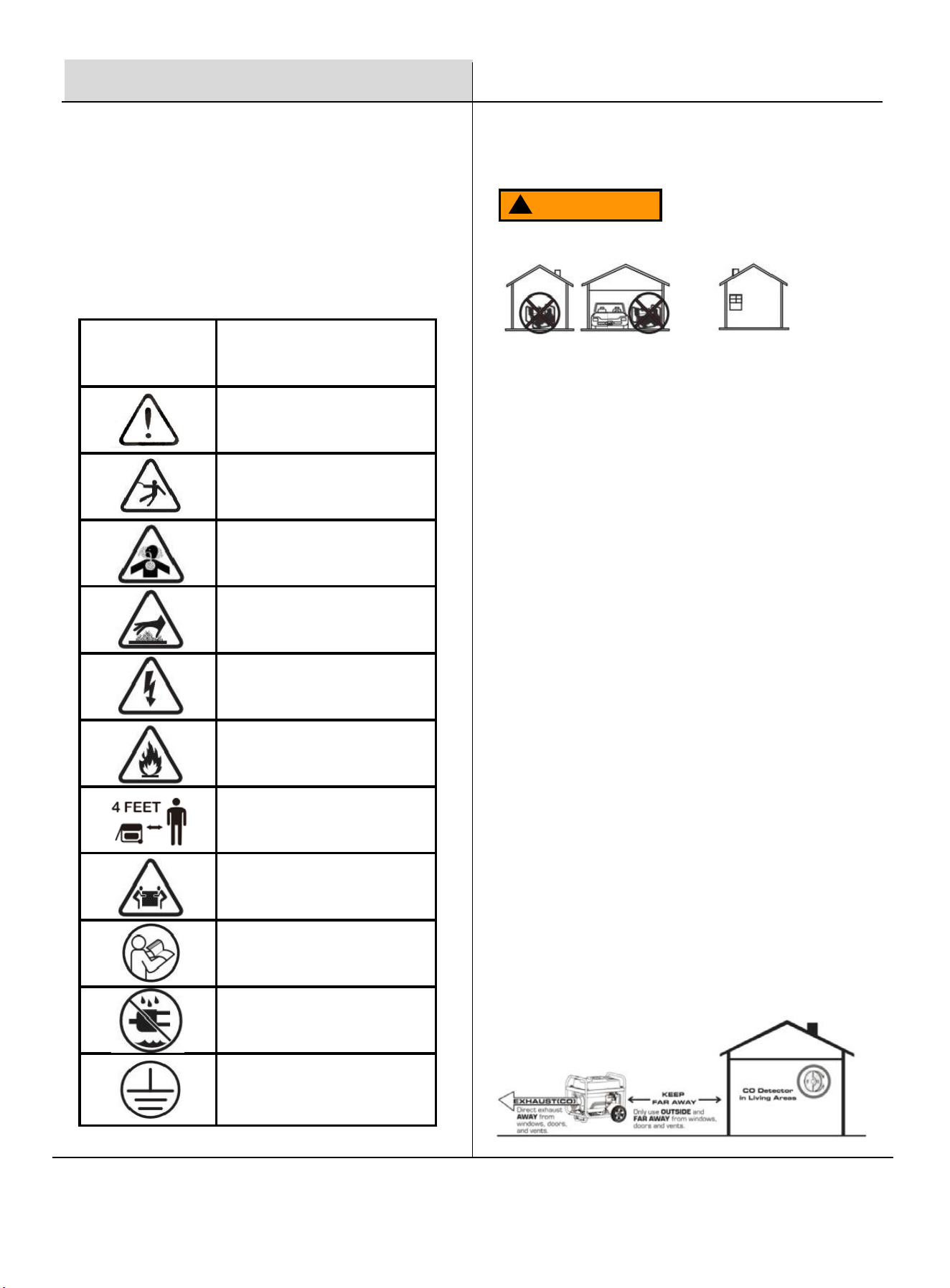
SYMBOL DESCRIPTION
Safety Alert Symbol
Electrocution Hazard
Asphyxiation Hazard
Burn Hazard - DO NOT touch hot
surfaces
Electrical Shock Hazard
Fire Hazard
Maintain Safe Distance
Lifting Hazard
Read Manufacturer's Instructions
DO NOT Operate in Wet Conditions
Grounding. Consult a qualified
electrician to determine the
necessary grounding requirements
before operating this product.
Safety Precautions
Operate this product ONLY outdoors, far away from
windows, doors, and vents, to reduce the risk of carbon
monoxide gas buildup, which could accumulate and be
drawn into occupied spaces.
DO NOT operate this product under the influence of
alcohol, while exhausted or sleep-deprived, when
drowsy from medications, or under any condition that
could impair your judgment or prevent safe operation.
Avoid operating this product under the following
circumstances:
1. When the ground is slippery or other conditions exist, it
might be difficult to maintain a steady posture.
2. It would be difficult to gain a clear view of the area at
night, during heavy fog, or at any other time when one's field
of vision might be limited.
3. During rainstorms, during lightning storms, at times of
strong or gale-force winds, or at any other times when
weather conditions might make it unsafe to use this product.
POISONOUS GAS HAZARD: Engine exhaust contains
carbon monoxide, a poisonous gas that could kill you in
minutes. You CAN NOT smell it, see it, or taste it. Even if
you do not smell exhaust fumes, you could still be exposed
to carbon monoxide gas.
Safety Symbols
WARNING
!
3
Safety Instructions
WARNING
!
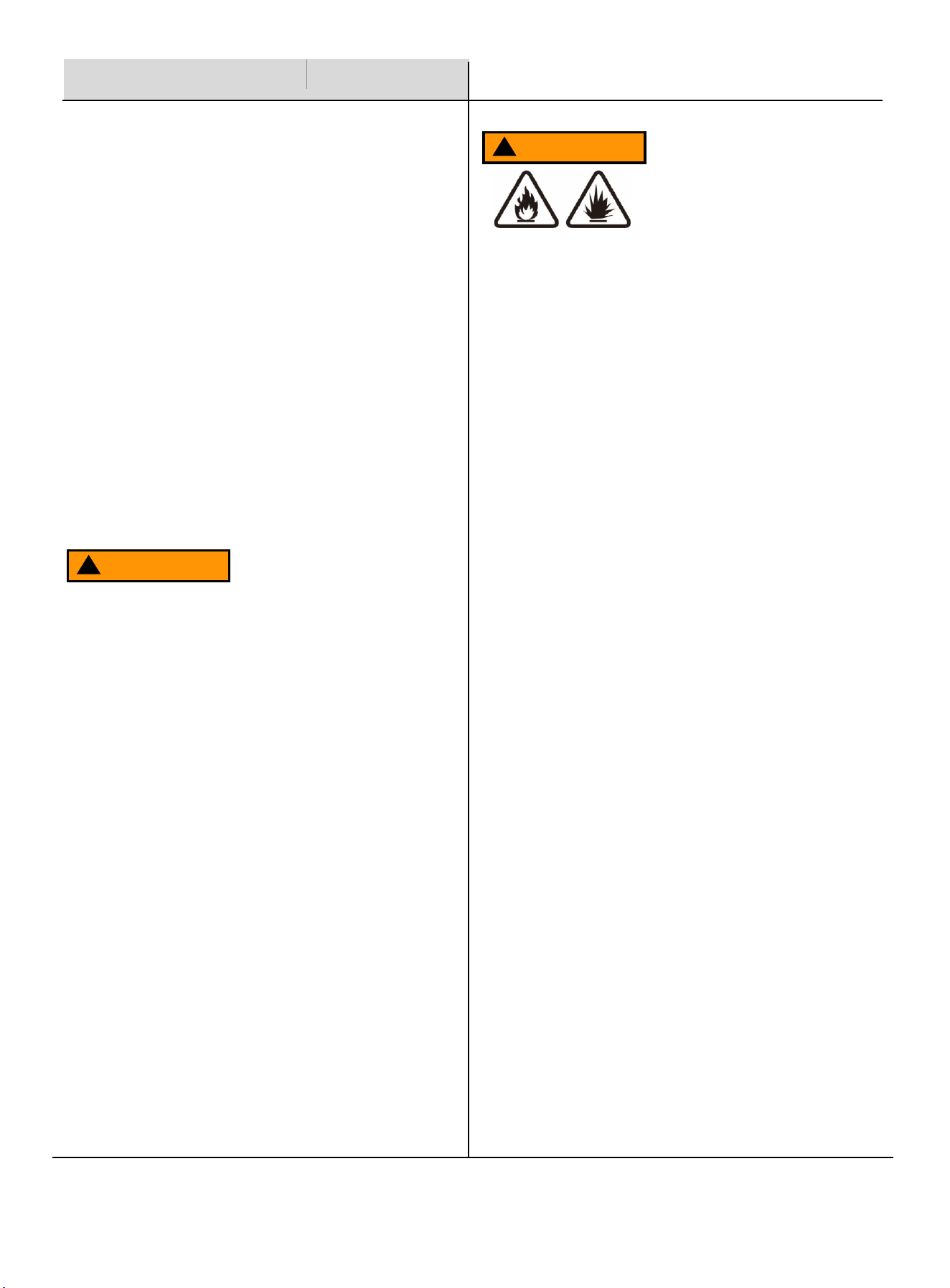
Never store fuel cans or refill the fuel tank in areas
with boilers, stoves, wood fires, electrical sparks,
welding sparks, or any other sources of heat or fire
that could ignite the fuel.
Smoking while operating the product or refilling its
fuel tank is extremely dangerous. Never smoke or
vape while working with your generator.
When refilling the fuel tank, always turn off the engine
first. Carefully inspect the area to ensure there are no
sparks or open flames nearby before refueling. If any
fuel spills occur during refueling, use a dry rag to
clean up the spills before restarting the engine.
After refueling, securely screw the fuel cap back onto
the tank and move the product at least 3 meters (10
feet) away from the refueling area before restarting
the engine.
Additionally, be aware that starter cord kickback
(rapid retraction) can pull your hand and arm toward
the engine faster than you can release it, potentially
causing broken bones, fractures, bruises, sprains, or
other serious injuries.
WARNING
!
Turn the generator engine OFF and let it cool for at
least 2 minutes before removing the fuel cap.
Loosen the cap slowly to relieve pressure in the tank.
Fill or drain fuel tank outdoors.
DO NOT overfill the tank. Allow space for fuel
expansion.
If fuel spills, wipe it up and let the area dry before
starting the engine.
Keep fuel away from sparks, open flames, heat, and
other ignition sources.
Check fuel lines, tank, cap, and fittings frequently for
cracks or leaks; replace them if necessary.
DO NOT smoke or vape anything.
Fuel and its vapors are extremely flammable and
explosive which could cause burns, fire, or
explosion resulting in death or serious injury and/or
property damage.
When Adding or Draining Gasoline
Before starting your generator, you must read and
understand the manual and familiarize yourself with safe
operating practices. Improper treatment of the generator
could damage it and shorten its lifespan.
Keep the handles dry, clean, and free of oil or fuel residue.
Before Starting the Generator
Never operate this product in enclosed or partially
enclosed spaces, including homes, garages, sheds,
basements, or crawlspaces, even if using fans or
open windows and doors for ventilation. Carbon
monoxide can build up quickly and linger for hours,
even after the engine is off.
Install battery-operated or plug-in carbon
monoxide alarms with battery backup per the
manufacturer's instructions. Most smoke alarms do
not detect carbon monoxide.
Position the product downwind and direct the
exhaust away from occupied spaces. If you
experience symptoms like dizziness, weakness, or
nausea, immediately turn off the product, move to
fresh air, and seek medical attention, as these may
indicate carbon monoxide poisoning.
4
When Starting the Unit
Ensure the spark plug, muffler, fuel cap, and air
cleaner are properly in place.
DO NOT crank the engine with the spark plug removed.
Safety Instructions
WARNING
!
Never touch the muffler, spark plug, or other metal
parts of the inverter generator while it is running or
immediately after stopping. Doing so could result in
serious burns or electrical shock.
NOTICE
Use the generator only for its intended
applications.
Operate the generator only on solid, level
surfaces.
DO NOT insert any objects through the cooling
slots.
DO NOT expose the generator to excessive
moisture, dust, dirt, or corrosive vapors.
If connected devices overheat, turn them off and
disconnect them from the generator immediately.
Shut off the generator if:
Electrical output is lost.
Equipment sparks, smokes, or emits flames.
The unit vibrates excessively.
5
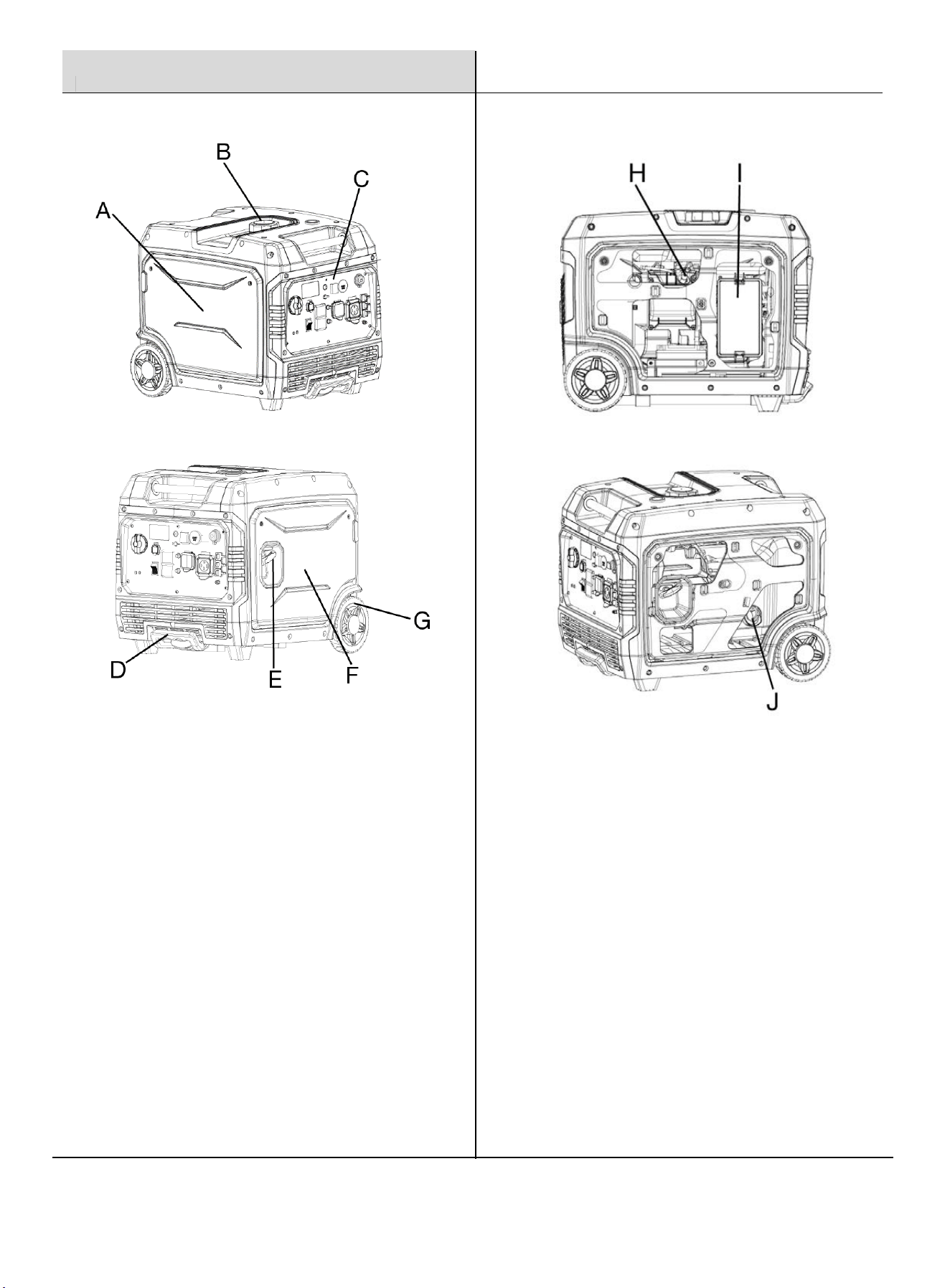
Components
H.
Spark Plug Cover
: This cover must be removed to
maintain the spark plug.
I.
Air Filter
: Clean or replace the air filter.
J.
Oil Dipstick
: Unscrew the oil dipstick to check oil
levels.
A.
Left Side Panel
:
Engine, Air Filter, Carburetor, Spark
Plug.
B.
Fuel Cap
: Use this cap to add gasoline to the
generator.
C.
Control Panel
: Contains the electrical outlets and
operational controls for the generator.
D.
Carry Handle
: Facilitates easy transport of the
generator.
E.
Recoil Handle
: Pull the recoil handle to manually
start the engine.
F.
Right Side Panel
: Add or drain oil, battery
disconnect.
G.
Transport Wheels
: Helps transport the generator.
6
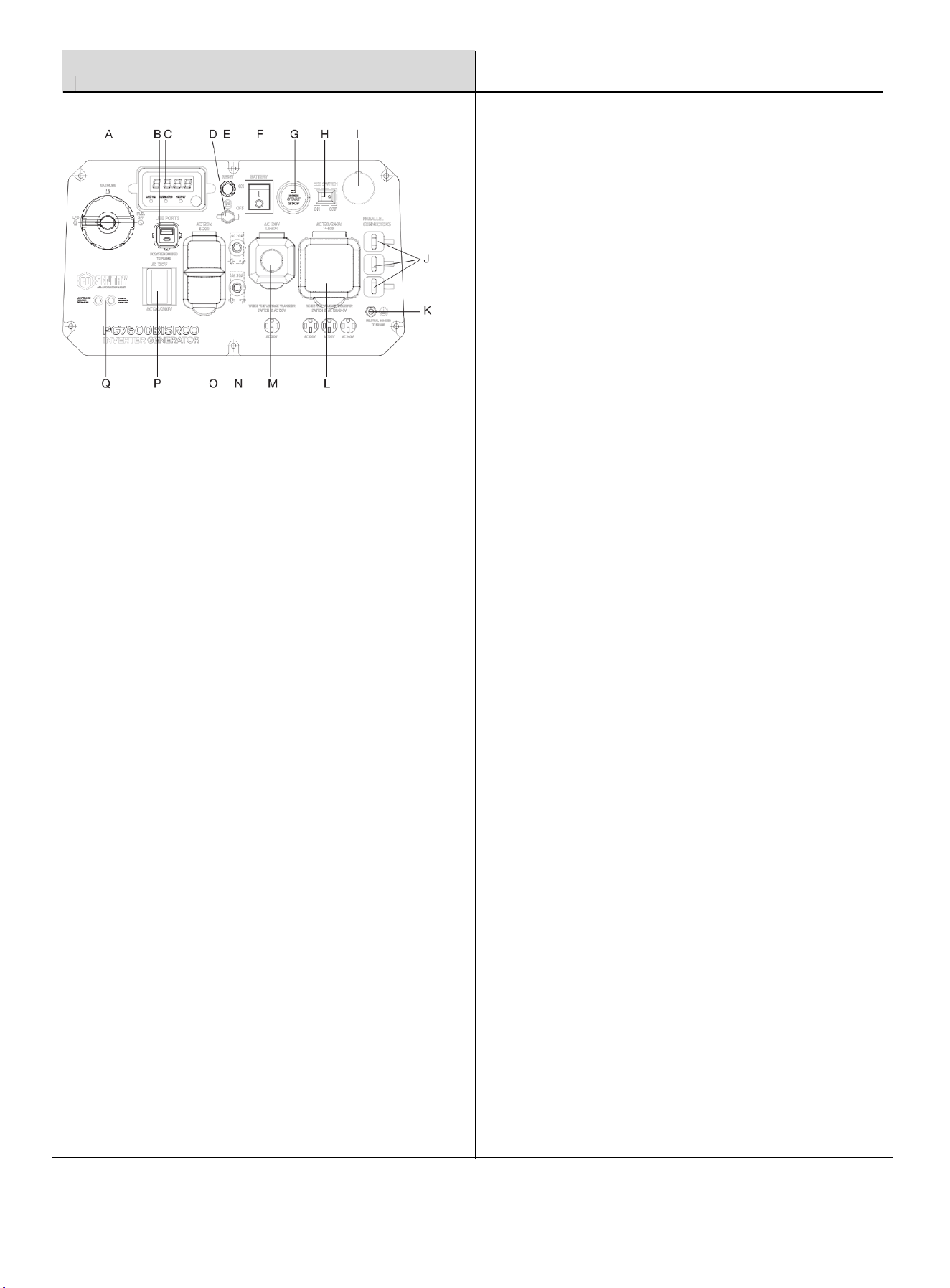
L.
Fuel Selector Switch
: To select Gasoline or Propane.
M.
USB Ports
: Features include USB Type A and USB Type C
(5V/3.6A, 9V/2.5A, 12V/2A) ports for convenient device
charging.
N.
Digital Hour Meter:
Real-time LED display with runtime,
remaining fuel, load/output, volts, and lifetime hours data.
①Low Oil Level Light: When the oil level in the crankcase
falls below the safe operating limit, the low oil level
indicator lights up red and the engine will automatically
shut down.
②Overload Light: When the red light is on, it indicates that
the generator is overloaded and the generator will stop
output.
③Output Light: When the generator is running normally, the
light will be green and steady on.
O.
Battery Charging Port:
:Used to charge the battery with
the included battery charger.
P.
Reset Button
: Press the reset button to start the device
reset process.
Q.
Battery Switch
: Turns the battery ON and OFF. Must be
ON before an electric start or remote start.
Control Panel
A.
Push Button Start/Stop
: Press this button up to enable
the engine start and press down to stop the engine.
B.
Eco Mode
: Eco mode minimizes fuel consumption and
noise by adjusting the engine RPM to the minimum required
for the current load.
C.
Propane Inlet
: Connect the propane hose (included) to
this inlet.
D.
Parallel Connectors
: A compatible Pulsar Inverter
Generator can be connected for additional power output.
E.
Ground Terminal
: Used to externally ground the generator,
enhancing safety during operation.
F.
14-50R Receptacle:
120/240 Volt, AC 50 Amp, This
receptacle is rated for a maximum of 50 amps.
G.
L5-30R Receptacle:
120 Volt, AC 30 Amp, This receptacle
can supply a maximum of 30 Amps.
H.
Circuit Breaker:
AC circuit breakers control the output of all
AC sockets to protect against overload or a short circuit of
the generator.
I.
5-20R Receptacle:
120 Volt, AC 20 Amp, This receptacle is
rated for a maximum of 20 amps.
J.
Voltage Switch
: Switch between 120V and 240V voltage
as required.
K.
CO Sentry Indicator Lights
: The CO Sentry monitors the
accumulation of poisonous carbon monoxide gas. If
increasing levels of CO gas are detected, the CO Sentry
automatically shuts down the engine.
7
Assembly
Preparation
Your generator requires some assembly. This generator ships from our factory without oil; it must be properly filled with oil
before operation.
Unpacking
1. Set the shipping carton on a solid, flat surface.
2. Remove everything from the carton except the generator. It is suggested to cut one panel of the carton to facilitate
assembly (a minimum of two people are required).
3. Using the carrying handles of the unit, carefully remove the generator from the box.
Packing List
Check all accessories to the following list. Contact your dealer if any parts are missing.
Included Accessories
1×Remote FOB
1×Engine Oil
1×Battery Charger
1×Warranty Card
1×Operator's Manual
1×Spark Plug Wrench
1×Combination Wrench
1×Funnel
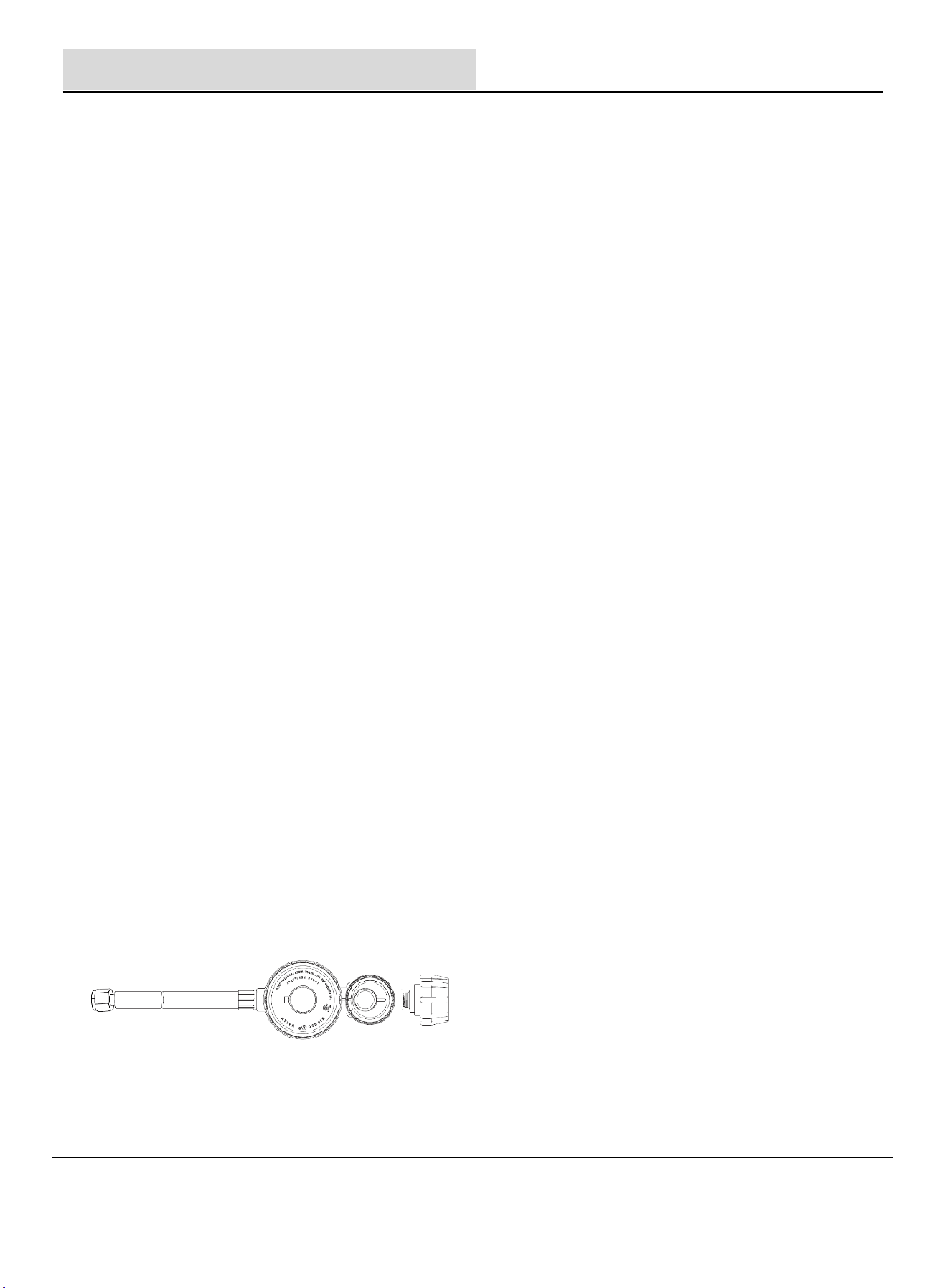
1×Propane Regulator Hose
8
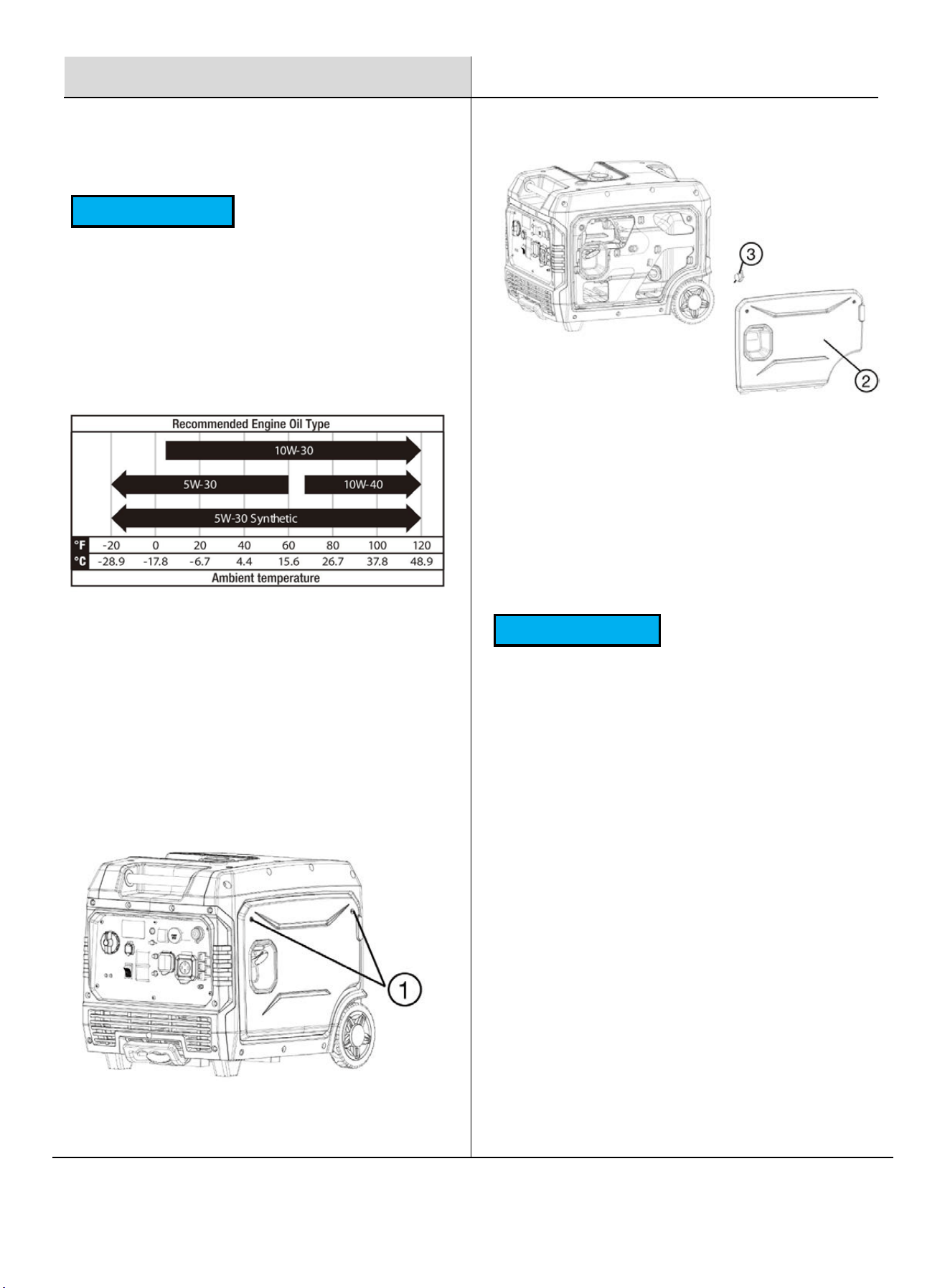
1. Fill the generator with the specified amount of the
recommended engine oil, then reinstall and tighten the
oil fill cap/dipstick (③).
2. Reattach the cover and tighten the screws.
3. Important: Do not start the engine until it has been
filled with the correct type and volume of oil.
NOTICE
Recommended Engine Oil:
Type: SAE 10W-30
Oil Grade: API Service SE type or higher
Engine Oil Capacity: 0.65 L (22 fl. oz)
Residual oil from the factory may remain in the
engine. Add oil slowly to prevent overfilling. Once oil
has been added, the oil level should be 1-2 threads
below the fill hole. DO NOT screw in the dipstick when
checking the oil level.
During the first 5 hours of operation (the break-in
period), check the oil level frequently and operate at
or below 50% of the running watt rating. Vary the load
occasionally to help the stator windings heat and
cool, and help seat the piston rings. After this period,
change the oil.
The engine features a low oil shut-off that stops
operation when the oil level is critically low. Refer to
the Maintenance section for service intervals.
Preparation
Add Engine Oil
NOTICE
Failure to follow this instruction may result in damage
to your generator and other property.
If you are operating the generator in extreme
temperatures, refer to the following chart for the
recommended oil type.
The generator is shipped without engine oil. Do not
start the engine without ensuring it has sufficient oil.
4. Place the generator on a level surface.
5. Remove the screws (①), then remove the cover
(②).
6. Remove the oil filler cap/dipstick (③).
9
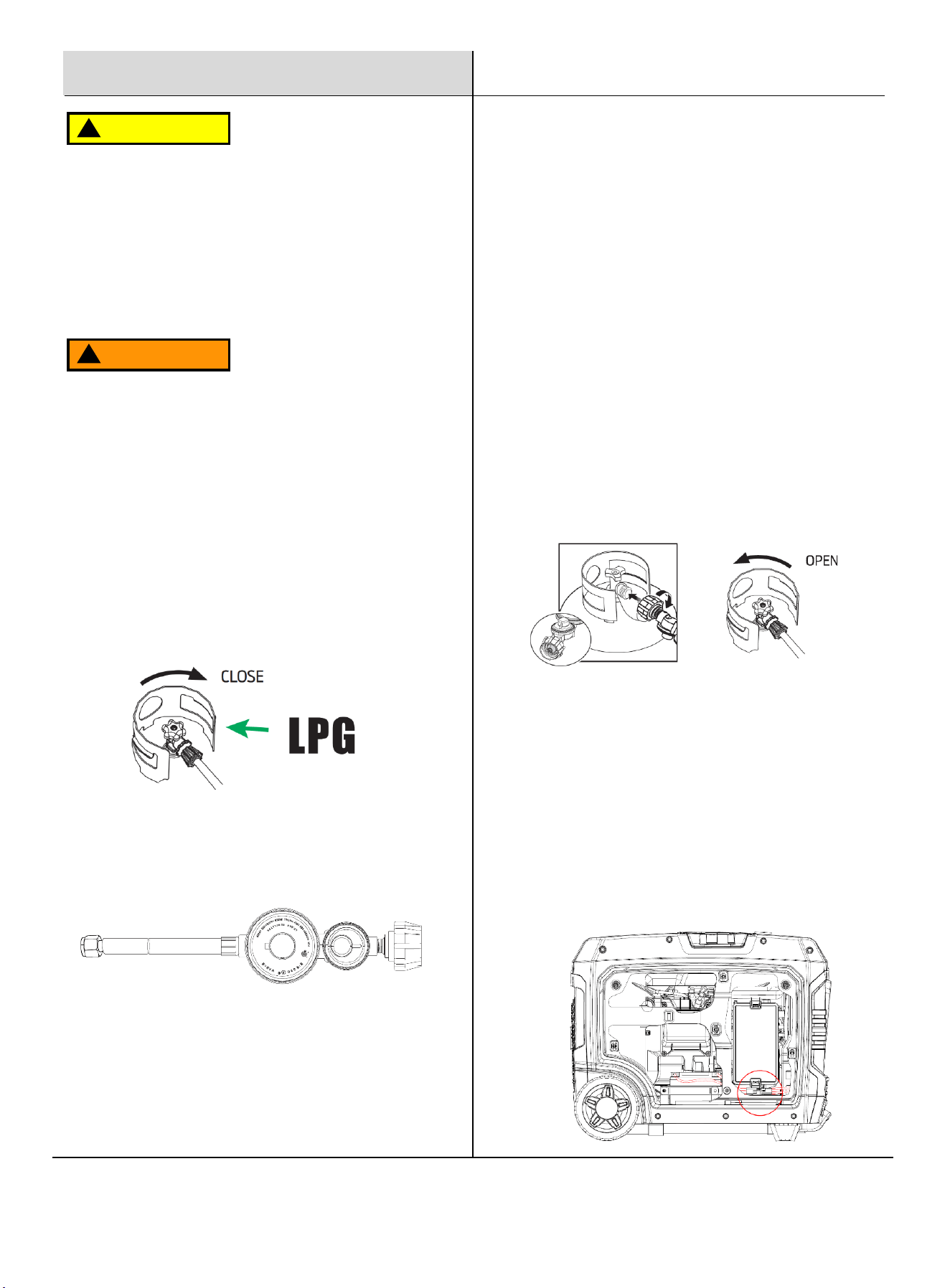
Connecting a Propane Tank
1. Turn the generator OFF and leave it on a flat surface
in a well-ventilated area.
2. Verify that the propane tank valve is in the fully
closed position.
IMPORTANT: DO NOT use thread seal tape or any other
sealant to seal the propane hose connection.
Connecting the battery
1. A quick connect battery plug is pre-installed on the battery
and the generator, connect both as shown.
2. Never attempt to connect different colored battery wires!
Fuel the Unit - LPG
Preparation
WARNING
!
• New propane tanks must be purged of air and
moisture before filling. Used propane tanks that have
not been plugged or kept closed must also be purged.
The purging process should be done by a propane
tank supplier (propane tanks from an exchange
supplier should have been purged and filled properly).
•
ALWAYS position the propane tank so the connection
between the valve and the gas inlet will not cause sharp
bends or kinks in the hose.
CAUTION
!
Explosion hazard. DO NOT start the generator if you
smell propane. ALWAYS fully close the LPG tank valve
and disconnect the propane hose from the generator
when not in use. Never invert (turn upside down) an
LPG tank while in use.
3. Remove the cap from the generator propane inlet.
4. Install the propane hose securely on the gas inlet
(threaded tight) and check for a secure connection.
5. Remove the safety plug or cap from the propane tank
valve and attach the regulator end of the hose to the
LPG connector on the tank, hand-tighten. Then turn
the fuel selector knob to "LPG".
6. Turn the propane tank valve to the fully open position.
Check all connections for leaks by wetting the fittings
with a solution of soap and water. Bubbles that
appear or bubbles that grow indicate that a leak
exists. If a leak exists at a fitting, turn the propane
tank valve to the fully closed position and tighten the
fitting. Open the propane tank valve and recheck the
fitting with the soap and water solution. If the leak
continues or if the leak is not at a fitting, then DO
NOT use the generator and contact an authorized
Pulsar service center.
IMPORTANT:The generator battery is shipped disconnected
for safety. You must connect the battery quick-connect
cables before using the generator.
10
Preparation
WARNING
!
Gasoline is extremely flammable. Never smoke or vape
anything near fuel. You must stop the engine and allow
it to cool before refueling. Select outdoor bare ground
for fueling and move the generator at least 3m (10 ft)
away from the fueling point before starting the engine.
Gasoline can expand; do not fill the tank to the top.
Leave at least 1.5 inches of open space. Gasoline
fumes are explosive, never fill the tank near an open
flame, and always check for spills.
To ensure smooth operation, use only fresh gasoline
with an octane rating of 87. Never use old gasoline and
avoid introducing dirt or water into the fuel tank.
Gasoline ages in the tank, making future starts difficult.
Do not store the generator for extended periods with
gasoline in the tank.
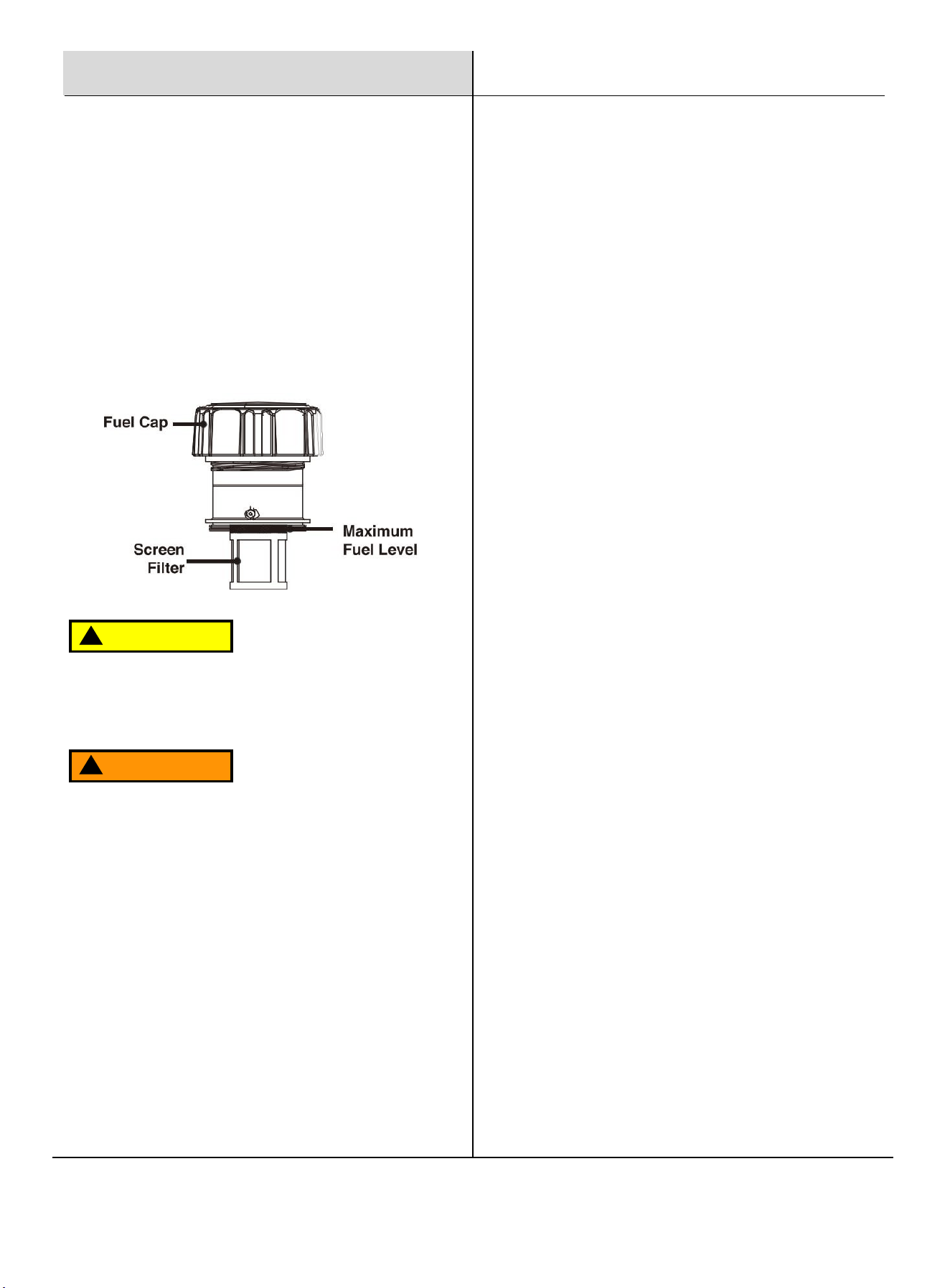
Remove the fuel cap and place it in a clean location.
Fill the fuel tank to no more than 80% capacity.
Securely replace the fuel cap and wipe up any spills.
CAUTION
!
Ensure the generator is on a solid, flat, level surface.
Unscrew the fuel cap and set it aside.
Slowly add gasoline to the fuel tank, taking care not to
overfill. The fuel gauge on the top indicates the
gasoline level.
Replace the fuel cap and wipe up any spilled gasoline
with a dry cloth, then safely remove the cloth from the
area.
Fuel the Unit - Gasoline
11
1. Make sure the generator is on a solid, flat, level surface.
2. Disconnect all electrical loads from the generator. Never
start or stop the generator with electrical devices attached.
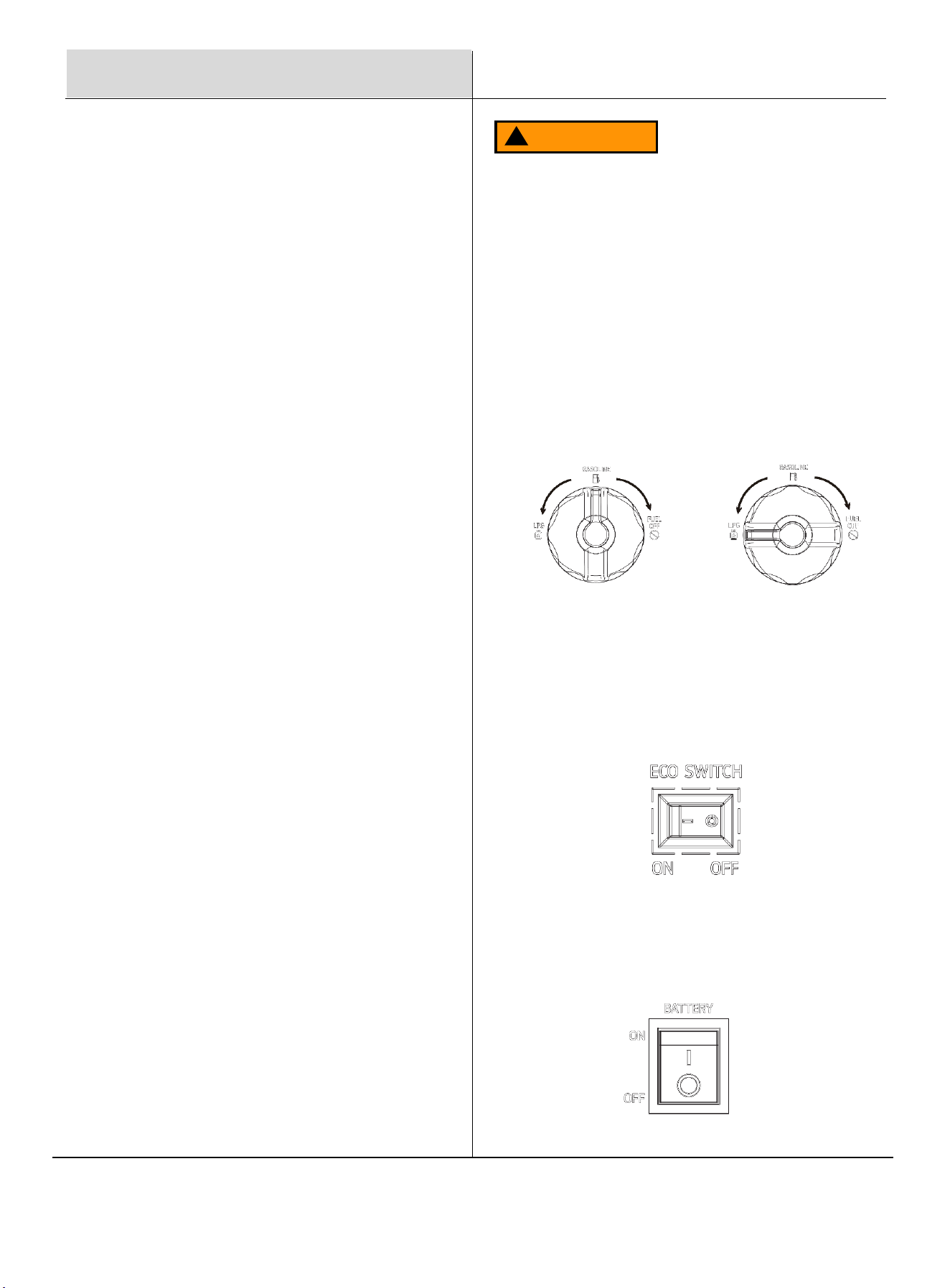
Turn the fuel valve to the desired fuel source. When the
valve is in the gasoline position, the generator is ready to
start with gasoline. When the switch is in the LPG position,
the generator is ready to start with propane.
GASOLINE
PROPANE
3. Turn OFF ECO Switch
The Economy Switch is located on the control panel. Switch
it OFF to disable low idle when starting the generator.
4. Turn ON Battery Switch
Press the Battery Switch up to the "ON" position to start the
generator.
Fuel And Chain Oil
Operation
Grounding the Generator
Attach a grounding wire if required by local code:
Connect a suitable grounding wire to the grounding
stud on the control panel and tighten the nut.
Attach the other end to a copper or brass grounding
rod driven into the earth.
A commonly acceptable grounding wire is a No. 12
AWG (American Wire Gauge) stranded copper wire.
Since grounding codes vary by location, consult a local
electrician to ensure compliance with local regulations.
Operating the Generator
Location: Do not operate the generator inside any building,
garage, basement, crawlspace, shed, RV compartment, or
other enclosed spaces.
Outdoor Setup: Avoid operating the generator in a truck
bed, camper, trailer, or any other confined location, such as
under staircases or next to walls, which may restrict airflow
or exhaust.
Weather Conditions: Never operate or store the generator
in wet conditions (e.g., rain or snow) to avoid serious injury
or death from electrocution.
Clearances: Maintain a minimum of 5 feet (1.5 meters) of
clearance from all combustible materials. Ensure at least 5
feet (1.5 meters) of airflow clearance on all sides for cooling,
maintenance, and safe exhaust flow.
Ventilation: Position the generator in a well-ventilated area
and away from air intake vents or confined spaces where
exhaust fumes could enter.
Wind Direction: Be mindful of wind direction when
positioning the generator to prevent exhaust from flowing
toward occupied spaces.
Cooling: Allow the generator to cool fully before
transporting or storing.
Failure to follow these safety precautions may result in
personal injury, damage to the generator, and may void
the manufacturer's warranty.
WARNING
!
During operation, the muffler and engine will be very
hot. Without adequate cooling space or if the generator
is blocked or enclosed, temperatures may rise quickly
and could lead to a fire.
Starting the Generator
12
Gasoline To LPG
IMPORTANT: Load capacity is reduced when running on
LPG. Ensure the generator can supply enough (running)
and surge (starting) watts for the devices you are powering
before switching to LPG.
1. Turn the LPG tank valve to the fully open position.
2. Turn the fuel selector valve to LPG.
NOTE: When switching to LPG operation the engine may
run rough for a few seconds while it purges gasoline from
the carburetor.
LPG To Gasoline
1. Turn the fuel selector valve to gasoline.
2. Turn the LPG tank valve to the fully closed position.
If the engine stops when switching fuel sources, disconnect
all loads then restart the unit on the fuel source of choice.
Parallel Operation
The parallel connection ports allow you to connect two
compatible generators to increase the total available
electrical power. Follow the instructions included with your
parallel connection kit for proper installation and operation.
Fuel And Chain Oil
Operation
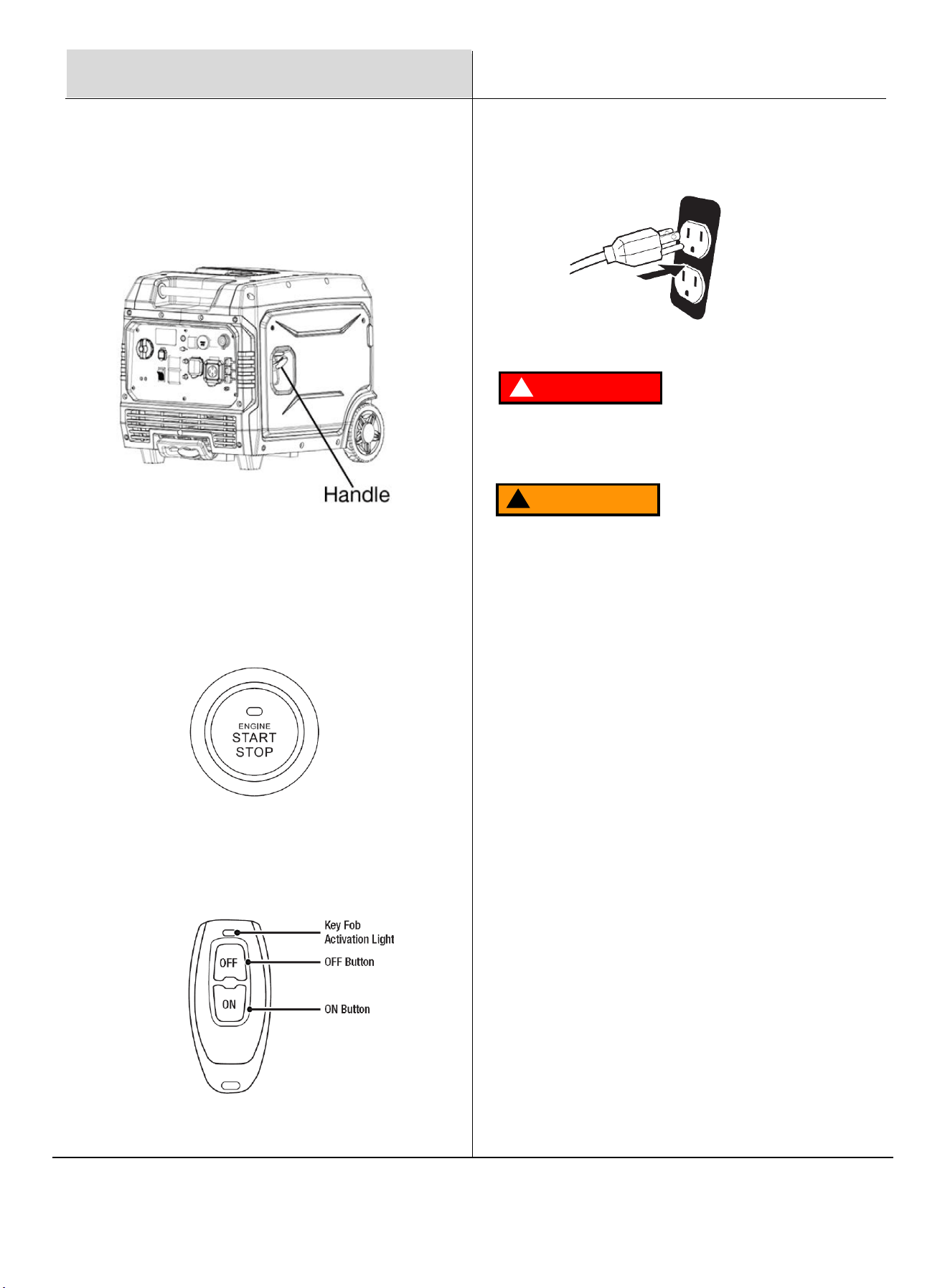
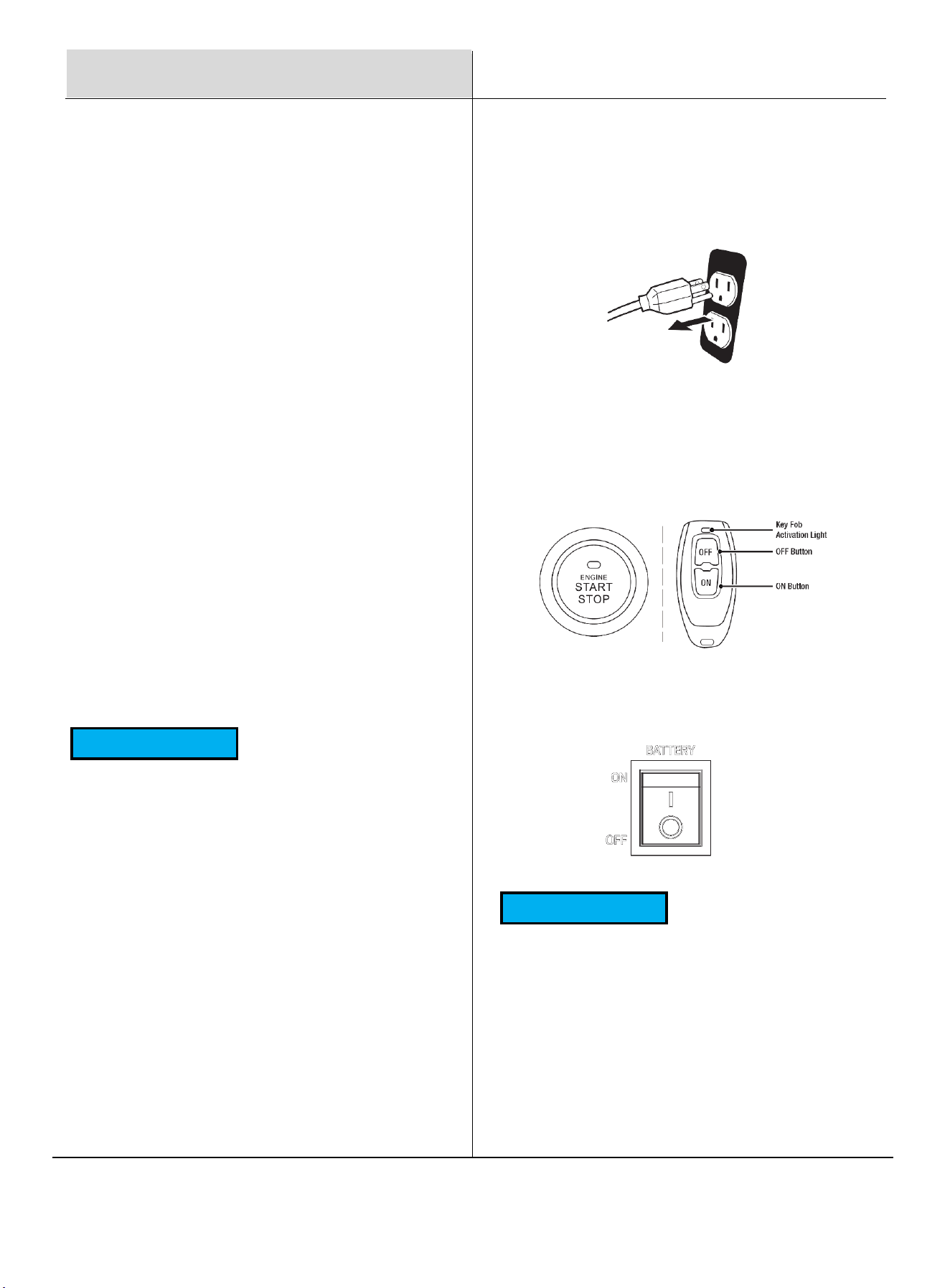
5. For Recoil Start
Recoil Start: Firmly grasp and pull the recoil handle slowly
until you feel resistance, let it retract then pull swiftly. If it
fails to start successfully, wait for 3 seconds then repeat this
step.
Engine Start/Stop: Press the start button once, the engine
will attempt to start twice automatically. If it fails to start,
press the start button again.
Remote Start: Push and hold the ON button on the remote
start key fob for one second.
6. Plug in devices
DANGER
!
Fire and explosion hazard. Always turn the propane tank
valve to the fully closed position if not running the generator
on propane
WARNING
!
When using the generator with propane, make sure there is
no possible ignition source close to the generator.
13
Generator Capacity
NOTICE
Do not exceed the generator's power capacity.
Exceeding the wattage capacity can lead to damage to
both the generator and the electrical devices
connected to it.
Ensure that the generator can supply sufficient
continuous (running) and surge (starting) watts for the
devices you plan to power simultaneously.
Low Oil Indicator
1. If the engine oil level is too low, the LOW OIL light
turns on, the engine will automatically shut off.
2. The engine cannot be restarted until the proper
amount of oil has been added.
NOTICE
Do not run the engine with too little oil. Engine
will shut off if engine oil level is too low.
Economy Switch
1. Turn the economy switch ON to limit noise and fuel
consumption for lighter generator loads.
2. Turn the economy switch OFF to operate the engine
at full speed when:
• Starting the generator
• A heavy load is applied
2.
Press the OFF button for 1-3 seconds to stop the
engine.
3.
Turn OFF Battery Switch.
Stop t
he Engine
1. Turn off and unplug all connected electrical
loads. Never
start or stop the generator with electrical devices
plugged in or turned on.
Fuel And Chain Oil
Operation
Overload Indicator
Note: The OVERLOAD light may turn on briefly when
starting a large device. This is normal for loads near
the generator's capacity.
Ensure the total combined load does not exceed the
generator's running power.
If the OVERLOAD light stays on and power stops, the
generator is overloaded or may need service.
Turn off and disconnect all devices, then stop the
engine. Compare device requirements to generator
rating and reduce wattage if necessary. Ensure proper
ventilation around the generator.
Check if any circuit breakers have tripped and reset all
breakers before restarting.
Restart the engine, reconnect devices, and avoid
overloading.
If this happens repeatedly, have the generator serviced
by an authorized Pulsar service center.
14
Operation
Operation
Maintenance
Safety Precautions Before
Maintenance
High Altitude Operation
Operating the generator at high altitudes can affect
performance due to a richer air/fuel mixture, leading to
decreased efficiency and increased fuel consumption. It
may also cause spark plug fouling and hard starting.
Extended operation at elevations different from the
engine’s certification may result in higher emissions.
For those using the generator above 5,000 feet (1,500
meters), a qualified technician should perform carburetor
modifications to improve performance. While these
modifications will help meet emission standards, note
that engine power will decrease by approximately 3.5%
for every 1,000-foot (300-meter) increase in elevation.
When determining power requirements, consider the total
power needs of all connected devices using the formula:
Volts x Amps = Watts. Appliance and power tool
manufacturers typically provide rating information near
the model or serial number.
To determine power requirements:
1. Select the Devices: Identify the devices you intend
to power simultaneously with the generator.
2. Total Continuous Watts: Calculate the total
continuous (running) watts. This total represents the
power the generator must deliver to keep all selected
devices operational.
3. Estimate Surge Watts: Determine the estimated
surge (starting) watts required. Surge wattage is the
initial burst of power needed to start electric motor-
driven tools or appliances, such as a circular saw or
refrigerator. Since not all motors start at the same
time, you can estimate total surge watts by adding the
item(s) with the highest additional surge wattage to
the continuous watt total from Step 2.
Turn Off the Generator: Switch the generator to "OFF,"
wait for the engine to cool, and disconnect the spark plug
cable before performing any inspections, maintenance, or
cleaning.
Equipment Failure: Do not use damaged equipment. If you
notice abnormal noise, vibration, or excessive smoke,
correct the issue before further use.
Qualified Technician: Many maintenance tasks, including
those not detailed in this manual, should be performed by a
qualified technician to ensure safety. If you are unsure about
servicing the equipment or engine, please contact an
authorized Pulsar service center for assistance.
Cleaning, Maintenance, and
Lubrication Schedule
This schedule serves as a general guide. If performance
decreases or if the generator operates unusually, have it
inspected immediately. Maintenance needs may vary based
on factors such as duty cycle, temperature, air quality, and
fuel quality.
The following procedures are in addition to the regular
checks and maintenance outlined for the generator:
WARNING
!
Before Each Use: Check engine oil level.
Every 3 Months or 50 Hours of Use: Clean or replace air
cleaner.
Every 6 Months or 100 Hours of Use: Change engine oil.
Check and clean the spark plug and spark arrestor.
Check/adjust valve clearance.
Yearly or Every 300 Hours of Use: Clean fuel tank,
strainer, and carburetor. Clean carbon build-up from the
combustion chamber.
Every 2 Years: Replace fuel line if necessary.
15
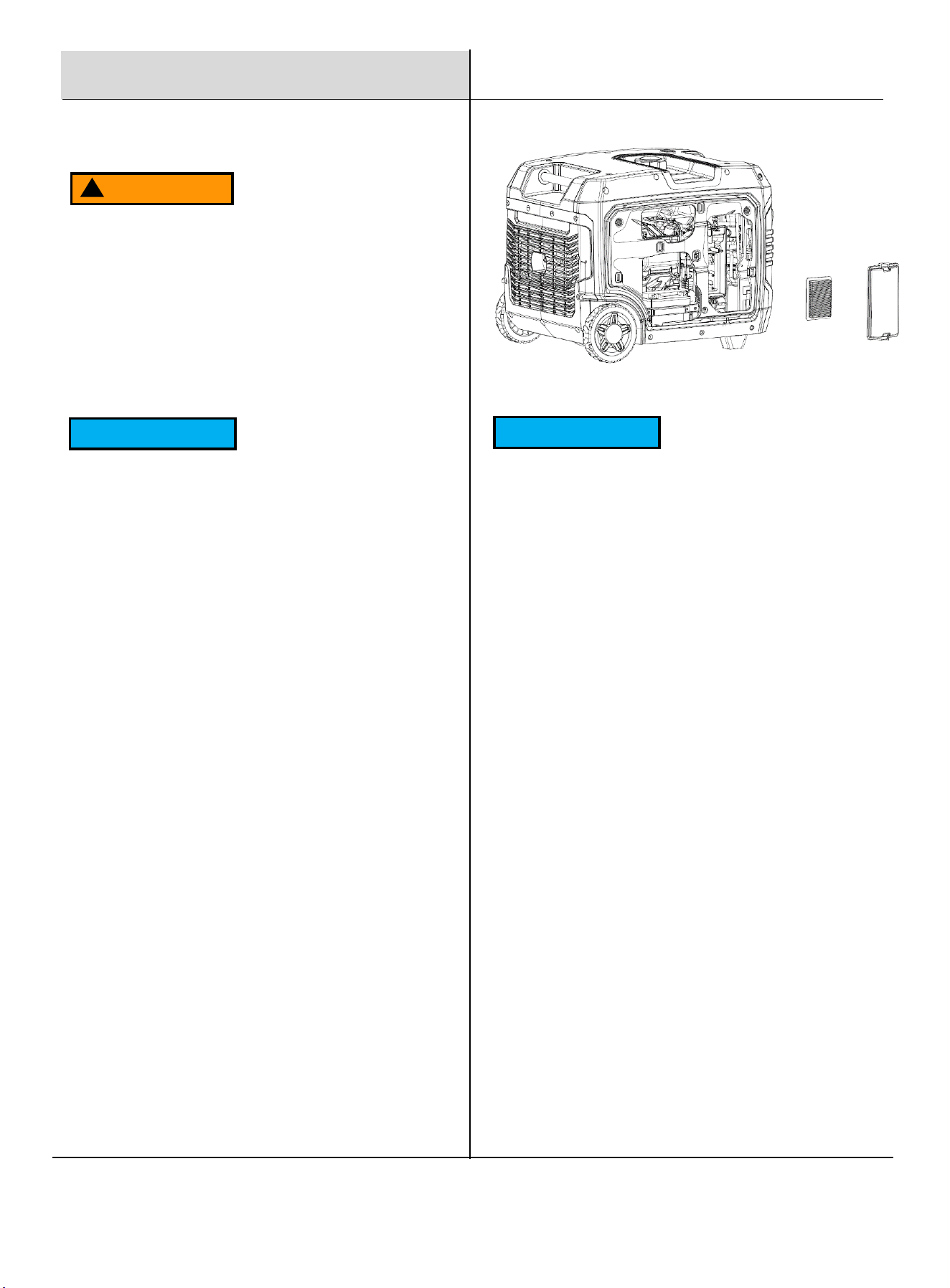
1. Remove the air filter case cover.
2. Take out the foam element.
3. Wash the foam element in hot, soapy water. Never
use a solvent.
4. Completely dry the foam element before reinstalling it.
Spark
Plug Maintenance
The spark plug is critical for good engine performance;
it should be removed, cleaned, inspected, adjusted,
and/or replaced regularly to maintain optimal
performance.
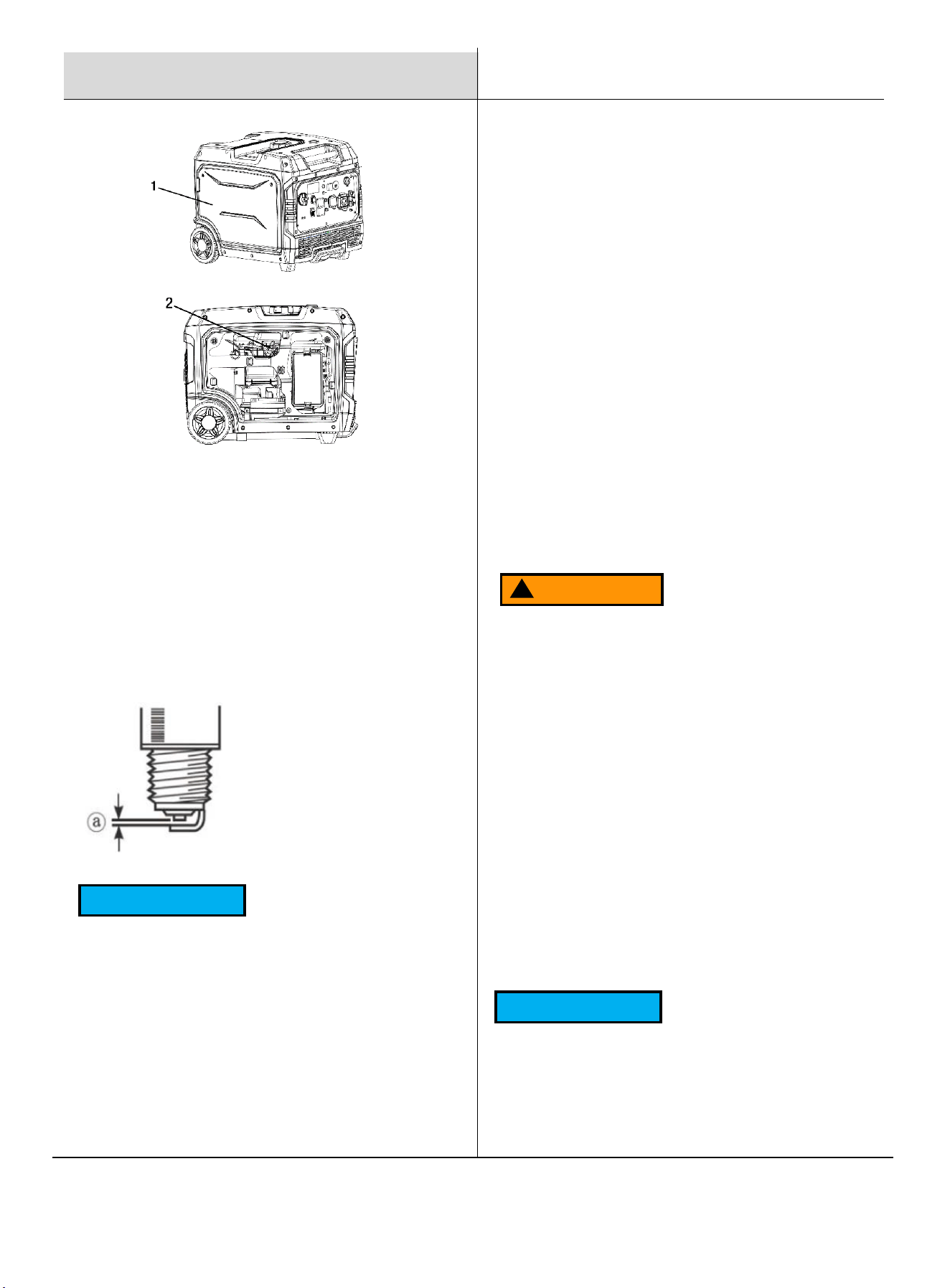
1. Remove the left side panel.
2. Remove the Spark Plug: Remove the spark plug access
cover (①) and then the spark plug boot (②).
Insert the spark plug tool through the hole and fit it
securely over the spark plug. Use the T-handle (④)
through the spark plug wrench (③) and turn it
counterclockwise until the spark plug can be removed.
Maintenance
Checking and Filling Fuel
WARNING
!
To Prevent Serious Injury from Fire: Always shut off
the engine while refueling.
1. Clean the fuel cap and the area around it.
2. Unscrew and remove the fuel cap.
3. Remove the strainer and discard any dirt and
debris, then replace the strainer.
NOTICE
Do not use gasoline containing more than 10% ethanol
(E10) or E85 ethanol.
Add a fuel stabilizer (such as Sta-Bil or Pri-G) to the
gasoline; failure to do so will void the warranty.
Avoid using gasoline that has been stored in a metal or
dirty fuel container, as it can introduce particles that
affect engine performance or cause damage.
4. Add fuel if needed, do not overfill.
5. Replace the fuel cap securely.
6. Wipe up any spilled fuel and allow any residue to
evaporate before starting the engine. To prevent
fire, do not start the engine while the smell of fuel
lingers in the air.
Air Filter Maintenance
NOTICE
Do not wring out the foam element as this could cause
it to tear.
1. Apply a few drops of clean engine oil to the foam
element and work it into the foam element. The foam
should have a light coating, not dripping. Ensure the
oil is evenly distributed for a light film across the foam
material.
2. Reinstall the foam element in the air filter box. The
engine should never run without the foam element, as
premature engine wear may result.
3. Install the air filter case cover in its original position.
16
Maintenance
3. Inspect and Clean: Check the porcelain insulator nose;
it should be a light tan color. Use a wire brush to remove
any black carbon deposits. Measure the spark plug gap.
Adjust the gap or replace the spark plug as necessary,
ensuring the gap is measured with a wire thickness
gauge.
4. Reinstall the Spark Plug: Tighten the spark plug to
12.5 N·m (15 lb·ft). Proper tightening is crucial: If the
spark plug is too loose, it can cause the engine to
overheat. If it is over-tightened, it may damage the
threads in the cylinder head.
NOTICE
If a torque wrench is not available, a good estimate of
the correct torque is 1/4 to 1/2 turn past finger tight.
However, the spark plug should be tightened to the
specified torque as soon as possible.
5. Reconnect the Spark Plug Boot: Ensure it clicks into
place. Tug gently on the boot to confirm a secure
connection.
6. Reinstall the Spark Plug Cover.
Standard Spark Plug: F7TC
Spark Plug Gap: 0.6-0.8 mm
Generator Storage
When the generator will remain idle for longer than 30
days, prepare the engine for storage as follows:
Cleaning: Allow the engine to cool. Open both side
access panels and blow or vacuum any dirt or debris.
Do not use water for cleaning, as it can enter the
engine and cause damage.
Fuel Treatment/Draining: Fill the fuel tank with fresh
gasoline that has been treated with a fuel stabilizer
additive (such as Sta-Bil or Pri-G). Follow the fuel
stabilizer manufacturer's recommendations for use.
Storage Area: Cover the generator and store it in a
dry, level, well-ventilated area out of reach of children,
away from ignition sources like water heaters and
furnaces.
Engine Operation During Storage: Start the engine
every 3 months and allow it to run for 15-20 minutes.
WARNING
!
Fill the fuel tank in a well-ventilated area away from
ignition sources. If the engine is hot from use, allow it
to cool before adding fuel. Do not smoke or vape
while refueling.
Draining the Carburetor
1. Shut off the gasoline flow.
2. Place an appropriate container under the carburetor.
3. Carefully open the drain screw at the bottom of the
carburetor bowl, allowing the fuel to drain completely.
4. Retighten the screw after draining.
NOTICE
Aged gasoline that has not been treated with a
stabilizer must be safely drained and disposed of.
Never run old gasoline through the engine.
To prevent
serious injury and fire, ensure the engine is cool
before performing any maintenance procedures.
17
Product Description
7600W Gasoline Inverter Generator
Engine Type
Single Cylinder, 4-Stroke, Forced Air Cooling, Gasoline Engine, OHV
Displacement (cc)
298
Peak Power (Gasoline)
7600W
Peak Power (Propane)
6900W
Rated Power (Gasoline)
6300W
Rated Power (Propane)
5700W
Consumption at Half Load (Gasoline)
1.87L/h, 0.49gal/h
Fuel Tank Capacity (gal)
15L/3.96gal
Run Time at Half Load (hour)
8h
Voltage Rating
120/240V
Rated Frequency
60Hz
Amperage (120V Rated/Peak)
52.5/63.3
Amperage (240V Rated/Peak)
26.3A / 31.7A
Starting Type
Recoil, Electric Start, and Remote
Outlet
2*AC 120V 20A,1*AC 120V 30A,1*AC 120/240V 50A, 1*USB-A, 1*USB-C
Oil Type
SAE 10W-30
Oil Capacity
650ml (22 fl oz)
Maximum Ambient Temperature
40°C (104°F)
Product Dimensions (in)
27 x 20.8 x 21.7
NW (lbs)
133.4
Warranty
3 Years
Specifications

18
Troubleshooting Guide
Problem What to Do
THE ENGINE WILL NOT START
Check Fuel Level: Ensure there is enough gasoline in the tank.
Fuel Filter Check: If the fuel filter is clogged, replace it with a new one.
Check Oil Level: Make sure the oil level is at the full mark. Low oil can
prevent starting in generators with a low oil shutdown feature.
Spark Plug Condition: Remove and inspect the spark plug. Clean or
replace if it appears fouled or worn. Ensure the spark plug cap is
securely attached.
Air Filter: Check the air filter for dirt or blockages. Clean or replace if
necessary.
Inspect Fuel Quality: Use fresh gasoline with an octane rating of 87.
Stale fuel may need to be drained and replaced.
Carburetor Issues: If the carburetor is fouled, it may require cleaning or
servicing.
Ignition System: If the ignition system seems faulty, consult an
authorized service center.
Fuel Valve Position(Gasoline): Ensure the fuel valve is set to the
"Gasoline" position.
If it’s off, or set to LPG gasoline won’t flow to the carburetor, preventing
the engine from starting.
Fuel Valve Blockage: If the fuel valve is open but no fuel is reaching
the carburetor, the valve or fuel line could be clogged. Cleaning or
replacing the fuel valve may be necessary.

19
Troubleshooting Guide
Problem What to Do
GENERATOR WILL NOT
PRODUCE POWER
Check Circuit Breakers: Ensure all circuit breakers are in the "ON"
position. If any are tripped, reset them and test for power.
Verify Connections: Make sure all power cords are connected securely
and that any connected devices are operational.
Inspect for Overload: If the generator was overloaded, disconnect all
devices and let it run briefly to reset. Reconnect devices gradually,
staying within the generator’s rated capacity.
Check for Overload Indicator Light: If your generator has an overload
indicator, make sure it isn’t lit. An overload light often signals that a high-
powered device is drawing too much electricity.
Examine the Outlet Panel: Inspect the outlets for damage or debris, as
these can prevent proper electrical flow.
Reset the Generator: Some inverter generators have reset buttons.
Follow the user manual to reset the inverter if applicable.
Professional Service: If none of the above steps restore power, it could
be an issue with internal components (e.g., alternator or inverter
module), and you may need to contact a Pulsar service center for repair.
20
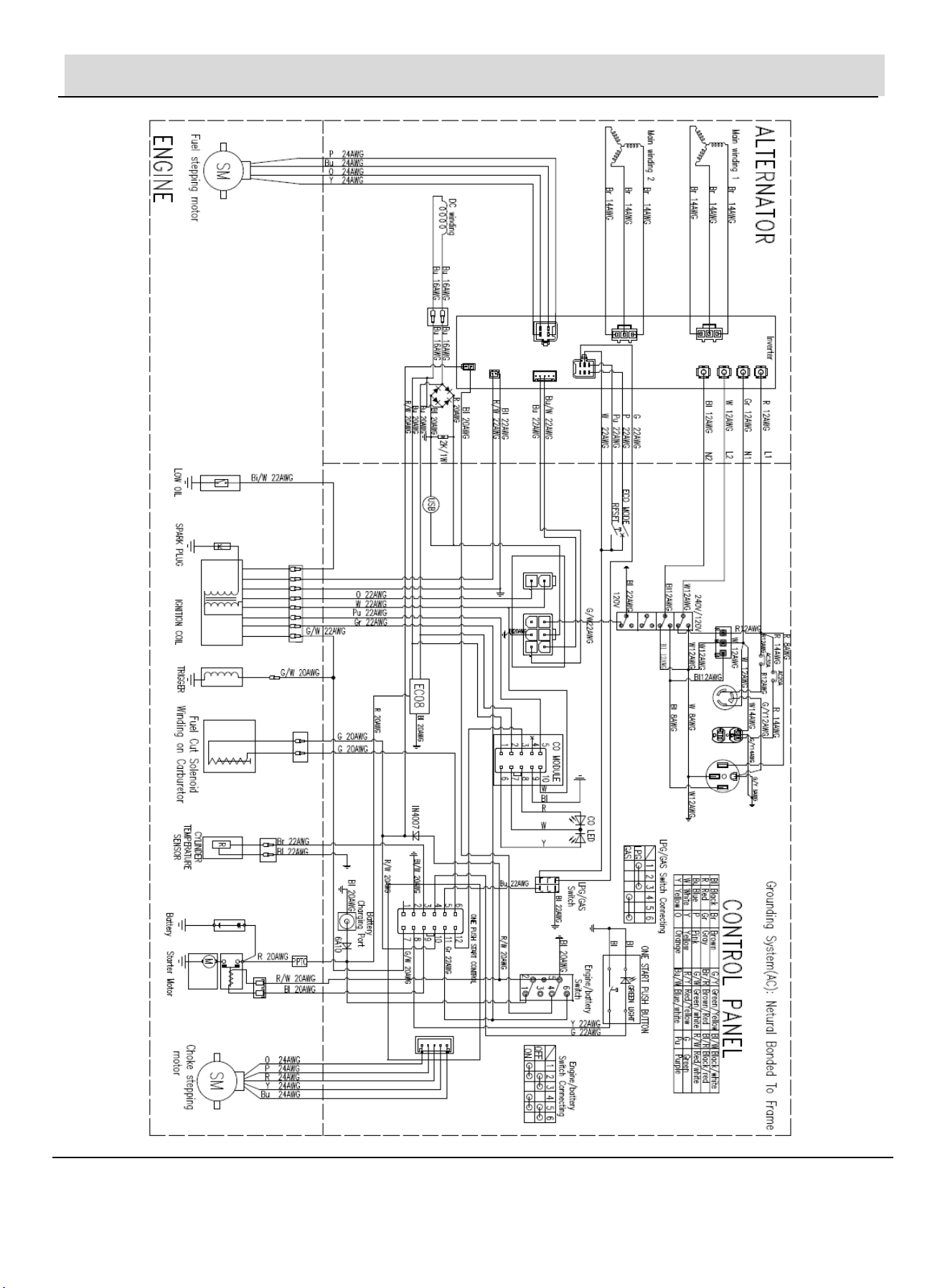
Electrical Schematic