USER’S MANUAL
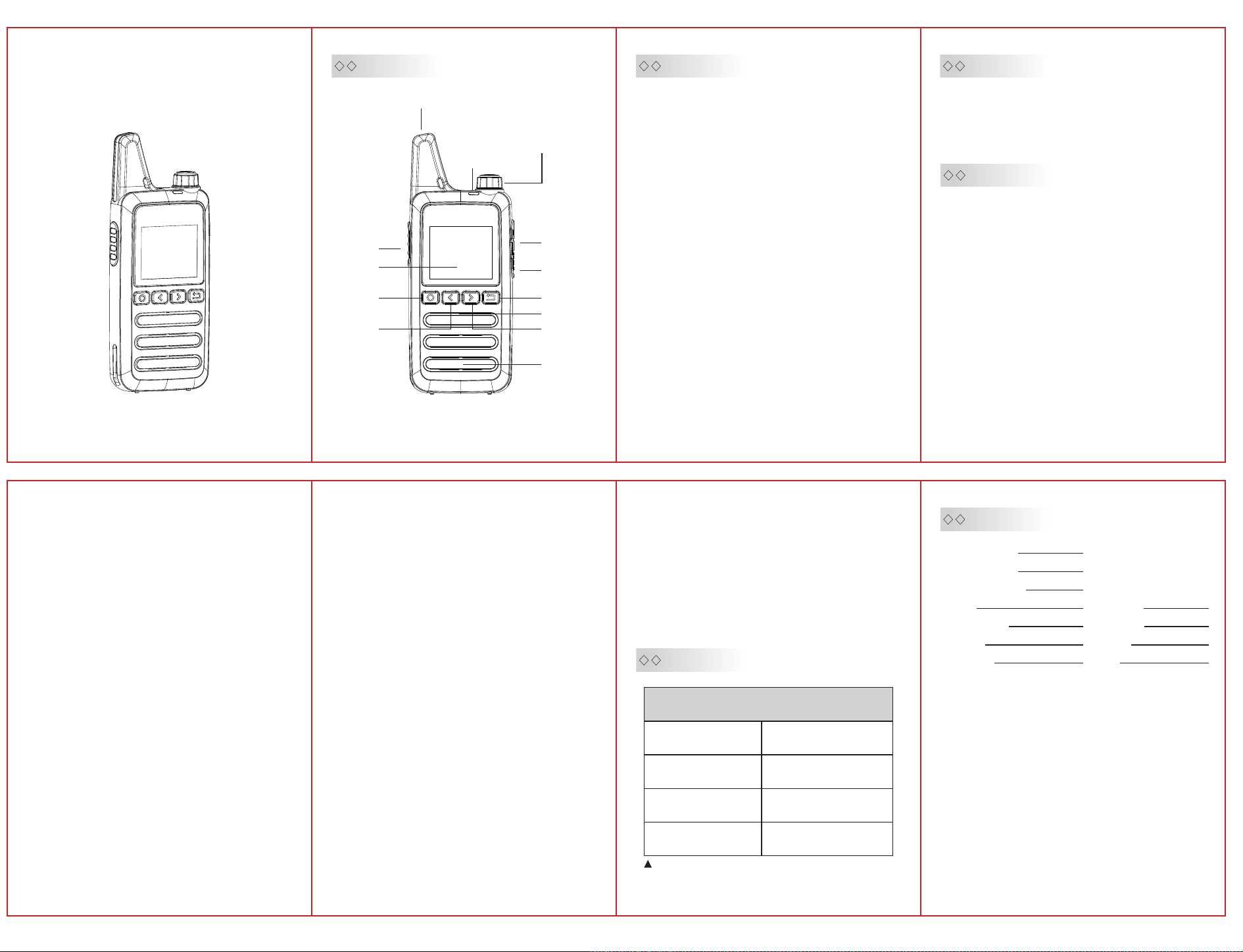
Product Overview
Antenna
Power Switch/Volume Switch
Indicator Light
PTT
Display Screen
Function Key/
Menu Key
UP Key
Charging port
Type-C
Earphone Jack
SIM Card Slot
Back Key
Microphone
DOWEN Key
Speaker
Charging Instructions
Functions Guide
.The battery is not charged in the factory,please
charge the battery under the environmental
temperature -℃ before using.
.After purchasing or long-term storage(more
than two months),charging the battery for the
fi r s t t i m e c a n n o t r e a c h i t s s a t u r a t i o n
capacity,repeat charge/discharge for twice or
three times to make battery capacity achieve the
best state.
. B e f o r e c h a r g i n g , p l e a s e p o w e r o ff t h e
transceiver,using the radio during charging may
affect correct charging.
.If the battery has been charged fully,please do
not charge it again,otherwise the service life of
the battery may be shorten or may be damaged.
.If the service time is significantly reduced even
after completely correct charging,the battery can
not be used any more,please replace a new
battery.
Key Operations
●Group Selection
Main Menu → Groups,select the groups with
Up /Down key s,the n press the M enu key to
confirm.
●Single Call Selection
Main Menu → Member List,use the Up/Down keys
to select the target for the single call,press the
Menu key to enter the single call interface,then
press the PTT key to initiate communication.
●Group Talk
After the transceiver is successfully logged
in,press the PTT ke y to activate the group
communication.
●Other Settings
Pres s the Menu key to access the menu,in
S e t t i n g s , c o n fi g u r e : k e y pa d t o n e 、s c r e e n
brightness、screen timeout duration、call alert
tone.
Basic Operations
Power Switch/Volume Adjustment
Turn the power switch knob clockwise to turn on
the transceiver,and adjust the volume by turning
the volume switch;turn the power switch knob
counterclockwise to turn it off.
Navigate to Main Menu → About the device to
view:
dev ice a ccou nt、IM EI num ber、ICCID、de vice
model、software version、key wake-up、
incoming call wake-up、voice prompts、power-
s a v i n g m o d e 、s i g n a l v a l u e 、s e r v i c e
i n f o r m a t i o n 、c a l l p o p - u p 、s o f t w a r e
update、weather forecast (supported on select
p l a tf o r ms ) 、l o ca t i on ( su p po r t ed o n s e l e ct
platforms).
Functions
●Single Call
S t e p s : G o t o t h e m e m b e r l i s t , s e l e c t a
member,then press the Menu key to enter the
single call interface,both parties can press the
PTT key to initiate a single call.
●Group Call
After joining a group,press the PTT key, al l
m e m b e r s i n t h e g ro u p c a n r e c e i ve v o i ce
communication.
Steps:
Navi gate to Main M e n u→Gro ups→S e l ect a
Group,after the voice prompt confirms group
entr y,press the PTT key to speak from any
interface,all members in the group can receive
the message.
●Create Temporary Group
Specify members to add to a temporary group
(requires platform support).
Steps:
. Go to Main Menu→Create Temporary Group.
. Select two or more members,then press the
PTT key to create the temporary group.
. Press the PTT key to initiate communication
within the temporary group.
. Members can exit the temporary group by
pressing the Back key.
.The creator can disband the temporary group by
pressing the Back key,and all members exit
automatically.
Talk Rules
When an active group call is initiated,other group
members cannot receive any other incoming
communications.
Single Call:In the member list,select a member
and press the confirm key to initiate a single
call.During a single call,the two devices involved
cannot be reached by any group call,cannot
receive single calls from other members,and
cannot form a temporary group.
PTT Key
Speak clearly into the microphone for best audio
quality.
Standby Indicator
Green light blinks every s.
Charging Status
Red light during charging;
Green light when fully charged.
The complete machine part
Technical Specifications:
Network
Product Size
Operating Temperature
Charging Temperature
Mobile/Unicom/Telecom
**mm
-℃-℃
℃-℃
We May Change The Specifications For Technical
Improvement Without Prior Notice.
Guarantee
Model Number:
Serial Number:
Purchasing Date:
Dealer:
User’s Name:
Country:
Post Code:
Remarks:
.This guarantee card should be kept by the user,no
replacement if lost.
.The user can get warranty and after-sales service as
below:
·Contact the seller where you buy.
·Products repaired by our local repair center
.For warranty service,you will need to provide a receipt
proof of purchase from the actual seller for verification
Exclusions from Warranty Coverage:
.To any product damaged by accident.
.In the event of misuse or abuse of the product or as a
result of unauthorized alterations or repairs.
.If the serial number has been altered,defaced,or
removed.
Telephone:
Telephone:
Address:
Email:

FCC compliance statement
This device complies with part 15 of the FCC Rules. Operation is subject to the following two
conditions:
(1) This device may not cause harmful interference, and
(2) this device must accept any interference including received interference that may cause
undesired operation.
The grantee is not responsible for any changes or modifications not expressly approved by
the party responsible for compliance. Such modifications could void the user’s authority to
operate the equipment.
Replacement of any transmitter component (crystal, semiconductor, etc.) not authorized by
the FCC equipment authorization for this radio could violate FCC rules.
Note: This equipment has been tested and found to comply with the limits for a Class B
digital device, pursuant to part 15 of the FCC Rules. These limits are designed to provide
reasonable protection against harmful interference in a residential installation.
This equipment generates, uses, and can radiate radio frequency energy and, if not installed
and used in accordance with the instructions, may cause harmful interference to radio
communications. However, there is no guarantee that interference will not occur in a
particular installation.
If this equipment does cause harmful interference to radio or television reception, which can
be determined by turning the equipment off and on, the user is encouraged to try to correct
the interference by one or more of the following measures:
— Reorient or relocate the receiving antenna.
— Increase the separation between the equipment and receiver.
— Connect the equipment into an outlet on a circuit different from that to which the
receiver is connected.
— Consult the dealer or an experienced radio/TV technician for help.
RF Exposure Statement:
SAR tests are conducted using standard operating positions accepted by FCC with the device
transmitting at its highest certified power level in all tested frequency bands, although the SAR is
determined at the highest certified power level, the actual SAR level of the device while operating can
be well below the maximum value. Before a new model is an available for sale to the public, it must be
tested and certified to the FCC that is does not exceed the exposure limit established by the FCC. Tests
for each product are performed in positions and locations as required by the FCC. For body worn
operation, this device has been tested and meets the FCC RF exposure guidelines when used with and
accessory designated for this product or when used with and accessory that contains no metal. To
maintain compliance with FCC RF exposure guidelines, hold the transmitter and antenna at least 1 inch
(2.5 centimeters) from your face and speak in a normal voice, with the antenna pointed up and away
from the face.