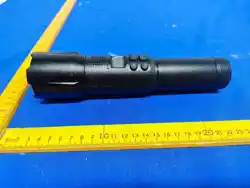
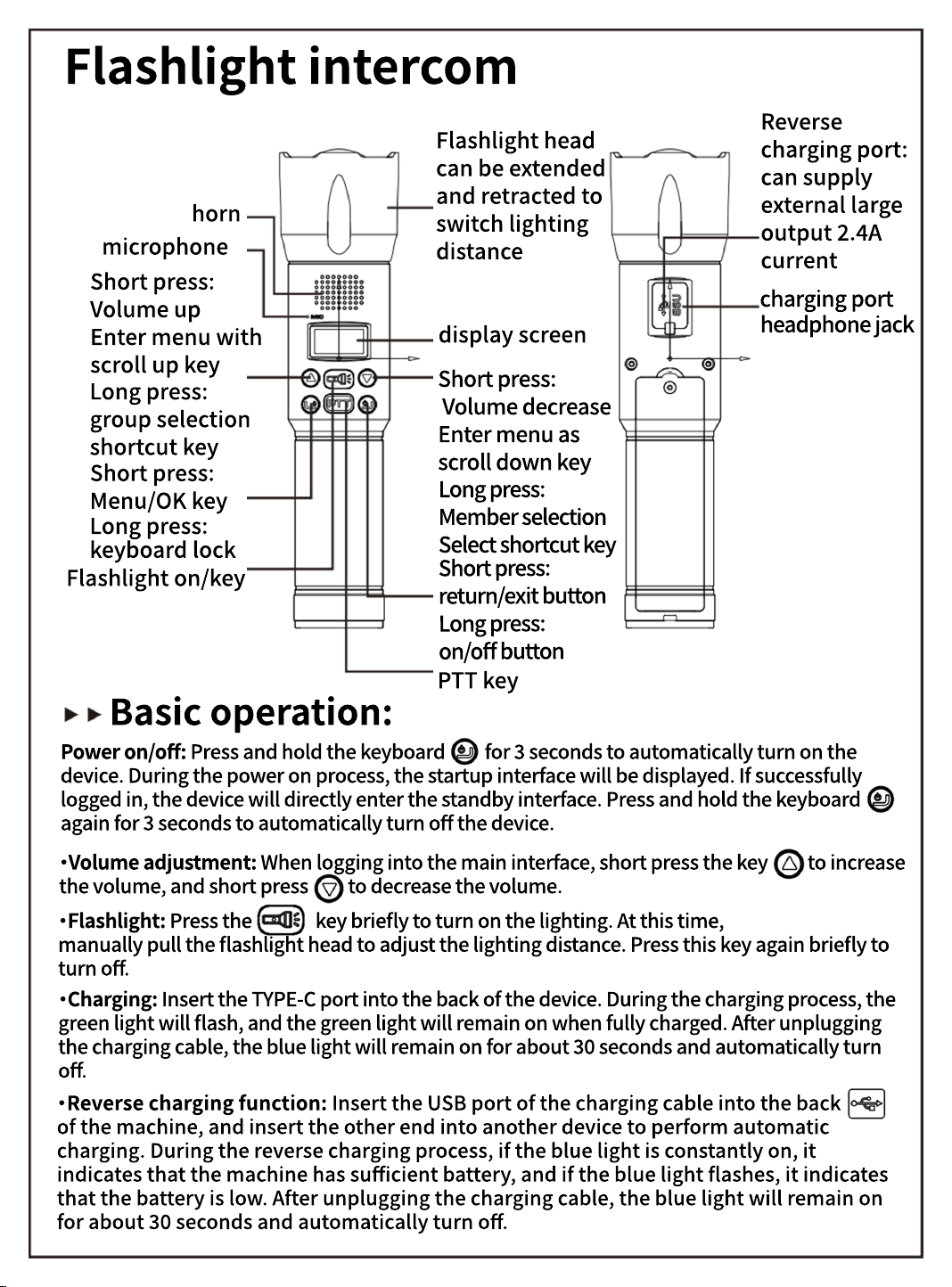
Flashlight intercom
Reverse
charging port:
can supply
external large
output .A
current
Flashlight head
can be extended
and retracted to
switch lighting
distance
horn
microphone
charging port
Short press:
Volume up
Enter menu with
scroll up key
display screen
headphone jack
Short press:
Volume decrease
Enter menu as
scroll down key
Long press:
group selection
shortcut key
Short press:
Menu/OK key
Long press:
Member selection
Select shortcut key
Long press:
keyboard lock
Flashlight on/key
Short press:
return/exit button
Long press:
on/off button
PTT key
Basic operation:
Power on/off: Press and hold the keyboard for seconds to automatically turn on the
device. During the power on process, the startup interface will be displayed. If successfully
logged in, the device will directly enter the standby interface. Press and hold the keyboard
again for seconds to automatically turn off the device.
·Volume adjustment: When logging into the main interface, short press the key to increase
the volume, and short press to decrease the volume.
·Flashlight: Press the key briefly to turn on the lighting. At this time,
manually pull the flashlight head to adjust the lighting distance. Press this key again briefly to
turn off.
·Charging: Insert the TYPE-C port into the back of the device. During the charging process, the
green light will flash, and the green light will remain on when fully charged. After unplugging
the charging cable, the blue light will remain on for about seconds and automatically turn
off.
·Reverse charging function: Insert the USB port of the charging cable into the back
of the machine, and insert the other end into another device to perform automatic
charging. During the reverse charging process, if the blue light is constantly on, it
indicates that the machine has sufficient battery, and if the blue light flashes, it indicates
that the battery is low. After unplugging the charging cable, the blue light will remain on
for about seconds and automatically turn off.

FCC Statement
This device complies with Part 15 of the FCC rules. Operation is subject to the following
two conditions: 1) this device may not cause harmful interference, and 2) this device
must accept any interference received, including interference that may cause
undesired operation.
Note: This equipment has been tested and found to comply with the limits for a Class
B digital device, pursuant to part 15 of the FCC Rules. These limits are designed to
provide reasonable protection against harmful interference in a residential installation.
This equipment generates uses and can radiate radio frequency energy and, if not
installed and used in accordance with the instructions, may cause harmful interference
to radio communications. However, there is no guarantee that interference will not
occur in particular installation. If this equipment does cause harmful interference to
radio or television reception, which can be determined by turning the equipment off
and on, the user is encouraged to try to correct the interference by one or more of the
following measures:
--Reorient or relocate the receiving antenna.
--Increase the separation between the equipment and receiver.
--Connect the equipment into an outlet on a circuit different from that to which the
receiver is connected.
--Consult the dealer or an experienced radio/TV technician for help.
Changes or modifications not expressly approved by the party responsible for
compliance could void the user’s authority to operate the equipment.
RF Exposure Statement
SAR tests are conducted using standard operating positions according standards with
the device transmitting at its highest certified power level in all tested frequency bands,
although the SAR is determined at the highest certified power level, the actual SAR
level of the device while operating can be well below the maximum value.
This model product has been tested and meets the RF exposure guidelines with the
test distance 25mm for face and 0mm for body worn. The highest SAR
1g
value is
0.283 W/Kg for face and W/Kg for body worn. The use of belt clips, holsters
and similar accessories should not contain metallic components in its assembly. The
use of accessories that do not satisfy these requirements may not comply with RF
exposure requirements, and should be avoided
0.707

