MANUAL
Please read the instructions carefully before use,
and keep these instructions for future reference
B02
01 02 03 04 05
06 07 08 09 10 11 12 13
14 15 16 17 18 19 20 21
22 23 24 25 26 27 28 29
30 31 32 33 34 35 36 37
38 39 40 41 42 43 44 45
46 48 49
47

Thank you for choosing Flysound Hearing Aids to enhance your hearing
experience and improve your quality of life.
These hearing aids are individually fitted and fine-tuned to meet your specific
hearing needs; therefore, they are not suitable for use by others.
Carefully and thoroughly read the user guide before using your hearing aids. It
is essential to operate the devices according to the instructions provided.
Improper handling may result in damage.
Should you have any questions regarding the use or maintenance of your
hearing aids, please do not hesitate to contact your hearing care professional.
01 02 03 04 05
06 07 08 09 10 11 12 13
14 15 16 17 18 19 20 21
22 23 24 25 26 27 28 29
30 31 32 33 34 35 36 37
38 39 40 41 42 43 44 45
46 48 49
47

INSTRUCTIONS FOR USE.................................................................................................................... 01
PRECAUTIONS ................................................................................................................................... 03
ACCESSORIES .................................................................................................................................... 04
PRODUCT STRUCTURE....................................................................................................................... 05
OPERATION GUIDE ............................................................................................................................ 09
MAINTENANCE AND CLEANING ......................................................................................................... 24
TROUBLESHOOTING GUIDE .............................................................................................................. 26
GENERAL WARNINGS ......................................................................................................................... 32
TECHNICAL SPECIFICATIONS............................................................................................................. 41
EXPLANATION OF GRAPHICAL SYMBOLS USED IN MEDICAL DEVICE LABELING.............................. 44
FCC REQUIREMENT ............................................................................................................................ 45
PRODUCT WARRANTY ........................................................................................................................ 48
CONTENTS
01 02 03 04 05
06 07 08 09 10 11 12 13
14 15 16 17 18 19 20 21
22 23 24 25 26 27 28 29
30 31 32 33 34 35 36 37
38 39 40 41 42 43 44 45
46 48 49
47

INSTRUCTIONS FOR USE
PRINCIPLES OF HEARING AIDS
Flysound hearing aids capture ambient sounds via a microphone and convert them into electrical
signals. The electrical signals are transmitted to the built-in digital chip of the device, where advanced
processing such as filtering and amplification is performed to form clear electrical signals. The
processed signals are then sent to the sound outlet, converted into sound waves, and conducted to the
ear canal via air. They are then transmitted through the middle ear and inner ear, perceived by the
auditory nerve, and relayed to the brain to enable sound perception.
HEARING AIDS STRUCTURAL COMPONENTS
The main components of the hearing aid include the main unit (with built-in microphone, battery and
digital chip), sound-collecting nozzle, and charging case.
HEARING AIDS SCOPE OF APPLICATION
Empirical testing for hearing compensation in patients with air-conducted hearing loss.
01 02 03 04 05
06 07 08 09 10 11 12 13
14 15 16 17 18 19 20 21
22 23 24 25 26 27 28 29
30 31 32 33 34 35 36 37
38 39 40 41 42 43 44 45
46 48 49
47

CONTRAINDICATIONS
Individuals with acute external otitis, tympanitis, acute suppurative otitis media, chronic suppurative
otitis media(in the stage of purulent infection), and those allergic to the materials of this product are
not suitable for wearing.
INDIVIDUALS UNDER THE AGE OF �� SHOULD CONSULT A
PHYSICIAN BEFORE USING THIS PRODUCT
Individuals under the age of 18 require specialized care. The use of this device without a proper
medical evaluation may potentially exacerbate hearing impairment or related conditions. It is essential
that hearing aid users under the 18 undergo a recent medical evaluation performed by a qualified
physician, preferably an ear, nose, and throat (ENT) specialist. The physician should assess and
confirm the suitability of hearing aid use before the device is utilized.
01 02 03 04 05
06 07 08 09 10 11 12 13
14 15 16 17 18 19 20 21
22 23 24 25 26 27 28 29
30 31 32 33 34 35 36 37
38 39 40 41 42 43 44 45
46 48 49
47

PRECAUTIONS
1.Hearing conditions professionally examined and audiologically tested before, and hearing aids
should be under the guidance of a doctor or a professional dispenser of hearing aids.
2.Pay attention to the moisture-proof, shock-proof, high temperature-proof, light-proof, and
drop-proof features of the products.
3.Never immerse your hearing aids in any liquid. Remove your hearing aids before swimming and
washing your hair and showering; wait for the ear canal to dry after swimming or showering before
putting on your hearing aids.
4.Avoid proximity to strong magnetic objects, as this may affect the sensitivity of the hearing aids.
5.If you feel uncomfortable during use, try adjusting the position of the earpiece or replacing it with a
more suitable sound-collecting nozzle while ensuring comfort. You may also consult customer service.
6.Keep the hearing aid clean. Regularly clean the sound-collecting nozzle, microphone, and earwax or
debris at the connection to the ear.
7.You should correctly use the program and the volume switch to control the program.
8.Please use the accessories provided by our company or authorized dealers, the use of other
accessories may affect the safety and effectiveness of the product.
01 02 03 04 05
06 07 08 09 10 11 12 13
14 15 16 17 18 19 20 21
22 23 24 25 26 27 28 29
30 31 32 33 34 35 36 37
38 39 40 41 42 43 44 45
46 48 49
47
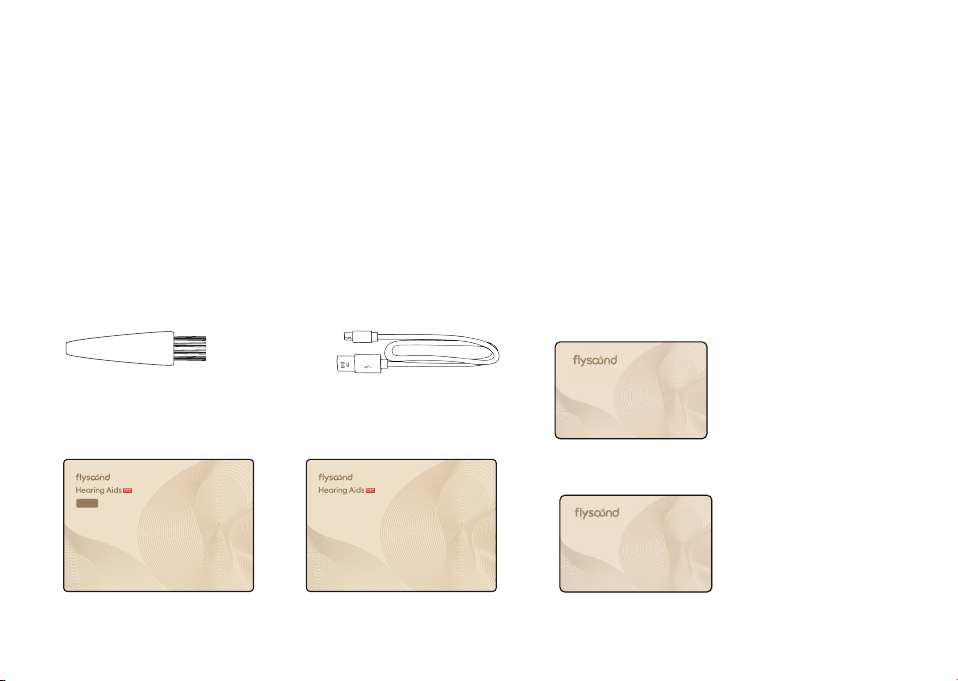
USB Cable X1
Warranty Card X1
Anti-Lost Lanyard X1
APP Download Card x1
User Manual x1
Quick Start Guide x1
Cleaning Brush X1
ACCESSORIES
Hearing Aids x2
Charging Case x1 Sound-collecting Nozzles
(Sizes S/M/L/XL) ‒ 4 sets
MANUAL
Please read the instructions carefully before use,
and keep these instructions for future reference
QUICK START GUIDE
Please read the instructions carefully before use,
and keep these instructions for future reference
APP DOWNLOAD CARD
VIP WARRANTY CARD
B02
01 02 03 04 05
06 07 08 09 10 11 12 13
14 15 16 17 18 19 20 21
22 23 24 25 26 27 28 29
30 31 32 33 34 35 36 37
38 39 40 41 42 43 44 45
46 48 49
47
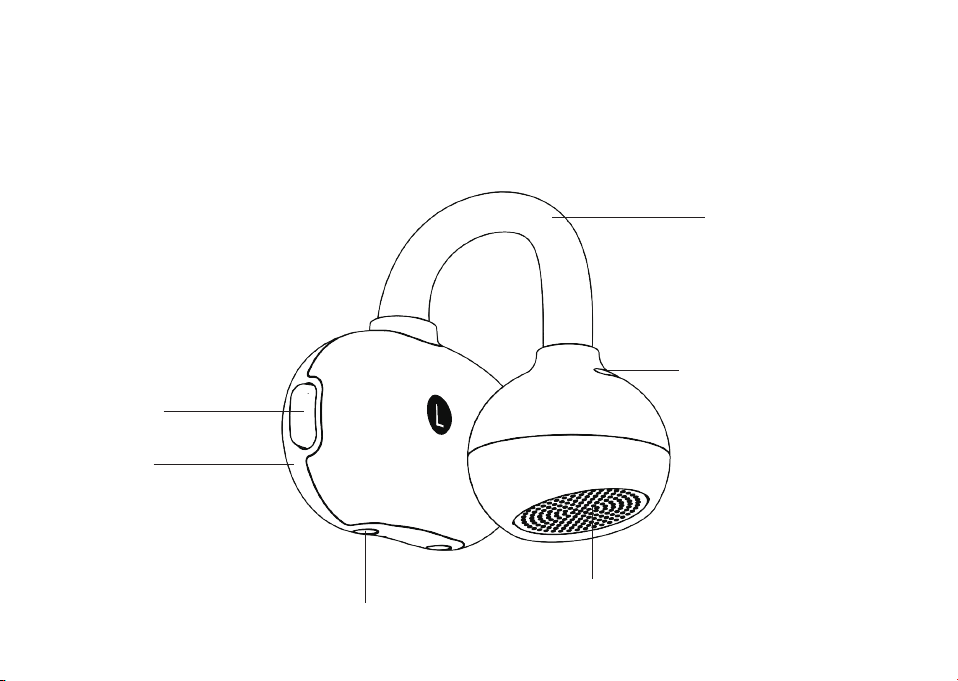
PRODUCT STRUCTURE
Ear Clip
Ventilation Hole
Sound Outlet
Charging Contacts
Button
Main Unit
01 02 03 04 05
06 07 08 09 10 11 12 13
14 15 16 17 18 19 20 21
22 23 24 25 26 27 28 29
30 31 32 33 34 35 36 37
38 39 40 41 42 43 44 45
46 48 49
47
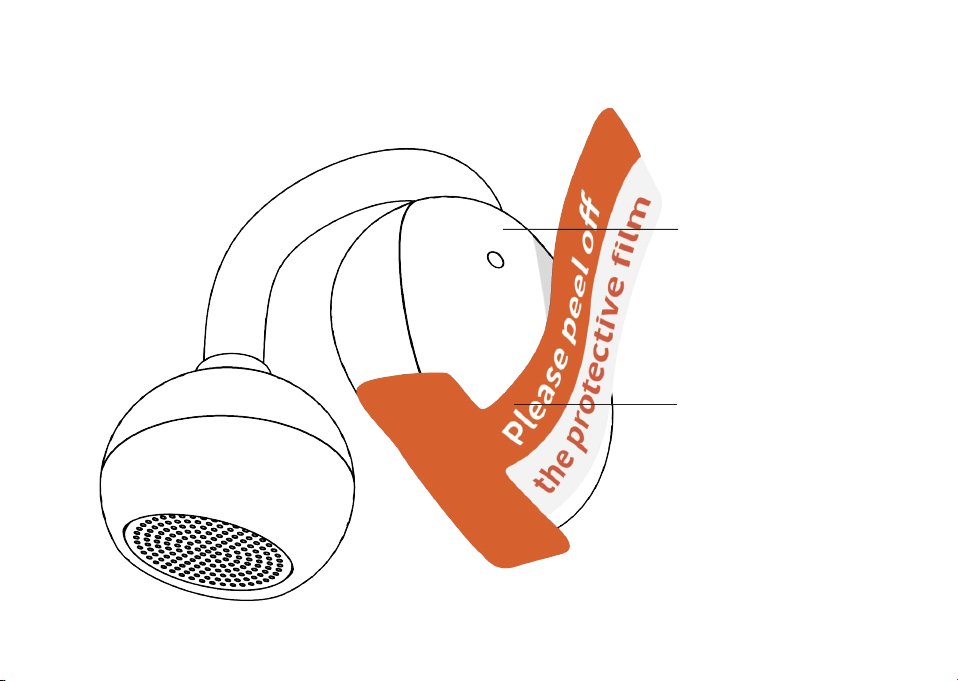
BACK
Microphone
Remove the protectors from the
hearing aids before use
Protector
01 02 03 04 05
06 07 08 09 10 11 12 13
14 15 16 17 18 19 20 21
22 23 24 25 26 27 28 29
30 31 32 33 34 35 36 37
38 39 40 41 42 43 44 45
46 48 49
47
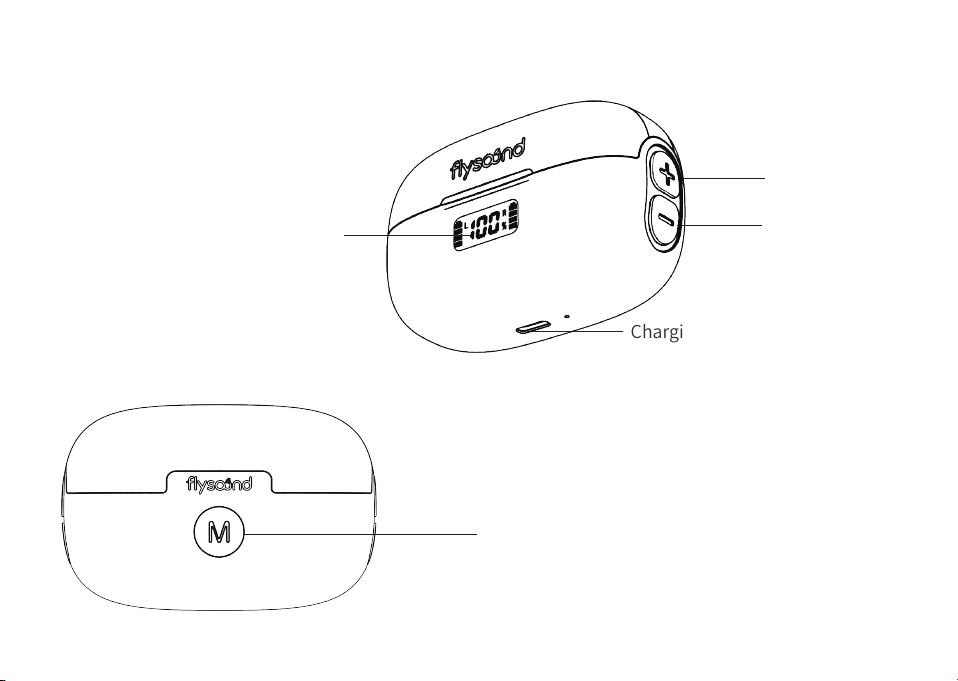
CHARGING CASE
Multi-function Button
Digital Display Screen
Charging Port
Volume "+" Button
Volume "-" Button
01 02 03 04 05
06
07 08 09 10 11 12 13
14 15 16 17 18 19 20 21
22 23 24 25 26 27 28 29
30 31 32 33 34 35 36 37
38 39 40 41 42 43 44 45
46 48 49
47
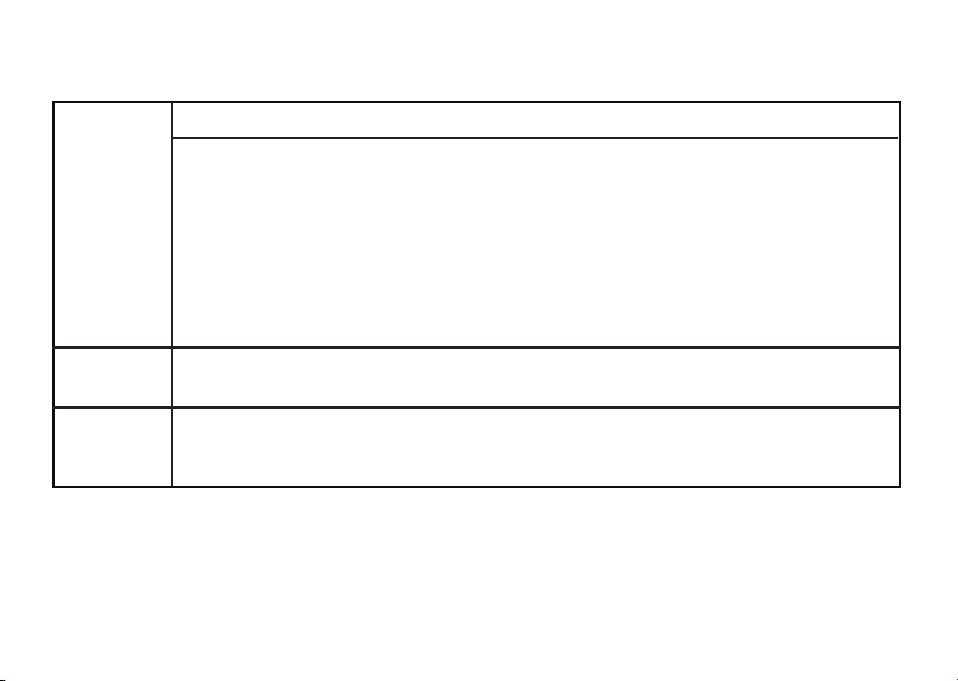
FUNCTION OF CHARGING CASE
Display
Function
Button
Function
Reset
Function
Multi-function button:
(1) Mode switch: Press once to toggle hearing aid scenes (Indoor/Outdoor/TV/Wind
Noise), indicated by 1-4 consecutive beeps. If the current mode is uncomfortable, press
to switch to a more suitable one
(2) Hearing Aid Reset: Place the hearing aids in the case, and keep the lid of charging
case open, then long press the multi-function button for 10s ‒ the charging case and
hearing aids will restore to factory default settings and pair with the hearing aids again
The middle of the digital screen displays the charging case's battery percentage; the left
and right sides show the battery status of the left and right hearing aids respectively
4 volume buttons: Left: Volume +/‒; Right: Volume +/‒
Place the hearing aids in the charging case and close the lid, then long press the
multi-function button for 10s ‒ the charging case will restore to factory default settings
and pair with the hearing aids again
01 02 03 04 05
06 07
08 09 10 11 12 13
14 15 16 17 18 19 20 21
22 23 24 25 26 27 28 29
30 31 32 33 34 35 36 37
38 39 40 41 42 43 44 45
46 48 49
47
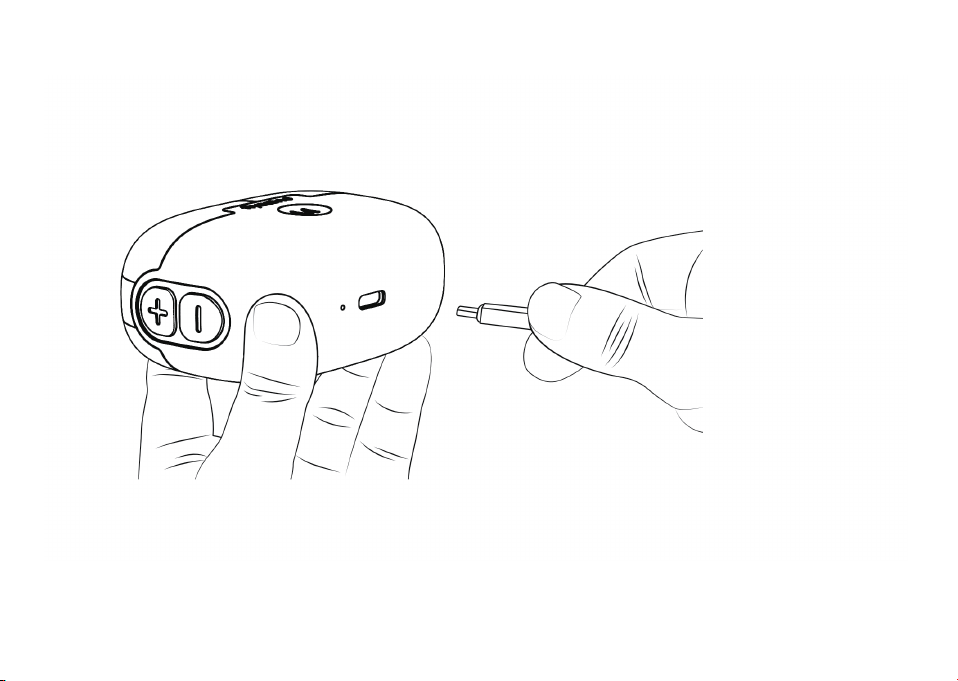
OPERATION GUIDE
CHARGING PRIOR TO FIRST USE
When using a hearing aid charging case for the first time, press any button on the charging case
and wait for 3‒6 seconds to activate it. Once activated, the hearing aids can be remotely
controlled using the buttons on the charging case.
01 02 03 04 05
06 07 08
09 10 11 12 13
14 15 16 17 18 19 20 21
22 23 24 25 26 27 28 29
30 31 32 33 34 35 36 37
38 39 40 41 42 43 44 45
46 48 49
47
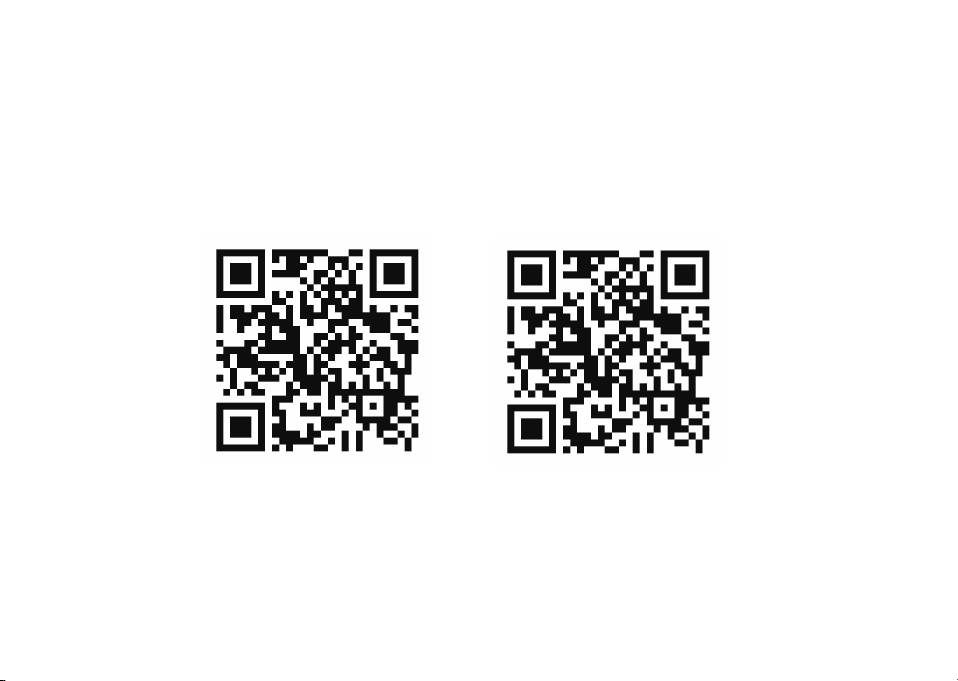
APP DOWNLOAD (Apple: FlysoundsMax | Google: Flysound)
The App enables you to set up and personalize your hearing aids according to your hearing preferences
and manage its settings. Ensure that you download the App before using the product.
(1) To download the application, search for "Flysound" in the Google Play Store or search for
"FlysoundsMax" in the App Store.
(2) Connect your hearing aids to your cell phone.
(3) Follow the instructions in the App to complete the setup of your hearing aids.
(Android)
Flysound APP
(iOS)
FlysoundsMax APP
01 02 03 04 05
06 07 08 09
10 11 12 13
14 15 16 17 18 19 20 21
22 23 24 25 26 27 28 29
30 31 32 33 34 35 36 37
38 39 40 41 42 43 44 45
46 48 49
47

BLUETOOTH STREAMING
The FLYSOUND B02 has Bluetooth® to connect with devices like Apple iOS or Android phones. When
connected to a phone, it can play music and answer calls hands free.
(1) On your phone:
Turn on Bluetooth.
Search for devices.
(2) Open the charging case, then tap "B02" in your phone's Bluetooth list, and it will automatically pair
with Bluetooth.
(3) Once connected successfully, your phone's Bluetooth list will show "B02" Connected.
The Bluetooth connection is ready. Now you can use the hearing aids for calls, listening to music, and
more.
To play/pause music: Press and hold the headphone button for 2 second.
Answer a Call: When the hearing aids is Bluetooth-connected to the mobile phone and there is an
incoming call on the mobile phone, press it briefly once.
End a Call: When the hearing aids is Bluetooth-connected to the mobile phone and a call is in progress,
01 02 03 04 05
06 07 08 09 10
11 12 13
14 15 16 17 18 19 20 21
22 23 24 25 26 27 28 29
30 31 32 33 34 35 36 37
38 39 40 41 42 43 44 45
46 48 49
47
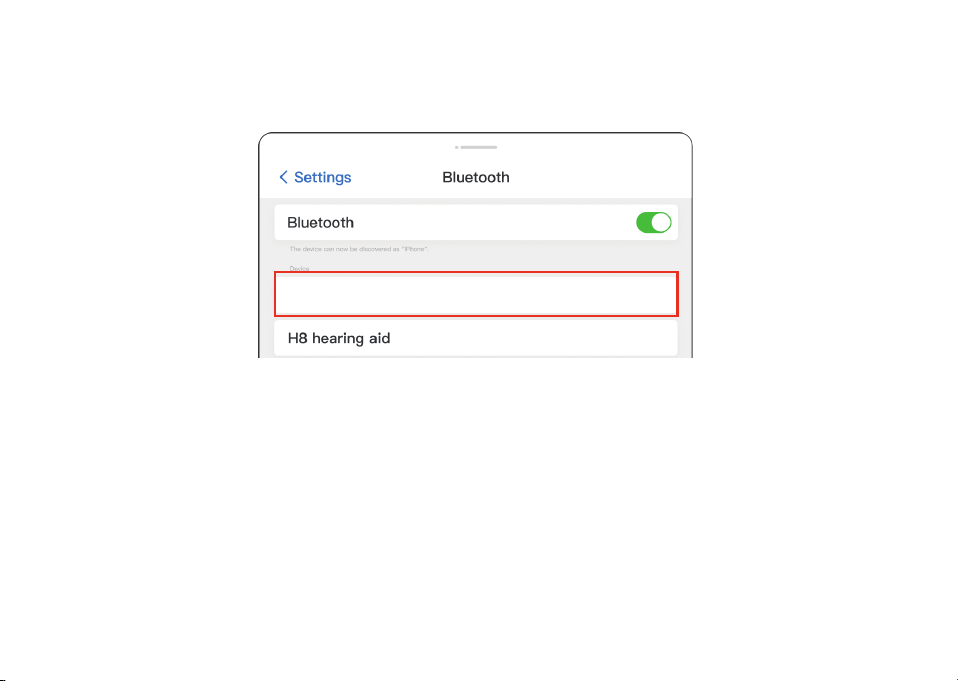
Note:
Connect the hearing aids to the phone within 5 minutes after taking them out. After this time, the
"B02" Bluetooth won't be detectable. If this occurs, return them to the charging case and then take
them out to reconnect.
Before boarding a flight, ensure to deactivate the Bluetooth function unless you receive authorization
from the flight crew.
The "B02" is compatible with versions prior to Bluetooth 5.3.
press and hold for 2 seconds.
B��
01 02 03 04 05
06 07 08 09 10 11
12 13
14 15 16 17 18 19 20 21
22 23 24 25 26 27 28 29
30 31 32 33 34 35 36 37
38 39 40 41 42 43 44 45
46 48 49
47
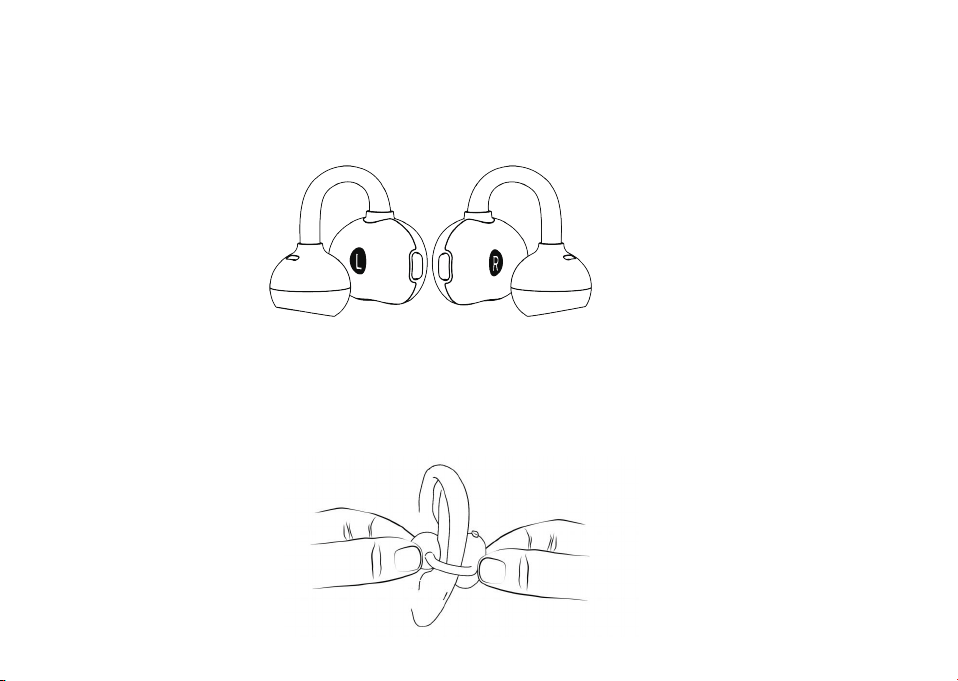
WEARING
(1) Distinguish left and right hearing aids: Identify left/right via the "L"/"R" markings on the device—
the left hearing aid is marked "L", and the right one is marked "R".
(2) Wearing steps: Hold the sound outlet of the hearing aid with one hand, and the main unit with the
other. Place it on the corresponding ear (ensure the sound outlet is in front and the main unit is
behind). Rotate the ear clip to align and fasten it to a comfortable position on the ear. Make sure the
sound outlet is aligned with the ear canal, and the fit is stable without obvious pressure.
01 02 03 04 05
06 07 08 09 10 11 12
13
14 15 16 17 18 19 20 21
22 23 24 25 26 27 28 29
30 31 32 33 34 35 36 37
38 39 40 41 42 43 44 45
46 48 49
47
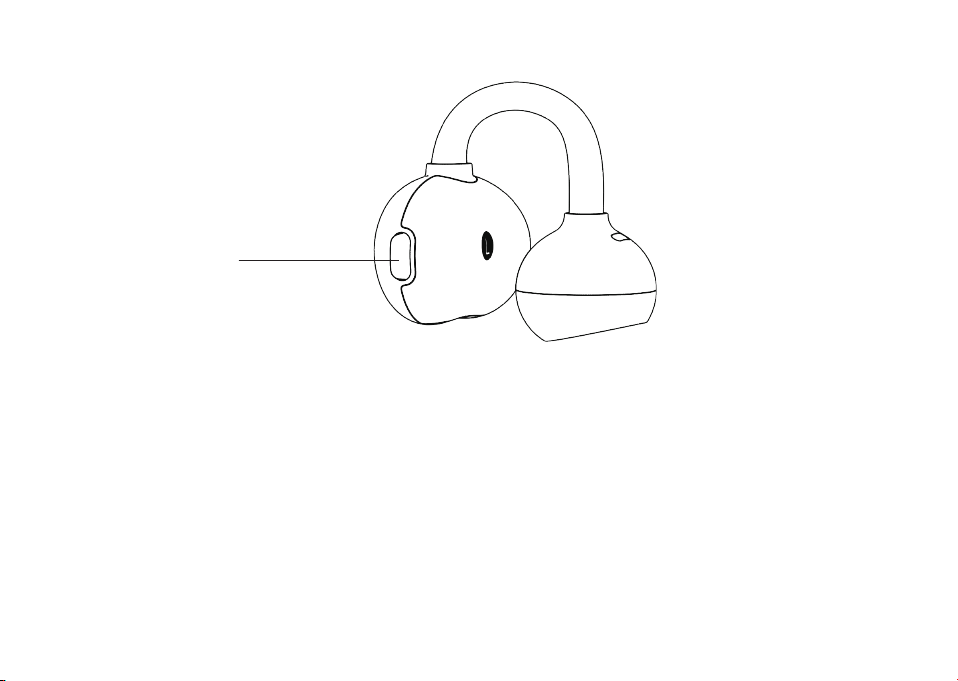
POWERING ON/OFF
Power On:
The hearing aids will power on automatically when removed from the charging case. Alternatively,
when powered off, press and hold the volume up/down button for 5 seconds.
Power Off:
Place the hearing aids into the charging case and close the lid securely. The hearing aids will power off
automatically. To power off manually, press and hold the volume up/down button for 5 seconds.
Press the volume up/
down button for � seconds
01 02 03 04 05
06 07 08 09 10 11 12 13
14 15 16 17 18 19 20 21
22 23 24 25 26 27 28 29
30 31 32 33 34 35 36 37
38 39 40 41 42 43 44 45
46 48 49
47
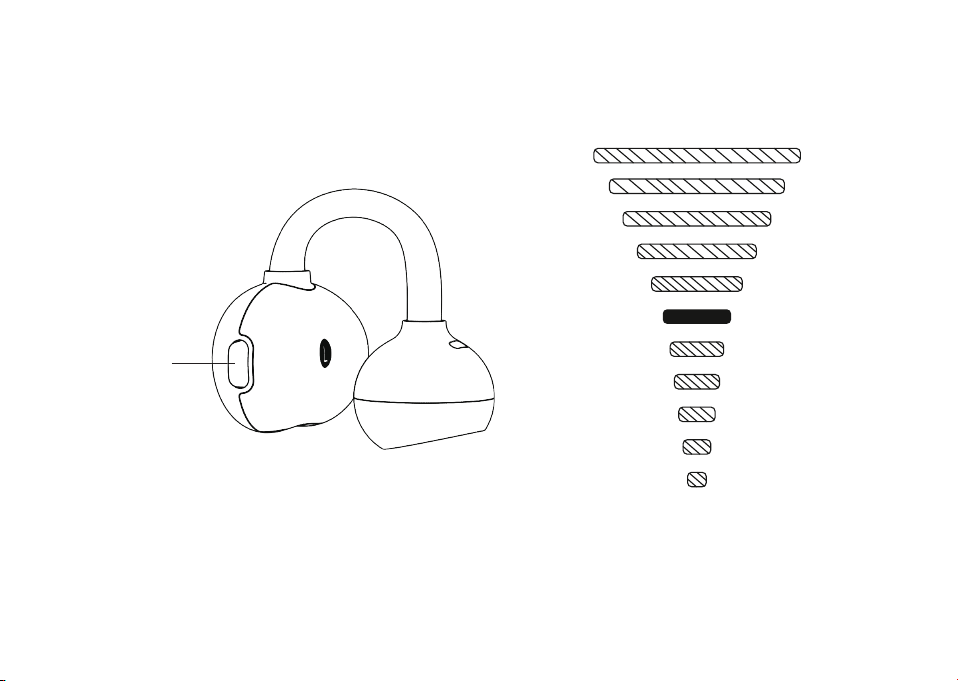
VOLUME UP/DOWN
The buttons have volume up and down controls, with a total of �� volume levels(� levels above and
� levels below the default setting). Each adjustment step increases or decreases the volume by � dB.
Volume up/
down button
Volume maximum
Volume minimum
Default setting
01 02 03 04 05
06 07 08 09 10 11 12 13
14
15 16 17 18 19 20 21
22 23 24 25 26 27 28 29
30 31 32 33 34 35 36 37
38 39 40 41 42 43 44 45
46 48 49
47
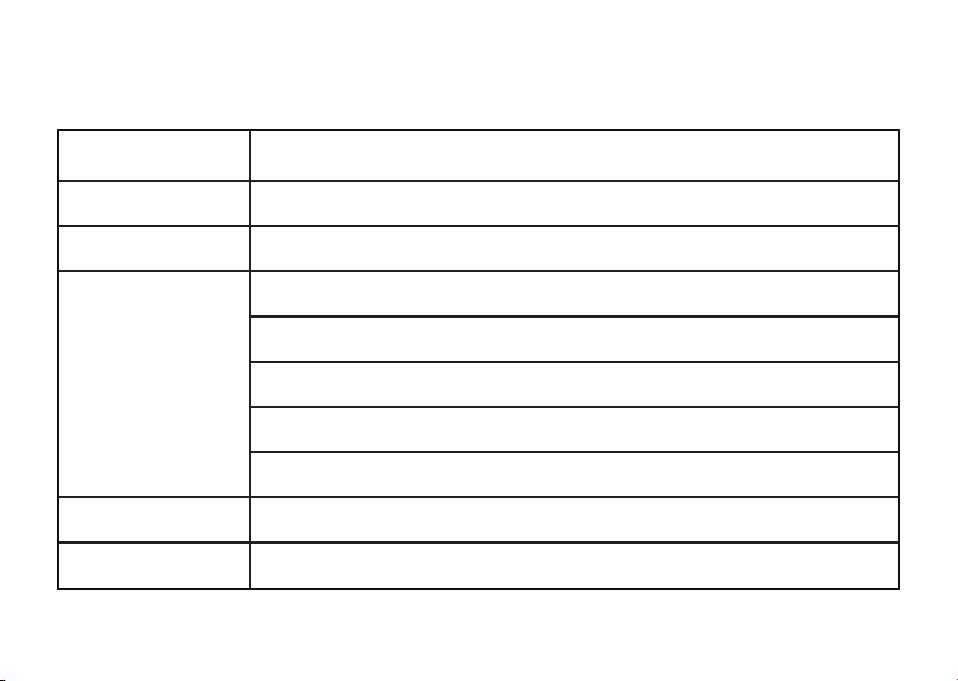
HEARING AID BUTTONS
Power on / Power off Press and hold for 5 seconds
Press once
Press twice quickly
Volume levels
Answer a call
End the call
Volume up: Press the hearing aid button once
Volume down: Press the hearing aid button twice quickly
11 volume levels
Single click: the hearing aids prompts a "beep"
When it is at the maximum volume, it prompts three beeps
When it is at the minimum volume, it prompts two beeps
Factory default volume level: Level 5
Press and hold for 2 seconds
Press once to answer a call (highest priority), volume unchanged
01 02 03 04 05
06 07 08 09 10 11 12 13
14 15
16 17 18 19 20 21
22 23 24 25 26 27 28 29
30 31 32 33 34 35 36 37
38 39 40 41 42 43 44 45
46 48 49
47
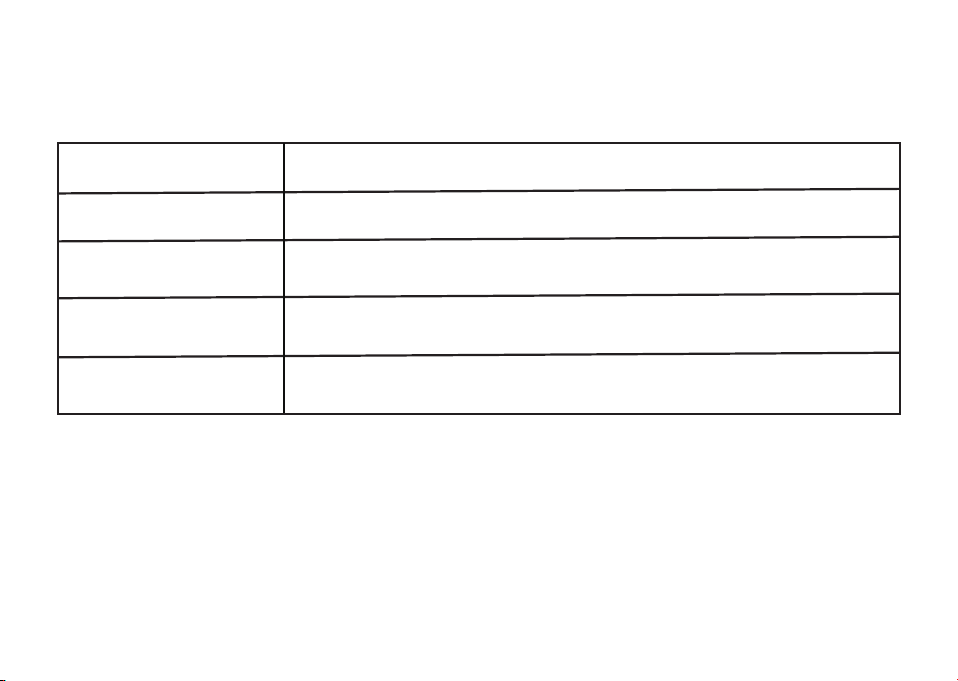
The hearing aid emits corresponding pure tone prompts when the following actions or states occur.
HEARING AIDS PROMPT TONES
Prompt Tones
Sounds when the hearing aid is turned on
Notifies when the battery level is insufficient
Sounds when the Bluetooth connected
Sounds when the Bluetooth connection is interrupted
Actions or States
Power-on prompt tone
Low battery
prompt tone
Bluetooth connected
prompt tone
Bluetooth disconnected
prompt tone
01 02 03 04 05
06 07 08 09 10 11 12 13
14 15 16
17 18 19 20 21
22 23 24 25 26 27 28 29
30 31 32 33 34 35 36 37
38 39 40 41 42 43 44 45
46 48 49
47
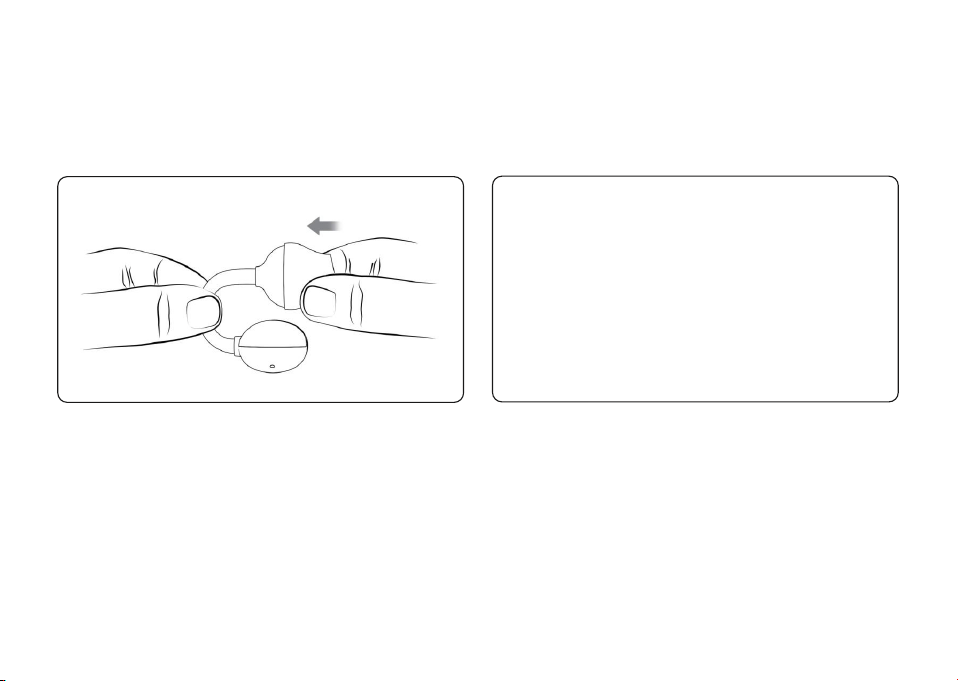
CHARGING
(�) Charging The Hearing Aids
Place the hearing aids in the charging case and make sure the lid is tightly closed, the hearing aids will
charge automatically.
Note: If the hearing aids can not be charged, please re-install the ear dome and press the hearing aids
into the charging case.
It takes 2 hours to fully charge the hearing aids. In the default setting (hearing aids mode), the battery
life is up to 11 hours. The battery provides up to 5 hours of use while streaming audio via Bluetooth.
01 02 03 04 05
06 07 08 09 10 11 12 13
14 15 16 17
18 19 20 21
22 23 24 25 26 27 28 29
30 31 32 33 34 35 36 37
38 39 40 41 42 43 44 45
46 48 49
47
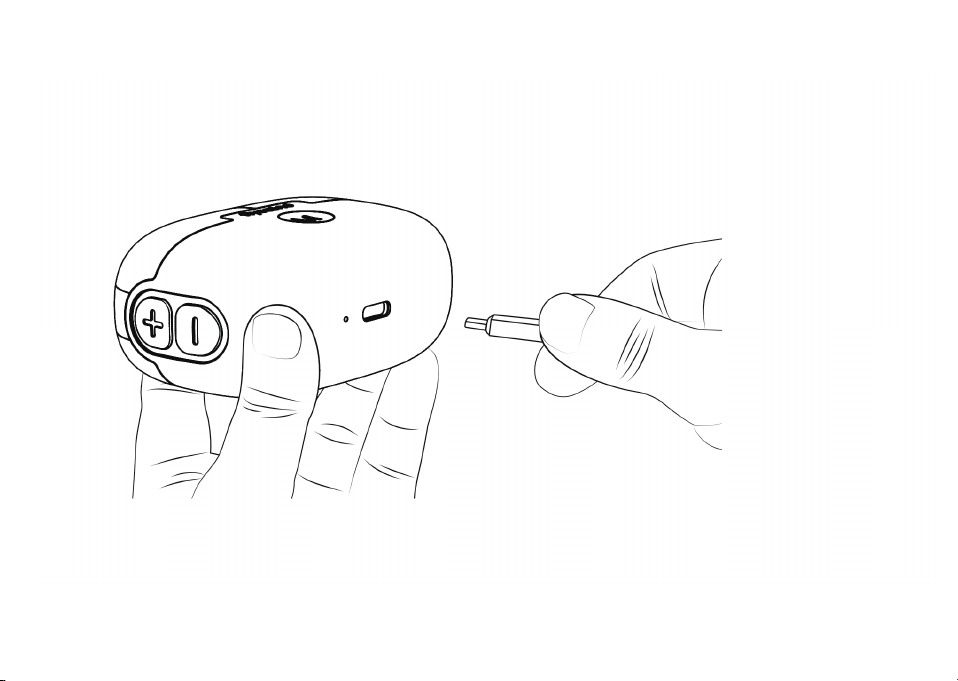
(�) Charging the charging case
Connect the charging case to the power outlet for full charging. This procedure can take up to 2 hours
to fully charge the charging case.
01 02 03 04 05
06 07 08 09 10 11 12 13
14 15 16 17 18
19 20 21
22 23 24 25 26 27 28 29
30 31 32 33 34 35 36 37
38 39 40 41 42 43 44 45
46 48 49
47
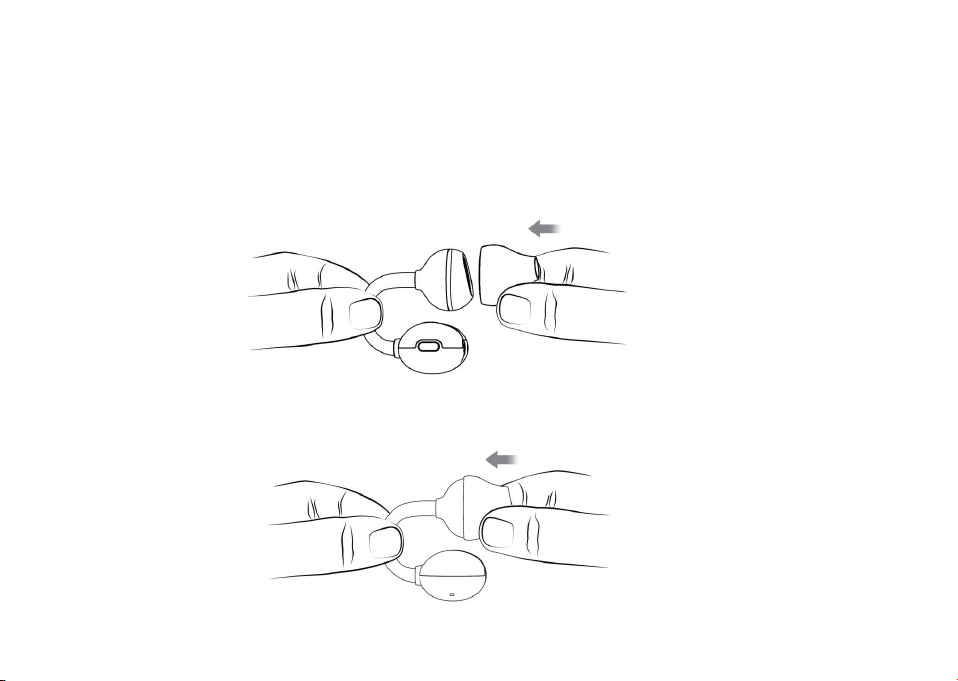
WEARING THE SOUND-COLLECTING NOZZLE
To ensure optimal sound quality, wear a properly sized sound-collecting nozzle and fit the hearing aid
correctly. If it feels uncomfortable or the volume is not enough, try a different-sized nozzle.
(1) Take a new sound-collecting nozzle and position the sound hole at its center.
(2) Attach the sound-collecting nozzle to the sound outlet. Ensure the sound outlet and the nozzle fit
tightly.
01 02 03 04 05
06 07 08 09 10 11 12 13
14 15 16 17 18 19
20 21
22 23 24 25 26 27 28 29
30 31 32 33 34 35 36 37
38 39 40 41 42 43 44 45
46 48 49
47
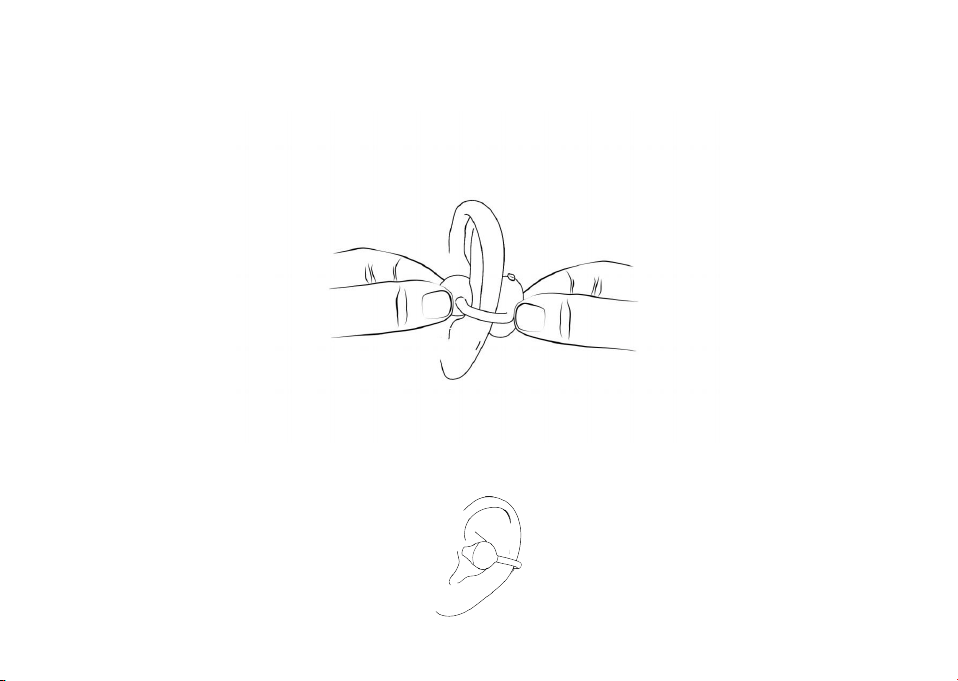
(3) Hold the hearing aid's sound outlet with one hand and the main unit with the other. Place it on the
corresponding ear (keep the sound outlet in front and the main unit behind), then gently adjust the
ear clip to fasten it in a comfortable position on the auricle. Ensure the sound outlet naturally fits the
top or side of the auricle, and the fit is stable without noticeable pressure.
(4) Slightly adjust the device's angle so the sound-collecting nozzle aligns with the ear canal entrance
(no need to insert it deep into the ear canal; keep an appropriate distance for efficient sound
transmission). Ensure the acoustic path between the sound-collecting nozzle and the ear canal is
unobstructed.
01 02 03 04 05
06 07 08 09 10 11 12 13
14 15 16 17 18 19 20
21
22 23 24 25 26 27 28 29
30 31 32 33 34 35 36 37
38 39 40 41 42 43 44 45
46 48 49
47
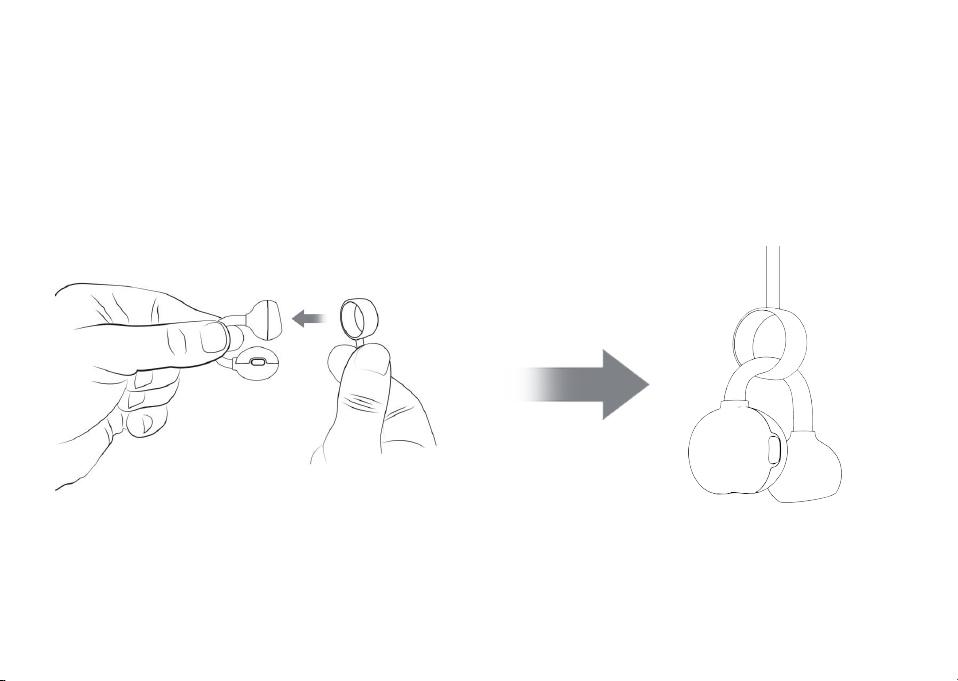
ANTI-LOST LANYARD
(1) Slide the white silicone sleeve of the anti-lost lanyard onto the hearing aid from the sound outlet,
then move it to the C-shaped bridge to fit in place. Repeat for both hearing aids.
01 02 03 04 05
06 07 08 09 10 11 12 13
14 15 16 17 18 19 20 21
22 23 24 25 26 27 28 29
30 31 32 33 34 35 36 37
38 39 40 41 42 43 44 45
46 48 49
47
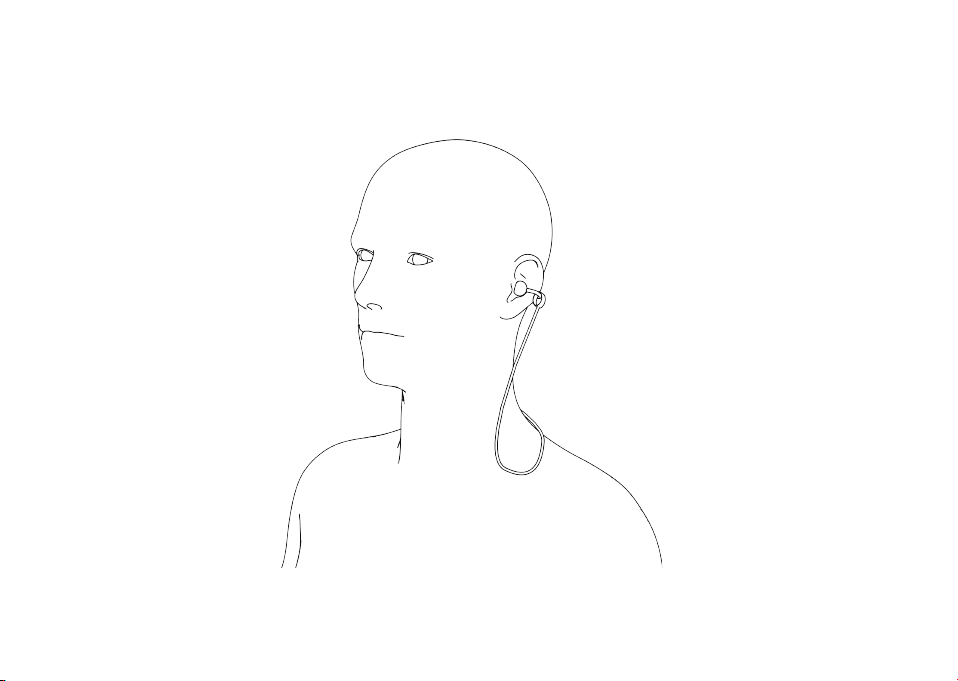
(2) Place the anti-lost lanyard around the back of your neck, then clip the hearing aids with the
lanyard onto both ear auricles. Gently pull the hearing aids to ensure a secure and comfortable fit.
01 02 03 04 05
06 07 08 09 10 11 12 13
14 15 16 17 18 19 20 21
22
23 24 25 26 27 28 29
30 31 32 33 34 35 36 37
38 39 40 41 42 43 44 45
46 48 49
47

MAINTENANCE AND CLEANING
CLEANING
(1) It is crucial to keep the hearing aid clean and dry. During daily use, prevent water and liquids from
entering the device.
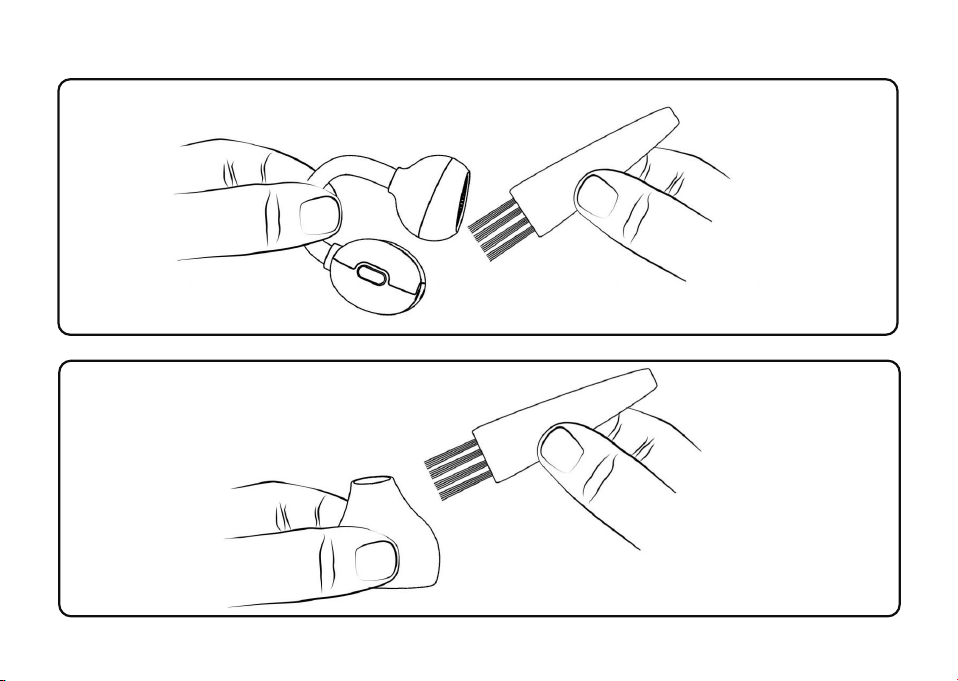
(2) Wipe the surface of the hearing aid with a dry cloth or tissue every day. Use the included cleaning
brush to gently clean the sound-transmitting components, microphone, and the connection area to
the ear.
(3) After long-term use, earwax may accumulate on the sound-collecting nozzle. You can use a
cleaning brush to remove the earwax, or wipe the nozzle with a damp (not wet) soft cloth. Do not
directly rinse the device or sound-collecting nozzle with water or liquid cleaning agents.
01 02 03 04 05
06 07 08 09 10 11 12 13
14 15 16 17 18 19 20 21
22 23
24 25 26 27 28 29
30 31 32 33 34 35 36 37
38 39 40 41 42 43 44 45
46 48 49
47
01 02 03 04 05
06 07 08 09 10 11 12 13
14 15 16 17 18 19 20 21
22 23 24
25 26 27 28 29
30 31 32 33 34 35 36 37
38 39 40 41 42 43 44 45
46 48 49
47

TROUBLESHOOTING GUIDE
New hearing aids users often experience an effect known as acoustic feedback, commonly referred to
as"whistling."
Reason: Hearing aids volume is too loud
Solution: Turn down the volume or consult an audiologist
Reason: When the hearing aids are placed in the charging case, the charging contacts are not in good
contact
Solution: Clean the charging contacts of the hearing aids and the charging case
Reason: The charging case is out of power
Solution: Charge the charging case
Should the problem remain unresolved, please reach out to our customer service via
service@flysounds.com.
01 02 03 04 05
06 07 08 09 10 11 12 13
14 15 16 17 18 19 20 21
22 23 24 25
26 27 28 29
30 31 32 33 34 35 36 37
38 39 40 41 42 43 44 45
46 48 49
47
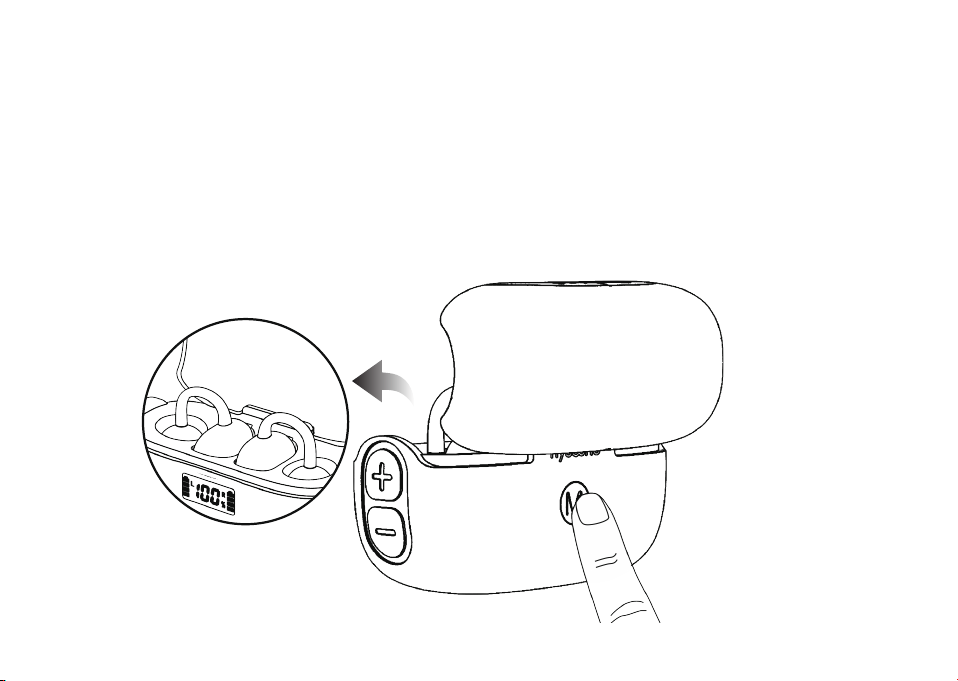
THE CHARGING CASE CANNOT CONTROL THE HEARING AIDS
Solution: After placing both hearing aids into the charging case, and keep the lid of charging case
open, then press and hold the multi-function button on the charging case for 10 seconds to
complete the re-pairing between the charging case and the binaural hearing aids.
Should the problem remain unresolved, please reach out to our customer service via
service@flysounds.com.
01 02 03 04 05
06 07 08 09 10 11 12 13
14 15 16 17 18 19 20 21
22 23 24 25 26
27 28 29
30 31 32 33 34 35 36 37
38 39 40 41 42 43 44 45
46 48 49
47
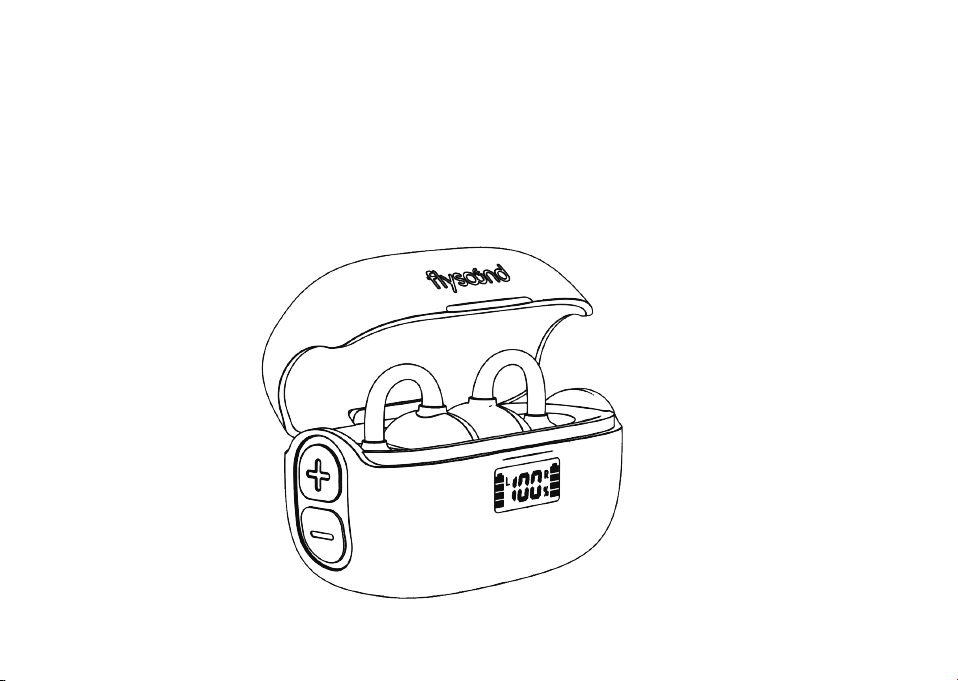
THE APP CAN ONLY PAIR WITH ONE HEARING AID
Solution: Place both hearing aids into the charging case, then open and close the case quickly 5 times
within 8 seconds to re-pair the hearing aids.The display screen on the charing case flashes, which
indicates that the hearing aids are re-paired successfully.
Should the problem remain unresolved, please reach out to our customer service via
service@flysounds.com.
01 02 03 04 05
06 07 08 09 10 11 12 13
14 15 16 17 18 19 20 21
22 23 24 25 26 27
28 29
30 31 32 33 34 35 36 37
38 39 40 41 42 43 44 45
46 48 49
47

SILENT
Reason: The device is switched off
Solution: Power on
Reason: No battery or low battery
Solution: Timely charging
Reason: The sound-collecting nozzle or sound outlet is blocked
Solution: Use a brush to clean the sound-collecting nozzle and sound outlet
Should the problem remain unresolved, please reach out to our customer service via
service@flysounds.com.
01 02 03 04 05
06 07 08 09 10 11 12 13
14 15 16 17 18 19 20 21
22 23 24 25 26 27 28
29
30 31 32 33 34 35 36 37
38 39 40 41 42 43 44 45
46 48 49
47

LOW VOLUME
Reason: Due to the volume settings
Solution: Adjust the volume in the settings
Reason: Battery is low
Solution: Charge the battery in time
Reason: The sound-collecting nozzle is worn incorrectly or the size is inappropriate
Solution: Adjust the way the sound-collecting nozzle is worn, or replace it with a properly sized one
Reason: The sound-collecting nozzle or sound outlet is blocked
Solution: Use a brush to clean the sound-collecting nozzle and sound outlet
Reason: Excessive earwax
Solution: Clean your ear canal or seek medical support
Reason: Changes in hearing condition
Solution: Consult an audiologist
Should the problem remain unresolved, please reach out to our customer service via
service@flysounds.com.
01 02 03 04 05
06 07 08 09 10 11 12 13
14 15 16 17 18 19 20 21
22 23 24 25 26 27 28 29
30 31 32 33 34 35 36 37
38 39 40 41 42 43 44 45
46 48 49
47

BLUETOOTH CONNECTION FAILURE
Reason: Bluetooth on the phone is off
Solution: Turn on the Bluetooth
Reason: Another device is connected to the hearing aids
Solution: You need to disconnect the Bluetooth of the other device first before you can reconnect
Reason: The phone is connected to other Bluetooth device
Solution: You need to unpair the other Bluetooth device in the phone
Reason: The phone version is too low
Solution: You need to use a latest smart phone to connect the hearing aids
Should the problem remain unresolved, please reach out to our customer service via
service@flysounds.com.
01 02 03 04 05
06 07 08 09 10 11 12 13
14 15 16 17 18 19 20 21
22 23 24 25 26 27 28 29
30
31 32 33 34 35 36 37
38 39 40 41 42 43 44 45
46 48 49
47

GENERAL WARNINGS
To ensure your safety and the proper use of your Flysound hearing aids and to avoid possible
personal injury or property damage caused by electric shock, high temperature, fire, radiation,
explosion, mechanical hazards, and improper use, please read and observe the following items
before using this product:
Hearing aids do not restore normal hearing. They are designed to amplify sound and improve
hearing ability in individuals with hearing loss. Hearing aids cannot reverse or prevent hearing loss
caused by underlying medical conditions.
Hearing aids are part of a comprehensive hearing healthcare plan. Optimal benefit may require
additional interventions such as auditory training and speechreading therapy. Consistent and regular
use of hearing aids is essential for maximizing their effectiveness.
If you experience any adverse events while using the Flysound hearing aids, such as skin irritation in
the ear, injuries caused by the device(including cuts, scratches, or burns from an overheated battery),
device fragments becoming stuck in the ear, or a sudden decrease in hearing after using the device,
the FDA refers to these issues as "adverse events." You should immediately discontinue use and
01 02 03 04 05
06 07 08 09 10 11 12 13
14 15 16 17 18 19 20 21
22 23 24 25 26 27 28 29
30 31
32 33 34 35 36 37
38 39 40 41 42 43 44 45
46 48 49
47

contact your hearing care professional. They will provide professional guidance, address your
concerns, and report the incidents to the manufacturer. and/or relevant regulatory authorities if
necessary. Instructions for reporting are available at https://www.fda.gov/Safety/MedWatch, or call
1-888-INFO-FDA (1-888-463-6332). You can also download a form to mail to FDA.
CONTRAINDICATIONS
Patients with acute otitis externa, tympanitis, chronic suppurative otitis media (in the period of runny
infection), and acute suppurative otitis media.
Patients who are allergic to the material of this product.
USE OF HEARING AIDS
Do not share hearing aids. Hearing aids are individually programmed and fitted to each user's unique
hearing needs. Sharing hearing aids can result in improper amplification levels and potential harm to
another person's hearing.
01 02 03 04 05
06 07 08 09 10 11 12 13
14 15 16 17 18 19 20 21
22 23 24 25 26 27 28 29
30 31 32
33 34 35 36 37
38 39 40 41 42 43 44 45
46 48 49
47

CHOKING AND INGESTION HAZARD
Keep hearing aids and their components out of reach of children and individuals who may be at risk
of swallowing small objects.
If hearing aids or any of their parts are swallowed, seek immediate medical attention.
EXPLOSION HAZARD
Flysound hearing aids are safe for use in normal environments. However, they have not been tested or
certified for use in potentially explosive atmospheres. Do not use hearing aids in environments with
explosion hazards, such as mines, areas with high concentrations of oxygen, or locations where
flammable anesthetics are handled.
MALFUNCTION RISK
Note that unexpected malfunction can happen on hearing aids. If you rely on your hearing for safety-
critical tasks such as driving, be mindful that your hearing aids could stop functioning. This could be
due to various factors, including battery depletion, moisture in the sound tube, or earwax blockage.
01 02 03 04 05
06 07 08 09 10 11 12 13
14 15 16 17 18 19 20 21
22 23 24 25 26 27 28 29
30 31 32 33
34 35 36 37
38 39 40 41 42 43 44 45
46 48 49
47

ENVIRONMENTAL AWARENESS
Avoid operating your hearing aids in situations that require your full attention, as this may divert your
focus from potential hazards. Adhere to all local traffic laws and regulations regarding the use of
electronic devices while driving.
COCHLEAR IMPLANTS
If you wear a cochlear implant(CI) in one ear and an Flysound hearing aids in the other, maintain a
minimum distance of 1cm between the two devices at all times. The magnetic fields generated by the
CI components, including the sound processor, coil, and magnet, can permanently damage the
speaker in the hearing aids. Avoid placing the devices in close proximity, especially when removing or
cleaning them. Do not store the CI and hearing aids together in the same container.
01 02 03 04 05
06 07 08 09 10 11 12 13
14 15 16 17 18 19 20 21
22 23 24 25 26 27 28 29
30 31 32 33 34
35 36 37
38 39 40 41 42 43 44 45
46 48 49
47

ACTIVE IMPLANTABLE DEVICES
Flysound hearing aids have undergone rigorous testing and meet international standards for human
exposure to electromagnetic emissions, including Specific Absorption Rate(SAR), induced
electromagnetic power, and voltage.
The levels of these emissions are well below the internationally recognized safety limits for human
health and are safe for use in proximity to active medical implants, such as pacemakers and
defibrillators.
If you have an active implant, particularly a brain implant, consult with your implant manufacturer
regarding potential risks of electromagnetic interference.
Maintain a safe distance(at least 30cm)between multi-functional tool pen containing magnets(e.g.,
pens with magnets)and your implanted device.
Always follow the recommendations and guidelines provided by the manufacturer of your
implantable cardiac device, including pacemakers and defibrillators, regarding the use of magnets.
01 02 03 04 05
06 07 08 09 10 11 12 13
14 15 16 17 18 19 20 21
22 23 24 25 26 27 28 29
30 31 32 33 34 35
36 37
38 39 40 41 42 43 44 45
46 48 49
47

X-RAYS, CT, MR, PET SCANS, ELECTROTHERAPY, AND SURGERY
Hearing aids may be damaged due to strong electromagnetic fields exposure, remove your hearing
aids before undergoing X-rays, CT, MR, PET scans, electrotherapy, surgery, or entering other
environments with strong electromagnetic fields.
HIGH TEMPERATURES AND CHEMICALS
Hearing aids should never be exposed to extreme heat or direct sunlight.
Do not dry hearing aids in a microwave or with hairdryers due to the risk of fire or explosion.
Chemicals in cosmetics, hairspray, perfumes, lotions, sunscreens, and insect repellents can damage
hearing aids. Always remove your hearing aids before using such products and allow them to dry
thoroughly before use.
01 02 03 04 05
06 07 08 09 10 11 12 13
14 15 16 17 18 19 20 21
22 23 24 25 26 27 28 29
30 31 32 33 34 35 36
37
38 39 40 41 42 43 44 45
46 48 49
47

CONNECTING EXTERNAL DEVICES
To ensure the safety of your hearing aids and charging accessories, follow the safety standards of
GB9706.1 or IEC60601-1 : When charging your devices, use the approved power adapter and charging
cable as described in the user guide, and ensure that the charging accessories are not placed near an
induction cooking surface. The conductive structures inside the charging accessories could absorb
inductive energy from the cooking surface, potentially leading to thermal destruction.
HIGH POWER DEVICES
Special care should be taken when selecting, testing, and using hearing aids with a maximum sound
pressure capability of more than 132 dB SPL (2cc coupler), as there may be a risk of damage to the
user's residual hearing.
POSSIBLE ADVERSE REACTIONS
In rare cases, other non-allergenic substances used in hearing aids may cause skin irritation or other
side effects. If this occurs, consult your doctor.
01 02 03 04 05
06 07 08 09 10 11 12 13
14 15 16 17 18 19 20 21
22 23 24 25 26 27 28 29
30 31 32 33 34 35 36 37
38 39 40 41 42 43 44 45
46 48 49
47

USE IN AIRPLANES
Your hearing aids contains Bluetooth functionality. When you are on an airplane, you should turn off
your hearing aids unless the flight crew allows.
USE OF THIRD-PARTY ACCESSORIES
Only use accessories, transducers, or cables supplied by the manufacturer. Non-original accessories
may reduce the electromagnetic compatibility (EMC) of the device.
NO MODIFICATION OF HEARING AIDS
Changes or adjustments not expressly approved by the manufacturer will void the equipment
warranty.
01 02 03 04 05
06 07 08 09 10 11 12 13
14 15 16 17 18 19 20 21
22 23 24 25 26 27 28 29
30 31 32 33 34 35 36 37
38
39 40 41 42 43 44 45
46 48 49
47

INTERFERENCE
Hearing aids have been thoroughly tested for interference in accordance with the most stringent
international standards. However, hearing aids may be interfered with by other devices(e.g., some
cell phones, civil band systems, store alarm systems, and other devices). If this happens, increase the
distance between the hearing aids and the interfering device.
ENVIRONMENTAL PROTECTION
Please do not discard end of life batteries, the device, or accessories at will. Disposal of waste and
residue should be in accordance with corresponding national laws and regulations.
01 02 03 04 05
06 07 08 09 10 11 12 13
14 15 16 17 18 19 20 21
22 23 24 25 26 27 28 29
30 31 32 33 34 35 36 37
38 39
40 41 42 43 44 45
46 48 49
47
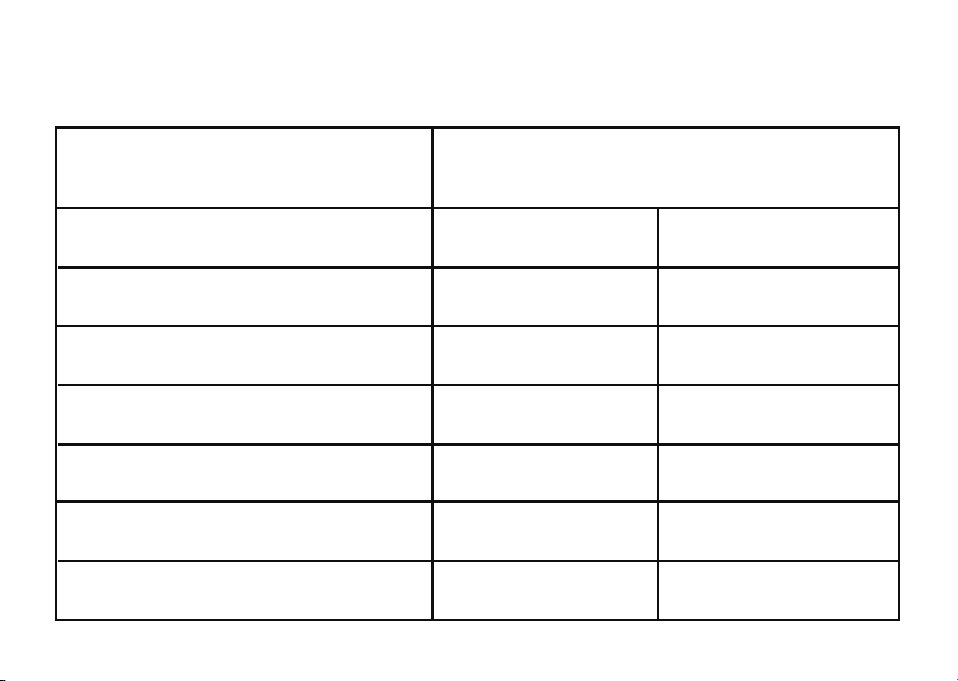
TECHNICAL SPECIFICATIONS
Parameter Name
Full on Gain (50dB SPL Input) HFA
Max
500Hz 100dBSPL
500Hz 70dBSPL
1500Hz
<6ms
250Hz-6000Hz
<4dB SPL
<25dB+3dB
≤3%+3%
110dB+3dB
45dB±5dB
Maximum Output (90dB SPL Input)
Total Harmonic Distortion+Noise
Self-generated Noise Level Limits
Frequency Response Smoothness
Frequency Range
Latency
Hearing Aids
01 02 03 04 05
06 07 08 09 10 11 12 13
14 15 16 17 18 19 20 21
22 23 24 25 26 27 28 29
30 31 32 33 34 35 36 37
38 39 40
41 42 43 44 45
46 48 49
47

TECHNICAL DESCRIPTION
Electrical Safety Classification: Internally powered equipment
Protection Against Electric Shock: Type B applied part
Mode of Operation: Continuous operation
Externally Connected Devices: Any external equipment connected to these hearing aids and powered
from the mains supply must comply with GB 9706.1-2020 or equivalent safety standards
Bluetooth Version: 5.3
Software Version: V1.0
OPERATING AND STORAGE CONDITIONS
1. Normal Operating Conditions
a. Ambient Temperature: -10°C to 40°C(14°F to 104°F)
b. Relative Humidity: ≤80%
c. Atmospheric Pressure: 86 kPa to 106 kPa
01 02 03 04 05
06 07 08 09 10 11 12 13
14 15 16 17 18 19 20 21
22 23 24 25 26 27 28 29
30 31 32 33 34 35 36 37
38 39 40 41
42 43 44 45
46 48 49
47

2. Storage Conditions
Products should be stored in a well-ventilated area free from corrosive gases and materials. The
environment should meet the following conditions.
a. Storage Temperature: -20°C to 55°C(-4°F to 131°F)
b. Relative Humidity: ≤93%
c. Atmospheric Pressure: 86 kPa to 106 kPa
3. Handle with care, avoid impacts.
4. It takes 1 hour to warm up from minimum storage and cool down from maximum storage
temperature before use.
01 02 03 04 05
06 07 08 09 10 11 12 13
14 15 16 17 18 19 20 21
22 23 24 25 26 27 28 29
30 31 32 33 34 35 36 37
38 39 40 41 42
43 44 45
46 48 49
47
ACTIVE IMPLANTABLE DEVICES
Flysound hearing aids have undergone rigorous testing and meet international standards for human
exposure to electromagnetic emissions, including Specific Absorption Rate(SAR), induced
electromagnetic power, and voltage.
The levels of these emissions are well below the internationally recognized safety limits for human
health and are safe for use in proximity to active medical implants, such as pacemakers and
defibrillators.
If you have an active implant, particularly a brain implant, consult with your implant manufacturer
regarding potential risks of electromagnetic interference.
Maintain a safe distance(at least 30cm)between multi-functional tool pen containing magnets(e.g.,
pens with magnets)and your implanted device.
Always follow the recommendations and guidelines provided by the manufacturer of your
implantable cardiac device, including pacemakers and defibrillators, regarding the use of magnets.
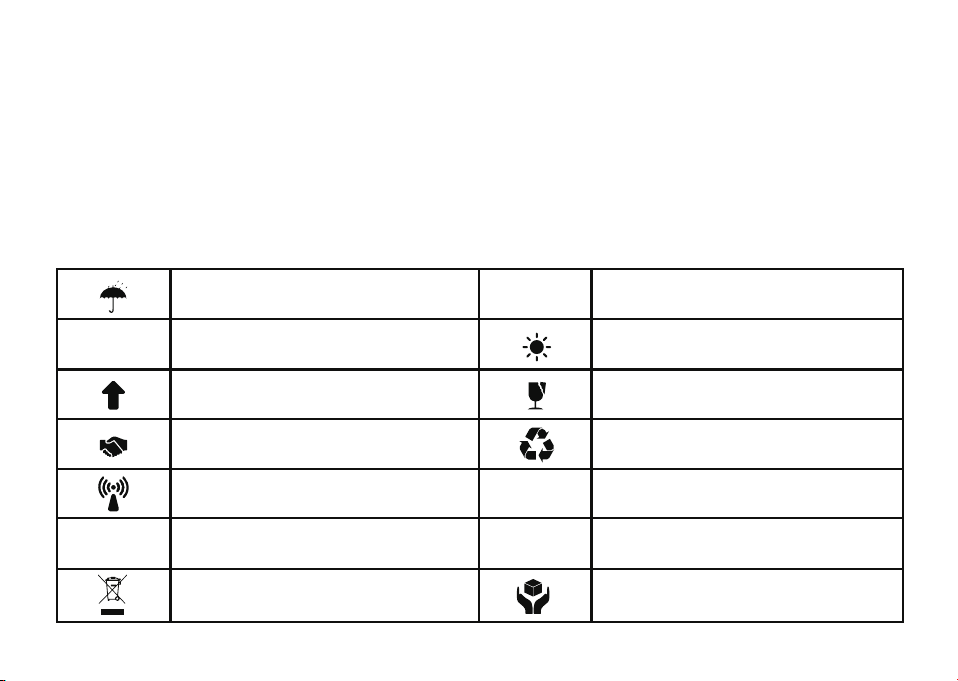
EXPLANATION OF GRAPHICAL
SYMBOLS USED IN MEDICAL DEVICE
LABELING
MEDICAL DEVICE IMAGES
Be afraid of rain
Up
Please follow local regulations
Nonionizing radiation
Class II equipment
Type BF application equipment Avoid the sun light
Fragile
Environmental protection
lifespan: 10 years
Follow the operating
instructions
Direct current
Note the attached documents
Separate collection of Waste Electrical and
Electronic Equipment
Handle with care
01 02 03 04 05
06 07 08 09 10 11 12 13
14 15 16 17 18 19 20 21
22 23 24 25 26 27 28 29
30 31 32 33 34 35 36 37
38 39 40 41 42 43
44 45
46 48 49
47

FCC REQUIREMENT
Any changes or modifications not expressly approved by the party responsible for compliance could
void the user's authority to operate the equipment.
This device complies with Part 15 of the FCC Rules. Operation is subjected to the following two
conditions.
(1) This device may not cause harmful interference, and
(2) This device must accept any interference received, including interference that may cause undesired
operation.This transmitter must not be co-located or operating in conjunction with any other antenna
or transmitter.
Note: This equipment has been tested and found to comply with the limits for a Class B digital device,
pursuant to Part 15 of the FCC Rules. These limits are designed to provide reasonable protection
against harmful interference in a residential installation. This equipment generates, uses, and can
radiate radio frequency energy, and if not installed and used in accordance with the instructions, may
cause harmful interference to radio communications.
01 02 03 04 05
06 07 08 09 10 11 12 13
14 15 16 17 18 19 20 21
22 23 24 25 26 27 28 29
30 31 32 33 34 35 36 37
38 39 40 41 42 43 44
45
46 48 49
47

There is no guarantee that interference will not occur in a particular installation. If this equipment
does cause harmful interference to radio or television reception, which can be determined by turning
the equipment off and on, the user is encouraged to try to correct the interference by one or more of
the following measures.
Reorient or relocate the receiving antenna.
Increase the separation between the equipment and receiver.
Connect the equipment into an outlet on a circuit different from that to which the receiver is
connected.
Consult the dealer or an experienced radio/TV technician for help.
RF Warning For Portable Device
The device has been evaluated to meet general RF exposure requirement. The device can be used in
portable exposure condition without restriction.
01 02 03 04 05
06 07 08 09 10 11 12 13
14 15 16 17 18 19 20 21
22 23 24 25 26 27 28 29
30 31 32 33 34 35 36 37
38 39 40 41 42 43 44 45
46 48 49
47
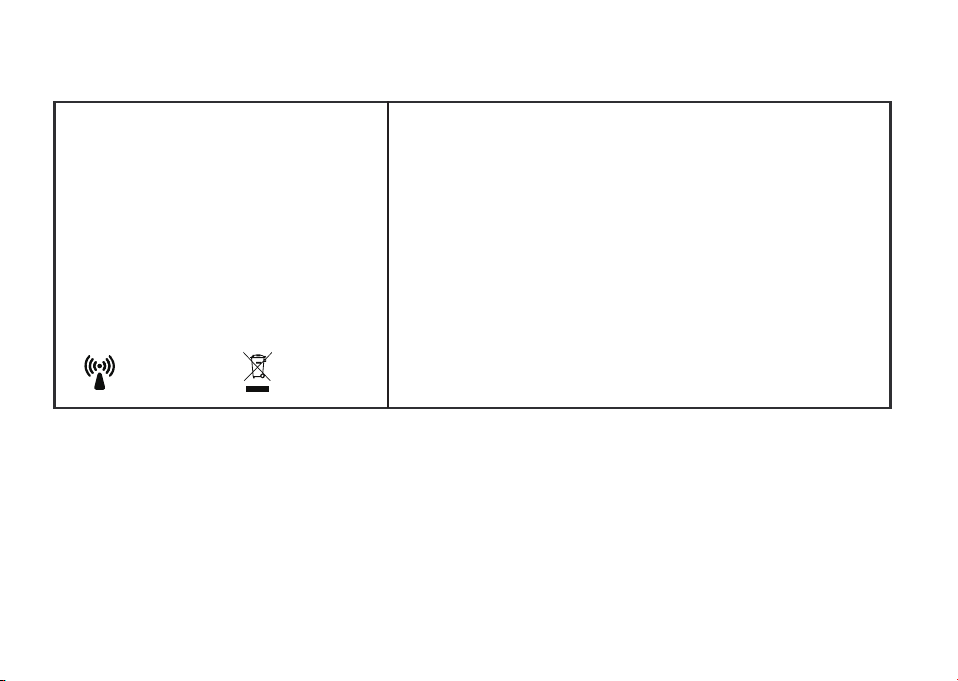
The FCC IDs for the earphone and charging case are located on the inner surface of the charging
case top cover.
NOTE: Changes or modifications not expressly approved by the party responsible for compliance
could void the user's authority to operate the equipment.
Label:
Hearing Aids
Model: B��
Made in China
Earphone 3.7V 55mAh
B02-EP
FCC ID:2BP4H-FSB02-EP
Shenzhen Flysounds Medical Technology Co., Ltd.
Input:5V
⎓0.6A
Charging Case 3.7V 550mAh
B02-CC
FCC ID:2BP4H-FSB02-CC
01 02 03 04 05
06 07 08 09 10 11 12 13
14 15 16 17 18 19 20 21
22 23 24 25 26 27 28 29
30 31 32 33 34 35 36 37
38 39 40 41 42 43 44 45
46 48 49
47

PRODUCT WARRANTY
TECHNICAL DESCRIPTION
Warranty Coverage: All Receiver in canal hearing aids by the company have 12 month free warranty for
non human failure from purchase date.
Exclusions
Damage from incorrect/improper use.
Damage from self disassembly or part assembly.
Damage from force majeure(flood, fire, earthquake, etc.)
Note: Please refer to www.flysounds.com for the latest user manual.
Date of Manual Preparation: 2025-11-04
01 02 03 04 05
06 07 08 09 10 11 12 13
14 15 16 17 18 19 20 21
22 23 24 25 26 27 28 29
30 31 32 33 34 35 36 37
38 39 40 41 42 43 44 45
46
48 49
47

WARNING
Remove and immediately recycle or dispose of used batteries according to local regulations and keep
away from children. Do NOT dispose of batteries in household trash or incinerate.
Even used batteries may cause severe injury or death. Call a local poison control center for treatment
information.
Battery type: Rechargeable lithium battery
Battery voltage: 3.7V
Non rechargeable batteries are not to be recharged.
Do not force discharge, recharge, disassemble, heat above 45°C or incinerate. Doing so may result in
injury due to venting, leakage or explosion resulting in chemical burns.
©2025 Shenzhen Flysounds Medical Technology Co., Ltd.
All rights reserved. Rev A 2025-11-04
01 02 03 04 05
06 07 08 09 10 11 12 13
14 15 16 17 18 19 20 21
22 23 24 25 26 27 28 29
30 31 32 33 34 35 36 37
38 39 40 41 42 43 44 45
46 48
49
47
Shenzhen Flysounds Medical Technology Co., Ltd.
Room 1816, Building A, Jindingshengkechuang Park, No. 356 Dahe Road, Qinghu Community,
Longhua Street, Longhua District, Shenzhen
Need more help?
The Flysounds customer support team is always at your service.
service@flysounds.com
Months
Warranty
12
+� ����������(7×24h online)
01 02 03 04 05
06 07 08 09 10 11 12 13
14 15 16 17 18 19 20 21
22 23 24 25 26 27 28 29
30 31 32 33 34 35 36 37
38 39 40 41 42 43 44 45
46 48 49
47