English Deutsche Français Español Italiano
1-8 9-16 17-24 25-32 33-40
J-905
Thank you for purchasing PRUNUS J-369 radio. In order to get the
best from the radio, please read this manual carefully before using
and take special notice of the section on precautions. And please
keep it for future reference.
J-369 Hand Crank Radio User Manual
SOS
J-369 Hand Crank Radio
FM 87 92 98 104 108 MHz
AM 520 700 1000 1300 1620 KHz
TUNING

Ⅰ
PRECAUTIONS
1. Recharge the radio for one hour with the adapter or spin the crank for
3-5 min before use to activate the radio.
2. The radio is not waterproof. Keep the unit dry as moisture and liquids
can damage it.
3. Keep the radio away from sources of heat such as radiators, hot water
pipes or fire.
4. Keep the radio away from any solvents, such as white spirit, paraffin
or petrol.
5. Don’t throw, drop, shake or put heavy pressure on the radio.
6. Don’t look directly into the LED flashlight for the bright light might
hurt your eyes.
2
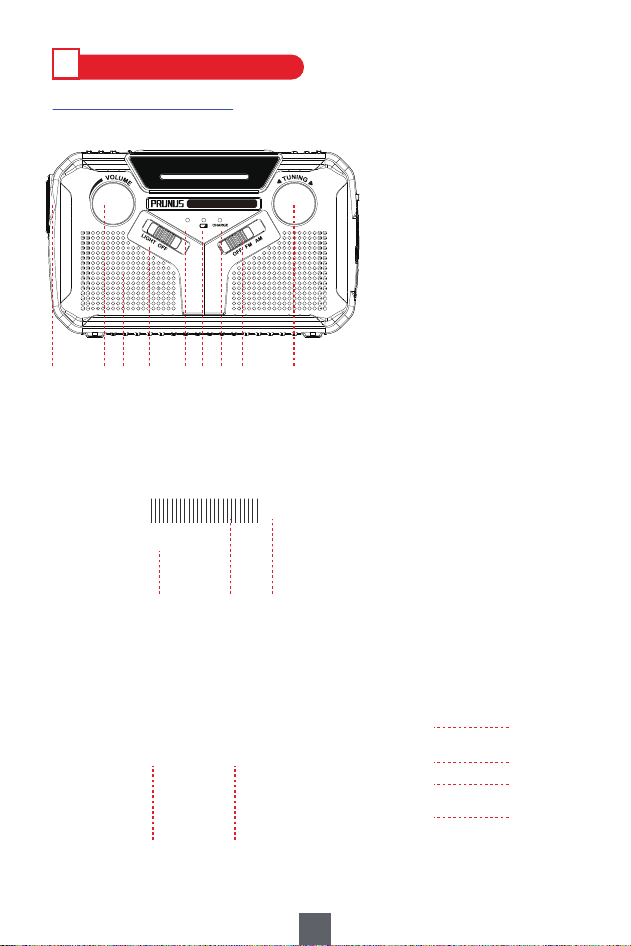
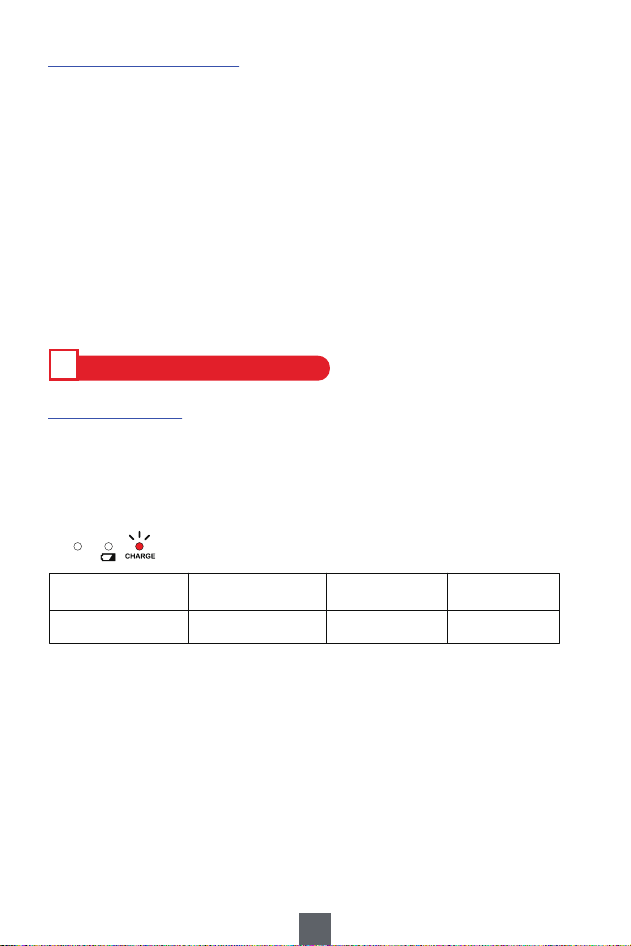
① Frequency Tuning Knob
② OFF/FM/AM Button
③ Charging Indicator
④ Output Power Indicator
⑤ Tuning Indicator
⑥ LIGHT ON/OFF/SOS
⑦ Speaker
⑧ Volume Control
⑨ LED Flashlight
⑩ Telescopic Antenna
⑪ LED Reading Lamp
⑫ Solar panel
⑬ LI-ION/AA Switch
⑭ DC5V IN Jack
⑮ USB 5V OUT Port
⑯ 3.5mm Earphone Jack
⑰ Hand Crank
⑱ 3*AA Battery Slot
Ⅱ
PRODUCT INTRODUCTION
1. Product Components
3
SOS
J-369 Hand Crank Radio
FM 87 92 98 104 108 MHz
AM 520 700 1000 1300 1620 KHz
TUNING
② ①⑧⑨ ③④⑤⑥⑦
⑩
⑪⑫
⑱⑰
⑬
⑭
⑮
⑯
2. Product Specifications
1) Model No: J-369
2) Frequency: FM: 87-108Mhz; AM: 520-1620Khz
3) 4 Ways to Charge: DC5V Charging/3*AA Battery(Not included)
/Hand Crank/Solar Panel
4) Power: Built-in 2500MAh*18650 lithium battery/3*AA Battery(Not included)
5) Other Functions: LED Flashlight 1W; Reading Lamp 2W
6) Unit Size: 15.5*4.2*9.4cm
7) Unit Weight: 364g
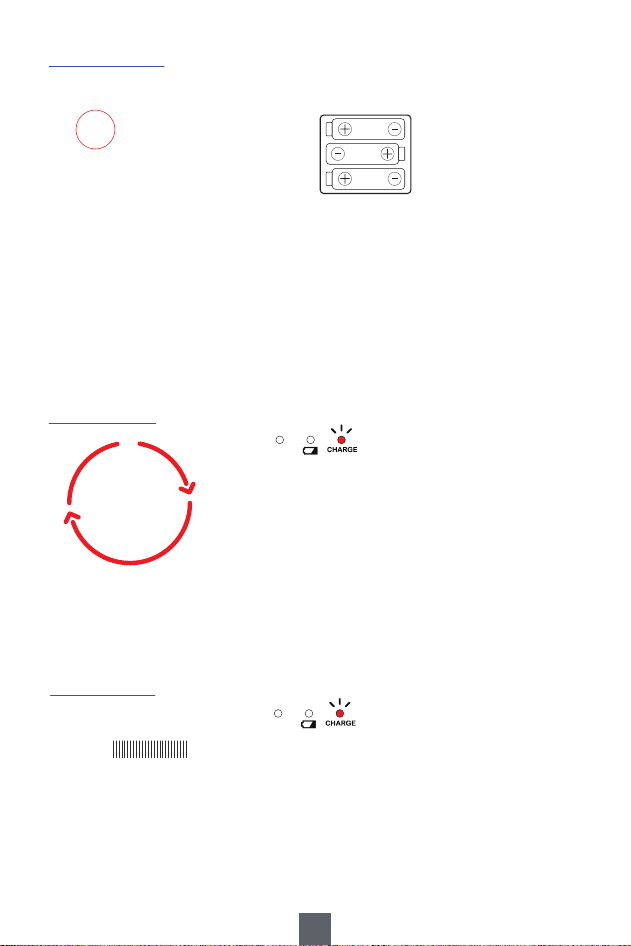
1. DC 5V Charging
Plug the smaller end of USB cable into <⑭DC5V IN Jack> on the radio
and other end into the USB port of your computer or power adapter.
It takes 2.5 hours around to charge.
Ⅲ
POWER YOUR RADIO - 4 WAYS
TUNING
Stop Flickering Once Fully Charged
ONE FULL CHARGE AM/FM (60% vol.)
11-12h
41h
48h
LED Flashlight Reading Lamp
LAST ABOUT
Note:
a. To protect the radio, please charge the radio with standard DC5V/0.5-2A charger
(or other devices that can supply this type of power).
b. To protect the battery, please try to avoid charging the radio continuously for a
long time, such as 12 hours or more.
c. If an adapter is important for you, please send message “PRUNUS Charger” to
E-mail: [email protected] (reply in 1 working day) to get PRUNUS
quality charger with indicator at 50% discount.
4
2. 3*AA Battery
This radio can also be used with 3 pieces of AA batteries (not included).
3. Hand Crank
Unfold the handle from the back of the radio
and spin it in either direction. Then start to
charge the built-in battery.
TUNING
TUNING
Note:
a. Remove the AA batteries if you won’t use them for a long time.
b. Don’t use a new battery and old battery together.
c. Don’t use batteries of different type or brand together.
d. Don’t use batteries with different power (mAh).
e. Don’t use alkaline battery and rechargeable battery together.
4. Solar Panel
Place the solar panel in direct sunlight. But it’s
difficult to fully charge the unit with solar panel, so
it’s mostly used for maintaining the built-in battery.
Note:
a. Please turn the radio off when charging.
b. The solar panel has a lifespan of more than 25 years when used for 6 hours per day.
Open the cover in the
direction of arrow mark.
Follow the electrode marks
inside to install the battery.
5
FM 87
AM 520
Solar Panel
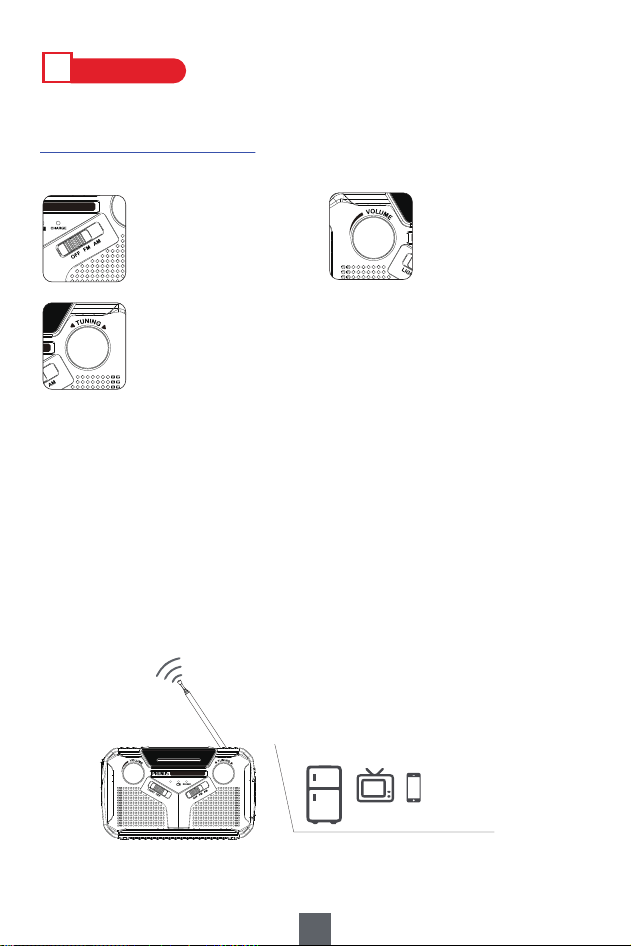
1. Listen to Stations - FM/AM
1) How to Get the Station?
2) How to Get Better Reception?
A. Adjust the telescopic antenna while listening to FM, but reposition the
radio while listening to AM.
B. When you’re indoors, approach the radio to the window and try to keep it
away from the electronic devices, such as computer, TVs, refrigerators,
mobile phones, etc. if the signal is not good.
According to the power supply, push <⑬LI-ION/AA Switch> to “LI-ION” or “AA”.
Ⅳ
HOW TO USE
Step1:
Choose “FM” or “AM”.
Step2:
Tune to the station you want to listen to.
If there’s available station, the <⑤Tuning Indicator> will turn green.
Step3:
Tune to the volume
you’re comfortable with.
SOS
J-369 Hand Crank Radio
M 87 92 98 104 108 MHz
AM 520 700 1000 1300 1620 KHz
TUNING
SOS
J-369 Hand Crank Radio
FM 87 92 98 104 108 MHz
AM 520 700 1000 1300 1620 KHz
TUNING
J-369 Hand Crank Radio
98 104 108 MHz
1000 1300 1620 KHz
Away From the Electronic Devices
SOS
J-369 Hand Crank Radio
FM 87 92 98 104 108 MHz
AM 520
700
1000
1300 1620
K
Hz
TUNING
6
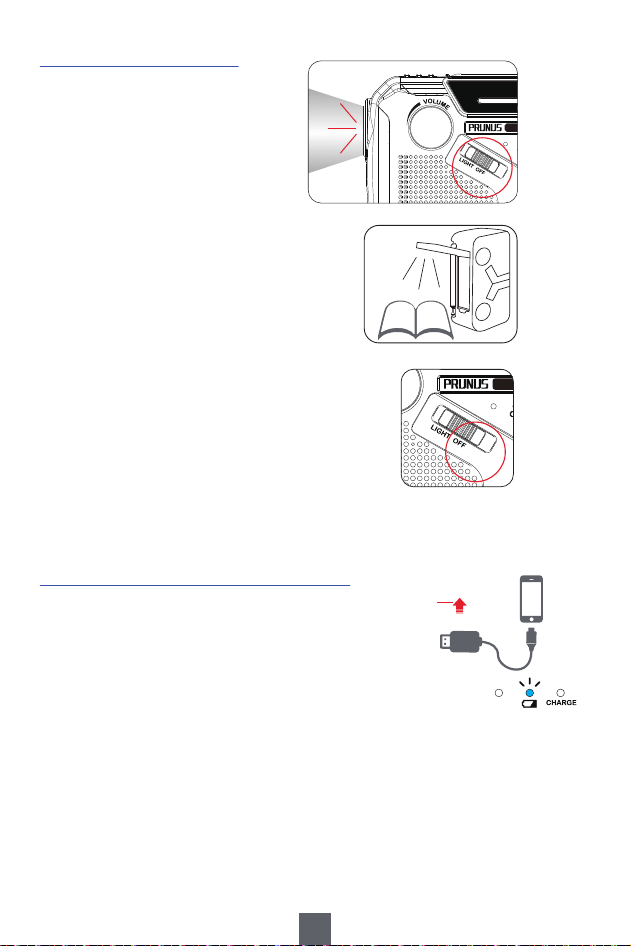
2. Little Helper - LED Light
1) LED Flashlight
Flashlight is used for long-distance
illumination, especially for looking for
something in the dark.
3. USB Charger - Charge External Devices
Charging external devices is powered by built-in batteries.
Push <⑬LI-ION/AA Switch> to "LI-ION" first. Then insert the
USB cable into the USB port on the radio and connect to
your devices. It will start to charge.
2) Reading Lamp
Just pull the solar panel to turn the reading
lamp ON. If necessary, you can place
something under the radio as a stand to adjust
it to a height for comfortable reading.
3) SOS Alarm
Features SOS alarm that you can use to call for
help if you’re in an emergency. The LED flashlight
shines with speaker giving an alarm.
Tips:
a. In light of lower capacity and charging current, the radio typically charge your phone
significantly slower than wall connection and regular power bank. And to avoid
shortening battery life, we recommend take it as a backup for emergency use only.
b. To 100% ensure the stability of the radio operation, especially the circuit, the radio does
not support charging USB device through AA batteries, but only the built-in battery acts
as an emergency charger.
SOS
J-369 Hand Crank Radio
FM 87 92 98 104 108 MHz
AM 520
700
1000
1300 1620
K
Hz
TUNING
SOS
J-369 Hand Crank Radio
FM 87 92 98 104 108 MHz
AM 520 700 1000 1300 1620 KHz
TUNING
7
TUNING

Ⅴ
FAQ
Power Supply
Q1: Can’t turn on the radio when using for the first time?
A1: The long-distance transport may cause the battery to run out
automatically. So, please charge the radio before using it for one
hour to activate it.
Q2: Will it stop charging automatically when the radio is fully charged?
A2: Well, it will. The radio is of overcharge protection. But to protect the
battery, we recommend not to charge over 12 hours at a time.
Q3: Includes an adapter?
A3: No. If you need one, you could buy one with 50% discount at
PRUNUS store.
Q4: Can I use the radio while it’s still charging?
A4: Better not. Because that would affect the reception quality of the radio
and shorten the battery life.
Ⅵ
AFTER-SALES SERVICE
1. If you got any problem, please scan the QR code on the instruction of
your country language. Then click “Ask a question”and log into
Amazon to contact us. We will provide you with the best service.
2. You can also send your messages to our customer service e-mail:
8