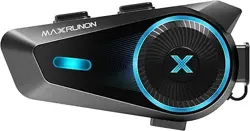

V1.0
Intelligent Helmet Bluetooth Headset
Product
Manual
1
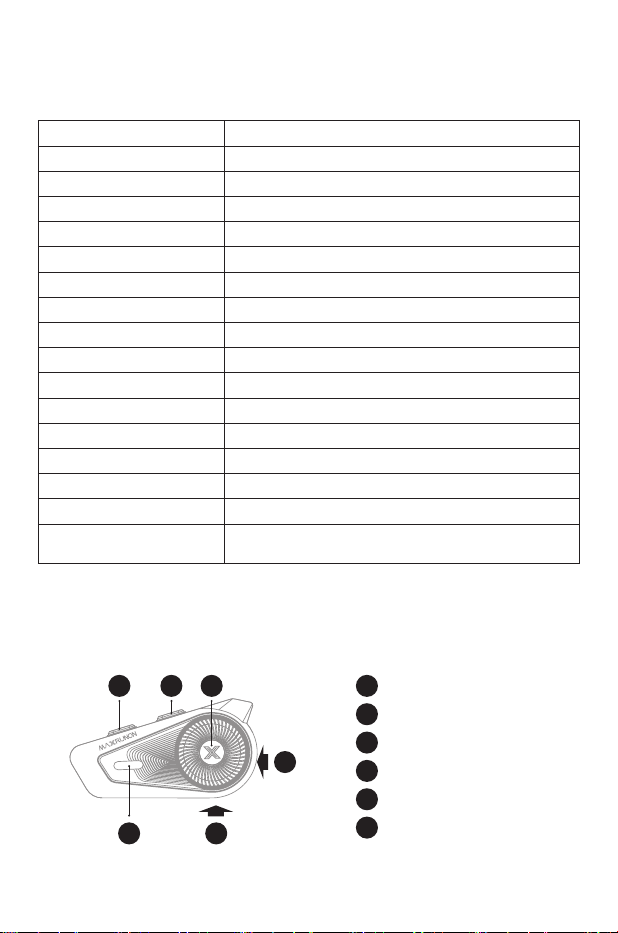
Product Specications
Product Parameter
Product Model MAXRUNON D10
Bluetooth Name MAXRUNON D10
Bluetooth Version 5.4
Speaker Unit 40 mm
Boom Microphone Bidirectional
Wired Microphone Omnidirectional
Voice Noise Reduction Yes, AI Noise Reduction
Batte Capacity 1000mAh
Waterproof Level IPX7
Base Back-Clip
Charging Po Type-C
Group Intercom 4 Riders
FM Function Yes
Voice Command Yes
Universal Pairing Yes
Intercom Distance
Device Suppos Bluetooth intercom, allowing up to 4
users to connect and communicate over 1-2 kilometers.
•Device suppos 18 oine voice commands.
•Do not use a high-pressure washer gun to wash the device
•Do not use a charger that exceeds 15V, and avoid charging the headphones when they
are wet.
5
Audio Inteace
4
Intercom button
1
Volume -
2
Volume+
3
Function button
6
Type-C Charging Po
4 5
6
1 2 3
2
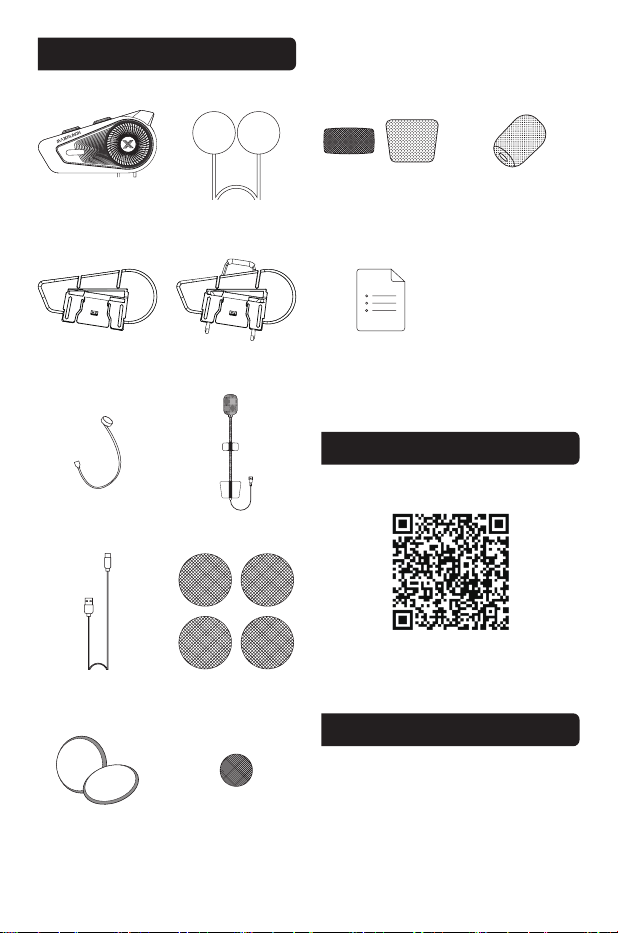
・PACKAGE CONTENTS
・APP Download
・Tech Support
MAXRUNON D10 Main Unit
Speaker Unit
3M Glue Plate Back Clip
Wired Microphone Boom Microphone
Type-C Cable
Speaker Pads
Velcro For Speaker
Velcro For Boom Mic
Velcro For Hybrid Mic
Microphone Sponge
Manual
For more features, please scan the QR
code to download, install and use the APP.
suppo@maxrunon.com
3
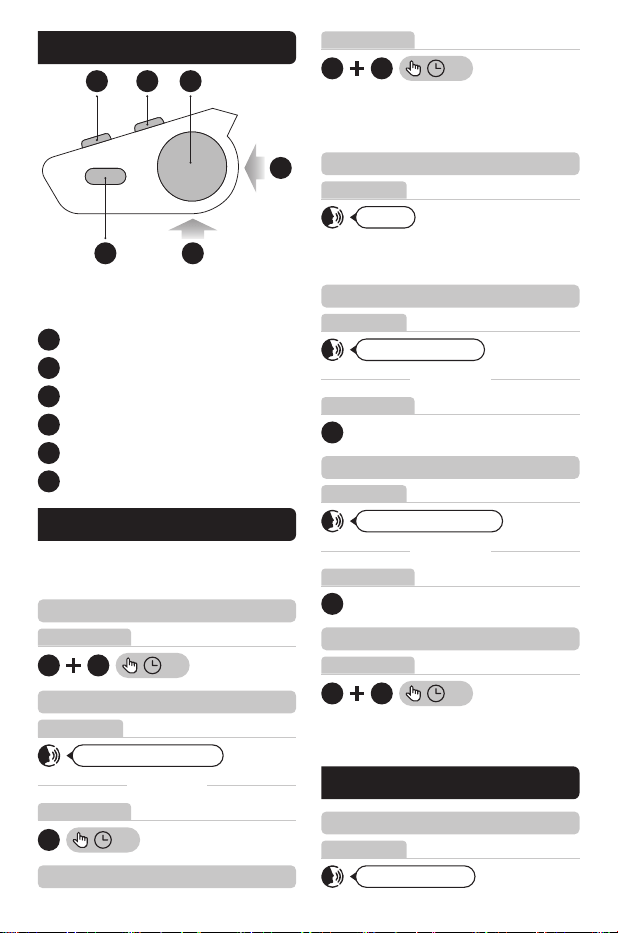
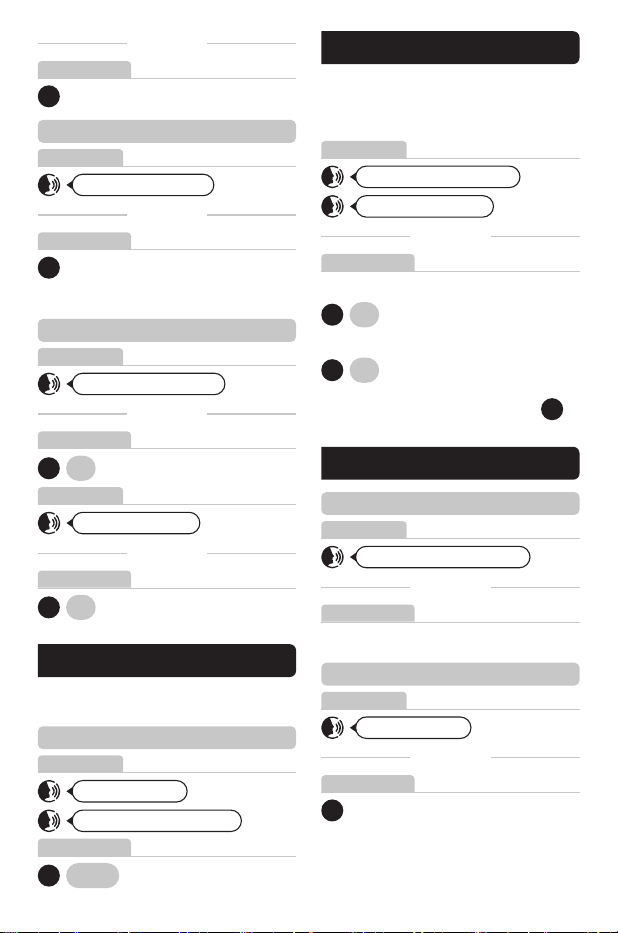
1.Function
4 5
6
1 2 3
5
Audio Inteace
4
Intercom button
1
Volume -
2
Volume +
3
Funciton button
6
Type-C Charging Po
Note:
The product appearance in the image is
for reference only;
Please see the actual product.
• Activate the intelligent voice assistant
• Volume up
• Volume down
• Restoring facto settings
2
1
Hi Max
Hi Max, volume up
Hi Max, volume down
4 2
2S
2 3
3S
Note: Simultaneously long press the
intercom button and any volume button
for 2s.
Note: “Voice Dialing” switch must be
turned on in the app rst.
YOU CAN ALSO
YOU CAN ALSO
YOU CAN ALSO
Note: The device will reboot and reset to
the manufacturer settings.
Button operation
Voice operation
Voice operation
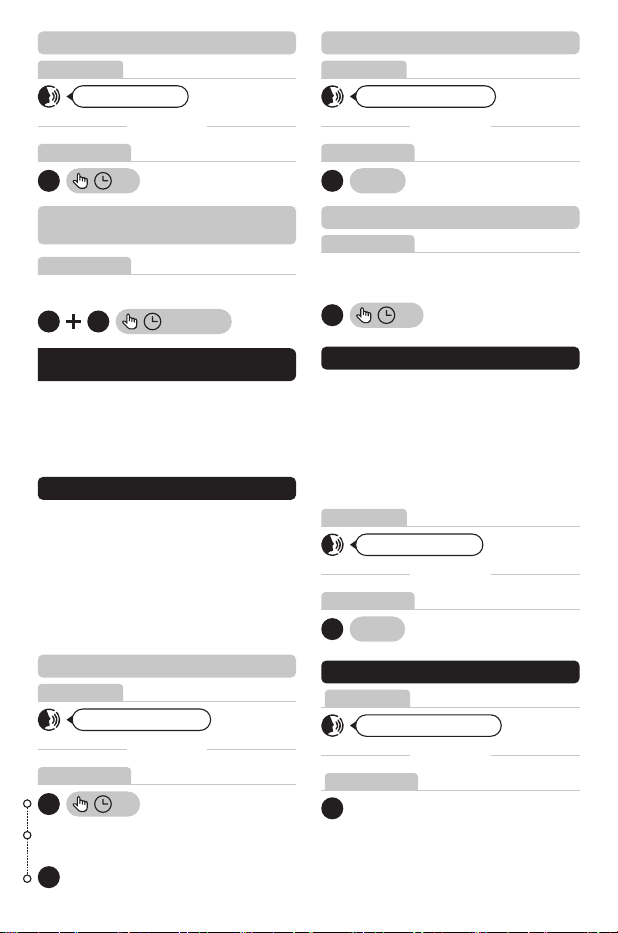
3.Music
• Play music
Hi Max, music on
Voice operation
Voice operation
Button operation
Button operation
Button operation
2.Basic operations
• Power on/o
• Microphone on/o
• Phone pairing
Hi Max, phone pairing
3
3S
4 3
2S
Button operation
Voice operation
Button operation
There are two methods for operating your
devices:voice commands and buttons.
Select your preference.
4
YOU CAN ALSO
5.Switch station
3S
2
3S
1
• Pause music
• Switch music
3
3
Hi Max, pause music
Hi Max, previous track
Hi Max, next track
Note: Ensure the music player is active
YOU CAN ALSO
YOU CAN ALSO
YOU CAN ALSO
Voice operation
Voice operation
Voice operation
Button operation
Button operation
Button operation
Button operation
4.Radio
• Turn on/o radio
×2 Tap
3
Hi Max, radio on
Hi Max, turn o the radio
Voice operation
Button operation
Note: In FM playback mode, sho press
to go to the next station and play.
Note: Radio function must be turned on.
Hi Max, previous station
Hi Max, next station
YOU CAN ALSO
YOU CAN ALSO
YOU CAN ALSO
Voice operation
3S
2
To switch to the previous FM channel.
Button operation
3S
1
To switch to the next FM channel.
3
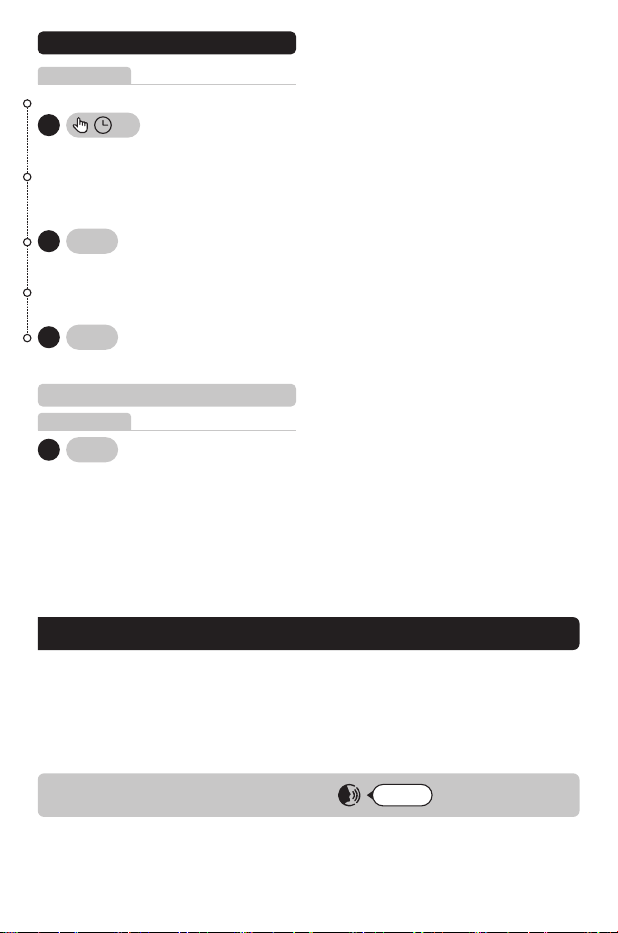
6.Phone call
• Answer phone call
Hi Max, answer the phone
Voice operation
Button operation
Sho press any Button to answer.
• End phone call
4
Hi Max, hang up
Voice operation
Button operation
Please check the specification to see if
this function is suppoed.
Please check the specification to see if
this function is suppoed.
5
• Reject phone call
• Automatic call answering
function on/o
Hi Max, hang up
4
3S
Voice operation
Button operation
Button operation
Can be turned on and o by APP.
1 2
3s On/O
YOU CAN ALSO
Cancer the group when you’re in the
group mesh state.
• Cancel group mesh
Button operation
4
2S
• Free mode
• Group mode
Hi Max, group mode
Voice operation
Button operation
4
Switch
YOU CAN ALSO
Free mode is an open intercom mode that
does not require pairing. As long as you
are in the communication range, you can
automatically connect up to 4 people for
intercom.
• End intercom
Hi Max, free mode
Hi Max, end intercom
Voice operation
Voice operation
Button operation
Button operation
4
4
Switch
YOU CAN ALSO
YOU CAN ALSO
This product has 2 modes:
Group Mode & Free Mode.
Switching from group mode to universal
pairing will disconnect the intercom from
group mode and enter pairing mode.
7.Communicate with others
• Group mode
Group Mode is a private communication
feature based on Bluetooth intercom
technology. A group network must be set
up before communication stas, and it
suppos up to 4 paicipants for group
communication.
• Group mesh
Voice operation
Button operation
After hearing the number of team
members on the broadcast
4
2S
4
Hi Max, group mesh
YOU CAN ALSO
Please refer to the product specication
for the maximum paring members
Please refer to the product specication
for the maximum paring members
6
• Bluetooth universal pairing
Button operation
Voice announcement “Universal pairing”
Voice announcement“Universal connected”
Activate intercom
×2 Tap
3
Voice announcement “Sta pairing”
Simultaneously, other bluetooth headsets
need to activate bluetooth pairing mode
With power on
light ashes red and blue.
3
3S
light ashes red and green.
×2 Tap
4
• Turn o Bluetooth universal pairing
Button operation
×2 Tap
3
This product has two operation modes: intelligent voice and buttons, and you can freely
choose according to your own habits.
• When the main unit is connected to the ocial app and the phone is connected to the
internet, the main unit can peorm intelligent voice interaction operations such as route
navigation, sending messages, making and receiving calls, playing music, and so on.
• When not connected to the network, the main unit can peorm voice commands through
local oine voice commands.
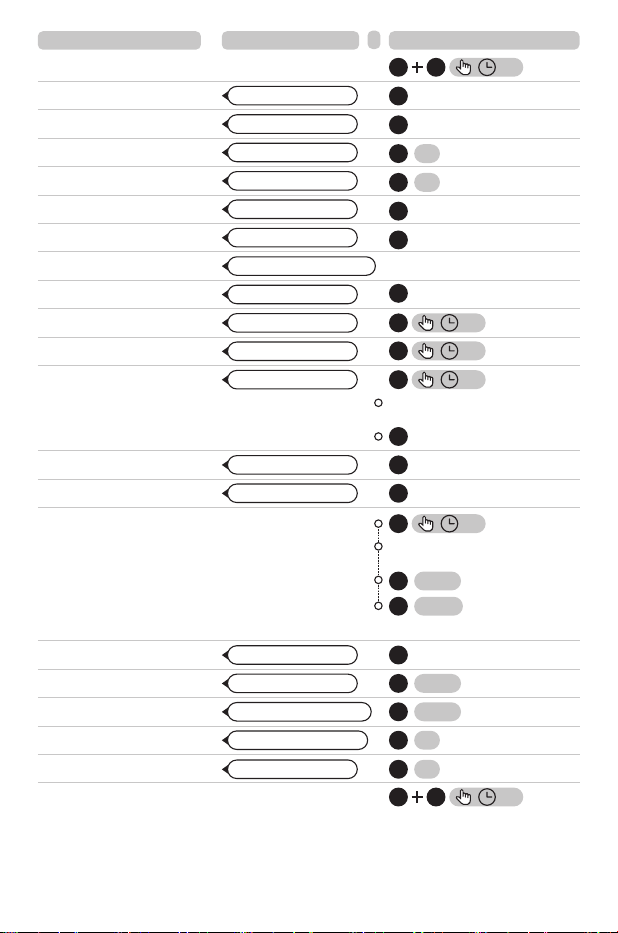
8.Quick operation
Hi Max
Awakening words
7
POWER ON/OFF
PLAY MUSIC
PAUSE MUSIC
PREVIOUS TRACK
NEXT TRACK
VOLUME +
VOLUME -
Any button
After hearing the number of team
members on the broadcast
ANSWER CALL
END CALL
REJECT CALL
PHONE PAIRING
GROUP MESH
GROUP MODE
FREE MODE
UNIVERSAL MODE
XXXXXXXXXXXXXX
XXXXXXXXXXXXXX
Function Voice command
Or
Button operation
Hi Max, phone pairing
Hi Max, volume up
Hi Max, answer the phone
Hi Max, hang up
Hi Max, hang up
Hi Max, pause music
Hi Max, previous track
Hi Max, next track
Hi Max, volume down
Hi Max, music on
Hi Max, group mesh
Hi Max, group mode
Hi Max, free mode
4
3
2S
3
3S
4
3S
4
2S
2
3S
1
3S
4
4
4
3
3
2
1
4
END INTERCOM
RADIO ON
RADIO OFF
PREVIOUS STATION
NEXT STATION
FACTORY RESET
Hi Max, end intercom
Hi Max, radio on
Hi Max, turn o the radio
Hi Max, previous station
Hi Max, next station
2 3
3S
×2 Tap
3
×2 Tap
3
2
3S
1
3S
4
Other bluetooth headsets need to
activate bluetooth pairing mode
3
3S
4
×2 Tap
×2 Tap
Activate intercom
3
Note: The voice command above are for high-end models.
For other models, Please refer to the manual for the number of voice command.

RF exposure statement
This equipment complies with the FCC and ISED radiation exposure limits set forth for an
uncontrolled environment. This transmitter must not be co-located or operating in conjunction
with any other antenna or transmitter.
Cet équipement est conforme aux limites d'exposition aux rayonnements de la FCC et de l'ISED
établies pour un environnement non contrôlé. Cet émetteur ne doit pas être co-localisé ou
fonctionner en conjonction avec une autre antenne ou un autre émetteur.
FCC Warning
This device complies with Pa 15 of the FCC Rules. Operation is subject to the following two
conditions:
(1) This device may not cause harmful interference, and (2) this device must accept any
inteerence received, including inteerence that may cause undesired operation.
Note: This equipment has been tested and found to comply with the limits for a Class B digital
device, pursuant to pa 15 of the FCC Rules. These limits are designed to provide reasonable
protection against harmful inteerence in a residential installation. This equipment generates,
uses and can radiate radio frequency energy and, if not installed and used in accordance with
the instructions, may cause harmful inteerence to radio communications. However, there is no
guarantee that inteerence will not occur in a paicular installation. If this equipment does cause
harmful inteerence to radio or television reception, which can be determined by turning the
equipment o and on, the user is encouraged to t to correct the inteerence by one or more of
the following measures:
—Reorient or relocate the receiving antenna.
—Increase the separation between the equipment and receiver.
—Connect the equipment into an outlet on a circuit dierent from that to which the receiver is
connected.
—Consult the dealer or an experienced radio/TV technician for help.
NOTE 2: Any changes or modifications to this unit not expressly approved by the party
responsible for compliance could void the user's authority to operate the equipment.
IC WARNING
This device contains licence-exempt transmitter(s) that comply with Innovation, Science and
Economic Development Canada’s licence-exempt RSS(s). Operation is subject to the following
two conditions:
(1) This device may not cause inteerence.
(2) This device must accept any inteerence, including inteerence that may cause undesired
operation of the device.
L’émetteur/récepteur exempt de licence contenu dans le présent appareil est conforme aux CNR
d’Innovation, Sciences et Développement économique Canada applicables aux appareils radio
exempts de licence. L’exploitation est autorisée aux deux conditions suivantes:
1. L’appareil ne doit pas produire de brouillage;
2. L’appareil doit accepter tout brouillage radioélectrique subi, même si le brouillage est
susceptible d’en compromettre le fonctionnement.
8