8 9 107
Welcome,
Get started!
home.id/HSP5800
Registration
and Bene�ts
Digital manual
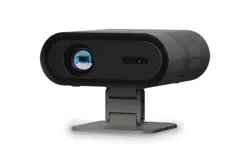
Wireless Spotlight
Camera
HSP5800
Home Safety
ENGLISH
Thank you for purchasing a Philips Home Safety product.
To get started, please download the Philips Home Safety app to set up and man-
age all your devices directly from your phone.
Simply connect to your home Wi-Fi and enjoy total control.
1. Important information
• Do not handle adapters, plugs or the mains cord with wet hands.
• Make sure the wall or ceiling is solid enough to support the camera.
• Only use certied DC adapters.
• When attaching the camera to a ceiling, only use the mount included in the
box.
• CAUTION 5 V 2 A/1.5 A DC ONLY.
• If the camera housing is damaged in any way, do not use.
• After setting up the camera, maintain an operating distance of at least 20 cm
between the camera and user.
• The camera has a Wi-Fi module, 2.4 GHz 802.11 b/g/n, with a maximum power
output of 66 mW EIRP.
2. Electromagnetic elds (EMF)
This appliance complies with the applicable standards and regulations regarding
exposure to electromagnetic elds.
3. Recycling
• This symbol means that electrical products and batteries shall not be
disposed of with normal household waste.
• Follow your country’s rules for the separate collection of electrical
products and batteries.
Removal of built-in rechargeable battery
• The built-in rechargeable battery must only be removed by a qualied
professional when the appliance is discarded. Before removing the battery,
make sure that the appliance is disconnected from the wall socket and that the
battery is completely empty.
Take any necessary safety precautions when you handle tools to open the appli-
ance and when you dispose of the rechargeable battery.
When you handle batteries, make sure that your hands, the product and the
batteries are dry.
To avoid accidental short-circuiting of batteries after removal, do not let battery
terminals come into contact with metal objects (e.g. coins, hairpins, rings). Do not
wrap batteries in aluminum foil. Tape battery terminals or put batteries in a plastic
bag before you discard them.
4. Technical specications
Storage Supports up to 128G Micro SD card (not included)
Wi-Fi IEEE 802.11 b/g/n, support 2.4 GHz
5. Warranty and support
Versuni oers a two-year warranty after purchase on this product. This warranty
is not valid if a defect is due to incorrect use or poor maintenance. Our warranty
does not aect your rights under law as a consumer. For more information or for
invoking the warranty, please visit our website home.id/HSP5800.
EN
Welcome, Get started!
EN
Home Safety
EN
Wireless Spotlight Camera
EN
Registration and Benets
AR
ايازملاو ليجستلا
EN
Digital manual
AR
يودي يمقر
AR
!مادختسا أدباو ل
ّ
ضفت ،كب
ً
هأ
AR
ةيلزنملا ةمسلا
AR
ةيكلس فشاك ءوضب اريماك
PHILIPS and the Philips Shield Emblem are registered trademarks of
Koninklijke Philips N.V. and are used under license.
This product has been manufactured by and is sold under the
responsibility of Versuni Holding B.V., and Versuni Holding B.V. is the
warrantor in relation to this product.
2023 © Versuni Holding B.V.
6880.010.0041.2 (03/12/2024)
ةيبرعلا
.Philips نم Home Safety ةعومجم نم جتنم ءارش ىلع كل ا
ً
ركش
نم ةرشابم اهترادإو كتزهجأ لك دادع Philips نم Home Safety قيبطت ليزنت ىجر
ُ
ي ،ءدبلل
.كفتاه
.لماكلا مكحتلاب عاتمتساو ةيلزنملا Wi-Fi ةكبشب لاصتا ىوس كيلع ام
1 .ةماه تامولعم
•.ةللبم ٍديأب يسيئرلا ةقاطلا كلس وأ سباقملا وأ توحملا سملت
•.اريماكلا معدل يفكي امب بلص فقسلا وأ رادجلا نأ نم دكأت
•.ةدمتعملا رمتسملا رايتلا توحم طقف مدختسا
•.قودنصلا يف نمضملا بيكرتلا دنسم طقف مدختسا ،فقسلاب اريماكلا بيكرت دنع
•.طقف رمتسم رايت ريبمأ 1,5/ريبمأ 2 تلوف 5 ريذحت
• .اهمدختست ف ،لاكشا نم لكش يأب ةررضتم اريماكلا ةينب تناك اذإ
•.مدختسملاو اريماكلا نيب مس 20 نع لقت ليغشت ةفاسم ىلع ظفاح ،اريماكلا دادعإ دعب
• غلبت ىوصق جارخإ ةردق عم 802.11 b/g/n زترهاجيج 2,4 ددرتب WiFi ةدحوب ةدوزم اريماكلا يتأت
.(EIRP) ا
ً
يهاجتا سناجتملا عاعشا ةقاطل ةئفاكملا ةميقلا نم طاو يللم 66
2 .(EMF) ةيسيطانغمورهكلا لوقحلا
لوقحلل ض
ّ
رعتلاب ةق
ّ
لعتملا ةقبطملا ةمظناو ريياعملا عم زاهجلا اذه قفاوتي
.ةيسيطانغمورهكلا
3 .ريودتلا ةداعإ
• عم تايراطبلاو ةيئابرهكلا تاجتنملا نم ص
ّ
لختلا مدع ةرورض ىلإ زمرلا اذه ريشي
.ةيداعلا ةيلزنملا تايافنلا
• ةيئابرهكلا تاجتنملل لصفنملا عيمجتلاب ق
ّ
لعتي ام يف كدلب يف ةيراسلا نيناوقلا عبتا
.تايراطبلاو
نحشلا ةداع ةلباقلا ةنمضملا ةيراطبلا ةلازإ
• دنع لهؤم صصختم ةطساوب إ نحشلا ةداع ةلباقلا ةنمضملا ةيراطبلا ةلازإ متت أ بجي
ةيراطبلا نأو طئاحلا ذخأم نع زاهجلا لصف نم دكأت ،ةيراطبلا ةلازإ لبق .زاهجلا نم صلختلا
.ا
ً
مامت ةغراف
نم صلختلا دنعو زاهجلا حتفل تاودا عم لماعتلا دنع ةمسلل ةمز تاطايتحا يأ ذاختا مزلي
.نحشلا ةداع ةلباقلا ةيراطبلا
.تايراطبلاو جتنملاو كي
َ
دي نم لك فافج نم دكأت ،تايراطبلا عم لماعتلا دنع
سمت تايراطبلا فارطأ عدت ،اهتلازإ دعب تايراطبلل يضرعلا ةيئابرهكلا ةرادلا رصق يدافتل
فلب مقت .(متاوخلاو ،رعشلا سيبابدو ،ةيندعملا عطقلا ،لاثملا ليبس ىلع) ةيندعم ا
ً
ماسجأ
يف تايراطبلا ع
َ
ض وأ تايراطبلا فارطأ ىلع ا
ً
قص ا
ً
طيرش ع
َ
ض .موينمولا قروب تايراطبلا
.اهنم ص
ّ
لختلا لبق يكيتسب سيك
4 .ةينقتلا تافصاوملا
نيزختلا (ةنمضم ريغ) اجيج 128 ىلإ لصت ةعسب Micro SD ةقاطب معدي
Wi-Fiزترهاجيج 2,4 قاطن معدي ،802,11 b/g/n IEEE
5 .معدلاو نامضلا
ا
ً
حلاص نامضلا اذه دع
ُ
ي .ءارشلا دعب جتنملا اذه ىلع ني
َ
تنس ةدمل ا
ً
نامض Versuni ةكرش م
ّ
دقت
يف نامضلا اذه رثؤي .ةئيدرلا ةنايصلا وأ حيحصلا ريغ مادختسا ببسب لطع دوجو لاح يف
وأ تامولعملا نم ديزملا ىلع لوصحلل .ا
ً
كلهتسم كتفصب نوناقلا كل اهحنمي يتلا قوقحلا
.home.id/HSP5800 ينورتكلا عقوملا ةرايزب ل
ّ
ضفت ،نامضلا نم ةدافتسل

1 2 3 4 65
1
2
1
2
1 2
3 4
5 6
Recommended
height= 2-3 m
40°
Tilt= 360°
ىصوملا عافترا
م 2-3 = هب
40
ةجرد
ةجرد 360 = ليملا
• ةملكو Wi-Fi ةكبش مسا ءاقبإ ىجر
ُ
ي
.ديلا لوانتم يف رورملا
• ماظنب لمعي لومحملا كزاهج نأ نم دكأت
Android 8 وأ ىلعأ وأ iOS 15 ليغشتلا
.ىلعأ وأ
• 2,4 قاطنب Wi-Fi ةكبشب إ لصتت
.زترهاجيج
.(زترهاجيج 5 قاطنب ةكبشلا معد متي )
،ديلاب ةيفلخلا ةحوللا حتفا :ىلوا ةوطخلا
ءزجلا دنع نم عافترا تاذ ةحوللا ىلع رقناو
.نحشلا لخدم نع ثحباو ،قيمعلا
1 3 4 5
What’s in the box ةمزحلا ىوتحم Setting up دادعا How to place it زاهجلا عضو ةيفيكWhere to place it زاهجلا عضو ناكم
3x 3x
24/7
Video and Audio
Monitoring
5S
1 2
3 4
Strong Wi-Fi signal
4 meters
IP67 waterproof
Note:
• Avoid installing the camera near
swaying trees.
• Do not position the camera to face
intense light sources, such as direct
sunlight or bright lamp lights.
• Refrain from placing the camera
near outlets, including those for
air conditioners, humidiers, or
projector heat vents.
• Opt for a quiet location to conserve
battery, and steer clear of bustling
roads with excessive noise.
Note: Suggested
screwdriver for gimbal
machine: Phillips head,
PH2, 6 mm diameter
2
Getting started عورشلا
• Please have your Wi-Fi network
name and password at hand.
• Make sure your mobile device is
running IOS 15 or higher or Android
8 or higher.
• Only connect to a 2.4 GHz Wi-Fi
network.
(5 GHz network not supported).
Download and open the app:
• Search for Philips Home Safety in the
app store or scan the QR code.
• Download and install the app.
• For the rst-time download and
usage, please click the “register”
button to create an account. If you
already have an account, click the
“Login” button.
Light indications:
• Pairing: White light - Slow ashing
• Successfully Connected: White light -
Steady on with sound eect
• Connecting Failure: White light - Fast
ashing
• Standby: Lights o
• Wake Up: White light - Steady on
• Charging: Amber light - Steady on
• Charging Finished: Amber light o
• Charging Failure: Amber light - Fast
ashing
• SD Card Failure: Red light - Steady on
• Software/Firmware Upgrade: Lights
o with sound eect
Step 1: Open the back panel by hand,
click the panel with the elevation
into the deepening part, and nd the
charging entrance.
Step 2:
Option 1: Connect the camera to a
power source using the charging cable.
Option 2: Connect the camera to the
solar panel to charge.
Step 3: Optional: Insert Micro SD card.
Step 4: Unplug before pairing. Open
the Philips Home Safety app. Press the
Reset button for 2 seconds to turn on
the camera, and press for 5 seconds for
paring.
Step 5: Pair the camera with the app.
When successful, close the back cover.
Note:
• Operating temperature in discharge
mode: –20°C to +50°C (charging
mode not included)
• Battery charging temperature:
0°C to 45°C (charging will stop if
exceeded to protect the camera)
• The solar panel HSP5810 is sold
separately.
:هحتفاو قيبطتلا ل
ّ
زن
• يف Philips نم Home Safety نع ثحبا
QR زمر حسمب مق وأ تاقيبطتلا رجتم
.ا
ً
يئوض
•.هت
ّ
بثو قيبطتلا ل
ّ
زن
• ،ىلوا ةرملل مادختساو ليزنتلا دنع
ءاشن “ليجستلا” رز ىلع رقنلا ىجر
ُ
ي
رقناف ،لعفلاب باسح كيدل ناك اذإ .باسح
.“لوخدلا ليجست” رز قوف
:ةيئوضلا تارشؤملا
•ءيطب ضيمو - ضيبأ ءوض :نارقا
• ريثأت عم تباث - ضيبأ ءوض :لاصتا حاجن
يتوص
•عيرس ضيمو - ضيبأ ءوض :لاصتا لشف
•ءوضلا ليغشت فقوت :دادعتسا
•تباث - ضيبأ ءوض :طاشنلا
•تباث - ينامرهك ءوض :نحشلا
• ءوضلا ليغشت فقوت :نحشلا ءاهتنا
ينامرهكلا
• ضيمو - ينامرهك ءوض :نحشلا لشف
عيرس
•تباث - رمحأ ءوض :SD ةقاطب لشف
• فقوت :تباثلا جمانربلا/جمانربلا ةيقرت
يتوص ريثأت عم ءوضلا ليغشت
:2 ةوطخلا
ةقاط ردصمب اريماكلا ليصوتب مق :1 رايخلا
.نحشلا لباك مادختساب
ةحوللاب اريماكلا ليصوتب مق :2 رايخلا
.اهنحشل ةيسمشلا
.Micro SD ةقاطب لخدأ :يرايتخا :3 ةوطخلا
ةقاطلا ردصم نع اريماكلا لصفا :4 ةوطخلا
Home Safety قيبطت حتفا .نارقا لبق
طبضلا ةداعإ رز ىلع طغضا .Philips نم
ةدمل طغضاو ،اريماكلا ليغشتل نيتيناث ةدمل
.نارقل
ٍ
ناوث 5
دنع .قيبطتلاب اريماكلا نارقإب مق :5 ةوطخلا
.يفلخلا ءاطغلا قلغأ ،نارقا حاجن
:ةظحم
• :غيرفتلا عضو يف ليغشتلا ةرارح ةجرد
ةيوئم ةجرد 50+ ىلإ ةيوئم ةجرد 20–
(نمضم ريغ نحشلا عضو)
• ةيوئم ةجرد 0 :ةيراطبلا نحش ةرارح ةجرد
نحشلا فقوتيس) ةيوئم ةجرد 45 ىلإ
ةيامحل كلت ةرارحلا ةجرد ةزواجم دنع
(اريماكلا
• لكشب HSP5810 ةيسمشلا حاولا عاب
ُ
ت
.لصفنم
:ةظحم
• نم برقلاب اريماكلا بيكرت بنجت
.ةليامتملا راجشا
• رداصم ةهجاوم يف اريماكلا عضت
سمشلا ةعشأ لثم ،ةديدشلا ءوضلا
ةءاضا حيباصم وأ ةرشابملا
.ةعطاسلا
• ،ذفانملا برق اريماكلا عضو بنجت
ءاوهلا تاف
ّ
يكمب ةصاخلا ذفانملا اهنمو
ةيوهتلا تاحتف وأ بيطرتلا ةزهجأ وأ
.ضرعلا زاهجب
• ىلع ظافحلل ا
ً
ئداه ا
ً
عقوم رتخا
ةبخاصلا قرطلا نع دعتباو ،ةيراطبلا
.ةطرفملا ءاضوضلا تاذ
يغاربلا كفم :ةظحم
تيبثتلا زاهجل حرتقملا
،PH2 ، Phillips سأر :يروحملا
مم 6 رطق
ةيوق Wi-Fi ةراشإ
4 راتمأ
هايملا ةمواقم
IP67 فينصتب