Make sure that you have the latest Philips Hue
app.
If you’ve upgraded to a new bridge, rst transfer
your settings.
Follow the instructions in the app to connect to
your Philips Hue bridge
How to
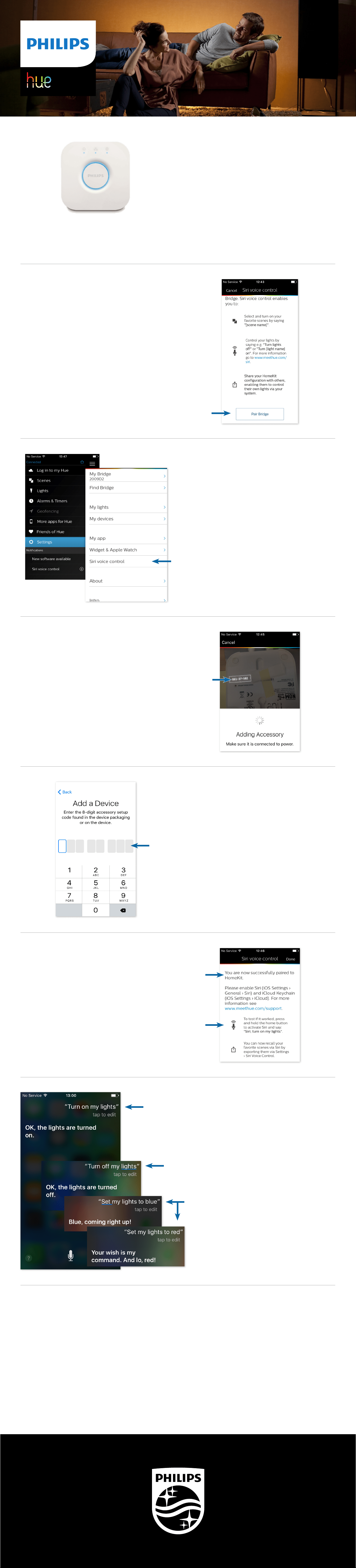
pair your bridge to Siri
If you’ve paired to the new bridge, you will be
notied to setup Siri Voice Control.
Tap ‘Pair Bridge’
Otherwise,
go to the Settings menu to pair your bridge to Siri.
Tap ‘Siri voice control’
Aim the camera at the bottom of your bridge.
The pairing code will automatically be recognized.
In case the pairing via the camera does not work,
you can manually pair the bridge by entering the
code on the bottom of the bridge.
You successfully paired your bridge to Siri!
Testing if Siri is set up correctly.
Test whether Siri Voice control works by turning ‘on’ your lights.
You can set all your lights to your favorite colors!
Available Siri Voice Commands
At this point you can use the following Siri Voice Commands:
• Turn on my lights
• Turn o my lights
• Dim my lights to [xx]%
• Dim my lights
• Set my lights to [color]
For additional information on Siri voice control, please visit
support.apple.com/HT204893
Pairing Code
The bridge will be added as ‘Accessory’.
In case your lights are already ‘on’, you can turn them ‘o’.
PERSONAL
WIRELESS
LIGHTING