ENGLISH
MODEL NUMBER SERIES:
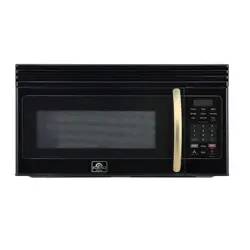
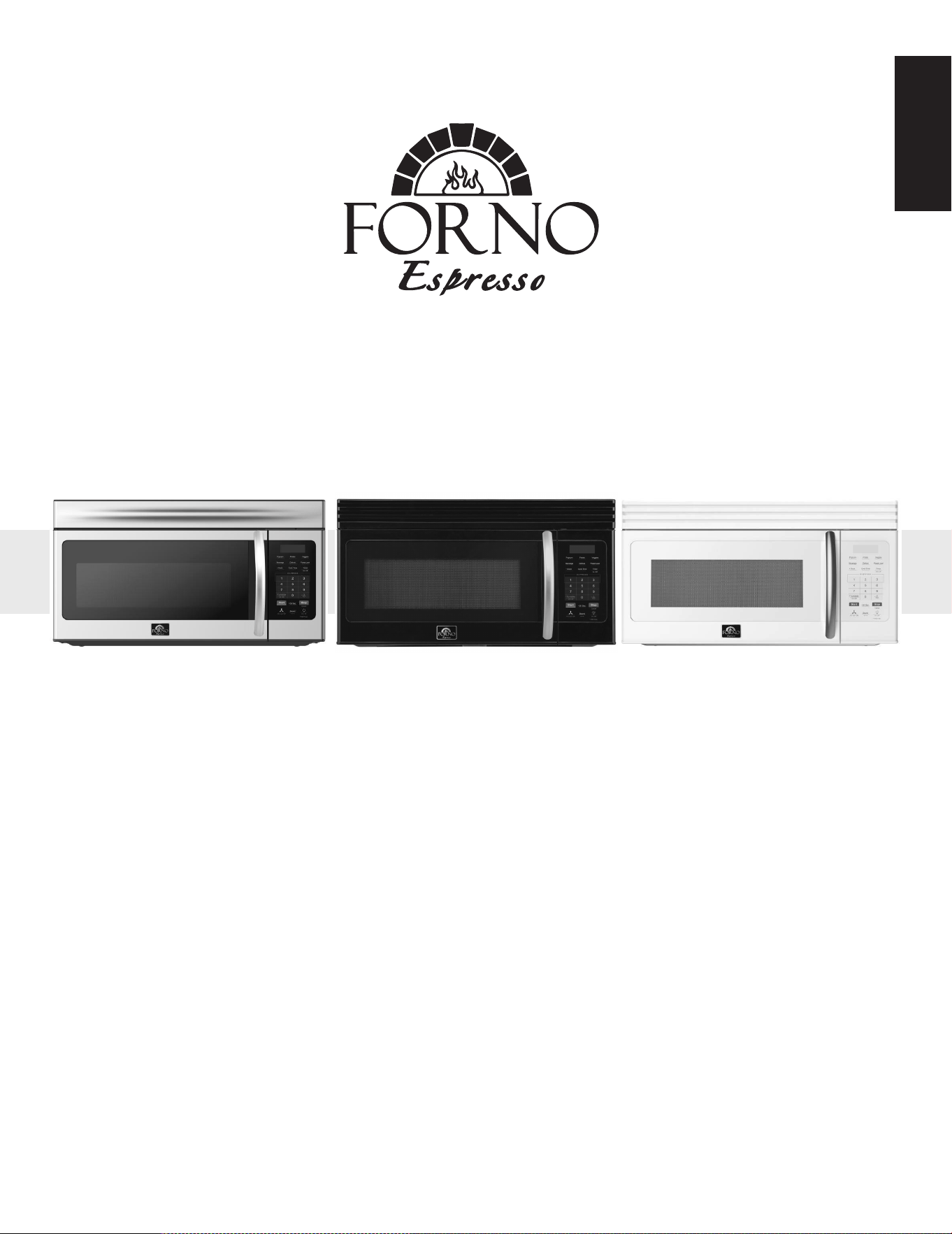
FOTR3007-30 / FOTR3007-30BLK / FOTR3007-30WHT
User’s Manual
1.6 Cu.Ft. Over the Range Microwave
Read these instructions carefully before using your appliance, and keep it carefully.
If you follow the instructions, your appliance will provide you with many years of good service.
SAVE THESE INSTRUCTIONS CAREFULLY
®

Contents
SAFETY INFORMATION . . . . . . . . . . . . . . . . . . . . . . . . . . . . . . . . . . . . . . . . . . . . . . . . . . . . . . . . . . . . . . . . . . . 3
Precautions to avoid possible exposure to excessive microwave energy: . . . . . . . . . . . . . . . . . . . . . . . . . . . . . . . . .3
IMPORTANT SAFETY INSTRUCTIONS . . . . . . . . . . . . . . . . . . . . . . . . . . . . . . . . . . . . . . . . . . . . . . . . . . . . . . . . . . . . . . . . . . . .3
Unpacking instructions. . . . . . . . . . . . . . . . . . . . . . . . . . . . . . . . . . . . . . . . . . . . . . . . . . . . . . . . . . . . . . . . . . . 4
Grounding instructions . . . . . . . . . . . . . . . . . . . . . . . . . . . . . . . . . . . . . . . . . . . . . . . . . . . . . . . . . . . . . . . . . . . . . . . . . . . . . . . .4
Cookware and cooking materials . . . . . . . . . . . . . . . . . . . . . . . . . . . . . . . . . . . . . . . . . . . . . . . . . . . . . . . . . . . . . . . . . . . . . . .6
Materials you can use . . . . . . . . . . . . . . . . . . . . . . . . . . . . . . . . . . . . . . . . . . . . . . . . . . . . . . . . . . . . . . . . . . . . . . . . . . . . . . . . . .6
Materials to be avoided . . . . . . . . . . . . . . . . . . . . . . . . . . . . . . . . . . . . . . . . . . . . . . . . . . . . . . . . . . . . . . . . . . . . . . . . . . . . . . . .6
Features . . . . . . . . . . . . . . . . . . . . . . . . . . . . . . . . . . . . . . . . . . . . . . . . . . . . . . . . . . . . . . . . . . . . . . . . . . . . . . . . . 7
Package contents . . . . . . . . . . . . . . . . . . . . . . . . . . . . . . . . . . . . . . . . . . . . . . . . . . . . . . . . . . . . . . . . . . . . . . . . . . . . . . . . . . . . . .7
Microwave. . . . . . . . . . . . . . . . . . . . . . . . . . . . . . . . . . . . . . . . . . . . . . . . . . . . . . . . . . . . . . . . . . . . . . . . . . . . . . . . . . . . . . . . . . . . .7
Control panel . . . . . . . . . . . . . . . . . . . . . . . . . . . . . . . . . . . . . . . . . . . . . . . . . . . . . . . . . . . . . . . . . . . . . . . . . . . . . . . . . . . . . . . . . .8
Setting up your microwave . . . . . . . . . . . . . . . . . . . . . . . . . . . . . . . . . . . . . . . . . . . . . . . . . . . . . . . . . . . . . . . 9
Installing the turntable. . . . . . . . . . . . . . . . . . . . . . . . . . . . . . . . . . . . . . . . . . . . . . . . . . . . . . . . . . . . . . . . . . . . . . . . . . . . . . . . .9
Using your microwave. . . . . . . . . . . . . . . . . . . . . . . . . . . . . . . . . . . . . . . . . . . . . . . . . . . . . . . . . . . . . . . . . . . 10
Cooking in your microwave . . . . . . . . . . . . . . . . . . . . . . . . . . . . . . . . . . . . . . . . . . . . . . . . . . . . . . . . . . . . . . . . . . . . . . . . . . .10
Setting the clock. . . . . . . . . . . . . . . . . . . . . . . . . . . . . . . . . . . . . . . . . . . . . . . . . . . . . . . . . . . . . . . . . . . . . . . . . . . . . . . . . . . . . .10
Using the kitchen timer . . . . . . . . . . . . . . . . . . . . . . . . . . . . . . . . . . . . . . . . . . . . . . . . . . . . . . . . . . . . . . . . . . . . . . . . . . . . . . .10
Turning sound on and off . . . . . . . . . . . . . . . . . . . . . . . . . . . . . . . . . . . . . . . . . . . . . . . . . . . . . . . . . . . . . . . . . . . . . . . . . . . . .10
Cooking quickly . . . . . . . . . . . . . . . . . . . . . . . . . . . . . . . . . . . . . . . . . . . . . . . . . . . . . . . . . . . . . . . . . . . . . . . . . . . . . . . . . . . . . .10
Cooking complete reminders. . . . . . . . . . . . . . . . . . . . . . . . . . . . . . . . . . . . . . . . . . . . . . . . . . . . . . . . . . . . . . . . . . . . . . . . . .10
Cooking with the auto menu . . . . . . . . . . . . . . . . . . . . . . . . . . . . . . . . . . . . . . . . . . . . . . . . . . . . . . . . . . . . . . . . . . . . . . . . . .11
Checking the time and power level while cooking . . . . . . . . . . . . . . . . . . . . . . . . . . . . . . . . . . . . . . . . . . . . . . . . . . . . .12
Using the light . . . . . . . . . . . . . . . . . . . . . . . . . . . . . . . . . . . . . . . . . . . . . . . . . . . . . . . . . . . . . . . . . . . . . . . . . . . . . . . . . . . . . . . .12
Using the vent fan . . . . . . . . . . . . . . . . . . . . . . . . . . . . . . . . . . . . . . . . . . . . . . . . . . . . . . . . . . . . . . . . . . . . . . . . . . . . . . . . . . . .12
Using the child lock . . .
. . . . . . . . . . . . . . . . . . . . . . . . . . . . . . . . . . . . . . . . . . . . . . . . . . . . . . . . . . . . . . . . . . . . . . . . . . . . . . . .12
Using the turntable . . . . . . . . . . . . . . . . . . . . . . . . . . . . . . . . . . . . . . . . . . . . . . . . . . . . . . . . . . . . . . . . . . . . . . . . . . . . . . . . . . .12
Cleaning and maintaining your microwave. . . . . . . . . . . . . . . . . . . . . . . . . . . . . . . . . . . . . . . . . . . . . . . 12
Cleaning the outside of your microwave . . . . . . . . . . . . . . . . . . . . . . . . . . . . . . . . . . . . . . . . . . . . . . . . . . . . . . . . . . . . . . .12
Cleaning the inside of your microwave . . . . . . . . . . . . . . . . . . . . . . . . . . . . . . . . . . . . . . . . . . . . . . . . . . . . . . . . . . . . . . . .12
Cleaning and replacing the filters. . . . . . . . . . . . . . . . . . . . . . . . . . . . . . . . . . . . . . . . . . . . . . . . . . . . . . . . . . . . . . . . . . . . . .13
Changing the LED bulbs . . . . . . . . . . . . . . . . . . . . . . . . . . . . . . . . . . . . . . . . . . . . . . . . . . . . . . . . . . . . . . . . . . . . . . . . . . . . . .15
Troubleshooting . . . . . . . . . . . . . . . . . . . . . . . . . . . . . . . . . . . . . . . . . . . . . . . . . . . . . . . . . . . . . . . . . . . . . . . . 16
Obtaining replacement parts. . . . . . . . . . . . . . . . . . . . . . . . . . . . . . . . . . . . . . . . . . . . . . . . . . . . . . . . . . . . . . . . . . . . . . . . . .16
Specifications . . . . . . . . . . . . . . . . . . . . . . . . . . . . . . . . . . . . . . . . . . . . . . . . . . . . . . . . . . . . . . . . . . . . . . . . . . . 16
Legal notices. . . . . . . . . . . . . . . . . . . . . . . . . . . . . . . . . . . . . . . . . . . . . . . . . . . . . . . . . . . . . . . . . . . . . . . . . . . . 17
NS-OTRB16SS3 24-0278_MAN_V3_EN.fm Page 2
Customer Care . . . . . . . . . . . . . . . . . . . .
. . . . . . . . . . . . . . . . . . . . . . . . . . . . . . . . . . . . . . . . . . . . . . . . . . . . . . ... 2
NS-OTRB16SS3 24-0278_MAN_V3_EN.fm Page 18
Thank you for purchasing a Frono product. Please read the entire instruction manual before operating your new
appliance for the first time. Whether you are an occasional user or an expert, it will be beneficial to familiarize yourself
with the safety practices, features, operation and care recommendations of your appliance.
Both the model and serial number are listed inside the product. For warranty purposes, you will also need the date of
purchase .
Services in Canada and Untied States
Keep the instruction manual handy to answer your questions. If you don’t understand something or need more
assistance, please visit our website for fast support. Please provide us your name, number, address,serial number
of the product that troubleshooting, proof of purchase, and a short description of the issue. A customer service
representative will contact you as soon as possible. All warranty work needs to be authorized by FORNO customer
service. All our authorized service providers are carefully selected and rigorously trained by us.
Product Information Service Information
Model Number : _________________________________________
Use these numbers in any
correspondence or services calls
concerning your product.
If you received a damaged product,
immediately contact Forno.
To save time and money, before
you call for serviced, check the
troubleshooting guide. It listed the
causes of minor operation problems
that you can correct yourself.
Serial Number : __________________________________________
Date of Purchase :________________________________________
Purchase Address And Phone : _____________________________
_______________________________________________________
_______________________________________________________
Customer Care
“Need some quick help? Simply scan the qr code and get access
to our fast support form. We’re always here to assist you with any
questions or concerns you may have. So, don’t hesitate to reach out!”
EN-2
SAFETY INFORMATION
Precautions to avoid possible exposure to excessive microwave energy:
1 Do not attempt to operate this microwave with the door open because this can result in harmful exposure to
microwave energy. It is important not to defeat or tamper with the safety interlocks.
2 Do not place any object between your microwave front face and the door or allow soil or cleaner residue to
accumulate on sealing surfaces.
3 Do not operate your microwave if it is damaged. It is particularly important that the microwave door closes
properly and that there is no damage to the:
(a) DOOR (bent)
(b) HINGES and LATCHES (broken or loosened)
(c) DOOR SEALS and SEALING SURFACES
4 Your microwave should not be adjusted or repaired by anyone except properly qualified service personnel.
IMPORTANT SAFETY INSTRUCTIONS
•
1 Read all instructions before using the microwave.
2 Read and follow: Precautions to avoid possible exposure to excessive microwave energy: on page 3.
3 This appliance must be grounded. Connect only to a properly grounded outlet. See Grounding instructions on
page 4.
4 Install or locate this appliance only in accordance with the provided installation instructions.
5 Some products such as whole eggs and sealed containers (closed glass jars, for example) are able to explode and
should not be heated in this microwave.
6 Use this appliance only for its intended use as described in this manual. Do not use corrosive chemicals or vapors
in this appliance. This type of microwave is specifically designed to heat, cook, or dry food. It is not designed for
industrial or laboratory use.
7 HOT CONTENTS CAN CAUSE SEVERE BURNS. DO NOT ALLOW CHILDREN TO USE THE MICROWAVE. Use caution
when removing hot items.
8 To reduce the risk of fire in the microwave cavity:
a) Do not overcook food. Carefully monitor the appliance when paper, plastic, or other combustible materials
are placed inside the microwave to facilitate cooking.
b) Remove wire twist-ties from paper or plastic bags before placing the bag in the microwave.
c) If materials inside the microwave should ignite, keep the microwave door closed, turn the microwave off, and
disconnect the power cord or shut off power at the fuse or circuit breaker panel.
d) Do not use the cavity for storage purposes. Do not leave paper products, cooking utensils, or food in the
cavity when not in use.
9 Liquids, such as water, coffee, or tea can be overheated beyond the boiling point without appearing to be
boiling. Visible bubbling or boiling when the container is removed from your microwave is not always present.
THIS COULD RESULT IN VERY HOT LIQUIDS SUDDENLY BOILING OVER WHEN THE CONTAINER IS DISTURBED OR A
SPOON OR OTHER UTENSIL IS INSERTED INTO THE LIQUID.
a) Do not overheat the liquid.
b) Stir the liquid both before and halfway through heating it.
c) Do not use straight-sided containers with narrow necks.
d) After heating, allow the container to stand in your microwave for a short time before removing the container.
e) Use extreme care when inserting a spoon or other utensil into the container.
10 Do not heat oil or fat for deep-frying. It is difficult to control the temperature of oil in your microwave.
11 Pierce foods with heavy skins such as potatoes, whole squash, apples, and chestnuts before cooking.
12 The contents of feeding bottles and baby jars should be stirred or shaken and the temperature should be
checked before serving in order to avoid burns.
13 Cooking utensils may become hot because of heat transferred from the heated food. Potholders may be needed
to handle the utensil.
14 Do not cover or block any openings on the appliance.
WARNING: To reduce the risk of burns, electric shock, fire, injury to persons, or exposure to excessive microwave energy when using
your microwave, follow these basic safety precautions.
NS-OTRB16SS3 24-0278_MAN_V3_EN.fm Page 3
EN-3
15 Do not store or use this appliance outdoors. Do not use this product near water, for example, near a kitchen sink,
in a wet basement, near a swimming pool, or similar locations.
16 Do not operate this appliance if it has a damaged cord or a plug, if it is not working properly, or if it has been
damaged or dropped.
17 Do not immerse the cord or plug in water. Keep the cord away from heated surfaces. Do not let the cord hang
over the edge of a table or counter.
18 Use only thermometers which are specifically designed for use in microwaves.
19 Be certain the glass tray and roller rings are in place when you operate the microwave.
20 This appliance should be serviced only by qualified service personnel. Contact the nearest authorized service
facility for examination, repair, or adjustment.
21 When cleaning surfaces of the door and microwave that come together on closing the door, use only mild,
nonabrasive soaps, or detergents applied with a sponge or soft cloth.
22 VENTILATING HOODS:
a) clean ventilating hoods frequently-grease should not be allowed to accumulate on the hood or filter.
b) When cooking foods under the hood, turn the fan on.
23 Use care when cleaning the vent-hood filter. Corrosive cleaning agents, such as lye-based oven cleaners, may
damage the filter.
24 To reduce the risk of fire and electric shock, install only above electric cooking equipment. If the
over-the-cooktop microwave is intended to be used with either a gas or electric range, the following words or
the equivalent shall be included: Suitable for use above both gas and electric cooking equipment.
Unpacking instructions
Carefully remove your microwave from the box. Save the box as it may make installation easier.
1 Remove all packing materials from inside the microwave cavity. However, DO NOT REMOVE THE WAVEGUIDE
COVER, which is located on the right side in the oven cavity. Make sure that you have all items from the Package
contents on page 7. Read and save the instructions.
2 Remove the feature sticker from the outside of the door, if there is one.
3 Check the microwave for any damage, such as a misaligned or bent door, damaged door seals and sealing
surfaces, broken or loose door hinges and latches, and dents inside the cavity or on the door. If there is any
damage, do not operate the microwave and contact your dealer.
See the Installation Guide for more information.
Grounding instructions
This appliance must be grounded. In the event of an electrical short circuit, grounding reduces the risk of electric
shock by providing an escape wire for the electric current. This appliance is equipped with a cord having a
grounding wire with a grounding plug. The plug must be plugged into an outlet that is properly installed and
grounded.
•
Electrical requirements
The electrical requirements are a 120VAC, 60Hz, AC only. It is recommended that a separate circuit
serving only the microwave be provided. The microwave is equipped with a three-prong grounding plug. It must be
plugged into a wall receptacle that is properly installed and grounded.
Power Supply Cord
1 A short power supply cord is provided to reduce the risks resulting from becoming entangled in or tripping over
a longer cord.
2 Longer cord sets or extension cords are available and may be used if care is exercised in their use.
3 If a long cord or extension cord is used:
a) The marked electrical rating of the cord set or extension cord should be at least as great as the electrical
rating of the appliance.
b) The extension cord must be a grounding-type three-wire cord, and the longer cord should be arranged so
that it will not drape over the counter top or table top where it can be pulled on by children or tripped over
unintentionally.
c) If it is necessary to use an extension cord, use only a three-wire extension cord that has a three-blade
grounding plug, and a three-slot receptacle that will accept the plug on the appliance. The marked rating of
the extension cord shall be equal to or greater than the electrical rating of the appliance.
WARNING: Improper use of the grounding plug can result in a risk of electric shock. Consult a qualified electrician or serviceman if the
grounding instructions are not completely understood or if doubt exists as to whether the appliance is properly grounded.
NS-OTRB16SS3 24-0278_MAN_V3_EN.fm Page 4
EN-4
•
Radio or TV interference
Should there be any interference caused by your microwave to your radio or TV, make sure that your microwave is
on a different circuit. Relocate the radio or TV as far away from the microwave as feasible or check the position and
signal of the receiving antenna.
SAVE THESE INSTRUCTIONS
NS-OTRB16SS3 24-0278_MAN_V3_EN.fm Page 5
EN-5
electrical connection procedures.
•
We does not accept any liability for damage to the
microwave
or personal injury resulting from failure to observe the
•
If you have any questions about the grounding or electrical instructions, consult a qualified electrician or service person.
Notes:
Cookware and cooking materials
•
Cookware and other materials must fit on the turntable. Always use oven mitts or pot holders because cookware
may become hot.
Refer to the Materials you can use and Materials to be avoided tables as a guide, then test before using.
Cookware and Materials Test:
1 Fill a microwave-safe container with 1 cup (236 ml) of cold water, along with the cookware or materials in
question.
2 Cook on maximum power for one minute. Do not exceed one minute cooking time.
3 Carefully feel the cookware or material. If the empty cookware or material is warm, do not use it for microwave
cooking.
Materials you can use
Materials to be avoided
WARNING: Personal Injury Hazard
Tightly-closed containers could explode. Closed containers should be opened and plastic pouches should be pierced before cooking.
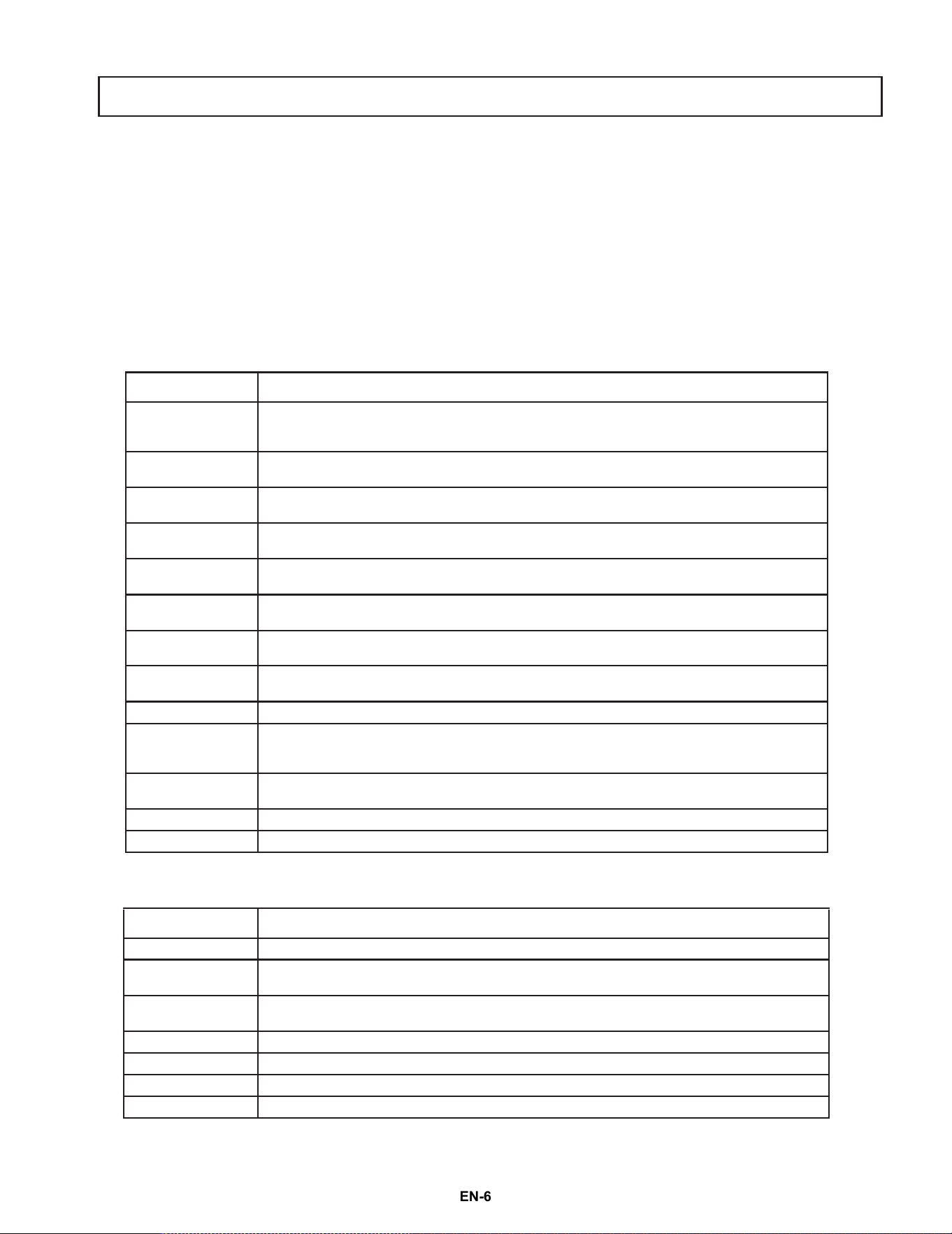
MATERIAL REMARKS
Aluminum foil
Use as shielding only. Small, smooth pieces can be used to cover thin parts of meat or poultry to
prevent overcooking. Arcing can occur if the foil is wrinkled or too close to microwave walls. The
foil should be at least 1 in. (2.5 cm) away from microwave walls.
Browning dish
Follow the manufacturer’s instructions. The bottom of the browning dish must be at least 3/16
in. (5 mm) above the turntable. Incorrect usage may cause the turntable to break.
Dinnerware
Use microwave-safe only. Follow the manufacturer's instructions. Do not use cracked or chipped
dishes
.
Glass jars
Always remove the lid. Use only to heat food until just warm. Most glass jars are not heat resistant
and may break.
Glassware
Use heat-resistant oven glassware only. Make sure there is no metallic trim. Do not use cracked or
chippe
d dishes.
Oven cooking bags
Follow the manufacturer’s instructions. Do not close with a metal tie. Make slits to allow steam to
escape.
Paper plates and
cups
Use for short–term cooking/warming only. Do not leave the microwave
unattended while
cooking.
Paper towels
Use to cover food for reheating and absorbing fat. Use with supervision for short-term cooking
only.
Pa
rchment paper Use as a cover to prevent splattering or a wrap for steaming.
Plastic
Use only if labeled “Microwave Safe.” Follow the manufacturer’s instructions.
Some plastic
containers soften as the food inside gets hot. “Boiling bags” and tightly closed plastic bags
should be slit, pierced, or vented, as indicated on the package.
Plastic wrap
Use microwave-safe only. Use to cover food during cooking to retain moisture. Do not allow
plastic wrap to touch food.
Thermometers Use microwave-safe only (such as meat and candy thermometers).
Wax paper Use as a cover to prevent splattering and retain moisture.
MATERIAL REMARKS
Aluminum tray May cause arcing. Use a microwave-safe dish instead.
Food carton with
metal
handle
May cause arcing. Use a microwave-safe dish instead.
Metal or metal
trimmed utensils
Metal shields the food from microwave energy. The metal trim may cause arcing.
Metal twist ties May cause arcing and could cause a fire in the microwave.
Paper bags May cause a fire in the m
icrowave.
Plastic foam Plastic foam may melt or contaminate the liquid inside when exposed to high temperature.
Wood Wood will dry out when used in your microwave and may split or crack.
NS-OTRB16SS3 24-0278_MAN_V3_EN.fm Page 6
EN-6
Features
• 9 auto-cook settings
• 10 variable power levels
• 1,000 watts of power
• 30-second express cooking
• 2-stage cooking available
• Exhaust fan with two speeds
• Hidden vent
• Task lighting
• Child lock
• 13.6-inch glass turntable
Package contents
• 1.6 cu. ft. over-the-range microwave
• Turntable (with ring)
• Installation hardware
• Grease filter
• Exhaust damper
• Installation Guide
• User Guide
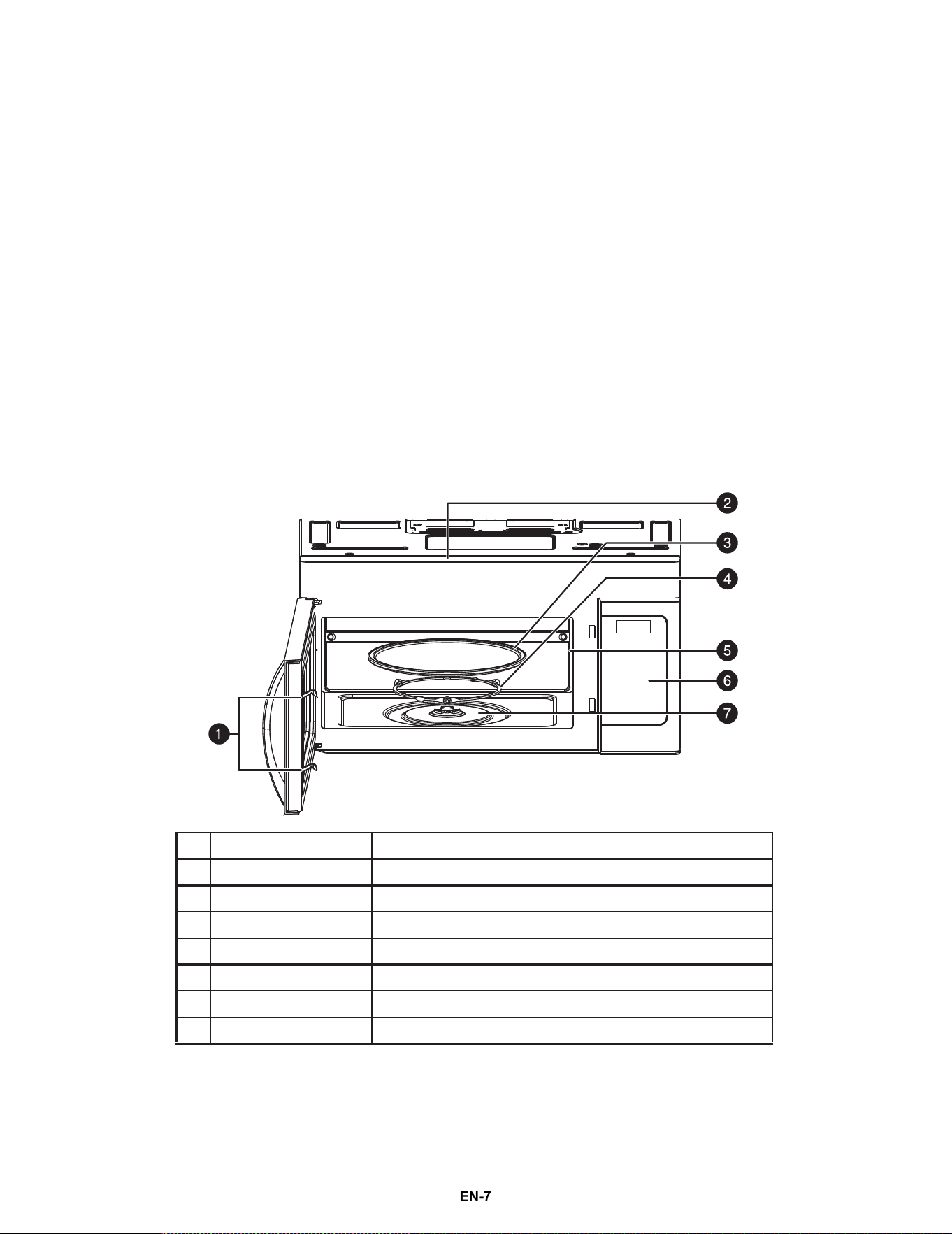
Microwave
# ITEM DESCRIPTION
1
Safety interlock system Prevents your microwave from operating when the door is open.
2
Top vent outlet Vents hot air from inside your microwave. Do not block.
3
Glass turntable Allows food to cook more evenly.
4
Turntable ring assembly Allows the turntable to rotate to cook food more evenly.
5
Waveguide cover Covers the waveguide. DO NOT REMOVE.
6
Control panel Use to set cooking times and enter other information as needed.
7
Turntable shaft Rotates the turntable assembly.
NS-OTRB16SS3 24-0278_MAN_V3_EN.fm Page 7
EN-7
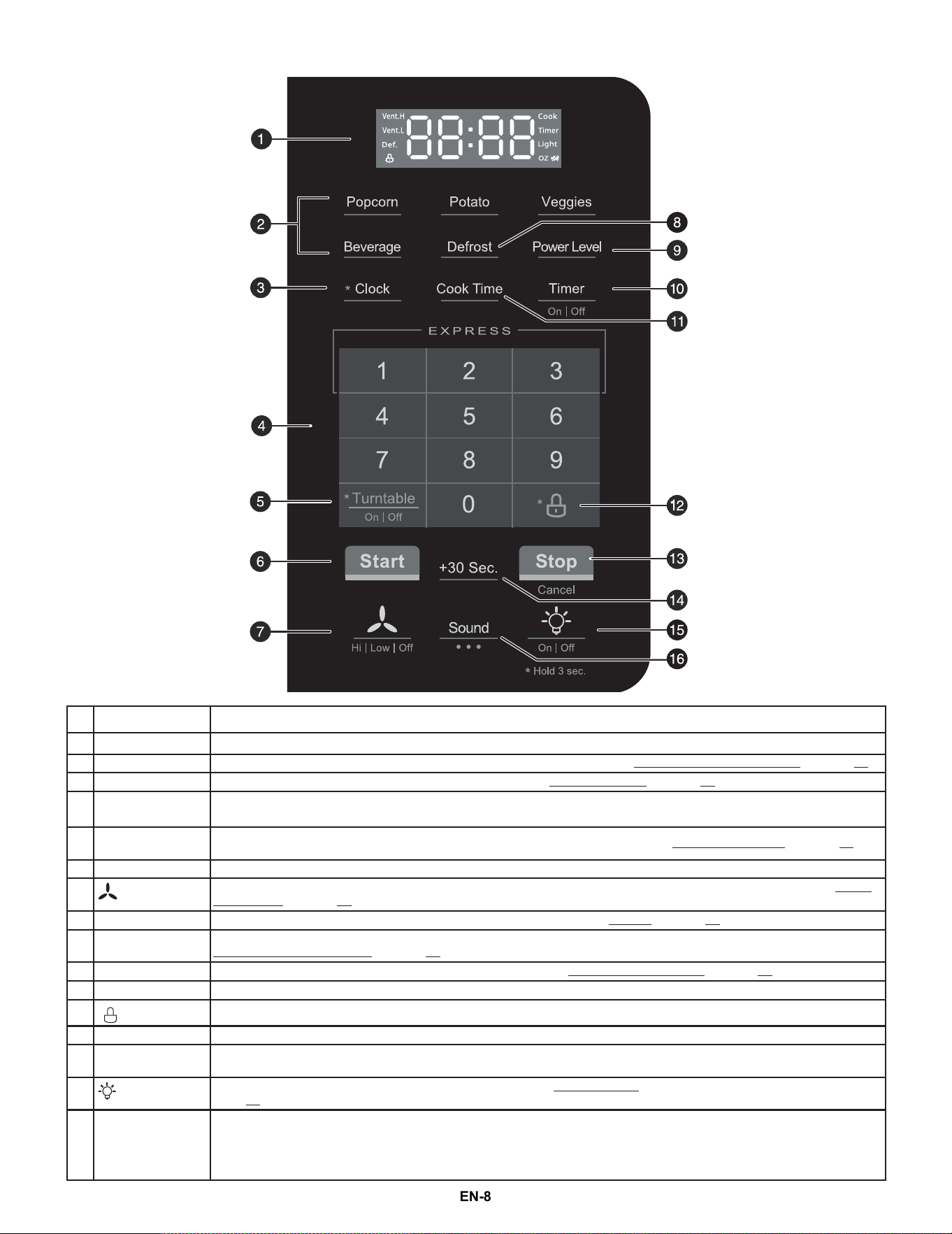
Control panel
# ITEM DESCRIPTION
1 Display
In standby mode, displays the time. In cooking mode, displays cooking time, weight, and other information.
2 Auto menu Press one of these buttons to automatically cook the item indicated. See Cooking with the auto menu on page 10.
3 *Clock Press and hold for three seconds, then enter the time. See Setting the clock on page 10.
4
Number pad and
EXPRESS buttons
Press to enter cook time, defrost time, clock time, and other information.
EXPRESS - press 1, 2, or 3 to quickly cook for that many minutes, at 100% power.
5
*Turntable
On/Off
P
ress and hold this button for three seconds to turn the turntable on or off. See Using the turntable on page 12.
6 Start In standby mode, or after you enter the cooking time, press this button to begin cooking.
7 (vent)
Press to turn on your vent fan. Press repeatedly to select the fan speed. You can select High, Low, or Off. See Using
the vent fan on page 12.
8 Defrost Press once, enter the time you want to defrost, then press Start. See Defrost on page 11.
9 Power Level
To set the power level of your microwave, press Power Level, then enter the power level you want (0-10). See
Cooking in your microwave on page 10.
10 Timer On/Off Press once, then enter the time you want to count down. See Using the kitchen timer on page 10.
11 Cook time Press once, then enter the time you want your food to cook.
12
* (lock)
Press and hold for three seconds to lock or unlock the control panel.
13 Stop/Cancel Press to stop the cooking process. Press again to cancel the cooking operation.
14 +30 Sec.
Press once to start a 30 second cooking cycle or to add 30 seconds to the current cooking time. Press repeatedly to
a
dd 30
second increments.
15 (light)
Press to turn the light under your microwave on or off. See
Using the light on
page 12.
16 Sound
All sounds are turned on by default. The display shows “on” when you press the Sound button the first time.
Press the Sound button again to turn off the keypad beep sound. The display shows “oFF1”.
Press the Sound button a third time to turn off all sounds. The display shows “oFF2”.
Press the Sound button a fourth time to turn all sounds back on. The di
splay shows “on”.
NS-OTRB16SS3 24-0278_MAN_V3_EN.fm Page 8
EN-8
Setting up your microwave
See the Installation Guide (included in your box) to install and set up your microwave.
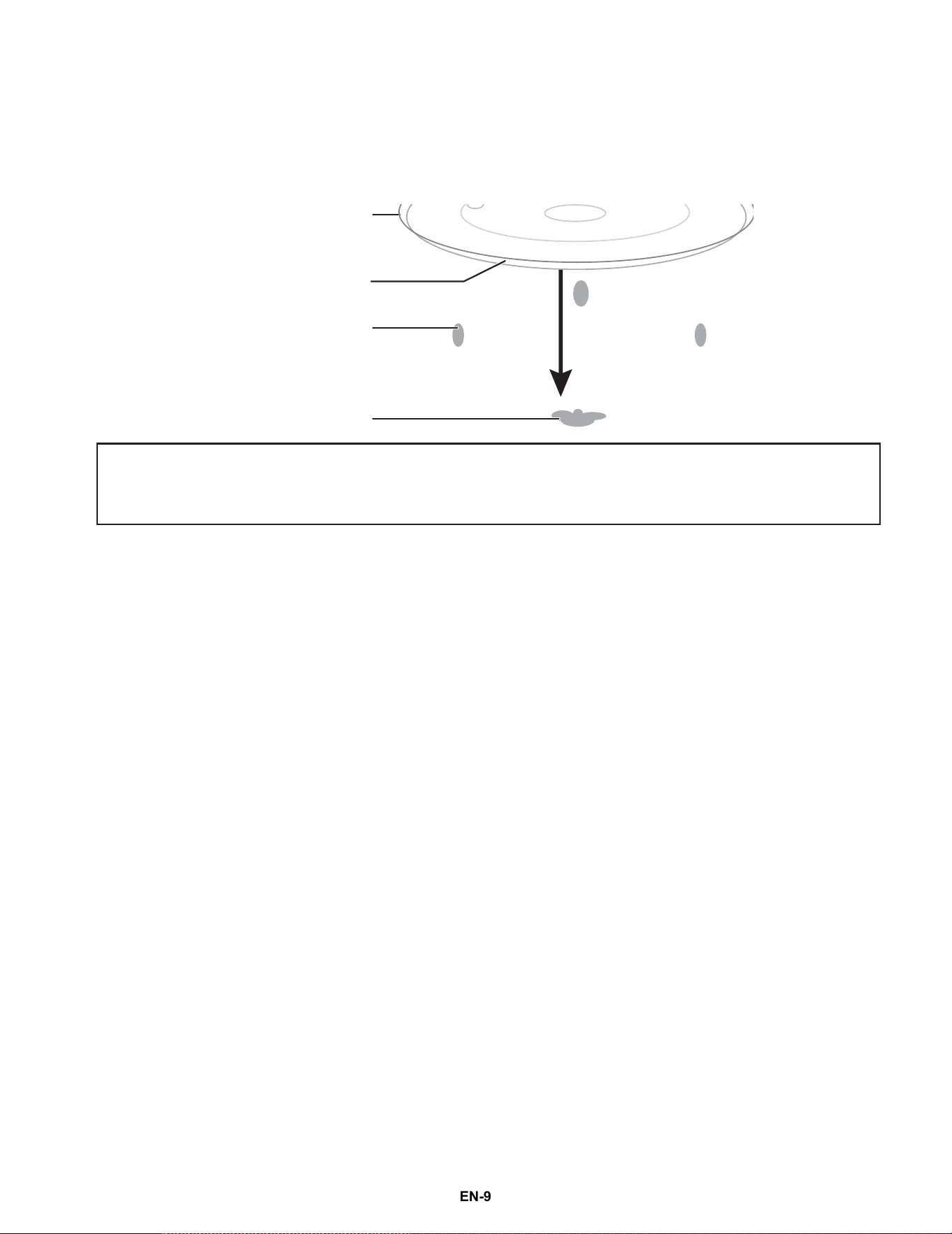
Installing the turntable
•
1 Place the turntable ring in the round depression in the bottom of your microwave so that it turns freely.
2 Place the glass turntable (flat side up) on the turntable ring so that the hub engages the turntable shaft in the
bottom of the microwave. The glass turntable should not turn freely when it is correctly installed.
Notes:
• Never place the glass tray upside down. The glass tray should never be restricted.
• Both the glass tray and turntable ring must always be used during cooking.
• Always place all food and containers of food on the glass tray for cooking.
• If the glass tray or turntable ring cracks or breaks, contact your nearest authorized service center.
Hub (underside)
Glass turntable
Turntable ring
Turntable shaft
NS-OTRB16SS3 24-0278_MAN_V3_EN.fm Page 9
EN-9
Using your microwave
Cooking in your microwave
1 Press Cook Time, then use the number pad to enter the cooking time that you want.
•
2 Press Power Level, then enter the power level that you want (0-10).
•
•
•
3 Press Start to begin heating.
OR
For two-stage cooking, repeat steps 1-2 to program the second stage.
•
Setting the clock
1 In standby mode, press and hold *Clock for three seconds. The display will flash.
2 Use the number pad to enter the current time (1:00–12:59), then press Start to confirm the setting. If your
microwave beeps three times, the numbers entered are valid.
Using the kitchen timer
1 In standby mode, press Timer On/Off. The display shows “: 0” and “TIMER”.
2 Use the number pad to enter the time (the maximum time is 99 minutes and 99 seconds), then press Start to
start the timer.
When the timer reaches 0, your microwave beeps three times. If you do not stop the timer, your microwave will
beep three times every five seconds to remind you. Your microwave will repeat this reminder a maximum of six
times.
Turning sound on and off
1 Press Sound to turn off the beep sounds when panel buttons are touched. “OFF 1” appears on the display
momentarily.
2 Press Sound again to turn off all beep sounds including end of cycle and timer alerts. “OFF 2” appears on the
display momentarily.
3 Press Sound again to turn on all sounds. “on” appears on the display momentarily.
Cooking quickly
• Press +30 Sec. to instantly cook something at 100% power for 30 seconds.
• To increase the time in 30 second increments (except Auto Cook), press +30 Sec. repeatedly.
• Press the 1, 2, or 3 (express number) keys to immediately start fast cooking for the corresponding number of
minutes at 100% power.
Cooking complete reminders
At the end of the cooking cycle, your microwave stops running and beeps. The display will show “End” until you
remove the food or press Stop. If you do not remove the food, your microwave will beep twice to remind you. Your
microwave will repeat this reminder three times, once every three minutes.
Note: For example, to enter 3 minutes and 15 seconds, press 3, 1, and then 5.
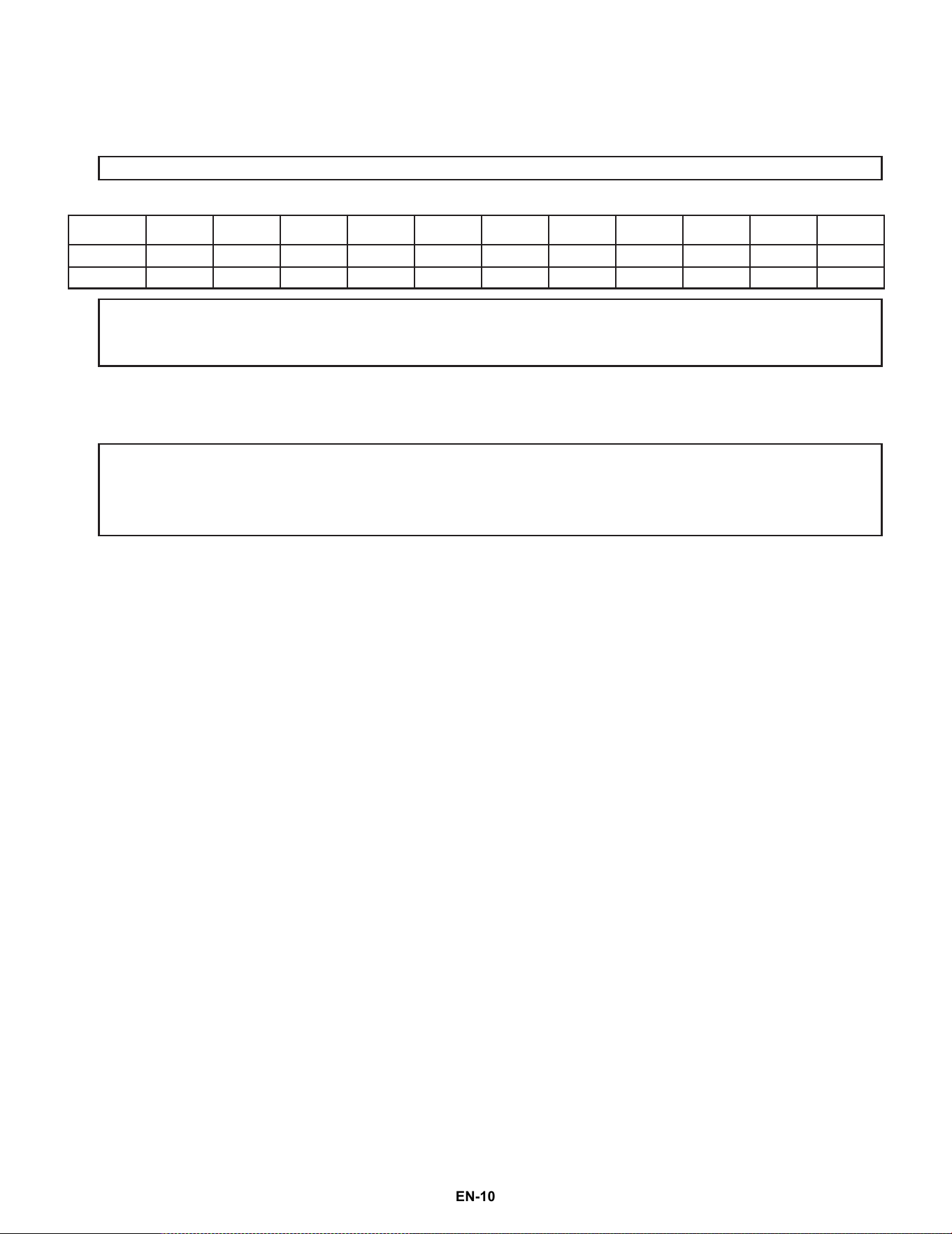
LEVEL 10 9 8 7 6 5 4 3 2 1 0
Power 100% 90% 80% 70% 60% 50% 40% 30% 20% 10% 0%
Display P-H1 P-90 P-80 P-70 P-60 P-50 P-40 P-30 P-20 P-10 P-0
Notes:
• You can check the power level during cooking by pressing Power Level. To change it, enter a new power level (0–10).
• If “P-0” is selected, the fan turns on but microwave cooking power will be at 0%. You can use this level to remove an odor in your
microwave.
Notes on two-stage cooking:
• Two-stage cooking lets you program two cook times and power levels at the same time.
• The first time/power level entered is the first stage and the second time/power level entered is the second stage.
• Two stage cooking does not show up on the display, but the total cook time is displayed.
• Two-stage cooking is useful to defrost and then cook, or cook at full power and then partial power.
NS-OTRB16SS3 24-0278_MAN_V3_EN.fm Page 10
EN-10
Cooking with the auto menu
Defrost
1 Press Defrost. The display shows “00:00” and “Def.”
2 Use the number pad to enter the defrosting time you want. The time entered must be between 00:01 and 99:99.
3 Press Start to start defrosting. The remaining cooking time is displayed.
•
Tips on defrosting
Defrosting steak, pork, chicken, or fish:
1 Remove the meat from your freezer. Defrost times depend on the approximate weight of your food, so check the
label or weigh your item.
2 Place the meat in a microwave safe container (see Cookware and cooking materials on page 6).
3 Press Defrost on your microwave, then set the cooking timer to defrost for 8 – 10 minutes per pound. The
thawing time for fish or other seafood can vary, so check the packaging for more information.
4 To ensure even thawing, stop the timer every few minutes to turn or flip the meat.
5 When finished, remove the meat and cook immediately.
Defrosting fruits and vegetables:
1 Remove the fruit or vegetables from your freezer.
2 Determine the weight of the produce.
3 Place the produce in a microwave safe container (see Cookware and cooking materials on page 6).
4 Press Defrost on your microwave, then set the cooking timer to defrost for two minutes.
5 After two minutes, separate the pieces. For leafy vegetables like cooked spinach, pull the block apart into smaller
pieces.
6 Continue to defrost for one minute for every four ounces of produce. Check and stir occasionally, until
completely thawed.
7 When finished, move to your stove top and cook immediately.
Potato
1 Press Potato. The display shows “1”.
2 Use the number pad to enter the number of potatoes, 1 through 4, as necessary.
3 Press Start.
Veggies
1 Press Veggies once for fresh vegetables and twice for frozen vegetables. The display shows “FrSH” or “FroZ.”
2 Press the number pad to enter the amount of vegetables (cups) to cook.
•
3 Press Start.
Popcorn
1 Press Popcorn. The display shows “3.0” and “OZ.”
2 Use the number pad to enter the amount of popcorn:
• Press 1 for 3.0 oz.
• Press 2 for 3.3 oz.
• Press 3 for 1.5 oz.
• Press 4 for 2.7 oz.
• Press 5 for 2.8 oz.
3 Press Start
Note: Three rapid beeps will sound at the halfway point to prompt you to turn the food over.
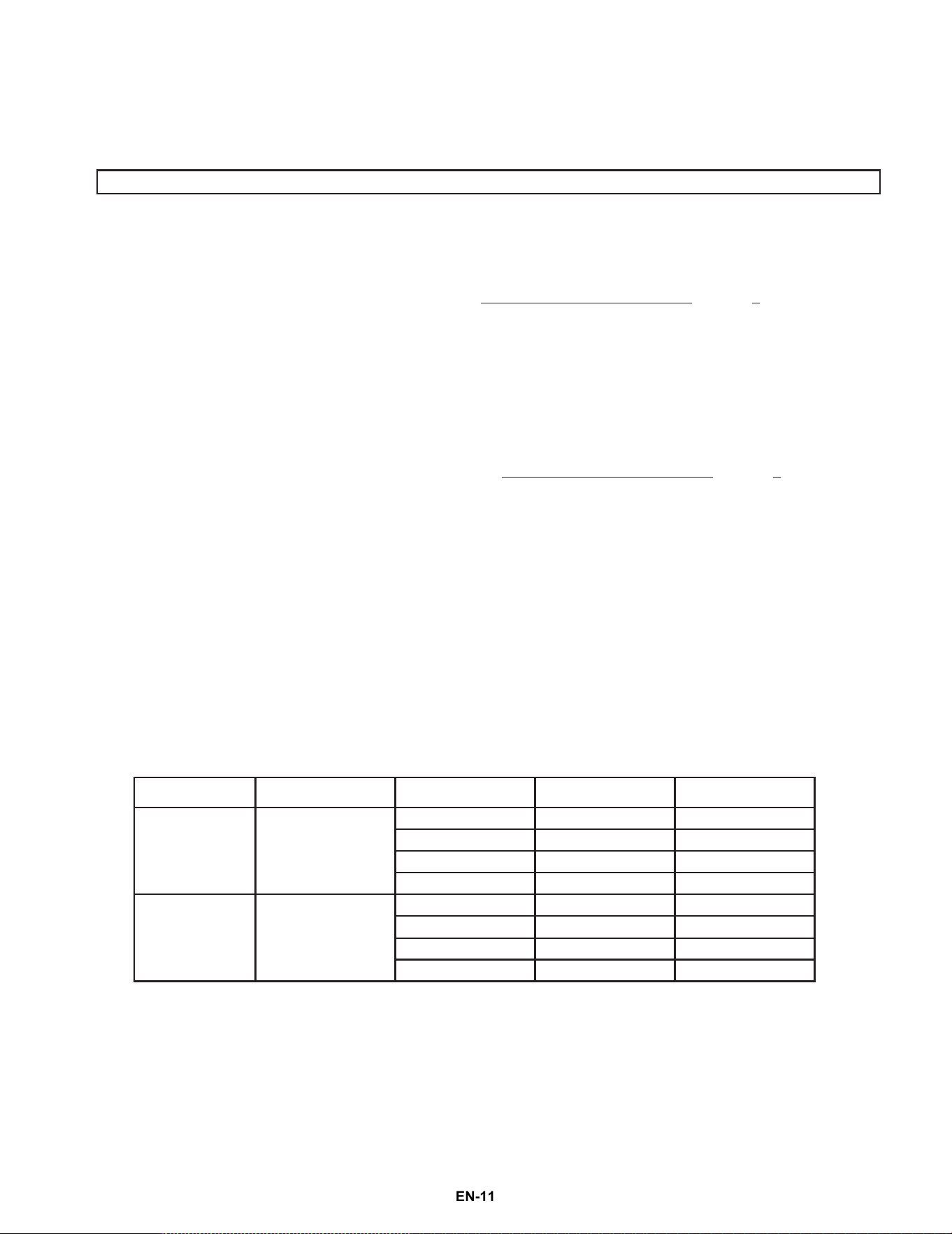
FOOD DISPLAY AMOUNT NUMBER PAD TOTAL TIME
Fresh vegetables FrSH
1 cup 1 3:20
2 cups 2 5:00
3 cups 3 7:00
4 cups 4 8:40
Frozen
vegetables
FroZ
1 cup 1 4:30
2 cups 2 7:30
3 cups 3 10:30
4 cups 4 13:30
NS-OTRB16SS3 24-0278_MAN_V3_EN.fm Page 11
EN-11
Beverage
1 Press Beverage.
2 Use the number pad (1-3) to enter the amount from 1-3 cups (8.0 oz./cup).
3 Press Start.
Checking the time and power level while cooking
• To check the power level while cooking a meal, press Power Level. The display shows the power level being used
for three seconds, then returns to the cooking time remaining.
Using the light
• Press (light) to turn the light underneath your microwave on or off.
Using the vent fan
Your microwave’s vent fan works as a range hood to filter out smoke and other odors while cooking.
• Press (vent) repeatedly to cycle between high speed, low speed, or off.
•
Using the child lock
• To lock the control panel buttons, press and hold (lock) for three seconds. Your microwave beeps and a lock
indicator appears on the display.
• To unlock the control panel buttons, press and hold (lock) until the lock indicator disappears (about three
seconds).
Using the turntable
• To turn off the turntable, press and hold *Turntable On/Off for about three seconds while cooking your food.
The display shows “off” for two seconds.
• To turn the turntable back on after turning it off, press and hold *Turntable On/Off for about three seconds
while cooking your food. The display shows “on” for two seconds.
•
Cleaning and maintaining your microwave
Cleaning the outside of your microwave
Exterior
The outside surface is precoated steel and plastic. Clean the outside with mild soap and water, then rinse and dry
with a soft cloth. Do not use any type of household or abrasive cleaner.
Door
Wipe the window on both sides with a damp cloth to remove any spills or spatters. Metal parts will be easier to
maintain if wiped frequently with a damp cloth. Avoid the use of spray and other harsh cleaners as they may stain,
streak, or dull the door surface.
Control panel
If the control panel is dirty, open the microwave door before cleaning. Wipe the panel with a cloth dampened
slightly with water only. Dry with a soft cloth. Do not scrub or use any sort of chemical cleaners. Close the door and
press Stop to clear any buttons you may have pressed.
Cleaning the inside of your microwave
Interior
Wipe with a soft cloth and warm water. Do not use abrasive or harsh cleaners or scouring pads. For baked-on food,
use baking soda or a mild soap, then rinse thoroughly with hot water.
Note: You can choose the vent speed while cooking in your microwave.
Note: Your microwave defaults to having the turntable on.
NS-OTRB16SS3 24-0278_MAN_V3_EN.fm Page 12
EN-12
Waveguide cover
The waveguide cover is located on the right side of the microwave cavity. It is made from mica and requires special
care. Keep the waveguide cover clean to assure good microwave performance. Carefully wipe with a damp cloth any
food spatters from the surface of the cover immediately after they occur. Built-up splashes may overheat and cause
smoke or possibly catch fire. DO NOT REMOVE THE WAVEGUIDE COVER.
Removing odors
Occasionally, a cooking odor may remain in your microwave. To remove, combine one cup water, the grated peel
and juice of one lemon, and several whole cloves in a two-cup glass measuring cup. Boil for several minutes using
100% power, then let it cool in your microwave. Wipe the interior with a soft cloth.
Turntable and turntable support
Remove the turntable and turntable support and wash them in mild, sudsy water. For stubborn stains, use a mild
cleanser and non-abrasive scouring sponge. You can also wash them in the top rack of a dishwasher.
The turntable motor shaft is not sealed, so excess water or spills should be wiped up immediately.
Cleaning and replacing the filters
Cleaning the grease filters
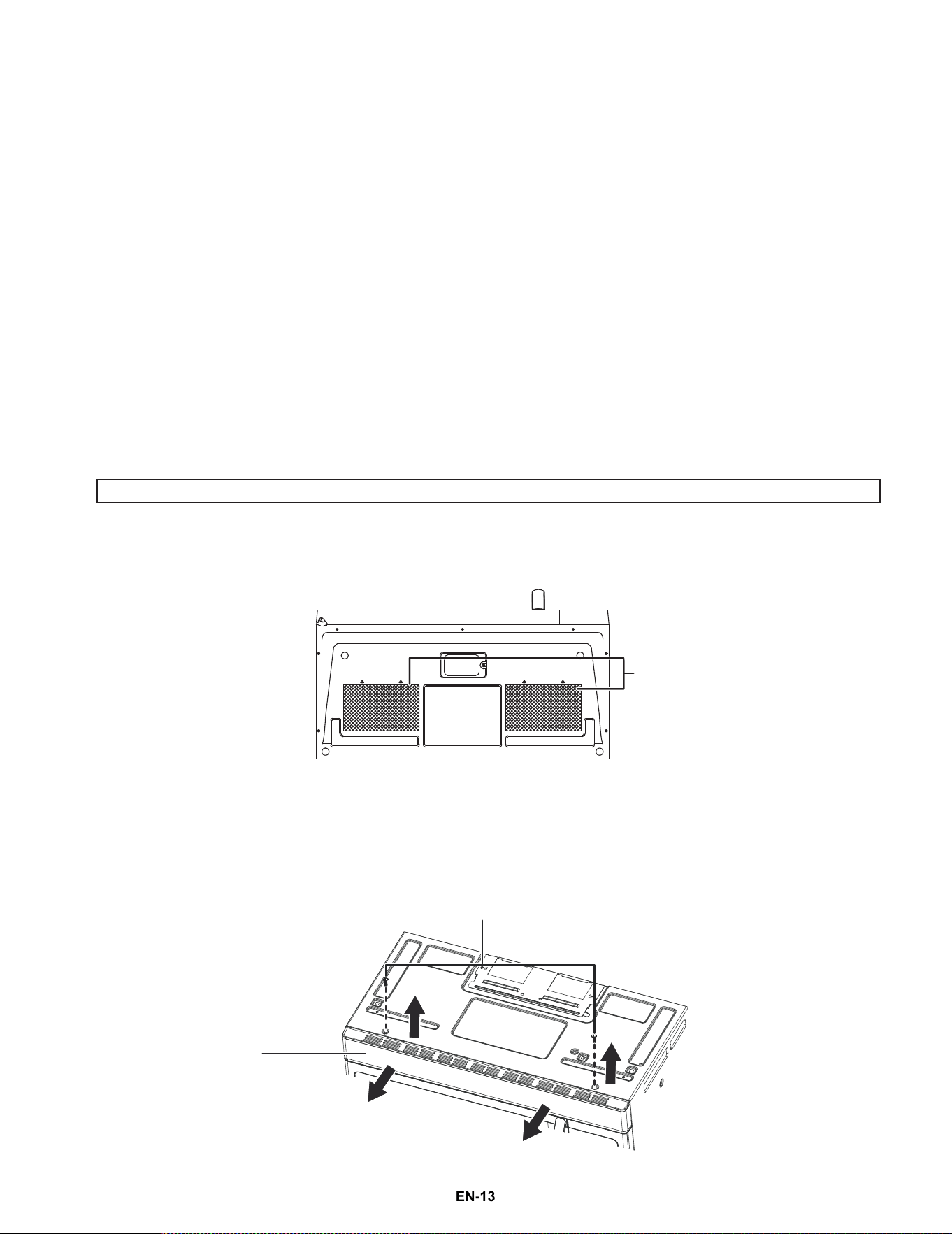
Clean the filter at least once a month. Never use the fan or microwave without the filters in place.
1 Pull down slightly on the tab toward the front of your microwave to remove the filter. Repeat for the other filter.
2 Soak the filters in a sink or dish pan filled with hot water and detergent.
•
3 Agitate and scrub the filters with a brush to remove embedded dirt.
4 Rinse thoroughly and shake dry.
5 Replace by fitting the filters back into the opening.
Replacing the charcoal filter
A charcoal filter is used for a nonvented, recirculated installation. The filter should be changed every 6 to 12 months
depending on use.
1 Disconnect power to your microwave at the circuit breaker or by unplugging it.
2 Remove the vent grille mounting screws from the top of the vent grille, then push down on the tabs at each end
of the vent grille to disengage it.
3 Pull the vent grille away from the unit.
CAUTION: DO NOT use ammonia or other alkali cleaning products. They will react with the filter material and darken it.
Grease filters
BOTTOM
Vent grille mounting screws
Vent grille
NS-OTRB16SS3 24-0278_MAN_V3_EN.fm Page 13
EN-13
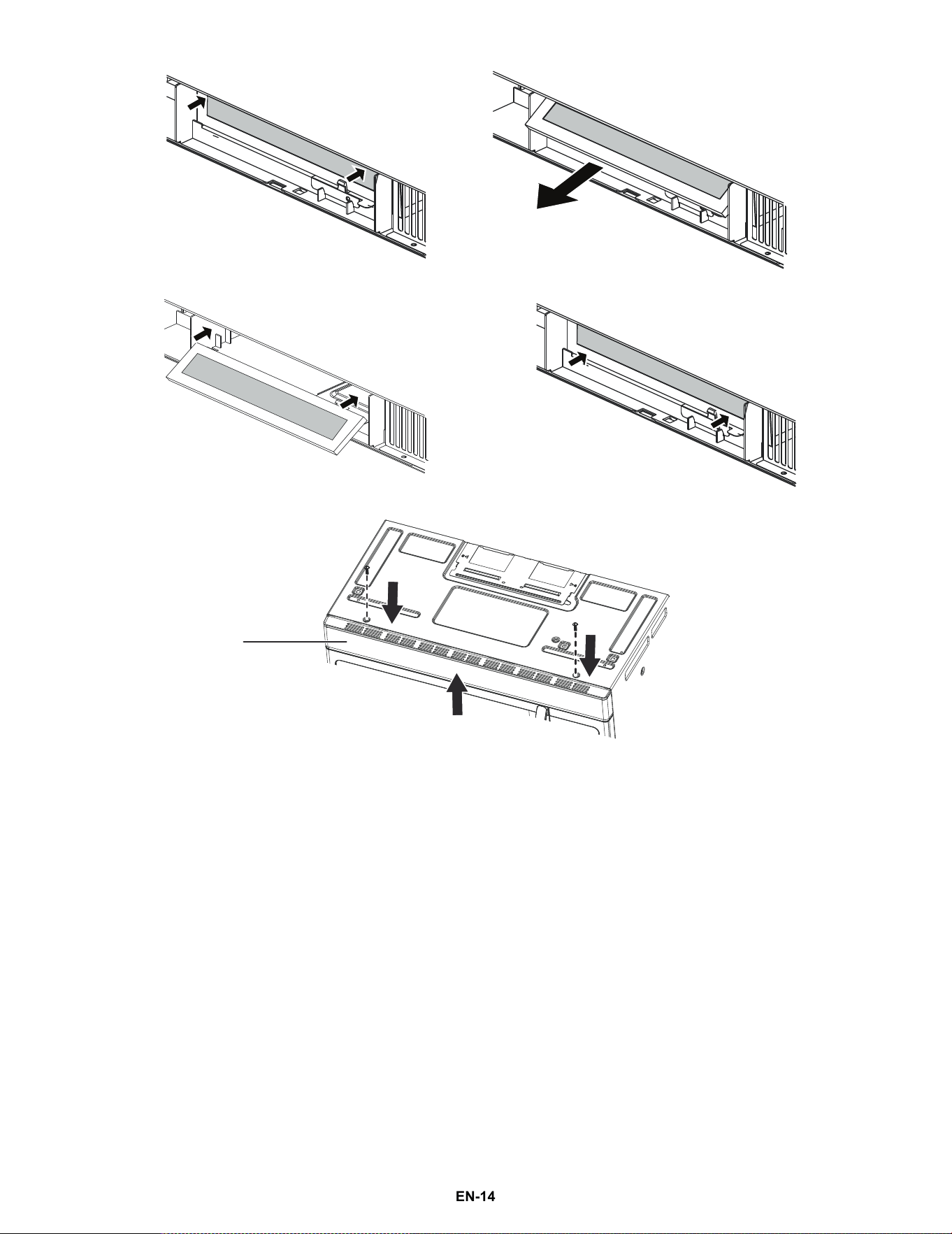
4 Remove the charcoal filter by pushing it inwards, then turn and pull it away from the unit.
5 Slide the new filter into the top of the unit, then press the bottom of the filter into place.
6 Carefully push the vent grille back into place and replace the vent grille mounting screws.
Vent grille
NS-OTRB16SS3 24-0278_MAN_V3_EN.fm Page 14
EN-14
Changing the LED bulbs
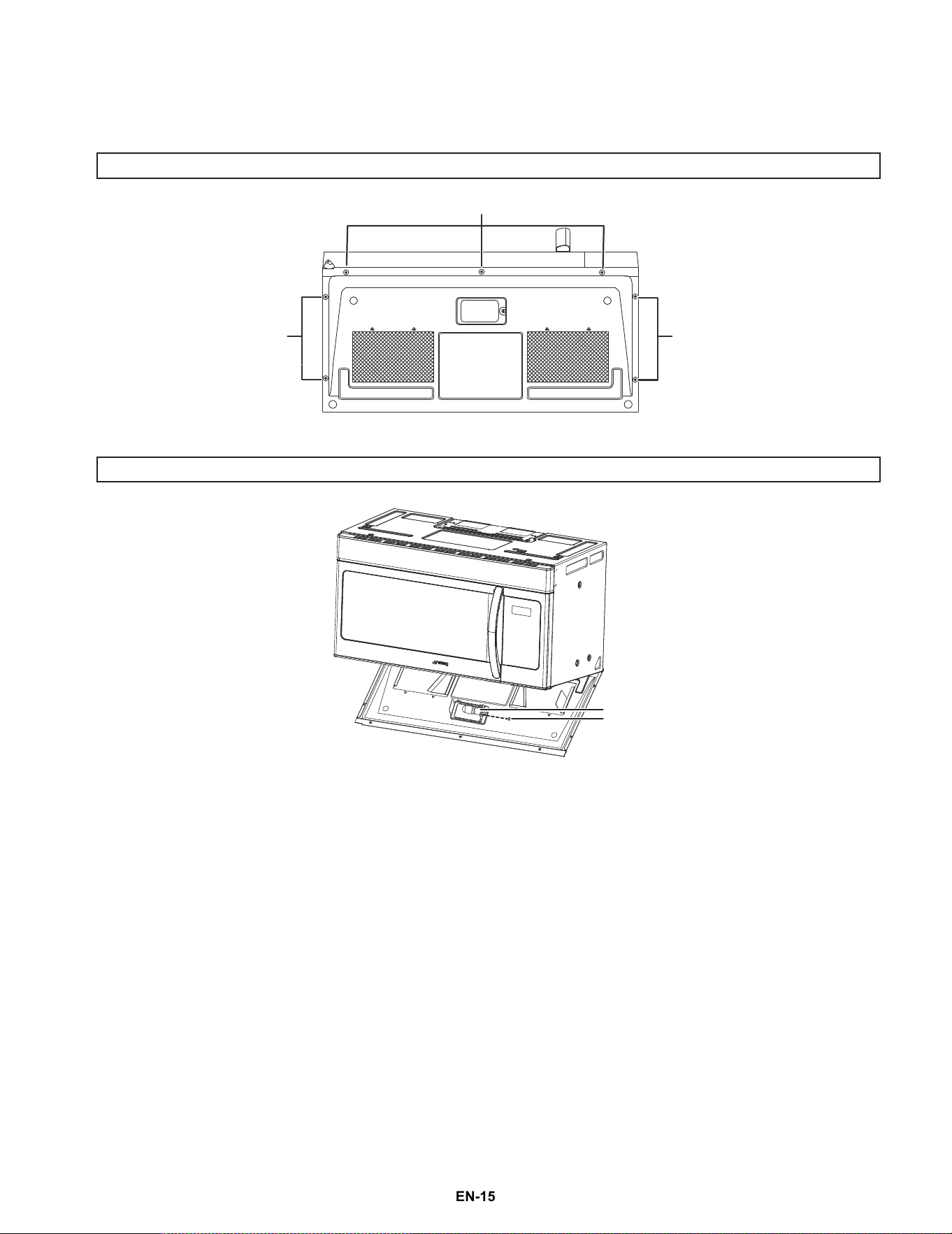
Countertop light (exterior)
1 Disconnect power to your microwave at the circuit breaker or by unplugging it.
2 Remove the screws holding the base plate in place, then swing the base plate down to access the LED bulb.
•
3 Remove the old light bulb, then replace with a new bulb.
•
4 Swing the base plate back into place and secure it with the screws.
CAUTION: The light cover may become very hot. Do not touch the glass when the light is on.
CAUTION: Do not use a bulb higher than 30 watts.
Screws
Screws
BOTTOM
Screws
Screw
LED bulb
NS-OTRB16SS3 24-0278_MAN_V3_EN.fm Page 15
EN-15
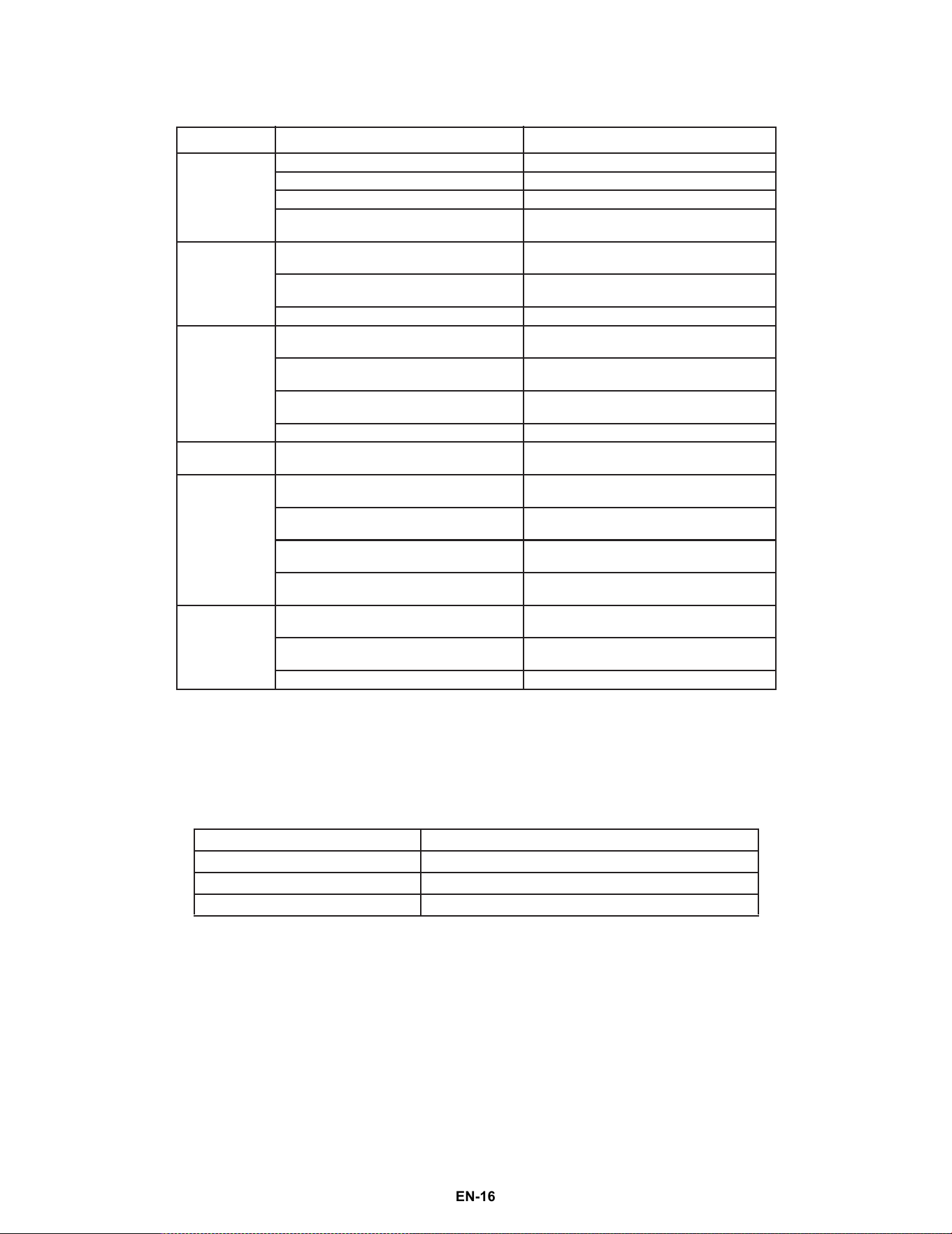
Troubleshooting
If you have a problem with your microwave, review the following chart for a possible solution. If your microwave still
does not work properly, contact the nearest authorized service center.
Specifications
PROBLEM POSSIBLE CAUSE POSSIBLE SOLUTION
My microwave
will not start
The electrical cord is not plugged in. Plug in the electrical cord.
The door is open. Close the door and try again.
The wrong operation is set. Check the instructions and try again.
The circuit breaker may have tripped.
Check the circuit breaker and reset if
n
eeded.
Arcing or
sparking in my
microwave
You are attempting to use incorrect
materi
als in your microwave.
Use only microwave-safe materials.
You are attempting to use your
microw
ave when it’s empty.
Do not operate your microwave when it’s
empty.
Spilled food remains in your microwave. Clean your microwave with a wet towel.
Unevenly
c
ooked
foods
You are attempting to use incorrect
materials in your microwave.
Use only microwave-safe materials.
The food is not defrosted completely.
Defrost the food completely before
attemp
ting to cook it.
The cooking time or power level is not
adequate to cook the food.
Use the correct cooking time and power
level.
The food is not turned or stirred. Turn or stir the food.
Overcooked
f
oods
The cooking time is too long or power
level is too high.
Use the correct cooking time and power
level.
Undercooked
foods
You are attempting to use incorrect
materials in your microwave.
Use only microwave-safe materials.
The food is not defrosted completely.
Defrost the food completely before
attemp
ting to cook it.
The cooking time or power level is not
adequate to cook the food.
Use the correct cooking time and power
level.
The microwave ventilation ports are
blocked or restricted.
Make sure that the ventilation ports are
not blocked or restricted.
Improper
defrosting
You are attempting to use incorrect
materials in your microwave.
Use only microwave-safe materials.
The cooking time or power level is not
adequate to cook the food.
Use the correct cooking time and power
level.
The food is not turned or stirred. Turn or stir the food.
Model FOTR3007-30 / FOTR3007-30BLK / FOTR3007-30WHT
Rated voltage 120VAC, 60Hz
Rated input power 1,500W
Rated output power 1,000W
NS-OTRB16SS3 24-0278_MAN_V3_EN.fm Page 16
EN-16

Legal notices
FCC statement
This equipment generates, uses, and can radiate radio frequency energy and, if not installed and used in accordance with the instructions, may
cause harmful interference to radio communications. However, there is no guarantee that interference will not occur in a particular installation. If
this equipment does cause harmful interference to radio or television reception, which can be determined by turning the equipment off and on,
the user is encouraged to try to correct the interference by one or more of the following measures:
• Reorient or relocate the receiving antenna.
• Increase the separation between the equipment and receiver.
• Connect the equipment into an outlet on a circuit different from that to which the receiver is connected.
• Consult the dealer or an experienced radio/TV technician for help.
NS-OTRB16SS3 24-0278_MAN_V3_EN.fm Page 17
EN-17