Rotate
P/N YRD157-MNL-0001 REV A
2-3/8" position
2-3/4" position
O
optional
x4
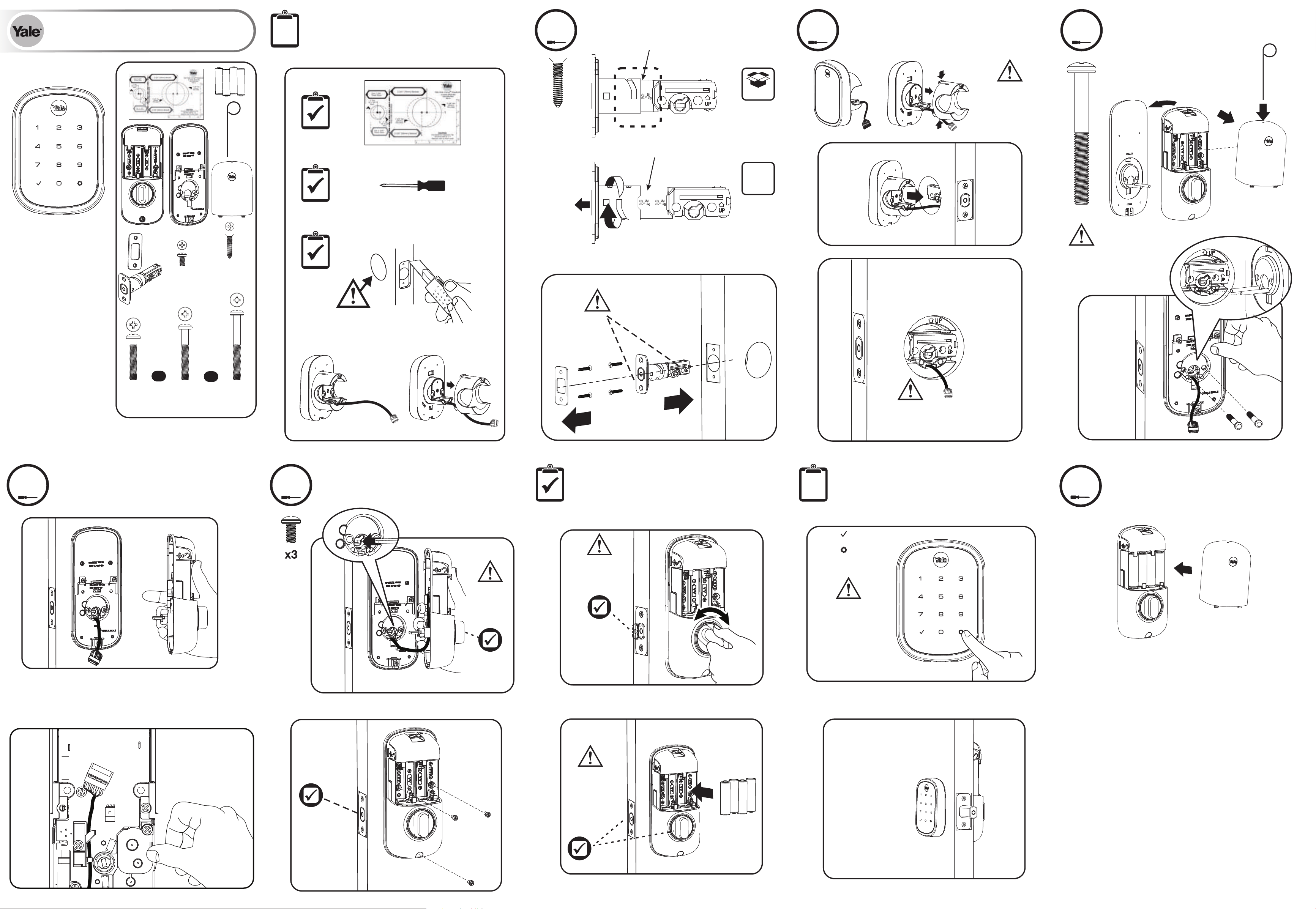
Installing Latch & Strike Plate
1
Bolt must be in retracted
(unlocked) position. UP
arrow must be facing
upwards.
Installing Touchscreen Escutcheon
2
Outside of Door
Ensure cable is
routed under the
deadbolt.
Installing Interior Mounting Plate
3
Attaching the Cable Assembly
4
Testing Operation
Preparing Door and
Touchscreen Escutcheon
Initial Programming
Bolt must be in
retracted
(unlocked)
position before
installing AA
batteries.
6
Yale Code™ SL
Key-Free Touchscreen Deadbolt (YRD157)
Installation and Programming Instructions
Installing Cover
Congratulations, you've installed the Yale Code™ SL Key-Free
Touchscreen Deadbolt (YRD157)! Turn sheet over for
Programming Instructions to customize your product.
default
Installing Interior Escutcheon
5
After entering the Master PIN
code, press any key to complete
handing.
Press to wake lock
Press 1
Press
Enter a 4-8 digit
Mater PIN code
FAILURE TO FOLLOW THESE INSTRUCTIONS COULD RESULT IN DAMAGE TO
THE PRODUCT AND VOID THE FACTORY WARRANTY
Thumbturn
should be in
vertical
position.
Deadbolt should
extend and retract
smoothly. If not, go
back to step 2.
Lock will not operate
until gear is pressed
and Master PIN code
is set.
x4
x3
#8-32 x 5/16"
Machine screws
#7 wood & #8-32
machine x 20mm
Combination screws
x2 Silver
M6x55mm
PPHMS
(2-1/4")
OR
x2 Black
M6x44mm
PPHMS
(Standard 1-3/4" - 2")
OR
x2 Teal
M6x36mm
PPHMS
(1-3/8")
x2
Choose
through bolt
appropriate for
your door
thickness.
If bore hole is less
than 2-1/8", remove
cup by gently
compressing two
tabs while pulling.
Cup must be removed from
escutcheon if bore hole is
less than 2-1/8".
2-1/8" Application
<2-1/8" Application
Master Lock Company LLC and its afliates
Press
Press
Press
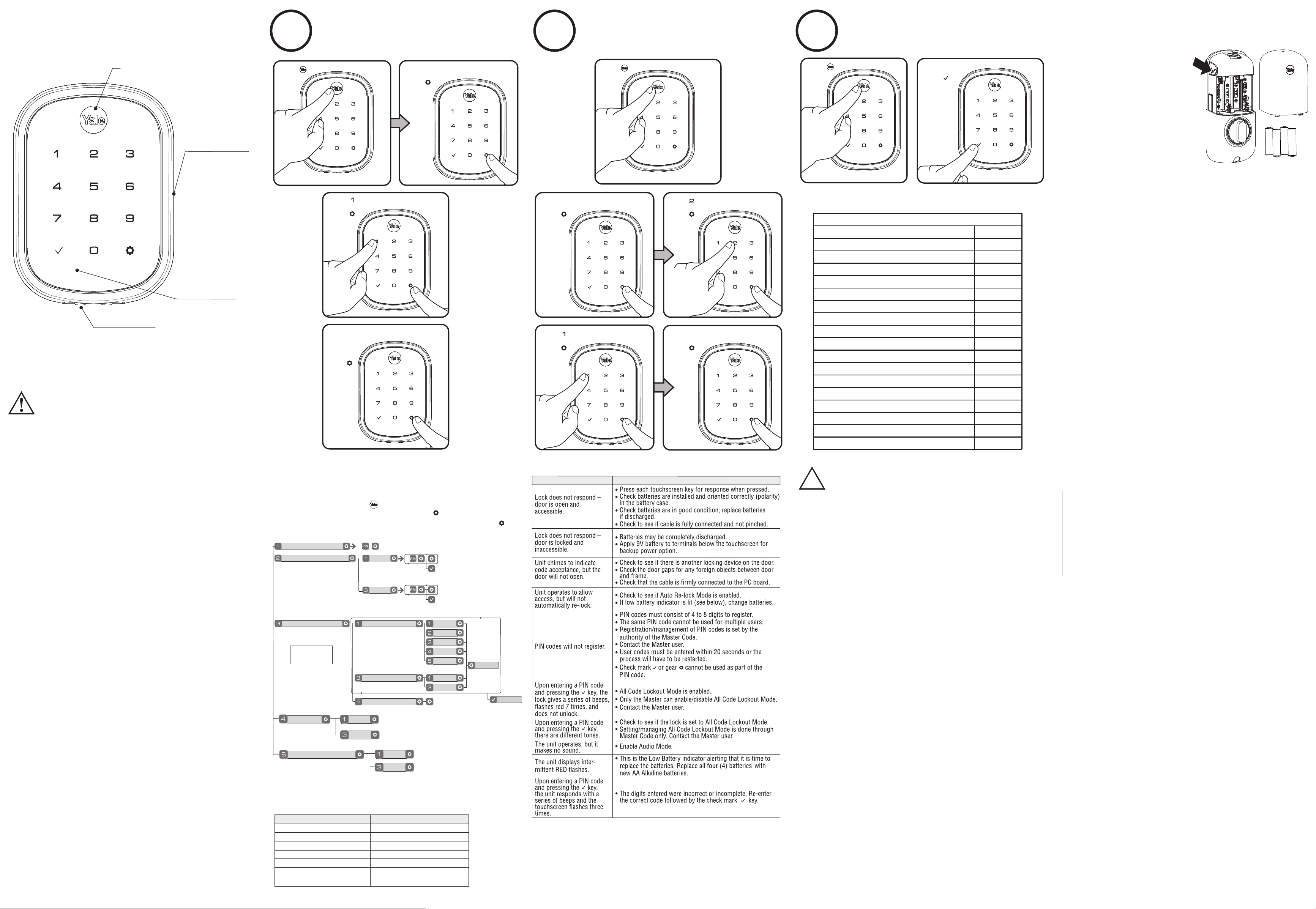
Programming Instructions
Press
Enter Master PIN code
Press
Enter 4-8 digit PIN code
"Unlock"
Audio Mode
All Code Lockout Mode
Enable
Enable
Disable
Disable
For quiet areas, select Disable (3)
in Audio Mode.
Programming Troubleshooting
Symptom
Suggested Action
Press
Press
Press
Press
Press
Definitions
Changing Master PIN Code
1
Enter 4-8
digit Master
PIN Code.
Creating User PIN Codes
2
Master PIN code must be created first.
*Max User Codes = 25 in network
Unlocking Door with PIN Code
3
Enter PIN
Press
Resetting Lock to Factory Default
Factory Settings
Settings
Factory Setting
Master PIN Code
Registration required*
Automatic Re-lock Disabled
One Touch Locking
Enabled
Audio Enabled
Automatic Re-lock Time
30 Seconds
Wrong Code Entry Limit
5 Times
Shutdown Time 60 Seconds
*The Master PIN code must be registered prior to any other programming of the lock.
When lock is reset to factory defaults all
user codes (including the Master PIN
code*) are deleted and all programming
features are reset to original default
settings (see "Factory Default Settings").
2. Remove the batteries.
1. Remove the battery cover.
3. While pressing the reset button
(minimum of 3 seconds) reinstall
batteries. Release reset button.
NOTE: After setting the Master Code,
press any key to complete handing of
the lock.
Upon reset, Master Code creation is the
only option available and must be
performed prior to any other
programming of the lock.
4. Replace battery cover.
Default settings
in bold.
Product Support Tel 1-855-213-5841 • www.shopyalehome.com
Master PIN Code must be created before any further programming.
Max User Codes = 25 in network
Warning: Changes or modifications to this device, not expressly approved by
Master Lock Company LLC and its affiliates could void the user's authority to
operate the equipment.
PIN Code Management - Up to 25 Pin Codes
Duplicate if necessary
User Name
PIN Code
Code Chart
Low Batter y Warning
Flashes RED
Audio Mode: Choosing Disable (3) in Audio mode shuts off the code confirmation tone
play-back for use in quiet areas. Audio mode is enabled or disabled through feature
programming by the Master code.
Low Battery: When battery power is low, the Low Battery Warning Indicator flashes RED. If
batter y power is completely lost, use the 9V battery override. To use the 9V battery
override apply 9V battery, in either direction, to terminals below the touchscreen for backup
power option. Wake up the lock and enter your pin code to unlock the door.
Tamper Alert: Audible alarm sounds if attempting to forcibly remove outside lock from door.
Master PIN Code: The Master PIN code is used for programming and for feature settings. It
must be created prior to programming the lock. The Master code will also operate
(unlock/lock) the lock.
Automatic Re-lock Time: After a successful code entry or manual unlock with the key, the
lock will automatically re-lock after each unlock in an effort to keep your home secure. This
feature is optional, and can be turned off. In the ON mode, the lock will automatically re-lock
after thirty (30) seconds.
Shutdown Time: The unit will shutdown (flashing touchscreen) for sixty (60) seconds and
not allow operation after the wrong code entry limit has been met.
All Code Lockout Mode: This feature is enabled by the Master code. When enabled, it
restricts all user (except Master) PIN code access. When attempting to enter a code while
the unit is in Lockout, the lock rapidly beeps 5 times.
One Touch Locking: When the latch is retracted, activating the touchscreen will extend the
latch (during Automatic Re-lock duration or when Automatic Re-lock is disabled).
Wrong Code Entry Limit: After five (5) unsuccessful attempts at entering a valid PIN code,
the unit will shut down and not allow operation for sixty (60) seconds.
User PIN Code: The User code operates the lock. Maximum number of user codes is 25 in
network.
All Code Lockout Mode
Rapidly beeps 5 times
Failsafe 9 Volt
Batter y Connection
(Use Alkaline battery)
®
While Yale has included several features to prevent lockout (9-
Volt battery jumper, low battery warnings), it is still possible for
a lockout situation to occur. Because this product does not
®
have a mechanical override (a key), Yale recommends to use
this product in an environment where there are additional
entry points into the dwelling.
NOTE TO INSTALLER AND CONSUMER
Touchscreen Wake-Up
Master PIN Code Setting
User PIN Code Registration
Register
Delete
Complete
Handing the Lock
Preforms automatic
handing of the lock
Advanced Lock Settings
Automatic Re-lock
Disable
30 sec
One Touch Locking
Enable
Disable
Continue
60 sec
3 min
2 min
2. Enter the 4-8 digit Master PIN code followed by the
key.
3. Enter digit corresponding to the function to be performed followed by the key.
1. Wake the lock by pressing the .
!
Warning: Changes or modifications to this device, not expressly approved by Master
Lock Company LLC and its affiliates could void the user's authority to operate the equipment.
THIS DEVICE COMPLIES WITH PART 15 OF THE FCC
RULES. OPERATION IS SUBJECT TO THE FOLLOWING
TWO CONDITIONS.
(1) THIS DEVICE MAY NOT CAUSE HARMFUL
INTERFERENCE, AND (2) THIS DEVICE MUST ACCEPT
ANY INTERFERENCE RECEIVED, INCLUDING
INTERFERENCE THAT MAY CAUSE UNDESIRED
OPERATION.
CAN ICES-3B/NMB-3B
Section 7.1.3 of RSS-GEN This Device complies with
Industry Canada License-exempt RSS standard(s).
Operation is subject to the following two conditions: 1)
this device may not cause interference, and 2) this
device must accept any interference, including
interference that may cause undesired operation of the
device.
Cet appareil est conforme avec Industrie Canada RSS
standard exemptes de licence(s). Son fonctionnement
est soumis aux deux conditions suivantes: 1) ce
dispositif ne peut causer des interférences, et 2) cet
appareil doit accepter toute interférence, y compris les
interférences qui peuvent causer un mauvais
fonctionnement du dispositif.
Enter Master PIN code
Press
Press
Press
Feature Programming Through Menu Mode
Using Master PIN code*
Yale Home
Yale® is a registered trademark of Master Lock Company LLC and its afliates. Yale Code™
is a trademark of Master Lock Company LLC and its afliates. Other products’ brand names
may be trademarks or registered trademarks of their respective owners and are mentioned
for reference purposes only. © Copyright 2024. All rights reserved. Reproduction in whole
or in part without the express written permission of Master Lock Company LLC and its
afliates is prohibited.