
CHiQ
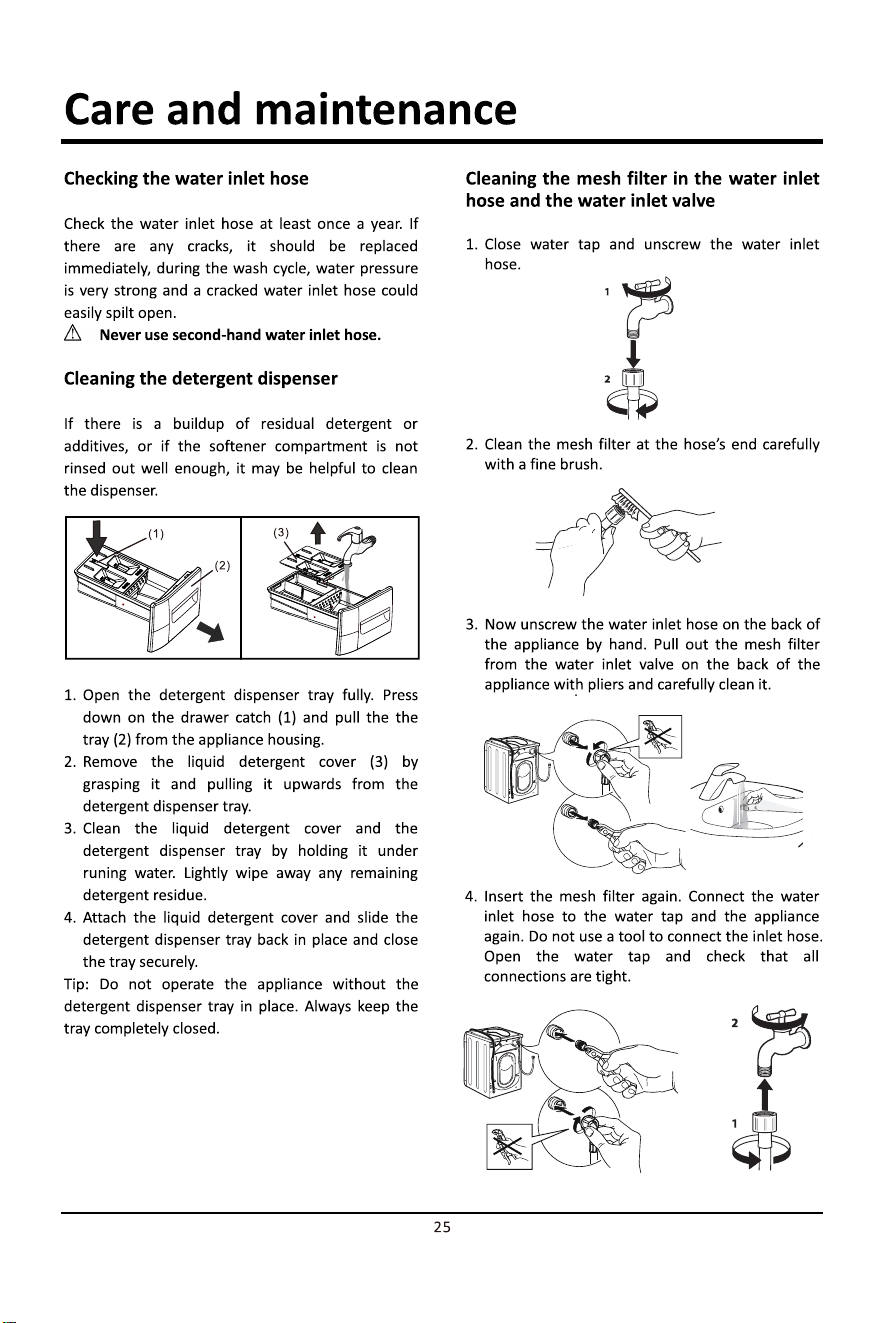
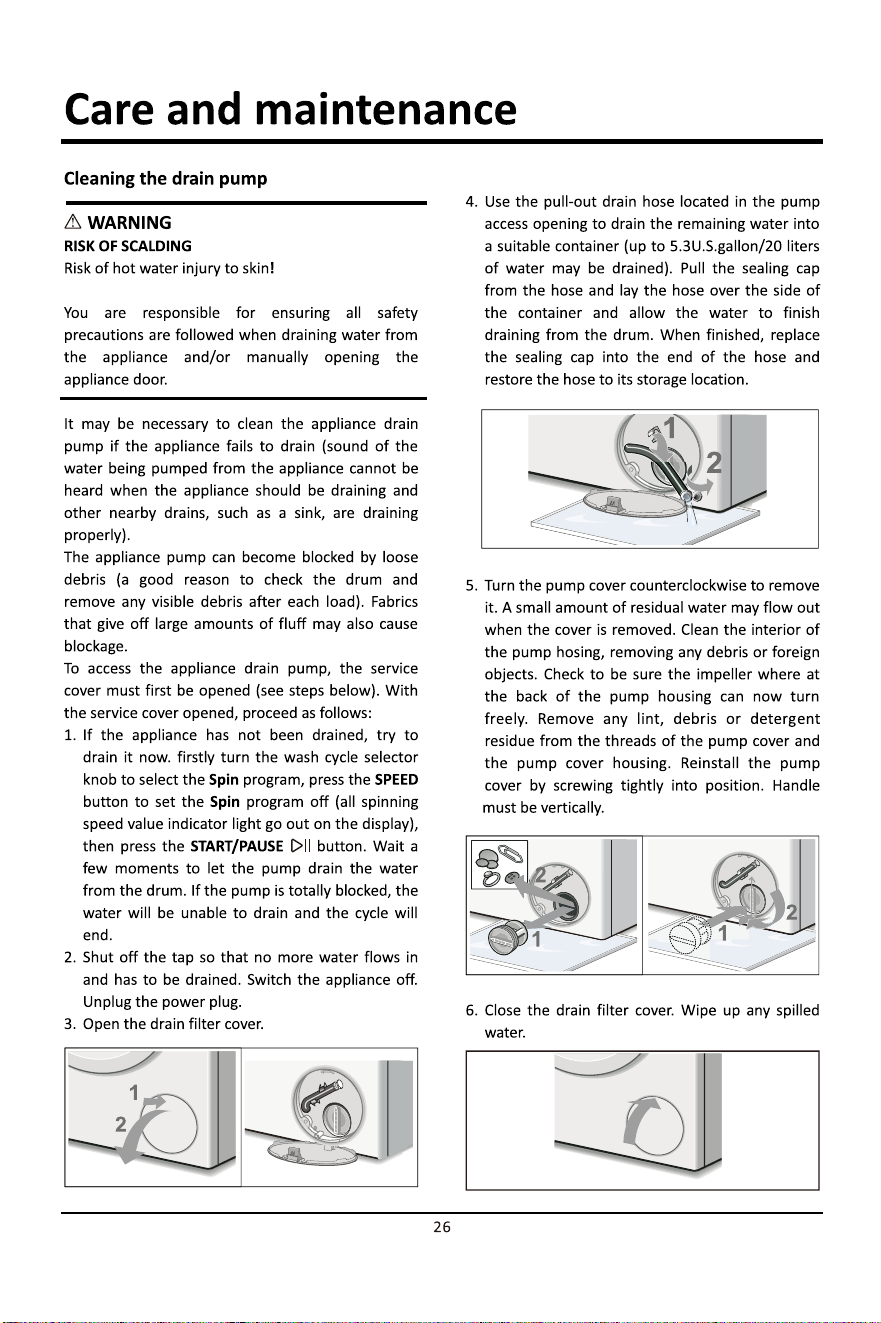
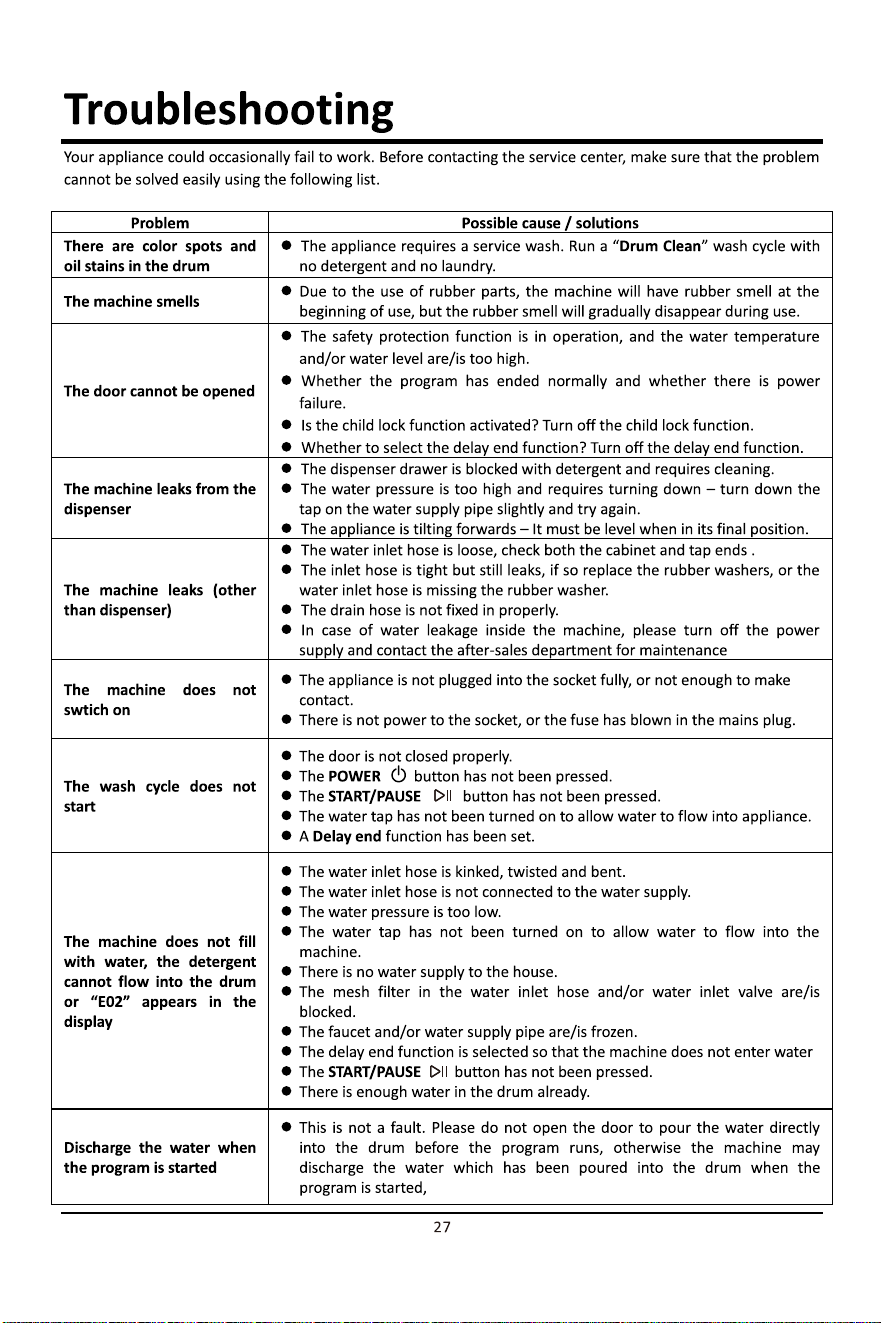
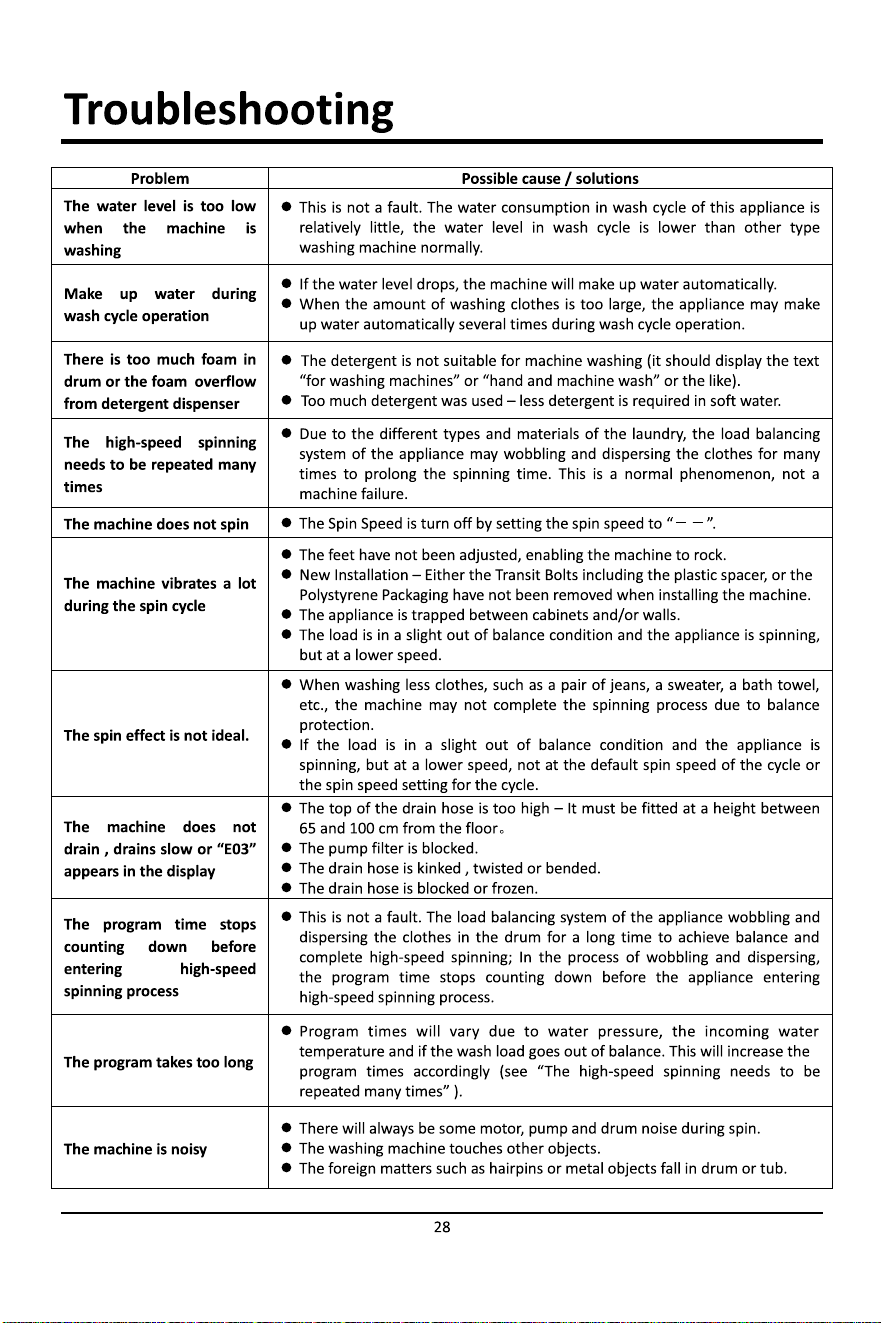
USER MANUAL
MODEL
WFL85SG
1
WFL85SW1
WF
L85PLSW
1. This appliance is not intended for use by persons (including children) with
reduced physical, sensory or mental capabilities, or lack of experience and
knowledge, unless they have been given supervision or instruction
concerning use of the appliance by a person responsible for their safety.
2. Children should be supervised to ensure that they do not play with the
appliance.
3. This appliance incorporates an earth connection for functional purposes.
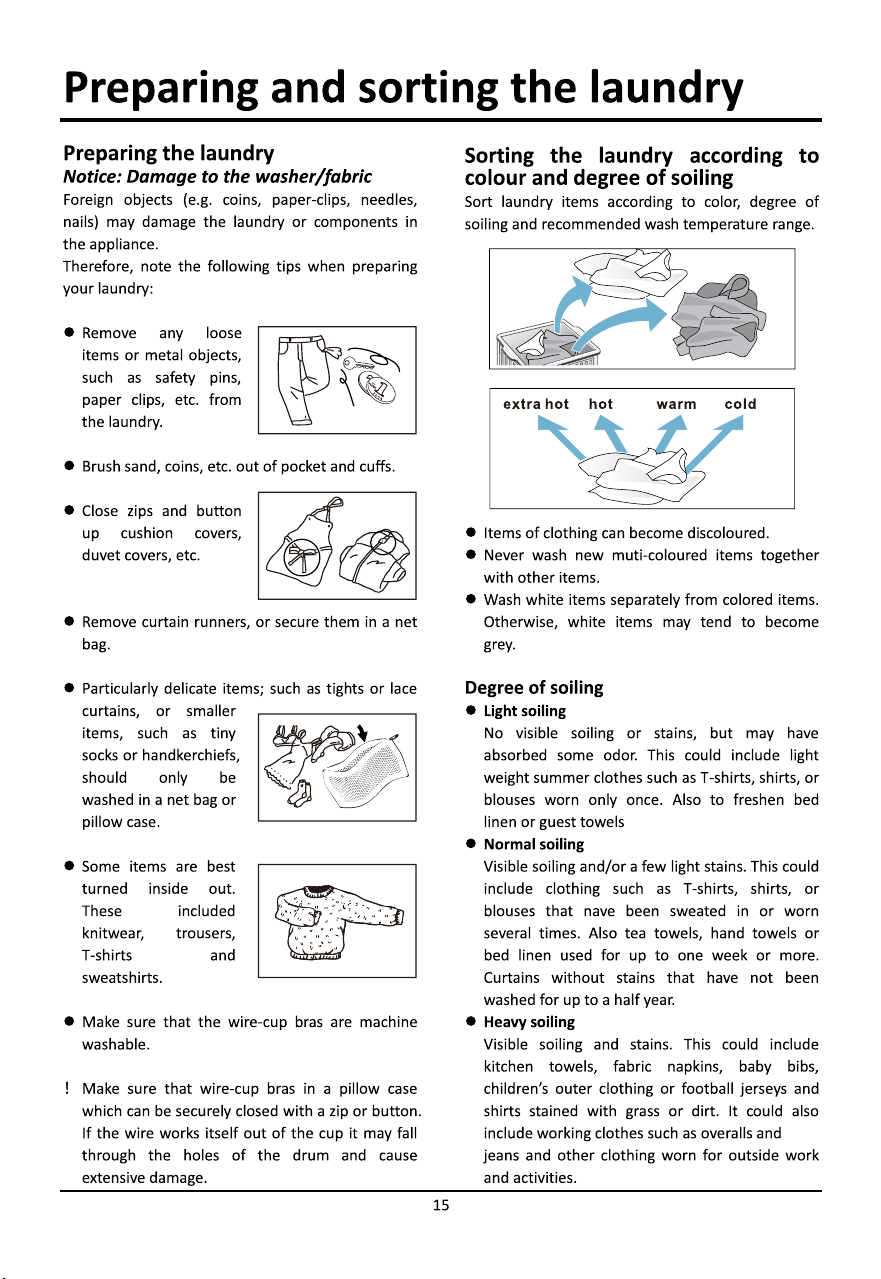
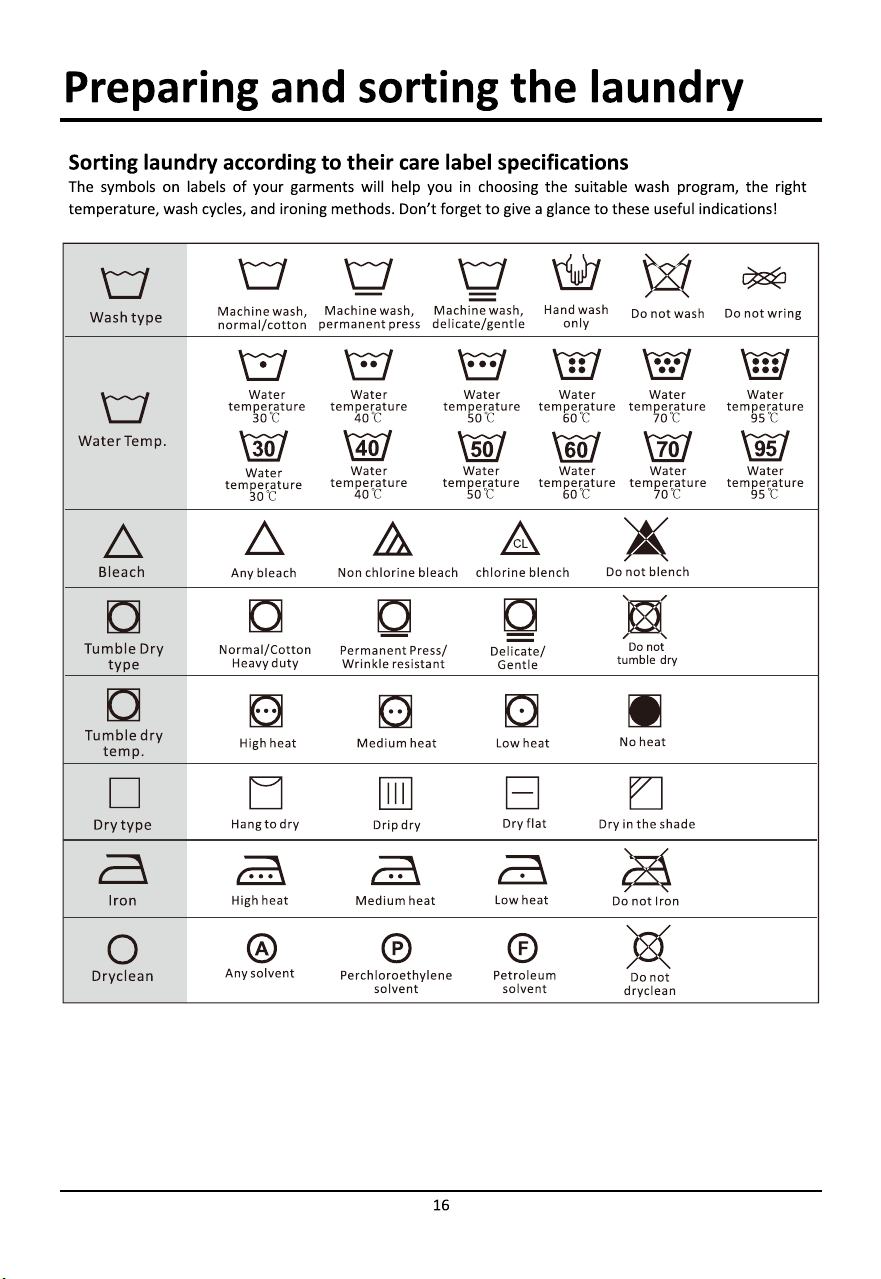
4. If the supply cord is damaged, it must be replaced by the manufacturer, its
service agent or similarly qualified persons in order to avoid a hazard.
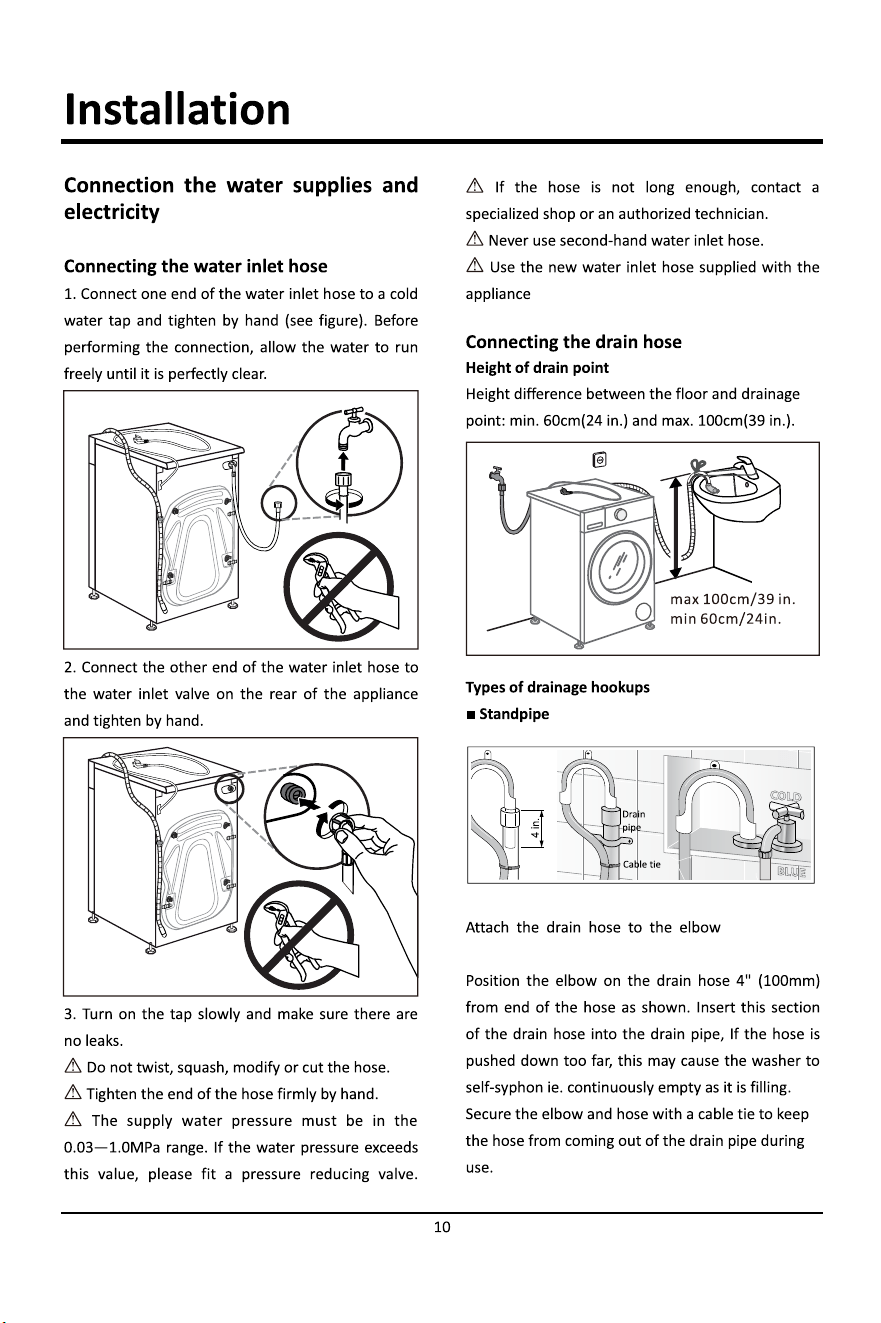
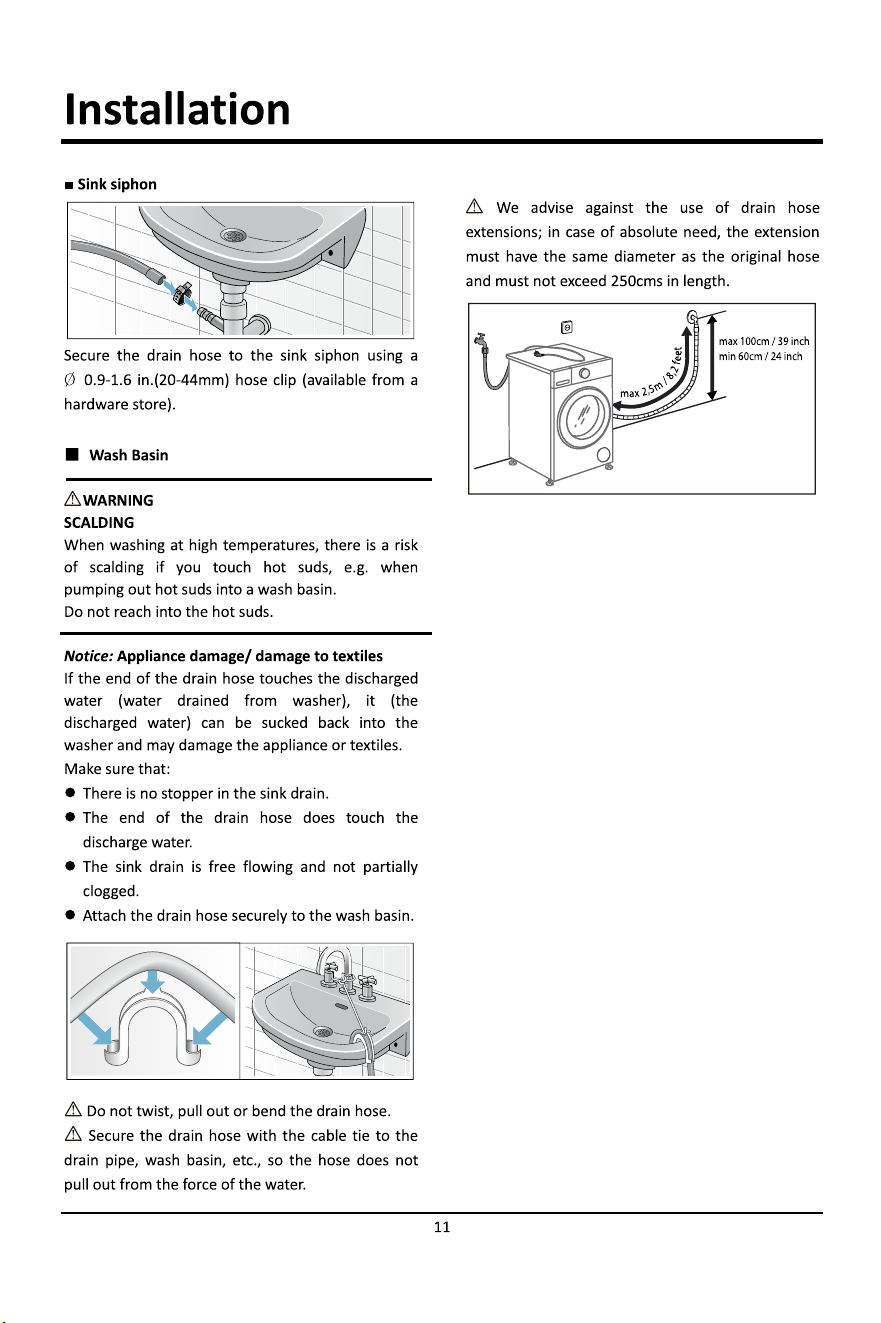
5. The maximum inlet water pressure:1.0Mpa.
6. The minimum inlet water pressure:0.03Mpa.
7. The new hose-sets supplied with the appliance are to be used and that old
hose-sets should not be reused.
8. This appliance is intended to be used in household and similar applications
such as:
•staff kitchen areas in shops, offices and other working environments;
•farm houses;
• by clients in hotels, motels and other residential type environments;
• bed and breakfast type environments.
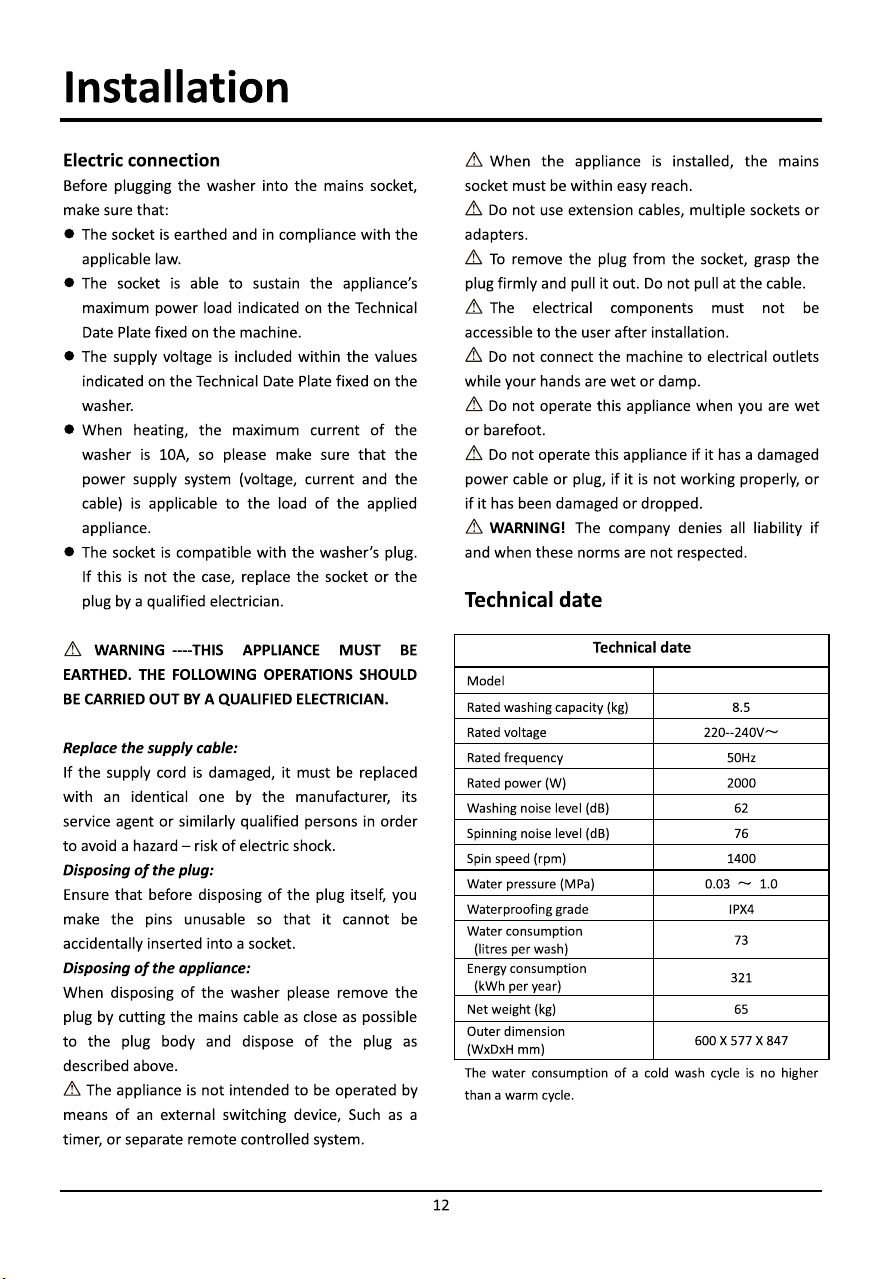
9. The openings must not be obstructed by a carpet.
read operator's manual
Caution
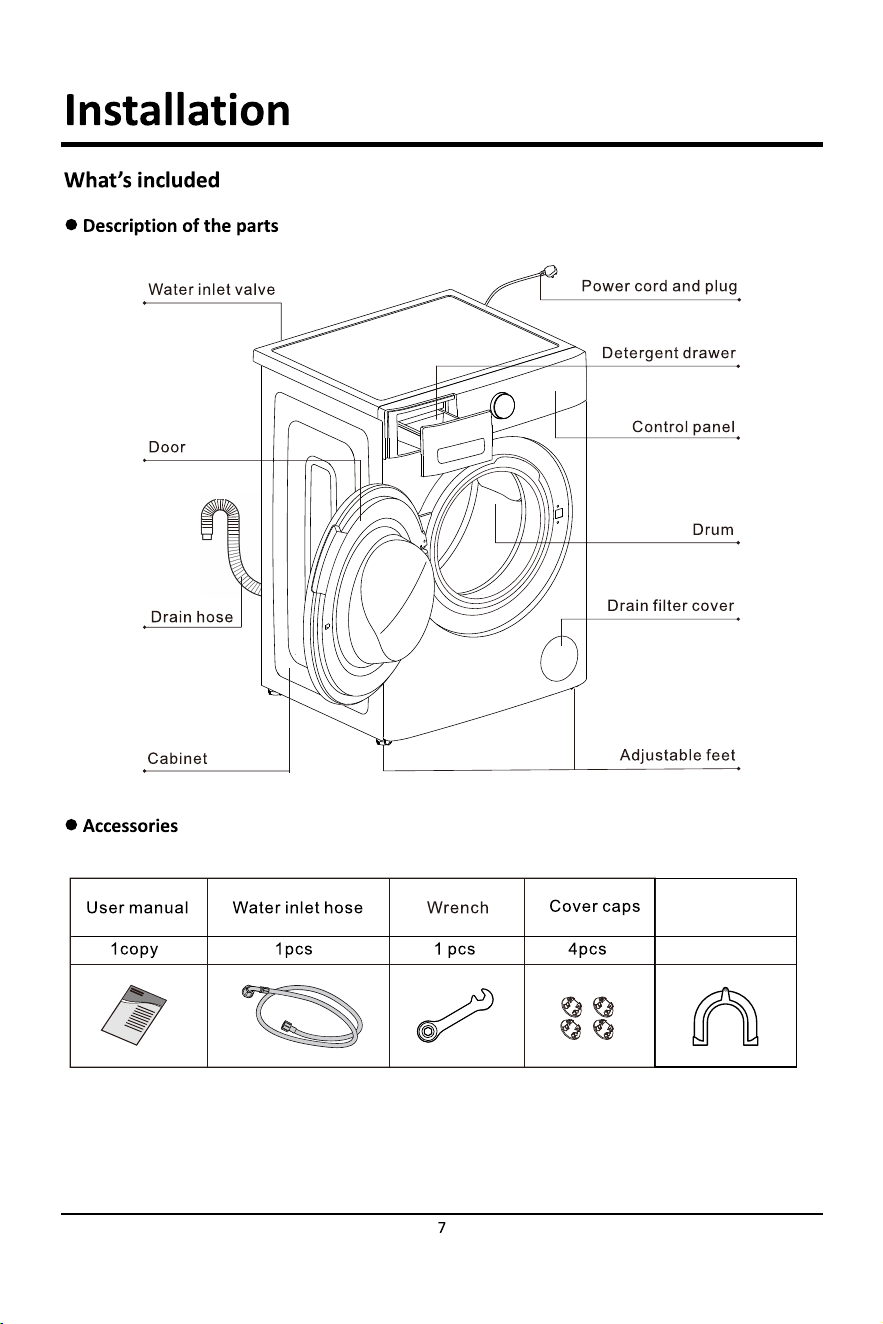
1pcs
U-tube
WFL85SG1
WFL85PLSW
Description of the appliance
13
Control panel
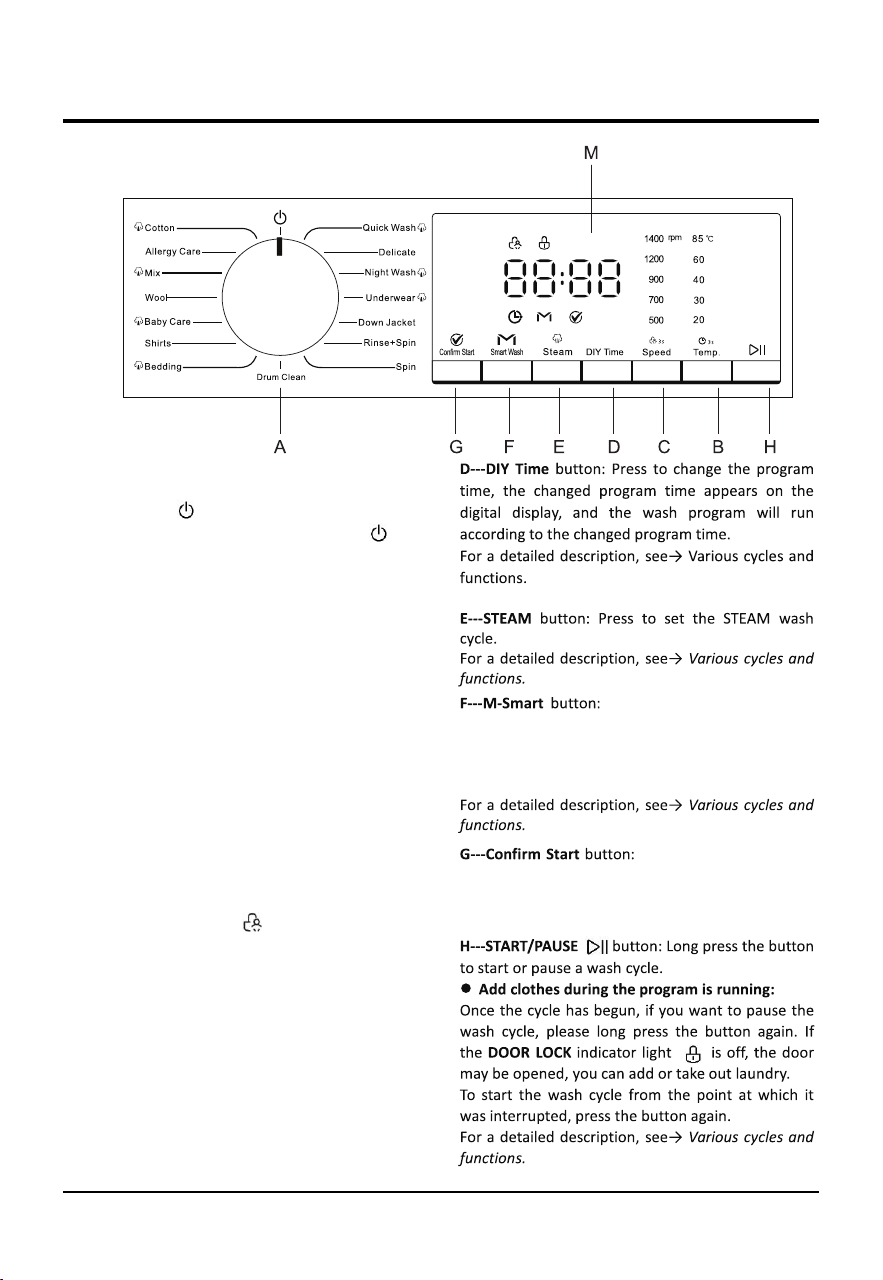
A---WASH CYCLE SELECTOR knob: Used to set the
desired wash cycle (see “Table of wash cycles”).
OFF position : Turn the Linear mark on the
wash cycle selector knob under the symbol “ “ to
switch the machine off. If the machine is switched
off during a wash cycle, this wash cycle will be
cancelled.
B---TEMP. button: Press to change the water
temperature for the current cycle. There are five
temperature values on the display. When a
temperature value is selected, the corresponding
temperature value indicator light illuminated on the
display.
DELAY END button: Long press temp to set 3 second
。
For a detailed description, see→ Various cycles and
functions.
C---SPEED button: Press to change the spinning
speed for the current cycle. There are five spinning
speed values on display. When a spinning speed
value is selected, the corresponding spinning speed
value indicator light illuminated on the display.
CHILD LOCK function : When the cycle is
running, long press the SPEED button for 3
seconds to set or cancel the Child lock function.
For a detailed description, see→ Various cycles and
functions.
Cancelling the buzzer:
Press and hold the SPEED button and Smart Wash
button together at the same time for at least 3
seconds, you can turn off the buzzer that sounds
during the washing cycle running.
For a detailed description, see→ Various cycles and
functions.
Press the smart wash buon to enter the Smart
wash cycle, the M-Smart washing light will turn
on,and enter different washing modes according
to different loads;
Aer selecng the program, press the Start/Pause
buon and press the ConfirmStart buon within
60 seconds to start the machine.
Preparing and sorting the laundry
14
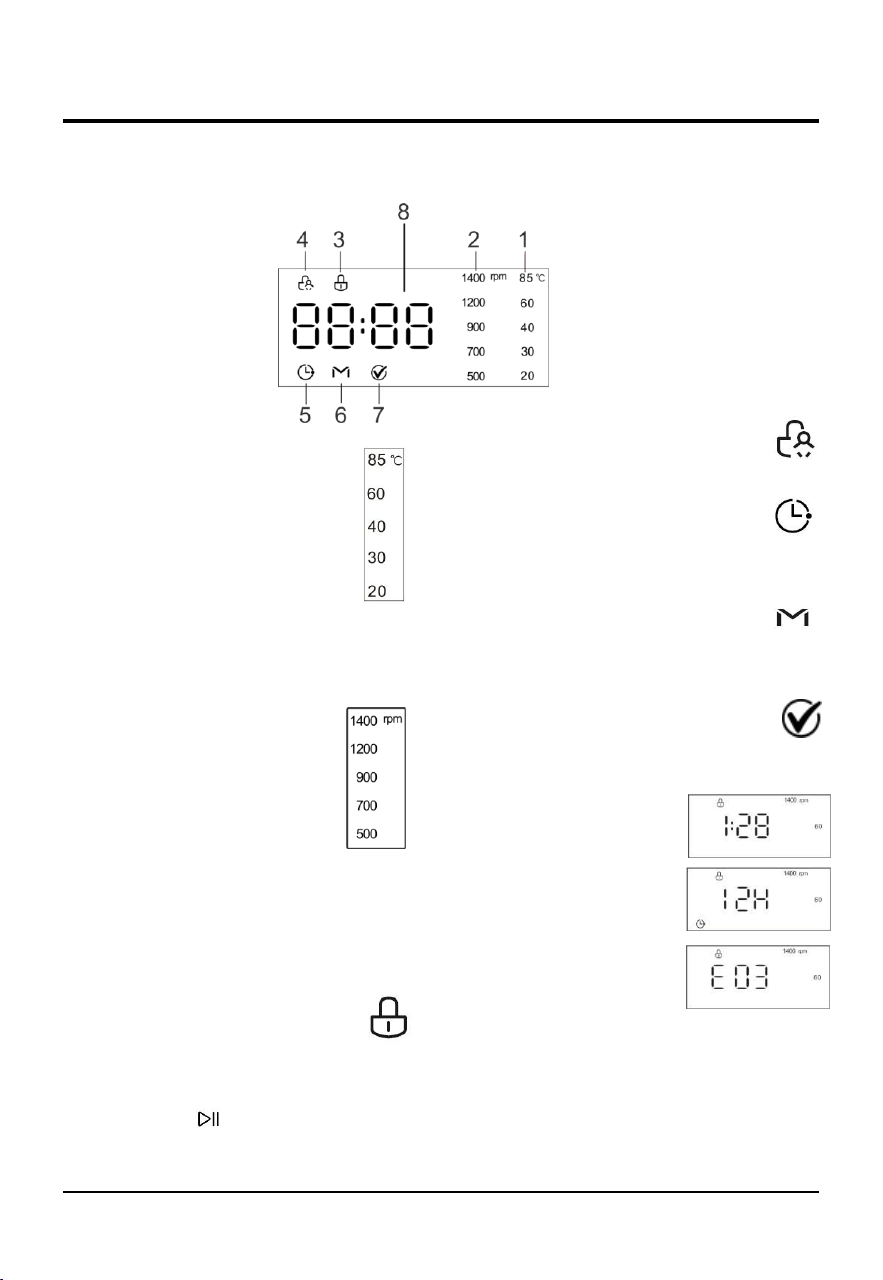
M---Display
1---Temperature indicator
When a program is selected, the default
temperature value indicator light of this
program will be lit on the display.
You can change the temperature value
by pressing the TEMP. button. There are
five temperature values indicator lights
on the display. When a temperature
value is selected, the corresponding
temperature value indicator light will be lit on the
display. If all temperature value indicator lights are
off, it indicates the appliance using only cold water
without utilized the heater in this program.
2---SPINNING SPEED indicator
When a program is selected, the
default spinning speed value indicator
light of this program will be lit on the
display.
You can change the spinning speed
value by pressing the SPEED button.
There are five spinning speed values
indicator lights on the display. When a spinning
speed value is selected, the corresponding spinning
speed value indicator light will be lit on the display.
If all spinning speed value indicator lights are off, it
indicates the appliance does not spin after the final
drain process in this program.
3---DOOR LOCK indicator
The lit indicator light indicates that the
door is locked. To prevent any damage,
wait until the indicator light turns off
before opening the door.
To open the door while a cycle is in progress, press
the START/PAUSE button, if the DOOR LOCK
indicator light is off, the door may be opened.
4---CHILD LOCK indicator
The lit indicator light indicates the CHILD
LOCK function is activated, the control
panel is locked.
5---DELAY END indicator
The lit indicator light indicates the DELAY
END function is activated. The countdown
to the end of the selected wash cycle will appear on
the digital display.
6---M-Smart indicator
The lit indicator light indicates the Smart
Wash wash program is selected. There are three
ways to set the Smart Wash wash program.
7---Confirm Start indicator
After the Confirm Start button operation
takes effect, the program starts operating,
with the "√" indicator on and the door locked.
8---DIGITAL DISPLAY
1) Remaining time of
the wash cycle
2) Delay end time
3) Faultcode
The display is useful when programming the machine and provides a great deal of information.
Special cycle which can be started
simply by pressing the Smart Wash
button
Various cycles and functions
18
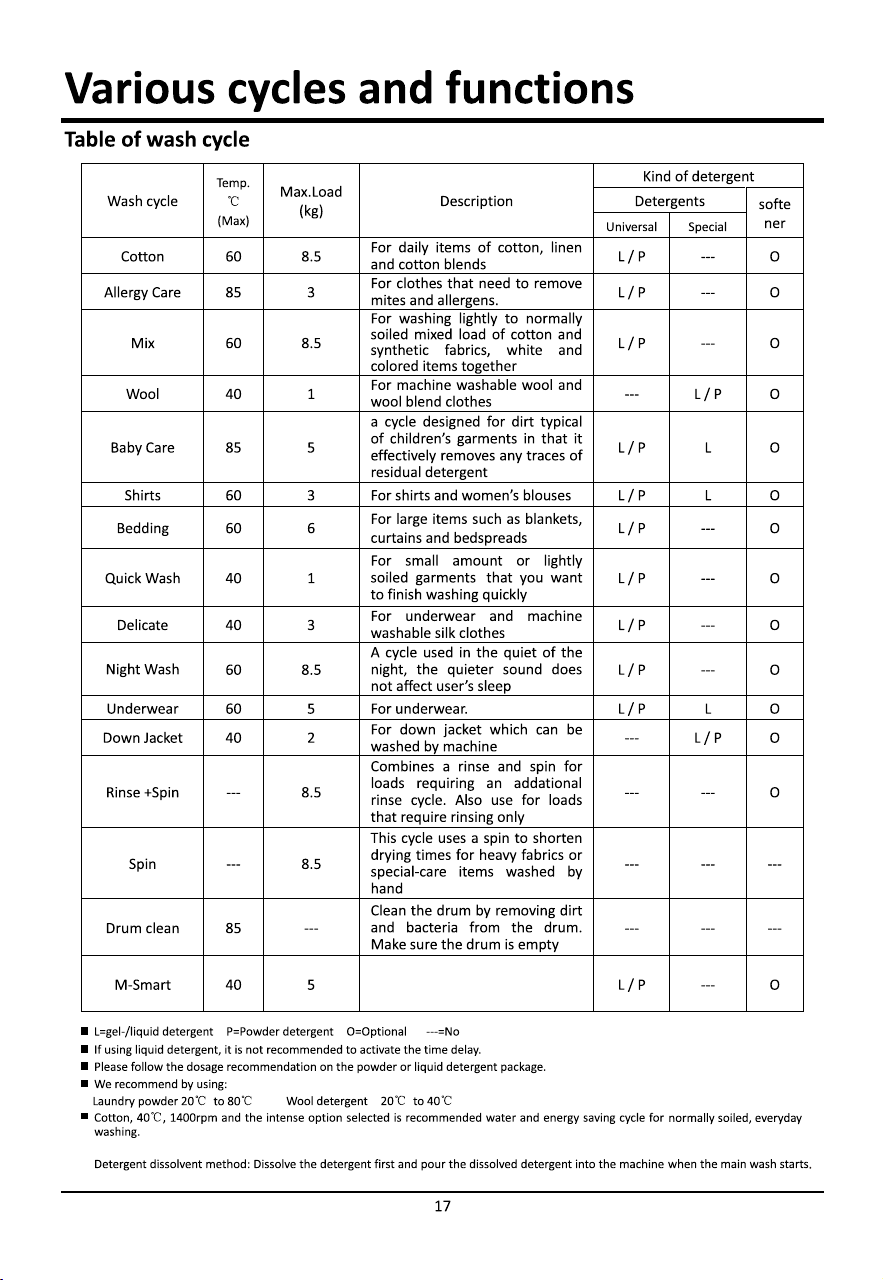
Various cycles
Special wash cycles
Baby care: a cycle designed for dirt typical of
children’s garments in that it effectively removes
any traces of residual detergent.
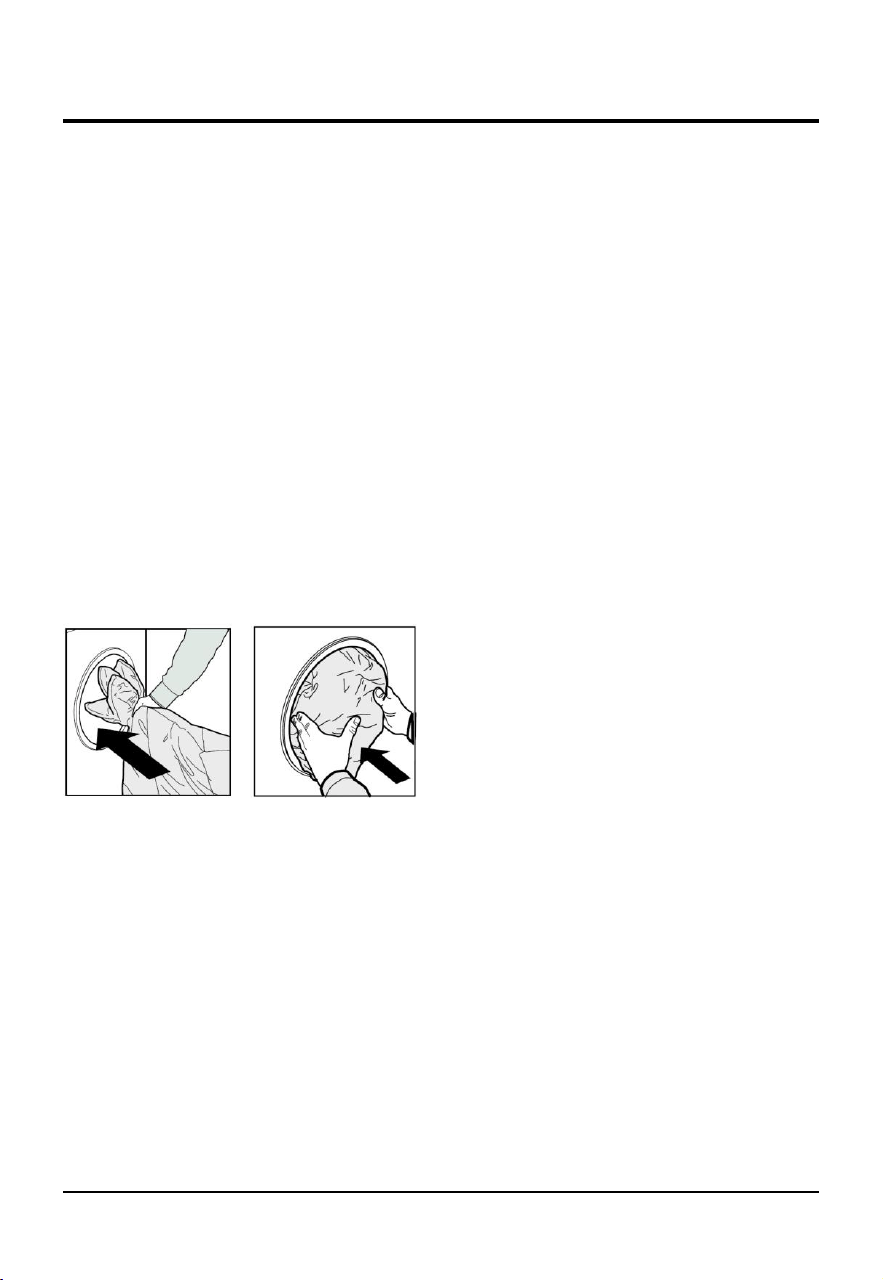
Down Jacket: a cycle to wash single downs (the
weight of which should not exceed 2.0kg), cushions
or clothes padded with goose down such as puffa
jacket, use this special wash cycle. We recommend
that down are placed in the drum with their edges
folded inwards (see figure) and that no more than
3/4 of the total volume of the drum is used. To
achieve the best results, we recommend that a
liquid detergent is used and placed inside the
detergent dispenser drawer.
Wool: a cycle designed for wool fabrics.
● Before washing, please confirm that the clothes
have the washing label of "machine washable".
● After the procedure is completed, please take out
the clothes quickly, shape and dry them to avoid
deformation caused by being placed in the drum for
too long.
● To prevent clothes from being damaged, the
water temperature should not exceed 40°C .
● For best results and to reduce the damage of
clothes, Please use special detergent for wool and
do not exceed 1.0 kg of laundry.
Various functions
Downlight
Downlight is always on during program or
function setting.
When the program is suspended, the downlight
can be lit by opening the machine door.
When the program is running, the downlight will
automatically light up with the change of
washing stage.
Touching any button other than the power
button can also illuminate the downlight.
Delay end
After selecting the desired washing program but
before pressing the START/PAUSE button, Long
press Temp button 3 second until the desired time is
displayed, e.g.8h,with the DELAY END indicator light
lit. press Temp button to set the program end(Delay
end) time in one hour increments to amaximum of
24h(hours).
(If no operation is performed within 3 seconds, the
DELAY END function is exited.)

Various cycles and functions
20
Cancelling the buzzer
Press and hold the SPEED button and Smart Wash
button together at the same time for at least 3
seconds, you can turn off the buzzer that sounds
during the washing cycle running.
To activate the buzzer setting
Do the same operation as you did for cancelling. The
buzzer setting is activated after one beep.
Load balancing system
The appliance has an automatic detection system
for eccentric load. In the process of spinning, if the
clothes are unevenly distributed, the appliance will
level and adjust the clothes until the clothes are
evenly distributed before spinning. If the clothes
cannot be evenly distributed within the specified
time, the appliance will not spin to avoid severe
vibration of the machine. At this time, you need to
check whether the clothes are knotted or entangled,
and select the "Spin" program after reorganizing the
clothes. When washing less clothes, such as a pair
of jeans, a sweater, a bath towel, etc., the machine
may not complete the spinning process due to
balance protection. Please wash the large and small
clothes together as much as possible to make the
clothes easier to release evenly and complete the
spinning process smoothly.
NOTICE:
Due to the different types and materials of the
laundry, the automatic adjustment and balance
system of the appliance may level and adjust the
clothes for many times to prolong the spinning time.
This is a normal phenomenon, not a machine failure.
Specification for Confirm Start Button
Aer pressing the "Start/Pause" buon, “√”
indicator starts flashing. Next pressing the
"ConfirmStart" buon within 60 seconds,
the "√" indicator on and the machine starts.
If it exceeds 60s, or the program is adjusted
or the door is opened before pressing
"ConfirmStart", the startup fails and "√"
indicator exnguished; .you need to press
Start/Pause and ConfirmStart buons again
to start the operaon.
During operaon,you can pause a program by
pressing Start/Pause buon without further
confirmaon;01.when starng the program
again, you need to press Start/Pause buon
first and then ConfirmStart buon to start
operaon.