
01
02
04
03
05
06
07
10
12
13
14
Customer support and specifications
Warning
Packing list
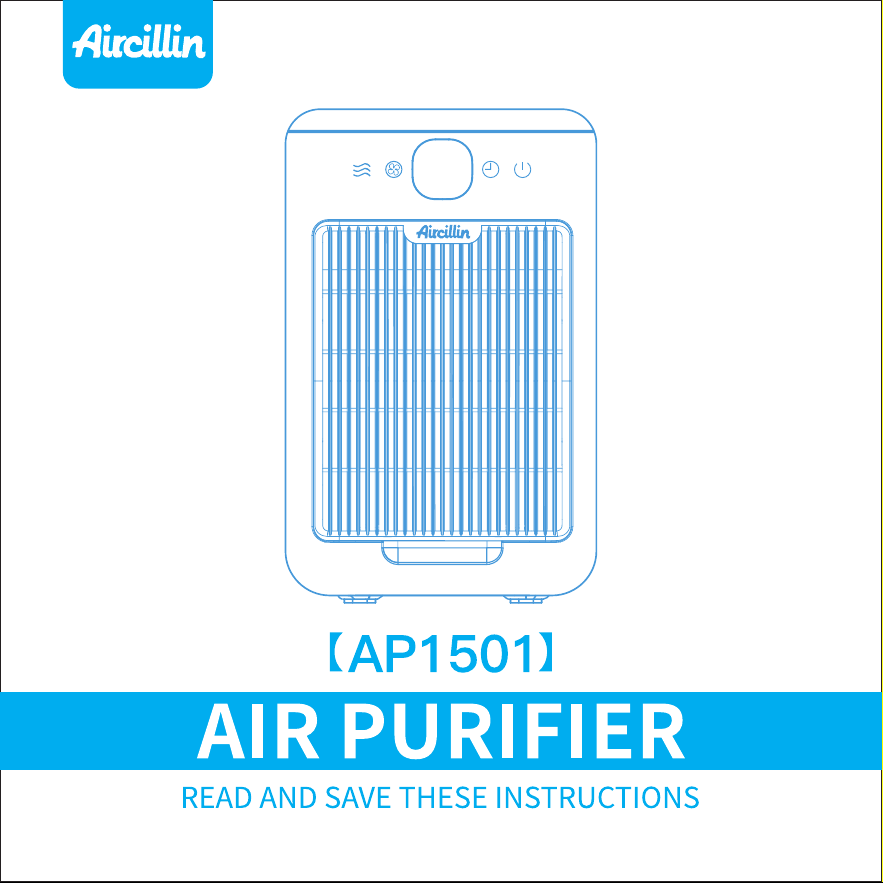
Product Instruction
Operating guide
Control panel and functions
How to use
How to replace filter
How to replace essential oil pad
Q & A
Contents
02
Customer support and Specifications
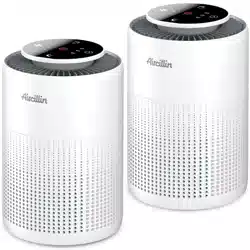
Thank you for purchasing our Aircillin air purifier. Please
study this manual carefully to familiarize yourself with the
features and functions of your Aircillin air purifier. Inside
you will find many helpful hints on how to use and maintain
your Aircillin air purifier properly.
lf you encounter any issues or have any questions regarding
your new product, feel free to contact our helpful Customer
Support Team. Your satisfaction is our goal!
Input voltage (adapter) AC100-240V/50-60Hz
Rated voltage DC12V/1.0A
Rated power 12W
CADR value 106CFM/180m³/h
Operating conditions Temperature: -10°C–40°C Humidity: ≤ 85% RH
Noise range 25-53dBA
Product net weight 1.4Kg
Product size 171.5*171.5*270mm

03
Important safety instructions
Read all instructions before using this air purifier.
When using an electrical appliance, basic precautions should
always be followed, including the following:
Make sure the air purifier is plugged into a live 120V AC outlet.
Always turn off and unplug the air purifier when not in use.
Disconnect the power supply from your air purifier by unplugging the
power cable before replacing filters and before cleaning and before
servicing.
Do not use attachments or filters which is not recommended by Aircillin
Do not use the air purifier outdoors.
Do not attempt to remove any part of the unit except the filters.
Do not attempt to repair the air purifier.
Do not attempt to plug in the machine when your hands are wet.
Do not soak the purifier in water or splash water on it.
Do not operate the air purifier near an open flame.
Do not obstruct the air inlet and air outlet of the air purifier.
Save these instructions for future reference.
To reduce the risk of fire or electric shock. Do not use this fan with
any solid-state speed control device.
04
Unpack your Aircillin purifier follows
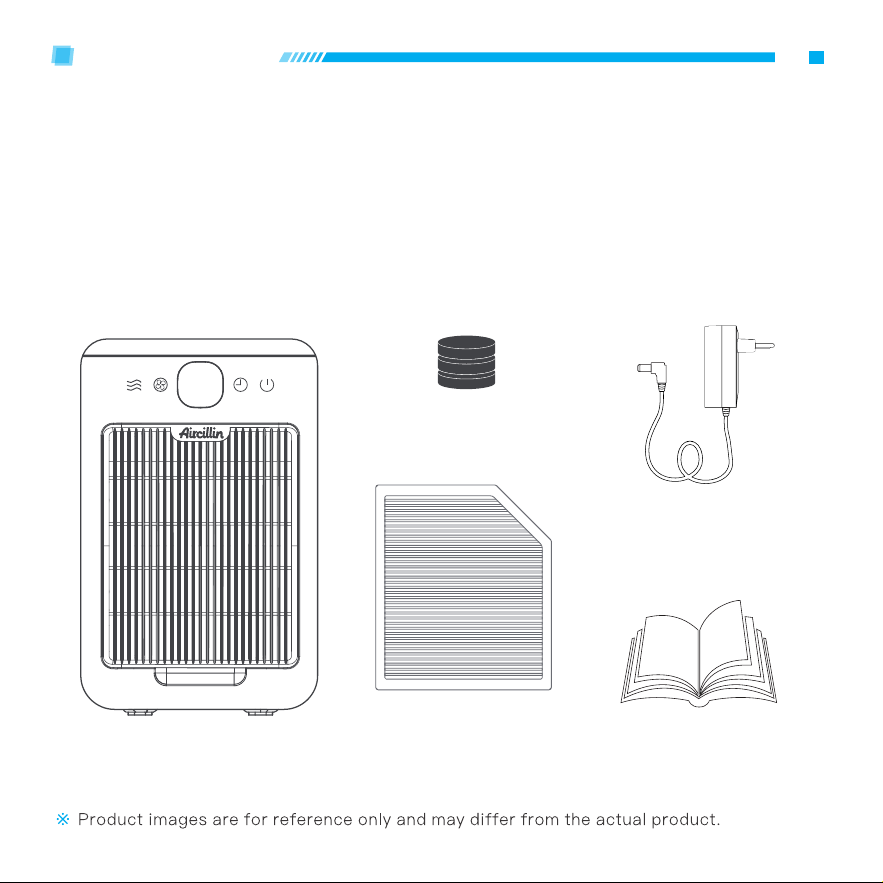
Packing list
1.
2.
3.
Take the Aircillin AP1501 air purifier out of the package.
Please check all the components as following picture.
If there is any damage for any of the component, please contact us
freely.(www.Airtok.com)
Host
(1 PCS)
Filter
(2 PCS)
Manual
(1 PCS)
Aroma Pads
(12 PACK)
Adapter
(1 PCS)
Product Instruction
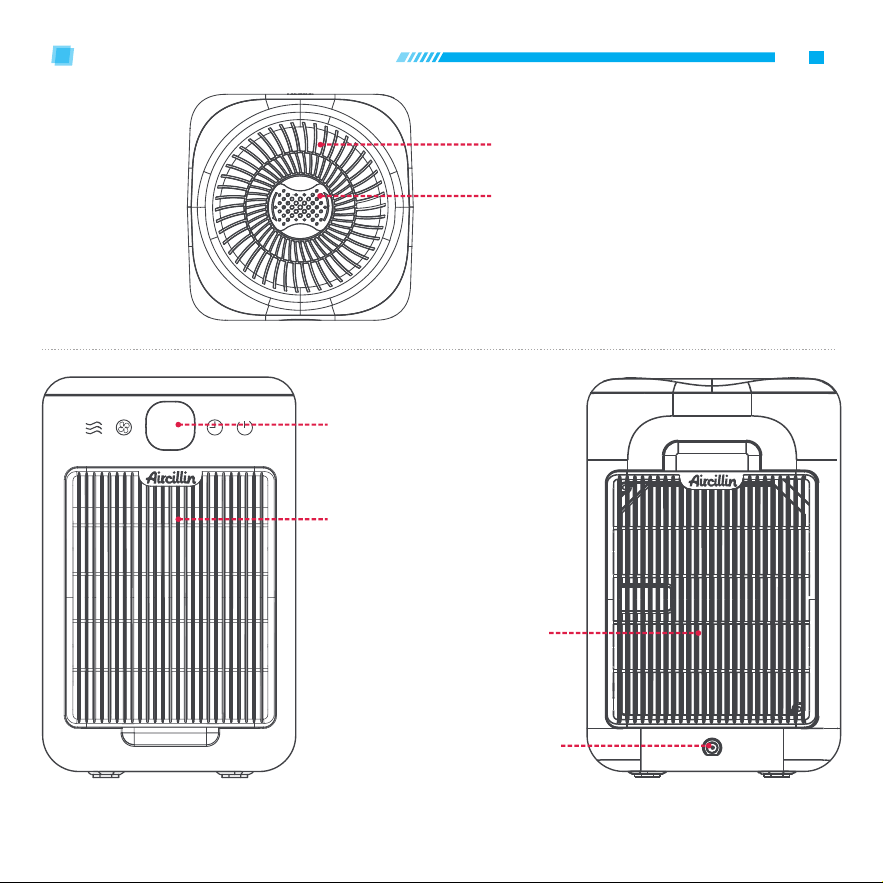
Aroma Pads Tank
Air outlet
Control panel
Air inlet
Power Port
Air inlet
05
06
Operating guide
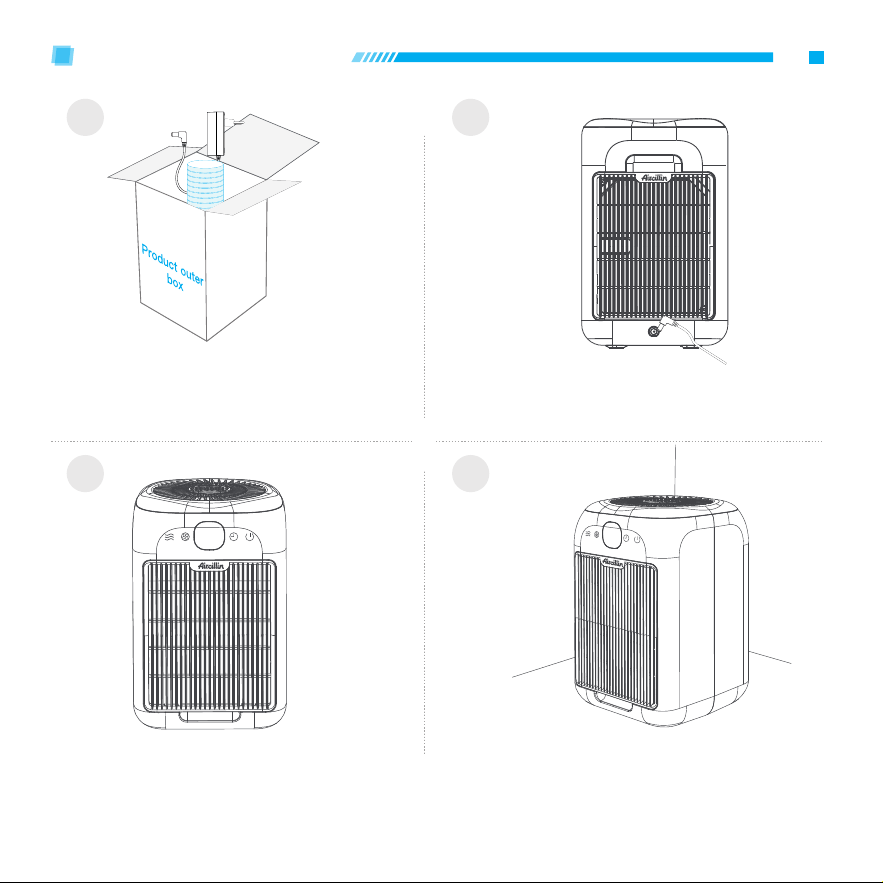
After opening the package, adapter
and aromatherapy cotton box on top
of the package.
Plug in the power.
The machine will make a “beep”
sound and enter the "standby" state
after powering on.
In order to achieve the best perfor-
mance, please keep the machine at
least 15cm away from other obstacles.
1 2
3 4
The adapter and aroma pads are put in the cotton box.
( the top of the package)
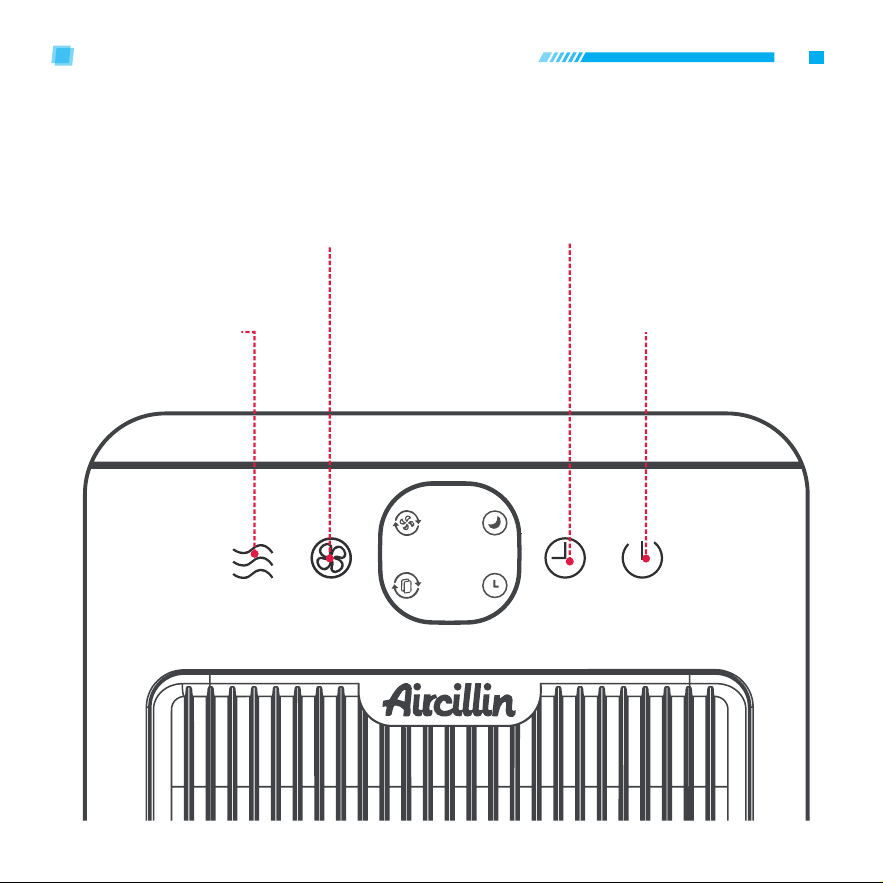
Extreme speed
mode
Power on/off/
standby button
Wind speed button Timer button
Control panel and functions
Operation buttons
07

When the filter replacement indicator flashes, this is a reminder to replace
the filter., after replacing the new filter, press these two buttons at the
same time at last 3S, after hearing the “Beep" sound, the display filter
icon disappears, and the filter reset operation is completed.
After plugging in the adapter, tap once, the air purifier turns on; Tap
again and the air purifier goes into standby state.
Tap once to adjust the working time of the air purifier, and when the
timer ends, the air purifier enters the standby state.
Filter reset key combination
Power on/off/standby button
Timer button
Control panel and functions
08

Adjust the wind speed, you can choose sleep, 1-2-3 gear switching.
Tap once, the air purifier enters the extreme speed mode, the maximum
power runs, the air is cleaned quickly,
PS. The wind speed noise in this mode will be relatively large, which is a
normal phenomenon.
Wind speed button
Extreme speed mode
Control panel and functions
09
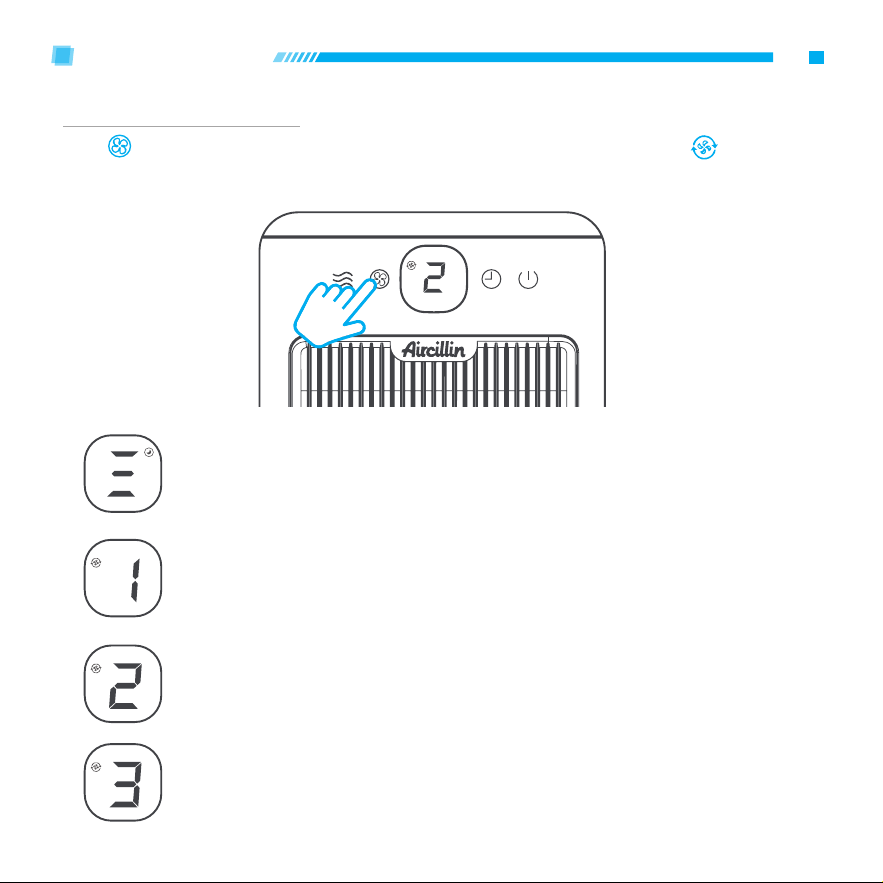
Tap to switch between sleep and 1-2-3 while the display icon lights
up and displays the gear value.
Adjust wind speed
10
Click to toggle
Indicates sleep gear, lowest wind speed, low noise,
dimming display brightness.
It means that the current operation is 1 gear, and the
display brightness is normal.
Indicates that the second gear is currently running,
and the display brightness is displayed normally.
Indicates that the third gear is currently running, and
the display brightness is displayed normally.
How to use
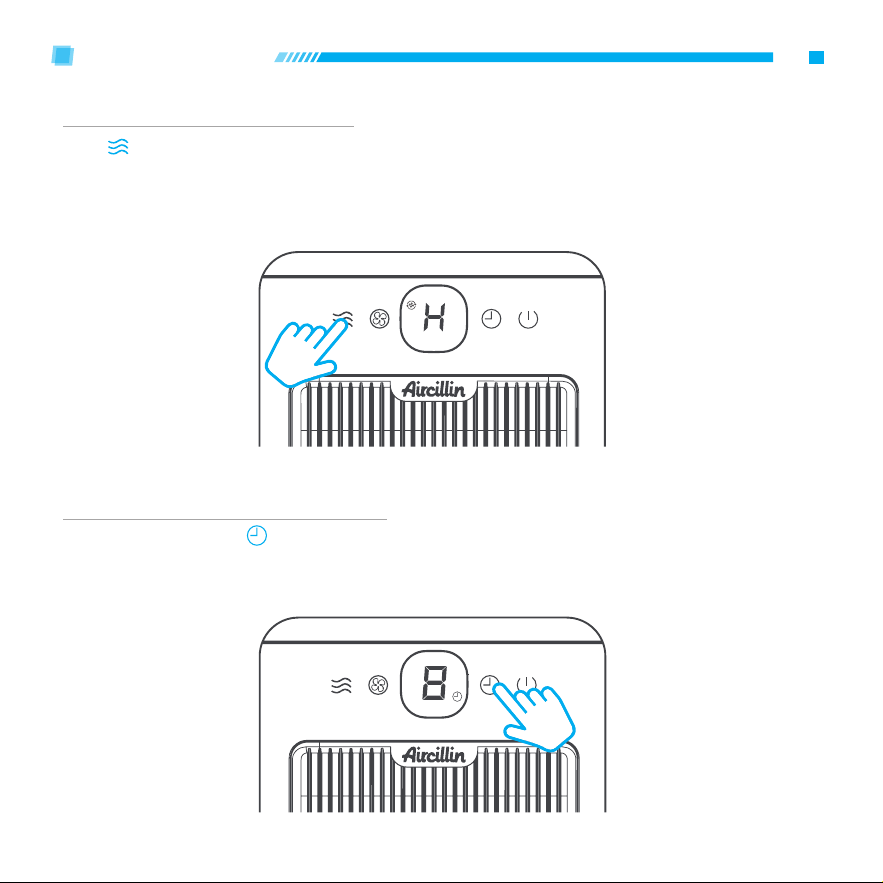
Tap , the maximum power of the air purifier runs at full load, the fastest
air filtration and cleaning. In this mode, the air purifier is at the highest
power, and it is normal to be noisy, so don't worry.
Press this button to choose different timer setting (0-8 hour).
Enable Extreme Speed
Enable the timing feature
Click to toggle
Click to toggle
How to use
11
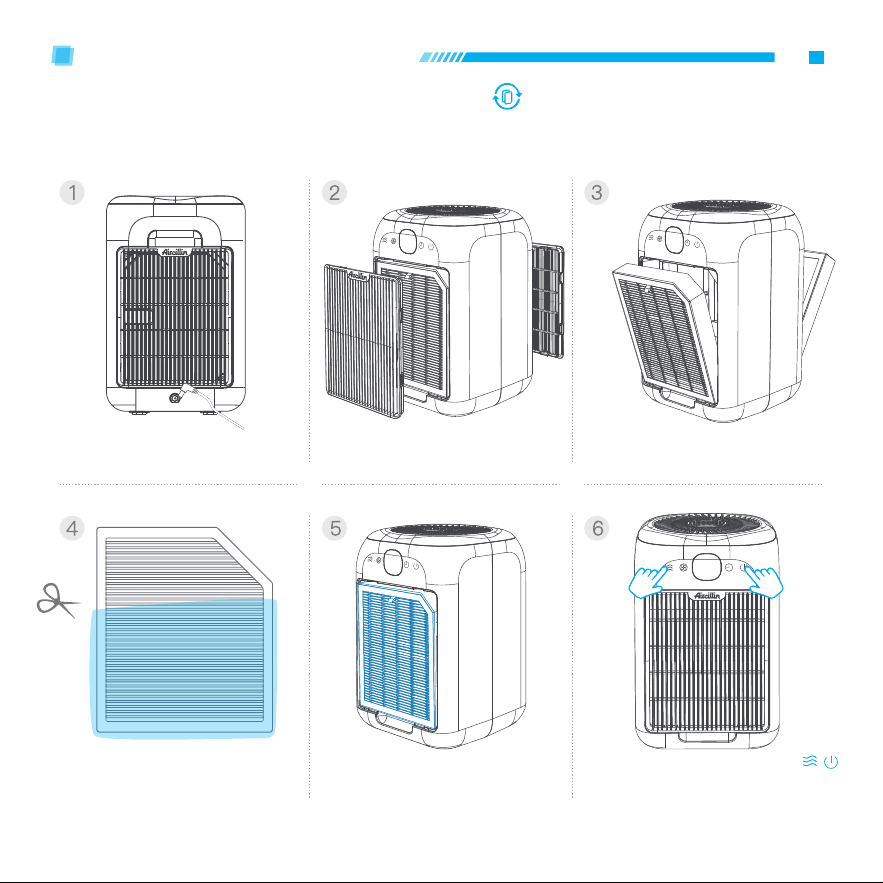
The air purifier display filter icon flashes to indicate
that you should replace the filter.
Turn off the air purifier, you must
ensure that the power is cut off.
Remove the front and rear air
intake grids.
Remove the used air purifier filter.
Remove the packaging of the
new filter and install it on the air
purifier.
Reinstall the pilgrimage grid. Power on, press the button
at the same time, hold for 3
seconds, after the product Bep
sound, the filter icon no longer
flashes, and the filter replace-
ment is completed.
How to replace filter
12
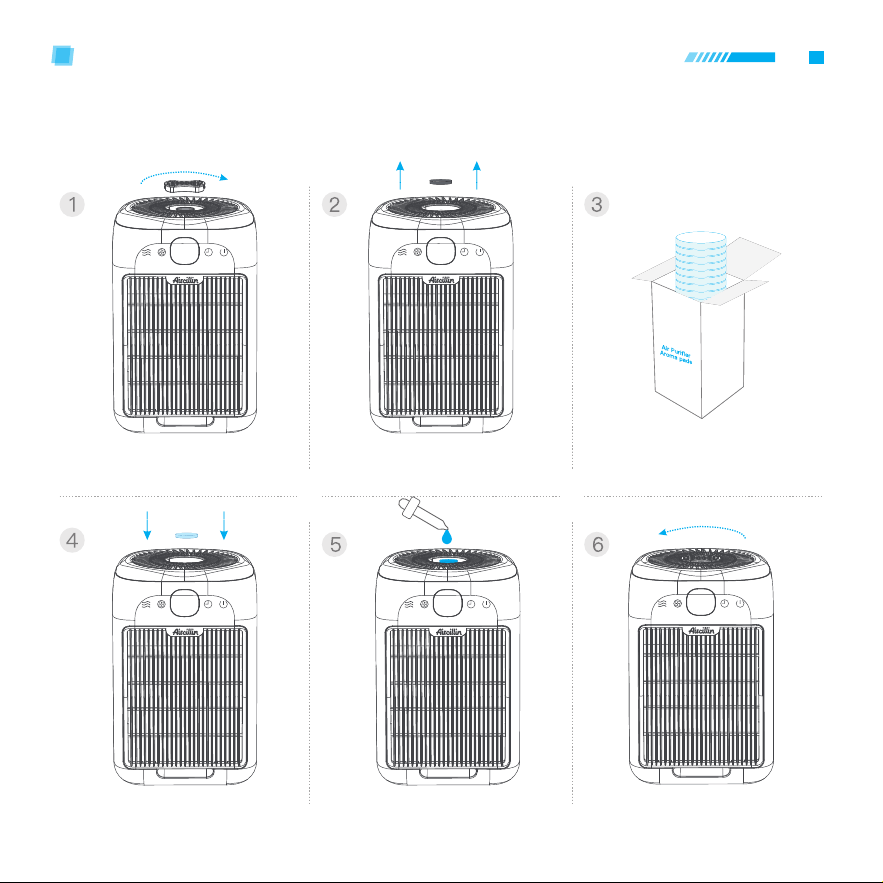
How to replace essential oil refill pad & add essential oil
Rotate the aromatherapy cap clockwise
so that it separates from the machine.
Place the new aromatherapy pad in the
machine.
Drop the essential oil onto a new
diffuser sheet.
Install the aromatherapy cap to the
machine and tighten the aromather-
apy cap counterclockwise.
Remove the old aromatherapy pad
from the machine.
Remove the new aromatherapy pad from
the aromatherapy tablet packaging.
13
How to replace essential oil refill pad
The air purifier
does not turn on
When the purification
function is turned on,
the sound is dull and
the wind is small
Whether the air outlet is
covered
Turn off the purifier and
remove the covering
There is a peculiar
smell at the air outlet
Whether there is a large
amount of peculiar
smell near the air inlet
that continues to
release
Whether the filter has
reached the replace-
ment time
Replace the filter
After removing the odor
and using the purifier to
run for a period of time,
the odor will gradually
disappear
14
Whether the socket has
power
Whether the plug is
loose from the socket
Power on
Connect the power
Troubleshooting and solutions

PLEASE READ AND SAVE THESE INSTRUCTIONS
When using an electrical appliance, basic safety precautions
should always be taken to re
duce the risk of fire, electric shock, and/or injury, including the
following:
1.
READ ALL INSTRUCTIONS BEFORE USE.
3.
The air purifier should always be placed on a flat, secure surface.
4.
The cord should be kept away from any heated surfaces.
5.
Never place or store the air purifier where it could fall or be pulled into a sink or bathtub.
6.
Do not reach for the air purifier if it has fallen into water. Unplug the appliance immediately.
7.
Do not place in or drop into water or liquid.
8. Do not place anything on top of unit.
9.
Always keep the air purifier dry and do not operate in wet or moist conditions like bath rooms,
laundry areas or similar moist indoor places.
10.
Always unplug the air purifier when not in use.
11.
Check your air purifier cord and plug connections. A faulty wall outlet or loose plug can cause the
outlet or plug to overheat. Make sure the plug fits tightly in outlet.
12.
Do not run power cord under carpeting, runners or similar type floor coverings.
13.
Do not use this product outdoors.
14.
Do not block air intakes or exhaust in any manner. Do not use on any soft surface, like a couch or
bed, where the openings may become blocked.
15.
Do not tilt or move the air purifier while the unit is powered on. Make sure the power is off and
remove the plug from the outlet before moving.
16.
Use this air purifier only for its intended use as described in this manual. Any other use not
recommended by the manufacturer may cause fire, electric shock, or serious injury to a person.
17.
Press the power button to turn off the air purifier prior to removing plug from outlet.
18.
Children aged 8 and over, as well as persons with reduced physical, sensory or mental abilities or
who lack experience and knowledge, may use the device if they are supervised or
instructed in the safe use of the device and are aware of the risks involved. Children sho uld
not play with this instrument as a toy.
2.
To reduce the risk of shock, always unplug the air purifier from the electrical outlet immediately
after using as well as before replacing or removing any filters.
19.
The device is not to be operated by any supply sources other than Information and Com
munication Technology Equipment or A Class 2 Power Unit.
20.
Unplug or disconnect the appliance from the power supply before servicing
21.
WARNING: To Reduce The Risk Of Fire Or Electric Shock, Do Not Use This Fan With Any
Soid-state Speed Control Device.
22.
WARNING: To Reduce The Risk Of Fire, Electric Shock Or lnjury To Persons, Do Not Use
Replacement Parts That Have Not Been Recommended By The Manufacturer (e.g. Parts Made At
Home Using A 3D Printer)
15