Product Manual
Interactive Multi-Media Digital Fitness Equipment
Contents
Product Overview
Operation Method
Parameters and Maintenance
Warranty and Service
Prohibitions / Musts / Notices
2
1
3
4
Smart handle
Double-headed rope
Leg shackle
Barbell
Barbell controller
Overall diagram of product
Diagram of product accessories
First use
Parameters
Cleaning and maintenance
Common Faults and Troubleshooting
Warranty scope
Maintenance services
P 64
P 64
P 64
P 65
P 65
P 55
P 56
P 58
P 52
P 67
P 68
P 69
P 71
P 72
Safety Warnings
Contents
Product Overview
Operation Method
Parameters and Maintenance
Warranty and Service
Prohibitions / Musts / Notices
2
1
3
4
Smart handle
Double-headed rope
Leg shackle
Barbell
Barbell controller
Overall diagram of product
Diagram of product accessories
First use
Parameters
Cleaning and maintenance
Common Faults and Troubleshooting
Warranty scope
Maintenance services
P 64
P 64
P 64
P 65
P 65
P 55
P 56
P 58
P 52
P 67
P 68
P 69
P 71
P 72
Safety Warnings
52 53
indicates "prohibitions"
indicates “musts”
indicates "notices" that may cause minor
injuries or property losses
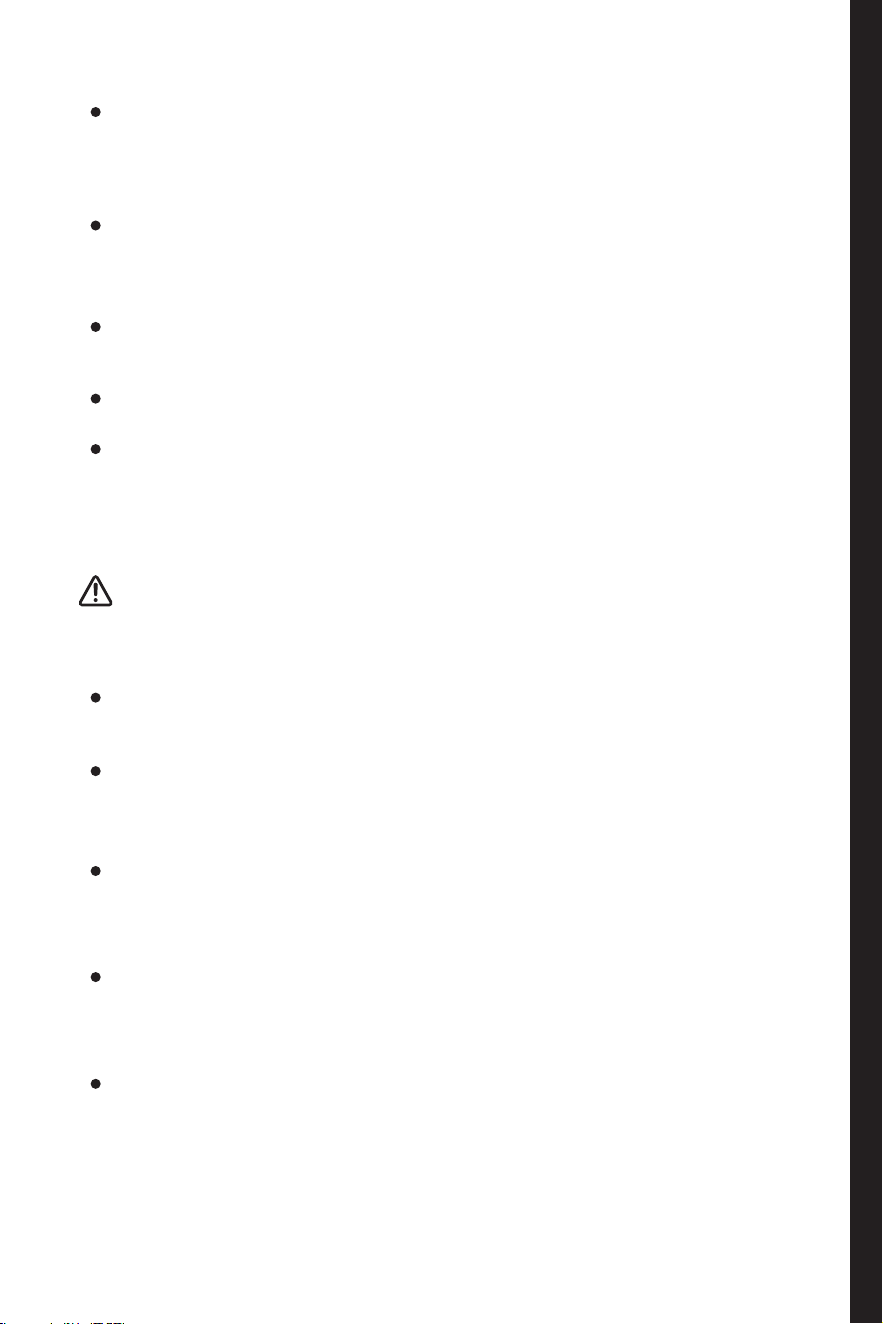
Safety Warning
NO FLAMMABLES
GROUND REQUIRED PROFESSIONAL MAINTENANCE
PERSONNEL REQUIRED
NO DAMP NO OPEN FLAME NO CHILD
OPERATION
NO INFERIOR
EXTENSION SOCKET
When removing the plug, do not pull the power cord, and instead, hold
the plug firmly and pull it out directly from the socket. For the sake of
use safety, please prevent the power cord from being damaged, and if
the power cord is damaged or the plug is worn, stop using the product. If
the power cord is worn or damaged, please get it replaced at the service
station designated by the manufacturer.
Please use the standard three-pin power socket with a rated current above
10A, and do not share it with other electrical appliances. Keep the power
plug in good contact with the socket, otherwise it may lead to re hazard.
Please ensure that the grounding electrode of the socket has a reliable
grounding wire.
When flammable gas (such as gas) leaks, close the leaking valve, open
the doors and windows, and do not pull out the plugs of the product and
other electrical appliances, as electric spark may occur and cause re at
this time.
For the sake of safety, it is recommended not to place other items than
those recommended by the supplier on the product.
This product is to be supplied by 100-240V~50-60Hz AC power, and if the
voltage fluctuation exceeds the specified range, it will lead to product
failure or damage. Under such a circumstance, an automatic voltage
regulator above 2000W should be equipped for utilizing.
Do not use flammables, explosives, liquid and corrosives near the
product to avoid product damage or fire accident. Do not place or use
combustibles near the product to prevent conagration.
After use, make sure that the product is o or standby, and do not stretch
your hand out into the small gap to avoid finger pinching. Release the
accessories as gently as possible to avoid injury.
To avoid unexpected accidents, prevent the children from accessing
the product, pulling wires, handles and other mechanical structures, or
operating the power button without the attendance of adult.
When folding the footboard, ensure the footboard folded in the correct
position and locked, so as to prevent personal injury or other property loss
when it drops down caused by improper locking.
In case of power failure or cleaning, remove the power plug, and if the
power supply is to be connected again, wait for 5 minutes at least to
prevent motor damaging or other electronic component damaging
resulted in continuous starting-ups.
When the discarding the product, please send it to the designated
recycling station for disposal to keep away from children and accidents.
Place the product in an open area without any obstacles around.
Do not clean the product by water spraying or rinsing, and do not place the
product in a damp place or a place in which it can be splashed with water,
so as to guarantee its electrical insulation function of the product.
Neither disassemble or modify electronic elements such as circuit boards
without permission, nor damage them. Please get the product maintained
by professional maintenance personnel. If the power cord is damaged,
please get it replaced by the manufacturer, its maintenance department
and professional maintenance personnel to avoid danger.
52 53
indicates "prohibitions"
indicates “musts”
indicates "notices" that may cause minor
injuries or property losses
Safety Warning
NO FLAMMABLES
GROUND REQUIRED PROFESSIONAL MAINTENANCE
PERSONNEL REQUIRED
NO DAMP NO OPEN FLAME NO CHILD
OPERATION
NO INFERIOR
EXTENSION SOCKET
When removing the plug, do not pull the power cord, and instead, hold
the plug firmly and pull it out directly from the socket. For the sake of
use safety, please prevent the power cord from being damaged, and if
the power cord is damaged or the plug is worn, stop using the product. If
the power cord is worn or damaged, please get it replaced at the service
station designated by the manufacturer.
Please use the standard three-pin power socket with a rated current above
10A, and do not share it with other electrical appliances. Keep the power
plug in good contact with the socket, otherwise it may lead to re hazard.
Please ensure that the grounding electrode of the socket has a reliable
grounding wire.
When flammable gas (such as gas) leaks, close the leaking valve, open
the doors and windows, and do not pull out the plugs of the product and
other electrical appliances, as electric spark may occur and cause re at
this time.
For the sake of safety, it is recommended not to place other items than
those recommended by the supplier on the product.
This product is to be supplied by 100-240V~50-60Hz AC power, and if the
voltage fluctuation exceeds the specified range, it will lead to product
failure or damage. Under such a circumstance, an automatic voltage
regulator above 2000W should be equipped for utilizing.
Do not use flammables, explosives, liquid and corrosives near the
product to avoid product damage or fire accident. Do not place or use
combustibles near the product to prevent conagration.
After use, make sure that the product is o or standby, and do not stretch
your hand out into the small gap to avoid finger pinching. Release the
accessories as gently as possible to avoid injury.
To avoid unexpected accidents, prevent the children from accessing
the product, pulling wires, handles and other mechanical structures, or
operating the power button without the attendance of adult.
When folding the footboard, ensure the footboard folded in the correct
position and locked, so as to prevent personal injury or other property loss
when it drops down caused by improper locking.
In case of power failure or cleaning, remove the power plug, and if the
power supply is to be connected again, wait for 5 minutes at least to
prevent motor damaging or other electronic component damaging
resulted in continuous starting-ups.
When the discarding the product, please send it to the designated
recycling station for disposal to keep away from children and accidents.
Place the product in an open area without any obstacles around.
Do not clean the product by water spraying or rinsing, and do not place the
product in a damp place or a place in which it can be splashed with water,
so as to guarantee its electrical insulation function of the product.
Neither disassemble or modify electronic elements such as circuit boards
without permission, nor damage them. Please get the product maintained
by professional maintenance personnel. If the power cord is damaged,
please get it replaced by the manufacturer, its maintenance department
and professional maintenance personnel to avoid danger.
55
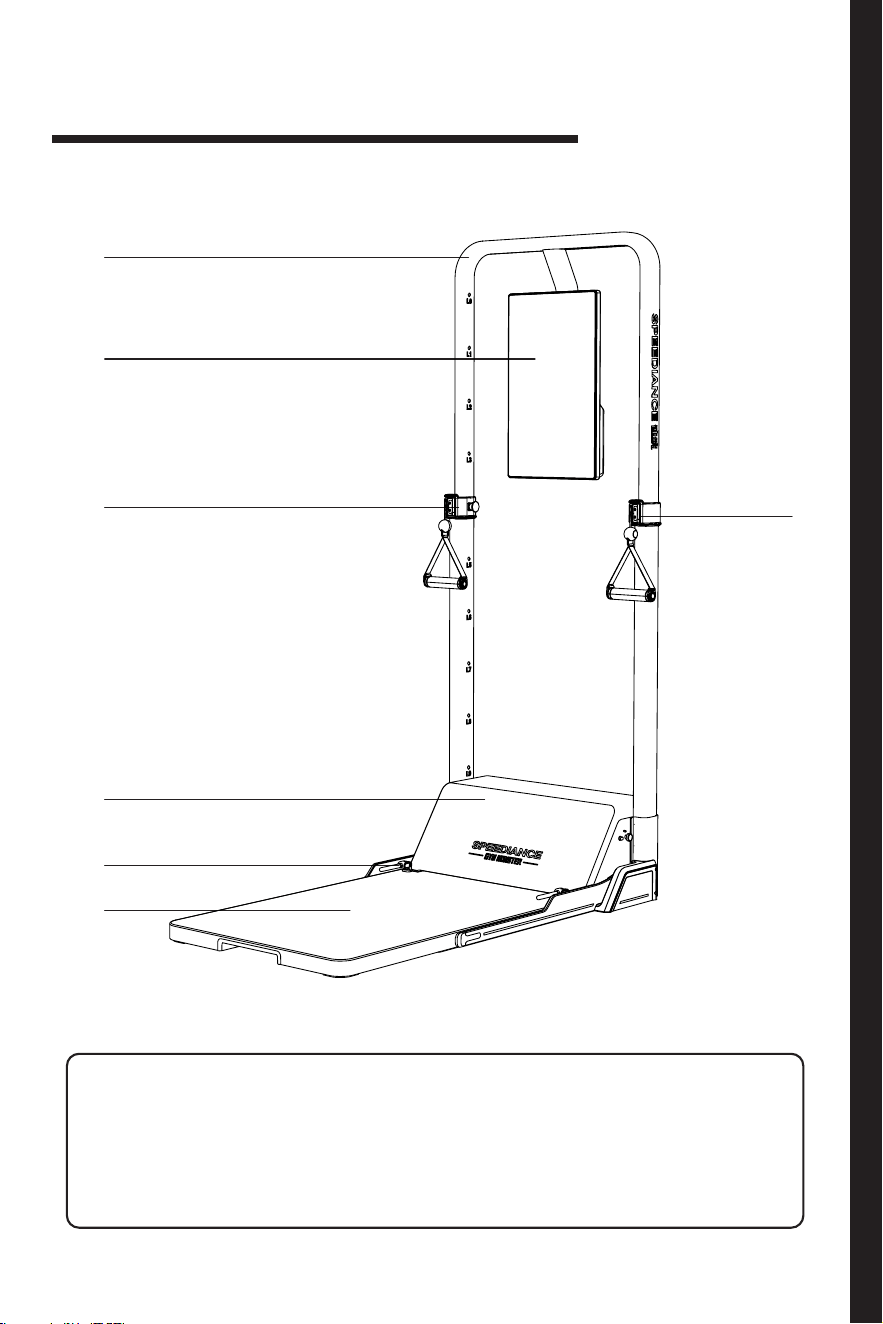
Diagram of product accessories
①
① ④ ⑦
② ⑤
③ ⑥
②
③
④
⑤
⑥
⑦
Support arm
Display
Lifting slider
Connector Footboard
Motor compartment hatch
Lock handle
Product
Overview
1
55
Diagram of product accessories
①
① ④ ⑦
② ⑤
③ ⑥
②
③
④
⑤
⑥
⑦
Support arm
Display
Lifting slider
Connector Footboard
Motor compartment hatch
Lock handle
Product
Overview
1
56 57
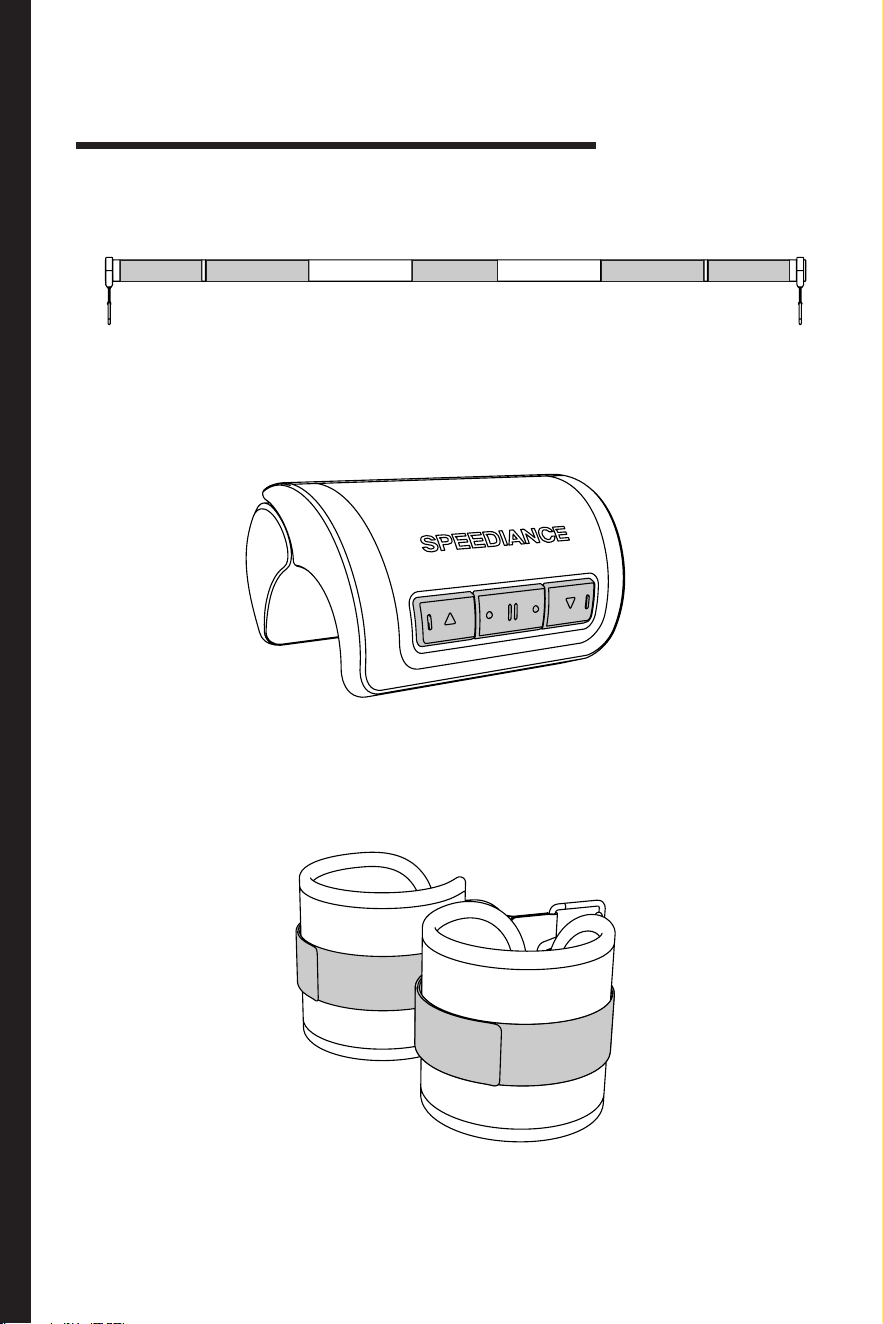
Barbell
Barbell controller
Leg shackle
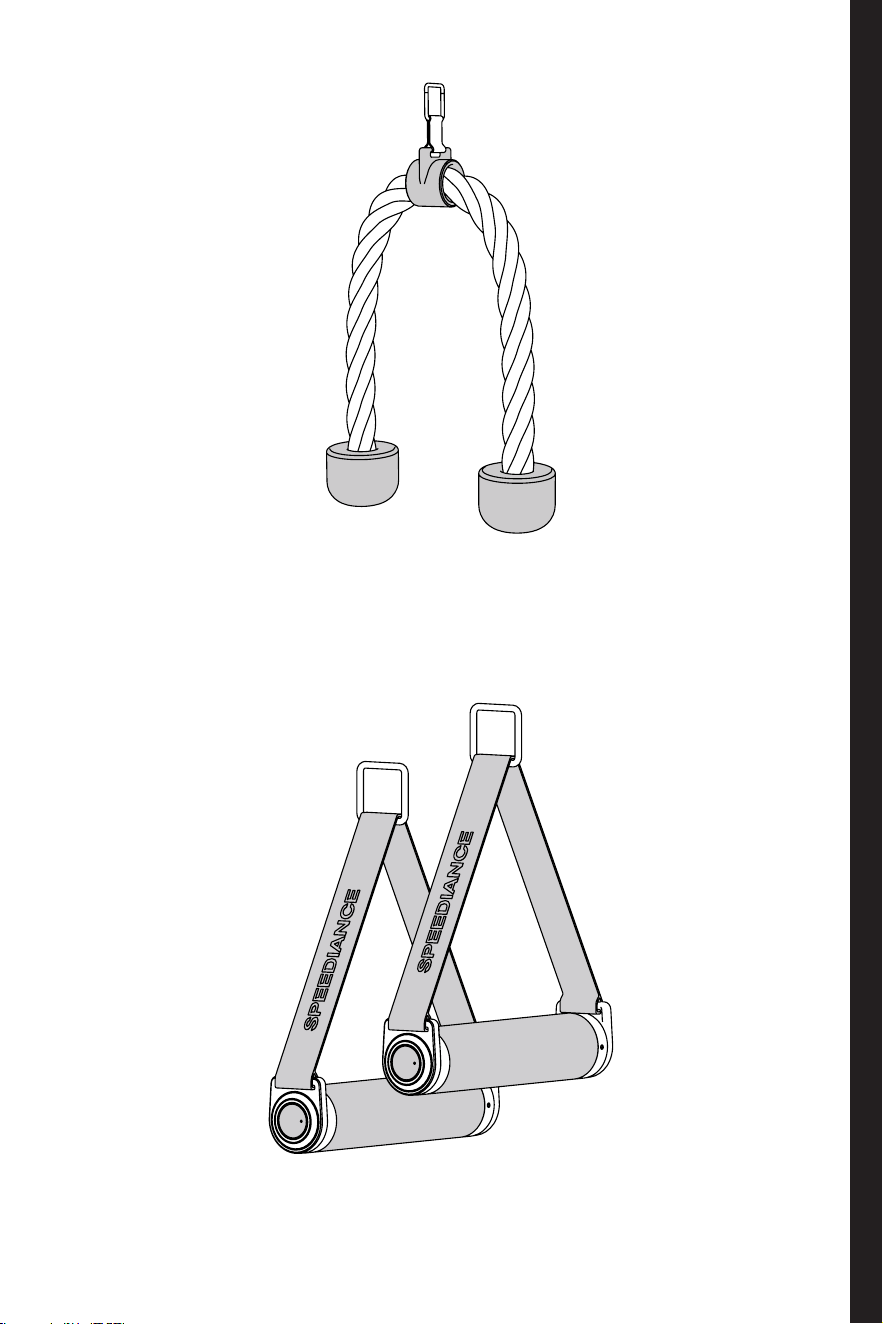
Diagram of product accessories
Smart handle
Double-headed rope
56 57
Barbell
Barbell controller
Leg shackle
Diagram of product accessories
Smart handle
Double-headed rope
58 59
First use
Before rst use, remove all packaging materials including outer carton, PE
foam and gummed paper bag, etc., and tear o the protective lm on the
product, if any.
Keep the product away from heat sources and prevent it from being
exposed to direct sunlight. Do not place it in wet or watery places, so as to
prevent rust or degradation of insulation eect.
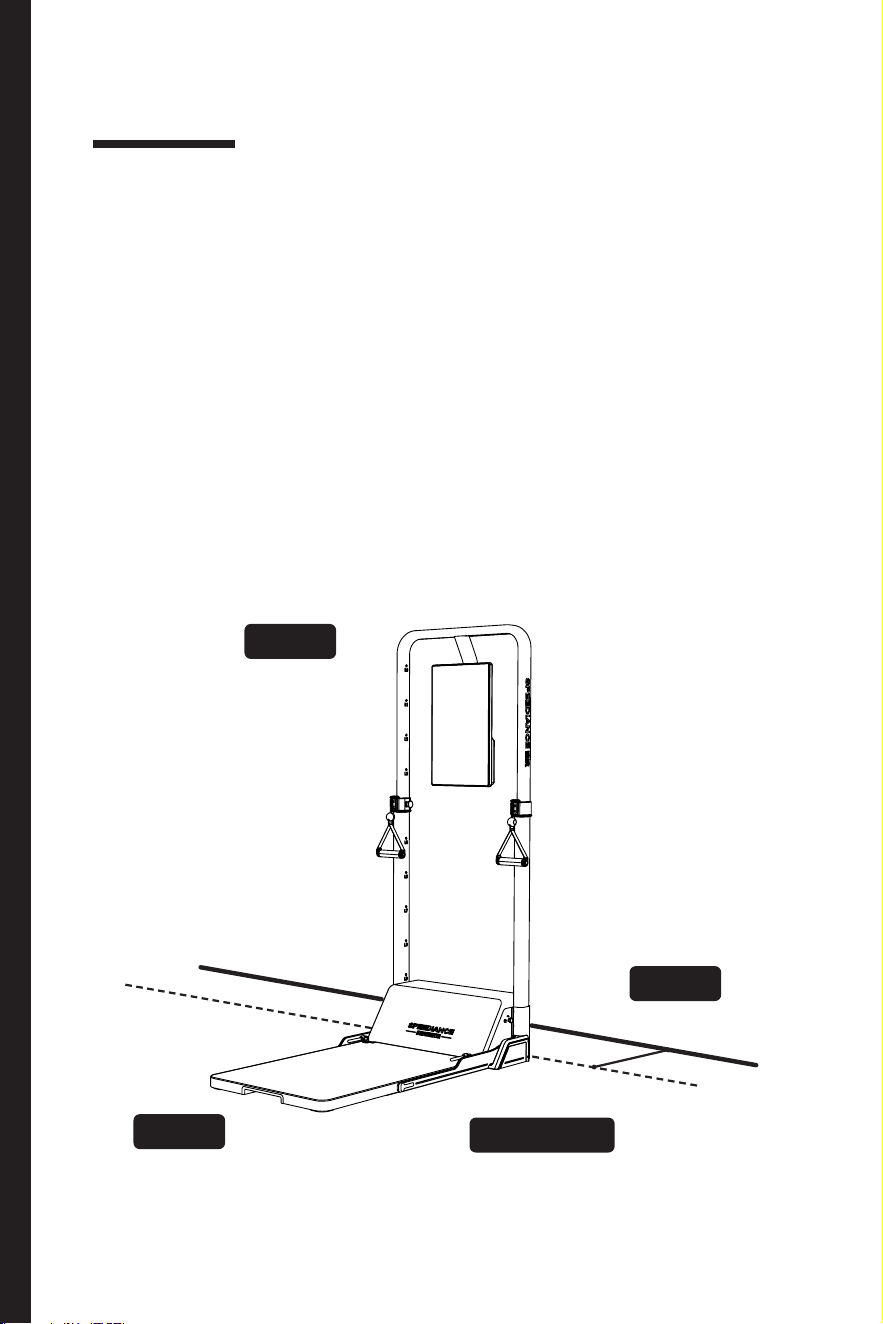
Place the product in an indoor well-ventilated place with flat and solid
ground
REAR
LEFT/RIGHT
FRONT
UP
> 15cm
Open space
Open space
Open space
Note: > 15cm
Considerations for placement
Power supply connection and power-on
Be sure to place the product on the ground, with an open space reserved
above its top, a distance more than 15cm reserved between its back and
the wall, and no other obstructions on both sides of the product.
After the product is turned on with power supply connected for the first
time, rest it for 5-10 min to check the product for appearance defects or
unusual operating noise, and if any abnormality is found, turn o the power
supply, and contact the after-sales service personnel.
Except for rear side, reserve an open space in front, on left and right and
above the top of the product to facilitate the normal use and avoid injury.
After power-on, verify that the environment around the product meets the
use standard, and the footboard is at without tilting.
Place the product in a dry environment, and do not use it outdoors.
After the above inspections and conrmations can the product be used.
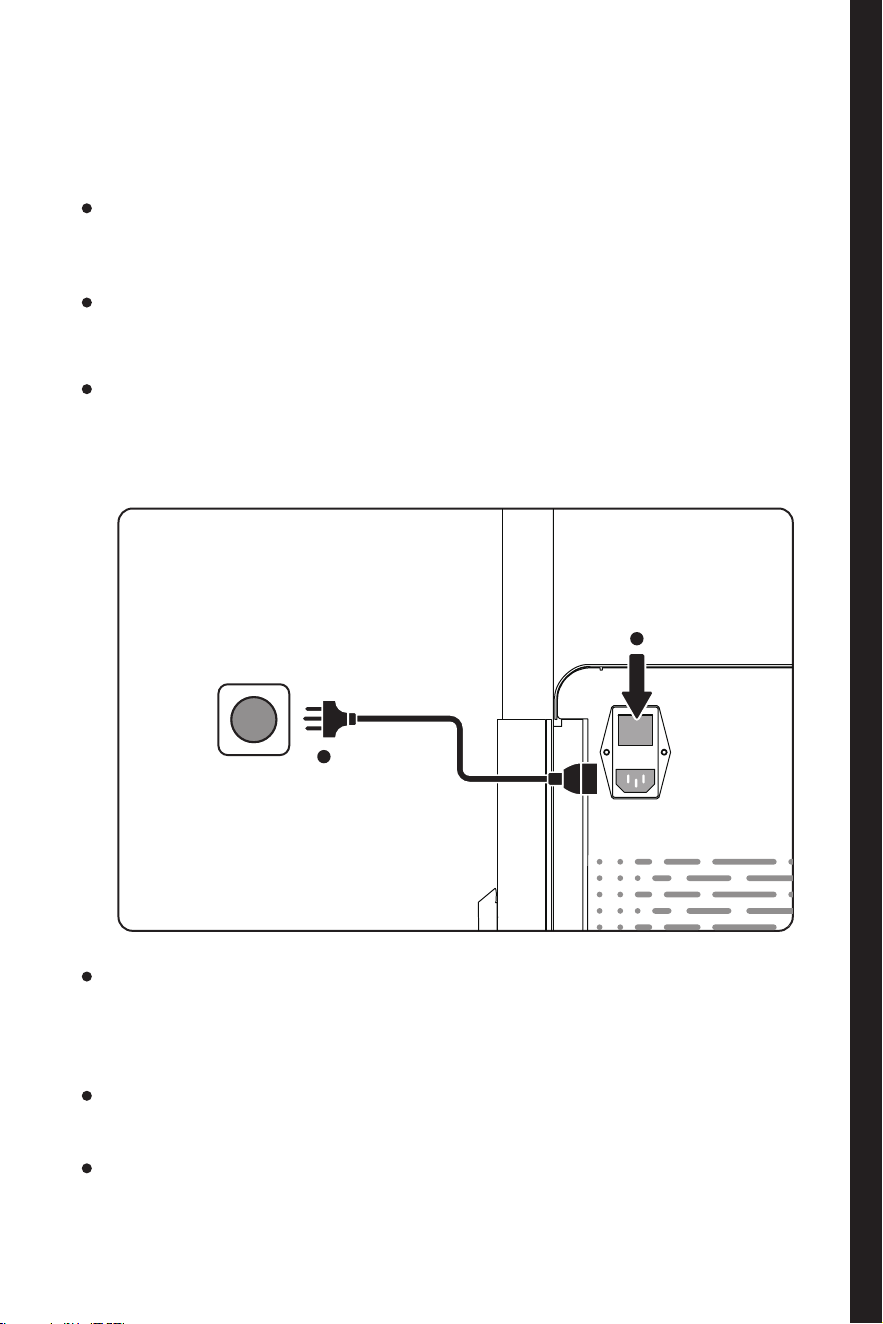
Use the power cord
to connect
the power supply
th
re
e
-pin soc
ket
Connect
the power supply
1
Press the power bu tton
Power-on
2
58 59
First use
Before rst use, remove all packaging materials including outer carton, PE
foam and gummed paper bag, etc., and tear o the protective lm on the
product, if any.
Keep the product away from heat sources and prevent it from being
exposed to direct sunlight. Do not place it in wet or watery places, so as to
prevent rust or degradation of insulation eect.
Place the product in an indoor well-ventilated place with flat and solid
ground
REAR
LEFT/RIGHT
FRONT
UP
> 15cm
Open space
Open space
Open space
Note: > 15cm
Considerations for placement
Power supply connection and power-on
Be sure to place the product on the ground, with an open space reserved
above its top, a distance more than 15cm reserved between its back and
the wall, and no other obstructions on both sides of the product.
After the product is turned on with power supply connected for the first
time, rest it for 5-10 min to check the product for appearance defects or
unusual operating noise, and if any abnormality is found, turn o the power
supply, and contact the after-sales service personnel.
Except for rear side, reserve an open space in front, on left and right and
above the top of the product to facilitate the normal use and avoid injury.
After power-on, verify that the environment around the product meets the
use standard, and the footboard is at without tilting.
Place the product in a dry environment, and do not use it outdoors.
After the above inspections and conrmations can the product be used.
Use the power cord
to connect
the power supply
th
re
e
-pin soc
ket
Connect
the power supply
1
Press the power bu tton
Power-on
2
60 61
User registration
Replacing accessories
Moving pulley block Unlocking pulley block
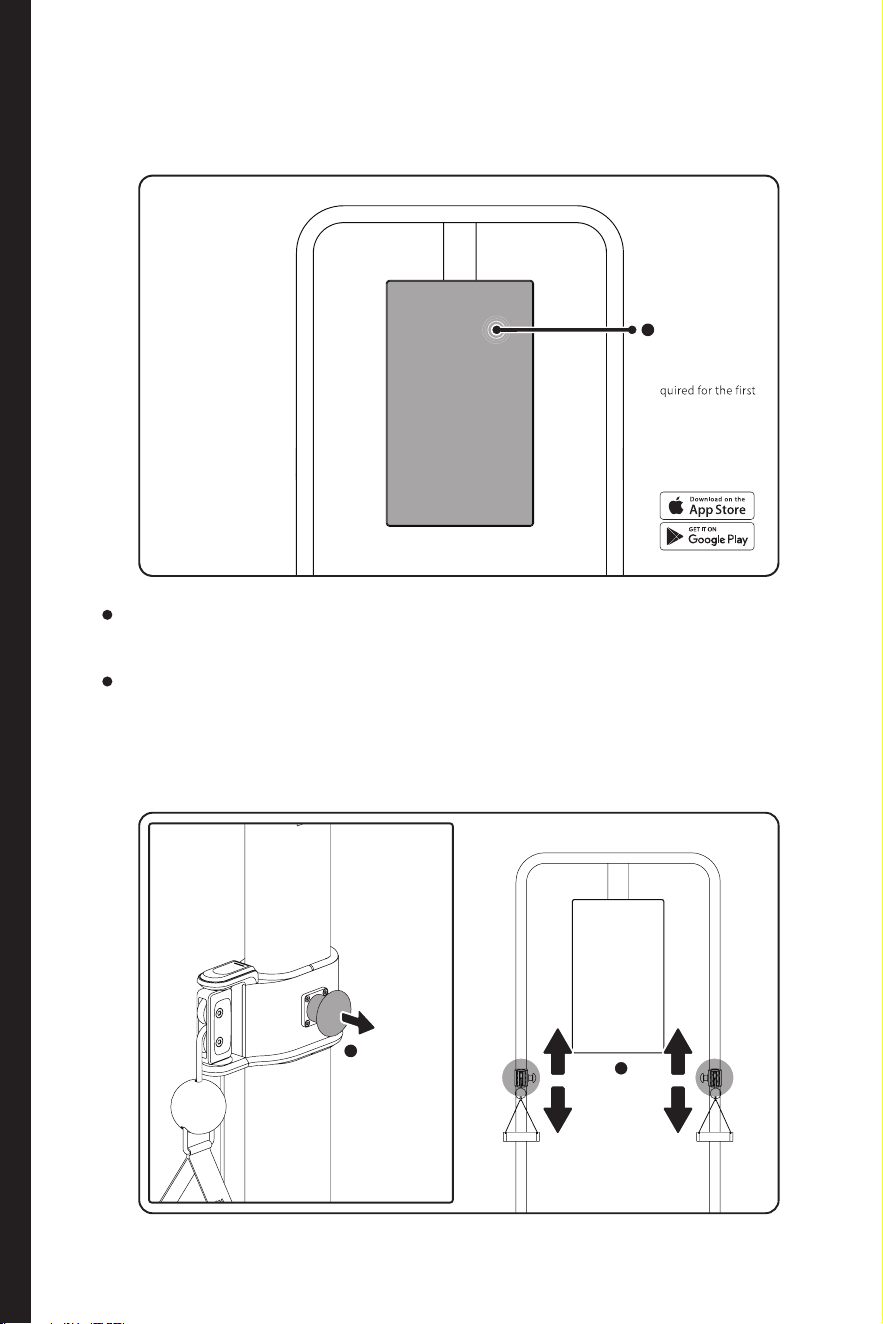
Check that all the required information is shown completely on the
display, and the touch function of the screen is normal.
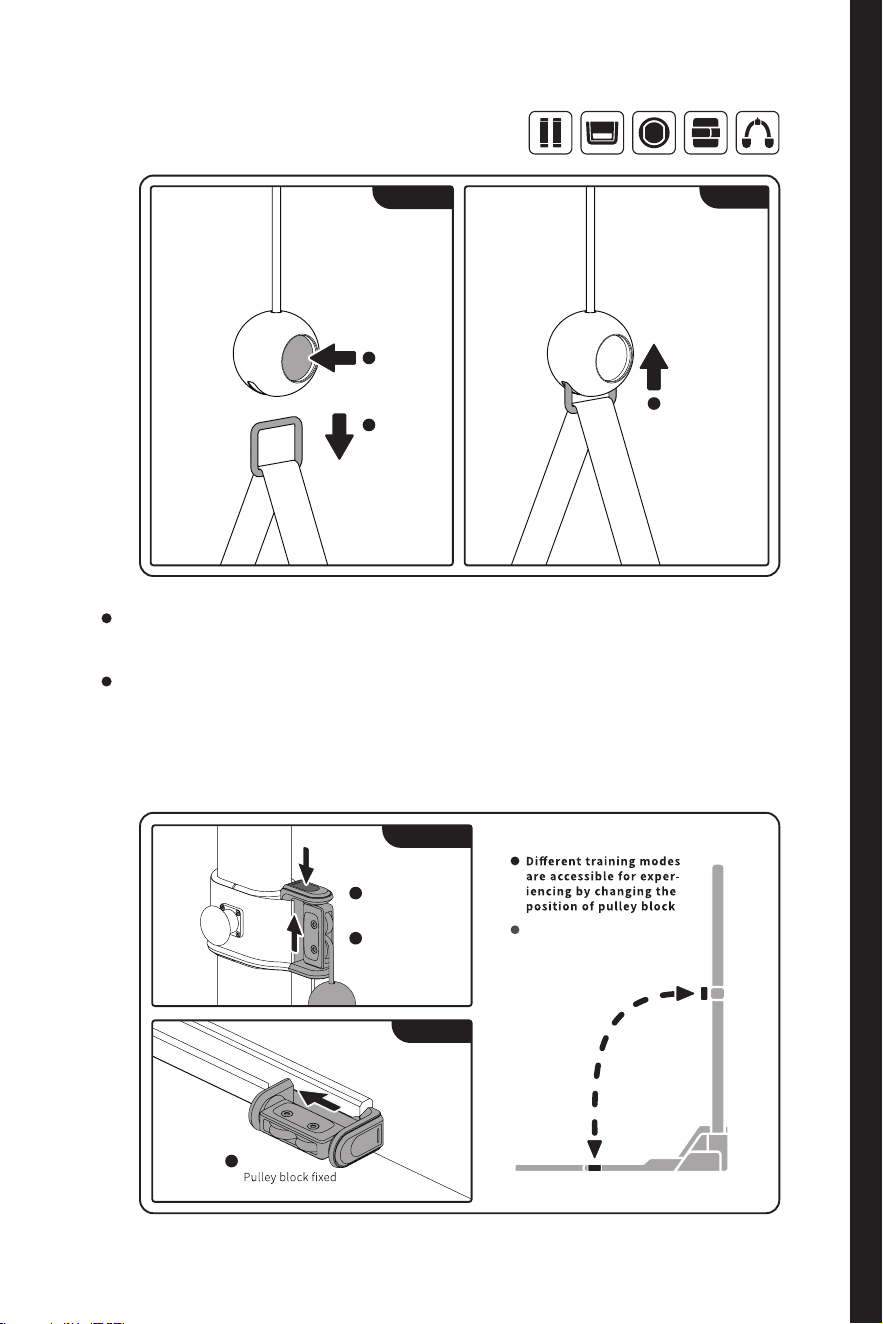
The connector is compatible with all accessories (including handle, leg
shackle, double-headed rope, barbell, etc.).
After function confirmation can the strength training be carried out
according to your needs.
If the connector becomes loose, stop using the product immediately
and contact the after-sales service personnel of SPEEDIANCE for
treatment.
Follow the prom pts
on the int erface
(registration is r e-
use)
Touch to use
1
Support arm
sleeve unloc ked
Pull out la tch
1
Automatic
positioning
Move connector
2
Connector loc ked
automatically
Connector
unlocked
Steel ring
disengaged
2
Push up
steel ring
1
Unlocking
Locking
Press the
button
1
Pulley block
unlocked
Press the bu tton
1
Take out
the pulle y block
Push up
2
Insert
1
Unlocking
Locking
The support arm end can
be lock ed in the same w ay
as the unlocking of foot-
board end
Support arm end
Footboard end
60 61
User registration
Replacing accessories
Moving pulley block Unlocking pulley block
Check that all the required information is shown completely on the
display, and the touch function of the screen is normal.
The connector is compatible with all accessories (including handle, leg
shackle, double-headed rope, barbell, etc.).
After function confirmation can the strength training be carried out
according to your needs.
If the connector becomes loose, stop using the product immediately
and contact the after-sales service personnel of SPEEDIANCE for
treatment.
Follow the prom pts
on the int erface
(registration is r e-
use)
Touch to use
1
Support arm
sleeve unloc ked
Pull out la tch
1
Automatic
positioning
Move connector
2
Connector loc ked
automatically
Connector
unlocked
Steel ring
disengaged
2
Push up
steel ring
1
Unlocking
Locking
Press the
button
1
Pulley block
unlocked
Press the bu tton
1
Take out
the pulle y block
Push up
2
Insert
1
Unlocking
Locking
The support arm end can
be lock ed in the same w ay
as the unlocking of foot-
board end
Support arm end
Footboard end
62
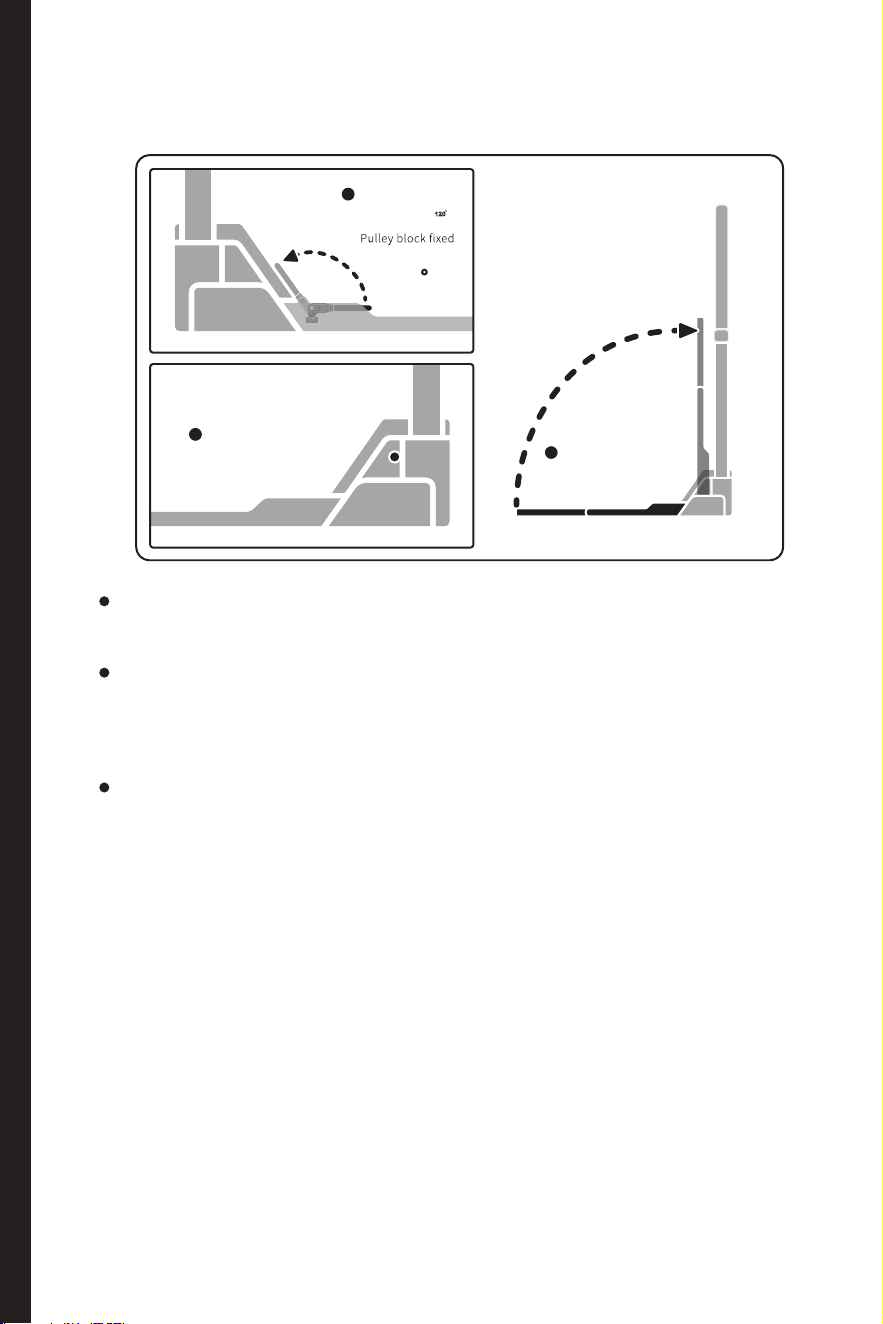
Folding/unfolding footboard
The operation logics for unfolding and folding of footboard are the
same
Before unfolding the footboard, always check that there are no other
objects in the unfolding area, so as to avoid potential safety hazards
due to an uneven footboard.
After the footboard is folded, confirm that the indexing pin has been
locked, so as to avoid accident and property damage when the
footboard drops down unexpectedly.
Operation
Method
2
Footboard unloc ked
Press the
UNLOCK button
2
120
Rotate
the quick
release leve r
1
Footboard
automatically loc ked
to save sp ace
Fold the f ootboard
3
62
Folding/unfolding footboard
The operation logics for unfolding and folding of footboard are the
same
Before unfolding the footboard, always check that there are no other
objects in the unfolding area, so as to avoid potential safety hazards
due to an uneven footboard.
After the footboard is folded, confirm that the indexing pin has been
locked, so as to avoid accident and property damage when the
footboard drops down unexpectedly.
Operation
Method
2
Footboard unloc ked
Press the
UNLOCK button
2
120
Rotate
the quick
release leve r
1
Footboard
automatically loc ked
to save sp ace
Fold the f ootboard
3
64 65
Smart handle
Barbell
Barbell controller
Double-headed rope
Check if the two smart handles involve
appearance defects, and check if they
function normally after power-on.
Check the barbell and its controller for
damage, and if any, stop using the product,
and contact the after-sales service personnel
of SPEEDIANCE.
Check the double-headed rope for damage, and if any, stop using the
product, and contact the after-sales service personnel of SPEEDIANCE.
Check the barbell for damage, and if any, stop using the product, and
contact the after-sales service personnel of SPEEDIANCE.
Connect the barbell to the main unit
through connector. (For details of
connection method, refer to P4 "Replacing
accessories".)
Clamp the controller on the appropriate
place on the barbell. (Adjust the controller
to the appropriate angle through translation
and rotation for the convenience of use.)
Press and hold “Pause ” button to activate Bluetooth for pairing, and
wait for pairing to be completed.
Connect the two handles to the main
unit through connectors. (For details of
connection method, refer to P10 "Replacing
accessories")
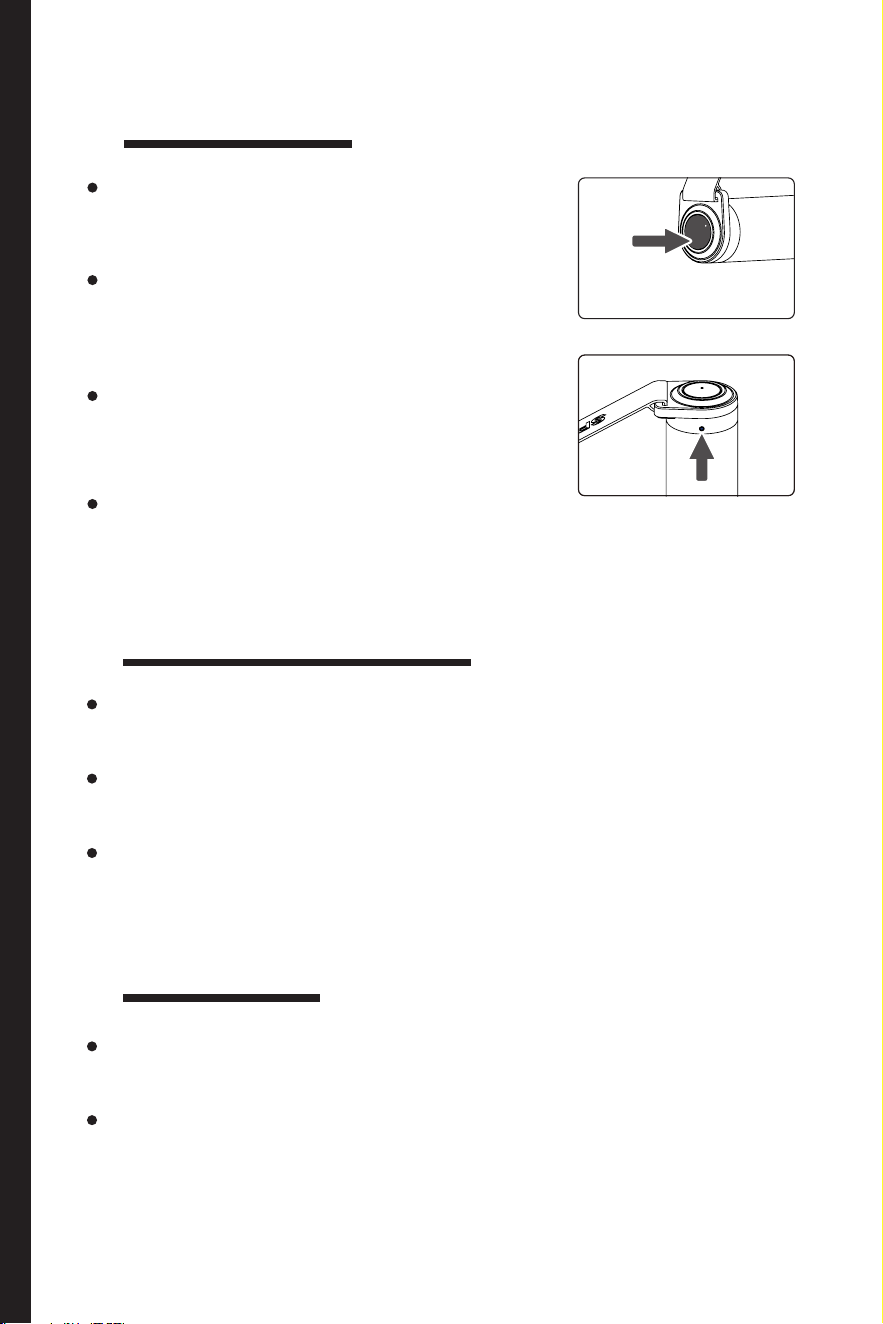
Press the button at either end of the handle
(as shown on the right) for Bluetooth pairing,
and wait for the pairing to be completed.
After the conguration is completed can the
course learning and training be started.
After the conguration is completed can the course learning and training
be started.
Press and hold
the button for
connection, and
the connection
indicator stays
on
Open the battery
cover and replace
the battery
Press and hold the button for connection,
and the connection indicator stays on
Connecting
the main
unit
Replacing the battery
Replace the
battery with
the needle
Connect the double-headed rope to the main unit through the connector.
(For details of connection method, refer to P10"Replacing accessories")
Connect the barbell to the main unit through the connector. (For details
of connection method, refer to P4 "Replacing accessories".)
After the installation is completed can the course learning and training be
started.
After the installation is completed can the course learning and training be
started.
Leg shackle
Check the two leg shackles for damage, and if any, stop using the product,
and contact the after-sales service personnel of SPEEDIANCE.
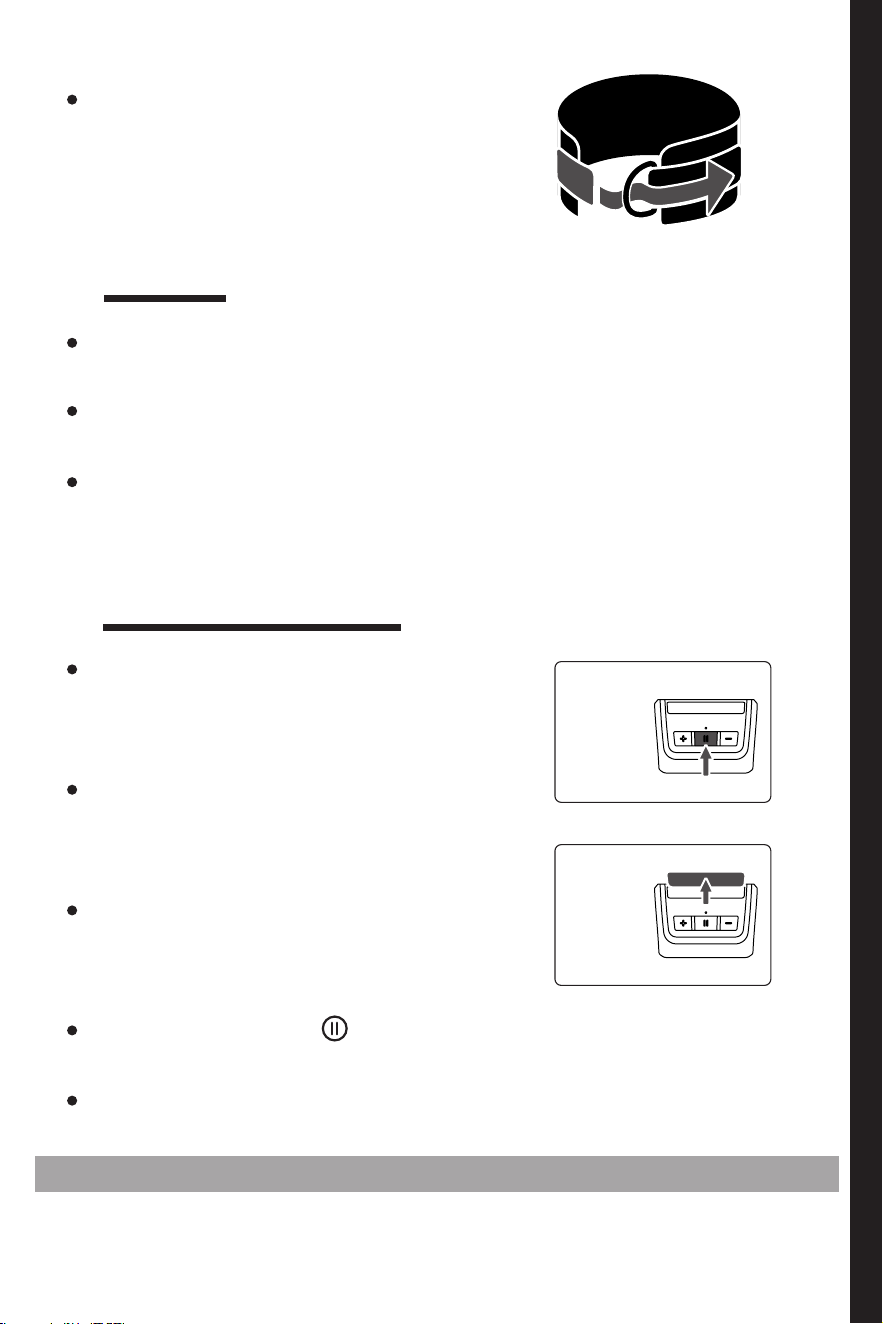
Open the leg shackle and put it on the ankle, pass one end of the leg
shackle through D-shaped ring and x it with hook and loop.
Connect the double-headed rope to
the main unit through connector. (For
details of connection method, refer to P4
"Replacing accessories")
Connecting the main unit
Replacing
the
battery
If there are problems still unsolved, please call the customer service hotline of SPEEDIANCE
64 65
Smart handle
Barbell
Barbell controller
Double-headed rope
Check if the two smart handles involve
appearance defects, and check if they
function normally after power-on.
Check the barbell and its controller for
damage, and if any, stop using the product,
and contact the after-sales service personnel
of SPEEDIANCE.
Check the double-headed rope for damage, and if any, stop using the
product, and contact the after-sales service personnel of SPEEDIANCE.
Check the barbell for damage, and if any, stop using the product, and
contact the after-sales service personnel of SPEEDIANCE.
Connect the barbell to the main unit
through connector. (For details of
connection method, refer to P4 "Replacing
accessories".)
Clamp the controller on the appropriate
place on the barbell. (Adjust the controller
to the appropriate angle through translation
and rotation for the convenience of use.)
Press and hold “Pause ” button to activate Bluetooth for pairing, and
wait for pairing to be completed.
Connect the two handles to the main
unit through connectors. (For details of
connection method, refer to P10 "Replacing
accessories")
Press the button at either end of the handle
(as shown on the right) for Bluetooth pairing,
and wait for the pairing to be completed.
After the conguration is completed can the
course learning and training be started.
After the conguration is completed can the course learning and training
be started.
Press and hold
the button for
connection, and
the connection
indicator stays
on
Open the battery
cover and replace
the battery
Press and hold the button for connection,
and the connection indicator stays on
Connecting
the main
unit
Replacing the battery
Replace the
battery with
the needle
Connect the double-headed rope to the main unit through the connector.
(For details of connection method, refer to P10"Replacing accessories")
Connect the barbell to the main unit through the connector. (For details
of connection method, refer to P4 "Replacing accessories".)
After the installation is completed can the course learning and training be
started.
After the installation is completed can the course learning and training be
started.
Leg shackle
Check the two leg shackles for damage, and if any, stop using the product,
and contact the after-sales service personnel of SPEEDIANCE.
Open the leg shackle and put it on the ankle, pass one end of the leg
shackle through D-shaped ring and x it with hook and loop.
Connect the double-headed rope to
the main unit through connector. (For
details of connection method, refer to P4
"Replacing accessories")
Connecting the main unit
Replacing
the
battery
If there are problems still unsolved, please call the customer service hotline of SPEEDIANCE
67
Parameters and
Maintenance
3
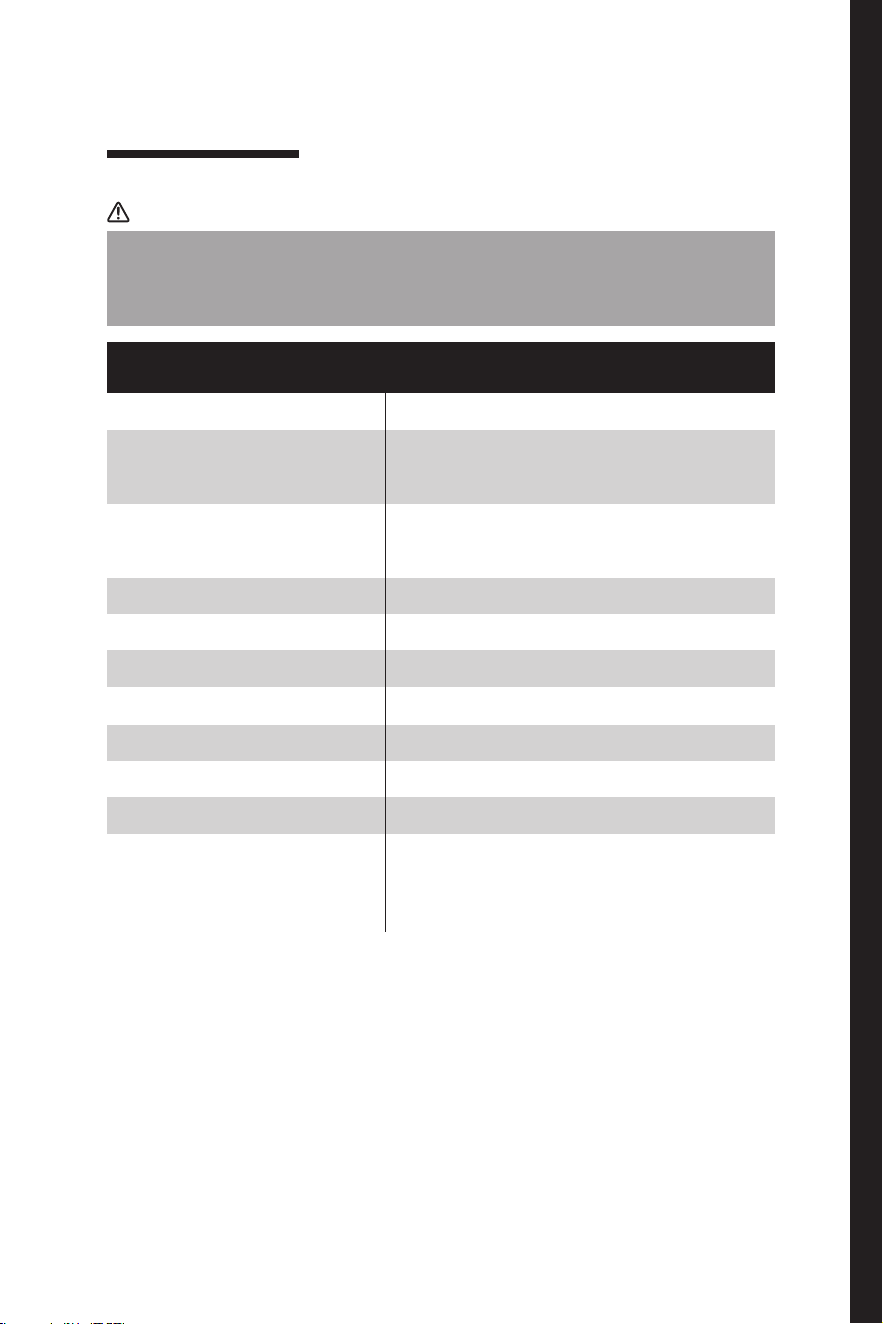
Notice
The parameters given in this table are for reference only, and in case of
any conict with the data on the nameplate of product, the data on the
nameplate shall apply.
Parameters of main unit
Name
Interactive Multi-Media Digital Fitness Equipment
1240*710*1845mm
320*710*1845mm
85KG
1920*1080
16A
1800W
65dB
BT5.0
WIFI 802.11b/g/n
Smart handle * 2, barbell,
controller, Triceps Pull Down
Rope, Ankle Strap * 2
Overall dimensions
(unfolded)
Overall dimensions
(folded)
Weight
Resolution
Rated current
Rated power
Noise
Bluetooth
Wi-Fi
Accessories
Parameters
67
Parameters and
Maintenance
3
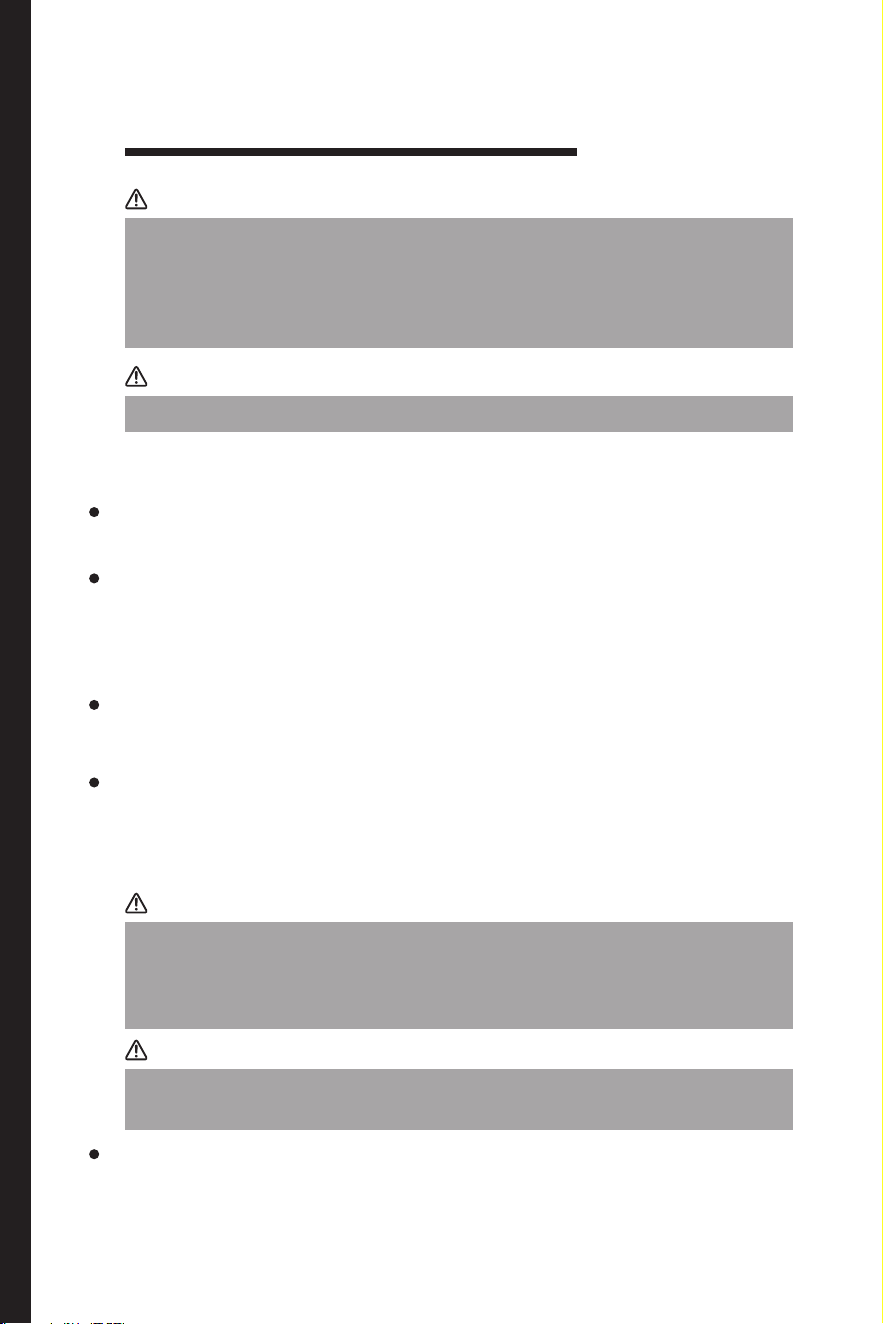
Notice
The parameters given in this table are for reference only, and in case of
any conict with the data on the nameplate of product, the data on the
nameplate shall apply.
Parameters of main unit
Name
Interactive Multi-Media Digital Fitness Equipment
1240*710*1845mm
320*710*1845mm
85KG
1920*1080
16A
1800W
65dB
BT5.0
WIFI 802.11b/g/n
Smart handle * 2, barbell,
controller, Triceps Pull Down
Rope, Ankle Strap * 2
Overall dimensions
(unfolded)
Overall dimensions
(folded)
Weight
Resolution
Rated current
Rated power
Noise
Bluetooth
Wi-Fi
Accessories
Parameters
68 69
Notice
Notice
Notice
Warning
Before cleaning the product, please remove the power plug.
Do not rinse the product with water, otherwise the electrical insulation
performance will be aected.
This section describes the safety precautions and their importance
to prevent personal injury or property damage to users or others.
Please read the text with a full understanding of the following (signs,
pictograms), and be sure to follow the safety precautions described
below.
Do not use hard brushes, steel wools, steel brushes, abrasive compounds
(such as toothpaste), organic solvents (such as alcohol, acetone, banana
oil, etc.), boiled water, and acid and alkaline substances to clean the
product. Otherwise, the surface of the product will be damaged.
Cleaning and maintenance
Cleaning
Please clean up the dust on the back of the product and on the ground as
scheduled to improve the heat dissipation eect and save energy.
During cleaning, prevent water droplets owing into the gaps of product,
otherwise, short circuit or electrical element burning may occur.
When cleaning accessories, please use a soft towel or sponge dipped in
clear water or non-corrosive neutral detergent, and finally wipe it with
clean water and dry it with a dry cloth. After cleaning, do not use the
accessory until it is naturally dried.
When cleaning the product, please use a soft towel or sponge dipped in
clear water or non-corrosive neutral detergent, and finally wipe it with
clean water and dry it with a dry cloth. After cleaning, do not turn on the
power supply until the product is naturally dried.
When the product is to be out of use for a long time: remove the power
plug to avoid electric shock or re due to aging of the power cord.
Common Faults and Troubleshooting
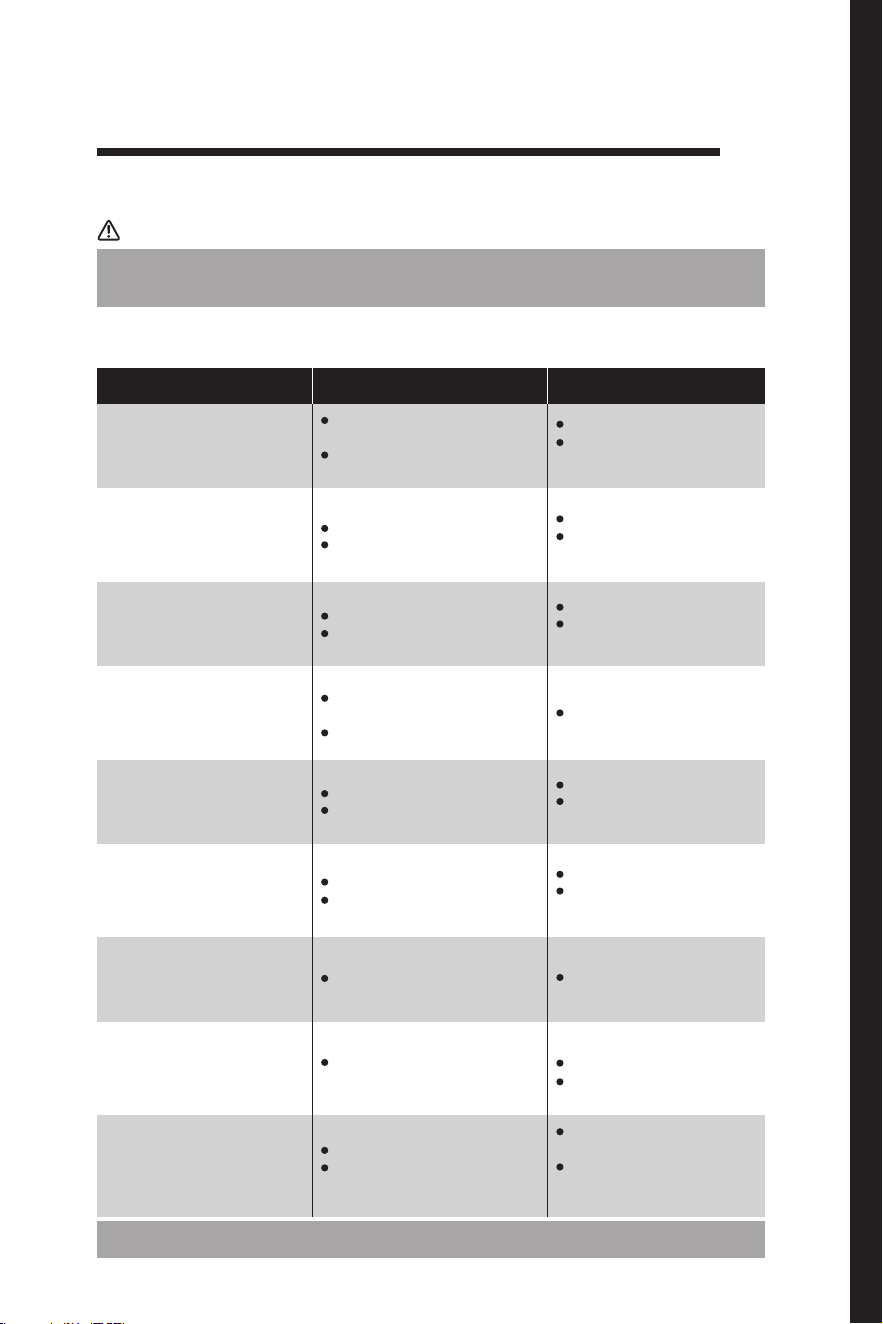
Treatment of problems other than faults
Troubleshooting of Common Faults
Notice
If no fault is identied after inspection but the product still malfunctions, please cut o the
power supply and contact the after-sales service personnel of SPEEDIANCE.
Symptoms Possible cause(s) Solution(s)
Main frame not working
Power cord disconnected or power plug
not fully inserted
Low voltage, power outage or partial
power cut.
Uneven ground
The product is not placed evenly
Uneven ground
The product is not placed evenly
Uneven ground
Unlocked or half-locked stepboard
Place the product on even ground
Push the quick release lever to the
lowest level for complete lock-in
A too high room temperature requires
more dissipation time
High temperature after usage
Obstacles around the pivot
Locked stepboard
Locked-in pulley set
Still working motors
Remove the objects in question
Unlock the stepboard according to
the manual
This is a normal situation. Place the
product somewhere ventilated.
Unlock the pulley set according to
the manual
Pause the motors by pressing
the buttons on accessories or
touchscreen
Running out of battery
High room temperature
Long time usage
Place the product on even ground
Remove objects in contact with the
product
Place the product on even ground
Remove objects in contact with the
product
This is a normal situation. Let it be.
Replace the battery
Firmly insert the power plug
Ask professional electricity
maintenance personals for help
Heavy motor noise
Uneven stepboard
Wobble
Accessories not working
High temperature of
motor compartment
Trouble removing the
pulley set
Trouble folding/unfolding
the stepboard
Fans working after the
product is turned off
For regular software issues, please check and seek solution in "Prole".
68 69
Notice
Notice
Notice
Warning
Before cleaning the product, please remove the power plug.
Do not rinse the product with water, otherwise the electrical insulation
performance will be aected.
This section describes the safety precautions and their importance
to prevent personal injury or property damage to users or others.
Please read the text with a full understanding of the following (signs,
pictograms), and be sure to follow the safety precautions described
below.
Do not use hard brushes, steel wools, steel brushes, abrasive compounds
(such as toothpaste), organic solvents (such as alcohol, acetone, banana
oil, etc.), boiled water, and acid and alkaline substances to clean the
product. Otherwise, the surface of the product will be damaged.
Cleaning and maintenance
Cleaning
Please clean up the dust on the back of the product and on the ground as
scheduled to improve the heat dissipation eect and save energy.
During cleaning, prevent water droplets owing into the gaps of product,
otherwise, short circuit or electrical element burning may occur.
When cleaning accessories, please use a soft towel or sponge dipped in
clear water or non-corrosive neutral detergent, and finally wipe it with
clean water and dry it with a dry cloth. After cleaning, do not use the
accessory until it is naturally dried.
When cleaning the product, please use a soft towel or sponge dipped in
clear water or non-corrosive neutral detergent, and finally wipe it with
clean water and dry it with a dry cloth. After cleaning, do not turn on the
power supply until the product is naturally dried.
When the product is to be out of use for a long time: remove the power
plug to avoid electric shock or re due to aging of the power cord.
Common Faults and Troubleshooting
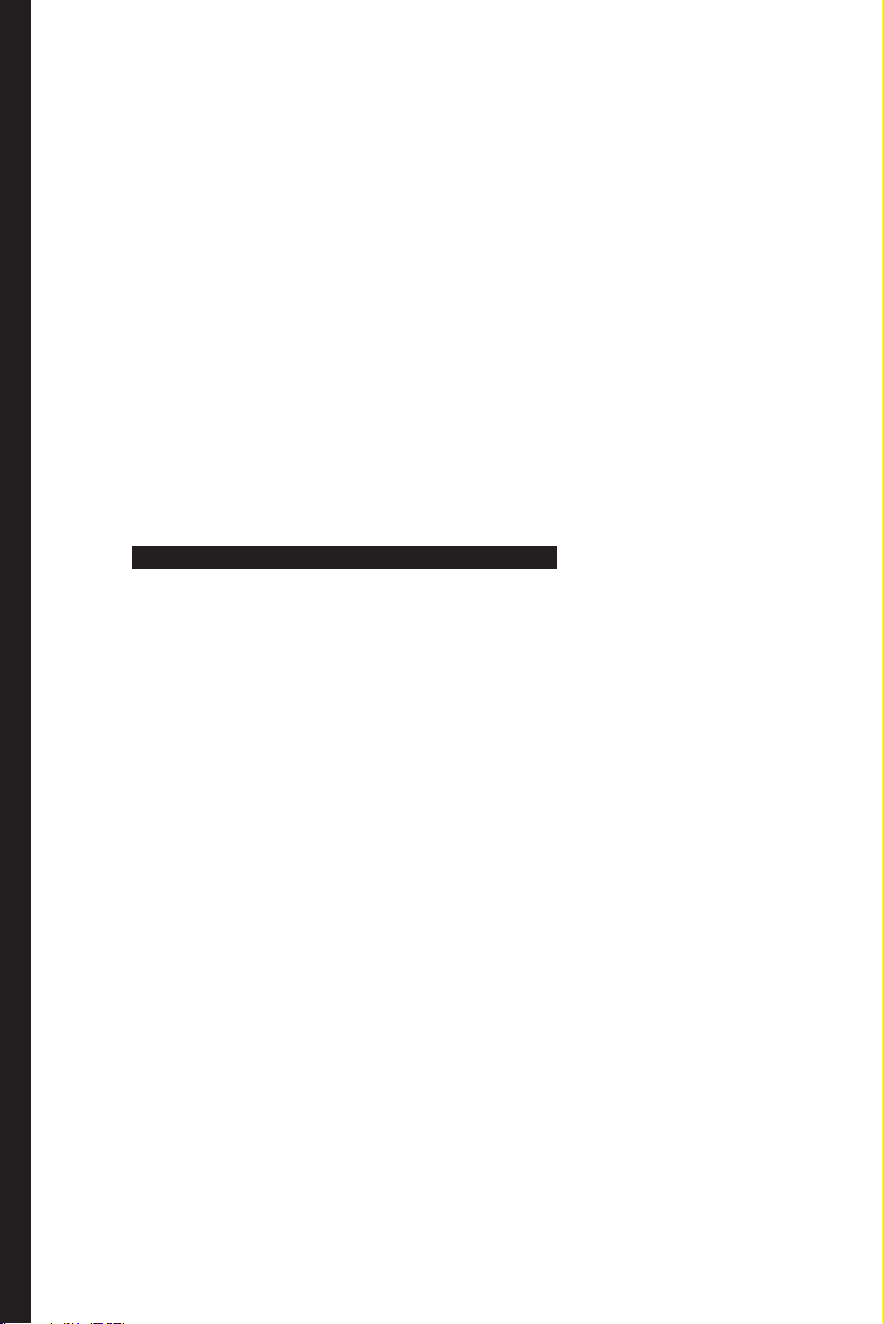
Treatment of problems other than faults
Troubleshooting of Common Faults
Notice
If no fault is identied after inspection but the product still malfunctions, please cut o the
power supply and contact the after-sales service personnel of SPEEDIANCE.
Symptoms Possible cause(s) Solution(s)
Main frame not working
Power cord disconnected or power plug
not fully inserted
Low voltage, power outage or partial
power cut.
Uneven ground
The product is not placed evenly
Uneven ground
The product is not placed evenly
Uneven ground
Unlocked or half-locked stepboard
Place the product on even ground
Push the quick release lever to the
lowest level for complete lock-in
A too high room temperature requires
more dissipation time
High temperature after usage
Obstacles around the pivot
Locked stepboard
Locked-in pulley set
Still working motors
Remove the objects in question
Unlock the stepboard according to
the manual
This is a normal situation. Place the
product somewhere ventilated.
Unlock the pulley set according to
the manual
Pause the motors by pressing
the buttons on accessories or
touchscreen
Running out of battery
High room temperature
Long time usage
Place the product on even ground
Remove objects in contact with the
product
Place the product on even ground
Remove objects in contact with the
product
This is a normal situation. Let it be.
Replace the battery
Firmly insert the power plug
Ask professional electricity
maintenance personals for help
Heavy motor noise
Uneven stepboard
Wobble
Accessories not working
High temperature of
motor compartment
Trouble removing the
pulley set
Trouble folding/unfolding
the stepboard
Fans working after the
product is turned off
For regular software issues, please check and seek solution in "Prole".
71
Warranty
and Service
4
Notice
Warranty scope
The warranty starts on the date that the product is purchased and is valid for 24 months
for the machine and 12 months for accessories. Customer must provide valid proof of
purchase for warranty. Replacement parts are available for sale after the warranty period
is over.
Warranty service will not be provided for the parts as:
If there is a quality issue, please contact us within 7 calendar days of
receiving your product.
Damage caused by improper use, improper maintenance, or improper
storage and force majeure.
Contact email info@tboxx.com with following information.
Normal wear and tear.
1、Order Number:
Damage caused by unauthorized repairs of the product.
2、roduct issue:
Re-sold / second-hand items.
3、Images or Videos of Products and Intact Packaging:
You can apply for our product warranty service if there is a performance
failure during the valid warranty period, please send email to info@
tboxx.com, we will get back to you as quickly as possible.
71
Warranty
and Service
4
Notice
Warranty scope
The warranty starts on the date that the product is purchased and is valid for 24 months
for the machine and 12 months for accessories. Customer must provide valid proof of
purchase for warranty. Replacement parts are available for sale after the warranty period
is over.
Warranty service will not be provided for the parts as:
If there is a quality issue, please contact us within 7 calendar days of
receiving your product.
Damage caused by improper use, improper maintenance, or improper
storage and force majeure.
Contact email info@tboxx.com with following information.
Normal wear and tear.
1、Order Number:
Damage caused by unauthorized repairs of the product.
2、roduct issue:
Re-sold / second-hand items.
3、Images or Videos of Products and Intact Packaging:
You can apply for our product warranty service if there is a performance
failure during the valid warranty period, please send email to info@
tboxx.com, we will get back to you as quickly as possible.
72 73
IC Statement
- English:
This device complies with Industry Canada licence-exempt RSS standard(s).
Operation is subject to the following two conditions: (1) This device may not cause int
erference, and (2) This device must accept any interference, including interference tha
t may cause undesired operation of the device.
- French:
Le présent appareil est conforme aux CNR d'Industrie Canada applicables aux apparei
ls radio exempts de licence. L'exploitation est autorisée aux deux conditions suivantes:
(1) l'appareil ne doit pas produire de brouillage, et
(2) l'utilisateur de l'appareil doit accepter tout brouillage radioélectrique subi, même s
i le
brouillage est susceptible d'en compromettre le fonctionnement.
Pour l'équipement de tness numérique multimédia interactif
Cet appareil est conforme aux limites d'exposition aux rayonnements RF dénies
pour unenvironnement non contrôlé. Cet appareil doit être installé et utilisé avec une
distance minimale de 20 cm entre le radiateur et votre corps.
Pour le Contrôleur de barre et la poignée intelligente L'appareil a été évalué pour
répondre aux exigences générales d'exposition aux RF.Cet équipement doit être
installé et utilisé avec une distance minimale de 0 mm entre le radiateur et votre corps.
FCC Statement
This equipment has been tested and found to comply with the limits for a Class B
digital device, pursuant to Part 15 of the FCC Rules. These limits are designed to
provide reasonable protection against harmful interference in a residential installation.
This equipment generates uses and can radiate radio frequency energy and, if not
installed and used in accordance with the instructions, may cause harmful interference
to radio communications. However, there is no guarantee that interference will not
occur in a particular installation. If this equipment does cause harmful interference to
radio or television reception, which can be determined by turning the equipment o
and on, the user is encouraged to try to correct the interference by one or more of the
following measures:
-- Reorient or relocate the receiving antenna.
-- Increase the separation between the equipment and receiver.
-- Connect the equipment into an outlet on a circuit dierent from that to which the
receiver is connected.
-- Consult the dealer or an experienced radio/TV technician for help.
This device complies with part 15 of the FCC Rules. Operation is subject to the
following two conditions:(1) This device may not cause harmful interference, and (2)
this device must accept any interference received, including interference that may
cause undesired operation.
Any Changes or modifications not expressly approved by the party responsible for
compliance could void the user's authority to operate the equipment.
For Interactive Multi-Media Digital Fitness Equipment
This device complies with RF radiation exposure limits set forth for an uncontrolled
environment. This device should be installed and operated with a minimum distance
of 20 cm between the radiator and your body.
For Barbell controller and Smart handle
The device has been evaluated to meet general RF exposure requirement. The device
can be used installed and operated with minimum distance 0 mm between the
radiator and your body.
72 73
IC Statement
- English:
This device complies with Industry Canada licence-exempt RSS standard(s).
Operation is subject to the following two conditions: (1) This device may not cause int
erference, and (2) This device must accept any interference, including interference tha
t may cause undesired operation of the device.
- French:
Le présent appareil est conforme aux CNR d'Industrie Canada applicables aux apparei
ls radio exempts de licence. L'exploitation est autorisée aux deux conditions suivantes:
(1) l'appareil ne doit pas produire de brouillage, et
(2) l'utilisateur de l'appareil doit accepter tout brouillage radioélectrique subi, même s
i le
brouillage est susceptible d'en compromettre le fonctionnement.
Pour l'équipement de tness numérique multimédia interactif
Cet appareil est conforme aux limites d'exposition aux rayonnements RF dénies
pour unenvironnement non contrôlé. Cet appareil doit être installé et utilisé avec une
distance minimale de 20 cm entre le radiateur et votre corps.
Pour le Contrôleur de barre et la poignée intelligente L'appareil a été évalué pour
répondre aux exigences générales d'exposition aux RF.Cet équipement doit être
installé et utilisé avec une distance minimale de 0 mm entre le radiateur et votre corps.
FCC Statement
This equipment has been tested and found to comply with the limits for a Class B
digital device, pursuant to Part 15 of the FCC Rules. These limits are designed to
provide reasonable protection against harmful interference in a residential installation.
This equipment generates uses and can radiate radio frequency energy and, if not
installed and used in accordance with the instructions, may cause harmful interference
to radio communications. However, there is no guarantee that interference will not
occur in a particular installation. If this equipment does cause harmful interference to
radio or television reception, which can be determined by turning the equipment o
and on, the user is encouraged to try to correct the interference by one or more of the
following measures:
-- Reorient or relocate the receiving antenna.
-- Increase the separation between the equipment and receiver.
-- Connect the equipment into an outlet on a circuit dierent from that to which the
receiver is connected.
-- Consult the dealer or an experienced radio/TV technician for help.
This device complies with part 15 of the FCC Rules. Operation is subject to the
following two conditions:(1) This device may not cause harmful interference, and (2)
this device must accept any interference received, including interference that may
cause undesired operation.
Any Changes or modifications not expressly approved by the party responsible for
compliance could void the user's authority to operate the equipment.
For Interactive Multi-Media Digital Fitness Equipment
This device complies with RF radiation exposure limits set forth for an uncontrolled
environment. This device should be installed and operated with a minimum distance
of 20 cm between the radiator and your body.
For Barbell controller and Smart handle
The device has been evaluated to meet general RF exposure requirement. The device
can be used installed and operated with minimum distance 0 mm between the
radiator and your body.
Agent Authorization
info@tboxx.com
8104 5000
Company:Shenzhen Speediance Living Technology co.,Ltd
Address:8A-F,K onka R&DB uilding, No. 28,S outh 12th Road,S cience and
Technology Park,N anshan District, Shenzhen, guangdongp rovince, China.
ProductN ame:
InteractiveM ulti-Media Digital FitnessE quipment
We authorizeM iCOM Labs Inc., 575 Boulder Court, Pleasanton, California 94566, USA,
to acto n our behalfo na ll mattersc oncerning thec ertification of above named
equipment.
We declare that MiCOM Labs Inc. is allowedt of orward alli nformation relatedt ot he
approval and certificationo f equipment to ther egulatorya genciesa sr equired andt o
discuss any issues concerning the approval application. Anya nd alla ctsc arried out by
MiCOM Labs on our behalfs hall havet he same effect as acts of our own.
Agent Authorization
info@tboxx.com
8104 5000
Company:Shenzhen Speediance Living Technology co.,Ltd
Address:8A-F,K onka R&DB uilding, No. 28,S outh 12th Road,S cience and
Technology Park,N anshan District, Shenzhen, guangdongp rovince, China.
ProductN ame:
InteractiveM ulti-Media Digital FitnessE quipment
We authorizeM iCOM Labs Inc., 575 Boulder Court, Pleasanton, California 94566, USA,
to acto n our behalfo na ll mattersc oncerning thec ertification of above named
equipment.
We declare that MiCOM Labs Inc. is allowedt of orward alli nformation relatedt ot he
approval and certificationo f equipment to ther egulatorya genciesa sr equired andt o
discuss any issues concerning the approval application. Anya nd alla ctsc arried out by
MiCOM Labs on our behalfs hall havet he same effect as acts of our own.