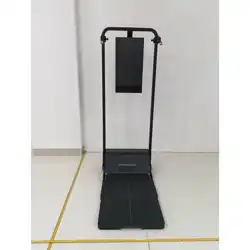

Gym Monster 3
Product Manual
US

[Warning] Before using or operating this product, please read and comply with the following precautions to ensure
optimal performance and prevent hazardous or unlawful situations.
1. The product emits radio waves and contains magnets that may impair the operation of implanted or personal
medical devices such as pacemakers, cochlear implants or hearing aids. If you use such medical devices, please
consult the manufacturer for any restrictions that may apply to the use of this product. When using this product,
maintain a distance of at least
15 cm from implanted medical devices (such as pacemakers and cochlear implants).
2. In the event of a gas leak, immediately close the gas supply valve and open doors and windows to ventilate the
room. Do not unplug this product or any other electrical appliances, to avoid sparks and even explosions or fires.
3. Risk of electric shock: Always unplug the power supply before performing any cleaning or maintenance work. Do
not spray or rinse the product with water or place it in damp or splash-prone environments, as this may cause an
electric shock or damage the product.
4. Child safety: This product is not a toy. Do not allow children to approach or use the product without supervision. To
prevent accidents, do not allow children to pull on cables, touch mechanical parts or operate the power switch.
5. Battery safety (risk of ingestion): This product contains button cells or small batteries. Do not swallow the batteries,
as they may cause chemical burns.
6. Dispose of batteries in accordance with local regulations. Do not place them in household waste. Improper
disposal may cause an explosion or pollute the environment.
7. Power cord and connection: Use the original power cord supplied with the product. Do not use the power cord for
other appliances. Ensure that the plug is fully inserted and the socket is properly grounded. Failure to do so may
cause a fire. When unplugging the product, hold the plug firmly and pull it out from the wall socket. Do not pull on the
power cord.
8. Power cord and product condition: Do not use damaged power cords or worn plugs. Do not disassemble or
modify the product or tamper with its internal electronic components (such as circuit boards). All repairs must be
carried out by authorized or qualified service personnel. Contact Speediance Customer Service in the event of a
malfunction.
9. Power supply specifications: This product requires 100–240 V/50–60 Hz AC power supply.
10. Warning: If the input voltage exceeds 240 V (especially at voltages above 260 V), the product may malfunction or
be damaged.
11. Intervals between restarts: After a power outage or cleaning, unplug the power supply and wait at least 30
seconds before plugging it back in to prevent damage to the motor or electronic components from repeated
restarts.
12. Placement: The product must be placed on a sturdy, level surface. To ensure proper ventilation and safe
operation, make sure that there are no obstacles above or on either side of the product, and maintain a clearance of
at least 10 cm from any walls to the back.
13. Moving: The casters are intended only for movement on level surfaces. Do not use the casters to move the
product on stairs, slopes or uneven surfaces.
14. Temperature range: Use this product at an ambient temperature of 0°C to 40°C. Store the product at a
temperature of -20°C to +50°C.
15. Locking: Before using the product, make sure that the platform secure handles are locked in position.
16. Keep away from: Do not place, use or spill flammable/explosive/highly corrosive substances, liquids or other
combustible materials on or near the product, as these may cause a fire or damage the product.
17. Placement of objects: Do not place any objects on the product other than those expressly recommended by the
manufacturer.
18. Product status: After use, make sure that the product is turned off or in standby mode.
19. Risk of pinching: Be aware of narrow gaps on the product during operation. To avoid injury, do not insert your
fingers into the gaps.
20. Disposal: When the product has reached the end of its life, promptly dispose of it at a designated recycling point
and keep it out of the reach of children to prevent accidents.
21. Regular inspection: Inspect the cables regularly for signs of corrosion or excessive wear (you can check the
cables' wear and tear in the Speediance app). Inspect all bolts and screws for signs of rust or damage.
22. First use: Before first use, remove all packaging materials, including the outer carton, foam, tape and plastic bags.
If the product is covered with a protective film, peel it off before use. After turning on the product, allow it to run idle
for 5–10minutes. Carefully inspect the exterior for signs of damage and check for any abnormal noises. In the event
of any abnormalities, switch off the power supply immediately and contact Speediance Customer Service.
23. Accessories: After using accessories with moving parts or weights, return them to their original position slowly to
prevent pinching or impact injuries. (Accessories include cables, Speediance Tricep Rope, Speediance Ankle Straps,
Speediance Handles, Speediance J-cup Pairs, Speediance Adjustable Barbell, Bluetooth Ring Controller,
Speediance Skiing Handles, Speediance Smart Handles, Speediance Lat Pulldown Bar, Speediance Pull-up Bar,
3-in-1 accessories and anti-wear Speediance Extension Straps; complimentary gifts are excluded.)
24. Check whether the connectors, platform secure handle and adjustable pulley holder are loose or abnormal, and
check that the connectors and accessories are securely connected. In the event of any abnormalities, stop using the
Safety Warnings

product and contact Speediance Customer Service for assistance.
25. Environmental conditions (supplementary): After powering on, double check that the surrounding environment
meets the requirements for use (in particular, there should be no flammable materials, the room should be well
ventilated and the product should be placed on a level surface).
26. After completing the above checks, you can proceed to use the product.
Do not use
in damp areas
Away away from
open flames
Keep away
from flammable
materials
Not suitable
for children
Do not use
poor-quality
power supplies
Professional
service required
Ground
required
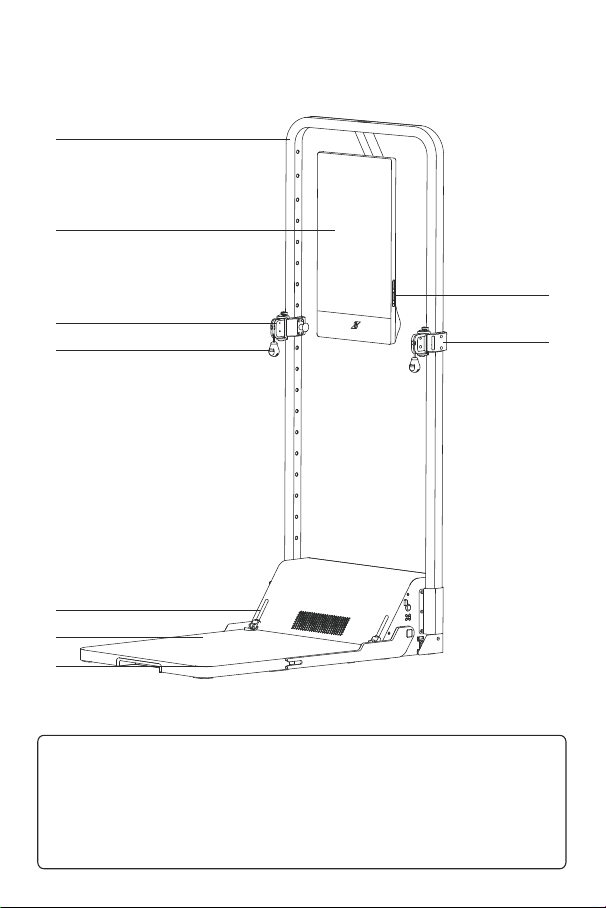
Product Illustration
①
③
④
⑧
⑨
⑤
⑥
⑦
②
① Main Frame
④ Ball-shaped Connector
⑦ Handle Catch
② Touchscreen
⑤ Pedal Lock Knob
⑧ Main Frame Sliding Sleeve
⑥ Pedal
⑨ Power/Sleep Button
③ Detachable Pulley System
First Use
- Before use, remove all packaging materials in accordance with the packaging descriptions (illustrations/labels). If
the product is covered with a protective film, peel it off before use. (Important)
- Place the product indoors in a well-ventilated location, on a flat and solid floor.
- Keep away from heat sources and avoid direct sunlight. Do not place the product in damp or wet areas to prevent
rust or reduced insulation.
- After unboxing and installation, check the appearance of the product to make sure that it is complete and intact.
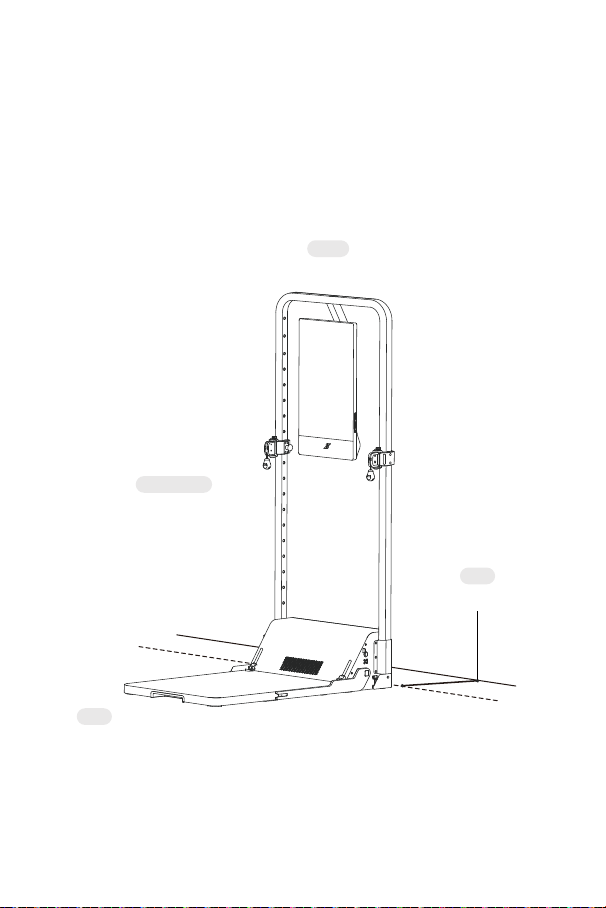
1. Placement Precautions
- The product must be placed on the floor. Keep an open space above the product, leave a clearance of a least 10
cm between the back of the product and the wall, and ensure both sides remain unobstructed.
- Besides the back of the product, the areas to the front, left, right, and top must also remain unobstructed to ensure
uninterrupted operation and prevent injury.
- Place the product in a dry environment. Do not use it outdoors.
Above
Open space
Front
Open space
Left and right
Open space
Rear
Maintain a clearance
of at least 10 cm
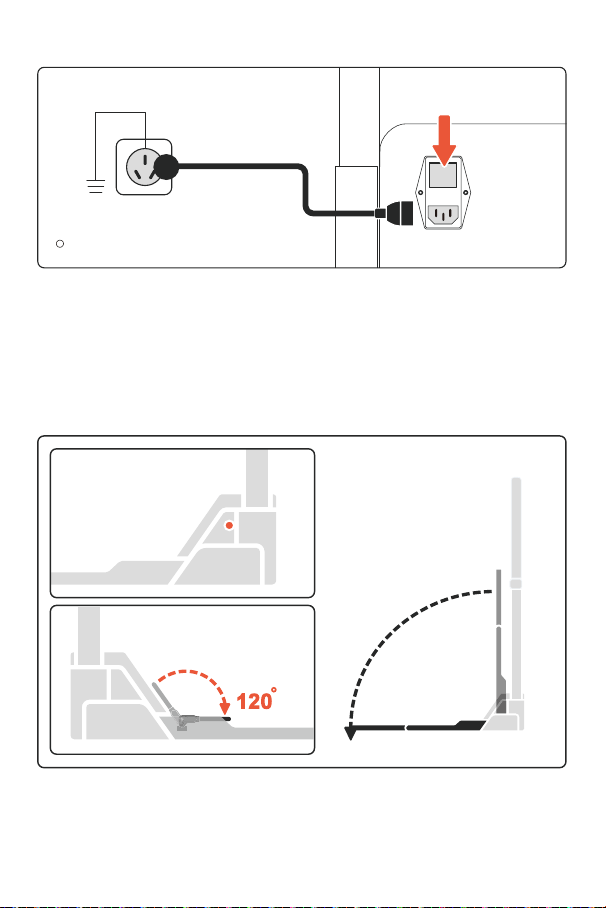
2. Connecting The Power And Turning On The Product
- Use a grounded three-prong outlet and ensure it is properly grounded.
- After connecting the power for the first time and turning on the product, let it sit for 5–10 minutes to check whether
the exterior is damaged or if there are abnormal noises during operation. If you notice anything unusual, turn off the
power immediately and contact Speediance Customer Service.
- After powering on, double check that the ambient conditions meet the usage requirements and that the platform
is completely flat.
- After completing the above checks, you can proceed to use the product.
3. Platform Deploying and Retracting
- Before deploying the platform, make sure the area is clear of any objects to avoid uneven placement that could
cause safety risks.
- After deploying the platform, make sure that the secure handles are locked in position.
- After retracting the platform, confirm that the unlock button is in the locked state to prevent the platform from
dropping unexpectedly and causing injury or damage.
➊ Connect Power Supply
Plug in the power cord
➋ Power On
Press the power switch
The power switch is located on the back of
the Gym Monster.
➊ Press the unlock button
Platform unlocked
➋ Lower the platform
Confirm that the platform is stable
➌ Rotate the secure handle
Platform locked
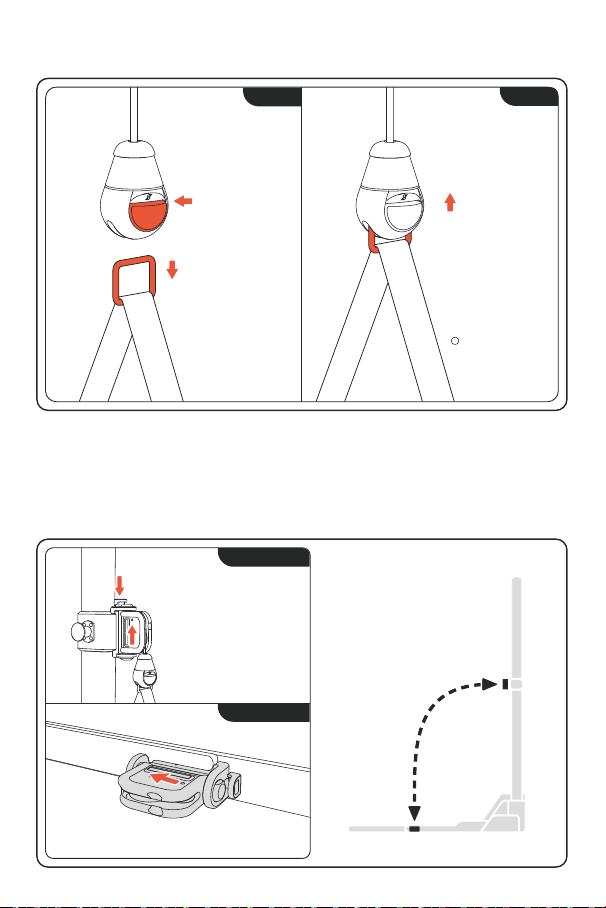
4. Replacing Accessories
If the connector becomes loose or faulty, discontinue use immediately and contact Speediance Customer Service.
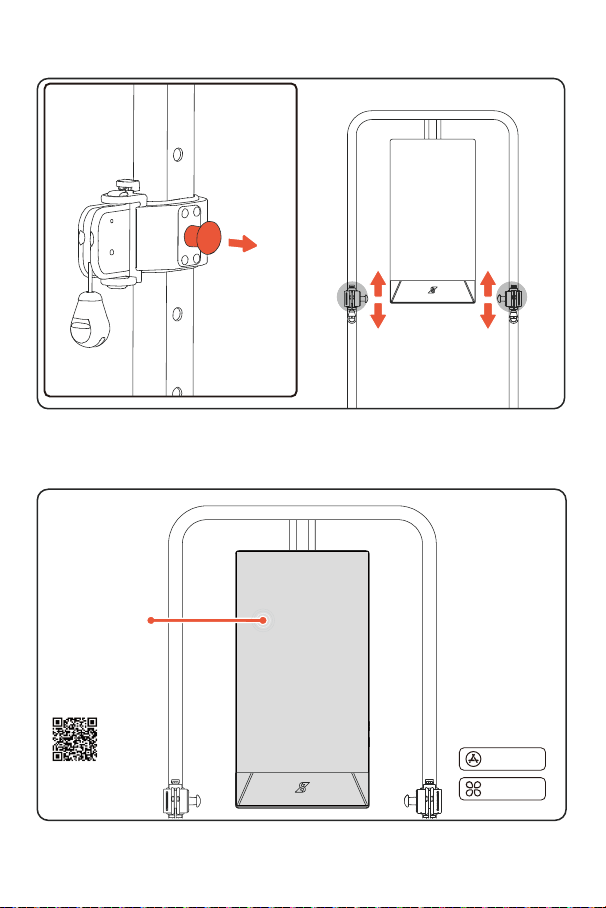
5. Unlock Main Frame Sliding Sleeve
Unlock demo-
Main frame side
Lock demo-
Platform side
➊
Press button
Unlock detachable pulley
system
➋ Push upward
Remove detachable pulley
system
➊ Insert into platform to secure main frame
➊ Change the position of the
adjustable pulley holder to
use different workout modes.
➋ Use the same steps for locking
to the main frame and unlocking
from the platform.
Main ftame side
Platform side
➊ Press button
➋ Connector unlocked
Rectangle ring released
➊ Press button
➋ Push up rectangle
ring
Connector
automatically locks
Compatible with
all accessories
Unlocking
Locking
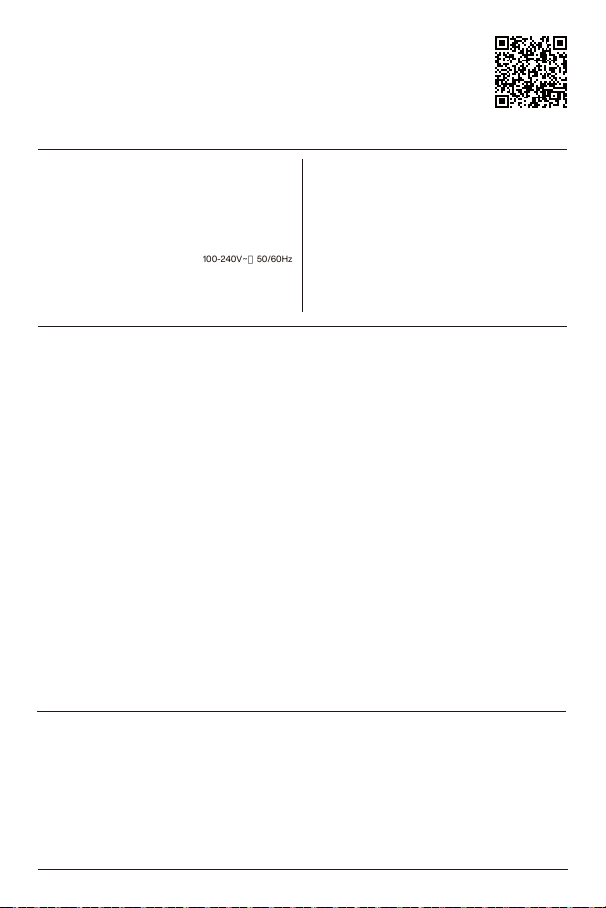
6. Move Main Frame Sliding Sleeve
7. User Registration
Verify the complete display content of Touchscreen and normal touch function.
After function verification, strength training can be performed as required.
➊ Pull out the
locking pin
Adjustable
pulleyholder
unlocked
➋
Moving the adjustable
pulley holder
automatic positioning
Touchscreen
Operation
Follow the
on-screenprompts
(User registration
required before first use)
Download on the
APP STORE
GET TI ON
Google Play
Download the Speediance
app from your mobile app
store.
Data protection: To find out how we protect your personal information, please visit https://www.speediance.com to
read our Privacy Policy, or view the Privacy Statement and Terms of Service in the Speediance app.
Open source software: Visit https://www.speediance.com and search for the product name to view detailed
information on open-source software.
User Agreement: Before using this product, please read the User Agreement carefully. By using this product, you
agree to be bound by the terms of the User Agreement. If you do not agree to the terms of the User Agreement, do
not use this product or any associated software. You may return the product in its original condition to receive a
refund.
Legal notice: Copyright © Shenzhen Speediance Living Technology Co., Ltd., All rights reserved.
The content and images in the product packaging are provided for reference only and may vary slightly from the
actual product, including but not limited to appearance, color, dimensions and supported functions. Product
functions may also be updated through software upgrades.
Note: Unplug the power cord before cleaning the product.
1. Regularly clean the dust from the back of the product and the floor to improve heat dissipation and maintain
energy efficiency.
2. When cleaning the product, use a soft cloth or sponge dipped in clean water or a non-corrosive neutral
detergent. Wipe with clean water afterward, then dry with a dry cloth. Allow the product to dry completely before
reconnecting the power.
3. When cleaning, do not allow water to enter the gaps in the product, as this may cause a short circuit or damage
the components.
4. If the product will not be used for a long time, unplug the power cord to prevent it from aging and causing an
electric shock or fire.
For more information, visit https://www.speediance.com
Scan the QR code to access the Quick Start Guide for the product.
Name:
Contact number:
Mailing address and ZIP code:
Purchase date:
Invoice number:
Retailer:
Retailer's address and ZIP code:
Retailer's phone number:
Model number:
Place of manufacture:
Serial number:
More Information
Cleaning And Maintenance
Main Unit Parameters
Purchase InformationWarranty Certificate
Wi-Fi
Bluetooth
Gym Monster 3
GMB3100A1
2560 X 1440
Net Weight
One-Sided Resistance
Model NO.
256-Color RGBAmbient LightName
Touchscreen Resolution
60Kg
83Kg Voice Dual Microphone; Voiceprint Recognition
Amplifier 2.1-Channel; 25W
Bluetooth 5.3
Wi-Fi 6
Touchscreen Size
Touchscreen
Input Voltage
Port 1 USB-C1: 20W
Humidity Range
Port 2
100-240V~,50/60Hz
Full-Lamination, Capacitive, Multi-Touch Screen
23.8Inches
Working Temperature
USB-C2: Versatile USB-C
20~80%RH
-10~40
℃

1. Warranty Coverage
- The limited warranty provided by Speediance is restricted exclusively to the repair or replacement of products
with material or production defects.
- This warranty does not cover any indirect losses, including but not limited to loss of data, property damage not
solely and directly caused by a product defect, personal injury not solely and directly caused by a product defect,
loss of work, or loss of business opportunities.
- Speediance warrants that the products you purchased are free from defects. During the warranty period, if a
malfunction occurs during the normal use, operation and maintenance of the product in accordance with the
product manual, Speediance will provide a free warranty service. If the warranty has expired or Speediance
determines that the product was damaged due to misuse or human error, you may choose to have the product
repaired at your own expense. All warranty and repair services will be provided in accordance with Speediance's
after-sales warranty policy, quality standards and production processes.
- Speediance's limited warranty applies only to Speediance products purchased through official Speediance
channels or authorized dealers. Second-hand Speediance products or products purchased through other
third-party channels are not covered by Speediance's limited warranty.
- The after-sales warranty provided by Speediance is limited in scope and does not constitute an assumption of
unlimited liability. You are advised to read this warranty policy carefully in order to understand the warranty period,
conditions, applicable circumstances, cost burden, risks and other relevant terms of Speediance's repair services.
2. Warranty Period
- The warranty validity period comes into effect at 0:00 on the day of delivery and terminates at 24:00 on the day
before the product's expiration date. If the user/logistics provider is unable to provide a specific date of
receipt/delivery, the warranty validity period will come into effect on the date that the invoice was issued, or on the
date the order was placed. If the user is unable to produce a valid purchase invoice or other proof of purchase, the
warranty validity period will come into effect from the day the product leaves the factory, and will be in effect for 30
days.
- The standard warranty period for the main unit is 24months, and the standard warranty period for accessories is
12months (pre-installed cables and other items are considered accessories).
- Any parts replaced or repaired during the warranty period shall become the property of Speediance (the user is
responsible for returning these parts to Speediance). Any parts replaced or repaired outside the warranty period
shall remain the property of the user.
Conditions for free warranty services
1. The product is a Speediance product purchased from an official Speediance channel or authorized dealer.
2. During the specified warranty period, the product is used under normal conditions and is affected by a
performance-related fault not attributable to misuse.
3. The product was purchased primarily for personal or household use (if the product is intended for commercial
use, rental or other non-personal/household purposes, a separate procurement agreement must be concluded with
Speediance stating the applicable warranty terms). This clause does not affect consumer rights under applicable
law.
4. The user must provide valid proof of purchase (such as the order number, invoice or receipt) together with the
product serial number.
3. Warranty Exclusions:
The Speediance warranty does not apply to any non-Speediance branded hardware products or any software (even
if packaged, sold or distributed together with Speediance hardware). Speediance shall not be liable for damage
resulting from failure to follow the operating instructions for Speediance products, nor for any loss or corruption of
data caused by the product.
The warranty does not cover the following:
1. Damage caused by factors unrelated to manufacturing, including but not limited to incorrect installation, usage or
disassembly, or by failure to follow official instructions or manuals.
2. Direct or indirect damage caused by installation or removal of the product, such as damage to personal property,
walls or flooring.
3. Damage caused by regular use or factors unrelated to manufacturing or transportation, such as wear, metal
rusting, and decline in functionality or appearance (including but not limited to scratches, dents and discoloration of
the plastic).
4. Damage caused by age or damage to parts caused by mandatory training.
5. Damage caused by unauthorized modifications, disassembly, servicing or non-Speediance technical support
(such as unsuitable third-party operators, product setup or installation).
6. Damage caused by unauthorized modifications to the electrical circuit, improper use of the battery charger or
external power supplies, and by operating the product on an insufficiently powered or defective battery.
7. Damage caused by reliability or compatibility issues when using unauthorized third-party parts.
After-Sales Service

8. Damage caused intentionally or by unauthorized modifications (including tampering with product operating data).
9. Damage caused by exposure to extreme conditions (such as high temperatures or corrosive environments).
10. Damage caused by electromagnetic interference or interference from other wireless devices.
11. Damage caused by force majeure events, such as fires, flooding, earthquakes or electrical accidents.
12. Damage caused by using non-commercial grade products for commercial purposes, such as for gyms, hotels,
multi-residence facilities or personal training studios.
13. Malfunctions of or damage caused by any third-party products, including those integrated into Speediance
products at your request.
14. Any software programs, whether supplied with the product or installed after purchase.
15. Parts and products with labels or logos that have been altered or removed.
16. Damage caused by improper storage or transportation of products or by improper use (such as being exposed
to fire, immersed in water or struck by lightning).
17. Damage caused by contact with liquids (such as sweat, beverages or rain).
18. Damage or performance issues caused by the use of unofficial, unauthorized or incompatible accessories.
19. Secondary damage or complications resulting from unauthorized repair attempts by the user (even if
well-intentioned).
20. Cosmetic aging (such as rusting of metal parts or discoloration of plastic parts) or functional issues caused by
extended periods of disuse.
21. Repair requests arising due to a misunderstanding of product functions/performance or unmet expectations
(such as workout results failing to meet expectations and other subjective circumstances), unless there is clear
evidence of a hardware defect.
22. Accelerated wear or premature component failure resulting from intensive use by multiple users (such as
frequent use by more than three users).
23. Structural damage, component deformation or performance failures caused by the user weight or usage
intensity exceeding the maximum load stated in the product specifications.
24. Damage caused by improper use (such as suspending heavy objects, use by pets or use of the product as a
support tool) or for any purpose other than its intended design.
25. Startup failures or functional issues caused by unsuccessful software/firmware upgrades that are not
attributable to Speediance's servers.
26. Mechanical, structural, electronic or cosmetic damage caused by improper storage (such as failure to lock
folding mechanisms, placing the product upside down or stacking heavy objects on the product).
27. Interruptions in access, changes to content, functional changes or termination of mobile apps or online services
provided for use with the product (such as course subscriptions or live-streaming services).
28. Associated damage caused by failure to promptly replace components that have reached the end of their
service life or are expressly designated as consumable parts (such as cables).
29. Warranty requests from subsequent owners after transfer of product ownership (i.e., second-hand transactions),
even if the product is still under warranty.
30. Any personal injury, property damage or other consequences caused by failure to comply with product safety
warnings and operating instructions.
4. How To Make A Warranty Claim
- In the event of a performance-related issue that is covered by the terms of this warranty policy, please contact
Speediance Customer Service at after-sales@speediance.com.
- To obtain prompt assistance, we recommend that you contact us as soon as you notice an issue.
- You must provide valid proof of purchase (such as the order number, invoice or receipt) together with the product
serial number to make a warranty claim. Services not covered by Speediance's limited warranty policy may be
subject to additional charges.
5. Amendments To And Applicability Of Warranty Terms
Speediance reserves the right to amend this Warranty Policy for the following reasons:
1. Legal and regulatory requirements: To comply with newly enacted or amended laws, regulations, rules and
administrative directives.
2. Product technical iterations: Where upgrades in product technology or changes in service models require
changes to warranty procedures.
3. Force majeure: Where performance of the original terms is rendered impossible due to natural disasters, policy
changes or other force majeure events.
4. Effective date of these amendments: Amendments that reduce your responsibilities, enhance your rights or
expand the scope of the warranty shall take effect immediately.
Amendments that narrow the scope of the warranty or impose additional obligations on you will be announced on
the official website or communicated by email, and shall apply to products purchased on or after the date of
announcement. Products purchased before the date of announcement shall continue to be covered by the warranty
terms in effect at the time of purchase.
5. Following these amendments, Speediance may make further changes to the warranty terms and policy for the
reasons stated above and publish such changes through the app, official website, product interface or other
channels. After the changes are published, you will be granted a 60-day period to lodge an objection. If you have
Speediance app Speediance
WeChat Account
Manufacturer: Shenzhen Speediance Living Technology Co., Ltd.
Suite 1901, 1902, 1903, 1905, 1906, 1907, Gemdale Viseen Tower A, No. 16
Gaoxin South 10th Road, Gaoxin Community, Yuehai Neighborhood,
Nanshan District, Shenzhen, China
Implemented standard
IC ID
Manufacturer's address
Manufacturer
2A4WP-GMB3100A1
MADE IN CHINA
GB4943.1-2022
FCC ID 28295-GMB3100A1
any objections, you may contact Speediance Customer Service (after-sales@speediance.com) within the 60-day
period. If you do not lodge any objections within this period, you shall be deemed to have accepted the revised
warranty terms and policy.
Regardless of whether the product is under warranty, if you request a home repair service (including but not limited
to on-site inspection, repair or installation of a new product), any resulting service fees (such as transportation and
labor costs) shall be borne by you. For more information on service fees, please contact Speediance Customer
Service.
Local laws and regulations of the place of purchase shall prevail if they have stricter requirements on after-sales
services, warranty periods or consumer rights or compulsory clauses that are more favorable to the consumer.
Email: after-sales@speediance.com
Address: 19/F, Gemdale Viseen Tower A, No. 16 Gaoxin South 10th Road, Gaoxin Community, Yuehai Neighborhood,
Nanshan District, Shenzhen, China
Product Manual

FCC Warnning:
This equipment has been tested and found to comply with the limits for a Class B digital device,
pursuant to part 15 of the FCC Rules. These limits are designed to provide reasonable
protection against harmful interference in a residential installation. This equipment generates,
uses and can radiate radio frequency energy and, if not installed and used in accordance with
the instructions, may cause harmful interference to radio communications. However, there
is no guarantee that interference will not occur in a particular installation. If this
equipment does cause harmful interference to radio or television reception, which can be
determined by turning the equipment off and on, the user is encouraged to try to correct the
interference by one or more of the following measures:
• Reorient or relocate the receiving antenna.
• Increase the separation between the equipment and receiver.
• Connect the equipment into an outlet on a circuit different from that to which the receiver is
connected.
• Consult the dealer or an experienced radio/TV technician for help.
Caution: Any changes or modifications to this device not explicitly approved by manufacturer
could void your authority to operate this equipment.
This device complies with part 15 of the FCC Rules. Operation is subject to the following two
conditions:
(1)This device may not cause harmful interference, and (2) this device must accept any
interference received, including interference that may cause undesired operation.
This equipment complies with FCC radiation exposure limits set forth for an uncontrolled
environment. This equipment should be installed and operated with minimum distance 20cm
between the radiator and your body.
ISED Statement:
‐ English: This device contains licence-exempt transmitter(s)/receiver(s) that comply with
Innovation,Science and Economic Development Canada’s licence-exempt RSS(s).
Operation is subject to the following two conditions:
(1) This device may not cause interference.
(2) This device must accept any interference, including interference that may cause
undesired operation of the device.
‐ French:Cet appareil contient des émetteurs/récepteurs exempts de licence qui sont
conformes aux CNR exempts de licence d’Innovation, Sciences et Développement
économique Canada. Le fonctionnement est soumis aux deux conditions suivantes :
(1) Cet appareil ne doit pas causer d’interférences.
(2) Cet appareil doit accepter toute interférence, y compris les interférences susceptibles
de provoquer un fonctionnement indésirable de l’appareil.
This equipment complies with Canada radiation exposure limits set forth for an
uncontrolled environment.
This equipment should be installed and operated with minimum distance 20cm between
the radiator & your body.
Cet équipement est conforme Canada limites d'exposition aux radiations dans un
environnement non contrôlé.
Cet équipement doit être installé et utilisé avec une distance minimale de 20 cm entre le
radiateur et votre corps.
The device for operation in the band 5150–5250 MHz is only for indoor use to
reduce the potential for harmful interference to co-channel mobile satellite systems.
L'appareil destiné à fonctionner dans la bande 5150-5250 MHz est uniquement destiné à
une utilisation en intérieur afin de réduire le potentiel d'interférences nuisibles aux
systèmes mobiles par satellite cocanaux.