Air Clips 2

User Manual for Air Clips 2
TABLE OF CONTENTS
01
02
03
04
05
06
08
09
• Package Contents and Features
• Specifications
• Power and Pairing
• Reset
• Charging
• Controls
• Warranty
• Safety
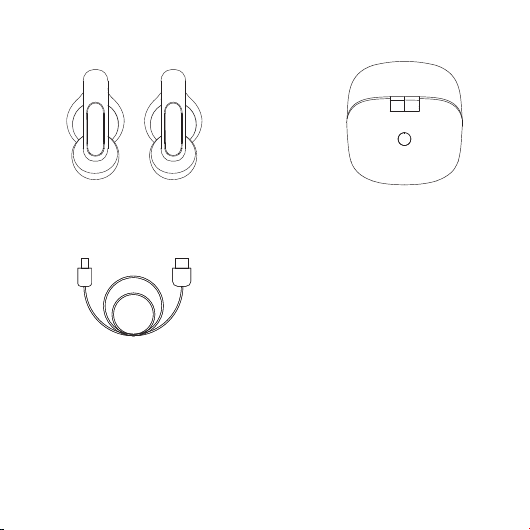
PACKAGE CONTENTS
User Manual x 1
‘How to wear’ Card x 1
Thank you Card x 1
User Manual for Air Clips 2
1
USB Type-C charging Cable x 1
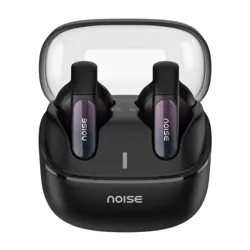
Noise Air Clips 2 x 1 Charging Case

Air Clips weight with charging case: 32
grams
Driver size: 12 mm
Supported profile: A2DP, HFP, AVRCP
Bluetooth version: 5.4
Charging time: Air Clips take up to 1 hour to
charge fully and the charging case takes up
to 1.5 hours to charge
Working voltage: DC5V
Standby time: 80 hours
Bluetooth range: 10m
Working temperature: -10 ± 5 °C to 45 ± 5 ° C
Playtime: Up to 40 hours
Fast Charging: 10 minutes of charge = 120
minutes of playtime
SPECIFICATIONS
User Manual for Air Clips 2
2
• Air Clips 2 weight: 6g (each)
• Charging case weight: 33g
• Driver size: 12mm
A2DP, HFP, AVRCP• Supported profile:
• Bluetooth version: 5.3
• Earbuds Charging time: Up to 90 mins
Charging case charging time: Up to 90 mins•
• Working voltage: 5V
• Standby time: Up to 500 hours
• Bluetooth range: 10m
• Playtime: 6.5 hours at 60% volume
• Waterproof rating: IPX5
• Charging port: Type-C
• Total playtime with charging case: 40 hours
• When you take the Air Clips 2 out from the charging case, it
automatically initiates the pairing mode.
• Select 'Add Device' and select Noise Air Clips 2 from the list of devices.
• Your Air Clips 2 are now paired with your device and ready to use.
Note: Your Air Clips 2 will automatically connect to the last
paired device as soon as you take them out of the charging case.
User Manual for Air Clips 2
PAIRING
POWER ON/OFF
3
•
•
DUAL DEVICE PAIRING
Follow these steps to connect two devices with Noise Air Clips 2:
• Pair Air Clips 2 with Device 1
•
• Pair Air Clips 2 with Device 2.
• Now power on the Bluetooth of Device 1.
• Noise Air Clips 2 is now paired with both devices.
If it does not connect automatically with Device 1, try connecting manually.
User Manual for Air Clips 2
• Make sure your earbuds are fully charged.
• On your paired devices, delete/remove Noise Air Clips 2 from the
list of paired devices in the bluetooth menu.
• Insert both earbuds into the charging case and long press the
charging case button for 7 seconds.
• The orange LED on the charging case will start blinking,
to indicate earbuds have been reset.
RESET
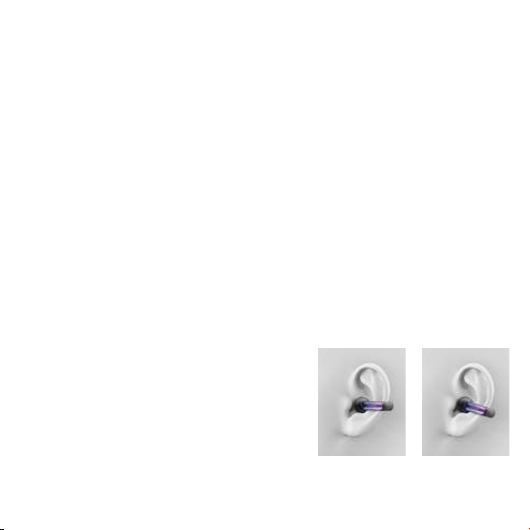
• Put on the air clips 2 on your auricle, push it down like
the above picture and adjust to fit yourself.
• Adjust its angle and make the sound hole towards
your earhole.
• Improper wear might bring bad call and playing
experience.
ENSURING THE AIR CLIPS FIT CORRECTLY
4
Move downwards Adjust to fit yourself
Air Clips 2 has a Mylar (protective film) on the charging pins that must be
removed and should place the Air Clips back in the charging case, to Power them on.
IMPORTANT NOTE - (WHEN NEW PRODUCT RECIEVED)
User Manual for Air Clips 2
5
Place both clips inside the case to charge them.
CHARGING
Case
Charge the case via a Type-C charging cable, preferably from any PC
or laptop as compared to a USB charger.
Clips
Blinking white LED (Only once) = Opening and closing the lid
Indication (on case)
Blinking Orange LED = Charging
No LED = Fully Charged
Before using your Air Clips 2 for the first time, fully charge them by
using the Type-C cable provided.
6
User Manual for Air Clips 2
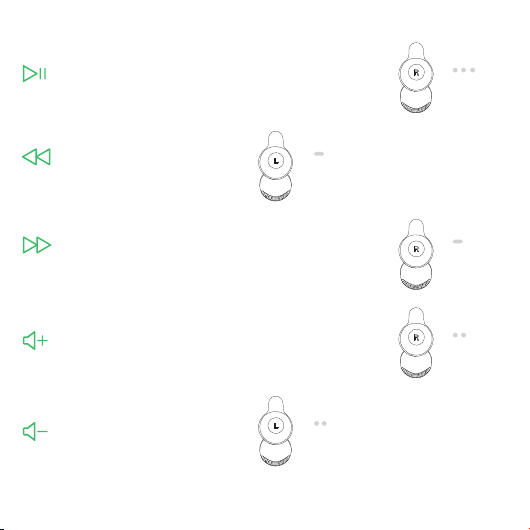
CONTROLS
Previous Song
Long press the left Air Clip
for 3 seconds
Long press,
3 seconds
Volume Down
Double tap the left Air Clip
Tap twice
Play/Pause
Triple tap the right Air Clip
Tap thrice
Next Song
Long press the right Air Clip
for 3 seconds
Long press,
3 seconds
Volume Up
Double tap the right Air Clip
Tap twice
7
User Manual for Air Clips 2
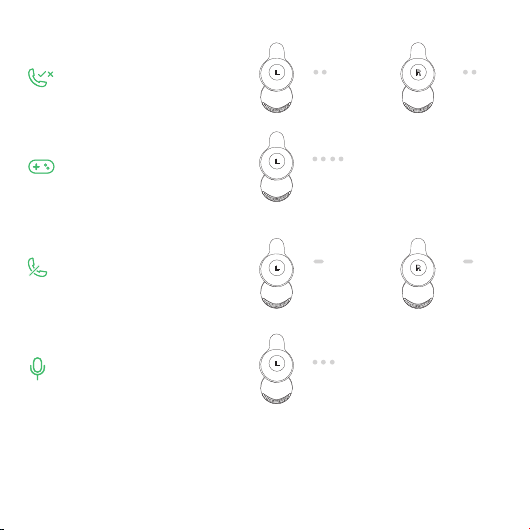
Gaming Mode
Four tap left clip
Reject Call
Long press either clip
for 3 seconds
Voice Assistant
Triple tap left Air Clip
Long press,
3 seconds
Long press,
3 seconds
Tap Four times
Answer Call/End Call
Double tap either clip
Tap twice
Tap twice
Tap thrice
The warranty covers your Noise product,
including accessories, against manufacturing
defects (if any) for 1 year from the date of
purchase.
Things that are not covered in the warranty are
listed below:
• Unauthorised tampering, modifications or
repairs of the product.
• Physical damage of the product on the
account of abuse, handling, storage,
installation or testing including any use that is
not by the product manual or documentation
or any other instruction provided along with
the Noise product.
For further information on product
replacement/refund-related queries, please
refer to the terms and conditions mentioned in
our online return policy section on
www.gonoise.com.
REGISTER YOUR WARRANTY
www.gonoise.com/pages/
warranty-registration
SUPPORT AND SERVICE
1 YEAR LIMITED WARRANTY
SCAN ME
CUSTOMER QUERY
WARRANTY
For any assistance,
please reach out to us at
support.gonoise.in
8
User Manual for Air Clips 2
9
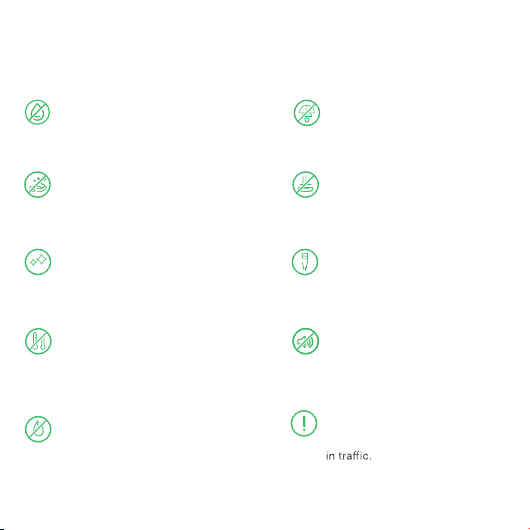
Follow these tips to get the best out of your new Air Clips 2:
Do not throw the earbuds in a fire to
dispose them. The internal battery
may explode.
SAFETY FOR YOU AND YOUR AIR CLIPS 2
Do not expose the earbuds to liquids,
moisture, or humidity as they have
electronics and batteries inside.
Do not try to disassemble your
earbuds. There are no user-
serviceable parts inside it.
Do not use abrasive cleaning solvents
to clean your new earbuds. Wipe them
down with a slightly damp cloth if and
when necessary.
Avoid dropping the earbuds and
keeping them away from sharp
objects such as keys in your
pockets.
Remove and clean the earbud
tips regularly to ensure that you
always enjoy the best sound
possible.
Only charge your earbuds from
5V/1A ports such as phones and
laptops or PC chargers.
Do not expose the earbuds to
extremely high or low temperatures
as this may damage the battery
or even deform the plastic parts.
Avoid listening to music at a high
volume or you may permanently
damage your hearing.
Pay attention to your surroundings
and never wear any earphones
while riding, driving, or walking
User Manual for Air Clips 2