wolox.com
The information in this manual is subject to change without notice.
V1.0
MegaVolt24
User Manual

1
Content
Precautions . . . . . . . . . . . . . . . . . . . . . . . . . . .
2
Packing List . . . . . . . . . . . . . . . . . . . . . . . . . . .
3
LED Display Instructions . . . . . . . . . . . . . . . . . . .
4
Pas and Functions Introduction . . . . . . . . . . . . . .
5
Technical Specications . . . . . . . . . . . . . . . . . . .
12
Frequently Asked Questions (FAQ) . . . . . . . . . . . . .
12
Troubleshooting . . . . . . . . . . . . . . . . . . . . . . .
14
Customer Seice . . . . . . . . . . . . . . . . . . . . . .
17

2
・ Thank you for choosing the Wolox Jump Staer. To ensure
a good user experience, personal safety, and propey
security, please carefully read all instructions before using
this product, and keep this manual for reference.
・
It is recommended to charge the product before initial use!
・
While reading this manual, you can sta charging the
MegaVolt24 with the included charger or wall charger.
Precautions
Warning:
This device is designed for vehicles (equipment) with 12V
batteries. Using it with other types of batteries may pose
a risk. Please read and understand the safety information
before use.
3
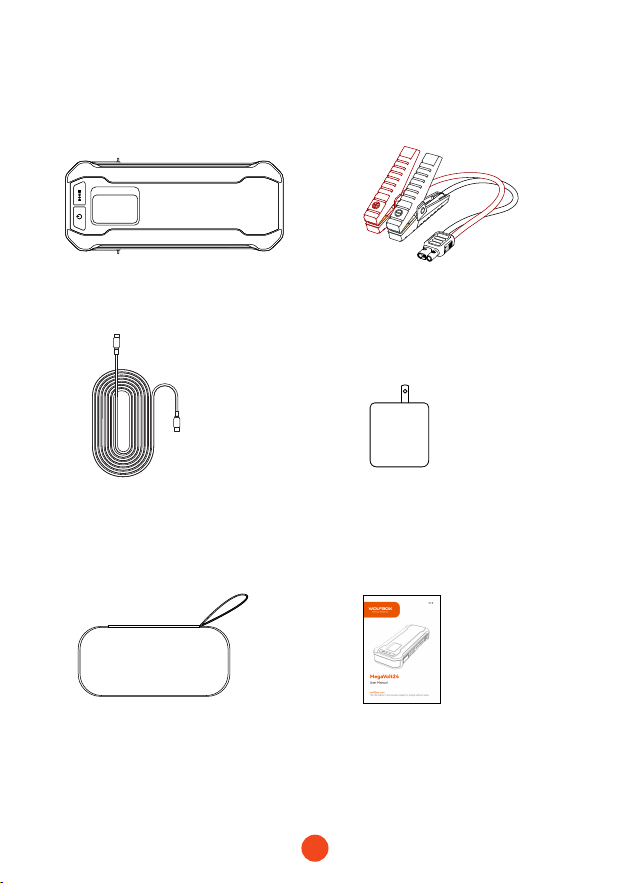
Packing list
・
Jump Staer Host machine
・
Jumper Cable
・
USB-C to USB-C
Cable
・
65W USB C
Wall Charger
・
EVA Pack
・
User Manual
4
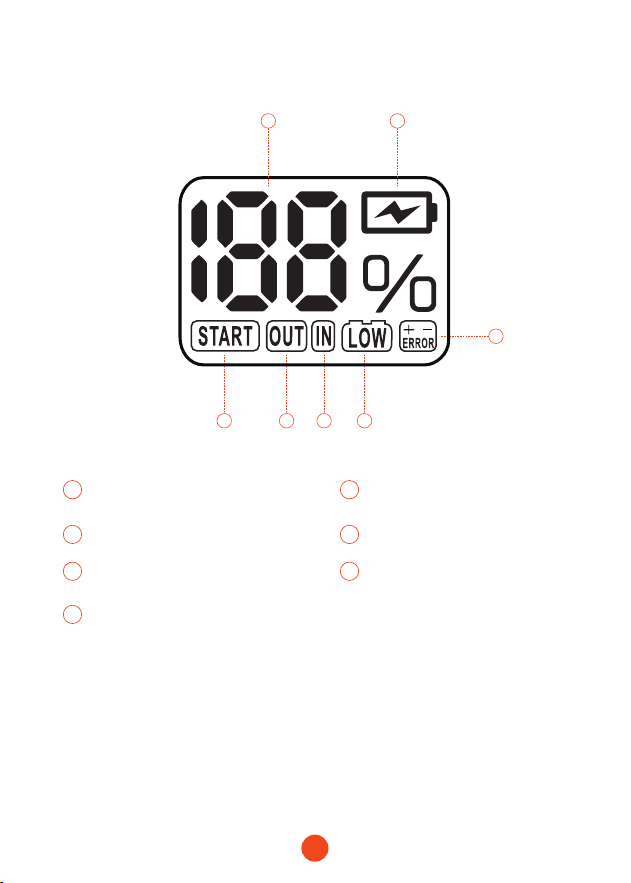
LED Display Instructions
1 2
7 46 5
3
1 2
Batte Percentage
Fast Charging Mode for Jump
Staer
3 4
Reverse Polarity Alarm Low Voltage
5
7
6
Input
Car is Ready to Sta / BOOST Sta
Output
5
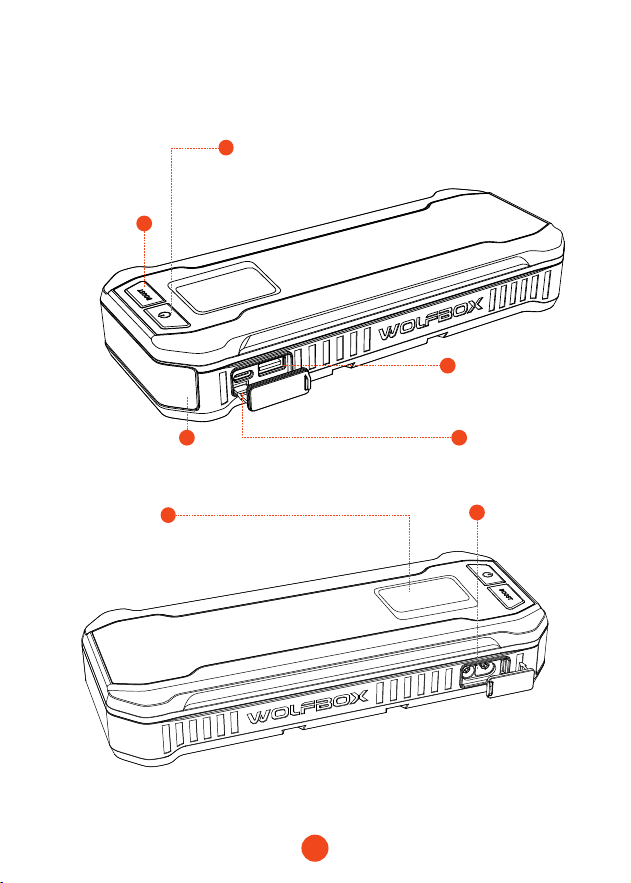
Pas and Functions Introduction
7
12V Car
Sta Po
2
1
6
4
5
BOOST
Button
LED Display
Screen
USB-A Input/
Output Po
USB-C
Output Po
LED Flashlight
3
Power Button
/LED Button
6
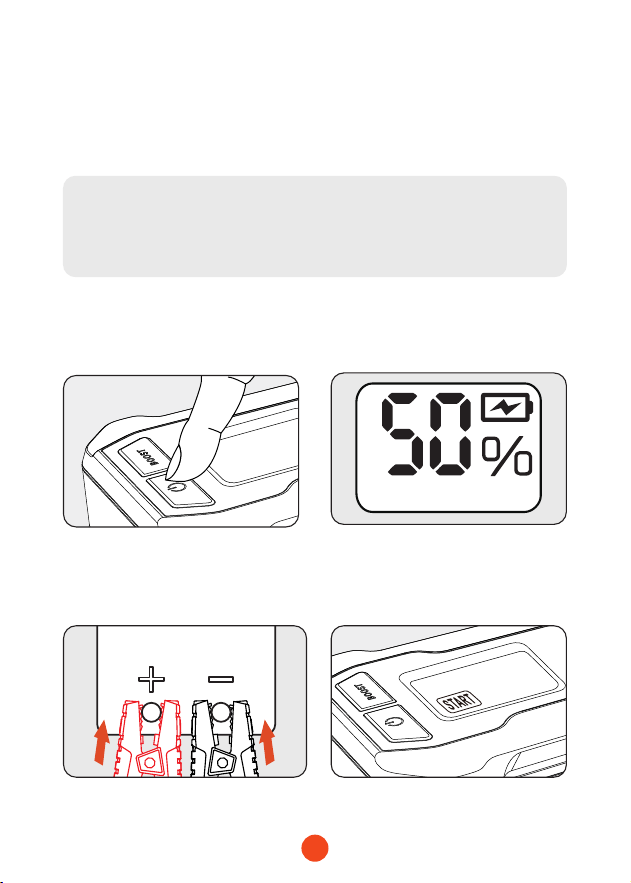
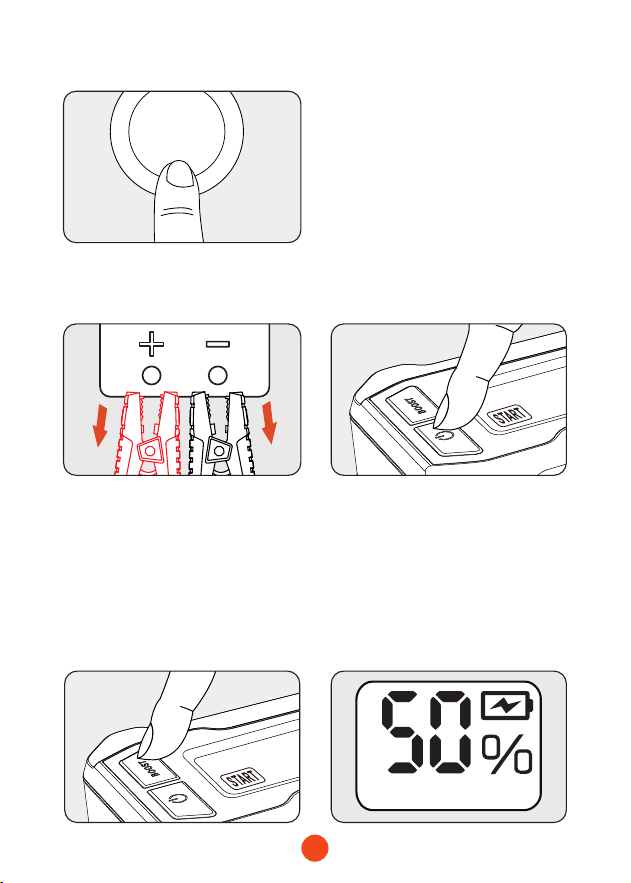
Feature 1: How to Sta a 12V Vehicle
(Ensure Batte Level >50%)
・ Normal Sta
2. Ensure that the MegaVolt24
battery level is not below
50%.
3. Attach the red clamp to the positive (+) terminal of the batte
and the black clamp to the negative (-) terminal. Greenlight
displays "START".
Caution:
Do not press the BOOST button before properly connecting
to the vehicle batte.
1. Press and hold the power
button for 2 seconds to
turn on MegaVolt24.
7
4. Sta the vehicle.
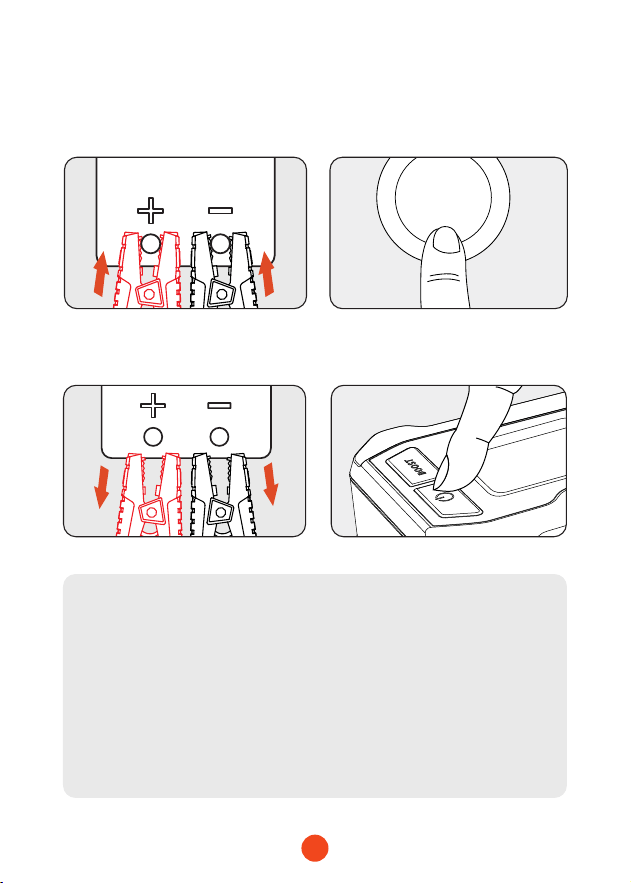
5. Remove the clamps and press and hold the power button for
2 seconds to turn o MegaVolt24.
START
STOP
・ BOOST Sta
2. Ensure that the MegaVolt24
battery level is not below
50%.
1. When unable to use the
regular sta function, press
and hold the BOOST button
for 2 seconds. MegaVolt24
will power on
.
Greenlight
displays "START".
8
4. Sta the vehicle.
START
STOP
5. Remove the clamps and press and hold the power button for
2 seconds to turn o MegaVolt24.
3. Attach the red clamp to the
positive (+) terminal of the
battery and the black clamp
to the negative (-) terminal.
Caution:
1. Use the BOOST function only if normal vehicle sta
procedures fail. Avoid activating BOOST when the
vehicle voltage is <9V or when regular sta features are
operational.
2. If the sta light goes o during boost, it means the
jumper cables aren't connected well. Check and secure
the clamps before restaing the vehicle.
9
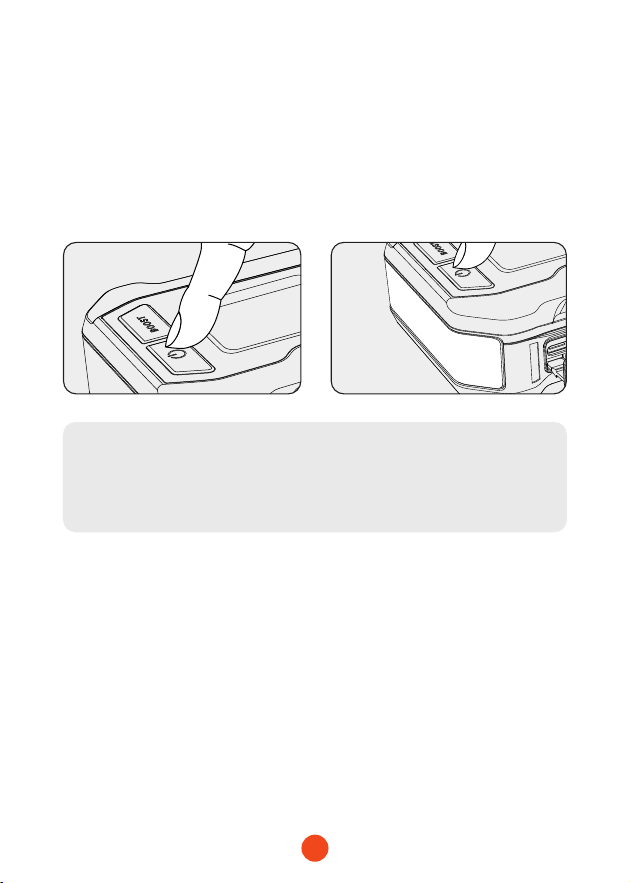
Feature 2: LED Light Mode Switching
1. After pressing and holding
the power button for 2
seconds, short press the
power button to activate
the LED light function.
2. Sho presses will cycle
through dierent lighting
modes: steady, white
strobe, SOS. (Include
visual indicators)
Tip:
LED ashlights cannot be used without turning on the
device.
10
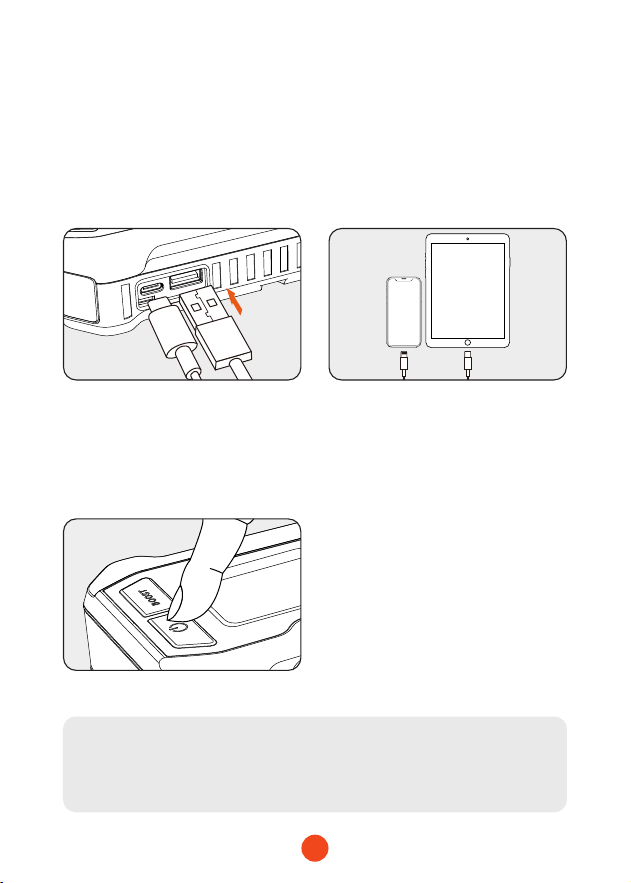
Feature 3: Charging Mobile Devices/
Tablets, etc
1. Connect the USB plug of
the adapter cable to the
main unit's USB-A/USB-C
output po.
3. Press and hold the power
button for 2 seconds to turn
on the device and initiate
charging for your mobile
device/tablet.
2. Connect the charging
adapter to your mobile
device/tablet or other
electronic products.
Tip:
Charging is only possible when the device is turned on.
11
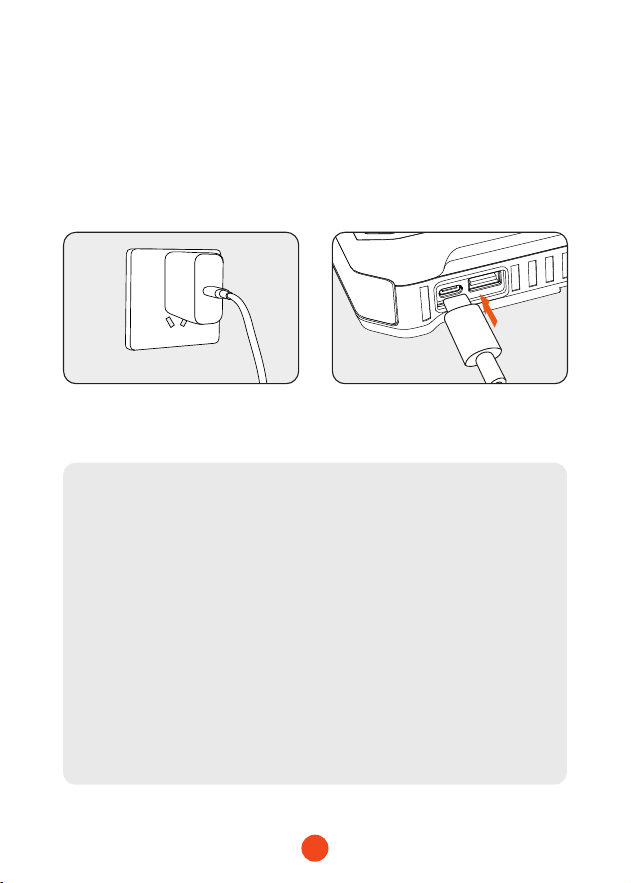
Feature 4: Charging the Product Main Unit
1. Plug the provided fast
charger or a compatible
charger into a power outlet.
2. Inse the plug of the fast
charger or a household
charger into the USB-C
input po of the MegaVolt24
main unit.
* It is recommended to use the
provided cable.
Automatic Shutdown Mechanism:
To presee the staup power source, we have
implemented an automatic shutdown mechanism during
prolonged periods of inactivity.
1. In the case of the light being turned on, the system will
automatically shut down after 4 hours.
2.
If the light is not in use, the system will automatically
shut down after 2 minutes of standby.
Automatic Power-on Mechanism:
When switched o and the MagaVolt24 and your car are
connected normally, the MagaVolt24 will automatically
turn on.
12
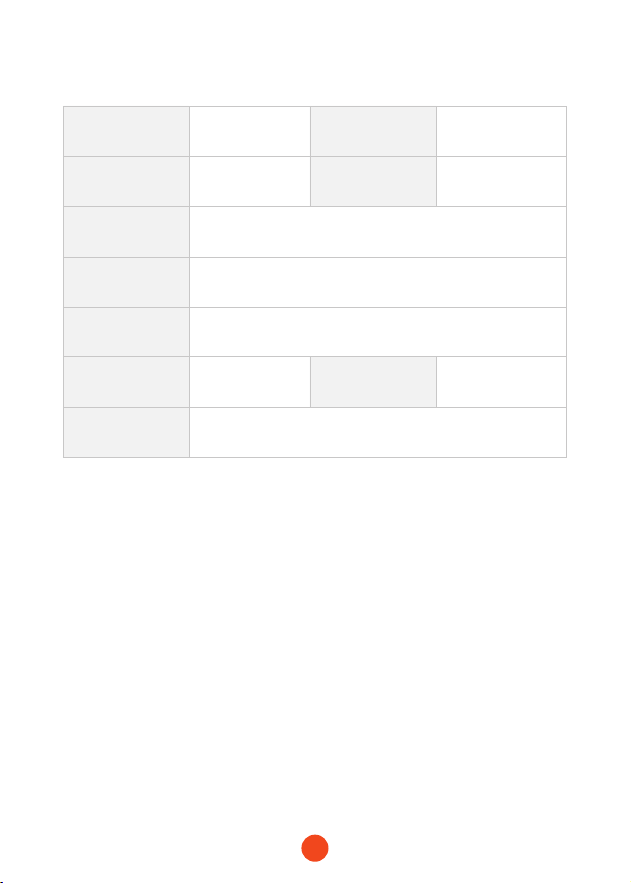
Technical Specications
Model MegaVolt24 Batte Capacity
88.8WH/
24000mAh
Staing Current 1000A Peak Current 4000A
USB-C
Input/Output
PD65W(5V/3A , 9V/3A , 12V/3A , 15V/3A/ , 20V/3.25A)
USB-A Output QC3.0 18W(5V/3A,9V/2A,12V/1.5A)
Operating
Temperature
-20℃ ~ 60℃ / -4℉ ~140℉
Full Charge Time
Approximately
1.5-2 hours
Weight 2.9lb
Dimensions
(L*W*H)
9.33 x 3.86 x 1.5inches
Frequently Asked Questions (FAQ)
・ How to turn o the poable power source?
Press and hold the power button for 2 seconds to power o, or
it will automatically shut down after 2 minutes of standby.
・ How long does it take to charge the MegaVolt24 main unit?
You can use the provided 65W fast charger for charging, and it
takes only 1.5 hours to charge the MegaVolt24.
・ Does this unit come with a charger for the jump staer? Is
the USB-C po Power Delive, and if so, what's the wattage?
Yes, MegaVolt24 includes a 65W fast charger with a USB-A
output po and a 65W Power Delive po. You can use it to
charge any electronic device.

13
・ How many times can MegaVolt24 sta a car?
It can consecutively sta a car approximately 40 times.
・ What is the lifespan of MegaVolt24?
Under normal usage conditions, it can last 3-5 years.
・ If MegaVolt24 is fully charged but not in use, how long can it
still sta a car?
The circuit design of MegaVolt24 is scientically engineered. It
can be stored for 6-12 months without use, but for an extended
lifespan, it is recommended to charge it eve 3 months.
・ How to know if MegaVolt24 is charging when plugged in?
MegaVolt24 comes with an LED screen that displays the
charging status.
・ What is the maximum and minimum temperature that this
jumper cable can withstand? Can I leave it in my car during
both summer and winter?
The jump staer can be stored between -20°C to 60°C / -4℉ to
140℉, allowing you to leave it in your car during both summer
and winter without any issues.
・What is the best way to stow this item?
MegaVolt24 comes with a caring bag. You can conveniently
store it in this bag for easy use and poability.
14
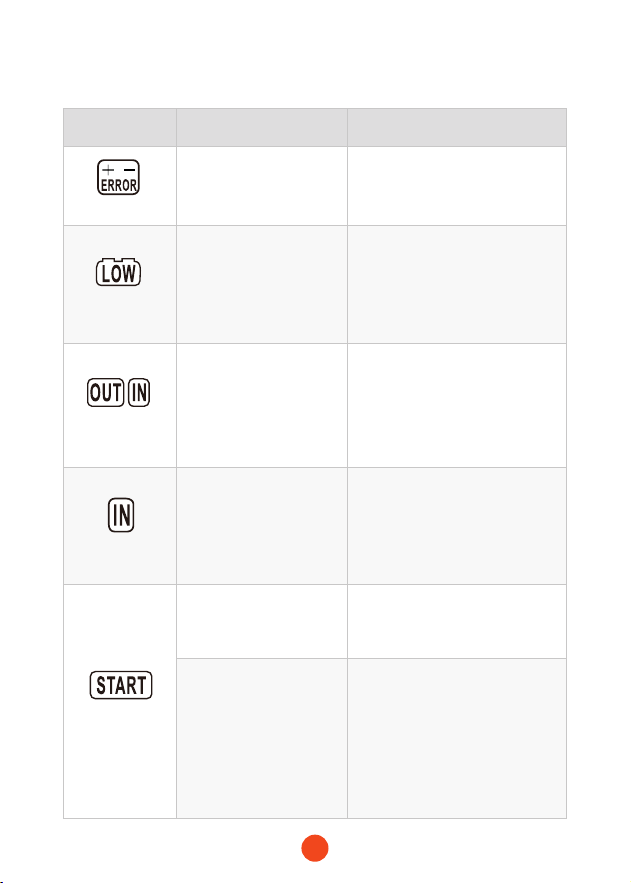
LED Display Reason Operation
Display in "red"
Jumper cables
connected with reversed
polarity to the car
Connect the batte clamps
to the correct positive and
negative terminals
Display in
"yellow"
Correctly connected
car batte, but batte
voltage is below 9V, and
the core temperature is
above 0℃/32℉
BOOST button for 2 seconds to
use the forced boot function
"OUT&IN"
ashing
High-temperature
protection activated,
displaying core
temperature
overheating
When the core temperature
reaches 55°C/131℉,
the product activates
temperature protection. Once
the temperature drops to
45°C/113℉, it can resume output
"IN" ashing
Low-temperature
protection activated,
displaying core
temperature too low
When the core temperature
drops below -20°C/-4℉, the
product activates temperature
protection. It can resume output
when the temperature rises to
0°C-3°C/32℉-37.4℉
"Sta"ashing
Buzzer sounding,
silence after 30 seconds
Overcurrent detected, stop
staing vehicle, disappear for
30S
Within 10 minutes, if the
vehicle is staed more
than 4 times, the buzzer
will sound, and after 30
seconds, the buzzer will
be silenced. The 'START'
will continue to ash
Stop staing the vehicle,the
safety mode will disappear after
10 minutes
Troubleshooting

15
Warning
WOLFBOX Two (2) Year Limited Warranty
・ Carefully read the user manual before using this product.
・ Do not substitute for car batteries.
・ Do not use it as a toy.
・ Close supeision is required when using this product near
children to reduce the risk of inju.
・ The product is intended for 12V vehicle staing; using it for
other purposes may pose risks.
・ Use the provided batte clamps; cease use if clamps or wires
are damaged to avoid re, electric shock, or personal inju.
・ Do not sho-circuit the positive and negative terminals of the
batte clamps.
・ Before staing, ensure the inteace is free from rust and
foreign objects. Connect the main unit securely to the batte
clamps to avoid staup peormance issues.
・ Remove the product from the car batte within 30 seconds
after successfully staing the vehicle to prevent damage.
・ Do not sta more than 3 times consecutively to avoid
overheating and potential damage. Wait two minutes between
each sta during multiple stas.
・ Do not use clamps to power other devices.
・ Do not expose the product to environments exceeding 60°C.
・ Charge the product at an ambient temperature ranging from 0°C
to 45°C.
・ Do not immerse the product in water.

16
・ Keep the product away from extremely hot conditions or re.
・ Do not operate the product in explosive environments with
ammable liquids, gases, or dust.
・ Ensure that someone is within hearing distance or capable of
assisting when using the product.
・ Remove metal jewel such as rings, bracelets, and necklaces
before using the product.
・ To reduce the risk of damage to the power plug and cable,
disconnect the main unit from the clamps at the plug location.
・ Do not use damaged or modied batte packs; unpredictable
consequences may occur, leading to risks such as re, explosion,
and inju.
・ Use the provided charger or a charger with the same
specications as the main unit's input for charging.
・ Do not charge the product immediately after staing a vehicle.
・ Do not sta the vehicle while charging the main unit.
・ In extreme cases, batte leakage may occur. Do not touch the
leaked substance with bare hands or skin. If contact occurs,
wash with soap and water. If it enters the eyes, rinse with
cold water for at least 10 minutes and seek medical attention
immediately.
・ Dispose of products using lithium batteries by local regulations
at the end of their seice lifepan.
17
Help Center WhatsApp
WOLFBOX
For more information:
contact@wolox.com
https://wolox.com/contact-us
www.wolox.com
Customer Seice Center
If you have any problems with the function or installation, please
feel free to reach us.

18

19
Check us out here!
We have professional customer seice!
www.wolox.com
Email: seice.wolo[email protected]om
Phone: +1 888 296 8399