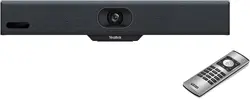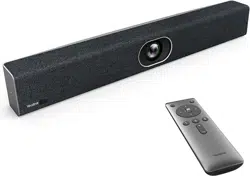
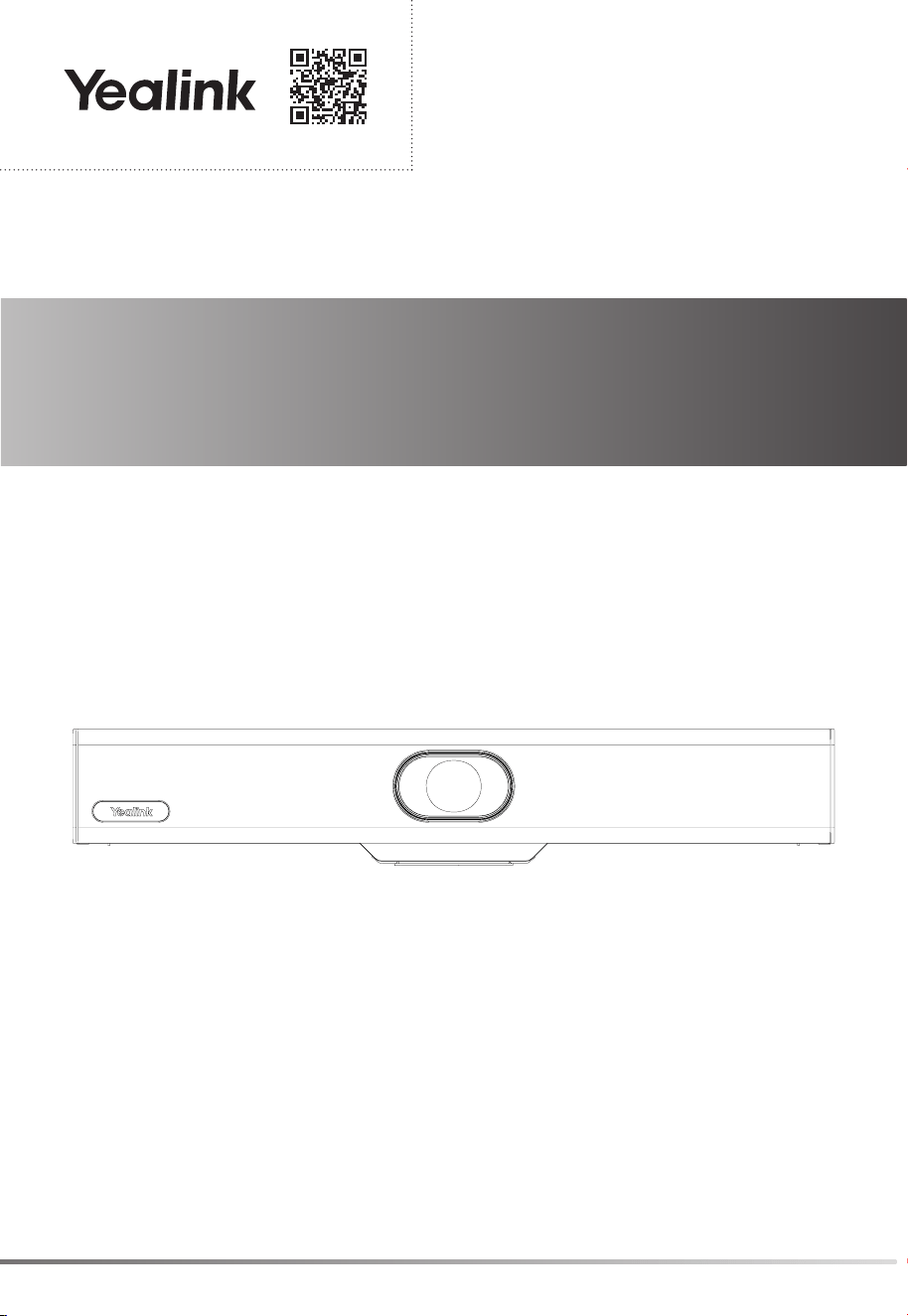
USB Video Conferencing Endpoint
UVC34
Quick Start Guide(V1.0)
Yealink Documentation
support.yealink.com
1
Note: We recommend that you use the accessories provided or approved by Yealink. The unapproved third-party
accessories may result in reduced performance.
Package Contents
VCR20
Remote Control
UVC34
AAA
Battery×2
7m
USB Cable
Power Adapter
48V/0.7A
Quick Start Guide
Cable Tie× 5
1/4”-20 UNC Screw
UVC34 Installation
• Put on a Flat Surface
You can put the UVC34 on the conference table.
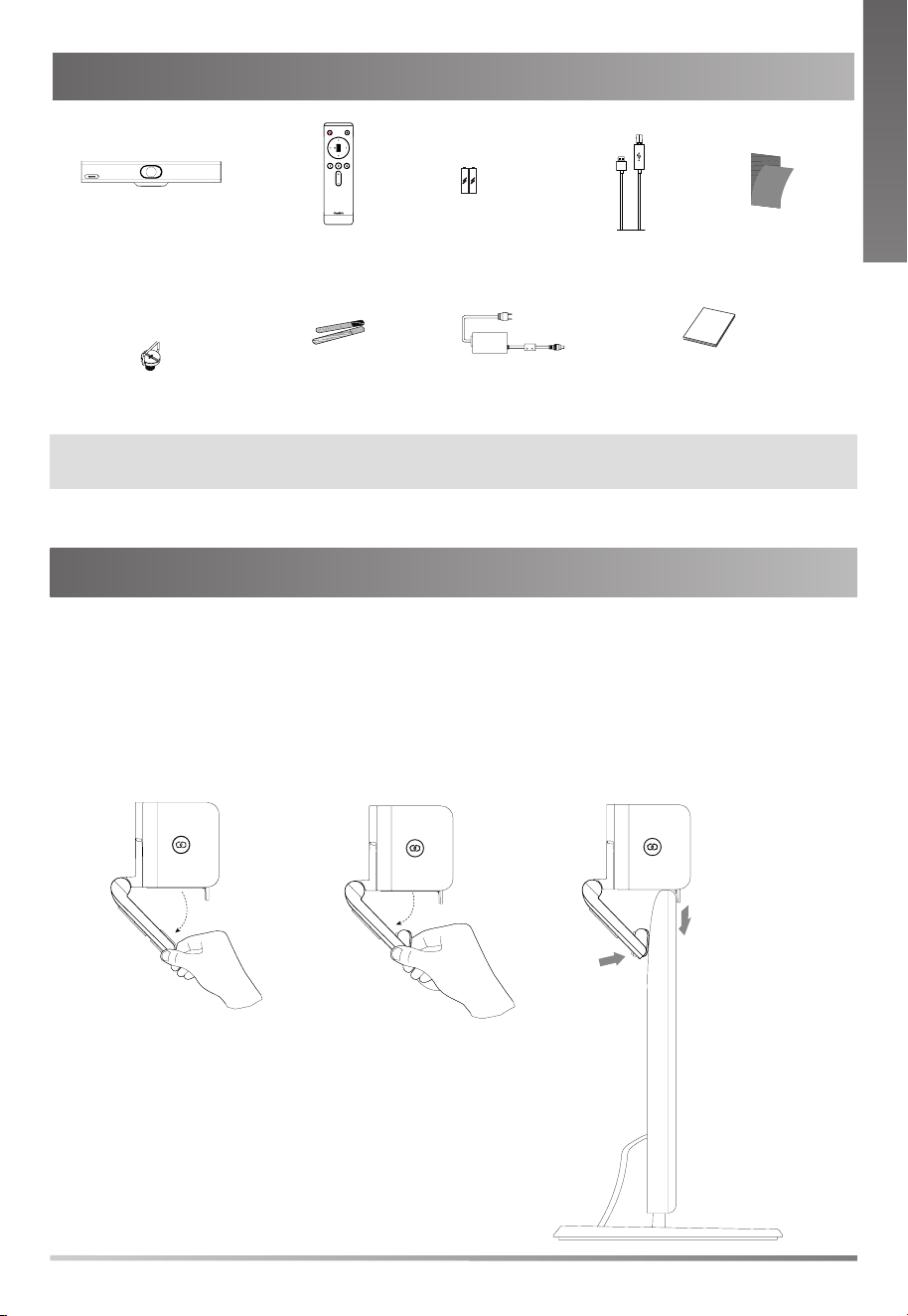
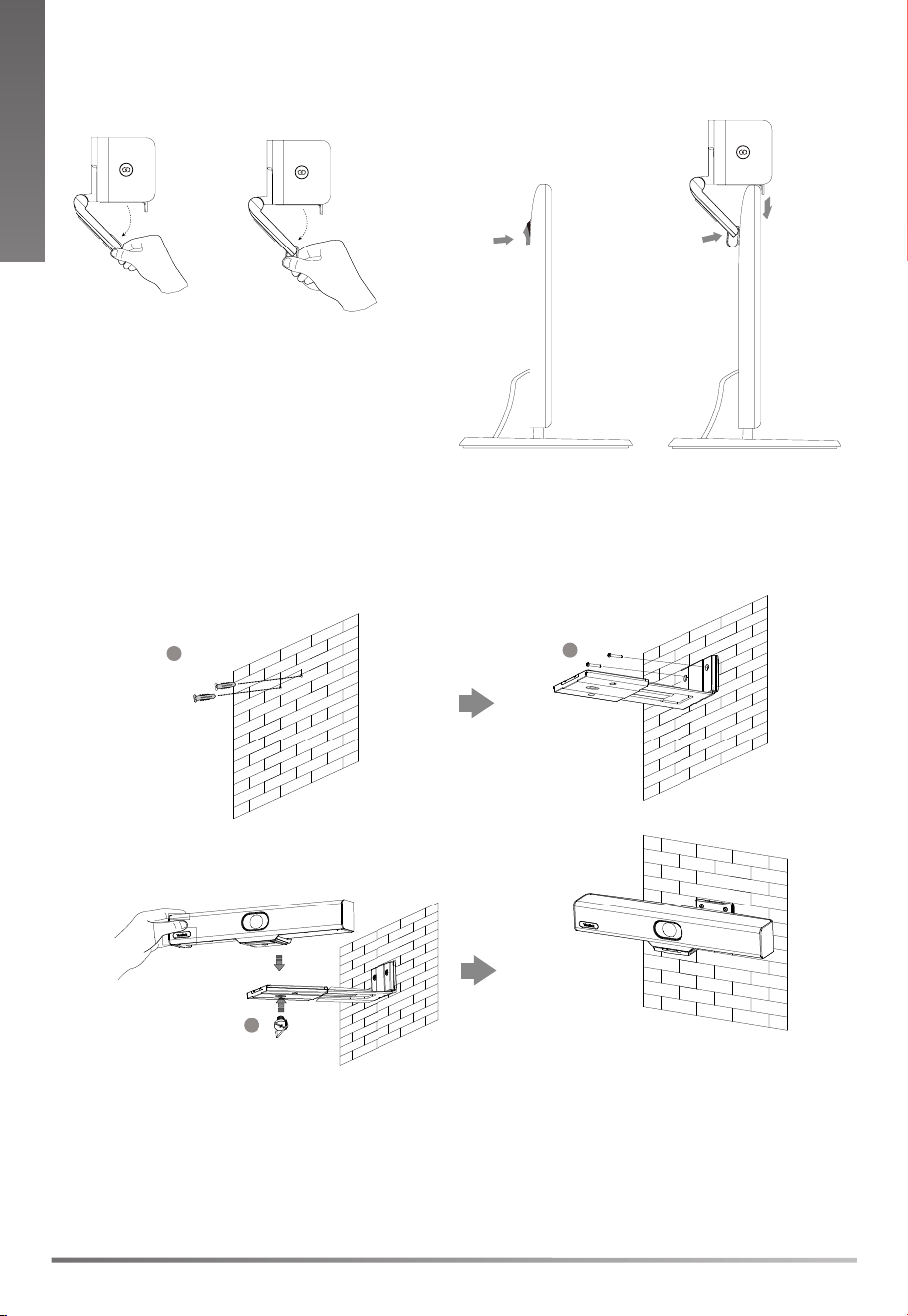
• Mount on top of a display
Choose the following installation method when the thickness of the TV is between
5mm and 60mm.
TV
Velcro
E
N
G
L
I
S
H
2
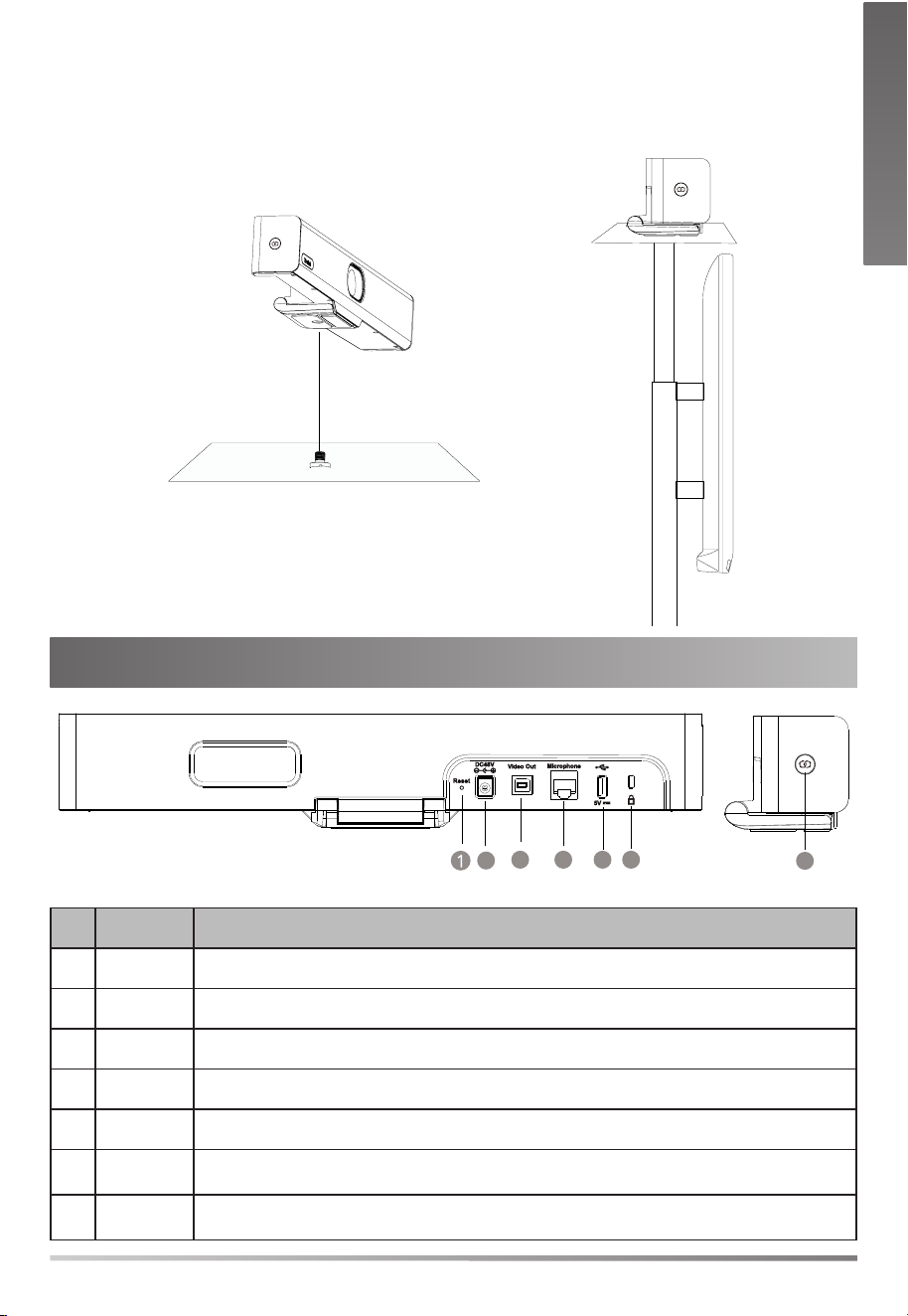
• Mount on the Wall
You can purchase a bracket to mount your endpoint on a wall.
NN
Screw specication:
1/4'' -20 UNC
Hole depth: 30mm
Hole diameter: 6mm
Expansion screw
Screw specication: T4×30
You can use 3M Velcro behind the display to ensure the stability of UVC34.
TV TV
E
N
G
L
I
S
H
E
N
G
L
I
S
H
3M Velcro
3
Hardware Interface Instructions
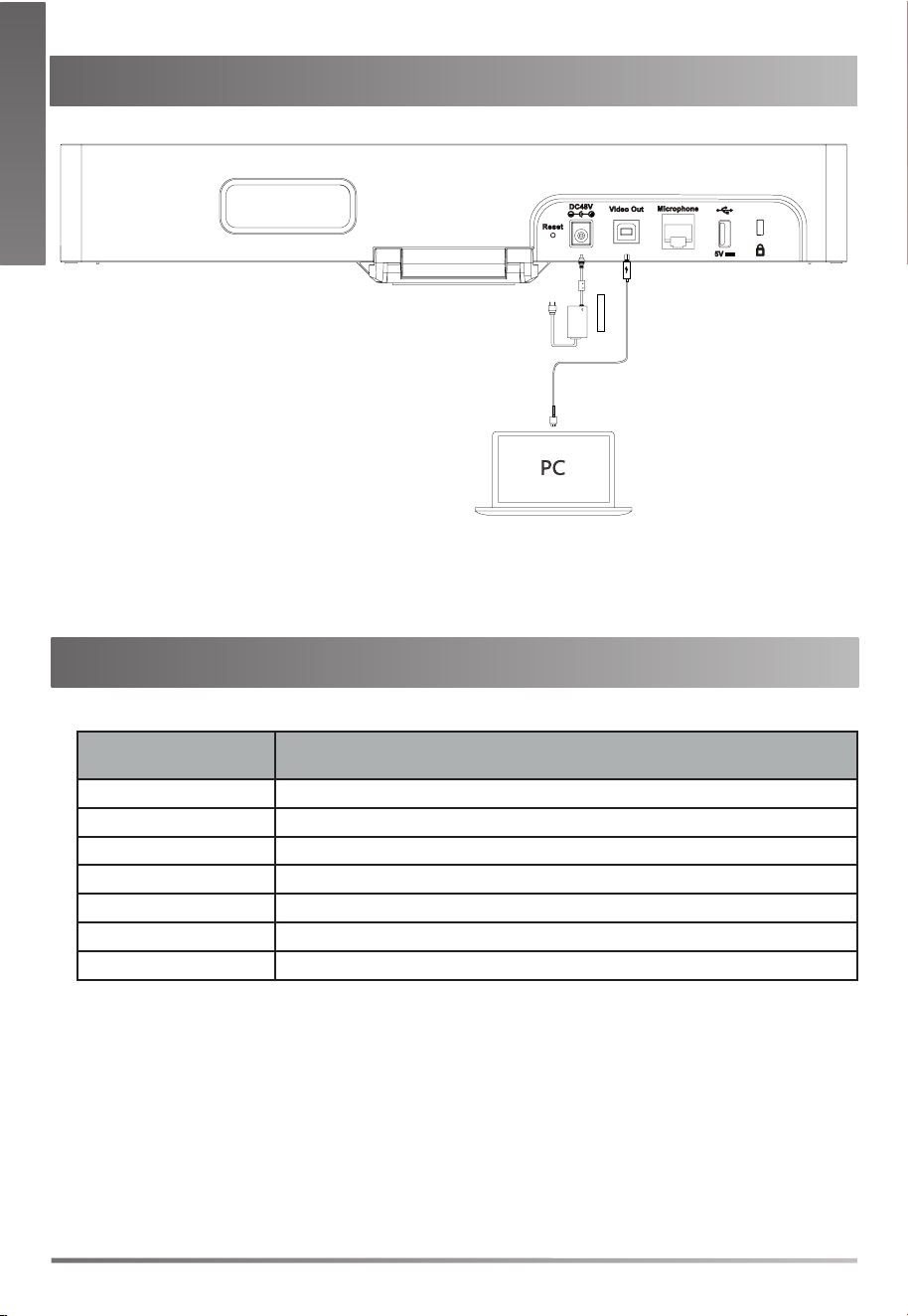
No. Item Description
1 Reset Reset the UVC34 to factory defaults.
2 DC48V Connect to the power adapter.
3 Video Out Connect to a PC as video output.
4 Microphone (Coming soon) Connect to audio device (for example: VCM34/38).
5 USB (Coming soon) Insert DD10 to connect to CPW90.
6
Security
slot
Connect a universal security cable to the UVC34 so that you can lock the UVC34
down.
7 Pairing key
(Coming soon) Press the pairing key to pair the CPW90 wireless microphone/
Bluetooth device.
• Mount onto a TV Stand or a Tripod
You need to purchase a TV stand or a tripod separately. The TV stand or a tripod
should be able to bear the weight of at least 5kg.
Screw specication:
1/4'' -20 UNC
E
N
G
L
I
S
H
4
UVC34 Connection
LED Indicator Instructions
LED indicators on the UVC34:
LED Status Description
Off The UVC34 is powered off.
Solid green The UVC34 is active.
Flashing green There is an incoming call.
Solid red The UVC34 is muted.
Flashing red The UVC34 is in recovery mode and the rmware has not been upgraded.
Solid orange The UVC34 is initializing or in sleep mode.
Flashing orange The UVC34 is upgrading rmware.
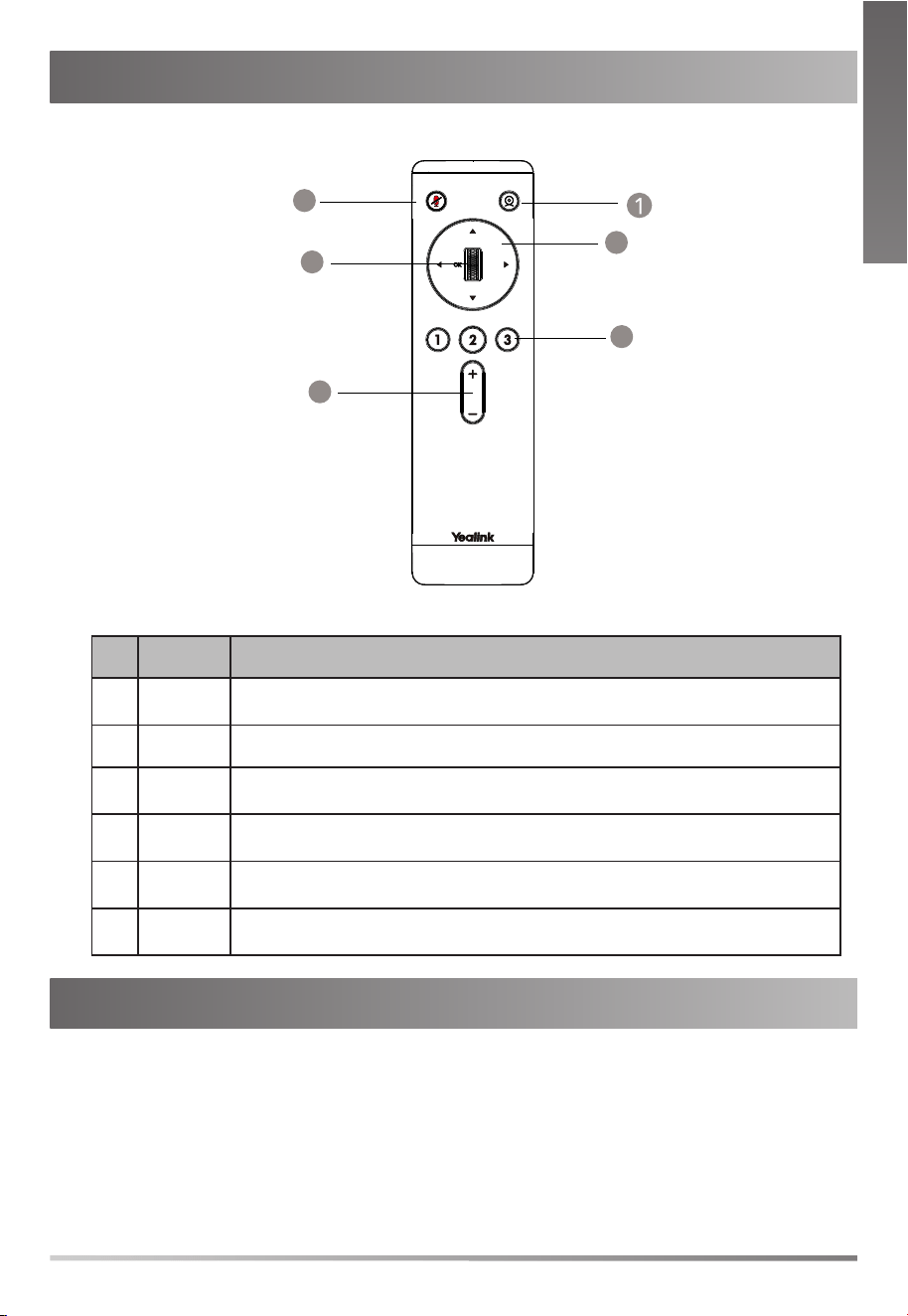
USB Cable
Ensure that UVC34 is the default device of your video conference software after connecting
successfully, and you can enjoy its audio and video in the meeting.
E
N
G
L
I
S
H
E
N
G
L
I
S
H
5
Upgrade the Firmware
Use Yealink Room Connect/USB Connect software to upgarde the firmware after
connecting to the PC.
For more information about how to upgrade the firmware, please refer to the
upgrading document.
VCR20 Remote Control Instructions
No. Item Description
1
Tracking
Mode Key
Long press the Tracking Mode key to switch between auto framing and
PTZ mode. *If you in tracking mode,scroll wheel,navigation key,preset key are unavailable.
2 Mute Key Mute or unmute the microphone.
3
Navigation
Key
Pan and tilt the camera to adjust the viewing angle.
4
Scroll
Wheel
• Scroll up to zoom camera in.
• Scroll down to zoom camera out.
5
Preset
Key
• Long press the number key to add/update the preset position.
• Short press the number key to apply the preset position.
6
Volume
Key
Adjust the volume.
E
N
G
L
I
S
H
1
YEALINK (XIAMEN) NETWORK TECHNOLOGY CO.,LTD
WWW.YEALINK.COM
Addr: 309, 3rd Floor, No.16, Yun Ding North Road,
Huli District, Xiamen City, Fujian, P.R. China
Tel: +86 -592-5702000
Fax: +86-592-5702455
Declaration of Conformity
We,
YEALINK(XIAMEN) NETWORK TECHNOLOGY CO.,LTD
Address: 309, 3rd Floor, No.16, Yun Ding North Road,
Huli District, Xiamen City, Fujian, P.R. China
Manufacturer: YEALINK(XIAMEN) NETWORK TECHNOLOGY CO.,LTD
Address: 309, 3rd Floor, No.16, Yun Ding North Road,
Huli District, Xiamen City, Fujian, P.R. China
DATE: 30
th
/November/2021
declare that the product
Type: USB Video Conferencing Endpoint
Model:UVC34
meets the essential requirements and other relevant provisions according to the following EC directive
Directive: 2014/30/EU, 2014/35/EU,RED 2014/53/EU
Conformity
The product complies with the following standards:
Safety : EN 62368-1:2014+A11:2017
EMC: EN 55032:2015
EN 55035:2017
EN61000-3-2: 2014
EN61000-3-3: 2013
Radio:ETSI EN 301 489-1 V2.2.3,
ETSI EN 301 489-3 V2.1.1,
ETSI EN 301 489-17 V3.2.2,
ETSI EN 300 328 V2.2.3;
ETSI EN 301 893 V2.1.1
EN 300 440 V2.2.1
Health :EN 62311:2008; EN62479:2010
Directive 2011/65/EU and (EU)2015/863 of the European Parliament
and of the Council of 8 June 2011 and
4 June 2015 on the restriction of the use of certain hazardous substances in electrical and electronic
equipment(RoHS 2.0)
Directive 2012/19/EU of the European Parliament
and of the Council of 4.July.2012 on Waste electrical
and electronic equipment(WEEE)
Regulation (EC) No.1907/2006 of the European Parliament
and of the Council of 18.December.2006
on Registration, Evaluation, Authorization, and Restriction of Chemicals (REACH)
NAME: Huahu Wang
DATE :
30
th
/November/2021
TITLE: Manager
Regulatory Notices
Operating Ambient Temperatures
• Operating temperature: +14 to 122°F (-10 to 50°C)
• Relative humidity: 5% to 90%, noncondensing
• Storage temperature: -22 to +160°F (-30 to +70°C)
Warranty
Our product warranty is limited only to the unit itself, when used normally in accordance with
the operating instructions and the system environment. We are not liable for damage or loss
resulting from the use of this product, or for any claim from a third party. We are not liable for
problems with Yealink device arising from the use of this product; we are not liable for nancial
damages, lost prots, claims from third parties, etc., arising from the use of this product.
DC symbol
is the DC voltage symbol.
Restriction of Hazardous Substances Directive (RoHS)
This device complies with the requirements of the EU RoHS Directive. Statements of
compliance can be obtained by contacting [email protected].
Safety Instructions
Save these instructions. Read these safety instructions before use!
The following basic safety precautions should always be followed to reduce risk of re,
electrical shock, and other personal injury.
General Requirements
• Before you install and use the device, read the safety instructions carefully and
observe the situation during operation.
• During the process of storage, transportation, and operation, please always keep
the device dry and clean.
• During the process of storage, transportation, and operation, please avoid collision
and crash of the device.
• Please attempt not to dismantle the device by yourself. In case of any discrepancy,
please contact the appointed maintenance center for repair.
• Without prior written consent, no organization or individual is permitted to make
any change to the structure or the safety design of the device. Yealink is under no
circumstance liable to consequences or legal issues caused by such changes.
• Please refer to the relevant laws and statutes while using the device. Legal rights of
others should be respected as well.
Environmental Requirements
• Place the device at a well-ventilated place. Do not expose the device under direct
sunlight.
• Keep the device dry and free of dusts.
• Place the device on a stable and level platform.
• Please place no heavy objects on the device in case of damageand deformation
caused by the heavy load.
• Keep at least 10 cm between the device and the closest object for heat dissipation.
• Do not place the device on or near any inammable or re-vulnerable object, such
as rubber-made materials.
• Keep the device away from any heat source or bare re, such as a candle or an
electric heater.
• Keep the device away from any household appliance with strong magnetic eld or
electromagnetic eld, such as a microwave oven or a refrigerator.
Operating Requirements
• Do not let a child operate the device without guidance.
• Do not let a child play with the device or any accessory in case of accidental
swallowing.
• Please use the accessories provided or authorized by the manufacturer only.
• The power supply of the device shall meet the requirements of the input voltage of
the device. Pleaseusethe provided surge protection power socket only.
• Before plugging or unplugging any cable, make sure that your hands are completely
dry.
• Do not spill liquid of any kind on the product or use the equipment near water, for example, near a
bathtub, washbowl, kitchen sink, wet basement or near a swimming pool.
• Do not tread on, pull, or over-bend any cable in case of malfunction of the device.
• During a thunderstorm, stop using the device and disconnect it from the power
supply. Unplug the power plug and the Asymmetric Digital Subscriber Line (ADSL)
twisted pair (the radio frequency cable) to avoid lightning strike.
• If the device is left unused for a rather long time, disconnect it from the power
supply and unplug the power plug.
• When there is smoke emitted from the device, or some abnormal noise or
smell, disconnect the device from the power supply, and unplug the power plug
immediately. Contact the specied maintenance center for repair.
• Do not insert any object into equipment slots that is not part of the product or
auxiliary product.
• Before connecting a cable, connect the grounding cable of the device rst. Do not
disconnect the grounding cable until you disconnect all other cables.
Cleaning Requirements
• Before cleaning the device, stop using it and disconnect it from the power supply.
• Use a piece of soft, dry and anti-static cloth to clean the device.
• Keep the power plug clean and dry. Using a dirty or wet power plug may lead to
electric shock or other perils.
ENVIRONMENTAL RECYCLING
Never dispose of the device with domestic waste
Ask your Town Council about how to dispose of it in an
environmentally friendly way. The cardboarc box, plastic
packaging and player components may be recycled in
accordance with prevailing recycling regulations in your
country.
Always adhere to prevailing regulations
Those who fail to do so may be ned or prosecuted in
accordance with the law. The crossed out garbage can that
appears on the device means that when it has reached the
end of its useful life, it should be taken to a special waste
disposal centre and treated separately to general urban waste.
Troubleshooting
The unit cannot supply power to Yealink device.
There is a bad connection with the plug.
1. Clean the plug with a dry cloth.
2. Connect it to another wall outlet.
The usage environment is out of operating temperature range.
1. Use in the operating temperature range.
The cable between the unit and the Yealink device is connected incorrectly.
1. Connect the cable correctly.
You cannot connect the cable properly.
1. You may have connected a wrong Yealink device.
2. Use the correct power supply.
Some dust, etc., may be in the port.
1. Clean the port.
Contact your dealer or authorized service facility for any further questions.
Contact Information
YEALINK NETWORK TECHNOLOGY CO.,LTD.
309, 3rd Floor, No.16, Yun Ding North Road, Huli District, Xiamen City, Fujian, P.R.C
YEALINK (EUROPE) NETWORK TECHNOLOGY B.V.
Strawinskylaan 3127, Atrium Building, 8th oor, 1077ZX Amsterdam, The Netherlands
YEALINK (USA) NETWORK TECHNOLOGY CO., LTD.
999 Peachtree Street Suite 2300, Fulton, Atlanta, GA, 30309, USA
Made in China
E
N
G
L
I
S
H
Sicherheitshinweise
Betriebsumgebungstemperaturen
• Betriebstemperatur: -10 bis 50 °C
• Relative Luftfeuchtigkeit: 5 % bis 90 %, nicht kondensierend
• Lagertemperatur: -30 bis + 70 °C
Garantie
Unsere Produktgarantie ist auf das Gerät selbst beschränkt, wenn es normal und gemäß
den Betriebsanweisungen und der Systemumgebung verwendet wird. Wir sind weder für
Schäden oder Verluste haftbar, die aus der Verwendung dieses Produkts entstehen, noch für
Ansprüche eines Dritten. Wir sind nicht haftbar für Probleme mit dem Yealink Gerät, die aus
der Verwendung dieses Produkts entstehen. Wir sind nicht haftbar für nanzielle Schäden,
Gewinnverluste, Ansprüche Dritter etc., die aufgrund der Verwendung dieses Produkts
entstehen.
Symbol DC
ist das Symbol für DC-Spannung.
Richtlinie zur Beschränkung der Verwendung bestimmter gefährlicher Stoffe in Elektro-
und Elektronikgeräten (RoHS)
Das Gerät erfüllt die Anforderungen der RoHS-Richtlinie der EU. Für Bestätigungen der
Einhaltung können Sie sich an [email protected] wenden.
Sicherheitshinweise
Bewahren Sie diese Anweisungen auf. Lesen Sie diese Sicherheitshinweise vor der
Verwendung!
Die folgenden grundlegenden Vorsichtsmaßnahmen müssen zur Vermeidung von Bränden,
Stromschlag und anderen Verletzungen immer befolgt werden.
Allgemeine Vorschriften
• Lesen Sie vor der Installation und Verwendung des Geräts die Sicherheitshinweise
sorgfältig durch und beobachten Sie die Situation im Betrieb.
• Halten Sie das Gerät während der Lagerung, dem Transport und dem Betrieb stets
sauber und trocken.
• Vermeiden Sie während der Lagerung, dem Transport und dem Betrieb stets
Zusammenprallen und Stürze des Geräts.
• Versuchen Sie nicht das Gerät eigenständig zu demontieren. Wenden Siesich im
Falle von Mängeln an das zuständige Wartungscenter für eine Reparatur.
• Ohne vorherige schriftliche Zustimmung dürfen weder Unternehmen noch
Einzelperson Änderungen an der Struktur oder dem Sicherheitskonzept des Geräts
vornehmen. Yealink übernimmt unter keinen Umständen die Haftung für Folgen oder
Rechtsansprüche, die auf solche Änderungen zurückzuführen sind.
• Beachten Sie bitte die entsprechenden Gesetze und Vorschriften bei der Verwendung
des Geräts. Die gesetzlichen Rechte Dritter müssen ebenfalls beachtet werden.
Umweltvorschriften
• Stellen Sie das Gerät an einem gut belüfteten Ort auf. Setzen Sie das Gerät nicht
direkter Sonneneinstrahlung aus.
• Halten Sie das Gerät trocken und frei von Staub.
• Stellen Sie das Gerät auf einen stabilen, ebenen Untergrund.
• Bitte legen Sie keine schweren Gegenstände auf das Gerät, da Beschädigung und
Verformungen durch zu hohe Last möglich sind.
• Halten Sie mindestens 10 cm Abstand zwischen dem Gerät und dem nächsten
Objekt ein, um die Wärmeabfuhr zu gewährleisten.
• Stellen Sie das Gerät nicht auf oder in der Nähe von entflammbaren oder
brandgefährdeten Objekt wie Gummimaterialien auf.
• Halten Sie das Gerät fern von Hitzequellen und offenem Feuer, wie Kerzen oder einer
elektrischen Heizung.
• Halten Sie das Gerät fern von jedem Haushaltsgerät mit starkem Magnetfeld oder
Elektromagnetfeld, z.B. einem Mikrowellenherd oder einem Kühlschrank.
Betriebsvorschriften
• Lassen Sie das Gerät nicht ohne Aufsicht durch ein Kind verwenden.
• Lassen Sie kein Kind mit dem Gerät oder einem Zubehörteil spielen, da Kleinteile
verschluckt werden können.
• Bitte verwenden Sie ausschließlich Zubehör, das vom Hersteller bereitgestellt oder
genehmigt wurde.
• Die Stromversorgung des Geräts muss den Anforderungen der Eingangsspannung
des Gerätes entsprechen. Bitte verwenden Sie ausschließlich den bereitgestellten
Überspannungsschutz an der Steckdose.
• Achten Sie vor dem Anschließen oder Abziehen des Kabels darauf, dass Ihre Hände vollständig trocken
sind.
• Verschütten Sie keine Flüssigkeiten auf das Gerät und verwenden Sie es
nicht in der Nähe von Wasser, beispielsweise in der Nähe einer Badewanne,
Waschschüssel, einem Spülbecken, in einem feuchten Keller oder in der Nähe eines
Schwimmbeckens.
• Treten Sie nicht auf das Kabel, ziehen und verbiegen Sie es nicht, da es dadurch zu
einer Fehlfunktion des Geräts kommen kann.
• Schalten Sie das Gerät bei Gewitter aus und trennen Sie es von der Stromversorgung.
Ziehen Sie das Netzkabel und das ADSL-Twisted-Pair-Kabel (Festnetzkabel)
zurVermeidung eines Blitzschlags.
• Wenn das Gerät längere Zeit ungenutzt bleibt, trennen Sie es von der
Stromversorgung und ziehen Sie den Netzstecker.
• Wenn Rauch oder ungewöhnliche Geräusche oder Gerüche aus dem Gerät
austreten, trennen Sie das Gerät sofort von der Stromversorgung und ziehen Sie das
Netzkabel. Wenden Sie sich an das angegebene Wartungscenter für eine Reparatur.
• Führen Sie keine Gegenstände in Einschübe oder Anschlussöffnungen des Geräts
ein, die kein Bestandteil des Produktes oder ein Zubehörteil sind.
• Schließen Sie zuerst das Erdungskabel des Geräts an, bevor Sie ein Kabel
anschließen.Trennen Sie das Erdungskabel nicht, bis nicht alle anderen Kabel
entfernt wurden.
Reinigungsvorschriften
• Bevor Sie das Gerät reinigen, schalten Sie es aus und trennen Sie es von der
Stromversorgung.
• Verwenden Sie ein Stück trockenes, weiches und antistatisches Tuch zum Reinigen
des Geräts.
• Halten Sie das Netzkabel sauber und trocken. Über einen schmutzigen oder nassen
Netzstecker kann es zu einem elektrischen Schlag oder anderen Gefahren kommen.
UMWELTFREUNDLICHE VERWERTUNG
Entsorgen Sie das Gerät nicht mit dem Hausmüll.
Erkundigen Sie sich bei Ihrer Stadtverwaltung, wie Sie das
Gerät umweltfreundlich entsorgen können Pappkarton,
Kunststoffverpackung und Bauteile des Gerätes können im Einklang
mit den geltenden Vorschriften in Ihrem Land verwertet werden.
Halten Sie stets die geltenden Vorschriften ein.
Deren Nichtbeachtung kann eine Buße oder Verfolgung gemäß
dem geltenden Recht nach sich ziehen Die durchgestrichene
Mülltonne auf dem Gerät bedeutet, dass das Gerät am Ende seiner
Nutzungsdauer zu einer speziellen Elektroschrottsammelstelle
gebracht und vom Hausmüll gesondert verarbeitet werden muss.
Fehlerbehebung
Die Einheit kann das Yealink Gerät nicht mit Strom versorgen.
Es gibt Probleme mit dem Steckeranschluss.
1. Reinigen Sie den Stecker mit einem trockenen Tuch.
2. Schließen Sie ihn an einer anderen Steckdose an.
Die Umgebungstemperatur liegt oberhalb des Betriebstemperaturbereichs.
1. Verwenden Sie die Einheit innerhalb des Betriebstemperaturbereichs.
Das Kabel zwischen der Einheit und dem Yealink Gerät ist nicht richtig angeschlossen.
1. Schließen Sie das Kabel richtig an.
Das Kabel lässt sich nicht richtig anschließen.
1. Sie haben möglicherweise ein falsches Yealink Gerät angeschlossen.
2. Verwenden Sie die richtige Stromversorgung.
Es bendet sich möglicherweise Staub etc. im Port.
1. Reinigen Sie den Port.
Setzen Sie sich bei weiteren Fragen mit Ihrem Händler oder Ihrer anerkannten Servicestelle
in Verbindung.
Kontaktdaten des Ansprechpartners
YEALINK NETWORK TECHNOLOGY CO., LTD.
309, 3rd Floor, No. 16, Yun Ding North Road, Huli District, Xiamen City, Fujian, VR China
YEALINK (EUROPE) NETWORK TECHNOLOGY B.V.
Strawinskylaan 3127, Atrium Building, 8th oor, 1077ZX Amsterdam, Niederlande
YEALINK (USA) NETWORK TECHNOLOGY CO., LTD.
999 Peachtree Street Suite 2300, Fulton, Atlanta, GA, 30309, USA
Hergestellt in China
D
E
U
T
S
C
H
Consignes de sécurit
Températures de fonctionnement ambiantes
• Température de fonctionnement : +14 à 122 °F (-10 à 50 °C)
• Humidité relative : 5 % à 90 %, sans condensation
• Température de stockage : -22 à +160 °F (-30 à +70 °C)
Garantie
Notre garantie produit est limitée à l’appareil lui-même, lorsqu’il est utilisé normalement selon
le mode d’emploi et l’environnement du système. Nous ne sommes pas responsables des
dommages ou pertes découlant de l’utilisation de ce produit ou de toute réclamation d’un
tiers. Nous ne sommes pas responsables des problèmes avec les appareils Yealink découlant
de l’utilisation de ce produit. Nous ne sommes pas responsables pour les dommages
nanciers, pertes de prots, réclamations de tiers, etc. découlant de l’utilisation de ce produit.
Symbole DC
est le symbole de tension CC.
Directive sur les substances dangereuses (RoHS)
Ce dispositif est conforme aux exigences de la directive RoHS de l’Union européenne.
Vous pouvez obtenir les déclarations de conformité en envoyant un message à l’adresse :
Consignes de sécurité
Gardez ces instructions. Lisez ces consignes de sécurité avant utilisation de l’appareil !
Les précautions de base suivantes doivent toujours être suivies pour réduire le risque
d'incendie, d'électrocution et de blessures.
Exigences générales
• Avant d’installer et d’utiliser l’appareil, lisez les consignes de sécurité et observez la
situation pendant le fonctionnement.
• Lorsque l’appareil est rangé, transporté ou utilisé, veuillez le garder toujours propre et
sec.
• Lorsque l’appareil est rangé, transporté ou utilisé, veuillez éviter tout choc ou toute
collision.
• Ne tentez pas de désassembler vous-même l’appareil. En cas de mauvais
fonctionnement, veuillez contacter le centre de service désigné.
• Sans consentement écrit préalable, aucune organisation ou individu n’est
autorisé à apporter des changements à la structure ou au dispositif de sécurité
de l’appareil. Yealink n’est en aucun cas responsable des conséquences ou des
problèmesjuridiques causés par ces changements.
• Veuillez vous référer aux lois et règlements pertinents lorsque l’appareil est utilisé.
Les droits légaux des tiers doivent également être respectés.
Exigences environnementales
• Placez l’appareil dans un espace correctement ventilé. N’exposez pas l’appareil à la
lumière directe du soleil.
• Gardez l’appareil propre et sec.
• Placez l’appareil sur une surface stable et plate.
• Veuillez ne placer aucun objet lourd sur l’appareil risquant d’entraîner dégâts et
déformations.
• Maintenez une distance d’au moins 10 cm entre l’appareil et l’objet le plus proche an
que la chaleur puisse se dissiper.
• Ne placez pas l’appareil sur ou à proximité de tout objet inammable ou vulnérable au
feu, comme des matériaux en caoutchouc.
• Gardez l’appareil loin de toute source de chaleur ou des ammes, comme une bougie
ou un radiateur électrique.
• Gardez l’appareil loin de tout appareil électroménager avec un fort champ magnétique
ou un champ électromagnétique, tel qu’un four à micro-ondes ou un réfrigérateur.
Exigences d’utilisation
• Ne laissez pas des enfants utiliser l’appareil sans surveillance.
• Ne laissez pas les enfants jouer avec l’appareil ou ses accessoires pour éviter tout
risque d’étouffement.
• Veuillez uniquement utiliser les accessoires fournis ou autorisés par le fabricant.
• L’alimentation de l’appareil doit satisfaire aux exigences de la tension d’entrée
de
l’appareil. Veuillez uniquement utiliser la prise protégée contre les surtensions fournie.
• Avant de brancher ou de débrancher tout câble, assurez-vous que vos mains sont
complètement sèches.
• Ne renversez aucun liquide sur le produit et n’utilisez pas l’équipement près de l’eau,
par exemple, près d’une baignoire, d’un lavabo, d’un évier, dans sous-sol humide ou
près d’une piscine.
• Veuillez à ne pas marcher sur, tirer sur, ou plier les câbles de l’appareil, cela pourrait
entraîner son mauvais fonctionnement.
• En cas d’orage, n’utilisez pas l’appareil et débranchez-le de son alimentation.
Débranchez la prise d’alimentation et l’Asymmetric Digital Subscriber Line (ADSL) à
paire torsadée (le câble de fréquence radio) pour éviter la foudre.
• Si l’appareil reste inutilisé pendant une longue période de temps, débranchez-le de
l’alimentation électrique et débranchez le cordon d’alimentation.
• Si l’appareil émet de la fumée, des odeurs ou bruits anormaux, débranchez l’appareil
de son alimentation et débranchez immédiatement le cordon d’alimentation. Pour
toute réparation, contactez le centre de service spécié.
• N’insérez aucun objet dans les fentes de l’appareil ne faisant pas partie du produit ou
n’est pas un produit auxiliaire.
• Avant de brancher un câble, connectez d’abord le câble de mise à la terre du de
l’appareil. Ne débranchez pas le câble de mise à la terre jusqu’à ce que tous les
autres câbles aient été débranchés.
Exigences de nettoyage
• Avant de nettoyer l’appareil, arrêtez de l’utiliser et déconnectez-le de son alimentation.
• Utilisez un chiffon doux, sec et antistatique pour nettoyer l’appareil.
• Maintenez la prise d’alimentation propre et sèche. Une prise sale ou humide peut
causer des chocs électriques et autres dangers.
RECYCLAGE ENVIRONNEMENTAL
Ne jetez pas cet appareil avec les déchets ménagers
Contactez vos collectivités locales pour savoir comment l'éliminer de
façon écologique. La boîte en carton, l'emballage en plastique et les
composants de l'appareil peuvent être recyclés conformément à la
réglementation en vigueur dans votre pays.
Respectez toujours la réglementation en vigueur
Les personnes qui l'enfreignent sont passibles de poursuites
judiciaires. Le symbole de poubelle barrée apposé sur l'appareil
signie que lorsque celui-ci a atteint sa n de vie utile, il doit être
amené à un centre de traitement des déchets spécial et traité
séparément des déchets ménagers ordinaires.
Dépannage
L’unité ne peut pas alimenter le dispositif de Yealink.
Mauvaise connexion avec la che.
1. Nettoyez la che avec un chiffon sec.
2. Branchez-la sur une autre prise murale.
L’environnement d’utilisation est hors de la plage de températures de fonctionnement.
1. Utilisez l’appareil dans sa plage de températures de fonctionnement.
Le câble entre l’appareil et le dispositif Yealink est mal branché.
1. Branchez le câble correctement.
Vous ne pouvez pas brancher le câble correctement.
1. Vous avez peut-être branché le mauvais dispositif Yealink.
2. Utilisez une source d’alimentation appropriée.
Le port contient peut être de la poussière.
1. Nettoyez le port.
Contactez votre revendeur ou un réparateur agréé pour toute autre question.
Informations de contact
YEALINK NETWORK TECHNOLOGY CO.,LTD.
309, 3rd Floor, No.16, Yun Ding North Road, Huli District, Xiamen City, Fujian, Chine
YEALINK (EUROPE) NETWORK TECHNOLOGY B.V.
Strawinskylaan 3127, Atrium Building, 8th oor, 1077ZX Amsterdam, Pays-Bas
YEALINK (USA) NETWORK TECHNOLOGY CO., LTD.
999 Peachtree Street Suite 2300, Fulton, Atlanta, GA, 30309, États-Unis
Fabriqué en Chine
F
R
A
N
Ç
A
I
S
Istruzioni di sicurezza
Temperature ambiente di funzionamento
• Temperatura di funzionamento: Da -10 a 50 °C (da +14 a 122 °F)
• Umidità relativa: dal 5 al 90% non condensante
• Temperatura di conservazione: da -30 a +70 °C (da -22 a 160 °F)
Garanzia
La garanzia del nostro prodotto è limitata all’unità stessa, quando utilizzata normalmente in
conformità alle istruzioni per il funzionamento e all’ambiente del sistema. Non ci assumiamo
alcuna responsabilità di danni o perdite conseguenti all’uso di questo prodotto o di eventuali
reclami di terzi. Non ci assumiamo responsabilità di problemi relativi ai dispositivi Yealink con
seguenti all’uso di questo prodotto; non ci assumiamo responsabilità di economici, man cati
protti, reclami di terzi, ecc., conseguenti all’uso di questo prodotto.
Simbolo CC
è il simbolo della tensione CC.
Direttiva RoHS (Restriction of Hazardous Substances)
Questo dispositivo è conforme ai requisiti della direttiva RoHS UE. È possibile ottenere le
dichi arazioni di conformità contattandoci all’indirizzo [email protected].
Istruzioni per la sicurezza
Conservare le presenti istruzioni. Prima dell’uso leggere queste istruzioni per la sicurezza!
Per ridurre il rischio di incendio, gravi lesioni alle persone o danni agli oggetti, leggere con at
tenzione le seguenti istruzioni per la sicurezza, prima di usare il prodotto.
Requisiti generali
• Prima di installare e usare il dispositivo, leggere con attenzione le istruzioni di
sicurezza e osservare la situazione durante il funzionamento.
• Durante le procedure di archiviazione, trasporto e funzionamento, assicurarsi sempre
che il dispositivo sia pulito e asciutto.
• Durante le procedure di archiviazione, trasporto e funzionamento, evitare la collisione
e la caduta del dispositivo.
• Non smontare il dispositivo. In caso di malfunzionamento, contattare il centro di
assistenza per la riparazione.
• Senza previo consenso, nessun’organizzazione o individuo può effettuare modiche
alla struttura o al design di sicurezza del dispositivo. Yealink non sarà ritenuta
responsabile per conseguenze o problemi legali causati da tali modiche.
• Fare riferimento alle norme e agli statuti durante l’uso del dispositivo. È necessario
rispettare anche i diritti legali degli altri.
Requisiti ambientali
• Collocare il dispositivo in un luogo ben ventilato. Non esporre il dispositivo alla luce
diretta del sole.
• Tenere il dispositivo asciutto e spolverato.
• Posizionare il dispositivo su una piattaforma piana e stabile.
• Si prega di non collocare oggetti pesanti sul dispositivo in caso di danni e di
deformazioni causate da carichi pesanti.
• Tenere almeno 10 cm tra il dispositivo e l’oggetto più vicino, per consentire la
dissipazione del calore.
• Non collocare il prodotto sopra o vicino a oggetti inammabili o sensibili al fuoco,
come ad esempio materiali in gomma.
• Tenere il dispositivo lontano da fonti di calore e fiamme libere, come candele o
termostati elettrici.
• Tenere il dispositivo lontano da elettrodomestici con un forte campo magnetico o
elettromagnetico, come microonde o frigoriferi.
Requisiti per il funzionamento
• Non consentire l’uso del dispositivo a un bambino senza supervisione.
• Non consentire a un bambino di giocare con il dispositivo o i suoi accessori,
potrebbero essere ingoiati.
• Usare solo gli accessori forniti o autorizzati dal produttore.
• L’alimentazione del dispositivo deve rispondere ai requisiti del voltaggio d’ingresso del
dispositivo. Si prega di utilizzare solo il dispositivo di protezione da sovratensione
fornito.
• Prima di collegare o scollegare un cavo, accertarsi che le mani sia asciutte.
• Non versare liquidi o prodotti e non usare il dispositivo in prossimità dell’acqua, ad
esempio vicino a una vasca da bagno, lavabo, lavandino, cantina umida o vicino a
una piscina.
• Non tirare, strappare o piegare eccessivamente i cavi in caso di malfunzionamento
del dispositivo.
• In caso di temporale, smettere di usare il dispositivo e scollegarlo dall’alimentazione.
Scollegare la presa di corrente e il doppino della linea ADSL (il cavo di frequenza
radio) per evitare fulmini.
• Se non si usa il dispositivo per un periodo di tempo prolungato, scollegarlo dalla
corrente e staccare la spina.
• Se il dispositivo emette fumo, suoni o odori anormali, scollegarlo dall’alimentazione
e staccare la spina immediatamente. Contattare il centro di manutenzione per la
riparazione.
• Non inserire nel dispositivo oggetti che non sono componenti dello stesso o di
prodotti ausiliari.
• Prima di collegare un cavo, collegare prima il cavo di massa. Non scollegare il cavo
di massa nché non sono stati staccati tutti gli altri cavi.
Requisiti di pulizia
• Prima di pulire il dispositivo, arrestarne l’uso e scollegarlo dall’alimentazione.
• Usare un panno morbido, asciutto e antistatico per pulire il dispositivo.
• Tenere la spina di alimentazione pulita e asciutta. Una spina di alimentazione sporca
o umida può causare scosse elettriche o altri rischi.
AMBIENTE E RICICLAGGIO
Non smaltire questo dispositivo con i riuti domestici
Rivolgersi al comune di residenza per informazioni su come smaltirlo
nel rispetto dell'ambiente. Il cartone e la plastica della confezione
nonché i componenti del lettore devono essere riciclati rispettando
la legislazione pertinente in vigore nel proprio Paese.
Attenersi sempre alle norme vigenti
Coloro che non rispettano tali norme potranno subire multe o essere
perseguiti a norma di legge. Il simbolo del cassonetto barrato
indica che al termine della sua vita utile il dispositivo dovrà essere
consegnato presso un centro di raccolta per riuti speciali e riciclato
separatamente dai normali riuti urbani.
Risoluzione dei problemi
L’unità non riesce ad alimentare al dispositivo Yealink.
Il collegamento con la spina non funziona.
1. Pulire la spina con un panno asciutto.
2. Collegarla a un’altra presa.
L’ambiente di utilizzo è al di fuori dell’intervallo di temperatura di funzionamento.
1. Utilizzare il dispositivo all’interno dell’intervallo di temperatura di funzionamento.
Il cavo tra l’unità e il dispositivo Yealink è collegato in modo errato.
1. Collegare il cavo correttamente.
Non è possibile collegare il cavo correttamente.
1. Potrebbe essere stato collegato un dispositivo Yealink sbagliato.
2. Utilizzare l’alimentatore corretto.
Potrebbe essere presente polvere o altro nella porta.
1. Pulire la porta.
Contattare il rivenditore o il servizio di assistenza autorizzato per ulteriori domande.
Informazioni di contatto
YEALINK NETWORK TECHNOLOGY CO., LTD.
309, 3rd Floor, No.16, Yun Ding North Road, Huli District, Xiamen City, Fujian, Repubblica
Popolare cinese
YEALINK (EUROPE) NETWORK TECHNOLOGY B.V.
Strawinskylaan 3127, Atrium Building, 8th oor, 1077ZX Amsterdam, Paesi Bassi
YEALINK (USA) NETWORK TECHNOLOGY CO., LTD.
999 Peachtree Street Suite 2300, Fulton, Atlanta, GA, 30309, USA
Made in China
E
S
P
A
Ñ
O
L
YEALINK(XIAMEN) NETWORK TECHNOLOGY CO.,LTD.
Web: www.yealink.com
Copyright©2021 YEALINK(XIAMEN) NETWORK
TECHNOLOGY CO.,LTD.All rights reserved.
About Yealink
Yealink (Stock Code: 300628) is a global brand that specializes in video conferencing, voice communications and collaboration solutions with best-in-class quality, innovative technology
and user-friendly experience. As one of the best providers in more than 140 countries and regions, Yealink ranks No.1 in the global market share of SIP phone shipments (Global IP
Desktop Phone Growth Excellence Leadership Award Report, Frost & Sullivan, 2019).
Technical Support
Visit Yealink WIKI (http://support.yealink.com/) for rmware downloads, product documents, FAQ, and more. For better service, we sincerely recommend you to use Yealink Ticketing
system (https://ticket.yealink.com) to submit all your technical issues.