Magnetic P-HD
e-Badge
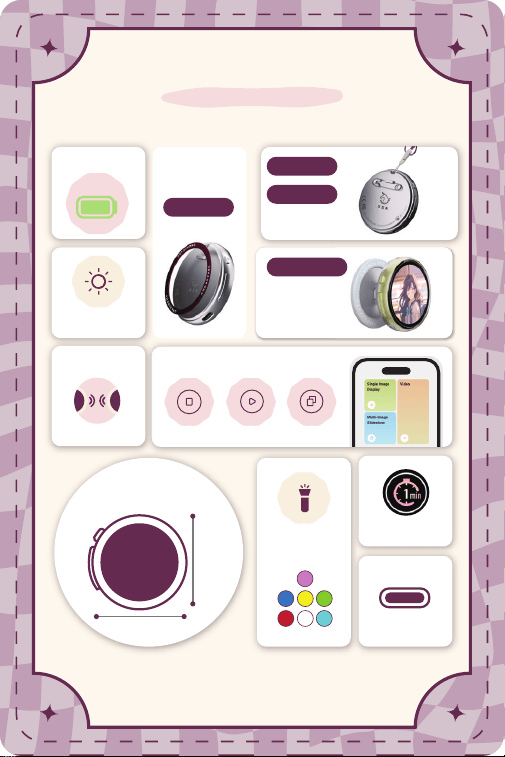
Product Introduction
Multiple
Styles
Magnetic
Battery Life
Long
18H
Single Image Video Image Carousel
4-level
brightness
TYPE-C
charging
7-color
support light
Countdown
Shutdown
Size · Weight
37g
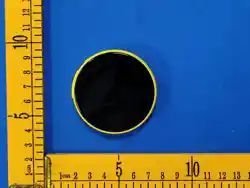
57mm
57mm
Image Sharing
One-click
sharing
Phone Stand
Pin
Lanyard
APP application /
Easily handle file transfer
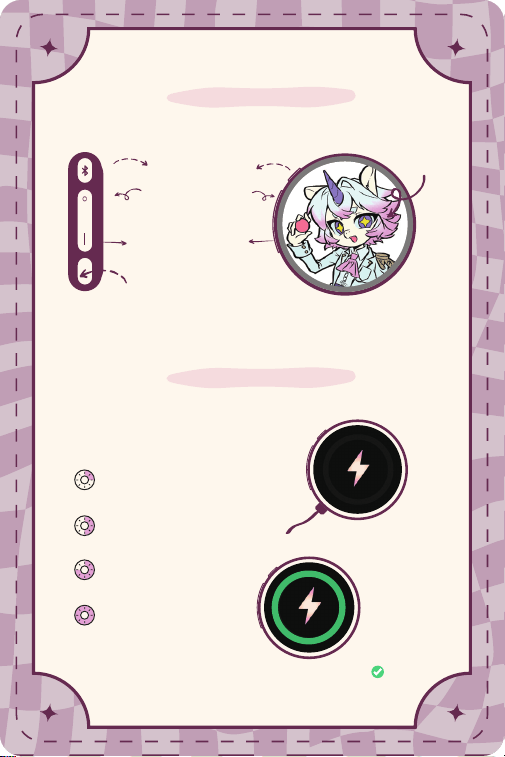
Operating Instructions
Usage Time
It can last up to 18 hours on a full charge!
TYPE-C charging
TYPE-C
Charging Port
Charging......
First Gear Brightness
Up to 18 hours of battery life
Second Gear Brightness
Up to 12 hours of battery life
Third gear brightness
Up to 7 hours of battery life
Fourth gear brightness
Up to about 4 hours of battery life
Screen Area
Lock screen button
Bluetooth button
One-click upload
On/Off Button
(Short press to turn on
long press to turn off)
Charging complete
✅
OK
< >
Swipe left or right to
switch the screen content
(Press once briefly to lock or
unlock the screen)
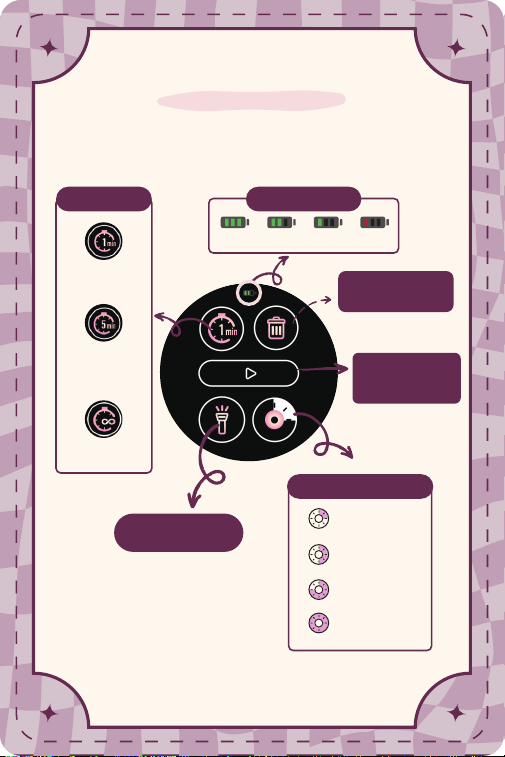
Screen Menu Function
100%
Countdown for
1 minute and
auto-shut down
60% 30% 10%
Swipe down to enter the screen menu
Continuous
Screen On
First Gear
Second gear
Third gear
Fourth gear
4-level brightness
Sleep Function
Delete current
content
Countdown for
5 minutes,
then auto-
shutdown
Scroll through
content / Pause
Battery level icon
Cheer Light Mode
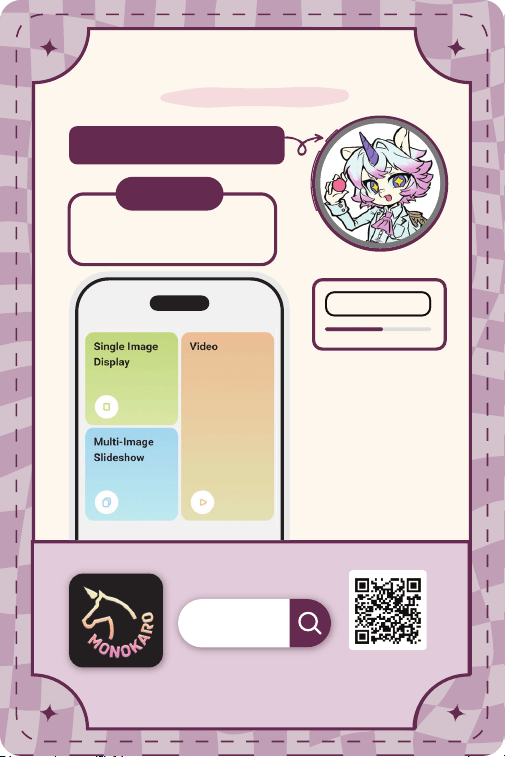
APP Image Transfer
File Format
JPEG, PNG, HEIC, MP4,
GIF and other formats
Dedicated App
Monokaro
Supports iOS/Android
Scan and download
with a browser
Step 1: Please always keep your
phone's Bluetooth turned on;
Step 2: Select the content to be
uploaded in the "Gem Corner"
app;
Step 3: Short-press the
Bluetooth button once and wait
for the transfer to complete.
Badge connected √
After selecting the content,
press the Bluetooth button once briefly
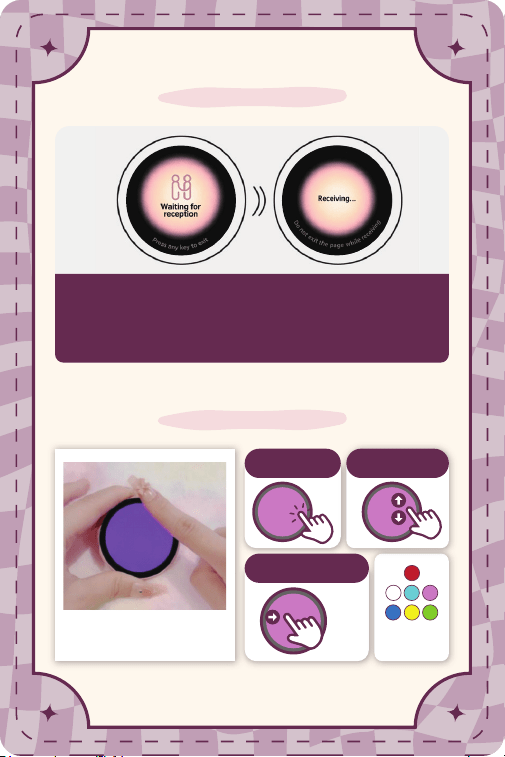
Badge Image Sharing
Support Light Mode
You can share pictures with other badge holders!
Step 1: Long-press the [BT] button on Device A for 3 seconds to
share the current picture.
Step 2: Short press the [BT] button twice on Device B to
receive the shared picture.
Tap to Flash
Swipe from
left to right to exit
Support Light Mode
7 Colors
Swipe up and
down to switch
A B

Package Contents
Product Specifications
Screen Size 1.85-inch Touch Screen
Resolution 360x360
Screen Type IPS + Touch Panel
Connection Type Bluetooth
Memory Capacity Approx. 50 Photos / 10 Animated GIFs or 3s Videos
Battery Life "Night Mode (18hrs) / Indoor Mode (12hrs) /
Standard Mode (7hrs) / Boost Mode (4hrs)"
Weight Approx. 37g
Dimensions 57x57x11(mm)
Display Single Image, Slideshow (Max 9 images), GIF Video
Power Saving Custom countdown
Support Light 7 colors (Purple, Blue, Yellow, Green, Red, White, Cyan)
sharing Independent share key, supports wireless sharing
image transfer APP
1 × Magnetic Badge
1 × Phone PopSocket Stand
1 × Magnetic Ring
1 × Data Cable
1 × Safety Pin
1 × Product Guide
This device complies with part 15 of the FCC rules.
Operation is subject to the following two conditions:
FCC Statement
(1) This device may not cause harmful interference.
(2) This device must accept any interference received, including interference
that may cause undesired operation.
Changes or modifications not expressly approved by the party responsible for
compliance could void the user's authority to operate the equipment.
NOTE This equipment has been tested and found to comply with the limits for
a Class B digital device, pursuant to part 15 of the FCC Rules.
These limits are designed to provide reasonable protection against harmful
interference in a residential installation.
This equipment generates, uses and can radiate radio frequency energy and, ifnot installed
and used in accordance with the instructions, may cause harmful
interference to radio communications.
However, there is no guarantee that interference will not occur in a particular
installation.
If this equipment does cause harmful interference to radio or television
reception (which can be determined by turning the equipment off and on), the
user is encouraged to try to correct the interference by one or more of the
following measures:
· Reorient or relocate the receiving antenna.
· Increase the separation between the equipment and receiver.
· Connect the equipment into an outlet on a circuit different from that to
which the receiver is connected. - Consult the dealer or an experienced
radio/TV technician for help.