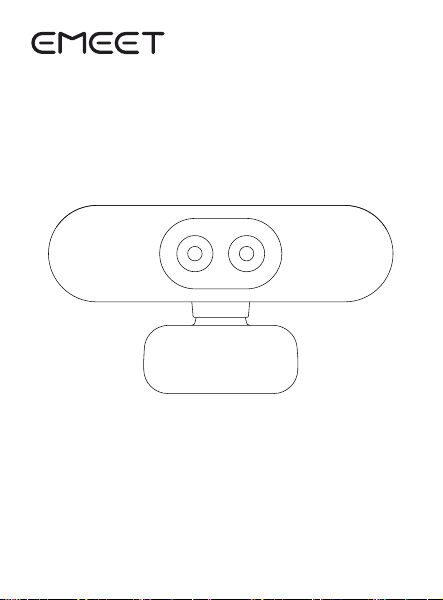
EMEET SmaCam
Quick Sta Guide
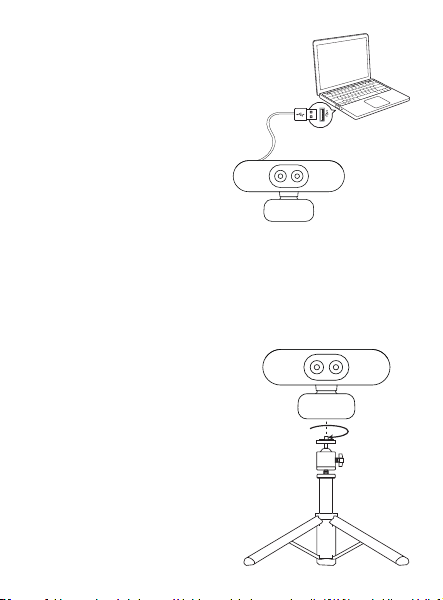
Connect to Computer
Mit dem Computer verbinden
Connecter à l'ordinateur
Conectar al ordenador
Collegare al computer
Conectar ao computador
コンピューターに接続する
連接到電腦
连接到电脑
Compatible with tripod (tripod sold separately)
Kompatibel mit Stativ
(Stativ separat erhältlich)
Compatible avec trépied
(trépied vendu séparément)
Compatible con trípode
(trípode se vende por separado)
Compatibile con treppiede
(treppiede venduto separatamente)
Compatível com tripé
(tripé vendido separadamente)
三脚架に対応
(別売りの三脚架が必要です)
可搭配三腳架使用(三腳架需另購)
可搭配三脚架使用(三脚架需另购)
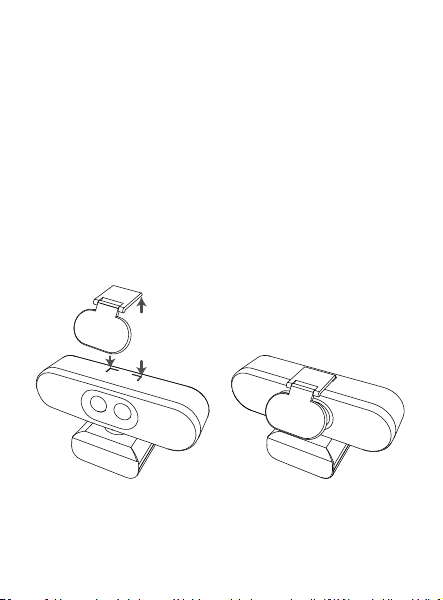
Install the privacy cover according to the silkscreen
position
Montieren Sie die Abdeckung gemäß der Siebdruck position
Installez le cache de condentialité selon la position de la sérigraphie
Instale la cubiea de privacidad según la posición de la serigrafía
Installare il coperchio della privacy secondo la posizione della
serigraa
Instale a tampa de privacidade de acordo com a posição da
serigraa
シルク印刷の位置に従ってプライバシーカバーを取り付ける
根據絲印位置安裝隱私蓋
根据丝印位置安装隐私盖
Download EMEET STUDIO for Personalization
Laden Sie EMEET STUDIO herunter, um personalisiee
Einstellungen vorzunehmen
Téléchargez EMEET STUDIO pour des réglages personnalisés
Descargue EMEET STUDIO para personalizar la conguración
Scarica EMEET STUDIO per personalizzare le impostazioni
Baixe o EMEET STUDIO para personalizar as congurações
EMEET STUDIOをダウンロードして、個別設定を行う
下載EMEET STUDIO,可進行個性化設置
下载EMEET STUDIO,可进行个性化设置
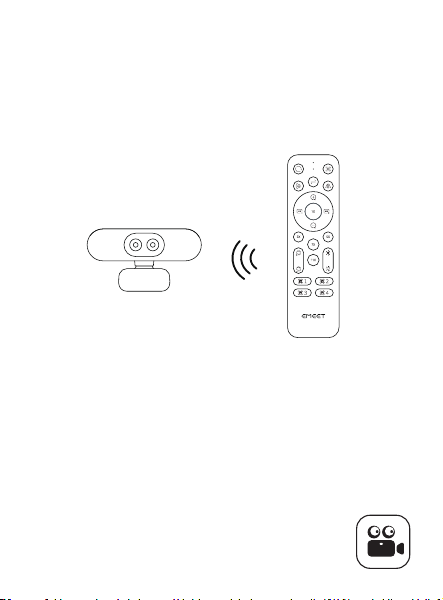
Can be remotely controlled with a remote control
Kann mit einer Fernbedienung ferngesteue werden
Peut être contrôlé à distance avec une télécommande
Se puede controlar remotamente con un control remoto
Può essere controllato a distanza con un telecomando
Pode ser controlado remotamente com um controle remoto
リモコンで遠隔操作が可能
搭配遙控器可遠程操控
搭配遥控器可远程操控
https://emeet.com/products/emeetstudio
https://emeet.com/products/webcam-c60e 4k dual
Please scan the code for more product information
Bitte scannen Sie den Code, um mehr Produktinformationen
zu erhalten
Veuillez scanner le code pour plus d'informations sur le produit
Por favor, escanee el código para obtener más información del producto
Si prega di scansionare il codice per ulteriori informazioni sul prodotto
Por favor, escaneie o código para mais informações sobre o produto
コードをスキャンして、製品の詳細情報をご覧ください
請掃碼獲取更多產品信息
请扫码获取更多产品信息
https://emeet.com/pages/c60e 4k dual-faq
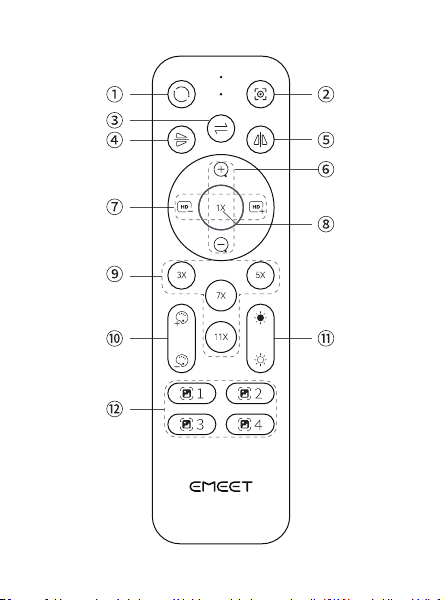

① Reset: Image restored to initial state
Zurücksetzen: Bild in den Anfangszustand zurückversetzt
Réinitialiser : Image restaurée à l'état initial
Restablecer: Imagen restaurada al estado inicial
Ripristina: Immagine ripoata allo stato iniziale
Redenir: Imagem restaurada ao estado inicial
リセット:画像が初期状態に戻ります
復位:圖像恢復為初始狀態
复位:图像恢复为初始状态
② Focus: Switch between Autofocus and Fixed Focus
Fokus: Zwischen Autofokus und Festfokus wechseln
Mise au point : Basculer entre autofocus et mise au point xe
Enfoque: Cambiar entre enfoque automático y enfoque jo
Messa a fuoco: Passa da autofocus a fuoco sso
Foco: Alternar entre foco automático e foco xo
フォーカス:オートフォーカスと固定フォーカスを切り替え
對焦:切換自動對焦和固定對焦
对焦:自动对焦和固定对焦切换
③ Switch: Switch Between Wide-Angle and Telephoto
Cameras
Umschalten: Umschalten zwischen Weitwinkel- und Teleobjek
tivkameras
Commutation : Commuter entre les caméras grand angle et
téléobjectif
Cambio: Cambiar entre cámaras gran angular y teleobjetivo
Commutazione: Passa tra fotocamere grandangolari e teleobiettivi
Alternar: Alternar entre câmeras grande angular e teleobjetiva
切り替え:広角カメラと望遠カメラの切り替え
切換:切換廣角攝像頭和遠焦攝像頭
切换:切换广角摄像头和远焦摄像头

④ Flip: Rotate Image 180° Veically
Drehen: Bild um 180° veikal drehen
Retourner : Retourner l'image de 180° veicalement
Voltear: Voltear imagen 180° veicalmente
Capovolgere: Ruota l'immagine di 180° veicalmente
Inveer: Girar imagem 180° veicalmente
反転:画像を上下に180°回転
翻轉:圖像上下翻轉180°
翻转:图像上下翻转180°
⑤ Mirror: Flip Image 180° Horizontally
Spiegeln: Bild um 180° horizontal spiegeln
Miroir : Retourner l'image de 180° horizontalement
Espejo: Voltear imagen 180° horizontalmente
Specchio: Capovolgi l'immagine di 180° orizzontalmente
Espelho: Inveer imagem 180° horizontalmente
ミラー:画像を左右に180°反転
鏡像:圖像左右翻轉180°
镜像:图像左右翻转180°
⑥ Zoom In/Out: Enlarge/Reduce Image Display
Vergrößern/Verkleinern: Bildanzeige vergrößern/verkleinern
Zoom avant/arrière : Agrandir/réduire l'achage de l'image
Acercar/Alejar: Ampliar/Reducir la pantalla de imagen
Zoom In/Out: Ingrandire/Ridurre la visualizzazione dell'immagine
Aproximar/Afastar: Ampliar/Reduzir a exibição da imagem
ズームイン/アウト:画像表示を拡大/縮小
放大/縮小:圖像畫面變大/縮小
放大/缩小:图像画面变大/缩小

⑦ Sharpness +/-: Increase/Decrease Sharpness
Schäe +/-: Schäe erhöhen/verringern
Netteté +/- : Augmenter/Réduire la netteté
Nitidez +/-: Aumentar/Disminuir la nitidez
Nitidezza +/-: Aumenta/Diminuisci la nitidezza
Nitidez +/-: Aumentar/Reduzir a nitidez
シャープネス+/-:シャープネスを増減
清晰度+/-:清晰度增加/減少
清晰度+/-:清晰度增加/减少
⑧ 1X: Restore Image to Original Size
1X: Bild auf Originalgröße zurücksetzen
1X : Restaurer l'image à sa taille d'origine
1X: Restaurar imagen al tamaño original
1X: Ripristina l'immagine alla dimensione originale
1X: Restaurar imagem ao tamanho original
1X:画像を元のサイズに戻す
1X:圖像恢復初始大小
1X:图像恢复初始大小
⑨ 3X/5X/7X/11X: Image Magnied 3/5/7/11 Times
3X/5X/7X/11X: Bild um das 3/5/7/11-fache vergröße
3X/5X/7X/11X : Image agrandie 3/5/7/11 fois
3X/5X/7X/11X: Imagen ampliada 3/5/7/11 veces
3X/5X/7X/11X: Immagine ingrandita di 3/5/7/11 volte
3X/5X/7X/11X: Imagem ampliada 3/5/7/11 vezes
3X/5X/7X/11X:画像を3/5/7/11倍に拡大
3X/5X/7X/11X:圖像3倍/5倍/7倍/11倍放大
3X/5X/7X/11X:图像3倍/5倍/7倍/11倍放大
⑩ Color +/-: Increase/Decrease Image Color Saturation
Farbe +/-: Bildfarbsättigung erhöhen/verringern
Couleur +/- : Augmenter/Réduire la saturation des couleurs de
l'imag
Color +/-: Aumentar/Disminuir la saturación de color de la imagen
Colore +/-: Aumentare/Ridurre la saturazione del colore
dell'immagine
Cor +/-: Aumentar/Diminuir a saturação de cor da imagem
色彩+/-:画像の色彩飽和度を増減する
色彩+/-:圖像色彩飽和度增加/減少
色彩+/-:图像色彩饱和度增加/减少
Brightness +/-: Increase/Decrease Image Brightness
Helligkeit +/-: Bildhelligkeit erhöhen/verringern
Luminosité +/- : Augmenter/Réduire la luminosité de l'image
Brillo +/-: Aumentar/Disminuir el brillo de la imagen
Luminosità +/-: Aumentare/Ridurre la luminosità dell'immagine
Brilho +/-: Aumentar/Diminuir o brilho da imagem
明るさ+/-:画像の明るさを増減する
亮度+/-:圖像亮度增加/減少
亮度+/-:图像亮度增加/减少
Image Eect 1/2/3/4: Switch Image Eects
Bildeekt 1/2/3/4: Bildeekte wechseln
Eet d'image 1/2/3/4 : Changer les eets d'image
Efecto de imagen 1/2/3/4: Cambiar efectos de imagen
Eetto immagine 1/2/3/4: Cambiare eetti immagine
Efeito de imagem 1/2/3/4: Alternar efeitos de imagem
画像効果1/2/3/4:画像効果を切り替える
圖像效果1/2/3/4:切換圖像效果
图像效果1/2/3/4:切换图像效果